Identity-Aware Proxy Misconfiguration- Google Cloud Vulnerability
Identity-Aware Proxy (IAP) reflected arbitrary origins in its CORS headers while allowing credentials, so a malicious site could read the email address of a signed-in user. For users not yet signed in, the attacker could open the Google sign-in window and poll IAP until the user logged in, then read the email.
 Published on medium.com
I found a way to disclose any user email address via CORS misconfiguration in IAP by opening a malicious domain. I implemented two different attack scenarios to read the email address of an authenticated or unauthenticated user.
The full write-up lives on its author's site
It belongs to its author, so we link to it rather than copy it. The other two tabs are our own rewrites, checked against it.
Context
Identity-Aware Proxy (IAP) is a Google Cloud Platform service that controls access to applications deployed on cloud infrastructure. It only lets requests through if they come from a user you authorise. With IAP you can enforce access control policies for applications and different resources.
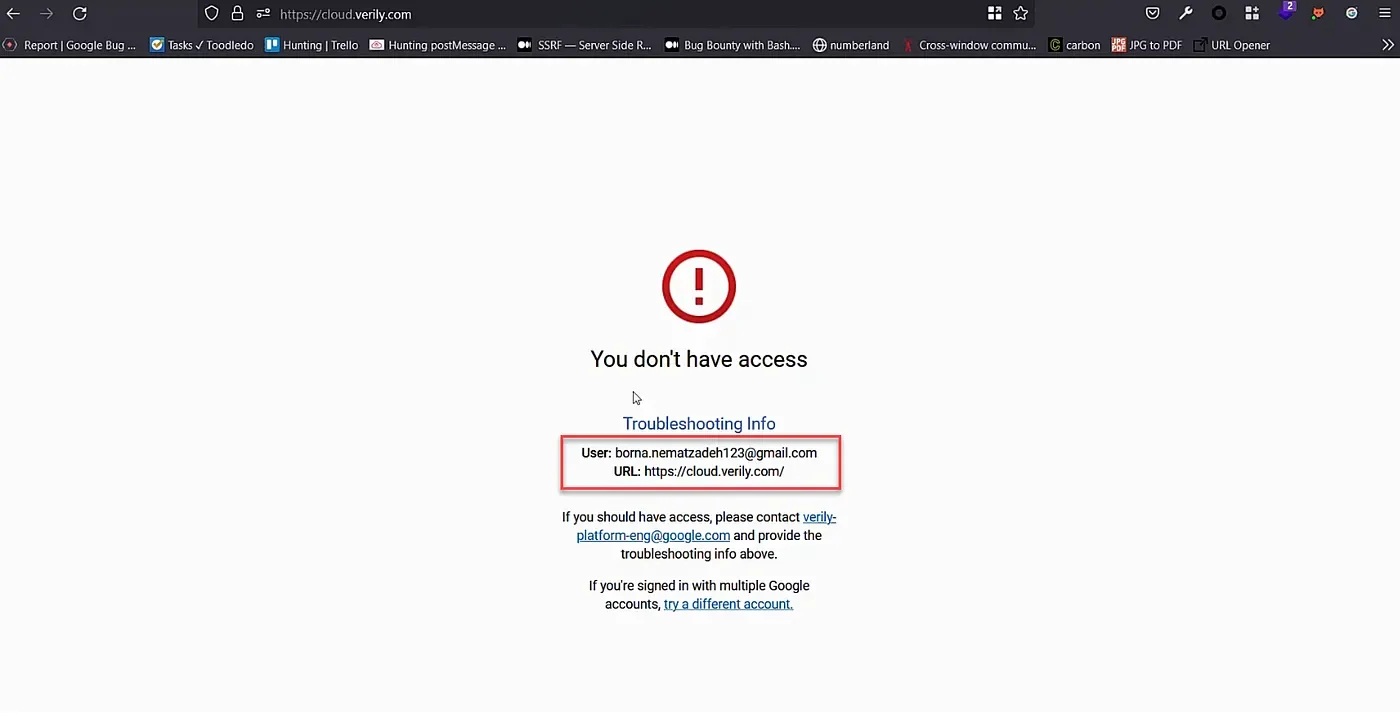
When IAP is enabled, the user is redirected to the Google Account Sign-In page. If the credentials are valid, IAP checks whether the user is authorised to access the resource. If the user has appropriate permissions, the request is forwarded to the protected resource (step 4.2 in the workflow). For an unauthorised user, the result is a "You don't have access" page sent back to the user. That error page includes both the email address of the logged-in user (which is not public) and the email address of the owner of the application (step 4.1).
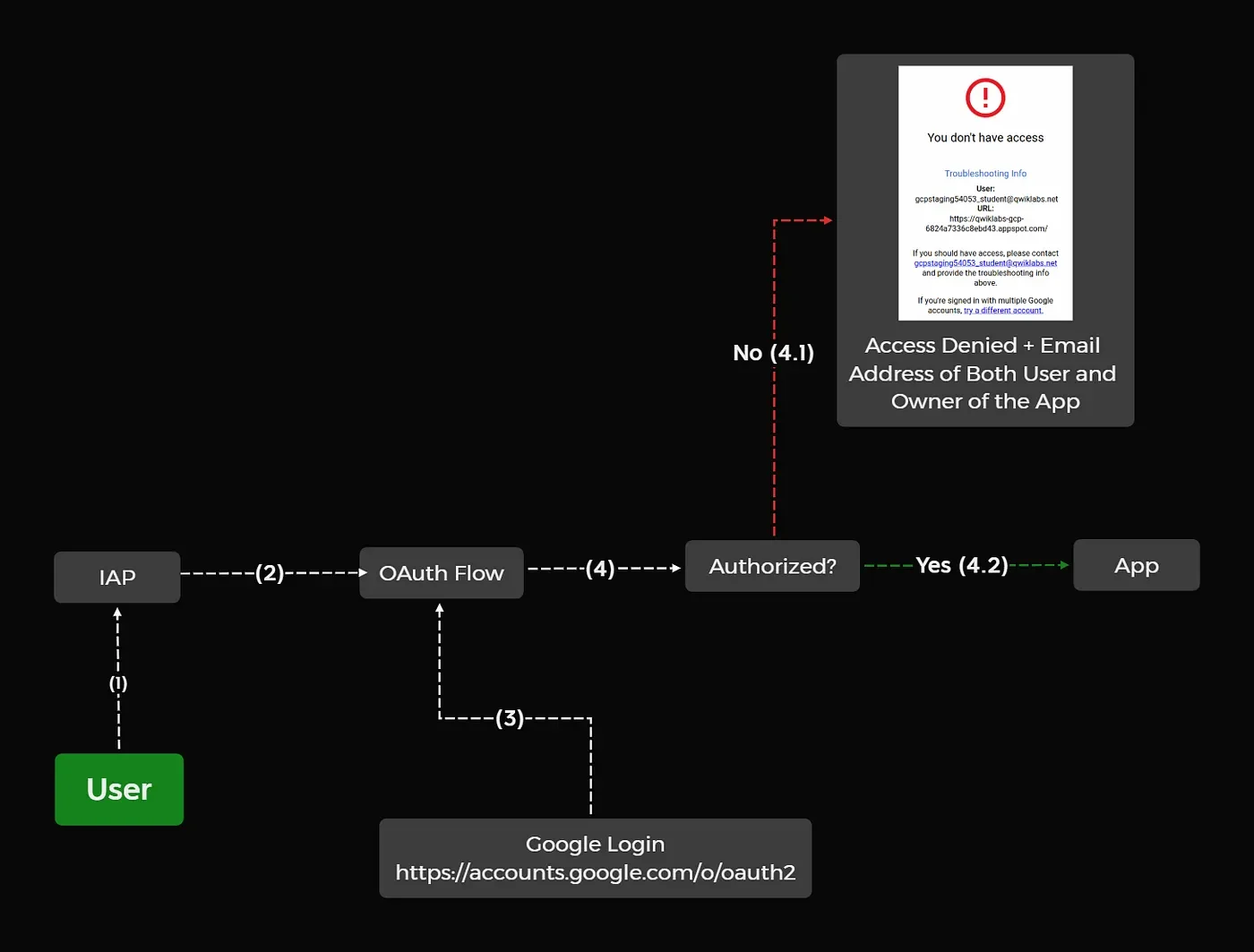
The workflow diagram comes from the Google codelab at https://codelabs.developers.google.com/codelabs/user-auth-with-iap.
The error page is the interesting part: it leaks the authenticated user's email address to that user, and the application owner's email address as well.
Setup
After some reconnaissance I found different domains which were protected by IAP. I had two attack scenarios in mind:
- Finding a CORS vulnerability in IAP to read the email address by opening a malicious domain.
- Finding an insecure postMessage channel to disclose the email address.
The second scenario did not work for me, so I tried the first one.
Finding it
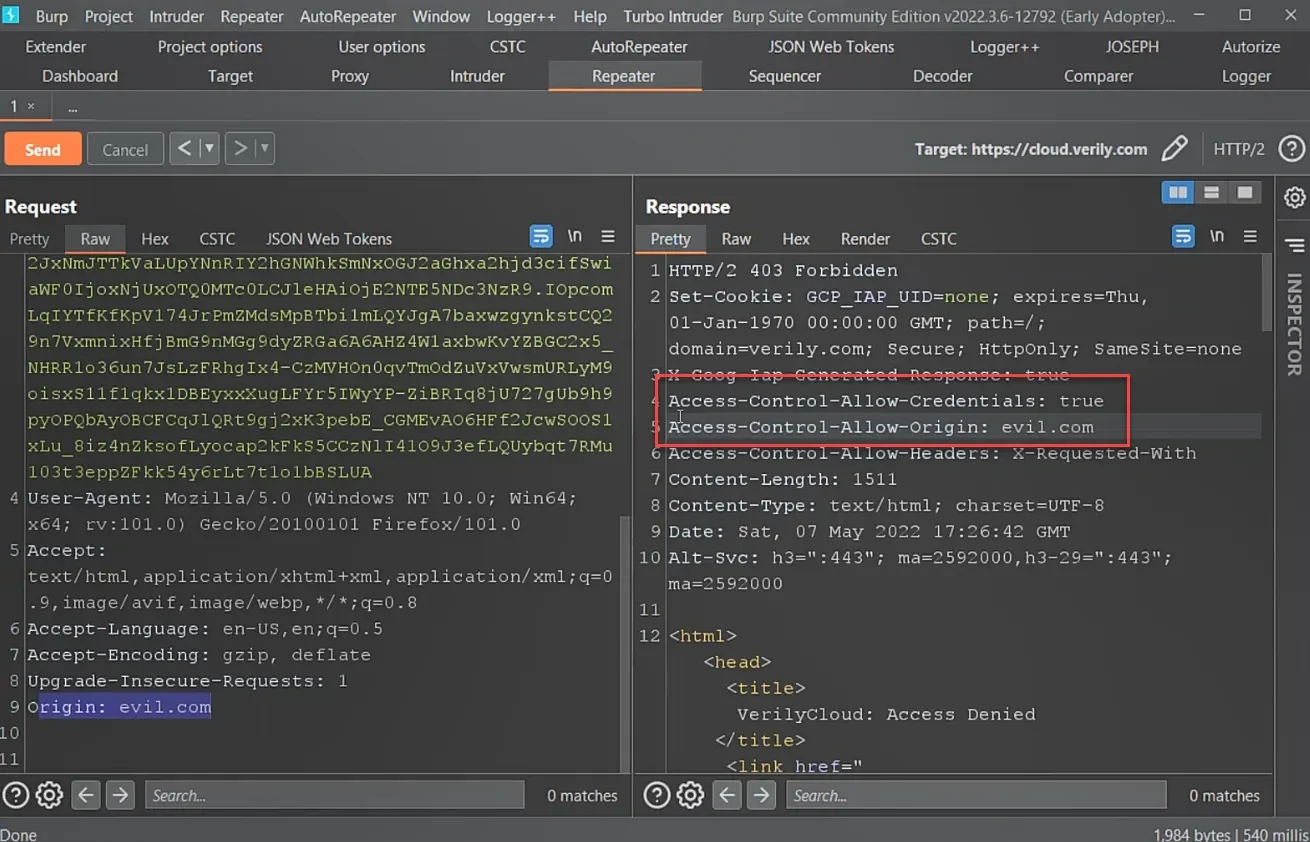
Many servers read the Origin header from the client and write it to the Access-Control-Allow-Origin header, thus giving access to all domains, including malicious ones. I sent an HTTP request with an arbitrary origin to check whether both headers, ACAC: true and ACAO, are reflected. They were: the IAP was vulnerable to CORS misconfiguration.
Allowing arbitrary origins with the ability to request credentials effectively disables the Same-Origin Policy and allows a malicious domain to issue authenticated requests to the IAP.
Exploitation
Step 1: Authenticated user
It was easy to make a proof of concept exploit to steal a user's email. We only need to send a malicious CORS request to read the email address.
Step 2: The unauthenticated user problem
For an unauthenticated user this does not work, because we need to send the request along with the user's credentials. We need another attack scenario.
Step 3: Forcing a login
The first idea which came to my mind was to force the victim to log in to the app via the Google SSO and then send XHR requests repeatedly to steal the email address. How to force the victim to log in to the app?
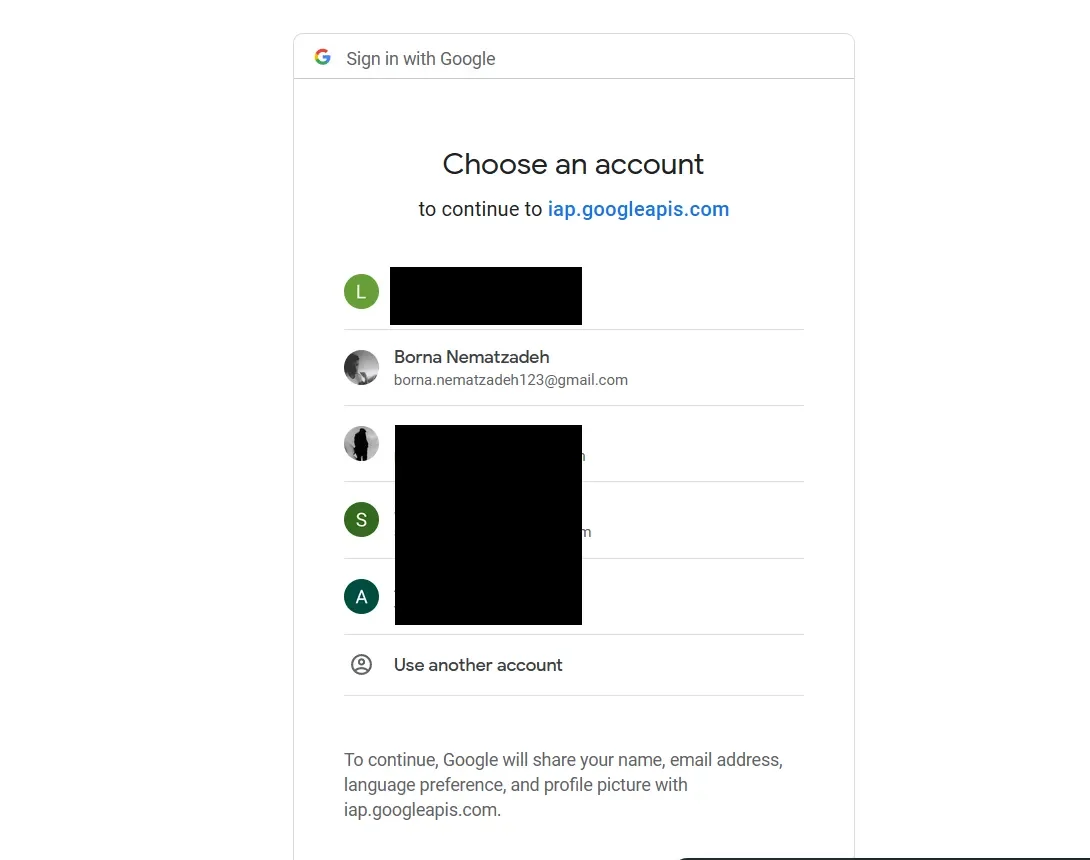
I tried to frame the Google Account Sign-In page in my domain but it did not work because of the protection. How about window.open? It worked fine. The opened window allows us to choose between different accounts.
Step 4: The proof of concept
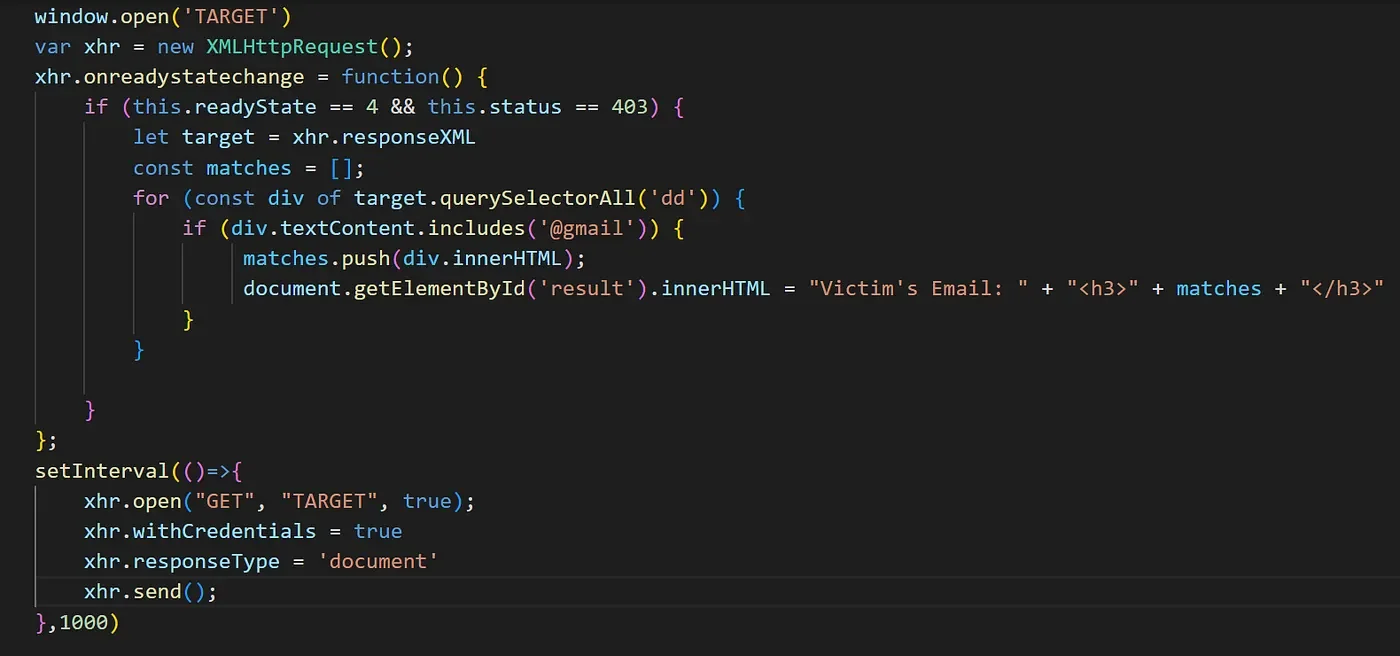
The attack scenario: an attacker could configure a malicious domain and host the above script. The exploit first redirects the user to Google Login. Then it sends XHR requests to IAP every second. After a successful login from the user, we access the email address.
Finding vulnerable domains
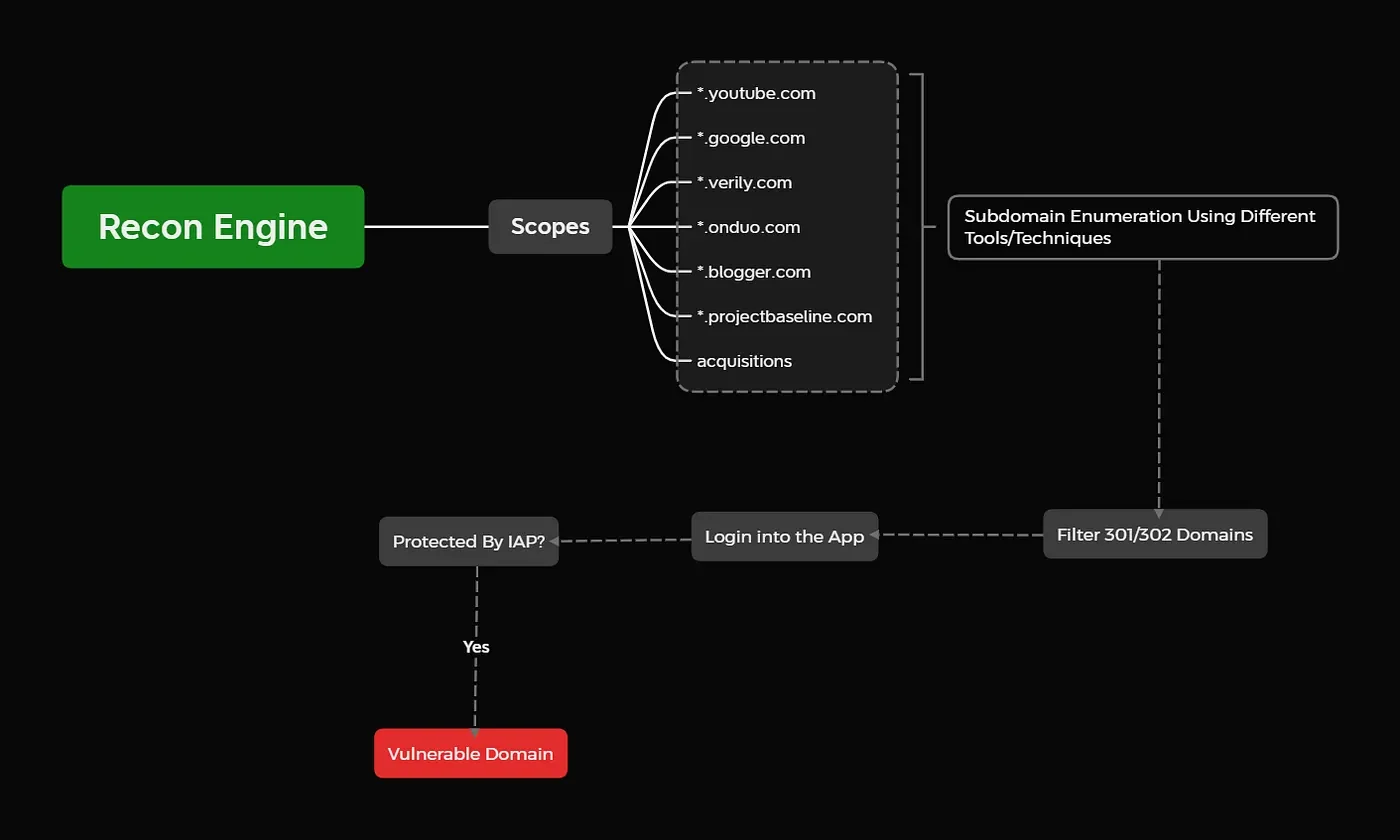
I used different approaches to find vulnerable domains which were protected by IAP. Here is a simple workflow of my recon phase:
Root cause
The IAP reflected the client-supplied Origin header into Access-Control-Allow-Origin and combined it with Access-Control-Allow-Credentials: true. That combination lets any origin read authenticated responses, which defeats the Same-Origin Policy for the IAP-protected resource. The error page shows the email address of the logged-in user and of the application owner.
Impact
An attacker who controls a malicious domain can disclose any user's email address through the CORS misconfiguration. For an authenticated user, a single malicious CORS request is enough. For an unauthenticated user, the attacker must first get the victim to log in through the Google Account Sign-In page opened with window.open, after which the script polls IAP with XHR requests every second until the login succeeds and the email address becomes readable.
Fix
Google fixed the issue in July 2022.
Timeline
- May 3, 2022: Report sent.
- May 6, 2022: Report accepted, "Nice catch!"
- May 31, 2022: The VRP panel decided to issue a reward of $1337.
- May 31, 2022: The VRP panel decided to issue a bonus of $1000: "We're issuing a $1000 bonus for highlighting the systemic pattern of this bug. Thanks!"
- July 2022: The issue was fixed by Google.
Variants to test
- Send a request with an arbitrary
Originheader to an IAP-protected endpoint and check whetherAccess-Control-Allow-Originreflects it together withAccess-Control-Allow-Credentials: true. A positive result is both headers reflected for a foreign origin. - Request the IAP error page from a cross-origin context with credentials and read the body. A positive result is the logged-in user's email address appearing in the readable response.
- Try
window.openon the Google Account Sign-In page from a malicious domain and poll the protected resource with XHR every second. A positive result is the email address becoming readable after the victim logs in.
What happened, in plain words
Google Cloud has a service called Identity-Aware Proxy, or IAP for short. Think of it as a security guard standing in front of a building: it checks who you are before it lets you through the door to the application behind it. If you are not on the guest list, the guard does not just turn you away silently. It shows you an error page, and that error page happens to print your email address, plus the email address of the person who owns the application.
A researcher found that this guard could be tricked into handing that error page to any website on the internet, not just to Google's own pages. A malicious website could therefore open a request to the IAP-protected app in the victim's browser, and read the email address that came back. For a user who was already logged in, one request was enough. For a user who was not logged in, the attacker first had to get the victim to sign in, and the researcher found a way to do that too, by opening the Google sign-in page in a new window.
The bug was reported to Google on 3 May 2022, accepted three days later, and paid a reward of $1337 plus a $1000 bonus. Google fixed it in July 2022.
The pieces you need to know first
Before the attack makes sense, a few everyday ideas need to be clear. None of them require any security background.
What an API and an HTTP request are
When you type an address into your browser, the browser sends a message to a server and the server sends a message back. That message exchange is called an HTTP request and an HTTP response. A web page is just one kind of response. An API (Application Programming Interface) is the same idea without the pretty page: one program asks another program for data, and gets data back. When a website's JavaScript asks a server for data in the background, without reloading the page, that is often called an XHR request (short for XMLHttpRequest, the old name of the browser feature that does it).
What a cookie and a session are
A website needs to remember who you are between requests, because HTTP itself has no memory. It does this with a cookie: a small piece of text the server asks the browser to store, and which the browser sends back automatically on every later request to that same site. If you have logged in, the cookie is what proves it. Security people call the proof of login a credential or a session token. The important part for this story: the browser attaches your cookies automatically, whether you meant to send a request or a random website caused it.
What the Same-Origin Policy is
Browsers have a rule called the Same-Origin Policy (SOP). An origin is the combination of scheme, host and port, roughly "https://example.com". The rule says a page from one origin cannot read the responses of requests to a different origin. Without it, any website you visited could quietly read your webmail. The SOP is the reason a random site cannot simply fetch your bank page and read it.
What CORS is, and what a CORS misconfiguration is
Sometimes a site genuinely wants to let another origin read its responses. The mechanism for that is CORS, Cross-Origin Resource Sharing. The server signals permission with response headers, two of which matter here:
Access-Control-Allow-Origin(often shortened to ACAO): which origin is allowed to read the response.Access-Control-Allow-Credentials(often shortened to ACAC): whether the request may carry the user's cookies, that is, whether it is an authenticated request.
A server that wants to allow everyone can answer with a wildcard. But a server that reflects whatever Origin the client sent, and at the same time says credentials are allowed, is effectively saying yes to every website on the internet, including malicious ones. That is a CORS misconfiguration. It switches the Same-Origin Policy off for that endpoint.
What IAP does
Identity-Aware Proxy is a Google Cloud Platform service that controls access to applications deployed on cloud infrastructure. It only lets requests through if they come from a user you authorise. With IAP you can enforce access control policies for applications and different resources.
When IAP is enabled, the user is redirected to the Google Account Sign-In page. If the credentials are valid, IAP checks whether the user is authorised to access the resource. If the user has appropriate permissions, the request is forwarded to the protected resource. For an unauthorised user, the result is a "You don't have access" page sent back to the user. That error page includes both the email address of the logged-in user (which is not public) and the email address of the owner of the application.
The diagram above is the workflow from the Google codelab at https://codelabs.developers.google.com/codelabs/user-auth-with-iap. Read it as a numbered journey: the user arrives, is sent to Google to sign in, comes back, and IAP decides whether to pass the request on or show the error page. The error page is the interesting part, because it leaks the authenticated user's email address to that user, and the application owner's email address as well.
The screenshot shows that error page. Two email addresses appear on it: the one belonging to the person who is logged in, which is not public, and the one belonging to the application's owner. If an attacker can read this page from their own website, they learn both.
Setting up the attack
After some reconnaissance (the phase where you look around, collect domain names and see what is exposed) the researcher found different domains which were protected by IAP. Two attack scenarios were in mind:
- Finding a CORS vulnerability in IAP to read the email address by opening a malicious domain.
- Finding an insecure postMessage channel to disclose the email address.
A postMessage channel is a way for two browser windows to talk to each other. If a site listens for messages and does not check who sent them, a malicious page can send instructions. The second scenario did not work, so the researcher tried the first one.
Finding the bug
Many servers read the Origin header from the client and write it to the Access-Control-Allow-Origin header, thus giving access to all domains, including malicious ones. The Origin header is simply the browser telling the server where the request came from. If the server copies that value straight back into its permission header, it is granting permission to whoever asked.
To test this, the researcher sent an HTTP request with an arbitrary origin and checked whether both headers, ACAC: true and ACAO, are reflected. They were: the IAP was vulnerable to CORS misconfiguration.
Allowing arbitrary origins with the ability to request credentials effectively disables the Same-Origin Policy and allows a malicious domain to issue authenticated requests to the IAP.
The screenshot shows the request with an arbitrary origin and the reflected Access-Control-Allow-Origin together with the credentials flag. In plain terms: the server said "yes, that stranger's website may read my answer, and yes, it may carry the user's cookies while doing so".
Exploitation
Step 1: Authenticated user
It was easy to make a proof of concept exploit to steal a user's email. We only need to send a malicious CORS request to read the email address.
Why this works: the victim is already logged in, so their browser already holds the cookie. The malicious page makes the browser send a request to the IAP-protected app, the cookie goes along automatically, IAP shows the error page with the email address, and because of the misconfiguration the malicious page is allowed to read that response. No password, no trick, just a request the browser was willing to make.
Step 2: The unauthenticated user problem
For an unauthenticated user this does not work, because we need to send the request along with the user's credentials. We need another attack scenario.
In other words: if the victim has never logged in, there is no cookie, so the request carries no proof of identity, and there is no email address to leak. The attacker has to make the victim log in first.
Step 3: Forcing a login
The first idea which came to my mind was to force the victim to log in to the app via the Google SSO and then send XHR requests repeatedly to steal the email address. How to force the victim to log in to the app?
SSO means single sign-on: one Google login that many applications trust. The plan was to get the victim through that login, then keep asking the protected app for the error page until the login had happened and the email address became readable.
I tried to frame the Google Account Sign-In page in my domain but it did not work because of the protection. How about window.open? It worked fine. The opened window allows us to choose between different accounts.
An iframe is a page embedded inside another page. Google protects its sign-in page from being embedded, which stops the iframe trick. window.open is the browser function that opens a new tab or window. That worked, and the new window shows the normal Google account chooser.
The screenshot shows the opened window, which allows the user to choose between different accounts.
Step 4: The proof of concept
The proof of concept is the small script the attacker hosts on the malicious domain. The attack scenario: an attacker could configure a malicious domain and host the above script. The exploit first redirects the user to Google Login. Then it sends XHR requests to IAP every second. After a successful login from the user, we access the email address.
Read it as a loop. First, send the victim to the Google login. Then, once per second, ask the protected app for the error page. Each answer is checked; while the victim has not logged in, the answer contains nothing useful. The moment the login completes, the cookie exists, the error page contains the email address, and the script reads it.
Finding vulnerable domains
I used different approaches to find vulnerable domains which were protected by IAP. Here is a simple workflow of my recon phase:
The diagram shows a simple workflow of the recon phase.
Why it happened
The IAP reflected the client-supplied Origin header into Access-Control-Allow-Origin and combined it with Access-Control-Allow-Credentials: true. That combination lets any origin read authenticated responses, which defeats the Same-Origin Policy for the IAP-protected resource. The leaked data is the email address shown on the IAP error page, both the logged-in user's and the application owner's.
What it meant in practice
An attacker who controls a malicious domain can disclose any user's email address through the CORS misconfiguration. For an authenticated user, a single malicious CORS request is enough. For an unauthenticated user, the attacker must first get the victim to log in through the Google Account Sign-In page opened with window.open, after which the script polls IAP with XHR requests every second until the login succeeds and the email address becomes readable.
The fix
Google fixed the issue in July 2022.
Timeline
- May 3, 2022: Report sent.
- May 6, 2022: Report accepted, "Nice catch!"
- May 31, 2022: The VRP panel decided to issue a reward of $1337.
- May 31, 2022: The VRP panel decided to issue a bonus of $1000: "We're issuing a $1000 bonus for highlighting the systemic pattern of this bug. Thanks!"
- July 2022: The issue was fixed by Google.
VRP stands for Vulnerability Reward Program: the scheme through which companies pay researchers for reporting security bugs responsibly.
How you could look for the same pattern
These are the checks the researcher describes, written so that someone new can follow the reasoning. Only test systems you are allowed to test.
- Send a request with an arbitrary
Originheader to an IAP-protected endpoint and check whetherAccess-Control-Allow-Originreflects it together withAccess-Control-Allow-Credentials: true. A positive result is both headers reflected for a foreign origin. Why: reflection plus credentials is the whole bug. - Request the IAP error page from a cross-origin context with credentials and read the body. A positive result is the logged-in user's email address appearing in the readable response. Why: this proves the leak is real data, not just headers.
- Try
window.openon the Google Account Sign-In page from a malicious domain and poll the protected resource with XHR every second. A positive result is the email address becoming readable after the victim logs in. Why: this covers victims who were not logged in yet.
Glossary
- API: a way for one program to ask another program for data or actions, without a human clicking through pages.
- HTTP request / response: the message a browser sends to a server and the message the server sends back.
- XHR: a browser feature that lets a page fetch data in the background; the request is made by JavaScript, not by you clicking a link.
- Cookie: a small piece of text a site stores in your browser and gets back on later requests, used to remember that you are logged in.
- Credential / session token: the proof of login, usually carried in a cookie.
- Origin: the scheme, host and port of a page, for example
https://example.com; the unit the browser uses to decide what may read what. - Same-Origin Policy (SOP): the browser rule that a page from one origin cannot read responses from another origin.
- CORS: Cross-Origin Resource Sharing, the set of response headers through which a server deliberately grants another origin permission to read its responses.
- ACAO (
Access-Control-Allow-Origin): the header naming which origin may read the response. - ACAC (
Access-Control-Allow-Credentials): the header saying whether the request may carry the user's cookies. - CORS misconfiguration: a server that grants permission too broadly, for example by reflecting any origin while also allowing credentials.
Originheader: the header in which the browser states which site the request comes from.- Identity-Aware Proxy (IAP): a Google Cloud Platform service that checks who a user is and whether they are authorised before letting a request reach an application.
- Google Cloud Platform: Google's collection of cloud computing services.
- Reconnaissance (recon): the information-gathering phase of a security test, finding domains, services and versions before trying anything.
- postMessage: a browser mechanism that lets two windows or frames send messages to each other; it is unsafe if the receiver does not check the sender.
- iframe: a page embedded inside another page.
window.open: the browser function that opens a new tab or window from a page.- SSO (single sign-on): one login that many separate applications trust.
- Proof of concept (POC): a small, working demonstration that a vulnerability is real.
- VRP (Vulnerability Reward Program): a scheme in which a company pays researchers for responsibly reported security bugs.
- Wildcard: a value such as
*that matches everything, used in CORS to mean "any origin".



