Into the borg of SSRF inside google production network
The Google Caja server-side fetcher on Google Sites would fetch only Google-owned resources, revealing it ran on the internal network. By pointing it at internal IP addresses, the researcher reached unauthenticated Borglet status pages that leaked infrastructure details.
 Published on opnsec.com
In March 2018, I reported an XSS in Google Caja, a tool to securely embed arbitrary html/javascript in a webpage. In May 2018, after the XSS was fixed, I realised that Google Sites was using an unpatched version of Google Caja, so I looked if it was vulnerable to the XSS.
The full write-up lives on its author's site
It belongs to its author, so we link to it rather than copy it. The other two tabs are our own rewrites, checked against it.
Context
Google Sites embedded user-supplied HTML and JavaScript through Google Caja, a tool designed to securely embed arbitrary HTML and JavaScript in a webpage. Caja parses HTML and JavaScript and rewrites it to strip sensitive content: iframe and object tags, and sensitive properties such as document.cookie. Most of that parsing and sanitising happens on the client side.
The exception is a remote script tag such as <script src="xxx">. For those, the remote resource was fetched, parsed and sanitised on the server side. That server-side fetch is the feature at the centre of this story: it is meant to retrieve external resources, so it should be able to reach any URL on the internet.
Setup
No special account or role was needed beyond the ability to create a Google Sites page and to run code on Google infrastructure. In May 2018, after that XSS was fixed, he noticed that Google Sites was using an unpatched version of Caja and checked whether the XSS was exploitable there. It was not.
To host a resource that the server-side fetcher could reach, he created a Google App Engine instance and put a JavaScript file on it. The App Engine logs were then used to observe where the fetch came from.
Finding it
The first attempt was to host a JavaScript file on his own server at https://[attacker].com/script.js and reference it from Google Sites, to see whether the server-side parse would fall for the XSS. The server replied that https://[attacker].com/script.js was not accessible.
After a few tests, a pattern emerged: the Google Sites Caja server would only fetch Google-owned resources such as https://www.google.com or https://www.gstatic.com, and refused external resources such as https://www.facebook.com. That is odd for a feature whose whole purpose is to fetch external resources, so it looked like a broken feature. More interestingly, deciding whether an arbitrary URL belongs to Google is hard given the breadth of Google services. Unless the fetch was not making an outbound internet request at all.
The reasoning was that the only explanation for the behaviour was that the fetching happened on the internal Google network, which is why only Google-owned resources were reachable. That made it a bug; the open question was whether it was a security bug.
Exploitation
Step 1: confirm the fetch comes from inside
Hosting arbitrary code on Google servers is easy: use Google Cloud services. The researcher created a Google App Engine instance, hosted a JavaScript file there, used that file's URL on Google Sites as an external script resource, and updated the page. The JavaScript was successfully fetched and parsed by the Google Caja server.
The App Engine instance logs showed where the resource had been fetched from: 10.x.x.201, a private network IP address. That was the confirmation that the server-side fetcher was operating inside Google's internal network.
Step 2: point the fetcher at the private address
The private IP was then used as the URL for the Google Sites JavaScript external resource. The request took more than 30 seconds to complete, long enough that the researcher assumed it had been blocked and almost closed the page. When Caja replied, the reply size was not around 1 KB like a typical error message but 1 MB. One million bytes of information came back from a 10.x.x.x address on Google's internal network. The file was full of private information from Google.
Step 3: the three internal requests
The researcher states explicitly that he did not scan Google's internal network. He made three requests to confirm the vulnerability and immediately sent a report to Google VRP.
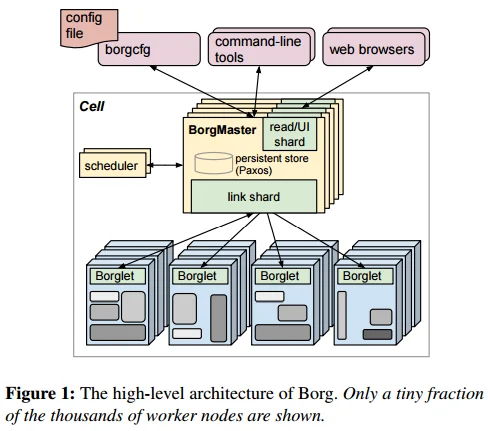
The first request was to http://10.x.x.201/. It returned a server status monitoring page of a "Borglet". A web search confirmed that this was inside Borg, Google's internal large-scale cluster management system. Google open-sourced Borg's successor, Kubernetes, in 2014; the researcher notes that Google still relies on Borg for its internal production infrastructure, and jokes that this is not thanks to the design of the Borg interfaces.
The second request was to http://10.x.x.1/, which was also a monitoring page for another Borglet. The third was to http://10.x.x.1/getstatus, a different status monitoring page of a Borglet with more detail on the jobs, such as permissions and arguments.
Each Borglet represents a machine, a server.
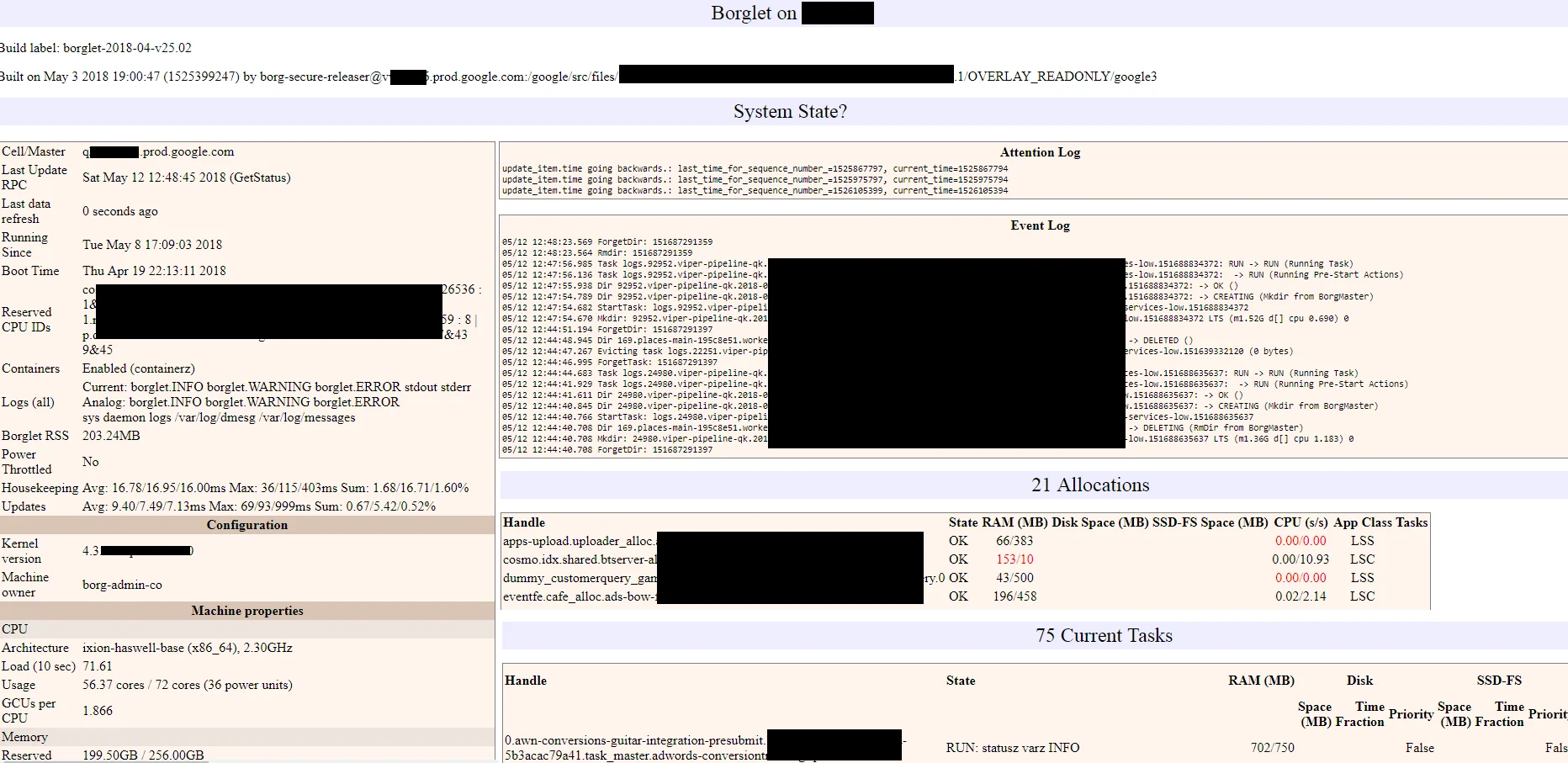
What the pages disclosed
On the hardware side, both servers used Haswell CPUs at 2.30 GHz with 72 cores, corresponding to a set of two or three Xeon E5 v3. Both were using their CPUs at 77%. They had 250 GB of RAM, used at 70%. Each had one 2 TB HDD and no SSD. The HDDs were almost empty, with only 15 GB used, so the data is stored elsewhere.
The processing jobs (alloc and tasks) were very diverse, which the researcher believes optimises resource usage: some jobs use memory, others CPU or network, some have high priority. Some services seemed very active: video encoding, Gmail and Ads. That is not surprising, since video processing is very heavy, Gmail is one of Google's main services and Ads is Google's core business.
Google Sites and Caja did not appear in the jobs list, so either the SSRF went through a proxy, or the Borglet on 10.x.x.201 was on a different network from the 10.x.x.201 address seen in the App Engine logs.
On the architecture side, jobs related to almost all components of the Google Stack were visible, in particular MapReduce, BitTable, Flume and GFS. Java seemed heavily used; no mention of Python, C++, NodeJS or Go was seen, but the researcher cautions against drawing conclusions from that. Borg, like Kubernetes, relies on containers such as Docker and on VMs. For video processing, Gvisor, Google's open-source tool that trades some container performance for VM-like security, appeared to be in use.
Parameters gave information on how to reach applications through network ports. On Borg, all applications on a server appear to share the same IP address, and each has dedicated ports.
Application arguments were the most interesting part, because they are almost code. No Google Search secret algorithm was found, but there were queries such as:
MSCR(M(Customer.AdGroupCriterion+Customer.AdGroupCriterion-marshal+FilterDurianAdGroupCriterion+FilterNeedReviewAdGroupCriterion+GroupAdGroupCriterionByAdGroupKey+JoinAdGroupData/MakeUnionTable:3)+M(JoinAdGroupData/MakeUnionTable:2)+M(Customer.AdGroup+Customer.AdGroup-marshal+FilterDurianAdGroup+ParDo(AdGroupDataStripFieldsFn)+JoinAdGroupData/MakeUnionTable)+R(JoinAdGroupData/GroupUnionTables+JoinAdGroupData/ConstructJoinResults+JoinAdGroupData/ExtractTuples+ExtractCreativeAndKeywordReviewables))
The Gmail system user was:
[redacted]
There was also a user [redacted] with permission auth.impersonation.impersonateNormalUser on mdb:all-person-users. The researcher later clarified that he simply saw these strings close to each other in a big array and assumed that is what it meant.
A little history showed that most jobs were aborted before finishing. Finally, there were many URLs to other servers or application endpoints. A promising-looking http://wiki/ URL did not work. A request to:
/getFile?FileName=/sys/borglet/borglet.INFO
returned an unauthorized response. Changing the FileName parameter produced error messages.
Root cause
The server-side component of Caja that fetches remote script resources was making its requests from inside Google's production network, so the set of reachable hosts was Google's internal estate rather than the public internet. That is why only Google-owned resources could be fetched and external sites could not: the fetcher was not restricted to Google URLs by a check, it simply could not reach anything outside. The internal Borglet status monitoring pages it reached were not authenticated, so the fetcher's position inside the network turned an information-fetching feature into an SSRF with real data behind it. The researcher's understanding is that in Kubernetes this page is authenticated.
Impact
SSRF impact depends entirely on what sits in the internal network. Google tends to keep most of its infrastructure available internally and uses many web endpoints, so an SSRF there could potentially reach hundreds if not thousands of internal web applications. On the other hand, Google relies heavily on authentication to access resources, which limits the impact. In this case the Borglet status monitoring page was unauthenticated and leaked a lot of information about the infrastructure: hardware, utilisation, job names, arguments, users, permissions and internal URLs. The researcher's attempts to turn the SSRF into unrestricted file access or RCE were unsuccessful.
Fix
Google VRP rewarded $13,337, which the researcher notes corresponds to something like unrestricted file access. Google explained that while most internal resources require authentication, they have seen dev or debug handlers in the past that give access to more than just information leaks, so they rewarded for the maximum potential impact.
Variants to test
- Server-side fetchers that only accept the vendor's own domains. If a feature that should fetch arbitrary URLs refuses external sites but accepts the vendor's, suspect that the fetch runs inside the vendor's network. Host a file on the vendor's own cloud (for example an app engine or object storage bucket you control) and check the access logs for a private source address.
- Private address as the resource URL. Point the fetcher at an RFC 1918 address and compare the response size and timing with a normal error. A large body or a long delay followed by real content is a positive result.
- Unauthenticated monitoring and status pages. Request the root and common status paths on internal hosts and look for hardware, job, argument or permission data. A page that returns cluster or job detail without credentials is a positive result.
- File-reading handlers. Where the leaked pages expose URLs with file parameters, try the same parameter with different paths and watch for unauthorised versus error responses, which indicate the handler exists and is checking access.
- Pivoting beyond information disclosure. Use the leaked internal URLs and port information to look for dev or debug handlers, which is where Google said the maximum impact could come from.
What happened, in plain words
A security researcher found a way to make one of Google's own servers fetch web pages from inside Google's private network, and then read those pages. The pages he reached were status screens for machines in Google's internal cluster system, called Borg. They were not protected by a login, and they showed a lot of detail about Google's infrastructure: hardware, running jobs, command-line arguments, user names and internal web addresses.
The interesting part is how he got there. He was not scanning Google's network. He was using a normal feature of Google Sites, a product for building simple websites, which lets you include a script from another address. That feature was supposed to download scripts from anywhere on the internet. Instead, it downloaded them from inside Google. Once he noticed that, he pointed the feature at a private address and got a page back.
To follow the story you only need a browser and some patience. Along the way I will explain each idea as it comes up.
Background: what Google Sites and Google Caja do
Google Sites lets a person build a web page without writing much code. One thing you can put on such a page is a script: a small program written in JavaScript, the language that browsers run. A script is included with a tag that looks like <script src="xxx">, where xxx is the address of the file. The browser then downloads that file and runs it.
Running someone else's script is risky. A script runs with the same powers as the page it sits on: it can read what the user types, look at stored data and send it elsewhere. So Google Sites did not let scripts run as they were. It passed the page through a tool called Google Caja.
Caja is a sanitiser. Think of it as a strict editor that reads a page and rewrites it, removing anything dangerous before the browser ever sees it. It removes tags such as iframe (which embeds another page inside yours) and object, and it removes sensitive properties such as document.cookie.
A cookie is a small piece of data a website asks your browser to store and send back on every visit. It is how a site remembers that you are logged in. If a script can read your cookies, it can often take over your session, which is why Caja strips that ability out.
Most of Caja's work happened in the browser, on the visitor's own computer. But there was one exception: a remote script tag, the <script src="xxx"> kind. For those, the file at xxx was downloaded, read and cleaned on Google's server instead, before being handed to the browser.
A server is a computer in a data centre that answers requests from browsers. When you type an address, your browser sends a request to a server, and the server sends back a page. Here, the server was doing the downloading, not your browser.
That server-side download is the feature at the centre of this story. Its whole purpose is to fetch external resources, so in principle it should be able to reach any address on the internet.
Setting up
The researcher needed no special account or role. He only needed to be able to create a Google Sites page and to run code on Google's infrastructure.
Some history matters here. In March 2018 he had reported an XSS in Google Caja. XSS stands for cross-site scripting: a bug where an attacker manages to get their own JavaScript to run inside someone else's page, and therefore with that page's powers. In May 2018, after that XSS was fixed, he noticed that Google Sites was using an older, unpatched copy of Caja, and he checked whether the XSS could be used there. It could not.
To have a file that the server-side fetcher could reach, he created a Google App Engine instance and put a JavaScript file on it. App Engine is a Google service that runs your code on Google's computers; you upload a small program and Google hosts it. The instance also kept logs: a record of every request it received, including the address the request came from. Those logs were how he planned to see where the fetch originated.
Finding it
The first attempt was simple. He hosted a JavaScript file on his own server at https://[attacker].com/script.js and referenced it from a Google Sites page, to see whether the server-side cleaning would fall for the XSS. The server replied that https://[attacker].com/script.js was not accessible.
After a few tests a pattern appeared. The Google Sites Caja server would only fetch resources owned by Google, such as https://www.google.com or https://www.gstatic.com. It refused external resources such as https://www.facebook.com.
That is strange. A feature whose entire job is to fetch external resources was refusing external resources. It looked like a broken feature rather than a security measure. And deciding whether any given address belongs to Google is hard, because Google runs so many services under so many names. Unless the fetch was not going out to the internet at all.
The reasoning was this: the only explanation for the behaviour is that the download happened on Google's internal network, the private network that connects Google's own machines. That is why only Google-owned resources were reachable. So it was a bug. The open question was whether it was a security bug.
A quick word on what an internal network is. Most companies put their servers on addresses that are not reachable from the internet. These are called private addresses, and the common ranges start with 10., 172.16. to 172.31., and 192.168.. Your home router probably uses one, such as [redacted]. From the outside internet you cannot connect to them directly. If a public-facing server can be tricked into making a request to a private address on your behalf, that is a class of bug called SSRF, server-side request forgery: you forge a request that the server makes for you, from a position you could not reach yourself.
Exploitation
Step 1: confirm the fetch comes from inside
Hosting code on Google's computers is easy: use Google Cloud services. The researcher created a Google App Engine instance, hosted a JavaScript file there, used that file's address on a Google Sites page as an external script resource, and saved the page. The JavaScript was successfully fetched and cleaned by the Google Caja server.
Then he looked at the App Engine logs to see where the request had come from. The source was 10.x.x.201, a private address. That confirmed it: the server-side fetcher was making its requests from inside Google's internal network.
Step 2: point the fetcher at the private address
Next he used that private address as the address of the script on the Google Sites page. The request took more than 30 seconds, long enough that he assumed it had been blocked and almost closed the page. When Caja finally replied, the reply was not around 1 KB like a typical error message. It was 1 MB.
A kilobyte (KB) is about a thousand bytes, and a megabyte (MB) is about a million. A short error message is a few hundred bytes. A megabyte is a whole document. One million bytes of information had come back from a 10.x.x.x address inside Google's network. He opened the file and it was full of private information from Google.
Step 3: the three internal requests
The researcher states explicitly that he did not scan Google's internal network. He made three requests to confirm the vulnerability and immediately sent a report to Google's VRP. VRP stands for Vulnerability Reward Program: a scheme where a company pays people who report security bugs to it, instead of suing them or ignoring them. The issue was fixed within 48 hours, and since it was reported on a Saturday, that was quick. In the meantime he tried two or three more requests to turn the SSRF into something bigger, such as reading arbitrary files or running his own code on the server (RCE, remote code execution), without luck.
The first request was to http://10.x.x.201/. It returned a server status monitoring page for a "Borglet". A web search confirmed that this was inside Borg, Google's internal large-scale cluster management system. Google released the successor to Borg, called Kubernetes, as open source in 2014. The researcher notes that Google still relies on Borg for its internal production infrastructure, and jokes that this is not thanks to the design of the Borg interfaces.
The second request was to http://10.x.x.1/, which was also a monitoring page for another Borglet. The third was to http://10.x.x.1/getstatus, a different status page for a Borglet, with more detail on the jobs, such as permissions and arguments.
Each Borglet represents a machine, a server.
What the pages disclosed
On the hardware side, both servers used Haswell processors at 2.30 GHz with 72 cores, which corresponds to a set of two or three Xeon E5 v3 chips. A core is one processing unit inside a chip; a modern laptop has a handful, these machines had 72. Both servers were using their processors at 77%. They had 250 GB of RAM, the fast working memory a computer uses while it runs, and it was 70% used. Each had one 2 TB HDD, a traditional spinning hard disk, and no SSD, the faster flash-based kind. The disks were almost empty, with only 15 GB used, so the data is stored elsewhere.
The processing jobs, called allocs and tasks, were very diverse. The researcher believes this optimises resource usage: some jobs need lots of memory, others lots of processor time or network, some have high priority. Some services seemed very active: video encoding, Gmail and Ads. That is not surprising, since video processing is very heavy, Gmail is one of Google's main services and Ads is Google's core business.
Google Sites and Caja did not appear in the jobs list. So either the SSRF went through a proxy, a middleman server that forwards requests, or the Borglet on 10.x.x.201 was on a different network from the 10.x.x.201 address seen in the App Engine logs.
On the architecture side, jobs related to almost all components of the Google Stack were visible, in particular MapReduce, BitTable, Flume and GFS. Java seemed heavily used; no mention of Python, C++, NodeJS or Go was seen, but the researcher cautions against drawing conclusions from that, because a job list is not a full inventory.
Parameters gave information on how to reach applications through network ports. A port is a numbered channel on a machine; one address can host many services, each listening on its own port, the way one building can have many numbered doors. On Borg, all applications on a server appear to share the same address, and each has dedicated ports.
Application arguments were the most interesting part, because they are almost code. No Google Search secret algorithm was found, but there were queries such as:
MSCR(M(Customer.AdGroupCriterion+Customer.AdGroupCriterion-marshal+FilterDurianAdGroupCriterion+FilterNeedReviewAdGroupCriterion+GroupAdGroupCriterionByAdGroupKey+JoinAdGroupData/MakeUnionTable:3)+M(JoinAdGroupData/MakeUnionTable:2)+M(Customer.AdGroup+Customer.AdGroup-marshal+FilterDurianAdGroup+ParDo(AdGroupDataStripFieldsFn)+JoinAdGroupData/MakeUnionTable)+R(JoinAdGroupData/GroupUnionTables+JoinAdGroupData/ConstructJoinResults+JoinAdGroupData/ExtractTuples+ExtractCreativeAndKeywordReviewables))
This is one of the application arguments shown on the page. You do not need to understand the syntax. The point is that a status page was showing the actual instructions Google's machines were running.
The Gmail system user was:
[redacted]
The report identifies this as the Gmail system user.
There was also a user [redacted] with permission auth.impersonation.impersonateNormalUser on mdb:all-person-users. A permission is a rule saying what an account is allowed to do. The researcher later clarified that he simply saw these strings close to each other in a big array and assumed that is what it meant, so treat it as an observation, not a proven capability.
A little history showed that most jobs were aborted before finishing. Finally, there were many addresses of other servers and application endpoints. An endpoint is a specific address a program can send a request to, like a counter in a shop. A promising-looking http://wiki/ address did not work. A request to:
/getFile?FileName=/sys/borglet/borglet.INFO
returned an unauthorized response. "Unauthorized" means the server understood the request but refused it because the caller was not allowed. Changing the FileName parameter produced error messages instead.
Root cause
The server-side part of Caja that downloads remote scripts was making its requests from inside Google's production network. So the set of reachable hosts was Google's internal estate, not the public internet. That is why only Google-owned resources could be fetched and external sites could not: the fetcher was not restricted to Google addresses by a check, it simply could not reach anything outside.
The internal Borglet status pages it reached were not protected by a login. So the fetcher's position inside the network turned a feature meant to fetch information into an SSRF with real data behind it. The researcher's understanding is that in Kubernetes this page is authenticated.
Impact
The impact of an SSRF depends entirely on what sits in the internal network. Google tends to keep most of its infrastructure available internally and uses many web endpoints, so an SSRF there could potentially reach hundreds if not thousands of internal web applications. On the other hand, Google relies heavily on authentication to access resources, which limits the impact.
In this case the Borglet status page was unauthenticated and leaked a lot of information about the infrastructure: hardware, utilisation, job names, arguments, users, permissions and internal addresses. The researcher's attempts to turn the SSRF into unrestricted file access or RCE were unsuccessful.
Fix
The vulnerable endpoint was removed on the Monday night after the report, and the issue was fixed. Google VRP rewarded $13,337, which the researcher notes corresponds to something like unrestricted file access. Google explained that while most internal resources require authentication, they have seen development or debug handlers in the past that give access to more than just information leaks, so they rewarded for the maximum potential impact.
Variants to test
If you ever look for this kind of bug yourself, these are the patterns worth trying. Only do this on systems you are allowed to test, such as a company's own bug bounty programme.
- Server-side fetchers that only accept the vendor's own domains. If a feature that should fetch any address refuses external sites but accepts the vendor's, suspect that the fetch runs inside the vendor's network. Host a file on the vendor's own cloud, for example an app engine or a storage bucket you control, and check the access logs for a private source address.
- Private address as the resource address. Point the fetcher at a private address and compare the response size and timing with a normal error. A large body, or a long delay followed by real content, is a positive result.
- Unauthenticated monitoring and status pages. Request the root and common status paths on internal hosts and look for hardware, job, argument or permission data. A page that returns cluster or job detail without credentials is a positive result.
- File-reading handlers. Where the leaked pages expose addresses with file parameters, try the same parameter with different paths and watch for unauthorised versus error responses, which indicate the handler exists and is checking access.
- Pivoting beyond information disclosure. Use the leaked internal addresses and port information to look for development or debug handlers, which is where Google said the maximum impact could come from.
Glossary
- App Engine: a Google service that runs code you upload on Google's computers.
- Borg: Google's internal system for deciding which program runs on which machine in its data centres.
- Borglet: the agent on a single machine that reports to Borg; each Borglet represents one server.
- Byte: a unit of digital information, roughly one character of text.
- Caja: Google's tool that reads HTML and JavaScript and rewrites it to remove dangerous parts.
- Cluster management system: software that assigns programs to machines across many servers.
- Cookie: a small piece of data a site asks your browser to store and send back, often used to keep you logged in.
- Core: one processing unit inside a computer chip.
- Endpoint: a specific address a program can send a request to.
- HDD: a traditional spinning hard disk for storing data.
- Internal network: a private network connecting a company's machines, not reachable from the public internet.
- JavaScript: the programming language browsers run to make pages interactive.
- KB (kilobyte): about a thousand bytes.
- Kubernetes: the open-source successor to Borg, released by Google in 2014.
- Log: a record of events, such as requests a server received and where they came from.
- MB (megabyte): about a million bytes.
- Permission: a rule saying what an account is allowed to do.
- Port: a numbered channel on a machine through which a service can be reached.
- Private address: an address in ranges such as
10.x.x.xthat is only reachable inside a private network. - Proxy: a middleman server that forwards requests on your behalf.
- RAM: a computer's fast working memory, used while programs run.
- RCE (remote code execution): a bug that lets an attacker run their own code on someone else's server.
- Sanitiser: a tool that cleans input by removing dangerous parts.
- Server: a computer in a data centre that answers requests from browsers.
- SSD: a fast flash-based storage device.
- SSRF (server-side request forgery): a bug where an attacker makes a server send a request to an address the attacker cannot reach directly.
- User (system): an account that a program runs as, rather than a person.
- VRP (Vulnerability Reward Program): a scheme where a company pays people who report security bugs to it.
- XSS (cross-site scripting): a bug where an attacker gets their own JavaScript to run inside someone else's page.



