Reposted [2019]: Hacking YouTube for #fun and #profit
Two vulnerabilities in YouTube Studio: a bulk update endpoint did not check video ownership, allowing an attacker to change settings of any video; and a playlist listing endpoint did not verify the channelId belonged to the user, exposing unlisted playlists of any channel with only public and unlisted playlists.
 Published on medium.com
While I was cleaning up some folders from my Desktop today, I accidentally found one of them called “PoCs”, full of text files and images. They were from my previous reported security bugs, 99% of them for the Google Vulnerability Reward Program.
The full write-up lives on its author's site
It belongs to its author, so we link to it rather than copy it. The other two tabs are our own rewrites, checked against it.
Context
YouTube Studio (https://studio.youtube.com/) is the dashboard Google provides to content creators. It lets a creator view analytics, change community and channel settings, and update many videos at once through a feature called Update In Bulk. The two bugs described here both live in the Studio web application and both come down to the backend trusting values supplied by the client.
The first bug lets an attacker change the settings of any YouTube video, not just their own. The second lets an attacker read the unlisted playlists of any YouTube user, provided that channel has only public and unlisted playlists.
Setup
No special tooling is described beyond a browser and the ability to intercept and modify the JSON body of the POST requests Studio sends in the background. The researcher worked against a normal logged-in Studio session. The report notes one condition for the second bug: the target channel must have only public and unlisted playlists.
Finding it
Bug #1: the bulk update body
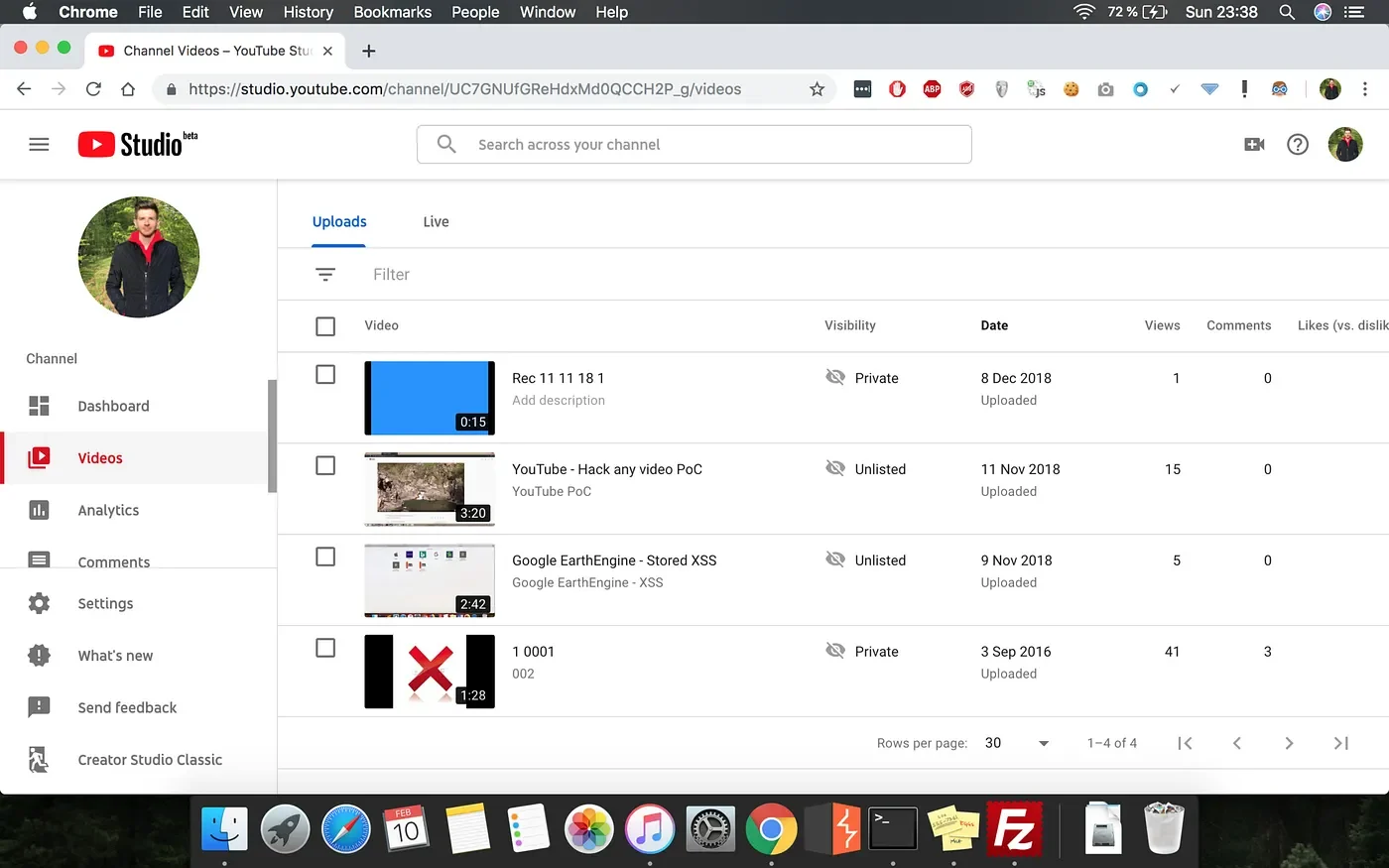
On the Studio homepage, the left menu has a Videos tab that leads to the page listing all of your videos.
Selecting videos brings up a toolbar in the context of the application. From there you choose which parts of the videos to change (title, description, tags, visibility, comments, and so on), and an update button appears.
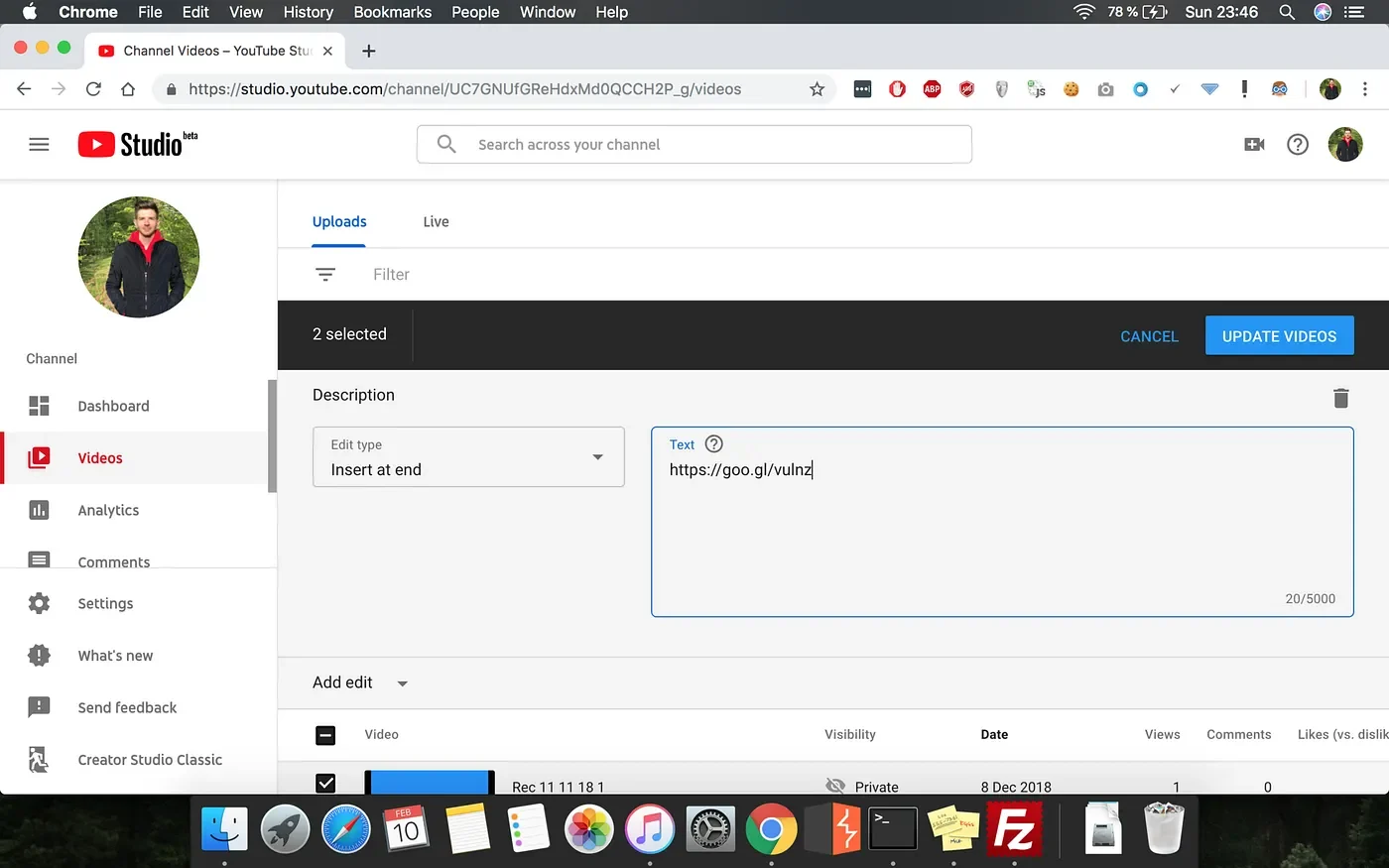
Clicking that blue Update button triggers a POST request to:
https://studio.youtube.com/youtubei/v1/creator/enqueue_creator_bulk_action
The body is JSON. Among the various attributes and configuration parameters, one stood out: a parameter called videos, represented by a videoIds object holding an array with the ids of the videos selected for update.
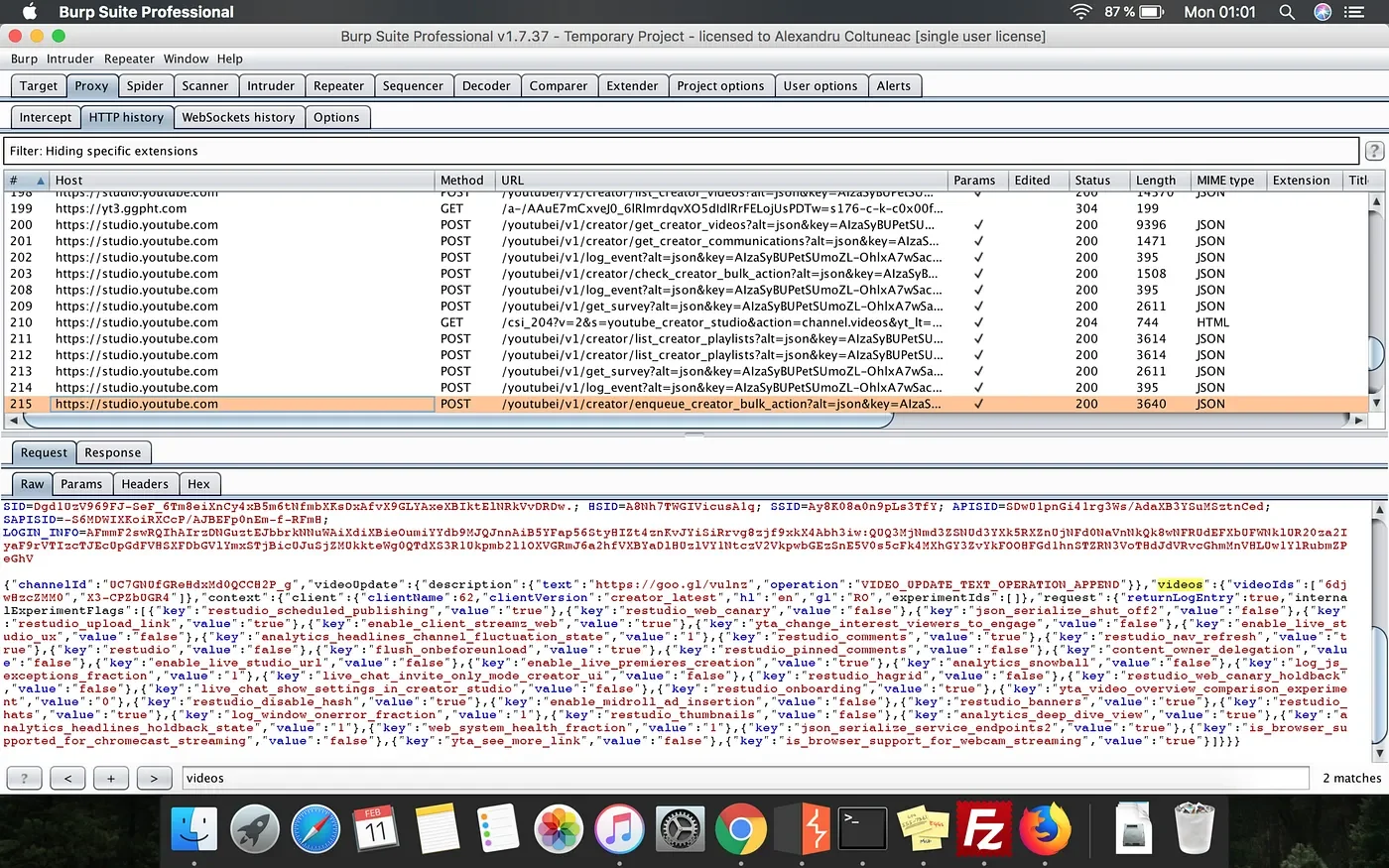
Playing with that body showed there was no protection or access-right check verifying that the videos behind those id values really belong to the user who started the update. Any video's settings could be changed just by putting its video ID in the array.
Bug #2: the playlist request
When a user opens the Studio dashboard and wants to edit a specific video, they click on it and are redirected to a new page.
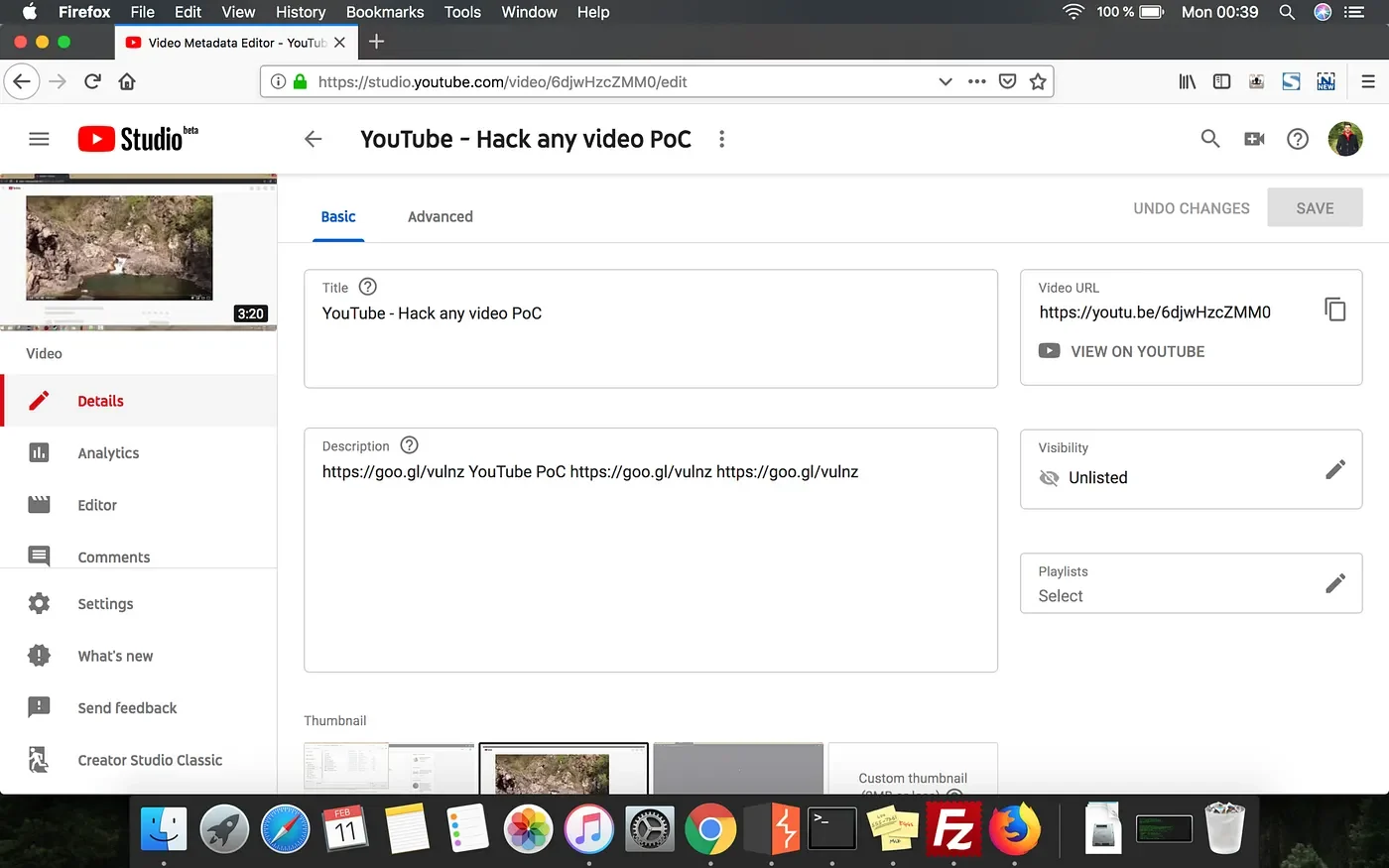
Once that page opens, a POST request goes out in the background to:
https://studio.youtube.com/youtubei/v1/creator/list_creator_playlists
As the name suggests, it retrieves the playlists of the current logged-in user and populates the Playlists section of the Video Edit page. Its body is JSON and contains an attribute called channelId, the value of the channel being edited.
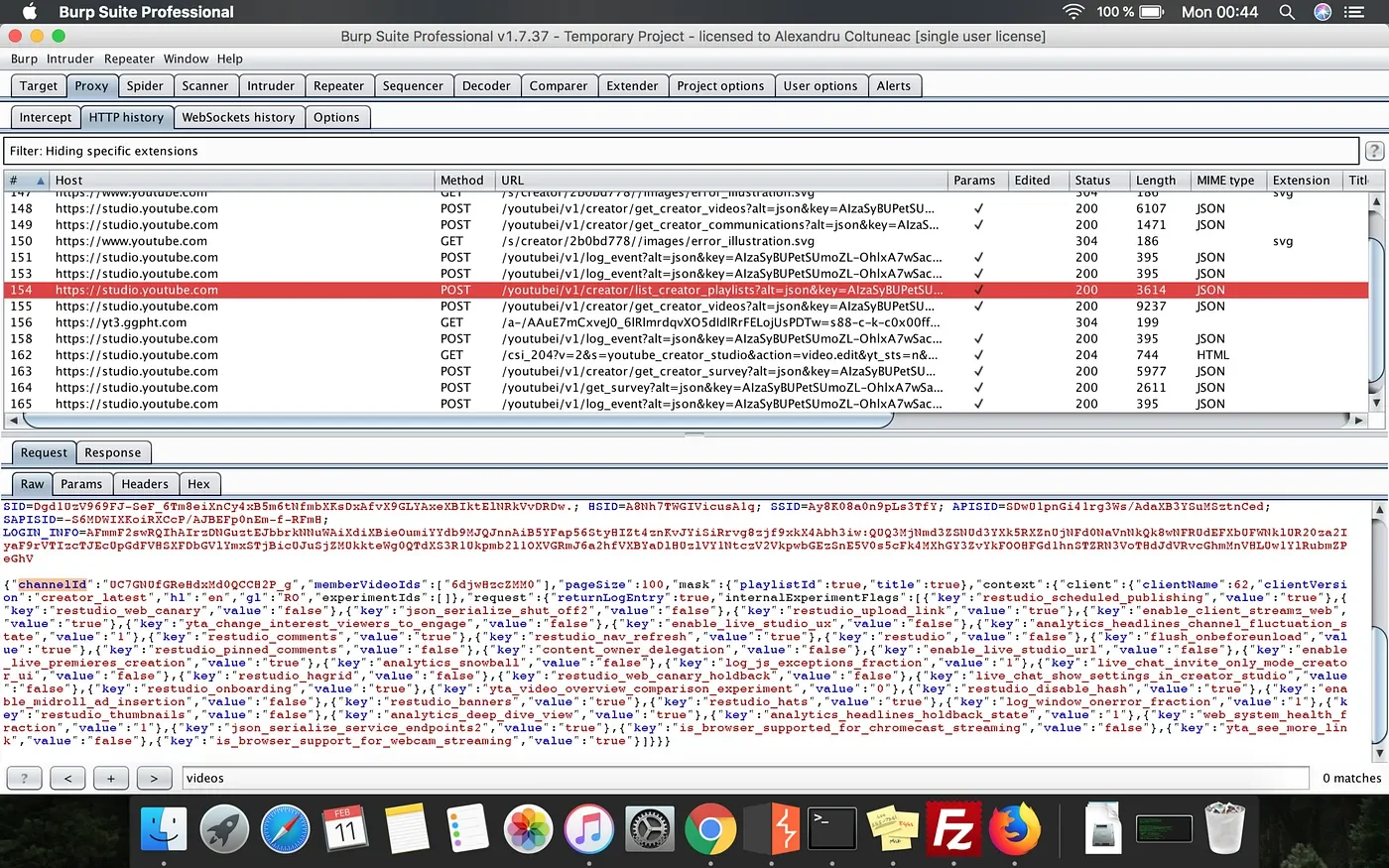
After several tests, the researcher found that the backend scripts did not verify that the channelId supplied by the user was actually that user's channel ID.
Exploitation
Step 1: capture the bulk update request
In Studio, select one or more of your own videos, choose the fields to change, and click Update. Intercept the resulting POST to enqueue_creator_bulk_action and look at the videos parameter, whose videoIds object contains the array of selected IDs.
Step 2: substitute a foreign video ID
Replace the IDs in that array with the ID of a video you do not own, keeping the rest of the JSON body as Studio generated it, and send the request. The backend did not check ownership, so a foreign video ID in the array would be accepted.
Step 3: capture the playlist request
Open the edit page for one of your videos and intercept the background POST to list_creator_playlists. Note the channelId attribute in the JSON body.
Step 4: substitute a foreign channel ID
Change channelId to the ID of a channel you do not control and send the request. The response contained all the playlists associated with that channelId, provided the channel had only public and unlisted playlists.
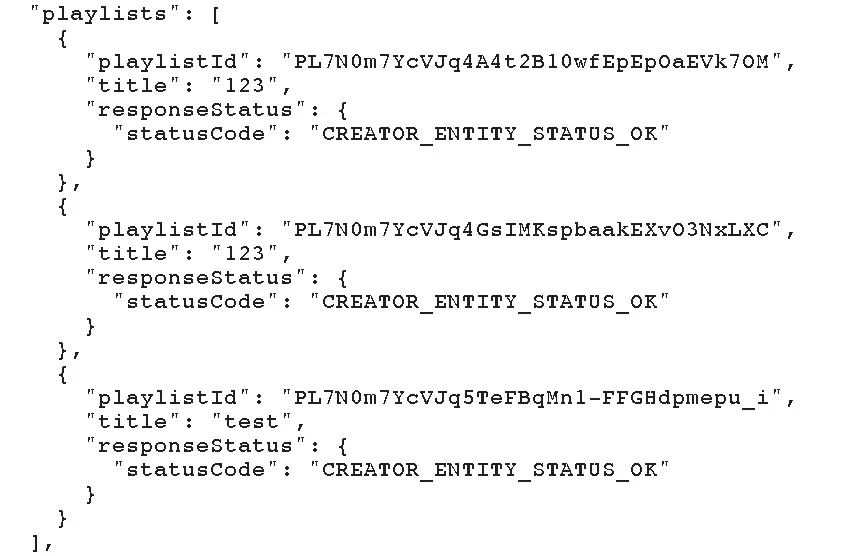
When that condition holds, the attacker obtains any unlisted playlist of that YouTube user.
Root cause
Both bugs are broken authorization on the server side. In the bulk update endpoint, the backend never checked that the video IDs in videoIds belonged to the authenticated user. In the playlist endpoint, the backend never checked that the channelId in the body matched the authenticated user's channel. In each case the client-supplied identifier was taken as authoritative, so the only thing standing between an attacker and another user's data was the value they chose to send. The report does not describe any additional defence that was present and bypassed.
Impact
For bug #1, the impact was described as pretty big. An attacker could, for example, shut down any YouTube channel by setting its videos to private, after which regular viewers can no longer find those videos and views are lost. Someone promoting a site or product could change the title and the video of popular videos such as Despacito or Shape of you by Ed Sheeran. Someone after pocket money could add a Donation PayPal account to the description of high-ranked videos, as many YouTubers do.
For bug #2, the impact is a privacy issue: an unlisted playlist, like an unlisted video, cannot be found on the platform until its owner shares it, and this flaw exposed it. The exposure is conditional on the channel having only public and unlisted playlists.
Timelines as given in the report:
| Bug #1 | Date |
|---|---|
| Reported | 11.11.2018 |
| Triaged, "Nice catch" | 12.11.2018 |
| Rewarded | 13.11.2018 |
| Fixed | 13.12.2018 |
| Bug #2 | Date |
|---|---|
| Reported | 12.11.2018 |
| Triaged | 13.11.2018 |
| "Nice catch" | 14.11.2018 |
| Rewarded | 30.11.2018 |
| Fixed | 12.12.2018 |
Fix
The report's timelines list fixes on 13.12.2018 and 12.12.2018 respectively. The report does not describe the change that was made. The fix that addresses the class of bug is server-side authorization: verify that every video ID in a bulk action belongs to the authenticated user, and derive or validate channelId against the authenticated session rather than trusting the body.
Variants to test
- Bulk action endpoints elsewhere: intercept any request that takes an array of object IDs for a bulk edit and swap in IDs you do not own. A positive result is a successful response and a visible change on the foreign object.
- Identifier parameters in JSON bodies: look for fields such as
channelId,accountIdorprojectIdon endpoints that populate a page, and substitute another user's value. A positive result is a response containing that user's objects. - Ownership checks that exist on one verb but not another: compare the read and write paths for the same resource. A positive result is a write succeeding where the equivalent read is refused, or vice versa.
- Visibility-limited resources: repeat the identifier substitution against endpoints returning unlisted or private objects. A positive result is unlisted content appearing in the response for an account that does not own it.
- Batch endpoints with partial failure: send a mix of owned and foreign IDs. A positive result is the foreign entries being processed rather than rejected.
What happened, in plain words
A security researcher found two bugs in YouTube Studio, the website Google gives to people who upload videos so they can manage their channels. Both bugs had the same basic shape: the website's server asked the browser to send along an identifier (a video ID or a channel ID), and then the server believed whatever identifier arrived without checking whether it actually belonged to the person making the request. Because of that, the researcher could change the settings of videos he did not own, and could read the unlisted playlists of channels he did not own.
To understand why this matters, it helps to know a few ideas first.
What an API is. When you click a button on a modern website, the page often does not reload. Instead, the page's JavaScript quietly sends a message to the server in the background, the server replies with data, and the page updates. That background conversation is an API (Application Programming Interface). Think of it like a waiter in a restaurant: you (the browser) tell the waiter what you want, the waiter carries the order to the kitchen (the server), and brings back a plate. The API is the set of orders the kitchen is willing to accept.
What a request body is. Each message to the server has a shape. The address it goes to is the URL. Extra information can travel in the body, which is the content of the message. Many modern APIs send the body as JSON, a text format that looks like a shopping list with labels: {"name": "value"}. The server reads the labels and acts on the values.
What authentication and authorization are. Authentication is proving who you are, like showing your passport at the airport. Authorization is what you are allowed to do once you are inside, like which doors your boarding pass opens. A bug where the server checks your passport but forgets to check which door you are opening is called a broken authorization bug, or sometimes an IDOR (Insecure Direct Object Reference): the server takes an object identifier from you and hands over the object without asking whether it is yours.
What YouTube Studio is. YouTube Studio at https://studio.youtube.com/ is a dashboard for content creators. It shows analytics, lets you change channel and community settings, and has a feature called Update In Bulk that lets you change many videos at once: for example, add a partner link to every description, add a tag to every title, or set every video to private.
What unlisted means. A video or playlist can be public (anyone can find it), unlisted (anyone with the link can watch it, but it does not appear in search or on your channel), or private (only you can see it). Unlisted content is meant to be shared deliberately, by handing someone the link. If a stranger can list your unlisted playlists, that promise is broken.
This article walks through both bugs in the order the researcher found them, with the exact requests involved and an explanation of every step.
Setup
The researcher used a normal browser and a normal logged-in YouTube Studio session. The only extra ability needed was to see and change the JSON body of the POST requests that Studio sends in the background. A POST request is simply a message that carries data to the server, as opposed to a GET request that asks for a page. Browsers have a developer tools panel (usually opened with F12) where you can watch these requests go out and inspect their bodies. The report does not describe any other tooling.
The report mentions one condition for the second bug: the target channel must have only public and unlisted playlists.
Finding it
Bug #1: the bulk update body
On the Studio homepage, the left menu has a Videos tab. Clicking it takes you to a page listing all of your videos.
If you are a content creator and want to change all your videos at once, you select the videos you want to update. A toolbar appears in the context of the application. From there you choose which parts of the videos to change: title, description, tags, visibility, comments, and so on. An update button then appears on the page.
Clicking that blue Update button triggers a POST request to the YouTube servers at this address:
https://studio.youtube.com/youtubei/v1/creator/enqueue_creator_bulk_action
Line by line: https:// means the connection is encrypted with TLS, so nobody on the network can read or change it in transit. studio.youtube.com is the server. /youtubei/v1/creator/enqueue_creator_bulk_action is the path, and the words in it are descriptive: creator means it is about a channel owner, enqueue means put a job in a queue, bulk_action means one action applied to many things. So the URL is literally saying: queue up a bulk action for this creator.
The body of that request is JSON. Among the various attributes and configuration parameters, one stood out: a parameter called videos, represented by a videoIds object holding an array with the ids of the videos selected for update. An array is just an ordered list, written with square brackets.
Why did this matter? Because the browser is telling the server which videos to change. If the server simply trusts that list, then the list is under the attacker's control. The researcher played with the body and found there was no protection or access-right check verifying that the videos behind those id values really belonged to the user who started the update. Any video's settings could be changed just by putting its video ID in the array.
A video ID is the short string in a YouTube URL, the part after watch?v=. It is not secret: it appears in every share link. That is exactly why the server must check ownership rather than relying on the ID being hard to guess.
Bug #2: the playlist request
When a user opens the Studio dashboard and wants to edit a specific video, they click on it and are redirected to a new page.
Once that page opens, a POST request goes out in the background to this address:
https://studio.youtube.com/youtubei/v1/creator/list_creator_playlists
Again, the path describes itself: list_creator_playlists means list the playlists belonging to a creator. As the name suggests, the request retrieves the playlists of the current logged-in user and populates the Playlists section of the Video Edit page. The body is JSON and contains an attribute called channelId, the value of the channel being edited.
After several tests, the researcher found that the backend scripts did not verify that the channelId supplied by the user was actually that user's channel ID. In other words, the server asked the browser "which channel's playlists do you want?" and then answered that question for any channel named, without checking that the person asking was the owner.
Exploitation
Step 1: capture the bulk update request
In Studio, select one or more of your own videos, choose the fields to change, and click Update. Intercept the resulting POST to enqueue_creator_bulk_action and look at the videos parameter, whose videoIds object contains the array of selected IDs. The reason for starting with your own videos is simply to get a valid request template: the browser builds a correct body for you, and you can then change one small part of it.
Step 2: substitute a foreign video ID
Replace the IDs in that array with the ID of a video you do not own, keeping the rest of the JSON body as Studio generated it, and send the request. The backend did not check ownership, so a foreign video ID in the array would be accepted. The rest of the body is kept unchanged so that the request still looks like a normal one and the only variable is the identifier under test.
Step 3: capture the playlist request
Open the edit page for one of your videos and intercept the background POST to list_creator_playlists. Note the channelId attribute in the JSON body. Again, this gives you a working request whose only interesting field is the channel identifier.
Step 4: substitute a foreign channel ID
Change channelId to the ID of a channel you do not control and send the request. The response contained all the playlists associated with that channelId, provided the channel had only public and unlisted playlists.
When that condition holds, the attacker obtains any unlisted playlist of that YouTube user. The condition is worth understanding: the endpoint was built to populate a playlist picker, and it appears to have been designed around channels whose playlists are all visible in some form. The response was returned only when the channel had only public and unlisted playlists.
Root cause
Both bugs are broken authorization on the server side. In the bulk update endpoint, the backend never checked that the video IDs in videoIds belonged to the authenticated user. In the playlist endpoint, the backend never checked that the channelId in the body matched the authenticated user's channel. In each case the client-supplied identifier was taken as authoritative, so the only thing standing between an attacker and another user's data was the value they chose to send. The report does not describe any additional defence that was present and bypassed.
A useful mental model: the server should treat every value from the browser as a claim, not a fact. "I am channel X" is a claim. The server should look up the session, find out which channel that session really belongs to, and compare. If it skips the comparison, the claim wins.
Impact
For bug #1, the impact was described as pretty big. An attacker could, for example, shut down any YouTube channel by setting its videos to private, after which regular viewers can no longer find those videos and views are lost. Someone promoting a site or product could change the title and the video of popular videos such as Despacito or Shape of you by Ed Sheeran. Someone after pocket money could add a Donation PayPal account to the description of high-ranked videos, as many YouTubers do.
For bug #2, the impact is a privacy issue: an unlisted playlist, like an unlisted video, cannot be found on the platform until its owner shares it, and this flaw exposed it. The exposure is conditional on the channel having only public and unlisted playlists.
Timelines as given in the report:
| Bug #1 | Date |
|---|---|
| Reported | 11.11.2018 |
| Triaged, "Nice catch" | 12.11.2018 |
| Rewarded | 13.11.2018 |
| Fixed | 13.12.2018 |
| Bug #2 | Date |
|---|---|
| Reported | 12.11.2018 |
| Triaged | 13.11.2018 |
| "Nice catch" | 14.11.2018 |
| Rewarded | 30.11.2018 |
| Fixed | 12.12.2018 |
Triaged means the security team confirmed the report was real and started handling it. Rewarded means the report's timeline records a reward on that date.
Fix
The report's timelines list fixes on 13.12.2018 and 12.12.2018 respectively. The fix that addresses the class of bug is server-side authorization: verify that every video ID in a bulk action belongs to the authenticated user, and derive or validate channelId against the authenticated session rather than trusting the body.
Variants to test
If you want to look for similar bugs yourself, these are the patterns to try. Each one is the same idea: find a place where the browser sends an identifier, and see whether the server checks it.
- Bulk action endpoints elsewhere: intercept any request that takes an array of object IDs for a bulk edit and swap in IDs you do not own. A positive result is a successful response and a visible change on the foreign object.
- Identifier parameters in JSON bodies: look for fields such as
channelId,accountIdorprojectIdon endpoints that populate a page, and substitute another user's value. A positive result is a response containing that user's objects. - Ownership checks that exist on one verb but not another: compare the read and write paths for the same resource. A positive result is a write succeeding where the equivalent read is refused, or vice versa.
- Visibility-limited resources: repeat the identifier substitution against endpoints returning unlisted or private objects. A positive result is unlisted content appearing in the response for an account that does not own it.
- Batch endpoints with partial failure: send a mix of owned and foreign IDs. A positive result is the foreign entries being processed rather than rejected.
Glossary
- API: the set of background messages a website's page can send to its server, and the replies it gets back.
- Array: an ordered list of values in JSON, written with square brackets.
- Authentication: proving who you are to a system, for example by logging in.
- Authorization: what a system lets you do once it knows who you are.
- Broken authorization: a bug where the server knows who you are but does not check whether you are allowed to do the thing you asked for.
- Bulk action: one operation applied to many items at once, such as changing the settings of many videos.
- channelId: the identifier of a YouTube channel, sent in the request body in bug #2.
- Developer tools: the panel built into browsers for inspecting network requests and page content.
- GET request: a message that asks the server for a page or data.
- IDOR (Insecure Direct Object Reference): a bug where the server accepts an object identifier from the user and returns or changes the object without checking ownership.
- JSON: a text format for structured data, made of labels and values in curly braces.
- POST request: a message that sends data to the server, often used for actions and background API calls.
- Private: visible only to the owner.
- Public: visible to anyone, including in search and on the channel page.
- Request body: the content of a message to the server, as opposed to its address.
- Session: the server's record of your logged-in state, usually tied to a cookie in your browser.
- TLS: the encryption that makes an
https://connection private and tamper-resistant. - Triaged: confirmed by the security team as a real issue and moved into their handling process.
- Unlisted: not findable by search or browsing, but viewable by anyone who has the link.
- URL: the address of a resource on the web.
- videoIds: the object in the bulk update request body holding the array of video identifiers.
- Vulnerability Reward Program (VRP): a programme that pays researchers for reporting security bugs.




