Reposted [2017]: LinkedIn Hacker’s Experience
LinkedIn's image upload feature allowed an attacker to upload a file with a manipulated Content-Type header, causing the server to serve it as HTML on the main domain. This stored cross-site scripting (XSS) vulnerability could let an attacker steal anti-CSRF tokens and perform actions like sending messages or creating posts on behalf of a victim.
 Published on medium.com
Today I want to talk to you about a tricky Stored XSS Vulnerability that I found here, in LinkedIn, 2 months ago.
The full write-up lives on its author's site
It belongs to its author, so we link to it rather than copy it. The other two tabs are our own rewrites, checked against it.
Context
LinkedIn lets members write, edit and distribute articles on the platform. The entry point the researcher used is the article editor at:
https://www.linkedin.com/post/new
Inside the editor you can customise the article and embed resources such as images, videos or slides. Of all these features, the image upload caught the researcher's attention. Uploaded images are stored on LinkedIn's static asset host, media.licdn.com, and the article editor reaches that host through a dedicated upload endpoint.
Setup
The researcher had a LinkedIn account with access to the article editor. No special role, tool or version is described. The work was done by hand: writing an article, adding an image, and intercepting and tampering with the resulting upload request. The researcher found the flaw about two months before writing, and the XSS was fixed by the time of writing.
Finding it
The researcher started from the normal upload flow and then looked at what the server returned and where the file ended up. The upload response is JSON and contains a field called value. That field acts as a unique identifier for the image and becomes its new name once the file is stored on the server. After the upload finishes, the image is available on https://media.licdn.com/; in the researcher's case at:
https://media.licdn.com/mpr/mpr/[redacted].jpg
The interesting question was whether the server's handling of the uploaded file could be bent into serving something other than an image.
Exploitation
Step 1: add an image to an article
In the editor, you add an image by clicking the "+" sign and selecting the type of content to include, in this case an image.

Step 2: observe the upload request
Clicking Upload from computer and choosing an image triggers a new POST request to the /mupld/megaImageUpload endpoint.
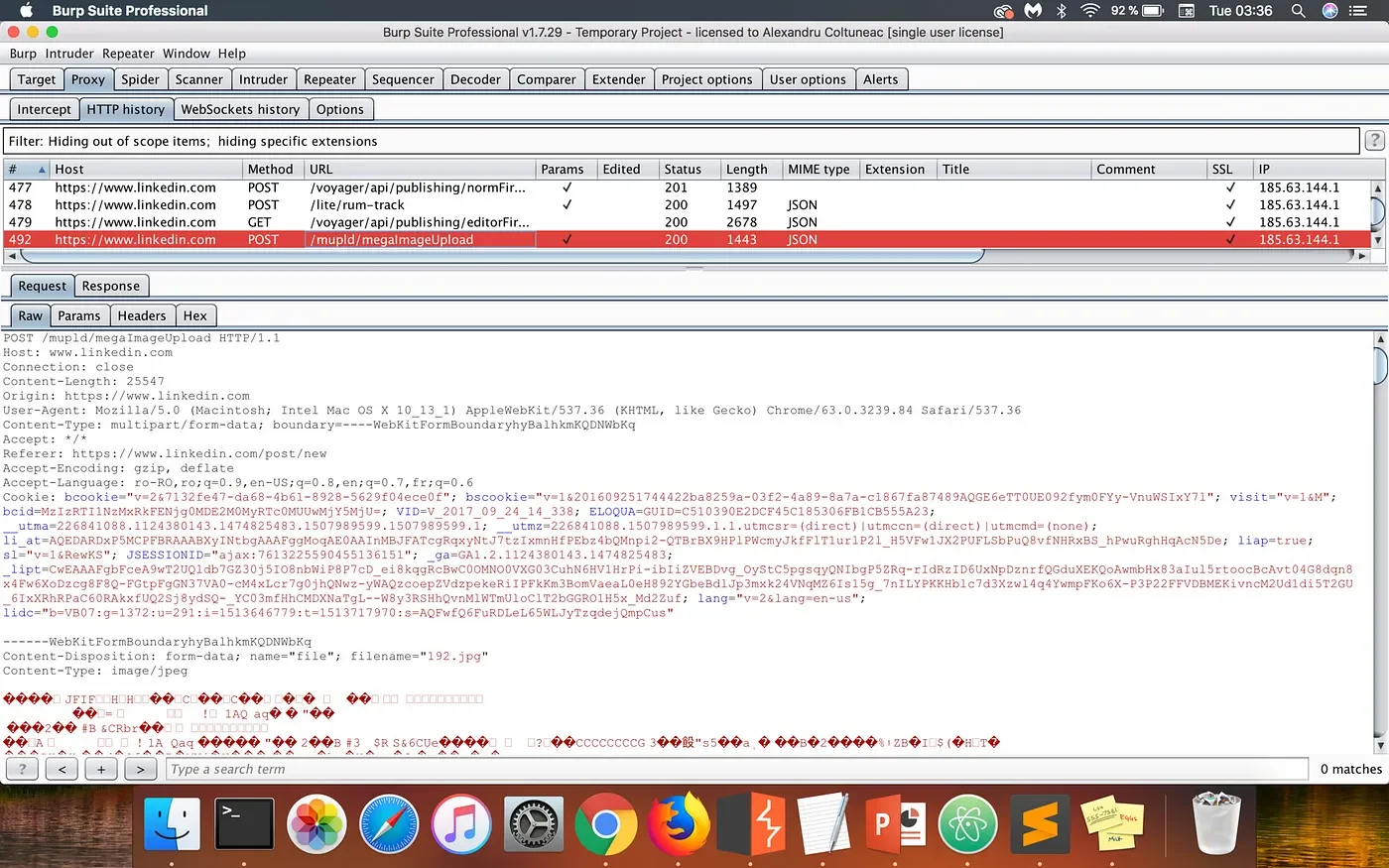
The response is JSON and carries the value field described above, which names the stored file.
Step 3: try to change the file extension
The first tampering attempt was to change the extension of the uploaded image to .html, .htm, .xml, .svg and similar, hoping the server would then deliver valid HTML content using the image. Every such change produced an INVALID_MEDIA error, so this route failed.

Step 4: tamper with Content-Type
Next the researcher looked at the Content-Type parameter sent with the upload request for the image. Changing it to text/html did not work either and returned the same error message as before.
After several tests, the researcher found that only the hardcoded value text/html was blacklisted. Any other value was accepted, so the Content-Type of the image could be set to something like I/hackYou, and once the file was served by LinkedIn's server the response carried that fake header:
Content-Type: I/hackYou
Step 5: bypass the blacklist with letter case
The server also did not check whether the blacklisted Content-Type was written in uppercase letters. The filter could therefore be bypassed with values such as text/htmL, Text/html, tExt/html, and so on. Browsers ignore the case of the letters in the Content-Type header and treat Text/Html as equivalent to text/html. As a result, every uploaded image, whether or not it had a valid extension, could be used to serve HTML content.
Step 6: a barely valid image is enough
The image did not need to be valid, nor did all the bytes in its body need to be in the right order. The backend script handling the upload checked only the first few bytes of the image to confirm it was valid, which was very helpful for the attack.
Step 7: move from the sandbox to the main domain
At this point there was a stored XSS, but the file lived on media.licdn.com, a sandboxed subdomain used by LinkedIn to host static files. The researcher checked every subdomain of linkedin.com for a CNAME record pointing to that domain, without success, and also looked for misconfigured CORS headers and incorrect cross-domain messaging to be sure of doing almost all that was possible.
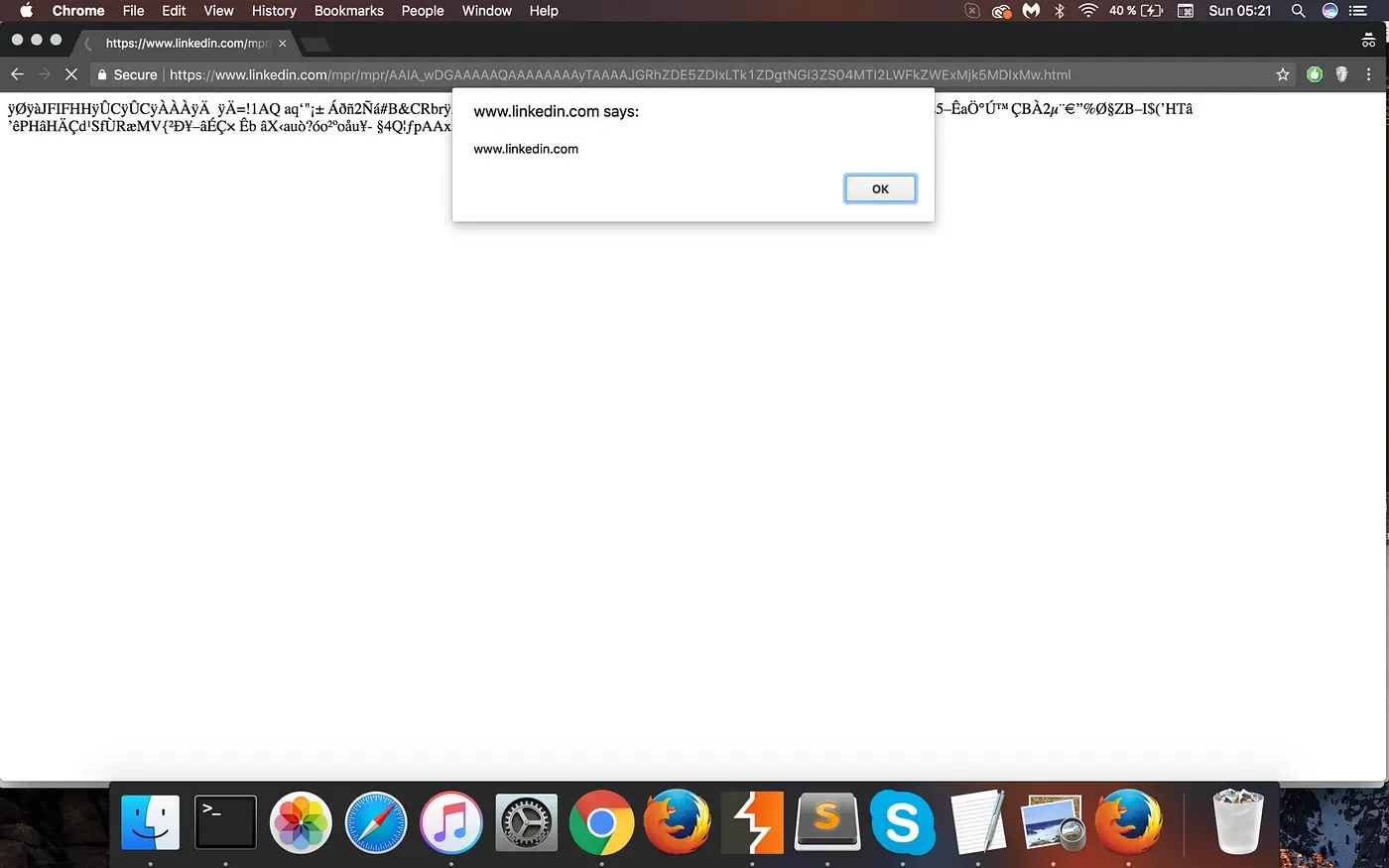
Ready to report the issue even though it did not impose a high security risk, the researcher had one more idea: what if the uploaded image could be accessed through the main LinkedIn domain? It could, and it worked.
Root cause
The upload endpoint blacklisted only the exact string text/html, and the server did not check whether the blacklisted value was written in uppercase letters. Any other Content-Type value, including a nonsense one such as I/hackYou, was stored and echoed back in the response when the file was served. Because browsers treat the media type case-insensitively, Text/html and its variants were honoured as HTML even though the filter had not matched them. Content validation was equally shallow: only the first few bytes of the uploaded file were checked, so the rest of the body could be arbitrary HTML. The file was then reachable from the main www.linkedin.com origin, which removed the sandboxing that media.licdn.com would otherwise have provided.
Impact
Because the payload was served from https://www.linkedin.com, the Same Origin Policy offered no protection. The main domain also hosts the OAuth Authorization Endpoint:
https://www.linkedin.com/oauth/v2/authorization
Crucially, the XSS bypassed any CSP restriction simply because the CSP header was not present in the response. The researcher built a PoC that stole the anti-CSRF token from the OAuth Authorization page and used it to make a victim grant permissions to the attacker's application without the victim's knowledge. The source code of the PoC was published separately by the researcher.
Even though the LinkedIn API for developers does not have many features, the researcher was able, for example, to create different posts on behalf of a victim and share them on their personal profile.
In that PoC the anti-CSRF token was stored as the value of an input tag, but in general LinkedIn stores it in a cookie called JSESSIONID, which is not marked as httpOnly. Every important action initiated by the user corresponds to a POST request carrying this cookie in a header, so the token could be read from document.cookie in JavaScript and the requests sent with Ajax. With that, an attacker could:
- send a private message to the victim's boss;
- update the victim's personal profile;
- share articles, photos, videos or ideas on the victim's personal profile.
Fix
The report does not describe the fix beyond stating that this XSS was fixed.
Variants to test
- Case variants of a blacklisted media type. Send
Content-Typevalues such astext/htmL,Text/htmlortExt/htmlon any upload endpoint. A positive result is a stored file that the server returns with an HTML media type and that a browser renders as HTML. - Arbitrary media types. Send a value the filter has never seen, such as
I/hackYou, and check the response headers of the stored file. A positive result is the server echoing the supplied type back verbatim. - Truncated or malformed files. Upload a file whose first bytes satisfy the image check but whose remaining body is HTML. A positive result is the file being accepted and served intact.
- Reachability from the main origin. For any asset host, try to fetch the uploaded file through the main application domain. A positive result is the same content served from the primary origin, which removes the sandbox.
- Missing CSP on asset responses. Inspect the response headers of the served file. A positive result is the absence of a CSP header, allowing inline script to run.
- Non-httpOnly session cookies. Check whether the session or anti-CSRF cookie is readable from
document.cookie. A positive result is a cookie that JavaScript can read and replay in state-changing requests.
What happened, in plain words
LinkedIn is a social network for professionals. One of its features lets members write articles and publish them on the platform, much like a blog. Inside the article editor you can add pictures, videos and slides to make the article look better. The researcher who wrote this report was curious about the picture upload, and that curiosity turned into a serious security problem.
The problem is a type called Stored XSS, short for Stored Cross-Site Scripting. To understand it, imagine a noticeboard in an office where anyone can pin a note. Normally people pin ordinary notes. But suppose someone pins a note written in a special ink that, when a cleaner reads it, makes the cleaner follow an instruction written on it. The note stays on the board (that is the "stored" part), and every person who reads it follows the hidden instruction. In a website, the "note" is a file or a piece of content saved on the server, and the "hidden instruction" is a small program written in a language called JavaScript that the visitor's browser runs without asking. Because the browser trusts the website that served the content, it runs the program with the same powers the website itself has.
In this case the researcher managed to upload a picture file that LinkedIn's servers would later hand back to a browser as if it were a web page containing JavaScript. Worse, the file could be reached through the main LinkedIn website address, not only through a separate storage address. That meant the small program ran with the full trust of the main site, and could do things on behalf of any logged-in member who opened it.

The researcher found the flaw about two months before writing, and by then this particular flaw had been fixed.
The product and the feature
LinkedIn lets members "write, edit, and distribute articles" on its platform. The researcher's starting point was the article editor, reachable at this address:
https://www.linkedin.com/post/new
A quick word on addresses. The part https:// means the connection is encrypted. www.linkedin.com is the name of the server (the domain). /post/new is the path to a particular page on that server, here the page for creating a new article.
Inside the editor you can customise the article and embed resources such as images, videos or slides. Of all these features, the image upload caught the researcher's attention. Uploaded images are not kept on the main website server. They are stored on a separate host used for static files, media.licdn.com, and the editor reaches that host through a dedicated upload endpoint.
Two terms worth explaining now, because they come back throughout the report:
- An endpoint is a specific address on a server that accepts a particular kind of request. Think of a large office building: the street address gets you into the building, but each department has its own door and its own counter. The endpoint is the department counter.
- A static file is a file that is simply handed out as it is stored, without the server computing anything: a picture, a stylesheet, a video. A separate host for static files is common practice, and it is often treated as a less trusted place (a sandbox) than the main application.
Setting up
The researcher had a LinkedIn account with access to the article editor. No special role, tool or version is described. The work was done by hand: writing an article, adding an image, and intercepting and tampering with the resulting upload request.
"Intercepting" deserves an explanation. When you fill in a form and press a button, your browser builds a message and sends it to the server. Tools exist that let you pause that message on its way out, look at it, change parts of it, and then let it continue. Security researchers use them constantly, because the browser's form only lets you choose certain things, while the message itself can carry much more. The researcher used such a tool to edit the upload message before it reached LinkedIn.
Finding it
The researcher started from the normal upload flow and then looked at what the server returned and where the file ended up.
When the upload finishes, the server replies with data in JSON format. JSON is just a way of writing structured data as text, using curly brackets and labels, a bit like a very strict shopping list. The reply contains a field called value. That field acts as a unique identifier for the image and becomes its new name once the file is stored on the server. Think of a cloakroom ticket: you hand over your coat, you get a ticket with a number, and that number is how the cloakroom finds your coat again.
After the upload finishes, the image is available on https://media.licdn.com/; in the researcher's case at:
https://media.licdn.com/mpr/mpr/[redacted].jpg
The long string in the middle is the identifier from the value field, and .jpg at the end is the file extension, the part of a name that traditionally tells you what kind of file it is. A .jpg is a picture format.
The interesting question was whether the server's handling of the uploaded file could be bent into serving something other than an image. In other words: can we make the cloakroom hand back something different from the coat we gave it?
Exploitation
Step 1: add an image to an article
In the editor, you add an image by clicking the "+" sign and selecting the type of content to include, in this case an image.
This step is just the normal, intended use of the feature. The researcher did it first so that the browser would produce a genuine upload request, which could then be studied and copied. It is much easier to modify a real request than to build one from nothing.
Step 2: observe the upload request
Clicking Upload from computer and choosing an image triggers a new POST request to the /mupld/megaImageUpload endpoint.
A POST request is one of the standard ways a browser talks to a server. A GET request asks for something ("give me this page"); a POST request sends something ("here is my form data, please store it"). The endpoint /mupld/megaImageUpload is the department counter that receives uploaded images.
The response is JSON and carries the value field described above, which names the stored file. Knowing this matters because it tells the researcher two things: the file is stored under a name the server chooses, and the server tells the client what that name is.
Step 3: try to change the file extension
The first tampering attempt was to change the extension of the uploaded image to .html, .htm, .xml, .svg and similar, hoping the server would then deliver valid HTML content using the image.
A short explanation of these extensions. HTML is the language web pages are written in. .htm is an older short form of the same thing. XML is a general text format for structured data. SVG is a picture format that is itself written in XML, and SVG files can contain scripts. The idea was simple: if the server saves the file as something.html, then when a browser asks for it, the server may label it as a web page, and the browser will run any script inside it.
Every such change produced an INVALID_MEDIA error, so this route failed. INVALID_MEDIA is the server's way of saying "this is not an acceptable media file".
Step 4: tamper with Content-Type
Next the researcher looked at the Content-Type parameter sent with the upload request for the image.
Content-Type is a label attached to data that says what kind of data it is. When a browser sends a form, it labels the data; when a server sends a file back, it labels the file too. The label is written as a media type, in the form type/subtype, for example image/jpeg for a photo or text/html for a web page. The browser receiving a file reads this label to decide how to display it. If the label says text/html, the browser treats the bytes as a web page and runs any script in them.
Changing the label to text/html did not work either and returned the same error message as before. So the server was also checking this label, and it refused the exact value text/html.
After several tests, the researcher found that only the hardcoded value text/html was blacklisted. A blacklist is a list of things that are forbidden; everything not on the list is allowed. The opposite is an allowlist, where only listed things are allowed and everything else is refused. Blacklists are fragile because the person writing them has to think of every possible bad value, and the attacker only has to think of one they missed.
Any other value was accepted, so the Content-Type of the image could be set to something like I/hackYou, and once the file was served by LinkedIn's server the response carried that fake header:
Content-Type: I/hackYou
Line by line: Content-Type is the name of the label; the colon separates the name from its value; I/hackYou is a made-up media type that means nothing at all. The point is that the server did not object to it. It stored the file and, when serving it later, repeated the label back exactly as it had been given. The server was trusting the client's own description of the file.
Step 5: bypass the blacklist with letter case
The server also did not check whether the blacklisted Content-Type was written in uppercase letters. The filter could therefore be bypassed with values such as text/htmL, Text/html, tExt/html, and so on.
Why does that work? Because the comparison was case-sensitive: to the server's check, text/html and Text/html are two different strings, and only the first one was on the blacklist. But browsers ignore the case of the letters in the Content-Type header and treat Text/Html as equivalent to text/html. So the server's check said "not on the list, allow it", and the browser said "this is a web page, run it". Each side was behaving reasonably on its own; the gap between them was the vulnerability.
As a result, every uploaded image, whether or not it had a valid extension, could be used to serve HTML content.
Step 6: a barely valid image is enough
The image did not need to be valid, nor did all the bytes in its body need to be in the right order. The backend script handling the upload checked only the first few bytes of the image to confirm it was valid, which was very helpful for the attack.
Picture formats begin with a short signature, a few bytes that identify the format, much like the first few letters of a word. Checking only that signature is a cheap way to reject obvious non-images, but it says nothing about the rest of the file. So the researcher could start the file with the right few bytes to pass the check, and fill the remainder with HTML and JavaScript. The server accepted it as a picture; the browser, reading the label, treated it as a page.
Step 7: move from the sandbox to the main domain
At this point there was a stored XSS, but the file lived on media.licdn.com, a sandboxed subdomain used by LinkedIn to host static files.
A subdomain is a name that sits under a main domain: media.licdn.com is a subdomain of licdn.com, and www.linkedin.com is another. Browsers enforce a rule called the Same Origin Policy: a page from one origin is not allowed to read data from another origin. An origin is the combination of protocol, domain and port, so https://media.licdn.com and https://www.linkedin.com are two different origins. That rule is the reason static file hosts are considered a sandbox: even if a script runs there, it cannot reach the main site's data or act as the logged-in user.
The researcher checked every subdomain of linkedin.com for a CNAME record pointing to that domain, without success. A CNAME record is a piece of the internet's naming system that says "this name is really another name", a bit like a mail forwarding address. If one existed, the two names might have been treated as the same place by the browser. The researcher also looked for misconfigured CORS headers and incorrect cross-domain messaging to be sure of doing almost all that was possible. CORS is the mechanism by which a server can deliberately relax the Same Origin Policy and say "this other site is allowed to read my data"; a misconfiguration there would have widened the attack.
Ready to report the issue even though it did not impose a high security risk, the researcher had one more idea: what if the uploaded image could be accessed through the main LinkedIn domain? It could, and it worked.
This is the turning point. The same stored file, reachable through https://www.linkedin.com, was now on the same origin as the logged-in application. The sandbox was gone.
Root cause
The upload endpoint blacklisted only the exact string text/html, and the server did not check whether the blacklisted value was written in uppercase letters. Any other Content-Type value, including a nonsense one such as I/hackYou, was stored and echoed back in the response when the file was served. Because browsers treat the media type case-insensitively, Text/html and its variants were honoured as HTML even though the filter had not matched them. Content validation was equally shallow: only the first few bytes of the uploaded file were checked, so the rest of the body could be arbitrary HTML. The file was then reachable from the main www.linkedin.com origin, which removed the sandboxing that media.licdn.com would otherwise have provided.
In everyday terms: the doorman checked the label on the parcel against a short list of forbidden words, matched the words exactly, and glanced only at the first centimetre of the contents. Then he put the parcel on a shelf that anyone in the main building could reach.
Impact
Because the payload was served from https://www.linkedin.com, the Same Origin Policy offered no protection. The main domain also hosts the OAuth Authorization Endpoint:
https://www.linkedin.com/oauth/v2/authorization
OAuth is the system that lets you grant one application permission to act on your account at another service, without giving it your password. You have seen it as the "Sign in with..." button. The Authorization Endpoint is the page where you are shown what the application is asking for and where you click to approve it. That page carries a hidden value, an anti-CSRF token, whose job is to prove that the approval click really came from the page the user was looking at and not from somewhere else. CSRF stands for Cross-Site Request Forgery: tricking a logged-in user's browser into sending a request the user never intended.
Crucially, the XSS bypassed any CSP restriction simply because the CSP header was not present in the response. CSP, Content Security Policy, is a set of instructions a server can attach to a page telling the browser which scripts it may run. It is a seatbelt. Here there was no seatbelt on the response at all.
The researcher built a PoC, a proof of concept, a small demonstration that shows the problem is real rather than theoretical. It stole the anti-CSRF token from the OAuth Authorization page and used it to make a victim grant permissions to the attacker's application without the victim's knowledge. The source code of the PoC was published separately by the researcher.
Even though the LinkedIn API for developers does not have many features, the researcher was able, for example, to create different posts on behalf of a victim and share them on their personal profile. An API is the set of doors a service offers to programs rather than to people: instead of a page with buttons, it is a list of requests a program can send and the answers it will get back.
In that PoC the anti-CSRF token was stored as the value of an input tag, but in general LinkedIn stores it in a cookie called JSESSIONID, which is not marked as httpOnly. A cookie is a small piece of text a website asks the browser to keep and to send back with every later request to that site; it is how a site remembers that you are logged in. The httpOnly flag is a protection that tells the browser "JavaScript must not be allowed to read this cookie". Without that flag, any script running on the page can read it.
Every important action initiated by the user corresponds to a POST request carrying this cookie in a header, so the token could be read from document.cookie in JavaScript and the requests sent with Ajax. document.cookie is the browser's built-in way for a script to read and write cookies. Ajax is the technique a page uses to send requests to the server in the background, without reloading the page, so the user sees nothing. With that, an attacker could:
- send a private message to the victim's boss;
- update the victim's personal profile;
- share articles, photos, videos or ideas on the victim's personal profile.
Each of these is an action the victim could legitimately perform. The attack did not break any password; it simply borrowed the victim's already-open session, the way someone who finds your keys on the table can open your door.
Fix
The report does not describe the fix beyond stating that this XSS was fixed.
In plain words: keep a list of allowed picture types instead of a list of forbidden ones; compare labels without caring about capital letters; look at the whole file, not just its opening bytes; and never let user-uploaded files be served from the same address as the application itself.
Variants to test
These are the same ideas generalised, so that a beginner can recognise the pattern elsewhere. Each one states what to send and what a positive result looks like.
- Case variants of a blacklisted media type. Send
Content-Typevalues such astext/htmL,Text/htmlortExt/htmlon any upload endpoint. A positive result is a stored file that the server returns with an HTML media type and that a browser renders as HTML. - Arbitrary media types. Send a value the filter has never seen, such as
I/hackYou, and check the response headers of the stored file. A positive result is the server echoing the supplied type back verbatim. - Truncated or malformed files. Upload a file whose first bytes satisfy the image check but whose remaining body is HTML. A positive result is the file being accepted and served intact.
- Reachability from the main origin. For any asset host, try to fetch the uploaded file through the main application domain. A positive result is the same content served from the primary origin, which removes the sandbox.
- Missing CSP on asset responses. Inspect the response headers of the served file. A positive result is the absence of a CSP header, allowing inline script to run.
- Non-httpOnly session cookies. Check whether the session or anti-CSRF cookie is readable from
document.cookie. A positive result is a cookie that JavaScript can read and replay in state-changing requests.
Glossary
- Ajax: a way for a web page to send requests to a server in the background, without reloading the page.
- Allowlist: a list of things that are permitted; everything not on the list is refused.
- Anti-CSRF token: a hidden value placed in a page or cookie to prove that a request really came from that page and not from an attacker's site.
- API: the set of requests a service offers to programs, as opposed to the pages it offers to people.
- Blacklist: a list of things that are forbidden; everything not on the list is allowed.
- Case-sensitive: a comparison that treats capital and lowercase letters as different.
- CNAME record: an entry in the internet's naming system saying that one name is really another name.
- Content-Type: a label attached to data saying what kind of data it is, written as
type/subtype. - Cookie: a small piece of text a site asks the browser to store and send back with later requests, commonly used to remember a login.
- CORS: a mechanism by which a server can deliberately allow another origin to read its data.
- CSP (Content Security Policy): instructions a server attaches to a page telling the browser which scripts it may run.
- CSRF (Cross-Site Request Forgery): tricking a logged-in user's browser into sending a request the user never intended.
- Domain: the name of a server on the internet, such as
linkedin.com. - Endpoint: a specific address on a server that accepts a particular kind of request.
- File extension: the part of a file name after the dot, traditionally indicating the file type, such as
.jpg. - HTML: the language web pages are written in.
- httpOnly: a cookie flag that stops JavaScript from reading that cookie.
- JSON: a text format for structured data, built from brackets, labels and values.
- Media type: the formal name for the value of a
Content-Typelabel, such asimage/jpegortext/html. - OAuth: a system that lets one application act on your account at another service with your permission, without sharing your password.
- Origin: the combination of protocol, domain and port that a browser uses to decide what may read what.
- PoC (proof of concept): a small demonstration showing that a vulnerability is real.
- POST request: a request that sends data to a server, as opposed to a GET request that asks for something.
- Sandbox: an isolated place where content is kept so that it cannot affect the main application.
- Same Origin Policy: the browser rule that a page from one origin may not read data from another origin.
- Static file: a file handed out exactly as stored, without the server computing anything.
- Stored XSS: a cross-site scripting flaw where the malicious content is saved on the server and served to later visitors.
- Subdomain: a name sitting under a main domain, such as
media.licdn.comunderlicdn.com. - SVG: a picture format written in XML that can contain scripts.
- XML: a general text format for structured data.




