SSH key injection in Google Cloud Compute Engine (Google VRP)
The SSH-in-browser feature accepted a username via a GET parameter without CSRF protection and used a colon delimiter to separate username from SSH key. An attacker could craft a link that, when opened by a victim, injected the attacker's SSH key into the victim's Compute Engine instance, granting the attacker login with sudo privileges.
 Published on blog.stazot.com
This write-up is the first in a series of write-ups about bugs that I, and Sreeram, found in Google Cloud during 2022.
The full write-up lives on its author's site
It belongs to its author, so we link to it rather than copy it. The other two tabs are our own rewrites, checked against it.
Context
This is the first in a series of write-ups about bugs that Sivanesh Ashok and Sreeram KL found in Google Cloud during 2022. After spending time hunting in common Google apps such as Drive, they moved into Google Cloud, and the first bug they found there had the impact of a single-click RCE in a victim user's Compute Engine instance.
The product is Compute Engine, and the feature is SSH-in-browser: a GCP feature that lets users access their compute instances over SSH through the browser. Visually, the interface looks very similar to Cloud Shell.
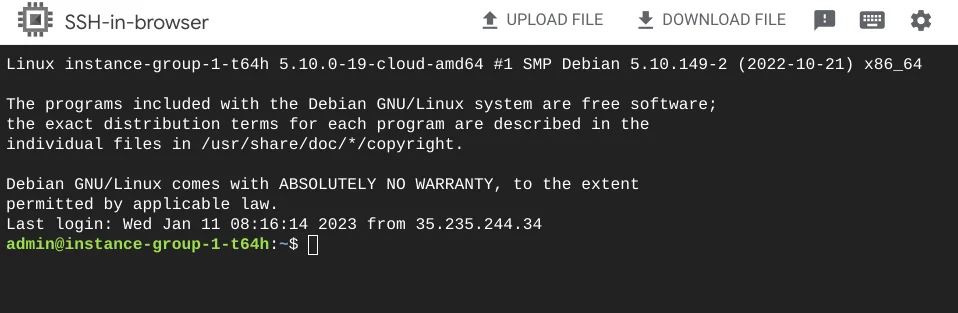
SSH-in-browser console
Setup
The write-up does not describe any special accounts, roles, tool versions or tooling. The precondition for the attack is a victim who uses SSH-in-browser against a Compute Engine instance, and an attacker who can get that victim to open a crafted link.
Finding it
While looking through the options of SSH-in-browser, one feature stood out: Change Linux Username.
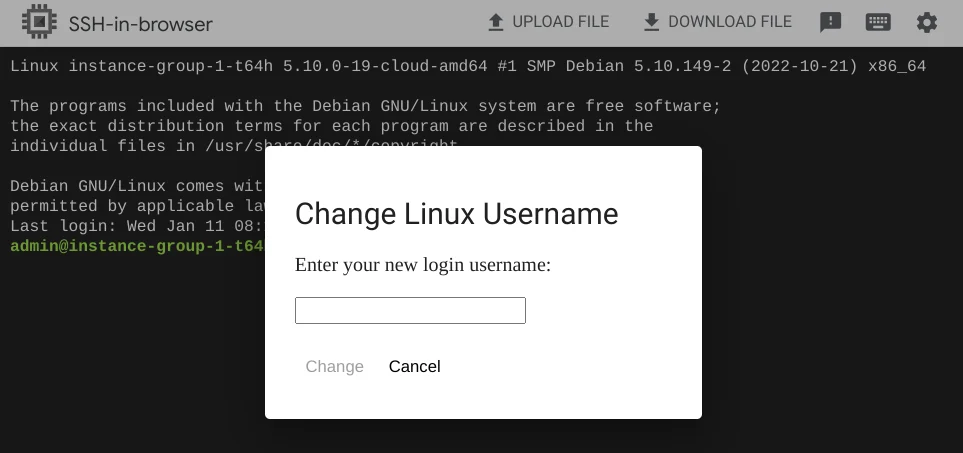
Getting username input from the user
The dialog takes a username from the user, which is then passed to the server as a GET parameter named newLinuxUsername. Even if the supplied username does not exist, the backend creates a new user with that name and logs you in as that user. The resulting URL has this shape:
https://ssh.cloud.google.com/v2/ssh/projects/{PROJECT-NAME}/zones/{INSTANCE-ZONE}/instances/{INSTANCE-NAME}?newLinuxUsername={USERNAME}
Two things looked wrong. First, there was no random token or CSRF protection, so anyone could craft a link and send it to a Compute Engine user to create a new user in their instance. On its own that is not very impactful, but it is worth noting. Second, at surface level the feature appeared to take user input and pass it to useradd or adduser, which raised the question of command injection.
Exploitation
Step 1: Test for direct command injection
The first payloads tried were whoami and $(whoami), to see whether they would be executed. Nothing happened. To check for second-order command execution, the payload curl https://stazot.com was tried. Again, nothing happened, so the researchers went back to the Compute Engine instance page to look at other things.
Step 2: Inspect the SSH keys section
Under the SSH Keys section, the usernames that had been tried as payloads were listed. This section contains the list of all users of the instance and their respective added or generated SSH keys. Payloads such as whoami were displayed as is, but the curl payload was listed in a strange way.
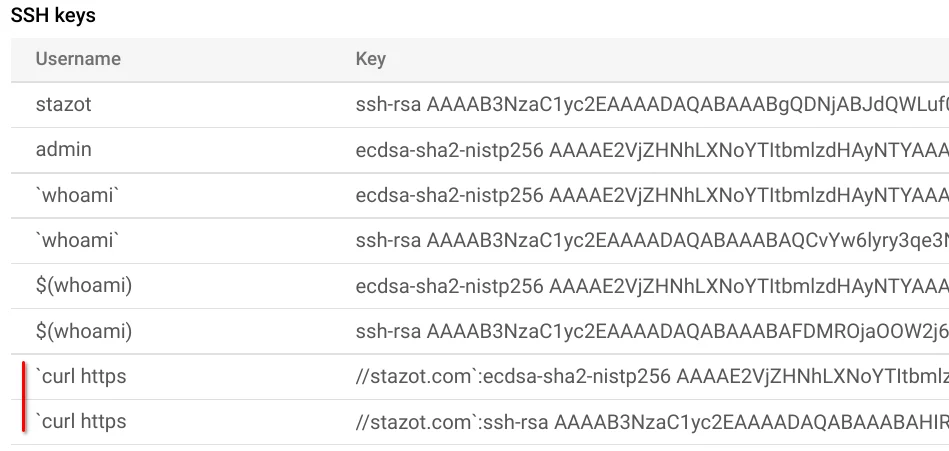
SSH keys of the instance
The username field contained curl http, and the SSH key field contained stazot.com`:ssh-key-value. That was the clue: the server was using the colon symbol : as a delimiter. Anything before : was treated as the username, and everything after : was treated as the SSH key for that user. In theory, this would let an attacker inject both a username and their own public SSH key. It was possible because, as noted earlier, the server accepted this input in a GET request and had no CSRF protection.
Step 3: Inject a username and SSH key
A victim opening a malicious link would therefore add the attacker's username and SSH key into their compute instance. To confirm the bug, the following URL was constructed with attacker:{URL-ENCODED-SSH-PUBLIC-KEY} as the payload:
https://ssh.cloud.google.com/v2/ssh/projects/{PROJECT-NAME}/zones/{INSTANCE-ZONE}/instances/{INSTANCE-NAME}?newLinuxUsername=attacker:{URL-ENCODED-SSH-PUBLIC-KEY}
The link was opened as the victim, and then a login to the compute instance as the attacker was attempted. It did not work. The reason was that the SSH key added this way was appended with the SSH key that Google generated in the backend.
Step 4: Break out with newline characters
To fix that, newline return characters were appended to the payload:
https://ssh.cloud.google.com/v2/ssh/projects/{PROJECT-NAME}/zones/{INSTANCE-ZONE}/instances/{INSTANCE-NAME}?newLinuxUsername=attacker:{URL-ENCODED-SSH-PUBLIC-KEY}%0d%0a
Once the victim opened this link, a login to that instance as the attacker was attempted, and it worked. The attacker was logged into the target machine with sudo privileges.
Root cause
The behaviour existed to facilitate authorisation via SSH-in-browser. Because the browser acts like an SSH client, it needs an authorised SSH key to log into the instance. Compute Engine handles this by creating an SSH key for each user in the instance who uses SSH-in-browser and storing it in the instance metadata. When the user logs in through SSH-in-browser, the instance fetches all the authorised SSH keys from the metadata server and logs the user in.
The behaviour is that the colon is used as the delimiter between the username and the SSH key, and the value is accepted over a GET request with no CSRF token. That combination lets an attacker supply both halves of the entry. The trailing %0d%0a was added because the backend appends its own generated key to whatever is supplied. The report does not describe the server-side code, so the exact parsing and storage implementation is not shown.
Impact
An attacker who can get a Compute Engine user to open a crafted link can add their own username and public SSH key to that user's instance, then log in to the machine with sudo privileges. The researchers characterise the overall impact as a single-click RCE in a victim user's Compute Engine instance.
Fix
It records only the disclosure outcome: a $5000 bounty plus a $1000 bonus from Google VRP, with the rationale "Bug of the week! Cool bug :D".
Timeline:
Jul 14, 2022 - Reported
Jul 15, 2022 - Closed as Intended Behavior
Jul 15, 2022 - Further explanation was sent
Jul 16, 2022 - Unable to reproduce
Jul 16, 2022 - PoC video was sent
Jul 23, 2022 - 🎉 Nice catch!
Jul 26, 2022 - Rewarded a $6000 bounty
Variants to test
- Delimiter injection in other user-management fields. Any feature that stores a username and an associated key or value in one delimited record is worth probing. Send a value containing the delimiter (here
:) and inspect the resulting listing in the UI or metadata. A positive result is the value being split into two separate fields, with your text appearing in the key or value column. - Newline termination against appended data. Where a backend appends generated data to your input, try
%0d%0a(and%0a) at the end of the payload. A positive result is your entry surviving intact instead of being merged with the generated suffix. - CSRF-free state changes over GET. Look for GET endpoints that create users, keys or other persistent objects without a random token. A positive result is a crafted link that, when opened by another user, creates the object in their account or instance.
- Second-order execution checks. When direct payloads such as
$(whoami)do nothing, submit a payload that would produce an observable outbound request if executed later, as was done here withcurl https://stazot.com, and watch for the callback. A positive result is a hit from the target infrastructure.
What happened, in plain words
Two security researchers, Sivanesh Ashok and Sreeram KL, spent a lot of time in 2022 looking for bugs in Google products. They started with everyday apps such as Google Drive, then decided to look at Google Cloud, which is Google's collection of services for running servers and other infrastructure in the cloud. The first bug they found there let an attacker log in to a victim's virtual machine with sudo privileges by getting the victim to click a single link. They call this a single-click RCE, which stands for remote code execution: the attacker ends up able to run commands on someone else's machine.
This article walks through that bug from the beginning, explaining each idea as it comes up, so you can follow it even if you have never done security work before.
The product and the feature
The product involved is Compute Engine. Think of it as renting a computer that lives in a Google data centre instead of on your desk. You can start it, stop it, and connect to it over the internet. Each of these rented computers is called an instance.
To work on an instance you normally connect to it using a protocol called SSH (Secure Shell). SSH is a way to open a text-based session on a remote computer: you type commands, and they run on the remote machine, not on your own. Traditionally you use an SSH program on your computer to do this.
Google Cloud offers a shortcut called SSH-in-browser. Instead of installing anything, you open a page in your web browser and get a terminal window connected to your instance. The researchers note that visually this interface looks very similar to Cloud Shell, which is another browser-based terminal Google offers.
SSH-in-browser console
Finding the interesting option
While clicking through the options of SSH-in-browser, one feature caught the researchers' attention: Change Linux Username.
Getting username input from the user
This dialog asks you to type a username. That name is then sent to Google's server as part of the web address, in what is called a GET parameter. A GET parameter is the part of a URL after a question mark: in example.com/page?colour=blue, colour is the parameter name and blue is its value. Parameters are just data the browser sends to the server along with the request.
The parameter here is called newLinuxUsername. If the username you type does not already exist on the instance, the backend creates a new user account with that name and logs you in as that user. The resulting URL looks like this:
https://ssh.cloud.google.com/v2/ssh/projects/{PROJECT-NAME}/zones/{INSTANCE-ZONE}/instances/{INSTANCE-NAME}?newLinuxUsername={USERNAME}
Line by line, in plain words:
https://ssh.cloud.google.com/v2/ssh/is the address of Google's SSH-in-browser service.projects/{PROJECT-NAME}identifies which Google Cloud project the instance belongs to. A project is a container that groups your cloud resources together.zones/{INSTANCE-ZONE}/instances/{INSTANCE-NAME}identifies the specific instance. A zone is the physical location, roughly, where the instance runs.?newLinuxUsername={USERNAME}is the GET parameter carrying the username you typed. The curly-bracket placeholders are just stand-ins for real values.
Two things looked wrong to the researchers.
First, there was no random token or CSRF protection. CSRF stands for cross-site request forgery: an attack where a malicious website or link causes your browser to perform an action on another site while you are logged in there. The usual defence is a random, unguessable value (a token) that must accompany the request, so that a link crafted by someone else cannot succeed. Without one, anyone could craft a link and send it to a Compute Engine user, and opening it would create a new user in that person's instance. On its own that is not very impactful, but it is worth noting.
Second, at surface level the feature looked like it was taking whatever the user typed and handing it to a Linux command called useradd or adduser, which are the standard commands for creating user accounts. If user input reaches a command like that without being cleaned up, you get command injection: the attacker slips extra commands into the input and the server runs them. That was the question the researchers wanted to answer.
Testing for command injection
The first payloads they tried were whoami and $(whoami). A payload is simply the malicious input an attacker sends. whoami is a Linux command that prints the name of the user the command is running as. The $(...) form tells a shell to run the command inside the brackets and substitute its output. If either payload were executed by the server, the researchers would have seen evidence of it. Nothing happened.
To check for second-order command execution, they tried curl https://stazot.com as the payload. Second-order means the input is not executed immediately but is stored somewhere and used later, so the effect shows up somewhere else. curl is a command-line tool for making web requests; if the server had run it, the researchers' own site would have received a request, which they could watch for. Again, nothing happened. So they went back to the Compute Engine instance page to look at other things.
The clue in the SSH keys section
Under the SSH Keys section, the usernames they had tried as payloads were listed. This section shows all the users of the instance and the SSH keys added or generated for each of them. An SSH key is a pair of cryptographic values: a public half and a private half. The public half is placed on the server to say "this person is allowed in", and the private half stays with the person and proves their identity when they connect. It works a bit like a lock and its only key: the server holds the lock, you keep the key.
Payloads such as whoami were displayed as they were typed, but the curl payload was listed in a strange way.
SSH keys of the instance
The username field contained curl http, and the SSH key field contained stazot.com`:ssh-key-value. That was the clue. The server was using the colon symbol : as a delimiter, meaning a separator that marks where one piece of data ends and the next begins. Anything before the colon was treated as the username, and everything after the colon was treated as the SSH key for that user. The payload curl https://stazot.com contains a colon after https, so the server split it in two: curl http became the username, and stazot.com plus whatever came after became the key.
In theory, this would let an attacker inject both a username and their own public SSH key. It was possible because, as noted earlier, the server accepted this input in a GET request and had no CSRF protection.
Injecting a username and an SSH key
A victim opening a malicious link would therefore add the attacker's username and SSH key into their compute instance. To confirm the bug, the researchers constructed the following URL with attacker:{URL-ENCODED-SSH-PUBLIC-KEY} as the payload:
https://ssh.cloud.google.com/v2/ssh/projects/{PROJECT-NAME}/zones/{INSTANCE-ZONE}/instances/{INSTANCE-NAME}?newLinuxUsername=attacker:{URL-ENCODED-SSH-PUBLIC-KEY}
What each part does:
- The first part of the URL is the same SSH-in-browser address as before, pointing at the victim's instance.
newLinuxUsername=is the parameter the feature reads.attacker:is the username the attacker wants, followed by the colon that the server treats as the separator.{URL-ENCODED-SSH-PUBLIC-KEY}is the attacker's public SSH key, encoded so it can travel safely inside a URL. URL encoding replaces characters that have special meaning in a web address with a percent sign and a code, so the address does not break.
The idea is that the server splits on the colon, sees attacker as the username and the attacker's key as the key, and stores both. Then the attacker can connect to the victim's machine using the matching private key.
The link was opened as the victim, and then a login to the compute instance as the attacker was attempted. It did not work. The reason was that the SSH key added this way was appended with the SSH key that Google generated in the backend, which corrupted the key. In other words, the server did not store the attacker's key on its own; it stuck Google's own generated key onto the end of it.
Breaking out with newline characters
To fix that, newline return characters were appended to the payload:
https://ssh.cloud.google.com/v2/ssh/projects/{PROJECT-NAME}/zones/{INSTANCE-ZONE}/instances/{INSTANCE-NAME}?newLinuxUsername=attacker:{URL-ENCODED-SSH-PUBLIC-KEY}%0d%0a
This is the same URL as before with %0d%0a added at the end. Those two codes are URL-encoded carriage return and line feed, the characters that mark the end of a line in a text file. Adding them made the login as the attacker work. The attacker's key stays intact and valid.
Once the victim opened this link, a login to that instance as the attacker was attempted, and it worked. The attacker was logged into the target machine with sudo privileges. sudo means the ability to run commands as the administrator, so the attacker had full control of the machine.
Why the bug existed
The behaviour existed to make authorisation work in SSH-in-browser. Authorisation is the process of deciding whether someone is allowed to do something. Because the browser acts like an SSH client, it needs an authorised SSH key to log into the instance.
Compute Engine handles this by creating an SSH key for each user in the instance who uses SSH-in-browser and storing it in the instance metadata. Metadata is a store of settings and information that the instance itself can read, a bit like a noticeboard inside the machine that the machine checks when it needs to know something. When the user logs in through SSH-in-browser, the instance fetches all the authorised SSH keys from the metadata server and logs the user in.
The behaviour is that the colon is used as the delimiter between the username and the SSH key, and the value is accepted over a GET request with no CSRF token. That combination lets an attacker supply both halves of the entry. The trailing %0d%0a was added because the backend appends its own generated key to whatever is supplied. The report does not describe the server-side code, so the exact parsing and storage implementation is not shown.
Impact
An attacker who can get a Compute Engine user to open a crafted link can add their own username and public SSH key to that user's instance, then log in to the machine with sudo privileges. The attack is single-click and requires the victim to open the link; the report does not describe any further interaction. The researchers characterise the overall impact as a single-click RCE in a victim user's Compute Engine instance.
Fix
It records only the disclosure outcome: a $5000 bounty plus a $1000 bonus from Google VRP, with the rationale "Bug of the week! Cool bug :D". A bug bounty is a programme where companies pay researchers for reporting security problems, and Google VRP is Google's own such programme (VRP stands for Vulnerability Reward Program).
Timeline:
Jul 14, 2022 - Reported
Jul 15, 2022 - Closed as Intended Behavior
Jul 15, 2022 - Further explanation was sent
Jul 16, 2022 - Unable to reproduce
Jul 16, 2022 - PoC video was sent
Jul 23, 2022 - 🎉 Nice catch!
Jul 26, 2022 - Rewarded a $6000 bounty
Read line by line: the report was filed on 14 July 2022. The next day it was closed as intended behaviour, meaning Google initially said the feature was working as designed. The researchers sent a further explanation the same day. On 16 July Google said it could not reproduce the issue, and the researchers sent a PoC video (proof of concept: a recording showing the attack actually working). On 23 July Google accepted it with a celebratory message, and on 26 July a $6000 bounty was awarded.
Variants to test
These are the general lessons the bug suggests, written as things to try on other systems.
- Delimiter injection in other user-management fields. Any feature that stores a username and an associated key or value in one delimited record is worth probing. Send a value containing the delimiter (here
:) and inspect the resulting listing in the UI or metadata. A positive result is the value being split into two separate fields, with your text appearing in the key or value column. - Newline termination against appended data. Where a backend appends generated data to your input, try
%0d%0a(and%0a) at the end of the payload. A positive result is your entry surviving intact instead of being merged with the generated suffix. - CSRF-free state changes over GET. Look for GET endpoints that create users, keys or other persistent objects without a random token. A positive result is a crafted link that, when opened by another user, creates the object in their account or instance.
- Second-order execution checks. When direct payloads such as
$(whoami)do nothing, submit a payload that would produce an observable outbound request if executed later, as was done here withcurl https://stazot.com, and watch for the callback. A positive result is a hit from the target infrastructure.
Glossary
- API: a defined way for one piece of software to talk to another, like a service counter where you make a request and get a response in a fixed format.
- Authorisation: the process of deciding whether someone is allowed to do something.
- Bug bounty: a programme where a company pays researchers for finding and reporting security problems.
- Carriage return / line feed: the two characters (
%0dand%0awhen URL-encoded) that mark the end of a line in text. - Cloud Shell: a browser-based terminal offered by Google Cloud.
- Command injection: a vulnerability where attacker input is run as commands by the server.
- Compute Engine: Google Cloud's service for renting virtual machines (instances).
- CSRF (cross-site request forgery): an attack where a link or site makes your browser perform an action on another site while you are logged in; random tokens are the usual defence.
- CSRF token: a random, unguessable value that must accompany a request so that links crafted by others cannot succeed.
- curl: a command-line tool for making web requests.
- Delimiter: a separator character that marks where one piece of data ends and the next begins, here the colon
:. - GET parameter: data sent to a server as part of the URL, after the question mark.
- Google VRP: Google's Vulnerability Reward Program, its bug bounty programme.
- Instance: a single virtual machine running in the cloud.
- Instance metadata: a store of settings and information that the instance itself can read.
- Payload: the malicious input an attacker sends.
- PoC (proof of concept): a demonstration, often a video, showing that an attack actually works.
- Project: a container in Google Cloud that groups your resources together.
- RCE (remote code execution): a vulnerability that lets an attacker run their own commands on someone else's machine.
- Second-order command execution: execution that happens later, after the input has been stored, rather than immediately.
- SSH (Secure Shell): a protocol for opening a text-based session on a remote computer.
- SSH key: a pair of cryptographic values, public and private, used to prove identity when connecting over SSH; the server holds the public half, you keep the private half.
- SSH-in-browser: a Google Cloud feature that lets you connect to an instance over SSH from a web browser.
- sudo: the ability to run commands as the administrator of a machine.
- Token: a random, unguessable value used to prove a request is legitimate.
- URL encoding: replacing characters that have special meaning in a web address with a percent sign and a code.
- useradd / adduser: standard Linux commands for creating user accounts.
- whoami: a Linux command that prints the name of the user running it.
- Zone: the physical location where an instance runs.