Google VRP (Acquisitions) — [Insecure Direct Object Reference] 2nd
An IDOR in AppSheet's email template feature let an attacker swap their own document ID for a victim's ID and cause documents to be written into the victim's Google Docs or Drive. The attacker could spam a victim's Drive with unwanted documents.
 Published on caesarevan23.medium.com
Hi All!, Yuuppp…It’s me again! XD.
The full write-up lives on its author's site
It belongs to its author, so we link to it rather than copy it. The other two tabs are our own rewrites, checked against it.
Context
AppSheet is a no-code development platform that lets users build mobile, tablet and web applications on top of data sources such as Google Drive, Dropbox, Office 365 and other cloud-based spreadsheet and database platforms. At the time of the report it was one of Google's acquisitions, which is why the finding went through the Google VRP programme.
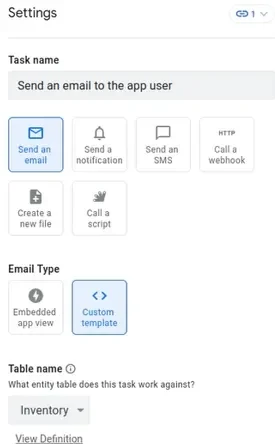
The feature involved is a menu that sends a template to generate an email, and the template is written into the user's Google Docs or Drive. In normal use, a user picks a template and the platform creates the resulting document in that user's own Drive.
Setup
Two AppSheet accounts were created for the test:
- Account B, the attacker.
- Account C, the victim.
The only tool mentioned is Burp Suite, specifically its Intruder module, used to swap the identifier in the request. No versions of AppSheet, Burp Suite or any browser are given in the report.
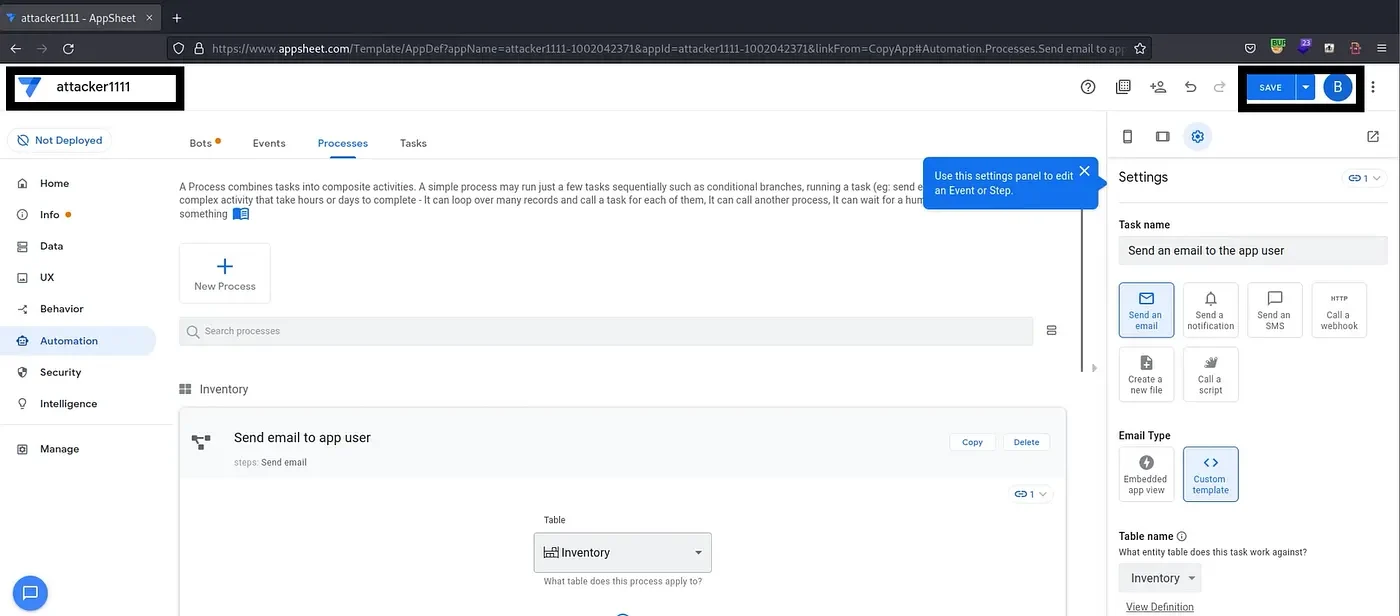
Attacker "B"
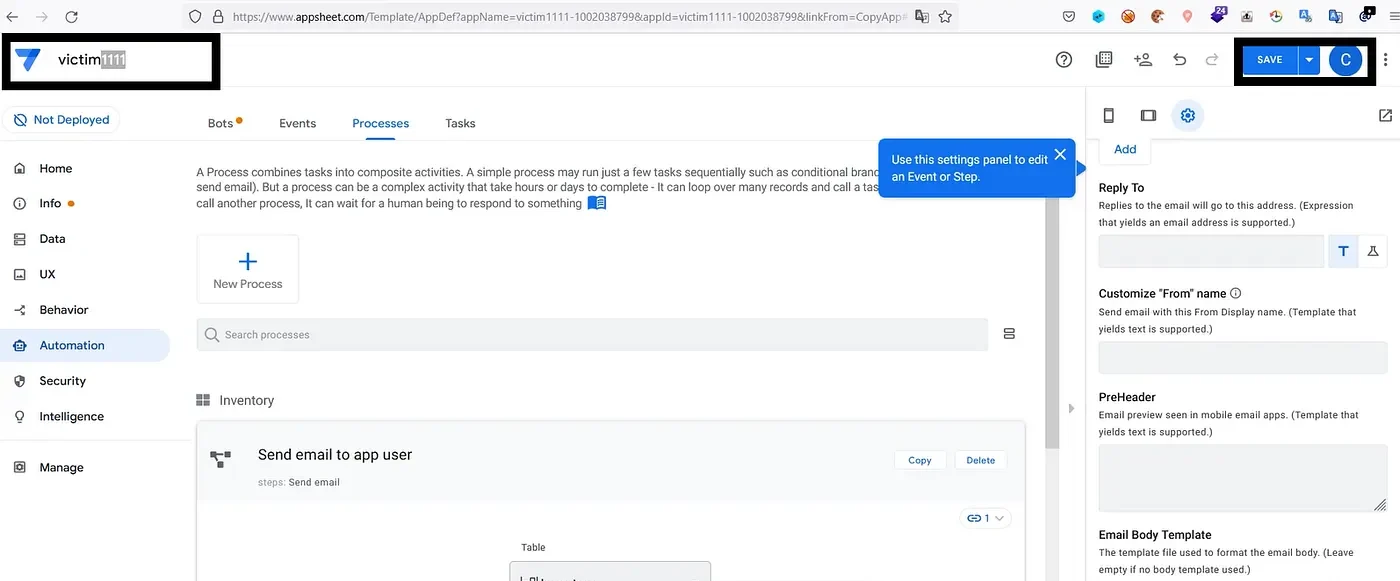
Victim "C"
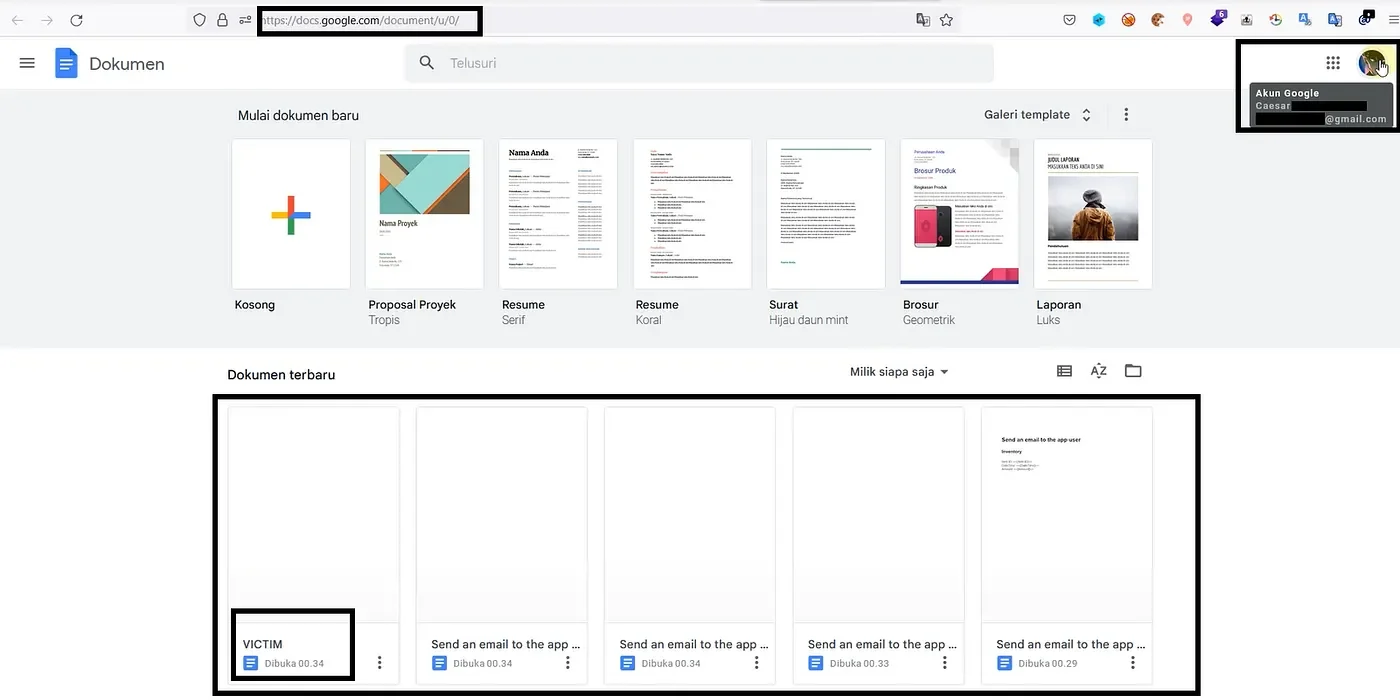
On the victim account, the last document is named "Victim", which makes it easy to recognise when something new lands in that account's Drive.
Finding it
While testing the menus, the researcher found the menu that sends a template to generate an email and writes the template into Google Docs or Drive. The request behind that action carries an identifier for the document or template being used. The request carries an identifier, and changing it to the victim's identifier made the platform act on the victim's resources. That is the direct object reference the report is about.
Exploitation
Step 1: Compare the identifiers of both accounts
The two accounts were set up so that the identifier in the request could be compared side by side. The report shows the ID difference between the attacker and the victim, then the request from the attacker and the request from the victim.

ID Attacker & Victim
Request from the attacker:
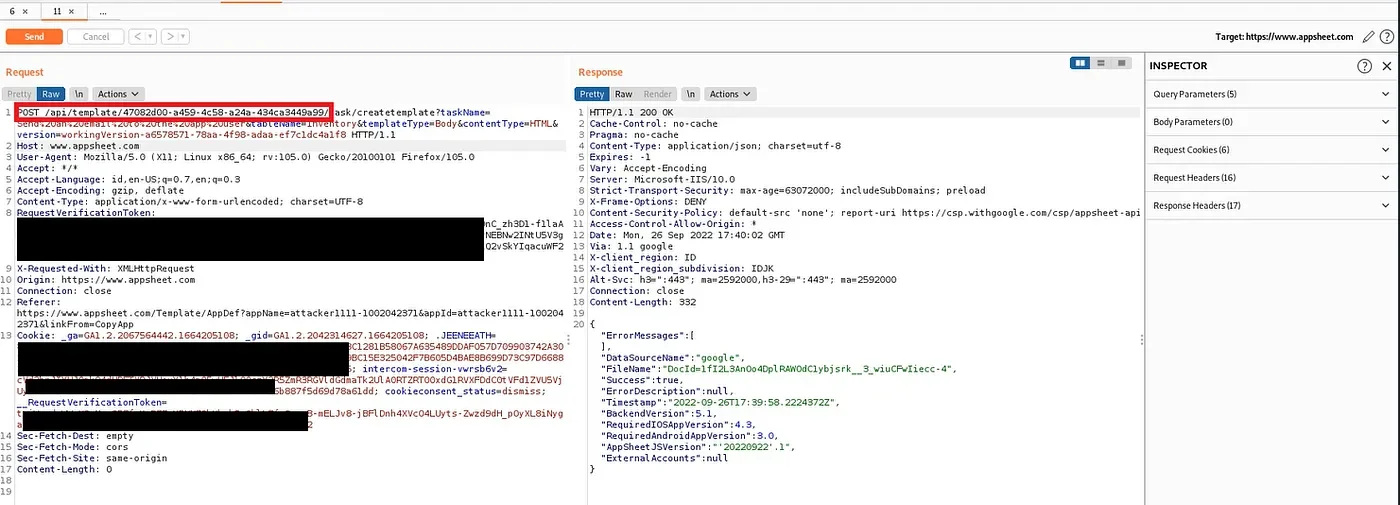
ID Attacker
Request from the victim:
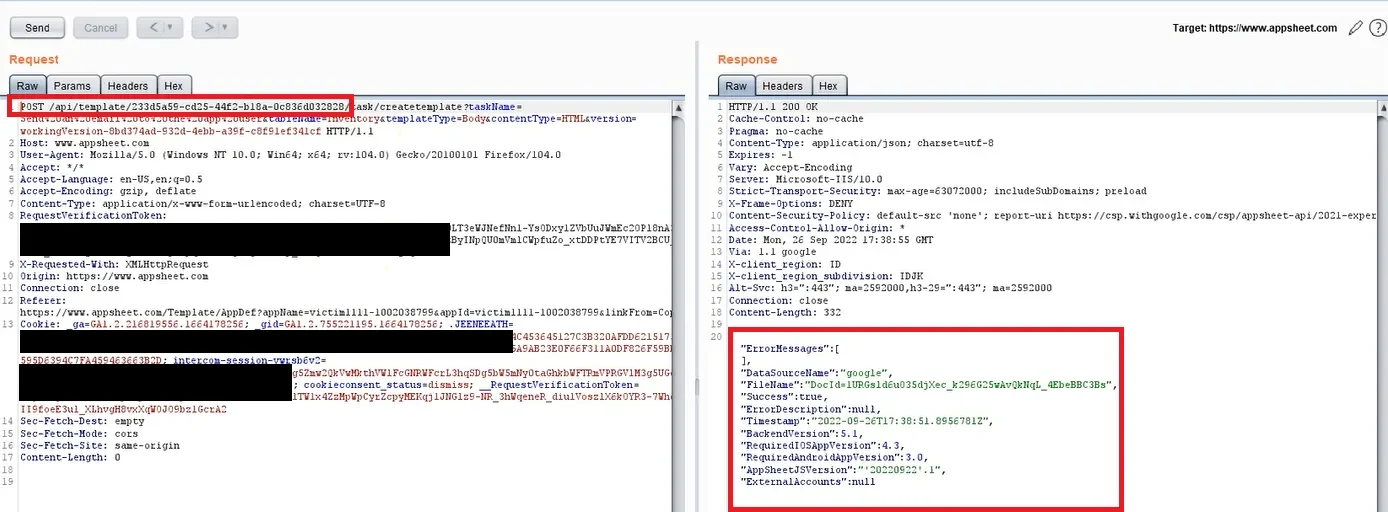
ID Victim
The report shows the request from each account side by side. The report does not reproduce the raw request text, so the exact endpoint, parameters and headers are not available here.
Step 2: Replace the attacker ID with the victim ID in Intruder
Burp Suite's Intruder was used to change the "ID" of the "Attacker ID" to the ID of the "Victim".
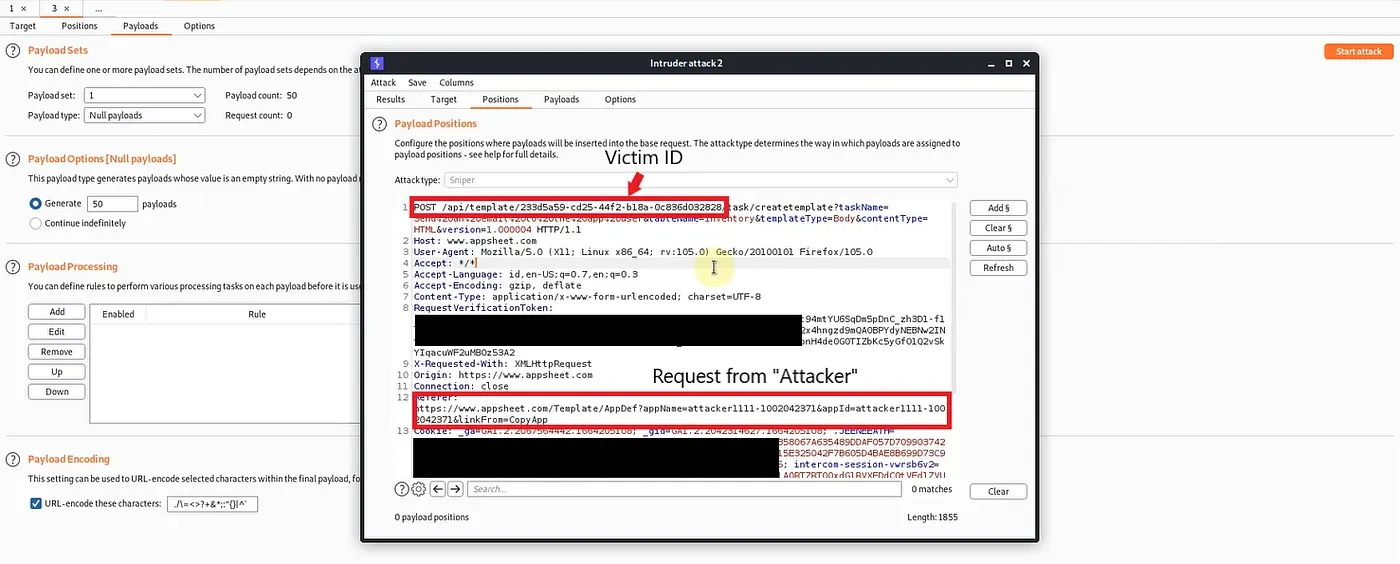
Intruder BurpSuite
Step 3: Read the response
The response shows a successful result, and it also contains a response related to the Docs sent to the victim's Docs. The response image is labelled with a file name and document ID.
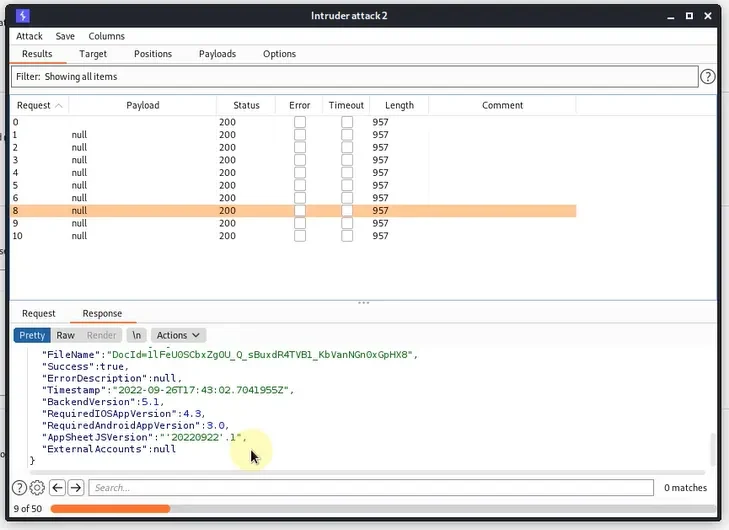
FileName : DocId
Step 4: Confirm on the victim account
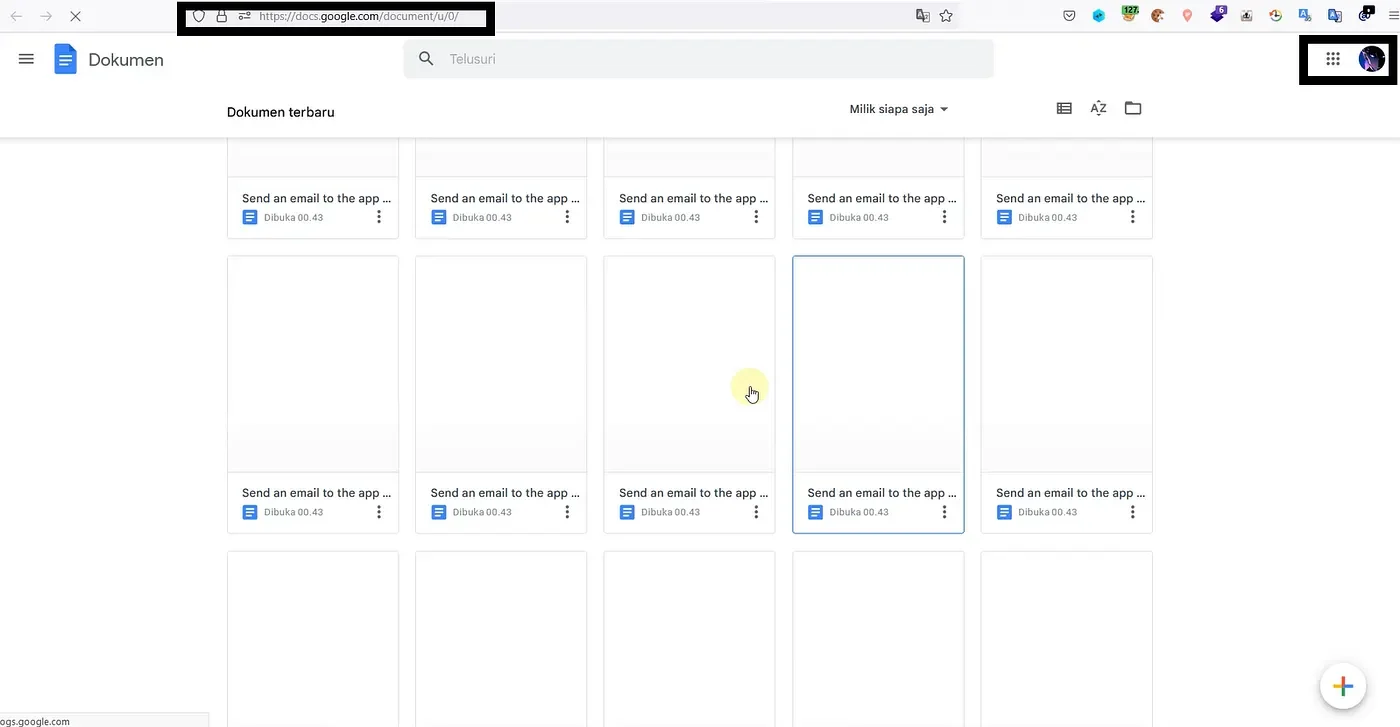
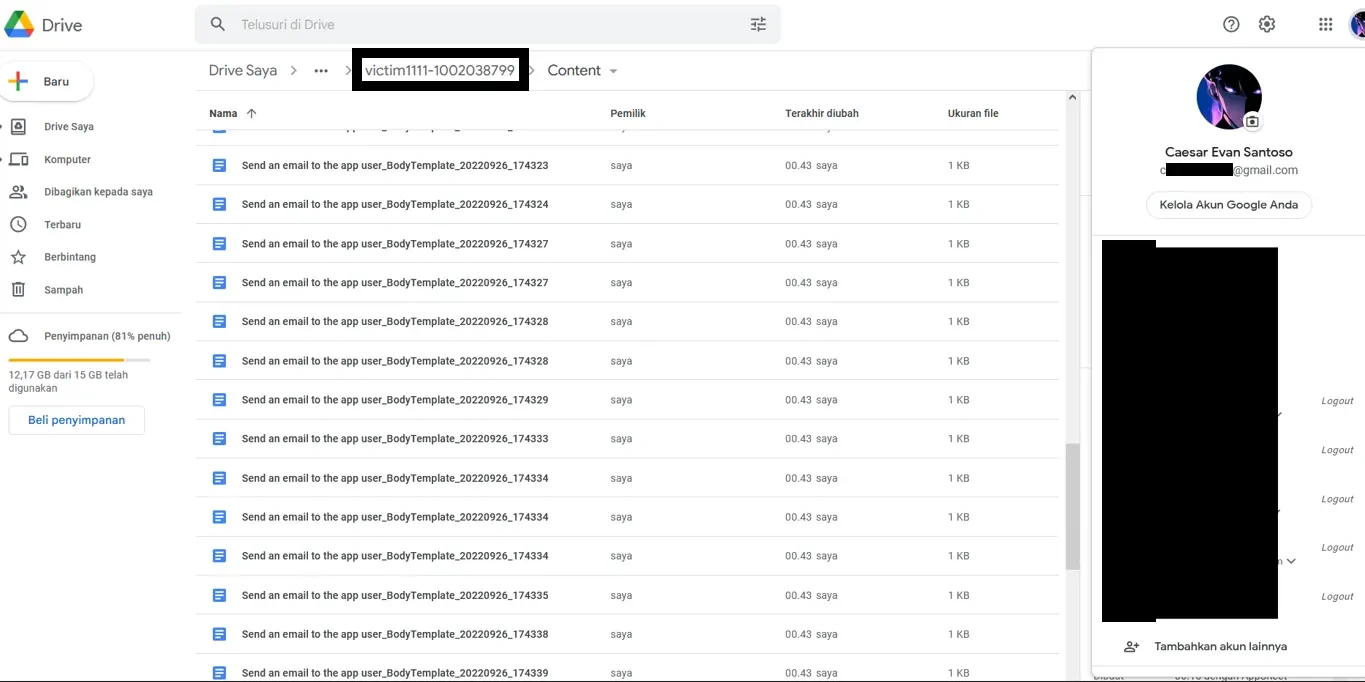
Looking at the Docs belonging to the victim account shows the documents that arrived as a result of the modified request. The victim's Docs received spam as a result of the modified request.
Notes from the Q&A
Two practical points are recorded in the report:
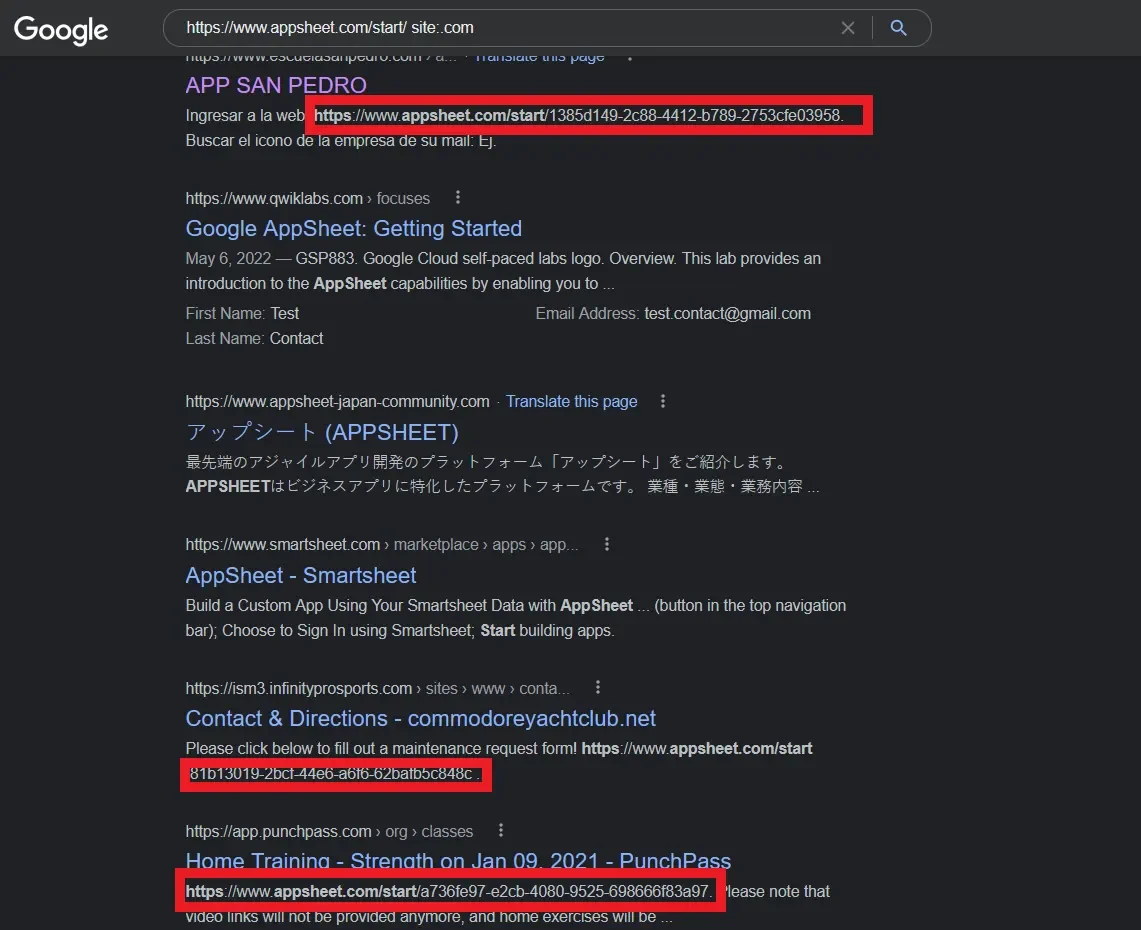
- Finding the ID. The identifiers can be found through Google Search.
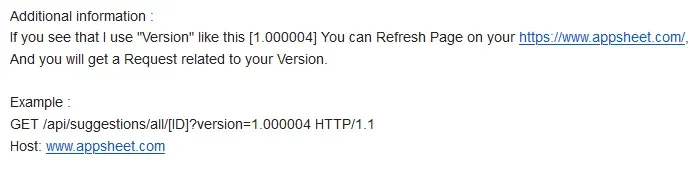
- The "Version" value. You do not have to follow the victim's version; your own version works.
Root cause
The request that generates the document accepts an object identifier from the client and acts on it without checking that the object belongs to the authenticated caller. Changing the identifier to the victim's made the platform write into the victim's Docs or Drive. The report does not include the server-side code, so the exact check that was missing is not shown; The report does not show the server-side code or the check that was missing..
Impact
An attacker with a normal AppSheet account can target another user's Google Docs or Drive, provided the attacker knows the victim's identifier. The effect shown in the report is that documents generated from the template are written into the victim's Drive, and repeating the request spams that Drive. The report does not describe reading the victim's existing documents, deleting them, or any other action beyond the write and the resulting spam.
Fix
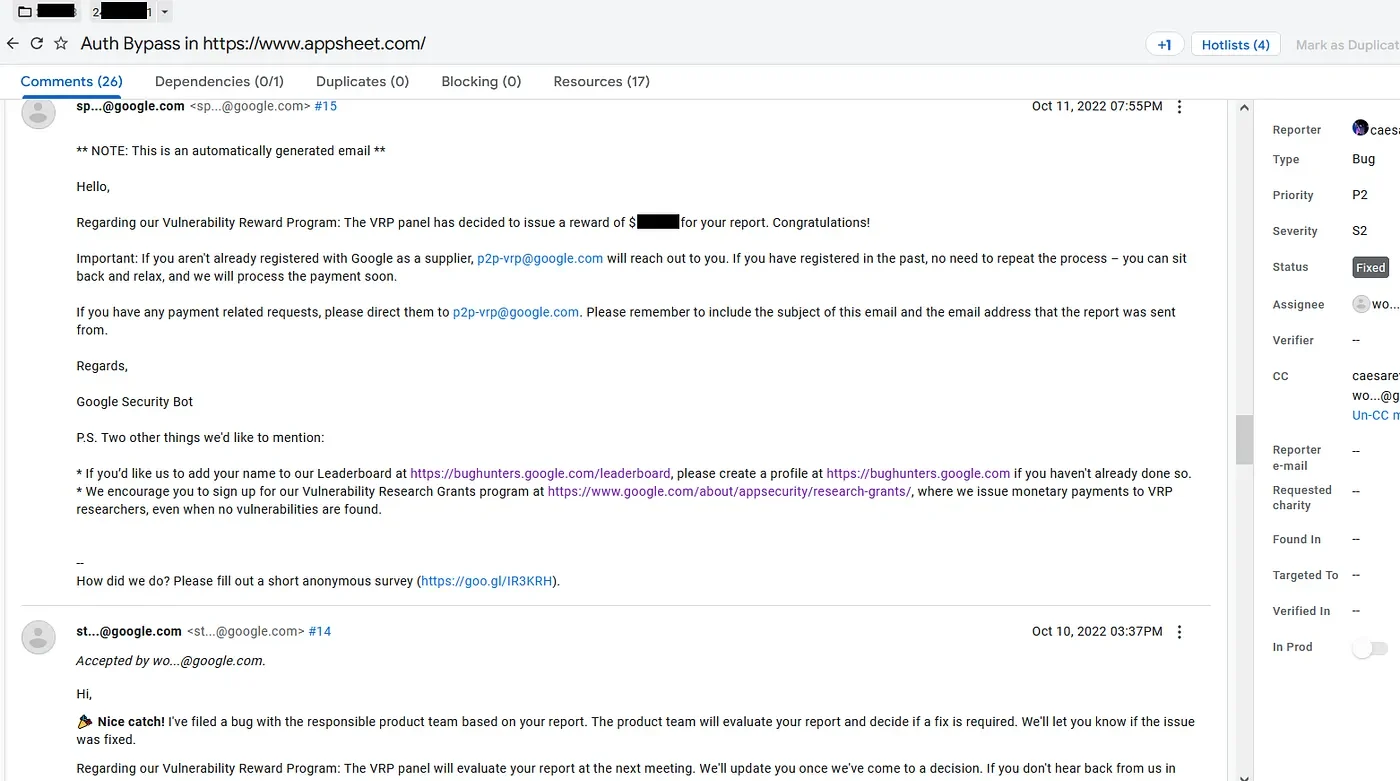
The report records that the issue was fixed on 6 November 2022.
Timeline
27 Sep 2022 : Get IDOR and Report to Google 10 Okt 2022 : Nice Catch! 11 Okt 2022 : The VRP panel has decided to issue a reward of $XXX for my report 6 Nov 2022 : Fixed!
Variants to test
- Template and document generation endpoints. On any platform that creates files from templates, capture the request and swap the object identifier for one belonging to a second account. A positive result is a successful response that names a file created in the second account.
- Version or revision parameters. Change the version value in the request to your own while keeping the victim's identifier. A positive result is that the request still succeeds with your own version value.
- Identifier discovery. Check whether identifiers are exposed through search engines or other public sources. A positive result is a set of identifiers that map to accounts you do not control.
- Repeat requests. Send the same modified request repeatedly. A positive result is generated documents appearing in the victim's Drive.
What happened, in plain words
A security researcher found a bug in AppSheet, a Google-owned service that lets people build simple apps without writing code. The bug let one user make the service create documents in another user's Google Drive by changing an identifier in a request. The researcher reported it to Google, got a reward, and Google fixed it. This article walks through what was done, step by step, for someone who has never done security testing before.
Background: what AppSheet is and what the feature does
AppSheet is a no-code development platform. "No-code" means you can build a mobile, tablet or web application by describing what you want, rather than writing programming code. The data behind those apps can come from Google Drive, Dropbox, Office 365, or other cloud-based spreadsheet and database services. At the time of the report, AppSheet was one of Google's acquisitions, which is why the finding went through the Google VRP programme. VRP stands for Vulnerability Reward Program: a scheme where Google pays people who report security bugs in its products.
The feature involved is a menu that sends a template to generate an email, and the template is written into the user's Google Docs or Drive. In normal use, you pick a template, and the platform creates the resulting document in your own Drive. Think of it like a photocopier that takes a form (the template) and puts the finished copy into your own filing cabinet (your Drive). The bug is that changing the identifier made the copy land in someone else's filing cabinet.
Setting up two accounts
To test whether one user can affect another, you need two separate accounts: one to act as the attacker and one to act as the victim. The researcher created two AppSheet accounts:
- Account B, the attacker.
- Account C, the victim.
The only tool mentioned is Burp Suite, specifically its Intruder module. Burp Suite is a program that sits between your browser and the website, letting you see and change the requests your browser sends. Intruder is the part of Burp that can send many requests automatically, changing one part each time. No versions of AppSheet, Burp Suite or any browser are given in the report.
Attacker "B"
Victim "C"
On the victim account, the last document is named "Victim". That makes it easy to recognise when something new lands in that account's Drive: if a document called "Victim" appears, or if new documents appear after the last one, you know the request worked.
Finding the feature
While testing the menus, the researcher found the menu that sends a template to generate an email and writes the template into Google Docs or Drive. The request behind that action carries an identifier for the document or template being used. An identifier (often called an ID) is a unique label for a thing, like a student number or a parcel tracking number. Changing the identifier to another user's identifier made the platform act on that user's resources. That is the direct object reference the report is about. In security terms, this class of bug is called Insecure Direct Object Reference, or IDOR: the application takes an object reference (the ID) from the user and uses it directly, without checking that the user is allowed to access that object.
Exploitation
Step 1: Compare the identifiers of both accounts
The two accounts were set up so that the identifier in the request could be compared side by side. The report shows the ID difference between the attacker and the victim, then the request from the attacker and the request from the victim.
ID Attacker & Victim
Request from the attacker:
ID Attacker
Request from the victim:
ID Victim
The report shows the request from each account side by side. The report does not reproduce the raw request text, so the exact endpoint, parameters and headers are not available here. An endpoint is the address (URL) that a request is sent to. Parameters are the pieces of information attached to the request, like the fields in a form. Headers are extra information sent along with the request, such as what kind of browser you are using or a cookie that proves who you are.
Step 2: Replace the attacker ID with the victim ID in Intruder
Burp Suite's Intruder was used to change the "ID" of the "Attacker ID" to the ID of the "Victim". In plain terms: Burp Suite's Intruder was used to change the attacker's ID to the victim's ID.. This is the core of the test: if the server accepts the request and acts on the victim's ID, the access control is missing.
Intruder BurpSuite
Step 3: Read the response
The response shows a successful result, and it also contains a response related to the Docs sent to the victim's Docs. The response image is labelled with a file name and document ID. A response is what the server sends back: a status code (like 200 for success) and often some data. A successful response and the document appearing in the victim's Docs show the request worked.
FileName : DocId
Step 4: Confirm on the victim account
Looking at the Docs belonging to the victim account shows the documents that arrived as a result of the modified request. The victim's Docs received spam as a result of the modified request. Spamming here means flooding someone's storage with unwanted files, which can be annoying and can use up their space.
Notes from the Q&A
Two practical points are recorded in the report:
- Finding the ID. The identifiers can be found through Google Search. The identifiers can be found through Google Search.
- The "Version" value. You do not have to follow the victim's version; your own version works. In some requests there is a version number that tells the server which revision of a document or template you are working with. The report says you can use your own version value and do not have to follow the victim's version.
Root cause
The request that generates the document accepts an object identifier from the client and acts on it without checking that the object belongs to the authenticated caller. Authenticated means the server knows who you are, usually because you logged in and your browser sends a session cookie or token. A session cookie is a small piece of data that your browser stores and sends with each request to prove you are logged in; a token is similar but often used in APIs. Changing the identifier to the victim's made the platform write into the victim's Docs or Drive. The report does not include the server-side code, so the exact check that was missing is not shown; The report does not show the server-side code or the check that was missing.. Client-side checks are ones that run in your browser, which an attacker can bypass by using a tool like Burp to send requests directly.
Impact
An attacker with a normal AppSheet account can target another user's Google Docs or Drive, provided the attacker knows the victim's identifier. The effect shown in the report is that documents generated from the template are written into the victim's Drive, and repeating the request spams that Drive. The report does not describe reading the victim's existing documents, deleting them, or any other action beyond the write and the resulting spam.
Fix
The report records that the issue was fixed on 6 November 2022. In other words, the server should check, for every request, that the ID being used belongs to the person making the request.
Timeline
27 Sep 2022 : Get IDOR and Report to Google 10 Okt 2022 : Nice Catch! 11 Okt 2022 : The VRP panel has decided to issue a reward of $XXX for my report 6 Nov 2022 : Fixed!
Variants to test
If you want to look for similar bugs, here are some starting points:
- Template and document generation endpoints. On any platform that creates files from templates, capture the request and swap the object identifier for one belonging to a second account. A positive result is a successful response that names a file created in the second account.
- Version or revision parameters. Change the version value in the request to your own while keeping the victim's identifier. A positive result is that the request still succeeds with your own version value.
- Identifier discovery. Check whether identifiers are exposed through search engines or other public sources. A positive result is a set of identifiers that map to accounts you do not control.
- Repeat requests. Send the same modified request repeatedly. A positive result is generated documents appearing in the victim's Drive.
Glossary
- API: Application Programming Interface; a set of rules that lets one program talk to another, often by sending requests to specific addresses.
- AppSheet: A no-code development platform for building mobile, tablet and web applications from data sources like Google Drive, Dropbox and Office 365.
- Attacker: The person trying to exploit a weakness, here account B.
- Authenticated: Having proven your identity to a system, usually by logging in.
- Burp Suite: A tool that intercepts and modifies requests between your browser and a website.
- Client: The program you use, such as your browser, which sends requests to a server.
- Cookie: A small piece of data stored by your browser and sent with requests, often used to keep you logged in.
- Endpoint: The address (URL) that a request is sent to.
- Header: Extra information sent with a request or response, such as the browser type or a cookie.
- ID: Identifier; a unique label for an object, like a document or user.
- IDOR: Insecure Direct Object Reference; a bug where an application uses an identifier supplied by the user without checking that the user is allowed to access that object.
- Intruder: A Burp Suite module that automates sending requests with changing values.
- Parameter: A piece of information attached to a request, like a field in a form.
- Request: A message sent from a client to a server asking for something.
- Response: The message a server sends back, including a status code and often data.
- Root cause: The underlying reason a bug exists.
- Server: The computer that receives requests and sends responses.
- Session: A period of interaction between a user and a system, often tracked by a cookie or token.
- Spam: Unwanted or repeated content, here documents flooding a Drive.
- Token: A piece of data, similar to a cookie, used to prove identity, often in APIs.
- Version: A number or label indicating a particular revision of a document or template.
- Victim: The person being targeted, here account C.
- VRP: Vulnerability Reward Program; a scheme that pays people for reporting security bugs.



