Google VRP: Insecure Direct Object Reference ($3133.70) | by Caesar Evan
An IDOR vulnerability in Google Data Studio's /persistTempReport endpoint allowed an attacker to change the sourceReportId parameter to access another user's template. The attacker could view and potentially edit another user's report template.
 Published on caesarevan23.medium.com
Hi All!!!, Yes… it’s me. As usual I want to give a story about how I find IDOR [Insecure Direct Object Reference] vulnerability on one of Google’s subdomains (https://datastudio.google.com/)
The full write-up lives on its author's site
It belongs to its author, so we link to it rather than copy it. The other two tabs are our own rewrites, checked against it.
Context
Google Data Studio (now Looker Studio) is a tool for displaying data so that it is easier to read, letting you build reports and dashboards that support planning and business decisions. The target here is the Data Studio web application at https://datastudio.google.com/, and specifically its template feature: a user picks a template, the application creates a working copy of it, and the user can then edit and share that copy as their own report.

The vulnerability described is an Insecure Direct Object Reference (IDOR) in the endpoint that persists a temporary report, /persistTempReport. The request carries a parameter, sourceReportId, which contains the template identifier. The identifier is taken from the request, and substituting another account's identifier was accepted by the server.
Setup
Two accounts were used, referred to in the write-up as account A and account B. Each account owns a template with its own identifier, and the goal is to show that account A can cause account B's template to be persisted by supplying B's identifier. The tooling is Burp Suite with Intercept enabled, used to pause and edit the request that the browser sends when a template is added to a report. No specific browser or Burp version is given.
Finding it
The researcher went through a large number of requests captured in Burp Suite and settled on /persistTempReport as the endpoint of interest. The reasoning is visible in the request flow: the template page the user lands on carries an identifier, but it is not the user's own template identifier, apparently a temporary identifier issued by Data Studio. When the user clicks through to add the template to a report, the request that follows contains the real template identifier in a parameter called sourceReportId. A parameter that names an object and is accepted from the client is exactly the shape of an IDOR, so the next step was to substitute a different account's identifier and see whether the server honoured it.
Exploitation
Step 1: Create a template from the template gallery
The first step was to open the Template page and select one of the available templates.
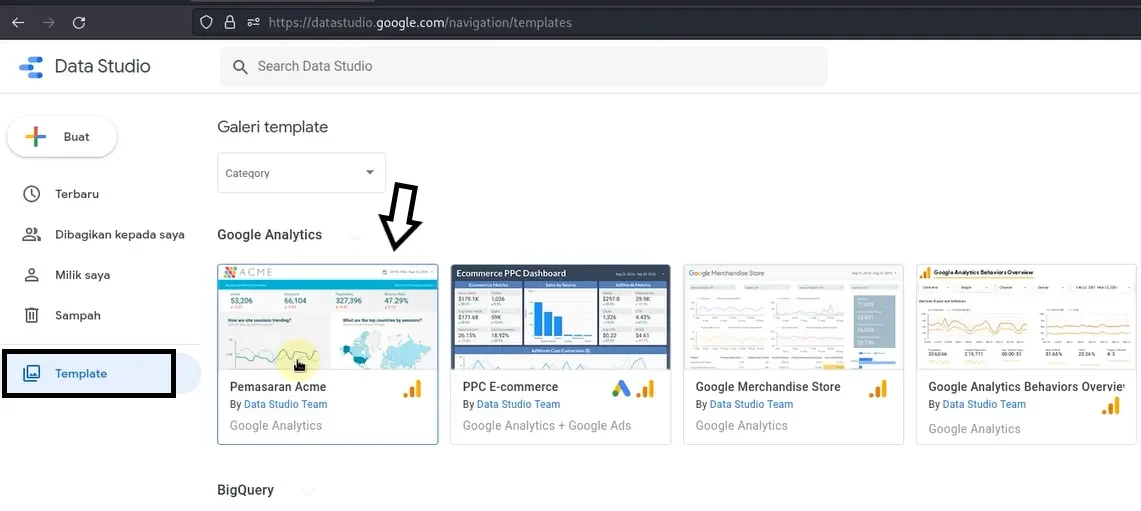
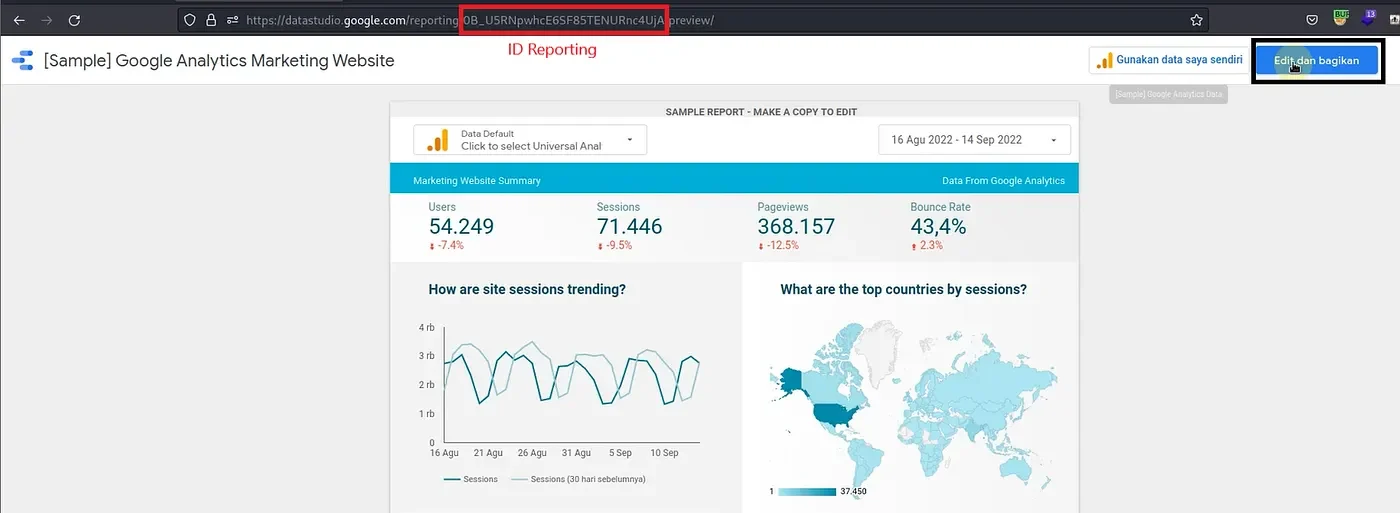
Selecting a template redirects to the template page that will be created, and the URL contains an identifier. That identifier is not the user's template identifier; the write-up suggests it may be a temporary identifier from Data Studio.
Step 2: Intercept the request that adds the template to a report
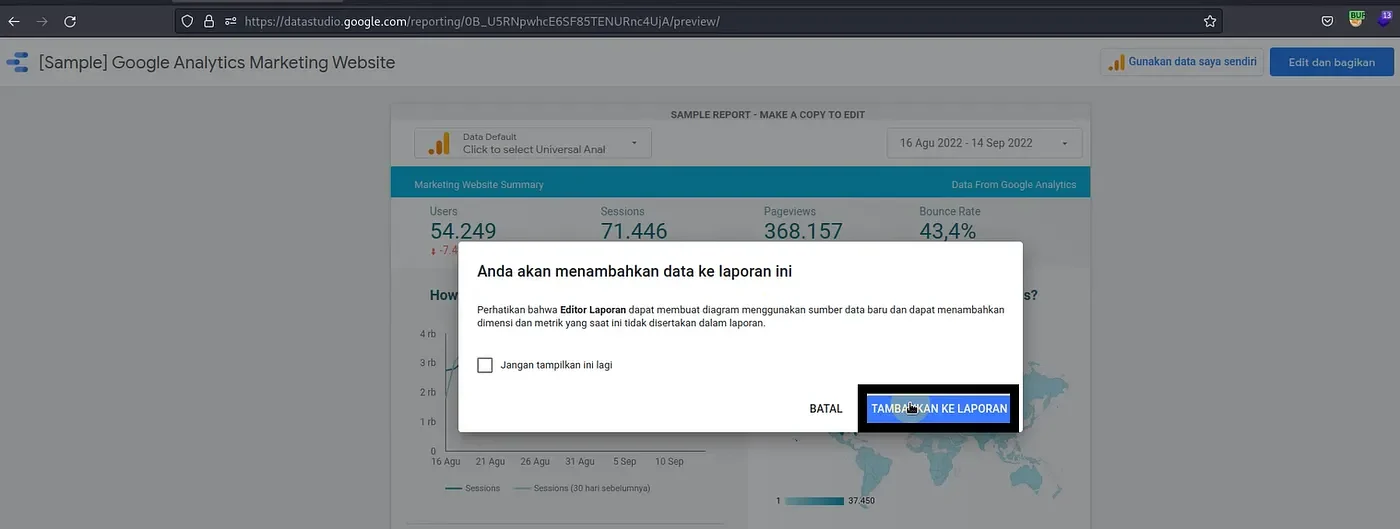
Before clicking Edit & Share, Intercept was enabled in Burp Suite, and then Add to Report was clicked.
Step 3: Inspect /persistTempReport
Intercepting produced the request to /persistTempReport, which is where the IDOR sits.
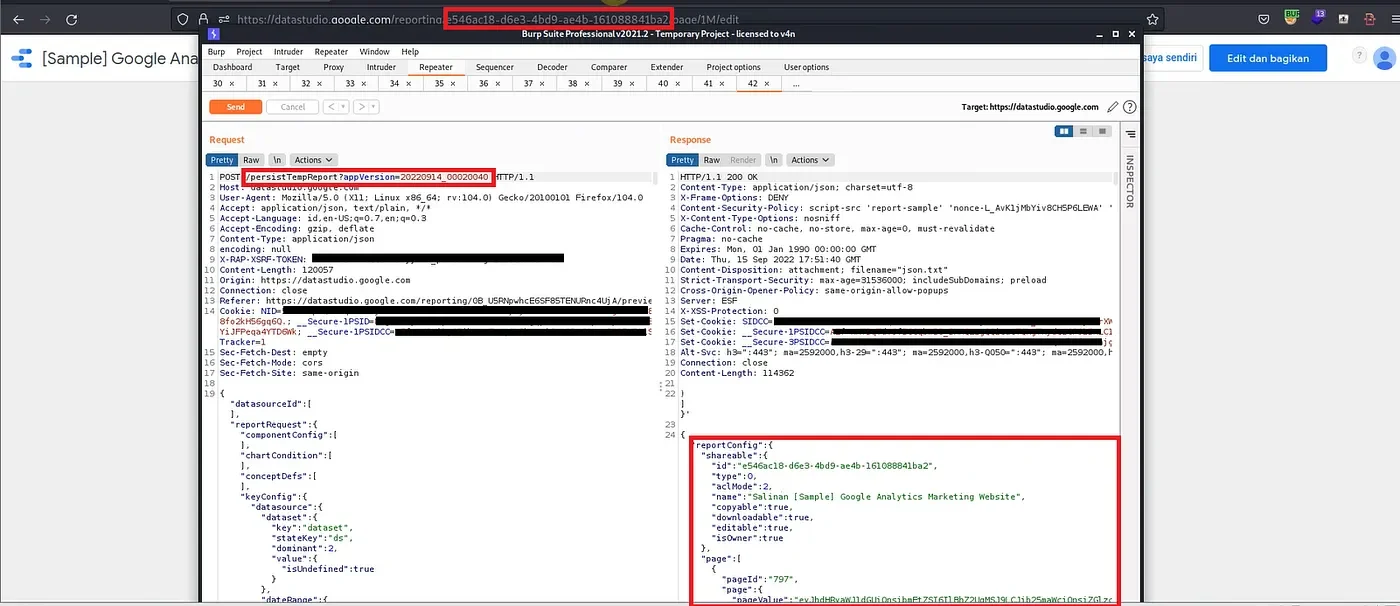
In the captured request the previous identifier has changed: it is now the user's own identifier, the one that later appears in the report URL of the form https://datastudio.google.com/u/0/reporting/[XXXXXXX]/page/qlD/edit.
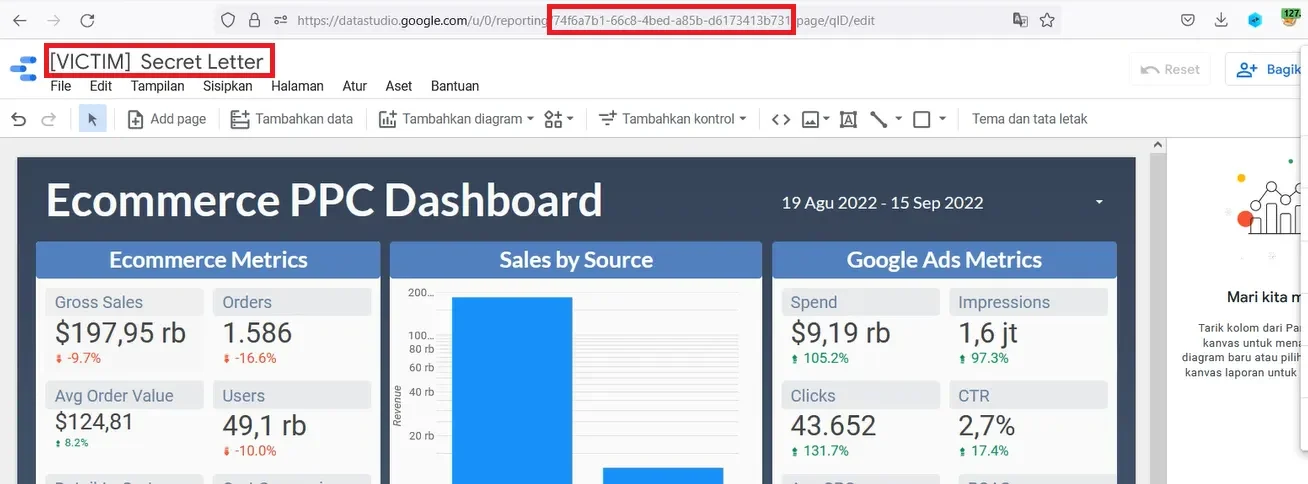
The same view, taken from the second account, shows that account's identifier.
Step 4: Change sourceReportId to the other account's identifier
The request to /persistTempReport contains a parameter named sourceReportId, which holds the template identifier and is fully client-controlled.
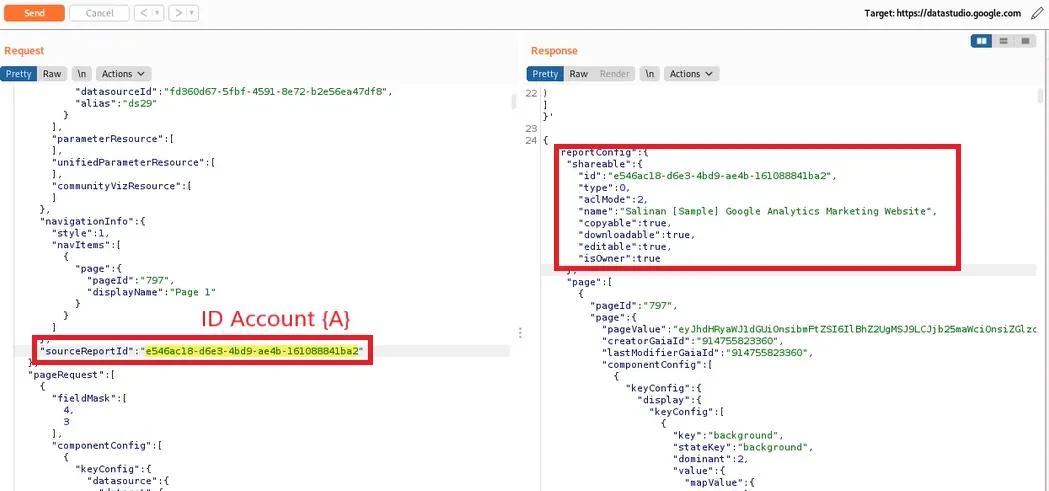
With account A's template identifier in place, the parameter was changed to the identifier belonging to account B.
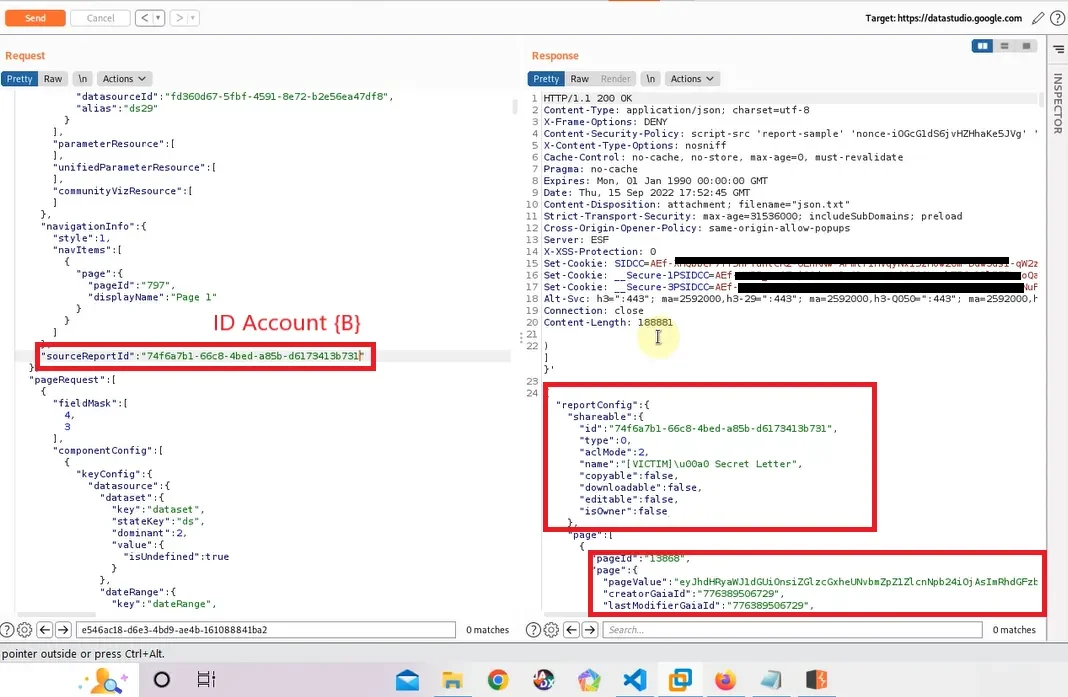
The substitution worked: the server accepted the identifier of a template owned by the other account and persisted the report from it.
Step 5: Compare /getReport with /persistTempReport
Looking for further requests, the researcher found /getReport, which returns the same response as /persistentTempReport.
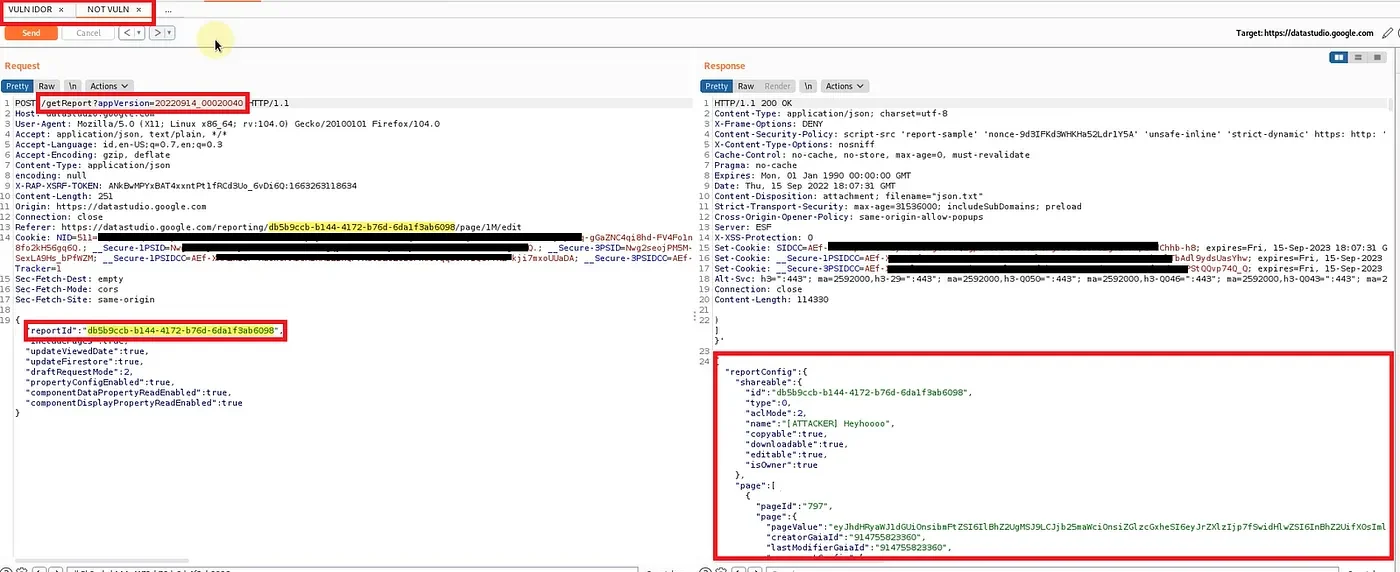
Changing the template identifier in the /getReport request, however, produces a PERMISSION_DENIED response, while the same change on /persistTempReport produces no error.
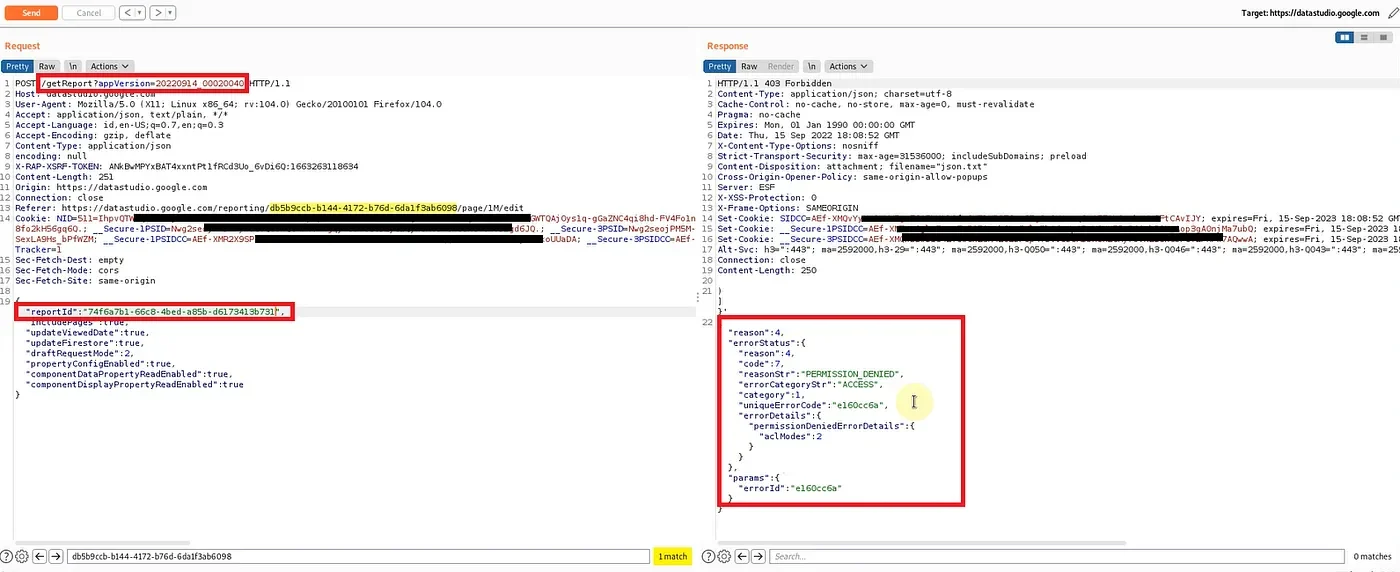
That difference is the interesting part of the finding: the read path enforces an ownership check on the template identifier, and the persist path does not. The same identifier that is rejected by /getReport produces no error on /persistTempReport.
Root cause
The sourceReportId value is accepted from the client, and a foreign identifier was persisted without error. The comparison between the two endpoints makes the gap explicit: /getReport performs an authorisation check and answers PERMISSION_DENIED for a foreign identifier, whereas /persistTempReport performs no such check and completes the operation. The two endpoints behave differently for the same foreign identifier, which points to an access-control inconsistency rather than a missing authentication control. The write-up does not describe the server-side code, so the exact location of the missing check is not stated.
Impact
An authenticated user who knows or can obtain another account's template identifier can cause that template to be persisted through /persistTempReport, even though the read endpoint refuses the same identifier. The write-up demonstrates the cross-account copy with two accounts it controls and does not describe what happens to the resulting report beyond it being created, nor whether the identifier can be guessed or enumerated. The practical exposure therefore depends on how easily a victim's template identifier can be learned, which the report does not analyse.
Fix
Google fixed the issue; the timeline records the fix on 19 October 2022. The report does not describe the change that was made. The control that is evidently needed, and that /getReport already applies, is an ownership check on sourceReportId in /persistTempReport: the server should confirm that the calling account may access the referenced template before persisting a report from it, and reject the request otherwise.
Variants to test
- Sibling endpoints that take an object identifier. Take any endpoint that accepts an identifier such as
sourceReportIdand find a related read endpoint for the same object. Send a foreign identifier to both. A positive result is aPERMISSION_DENIED(or equivalent) from the read endpoint and a successful response from the write or copy endpoint. - Copy, clone, duplicate and import operations. These features routinely reference a source object by identifier. Create an object under account B, then perform the copy under account A with B's identifier. A positive result is a new object under A whose contents match B's object.
- Temporary versus persistent identifiers. The template page here exposed a temporary identifier before the real one appeared in the persist request. Watch for both forms and try each in the parameter; a positive result is acceptance of an identifier that belongs to another account in either form.
- Identifier substitution across accounts on the same endpoint. Capture the request under account A, replace the identifier with account B's, and replay. A positive result is a successful response reflecting B's object rather than an authorisation error.
Timeline
| Date | Event |
|---|---|
| 16 Sep 2022 (01:04) | IDOR found and reported to Google |
| 16 Sep 2022 (01:13) | Additional information added (/getReport and /persistTempReport comparison) |
| 20 Sep 2022 | "Nice Catch!" from Google |
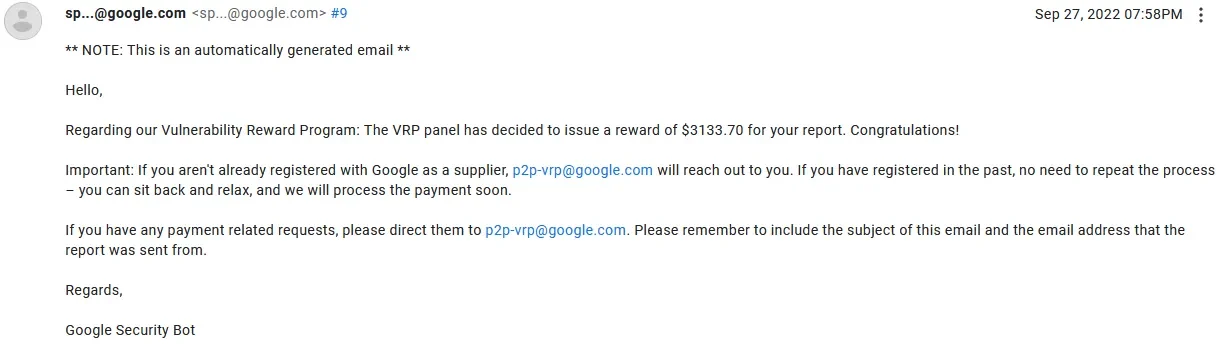
| 27 Sep 2022 | VRP panel decided to issue a reward of $3133.70 |
| 19 Oct 2022 | Fix by Google |
What happened, in plain words
A security researcher found a way to make Google's Data Studio website copy a template that belonged to a different user, without that user's permission. Data Studio (now called Looker Studio) is a free Google tool for turning spreadsheets and other data into charts and dashboards. It has a gallery of ready-made templates: you pick one, the site makes your own editable copy, and you can then change it and share it.
When you add a template to a report, your browser sends a request to a Google server that includes the template's identifier. That number, X, is written into the message by your browser. The server accepted the number of a template owned by the second account. So the researcher took the number of a template owned by a second account and put it into the request sent from the first account. The server made the copy anyway.
This kind of flaw has a name: Insecure Direct Object Reference, or IDOR. It means the application lets you name an object (a file, a report, a template, an order) directly by its identifier, and does not check that you are allowed to touch that particular object. The fix is simple in principle: before acting on the identifier, the server must confirm that the account making the request is allowed to access that object. Google fixed it on 19 October 2022 and paid a reward of $3133.70.
The image above is the title card of the write-up, labelled Google VRP. VRP stands for Vulnerability Reward Program: Google's scheme for paying people who report security bugs to them.
The product and the feature
Google Data Studio is a tool for displaying data so that it is easier to read. You connect it to data, build reports and dashboards, and use them to plan a website or a business strategy more quickly and precisely. The write-up notes that Data Studio has since been renamed Looker Studio.
The part of the product involved here is the template feature. A template is a ready-made report design that anyone can start from. The flow is:
- You open the Template page and choose one of the templates on offer.
- The site opens a page for the template you are about to create. The address bar contains an identifier, but it is not your own template identifier; the write-up suggests it may be a temporary identifier issued by Data Studio.
- You click Add to Report (the button sits next to Edit & Share). At that moment your browser sends a request to the server asking it to save, or "persist", a temporary report built from the template.
- Your own identifier is the one that later appears in a URL of the form
https://datastudio.google.com/u/0/reporting/[XXXXXXX]/page/qlD/edit.
A few words that will come up again:
- Server: the computer at Google that stores the templates and does the copying. Your browser is the client; it asks, the server acts.
- Request: the message your browser sends to the server. It has a method (such as GET or POST), a path (such as
/persistTempReport), sometimes a body containing data, and headers carrying extra information. - Endpoint: a specific address on the server that does one job.
/persistTempReportis an endpoint; so is/getReport. - Parameter: a named value inside a request, such as
sourceReportId=123. The name is fixed by the application; the value is supplied by the browser. - API: the general name for this arrangement, where one program talks to another over requests and responses rather than showing a web page. Think of it as a service counter: you hand over a form with fields filled in, and the clerk behind the counter acts on what the form says.
- Identifier (ID): a unique label for one object, like a coat-check ticket number. If you know someone else's ticket number, and the cloakroom attendant does not check who you are, you can walk off with their coat. That is exactly the shape of an IDOR.
Proof of concept
A proof of concept is a demonstration that the bug is real: the smallest set of steps that shows the flaw working. The researcher went through a large number of requests captured in Burp Suite, a tool that sits between the browser and the server and lets you pause, read and edit the traffic. After trying many requests, one endpoint turned out to have the flaw: /persistTempReport.
Create Template
The first step was to go to the Template page and select one of the templates available there.
The screenshot shows the template gallery, the page where the available templates are listed. Choosing one is how any ordinary user starts, so the researcher began exactly where a normal user would.
After you click one of these templates, you are taken to the template page that will be created later. The address contains an identifier, but it is not your template identifier; the write-up suggests it may be a temporary identifier from Data Studio.
The screenshot shows that page with the identifier visible in the URL. The point of this step is to notice that the identifier in the address bar is not the one that matters. It is a temporary label, and the real one shows up later, in the request. The identifier in the address bar is not the one that matters; the real one shows up later, in the request.
Before clicking Edit & Share, the researcher enabled Intercept in Burp Suite, and then clicked Add to Report.
Intercept is a mode in which Burp holds each request your browser sends and waits for you to release it. Nothing reaches Google until you press forward. That pause is what makes it possible to read the request and change a value inside it before the server ever sees it. The screenshot shows the page with the Edit & Share and Add to Report controls, taken just before the click.
Get Request {/persistTempReport}
With Intercept on, clicking Add to Report produced a request to /persistTempReport. This is where the IDOR was found.
The screenshot shows the captured request. In it, the previous identifier has changed: it is now your own identifier, the one that later appears in the report URL of the form https://datastudio.google.com/u/0/reporting/[XXXXXXX]/page/qlD/edit.
The screenshot shows that report URL with the identifier in place. The same view, taken from the second account, shows that account's identifier. Two accounts were used throughout, called account A and account B in the write-up. Each owns a template with its own identifier. Having two accounts you control is the standard way to test access control: you can compare what each one is allowed to do, and you can try to make one act on the other's objects without involving a real person.
Found IDOR
Inside the request to /persistTempReport there is a parameter named sourceReportId, which holds the template identifier. It can be changed.
The screenshot is captioned ID Template Account {A}: it shows the request as sent by account A, with account A's template identifier in the sourceReportId parameter. The name of the parameter is the clue. "Source" means the template being copied from; "Report" means the report being built; "Id" means it is named by identifier. A parameter that names an object and is taken from the client is exactly the shape of an IDOR, so the next step was to substitute a different account's identifier and see whether the server honoured it.
When the contents of the sourceReportId parameter were changed to the second account's identifier, it worked.
The screenshot is captioned ID Template Account {B}: the same request, now carrying account B's template identifier. The server accepted it and persisted the report from a template owned by the other account. That is the whole bug: one value, swapped.
{getReport} and {persistentTempReport}
It did not stop there. After looking for more requests, the researcher found /getReport, which returns the same response as /persistentTempReport.
The screenshot is captioned Request and Response from /getReport and shows that request and its reply. The two endpoints handle the same object, the template, but do different things with it: one reads it, the other persists a report from it.
When the template identifier was changed in the /getReport request, the response was PERMISSION_DENIED; the same change on /persistentTempReport produced no error.
The screenshot is captioned Permission Denied at getReport and shows that refusal. This comparison is the most instructive part of the finding. The read path checks who owns the template and refuses a foreign identifier. The persist path does not check, and completes the operation. The same identifier that is rejected by /getReport produces no error on /persistTempReport. In everyday terms: one clerk at the counter asks for your ticket before fetching the coat, and the clerk at the next window hands over whatever coat the ticket names.
Why it worked
The sourceReportId value is accepted from the client, and a foreign identifier was persisted without error. The comparison between the two endpoints makes the gap explicit: /getReport performs an authorisation check and answers PERMISSION_DENIED for a foreign identifier, whereas /persistTempReport performs no such check and completes the operation.
The two endpoints behave differently for the same foreign identifier, which points to an access-control inconsistency. This is an access-control inconsistency rather than a missing login check: the attacker still has to be logged in, and the flaw is that being logged in was treated as being allowed. The write-up does not describe the server-side code, so the exact place where the check is missing is not stated.
What it means in practice
A logged-in user who knows or can obtain another account's template identifier can cause that template to be persisted through /persistTempReport, even though the read endpoint refuses the same identifier. The write-up demonstrates the cross-account copy with two accounts the researcher controlled. It does not describe what happens to the resulting report beyond it being created, and it does not say whether the identifier can be guessed or enumerated. How much this exposes in practice therefore depends on how easily a victim's template identifier can be learned, which the report does not analyse.
The fix
Google fixed the issue; the timeline records the fix on 19 October 2022. The control that is evidently needed, and that /getReport already applies, is an ownership check on sourceReportId in /persistTempReport: the server should confirm that the calling account may access the referenced template before persisting a report from it, and reject the request otherwise.
Variants to test
If you want to look for the same pattern elsewhere, these are the shapes to try. Each one is a way of asking the same question: does the server check who owns the object named in the request?
- Sibling endpoints that take an object identifier. Take any endpoint that accepts an identifier such as
sourceReportIdand find a related read endpoint for the same object. Send a foreign identifier to both. A positive result is aPERMISSION_DENIED(or equivalent) from the read endpoint and a successful response from the write or copy endpoint. - Copy, clone, duplicate and import operations. These features routinely reference a source object by identifier. Create an object under account B, then perform the copy under account A with B's identifier. A positive result is a new object under A whose contents match B's object.
- Temporary versus persistent identifiers. The template page here exposed a temporary identifier before the real one appeared in the persist request. Watch for both forms and try each in the parameter; a positive result is acceptance of an identifier that belongs to another account in either form.
- Identifier substitution across accounts on the same endpoint. Capture the request under account A, replace the identifier with account B's, and replay. A positive result is a successful response reflecting B's object rather than an authorisation error.
Timeline
| Date | Event |
|---|---|
| 16 Sep 2022 (01:04) | IDOR found and reported to Google |
| 16 Sep 2022 (01:13) | Additional information added (/getReport and /persistTempReport comparison) |
| 20 Sep 2022 | "Nice Catch!" from Google |
| 27 Sep 2022 | VRP panel decided to issue a reward of $3133.70 |
| 19 Oct 2022 | Fix by Google |
The final image shows the timeline as it appears in the write-up, from the report on 16 September to the fix on 19 October.
Glossary
- API: the arrangement by which one program sends requests to another and gets structured responses back, instead of a human clicking through pages.
- Authorisation: the check that a logged-in user is allowed to perform a particular action on a particular object. Different from authentication, which is only about proving who you are.
- Burp Suite: a tool that sits between your browser and a website so you can pause, read and edit the requests and responses.
- Client: the program making the request, normally your browser.
- Data Studio / Looker Studio: Google's tool for turning data into reports and dashboards; renamed Looker Studio.
- Endpoint: a specific address on a server that performs one job, such as
/persistTempReport. - GET request: a request that asks the server to return something, without changing it.
- Header: an extra piece of information attached to a request or response, such as the type of content or a cookie.
- IDOR (Insecure Direct Object Reference): a flaw where the application lets you name an object directly by its identifier and does not check that you are allowed to access that object.
- Identifier (ID): a unique label for one object, such as a template or a report.
- Intercept: a Burp Suite mode that holds each request until you release or edit it.
- Parameter: a named value inside a request, such as
sourceReportId. PERMISSION_DENIED: the error response meaning the server understood the request but refused it because the caller is not allowed.- Persist: to save something on the server so it continues to exist, as opposed to a temporary value that disappears.
- Proof of concept: a demonstration that a bug is real, using the smallest set of steps that shows it working.
- Request: the message a browser sends to a server, containing a method, a path, headers and sometimes a body.
- Response: the message the server sends back, containing a status and usually a body.
- Server: the computer that stores data and performs actions on behalf of clients.
sourceReportId: the parameter in the/persistTempReportrequest that names the template being copied.- Template: a ready-made report design that a user can copy and then edit as their own.
- VRP (Vulnerability Reward Program): a scheme in which a company pays people who report security bugs to it.



