SSRF External Service Interaction for Find Real IP CloudFlare and Leads to SQL Injection
An image-resize endpoint accepted a user-supplied URL and fetched it server-side, letting the author make the server contact an external listener and reveal the site's real IP behind Cloudflare. Using that IP, the author reached an unprotected dashboard and a password-reset form where a single quote in the email field produced a database error, and SQLMap then extracted data.
 Published on caesarevan23.medium.com
Hello, here I just want to tell about my experience finding a real IP using CloudFlare through “SSRF External Interaction” and getting a form login for Admin and there is a SQL Injection bug.
The full write-up lives on its author's site
It belongs to its author, so we link to it rather than copy it. The other two tabs are our own rewrites, checked against it.

My reaction when I find a case like this
This is a short account of how I found the real IP behind CloudFlare through an SSRF external service interaction, reached an admin login form on the origin, and ended up with a SQL injection in the password reset flow. The site address and some sensitive data are censored here.
Context
The target is a website sitting behind CloudFlare. The feature that started everything is an endpoint, /api/resize.php?image=, with an image parameter.
Setup
The tools used across the walkthrough are:
- SQLmap, which first flagged the
imageparameter as possibly file-inclusion related. - Burp Suite, both for intercepting requests and for the Burp Collaborator Client.
digand shodan.io to check whether an IP belongs to CloudFlare or to the origin.- The Wappalyzer browser extension, to read the CDN section.
- dirsearch, for content discovery against the origin.
The later steps involve the site's login page and its "Forgot Password" form.
Finding it
After a little recon I found the endpoint:
/api/resize.php?image=

Running SQLmap against it produced information that the image parameter may have a file inclusion vulnerability. At that point I was not sure whether it was RFI or LFI.
Exploitation
Step 1: Trying LFI and RFI on the image parameter
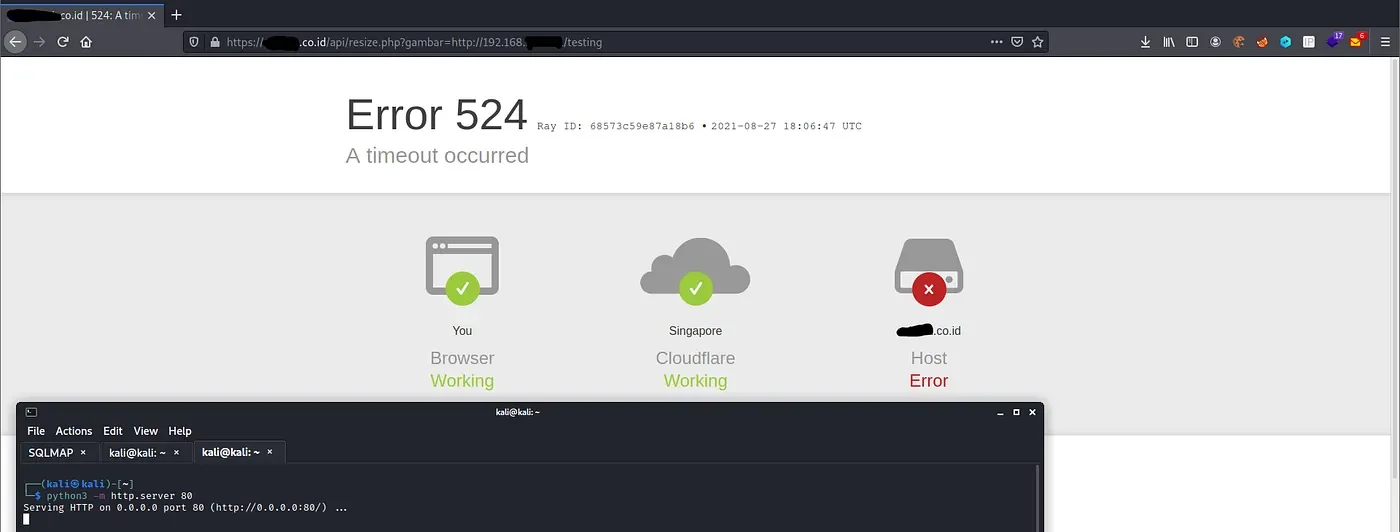
I tried several LFI payloads and none of them worked. RFI did not work either. When I tried to make the server fetch from my local IP, the response was "Error 524".
Step 2: SSRF external service interaction with Burp Collaborator
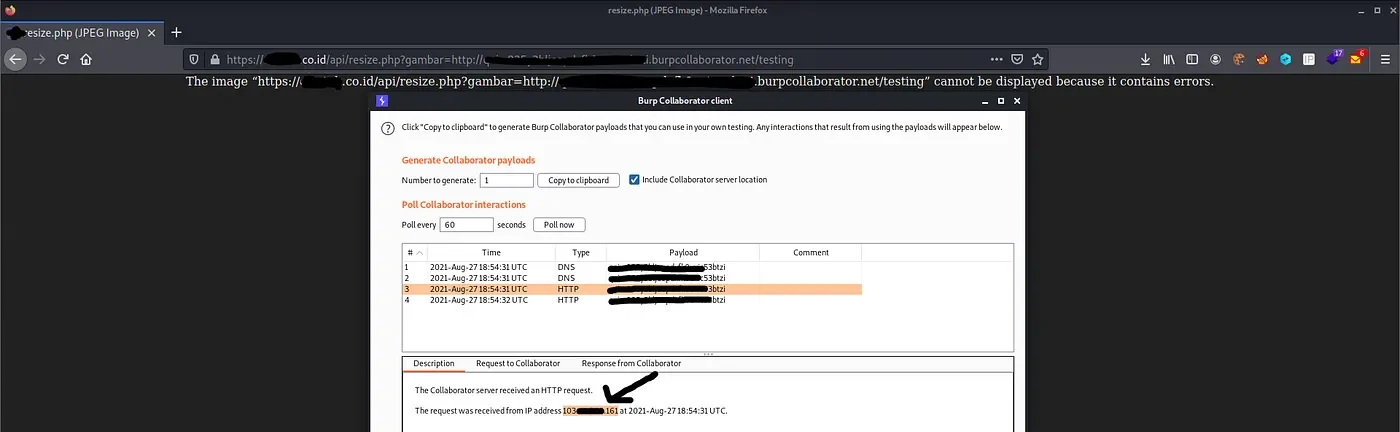
Since direct inclusion failed, I switched to the Burp Collaborator Client to test for SSRF external service interaction.
Found Real IP
I got an HTTP request back from an IP address I did not recognise.
Step 3: Confirming the IP is the origin and not CloudFlare
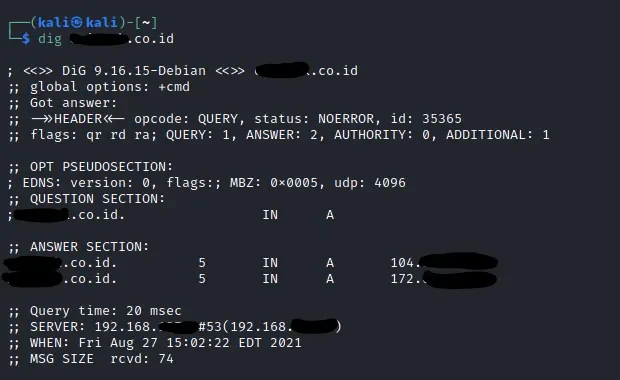
Opening the IP address showed a page that looked like the website under test. To be sure it was a real address and not CloudFlare, I used the dig command and shodan.io.

With dig I found only two IP addresses, starting with 104 and 172, while the address I got started with 103.
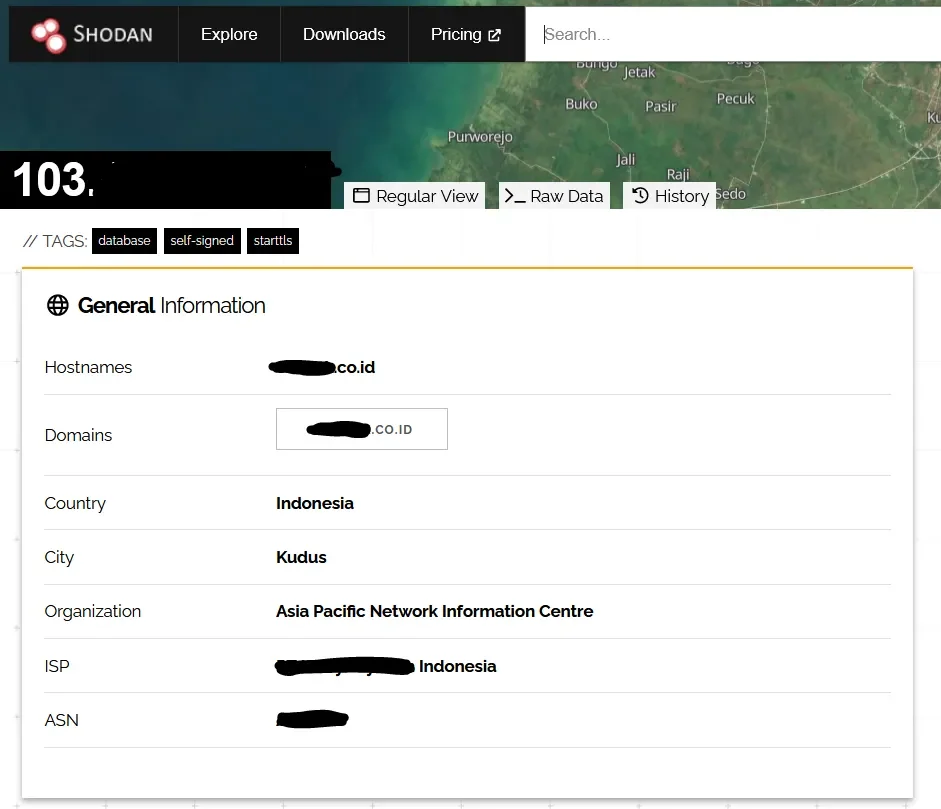
Then I checked the address on shodan.io.
Niceeee!!!
Step 4: Cross-checking with Wappalyzer
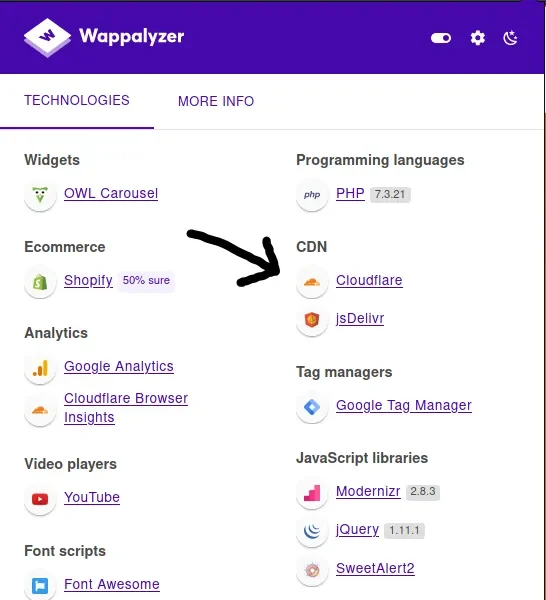
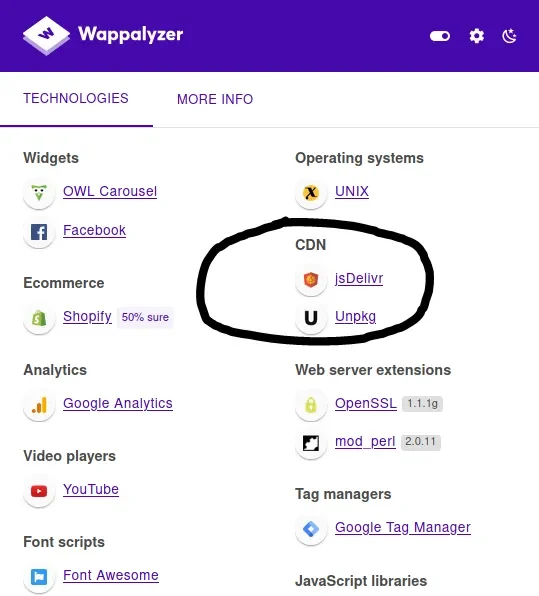
As an extra check, the Wappalyzer extension shows a CDN section. Comparing the site within CloudFlare protection and without CloudFlare protection makes the difference visible.
Step 5: Recon on the origin with dirsearch
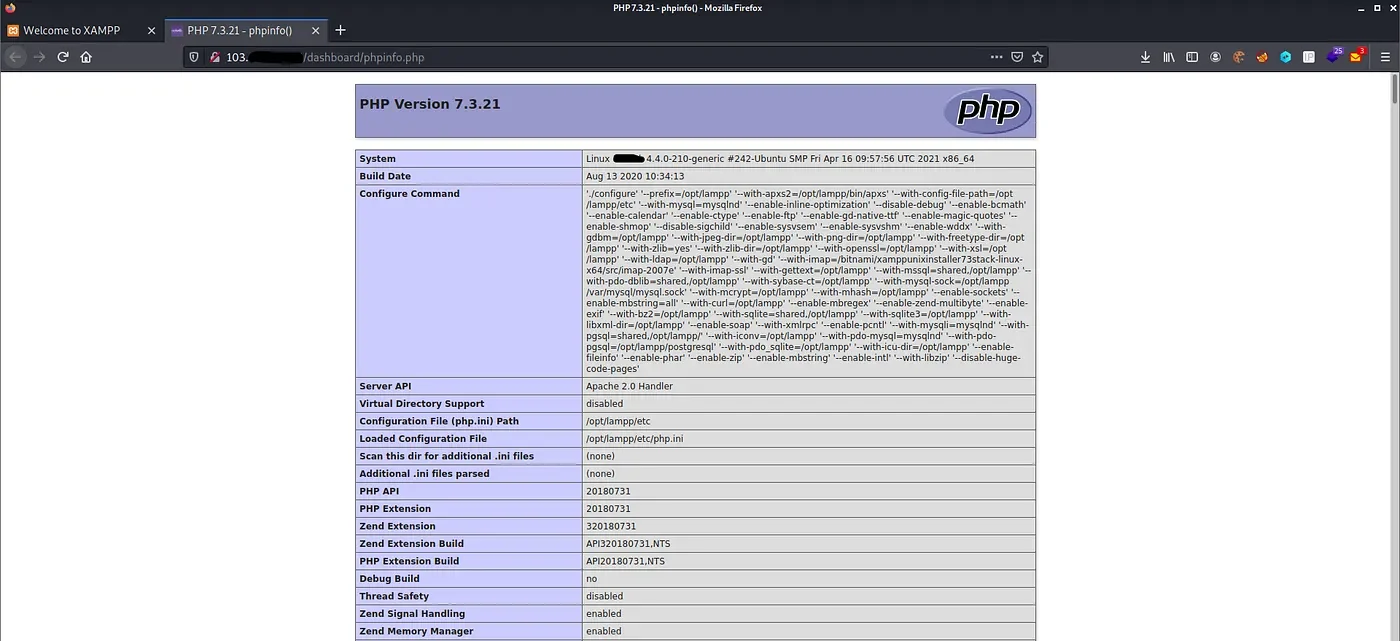
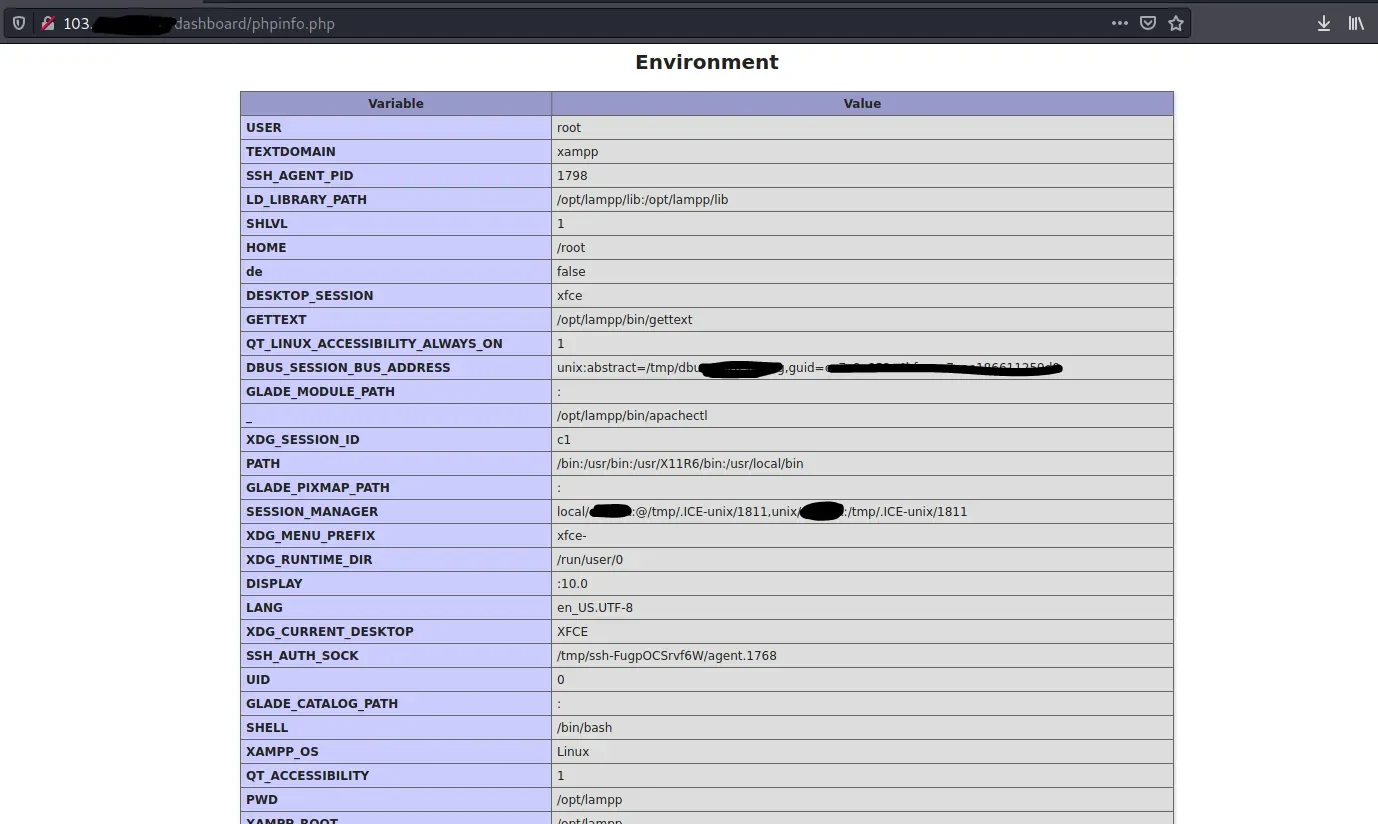
Once I was confident I had the original IP, I ran dirsearch against it and found the /dashboard/ folder. It exposed the XAMPP default display and had PHPinfo open.
PHPinfo
Step 6: The login page
I also reached a login page. I tried a few payloads for SQL injection login bypass, but they did not work.

Step 7: Intercepting the forgot password request
The site has a "Forgot Password" menu. I entered the original email address and turned on Burp interception to capture the request data.

Step 8: Breaking the query with a single quote
I added a single quote at the end of my email address and got an error back.
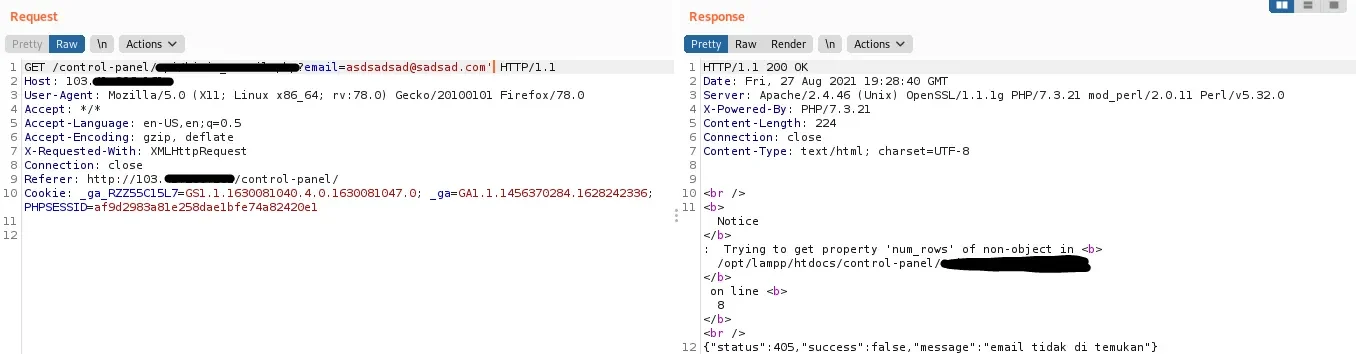
Step 9: SQLmap on the saved request
I saved the request and ran SQLmap against it, and got what I was looking for.
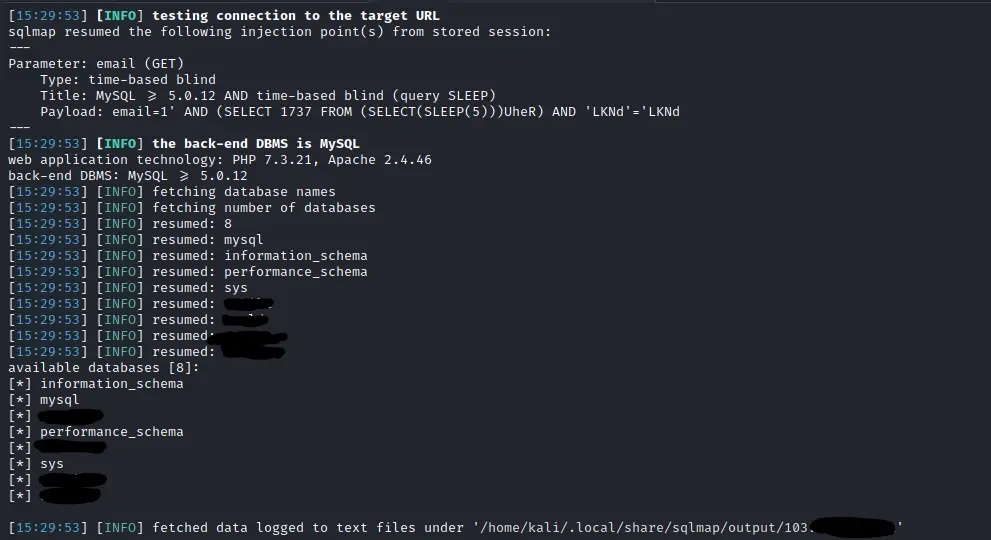
I Love ittttt❤❤
Root cause
The resize endpoint's image parameter produced an SSRF external service interaction, and the address that contacted the Collaborator turned out to be the origin behind CloudFlare. The forgot password handler returned an error when a single quote was appended to the email, and SQLmap on the saved request found the injection. The /dashboard/ folder on the origin showed the XAMPP display and had PHPinfo open.
Impact
An attacker can use the SSRF to learn the origin IP behind CloudFlare. On the origin, exposed XAMPP and PHPinfo pages give information about the environment, and the forgot password form is injectable, which the researcher took through SQLmap. The login bypass attempts on the login page did not succeed.
Fix
Restrict the destinations the resize endpoint may fetch, so it cannot reach arbitrary hosts, and use parameterised queries in the forgot password handler so the email value cannot alter the SQL.
Variants to test
- Any endpoint that takes a URL or path in a parameter, such as an image resizer or thumbnailer: point it at a Collaborator domain and look for an incoming interaction.
- Password reset and other unauthenticated forms that take an email address: append a single quote and watch for a database error, then confirm with SQLmap on the saved request.
- Directories left on the origin after an IP is found: run dirsearch and look for setup pages, PHPinfo and default XAMPP output.
Reference
- External service interaction (DNS), PortSwigger
- Stripo Inc disclosed on HackerOne: SSRF external interaction
Correct me if I am wrong in the sense of this bug. I hope you enjoyed this writeup. SSSSKKKKKRRRRTTTT!!!!
What happened, in plain words
A website was hidden behind CloudFlare. CloudFlare is a service that sits in front of a site and answers visitors on its behalf, so the public only ever sees CloudFlare's addresses, not the address of the machine that actually runs the site. That real machine is called the origin.
The site had a feature that resizes images. You give it a link to a picture and it fetches that picture for you. The researcher found that the feature could be made to contact an address he chose, which is the SSRF flaw. That kind of flaw is called SSRF, server-side request forgery: the server is tricked into making a request on the attacker's behalf.
By pointing the feature at a special address that records who connects to it, the researcher saw a connection arrive from an address he did not recognise. Opening that address in a browser showed the same website. That was the origin, the machine behind CloudFlare. Once he knew the origin address, he had the machine behind CloudFlare.
On the origin he found a /dashboard/ folder that showed a default XAMPP page and an open PHPinfo page. XAMPP is a package that lets people run a web server and PHP on their own computer; when it is left on a public server it often shows a default welcome page. PHPinfo is a page that prints lots of details about how PHP is set up. Both are things you do not want strangers to see.
He also found a login page. His attempts to get past the login with SQL injection payloads did not work. Then he tried the "Forgot Password" form: he typed an email address, captured the request with Burp Suite, added a single quote to the end of the email, and the site returned an error. That error is a sign worth following up with SQLmap. He saved the request and ran SQLmap on it, and got what he was looking for.
My reaction when I find a case like this
Little Story
I had found SQL injection on this website before, but this time it felt interesting enough to write up. Getting from SSRF to SQL injection took only a few hours, not days.
The address of the website and some sensitive data are censored here.

Enjooooyyyy
Before we start: the words you will meet
A few ideas come up again and again, so here they are in plain language.
- Server: the computer that runs a website and answers visitors. When you open a page, your browser asks a server for it.
- Endpoint: one specific address on a server that does one specific job, like a counter in a shop that only handles returns.
/api/resize.phpis an endpoint. - API: a way for one program to ask another program to do something, without a human clicking around. The
/api/part of the address is a hint that this is such a program-to-program door. - Parameter: the part of an address after the
?, which carries a value. In?image=cat.jpg,imageis the parameter name andcat.jpgis its value. Think of it as a form field that travels inside the link. - SSRF (server-side request forgery): the server is made to send a request to an address the attacker chooses. The attacker cannot reach that address from their own computer, but the server can.
- LFI (local file inclusion): the server is made to read a file that sits on its own disk, such as a configuration file.
- RFI (remote file inclusion): the server is made to fetch a file from another machine and treat it as part of the site.
- SQL: the language databases speak. A website asks the database questions in SQL, for example "find the user with this email".
- SQL injection: a value the user types is glued into an SQL question without being cleaned, so the user can change the question itself. It is like writing your name on a form and having the clerk read the extra words you squeezed in as instructions.
- CloudFlare: a service in front of a website that hides the real server. Visitors talk to CloudFlare, CloudFlare talks to the origin.
- Origin: the actual machine that runs the website, behind CloudFlare.
- CDN: a network of servers that delivers content for a site and can hide the origin. CloudFlare is one.
- Burp Suite: a tool that sits between your browser and the website so you can see and change every request.
- Burp Collaborator Client: a part of Burp that gives you a unique address and tells you when something on the internet contacts it. If the target server contacts it, you know the server made an outbound request.
- SQLmap: a tool that automates finding and exploiting SQL injection.
- dirsearch: a tool that tries many folder and file names on a site to see which ones exist.
- dig: a command-line tool that asks the internet's address book (DNS) what addresses belong to a name.
- shodan.io: a search engine for internet-connected machines, which shows what a given address is running.
- Wappalyzer: a browser extension that guesses which technologies a site uses, including its CDN.
- XAMPP: a bundle that installs a web server, PHP and a database on a computer, often used for learning. It ships with a default page.
- PHPinfo: a page that prints the PHP configuration of a server.
- Error 524: an error a proxy returns when it waited for the server behind it and gave up.
Steps to Reproduce
1. Finding the resize endpoint
After a little recon I found the endpoint:
/api/resize.php?image=
Line by line: /api/ is the folder that holds program-facing endpoints. resize.php is a script written in PHP, a language many websites use. The ? starts the parameters. image= is the parameter name, and its value is left empty here because we are about to put something in it.
Why this matters: a resizer has to fetch the picture from somewhere. If it accepts a full link, the server will go and get whatever that link points at. That is the door we want to test.
When I ran SQLmap against it, SQLmap reported that the image parameter may have a file inclusion vulnerability. I was not sure whether it was RFI or LFI.
I tried several LFI payloads and none worked. RFI did not work either.
2. Trying RFI from my own machine
When I tried to make the server fetch from my local IP, the response was "Error 524".
Why this was tried: RFI means the server fetches a file from another machine. If I host a file on my own machine and the server fetches it, I have proven the server will fetch from anywhere. The 524 means the proxy in front gave up waiting, so this route did not give a clear answer.
3. SSRF external service interaction with Burp Collaborator
Next I used the Burp Collaborator Client to test for SSRF external service interaction.
Found Real IP
Why this was tried: instead of hosting a file myself, I only needed to know whether the server would contact an address I chose. Collaborator gives you a unique address and records any contact. If a contact arrives, the server made an outbound request.
Annnndddd niiicceee, I got an HTTP request from an IP address I did not know the origin of. That contact is the proof: the server reached out to a destination I controlled.
4. Checking whether the address is the origin or CloudFlare
When I opened the IP address, it showed a page that looked like the website I was testing. To be sure it was a real address and not CloudFlare, I used the dig command and shodan.io.
Why this was tried: CloudFlare has many addresses, and a page that looks like the site could still be CloudFlare answering. I needed a second opinion on whose address it was.
With dig I found only two IP addresses, starting with 104 and 172, while the address I got started with 103.
Why this matters: dig asks the public address book what addresses belong to the site's name. Those answers are the CloudFlare addresses the public sees. The address I got from the Collaborator contact was different, which suggests it is not the public face of the site.
Then I checked the address on shodan.io.
Niceeee!!!
Why this was tried: shodan.io shows what a machine on the internet is running. If the address looks like the site's own server rather than a CloudFlare machine, that supports the idea that it is the origin.
5. Cross-checking with Wappalyzer
As an extra check, the Wappalyzer extension has a CDN section. Comparing the site with CloudFlare protection and without CloudFlare protection makes the difference visible.
Why this was tried: Wappalyzer reads clues in the site's responses and guesses which services are in use. Seeing the CDN listed, and then seeing what the site looks like when that layer is not in the way, helps confirm that the address found earlier is the machine behind the CDN.
6. Recon on the origin with dirsearch
Once I was confident I had the original IP, I ran dirsearch against it and found the /dashboard/ folder. It showed the XAMPP default display and had PHPinfo open.
PHPinfo
Why this was done: dirsearch tries common folder and file names and reports which ones answer. A /dashboard/ folder that shows a default XAMPP page and an open PHPinfo page tells you the server was set up casually and never tidied up for public view.
7. The login page
I also reached a login page. I tried a few payloads for SQL injection login bypass, but they did not work.
Why this was tried: a login form sends a username and a password to the server, and the server checks them against the database. If the form is built carelessly, a crafted value can make the check pass without the right password. Here it did not work.
8. Intercepting the forgot password request
The site has a "Forgot Password" menu. I entered the original email address and turned on Burp interception to capture the request data.
Why this was done: the forgot password form is another place where a value you type goes to the database. By intercepting, I could see exactly what my browser sent, and change it before it reached the server.
9. Breaking the query with a single quote
I added a single quote at the end of my email address and got an error back.
Why this matters: in SQL, text values are wrapped in single quotes. If the site pastes your email between quotes without cleaning it, an extra quote ends the text early and the rest of the question becomes garbled. The database complains, and that complaint is the error you see. It is the classic first sign of SQL injection.
10. SQLmap on the saved request
I saved the request and ran SQLmap against it, and got what I was looking for.
I Love ittttt❤❤
Why this was done: SQLmap takes a saved request and tries many variations automatically, confirming the injection and working out what it can extract. Running it on the saved request means it repeats exactly what the browser sent, including the quote that caused the error.
Why it worked
The resize endpoint's image parameter produced an SSRF external service interaction. That is what let the server contact the Collaborator and reveal the origin address behind CloudFlare. The forgot password handler returned an error when a single quote was appended to the email, and SQLmap on the saved request found the injection. The /dashboard/ folder on the origin showed the XAMPP display and had PHPinfo open.
What an attacker could do
An attacker can use the SSRF to learn the origin address behind CloudFlare. On the origin, the exposed XAMPP and PHPinfo pages give information about the environment, and the forgot password form is injectable, which the researcher took through SQLmap. The login bypass attempts on the login page did not succeed.
How to fix it
Restrict the destinations the resize endpoint may fetch, so it cannot reach arbitrary machines, and use parameterised queries in the forgot password handler so the email value cannot change the SQL. Parameterised queries mean the value is handed to the database separately from the question, so a quote inside it stays just a character.
Other places to look
- Any endpoint that takes a link or path in a parameter, such as an image resizer or thumbnailer: point it at a Collaborator address and watch for an incoming contact.
- Password reset and other forms that work without logging in and take an email address: add a single quote and watch for a database error, then confirm with SQLmap on the saved request.
- Folders left on the origin once an address is found: run dirsearch and look for setup pages, PHPinfo and default XAMPP output.
Reference
- External service interaction (DNS), PortSwigger
- Stripo Inc disclosed on HackerOne: SSRF external interaction
Correct me if I am wrong in the sense of this bug. I hope you enjoyed this writeup. SSSSKKKKKRRRRTTTT!!!!
Glossary
- Server: the computer that runs a website and answers visitors' requests.
- Origin: the real machine that runs a website, as opposed to the protective layer in front of it.
- Endpoint: one specific address on a server that performs one specific job.
- API: a way for one program to ask another program to do something automatically.
- Parameter: the part of an address after the
?that carries a named value. - SSRF (server-side request forgery): tricking a server into sending a request to an address the attacker chooses.
- External service interaction: a test where you check whether a server contacts an address you control, which proves it makes outbound requests.
- LFI (local file inclusion): making a server read a file from its own disk through a parameter.
- RFI (remote file inclusion): making a server fetch a file from another machine through a parameter.
- SQL: the language used to ask questions of a database.
- SQL injection: inserting characters into a value so that it changes the database question itself.
- SQL injection login bypass: using an injected value to get past a login check without the correct password.
- Parameterised query: a way of sending a value to the database separately from the question, so the value cannot change the question.
- CloudFlare: a service that sits in front of a website and hides the real server from visitors.
- DNS: the internet's address book, which maps names to addresses.
- Burp Suite: a tool that sits between your browser and a website so you can see and change requests.
- Burp Collaborator Client: a Burp feature that gives you a unique address and reports when something contacts it.
- Intercept: pausing a request in Burp so you can read or change it before it reaches the server.
- dirsearch: a tool that tries many folder and file names on a site to see which exist.
- dig: a command-line tool that looks up the addresses belonging to a name in DNS.
- shodan.io: a search engine for internet-connected machines that shows what an address is running.
- Wappalyzer: a browser extension that guesses which technologies a site uses.
- PHP: a programming language commonly used to build websites.
- Error 524: an error a proxy returns when the server behind it took too long to answer.
- Payload: the crafted value you send to test or exploit a flaw.
- Recon: the information-gathering phase before attacking, such as finding endpoints and folders.
- IP address: the numeric address of a machine on a network.





