GoogleMeetRoulette: Joining random meetings
Google Meet's call-in feature used a 4-digit PIN for authentication, and phone numbers were assigned sequentially in some countries, allowing an attacker to find meeting phone numbers and brute-force PINs to join meetings without approval. The attacker could listen to confidential meetings and impersonate attendees.
 Published on martinvigo.com
A while ago, I was at a friend’s house and he mentioned he had to join a work meeting. He used Google Meet to join.
The full write-up lives on its author's site
It belongs to its author, so we link to it rather than copy it. The other two tabs are our own rewrites, checked against it.
Context
Google Meet is the business-oriented successor to Google Hangouts and part of G-Suite, the cloud services bundle that Google sells to companies, including Fortune 500 customers. The feature that drew attention here is not the browser client but the dial-in path: when a G-Suite Enterprise customer creates a meeting in Google Calendar, the invitation carries a phone number and a PIN. Anyone who dials the number and enters the PIN joins the meeting in voice-only mode, which is useful for attendees without reliable internet or who want to avoid heavy data use while travelling.
Because the join is an ordinary phone call, the phone number plus PIN is effectively the credential: the number behaves like a username and the PIN like a shared password for all attendees. The researcher's question was whether an outsider could discover those pairs and join meetings they were never invited to, and how authentication was handled on this path compared with the browser path.
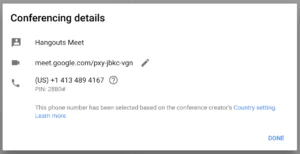
The screenshot shows the Google Meet information with the dial-in details.
Setup
The work needed only a few things:
- A Google Calendar account able to create meetings, so that dial-in numbers and PINs could be generated and observed.
- A Twilio account, funded with $20, to query phone number metadata through the Twilio Lookup API and to place calls programmatically at scale.
- A Python script, GoogleMeetRoulette.py, that drives the Twilio APIs to make many calls in parallel and enter PINs.
Finding it
The starting observation came from a friend who could not follow a meeting over a flaky WiFi connection and was told to call in. That raised the question of how the call-in path authenticates a participant. The researcher deliberately ignored the normal browser flow and focused on the phone flow, treating the number and PIN as the two secrets to obtain.
Two goals followed: find valid Google Meet phone numbers, and find the PIN associated with each.
Finding phone numbers
Wardialing
The historical technique of wardialing, dialling numbers en masse to find machines rather than people, would work in principle because Google Meet always answers the same way, beginning with a short two-second sound. Tools such as ToneLoc did this in the past, and VOIP makes it cheaper today. It is still too noisy, since it means dialling every number in a country.
Guessing from generated meetings
The researcher scripted the creation of hundreds of meetings and scraped the generated phone numbers, to answer three questions:
- Are phone numbers reused? Yes. Unique numbers per meeting are not practical given the limited supply.
- Are phone numbers unique per meeting? Recurring meetings, such as a weekly one-to-one with a manager, always keep the same phone number and PIN combination.
- Are phone numbers random? No useful pattern was found among the collected numbers.
The important result is the second point: a recurring meeting's number and PIN never change, so an employee who leaves the company still knows a working combination and can rejoin those meetings indefinitely unless the meeting is deleted and recreated.
Carrier lookup through HLR data
HLR registers hold GSM subscriber information in global databases and are queried in SS7 attacks, but commercial queries cost money and the tower data is not needed here. Twilio's Lookup API offers a limited lookup that exposes, among other fields, the carrier of a number. Creating several meetings and checking their numbers showed that the carrier of Google Meet numbers is:
Google (Grand Central) BWI - Bandwidth.com - SVR
That gives a cheap test for any number: query it and check the carrier.
Search engines
Many websites publish information about phone numbers, for example to track spam callers or identify owners, and search engines index those pages. Searching for the carrier string surfaces numbers belonging to it. Not all of them are Google Meet, because Google Voice uses the same carrier, but it is a good starting point.
International numbers assigned in sequence
The meeting information screen carries a note that the phone number has been selected based on the conference creator's country settings, and Google documents international dial-in numbers. Changing the country setting in Google Calendar to Australia and creating a meeting produced an Australian number, whose carrier through Twilio was:
Symbio Networks
Checking a neighbouring number out of curiosity, rather than the meeting's own number, returned the same carrier. The researcher had intended to compare against a different number to see what a normal carrier looked like, but the numbers he checked also returned Symbio Networks. Calling one produced the Google Meet greeting.
So for countries such as Australia and Spain, Google Meet numbers are allocated in sequential batches. Generating one meeting and checking the numbers after it yields many more valid Google Meet numbers. These numbers are global: they can be used to join or find meetings in the US, not only meetings in the country that issued them.
Finding PINs
A four-digit PIN has 10,000 combinations, and Google Meet allows only three PIN attempts per call, so manual guessing is far too slow. Programmatic telephony APIs from Twilio and bandwidth make it possible to place many calls and interact with them, so hundreds of simultaneous calls trying different PINs should cover the space quickly.
Two further observations came out of poking at the API. First, there is a global per-country number that is the same for all Google Meet meetings, but its PIN is 13 digits instead of four, adding entropy; the researcher wondered how many parallel calls it could take and how easy a denial of service would be, but did not test it because DoS testing on production services is discouraged. Second, the PIN length varies by country, which is odd because all the security rests on PIN entropy: some countries are more secure than others, and the US is the weakest with four digits.
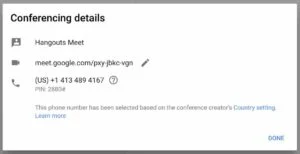
The US PIN is four digits.
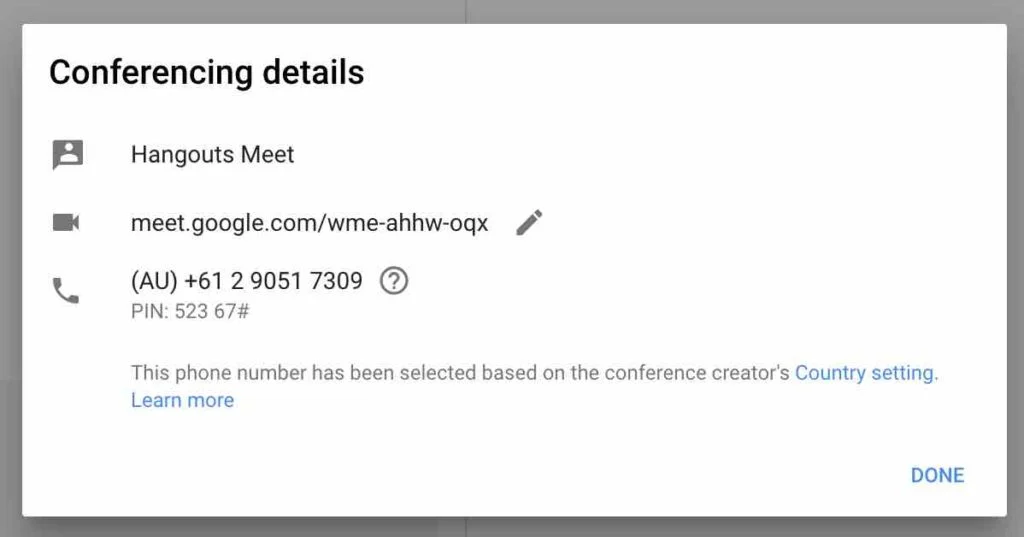
Australia uses a longer PIN.
GoogleMeetRoulette.py
The script uses Twilio's APIs to start multiple calls and try three PINs per call. The key efficiency gain is that it does not wait for the recording to say the first PIN was wrong before trying the second and third: three PINs can be entered at once and Google accepts whichever is correct. A call that tries three PINs and waits for the recording takes about 25 seconds; entering three PINs at once takes about 10.
At 10 seconds per call and three PINs per call, one call at a time would cover all 10,000 combinations in about nine hours. Twilio is built for calls at scale, so hundreds of calls can run concurrently. The line is sometimes busy, but the script detects failed calls and retries, and Twilio reports failed calls immediately through webhooks, which keeps the handling efficient.
Success detection avoids audio processing entirely. Google Meet ends the call when three PINs are wrong and keeps it open when one is right, so the script instructs Twilio to pause silently on the line for 10 seconds before hanging up. A call of roughly 17 seconds means Google ended it and the guess failed; a call roughly 10 seconds longer means the call joined a meeting and one of the three PINs is valid.
Benchmarks showed that trying all 10,000 PINs takes on average 25 minutes and finds 15 valid PINs for 15 different meetings, at a cost of $16.
A demo was recorded bruteforcing only 100 PINs to keep it short. The work was also the basis of research presented at DEF CON.
Exploitation
Step 1: obtain candidate phone numbers
Generate a meeting in a country whose numbers are allocated sequentially, such as Australia or Spain, and check the numbers following it with the Twilio Lookup API. Any number whose carrier matches the Google Meet carrier, or which answers with the Google Meet greeting, is a candidate. Search engines and carrier lookups extend the pool.
Step 2: brute force the PIN
Run GoogleMeetRoulette.py against a candidate number. Each call enters three PINs at once and pauses for 10 seconds before hanging up. Call duration distinguishes a failed guess from a successful join.
Step 3: join at leisure
A meeting's number is associated from the moment it is scheduled, and anyone can join at any time, even before the meeting starts. A meeting scheduled for next week can be attacked immediately, so the attacker does not need to know when it takes place.
Step 4: stay unnoticed
Several UI behaviours help an intruder:
- Only about five attendee profiles are shown at once depending on resolution, so the rest require clicking through the list.
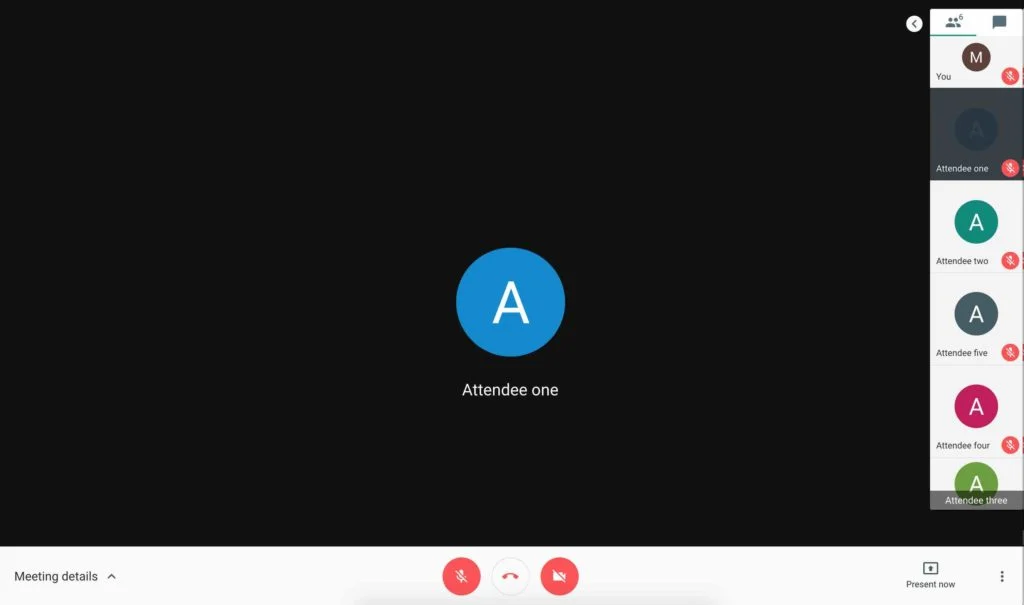
The attendee display on a 15.4-inch MacBook Pro shows only a small number of participants.
- Attendees joining through a browser are shown by full name and profile picture, with no email address. Since a Gmail account can be created in a minute with any name and picture, impersonation is trivial; showing the email would prevent it. External browser attendees must be approved before joining, which mitigates this to some extent.
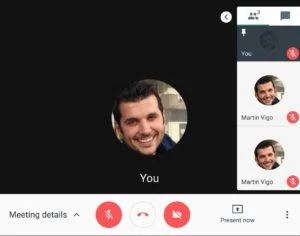
A browser attendee is identified by name and profile picture only.
- That approval does not apply to callers. Phone calls cannot be authenticated, so anyone can join over the phone without prior approval, a significantly lower security bar than the browser path.
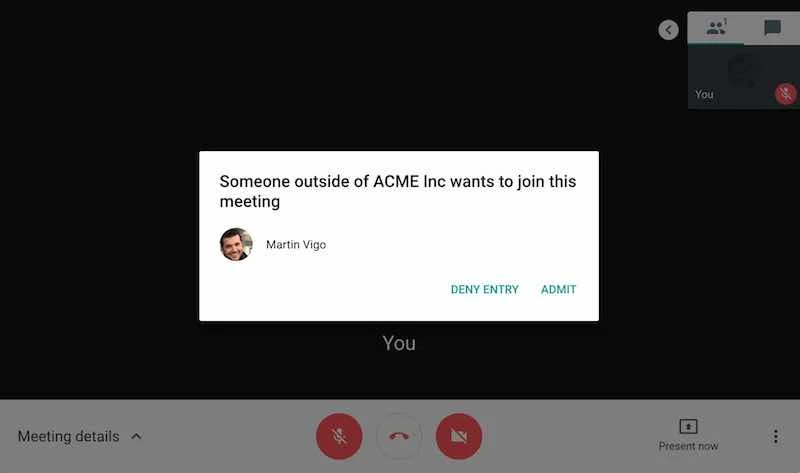
When a Gmail account tries to join an ACME Inc. meeting, attendees see a popup warning that an external account is asking to join.
- Phone numbers of callers are masked in the UI, shown in a form like 555-XXXX-XX55. Using the bandwidth.com API to search available numbers by regular expression, the researcher bought a number that masks to exactly the same pattern, for 35 cents, and impersonated himself perfectly.
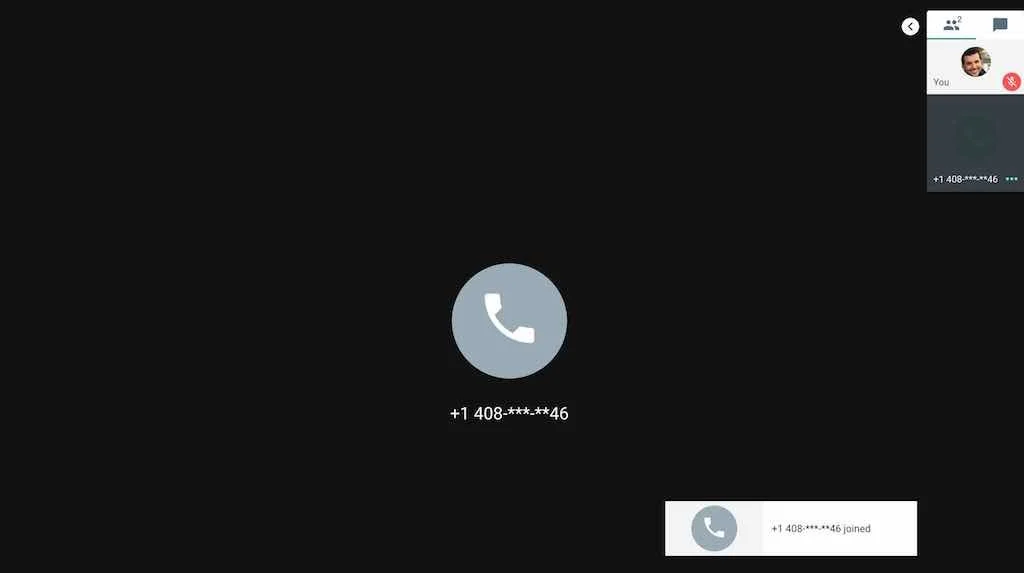
A masked caller number as displayed in the meeting.
Root cause
The design treats a short numeric PIN, shared by all attendees and unchanged for recurring meetings, as sufficient authentication for a channel that cannot verify identity. Four-digit PINs in the US give only 10,000 possibilities, and the service permits three attempts per call, which is no obstacle once calls can be placed in bulk through commercial telephony APIs. Sequential allocation of numbers in some countries removes the obscurity of the number itself. On the client side, masking caller numbers and showing only names and pictures for browser attendees removes the signals that would let participants notice an intruder. The three-attempt limit applies per call, and the approval step for external browser attendees does not apply to callers.
Impact
An attacker who can find a number and brute force its PIN can join meetings in voice-only mode without an invitation, including confidential discussions such as security, architecture, all-hands, financial results and roadmap planning. The attack works against meetings whose dial-in number can be found and whose PIN can be brute forced, costs little (about $16 per 10,000 PINs, with 15 meetings found per run in the benchmark), and can be launched before the meeting begins. Recurring meetings are permanently exposed to anyone who once knew the combination, including former employees. Impersonation is practical because caller numbers are masked and browser identities are unverified names and pictures. The report does not quantify how many organisations were affected.
Fix
Google's timeline:
- 29 March 2018: responsible disclosure
- 13 April 2018: Google acknowledges the issues and files bugs
- 8 May 2018: Google issues a bounty
- 20 July 2018: Google confirms fixes
- 28 July 2018: Google reverts some fixes after customer complaints
- 4 October 2018: Google gives the green light for public disclosure
The report does not say which specific fixes were applied or reverted. The recommendations were:
For users: admins can disable the option to call into meetings, which is worth considering where confidential material is discussed. If call-in must stay, share a password with each attendee by email or in the meeting description and have attendees say it at the start, while watching for new joiners.
For Google:
- Increase the PIN size so brute forcing is infeasible or too expensive; since the PIN can be dialled automatically, 8 or more digits should be practical, especially as some countries already use longer PINs. Competitors such as GoToMeeting, GoToWebinar and Zoom already do this.
- Keep the same security bar across countries: if Spain and Australia use five-digit PINs, so should the US, because attackers will use the weakest link.
- Do not mask caller numbers, and show email addresses for browser attendees, to prevent impersonation.
- Require approval for callers, treating them as external by default, which at least gives a chance to verify the number.
- Rotate PINs for recurring meetings so former employees lose access.
Variants to test
- Enumerate dial-in numbers in other countries and check whether numbers after a generated one answer with the service greeting. A positive result is a run of consecutive numbers that all connect to the same conferencing service.
- Query carrier metadata for numbers found in public spam and owner-lookup sites. A positive result is a cluster of numbers sharing the conferencing provider's carrier string.
- Check whether recurring meetings keep the same number and PIN over time. A positive result is an unchanged pair across several occurrences.
- Try joining a scheduled future meeting before it starts. A positive result is a successful join ahead of the scheduled time.
- Compare identity display between browser and phone attendees. A positive result is a phone attendee shown with a masked number and no approval step, while a browser attendee with an unverified name and picture is shown without an email address.
What happened, in plain words
A security researcher heard a friend say he could not follow a work video meeting because the WiFi was bad, and that someone told him to "call in" instead. That made the researcher wonder: could a stranger join meetings they were never invited to, just by phoning in?
The product involved is Google Meet, Google's video meeting service for businesses. It is the newer version of Google Hangouts and part of G-Suite, the bundle of cloud services Google sells to companies, including very large ones. Most people join a meeting by clicking a link in a browser. But there is a second way in: a phone number and a short PIN. You dial the number, type the PIN, and you are in the meeting by voice only, like a conference call. That is handy when your internet is poor or you are travelling and do not want to burn data.
Because this is an ordinary phone call, the phone number plus the PIN work like a login. Think of the number as the username and the PIN as the password that everyone in the meeting shares. So the researcher set two goals: find phone numbers that belong to Google Meet meetings, and find the PIN for each one. If you have both, you can join.
The screenshot shows the Google Meet information with the dial-in details.
Setup
The work needed only a few ordinary things:
- A Google Calendar account that can create meetings, so dial-in numbers and PINs could be generated and watched.
- A Twilio account with $20 on it. Twilio is a company that lets software make and receive phone calls. Its Lookup API (an API is a way for one program to ask another program for information or to make it do something, like a waiter taking your order to the kitchen) can tell you facts about a phone number, such as which phone company owns it.
- A Python script called GoogleMeetRoulette.py that uses Twilio to make many calls at once and type in PINs.
Finding it
The starting point was the friend's story. The researcher deliberately ignored the normal browser way of joining and looked only at the phone way, treating the number and the PIN as the two secrets to obtain.
Finding phone numbers
Wardialing
Wardialing is an old technique: dial lots of numbers automatically to find machines rather than people. In principle it would work here, because Google Meet always answers the same way, starting with a short two-second sound. Tools such as ToneLoc did this in the past, and internet calling (VOIP, voice over IP, meaning phone calls carried over the internet) makes it cheaper today. But it is far too noisy, because it means dialling every number in a country.
Guessing from generated meetings
The researcher wrote a script to create hundreds of meetings and collect the phone numbers that came with them, to answer three questions:
- Are phone numbers reused? Yes. There are only so many phone numbers in the world, so a unique one per meeting is not practical.
- Are phone numbers unique per meeting? Recurring meetings, such as a weekly one-to-one with your manager, always keep the same phone number and PIN combination.
- Are phone numbers random? No useful pattern was found among the collected numbers.
The important result is the second point. A recurring meeting's number and PIN never change, so an employee who leaves the company still knows a working combination and can rejoin those meetings forever unless the meeting is deleted and recreated.
Carrier lookup through HLR data
HLR registers are databases that mobile phone networks keep about their subscribers. They are queried in SS7 attacks, a way of abusing the signalling system that mobile networks use to talk to each other, but commercial queries cost money and the location data they give is not needed here. Twilio's Lookup API offers a limited lookup that shows, among other things, which carrier (phone company) a number belongs to. Creating several meetings and checking their numbers showed that the carrier of Google Meet numbers is:
Google (Grand Central) BWI - Bandwidth.com - SVR
This is a single line of text: the name of the phone company that owns the numbers. It gives a cheap test for any number: ask Twilio who owns it and compare the answer with this string.
Search engines
Many websites publish information about phone numbers, for example to track spam callers or identify owners, and search engines index those pages. Searching for the carrier string above surfaces numbers that belong to it. Not all of them are Google Meet, because Google Voice uses the same carrier, but it is a good starting point.
International numbers assigned in sequence
The meeting information screen carries a note that the phone number has been selected based on the conference creator's country settings, and Google documents international dial-in numbers. Changing the country setting in Google Calendar to Australia and creating a meeting produced an Australian number, whose carrier through Twilio was:
Symbio Networks
Again, this is just the carrier name Twilio returned for that number. Checking a neighbouring number out of curiosity, rather than the meeting's own number, returned the same carrier. The researcher had meant to compare against a different number to see what a normal carrier looked like, but the numbers he checked also returned Symbio Networks. Calling one produced the Google Meet greeting.
So for countries such as Australia and Spain, Google Meet numbers are handed out in sequential batches. Generate one meeting and check the numbers after it, and you find many more valid Google Meet numbers. These numbers are global: they can be used to join or find meetings in the US, not only meetings in the country that issued them.
Finding PINs
A four-digit PIN has 10,000 possible combinations (0000 to 9999). Google Meet allows only three PIN attempts per call, so guessing by hand is far too slow. Telephony APIs from Twilio and bandwidth make it possible to place many calls and interact with them, so hundreds of simultaneous calls trying different PINs should cover the space quickly.
Two more observations came from poking at the API. First, there is a global per-country number that is the same for all Google Meet meetings, but its PIN is 13 digits instead of four, which adds entropy (unpredictability). The researcher wondered how many parallel calls it could take and how easy a denial of service would be, but did not test it, because DoS testing (deliberately overwhelming a service) on production systems is discouraged. Second, the PIN length varies by country, which is odd because all the security rests on PIN entropy: some countries are more secure than others, and the US is the weakest with four digits.
The US PIN is four digits.
Australia uses a longer PIN.
GoogleMeetRoulette.py
The script uses Twilio's APIs to start multiple calls and try three PINs per call. The key efficiency gain is that it does not wait for the recording to say the first PIN was wrong before trying the second and third: three PINs can be entered at once and Google accepts whichever is correct. A call that tries three PINs and waits for the recording takes about 25 seconds; entering three PINs at once takes about 10.
At 10 seconds per call and three PINs per call, one call at a time would cover all 10,000 combinations in about nine hours. Twilio is built for calls at scale, so hundreds of calls can run at the same time. The line is sometimes busy, but the script detects failed calls and retries, and Twilio reports failed calls immediately through webhooks (automatic messages a service sends to your program when something happens), which keeps the handling efficient.
Success detection avoids audio processing entirely. Google Meet ends the call when three PINs are wrong and keeps it open when one is right, so the script tells Twilio to pause silently on the line for 10 seconds before hanging up. A call of roughly 17 seconds means Google ended it and the guess failed; a call roughly 10 seconds longer means the call joined a meeting and one of the three PINs is valid.
Benchmarks showed that trying all 10,000 PINs takes on average 25 minutes and finds 15 valid PINs for 15 different meetings, at a cost of $16.
A demo was recorded bruteforcing only 100 PINs to keep it short. The work was also the basis of research presented at DEF CON, a well-known security conference.
Exploitation
Step 1: obtain candidate phone numbers
Generate a meeting in a country whose numbers are allocated sequentially, such as Australia or Spain, and check the numbers following it with the Twilio Lookup API. Any number whose carrier matches the Google Meet carrier, or which answers with the Google Meet greeting, is a candidate. Search engines and carrier lookups extend the pool.
Step 2: brute force the PIN
Run GoogleMeetRoulette.py against a candidate number. Each call enters three PINs at once and pauses for 10 seconds before hanging up. Call duration tells a failed guess from a successful join.
Step 3: join at leisure
A meeting's number is associated from the moment it is scheduled, and anyone can join at any time, even before the meeting starts. A meeting scheduled for next week can be attacked immediately, so the attacker does not need to know when it takes place.
Step 4: stay unnoticed
Several things in the interface help an intruder:
- Only about five attendee profiles are shown at once depending on resolution, so the rest require clicking through the list.
The attendee display on a 15.4-inch MacBook Pro shows only a small number of participants.
- Attendees joining through a browser are shown by full name and profile picture, with no email address. Since a Gmail account can be created in a minute with any name and picture, impersonation is trivial; showing the email would prevent it. External browser attendees must be approved before joining, which mitigates this to some extent.
A browser attendee is identified by name and profile picture only.
- That approval does not apply to callers. Phone calls cannot be authenticated, so anyone can join over the phone without prior approval, a significantly lower security bar than the browser path.
When a Gmail account tries to join an ACME Inc. meeting, attendees see a popup warning that an external account is asking to join.
- Phone numbers of callers are masked in the interface, shown in a form like 555-XXXX-XX55. Using the bandwidth.com API to search available numbers by regular expression (a pattern for matching text), the researcher bought a number that masks to exactly the same pattern, for 35 cents, and impersonated himself perfectly.
A masked caller number as displayed in the meeting.
Root cause
The design treats a short numeric PIN, shared by all attendees and unchanged for recurring meetings, as enough proof of identity for a channel that cannot verify who is calling. Four-digit PINs in the US give only 10,000 possibilities, and the service permits three attempts per call, which is no obstacle once calls can be placed in bulk through commercial telephony APIs. Sequential allocation of numbers in some countries removes the obscurity of the number itself. On the client side, masking caller numbers and showing only names and pictures for browser attendees removes the signals that would let participants notice an intruder. The three-attempt limit applies per call, and the approval step for external browser attendees does not apply to callers.
Impact
An attacker who can find a number and brute force its PIN can join meetings in voice-only mode without an invitation, including confidential discussions such as security, architecture, all-hands, financial results and roadmap planning. The attack works against meetings whose dial-in number can be found and whose PIN can be brute forced, costs little (about $16 per 10,000 PINs, with 15 meetings found per run in the benchmark), and can be launched before the meeting begins. Recurring meetings are permanently exposed to anyone who once knew the combination, including former employees. Impersonation is practical because caller numbers are masked and browser identities are unverified names and pictures. The report does not quantify how many organisations were affected.
Fix
Google's timeline:
- 29 March 2018: responsible disclosure
- 13 April 2018: Google acknowledges the issues and files bugs
- 8 May 2018: Google issues a bounty
- 20 July 2018: Google confirms fixes
- 28 July 2018: Google reverts some fixes after customer complaints
- 4 October 2018: Google gives the green light for public disclosure
The report does not say which specific fixes were applied or reverted. The recommendations were:
For users: admins can disable the option to call into meetings, which is worth considering where confidential material is discussed. If call-in must stay, share a password with each attendee by email or in the meeting description and have attendees say it at the start, while watching for new joiners.
For Google:
- Increase the PIN size so brute forcing is infeasible or too expensive; since the PIN can be dialled automatically, 8 or more digits should be practical, especially as some countries already use longer PINs. Competitors such as GoToMeeting, GoToWebinar and Zoom already do this.
- Keep the same security bar across countries: if Spain and Australia use five-digit PINs, so should the US, because attackers will use the weakest link.
- Do not mask caller numbers, and show email addresses for browser attendees, to prevent impersonation.
- Require approval for callers, treating them as external by default, which at least gives a chance to verify the number.
- Rotate PINs for recurring meetings so former employees lose access.
Variants to test
- Enumerate dial-in numbers in other countries and check whether numbers after a generated one answer with the service greeting. A positive result is a run of consecutive numbers that all connect to the same conferencing service.
- Query carrier metadata for numbers found in public spam and owner-lookup sites. A positive result is a cluster of numbers sharing the conferencing provider's carrier string.
- Check whether recurring meetings keep the same number and PIN over time. A positive result is an unchanged pair across several occurrences.
- Try joining a scheduled future meeting before it starts. A positive result is a successful join ahead of the scheduled time.
- Compare identity display between browser and phone attendees. A positive result is a phone attendee shown with a masked number and no approval step, while a browser attendee with an unverified name and picture is shown without an email address.
Glossary
- API: a way for one program to ask another program for information or to make it do something, like a waiter taking your order to the kitchen.
- Bruteforce: trying every possible value of a secret, one after another, until the right one is found.
- Carrier: the phone company that owns and operates a phone number.
- Denial of service (DoS): deliberately overwhelming a service with traffic or requests so that it stops working for everyone.
- Entropy: the amount of unpredictability in a secret; more entropy means more possible values and harder guessing.
- G-Suite: Google's bundle of cloud services sold to businesses.
- HLR register: a database mobile networks keep about their subscribers.
- Impersonation: pretending to be another person, for example by copying their name and picture.
- PIN: a short numeric code used as a password.
- Recurring meeting: a meeting that repeats on a schedule, such as a weekly one-to-one.
- Regular expression: a pattern for matching text, used to search for strings that fit a shape.
- Responsible disclosure: telling the vendor about a security problem privately first, giving them time to fix it before it is made public.
- SS7: the signalling system mobile networks use to talk to each other.
- Twilio: a company whose APIs let software make and receive phone calls.
- VOIP: voice over IP, phone calls carried over the internet instead of traditional phone lines.
- Wardialing: dialling lots of phone numbers automatically to find machines rather than people.
- Webhook: an automatic message a service sends to your program when something happens.



