Getting email address of any HackerOne user worth $7,500
A GraphQL query used when adding collaborators to a report returned the email addresses of all collaborators and invitees, even though only their usernames were provided. An attacker could supply any HackerOne username and obtain the associated email address without user interaction.
 Published on medium.com
Just wanna share my recent finding in HackerOne’s own bug bounty program. This finding is pretty much straight forward :)
The full write-up lives on its author's site
It belongs to its author, so we link to it rather than copy it. The other two tabs are our own rewrites, checked against it.
Context
HackerOne runs its own bug bounty program, and this write-up covers a finding in that program. The target feature is the collaborator feature on a report: after you submit a report, you can invite other users to it as collaborators, and the platform lets you add them by their HackerOne username. The researcher's asset for the report is listed as medium.com, where the write-up was published, but the vulnerable product is HackerOne itself.
The finding is an information disclosure: the collaborator invitation flow returned the email address of every invited collaborator, even though the inviter only supplied a username. The researcher rates it High (7.5) with the weakness Sensitive Information Disclosure. The submission was closed as a duplicate of an earlier report, and the first researcher received the reward.
Setup
The researcher had a HackerOne account and a report of their own to work with. They added their brother, hackerone.com/r3y, as a collaborator on that report. For the proof of concept they used three analyst usernames, including the HackerOne username of Co-Founder Jobert, to invite as collaborators. The researcher captured the request sent while adding a collaborator. No versions are given in the report.
Finding it
After submitting a report, the researcher added r3y as a collaborator and noticed that the user interface for adding collaborators had changed. The report shows the new interface:
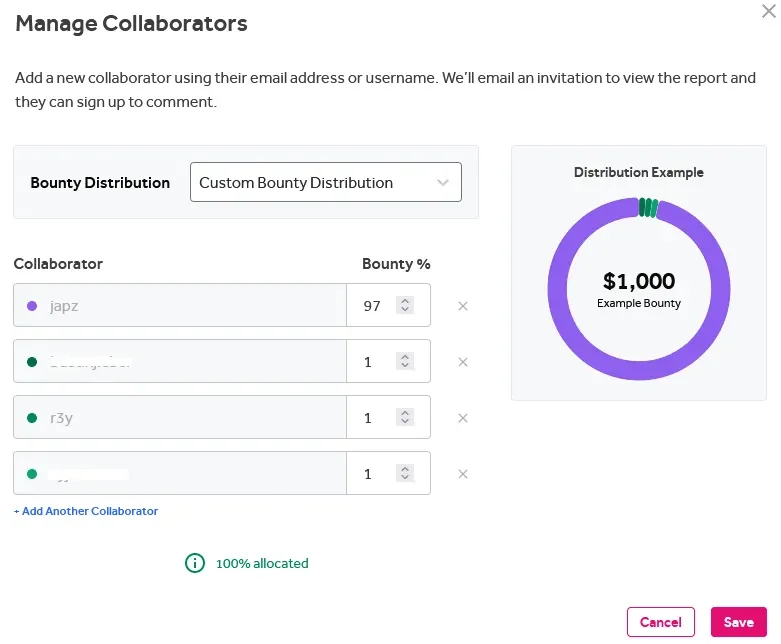
New user interface when you add a collaborator.
Because the UI had been updated, the researcher captured the request sent while adding a collaborator. The request contained a new GraphQL operation, ReportCollaboratorQuery. They then invited the three analyst usernames, using only the usernames to invite them, and recorded the proof of concept. When they inspected the response, the email address of all collaborators was disclosed even though only usernames had been supplied.
Exploitation
Step 1: capture the collaborator request
The captured request is a GraphQL POST to /graphql on hackerone.com. The captured request, with the cookie and CSRF token redacted, is:
POST /graphql HTTP/2Host: hackerone.comCookie: <redacted>Accept: */*Accept-Language: en-US,en;q=0.5Accept-Encoding: gzip, deflateReferer:<redacted>Content-Type: application/jsonX-Csrf-Token: <redacted>X-Product-Area: otherX-Product-Feature: otherContent-Length: 832Origin: https://hackerone<SNIP>{ "operationName": "ReportCollaboratorQuery", "variables": { "reportId": <report-id> }, "query": "query ReportCollaboratorQuery($reportId: Int!) {\n report(id: $reportId) {\n report_collaborators {\n total_count\n edges {\n node {\n id\n user {\n id\n username\n __typename\n }\n bounty_weight\n __typename\n }\n __typename\n }\n __typename\n }\n report_collaborator_invitations {\n total_count\n edges {\n node {\n id\n state\n email\n bounty_weight\n recipient {\n id\n username\n __typename\n }\n __typename\n }\n __typename\n }\n __typename\n }\n __typename\n }\n}\n"}
The important parts are the operationName of ReportCollaboratorQuery, the single reportId variable, and the query body. The query asks for two connections on the report: report_collaborators, which returns each collaborator's id, user (id and username) and bounty_weight, and report_collaborator_invitations, which returns each invitation's id, state, email, bounty_weight and recipient (id and username). The email field on the invitation is the one that matters.
Step 2: read the response
The response to that request came back as HTTP 200 with JSON. The relevant part, with the email addresses redacted, is:
The report_collaborators connection lists four collaborators with their usernames and bounty weights. The report_collaborator_invitations connection lists three invitations, each with state set to accepted, an email value, a bounty_weight of 0.01, and a recipient with an id and username. The email addresses in the response are the disclosure: the inviter supplied only usernames, but the response returned the email address tied to each invited account.
Step 3: scale it with the sitemap
The researcher notes that an attacker only needs a target username, and that a list of HackerOne usernames can be found at https://hackerone.com/sitemap. That means a simple Python script can dump all HackerOne registered email addresses that are exactly tied to a username. The report does not include such a script.
Root cause
The invitation object returned by the ReportCollaboratorQuery operation includes an email field. The invitation is created from a username, but the stored invitation record carries the recipient's email address, and the GraphQL response exposes that field to whoever can query the report. The report does not describe the server-side authorisation logic, so the precise reason the field was not restricted is not stated; likely the resolver returned the invitation record without checking whether the requesting user should see the recipient's email.
Impact
An attacker who can invite a user as a collaborator on a report they own can learn that user's email address, using only the username. Because usernames are enumerable from the public sitemap, the researcher states that a script could dump all registered email addresses tied to usernames. The researcher rates this High severity because it is very easy to exploit without user interaction. The report does not state whether the invitation has to be accepted before the email appears, though in the captured response all three invitations are in the accepted state.
Fix
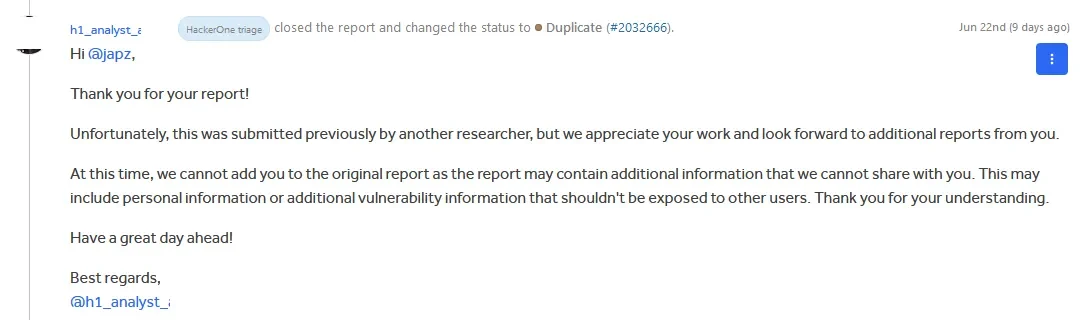
What is known is the sequence of events: the new collaborator UI was reverted to the old UI after it introduced the vulnerability, and the new UI was deployed again once the vulnerability had been resolved. The researcher also observed the fix through their reputation logs: the +2 reputation entries indicated that the original report had been closed as resolved.

+2 reps indicates that the original report was already closed as resolved.
Duplicate and reward
The researcher learned who the first reporter was because that person posted their report ID on Twitter.
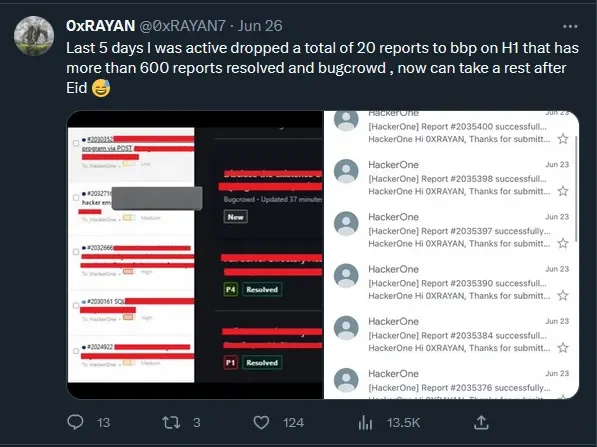
First researcher who found the same vulnerability and received the reward.
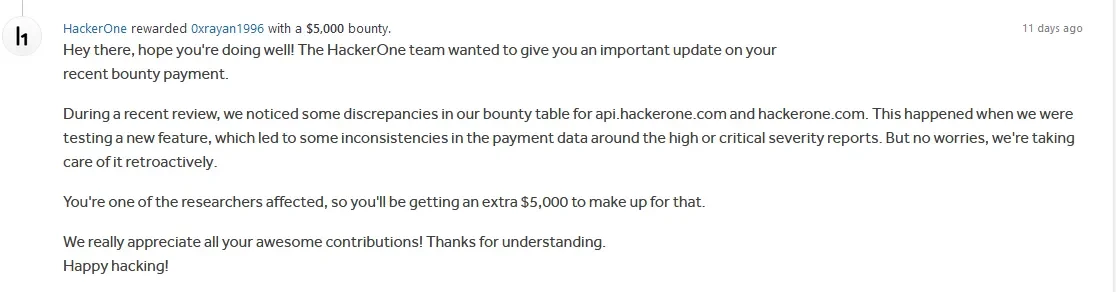
The first researcher was rewarded with $7,500.

0xrayan1996 rewarded.
An additional $5,000 was rewarded on May 9, 2024 due to an H1 adjustment for High vulnerability rewards because of discrepancies in their bounty table, bringing the researcher's total to $12,500.
The reference report from the first researcher was fully disclosed at https://hackerone.com/reports/2032716. The researcher notes that the GraphQL query operation in that disclosed report differs from the one in this write-up, but the root cause and impact are the same, so it was considered a duplicate.
The researcher also uploaded a proof-of-concept video to their YouTube channel. In the video the old collaborator UI is visible, because the old UI had been restored after the new one introduced the vulnerability, and the video was recorded at that time.
Timeline:
| Time | Event |
|---|---|
| June 21, 2023, 11:57:32 PST | Report submitted |
| June 22, 2023, 14:15:29 PST | Report marked as duplicate |
| June 29, 2023, 23:40:45 PST | Report marked as resolved (based on the reputation log) |
The lesson the researcher draws is that every new feature update may introduce a vulnerability, or may result in a regression of a resolved and disclosed report from the past.
Variants to test
- Query other GraphQL operations that return invitation or membership objects and ask for fields such as
email,phoneorname. A positive result is a response that returns a value the inviter never supplied. - Invite a user by username only and inspect the full response, not just the rendered UI. A positive result is any personal data in the response that the UI does not show.
- Test the same invitation flow on other object types that support collaborators or members, such as teams or programs. A positive result is the same email disclosure on a different object.
- Check whether the disclosure requires the invitation to be accepted, by capturing the response immediately after sending an invitation. A positive result is an email returned while the invitation is still pending.
- Enumerate usernames from a public sitemap or directory and script the invitation call. A positive result is a reliable mapping from username to email at scale.
What happened, in plain words
HackerOne is a website where security researchers report bugs to companies and get paid for them. HackerOne also runs a bug bounty program on its own website, meaning people can report bugs in HackerOne itself and get paid. This write-up is about one of those findings.
The feature involved is the collaborator feature. When you submit a report on HackerOne, you can invite other people to work on it with you. These people are called collaborators. To add one, you type their HackerOne username, which is their public handle on the site, like a nickname. You do not need to know their email address.
The bug: when the researcher added collaborators by username only, the website's response quietly included the email address of every invited person. So anyone who could invite a user to a report could learn that user's private email address, using nothing but the public username.
The researcher rated it High severity, with a score of 7.5, and the weakness type Sensitive Information Disclosure. HackerOne closed the submission as a duplicate, because someone else had reported the same bug first, and that first researcher received the reward.
Some background you need first
Before the steps make sense, here are a few ideas explained from zero.
A report. On HackerOne, a report is a written description of a security bug, submitted by a researcher to a company. It has an ID number, a title, a description, and a conversation thread.
A collaborator. A collaborator is another user you invite to a report so they can see it and help. You add them by typing their username.
A username. A username is the public name a person picks on a website, for example the one that appears in their profile URL. It is not secret. Anyone can see it.
An email address. This is private contact information. On a bug bounty site it is tied to your account, your notifications and your payouts. You would not expect a stranger to learn it just because they typed your public username somewhere.
An API. An API is the way one piece of software talks to another. Think of a restaurant: the menu and the waiter are the API. You do not walk into the kitchen; you tell the waiter what you want, and food comes back. A website's own pages use an API behind the scenes: your browser sends a request, the server sends back data, and the page draws it on screen.
GraphQL. GraphQL is a style of API where the client sends a request describing exactly which pieces of data it wants, and the server sends back exactly those pieces. It is like filling in a form that says "I want the name, the date and the price" rather than accepting a fixed set menu. The request is usually sent as a POST to a single address, here /graphql.
A cookie. A cookie is a small piece of data your browser stores for a website and sends back with every request. It is how the site remembers that you are logged in. If someone steals your cookie, they can act as you. That is why cookies are treated as secrets.
A CSRF token. CSRF stands for Cross-Site Request Forgery. It is an attack where a malicious page tricks your browser into sending a request to another site where you are logged in. To stop it, sites include a random secret value, the CSRF token, in each state-changing request. The server checks that the token matches your session. A page on another site cannot guess it. Like a cookie, it is a secret.
An intercepting proxy. A proxy is a piece of software that sits between your browser and the internet. An intercepting proxy lets you pause a request before it leaves, look at it, change it, and send it on. It is the standard tool for this kind of testing, because the browser's own developer tools show you the request but make it awkward to replay it.
Information disclosure. This is a vulnerability class where a system reveals data to someone who should not have it. Nothing is broken or crashed; the harm is that private information leaks. Here, the leaked information is email addresses.
Severity and CVSS. Severity is a rough label for how bad a bug is, such as Low, Medium, High or Critical. CVSS is a scoring system that turns the details of a bug into a number, usually 0 to 10. The researcher gives 7.5, which falls in the High band.
Duplicate. Bug bounty platforms receive many reports. If two people report the same underlying bug, the first valid report is the original and later ones are marked duplicate. Only the original is rewarded, though duplicates sometimes earn reputation points.
Reputation. HackerOne gives users reputation points for activity such as valid reports. The researcher watches these points as a signal of what happened to a report.
Setting up
The researcher already had a HackerOne account and a report of their own to work with. That matters: you can only invite collaborators to a report you own or can edit, so you need a report of your own to test this.
They added their brother, whose HackerOne profile is hackerone.com/r3y, as a collaborator on that report. For the proof of concept they used three analyst usernames, including the HackerOne username of Co-Founder Jobert, to invite as collaborators. The researcher captured the request made while adding a collaborator. The report does not give any software versions.
Finding it
After submitting a report, the researcher added r3y as a collaborator and noticed that the user interface for adding collaborators had changed. The report shows the new interface:
New user interface when you add a collaborator.
Why does a changed interface matter? Because new code is new code. A feature that was rewritten or redesigned has fresh logic behind it, and fresh logic has not been tested by years of users. When a researcher sees an update, the habit is to poke at it.
So the researcher captured the request the browser sent while adding a collaborator. Inside it was a new GraphQL operation named ReportCollaboratorQuery. They then invited the three analyst usernames, supplying only the usernames, and recorded the proof of concept. When they looked at the response, the email address of every collaborator was there, even though only usernames had been typed in.
Exploitation
Step 1: capture the collaborator request
The captured request is a GraphQL POST to /graphql on hackerone.com. The captured request, with the cookie and CSRF token redacted, is:
POST /graphql HTTP/2Host: hackerone.comCookie: <redacted>Accept: */*Accept-Language: en-US,en;q=0.5Accept-Encoding: gzip, deflateReferer:<redacted>Content-Type: application/jsonX-Csrf-Token: <redacted>X-Product-Area: otherX-Product-Feature: otherContent-Length: 832Origin: https://hackerone<SNIP>{ "operationName": "ReportCollaboratorQuery", "variables": { "reportId": <report-id> }, "query": "query ReportCollaboratorQuery($reportId: Int!) {\n report(id: $reportId) {\n report_collaborators {\n total_count\n edges {\n node {\n id\n user {\n id\n username\n __typename\n }\n bounty_weight\n __typename\n }\n __typename\n }\n __typename\n }\n report_collaborator_invitations {\n total_count\n edges {\n node {\n id\n state\n email\n bounty_weight\n recipient {\n id\n username\n __typename\n }\n __typename\n }\n __typename\n }\n __typename\n }\n __typename\n }\n}\n"}
Line by line, in plain words:
POST /graphql HTTP/2means the browser is sending data to the address/graphqlon the server, using version 2 of the HTTP protocol. POST is the method used when you are sending something, as opposed to GET, which is used when you are just asking for a page.Host: hackerone.comsays which website this request is for. One server can host many sites, so the request names the one it wants.Cookie: <redacted>is the login cookie. It proves who is making the request. It is redacted here because anyone holding it could act as the researcher.Accept: */*says the browser will accept any kind of response.Accept-Language: en-US,en;q=0.5says the browser prefers English, with a slight preference weighting.Accept-Encoding: gzip, deflatesays the browser can accept compressed responses, which saves bandwidth.Referer:<redacted>normally tells the server which page the request came from. It is redacted here.Content-Type: application/jsonsays the body of the request is JSON, a text format for structured data.X-Csrf-Token: <redacted>is the anti-forgery token described earlier. The server checks it to be sure the request really came from the site's own pages and not from a malicious page elsewhere.X-Product-Area: otherandX-Product-Feature: otherare custom headers the site uses for its own bookkeeping, for example to tag which part of the product a request belongs to.Content-Length: 832says the body is 832 bytes long, so the server knows when it has received all of it.Origin: https://hackeronetells the server which site the request originated from. Servers use it for security checks.<SNIP>marks a place where the report cut out part of the captured text.- The JSON body has three parts.
operationNameis the name of the GraphQL operation, hereReportCollaboratorQuery.variablesholds the inputs, here a singlereportId, which is the ID number of the report being worked on.queryis the actual question being asked of the server.
The query asks for two lists attached to the report. The first, report_collaborators, returns each collaborator's id, their user object with id and username, and a bounty_weight. The second, report_collaborator_invitations, returns each invitation's id, state, email, bounty_weight and recipient with id and username. The email field on the invitation is the one that matters: it is the private data.
A word on the odd-looking fields. total_count is how many items are in the list. edges and node are GraphQL's way of wrapping a list of items, like pages in a book and the content on each page. __typename is a built-in field that tells you what kind of object you are looking at. bounty_weight is a number showing what share of any bounty each collaborator gets; 1 means the full amount, 0.01 means one percent.
Step 2: read the response
The response came back as HTTP 200, which means success, with JSON in the body. The relevant part, with the email addresses redacted, is:
Line by line, in plain words:
HTTP/2 200 OKis the status line. 200 means the request succeeded.Date: Wed, 21 Jun 2023 03:33:47 GMTis when the server answered.Content-Type: application/json; charset=utf-8says the body is JSON text encoded in UTF-8, a standard character encoding.Cache-Control: no-storetells browsers and proxies not to save this response. Sensible for private data.Content-Disposition: inline; filename="response."suggests a filename if the browser decides to save the body.Vary: Accepttells caches that the response can differ depending on theAcceptheader.X-Request-Id: 31ef2c4f-e8fc-4544-b35d-bc219dd0ef64is a unique tag for this request, useful when looking it up in server logs.Etag: W/"[redacted]"is a fingerprint of the response body, used for caching.Set-Cookie: <redacted>is the server handing the browser a cookie. It is redacted because it is a secret.Strict-Transport-Security: max-age=31536000; includeSubDomains; preloadtells the browser to always use HTTPS for this site for the next year, including subdomains. HTTPS is the encrypted version of HTTP.X-Frame-Options: DENYstops other sites from embedding this page in a frame, which prevents clickjacking, where a hidden page sits over a real one to trick your clicks.X-Content-Type-Options: nosniffstops the browser from guessing the content type and insists on the declared one.X-Xss-Protection: 1; mode=blockis a legacy instruction to old browsers to block suspected cross-site scripting, where an attacker injects their own script into a page.X-Download-Options: noopenis an old Internet Explorer instruction about downloaded files.X-Permitted-Cross-Domain-Policies: nonerestricts old Flash and PDF cross-domain behaviour.Referrer-Policy: strict-origin-when-cross-origincontrols how much of the referring page's address is shared with other sites.<SNIP>again marks cut text.- In the JSON body,
dataholds the answer. Underreport,report_collaboratorshastotal_count4 and lists four collaborators with their usernames and bounty weights.report_collaborator_invitationshastotal_count3 and lists three invitations, each withstateset toaccepted, anemailvalue, abounty_weightof 0.01, and arecipientwith anidandusername.
The long strings such as [redacted]== are IDs encoded in base64, a way of writing binary data as plain text. Decoded, they read like gid://hackerone/User/2549253, which is a global ID naming a user. They are not secrets; they are just identifiers.
The email addresses in the response are the disclosure. The inviter typed only usernames, but the response handed back the email address tied to each invited account.
Step 3: scale it with the sitemap
The researcher notes that an attacker only needs a target username, and that a list of HackerOne usernames can be found at https://hackerone.com/sitemap. A sitemap is a page that lists a site's pages or, here, its users, so search engines and visitors can find them. Because it is public, usernames are not secret at all.
That means a simple Python script can dump all HackerOne registered email addresses that are exactly tied to a username. Python is a common programming language; a script is a short program. The report does not include such a script.
Root cause
The invitation object returned by the ReportCollaboratorQuery operation includes an email field. The invitation is created from a username, but the stored invitation record carries the recipient's email address, and the GraphQL response exposes that field to whoever can query the report. The report does not describe the server-side authorisation logic, so the precise reason the field was not restricted is not stated; likely the resolver returned the invitation record without checking whether the requesting user should see the recipient's email.
A resolver is the part of a GraphQL server that fetches the data for one field. Authorisation means deciding whether the person asking is allowed to see the answer. Here, the check seems to have been missing on one field.
Impact
An attacker who can invite a user as a collaborator on a report they own can learn that user's email address, using only the username. Because usernames are enumerable from the public sitemap, the researcher states that a script could dump all registered email addresses tied to usernames. The researcher rates this High severity because it is very easy to exploit without user interaction.
Fix
What is known is the sequence of events: the new collaborator UI was reverted to the old UI after it introduced the vulnerability, and the new UI was deployed again once the vulnerability had been resolved. Reverting means putting the previous version back. Deploying means pushing a version to the live site.
The researcher also observed the fix through their reputation logs: the +2 reputation entries indicated that the original report had been closed as resolved.
+2 reps indicates that the original report was already closed as resolved.
Duplicate and reward
The researcher learned who the first reporter was because that person posted their report ID on Twitter.
First researcher who found the same vulnerability and received the reward.
The first researcher was rewarded with $7,500.
0xrayan1996 rewarded.
An additional $5,000 was rewarded on May 9, 2024 due to an H1 adjustment for High vulnerability rewards because of discrepancies in their bounty table, bringing the researcher's total to $12,500. A bounty table is the published list of how much a company pays for each severity level. A discrepancy means the table and the actual payment did not match.
The reference report from the first researcher was fully disclosed at https://hackerone.com/reports/2032716. The researcher notes that the GraphQL query operation in that disclosed report differs from the one in this write-up, but the root cause and impact are the same, so it was considered a duplicate.
The researcher also uploaded a proof-of-concept video to their YouTube channel. In the video the old collaborator UI is visible, because the old UI had been restored after the new one introduced the vulnerability, and the video was recorded at that time.
Timeline:
| Time | Event |
|---|---|
| June 21, 2023, 11:57:32 PST | Report submitted |
| June 22, 2023, 14:15:29 PST | Report marked as duplicate |
| June 29, 2023, 23:40:45 PST | Report marked as resolved (based on the reputation log) |
The lesson the researcher draws is that every new feature update may introduce a vulnerability, or may result in a regression of a resolved and disclosed report from the past. A regression is when a bug that was fixed comes back.
Variants to test
Each one says what a positive result looks like, so you know when you have found something.
- Query other GraphQL operations that return invitation or membership objects and ask for fields such as
email,phoneorname. A positive result is a response that returns a value the inviter never supplied. - Invite a user by username only and inspect the full response, not just the rendered UI. A positive result is any personal data in the response that the UI does not show.
- Test the same invitation flow on other object types that support collaborators or members, such as teams or programs. A positive result is the same email disclosure on a different object.
- Check whether the disclosure requires the invitation to be accepted, by capturing the response immediately after sending an invitation. A positive result is an email returned while the invitation is still pending.
- Enumerate usernames from a public sitemap or directory and script the invitation call. A positive result is a reliable mapping from username to email at scale.
Glossary
- API: the way one piece of software asks another for data or actions, like a waiter taking your order to the kitchen.
- Authorisation: the decision about whether the person making a request is allowed to see or do what they asked.
- Base64: a way of writing binary data using plain text characters, often used for IDs.
- Bounty table: a company's published list of how much it pays for each severity level.
- Bug bounty program: a scheme where a company pays people for reporting security bugs in its systems.
- Cache: a place where responses are stored so they can be reused without asking the server again.
- Collaborator: another user invited to work on a report.
- Cookie: a small piece of data a browser stores for a site and sends back with each request, used to remember who you are.
- CSRF (Cross-Site Request Forgery): an attack where a malicious page makes your browser send a request to another site where you are logged in.
- CSRF token: a random secret value included in requests so the server can tell a genuine request from a forged one.
- CVSS: a scoring system that turns the details of a bug into a number from 0 to 10.
- Deploy: to push a version of software to the live site.
- Duplicate: a report of a bug that someone else already reported first.
- Email address: private contact information tied to an account.
- Enumerate: to list items one by one, for example collecting usernames from a public page.
- GraphQL: a style of API where the client describes exactly which fields it wants and the server returns exactly those.
- Header: extra information attached to a request or response, such as the content type or a cookie.
- HTTPS: the encrypted version of HTTP, so others on the network cannot read the traffic.
- Information disclosure: a vulnerability where a system reveals data to someone who should not have it.
- Intercepting proxy: software that sits between your browser and the internet and lets you pause, inspect and change requests.
- JSON: a text format for structured data, made of names and values.
- Operation name: the label a GraphQL client gives to a query so both sides can refer to it.
- Origin: a header telling the server which site a request came from.
- POST: an HTTP method used when sending data to a server, as opposed to GET, which asks for a page.
- Proof of concept (PoC): a demonstration that a bug is real, usually a recording or a set of steps.
- Regression: when a bug that was fixed comes back.
- Reputation: points a platform gives users for activity such as valid reports.
- Resolver: the part of a GraphQL server that fetches the data for one field.
- Revert: to put a previous version of software back.
- Severity: a rough label for how bad a bug is, such as Low, Medium, High or Critical.
- Sitemap: a page listing a site's pages or users so they can be found.
- Username: a person's public handle on a website, not secret.
- Variable: an input value passed to a GraphQL query, such as a report ID.
- Vulnerability: a weakness in software that someone can use to do something they should not be able to do.



