Huawei Theme Manager Arbitrary Code Execution
The Huawei Theme Manager loaded Java classes from theme files without validating their signatures, allowing an attacker to execute arbitrary code within a highly privileged process. This could lead to total compromise of user data and system integrity, and potentially be used in a rooting chain.
 Published on blog.doyensec.com
Back in 2019, we were lucky enough to take part in the newly-launched Huawei mobile bug bounty. For that, we decided to research Huawei’s Themes.
The full write-up lives on its author's site
It belongs to its author, so we link to it rather than copy it. The other two tabs are our own rewrites, checked against it.
Context
Huawei's Themes Manager lets users apply custom themes on EMUI devices to stylise preferences and customise lock screens, wallpapers and icons. Because these changes are system-wide, the processes that apply them run with elevated privileges, which makes them interesting targets for research and exploitation.
When it comes to implementing a lock screen on EMUI, three engines were in use:
- com.ibimuyu.lockscreen
- com.vlife.huawei.emuilock
- com.huawei.ucdlockscreen
When a theme is installed, SystemUI.apk verifies the signature of the application attempting to make these changes against a hardcoded list of trusted ones. From what the researchers observed, that check appears to have been implemented properly, with no clear way to bypass it.
Setup
The research was carried out as part of the Huawei mobile bug bounty programme, which the researchers took part in when it launched in 2019. The vulnerability was confirmed by direct testing on EMUI 9.1 and 10, and it appears to affect the current version of EMUI with some limitations. The work involved inspecting theme archives, reading manifests and properties files, and observing runtime behaviour with logcat.
Finding it
The interesting observation was that when com.huawei.ucdlockscreen was used, it loaded additional classes at runtime. The signatures of these classes were not validated properly, nor were they even checked. That gap is what allowed the researchers to introduce their own code.
Theme archives use the .hwt extension. Looking at the structure of these archives, the unlock screen elements are packaged as follows:
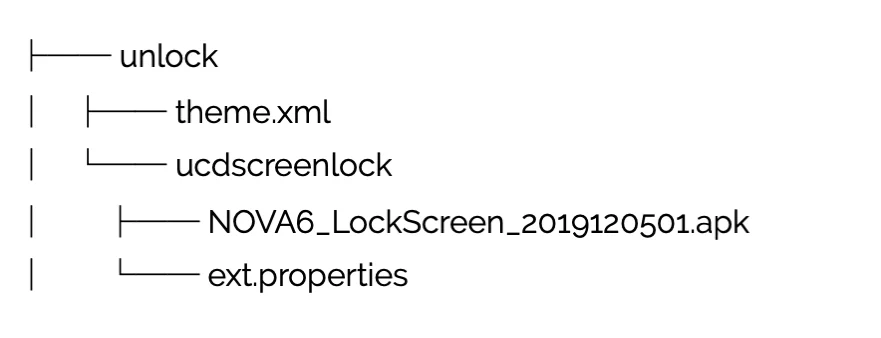
Inside the unlock directory there is a theme.xml file, a manifest that specifies several properties. These settings included the dynamic unlock engine to use (ucdscreenlock in this case) and an ext.properties file, which allows dynamic Java code loading from within the theme file. The content of that file looks like this:
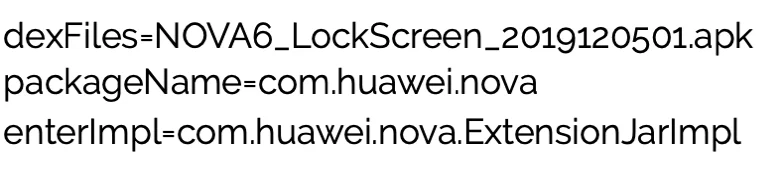
This instructs the dynamic engine (com.huawei.ucdlockscreen) to load com.huawei.nova.ExtensionJarImpl at runtime from the NOVA6LockScreen2019120501.apk. Since this class is not validated, an attacker can introduce their own code and achieve arbitrary code execution.
Exploitation
Step 1: Package a theme with a dynamic engine and an extension class
The attacker builds a .hwt archive whose unlock directory contains a theme.xml selecting the ucdscreenlock engine and an ext.properties file pointing at a class to load. The properties file points at a class and the APK that carries it:
com.huawei.nova.ExtensionJarImpl
NOVA6`LockScreen`2019120501.apk
The engine reads these values and loads the named class from the named APK at runtime, without validating the signature of the loaded code.
Step 2: Deliver the theme to the victim
Exploitation requires installing a custom theme, so a remote attack needs user interaction. The researchers describe two plausible social engineering routes.
First, themes can be gifted to other users, so a compromised trusted contact could be leveraged (or spoofed) to convince a victim to accept and install the malicious theme. The following URL opens the theme gift page:
hwt://www.huawei.com/themes?type=33&id=0&from=AAAA&channelId=BBB
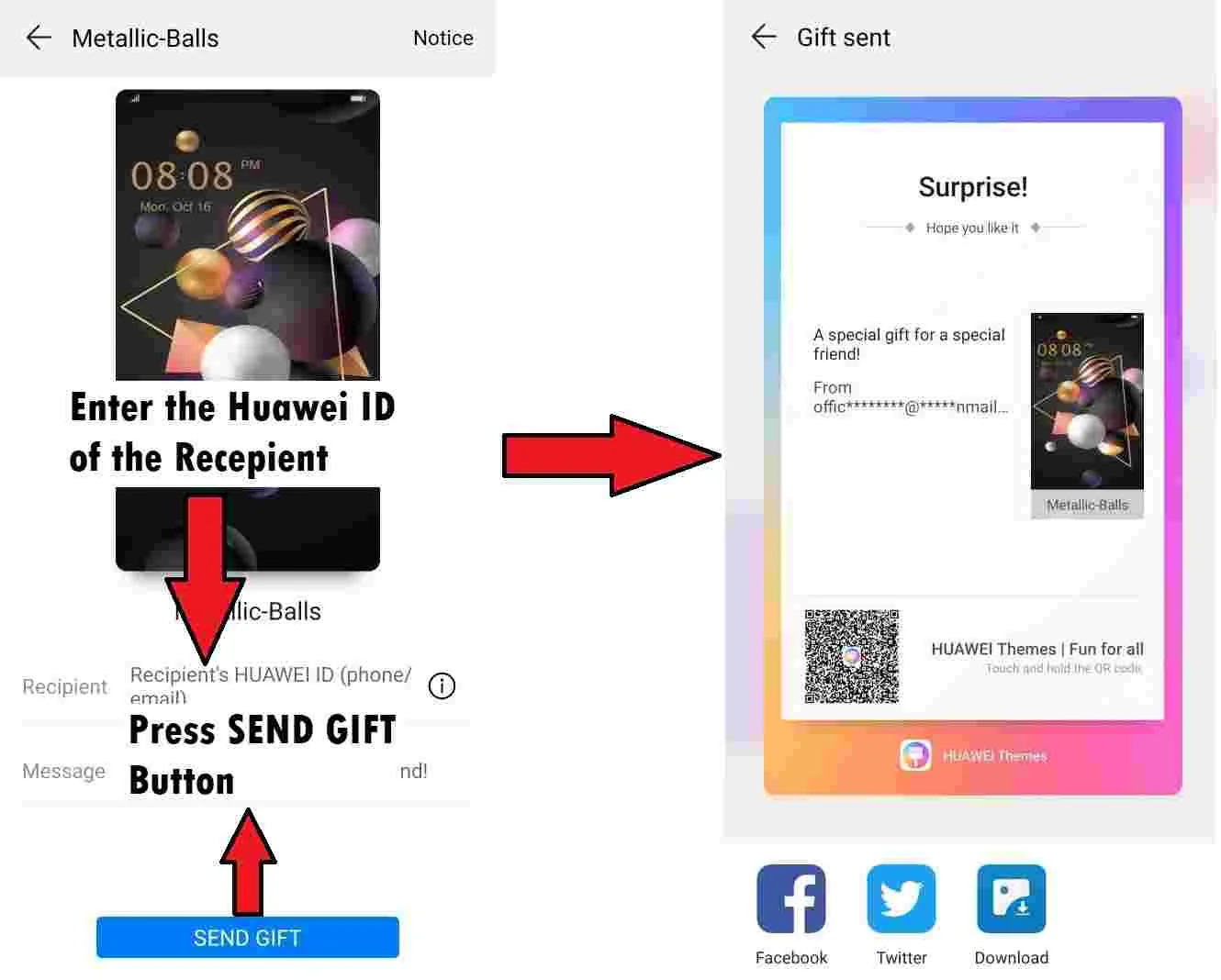
Second, an attacker could publish a link or QR code pointing to the malicious theme online and convince a victim into triggering the HwThemeManager application via a deep link using the hwt:// scheme.
Step 3: Code runs inside a privileged process
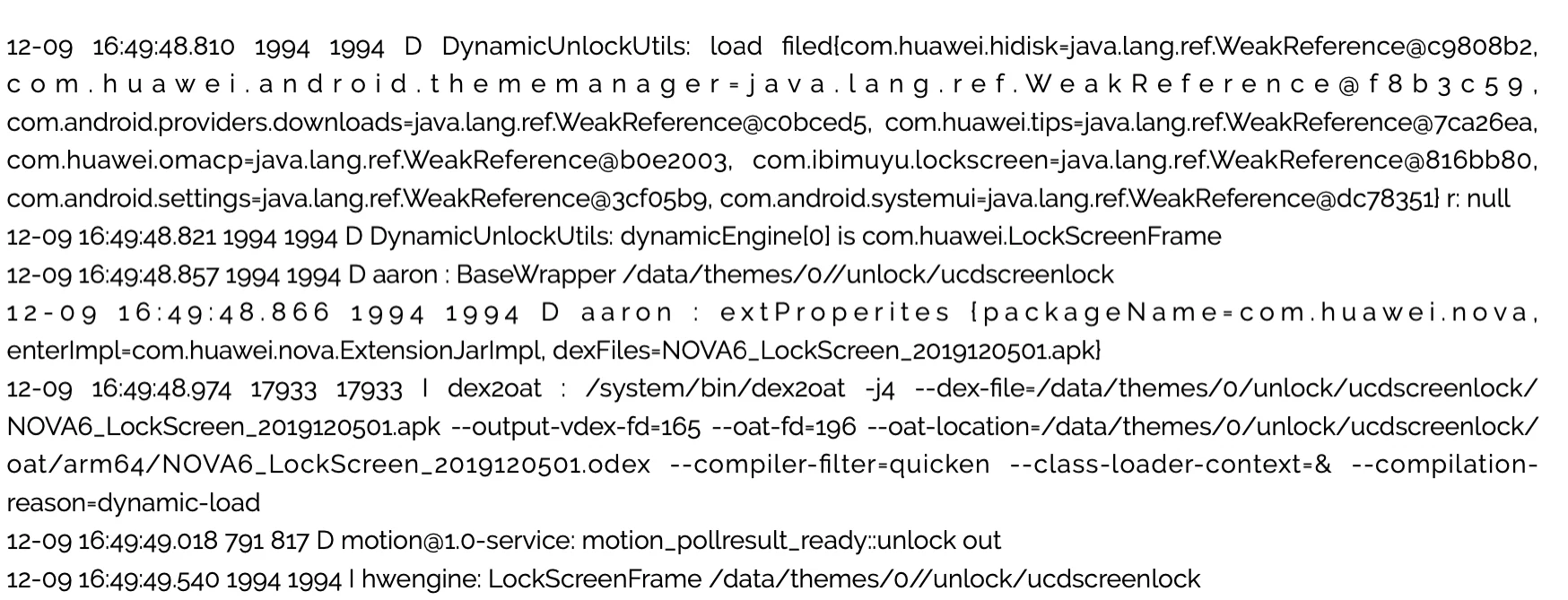
Once the theme is applied, the attacker's code runs within the process of a highly privileged application, com.huawei.android.thememanager, as shown below.

Using the logcat utility, the dynamic loading process can be observed:
Root cause
The design flaw is that the dynamic lock screen engine loads Java classes from inside the theme archive at runtime, and those classes are not signature-checked. The signature verification that SystemUI.apk performs on the application making the changes is sound, but it does not extend to code that is loaded later from the theme itself. The ext.properties file can point the engine at a class and APK the attacker supplies, and that class is not validated.
A second, related weakness appeared in the fix. The updated com.huawei.ucdlockscreen checks for the presence of a /data/themes/0/unlock/ucdscreenlock/error file during theme loading. Because every file under /data/themes/0/ is copied from the supplied .hwt, all of them are attacker-controlled. The error file is used to check the specific version of the theme, so an attacker can embed an error file referencing an older version, forcing legacy theme support. Combined with a fictitious package name in ext.properties, this bypasses all the required checks and makes the issue exploitable again on the latest EMUI 9.1 with no physical access required. At the time of the investigation, the other EMUI major versions appeared to implement signature validation mechanisms that mitigated this.
Impact
The result is arbitrary code execution using the PID of a highly privileged application. In testing, exploitation yielded around 200 Android and Huawei custom permissions. Among them were permissions that could result in total compromise of the device's user data, sensitive system data, any credentials entered into the system and the integrity of the system's environment.
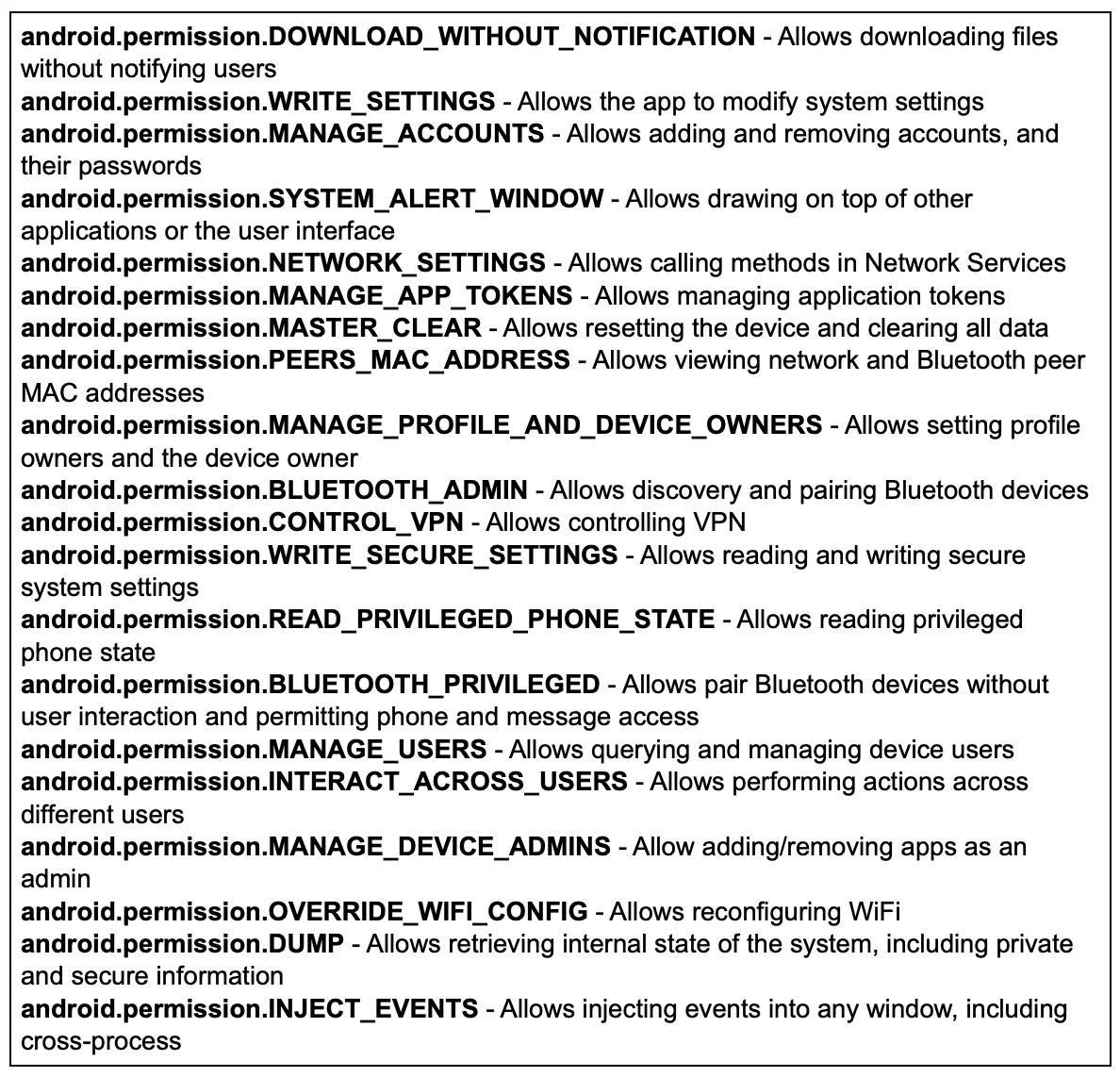
Because the application can send intents requiring the huawei.android.permission.HW_SIGNATURE_OR_SYSTEM permission, the researchers believe it is possible to leverage existing system functionality to obtain system-level code execution. Once that is achieved, the vulnerability has great potential as part of a rooting chain.
The issue can be reliably exploited with no technical impediments, but it requires installing a custom theme, so remote exploitation needs user interaction. Huawei has a review process in place for new themes and wallpapers, which might limit the use of live themes exploiting the vulnerability.
Fix
Huawei released an update for HwThemeManager on February 24, 2022 (internally tracked as HWPSIRT-2019-12158) stating the issue was resolved. The researchers believe the issue was actually resolved in ucdlockscreen.apk (com.huawei.ucdlockscreen version 3 and later).
That distinction matters because the latest version of ucdlockscreen.apk is installed at runtime by HwThemeManager after applying a theme that requires such an engine. Even on a stock phone (EMUI 9, 10 and the latest [redacted]), an attacker with physical access can uninstall the latest version and install the old vulnerable version, since it is properly signed by Huawei. Without further mitigations, an attacker with physical access can still leverage the vulnerability to gain system-privileged access on even the latest devices.
The additional bypass, found by reverse engineering com.huawei.ucdlockscreen version 4.6, affects EMUI 9.1 and does not require physical access. The researchers reported these additional results to Huawei on 1 September 2021. At the time of writing (28 April 2023), the issue was still exploitable locally on the latest EMUI ([redacted]) by force-loading the vulnerable ucdlockscreen.apk. The vulnerable APK and the malicious theme proof of concept were not released.
Variants to test
- Other dynamic engines. Check whether the other lock screen engines (
com.ibimuyu.lockscreen,com.vlife.huawei.emuilock) also load classes from theme archives. A positive result is a theme that causes a class from an attacker-supplied APK to be loaded at runtime. - Other theme-driven loaders. Look for any component that reads a properties or manifest file from a
.hwtarchive and uses it to locate code or resources. A positive result is a value in the archive that changes which code is executed. - Version-selection files. Look for files inside theme directories that select a code path or version, such as the
errorfile here. A positive result is an attacker-controlled file that forces a legacy or less-checked code path. - Package-name substitution. Where a properties file names a package or class, try substituting a fictitious or attacker-controlled name. A positive result is the engine loading the substituted code without a signature check.
- Downgrade of signed components. Check whether a privileged component installed at runtime can be uninstalled and replaced with an older, properly signed version. A positive result is a device that accepts the older version and remains exploitable.
- Deep-link delivery. Test whether
hwt://deep links or theme gifting flows can trigger installation with minimal interaction. A positive result is a victim device installing an attacker-supplied theme from a link or gift.
What happened, in plain words
In 2019 the authors of this research joined Huawei's mobile bug bounty programme, a scheme where a company pays people who find security problems in its products. They chose to look at Huawei Themes, a feature on Huawei phones running EMUI (Huawei's version of Android) that lets you change how the phone looks: the lock screen, the wallpaper, the icons.
Changing the look of the whole phone is not something an ordinary app is allowed to do. The part of the phone that applies a theme runs with high privileges, meaning it is trusted to touch system-wide settings. Anything that runs inside such a trusted part is a valuable target, because code that gets in there inherits that trust.
What the researchers found is that one of the lock screen engines, a piece of software that draws the lock screen, could be told by a theme file to load extra code at runtime. That extra code was never checked for a valid signature. A signature here is like a wax seal on an envelope: it proves who made the contents and that nobody changed them. Because the seal was never checked on this extra code, an attacker could put their own code in a theme, and the phone would run it inside the trusted theme manager process. That is called arbitrary code execution: the attacker gets to run whatever code they like.
This article walks through the same story step by step, explaining each idea from scratch as it appears.
Background: themes, lock screens and signatures
A theme on EMUI is a package of files that changes preferences, lock screens, wallpapers and icons. Because these changes are system-wide, the processes that apply them need elevated privileges. Think of it like a building: most apps are visitors who can only enter the lobby, while the theme manager holds a master key to every floor. That is why researchers look at it closely.
For the lock screen, EMUI used three different engines over time:
- com.ibimuyu.lockscreen
- com.vlife.huawei.emuilock
- com.huawei.ucdlockscreen
An engine here is simply a component responsible for drawing and animating the lock screen. The names in italics are package names, the unique identifiers Android uses for apps and components, a bit like a postal address for software.
When a theme is installed, SystemUI.apk checks the signature of the application that is trying to make these changes, comparing it against a hardcoded list of trusted ones. SystemUI.apk is the Android component that draws the status bar, notifications and other system interface elements. A hardcoded list is a list written directly into the program, not one you can edit from outside. From what the researchers observed, this check was implemented properly, and they found no clear way to bypass it. So the front door was locked.
Finding it: the door that was left open
The interesting observation was elsewhere. When com.huawei.ucdlockscreen was used, it loaded additional classes at runtime. A class is a building block of a program in Java (the language Android apps are largely written in); loading a class at runtime means the program reads new code from a file while it is already running, instead of having all its code baked in from the start. It is like a chef who follows a recipe book but is also allowed to take extra pages handed to them mid-cooking.
The signatures of these extra classes were not validated properly, nor were they even checked. That gap is what allowed the researchers to introduce their own code.
Theme archives use the .hwt extension. An archive is a single file that bundles many files together, like a zip file. Looking at the structure of these archives, the unlock screen elements are packaged as follows:
The image shows the structure of the theme archive. This matters because it tells us where the phone looks for lock screen instructions, and therefore where an attacker would place their own.
Inside the unlock directory there is a theme.xml file. XML is a text format for structured data, using tags in angle brackets to label pieces of information; a manifest is a file that describes what the rest of the package contains and how it should be used. This manifest specifies several properties, including the dynamic unlock engine to use (ucdscreenlock in this case) and an ext.properties file. A properties file is a plain text file of settings, one key and value per line. This particular one allows dynamic Java code loading from within the theme file. The content of that file looks like this:
The image relates to the properties file content. An APK is the file format of an Android app, the same kind of file you install from an app store.
This instructs the dynamic engine (com.huawei.ucdlockscreen) to load com.huawei.nova.ExtensionJarImpl at runtime from the NOVA6LockScreen2019120501.apk. Since this class is not validated, an attacker can introduce their own code and achieve arbitrary code execution. In plain terms: the theme says "please run the code called ExtensionJarImpl, it is in this APK file", and the engine does so without checking who made that APK.
Exploitation
Step 1: Package a theme with a dynamic engine and an extension class
The attacker builds a .hwt archive whose unlock directory contains a theme.xml selecting the ucdscreenlock engine and an ext.properties file pointing at a class to load. The properties file names the class and the APK that carries it:
com.huawei.nova.ExtensionJarImpl
NOVA6`LockScreen`2019120501.apk
The engine reads these values and loads the named class from the named APK at runtime, without validating the signature of the loaded code. The attacker controls both lines, so they can point at their own class in their own APK.
Step 2: Deliver the theme to the victim
Exploitation requires installing a custom theme, so a remote attack needs user interaction: the victim has to do something, such as tap accept. The researchers describe two plausible social engineering routes. Social engineering means persuading a person to take an action that helps the attacker, rather than breaking in technically.
First, themes can be gifted to other users, so a compromised trusted contact could be leveraged (or spoofed) to convince a victim to accept and install the malicious theme. A compromised account is one the attacker has taken over; a spoofed one is faked to look like someone the victim knows. The following URL opens the theme gift page:
hwt://www.huawei.com/themes?type=33&id=0&from=AAAA&channelId=BBB
Reading this URL: hwt:// is a custom scheme, a prefix that tells the phone to open the theme manager rather than a website; a deep link is exactly this, a link that jumps straight into a specific screen of an app. www.huawei.com/themes is the address part the scheme is attached to. Everything after the ? is the query string, a list of key and value pairs separated by &: type=33, id=0, from=AAAA and channelId=BBB. These values tell the theme manager which page to open and with which parameters. The researchers use this as an example of a link that lands the victim on the gift page.
The image relates to the theme gifting flow.
Second, an attacker could publish a link or QR code pointing to the malicious theme online and convince a victim into triggering the HwThemeManager application via a deep link using the hwt:// scheme. A QR code is the square barcode you scan with a phone camera; it can hold a link, so scanning it can open the theme manager directly.
Step 3: Code runs inside a privileged process
Once the theme is applied, the attacker's code runs within the process of a highly privileged application, com.huawei.android.thememanager, as shown below. A process is a running instance of a program, and every process has a PID, a process identifier, a number the operating system uses to tell running programs apart. Running inside the theme manager's process means the attacker's code inherits the theme manager's permissions.
The image relates to the privileged application.
Using the logcat utility, the dynamic loading process can be observed. logcat is Android's built-in tool for reading the system log, the running diary of messages that apps and the system write as they work; developers and researchers use it to see what happened behind the scenes.
The image relates to the logcat output of the dynamic loading process.
Root cause
The design flaw is that the dynamic lock screen engine loads Java classes from inside the theme archive at runtime, and those classes are not signature-checked. The signature verification that SystemUI.apk performs on the application making the changes is sound, but it does not extend to code that is loaded later from the theme itself. The ext.properties file can point the engine at a class and APK the attacker supplies, and that class is not validated. In everyday terms: the bouncer checks the ID of the person who walks in the front door, but not of anyone who later climbs in through a window the bouncer does not know about.
A second, related weakness appeared in the fix. The updated com.huawei.ucdlockscreen checks for the presence of a /data/themes/0/unlock/ucdscreenlock/error file during theme loading. A file path like this is the address of a file on the phone's storage: /data/themes/0/ is a folder, and unlock/ucdscreenlock/error is the file inside it. Because every file under /data/themes/0/ is copied from the supplied .hwt, all of them are attacker-controlled. The error file is used to check the specific version of the theme, so an attacker can embed an error file referencing an older version, forcing legacy theme support. Legacy means an older, kept-for-compatibility mode. Combined with a fictitious package name in ext.properties, this bypasses all the required checks and makes the issue exploitable again on the latest EMUI 9.1 with no physical access required. At the time of the investigation, the other EMUI major versions appeared to implement signature validation mechanisms that mitigated this.
Impact
The result is arbitrary code execution using the PID of a highly privileged application. In testing, exploitation yielded around 200 Android and Huawei custom permissions. A permission is the phone's rule for what an app may do, such as reading contacts or sending messages; holding 200 of them is a very wide set of abilities. Among them were permissions that could result in total compromise of the device's user data, sensitive system data, any credentials entered into the system and the integrity of the system's environment. Credentials here means things like passwords and login tokens; integrity means the guarantee that data and software have not been tampered with.
The image relates to the permissions obtained during testing.
Because the application can send intents requiring the huawei.android.permission.HW_SIGNATURE_OR_SYSTEM permission, the researchers believe it is possible to leverage existing system functionality to obtain system-level code execution. An intent is Android's way of asking another component to do something, like passing a note to a colleague; this particular permission is a gate that only system-level or properly signed components are meant to pass. Once system-level execution is achieved, the vulnerability has great potential as part of a rooting chain. Rooting means gaining the highest level of control over an Android device, and a chain is a series of bugs used one after another, each unlocking the next step.
The issue can be reliably exploited with no technical impediments, but it requires installing a custom theme, so remote exploitation needs user interaction. Huawei has a review process in place for new themes and wallpapers, which might limit the use of live themes exploiting the vulnerability. A review process means a human or automated check before a theme is published, which could catch a malicious one.
Fix
Huawei released an update for HwThemeManager on February 24, 2022 (internally tracked as HWPSIRT-2019-12158) stating the issue was resolved. The researchers believe the issue was actually resolved in ucdlockscreen.apk (com.huawei.ucdlockscreen version 3 and later).
That distinction matters because the latest version of ucdlockscreen.apk is installed at runtime by HwThemeManager after applying a theme that requires such an engine. In other words, the lock screen engine is not permanently part of the phone; it is fetched and installed when a theme needs it. Even on a stock phone (EMUI 9, 10 and the latest [redacted]), an attacker with physical access can uninstall the latest version and install the old vulnerable version, since it is properly signed by Huawei. Stock means the phone as sold, without modifications. Physical access means holding the device in your hands. The old version is still accepted because Huawei's own signature on it is genuine, so the phone has no reason to refuse it.
The additional bypass, found by reverse engineering com.huawei.ucdlockscreen version 4.6, affects EMUI 9.1 and does not require physical access. The researchers reported these additional results to Huawei on 1 September 2021. At the time of writing (28 April 2023), the issue was still exploitable locally on the latest EMUI ([redacted]) by force-loading the vulnerable ucdlockscreen.apk. Force-loading means making the phone use a specific version of the component rather than the current one. The vulnerable APK and the malicious theme proof of concept were not released. A proof of concept is a demonstration that the attack works, often a small working example.
Variants to test
- Other dynamic engines. Check whether the other lock screen engines (
com.ibimuyu.lockscreen,com.vlife.huawei.emuilock) also load classes from theme archives. A positive result is a theme that causes a class from an attacker-supplied APK to be loaded at runtime. - Other theme-driven loaders. Look for any component that reads a properties or manifest file from a
.hwtarchive and uses it to locate code or resources. A positive result is a value in the archive that changes which code is executed. - Version-selection files. Look for files inside theme directories that select a code path or version, such as the
errorfile here. A positive result is an attacker-controlled file that forces a legacy or less-checked code path. - Package-name substitution. Where a properties file names a package or class, try substituting a fictitious or attacker-controlled name. A positive result is the engine loading the substituted code without a signature check.
- Downgrade of signed components. Check whether a privileged component installed at runtime can be uninstalled and replaced with an older, properly signed version. A positive result is a device that accepts the older version and remains exploitable.
- Deep-link delivery. Test whether
hwt://deep links or theme gifting flows can trigger installation with minimal interaction. A positive result is a victim device installing an attacker-supplied theme from a link or gift.
Conclusions
While the vulnerability is technically interesting by itself, there are two security engineering learning lessons here. The biggest takeaway is clearly that while relying on signature validation for authenticating software components can be an effective security measure, it must be thoroughly extended to include any dynamically loaded code. If you check the seal on the envelope, also check the seal on every extra page that comes out of it.
That said, it appears Huawei no longer provides bootloader unlock options, which makes rooting more complicated and expensive. A bootloader is the first program that runs when a phone starts and decides what operating system to load; unlocking it is the usual first step to rooting. It remains to be seen if this bug is ever used as part of a chain developed by the rooting community.
A secondary engineering lesson is to ensure that when we design backwards compatibility mechanisms, we should assume that there may be older versions that we want to abandon. Backwards compatibility means keeping old things working with new software; the danger is that an attacker can use the old path to get around the new checks.
This research was made possible by the Huawei Mobile Phone Bug Bounty Program. The researchers thank the Huawei PSIRT for their help in handling this issue, the generous bounty and the openness to disclose the details. PSIRT stands for Product Security Incident Response Team, the group inside a company that handles reports of security problems.
Glossary
- APK: the file format of an Android app, the package you install on a phone.
- Archive: a single file that bundles many files together, like a zip file; here the
.hwttheme file. - Arbitrary code execution: the ability for an attacker to make a device run code of their choosing.
- Backwards compatibility: keeping older software or formats working with newer versions.
- Bootloader: the first program that runs when a device starts, which loads the operating system.
- Bug bounty programme: a scheme where a company pays researchers who find and report security problems in its products.
- Class: a building block of a Java program; loading one at runtime means reading new code while the program is already running.
- Credentials: secrets used to prove identity, such as passwords or login tokens.
- Deep link: a link that opens a specific screen inside an app rather than a website.
- EMUI: Huawei's version of the Android operating system.
- Engine (lock screen engine): the component that draws and animates the lock screen.
- Hardcoded list: a list written directly into a program's code, not editable from outside.
- Intent: Android's mechanism for one component to ask another to perform an action.
- Integrity: the guarantee that data or software has not been tampered with.
- Legacy: an older mode or version kept for compatibility.
- Logcat: Android's tool for reading the system log of running messages.
- Manifest: a file describing what a package contains and how it should be used.
- Package name: the unique identifier Android uses for an app or component.
- Permission: a rule for what an app is allowed to do on the device.
- PID: process identifier, the number the operating system uses to tell running programs apart.
- Process: a running instance of a program.
- Properties file: a plain text file of settings, one key and value per line.
- Proof of concept: a small working demonstration that an attack is possible.
- Privileges: the level of trust and access a program has; elevated privileges mean it can make system-wide changes.
- PSIRT: Product Security Incident Response Team, the group inside a company that handles security reports.
- QR code: a square barcode that can hold a link and be scanned by a phone camera.
- Query string: the part of a URL after the
?, made of key and value pairs separated by&. - Rooting: gaining the highest level of control over an Android device.
- Rooting chain: a series of bugs used one after another, each enabling the next step towards root.
- Signature: a cryptographic seal that proves who made a piece of software and that it has not been altered.
- Social engineering: persuading a person to take an action that helps an attacker, instead of breaking in technically.
- Stock phone: a phone as sold, without modifications.
- SystemUI.apk: the Android component that draws the status bar, notifications and other system interface elements.
- URL scheme: the prefix of a link, such as
hwt://, that tells the device which app should handle it. - XML: a text format for structured data using tags in angle brackets.


