SSRF Possible through /wordpress/xmlrpc.php
The WordPress xmlrpc.php pingback function can be abused to make the server send requests to arbitrary URLs, enabling SSRF. An attacker could use this to probe internal network infrastructure or coordinate a DDoS against a target.

- Disclosed after 42 hours
Hello,
I have found a SSRF in iandunn.name through the xmlrpc.php API.
I understood you've said about this endpoint in the past making up junk reports, but this is on a function which isn't disabled by disabling the endpoint, as I can prove with a Proof-Of-Concept.
There is a function using pingbacks which can be used when someone has linked your blog post, this makes a request to the website and scans for your post URL and adds it to a database on the site.
It is possible to disable pingbacks and there is articles on why you should.
I have been using a grabify link to debug how this works, the Proof-Of-Concept calls for a link to be used where you can review the IPs which have interacted with it, although you could probably use a link on your own domain if you can access the logs, if you are going to use grabify then you will have to set up a redirect URL, I used http://youtube.com. You will be given a link like grabify.link/XXXXXX, this is required for the Proof-Of-Concept to function correctly, just click the copy button and move on to the next step.
Execute the Proof-Of-Concept and input the URL you copied, you will then be asked for an amount of seconds to wait between each request, I personally would choose 5, since it's only proving it (There will be more time between each request because the server has to send the request, process and send it back before the code will continue).
The Proof-Of-Concept will print out any error codes the system sends back, there should be none. If there is a message, stop the code and make sure you have copied the URL and pasted it correctly, including the protocol and no slash at the end of the URL. (When the code says Fault string returned: followed by a blank string, it means there is no error)
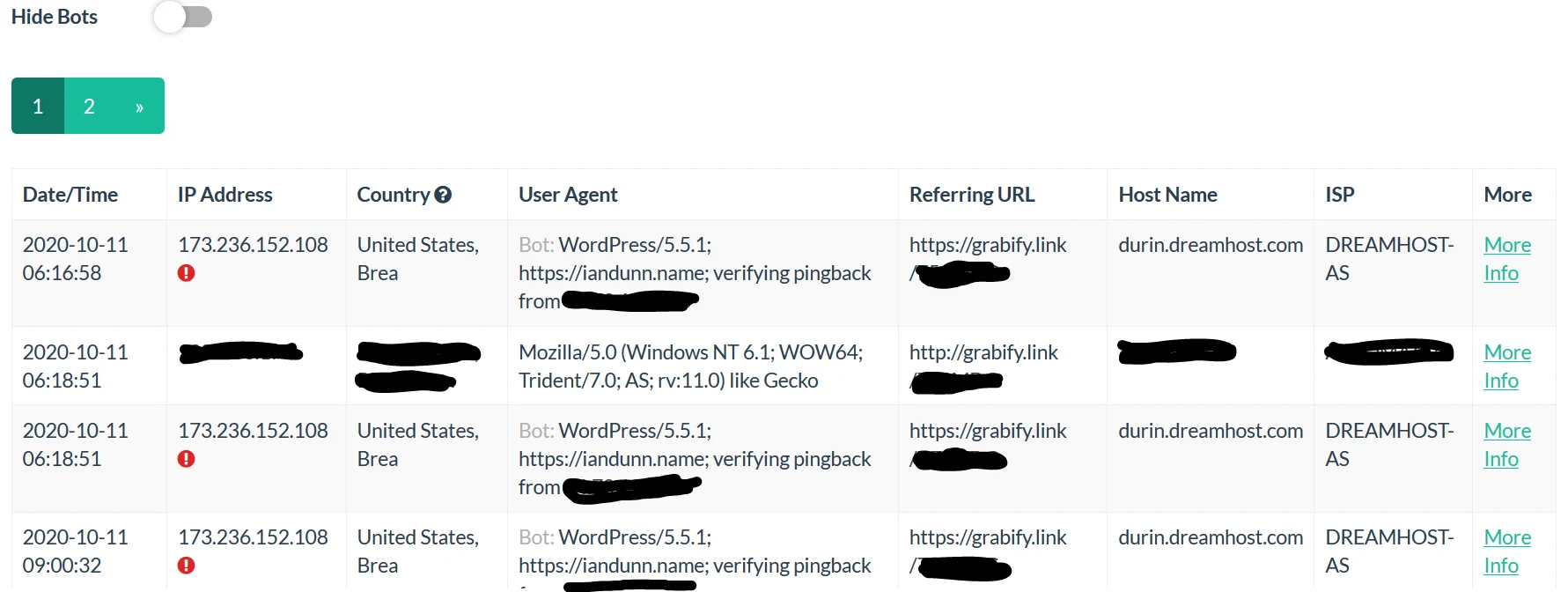
After it has printed a few links, go the grabify tracking page in your browser, scroll down and see the logged IPs, you may need to refresh your browser and ensure you didn't enable the toggle to stop bots showing up.
I have attacked a Proof-Of-Concept on how this can be abused and screenshots.
Impact
An attacker can use this to get some idea of the internal network infrastructure or use it in co-ordination with other WordPress web sites to conduct a DDoS on a target
Attachments

Not written yet. The AI write-up for this report has not been written yet. The Original tab links to the source.
How it worked
Root cause
Likely the pingback functionality in xmlrpc.php allows arbitrary URLs to be supplied, causing the server to make outbound requests without proper validation.
Impact
An attacker could use this to get some idea of the internal network infrastructure or use it in co-ordination with other WordPress web sites to conduct a DDoS on a target.
What the attacker needed
WordPress with xmlrpc.php enabled; Pingbacks not disabled; Attacker can supply a URL
How it was found
- Create a tracking link (e.g., using grabify) with a redirect URL.
- Run the proof-of-concept script and input the tracking URL.
- Set a delay between requests (e.g., 5 seconds).
- Check the tracking page for logged IPs to confirm requests originated from the server.
Explained by bugbounty.wiki with AI from the original and checked against quotes from it; it can still be wrong. Read the original before relying on a detail.
Not written yet. The AI write-up for this report has not been written yet. The Original tab links to the source.
The report describes a server-side request forgery (SSRF) flaw. In SSRF, an attacker tricks a server into making requests to other systems, which can reveal internal network details or be used to attack others. Here, the WordPress pingback feature is abused to send requests to attacker-chosen URLs.
What is SSRF?
The server can be made to fetch an address the attacker chooses, reaching internal services, cloud metadata or other customers' data.



