Hyperlink Injection On IRC Cloud
The signup form on IRC Cloud allowed a user to enter a name containing HTML or a URL, which was then included in notification emails sent to other users. An attacker could send emails containing malicious hyperlinks to any user they targeted.

What is Hyperlink Injection, its basically spoofing or injecting a link when sending an email invitation. Its a P5 according to bugcrowd, but some companies might consider it as a serious issue so report if you find it, might get paid.
The full write-up lives on its author's site
It belongs to its author, so we link to it rather than copy it. The other two tabs are our own rewrites, checked against it.
Context
IRCCloud is a web based IRC client, and the write-up treats it as a trusted, well known site. The feature in question is the sign-up form: a new user supplies a first name, an email address and the rest of the registration details, and IRCCloud sends email to the address that was entered. That email is the part that matters here. The name the user typed is placed into the notification email, and the researcher found that a URL or HTML placed in the first name field survives into the delivered message as a working hyperlink.
The class of issue is hyperlink injection, which the author describes as spoofing or injecting a link when an email invitation is sent. The author rates it P5 according to Bugcrowd, while noting that some companies treat it as a serious issue and may pay for it.

Setup
No accounts, tools, versions or special preconditions are described. The only requirement shown is access to the public sign-up form at https://www.irccloud.com and an email address to receive the resulting message. The attack depends on user interaction: the victim has to open the email and follow the injected link.
Finding it
The researcher's summary is that IRCCloud is a trusted website, but the sign-up form lets an attacker inject malicious links (HTML) that reach any user the attacker targets through an email address, which damages the company's reputation. In other words, the first name field is reflected into an outbound email without being neutralised, so whatever is typed there is rendered as markup or as a link by the mail client.
Exploitation
Step 1: open the sign-up form
Go to the site:
https://www.irccloud.com
Step 2: put the payload in the first name
Fill in the sign-up form, giving the first name as a malicious link or HTML code. The write-up gives two examples:
→ go to this link https://www.evil.com
<a href="evil.com">click here for pass</a>
The first is a bare URL embedded in the name text. The second is an anchor element. Both are placed in the same field, the first name.
Step 3: enter the victim's address and submit
Give the victim's email id in the form and submit it. The registration flow then sends its notification to that address.
Step 4: the email arrives with the injected link
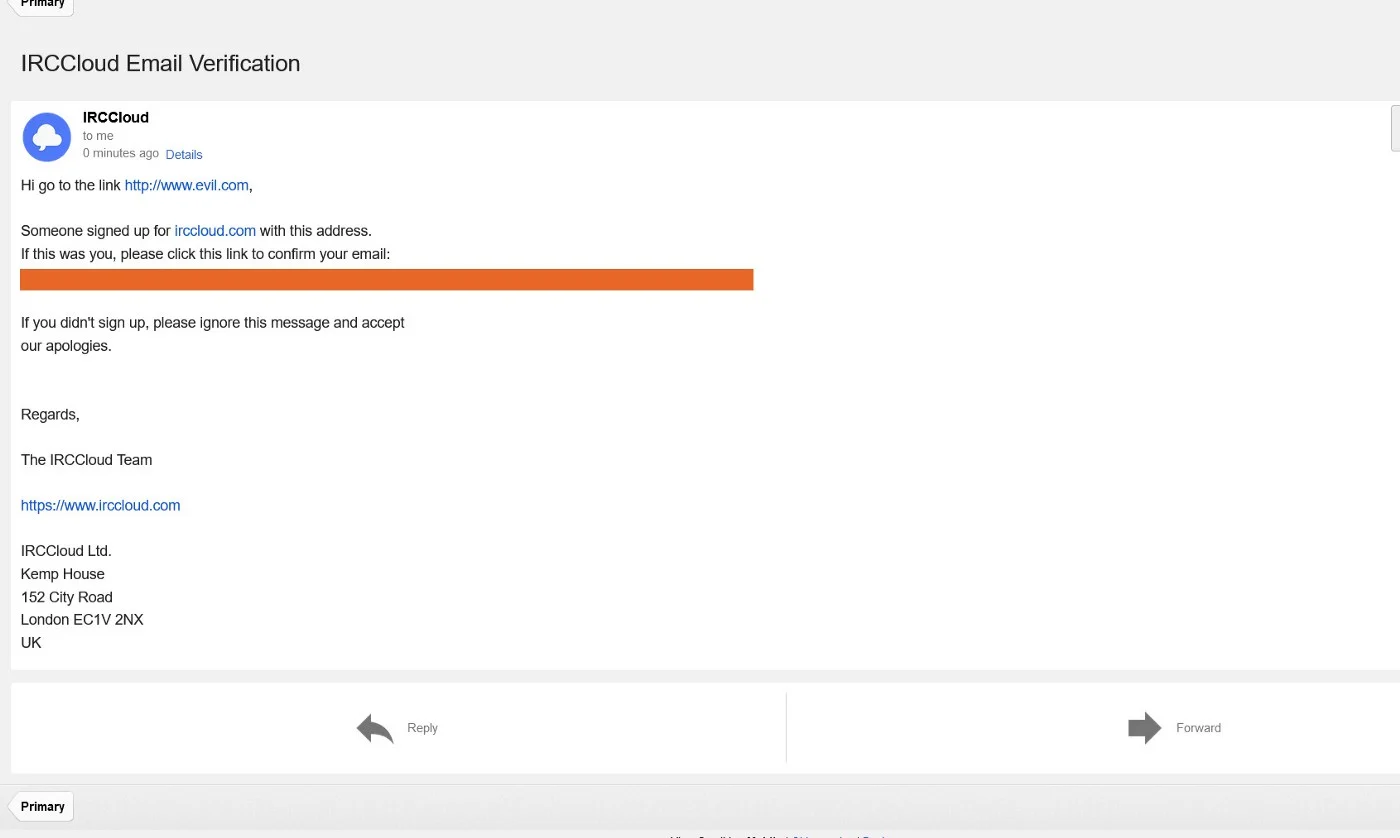
The victim receives mail from IRCCloud containing the malicious link.
Root cause
The sign-up form lets a URL or HTML in the first name field reach the notification email. The write-up does not show the server side code or the email template, so the exact escaping failure is not documented; .
Impact
Using the vulnerability, an attacker can abuse the target's email system to send malicious emails to any user. The author states that this might lead to redirecting the victim to a malicious website, or to downloading trojans or viruses on the victim's system. The attack involves user interaction in the majority of cases, and the practical effect described is reputational damage to the company, since the mail appears to come from IRCCloud.
Fix
The write-up does not describe a fix or say what was changed. The measure it implies is to sanitise or encode the first name before it is placed into the email, so that URLs and HTML are rendered as inert text rather than as links or markup.
Variants to test
- Other name fields in the same flow: try the last name, display name or organisation name in the sign-up and invitation forms. A positive result is a notification email in which the value appears as a clickable link or as rendered HTML.
- Invitation flows on other products: the referenced reports cover hyperlink injection in friend invitations and in organisation invitations. A positive result is an invitation email whose body contains the attacker supplied link.
- Bare URLs versus markup: submit a plain URL first, then an anchor element. A positive result is either the URL being auto-linked or the anchor being rendered, which tells you whether the mail template escapes HTML but still allows linkification.
- Notification subjects and headers: place the payload in fields that end up in the subject line or other headers. A positive result is the payload appearing unescaped outside the body.
- Different recipients: send to addresses on different mail providers. A positive result is the payload rendering in at least one client, which shows the issue is in the message rather than in a single client's behaviour.
What happened, in plain words
IRCCloud is a website that lets people chat on IRC, an old but still widely used text chat system, from inside a normal web browser instead of a separate chat program. The write-up treats it as a trusted, well known site, the kind of name people recognise and do not think twice about.
The feature involved is the sign-up form, the page where a new user creates an account. You type a first name, an email address and the other registration details, and IRCCloud sends an email to the address you entered. That email is the interesting part. Whatever you typed as your first name is placed inside the notification email, and the researcher found that a web address (a URL) or a piece of HTML placed in the first name field survives all the way into the delivered message as a working hyperlink.
To unpack the terms: a URL is just the address of something on the web, like https://www.irccloud.com. HTML is the language web pages and many emails are written in; a link in HTML is made with a tag that looks like <a href="...">text</a>, where the part in quotes is where the link goes and the text between the tags is what the reader sees and clicks. A hyperlink is simply clickable text that takes you somewhere.
The class of issue is called hyperlink injection. The author describes it as spoofing or injecting a link when an email invitation is sent. In everyday terms, imagine a company sending you a letter on its own headed paper, but letting a stranger dictate one sentence in the middle. The letter still looks official, so you trust the sentence. Here the stranger is the attacker and the sentence is a link.
The author rates the issue P5 according to Bugcrowd. Bugcrowd is a platform where companies list their products and security researchers report problems in them; P5 is the lowest priority level on its scale. The author adds that some companies treat this kind of issue as serious and may pay for it, so it is still worth reporting if you find one.
Setup
No accounts, tools, versions or special preconditions are described. The only requirement shown is access to the public sign-up form at https://www.irccloud.com and an email address to receive the resulting message. In other words, you need a browser and a mailbox, nothing more.
The attack depends on user interaction: the victim has to open the email and follow the injected link. That is a common pattern in security. Some bugs fire the moment a page loads, with no action from the victim; this one needs a person to click. That makes it less reliable for an attacker, but it also makes it harder to notice, because the click looks like an ordinary decision by the recipient.
Finding it
The researcher's summary is that IRCCloud is a trusted website, but the sign-up form lets an attacker inject malicious links (HTML) that reach any user the attacker targets through an email address, which damages the company's reputation.
In other words, the first name field is reflected into an outbound email without being neutralised, so whatever is typed there is rendered as markup or as a link by the mail client. "Reflected" means the value you typed comes back out somewhere else, in this case in a message sent to someone else. "Neutralised" means made harmless: for example, turning the characters < and > into codes that display as text instead of being treated as the start and end of an HTML tag. A mail client is the program that displays email, such as the webmail page or the phone app; it is the client that decides whether to show the name as plain text or to act on the HTML inside it.
Exploitation
Step 1: open the sign-up form
Go to the site:
https://www.irccloud.com
This is the public home page of IRCCloud. The researcher starts here because the sign-up form is reachable from it, and because the whole point is that the form is open to anyone: no account, no invitation, no special access. That is what makes the issue easy to reach for an attacker.
Step 2: put the payload in the first name
Fill in the sign-up form, giving the first name as a malicious link or HTML code. A payload is simply the piece of text an attacker supplies to try to make something happen; here it is the content typed into the name box. The write-up gives two examples:
→ go to this link https://www.evil.com
This first example is a bare URL embedded in the name text. Read it as: the name contains an arrow, the words "go to this link", an invisible character, and then a web address. The address https://www.evil.com is a placeholder domain the researcher uses to stand in for any site an attacker might want to send people to. If that happens, the attacker gets a working link without needing any HTML to survive at all.
<a href="evil.com">click here for pass</a>
This second example is an anchor element, the HTML way of writing a link. Read it piece by piece: <a starts the link, href="evil.com" says where the link points, > ends the opening tag, click here for pass is the visible text the reader sees, and </a> closes the link. Escaping is the defence where the mail system rewrites special characters so they show up as literal text; if escaping is in place, the victim sees the raw tag instead of a link. Trying both tells you which defence, if any, is missing.
Both are placed in the same field, the first name. That detail matters: the first name is a field nobody would expect to carry a link, which is exactly why it may have been overlooked when the email template was built.
Step 3: enter the victim's address and submit
Give the victim's email id in the form and submit it. The registration flow then sends its notification to that address. The reason this step works is that the form lets the person filling it in choose which address receives the mail; the attacker does not need access to the victim's account or mailbox, only the ability to type the address into a public form.
Step 4: the email arrives with the injected link
The victim receives mail from IRCCloud containing the malicious link. This is the heart of the problem: the victim is not reading a suspicious message from an unknown sender, but a real notification from a service they may already use, and the injected link sits inside it.
Root cause
The sign-up form lets a URL or HTML in the first name field reach the notification email. Sanitising means cleaning input so dangerous parts are removed; encoding means converting special characters into a safe representation so they display as text rather than being interpreted. Escaping, again, is the act of making those special characters inert.
The write-up does not show the server side code or the email template, so the exact escaping failure is not documented; . Concatenated means simply glued together: the template text, then the name, then more template text, with nothing checking what the name contains.
To see why that matters, picture a form that carefully checks a comment box but forgets that the name box ends up in the same email. The attacker does not need to defeat the check on the comment box at all; they use the door nobody locked.
Impact
Using the vulnerability, an attacker can abuse the target's email system to send malicious emails to any user. The author states that this might lead to redirecting the victim to a malicious website, or to downloading trojans or viruses on the victim's system. A trojan is malicious software disguised as something legitimate, and a virus is malicious software that spreads; both are things a victim might end up with after following a link and downloading a file.
The attack involves user interaction in the majority of cases, and the practical effect described is reputational damage to the company, since the mail appears to come from IRCCloud. Reputational damage here means users losing trust in the brand: the emails are genuine, sent by the real service, so the harm lands on the company's name rather than on some impersonator's.
Fix
The write-up does not describe a fix or say what was changed. The measure it implies is to sanitise or encode the first name before it is placed into the email, so that URLs and HTML are rendered as inert text rather than as links or markup. In plain terms: when the name is dropped into the email, any <, > or quote characters should be converted so the mail client shows them as characters, not as instructions.
Variants to test
These are follow-up ideas for someone who wants to look for the same class of bug elsewhere. Each one names what to try and what a positive result looks like.
- Other name fields in the same flow: try the last name, display name or organisation name in the sign-up and invitation forms. A positive result is a notification email in which the value appears as a clickable link or as rendered HTML.
- Invitation flows on other products: the referenced reports cover hyperlink injection in friend invitations and in organisation invitations. A positive result is an invitation email whose body contains the attacker supplied link.
- Bare URLs versus markup: submit a plain URL first, then an anchor element. A positive result is either the URL being auto-linked or the anchor being rendered, which tells you whether the mail template escapes HTML but still allows linkification. Linkification is the automatic turning of plain text that looks like a web address into a clickable link.
- Notification subjects and headers: place the payload in fields that end up in the subject line or other headers. A positive result is the payload appearing unescaped outside the body. Headers are the hidden lines at the top of an email that carry information like the subject and sender, separate from the visible body.
- Different recipients: send to addresses on different mail providers. A positive result is the payload rendering in at least one client, which shows the issue is in the message rather than in a single client's behaviour. This matters because each mail provider has its own filtering and display rules, so a bug that one provider blocks may still work on another.
Glossary
- API: a defined way for one piece of software to talk to another, like a service counter where you make a request and get a response in a fixed format.
- Anchor element: the HTML tag
<a>used to create a link, with anhrefattribute saying where the link points. - Bug bounty: a programme where a company rewards people for reporting security problems in its products.
- Bugcrowd: a platform that hosts bug bounty programmes and priority scales for companies.
- Concatenation: gluing pieces of text together in order, with nothing checking what each piece contains.
- Cookie: a small piece of data a website stores in your browser so it can recognise you on later requests, like a cloakroom ticket.
- Email header: the hidden lines at the top of a message carrying the subject, sender and routing information, separate from the visible body.
- Encoding (output encoding): converting special characters into a safe form so they display as text instead of being interpreted as instructions.
- Escaping: making special characters inert, so
<shows as a character rather than starting an HTML tag. - HTML: the language used to describe the structure and formatting of web pages and many emails, including links.
- Hyperlink: clickable text or an image that takes you to another address when clicked.
- Hyperlink injection: getting an attacker supplied link into a message or page that the victim trusts, so the link appears to come from that trusted source.
- IRC: Internet Relay Chat, a long standing text chat system with channels and nicknames.
- IRCCloud: a web based client for IRC, letting people chat from a browser.
- Linkification: a mail client's automatic turning of plain text that looks like a web address into a clickable link.
- Mail client: the program or web page that displays email and decides how to render its contents.
- P5: the lowest priority level on Bugcrowd's scale, used for low impact issues.
- Payload: the piece of text or data an attacker supplies to try to trigger a behaviour.
- Reflected input: a value you typed that comes back out somewhere else, such as in an email sent to another person.
- Sanitising: cleaning input so dangerous parts are removed or made harmless.
- Sign-up form: the page where a new user enters details such as name and email address to create an account.
- Token: a short piece of data used to prove identity or authorise an action, like a temporary pass.
- Trojan: malicious software disguised as something legitimate, which a victim may install willingly.
- URL: the address of something on the web, such as
https://www.irccloud.com. - User interaction: the victim having to do something, such as opening an email or clicking a link, for an attack to work.
- Virus: malicious software that spreads, often by attaching itself to files or programs.
- Vulnerability: a weakness in software that someone can use to make it behave in a way its makers did not intend.