MobileIron MDM Contains Static Key Allowing Account Enumeration
The Mobile@Work agent contained a hardcoded API key and a hardcoded encryption key, and the authentication service allowed account enumeration without triggering lockout. An unauthenticated attacker could discover an organisation's MobileIron endpoint, build authentication requests, and enumerate or brute-force user accounts.
 Published on emptynebuli.github.io
In December, 2020, I originally released this content through Optiv SourceZero. To ensure future control over this content and provide central storage, I have copied here.
The full write-up lives on its author's site
It belongs to its author, so we link to it rather than copy it. The other two tabs are our own rewrites, checked against it.
MobileIron is an enterprise mobile device management (MDM) platform. Like other MDM products, it lets an organisation manage containerised access to internal resources from untrusted or unmanaged devices: a provisioning profile is pushed to the device, the operating system, patch level and manufacturer are validated, and the device is checked for compromise, jailbreak or unlock. Once a device passes the security check and the user authenticates, the organisation can push applications and services to it, typically email, VPN and other internal services.
This write-up covers three issues in MobileIron's authentication workflow that, chained together, could lead to account compromise. It builds on earlier research into VMware AirWatch, where the authentication workflow could be abused to bypass multi-factor authentication. A similar attack surface exists for MobileIron. The content was originally published through Optiv SourceZero in December 2020 and is reproduced here for central storage. The rough proof of concept released alongside it, rustyIron, has since been replaced by Dauthi, an MDM analysis framework designed to perform single-factor authentication (SFA) validation against numerous platforms.
Context
MobileIron implements MDM through the Mobile@Work agent application for Android and iOS. On launch, the app prompts the user for their email address or for the authentication endpoint of the MobileIron MDM environment.
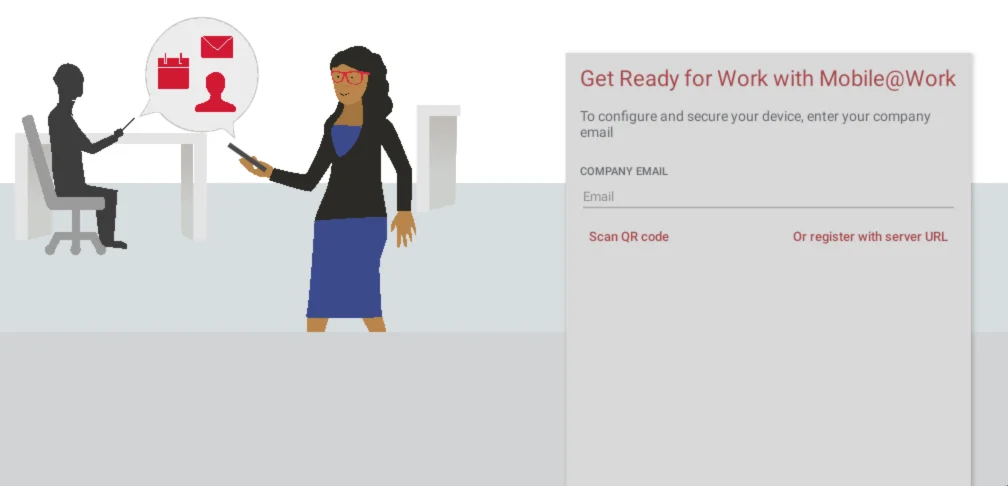
Submitting an email address starts a discovery process that identifies the authentication endpoint attributed to the email address's FQDN. The discovery request goes to a MobileIron-hosted API at appgw.mobileiron.com. Unlike AirWatch, MobileIron tries to restrict access to authorised requests by requiring an API key:
GET /api/v1/gateway/customers/servers?[redacted] HTTP/1.1
Host: appgw.mobileiron.com
User-Agent: MobileIron/OpenSSLWrapper (Dalvik VM)
The request takes two user-supplied values:
- key: the MobileIron API key that authorises requests against the discovery service.
- domain: the registered FQDN of the user's submitted email address.
Requests without the correct API value are denied and receive an HTTP 403 error.
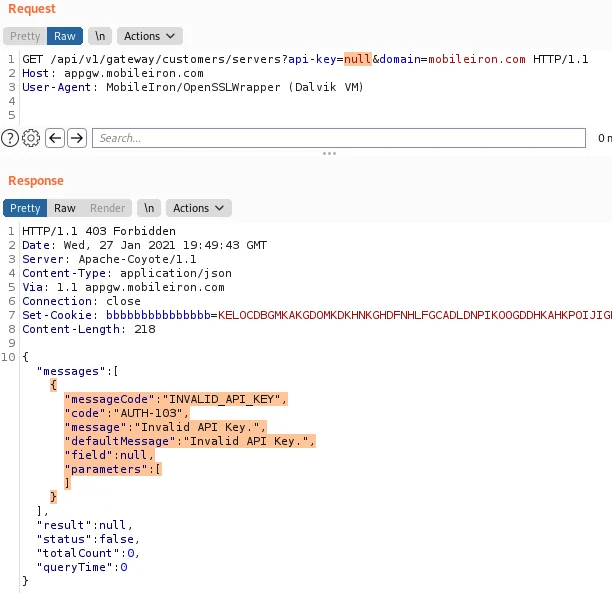
API keys are generally treated as sensitive information equivalent to credentials. MobileIron, however, hardcoded an API key in the Mobile@Work agent.
Setup
The research required recovering the Mobile@Work agent from an Android environment and decompiling it to derive the original Java source. Android packages (APK) are zip archives containing an application's code, resources, assets, certificates and the Java manifest.
iOS Application Archives (IPA) are different: they are encrypted with a unique key tied to each individual iOS device, and can be decrypted only on a jailbroken device. The report does not describe the process of recovering or decompiling the APK/IPA itself; it only notes that the agent was recovered from an Android environment and decompiled.
For protocol testing, the researcher added a self-signed certificate to the device's trusted authorities, which allowed decryption of the Mobile@Work communication channel. To remove the randomness introduced by device-specific data, testing of the MobileIron protocol was standardised to represent a Google Pixel 2 (walleye) running Android 11.
Finding it
Hardcoded API key
Examination of the decompiled Java source revealed that the MobileIron API key was hardcoded in the following file:
sources/com/mobileiron/registration/RegisterActivity.java
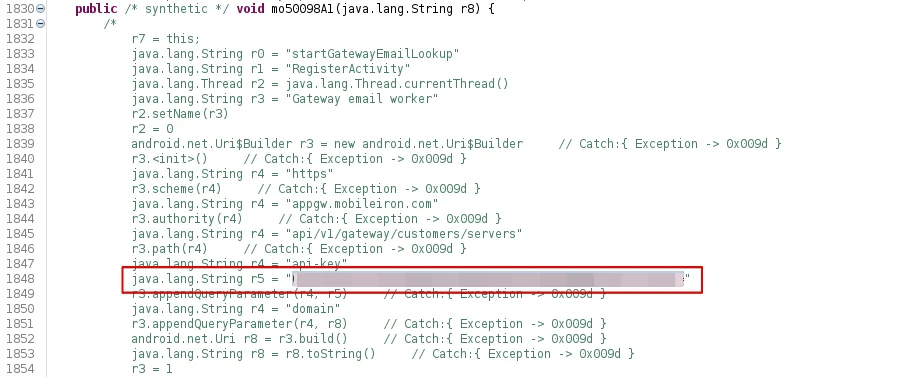
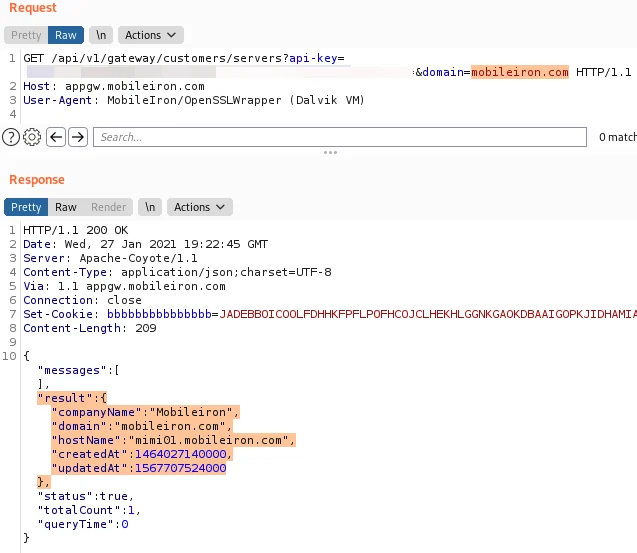
With the key recovered, any unauthenticated attacker can locate an organisation's MobileIron authentication endpoint.
MobileIron validated and acknowledged the issue. It described the functionality as a critical component of the Mobile@Work workflow and said it would review alternatives:
The static key is used during the registration process and allows the mobile client to find a customer's Core based on the user's email address. Removing this functionally means the user would need to provide the host name of the Core which would likely be impactful on our customers' workflow. The Engineering team is looking at additional options though there is currently no timeline for remediation.
MITRE assigned CVE-2020-35137 to this observation, based on CWE-798. Validation of the attack surface can be performed with Dauthi.
Hardcoded encryption key
Once the authentication endpoint is known, the Mobile@Work agent begins authentication over port 9997/TCP. This is a TLS-encrypted raw TCP socket carrying a proprietary MobileIron protocol. By default Mobile@Work does not validate the TLS certificate chain and relies on the mobile device's trusted authorities. It can be configured to perform TLS validation through the non-reversible Mutual Certificate Authentication feature, which does not change the client/server communication process and only instructs the client to validate the endpoint certificate chain.
Mobile@Work sends raw binary data to the endpoint, which appears to contain a variable 38-byte payload header. Through examination and submission of various authentication requests, the researcher identified the following packet layout:

- Request Header: a 4-byte value populated with the ASCII string
MIPR. Based on Android logcat output, this is believed to stand for MobileIron Protocol Request. - Version: a two-byte field that mostly carried
0x02or0x01. - Flags: a four-byte field with various flag values. Based on logcat output, each byte is believed to correspond to Flags, HBT, ACK and NAK respectively. The specific conditions and purpose of these flags were unknown at the time of writing.
- Packet Size: a Big Endian representation of the uint16 payload length.
- Sender GUID: a Big Endian representation of the uint32
SenderGUIDassigned to the Mobile@Work agent after successful authentication. Initial communication defaults this value to0xFFFFFFFF. - Receiver GUID: used as an impromptu session-tracking mechanism. MobileIron response packets zero out the
SenderGUIDand populate this value, representing an ACK response. - Unknown: a three-byte value after the
ReceiverGUIDthat always carried 0x0 during testing. - PKT Count: a two-byte counter of the packet exchange between Mobile@Work and the endpoint. Mobile@Work sets it to
0x01initially and increments it by one for each subsequent packet; MobileIron responses carry the same count as the originating request. - Unknown: a seven-byte header field after the
PKT Countthat always carried 0x0 during testing. - Packet Type: a two-byte value determining the opcode of the request and/or response.
- Type Parameters: a four-byte value defining sub-criteria associated with the
PKT Type. - Payload: a variable-length field containing the message body, observed to hold ASCII, binary and zLib-compressed data.
An example Mobile@Work to MobileIron packet header:

Communication is initialised with an 0x1C message. The additional parameters 0x03790376 were observed to have an affinity with the model, OS and manufacturer details of the mobile device. To eliminate the randomisation of this exchange, testing was standardised to the Pixel 2 on Android 11, producing the following initialisation request:
MIPR\x00\x02\x00\x00\x00\x00\x03\x71\xff\xff\xff\xff\x00\x00\x00\x00\x00]\x00\x00\x02\
x01\x00\x00\x00\x00\x00\x00\x00\x00\x1c\x03\x4d\x03\x4a
RSN=7e01f61d2659e90a
mode=0
platform_flags=0x143
safety_net_enabled=true
registration_operator_name=rustyIron
reg_uuid=7e01f61d2659e90a
CellularTechnology=GSM
Client_build_date=Dec 02 2020 17:24:10
Client_version=11.0.0.0.115R
Client_version_code=593
afw_capable=true
brand=google
client_name=com.mobileiron
country_code=0
current_mobile_number=[redacted]
current_operator_name=unknown
device=walleye
device_id=7e01f61d2659e90a
device_manufacturer=Google
device_model=Pixel 2
device_type=GSM
display_size=2729X1440
home_operator=rustyIron::333333
incremental=6934943
ip_address=[redacted]
locale=en-US
operator=rustyIron
os_build_number=walleye-user 11 RP1A.201005.004.A1 6934943 release-keys
os_version=30
phone=[redacted]
platform=Android
platform_name=11
security_patch=2020-12-05
system_version=11
\x00
The binary header carries the MIPR magic, version 0x02, the initial 0xFFFFFFFF sender GUID, the packet count and the 0x1C packet type with its type parameters, followed by the ASCII key/value body describing the device.
MobileIron was observed to perform some level of device indexing, matching model, manufacturer, OS and build information. Depending on how this data was submitted, the MIPR Type Parameters would change and/or MobileIron would deny the authorisation attempt. Because of this, research was standardised to the device details above and the Packet Type Detail of 0X001C034D034A.
A successful initialisation request results in the endpoint returning details about the provisioning of the environment.
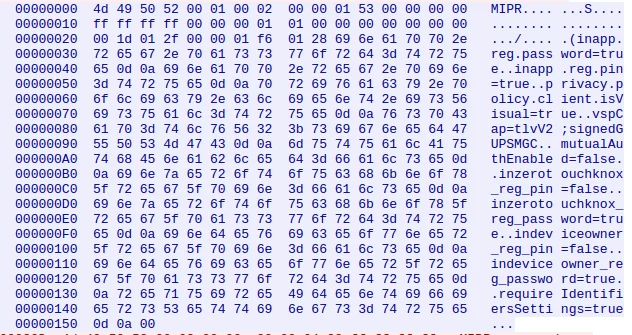
The response is an 0x1D message containing the following ASCII content:
inapp.reg.password=true
inapp.reg.pin=true
privacy.policy.client.isVisual=true
vspCap=tlvV2;signedGUPSMGC
mutualAuthEnabled=false
inzerotouchknox_reg_pin=false
inzerotouchknox_reg_password=true
indeviceowner_reg_pin=false
indeviceowner_reg_password=true
requireIdentifiersSettings=true
This response contains the provisioning details and authentication requirements of the endpoint. The research reviewed four authentication strategies, which map to the following 0x1D configuration details:
- User-Password Authentication:
inapp.reg.passwordis true andinapp.reg.pinis false or absent. - PIN Authentication:
inapp.reg.pinis true andinapp.reg.passwordis false or absent. - PIN-Password Authentication: both
inapp.reg.pinandinapp.reg.passwordare true. - Mutual Certificate Authentication: a global setting defined by
mutualAuthEnabledset totrue. It only instructs the Mobile@Work client to perform certificate validation checks and does not affect the client/server communication process.
The username, password and PIN values are submitted in the 0x1C ASCII message body, with the following additional fields:
auth_username=<username>
auth_password=<password>
auth_pin=<pin>
Each value is represented as masked ASCII HEX and does not directly reflect the plaintext input. A PIN-password authentication request looks like this:
MIPR\x00\x02\x00\x00\x00\x00\x03\x71\xff\xff\xff\xff\x00\x00\x00\x00\x00]\x00\x00\x02\
x01\x00\x00\x00\x00\x00\x00\x00\x00\x1c\x03\xad\x03\xaa
RSN=98a7a2283c96c070
mode=0
platform_flags=0x143
safety_net_enabled=true
auth_username=[redacted]
auth_password=[redacted]
registration_operator_name=rustyIron
reg_uuid=98a7a2283c96c070
CellularTechnology=GSM
Client_build_date=Dec 02 2020 17:24:10
Client_version=11.0.0.0.115R
Client_version_code=593
afw_capable=true
brand=google
client_name=com.mobileiron
country_code=0
current_mobile_number=[redacted]
current_operator_name=unknown
device=walleye
device_id=98a7a2283c96c070
device_manufacturer=Google
device_model=Pixel 2
device_type=GSM
display_size=2729X1440
home_operator=rustyIron::333333
incremental=6934943
ip_address=[redacted]
locale=en-US
operator=rustyIron
os_build_number=walleye-user 11 RP1A.201005.004.A1 6934943 release-keys
os_version=30
phone=[redacted]
platform=Android
platform_name=11
security_patch=2020-12-05
system_version=11
\x00
In this example the following plaintext values were submitted:
auth_username=mobileiron
auth_password=1
The masked values were 16-byte, 128-bit ASCII HEX strings. Hashing mechanisms such as md5sum output a fixed 128-bit hash, and sha1sum returns 160 bits; the defining property of a hash is a fixed output length regardless of input. Increasing the username from 10 to 16 characters (mobileiron123456) produced the following:
auth_username=[redacted]
A 15-character input is represented as a 16-byte ASCII HEX value; once the input reaches 16 characters, the output grows by another 16 bytes. This identified a 128-bit block cipher encryption mechanism.
For the endpoint to decrypt the Mobile@Work content, a shared encryption key must be exchanged. Searching the decompiled Java source for the string auth_username= identified:
sources/com/mobileiron/common/C4944v.java
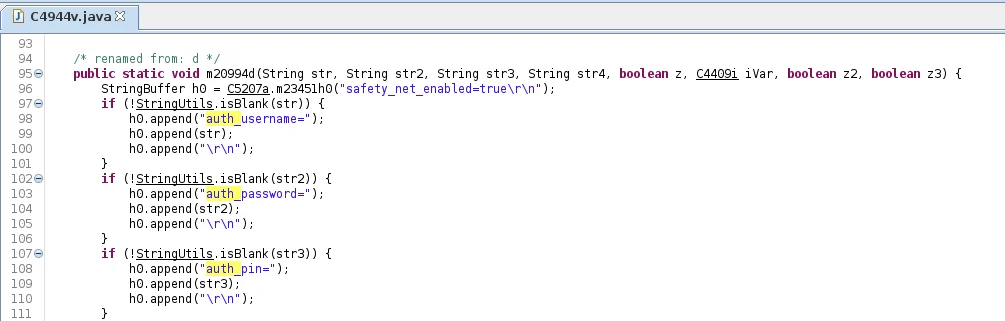
The function appends the input cipher variable str to the ASCII string auth_username=. Since this function was not where the content was encrypted but where it was passed, the researcher searched for all calls to m20994d(), which led to:
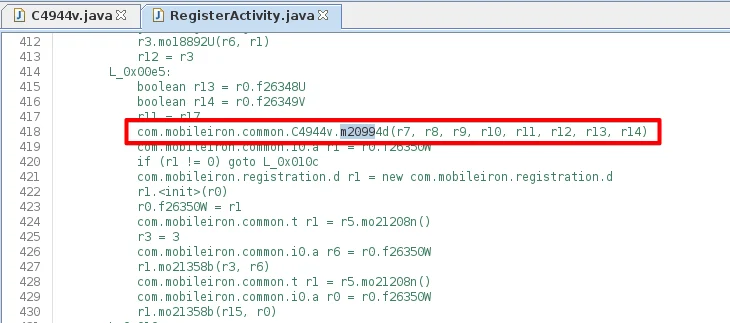
The Java function m33760C0() was not completely decompiled, but enough of the original content could be deciphered to identify the logic flow. Based on the m20994d() source, r7, r8 and r9 should contain the output ciphertext, so the question was how those values are assigned.
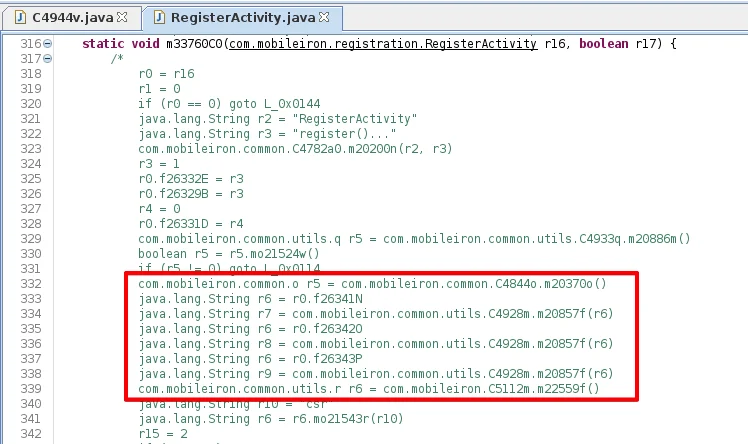
Through m20857f().
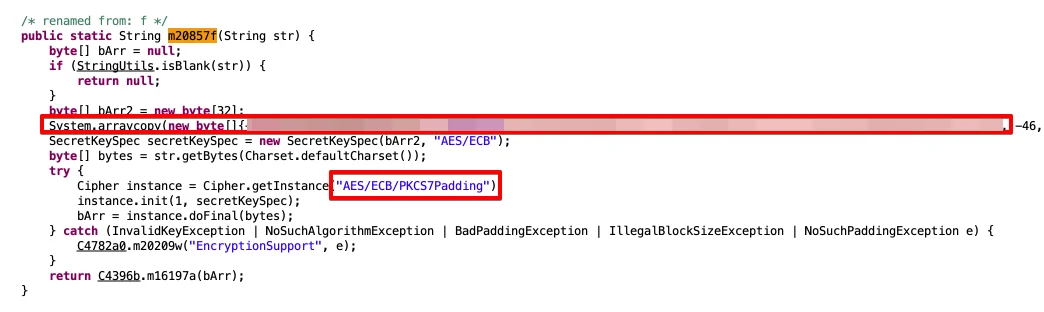
m20857f() is located in sources/com/mobileiron/common/utils/C4928m.java and contains the encryption function along with a hardcoded encryption key.
MobileIron acknowledged the configuration deficiency but considered the attack vector minimal because of the multi-layered encryption strategy through TLS:
The static key is used to encrypt the user's username and password during the registration process. The encrypted credentials are then encrypted again using TLS as they're sent to the MobileIron Core. While the first layer of encryption provides little value (if the key is discovered), an attacker would still need to conduct a MitM attack (and break TLS) in order to obtain the credentials during the registration process. Core customers have the ability to enable two-factor authentication for device registration to mitigate the risk of an authentication attack. Customers can also enable Mutual Certificate Authentication to secure subsequent device check-ins. Finally, the product team is looking into certificate pinning which would mitigate the risk of MitM attacks.
MobileIron also points to two-factor authentication. This is not a typical MFA implementation but a proprietary mechanism through PIN and/or PIN-password authentication. In validating the suggested mitigations, PIN values were observed to be single-use. However, MobileIron does not appear to contain a protection mechanism against brute-force enumeration of these values, allowing an unregistered PIN to be intercepted by an unauthenticated attacker. PIN values are registered to a single user, so compromising a PIN registration only allows authentication attacks against that one user.
This issue was reported to MITRE and assigned CVE-2020-35138. Exploitation can be performed with Dauthi.
Armed with the AES encryption key, the researcher could encrypt and decrypt MIPR data. That makes man-in-the-middle attacks against MIPR communications possible, though not very opportunistic: a successful execution requires coercing the device owner to accept and authorise a malicious TLS certificate. Mobile@Work does not natively conduct TLS verification and inherits the device's trusted authorities, so if an attacker can inject or coerce installation of a malicious certificate, MitM of the communication becomes possible.
The MitM risk is reduced by TLS and is only a small part of the exposure. An attacker with the encryption key can construct authentication requests against a MobileIron endpoint without any requirement on the device or the Mobile@Work agent, extending an Internet-accessible SFA interface. That interface can be used in an authentication attack to compromise user credentials and, if successful, obtain access to internal corporate resources, VPN and employee email by registering an attacker-controlled mobile device.
Account enumeration
A standard MobileIron deployment is integrated with the environment's identity source, traditionally Microsoft Active Directory, linked through LDAP using filter criteria so that MobileIron can view the user repository. MobileIron does not allow registration for all visible users by default: the account must be enabled in the solution before a device can be registered. Once a user account is visible, however, an attacker can perform authentication attacks against it. MobileIron provides the following variable MIPR responses:
- Successful Authentication
- Failed Authentication
- Account Lockout
Depending on the submitted MIPR content, the following ancillary responses were also observed:
- Null Response: received when there is a format or conditional input problem with the client submission, resulting in a
0x000000NULL response from the endpoint. - Device Unregistered: received when a PIN-authorised session has been revoked or unregistered. The authentication request succeeds, but the conditional state of the connection is no longer valid.
- Unknown Client ID: received when an invalid or unknown
SenderGUIDis submitted.
A successful authentication is determined by two criteria. First, if a client is enabled in MobileIron and allowed to register a mobile device, MobileIron responds with a zLib-compressed payload containing the MDM profile. That profile contains a number of interesting details, including the associated username, SenderGUID, UUID and cookie. A successful authentication returns the following 0x1D response (0X001D006400000193):
appConnectEnabled=false
appReflectEnabled=false
appconn=1
certAuthEnabledForAppStore=false
cookie=X4ZLCcdqwp0jTjjs
docsAppEnabled=null
easAppListUrl=https://auth.mitest.com/mifs/c/api/v4/appstore/apps?clientid=1073741842
easSettingsUrl=https://auth.mitest.com/mifs/c/api/v4/appstore/settings?clientid=1073741842
easV3Signature=[redacted]
[redacted]
Nwufp6Y+W9HD+[redacted]/NVq06qlq5RPP5VSEx0HlIT
[redacted]/u2M24yCk7ANaah6qpU9Yj9/9rbDTG
82XKUsp11wrfQ==
easaV3Url=https://auth.mitest.com/mifs/asfV3/appstore?clientid=1073741842&vspver=[redacted]
easi=[redacted]
F02F844

<--- Snipped for brevity --->

rsn=2ec3b2702e5a4161
senderGUID=1073741842

<--- Snipped for brevity --->

userId=john.smith
userName=John Smith

<--- Snipped for brevity --->
The interesting items in this provisioning packet are:
- cookie: a case-sensitive alphanumeric value representing the authenticated and registered MDM session. Further communication relies on this value, together with
senderGUIDandrsn, to validate device connections. - easV3Signature: a Base64-encoded certificate used during mutual certificate authentication.
- easi: an HTTP client authorisation header used to authenticate to the endpoint and pull applications from the MDM profile's app store.
- rsn: the device UUID collected from the Mobile@Work agent. MDM registration uses it as a primary key, and further communication relies on it together with
senderGUIDandcookie. - senderGUID: a numeric ID assigned to the authenticated and registered MDM session, used with
cookieandrsnto validate device connections. - userID / username: the username associated with the authentication session. During PIN-based authentication, PINs are registered directly to user accounts, which indicates which account has been compromised during an authentication attack.
A failed authentication returns the following 0x1D message (0X001D003200000193). Failed attempts are implemented in a unique way in MIPR: the lockout condition is local, so failed attempts do not result in AD account lockout. The MobileIron lockout threshold is about five failed attempts, which is not inherited from LDAP/AD but appears to be a MobileIron configuration design. Once the threshold is reached, subsequent requests receive a lockout message, but the lockout duration is about 30 seconds and was not observed to affect the upstream identity source. The lockout event is determined by the following 0x1D response (0X001D004C0000019300). A full lockout message body looks like this:
[redacted]
Locked: User has been locked out. Wait 26 seconds and try again
Perpetual authentication attacks can therefore be executed against a MobileIron environment with negligible impact.
Based on the 0x1D variable Type Parameters, user enumeration is also possible. A successful authentication obviously identifies a valid account, but enumeration comes from examining the authentication process across multiple attempts with the same user:
- Invalid Account: if a username is outside the LDAP filter criteria or does not exist in MobileIron, a lockout condition never occurs. This indicates the username is invalid.
- Disabled / Locked AD Account: the first attempt fails and the second results in a lockout response, a threshold lower than the MobileIron default of five.
- Valid Account: an active valid account can have five failed attempts before a lockout occurs.
MITRE assigned CVE-2021-3391 to this observation, based on CWE-204. Validation can be performed with Dauthi.
Exploitation
Step 1: Recover the API key and discover the endpoint
Decompile the Mobile@Work APK and read sources/com/mobileiron/registration/RegisterActivity.java to recover the hardcoded API key. Then submit a discovery request to the MobileIron-hosted API with the key and the target's domain:
GET /api/v1/gateway/customers/servers?[redacted] HTTP/1.1
Host: appgw.mobileiron.com
User-Agent: MobileIron/OpenSSLWrapper (Dalvik VM)
Without the correct key the API returns HTTP 403. With the recovered key it returns the organisation's MobileIron authentication endpoint. This step is unauthenticated and requires only that MobileIron discovery services are enabled.
Step 2: Initialise an MIPR session
Connect to the endpoint on port 9997/TCP over TLS and send an 0x1C initialisation message. The standardised Pixel 2 / Android 11 request is the block shown above, with the binary header followed by the ASCII device key/value body. The endpoint answers with an 0x1D message containing the provisioning details, including inapp.reg.password, inapp.reg.pin and mutualAuthEnabled, which tell you which authentication strategy the environment uses.
Step 3: Build authentication requests with the hardcoded key
Recover the encryption key from sources/com/mobileiron/common/utils/C4928m.java (function m20857f()). Use it to encrypt the auth_username, auth_password and auth_pin values, which are submitted as masked ASCII HEX in the 0x1C body. A successful authentication returns the MDM profile shown above, including cookie, senderGUID, rsn and the userId / userName of the account.
Step 4: Enumerate accounts through lockout behaviour
Send repeated authentication attempts for the same username and observe the 0x1D Type Parameters. An invalid account never produces a lockout; a disabled or locked AD account produces a lockout on the second attempt; a valid account tolerates about five failures before lockout. Because the lockout is local and lasts about 30 seconds, attempts can continue indefinitely without affecting the upstream identity source.
Root cause
The API key that authorises discovery requests is hardcoded in the Mobile@Work agent (RegisterActivity.java), so anyone who decompiles the APK can locate any organisation's authentication endpoint. MobileIron's position is that removing the key would force users to supply the Core hostname, which would affect customer workflow.
The encryption key used to protect auth_username, auth_password and auth_pin is hardcoded in C4928m.java (m20857f()), so the encryption provides little value once the key is discovered. MobileIron's view is that TLS provides the effective layer and that an attacker would still need to conduct a MitM attack and break TLS to obtain credentials during registration. The report notes that Mobile@Work does not validate the TLS certificate chain by default and relies on the device's trusted authorities, so a malicious certificate trusted by the device would expose the traffic.
The enumeration issue stems from the lockout being local to MobileIron rather than inherited from LDAP/AD, with a threshold of about five attempts and a duration of about 30 seconds, and from the different lockout behaviour for invalid, disabled and valid accounts. The report describes the differing thresholds as appearing to be a MobileIron configuration design rather than something inherited from LDAP/AD.
Impact
- Hardcoded API key: an unauthenticated attacker can discover an organisation's MobileIron authentication endpoint. The report rates this as low risk; it depends on extracting the key and on discovery services being enabled.
- Hardcoded encryption key: an unauthenticated attacker can construct MobileIron authentication requests without any device or Mobile@Work agent, creating an Internet-accessible SFA interface that can be used in authentication attacks. If successful, the attacker could obtain access to internal corporate resources, VPN and employee email by registering an attacker-controlled device. A well-positioned attacker could also use the key for MitM against MIPR traffic, but that requires injecting or coercing acceptance of a malicious TLS certificate, and TLS still provides transport protection in most circumstances. If a mobile device were compromised, the key could allow visibility into application data streams. The report rates this as medium risk.
- Account enumeration: outside entities can enumerate user accounts and perform authentication attacks without triggering account lockout. The report rates this as medium risk and notes no additional requirements for success.
Fix
No remediation timeline was given for the API key; MobileIron said its engineering team was looking at additional options. For the encryption key, MobileIron said it would look into certificate pinning to mitigate MitM risk. The report states that mitigation of the encryption key issue is not known to exist, as it would require MobileIron to remove the encryption functionality of the username/password/pin information or eliminate the hardcoded nature of the key. Mitigation of the enumeration issue was also not known to exist at the time of writing.
MobileIron provided the following configuration recommendations:
- PIN-Based Authentication: a six-digit, single-use PIN tied to a single account. PIN requests are not throttled, so an unauthenticated attacker can brute-force valid PIN values, but PIN-based registration prevents user enumeration using the technique above. On balance it reduces the attack surface.
- Mutual Certificate Authentication: a non-reversible option layered on top of user, PIN and PIN-password authentication. Research shows it has no effect on the client/server communication channel and only enables TLS validation checks by the agent, so it has no effect on the documented attack surface.
Best practices for customers:
- Strong Corporate Password Policy: a minimum length of 12 characters, combined with blocklisting common patterns such as "SeasonYear".
- Limit User Device Registration: restrict MDM registration to a single UUID and/or a list of validated UUID values, so a compromised account cannot register a malicious device.
- Monitor MDM Authentication Requests: watch the MobileIron connector service and logs for brute-force attempts. A legitimate agent should authenticate infrequently, so excessive attempts warrant action.
Variants to test
- Other MDM agents for hardcoded discovery keys. Decompile the Android agent and search for API keys used against vendor-hosted discovery endpoints. A positive result is a request to the discovery API that succeeds without any user-supplied credential.
- Hardcoded symmetric keys in registration code. Search decompiled sources for functions that build
auth_username=style fields and trace the cipher call. A positive result is a fixed key that lets you produce ciphertext the server accepts. - TLS validation gaps in agents. Add a self-signed certificate to a test device's trusted authorities and observe whether the agent still connects. A positive result is a decrypted protocol stream.
- Local versus upstream lockout. Send repeated failed authentications for a known account and watch the identity source. A positive result is a lockout that clears after a short interval without affecting AD.
- Differential lockout thresholds for enumeration. Compare attempt counts for invalid, disabled and valid accounts. A positive result is a distinguishable pattern, such as lockout on the second attempt for disabled accounts versus about five for valid ones.
- PIN brute force. Submit repeated PIN authentication requests and check for throttling. A positive result is many attempts accepted without lockout.
Disclosure timeline
- October 7, 2020: issue initially reported to MobileIron.
- November 3, 2020: MobileIron acknowledged the vulnerabilities and attack surface.
- November 5, 2020: MobileIron provided an eval licence and configuration instructions to build and validate the suggested mitigation checks.
- December 11, 2020: CVE-2020-35137 and CVE-2020-35138 assigned.
- January 25, 2020: validation of MobileIron mitigation suggestions (date as given in the report).
- February 2, 2021: CVE-2021-3397 assigned (identifier as given in the report).
What happened, in plain words
MobileIron is a product that companies use to manage the phones and tablets their staff use for work. It is called an MDM, short for mobile device management. When an employee wants to read work email or open a work app on a personal phone, the company installs a small app on that phone, called Mobile@Work, and the phone is then checked and set up by the company's MobileIron server. This lets the company give the phone access to internal systems such as email and VPN without taking over the whole device.
To do this, MobileIron pushes something called a provisioning profile to the phone. It checks the operating system, the security patch level and the manufacturer, and it looks for signs that the phone has been tampered with, jailbroken or unlocked. If the phone passes the check and the user logs in correctly, the company can push apps and services to it.
A security researcher looked at how MobileIron's login process works and found three problems that, used together, could let an attacker take over accounts:
- A hardcoded API key. The Mobile@Work app contains a secret key baked into its code. With that key, anyone, without logging in, can find out which MobileIron login server a company uses. This is rated low risk, and a company can reduce it by turning off MobileIron's discovery service.
- A hardcoded encryption key. The app also contains a second secret key, this one used to encrypt the username and password before they are sent. With that key, an attacker can build their own login requests to MobileIron without needing the app or a phone at all. This is rated medium risk. It could also help an attacker who can sit between the phone and the server (a man-in-the-middle) to read credentials, though that would also require breaking the TLS protection that normally secures the connection.
- Account enumeration. The login process lets an outsider work out which usernames exist, and try passwords over and over, without triggering the usual account lockout. This is rated medium risk.
The research was first published through Optiv SourceZero in December 2020 and is reproduced here for central storage. A rough proof-of-concept tool released with it, called rustyIron, has since been replaced by Dauthi, a framework for testing MDM platforms for single-factor authentication (SFA) problems. SFA simply means logging in with one thing, such as a password, rather than two.
Context
MobileIron works through the Mobile@Work app on Android and iOS. When you open the app, it asks for your email address, or for the address of your company's MobileIron server.
Figure 1: MobileIron Initial Registration UI
When you type an email address, the app starts a discovery process. It works out which login server belongs to the domain part of your email address (the part after the @). To do that, it sends a request to a MobileIron-run service at appgw.mobileiron.com.
An API is simply a way for one piece of software to talk to another over the internet, like a service counter where you hand over a request and get an answer back. MobileIron tried to make sure only its own app could use this counter, by requiring an API key. An API key is a long secret string, a bit like a password that identifies the software making the request rather than a person.
The request looks like this:
GET /api/v1/gateway/customers/servers?[redacted] HTTP/1.1
Host: appgw.mobileiron.com
User-Agent: MobileIron/OpenSSLWrapper (Dalvik VM)
Line by line:
GET /api/v1/gateway/customers/servers?[redacted] HTTP/1.1is the request itself.GETmeans "give me this information". The path/api/v1/gateway/customers/serversis the address of the service on the server. After the?come two values being handed over:[redacted] the secret key, anddomain=<domain>, the domain being looked up.HTTP/1.1` is the version of the web protocol being used.Host: appgw.mobileiron.comtells the server which website name the request is for. One server can host many names, so this is how it knows which one you want.User-Agent: MobileIron/OpenSSLWrapper (Dalvik VM)is a label saying what software is making the request. Here it claims to be the MobileIron app. Dalvik is the engine Android uses to run app code.
The request carries two values supplied by the user:
- key: the MobileIron API key that authorises requests to the discovery service.
- domain: the registered domain name of the email address the user typed.
If the key is wrong or missing, the service refuses and returns an HTTP 403 error. HTTP status codes are short numbers a web server sends back to say what happened; 403 means "forbidden", as in "you are not allowed in".
Figure 3: MobileIron Discovery - Invalid API Key
API keys are normally treated as sensitive, the same way you would treat a password. MobileIron, however, put the key directly into the Mobile@Work app's code, where anyone who downloads the app can find it.
Setup
To find the key, the researcher took the Mobile@Work app from an Android phone and decompiled it. Decompiling means turning the finished, machine-readable app back into something close to the original human-readable source code, the way a recipe can be reconstructed from a baked cake.
An Android app comes as an APK file. An APK is a zip archive, like a folder compressed into one file, holding the app's code, resources, images, certificates and a manifest file that describes the app. The actual code sits in a file called a Dalvik Executable, or DEX, which is binary.
iOS apps are different. They come as IPA files, which are encrypted with a key tied to each individual iPhone or iPad, and can only be decrypted on a jailbroken device. They are built with Xcode, Apple's development tool, so you can analyse them with the right debugging tools, but you cannot decompile them back to source code. The report does not describe how the app was recovered or decompiled; it only says the agent was taken from an Android environment and decompiled.
For testing the network protocol, the researcher added a self-signed certificate to the phone's list of trusted authorities. A certificate is a digital ID that a server presents to prove who it is, and TLS is the system that uses these certificates to encrypt traffic between a phone and a server. A self-signed certificate is one the researcher made themselves rather than one issued by a recognised authority. Adding it to the trusted list let the researcher decrypt the traffic between the app and the server, the way adding a spare key to your keyring lets you open a door you were not given a key for.
To keep results repeatable, testing was standardised to pretend to be a Google Pixel 2 (code name "walleye") running Android 11. Otherwise, every phone would send slightly different details and the results would be hard to compare.
Finding it
Hardcoded API key
Reading through the decompiled Java source, the researcher found the MobileIron API key written directly into this file:
sources/com/mobileiron/registration/RegisterActivity.java
Figure 4: MobileIron Hardcoded API Key
With the key in hand, anyone can find a company's MobileIron login server without logging in anywhere.
Figure 5: MobileIron Discovery - Valid API Key
MobileIron confirmed the issue. It said the key is a critical part of how Mobile@Work works and that it would look at alternatives:
The static key is used during the registration process and allows the mobile client to find a customer's Core based on the user's email address. Removing this functionally means the user would need to provide the host name of the Core which would likely be impactful on our customers' workflow. The Engineering team is looking at additional options though there is currently no timeline for remediation.
MITRE, the organisation that keeps a public catalogue of known vulnerabilities, gave this issue the identifier CVE-2020-35137, based on CWE-798. A CVE is a unique label for a specific security flaw, and a CWE is a label for a category of flaw; CWE-798 means "use of hardcoded credentials". The issue can be tested with Dauthi.
Hardcoded encryption key
Once the login server is known, the Mobile@Work app starts logging in over port 9997/TCP. A port is a numbered doorway on a server, and TCP is the basic protocol that carries data reliably between two computers. This particular doorway carries a TLS-encrypted raw connection using a protocol that MobileIron made up for itself.
By default, Mobile@Work does not check the TLS certificate chain. A certificate chain is the sequence of certificates that proves a server's identity, ending at a trusted authority. Instead, the app trusts whatever the phone trusts. The app can be set to check certificates through a feature called Mutual Certificate Authentication, which cannot be switched back off once enabled. It does not change how the app and server talk; it only tells the app to check the server's certificate chain.
Mobile@Work sends raw binary data to the server. Binary means data in the form of ones and zeros rather than readable text. The data appears to start with a header of variable length, around 38 bytes. A byte is a unit of data, roughly one character of text. A header is the fixed-format beginning of a message that says what kind of message it is and how big it is, like the label on a parcel. By looking at many login requests, the researcher worked out the following layout:
Figure 6: MobileIron Protocol Request - Packet Layout
- Request Header: four bytes holding the letters
MIPR. Based on Android logcat output (logcat is the phone's built-in log of what apps are doing), this is believed to stand for MobileIron Protocol Request. - Version: two bytes, mostly
0x02or0x01. The0xprefix means the number is written in hexadecimal, a base-16 counting system often used for binary data. - Flags: four bytes of flag values. A flag is a single on/off marker. Based on logcat, each byte is believed to correspond to Flags, HBT, ACK and NAK. ACK means "acknowledged" and NAK means "not acknowledged", like a delivery receipt. The exact purpose of these flags was unknown at the time of writing.
- Packet Size: the length of the payload, written as a 16-bit unsigned integer in Big Endian order. Big Endian means the most significant byte comes first, like writing a number with its largest digit on the left.
- Sender GUID: a 32-bit unsigned integer identifying the sender, assigned to the app after a successful login. A GUID is a unique identifier. Initial communication uses
0xFFFFFFFFas a placeholder. - Receiver GUID: used informally to track a session. A session is one continuous conversation between a client and a server. When MobileIron replies, it clears the Sender GUID and puts its value here, which acts as an acknowledgement.
- Unknown: three bytes after the Receiver GUID that were always
0x0during testing. - PKT Count: two bytes counting the packets exchanged. A packet is one chunk of data sent over the network. The app starts at
0x01and adds one for each packet; replies carry the same count as the request they answer. - Unknown: seven more bytes after the PKT Count that were always
0x0during testing. - Packet Type: two bytes that decide what kind of request or response this is, like a code on a form saying which department should handle it.
- Type Parameters: four bytes giving extra detail about the Packet Type.
- Payload: the actual message body, of variable length. It was seen to hold readable text, binary data and zLib-compressed data. zLib is a way of squeezing data smaller so it takes less space to send.
An example of a packet header from the app to the server:
Figure 7: MIPR TCP Header- Hexdump
A hexdump is a view of raw binary data shown as hexadecimal numbers, so a human can inspect it.
The conversation starts with a message of type 0x1C. The extra parameters 0x03790376 seemed to be tied to the phone's model, operating system and manufacturer. To remove that variability, testing was fixed to the Pixel 2 on Android 11, producing this initialisation request:
MIPR\x00\x02\x00\x00\x00\x00\x03\x71\xff\xff\xff\xff\x00\x00\x00\x00\x00]\x00\x00\x02\
x01\x00\x00\x00\x00\x00\x00\x00\x00\x1c\x03\x4d\x03\x4a
RSN=7e01f61d2659e90a
mode=0
platform_flags=0x143
safety_net_enabled=true
registration_operator_name=rustyIron
reg_uuid=7e01f61d2659e90a
CellularTechnology=GSM
Client_build_date=Dec 02 2020 17:24:10
Client_version=11.0.0.0.115R
Client_version_code=593
afw_capable=true
brand=google
client_name=com.mobileiron
country_code=0
current_mobile_number=[redacted]
current_operator_name=unknown
device=walleye
device_id=7e01f61d2659e90a
device_manufacturer=Google
device_model=Pixel 2
device_type=GSM
display_size=2729X1440
home_operator=rustyIron::333333
incremental=6934943
ip_address=[redacted]
locale=en-US
operator=rustyIron
os_build_number=walleye-user 11 RP1A.201005.004.A1 6934943 release-keys
os_version=30
phone=[redacted]
platform=Android
platform_name=11
security_patch=2020-12-05
system_version=11
\x00
Line by line:
- The first line is the binary header.
MIPRis the four-letter marker.\x00\x02is the version. The next bytes include the placeholder sender GUID\xff\xff\xff\xff, the packet count, and the packet type\x1cwith its type parameters\x03\x4d\x03\x4a.\xfollowed by two hex digits is how a single byte is written in this notation. RSN=7e01f61d2659e90ais a device identifier.mode=0,platform_flags=0x143andsafety_net_enabled=truedescribe how the device is set up. Safety Net is Google's check for whether a phone has been tampered with.registration_operator_name=rustyIronandreg_uuid=7e01f61d2659e90aname the test tool and give its identifier.CellularTechnology=GSMsays the phone uses a GSM mobile network.Client_build_date,Client_versionandClient_version_codedescribe the app itself.afw_capable=truesays the device can support Android for Work, Google's system for separating work and personal data.brand=google,device=walleye,device_manufacturer=Google,device_model=Pixel 2identify the phone.client_name=com.mobileironis the app's package name, its unique name on Android.country_code=0,current_mobile_number=[redacted],phone=[redacted]andcurrent_operator_name=unknowndescribe the phone number and network.device_id=7e01f61d2659e90arepeats the device identifier.device_type=GSM,display_size=2729X1440describe the screen and network type.home_operator=rustyIron::333333andoperator=rustyIronname the mobile operator.incremental=6934943is the build number.ip_address=[redacted]is the phone's network address.locale=en-USis the language and region setting.os_build_number=walleye-user 11 RP1A.201005.004.A1 6934943 release-keysis the exact Android build.os_version=30,platform=Android,platform_name=11,system_version=11all describe Android 11.security_patch=2020-12-05is the date of the latest security update.- The final
\x00is a null byte, a byte with value zero, often used to mark the end of a piece of data.
MobileIron was seen to keep some kind of index of devices, matching model, manufacturer, operating system and build. Depending on what was sent, the type parameters would change, or MobileIron would refuse the login attempt. Because of this, testing was fixed to the device details above and the packet type detail 0X001C034D034A.
A successful initialisation request makes the server reply with details about how the environment is set up.
Figure 9: MIPR 0x1D Response Packet
The reply is a message of type 0x1D containing this readable text:
inapp.reg.password=true
inapp.reg.pin=true
privacy.policy.client.isVisual=true
vspCap=tlvV2;signedGUPSMGC
mutualAuthEnabled=false
inzerotouchknox_reg_pin=false
inzerotouchknox_reg_password=true
indeviceowner_reg_pin=false
indeviceowner_reg_password=true
requireIdentifiersSettings=true
Line by line:
inapp.reg.password=truemeans the environment accepts a password during registration.inapp.reg.pin=truemeans it also accepts a PIN, a short numeric code.privacy.policy.client.isVisual=truesays the privacy policy is shown visually in the app.vspCap=tlvV2;signedGUPSMGCdescribes a capability the server supports.mutualAuthEnabled=falsesays Mutual Certificate Authentication is off.inzerotouchknox_reg_pin=falseandinzerotouchknox_reg_password=truedescribe PIN and password options for Samsung Knox zero-touch setup, a way of setting up phones automatically.indeviceowner_reg_pin=falseandindeviceowner_reg_password=truedescribe the same options for Android's device owner mode, where an app manages the whole phone.requireIdentifiersSettings=truesays the app must send device identifiers.
This reply tells you the environment's setup and login requirements. The research looked at four login strategies, which show up in the 0x1D reply like this:
- User-Password Authentication:
inapp.reg.passwordis true andinapp.reg.pinis false or absent. - PIN Authentication:
inapp.reg.pinis true andinapp.reg.passwordis false or absent. - PIN-Password Authentication: both
inapp.reg.pinandinapp.reg.passwordare true. - Mutual Certificate Authentication: a global setting shown by
mutualAuthEnabledbeingtrue. It only tells the app to check certificates and does not change how the app and server talk.
The username, password and PIN are sent in the 0x1C text body, using these extra fields:
auth_username=<username>
auth_password=<password>
auth_pin=<pin>
Line by line:
auth_username=<username>is where the username goes.auth_password=<password>is where the password goes.auth_pin=<pin>is where the PIN goes.
Each value is sent as masked ASCII HEX, meaning it is scrambled and written as hexadecimal characters, so it does not look like the plain text you typed. A PIN-password login request looks like this:
MIPR\x00\x02\x00\x00\x00\x00\x03\x71\xff\xff\xff\xff\x00\x00\x00\x00\x00]\x00\x00\x02\
x01\x00\x00\x00\x00\x00\x00\x00\x00\x1c\x03\xad\x03\xaa
RSN=98a7a2283c96c070
mode=0
platform_flags=0x143
safety_net_enabled=true
auth_username=[redacted]
auth_password=[redacted]
registration_operator_name=rustyIron
reg_uuid=98a7a2283c96c070
CellularTechnology=GSM
Client_build_date=Dec 02 2020 17:24:10
Client_version=11.0.0.0.115R
Client_version_code=593
afw_capable=true
brand=google
client_name=com.mobileiron
country_code=0
current_mobile_number=[redacted]
current_operator_name=unknown
device=walleye
device_id=98a7a2283c96c070
device_manufacturer=Google
device_model=Pixel 2
device_type=GSM
display_size=2729X1440
home_operator=rustyIron::333333
incremental=6934943
ip_address=[redacted]
locale=en-US
operator=rustyIron
os_build_number=walleye-user 11 RP1A.201005.004.A1 6934943 release-keys
os_version=30
phone=[redacted]
platform=Android
platform_name=11
security_patch=2020-12-05
system_version=11
\x00
Line by line:
- The header is the same as before, except the packet type parameters are now
\x03\xad\x03\xaa, which mark this as a login request rather than an initialisation. RSN=98a7a2283c96c070andreg_uuid=98a7a2283c96c070are a fresh device identifier for this attempt.auth_username=[redacted]is the scrambled username.auth_password=[redacted]is the scrambled password.- The rest of the lines are the same device details as before, with
device_id=98a7a2283c96c070matching the new identifier.
In this example, these plain values were submitted:
auth_username=mobileiron
auth_password=1
Line by line:
auth_username=mobileironis the username in plain text.auth_password=1is the password in plain text.
The scrambled values were 16 bytes long, or 128 bits, written as hexadecimal characters. A hash is a one-way scrambling function, like a meat grinder: you cannot turn the mince back into a steak. Tools such as md5sum produce a fixed 128-bit hash, and sha1sum produces 160 bits. The key property of a hash is that the output is always the same length, no matter how long the input is. When the username was lengthened from 10 to 16 characters (mobileiron123456), the output was:
auth_username=[redacted]
Line by line:
auth_username=is the field name.[redacted]is the scrambled value, now longer than before.
A 15-character input produced a 16-byte value. Once the input reached 16 characters, the output grew by another 16 bytes. A hash would not do that; its output length would stay the same. Growing in 16-byte chunks is the signature of a block cipher, an encryption method that works on fixed-size blocks of data. Here the block size is 128 bits.
For the server to decrypt what the app sends, both sides must share an encryption key. An encryption key is like the key to a padlock: whoever holds it can lock and unlock the message. To find it, the researcher went back to the decompiled app and searched the Java source for the text auth_username=. That led to this file:
sources/com/mobileiron/common/C4944v.java
Figure 15: Mobile@Work C4944v.java - Function m20994d
The function there takes the scrambled value, called str, and sticks it onto the text auth_username=. Since this function was not where the scrambling happened, only where the value was passed along, the researcher searched for every place that calls m20994d(). That led to:
Figure 16: Mobile@Work - RegisterActivity.java m20994d Function Call
The Java function m33760C0() was not fully decompiled, but enough of it could be read to follow the logic. Based on the m20994d() source, the scrambled output should end up in r7, r8 and r9, which are named storage slots in the code. The question was how those slots get filled.
Figure 17: Mobile@Work - m33760C0 Assignment of r7, r8, and r9
Through m20857f(), of course.
Figure 18: Mobile@Work - m20857f()
m20857f() lives in sources/com/mobileiron/common/utils/C4928m.java and contains the encryption function along with a hardcoded encryption key.
MobileIron acknowledged the problem but considered the risk small because of the layers of encryption:
The static key is used to encrypt the user's username and password during the registration process. The encrypted credentials are then encrypted again using TLS as they're sent to the MobileIron Core. While the first layer of encryption provides little value (if the key is discovered), an attacker would still need to conduct a MitM attack (and break TLS) in order to obtain the credentials during the registration process. Core customers have the ability to enable two-factor authentication for device registration to mitigate the risk of an authentication attack. Customers can also enable Mutual Certificate Authentication to secure subsequent device check-ins. Finally, the product team is looking into certificate pinning which would mitigate the risk of MitM attacks.
MobileIron also points to two-factor authentication. Two-factor authentication, or MFA, normally means logging in with two different things, such as a password plus a code from your phone. Here it is not a standard implementation but a MobileIron-specific mechanism using PIN and/or PIN-password login. When the researcher tested the suggested mitigations, PIN values turned out to be single-use. However, MobileIron does not appear to have any protection against guessing PINs over and over, so an unregistered PIN could be intercepted by an attacker who is not logged in. PINs are tied to a single user, so compromising one PIN only allows attacks against that one user.
This issue was reported to MITRE and given the identifier CVE-2020-35138. It can be tested with Dauthi.
With the AES encryption key in hand, the researcher could encrypt and decrypt MIPR data. AES is a widely used standard encryption method. This makes man-in-the-middle attacks against MIPR traffic possible, though not very practical. A man-in-the-middle attack is where an attacker secretly sits between two parties and relays their messages, like a postal worker who opens and reseals letters. To succeed, the attacker would have to trick the phone's owner into accepting and trusting a malicious TLS certificate. Mobile@Work does not check certificates itself and simply trusts whatever the phone trusts, so if an attacker can plant a malicious certificate, they can read the traffic.
The man-in-the-middle risk is reduced by TLS and is only a small part of the exposure. An attacker with the encryption key can build login requests against a MobileIron server without needing the phone or the app at all. That turns the server into an internet-accessible single-factor login interface, which can be used to attack user credentials. If that succeeds, the attacker could reach internal company resources, VPN and employee email by registering a phone they control.
Account enumeration
A typical MobileIron setup is connected to the company's identity source, usually Microsoft Active Directory (AD). AD is the company's directory of user accounts. MobileIron connects to it through LDAP, a protocol for querying directories, using filter rules so it can see the user list. MobileIron does not let every visible user register by default; the account must be enabled in MobileIron first. Once an account is visible, though, an attacker can try to log in as it. MobileIron gives these different MIPR replies:
- Successful Authentication
- Failed Authentication
- Account Lockout
Depending on what is sent, these other replies were also seen:
- Null Response: sent when there is a formatting or input problem with the request, resulting in a
0x000000NULL reply. NULL means "nothing" or "empty". - Device Unregistered: sent when a PIN-authorised session has been revoked or unregistered. The login succeeds, but the connection is no longer in a valid state.
- Unknown Client ID: sent when an invalid or unknown
SenderGUIDis submitted.
A successful login is judged by two things. First, if the client is enabled in MobileIron and allowed to register a phone, MobileIron replies with a zLib-compressed payload containing the MDM profile. That profile holds useful details, including the associated username, SenderGUID, UUID and cookie. A cookie here is a short value the server gives the client to remember who it is, like a wristband at an event. A successful login returns this 0x1D reply (0X001D006400000193):
appConnectEnabled=false
appReflectEnabled=false
appconn=1
certAuthEnabledForAppStore=false
cookie=X4ZLCcdqwp0jTjjs
docsAppEnabled=null
easAppListUrl=https://auth.mitest.com/mifs/c/api/v4/appstore/apps?clientid=1073741842
easSettingsUrl=https://auth.mitest.com/mifs/c/api/v4/appstore/settings?clientid=1073741842
easV3Signature=[redacted]
[redacted]
Nwufp6Y+W9HD+[redacted]/NVq06qlq5RPP5VSEx0HlIT
[redacted]/u2M24yCk7ANaah6qpU9Yj9/9rbDTG
82XKUsp11wrfQ==
easaV3Url=https://auth.mitest.com/mifs/asfV3/appstore?clientid=1073741842&vspver=[redacted]
easi=[redacted]
F02F844

<--- Snipped for brevity --->

rsn=2ec3b2702e5a4161
senderGUID=1073741842

<--- Snipped for brevity --->

userId=john.smith
userName=John Smith

<--- Snipped for brevity --->
Line by line:
appConnectEnabled=falseandappReflectEnabled=falsesay two app features are off.appconn=1is a setting for app connections.certAuthEnabledForAppStore=falsesays certificate login is off for the app store.cookie=X4ZLCcdqwp0jTjjsis the session cookie for this logged-in session.docsAppEnabled=nullsays the documents app setting is empty.easAppListUrl=...andeasSettingsUrl=...are web addresses the app uses to fetch the app list and settings.easV3Signature=...is a long Base64-encoded certificate. Base64 is a way of writing binary data as plain text characters.easaV3Url=...is another web address for the app store.easi=...is a long authorisation value used to fetch apps.<--- Snipped for brevity --->marks where the report cut out content to keep it short.rsn=2ec3b2702e5a4161is the device identifier.senderGUID=1073741842is the numeric ID for this session.userId=john.smithanduserName=John Smithidentify the account.
The interesting items in this profile are:
- cookie: a case-sensitive mix of letters and numbers that represents the logged-in session. Later communication relies on it, together with
senderGUIDandrsn, to check the device. - easV3Signature: a Base64-encoded certificate used during mutual certificate authentication.
- easi: an HTTP authorisation header, a value sent with web requests to prove you are allowed in, used to fetch apps from the app store.
- rsn: the device UUID collected from the app. Registration uses it as a primary key, a unique identifier for the record, and later communication relies on it with
senderGUIDandcookie. - senderGUID: a numeric ID for the logged-in session, used with
cookieandrsnto check the device. - userID / username: the account tied to the session. During PIN login, PINs are registered directly to accounts, which shows whose account was compromised in an attack.
A failed login returns this 0x1D message (0X001D003200000193). Failed attempts work in a particular way in MIPR: the lockout is local, meaning failed attempts do not lock the AD account. The MobileIron lockout threshold is about five failed attempts, which is not inherited from LDAP/AD but appears to be a MobileIron design choice. Once the threshold is reached, later requests get a lockout message, but the lockout lasts about 30 seconds and was not seen to affect the upstream identity source. The lockout event is shown by this 0x1D reply (0X001D004C0000019300). A full lockout message body looks like this:
[redacted]
Locked: User has been locked out. Wait 26 seconds and try again
Line by line:
MIPRis the protocol marker.[redacted]is the binary header written as hexadecimal text, including the packet type1dand the type parameters004c.UserandLocked: User has been locked out. Wait 26 seconds and try againis the readable message telling you the account is locked and how long to wait.
Because of this, an attacker can keep trying logins against a MobileIron environment indefinitely with almost no impact.
Based on the 0x1D type parameters, user enumeration is also possible. Enumeration means working out which accounts exist. A successful login obviously proves an account is valid, but enumeration comes from watching how the process behaves over several attempts with the same username:
- Invalid Account: if a username is outside the LDAP filter or does not exist in MobileIron, a lockout never happens. That tells you the username is invalid.
- Disabled / Locked AD Account: the first attempt fails and the second gets a lockout reply, a lower threshold than MobileIron's default of five.
- Valid Account: an active valid account can take five failed attempts before a lockout.
MITRE gave this issue the identifier CVE-2021-3391, based on CWE-204. CWE-204 means "observable response discrepancy", where different replies reveal information. It can be tested with Dauthi.
Exploitation
Step 1: Recover the API key and discover the endpoint
Decompile the Mobile@Work APK and read sources/com/mobileiron/registration/RegisterActivity.java to get the hardcoded API key. Then send a discovery request to the MobileIron service with the key and the target's domain:
GET /api/v1/gateway/customers/servers?[redacted] HTTP/1.1
Host: appgw.mobileiron.com
User-Agent: MobileIron/OpenSSLWrapper (Dalvik VM)
Line by line:
GET /api/v1/gateway/customers/servers?[redacted] HTTP/1.1asks the service for the server belonging to a domain, passing the key and the domain.Host: appgw.mobileiron.comnames the service.User-Agent: MobileIron/OpenSSLWrapper (Dalvik VM)pretends to be the MobileIron app.
Without the right key the service returns HTTP 403. With the recovered key it returns the company's MobileIron login server. This step needs no login and only works if MobileIron's discovery service is turned on.
Step 2: Initialise an MIPR session
Connect to the server on port 9997/TCP over TLS and send an 0x1C initialisation message. The standardised Pixel 2 / Android 11 request is the block shown earlier, with the binary header followed by the text device details. The server answers with an 0x1D message containing the setup details, including inapp.reg.password, inapp.reg.pin and mutualAuthEnabled, which tell you which login strategy the environment uses.
Step 3: Build authentication requests with the hardcoded key
Recover the encryption key from sources/com/mobileiron/common/utils/C4928m.java (function m20857f()). Use it to encrypt the auth_username, auth_password and auth_pin values, which are sent as masked ASCII HEX in the 0x1C body. A successful login returns the MDM profile shown above, including cookie, senderGUID, rsn and the userId / userName of the account.
Step 4: Enumerate accounts through lockout behaviour
Send repeated login attempts for the same username and watch the 0x1D type parameters. An invalid account never produces a lockout; a disabled or locked AD account produces a lockout on the second attempt; a valid account tolerates about five failures before lockout. Because the lockout is local and lasts about 30 seconds, attempts can continue indefinitely without affecting the upstream identity source.
Root cause
The API key that authorises discovery requests is hardcoded in the Mobile@Work app (RegisterActivity.java), so anyone who decompiles the APK can find any company's login server. MobileIron's position is that removing the key would force users to type the server's hostname, which would affect customer workflow.
The encryption key that protects auth_username, auth_password and auth_pin is hardcoded in C4928m.java (m20857f()), so the encryption adds little once the key is found. MobileIron's view is that TLS is the effective layer and that an attacker would still need a man-in-the-middle attack and to break TLS to get credentials during registration. The report notes that Mobile@Work does not check the TLS certificate chain by default and relies on the phone's trusted authorities, so a malicious certificate the phone trusts would expose the traffic.
The enumeration issue comes from the lockout being local to MobileIron rather than inherited from LDAP/AD, with a threshold of about five attempts and a duration of about 30 seconds, and from the different lockout behaviour for invalid, disabled and valid accounts. The report describes the differing thresholds as appearing to be a MobileIron design choice rather than something inherited from LDAP/AD.
Impact
- Hardcoded API key: anyone can find a company's MobileIron login server without logging in. The report rates this as low risk; it depends on extracting the key and on discovery services being enabled.
- Hardcoded encryption key: an attacker can build MobileIron login requests without any phone or the app, creating an internet-accessible single-factor login interface that can be used in login attacks. If successful, the attacker could reach internal company resources, VPN and employee email by registering a phone they control. A well-placed attacker could also use the key for man-in-the-middle attacks on MIPR traffic, but that requires planting or tricking someone into accepting a malicious TLS certificate, and TLS still protects traffic in most cases. If a phone were compromised, the key could let an attacker see app data streams. The report rates this as medium risk.
- Account enumeration: outsiders can work out which accounts exist and try logins without triggering account lockout. The report rates this as medium risk and notes no extra requirements for success.
Fix
No remediation timeline was given for the API key; MobileIron said its engineering team was looking at other options. For the encryption key, MobileIron said it would look into certificate pinning, a technique where an app only trusts one specific certificate, to reduce man-in-the-middle risk. The report states that no mitigation for the encryption key issue is known, as it would require MobileIron to remove the encryption functionality of the username/password/PIN or to stop hardcoding the key. No mitigation for the enumeration issue was known at the time of writing either.
MobileIron gave these configuration recommendations:
- PIN-Based Authentication: a six-digit, single-use PIN tied to one account. PIN requests are not rate-limited, so an attacker can guess PINs repeatedly, but PIN-based registration prevents user enumeration using the technique above. On balance it reduces the attack surface.
- Mutual Certificate Authentication: a setting that cannot be switched back off, layered on top of user, PIN and PIN-password login. Research shows it has no effect on how the app and server talk and only turns on certificate checks by the app, so it has no effect on the documented attack surface.
Best practices for customers:
- Strong Corporate Password Policy: a minimum length of 12 characters, combined with blocking common patterns such as "SeasonYear".
- Limit User Device Registration: restrict MDM registration to a single UUID and/or a list of approved UUID values, so a compromised account cannot register a malicious phone.
- Monitor MDM Authentication Requests: watch the MobileIron connector service and logs for repeated login attempts. A legitimate app should log in rarely, so excessive attempts warrant action.
Variants to test
- Other MDM apps for hardcoded discovery keys. Decompile the Android app and search for API keys used against vendor discovery services. A positive result is a discovery request that succeeds without any user-supplied credential.
- Hardcoded symmetric keys in registration code. Search decompiled sources for functions that build
auth_username=style fields and trace the encryption call. A positive result is a fixed key that lets you produce scrambled values the server accepts. - TLS validation gaps in apps. Add a self-signed certificate to a test phone's trusted authorities and see whether the app still connects. A positive result is a decrypted protocol stream.
- Local versus upstream lockout. Send repeated failed logins for a known account and watch the identity source. A positive result is a lockout that clears after a short interval without affecting AD.
- Differential lockout thresholds for enumeration. Compare attempt counts for invalid, disabled and valid accounts. A positive result is a distinguishable pattern, such as lockout on the second attempt for disabled accounts versus about five for valid ones.
- PIN brute force. Send repeated PIN login requests and check for rate limiting. A positive result is many attempts accepted without lockout.
Disclosure timeline
- October 7, 2020: issue initially reported to MobileIron.
- November 3, 2020: MobileIron acknowledged the vulnerabilities and attack surface.
- November 5, 2020: MobileIron provided an eval licence and configuration instructions to build and validate the suggested mitigation checks.
- December 11, 2020: CVE-2020-35137 and CVE-2020-35138 assigned.
- January 25, 2020: validation of MobileIron mitigation suggestions (date as given in the report).
- February 2, 2021: CVE-2021-3397 assigned (identifier as given in the report).
Glossary
- MDM (mobile device management): software that lets a company manage phones and tablets used for work.
- Mobile@Work: the app employees install on their phone to connect it to a company's MobileIron system.
- Provisioning profile: a set of settings and rules pushed to a phone to set it up for work use.
- API (application programming interface): a way for one piece of software to request information or actions from another over the internet.
- API key: a long secret string used to identify and authorise software making a request.
- FQDN (fully qualified domain name): the complete name of a server on the internet, such as a domain plus its subdomains.
- HTTP 403: a web server reply meaning "forbidden", you are not allowed in.
- APK: the file format of an Android app, a zip archive holding its code and resources.
- DEX (Dalvik Executable): the binary file inside an Android app that holds its code.
- IPA: the file format of an iOS app, encrypted per device.
- Jailbroken: a phone that has been modified to remove the manufacturer's restrictions.
- TLS: the system that encrypts and authenticates traffic between a client and a server.
- Certificate: a digital ID a server presents to prove who it is.
- Certificate chain: the sequence of certificates that proves a server's identity, ending at a trusted authority.
- Self-signed certificate: a certificate someone made themselves rather than one issued by a recognised authority.
- Trusted authorities: the list of certificate issuers a device or app is willing to trust.
- Port: a numbered doorway on a server that a particular service listens on.
- TCP: the basic protocol that carries data reliably between two computers.
- Binary: data in the form of ones and zeros rather than readable text.
- Byte: a unit of data, roughly one character of text.
- Header: the fixed-format beginning of a message that says what kind of message it is and how big it is.
- Hexadecimal (hex): a base-16 way of writing numbers, often used for binary data.
- Big Endian: a way of writing numbers where the most significant byte comes first.
- GUID: a unique identifier.
- Session: one continuous conversation between a client and a server.
- Packet: one chunk of data sent over a network.
- Payload: the actual message body carried inside a packet.
- zLib: a way of compressing data so it takes less space to send.
- Hexdump: a view of raw binary data shown as hexadecimal numbers.
- Null byte: a byte with value zero, often used to mark the end of data.
- PIN: a short numeric code used to log in.
- Masked ASCII HEX: scrambled data written as hexadecimal characters.
- Hash: a one-way scrambling function with a fixed-length output.
- Block cipher: an encryption method that works on fixed-size blocks of data.
- Encryption key: the secret value used to lock and unlock encrypted data.
- AES: a widely used standard encryption method.
- Base64: a way of writing binary data as plain text characters.
- Cookie: a short value a server gives a client to remember who it is.
- UUID: a unique identifier for a record or device.
- Primary key: a unique identifier used to look up a record.
- LDAP: a protocol for querying directory services such as user lists.
- Active Directory (AD): Microsoft's directory of user accounts used by many companies.
- Account lockout: a state where an account is temporarily blocked after too many failed logins.
- Enumeration: working out which accounts or resources exist by observing how a system responds.
- Man-in-the-middle (MitM): an attack where someone secretly sits between two parties and relays their messages.
- SFA (single-factor authentication): logging in with one thing, such as a password.
- MFA (multi-factor authentication): logging in with two or more different things.
- Mutual Certificate Authentication: a MobileIron setting that makes the app check the server's certificate chain; it cannot be switched back off.
- Certificate pinning: a technique where an app only trusts one specific certificate.
- CVE: a unique public label for a specific security flaw.
- CWE: a label for a category of security flaw.
- CWE-798: the category "use of hardcoded credentials".
- CWE-204: the category "observable response discrepancy", where different replies reveal information.
- MITRE: the organisation that maintains the public CVE catalogue.
- Dauthi: an MDM analysis framework for testing MDM platforms for single-factor authentication problems.
- rustyIron: the earlier proof-of-concept tool released with this research, since replaced by Dauthi.
- Logcat: the phone's built-in log of what apps are doing.
- Safety Net: Google's check for whether a phone has been tampered with.
- Android for Work (afw): Google's system for separating work and personal data on a phone.
- Device owner: an Android mode where one app manages the whole phone.
- Samsung Knox zero-touch setup: a way of setting up Samsung phones automatically.
- Package name: an app's unique name on Android.
- Rate limiting / throttling: deliberately slowing or blocking repeated requests to stop guessing attacks.