BlackBerry MDM Has Some Authentication Flaws
The BlackBerry UEM Android client used hardcoded HMAC and AES keys to generate authentication tokens and encrypt usernames, and the discovery endpoint accepted replayed tokens. An attacker could replay tokens and, with the extracted keys, encrypt arbitrary usernames to enumerate valid users.
 Published on emptynebuli.github.io
After detailing authentication issues with VMWare’s Airwatch and Ivanti’s MobileIron, I began to search other popular Mobile Device Management (MDM) tools for similar logic flaws. One of my primary targets for this effort was the BlackBerry MDM.
The full write-up lives on its author's site
It belongs to its author, so we link to it rather than copy it. The other two tabs are our own rewrites, checked against it.
Context
BlackBerry MDM (the BlackBerry UEM client) is a Mobile Device Management solution. This research follows earlier work on VMware AirWatch and Ivanti MobileIron and looks for the same class of logic flaws in the BlackBerry client.
Two features matter here. The first is the discovery request: when a user launches the client and supplies their email address, the client asks a discovery service where the MDM endpoint lives. Discovery bootstrapping is common across MDM products, and BlackBerry attaches an authentication value to it. The second is the authentication request: the user submits a username and password, and the client sends an encrypted authentication request to the MDM API.
Setup
The only reference material is the APK itself. The researcher used dex2jar and jadx to recover the application code. The client uses certificate pinning, so a Manipulator-in-the-Middle (MitM) is not possible without disabling or bypassing that feature; Frida was used for that and for hooking both Java and native code. The report does not cover Frida configuration and points to several online scripts for disabling certificate pinning on Android.
No accounts, roles or product versions are given. The workflow described is the ordinary client workflow: launch the app, provide an email address, then submit username and password.
Finding it
After recovering most of the application code, the researcher could see some effort to obstruct analysis through "hodoring", that is, masking the code.
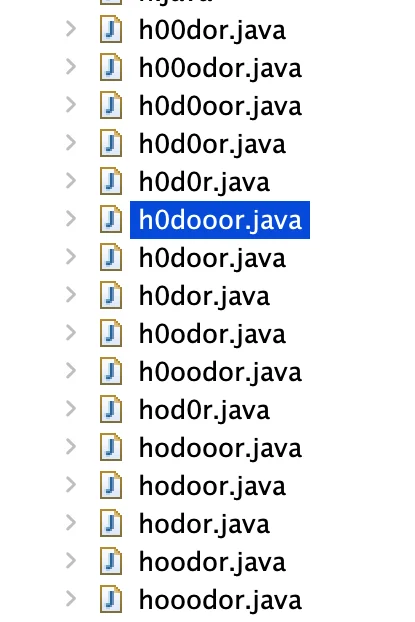
Figure 1: BlackBerry Source-Code Masking
Capturing application data showed that the discovery request carries an authentication value, similar to MobileIron. The X-AuthToken header validates the request: without it, the API returns a 401 failure.
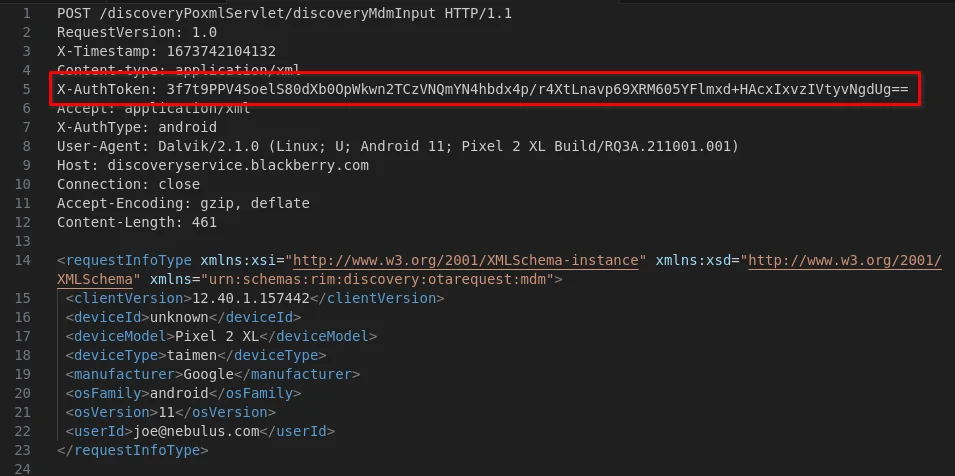
Figure 2: BlackBerry MDM Discovery - X-AuthToken
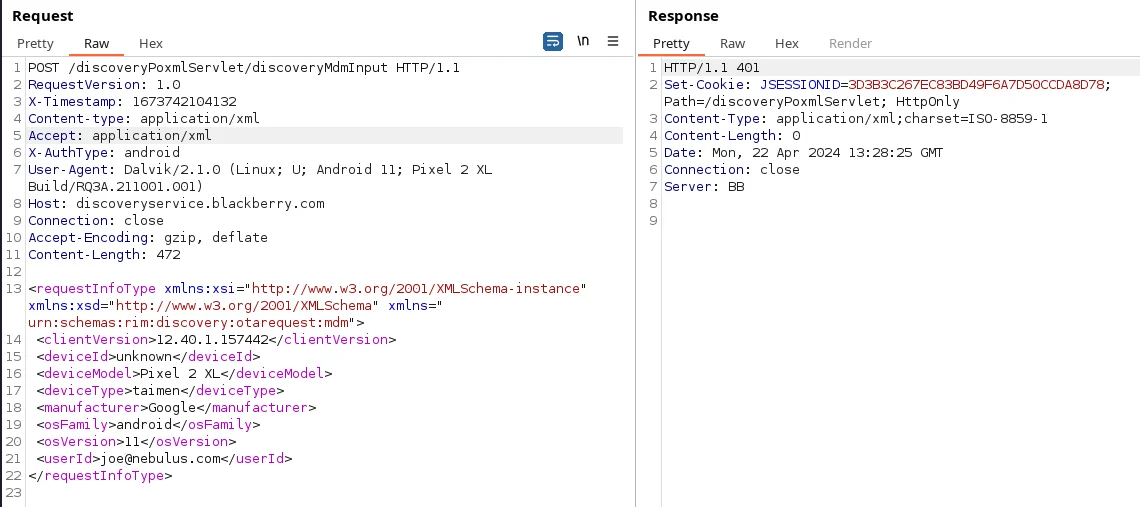
Figure 3: BlackBerry MDM Discovery - Failed Request
The values also appeared to allow replay attacks.
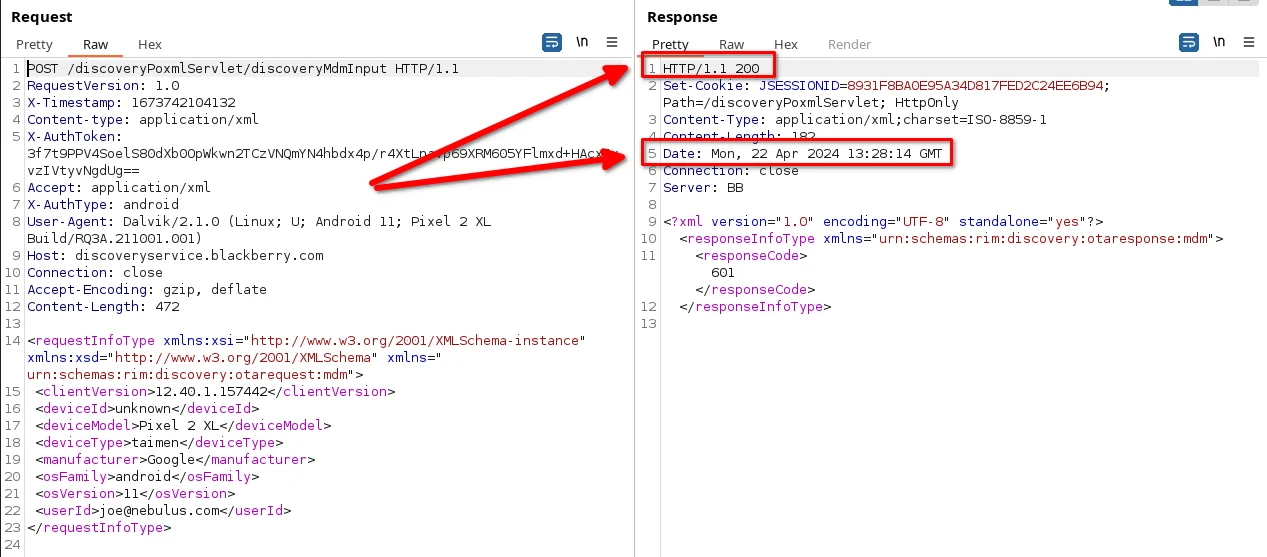
Figure 4: BlackBerry MDM Discovery - Replay #1
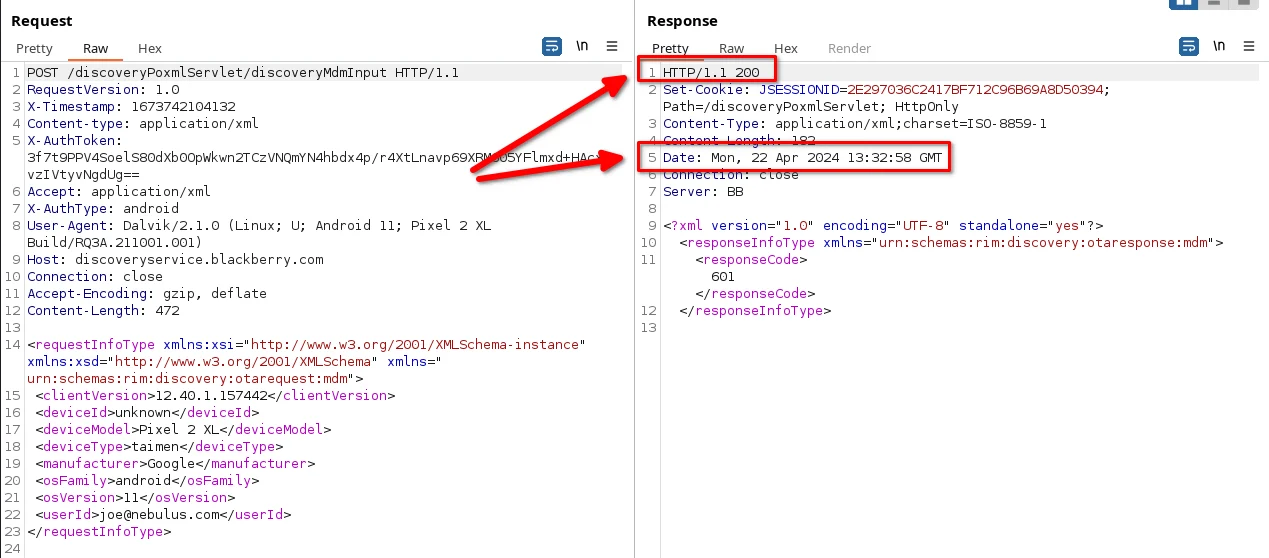
Figure 5: BlackBerry MDM Discovery - Replay #2
Exploitation
Step 1: Recover the X-AuthToken generation logic
The function that generates the token was located in the com.blackberry.emalib.util package, in the e class, in the hodoR method. The value is an HMAC-SHA512 hash containing several hardcoded values.
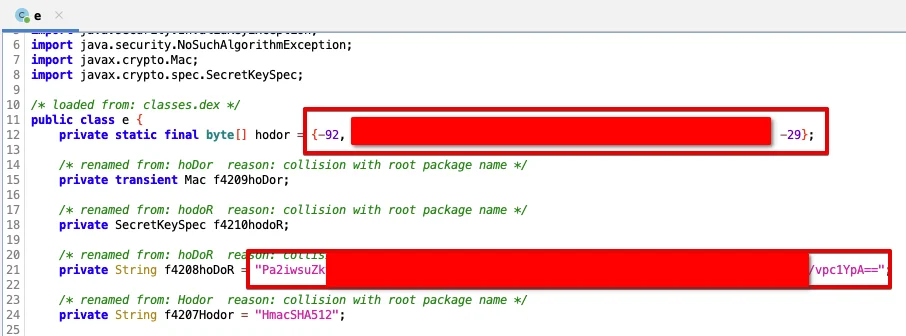
Figure 6: BlackBerry MDM - Hardcoded Keys
The HMAC buffer is built from the following values:
device ID: unknowndevice Type: taimenrequest timestamp: 1673742104132hodor: the salt key appended to the array
That array is SHA512 hashed with the f4208hoDoR key, producing the X-AuthToken value. The following Frida script extracts these values:
function bytes2hex(array) {
    var result = '';
    for (var i = 0; i < array.length; ++i)
        result += ('0' + (array[i] & 0xFF).toString(16)).slice(-2);
    return result;
};

// setTimeout is used to defines the timeout counter before the Java.perform function is call
setTimeout(function(){
    if (Java.available) {
    // Java.perform is the Frida function call to start injection
        Java.perform(function (){
            var UtilE = Java.use("com.blackberry.emalib.util.e");

            // Get HMAC-SHA512 Buffer Strings
            var hmacBuff = new Array();
            UtilE["hodor"].implementation = function (str) {
                if (str.length < 51) { // DB strings are about 51 characters
                    hmacBuff.push(str)
                }
                return this.hodor(str);
            };
            // Get HmacSHA512 Result Value
            UtilE["hodoR"].implementation = function () {
                // Add static salt
                hmacBuff.push("0x"+bytes2hex(this._hodor.value))
                console.log("[+] HMAC-Buff: "+JSON.stringify(hmacBuff))
                // Pull HMAC Key
                console.log('[+] HMAC Key: '+this.hoDoR.value)

                let ret = this.hodoR();
                console.log('[+] B64 HmacSHA512: ' + ret);
                return ret;
            };

        })
    }
},0)
Figure 7: com.blackberry.emalib.util.e HMAC-SHA512 Data Recovery, Frida Script
The script hooks hodor to collect the buffer strings (filtering out database strings of about 51 characters), appends the static salt from _hodor, prints the HMAC key from hoDoR, and prints the Base64 HMAC-SHA512 result.
This was reported to BlackBerry, which responded:
"The reported behaviour is the intended design. The Discovery Service is intended to bootstrap enterprise authentication and thus is unable to be strongly authenticated. The connection to the Discovery Service is encrypted in transit with TLS and the server certificate is validated against the platform root certificate authority (CA) store. The Discovery Service lookup can further be avoided if a QR code is used to bootstrap enterprise authentication. As a workaround, customers can disable Discovery Service bootstrapping to avoid the additional risk of PII correlation by following the steps below on the UEM Management Console."
Step 2: Capture the authentication request
Communicating with the discovery API is only the first step; the goal is to generate authentication requests against the MDM solution. In the normal workflow the user submits username and password, which generates the following request:
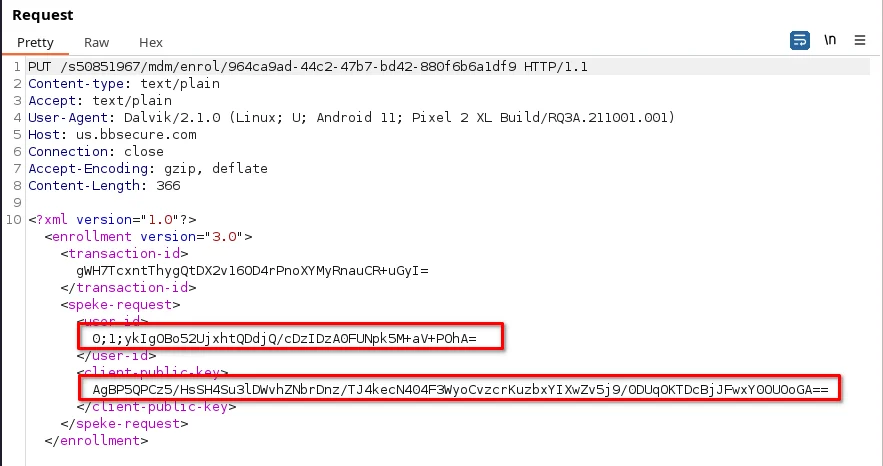
Figure 8: BlackBerry MDM Auth Request
The server response code determines pass or fail. During this research only failed authentication attempts were received, but those failures still indicated valid versus invalid username values.
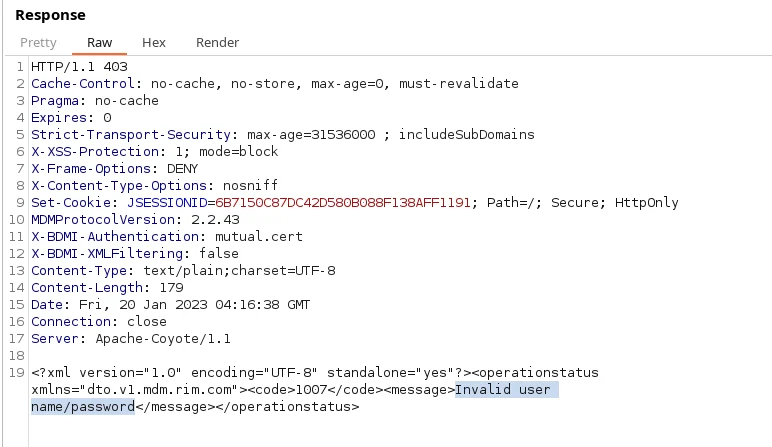
Figure 9: BlackBerry MDM Auth Request - Failure Response
The submitted username/password data is encrypted and there is a reference to a public key.
Step 3: Locate the native encryption library
Encryption of these values is done in libspekexp.so, a native Java library: C or similar compiled code embedded in the APK, which adds a layer of protection against reverse engineering. The compiled application is interpreted and loaded into memory as part of the APK, so the function calls can be manipulated with Frida.
libspekexp.so is loaded in the com.blackberry.emalib.bdmitransport package within the hooodor class and called in the H0dooor method.
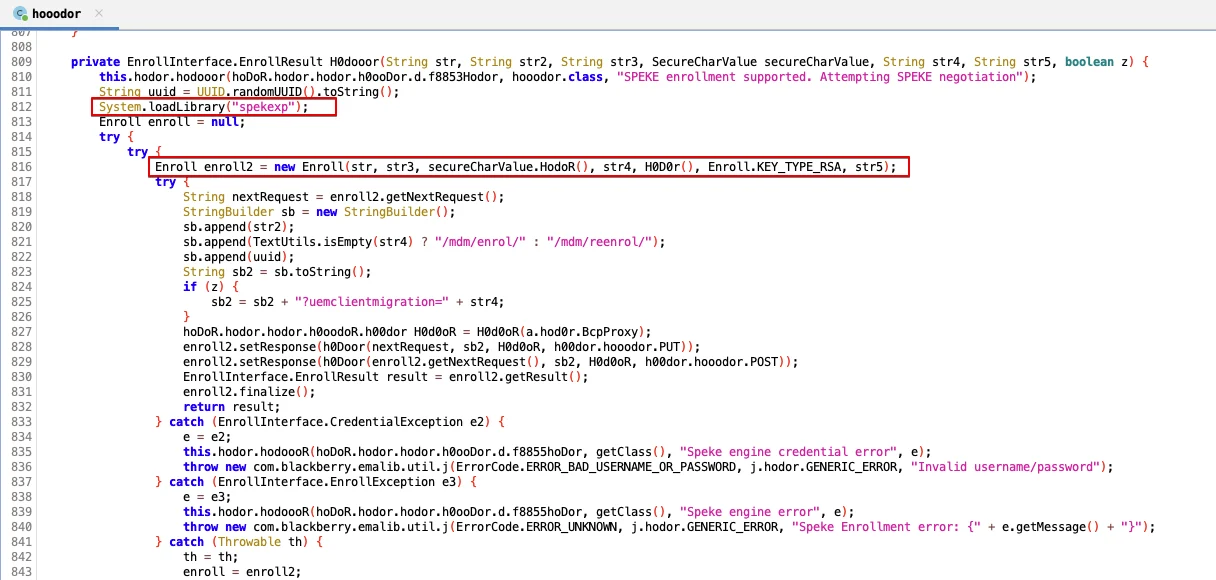
Figure 10: com.blackberry.emalib.bdmitransport.hooodor.H0dooor - spekexp.so Loaded
The call to new Enroll creates an enrollment object via EnrollmentInterface.enrollment_create, which returns an INT value representing an ID for the current enrollment request.
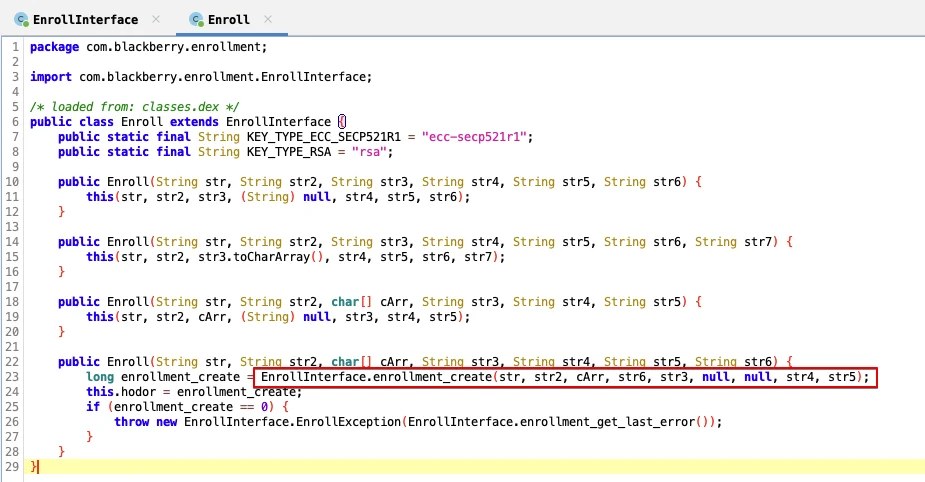
Figure 11: com.blackberry.enrollment - Enroll Initialization
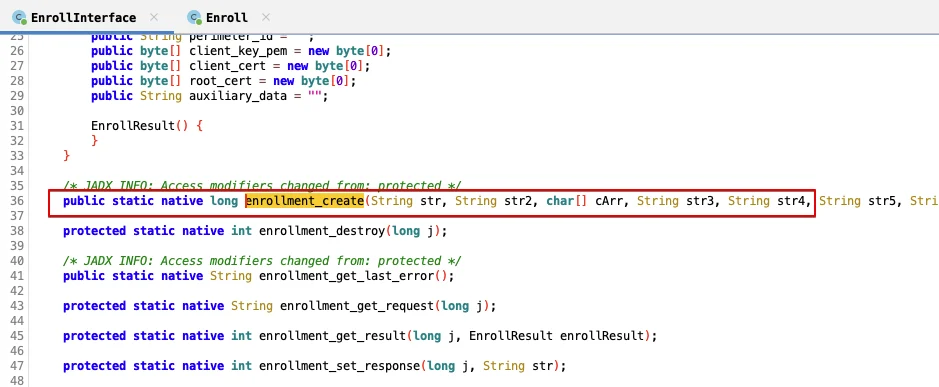
Figure 12: com.blackberry.enrollment - enrollment_create Method Call
References to KEY_TYPE_RSA in the new Enroll call (Figure 10) suggested the value was encrypted with some form of AES. With no direct references to how encryption was performed outside libspekexp.so, that library was the presumed location.
Step 4: Enumerate the native exports
The following Frida script hooks the native library and enumerates all method calls containing string values of enroll or aes:
var libspekexp_addr = Module.findBaseAddress("libspekexp.so")
console.log("[+] libspekexp_addr is: "+libspekexp_addr)

if (libspekexp_addr) {
    console.log('[*] Libspekexp Exports: ')
    Process.findModuleByName("libspekexp.so").enumerateExports().forEach(function(exp) {
        if (exp.address != null) {
            if (exp.name.includes("enrollment")) {
                console.log("  [+] Enrollment Interface: "+exp.name)
            } else if (exp.name.includes("aes")) {
                console.log("  [+] AES Export: "+exp.name)
            }
        }
    })
}
Figure 13: Frida Script - Native Library Enumeration
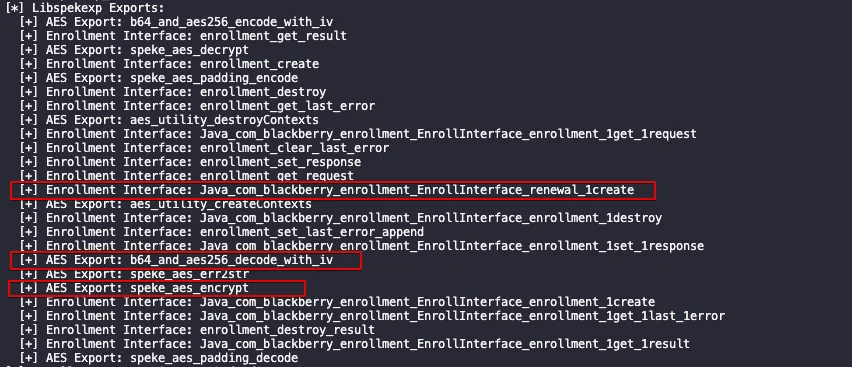
Figure 14: libspekexp.so Exports
Step 5: Hook the encryption function
Each function call was hooked to review arguments and return values, following the Frida cheat sheet by Awakened. The skeleton template used:
function bytes2hex(array) {
    var result = '';
    for (var i = 0; i < array.length; ++i)
        result += ('0' + (array[i] & 0xFF).toString(16)).slice(-2);
    return result;
};

function edianPTR(array) {
    var result = '';
    for (var i = 4; i >= 0; i--)
        result += ('0' + (array[i] & 0xFF).toString(16)).slice(-2);
    console.log('[*] PTR: 0x'+result)
    return ptr('0x'+result)
};

setTimeout(function(){
    if (Java.available) {
    // Java.perform is the Frida function call to start injection
        Java.perform(function (){

            var libspekexp_addr = Module.findBaseAddress("libspekexp.so")
            console.log("[+] libspekexp_addr is: "+libspekexp_addr)

            // speke_aes_encrypt(int param_1,int param_2,long param_3,long param_4,long param_5,void *param_6,long param_7,long param_8,size_t *param_9,void **param_10)
            var spekeContexts = new Array()
            Interceptor.attach(speke_aes_encrypt, {
                onEnter: function (args) {
                    console.log("[*] HIT speke_aes_encrypt")
                    for (var i=0; i<9; ++i) {
                        spekeContexts.push(args[i])
                        console.log("  [**] speke_aes_encrypt ARGS["+i+"]: 0x"+bytes2hex(new Uint8Array(args[i].readByteArray(32))))
                    }
                },
                onLeave: function (retval) {
                    console.log('[*] HIT speke_aes_encrypt RET: '+JSON.stringify(retval))

                    for (var i=0; i<2; ++i) {
                        if (bytes2hex(new Uint8Array(spekeContexts[i].readByteArray(2))) != "0000") {
                            var p1 = edianPTR(new Uint8Array(spekeContexts[i].readByteArray(5)))
                            console.log("  [**] speke_aes_encrypt RET ARGS["+i+"]: 0x"+bytes2hex(new Uint8Array(p1.readByteArray(32))))
                        } else {
                            console.log("  [**] speke_aes_encrypt RET ARGS["+i+"]: 0x"+bytes2hex(new Uint8Array(spekeContexts[i].readByteArray(32))))
                        }

                    }
                }
            })
        });
    }
},0);
Figure 15: Frida Script - Native Library Hooking
Examination of speke_aes_encrypt showed a key and IV passed as the 3rd and 5th arguments respectively. The IV (Initialization Vector) prevents an identical sequence of bytes from producing the same ciphertext when encrypted; it is essentially a seed value controlling the produced ciphertext.
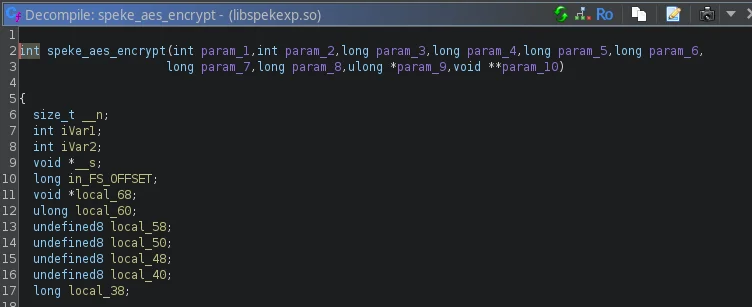
Figure 16: libsepekexp.so - speke_aes_encrypt Function Constructor
Step 6: Recover the hardcoded key and IV
The argument values were consistent across numerous executions of the application, suggesting they too were hardcoded. Recovering the HEX values for key and IV made it possible to locate their static offset 0x78600.
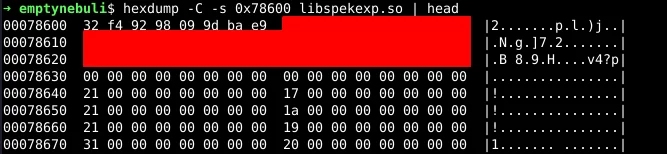
Figure 17: libsepekexp.so - Hardcoded AES-256 Encryption Key and IV
The following Frida script hooks the native library and extracts the cipher values:
function bytes2hex(array) {
    var result = '';
    for (var i = 0; i < array.length; ++i)
        result += ('0' + (array[i] & 0xFF).toString(16)).slice(-2);
    return result;
};

// setTimeout is used to defines the timeout counter before the Java.perform function is call
setTimeout(function(){
    if (Java.available) {
    // Java.perform is the Frida function call to start injection
        Java.perform(function (){
            var libspekexp_addr = Module.findBaseAddress("libspekexp.so")
            console.log("[+] libspekexp_addr is: "+libspekexp_addr)
            if (libspekexp_addr) {
                var enrollment_create = Module.findExportByName("libspekexp.so", "enrollment_create")
                console.log("[+] enrollment_create is: "+enrollment_create)
                var speke_aes_encrypt = Module.findExportByName("libspekexp.so", "speke_aes_encrypt")
                console.log("[+] speke_aes_encrypt is: "+speke_aes_encrypt)

                // Key/IV Recovery
                // speke_aes_encrypt(int param_1,int param_2,long param_3,long param_4,long param_5,void *param_6,long param_7,long param_8,size_t *param_9,void **param_10)
                Interceptor.attach(speke_aes_encrypt, {
                    onEnter: function (args) {
                        console.log("[*] HIT speke_aes_encrypt")
                        var cLength = args[2].toInt32()
                        var ivLength = args[4].toInt32()

                        console.log("[+] aes256-CBC Key: 0x"+bytes2hex(new Uint8Array(args[3].readByteArray(cLength))))
                        console.log("[+] aes256-CBC IV: 0x"+bytes2hex(new Uint8Array(args[5].readByteArray(ivLength))))
                    },
                    onLeave: function () {}
                })

                // enrollment_create(char *ptr_pin,char *ptr_usr,char *ptr_pass,ulong ptr_passLength,char *param_5,char *param_6,void *param_7,ulong param_8,char *param_9,void **param_10,char *param_11,char *cipher)
                Interceptor.attach(enrollment_create, {
                    onEnter: function (args) {
                        console.log("[*] HIT enrollment_create NATIVE")
                        console.log("[+] Encrypted User: "+Memory.readCString(args[0]))
                    },
                    onLeave: function () {}
                })
            }
        })
    }
},0)
Figure 18: Frida Script - Encryption Key and IV Recovery
Step 7: Decrypt the username submission
With the key and IV, the original authentication request could be examined more closely.
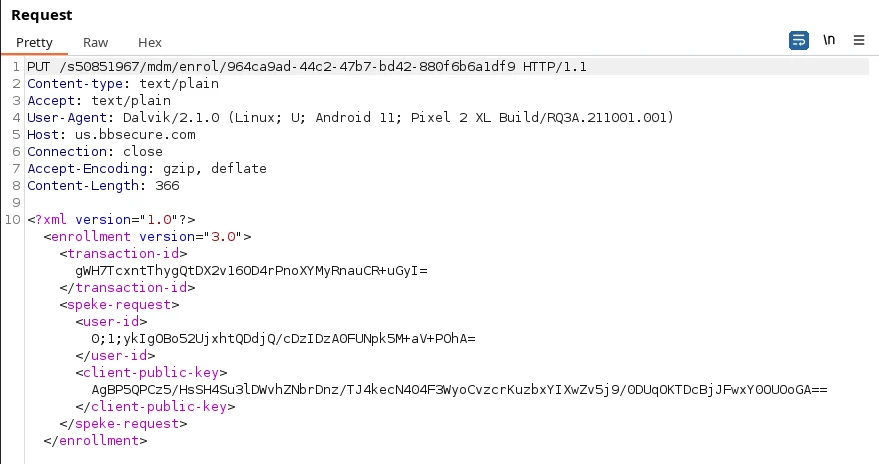
Figure 19: ORG BlackBerry MDM Auth Request
Decoding the Base64 hashed bytecode revealed the 16-byte IV, followed by the encrypted username.

Figure 20: BlackBerry MDM - Decoded Username Submission
With both key and IV recovered, any username value can be encrypted manually and submitted to the API. Although the client has the user submit both username and password, only the username is submitted through this request. The researcher therefore assumes the BlackBerry UEM client is vulnerable to unauthenticated username enumeration, because the server response indicates whether the user is invalid.
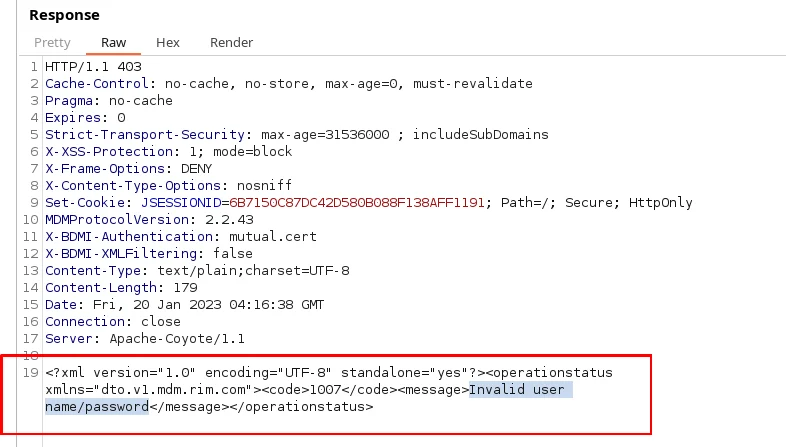
Figure 21: BlackBerry MDM - User Enumeration?
This was also reported to BlackBerry, which responded:
"The EC-SPEKE handshake is encrypted in transit with TLS and the server certificate is validated against the platform root certificate authority (CA) store. Assuming the platform and application have integrity (e.g. not rooted or hooked), this means the only parties who can decrypt the obfuscated username are the service operators (i.e. BlackBerry employees and Enterprise customers for their own users). We do not support multi-factor enrollment, the key authentication factor for all forms of UEM device enrollment is a limited-lifetime password or token. Note that in the outlined attack, the user ID alone is not sufficient to complete the key exchange and the potential attacker would still need to obtain the activation password."
The response notes that enrollment does not support multi-factor authentication, which the researcher reads as BlackBerry, like AirWatch and MobileIron, being exposed to single-factor authentication within the MDM application.
Step 8: The public key and the password exchange
The encrypted username submission also included a client-public-key, assumed to be used in Elliptical Curve Cryptography (ECC) for transmitting the password value. This was never fully validated. The presumed process: both sides exchange public keys and perform maths with their private keys to generate a unique value shared by client and server, which then encrypts the password submission, assuming the user exists. A Wikipedia graphic illustrates the exchange:
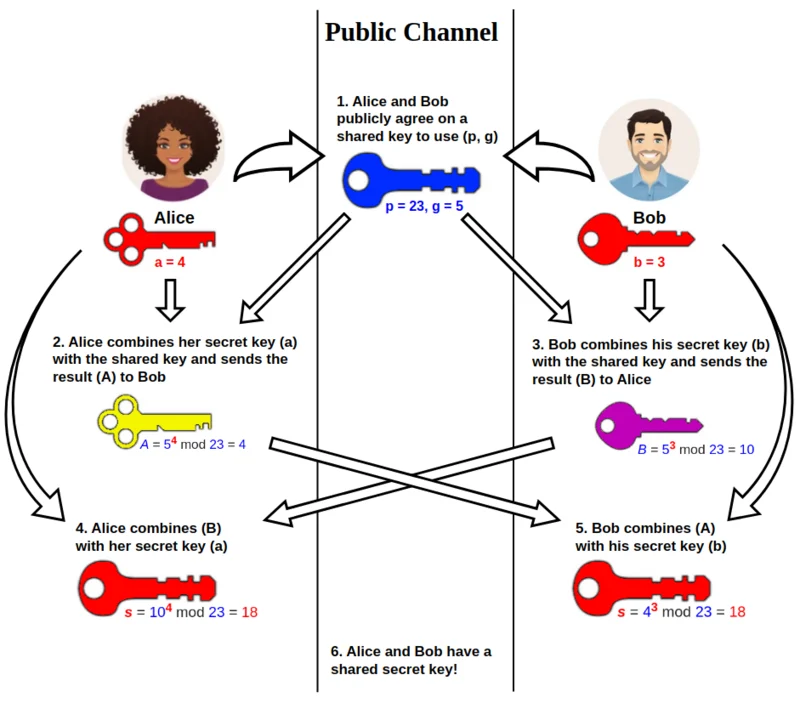
Figure 22: ECC Key Exchange
The public key only needs to be generated once and can be submitted to the BlackBerry API repeatedly to validate username values. A Frida script that hooks the BlackBerry UEM client and recovers the public/private keys is published here.
Root cause
The discovery token is an HMAC-SHA512 over a buffer containing a device ID, the device type taimen, a request timestamp and a salt, hashed with the hardcoded key f4208hoDoR. Because the key and salt ship inside the APK, anyone with the APK can generate valid tokens, and the captured values appeared to allow replay. BlackBerry's position is that this is intended design: the Discovery Service bootstraps enterprise authentication and cannot be strongly authenticated, it is protected by TLS with certificate validation against the platform CA store, and it can be avoided entirely by bootstrapping with a QR code.
The authentication request encrypts the username with AES-256-CBC using a key and IV that are hardcoded in libspekexp.so at static offset 0x78600. The native library adds reverse-engineering friction but no secrecy, since it is loaded into memory and can be hooked. BlackBerry's position is that the EC-SPEKE handshake is protected by TLS with certificate validation, so only service operators can decrypt the obfuscated username assuming platform and application integrity (not rooted or hooked), and that the user ID alone is not sufficient to complete the key exchange because the activation password is still required.
Impact
With the recovered discovery token logic, an attacker can generate valid X-AuthToken values, and captured values appeared to allow replay against the discovery API. With the hardcoded AES key and IV, an attacker can encrypt arbitrary usernames and submit them to the authentication API; the response distinguishes valid from invalid usernames, which the researcher treats as unauthenticated username enumeration. Only failed authentication attempts were observed during the research. The public key can be reused across submissions, so a single key pair supports repeated username validation. The password exchange over ECC was not validated. BlackBerry's response stresses that the user ID alone does not complete the key exchange and that an activation password is still needed.
Fix
No fix is described. BlackBerry classified both behaviours as intended design and pointed to TLS with certificate validation, QR-code bootstrapping as an alternative to the Discovery Service, and the option for customers to disable Discovery Service bootstrapping on the UEM Management Console to avoid PII correlation.
Variants to test
- Discovery token replay. Capture a discovery request with its
X-AuthTokenand resend it later. A positive result is the API accepting the replayed token rather than rejecting it. - Client-side HMAC key recovery. Decompile an MDM client and look for HMAC generation in utility classes. A positive result is a hardcoded key and salt that let you reproduce a valid token offline.
- Hardcoded AES key and IV in native libraries. Hook encryption exports and log key and IV arguments across runs. A positive result is identical values on every execution, locatable at a static offset.
- Username enumeration through encrypted submissions. Encrypt candidate usernames with the recovered key and IV and submit them. A positive result is a response that differs between valid and invalid users.
- Public key reuse. Generate one client key pair and submit it with many username values. A positive result is the API accepting the same public key repeatedly.
- Single-factor enrollment. Check whether enrollment accepts only a password or token. A positive result is successful enrollment without a second factor.
What happened, in plain words
BlackBerry makes a product called BlackBerry MDM, and the specific piece looked at here is the BlackBerry UEM client, an app that runs on Android phones. MDM stands for Mobile Device Management: it is the software a company uses to set up, configure and control its employees' phones and tablets from one central place. When an employee installs the company app on their phone, that app has to talk to a company server to register the device and prove who the user is. This article is about how that conversation works, and about a few shortcuts in it that make it weaker than it looks.
The researcher had already looked at two competing MDM products, VMware AirWatch and Ivanti MobileIron, and found similar problems there. This time the target was the BlackBerry client. The app is an Android APK, which is the file format Android uses to install apps. An APK is really a modified Java JAR file, meaning a zip-like archive full of compiled code. If you unpack it, you can read that code, and with some effort you can rebuild most of the original program from it. That is the whole starting point: the app is in your hands, so its secrets are in your hands too.
Two parts of the app's behaviour matter:
- The discovery request. When you first open the app and type your email address, the app does not yet know which company server it should talk to. So it asks a central "discovery service" where the right server lives. This is a common pattern in MDM products. BlackBerry attaches an authentication value to that request, a header called
X-AuthToken. - The authentication request. Later, the app asks you for a
usernameand apasswordand sends an encrypted login request to the company's MDM server.
The findings are that the discovery token can be recreated by anyone who has the app, because the ingredients that make it are baked into the app; that captured tokens appeared to allow replay; and that the login request encrypts the username with a key and an initialisation value that are also baked into the app. Because the server's reply differs for real and fake usernames, that adds up to a way to check whether a username exists without logging in. BlackBerry's position, quoted in full below, is that both behaviours are intended design and that the transport is protected by TLS.
No accounts, roles or product versions are given in the report. The workflow described is the ordinary one: launch the app, give an email address, then submit username and password.
Setting up the workbench
The only reference material is the APK itself. To turn the compiled app back into readable code, the researcher used two free tools, dex2jar and jadx.
The app also uses certificate pinning. To understand that, start with the normal situation: when your phone talks to a server over HTTPS, the server presents a certificate, and your phone checks that the certificate was issued by a trusted authority. Certificate pinning is a stricter version: the app refuses to accept any certificate except one specific, pre-approved certificate. The practical effect is that you cannot put a proxy in the middle to read the traffic. A proxy is a piece of software that sits between your phone and the server and copies everything that passes. When you use a proxy to read traffic you are not supposed to read, that is called a Manipulator-in-the-Middle (MitM) attack. Pinning blocks it, so the researcher had to disable or bypass pinning first.
For that, and for everything else that involved reaching into the running app, the researcher used Frida. Frida is a toolkit that lets you attach to a running program and watch or change what its functions do, without editing the program itself. The report does not explain how to install or configure Frida and points to several online scripts that disable certificate pinning on Android.
Finding the weak spots
Once most of the application code had been recovered, the researcher could see that someone had made an effort to obstruct analysis by "hodoring", that is, masking the code. Masking here means renaming things and shuffling the code so that a human reading it has a harder time following what happens. It is like labelling every drawer in a kitchen with a random number: the contents are still there, you just have to open more drawers.
Figure 1: BlackBerry Source-Code Masking
Next, the researcher captured some application data and reviewed how requests are generated. Doing that showed that the discovery request carries an authentication value, much like MobileIron did. The X-AuthToken header is what validates the request: without it, the API returns a 401 failure. An API (Application Programming Interface) is simply the set of addresses and rules a program uses to talk to a server; here it means the discovery service's web addresses. A 401 is the standard HTTP status code for "you are not authenticated", the same idea as a door that will not open because you did not show a badge.
Figure 2: BlackBerry MDM Discovery - X-AuthToken
Figure 3: BlackBerry MDM Discovery - Failed Request
A header, by the way, is a small labelled field sent along with a web request, like the "From:" and "Subject:" lines on an envelope. X-AuthToken is a custom header name that BlackBerry chose; the X- prefix is a convention for non-standard headers.
The captured values also appeared to allow replay attacks. A replay attack means taking a request that was already sent once, keeping a copy, and sending it again later. If the server accepts the copy, then the value inside it is not tied to a single use, and anyone who can see or capture it can reuse it.
Figure 4: BlackBerry MDM Discovery - Replay #1
Figure 5: BlackBerry MDM Discovery - Replay #2
Step by step
Step 1: Work out how the X-AuthToken is made
The first question is where the token comes from. Since the app has to produce it on the phone, the recipe must be inside the app. The function that generates the value was found in the com.blackberry.emalib.util package, in the e class, in the hodoR method. A package is a folder-like grouping of code; a class is a named bundle of code and data; a method is a single named action inside a class. So the trail is: this folder, this bundle, this action.
The value turned out to be an HMAC-SHA512 hash containing several hardcoded values. Two terms to unpack. A hash is a one-way fingerprint of some data: you can turn any input into a fixed-length string of characters, but you cannot turn the string back into the input. SHA512 is one particular hashing recipe that produces a long fingerprint. An HMAC is a hash with a secret key mixed in, so that only someone who knows the key can produce the same fingerprint. It is like a wax seal stamped with a private stamp: anyone can see the seal, but only the holder of the stamp can make a new one. "Hardcoded" means the value is written directly into the program's code, so it ships with the app and is the same on every phone.
Figure 6: BlackBerry MDM - Hardcoded Keys
The HMAC buffer, that is, the data that gets hashed, is built from these values:
device ID: unknowndevice Type: taimenrequest timestamp: 1673742104132hodor: the salt key appended to the array
A buffer is just a chunk of data held in memory. A timestamp is the moment the request was made, here written as a number. A salt is extra random-looking data added to the input before hashing, so that two similar inputs do not produce the same fingerprint. An array is an ordered list of values.
That array is then SHA512 hashed with the f4208hoDoR key, producing the X-AuthToken value. In other words: take the list above, mix in the secret key f4208hoDoR, run the SHA512 recipe, and out comes the token. The following Frida script extracts these values:
function bytes2hex(array) {
    var result = '';
    for (var i = 0; i < array.length; ++i)
        result += ('0' + (array[i] & 0xFF).toString(16)).slice(-2);
    return result;
};

// setTimeout is used to defines the timeout counter before the Java.perform function is call
setTimeout(function(){
    if (Java.available) {
    // Java.perform is the Frida function call to start injection
        Java.perform(function (){
            var UtilE = Java.use("com.blackberry.emalib.util.e");

            // Get HMAC-SHA512 Buffer Strings
            var hmacBuff = new Array();
            UtilE["hodor"].implementation = function (str) {
                if (str.length < 51) { // DB strings are about 51 characters
                    hmacBuff.push(str)
                }
                return this.hodor(str);
            };
            // Get HmacSHA512 Result Value
            UtilE["hodoR"].implementation = function () {
                // Add static salt
                hmacBuff.push("0x"+bytes2hex(this._hodor.value))
                console.log("[+] HMAC-Buff: "+JSON.stringify(hmacBuff))
                // Pull HMAC Key
                console.log('[+] HMAC Key: '+this.hoDoR.value)

                let ret = this.hodoR();
                console.log('[+] B64 HmacSHA512: ' + ret);
                return ret;
            };

        })
    }
},0)
Figure 7: com.blackberry.emalib.util.e HMAC-SHA512 Data Recovery, Frida Script
Line by line, in plain words:
function bytes2hex(array) { ... }defines a small helper that turns a list of raw byte values into a readable hexadecimal string (hex is base 16, using 0 to 9 and a to f). The loop walks the list;('0' + (array[i] & 0xFF).toString(16)).slice(-2)converts each byte to hex and pads it to two characters, so a byte like 5 becomes05rather than5.setTimeout(function(){ ... },0)schedules the inner code to run almost immediately. The comment explains it is used to define a timeout counter before the Java injection starts.if (Java.available)checks that the app's Java runtime is present, so the script only proceeds when it can actually reach Java code.Java.perform(function (){ ... })is Frida's way of saying "run this inside the app's Java world".var UtilE = Java.use("com.blackberry.emalib.util.e");grabs a handle on the class identified earlier, so its methods can be watched.var hmacBuff = new Array();creates an empty list to collect the pieces of the buffer as they are used.UtilE["hodor"].implementation = function (str) { ... }replaces thehodormethod with a wrapper. The wrapper receives the same argument, checksif (str.length < 51)to skip database strings of about 51 characters, pushes the string intohmacBuff, and then calls the original method withreturn this.hodor(str);so the app keeps working normally.UtilE["hodoR"].implementation = function () { ... }wraps the method that produces the final token. Inside it,hmacBuff.push("0x"+bytes2hex(this._hodor.value))adds the static salt, converted to hex, to the collected list.console.log("[+] HMAC-Buff: "+JSON.stringify(hmacBuff))prints the whole buffer.console.log('[+] HMAC Key: '+this.hoDoR.value)prints the HMAC key.let ret = this.hodoR();calls the real method,console.log('[+] B64 HmacSHA512: ' + ret);prints the result (Base64 is a way of writing binary data as plain text characters), andreturn ret;hands the real result back to the app.
This was reported to BlackBerry, which responded:
"The reported behaviour is the intended design. The Discovery Service is intended to bootstrap enterprise authentication and thus is unable to be strongly authenticated. The connection to the Discovery Service is encrypted in transit with TLS and the server certificate is validated against the platform root certificate authority (CA) store. The Discovery Service lookup can further be avoided if a QR code is used to bootstrap enterprise authentication. As a workaround, customers can disable Discovery Service bootstrapping to avoid the additional risk of PII correlation by following the steps below on the UEM Management Console."
A few words in that reply: TLS is the encryption layer behind HTTPS, so traffic cannot be read in transit. A certificate authority (CA) store is the phone's built-in list of trusted certificate issuers. PII means personally identifiable information, data that points at a specific person, such as an email address. Bootstrapping is the initial setup step that gets a device pointed at the right server.
Step 2: Capture the authentication request
Talking to the discovery API is only the first step. The real goal is to generate authentication requests against the MDM solution, that is, the login requests the app sends when a user signs in. In the normal workflow the user submits username and password, which generates the following request:
Figure 8: BlackBerry MDM Auth Request
The server's response code determines pass or fail. During this research only failed authentication attempts were received, but those failures still indicated valid versus invalid username values. That difference is the interesting part: even a failed login can leak whether the account exists.
Figure 9: BlackBerry MDM Auth Request - Failure Response
The submitted username/password data is encrypted, and there is a reference to a public key. A public key belongs to public-key cryptography, a system where each party has a pair of keys: one that can be shared openly (the public key) and one kept secret (the private key). It is like a padlock you can hand out freely while you keep the only key that opens it.
Step 3: Find the native encryption library
The encryption of these values is done in libspekexp.so, a native Java library. "Native" here means the code is not Java at all: it is C or similar compiled code embedded in the APK. Compiled code is harder to read than Java, which adds a layer of protection against reverse engineering. But there is a catch: the compiled application is interpreted and loaded into memory as part of the APK, so its function calls can still be manipulated with Frida. The code is hidden from reading, not from watching.
libspekexp.so is loaded in the com.blackberry.emalib.bdmitransport package within the hooodor class and called in the H0dooor method. The odd spellings are part of the masking seen earlier.
Figure 10: com.blackberry.emalib.bdmitransport.hooodor.H0dooor - spekexp.so Loaded
The call to new Enroll creates an enrollment object via EnrollmentInterface.enrollment_create, which returns an INT value representing an ID for the current enrollment request. An object is a bundle of data and behaviour created from a class; an INT is a whole number; an ID is a label used to refer to that particular request later. Enrollment is the process of a device registering itself with the company server.
Figure 11: com.blackberry.enrollment - Enroll Initialization
Figure 12: com.blackberry.enrollment - enrollment_create Method Call
References to KEY_TYPE_RSA in the new Enroll call (Figure 10) suggested the value was encrypted with some form of AES. RSA is one well-known public-key system; AES is a different, very common system for encrypting data with a single shared key. With no direct references to how encryption was performed outside libspekexp.so, that library was the presumed location.
Step 4: List what the native library offers
The following Frida script hooks the native library and lists all method calls containing string values of enroll or aes:
var libspekexp_addr = Module.findBaseAddress("libspekexp.so")
console.log("[+] libspekexp_addr is: "+libspekexp_addr)

if (libspekexp_addr) {
    console.log('[*] Libspekexp Exports: ')
    Process.findModuleByName("libspekexp.so").enumerateExports().forEach(function(exp) {
        if (exp.address != null) {
            if (exp.name.includes("enrollment")) {
                console.log("  [+] Enrollment Interface: "+exp.name)
            } else if (exp.name.includes("aes")) {
                console.log("  [+] AES Export: "+exp.name)
            }
        }
    })
}
Figure 13: Frida Script - Native Library Enumeration
Line by line:
var libspekexp_addr = Module.findBaseAddress("libspekexp.so")asks Frida where the library has been loaded in memory. Every loaded library sits at some starting address, like a book placed on a shelf at a particular position.console.log("[+] libspekexp_addr is: "+libspekexp_addr)prints that address.if (libspekexp_addr) { ... }only continues if the library was actually found.Process.findModuleByName("libspekexp.so").enumerateExports().forEach(function(exp) { ... })lists everything the library offers to the outside world. An export is a named function that other code can call, like a shop's list of services on the door.if (exp.address != null)skips entries with no address.if (exp.name.includes("enrollment"))andelse if (exp.name.includes("aes"))filter the list to names containingenrollmentoraes, and print the matching names.
Figure 14: libspekexp.so Exports
Step 5: Watch the encryption function
Each function call was hooked to review its arguments and return values, following the Frida cheat sheet by Awakened. Hooking means attaching a listener to a function so that every time it is called, your listener runs first and can record what went in and what came out. The skeleton template used:
function bytes2hex(array) {
    var result = '';
    for (var i = 0; i < array.length; ++i)
        result += ('0' + (array[i] & 0xFF).toString(16)).slice(-2);
    return result;
};

function edianPTR(array) {
    var result = '';
    for (var i = 4; i >= 0; i--)
        result += ('0' + (array[i] & 0xFF).toString(16)).slice(-2);
    console.log('[*] PTR: 0x'+result)
    return ptr('0x'+result)
};

setTimeout(function(){
    if (Java.available) {
    // Java.perform is the Frida function call to start injection
        Java.perform(function (){

            var libspekexp_addr = Module.findBaseAddress("libspekexp.so")
            console.log("[+] libspekexp_addr is: "+libspekexp_addr)

            // speke_aes_encrypt(int param_1,int param_2,long param_3,long param_4,long param_5,void *param_6,long param_7,long param_8,size_t *param_9,void **param_10)
            var spekeContexts = new Array()
            Interceptor.attach(speke_aes_encrypt, {
                onEnter: function (args) {
                    console.log("[*] HIT speke_aes_encrypt")
                    for (var i=0; i<9; ++i) {
                        spekeContexts.push(args[i])
                        console.log("  [**] speke_aes_encrypt ARGS["+i+"]: 0x"+bytes2hex(new Uint8Array(args[i].readByteArray(32))))
                    }
                },
                onLeave: function (retval) {
                    console.log('[*] HIT speke_aes_encrypt RET: '+JSON.stringify(retval))

                    for (var i=0; i<2; ++i) {
                        if (bytes2hex(new Uint8Array(spekeContexts[i].readByteArray(2))) != "0000") {
                            var p1 = edianPTR(new Uint8Array(spekeContexts[i].readByteArray(5)))
                            console.log("  [**] speke_aes_encrypt RET ARGS["+i+"]: 0x"+bytes2hex(new Uint8Array(p1.readByteArray(32))))
                        } else {
                            console.log("  [**] speke_aes_encrypt RET ARGS["+i+"]: 0x"+bytes2hex(new Uint8Array(spekeContexts[i].readByteArray(32))))
                        }

                    }
                }
            })
        });
    }
},0);
Figure 15: Frida Script - Native Library Hooking
Line by line:
bytes2hexis the same helper as before: raw bytes in, readable hex out.edianPTR(array)is a second helper. It reads five bytes in reverse order (for (var i = 4; i >= 0; i--)), builds a hex string, prints it, and turns it into a pointer withptr('0x'+result). A pointer is a memory address, a number that says where something lives in memory. The reverse order is because of endianness, the convention for which byte of a number comes first; the name is a small joke on "endian".setTimeout(...)andJava.perform(...)again start the script inside the app's Java runtime.var libspekexp_addr = Module.findBaseAddress("libspekexp.so")finds the library's starting address, and the next line prints it.- The comment above
var spekeContexts = new Array()shows the function's signature: the list of argumentsspeke_aes_encryptexpects. Reading a signature is like reading the order form of a function: it tells you what each slot means. var spekeContexts = new Array()creates an empty list to remember the arguments so they can be inspected again after the function returns.Interceptor.attach(speke_aes_encrypt, { ... })attaches the listener to the encryption function.onEnter: function (args) { ... }runs when the function is entered.argsholds the arguments. The loopfor (var i=0; i<9; ++i)walks the first nine arguments, saves each one inspekeContexts, and prints the first 32 bytes at each argument's address, converted to hex.new Uint8Array(...)treats the raw memory as a list of bytes, andreadByteArray(32)reads 32 of them.onLeave: function (retval) { ... }runs when the function returns. It prints the return value, then loops over the first two saved arguments.if (bytes2hex(new Uint8Array(spekeContexts[i].readByteArray(2))) != "0000")checks whether the first two bytes are not zero. If they are not, the value is treated as a pointer:edianPTRconverts it, and the script prints 32 bytes found at that address. Otherwise it prints 32 bytes directly from the saved argument. This is a common trick: some arguments are values, others are addresses of values, and you have to check which is which.
Examination of speke_aes_encrypt showed a key and IV passed as the 3rd and 5th arguments respectively. The IV (Initialization Vector) prevents an identical sequence of bytes from producing the same ciphertext when encrypted; it is essentially a seed value controlling the produced ciphertext. Ciphertext is the scrambled output of encryption. The everyday comparison: if you always stamp the same wax seal in exactly the same way, two identical letters look identical, and an observer learns that they are the same. A fresh IV makes each letter look different even when the contents match.
Figure 16: libsepekexp.so - speke_aes_encrypt Function Constructor
Step 6: Recover the hardcoded key and IV
The argument values were consistent across numerous executions of the application, suggesting they too were hardcoded. If the key and IV were generated fresh each time, they would change on every run; because they did not, they must be fixed values sitting in the app. Recovering the HEX values for key and IV made it possible to locate their static offset 0x78600. A static offset is a fixed position inside the file, like a page number in a book that never changes between printings.
The following Frida script hooks the native library and extracts the cipher values:
function bytes2hex(array) {
    var result = '';
    for (var i = 0; i < array.length; ++i)
        result += ('0' + (array[i] & 0xFF).toString(16)).slice(-2);
    return result;
};

// setTimeout is used to defines the timeout counter before the Java.perform function is call
setTimeout(function(){
    if (Java.available) {
    // Java.perform is the Frida function call to start injection
        Java.perform(function (){
            var libspekexp_addr = Module.findBaseAddress("libspekexp.so")
            console.log("[+] libspekexp_addr is: "+libspekexp_addr)
            if (libspekexp_addr) {
                var enrollment_create = Module.findExportByName("libspekexp.so", "enrollment_create")
                console.log("[+] enrollment_create is: "+enrollment_create)
                var speke_aes_encrypt = Module.findExportByName("libspekexp.so", "speke_aes_encrypt")
                console.log("[+] speke_aes_encrypt is: "+speke_aes_encrypt)

                // Key/IV Recovery
                // speke_aes_encrypt(int param_1,int param_2,long param_3,long param_4,long param_5,void *param_6,long param_7,long param_8,size_t *param_9,void **param_10)
                Interceptor.attach(speke_aes_encrypt, {
                    onEnter: function (args) {
                        console.log("[*] HIT speke_aes_encrypt")
                        var cLength = args[2].toInt32()
                        var ivLength = args[4].toInt32()

                        console.log("[+] aes256-CBC Key: 0x"+bytes2hex(new Uint8Array(args[3].readByteArray(cLength))))
                        console.log("[+] aes256-CBC IV: 0x"+bytes2hex(new Uint8Array(args[5].readByteArray(ivLength))))
                    },
                    onLeave: function () {}
                })

                // enrollment_create(char *ptr_pin,char *ptr_usr,char *ptr_pass,ulong ptr_passLength,char *param_5,char *param_6,void *param_7,ulong param_8,char *param_9,void **param_10,char *param_11,char *cipher)
                Interceptor.attach(enrollment_create, {
                    onEnter: function (args) {
                        console.log("[*] HIT enrollment_create NATIVE")
                        console.log("[+] Encrypted User: "+Memory.readCString(args[0]))
                    },
                    onLeave: function () {}
                })
            }
        })
    }
},0)
Figure 18: Frida Script - Encryption Key and IV Recovery
Line by line:
bytes2hexis the same byte-to-hex helper.setTimeout(...)andJava.perform(...)start the script inside the app.var libspekexp_addr = Module.findBaseAddress("libspekexp.so")finds the library, and the next line prints its address.if (libspekexp_addr) { ... }continues only if the library is loaded.var enrollment_create = Module.findExportByName("libspekexp.so", "enrollment_create")looks up the named functionenrollment_createinside the library, and the next line prints where it is.var speke_aes_encrypt = Module.findExportByName("libspekexp.so", "speke_aes_encrypt")does the same for the encryption function.- The first
Interceptor.attach(speke_aes_encrypt, { ... })watches the encryption function. InonEnter,var cLength = args[2].toInt32()reads the third argument as a number, the key length;var ivLength = args[4].toInt32()reads the fifth argument as a number, the IV length. Thenargs[3].readByteArray(cLength)reads that many bytes at the fourth argument (the key) and prints them as hex, andargs[5].readByteArray(ivLength)does the same for the sixth argument (the IV). The labelaes256-CBCnames the encryption scheme: AES with a 256-bit key, in CBC mode, a way of chaining blocks so each one depends on the previous. onLeave: function () {}does nothing on return; only the inputs matter here.- The second
Interceptor.attach(enrollment_create, { ... })watches the enrollment function. Its comment lists the expected arguments, starting withptr_pin,ptr_usrandptr_pass. InonEnter,Memory.readCString(args[0])reads a text string from the first argument and prints it as the encrypted user.
Step 7: Decrypt the username submission
With the key and IV in hand, the original authentication request could be examined more closely.
Figure 19: ORG BlackBerry MDM Auth Request
Decoding the Base64 hashed bytecode revealed the 16-byte IV, followed by the encrypted username. Base64 is the text encoding mentioned earlier; decoding it turns the readable characters back into raw bytes. The layout is simple: the first 16 bytes are the IV, and everything after that is the encrypted username.
Figure 20: BlackBerry MDM - Decoded Username Submission
With both key and IV recovered, any username value can be encrypted manually and submitted to the API. Although the client has the user submit both username and password, only the username is submitted through this request. The researcher therefore assumes the BlackBerry UEM client is vulnerable to unauthenticated username enumeration, because the server response indicates whether the user is invalid. Username enumeration means being able to test a list of names and learn which ones exist. "Unauthenticated" means you can do it without logging in first. The everyday comparison: a receptionist who answers "no such person works here" for some names and "wrong password" for others has just told you which people work there, without letting you in.
Figure 21: BlackBerry MDM - User Enumeration?
This was also reported to BlackBerry, which responded:
"The EC-SPEKE handshake is encrypted in transit with TLS and the server certificate is validated against the platform root certificate authority (CA) store. Assuming the platform and application have integrity (e.g. not rooted or hooked), this means the only parties who can decrypt the obfuscated username are the service operators (i.e. BlackBerry employees and Enterprise customers for their own users). We do not support multi-factor enrollment, the key authentication factor for all forms of UEM device enrollment is a limited-lifetime password or token. Note that in the outlined attack, the user ID alone is not sufficient to complete the key exchange and the potential attacker would still need to obtain the activation password."
A handshake is the opening exchange where two sides agree on how to talk securely. EC-SPEKE is the name of the particular handshake used here. "Rooted" means the phone's operating system has been modified to allow deeper access than the manufacturer intended; "hooked" means a tool like Frida is attached to the running app. Multi-factor authentication means proving who you are with more than one kind of evidence, for example a password plus a code from your phone. Single-factor authentication means only one kind is required.
The response notes that enrollment does not support multi-factor authentication, which the researcher reads as BlackBerry, like AirWatch and MobileIron, being exposed to single-factor authentication within the MDM application.
Step 8: The public key and the password exchange
The encrypted username submission also included a client-public-key, assumed to be used in Elliptical Curve Cryptography (ECC) for transmitting the password value. ECC is a family of public-key methods built on a particular kind of mathematical curve; the point is that two parties can agree on a shared secret without ever sending that secret over the network. This was never fully validated. The presumed process: both sides exchange public keys and perform maths with their private keys to generate a unique value shared by client and server, which then encrypts the password submission, assuming the user exists. A Wikipedia graphic illustrates the exchange:
Figure 22: ECC Key Exchange
The everyday comparison is mixing paint: each side picks a secret colour, mixes it with a shared public colour, and sends the mixture. Each side then adds its own secret colour to the other's mixture, and both end up with the same final colour, which an observer cannot reproduce from the mixtures alone.
The public key only needs to be generated once and can be submitted to the BlackBerry API repeatedly to validate username values. A Frida script that hooks the BlackBerry UEM client and recovers the public/private keys is published here.
Why it works
The discovery token is an HMAC-SHA512 over a buffer containing a device ID, the device type taimen, a request timestamp and a salt, hashed with the hardcoded key f4208hoDoR. Because the key and salt ship inside the APK, anyone with the APK can generate valid tokens, and captured tokens can be replayed. BlackBerry's position is that this is intended design: the Discovery Service bootstraps enterprise authentication and cannot be strongly authenticated, it is protected by TLS with certificate validation against the platform CA store, and it can be avoided entirely by bootstrapping with a QR code.
The authentication request encrypts the username with AES-256-CBC using a key and IV that are hardcoded in libspekexp.so at static offset 0x78600. The native library adds reverse-engineering friction but no secrecy, since it is loaded into memory and can be hooked. BlackBerry's position is that the EC-SPEKE handshake is protected by TLS with certificate validation, so only service operators can decrypt the obfuscated username assuming platform and application integrity (not rooted or hooked), and that the user ID alone is not sufficient to complete the key exchange because the activation password is still required.
What an attacker could do with it
With the recovered discovery token logic, an attacker can generate valid X-AuthToken values and replay captured ones against the discovery API. With the hardcoded AES key and IV, an attacker can encrypt arbitrary usernames and submit them to the authentication API; the response distinguishes valid from invalid usernames, which the researcher treats as unauthenticated username enumeration. Only failed authentication attempts were observed during the research. The public key can be reused across submissions, so a single key pair supports repeated username validation. The password exchange over ECC was not validated. BlackBerry's response stresses that the user ID alone does not complete the key exchange and that an activation password is still needed.
Was it fixed?
No fix is described. BlackBerry classified both behaviours as intended design and pointed to TLS with certificate validation, QR-code bootstrapping as an alternative to the Discovery Service, and the option for customers to disable Discovery Service bootstrapping on the UEM Management Console to avoid PII correlation.
Similar things to try elsewhere
- Discovery token replay. Capture a discovery request with its
X-AuthTokenand resend it later. A positive result is the API accepting the replayed token rather than rejecting it. - Client-side HMAC key recovery. Decompile an MDM client and look for HMAC generation in utility classes. A positive result is a hardcoded key and salt that let you reproduce a valid token offline.
- Hardcoded AES key and IV in native libraries. Hook encryption exports and log key and IV arguments across runs. A positive result is identical values on every execution, locatable at a static offset.
- Username enumeration through encrypted submissions. Encrypt candidate usernames with the recovered key and IV and submit them. A positive result is a response that differs between valid and invalid users.
- Public key reuse. Generate one client key pair and submit it with many username values. A positive result is the API accepting the same public key repeatedly.
- Single-factor enrollment. Check whether enrollment accepts only a password or token. A positive result is successful enrollment without a second factor.
Glossary
- APK: the file format Android uses to install an app; a zip-like archive containing the app's code and resources.
- API: the set of addresses and rules a program uses to talk to a server.
- Array: an ordered list of values.
- AES: a very common encryption method that uses one shared key to scramble and unscramble data.
- Base64: a way of writing binary data using only plain text characters.
- Buffer: a chunk of data held in memory.
- Certificate authority (CA) store: the phone's built-in list of trusted certificate issuers.
- Certificate pinning: an app accepting only one specific, pre-approved certificate instead of any trusted one.
- Ciphertext: the scrambled output of encryption.
- Class: a named bundle of code and data in a program.
- Compiled code: code translated ahead of time into machine instructions, harder to read than source code.
- DEX (Dalvik Executable): the instruction format Android apps are compiled into.
- Discovery service: a central service that tells an MDM app where the company's server lives.
- ECC (Elliptical Curve Cryptography): a family of public-key methods that let two sides agree on a shared secret without sending it.
- Enrollment: the process of a device registering itself with the company server.
- Export: a named function a library offers for other code to call.
- Frida: a toolkit for attaching to a running program to watch or change its functions.
- Hardcoded: written directly into the program's code, so it ships with the app and is the same everywhere.
- Hash: a one-way fingerprint of data; easy to compute, practically impossible to reverse.
- Header: a small labelled field sent along with a web request.
- HMAC: a hash with a secret key mixed in, so only someone with the key can produce the same result.
- Hook: a listener attached to a function that runs whenever the function is called.
- IV (Initialization Vector): a seed value that makes identical inputs encrypt to different outputs.
- Manipulator-in-the-Middle (MitM): an attack where someone sits between two parties and reads or alters their traffic.
- Masking: renaming and shuffling code to make it harder for a human to follow.
- MDM (Mobile Device Management): software a company uses to set up and control its employees' phones and tablets centrally.
- Method: a single named action inside a class.
- Multi-factor authentication: proving who you are with more than one kind of evidence.
- Native library: compiled code (often C) embedded in an app, rather than Java code.
- Package: a folder-like grouping of code.
- PII: personally identifiable information, data that points at a specific person.
- Pointer: a number that says where something lives in memory.
- Proxy: software that sits between your device and a server and copies the traffic.
- Public key: the shareable half of a key pair in public-key cryptography.
- Replay attack: sending a copy of a request that was already sent once, to see if the server accepts it again.
- Rooted: a phone whose operating system has been modified to allow deeper access than intended.
- Salt: extra data added to input before hashing so similar inputs do not produce the same fingerprint.
- SHA512: a hashing recipe that produces a long fingerprint.
- Single-factor authentication: proving who you are with only one kind of evidence.
- Static offset: a fixed position inside a file.
- TLS: the encryption layer behind HTTPS, protecting traffic in transit.
- Username enumeration: testing a list of names and learning which ones exist.
- X-AuthToken: the custom header BlackBerry attaches to discovery requests to validate them.