CVE-2021-23827: Sakura Samurai discover cleartext pictures in Keybase Desktop Client; Windows, macOS, Linux
The Keybase desktop client stored previously pasted photos in cleartext in its uploadtemps directory, even after the messages were deleted or exploded.
 Published on johnjhacking.com
Cleartext Storage in a File or on Disk in Keybase Desktop Clients for Windows, macOS, and Linux allows attacker who can locally read user’s files obtain private pictures in the Cache and uploadtemps directories. Keybase Client fails to effectively clear cached pictures, even after deletion via normal methodology…
The full write-up lives on its author's site
It belongs to its author, so we link to it rather than copy it. The other two tabs are our own rewrites, checked against it.
Context
Keybase is an end-to-end encrypted (E2EE) communication application: conversations between individuals or groups are meant to stay private, and content sent through the app should not be persistently stored unencrypted on disk. The desktop clients for Windows, macOS and Linux are the target of this research. The feature under scrutiny is the handling of pictures pasted into conversations, including pictures that the sender later deletes through normal means or removes with the "Explode message/Explode now" functionality.
The issue is tracked as CVE-2021-23827 and classified as cleartext storage in a file or on disk. An attacker who can locally read a user's files can obtain private pictures from the Cache and uploadtemps directories, because the client fails to effectively clear cached pictures even after deletion inside the client or after an explode.
The research is credited to John Jackson, Aubrey Cottle, Jackson Henry and Robert Willis.
Setup
No special accounts, roles or tooling are described. The researchers examined the client on Windows and macOS.
Finding it
During security research, John Jackson came across the Keybase Client directories and decided to look at them, given that Keybase operates a Bug Bounty Program. Within several minutes he noticed a directory named uploadtemps:
C:\Users\yourusername\AppData\Local\Keybase\uploadtemps
The directory contained randomized folders:
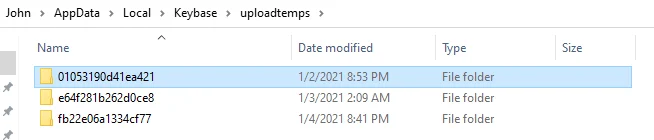
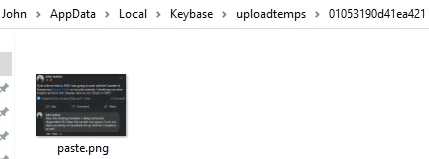
Inside those folders, photos that had previously been pasted into conversations, but deleted through either normal means or exploded, remained, unencrypted.
Windows Client
macOS Client
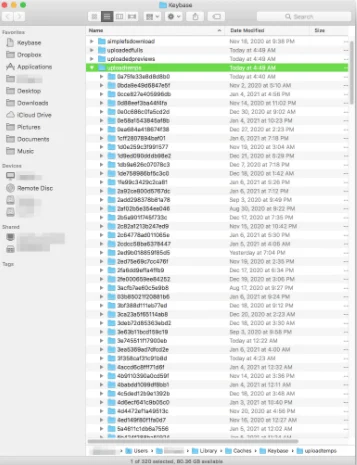
At that point John brought in Aubrey Cottle, Jackson Henry and Robert Willis. Robert investigated further, while Cottle and Henry quickly spun up an instance of Keybase on macOS and determined that the issue also existed there, using a slightly different filesystem path:
/Users/usernamehere/Library/Caches/Keybase/uploadtemps
Exploitation
Step 1: Read the uploadtemps directory
On Windows, the directory holding the pasted pictures is:
C:\Users\yourusername\AppData\Local\Keybase\uploadtemps
On macOS, the equivalent location is:
/Users/usernamehere/Library/Caches/Keybase/uploadtemps
Inside the randomized folders under uploadtemps, pictures that had been pasted into conversations and then deleted or exploded were still present and unencrypted. Anyone able to read the user's files can recover them, though on Windows the extension must be changed to .png or .jpg.
Step 2: Check the Cache directory on macOS
The team investigated further and found a similar issue in the Cache directory of the Keybase Client for macOS:
~/Library/Application Support/Keybase/Cache
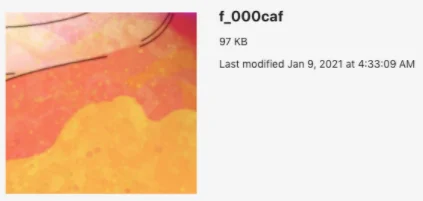
The issue was similar in that images were also stored in this directory unencrypted, but the number of images stored was far greater than in uploadtemps. The directory even included images that other users had sent to the researchers. In other words, a user could send a photo to another user in a private conversation, click "delete" or "explode", and the photo could still be recovered from the Cache directory, because of the insufficient cache clearing and the lack of encryption of the content.
On macOS the recovered files were easily seen because of the fileviewer functionality. On Windows, a user has to change the file extension from its native extension to .png or .jpg.
Recovered, unencrypted image on macOS
Step 3: Replicate on Windows
The vulnerability was quickly replicated on Windows by navigating to the Roaming folder of the AppData directory:
C:\Users\usernamehere\AppData\Roaming\Keybase\Cache
Recovered, unencrypted image on Windows
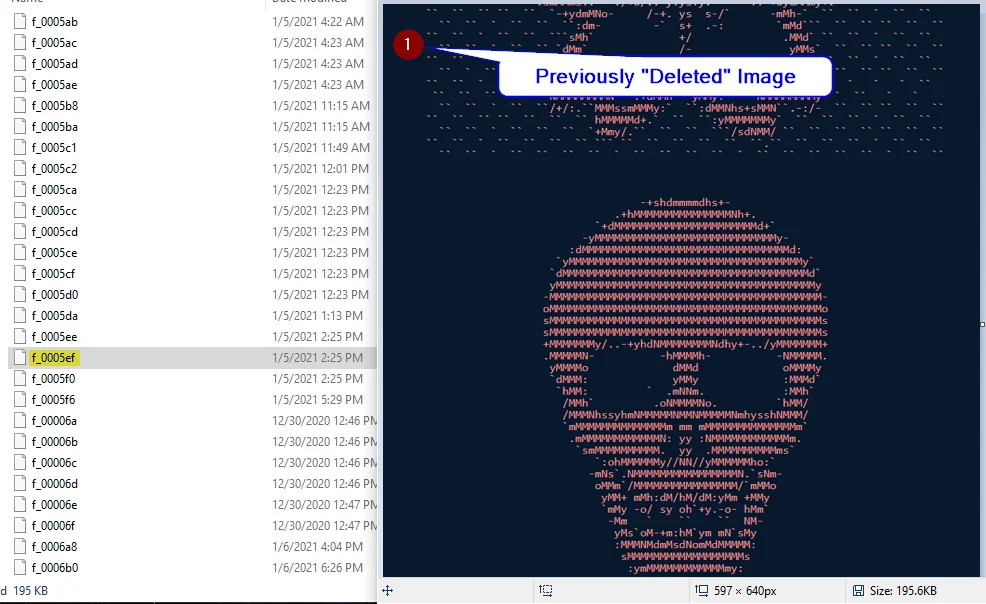
Specifically, the image of the skull shown above was sent to John Jackson by Robert Willis, and Robert had deleted the image, yet it remained behind in the Cache.
Root cause
The client fails to effectively clear cached pictures, even after deletion via normal methodology within the client or by using the "Explode message/Explode now" functionality. The content is stored on disk without encryption in the Cache and uploadtemps directories. The report describes this as an insufficient cache clearing issue combined with a lack of encryption of the content; the exact code path is not shown.
Impact
Normally, cached and cleartext photos would not be considered a vulnerability, but in the case of Keybase they are. Keybase presents itself as an end-to-end encryption communication application, which in non-technical terms means that conversations between individuals or groups within the app should not be persistently stored unencrypted on disk.
An attacker who gains access to a victim machine can potentially obtain sensitive data through the gathered photos, especially if the user uses Keybase frequently. A user who believes they are sending photos that can be cleared later may not realise that sent photos are not cleared from the cache, and may send photos containing PII or other sensitive data to friends or colleagues. There are also legal ramifications to storing information this way: because Keybase presents itself as a secure end-to-end encryption solution, a vulnerability of this kind could lead to private data being used in court cases against individuals, damaging Keybase's reputation as a secure and private communication platform.
Fix
After the vulnerability was reported through Keybase's Bug Bounty Program, it was swiftly accepted and a bounty was awarded. Keybase began working on the issue nearly immediately and addressed it on January 23, 2021 in versions 5.6.0 for Windows and macOS, and 5.6.1 for Linux. Updating to the latest version of Keybase removes any unintentionally cached files; no other action is required.
Variants to test
- Other temporary upload directories. Look for directories with names suggesting staging or temporary uploads (the report found
uploadtemps) under the client's local application data. A positive result is pasted or sent media still present there after deletion or explode. - Cache directories on every platform. Check the cache location on Windows, macOS and Linux, not just the one where the issue was first seen. A positive result is unencrypted images, including images received from other users, surviving deletion.
- Received media, not just sent media. Send a picture from one account to another, delete or explode it on both sides, then inspect the recipient's cache. A positive result is the picture still recoverable on the recipient's disk.
- Extension handling. On Windows, files may not be viewable until the extension is changed to
.pngor.jpg. A positive result is a file that opens as an image after renaming. - Other E2EE desktop clients. Apply the same check to any client that advertises end-to-end encryption and offers delete or explode features. A positive result is cleartext media persisting on disk after the in-app deletion.
What happened, in plain words
Keybase is a messaging app that advertises end-to-end encryption. That phrase means the messages and pictures you send are scrambled so that only the person you are talking to can read them, not the company running the service and not anyone who might be watching the traffic. People use it precisely because they expect that privacy.
The researchers in this report found that the desktop version of Keybase, the program you install on a Windows PC or a Mac, was leaving copies of pictures on the computer's disk in a form anyone could open. This happened even when the sender had deleted the picture inside the app, or used a feature called "Explode message/Explode now", which is meant to make a message vanish. The pictures sat in two folders on the disk, called Cache and uploadtemps, without any scrambling at all.
The problem is tracked as CVE-2021-23827. A CVE is a public catalogue number given to a known security flaw so that people can refer to it unambiguously. The flaw is classified as "cleartext storage in a file or on disk", which simply means secret information was written to a storage device in a readable form. Anyone who could read the user's files could take those pictures.
The research is credited to John Jackson, Aubrey Cottle, Jackson Henry and Robert Willis.
Before you start: the words you need
A few everyday comparisons will make the rest of this easier.
- End-to-end encryption (E2EE): imagine posting a letter in a locked box that only your friend has the key to. The postal service carries the box but cannot open it. In an app, the scrambling and unscrambling happen on the two phones or computers, not on the company's servers.
- Disk: the computer's long-term storage, where files stay after the power is off. A photo you see on screen is held in memory for a moment; a photo written to disk stays until something deletes it.
- Cache: a stash of recently used things kept close at hand so they load faster. Your web browser keeps a cache of images from websites for exactly this reason. The catch is that a cache is a second copy, and deleting the original does not always delete the copy.
- Cleartext: data that has not been scrambled. If you open the file in a viewer and see the picture, it is cleartext.
- Directory (folder): a container for files. Paths like
C:\Users\...are the address of a folder on Windows, and paths like/Users/...are the address on macOS and Linux. - Bug bounty program: a scheme where a company pays independent researchers for finding and reporting flaws in its products, instead of punishing them. Keybase runs one, which is why the researchers were looking at its files in the first place.
- Attacker with local access: someone who can already read files on the machine. This is not a remote break-in over the internet; the point is that data the app promised to protect is lying around readable for anyone in that position.
Finding it
John Jackson was doing security research and came across the folders Keybase keeps on a computer. Because Keybase runs a bug bounty program, looking more closely was worthwhile: if something private was stored badly, the company would want to know and would pay for the report.
Within several minutes he noticed a folder named uploadtemps:
C:\Users\yourusername\AppData\Local\Keybase\uploadtemps
Line by line, this path says:
C:\is the main drive on a Windows computer.Usersis the folder that holds one folder per person who uses the machine.yourusernamestands for the name of the logged-in user; the report uses a placeholder rather than a real name.AppDatais a hidden area where Windows programs keep their own settings and data, separate from your documents.Localis one of the sub-areas ofAppData, used for data that belongs to this machine only.Keybaseis the app's own folder.uploadtempsis the folder the researchers found. The name suggests "temporary uploads", a staging area for files on their way somewhere.
The folder contained randomized folders:
Random names are typical of software that creates a fresh working folder for each upload so that two uploads never collide.
Inside those folders, photos that had previously been pasted into conversations, but deleted through either normal means or exploded, remained, unencrypted. In other words, the app had made a copy on disk when the picture was sent, and deleting the message in the chat window did not remove that copy.
Windows Client
macOS Client
At that point John brought in Aubrey Cottle, Jackson Henry and Robert Willis. Robert investigated further, while Cottle and Henry quickly set up Keybase on a Mac and found the issue there too, at a slightly different address:
/Users/usernamehere/Library/Caches/Keybase/uploadtemps
Reading this path:
- The leading
/is the top of the filesystem on macOS and Linux. Usersholds one folder per account, as on Windows.usernamehereis again a placeholder for the account name.Libraryis the macOS per-user area for application data.Cachesis the system's designated place for exactly this kind of temporary copy.Keybase/uploadtempsis the app's own folder, with the same name as on Windows.
So the same mistake existed on a second operating system, just filed in the place each system expects temporary data to live.
Exploitation
"Exploitation" here does not mean breaking in over the network. It means showing, step by step, how someone who can already read the machine's files gets the pictures back.
Step 1: Read the uploadtemps directory
On Windows, the folder holding the pasted pictures is:
C:\Users\yourusername\AppData\Local\Keybase\uploadtemps
On macOS, the equivalent location is:
/Users/usernamehere/Library/Caches/Keybase/uploadtemps
Inside the randomized folders under uploadtemps, pictures that had been pasted into conversations and then deleted or exploded were still present and unencrypted. Anyone able to read the user's files can open them directly. No password, no key and no special tool is needed: a file browser is enough.
Step 2: Check the Cache directory on macOS
The team kept looking and found a similar issue in the Cache folder of the Keybase client for macOS:
~/Library/Application Support/Keybase/Cache
Here the ~ is shorthand for the current user's home folder, so the path means "inside my home folder, Library, Application Support, Keybase, Cache". Application Support is where macOS apps keep data they need to keep between runs, as opposed to Caches, which is meant to be disposable.
The issue was similar in that images were also stored in this folder unencrypted, but the number of images stored was far greater than in uploadtemps. The folder even included images that other users had sent to the researchers. That last detail matters: it means the problem was not limited to pictures you send. A user could send a photo to another user in a private conversation, click "delete" or "explode", and the photo could still be recovered from the Cache folder, because the cache was not being cleared properly and the content was not encrypted.
On macOS the recovered files were easily seen because of the fileviewer functionality. On Windows, a user has to change the file extension from its native extension to .png or .jpg. A file extension is the part after the dot in a filename, such as .png, which tells the operating system which program should open the file. If the app saves the picture under a different or unfamiliar extension, double-clicking it may open the wrong program or nothing at all; renaming it to .png or .jpg lets an image viewer recognise it.
Recovered, unencrypted image on macOS
Step 3: Replicate on Windows
The vulnerability was quickly replicated on Windows by navigating to the Roaming folder of the AppData directory:
C:\Users\usernamehere\AppData\Roaming\Keybase\Cache
This is the same structure as before, with one difference: Roaming instead of Local. Windows splits AppData into areas with different purposes, and Roaming is the one used for data that can follow a user between machines in a managed network. The point is that the cache existed on Windows too, in the place Windows expects such data.
Recovered, unencrypted image on Windows
Specifically, the image of the skull shown above was sent to John Jackson by Robert Willis, and Robert had deleted the image, yet it remained behind in the Cache. The sender deleted the picture, yet it remained behind in the Cache.
Root cause
The client fails to effectively clear cached pictures, even after deletion via normal methodology within the client or by using the "Explode message/Explode now" functionality. The content is stored on disk without encryption in the Cache and uploadtemps folders. The report describes this as an insufficient cache clearing issue combined with a lack of encryption of the content; the exact code path is not shown.
In plain terms, two things went wrong at once. First, the app wrote a copy of the picture to disk, which is common for performance. Second, when you deleted the message, the app removed it from the conversation but did not reliably remove that copy, and it never scrambled the copy in the first place. Either fix alone would have helped: deleting the copy properly, or encrypting it so that reading the file would not reveal the picture.
Impact
Normally, cached and cleartext photos would not be considered a vulnerability, but in the case of Keybase they are. Many programs keep temporary copies of images; that is ordinary. The difference is the promise the product makes. Keybase presents itself as an end-to-end encryption communication app, which in non-technical terms means that conversations between individuals or groups within the app should not be persistently stored unencrypted on disk.
An attacker who gains access to a victim machine can potentially obtain sensitive data through the gathered photos, especially if the user uses Keybase frequently. A user who believes they are sending photos that can be cleared later may not realise that sent photos are not cleared from the cache, and may send photos containing PII or other sensitive data to friends or colleagues. PII stands for personally identifiable information: things like a passport photo, an ID card, an address or a medical document, which can identify a person and cause harm if they leak.
There are also legal ramifications to storing information this way. Because Keybase presents itself as a secure end-to-end encryption solution, a vulnerability of this kind could lead to private data being used in court cases against individuals, damaging Keybase's reputation as a secure and private communication platform. In other words, the harm is not only technical: material a user thought was gone could resurface from their own disk.
Fix
After the vulnerability was reported through Keybase's bug bounty program, it was swiftly accepted and a bounty was awarded. Keybase began working on the issue nearly immediately and addressed it on January 23, 2021 in versions 5.6.0 for Windows and macOS, and 5.6.1 for Linux. Updating to the latest version of Keybase removes any unintentionally cached files; no other action is required.
A version number like 5.6.0 is simply the label the developer gives each release; a higher number means a newer build. The practical advice for a user is the usual one: keep the app updated, because updating removes any unintentionally cached files.
Variants to test
If you want to look for the same kind of mistake in other software, these are the directions the researchers suggest. You do not need special tools, just a file browser and a test account.
- Other temporary upload folders. Look for folders with names suggesting staging or temporary uploads (the report found
uploadtemps) under the app's local application data. A positive result is pasted or sent media still present there after deletion or explode. - Cache folders on every platform. Check the cache location on Windows, macOS and Linux, not just the one where the issue was first seen. A positive result is unencrypted images, including images received from other users, surviving deletion.
- Received media, not just sent media. Send a picture from one account to another, delete or explode it on both sides, then inspect the recipient's cache. A positive result is the picture still recoverable on the recipient's disk.
- Extension handling. On Windows, files may not be viewable until the extension is changed to
.pngor.jpg. A positive result is a file that opens as an image after renaming. - Other E2EE desktop clients. Apply the same check to any client that advertises end-to-end encryption and offers delete or explode features. A positive result is cleartext media persisting on disk after the in-app deletion.
Glossary
- AppData: the hidden per-user folder on Windows where programs store their settings and data, split into areas such as
LocalandRoaming. - Bug bounty program: a scheme in which a company pays researchers for reporting security flaws responsibly.
- Cache: a store of recently used data kept for speed, which can leave extra copies behind when the original is deleted.
- Cleartext: data stored or transmitted without encryption, readable by anyone who can access it.
- Cleartext storage in a file or on disk: a weakness class where sensitive data is written to storage in readable form.
- CVE: a public identifier assigned to a known security vulnerability so it can be referenced consistently.
- Directory: a folder; a container for files, addressed by a path.
- Disk: a computer's long-term storage, where files persist after the machine is switched off.
- End-to-end encryption (E2EE): encryption performed on the users' devices so that only the intended recipients can read the content.
- Explode message/Explode now: a Keybase feature intended to make a message disappear.
- File extension: the suffix after the dot in a filename, such as
.png, which tells the system how to open the file. - Local access: the ability to read files on a particular machine, for example by using that machine or running software on it.
- macOS: Apple's desktop operating system.
- PII (personally identifiable information): data that can identify a specific person, such as an ID document or address.
- Root cause: the underlying reason a flaw exists, as opposed to its visible symptoms.
- uploadtemps: the Keybase folder name where the researchers found leftover pasted pictures.
- Version number: the label a developer gives a release, such as 5.6.0, used to tell builds apart.
- Windows: Microsoft's desktop operating system.
- Linux: a family of open-source desktop and server operating systems.