SOP Bypass via browser-cache

Whilst hunting for security issues on Keybase.io’s public HackerOne program, I noticed that several API endpoints had CORS enabled. For those who are not familiar with CORS, it allows for a site to relax the SOPso that other domains may interact with (most often) a web API.
The full write-up lives on its author's site
It belongs to its author, so we link to it rather than copy it. The other two tabs are our own rewrites, checked against it.
Context
Keybase.io runs a public HackerOne program, and while hunting on it I spent time looking at the site's API. Several API endpoints had CORS enabled. CORS is the mechanism that relaxes the same-origin policy (SOP) so that other domains can interact with a web API. This write-up covers how a misconfiguration of Keybase's CORS policy let me manipulate the browser cache into returning private user data.
The feature at the centre of it is the user lookup API. Keybase provides an endpoint that lets users look up other Keybase users when encrypting a message, much like a contact book lookup. It returns publicly accessible information about other users that is needed when encrypting a message, such as their public PGP key. On its own that is harmless: the data is public by design.
The CORS policy on this endpoint looked like this:
Access-Control-Allow-Origin: *
Access-Control-Allow-Methods: GET
Access-Control-Allow-Headers: Content-Type, Authorization, Content-Length, X-Requested-With
Access-Control-Allow-Credentials: false
Two aspects of that policy matter for understanding the issue:
- The wildcard (
*) value forAccess-Control-Allow-Originallows any external domain to interact with the API and perform queries cross-origin. - The wildcard value forces
Access-Control-Allow-Credentials: false, which means authenticated requests cross-origin are disallowed, for security reasons. TheAuthorizationheader listed inAccess-Control-Allow-Headersis not overly relevant to the exploit, because it is not required to query the public API.
Setup
No special tooling was needed beyond a browser and a local HTML file. The preconditions are worth spelling out because they define the attack:
- The victim uses Keybase.io and is authenticated, with their session stored in cookies.
- The browser has previously made an authenticated request to the lookup endpoint, so a response is sitting in the browser cache.
- A page on another origin issues a cross-origin request to the endpoint.
No CSRF token is required for these cross-origin requests to work, naturally, since the API is considered public. Users of Keybase.io are authenticated through cookies, while more sensitive API endpoints require an Authorization token in a header.
Finding it
What I noticed was that if I performed a lookup on myself while authenticated, with a keybase.io session set in my cookies, or even entered a letter contained in my name, my own account would be returned in the search results along with private information. That included:
- Email address
- How many invitation codes I had used and how many I had left to use
- Billing plan information
- Timestamps relating to last login, and the time and date of email verification
- Private PGP key (encrypted with TripleSec)
I had no private PGP key stored on Keybase, and I later learned that private PGP key hosting on Keybase.io is a legacy feature from 2015-2016 that is no longer implemented.
Once the cookies were removed from my request to the endpoint, the private information above was no longer returned. However, one thing I did notice in the response was an Etag header. That header is an indicator of browser caching: it instructs a browser to fetch from its cache if the content in the response has not changed.
Exploitation
Step 1: force a cross-origin request to read from cache
I recalled a trick I learned from @Bitk_: it is possible to use JavaScript's fetch API to force a cross-origin request to retrieve from the browser cache directly. Keybase did not implement any cache-control headers in the response, so I created a payload locally. The null origin does not matter here.
<html>
<script>
var url = "https://keybase.io/_/api/1.0/user/lookup.json?username={YOUR_USERNAME}";
fetch(url, {
    method: 'GET',
    cache: 'force-cache'
    });
</script>
</html>
The url variable points at the lookup endpoint with a username in the query string. The fetch call uses method: 'GET' and, crucially, cache: 'force-cache', which tells the browser to satisfy the request from its cache rather than going to the network. Because the endpoint sends an Etag and no cache-control headers, a cached response from an earlier authenticated request is available to be served.
Step 2: observe the cached private data
I knew that if this request succeeded, it would likely return the cached response given by Keybase after I had made an authenticated request, which would likely contain my private information.
And voila!
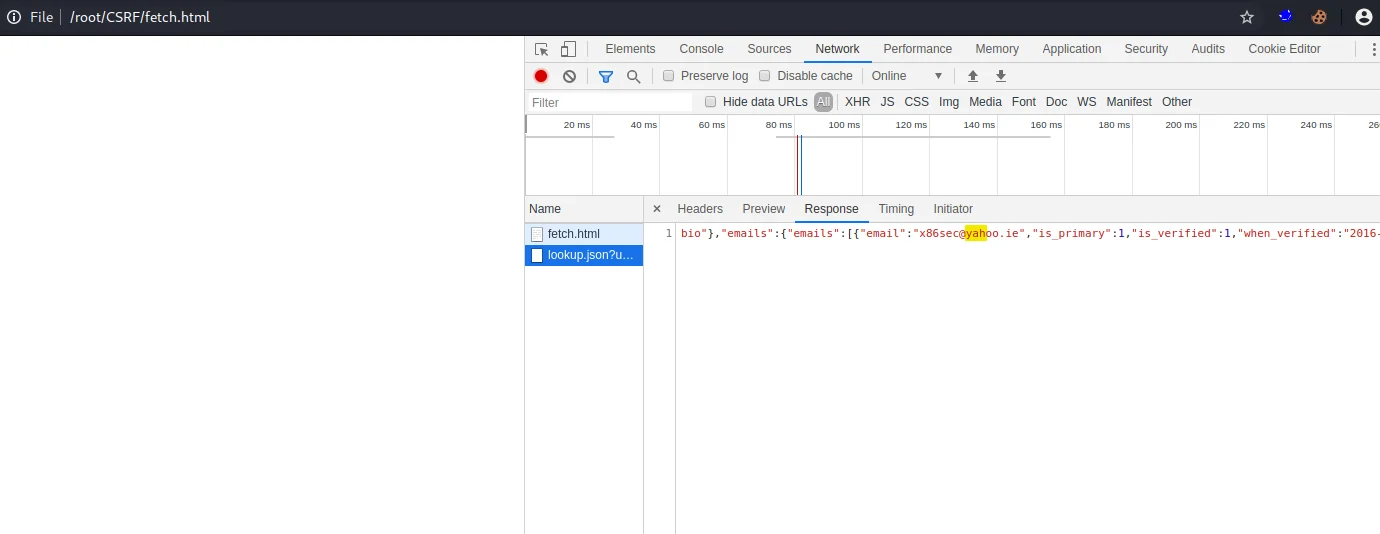
The screenshot shows the result of the payload: the cached response, originally produced for an authenticated request, is returned to the cross-origin page.
Step 3: confirm the response came from the cache
In order to confirm that the payload was successful, the next screenshot shows that fetch had pulled the response directly from the browser cache.
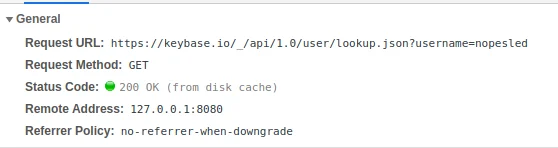
That confirmation shows fetch pulled the response directly from the browser cache.
Root cause
The endpoint was CORS-enabled with a wildcard origin and returned an Etag with no cache-control headers. The lookup endpoint is public and CORS-enabled with Access-Control-Allow-Origin: *, so any origin can read its responses. Separately, the endpoint returns an Etag and sets no cache-control headers, so responses are cacheable by the browser. When the same URL is requested while the user is authenticated, the response contains private data, and that response is cached under the same URL.
Impact
A cross-origin page can retrieve the cached lookup response for a logged-in user, as I demonstrated on my own account. Based on what I observed, that response can contain the victim's email address, invitation code usage, billing plan information, login and email verification timestamps, and a TripleSec-encrypted private PGP key where one is stored. Private PGP key hosting is a legacy feature from 2015-2016 that is no longer implemented.
Fix
The issue was remediated by implementing the Cache-Control: no-store header in the response, as advised. That prevents the browser from storing the authenticated response in the first place, so there is nothing for a cross-origin fetch with cache: 'force-cache' to read.
Timeline
- 19/12/2019: issue reported to Keybase.
- 19/12/2019, two hours later: issue remediated with implementation of the
Cache-Control: no-storeheader in the response as advised. - 24/12/2019: public disclosure of the HackerOne report.

Variants to test
- Authenticated JSON endpoints with
Etagand no cache-control. Look for API responses that vary by cookie session and carry anEtagorLast-ModifiedwithoutCache-Control: no-storeorprivate. A positive result is a cross-originfetchwithcache: 'force-cache'returning data that only appears when the victim is logged in. - Wildcard CORS on endpoints that also serve personalised data. Check whether
Access-Control-Allow-Origin: *is applied to a path that returns user-specific fields when a session cookie is present. A positive result is the same URL returning different content with and without cookies. - Lookup and search endpoints keyed by short query strings. Try single-letter or partial-name queries, as I did, since these are likely to have been cached during normal use. A positive result is a cached response containing the victim's own record.
- Other cacheable authenticated responses. Apply the same
force-cachetechnique to any endpoint whose response is stored by the browser, and confirm via the browser's cache behaviour that the data came from cache rather than the network.
What happened, in plain words
Keybase.io is a service that lets people prove who they are online and share things like encryption keys. It runs a public bug bounty programme on HackerOne, which means anyone can look for security problems and report them, sometimes for a reward. While looking around the site, I noticed that some of its API endpoints had something called CORS turned on.
An API is a way for one piece of software to ask another for information, like a waiter taking your order to the kitchen and bringing back a plate. A web API is the same idea over the internet: a page or a script sends a request to a server and gets data back, usually in a structured format rather than as a web page.
CORS (Cross-Origin Resource Sharing) is a set of rules a server sends to tell browsers which other websites are allowed to read its responses. It exists because of the same-origin policy (SOP), a browser rule that stops a page on one site from freely reading data from another site. Think of the SOP as a building's default rule that visitors from one company cannot open drawers in another company's office. CORS is the server saying "actually, these particular visitors may open these particular drawers".
This write-up is about how a mistake in Keybase's CORS settings let me trick the browser's cache into handing back private user data.
The feature at the centre of it is the user lookup API. When you encrypt a message to someone on Keybase, the site needs to find that person and fetch their public key, much like looking someone up in a contact book. The lookup endpoint returns information that is public by design, such as a user's public PGP key. On its own, that is harmless.
The CORS policy on this endpoint looked like this:
Access-Control-Allow-Origin: *
Access-Control-Allow-Methods: GET
Access-Control-Allow-Headers: Content-Type, Authorization, Content-Length, X-Requested-With
Access-Control-Allow-Credentials: false
Line by line, in plain words:
Access-Control-Allow-Origin: *says any website at all may read this endpoint's responses. The*is a wildcard meaning "everyone".Access-Control-Allow-Methods: GETsays the only kind of request allowed isGET, which is the ordinary "please give me this" request a browser makes when you open a page.Access-Control-Allow-Headers: ...lists extra pieces of information a request may carry.Authorizationis a header used to prove who you are, andContent-Typedescribes the format of the data being sent.Access-Control-Allow-Credentials: falsesays requests made from another site may not carry the visitor's login credentials (their cookies).
Two aspects of that policy matter for understanding the issue:
- The wildcard (
*) value forAccess-Control-Allow-Originallows any external domain to interact with the API and perform queries cross-origin. Cross-origin simply means "from a different website than the one being asked". - The wildcard value forces
Access-Control-Allow-Credentials: false, which means authenticated requests cross-origin are disallowed, for security reasons. TheAuthorizationheader listed inAccess-Control-Allow-Headersis not overly relevant to the exploit, because it is not required to query the public API.
Setup
No special tooling was needed beyond a browser and a local HTML file. An HTML file is just a text file a browser can open, and you can write one on your own computer and open it by double-clicking it.
The preconditions are worth spelling out because they define the attack:
- The victim uses Keybase.io and is logged in, with their session stored in cookies. A cookie is a small piece of text a website asks your browser to keep and send back on every later request, so the site can recognise you. It is like a wristband you get at an event: show it and staff know you already paid.
- The browser has previously made a logged-in request to the lookup endpoint, so a response is sitting in the browser cache. The cache is the browser's local store of recent responses, kept so pages load faster next time, like keeping a photocopy of a document you expect to need again.
- A page on another origin issues a cross-origin request to the endpoint.
No CSRF token is required for these cross-origin requests to work, naturally, since the API is considered public. A CSRF token is a random value a site puts into forms and requests to prove the request really came from its own pages and not from somewhere else. Users of Keybase.io are authenticated through cookies, while more sensitive API endpoints require an Authorization token in a header. A token here is a string that acts like a temporary password for a single request.
Finding it
What I noticed was that if I performed a lookup on myself while logged in, with a keybase.io session set in my cookies, or even entered a letter contained in my name, my own account would be returned in the search results along with private information. That included:
- Email address
- How many invitation codes I had used and how many I had left to use
- Billing plan information
- Timestamps relating to last login, and the time and date of email verification
- Private PGP key (encrypted with TripleSec)
A PGP key comes in a pair: a public key you share so others can encrypt messages to you, and a private key you keep secret so you can decrypt them. TripleSec is a way of encrypting data, so the private key in that list was itself stored in encrypted form.
I had no private PGP key stored on Keybase, and I later learned that private PGP key hosting on Keybase.io is a legacy feature from 2015-2016 that is no longer implemented.
Once the cookies were removed from my request to the endpoint, the private information above was no longer returned. However, one thing I did notice in the response was an Etag header. A header is a small labelled line of extra information attached to a request or a response, like the notes on the outside of an envelope. An Etag is a fingerprint of a particular version of a response. It is an indicator of browser caching: it instructs a browser to fetch from its cache if the content in the response has not changed.
Exploitation
Step 1: force a cross-origin request to read from cache
I recalled a trick I learned from @Bitk_: it is possible to use JavaScript's fetch API to force a cross-origin request to retrieve from the browser cache directly. JavaScript is the programming language browsers run to make pages interactive, and fetch is the built-in function for asking a server for something. Keybase did not implement any cache-control headers in the response, so I created a payload locally. A payload is the piece of code that actually carries out the attack. The null origin does not matter here: an origin is the combination of scheme, host and port that identifies where a page came from, and a page opened straight from disk has a special, empty origin.
<html>
<script>
var url = "https://keybase.io/_/api/1.0/user/lookup.json?username={YOUR_USERNAME}";
fetch(url, {
    method: 'GET',
    cache: 'force-cache'
    });
</script>
</html>
Line by line:
<html>and</html>mark the start and end of the page.<script>and</script>mark the start and end of the JavaScript the browser should run.var url = "..."stores the address to request in a variable calledurl. The address is the lookup endpoint, and?username={YOUR_USERNAME}is the part that says whose record to look up. The curly braces are a placeholder you replace with a real username.fetch(url, { ... })asks the browser to request that address.method: 'GET'says this is an ordinary read request.cache: 'force-cache'is the crucial part: it tells the browser to answer from its cache if it can, instead of going to the network.
The url variable points at the lookup endpoint with a username in the query string. The fetch call uses method: 'GET' and, crucially, cache: 'force-cache', which tells the browser to satisfy the request from its cache rather than going to the network. Because the endpoint sends an Etag and no cache-control headers, a cached response from an earlier logged-in request is available to be served.
Step 2: observe the cached private data
I knew that if this request succeeded, it would likely return the cached response given by Keybase after I had made an authenticated request, which would likely contain my private information. An authenticated request is one that carries proof of who is asking, in this case the session cookie.
And voila!
The screenshot shows the result of the payload: the cached response, originally produced for a logged-in request, is returned to the cross-origin page.
Step 3: confirm the response came from the cache
In order to confirm that the payload was successful, the next screenshot shows that fetch had pulled the response directly from the browser cache.
That confirmation shows fetch pulled the response directly from the browser cache.
Root cause
The endpoint was CORS-enabled with a wildcard origin and returned an Etag with no cache-control headers. The lookup endpoint is public and CORS-enabled with Access-Control-Allow-Origin: *, so any origin can read its responses. Separately, the endpoint returns an Etag and sets no cache-control headers, so responses are cacheable by the browser. When the same URL is requested while the user is logged in, the response contains private data, and that response is cached under the same URL.
Impact
A cross-origin page can retrieve the cached lookup response for a logged-in user, as I demonstrated on my own account. Based on what I observed, that response can contain the victim's email address, invitation code usage, billing plan information, login and email verification timestamps, and a TripleSec-encrypted private PGP key where one is stored. Private PGP key hosting is a legacy feature from 2015-2016 that is no longer implemented.
Fix
The issue was remediated by implementing the Cache-Control: no-store header in the response, as advised. Cache-Control is the header that tells a browser whether and how long it may keep a response, and no-store means "do not keep this at all". That prevents the browser from storing the logged-in response in the first place, so there is nothing for a cross-origin fetch with cache: 'force-cache' to read.
Timeline
- 19/12/2019: issue reported to Keybase.
- 19/12/2019, two hours later: issue remediated with implementation of the
Cache-Control: no-storeheader in the response as advised. - 24/12/2019: public disclosure of the HackerOne report.
Variants to test
- Logged-in JSON endpoints with
Etagand no cache-control. JSON is a common text format for structured data, made of names and values in curly braces. Look for API responses that vary by cookie session and carry anEtagorLast-ModifiedwithoutCache-Control: no-storeorprivate. A positive result is a cross-originfetchwithcache: 'force-cache'returning data that only appears when the victim is logged in. - Wildcard CORS on endpoints that also serve personalised data. Check whether
Access-Control-Allow-Origin: *is applied to a path that returns user-specific fields when a session cookie is present. A positive result is the same URL returning different content with and without cookies. - Lookup and search endpoints keyed by short query strings. Try single-letter or partial-name queries, as I did, since these are likely to have been cached during normal use. A positive result is a cached response containing the victim's own record.
- Other cacheable logged-in responses. Apply the same
force-cachetechnique to any endpoint whose response is stored by the browser, and confirm via the browser's cache behaviour that the data came from cache rather than the network.
Glossary
- API: a defined way for one piece of software to ask another for information or an action.
- Web API: an API reached over the internet, usually returning structured data rather than a web page.
- CORS (Cross-Origin Resource Sharing): rules a server sends to tell browsers which other websites may read its responses.
- SOP (same-origin policy): the browser rule that stops a page on one site from freely reading data from another site.
- Origin: the combination of scheme, host and port that identifies where a page came from.
- Cross-origin: coming from a different origin than the one being requested.
- Wildcard (
*): a symbol meaning "anything", here "any website". - GET: the ordinary request type used to ask for something without changing it.
- Header: a small labelled line of extra information attached to a request or response.
Authorizationheader: a header used to prove who is making a request.Content-Typeheader: a header describing the format of the data being sent.- Credentials: proof of identity, such as cookies, that a browser can attach to a request.
- Cookie: a small piece of text a site asks the browser to keep and send back on later requests, so the site can recognise you.
- Session: the period during which a site remembers that you are logged in, usually via a cookie.
- Browser cache: the browser's local store of recent responses, kept so pages load faster next time.
Etag: a header holding a fingerprint of a particular version of a response, used to decide whether the cached copy is still current.Last-Modified: a header stating when the response content last changed.Cache-Control: the header that tells a browser whether and how long it may keep a response.no-store: aCache-Controlvalue meaning the browser must not keep the response at all.private: aCache-Controlvalue meaning a response may be kept only by the user's own browser, not by shared caches.- CSRF token: a random value placed in requests to prove they came from the site's own pages.
- Token: a string that acts like a temporary password for a request.
- JavaScript: the programming language browsers run to make pages interactive.
fetch: the built-in JavaScript function for requesting something from a server.cache: 'force-cache': afetchoption telling the browser to answer from its cache if possible instead of going to the network.- Payload: the piece of code that carries out an attack.
- HTML file: a text file a browser can open and display.
- Authenticated request: a request that carries proof of who is asking.
- PGP key: one half of a pair used for encryption; the public key is shared, the private key is kept secret.
- TripleSec: a way of encrypting data.
- JSON: a common text format for structured data, made of names and values.
- Query string: the part of a URL after the
?that passes values, such as a username, to the server. - Bug bounty programme: a scheme where an organisation pays people for reporting security problems.
- HackerOne: a platform where bug bounty reports are submitted and disclosed.
- Disclosure: making a security report public.



