Homograph IDNs displayed in Description
The application displays internationalised domain names (IDNs) in their Unicode form rather than punycode, so a homograph URL that looks like a legitimate domain can be shown to users. An attacker could use this to trick users into visiting a malicious site that appears to be a trusted one.

- Paid in 16 hours
- Disclosed after 31 days
The IDN: http://ebаy.com/ is a homograph for the latin ebay.com. if you copy and paste a link, you might think that you are going to ebay.com. in fact, you are going to a homograph url http://xn--eby-7cd.com/
it would be safer to show the punycode version of the url so that it would be apparent that something weird is going on. that is, show http://[email protected]/ instead of http://ebаy.com/
#STEPS TO REPRODUCE:
-
Login to your account https://app.legalrobot-uat.com
-
Navigate this URL:
-
Click the "Add a new idea" button
-
Actually their is no problem on Name but in Description.
-
Put http://ebаy.com/ on Description
-
Click the "Add Idea" Button
-
Notice that it display http://ebаy.com/ See my attached photo
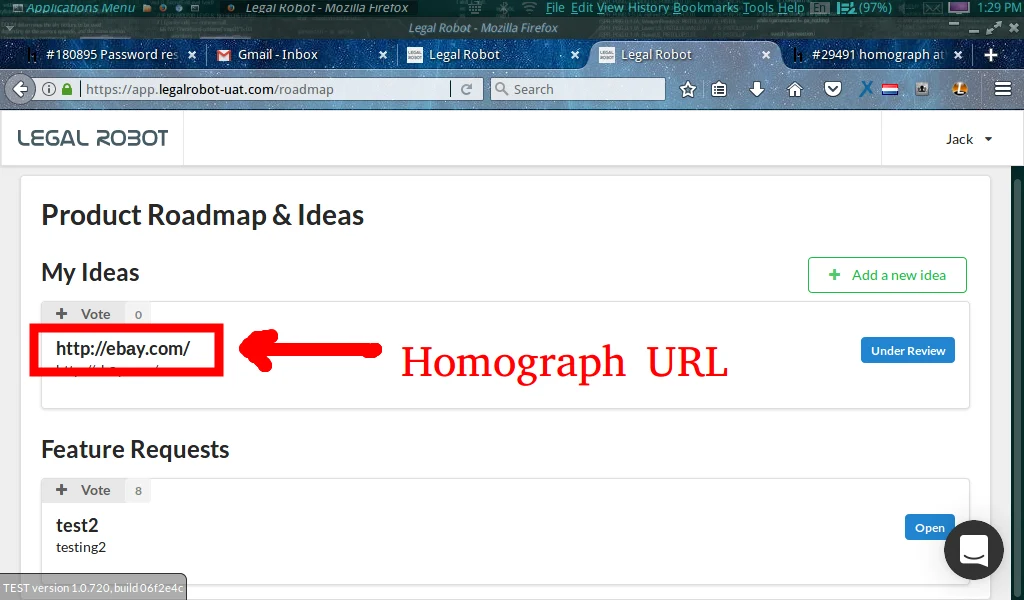
homo.png From the original on HackerOne
Thanks,
Not written yet. The AI write-up for this report has not been written yet. The Original tab links to the source.
How it worked
Root cause
Likely the application renders user-supplied URLs without converting internationalised domain names to punycode, so visually confusable characters are displayed as-is.
Impact
A user might think a homograph link points to a trusted domain but it actually leads elsewhere.
What the attacker needed
A free account; victim views the displayed URL
How it was found
- Log in to the account.
- Navigate to the roadmap page.
- Click the 'Add a new idea' button.
- Enter a homograph URL in the Description field.
- Click the 'Add Idea' button.
- Observe that the homograph URL is displayed as entered.
Explained by bugbounty.wiki with AI from the original and checked against quotes from it; it can still be wrong. Read the original before relying on a detail.
Not written yet. The AI write-up for this report has not been written yet. The Original tab links to the source.
Some web addresses can use letters from other alphabets that look identical to normal Latin letters. For example, the Cyrillic 'а' looks just like the Latin 'a'. This means a link can look like 'ebay.com' but actually point to a completely different site. The report says the application should show the encoded version (punycode) so users can see the difference.
What is Info disclosure?
Data the application should keep private (personal data, internal details, other users' records) reaches someone it should not.






