Intercom chat session information persists after logout
The Intercom chat session was not cleared on logout, so an attacker with the user's session cookies could still access the chat after the user logged out. This could expose previous chat information to another user on a shared computer.

- Triaged in 3 days
- Fixed in 3 days
- Paid in 3 days
- Disclosed after 4 days
Summary by the program
A security researcher discovered that the Intercom chat session was not explicitly cleared when a user logs out. On a shared computer, this could have led to chat information from a previous session being accessible to another user because the Intercom components do not explicitly require a user to be logged in. However, this is considered low risk since an attacker would require script access to the machine and technical skill to re-add Intercom script components to a page and carry over cookies to the new session.
The report
Hi team,
While testing i look for session related issues but It seems that The Site is Will protected For such problems But a little Issue related to that i wanted to mention here...
When A user Sign-In to his account he can see a Little chat button on Bottom right corner of the page (After Logging-In) And of he sends a Message to Support by this he is surely going to get reply on same location...
Well when User logs out of his account he can't access the chat after logging-out but if he logs-in back he can again chat...
Now if we get the user Session cookies And Logout the user from his account he can still use that session cookies to access the chat ( Only chat on the login page )
POC:
-
Login to your account at https://app.legalrobot.com/login
-
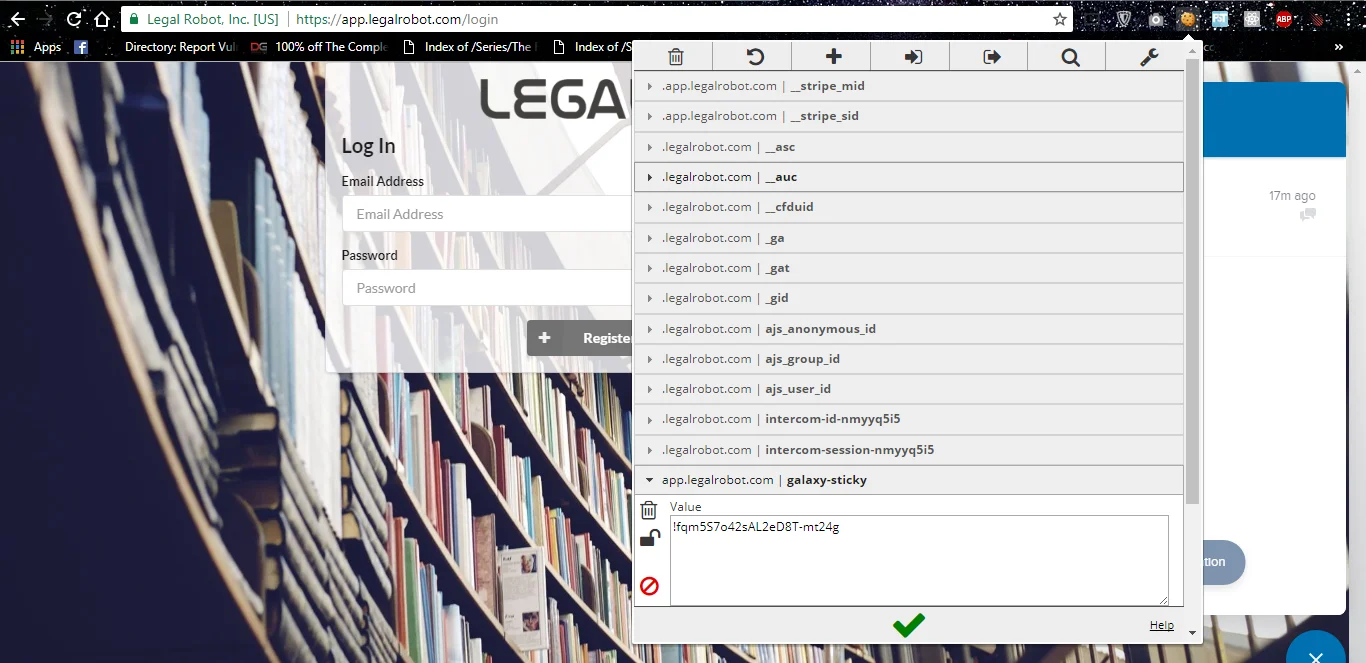
After that Copy the session cookies from export button on extension ( I used Edit this cookie chrome extension to get the cookies and perform the test ) I an attacker case he can use any Cookei grabber to grab the user cookies depends on attack scenario
-
Now When u will get the cookies from the extension Logout from the account
-
Now Load the page https://app.legalrobot.com/login again and Delete all cookies from your browser regarding the website
-
Now add the cookies again from the Extension from import button,
and then go to the page https://app.legalrobot.com/account 6) You will see that the page will take u back to Login page but a little difference it contains the same Chat button on the button that was not present click on that button and You will see that all of the user chats are available their and if u send some message it will still be sent
Fix:
Possible fix Include to make it sure no cookies data from Last session is accessible after logout
Attachments
Not written yet. The AI write-up for this report has not been written yet. The Original tab links to the source.
How it worked
Root cause
Likely the Intercom chat session was not explicitly cleared on logout, and the chat component did not require an active login.
Impact
An attacker with script access to the machine and technical skill could re-add Intercom components and carry over cookies to access chat information from a previous session, though this is considered low risk.
What the attacker needed
Attacker has session cookies; attacker has script access to the machine; technical skill to re-add Intercom components
The fix
The fix should ensure that no cookie data from the last session is accessible after logout.
How it was found
- Log in to the account.
- Copy the session cookies using a browser extension.
- Log out of the account.
- Load the login page and delete all cookies for the site.
- Import the copied cookies back.
- Go to the account page, get redirected to login, but see the chat button and access previous chats.
Explained by bugbounty.wiki with AI from the original and checked against quotes from it; it can still be wrong. Read the original before relying on a detail.
Not written yet. The AI write-up for this report has not been written yet. The Original tab links to the source.
When you log out of a website, the site should forget who you are. Here, the chat widget kept working even after logout if someone had copied your login cookies (small files that prove who you are). On a shared computer, another person could use those cookies to read your old chats.
What is Info disclosure?
Data the application should keep private (personal data, internal details, other users' records) reaches someone it should not.