SQL Injection On MEGA.NZ
The login form on a MEGA subdomain was vulnerable to SQL injection. An attacker could manipulate the username and password fields to inject SQL, potentially bypassing authentication or extracting data.
 Published on nareshlamgade.com.np
While checking Detectify Lab, I came across XSS Vulnerability on MEGA.CO.NZ which was found by Frans Rosenso I though of doing some test on MEGA but I ended with none. I didn’t give up ! after a while I thought of scanning & looking into sub domain of both mega.nz and mega.co.nz and found out eye catching sub-domain.
The full write-up lives on its author's site
It belongs to its author, so we link to it rather than copy it. The other two tabs are our own rewrites, checked against it.
Context
MEGA runs its service on both mega.nz and mega.co.nz. While reading the Detectify Labs blog, I came across a post by Frans Rosen about an XSS vulnerability on MEGA.CO.NZ that had earned a bug bounty, and that prompted me to do some testing on MEGA myself. My first attempts turned up nothing.
Rather than stop there, I moved on to enumerating subdomains of both mega.nz and mega.co.nz. That scan surfaced a subdomain that stood out: https://stats.admin.mega.nz/. It presented a login form.
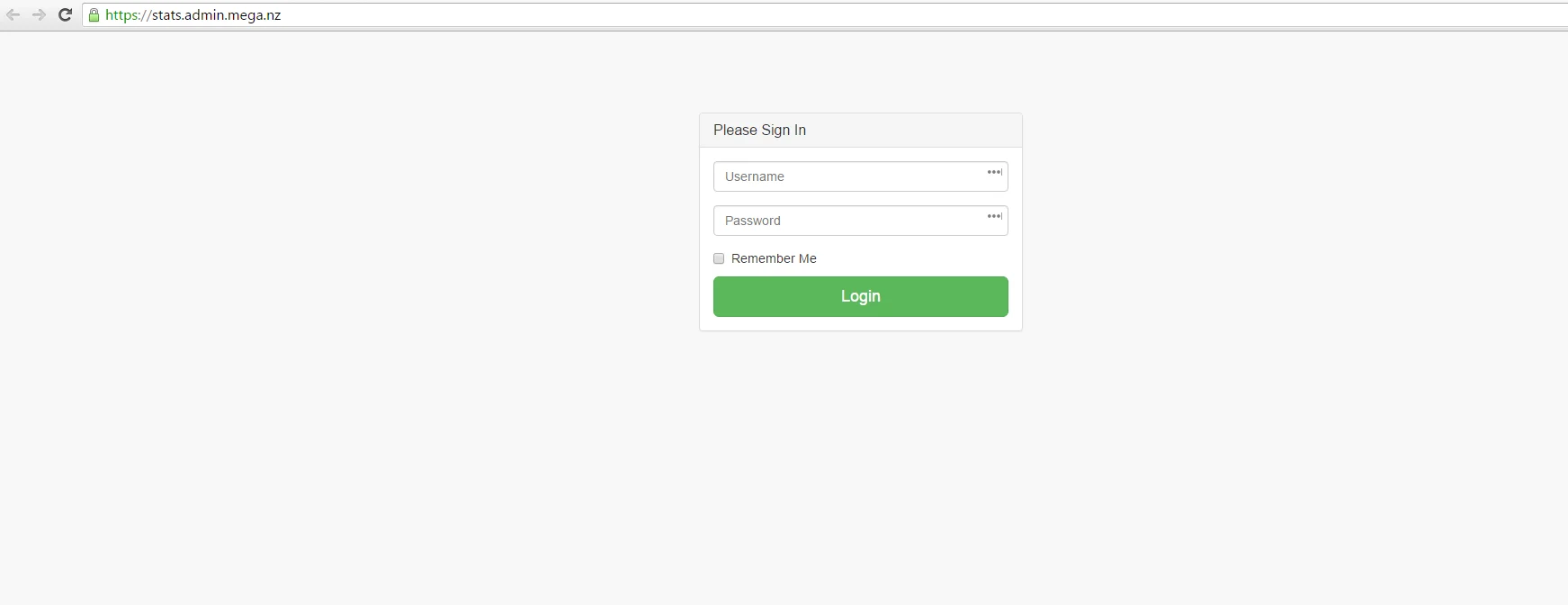
The screenshot shows the stats subdomain.
Setup
No accounts, roles or special tooling are described. The only precondition was access to the public login page at https://stats.admin.mega.nz/. Testing was done from a browser, with requests captured and replayed as raw HTTP. The User-Agent in the captured request identifies Firefox 44 on Windows 7 (the rv:44.0 and Windows NT 6.1; WOW64 strings).
Finding it
I first tried logging in with random credentials. The captured request looked like this:
POST / HTTP/1.1
Host: stats.admin.mega.nz
User-Agent: Mozilla/5.0 (Windows NT 6.1; WOW64; rv:44.0) Gecko/20100101
Firefox/44.0
Accept: text/html,application/xhtml+xml,application/xml;q=0.9,*/*;q=0.8
Accept-Language: en-US,en;q=0.5
Accept-Encoding: gzip, deflate, br
Referer: https://stats.admin.mega.nz/
Connection: keep-alive
Content-Type: application/x-www-form-urlencoded
Content-Length: 37

username=admin&password=admin
The form posts two URL-encoded parameters, username and password, to the root path. The credentials admin/admin did not get me in. What drew my attention was the way the login behaved when I manipulated the input, so I appended a single quote (') to the parameters.
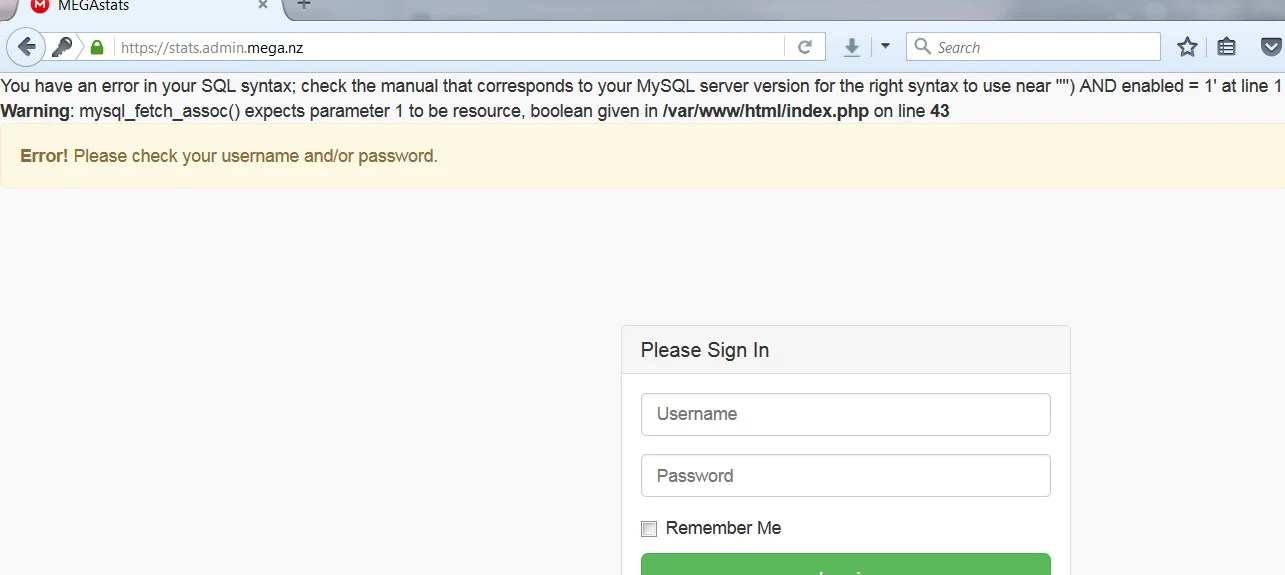
I added a single quote to the parameters and the request looked like the screenshot below.
Exploitation
Step 1: Probe the login parameters
- Submit the login form with arbitrary credentials (`username=admin&[redacted] to establish the baseline failed-login response.
- Add a single quote (
') to the parameters and resubmit. - Compare the response with the baseline. The request with the quote added is shown in the screenshot.
The screenshot shows the request with the quote added. The report does not include the exact payload beyond the single quote, nor the response body, so the precise error or output is not reproduced here.
Step 2: Report
Without any delay I emailed MEGA at [redacted]. The mail went out at 3:10 PM, and a few minutes later I had a reply.
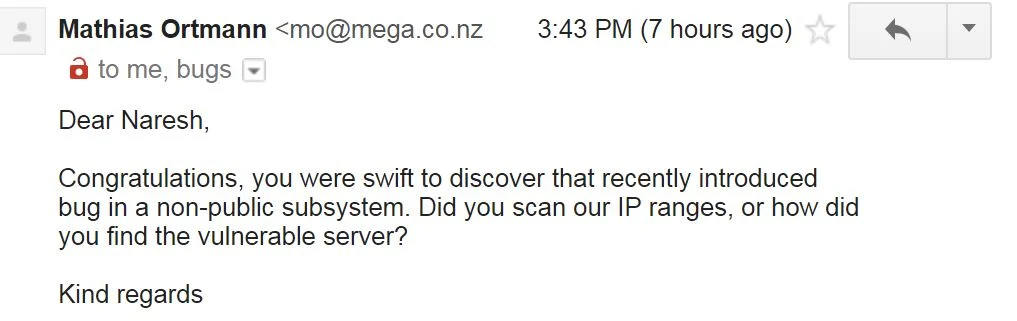
The screenshot shows the reply from MEGA.
Step 3: Fix and bounty
The bug was fixed within 30 minutes, which I noted publicly at the time:
#meganz that was the quickest bug fix I have ever seen. 30 min. that was way damn awesome. (y) good job #meganz
, NȺɌɆSĦ ŁȺMǤȺĐɆ (@nlamgade) March 10, 2016

The bounty was 400 EUR.
Step 4: Recheck months later
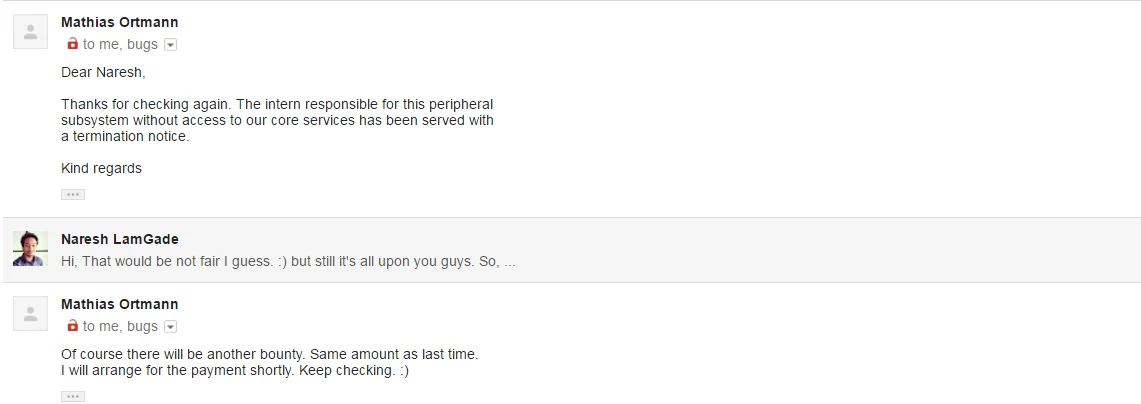
After a few months I checked the same site again and the bug was still there. I reported it again and received another bounty, another 400 EUR.
Root cause
The report does not describe the server-side code. What the behaviour shows is that the username and password values from the login form reach a SQL query without being safely bound, so a single quote changes how the query is parsed. The likely cause is string concatenation of user input into the query rather than parameterised statements. The report does not say which database or framework was in use, nor why the existing defences failed to stop it.
Impact
The report does not enumerate what an attacker could extract. The affected component is the login form of stats.admin.mega.nz, so the exposure is whatever the backing database holds and whatever the database account behind the login is permitted to do. The report gives no detail on the data reachable or the privileges of that account.
Fix
MEGA fixed the issue within 30 minutes of the report. The durable fix for this class of bug is to stop building the query from concatenated input and use parameterised queries or prepared statements for the login lookup, with the database account limited to the minimum privileges the login needs.
The later recheck is the important lesson: the same injection was present again months afterwards, and a second report earned a second bounty. A fix that is not verified and regression-tested can silently disappear.
Variants to test
- Quote in each parameter separately. Send
'inusernameonly, then inpasswordonly, and compare responses. A different error or timing points to which parameter is concatenated into the query. - Boolean pair. Compare a condition that should be true with one that should be false, for example appending
' AND '1'='1versus' AND '1'='2to a parameter. A consistent difference in response (login success, error page, or content) is a positive result. - Time-based check. Append a database-specific sleep construct to a parameter and measure response time against a baseline. A repeatable delay that scales with the sleep value is a positive result.
- Re-test after disclosure. Return to the same endpoint months after a fix and repeat the single-quote probe. Any change from the fixed baseline means the regression has returned, as happened here.
- Subdomain enumeration on related domains. Enumerate subdomains of every domain the target owns, as was done for
mega.nzandmega.co.nz. An administrative or statistics host with its own login form is a candidate for the same class of bug.
What happened, in plain words
MEGA is a cloud storage service, a bit like an online hard drive where people keep files and photos. It runs its website on two domain names, mega.nz and mega.co.nz. A domain name is the part you type in the address bar, such as mega.nz.
One day I was reading a blog called Detectify Labs. On it there was a post by a researcher named Frans Rosen about a security bug on MEGA.CO.NZ that had earned him a reward. A security bug is a mistake in a website that lets someone make it behave in a way its owners did not intend. Companies often pay a reward, called a bug bounty, to people who report such mistakes privately instead of abusing them. Reading that post made me want to test MEGA myself.
My first attempts found nothing. Instead of giving up, I started looking at the smaller sites that belong to the same company. Large websites are often split into many subdomains, which are names that sit in front of the main domain, like something.mega.nz. Each subdomain can be a separate small website with its own login page, and these are often less well tested than the main site. While scanning the subdomains of both mega.nz and mega.co.nz, I found one that stood out: https://stats.admin.mega.nz/. It showed a login form.
The screenshot shows that statistics subdomain.
What I needed to start
There were no accounts, no special roles and no special tools involved. The only thing needed was access to the public login page at https://stats.admin.mega.nz/. I worked from a normal browser, and I captured the requests the browser sent and replayed them as raw text. A request is the message your browser sends to a website when you do something, such as submitting a form. Seeing it as raw text lets you change it by hand.
The User-Agent line in the captured request tells the website which browser is being used. Here it identifies Firefox 44 on Windows 7, which is what the rv:44.0 and Windows NT 6.1; WOW64 parts mean.
Finding the bug
First I tried logging in with random credentials. Credentials are simply the username and password you type into a login form. The request my browser sent looked like this:
POST / HTTP/1.1
Host: stats.admin.mega.nz
User-Agent: Mozilla/5.0 (Windows NT 6.1; WOW64; rv:44.0) Gecko/20100101
Firefox/44.0
Accept: text/html,application/xhtml+xml,application/xml;q=0.9,*/*;q=0.8
Accept-Language: en-US,en;q=0.5
Accept-Encoding: gzip, deflate, br
Referer: https://stats.admin.mega.nz/
Connection: keep-alive
Content-Type: application/x-www-form-urlencoded
Content-Length: 37

username=admin&password=admin
Line by line, in plain words:
POST / HTTP/1.1says this is a POST request, which is the kind used to send data to a website, and it is aimed at the root path/of the site.HTTP/1.1is the version of the language browsers and websites use to talk to each other.Host: stats.admin.mega.nznames the website being contacted.User-Agent: ...identifies the browser, as described above.Accept,Accept-LanguageandAccept-Encodingtell the site which kinds of content and languages the browser can handle.Referer: https://stats.admin.mega.nz/says which page the request came from.Connection: keep-aliveasks to keep the connection open for further requests.Content-Type: application/x-www-form-urlencodedsays the data is sent in the standard form format, the same format used when you fill in a web form.Content-Length: 37says the data is 37 bytes long.- The blank line separates the headers from the body.
username=admin&[redacted] is the body: two fields,usernameandpassword, joined with&, both set toadmin`.
The form sends two fields, username and password, to the root path. The credentials admin/admin did not get me in. What caught my attention was how the login behaved when I changed the input, so I added a single quote (') to the fields.
I added a single quote to the fields and the request looked like the screenshot below. A database is the place where a website stores its data, and a query is the instruction sent to it, for example "find the user with this name and this password".
Exploiting it
Step 1: Probe the login fields
- Submit the login form with arbitrary credentials (`username=admin&[redacted] to record what a normal failed login looks like. This is the baseline, the reference answer you compare everything else against.
- Add a single quote (
') to the fields and submit again. - Compare the new response with the baseline. The request with the quote added is shown in the screenshot.
The screenshot shows the request with the quote added. The report does not include the exact payload beyond the single quote, nor the response body, so the precise error or output is not reproduced here.
SQL injection is a class of bug where a website builds a database query by gluing together fixed text and whatever the user typed. In a database query, a single quote is a special character: it marks where a piece of text begins or ends. If your typed quote is pasted straight into the query, the database can read it as the end of a piece of text rather than as part of your input, and the rest of your input can then be read as instructions. A useful everyday comparison is a form letter where someone fills in a blank: if the person filling it in writes extra sentences that look like part of the letter, the reader may not be able to tell the difference.
Step 2: Report it
Without any delay I emailed MEGA at [redacted]. The mail went out at 3:10 PM, and a few minutes later I had a reply.
The screenshot shows the reply from MEGA.
Step 3: Fix and bounty
The bug was fixed within 30 minutes, which I noted publicly at the time:
#meganz that was the quickest bug fix I have ever seen. 30 min. that was way damn awesome. (y) good job #meganz
, NȺɌɆSĦ ŁȺMǤȺĐɆ (@nlamgade) March 10, 2016
The bounty was 400 EUR.
Step 4: Check again months later
After a few months I checked the same site again and the bug was still there. I reported it again and received another bounty, another 400 EUR.
Why it happened
The report does not describe the code running on the server. What the behaviour shows is that the username and password values from the login form reach a database query without being safely bound, so a single quote changes how the query is read. The likely cause is that the user input is glued into the query as text rather than passed as a separate value. The report does not say which database or framework was in use, nor why the existing protections failed to stop it.
What it exposed
The report does not list what an attacker could have taken out. The affected part is the login form of stats.admin.mega.nz, so the exposure is whatever the database behind it holds and whatever the database account behind the login is allowed to do. The report gives no detail on the data reachable or the permissions of that account.
The fix
MEGA fixed the issue within 30 minutes of the report. The lasting fix for this kind of bug is to stop building the query from glued-together input and to use parameterised queries, also called prepared statements, for the login lookup. In a parameterised query the fixed part of the instruction and the user's values travel separately, so a quote in a value stays just a character and is never read as part of the instruction. The database account should also be limited to the minimum permissions the login needs.
The later recheck is the important lesson: the same injection was present again months afterwards, and a second report earned a second bounty. A fix that is not checked and tested can quietly disappear.
Other things to try
- Quote in each field separately. Send
'inusernameonly, then inpasswordonly, and compare the responses. A different error or timing points to which field is glued into the query. - True and false pair. Compare a condition that should be true with one that should be false, for example appending
' AND '1'='1versus' AND '1'='2to a field. A consistent difference in the response, such as a login success, an error page or different content, is a positive result. - Time-based check. Append a database-specific sleep instruction to a field and measure the response time against the baseline. A repeatable delay that grows with the sleep value is a positive result.
- Test again after disclosure. Return to the same endpoint months after a fix and repeat the single-quote probe. Any change from the fixed baseline means the bug has come back, as happened here.
- Look at subdomains of related domains. List the subdomains of every domain the target owns, as was done for
mega.nzandmega.co.nz. An administrative or statistics host with its own login form is a candidate for the same kind of bug.
Glossary
- Bug bounty: a reward a company pays to someone who reports a security mistake privately instead of abusing it.
- Credentials: the username and password used to log in.
- Database: the place where a website stores its data.
- Domain name: the name you type in the address bar to reach a website, such as
mega.nz. - HTTP: the language browsers and websites use to exchange requests and responses.
- Parameterised query (prepared statement): a database query where the fixed instruction and the user's values are sent separately, so values cannot change the instruction.
- Payload: the piece of input crafted to trigger a bug.
- POST request: a request that sends data to a website, typically from a form.
- Query: an instruction sent to a database, such as looking up a user.
- Request: the message a browser sends to a website when you do something.
- Response: the message a website sends back to the browser.
- SQL injection: a bug where user input is glued into a database query, so special characters in the input can change the query's meaning.
- Subdomain: a name in front of the main domain, such as
stats.admin.mega.nz, often a separate small website. - User-Agent: a request header that identifies the browser and operating system.
- XSS (cross-site scripting): a bug where an attacker gets their own code to run in another user's browser on a website.




