$10,000 for automatic email confirmation bug in Microsoft's Edge browser
The Edge browser automatically made DNS requests for links that were copied or pasted into the address bar, even without the user visiting them. This allowed an attacker to trigger email confirmation on a target website simply by having the victim copy or paste a confirmation link, because the site treated the DNS lookup as a click.
 Published on kingkaran977.medium.com
Hey folks, welcome to my first bug bounty writeup, which I found on Microsoft Edge (Chromium) browser.
The full write-up lives on its author's site
It belongs to its author, so we link to it rather than copy it. The other two tabs are our own rewrites, checked against it.
Context
This is a write-up of a logic flaw found in the Microsoft Edge (Chromium) browser. The behaviour described here is not a bug in a web application's own code: it is a side effect of how Edge handles links that are copied or pasted into the address bar. The researcher's target application was a website with a standard email registration flow, where a confirmation link is sent to the user's mailbox and the account is verified once that link is visited.
The report describes the target as "Lark Technologies", selected on HackerOne. The same issue was later reported to Microsoft, because the behaviour was specific to Edge and did not reproduce in Firefox or Chrome.
Setup
- Target: a web application with an email registration and confirmation flow (referred to in the report as Lark Technologies).
- Browsers used for comparison: Microsoft Edge (Chromium), Firefox and Chrome.
- Tools: Burp Suite, used to generate a Burp Collaborator payload and observe DNS queries.
- Preconditions: a testing email address that can receive the confirmation mail, and the ability to copy the confirmation link without opening it.
Finding it
On 2 December 2020, after several hours of testing without results, the researcher decided to test the application in multiple browsers rather than only Firefox. The registration and login functionality was exercised in Edge.
A testing email was entered on the registration form.
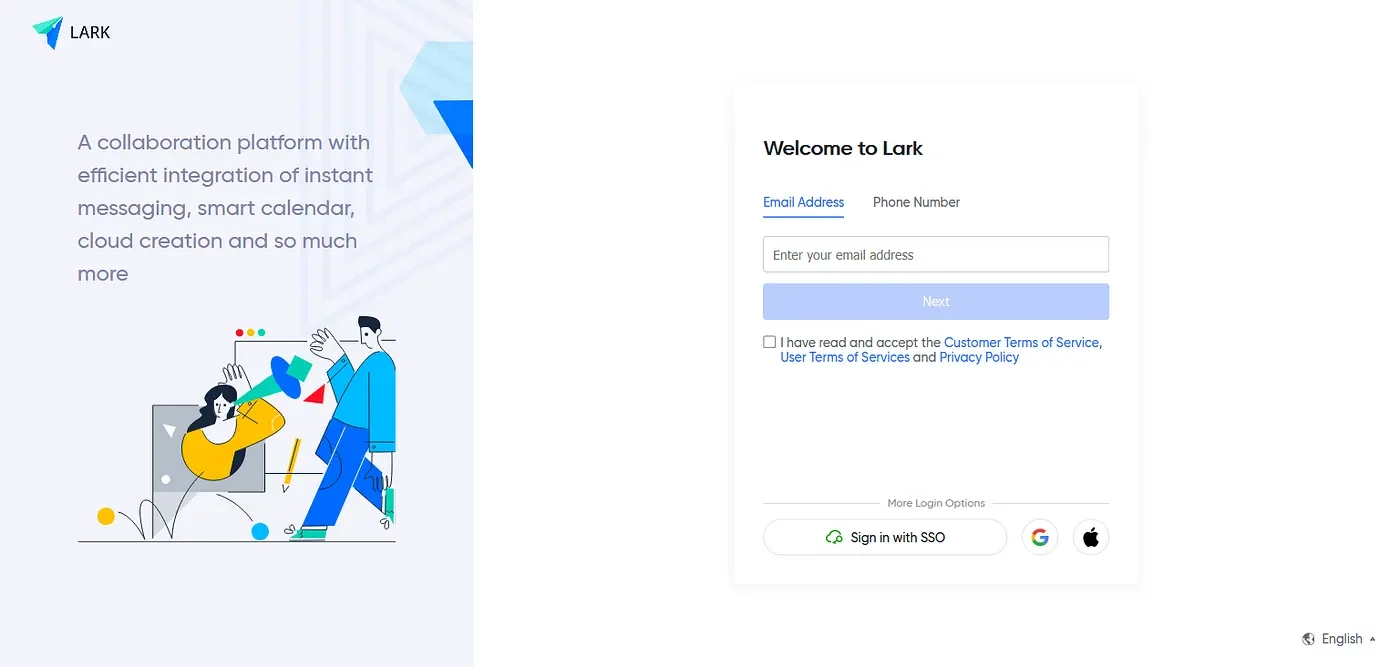
The confirmation email arrived in the mailbox.
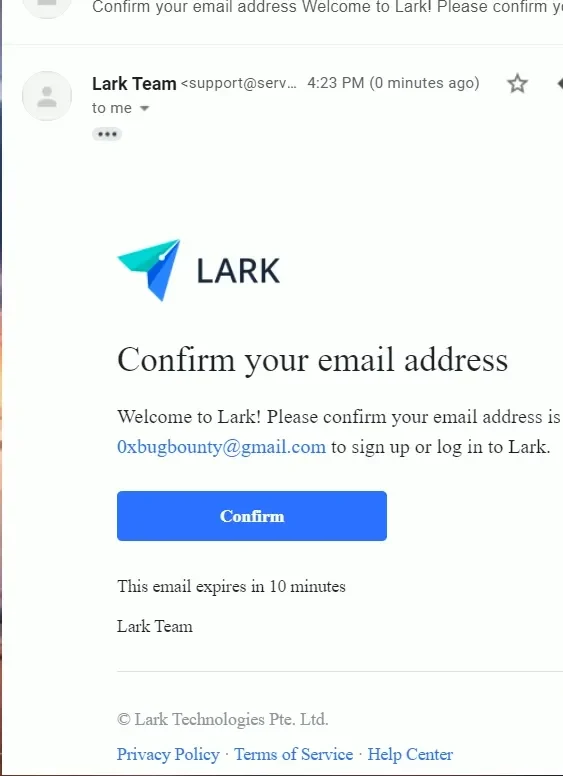
Before clicking the confirm email button, the researcher copied the link to inspect it. As soon as the link was copied, the target website moved to the page that is shown after email verification, even though the link had never been visited. That was the anomaly: copying a link should have no effect on the target application.
Exploitation
Step 1: Reproduce in other browsers
The same sequence was repeated with a different email address in Firefox and Chrome:
- Enter the email address.
- Receive the confirmation link.
- Copy the link.
In both browsers nothing happened on the target website, and the page stayed where it was. The behaviour was therefore specific to Edge.
Step 2: Paste the link without visiting it
The link was then pasted into the Edge address bar without pressing Enter and without visiting it. The email was verified again.
Step 3: Test other targets
The same steps were repeated against Facebook, Spotify and other sites:
- Register.
- Receive the confirmation link.
- Copy the link.
- Paste the link into the Edge address bar.
Those accounts were not verified. At this point the researcher suspected the automatic verification was a property of the target website, but wanted to understand the mechanism.
Step 4: Observe the traffic with Burp Collaborator
A Burp Collaborator payload was generated and pasted into the browser's address bar. A DNS query arrived from the following address:
[redacted]
A reverse IP lookup showed that the address belongs to Microsoft.
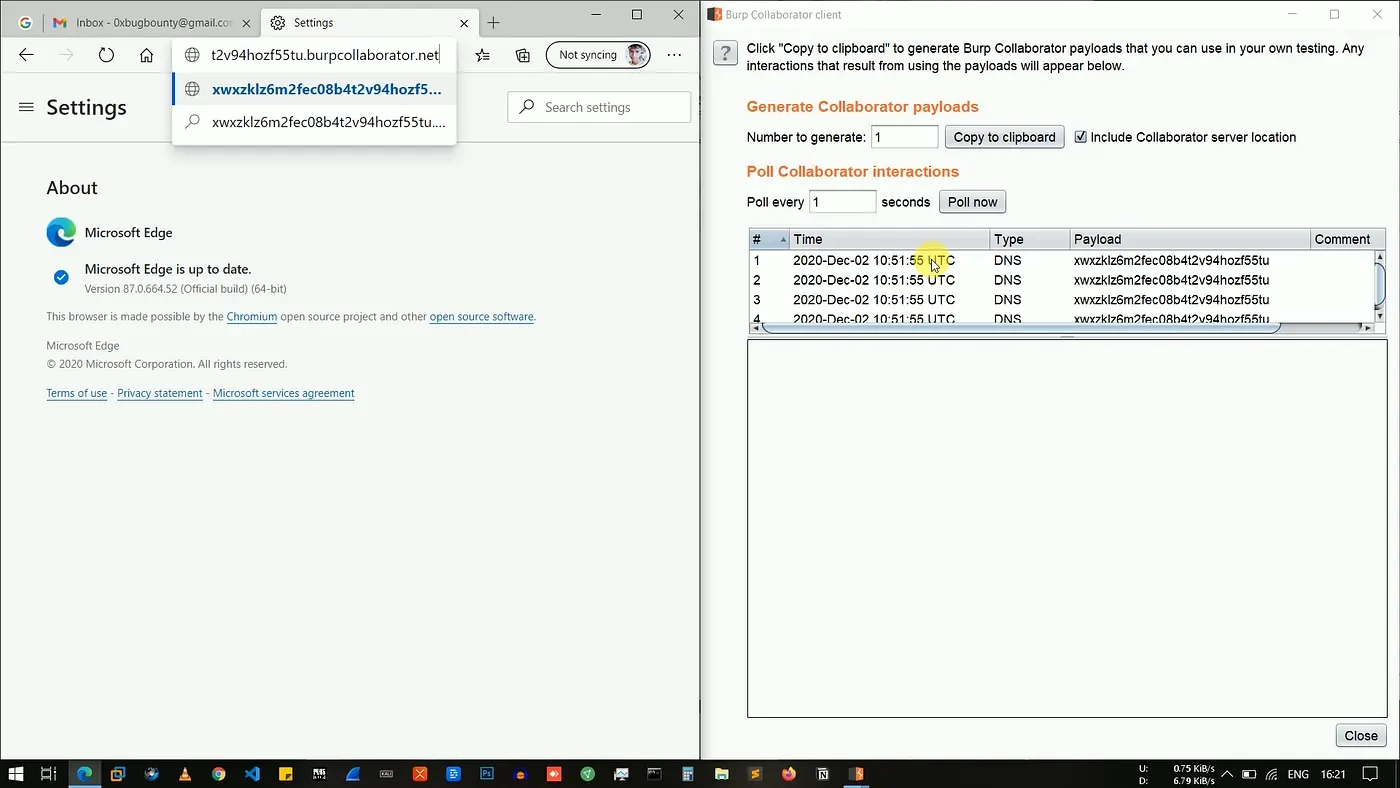
The conclusion was that whenever a link is copied from Edge, or pasted into the address bar (even when copied from somewhere else), Edge performs a DNS lookup for that link. When the target application sees this request, it treats it as though the user clicked the link and made an HTTP request, so the email address is verified.
Step 5: Report to the target
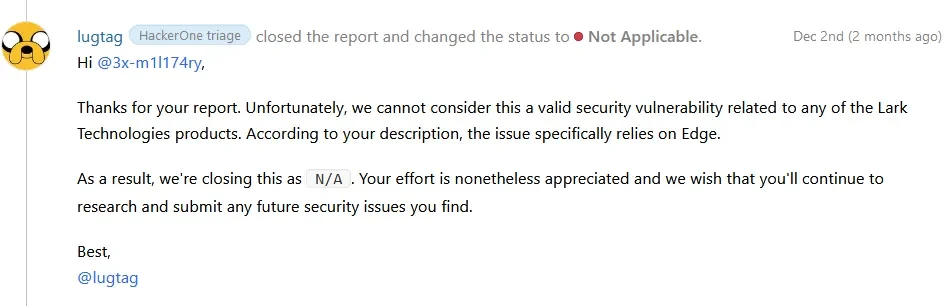
The issue was reported to the program on HackerOne. The response was that they could not consider it a bug, and the report was closed as N/A.
Step 6: Report to Microsoft
The same report was submitted to Microsoft, on the basis of their valid report rules: if an attack is possible on Microsoft Edge (Chromium) but not on Google Chrome, the report is considered valid.
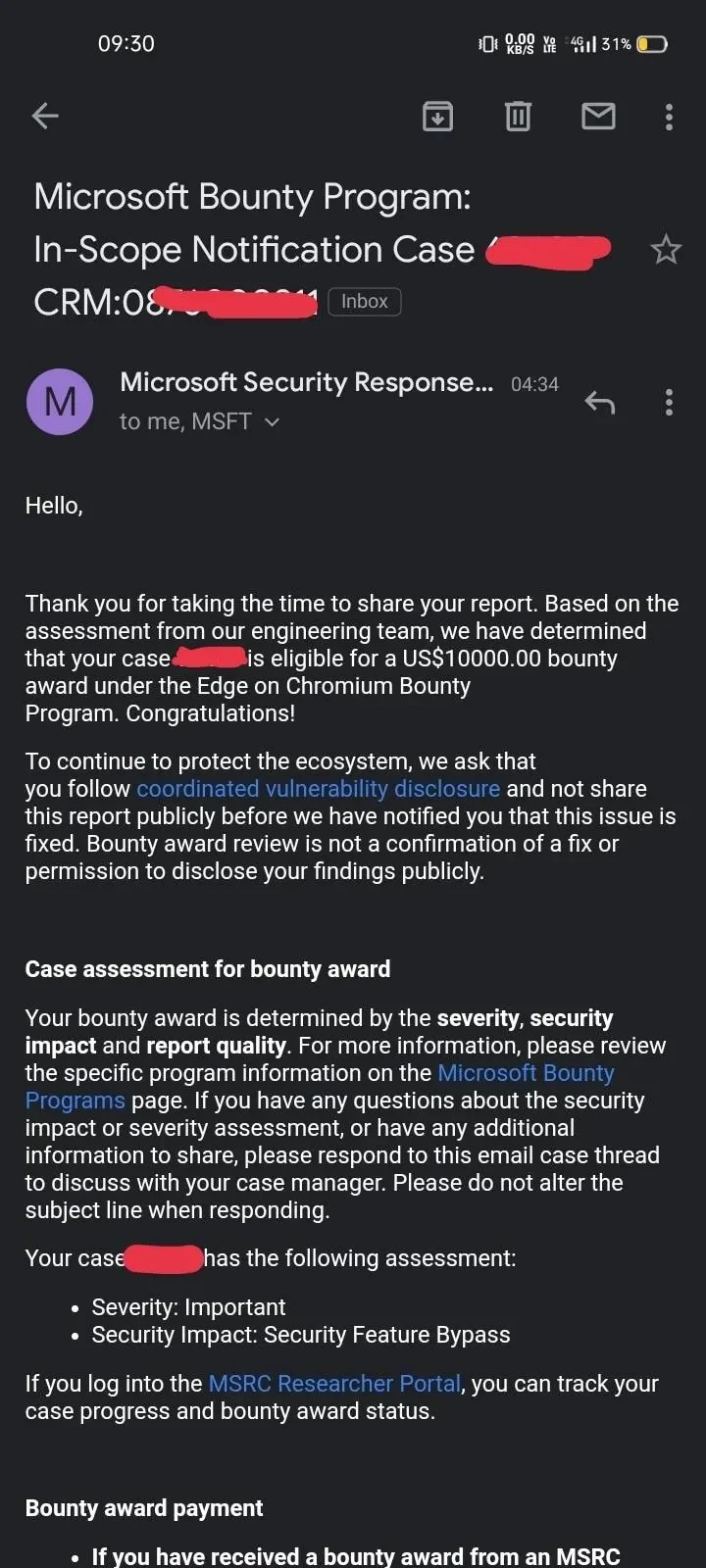
On 6 January 2021 the researcher received an email from Microsoft stating that the report was eligible for a $10,000 bounty award.
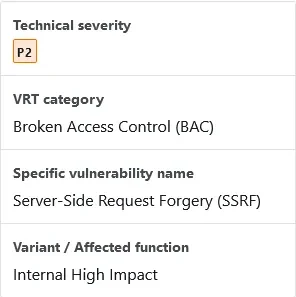
Months later, after further study, the researcher realised the issue was an SSRF bug.
Root cause
Edge (Chromium) resolves a URL with a DNS lookup when the URL is copied or pasted into the address bar, before any navigation is performed. The application treated the contact it received as proof that the user had clicked the link. The DNS lookup originated from an address belonging to Microsoft, and the account was marked as verified.
The report does not describe the server-side code of the target application, so the exact check it performed is not stated. The report does not describe the server-side code, so the exact check the application performed is not stated.
Impact
Copying or pasting a confirmation link in Edge can cause an email address to be verified without the link being visited, as shown on the researcher's own test accounts. The report shows this working against the researcher's own test accounts.
Fix
Microsoft patched the issue and released a new update on 14 January 2021.
Variants to test
- Copy a confirmation or password reset link in Edge and watch the target's logs for a request before the link is visited. A positive result is a verification or reset completed without navigation.
- Paste a link into the Edge address bar without pressing Enter and check whether the target receives a request. A positive result is a state change on the target.
- Repeat the same steps in Firefox and Chrome. A positive result in Edge only, and not in the other browsers, matches the behaviour described here.
- Use a Burp Collaborator payload in the address bar and check for DNS queries from Microsoft-owned addresses. A positive result confirms that Edge resolves pasted URLs.
- Test other one-click actions that rely on a GET request, such as unsubscribe links or invite acceptance. A positive result is the action completing without the link being opened.
Timeline
| Date | Event |
|---|---|
| 2 Dec 2020 | Bug reported to Lark Technology and Microsoft |
| 2 Dec 2020 | Report rejected by Lark Technology |
| 3 Dec 2020 | Microsoft opened the report |
| 23 Dec 2020 | Microsoft confirmed the issue |
| 6 Jan 2021 | Microsoft awarded $10,000 |
| 14 Jan 2021 | Vulnerability patched and new update released |
What happened, in plain words
A security researcher found that the Microsoft Edge browser does something unexpected when you copy a link or paste it into the address bar: it quietly looks up the link's address on the internet, even if you never press Enter. That lookup is enough to make some websites think you clicked a confirmation link, so your email address gets verified without you ever visiting the page. The researcher first reported this to the website where he saw it, and the report was closed as not a bug. He then reported it to Microsoft, because the behaviour only happened in Edge and not in Firefox or Chrome, and Microsoft paid him $10,000. Months later he understood that the underlying issue is a kind of bug called SSRF.
This article explains the whole story from scratch, assuming you know how to use a browser but nothing about security.
Context
This is a write-up of a logic flaw found in the Microsoft Edge (Chromium) browser. The behaviour described here is not a bug in a web application's own code: it is a side effect of how Edge handles links that are copied or pasted into the address bar. The researcher's target application was a website with a standard email registration flow, where a confirmation link is sent to the user's mailbox and the account is verified once that link is visited.
The report describes the target as "Lark Technologies", selected on HackerOne. The same issue was later reported to Microsoft, because the behaviour was specific to Edge and did not reproduce in Firefox or Chrome.
What is a logic flaw? A logic flaw is a mistake in the rules a program follows, rather than a mistake in how it stores or checks data. Imagine a vending machine that is supposed to give a snack only after you insert a coin, but it also gives one if you simply press the button twice. Nothing is broken physically; the rule is just wrong. Here, the rule that was wrong was: "a confirmation link is verified when the user clicks it." Edge made the website believe a click had happened when it had not.
What is a browser? A browser is the program you use to visit websites (Edge, Firefox, Chrome, Safari). It takes a web address (URL), asks the website's server for the page, and displays it.
What is an email confirmation flow? When you sign up for a website, many sites send you an email with a link. You click the link, and the site marks your email address as real. This proves you own the mailbox and prevents people from signing up with addresses they do not control. The link usually contains a long random code (a token) that identifies your sign-up.
What is HackerOne? HackerOne is a platform where companies list their bug bounty programs. A bug bounty program is an offer: if you find a security problem in our product and report it responsibly, we may pay you a reward (the bounty). Researchers use the platform to submit reports and communicate with the company.
What is Chromium? Chromium is the open-source browser project that Microsoft Edge is built on. Many browsers share this underlying engine, which is why a behaviour in Edge can be compared with Chrome.
Setup
- Target: a web application with an email registration and confirmation flow (referred to in the report as Lark Technologies).
- Browsers used for comparison: Microsoft Edge (Chromium), Firefox and Chrome.
- Tools: Burp Suite, used to generate a Burp Collaborator payload and observe DNS queries.
- Preconditions: a testing email address that can receive the confirmation mail, and the ability to copy the confirmation link without opening it.
What is Burp Suite? Burp Suite is a toolkit used by security testers to watch and change the traffic between a browser and a website. Think of it as a transparent proxy: you set your browser to send its requests through Burp, and Burp shows you exactly what was sent and what came back.
What is a Burp Collaborator payload? Collaborator is a Burp feature that gives you a unique, made-up web address (the payload). You can put that address anywhere, and if anything on the internet tries to contact it, Burp records the attempt. It is like putting a fake phone number in a form and seeing if anyone calls it. The payload is a URL, for example something like http://[redacted].burpcollaborator.net.
What is a DNS query? Every time a browser or server needs to visit a web address, it first has to translate the human-readable name (like example.com) into a numeric address (like [redacted]) that computers use. That translation is called a DNS lookup, and the request that performs it is a DNS query. It is like looking up a name in a phone book before dialling the number. A DNS query happens before any actual web page is fetched.
Finding it
On 2 December 2020, after several hours of testing without results, the researcher decided to test the application in multiple browsers rather than only Firefox. The registration and login functionality was exercised in Edge.
A testing email was entered on the registration form.
The confirmation email arrived in the mailbox.
Before clicking the confirm email button, the researcher copied the link to inspect it. As soon as the link was copied, the target website moved to the page that is shown after email verification, even though the link had never been visited. That was the anomaly: copying a link should have no effect on the target application.
Why copy the link instead of clicking it? Security testers often copy a link to see what is inside it: the address, any parameters, any token. Clicking it immediately would trigger the action; copying it lets you examine it first. The surprise here was that copying alone triggered the action.
Exploitation
Step 1: Reproduce in other browsers
The same sequence was repeated with a different email address in Firefox and Chrome:
- Enter the email address.
- Receive the confirmation link.
- Copy the link.
In both browsers nothing happened on the target website, and the page stayed where it was. The behaviour was therefore specific to Edge.
Why repeat in other browsers? If a problem happens only in one browser, it is likely caused by that browser rather than by the website. Testing in Firefox and Chrome is a simple way to narrow down where the fault lies. This is called differential testing: change one thing (the browser) and see if the result changes.
Step 2: Paste the link without visiting it
The link was then pasted into the Edge address bar without pressing Enter and without visiting it. The email was verified again.
Why paste without pressing Enter? Pressing Enter would actually visit the link, which would verify the email in any browser. Pasting without Enter isolates the browser's handling of the text itself. If the verification still happens, the browser must be doing something with the link before any navigation.
Step 3: Test other targets
The same steps were repeated against Facebook, Spotify and other sites:
- Register.
- Receive the confirmation link.
- Copy the link.
- Paste the link into the Edge address bar.
Those accounts were not verified. At this point the researcher suspected the automatic verification was a property of the target website, but wanted to understand the mechanism.
Why test other sites? If the same trick works on many sites, the problem is probably in the browser. If it works only on one site, the problem is probably in that site. Here the trick did not work on Facebook or Spotify, which suggested the target site was doing something unusual, but the researcher still wanted to know what Edge was doing.
Step 4: Observe the traffic with Burp Collaborator
A Burp Collaborator payload was generated and pasted into the browser's address bar. A DNS query arrived from the following address:
[redacted]
A reverse IP lookup showed that the address belongs to Microsoft.
What is a reverse IP lookup? Normally DNS turns a name into an address. A reverse lookup goes the other way: given an address, it asks who owns it. It is like getting a phone number and looking it up in a reverse directory to find the name.
What this step proved: The Collaborator payload was a made-up address that nobody would contact unless something was actively resolving it. The fact that a DNS query arrived, from an address owned by Microsoft, showed that Edge itself was performing the lookup. The researcher's own computer was not visiting the payload; the browser was resolving it.
The conclusion was that whenever a link is copied from Edge, or pasted into the address bar (even when copied from somewhere else), Edge performs a DNS lookup for that link. When the target application sees this request, it treats it as though the user clicked the link and made an HTTP request, so the email address is verified.
What is an HTTP request? When your browser asks a web server for a page, it sends an HTTP request. The server replies with an HTTP response. A DNS lookup is not an HTTP request; it is a separate, earlier step. But some applications, or the infrastructure in front of them, may treat any contact as a visit.
Step 5: Report to the target
The issue was reported to the program on HackerOne. The response was that they could not consider it a bug, and the report was closed as N/A.
What does N/A mean? N/A stands for "not applicable". On a bug bounty platform it usually means the report was rejected: the company decided it was not a valid security issue, so no reward is given.
Step 6: Report to Microsoft
The same report was submitted to Microsoft, on the basis of their valid report rules: if an attack is possible on Microsoft Edge (Chromium) but not on Google Chrome, the report is considered valid.
On 6 January 2021 the researcher received an email from Microsoft stating that the report was eligible for a $10,000 bounty award.
Months later, after further study, the researcher realised the issue was an SSRF bug.
What is SSRF? SSRF stands for Server-Side Request Forgery. It means making a server send a request to a destination of your choosing, usually one the server can reach but you cannot. Imagine a hotel concierge who will fetch anything you ask from any room. If you can trick the concierge into fetching something from a locked room, you have reached a place you should not. In this case, the browser (acting like a server component) made a request to a URL because the user copied or pasted it, and the target application treated that request as a genuine user action. The researcher only understood later that this pattern is what SSRF describes.
Root cause
Edge (Chromium) resolves a URL with a DNS lookup when the URL is copied or pasted into the address bar, before any navigation is performed. The application treated the contact it received as proof that the user had clicked the link. The DNS lookup originated from an address belonging to Microsoft, and the account was marked as verified.
The report does not describe the server-side code of the target application, so the exact check it performed is not stated. The report does not describe the server-side code, so the exact check the application performed is not stated.
What is a confirmation endpoint? An endpoint is a specific address on a server that does something. The confirmation endpoint is the part of the website that receives the confirmation link and marks the account as verified.
What is a GET request versus a POST request? HTTP has methods. GET is used to ask for a page; it should not change anything on the server. POST is used to send data that changes something, like submitting a form. A well-designed confirmation flow uses a POST from a button on a confirmation page, so that merely loading a link cannot verify the account. If the endpoint accepts a GET, then any request, even one not made by a real click, can trigger it.
What is a session? A session is how a website remembers who you are between requests. When you log in, the server gives your browser a cookie, a small piece of data that the browser sends back on every request. The server uses the cookie to link requests to your account. Binding a confirmation to the session means the server checks that the person confirming is the same person who started the registration.
Impact
Copying or pasting a confirmation link in Edge can cause an email address to be verified without the link being visited, as shown on the researcher's own test accounts. The report shows this working against the researcher's own test accounts.
Why does this matter? Email verification is a security check. The report does not go into those consequences; it only demonstrates that the verification happens without a visit.
Fix
Microsoft patched the issue and released a new update on 14 January 2021.
What is a patch? A patch is a software update that fixes a problem. Microsoft released an update that fixed the issue.
Variants to test
- Copy a confirmation or password reset link in Edge and watch the target's logs for a request before the link is visited. A positive result is a verification or reset completed without navigation.
- Paste a link into the Edge address bar without pressing Enter and check whether the target receives a request. A positive result is a state change on the target.
- Repeat the same steps in Firefox and Chrome. A positive result in Edge only, and not in the other browsers, matches the behaviour described here.
- Use a Burp Collaborator payload in the address bar and check for DNS queries from Microsoft-owned addresses. A positive result confirms that Edge resolves pasted URLs.
- Test other one-click actions that rely on a GET request, such as unsubscribe links or invite acceptance. A positive result is the action completing without the link being opened.
What are logs? Logs are records that a server keeps of requests it receives. Security testers use logs to see whether a request arrived, even when the browser did not show a page.
Timeline
| Date | Event |
|---|---|
| 2 Dec 2020 | Bug reported to Lark Technology and Microsoft |
| 2 Dec 2020 | Report rejected by Lark Technology |
| 3 Dec 2020 | Microsoft opened the report |
| 23 Dec 2020 | Microsoft confirmed the issue |
| 6 Jan 2021 | Microsoft awarded $10,000 |
| 14 Jan 2021 | Vulnerability patched and new update released |
Glossary
- API: A set of rules that lets one program talk to another. Think of it as a menu of requests a service accepts.
- Browser: The program you use to visit websites, such as Edge, Firefox or Chrome.
- Bug bounty program: A company's offer to pay researchers who find and report security problems in its products.
- Burp Collaborator: A Burp Suite feature that gives you a unique address and records any contact made to it, used to detect requests you cannot see directly.
- Burp Suite: A toolkit for watching and changing traffic between a browser and a website.
- Chromium: The open-source browser engine that Microsoft Edge is built on.
- Cookie: A small piece of data a website stores in your browser and receives back on each request, often used to remember who you are.
- DNS lookup: The process of translating a web address name into a numeric IP address, like looking up a name in a phone book.
- DNS query: The request sent during a DNS lookup.
- Endpoint: A specific address on a server that performs an action.
- GET request: An HTTP method used to ask for a page; it should not change anything on the server.
- HackerOne: A platform where companies list bug bounty programs and researchers submit reports.
- HTTP request: A message a browser sends to a web server asking for something; the server replies with an HTTP response.
- Logic flaw: A mistake in the rules a program follows, rather than in how it stores or checks data.
- N/A: "Not applicable"; on a bug bounty platform, usually a rejected report.
- Patch: A software update that fixes a problem.
- POST request: An HTTP method used to send data that changes something on the server, such as submitting a form.
- Reverse IP lookup: Finding the owner of an IP address, the opposite of a normal DNS lookup.
- Session: How a website remembers who you are across multiple requests, usually using a cookie.
- SSRF (Server-Side Request Forgery): A bug where an attacker makes a server send a request to a destination of the attacker's choosing.
- Token: A long random value used to identify something, such as a sign-up or a session.
- URL: A web address, such as https://example.com/page.



