Insecure Direct Object Reference Exposes all users of Microsoft Azure Independent Software Vendors
The Microsoft Partner portal exposed seller details through an endpoint that accepted a sequential seller ID without verifying the requester's authorisation. An attacker could enumerate IDs to read other partners' user information, including Microsoft teams.

This is my continued responsible disclosure blog on Microsoft products. If you didn’t read my previous blog, you can get it from here.
The full write-up lives on its author's site
It belongs to its author, so we link to it rather than copy it. The other two tabs are our own rewrites, checked against it.
Context
Microsoft runs a Partner portal where independent software vendors (ISVs) build, manage and sell their solutions. Partners use it to manage publishers, users and the commercial marketplace. The feature in question is the seller listing under Organization Profile: each seller in an account is identified by an 8 digit ID, and the portal fetches the users belonging to a given seller through an underlying API call.
The bug is an Insecure Direct Object Reference (IDOR). As the author puts it, IDOR is an access control vulnerability that arises when an application uses user supplied input to access an object directly without properly checking the permission of the user; the application relies solely on the presence of a valid session.
Setup
The precondition is simply a registered account on the Microsoft Partner application. Once registered, the Partner portal is reachable by browsing directly to its URL:
https://partner.microsoft.com
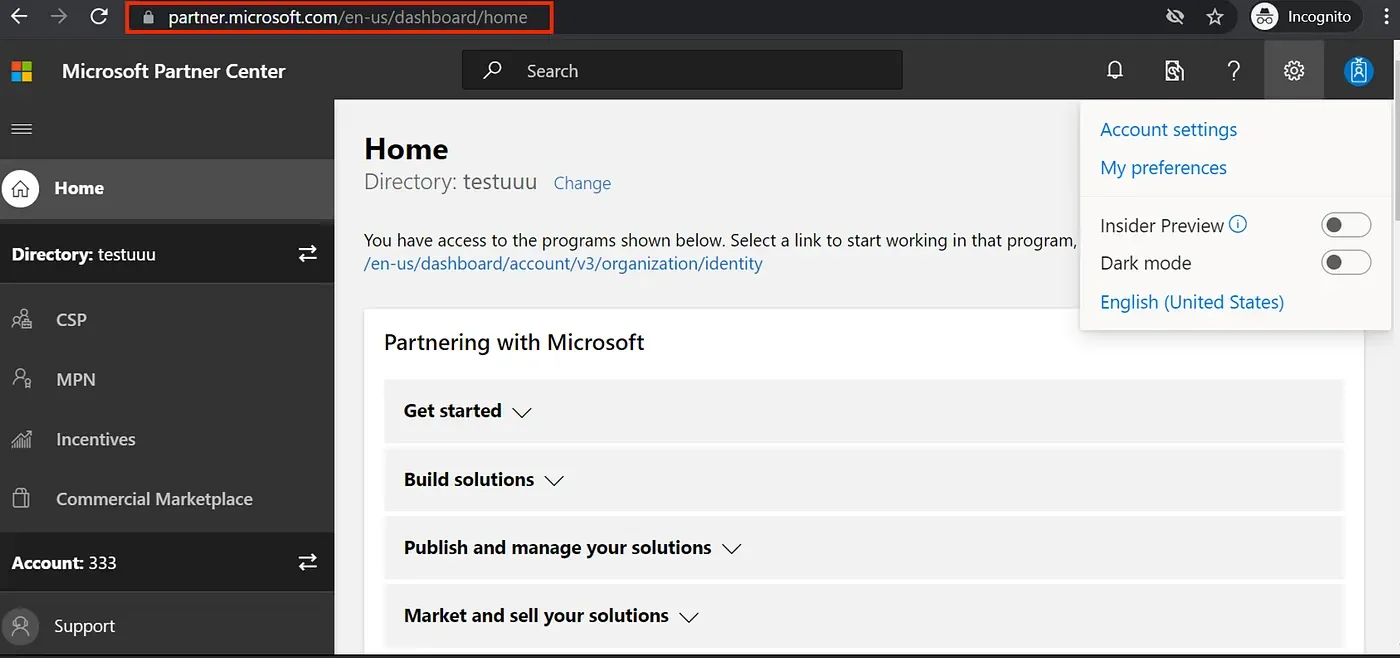
From Organization Profile you can list the sellers in your account. Each seller has an 8 digit ID; the author's own sellerId is shown as 76xxxx10.
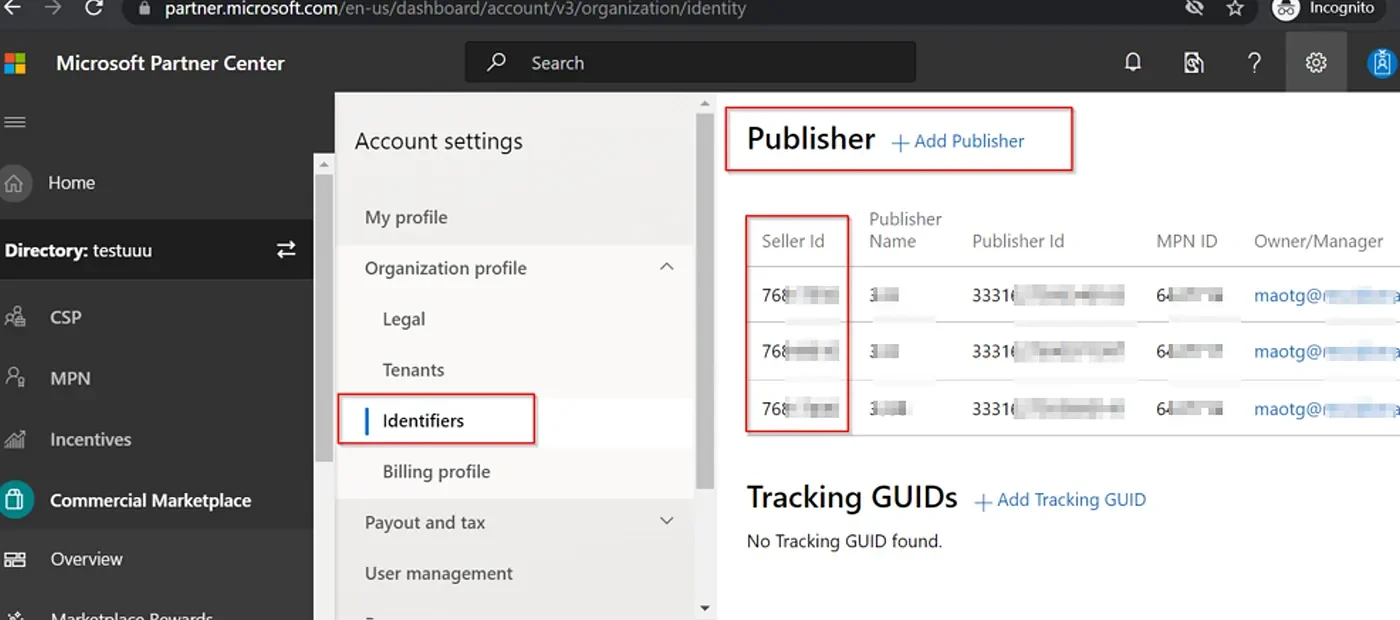
List of Sellers
Finding it
The author captured the API request that the portal uses to fetch publisher/seller details. The sellerId of the currently logged in user in that request is 76????10.
Request:
GET /en-us/dashboard/account/<reduct>/<reduct>/<reduct>/<reduct>/76????10/users HTTP/2Host: partner.microsoft.com
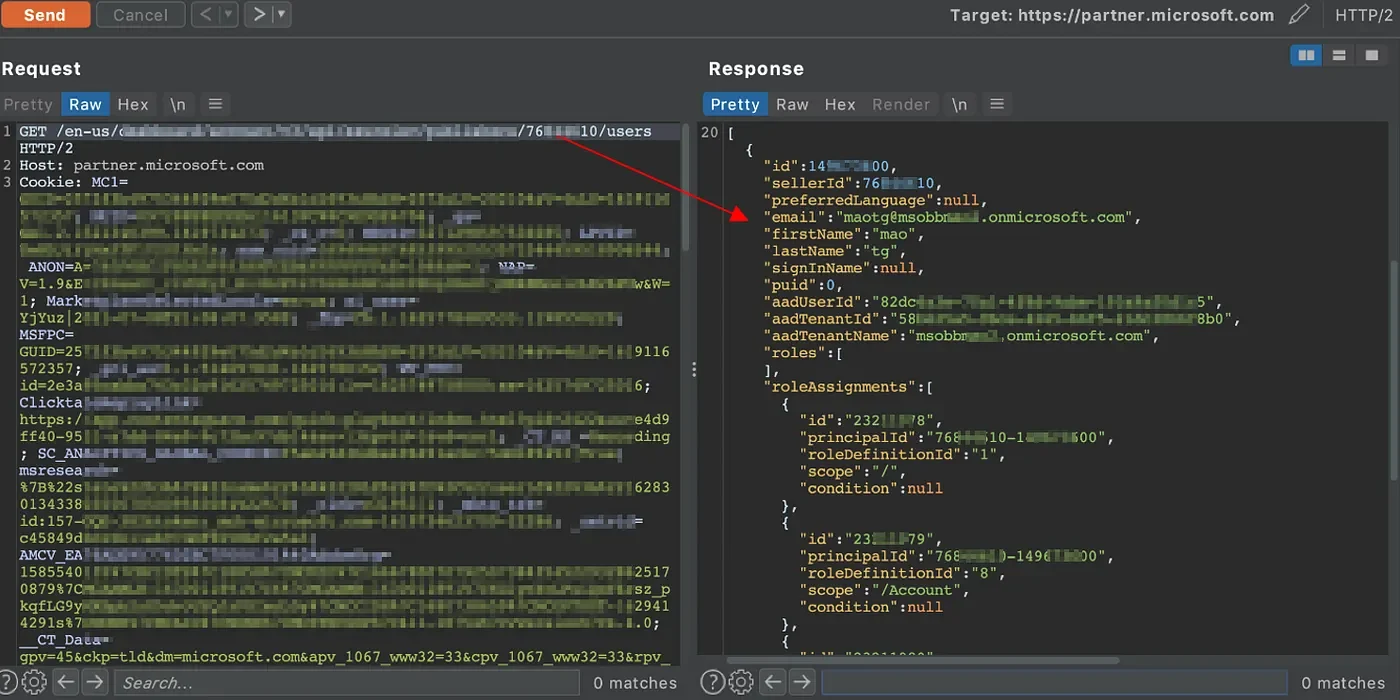
Details of users belongs to publisher 76????10
Response: the application returns the details of publishers.
Close analysis of the request showed that the sellerId value appears sequential in nature. That is what made the parameter worth tampering with: if IDs are allocated in sequence, neighbouring values belong to other customers.
Exploitation
Step 1: read the next seller
Starting from the author's own sellerId 76????10, adding 10 gives the next seller:
76????10 + 10 = 76????20
Request:
GET /en-us/dashboard/account/<reduct>/<reduct>/<reduct>/<reduct>/76????20/users HTTP/2Host: partner.microsoft.com
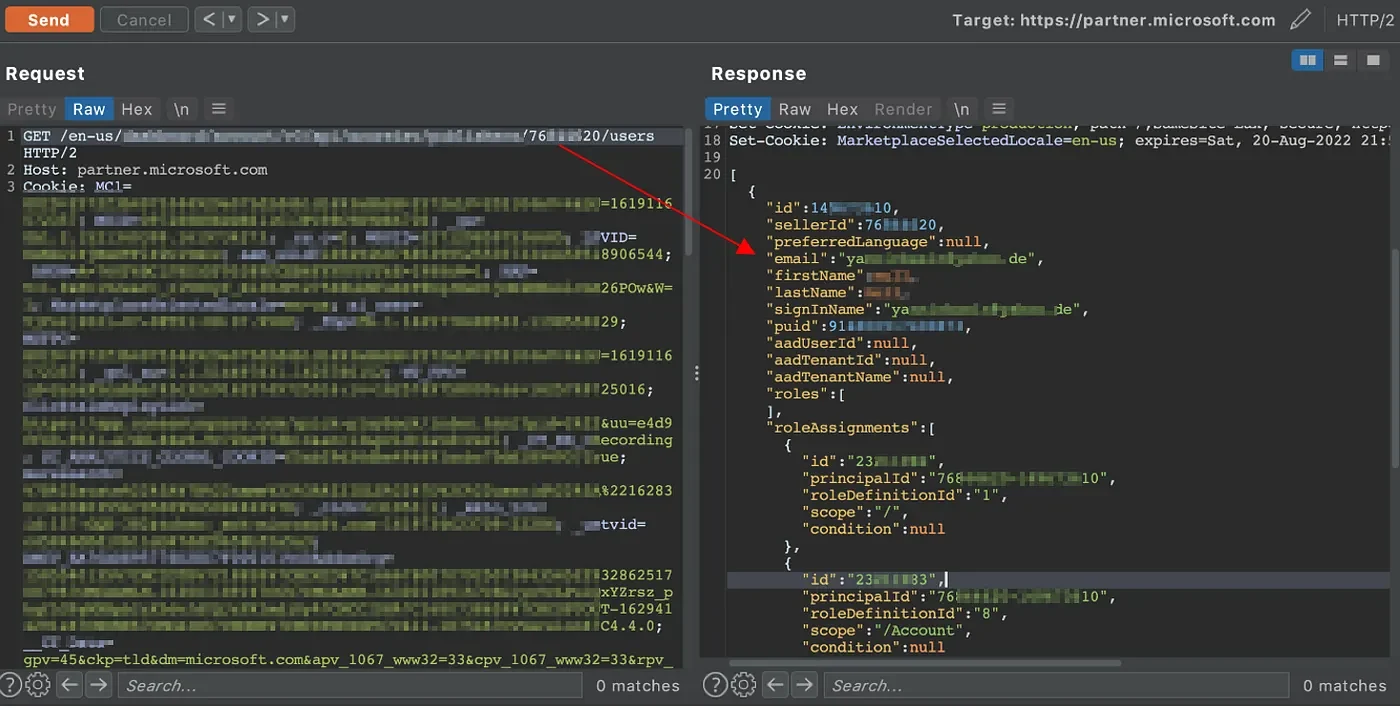
Details of users belongs to publisher 76????20
Response: the application discloses another customer's details without verifying the user's authorization. The author calls this unexpected behaviour, i.e. a security vulnerability.
Step 2: read the previous seller
Going the other way, subtracting 10 from 76????10 gives 76????00:
Request:
GET /en-us/dashboard/account/<reduct>/<reduct>/<reduct>/<reduct>/76????00/users HTTP/2Host: partner.microsoft.com
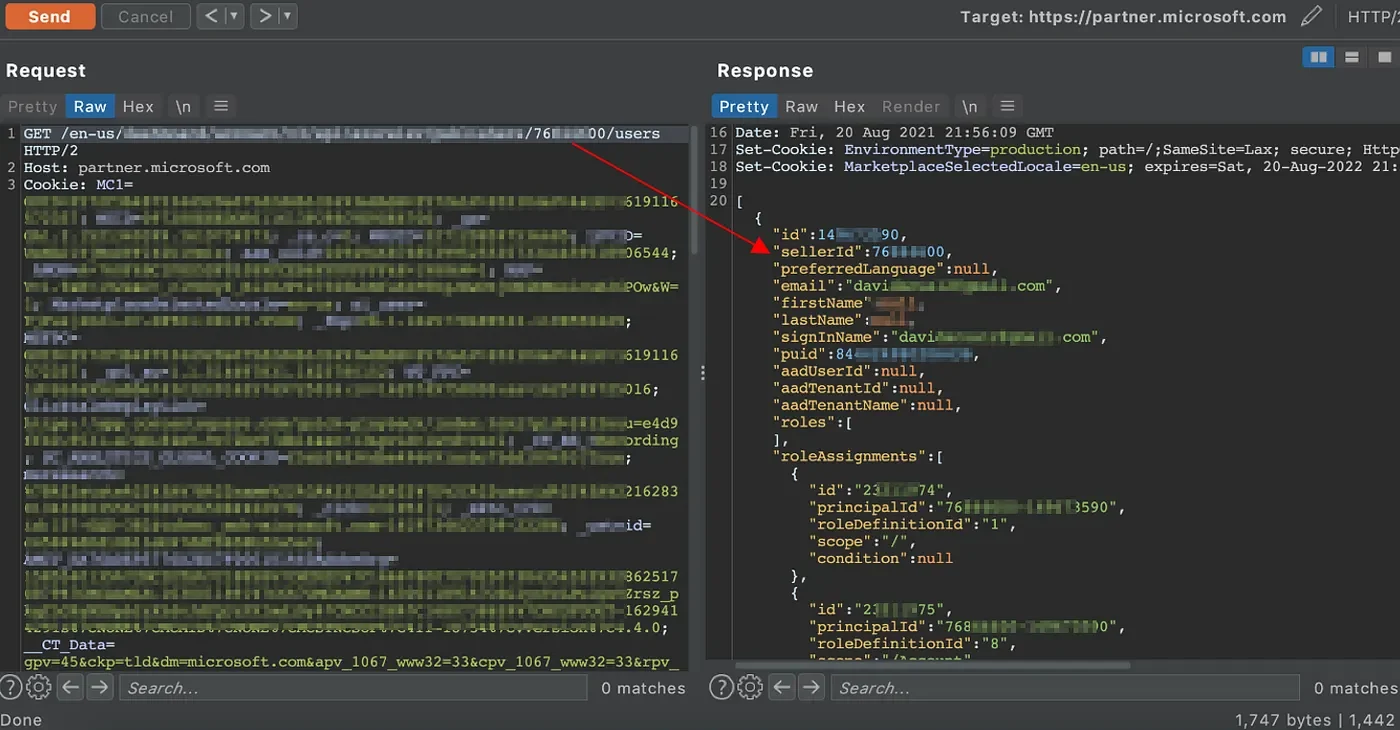
Details of users belongs to publisher 76????00
At this point the author concludes the application is clearly vulnerable to IDOR: an attacker can fetch any publisher's details.
Step 3: arbitrary sellers
The same request works with sellerIds that are nowhere near the author's own, for example:
GET /en-us/dashboard/account/<reduct>/<reduct>/<reduct>/<reduct>/3?????30/users HTTP/2Host: partner.microsoft.com
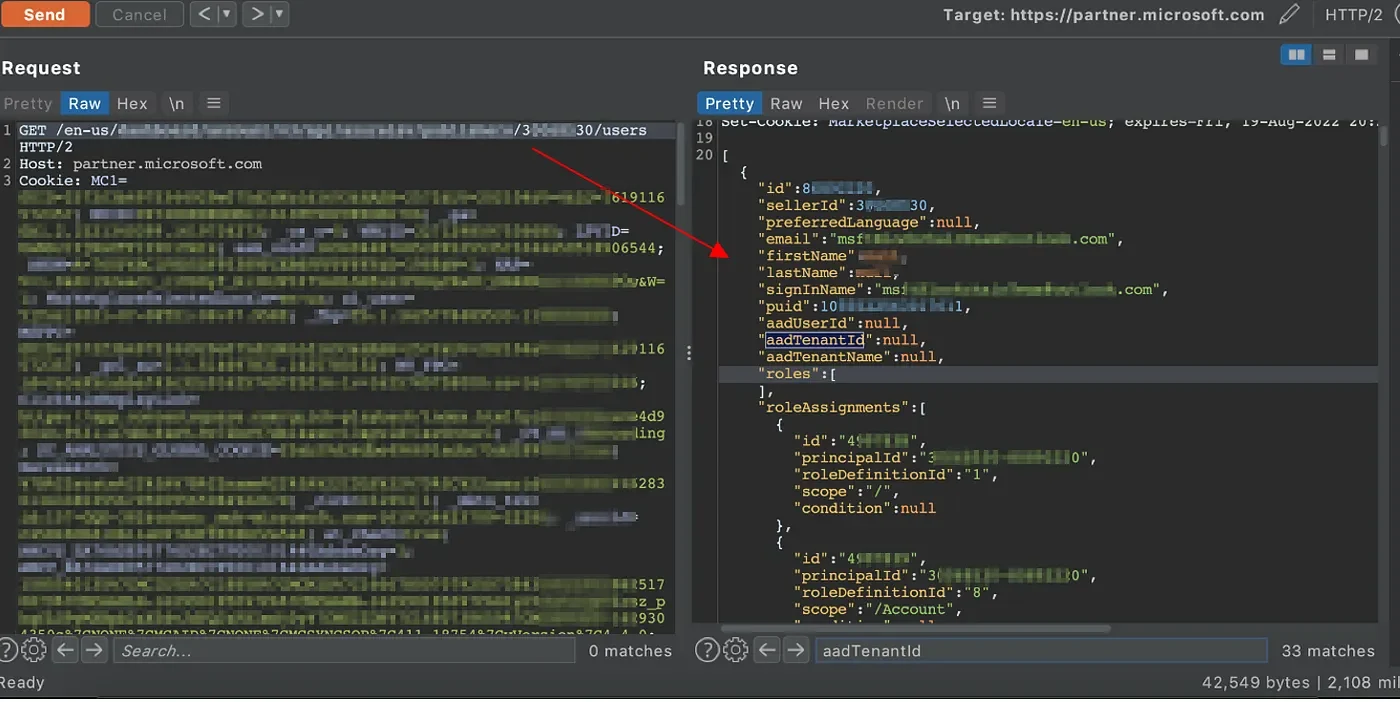
Details of users belongs to publisher 3?????30
and another example:
GET /en-us/dashboard/account/<reduct>/<reduct>/<reduct>/<reduct>/2?????50/users HTTP/2Host: partner.microsoft.com
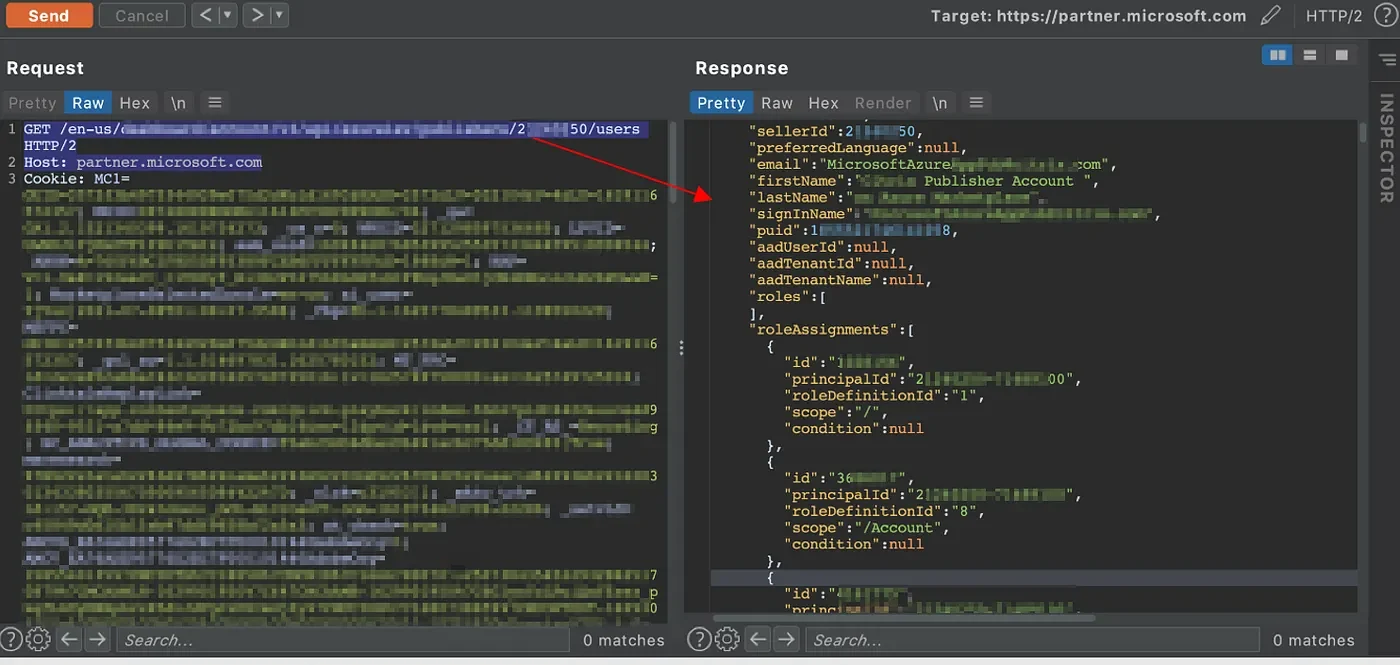
Details of users belongs to publisher 2?????50
Step 4: automation
Because the application has no rate limiting and the sellerId is sequential, the whole process can be automated to extract thousands of customers' details. The author includes a Python script for this.
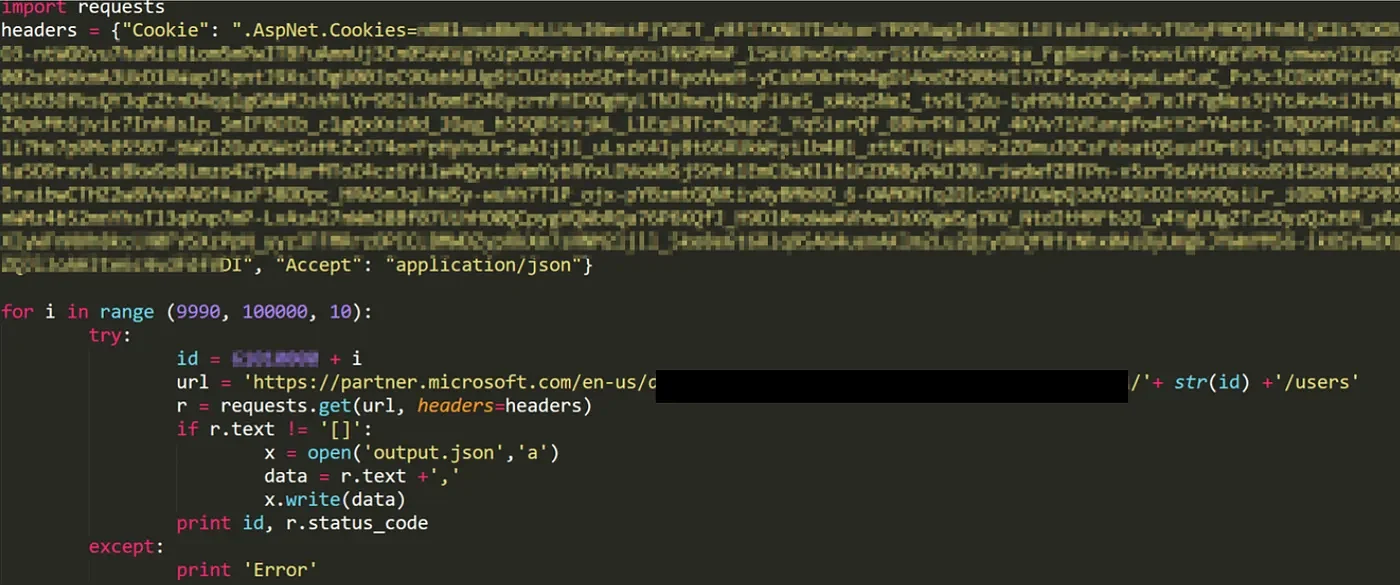
python script to extract thousands of users
Root cause
The endpoint takes the sellerId from the URL path and returns the users belonging to that seller. The application returns another customer's details without verifying the user's authorisation, so an authenticated partner can read other partners' data. The sequential, predictable sellerId makes enumeration trivial, and the absence of rate limiting means the enumeration can be run at scale. The report does not describe the server-side code, so the exact implementation of the missing check is not shown.
Impact
An authenticated partner can fetch the publisher information of other companies, including the users belonging to each seller. During the security review the author was able to fetch numerous companies' publisher information, including different Microsoft teams (the blockchain team, the AKS Engine team and others) and other important Microsoft Partners. The exposed data is the seller/publisher details and the users belonging to them, as shown in the screenshots. The report does not give a count of affected accounts beyond "thousands" being extractable through automation.
Fix
Microsoft fixed the vulnerability on 10 September 2021, three days after triage. The author's recommendations are:
- Implement rate limiting, so a user cannot send thousands of requests to a single endpoint in a short period.
- Use randomised strings to identify objects (user, account, customer and so on).
- Detect and respond to anomalies in real time.
- Treat S-SDLC as key.
- Perform security code review, manual and automated.
- Perform penetration testing before releasing any product to production.
- Log and monitor.
Variants to test
- Sequential numeric identifiers in path segments. Take any endpoint of the form
/account/.../<id>/usersand increment or decrement the id by small steps. A positive result is another organisation's users being returned rather than an authorisation error. - Identifiers far from your own range. Try values in completely different numeric ranges, as the author did with
3?????30and2?????50. A positive result is data for a seller you have no relationship with. - Missing rate limiting on enumeration. Script the request over a range of ids and watch for throttling. A positive result is a long run of successful responses with no blocking.
- Same pattern on sibling resources. Where a seller or account id appears in other endpoints, swap it for a neighbouring value. A positive result is another tenant's data returned under your session.
Timeline
| Date | Event |
|---|---|
| Aug 21, 2021 | Reported to Microsoft |
| Aug 21, 2021 | Case Manager assigns a case to the defect |
| Sep 07, 2021 | Triage |
| Sep 10, 2021 | Vulnerability was fixed |
| Dec 10, 2021 | Writeup Request |
What happened, in plain words
Microsoft runs a website called the Partner portal. Companies that build software on top of Microsoft products (Microsoft calls them independent software vendors, or ISVs) use this portal to manage their products, their users and their listings in Microsoft's commercial marketplace. Think of it as a private back office for each partner company: you log in, and you see your own company's information.
Inside that portal there is a page called Organization Profile that lists the "sellers" belonging to your account. Each seller has a numeric ID made of 8 digits. When you open that page, your browser quietly asks a Microsoft server for the list of users belonging to a particular seller, and it puts the seller's ID in the web address of that request.
The researcher noticed that this ID seems sequential in nature, so he tried the neighbouring value, adding 10 to his own. So he changed the number in the request to a neighbouring value, and the server happily returned the users of a completely different company. He then tried numbers far away from his own, and those worked too. Because nothing slowed him down, the whole process could be automated to extract thousands of customers' details, and the report includes a Python script for this.
This kind of bug is called an Insecure Direct Object Reference, or IDOR. The server checks that you are logged in, but it never checks that the thing you are asking for actually belongs to you.
Background: what IDOR is
The report starts with a definition, and it is worth unpacking it word by word. An IDOR is a type of access control vulnerability. "Access control" is simply the set of rules that decide who is allowed to see or do what. A vulnerability is a weakness that someone can abuse.
The definition says the problem arises when an application uses input supplied by the user to access an object directly, without properly checking the permission of that user. An "object" here means a record in the application's database: a user, an invoice, a company, a document. "Directly" means the application takes the identifier you gave it and looks the record up, with no further question asked. And the application relies solely on the presence of a valid session, meaning it only asks "is this person logged in?" and never "is this person allowed to see this particular record?".
An everyday comparison: imagine a hotel where the receptionist gives you a key card for room 305. If the card opens any room whose number you type into the lock, the hotel has an IDOR. The card proves you are a guest (a valid session), but nothing checks that room 412 is yours.
A small example to make it concrete
The report uses a fictional application, mynotsecureapp.com, and a fictional user called Negus whose userId is 1055. Negus fetches his own details with this address:
https://mynotsecureapp.com/users?userId=1055
Let us read that address piece by piece. https:// is the secure version of the protocol browsers use to talk to websites. mynotsecureapp.com is the name of the server. /users is the path, which tells the server which feature is being used, here the user records. Then comes a question mark, and after it userId=1055. Everything after the question mark is called the query string: it is a list of named values the browser sends along with the request. Here the name is userId and the value is 1055. The server reads that value and uses it to pick which record to return.
The result, according to the report, is the personal information of that user pulled from the backend database:
{ "UserId": 1055, "First Name": "Negus", "Last Name": "Ezana", "DoB": "1970–01–01", "Place of Birth": "Bahir Dar", "email": "[redacted]", "mobile": "0918xxxxxx"}
This block is written in JSON, a text format for structured data that applications use to exchange information. The curly braces wrap a single object, and inside it each line is a pair: a name in double quotes, a colon, then a value. So "UserId": 1055 means the field called UserId has the value 1055. The other fields are the user's first name, last name, date of birth, place of birth, email and mobile number. The email and mobile are partly masked in the report.
The interesting part, the report says, is the userId parameter. A parameter is just a named value in a request. From the point of view of an attacker, or simply a curious user, it is the one thing in the request that looks like it could be changed. So the report imagines Negus asking for the next user in the sequence, 1056:
https://mynotsecureapp.com/users?userId=1056
The only difference from the first address is the last digit. And the result, per the report, is the personal information of a different person, Mahelete:
{ "UserId": 1056, "First Name": "Mahelete", "Last Name": "Solomon", "DoB": "1980–04–10", "Place of Birth": "Addis Ababa", "email": "[redacted]", "mobile": "0911xxxxxx"}
Same structure as before, different values. The server did not stop and ask whether Negus was allowed to see user 1056. It saw a valid session and a number, and it returned the record. The report calls this circumventing the authorisation mechanism, which means getting around the rules that are supposed to limit what you can see. That is why the application can safely be called vulnerable to IDOR.
Why does it matter? Because an attacker can repeat this over and over and collect every user's details, and then use that information for harmful purposes. In plain terms, it causes serious financial and reputational damage to the owner of the application. The report adds a remark worth keeping in mind: an attacker only needs one vulnerable endpoint, while a defender has to protect all of them. An endpoint is one specific address on a server that performs one specific job, like /users above. This asymmetry is often called the attacker-defender dilemma.
The Microsoft Partner portal
Microsoft provides a platform where independent software vendors centrally build, manage and sell their solutions. Partners use the Microsoft Partner portal to manage publishers, users and the commercial marketplace. The report's goal is to show an IDOR in that portal which exposes all Microsoft Partner users.
Getting in
The only precondition is a registered account on the Microsoft Partner application. Once you have registered, you can reach the Partner portal by typing its address into your browser:
https://partner.microsoft.com
That is the whole setup: no special tools, no special access. The screenshot shows the portal as a normal registered partner sees it.
Finding your sellers
Under Organization Profile you can fetch the details of the sellers in your account. Each seller is identified by an 8 digit ID. The report gives the author's own as 76xxxx10, with the middle digits masked.
List of Sellers
The screenshot shows the list of sellers as displayed in the portal. This matters because it tells you what a legitimate seller ID looks like: eight digits, and in this account they end in a recognisable pattern.
Finding the request
The next step is to look at what the browser actually sends when that page loads. Modern websites are built from small pieces: the page you see is assembled by your browser, and the data inside it (the list of users, for example) is fetched separately from the server by a request that runs in the background. That kind of request is commonly called an API call. An API, or application programming interface, is the set of addresses and rules a program uses to talk to another program. When your browser talks to a website's API, it sends a request and receives a response, usually in JSON.
To see these requests you open your browser's developer tools, usually with the F12 key, and switch to the network tab, which lists every request the page makes. The report shows the request used to fetch publisher/seller details. The sellerId of the currently logged-in user in that request is 76????10.
Request:
GET /en-us/dashboard/account/<reduct>/<reduct>/<reduct>/<reduct>/76????10/users HTTP/2Host: partner.microsoft.com
Line by line:
GETis the method, the verb of the request. GET means "give me this thing"; it does not change anything on the server. Other common methods are POST (create something) and DELETE (remove something)./en-us/dashboard/account/<reduct>/<reduct>/<reduct>/<reduct>/76????10/usersis the path.en-usis the language,dashboard/accountlocates the account area, the four<reduct>placeholders stand for parts of the address the author removed before publishing,76????10is the seller ID, anduserssays which list is wanted: the users of that seller.HTTP/2is the version of the protocol used for the conversation between browser and server.Host: partner.microsoft.comnames the server being asked. Because the path is relative, the browser combines it with this host name to build the full address.
Details of users belongs to publisher 76????10
The screenshot shows the response for the author's own seller: the details of the users belonging to publisher 76????10. This is the normal, intended behaviour. It is the baseline you compare everything else against.
Response: the application returns the details of publishers.
Noticing the pattern
Close analysis reveals that the sellerId value seems sequential in nature. Sequential means the numbers follow one another in a predictable order, like house numbers on a street. If IDs are handed out in sequence, then the numbers next to yours belong to other customers, and you can guess them without any inside knowledge.
This is the key insight of the whole report. The researcher did not find a password or break any encryption. He simply noticed that one number in the address was predictable, and asked himself what would happen if he changed it. That question is the heart of testing for IDOR.
Step 1: reading the next seller
Starting from the author's own sellerId 76????10, adding 10 gives the next seller:
76????10 + 10 = 76????20
Request:
GET /en-us/dashboard/account/<reduct>/<reduct>/<reduct>/<reduct>/76????20/users HTTP/2Host: partner.microsoft.com
This is the same request as before with one change: the seller ID in the path is now 76????20 instead of 76????10. Everything else, the method, the path structure, the host, is identical. The reason for choosing exactly this value is that it is the immediate neighbour of the author's own ID, so if the IDs really are sequential, this should be the next customer.
Details of users belongs to publisher 76????20
The screenshot shows what came back: the details of the users belonging to publisher 76????20.
Response: the application discloses another customer's details without verifying the user's authorization. The report calls this unexpected behaviour, that is, a security vulnerability. The word "discloses" simply means it revealed information it should have kept private.
Step 2: reading the previous seller
Going the other way, subtracting 10 from 76????10 gives 76????00:
Request:
GET /en-us/dashboard/account/<reduct>/<reduct>/<reduct>/<reduct>/76????00/users HTTP/2Host: partner.microsoft.com
Again, only the seller ID changed, this time downwards. The reason for trying both directions is to confirm the pattern is not a one-off: if the number above yours and the number below yours both return other companies' data, the sequence is clearly shared across all customers, not just a coincidence.
Details of users belongs to publisher 76????00
The screenshot shows the users of publisher 76????00.
At this point the author concludes the application is clearly vulnerable to IDOR: an attacker can fetch any publisher's details.
Step 3: sellers far from your own
So far the IDs tried were neighbours of the author's own. The next question is whether the bug is limited to nearby numbers or works anywhere. The report tries seller IDs that are nowhere near the author's own:
GET /en-us/dashboard/account/<reduct>/<reduct>/<reduct>/<reduct>/3?????30/users HTTP/2Host: partner.microsoft.com
This request has the same shape as all the others, but the ID starts with a 3 instead of a 7. The request has the same shape as the others, but the ID starts with a 3 instead of a 7.
Details of users belongs to publisher 3?????30
The screenshot shows the users of publisher 3?????30.
And another example:
GET /en-us/dashboard/account/<reduct>/<reduct>/<reduct>/<reduct>/2?????50/users HTTP/2Host: partner.microsoft.com
Here the ID starts with a 2, even further from the author's own range. The reason is the same: to demonstrate that the choice of ID is completely free.
Details of users belongs to publisher 2?????50
The screenshot shows the users of publisher 2?????50.
Step 4: doing it at scale
One request at a time is slow. The report notes two facts that make automation possible. First, the application has no rate limiting. Rate limiting is a defence where a server counts how many requests arrive from one user in a given time and starts refusing them once the count is too high, a bit like a bouncer who lets only a few people in per minute. Without it, nothing stops a program from sending request after request. Second, the sellerId is sequential, so a program can simply count upwards through the numbers.
Because of those two facts, the whole process can be automated to extract thousands of customers' details. The report includes a Python script for this. Python is a popular programming language, and a script is a text file of instructions that the computer runs in order.
python script to extract thousands of users
The screenshot shows the script the author used to walk through the IDs and collect the results.
Why the bug exists
The endpoint takes the sellerId from the URL path and returns the users belonging to that seller. The application returns another customer's details without verifying the user's authorisation for the requested sellerId. So any authenticated partner can read any other partner's data. The sequential, predictable sellerId makes enumeration trivial, and the absence of rate limiting means the enumeration can be run at scale. Enumeration here means trying every possible value one after another. The report does not describe the server-side code, so the exact implementation of the missing check is not shown.
A useful way to picture it: the server behaves like a librarian who checks that you have a library card, then fetches any book whose number you write on a slip, without ever checking whether that book is on your borrowing list.
What was exposed
An authenticated partner can fetch the publisher information of other companies, including the users belonging to each seller. During the security review the author was able to fetch numerous companies' publisher information, including different Microsoft teams (the blockchain team, the AKS Engine team and others) and other important Microsoft Partners. The exposed data is the seller and publisher details and the users belonging to them, as shown in the screenshots. The report does not give a count of affected accounts beyond saying that thousands could be extracted through automation.
The fix
Microsoft fixed the vulnerability on 10 September 2021, three days after triage. Triage is the step where a security team reviews a report and confirms it is a real problem. The author's recommendations are:
- Implement rate limiting, so a user cannot send thousands of requests to a single endpoint in a short period.
- Use randomised strings to identify objects (user, account, customer and so on). A random string, unlike a sequential number, cannot be guessed by adding one.
- Detect and respond to anomalies in real time. An anomaly is activity that does not look like normal use, such as one account reading hundreds of different sellers in a minute.
- Treat S-SDLC as key. S-SDLC stands for secure software development life cycle: building security checks into every stage of making software, not just at the end.
- Perform security code review, manual and automated.
- Perform penetration testing before releasing any product to production. Penetration testing is deliberately attacking your own system, with permission, to find problems first.
- Log and monitor. Logging means keeping a record of what happened; monitoring means watching those records for signs of trouble.
Related patterns worth testing
These are the same idea applied in slightly different places, useful when you are learning to spot IDOR:
- Sequential numeric identifiers in path segments. Take any endpoint of the form
/account/.../<id>/usersand increment or decrement the id by small steps. A positive result is another organisation's users being returned rather than an authorisation error. - Identifiers far from your own range. Try values in completely different numeric ranges, as the author did with
3?????30and2?????50. A positive result is data for a seller you have no relationship with. - Missing rate limiting on enumeration. Script the request over a range of ids and watch for throttling. A positive result is a long run of successful responses with no blocking.
- Same pattern on sibling resources. Where a seller or account id appears in other endpoints, swap it for a neighbouring value. A positive result is another tenant's data returned under your session. A tenant is one customer organisation inside a shared service.
Timeline
| Date | Event |
|---|---|
| Aug 21, 2021 | Reported to Microsoft |
| Aug 21, 2021 | Case Manager assigns a case to the defect |
| Sep 07, 2021 | Triage |
| Sep 10, 2021 | Vulnerability was fixed |
| Dec 10, 2021 | Writeup Request |
Glossary
- Access control: the rules that decide who may see or do what in an application.
- Anomaly: activity that does not match normal use, such as one account reading hundreds of sellers.
- API (application programming interface): the set of addresses and rules one program uses to talk to another; in a website, the background requests that fetch data for the page.
- Attacker-defender dilemma: the attacker only needs one weak spot, the defender must protect every one.
- Authentication: proving who you are, usually by logging in.
- Authorisation: deciding what a proven user is allowed to access.
- Circumventing: getting around a rule or control without breaking it outright.
- Disclose: to reveal information that should have stayed private.
- Endpoint: one specific address on a server that performs one specific job.
- Enumeration: trying values one after another, often by counting, to discover what exists.
- GET: the request method that asks a server to return something without changing it.
- Host: the name of the server a request is addressed to.
- HTTP/2: a version of the protocol browsers and servers use to exchange requests and responses.
- IDOR (Insecure Direct Object Reference): a bug where the application takes an identifier from the user and returns the matching record without checking that the record belongs to that user.
- JSON: a text format for structured data, built from names and values in curly braces.
- Logging and monitoring: keeping records of activity and watching them for signs of trouble.
- Object: a record in an application's data, such as a user, a company or an invoice.
- Parameter: a named value sent with a request, such as
userId=1055. - Path: the part of a web address after the server name that identifies which feature is being used.
- Penetration testing: deliberately attacking your own system, with permission, to find weaknesses before others do.
- Query string: the part of a web address after the question mark, made of named values.
- Rate limiting: a defence that counts requests from one user over time and refuses them once the count is too high.
- Response: what the server sends back, including a status code and usually some data.
- S-SDLC (secure software development life cycle): building security checks into every stage of creating software.
- Seller ID: the 8 digit number that identifies a seller in the Microsoft Partner portal.
- Sequential: following a predictable order, like 10, 20, 30, so the next value can be guessed.
- Session: the state of being logged in, usually represented by a cookie or token the browser sends with each request.
- Tenant: one customer organisation inside a shared service.
- Triage: the step where a security team reviews a report and confirms it is a real problem.
- Vulnerability: a weakness in software that someone can abuse.




