Broken Access Control
An API endpoint for fetching user details by email did not check that the caller was authorised to view that user, and a related endpoint returned details for all users. An attacker with a valid partner account could read personally identifiable information of other users, including over 100,000 records.

As a part of Microsoft coordinated vulnerability disclosures, I would like to share a critical vulnerability within the dynamics portal which could allow an attacker to access personally identifiable information (first name, last name, email address, MPN ID etc.) of users of the Microsoft Dynamics for 365 Partner…
The full write-up lives on its author's site
It belongs to its author, so we link to it rather than copy it. The other two tabs are our own rewrites, checked against it.
Context
The target is the Microsoft Dynamics 365 for Partners portal, reached at a partner-facing host under dynamicspartners.xxxxx.microsoft.com. The portal is a web application for Microsoft partners, and behind its pages it calls a backend API hosted at landingapi-prod.azurewebsites.net. That API exposes user records: first name, last name, email address, MPN ID, AAD Profile ID and role name.
The feature at the centre of the report is the profile lookup. When a signed-in partner loads the portal, the front end asks the API for the details of the currently logged-in user, passing that user's email address as a parameter. The bug is that the same endpoint returns the details of another user whose email address you supply, and a second endpoint returns the whole user collection.
Setup
The only precondition is a valid partner account on the portal. The researcher used their own partner account to sign in, and a second testing account whose email address was used as the "other user" in the cross-user test. No special role, tooling or version information is given in the report.
Finding it
After logging in, the researcher watched the background API calls the portal makes. One of them stood out: a call that fetches the details of the currently logged-in user, where the user is identified by an email address taken from a query parameter. A user identifier supplied by the client, with no visible check that it belongs to the caller, is the classic shape of an IDOR, so it was worth testing whether the parameter could be pointed at somebody else.
Exploitation
Step 1: Sign in to the portal
Log in to the Dynamics 365 for Partners portal with a valid partner account:
https://dynamicspartners.xxxxx.microsoft.com/
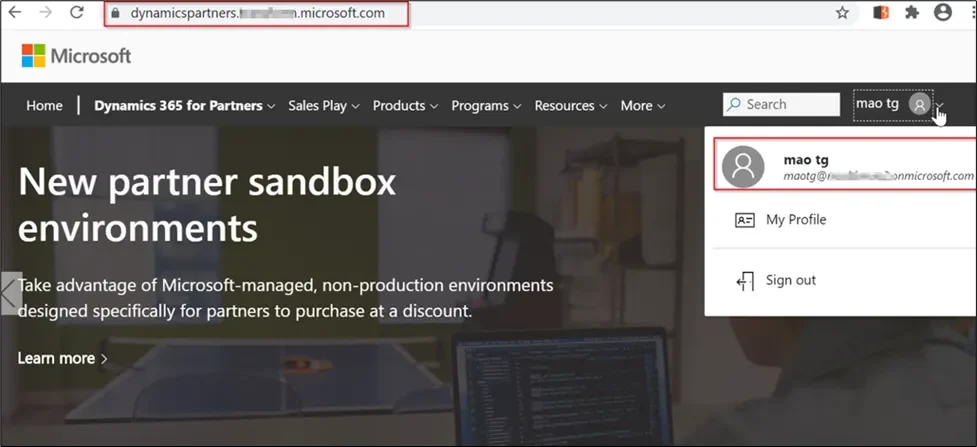
The screenshot shows the portal after login, the starting point for observing the API traffic described below.
Step 2: Capture the profile lookup
The portal issues several API calls in the background. The interesting one fetches the details of the currently logged-in user:
Endpoint: /api/Users/email?emailId=maotg@???.onmicrosoft.comHost: landingapi-prod.azurewebsites.netAuthorization: Bearer eyJ....
The emailId parameter carries the signed-in user's own email address by default, and the request is authenticated with a bearer token in the Authorization header. The response returns the first and last name, email address, MPNID, AAD Profile ID, role name and similar fields for that user.
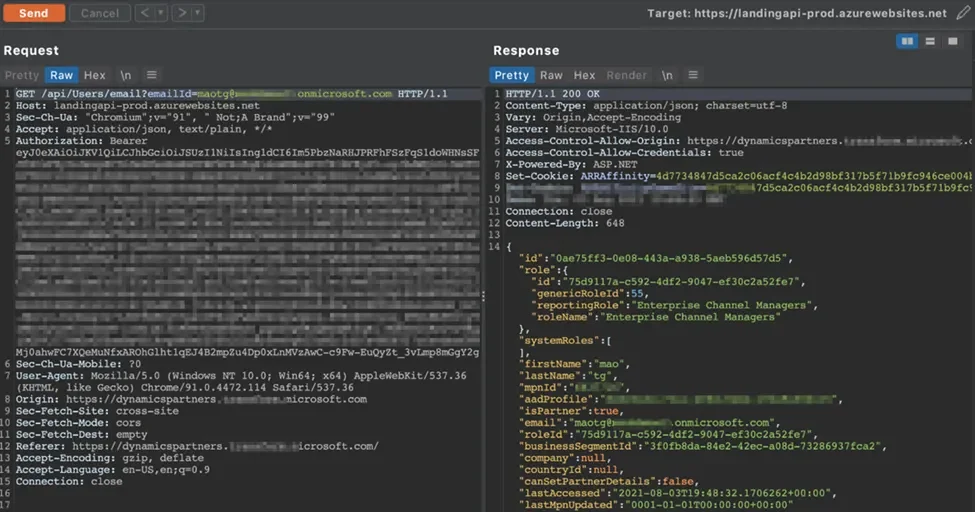
The screenshot shows the request as the portal sends it, with the caller's own address in emailId.
Step 3: Point the lookup at another user
The test is to change emailId to the email address of a different user on the portal. The researcher used the address of a second testing account:
Endpoint: /api/Users/email?emailId=moxxx@???.onmicrosoft.comHost: landingapi-prod.azurewebsites.netAuthorization: Bearer eyJ....
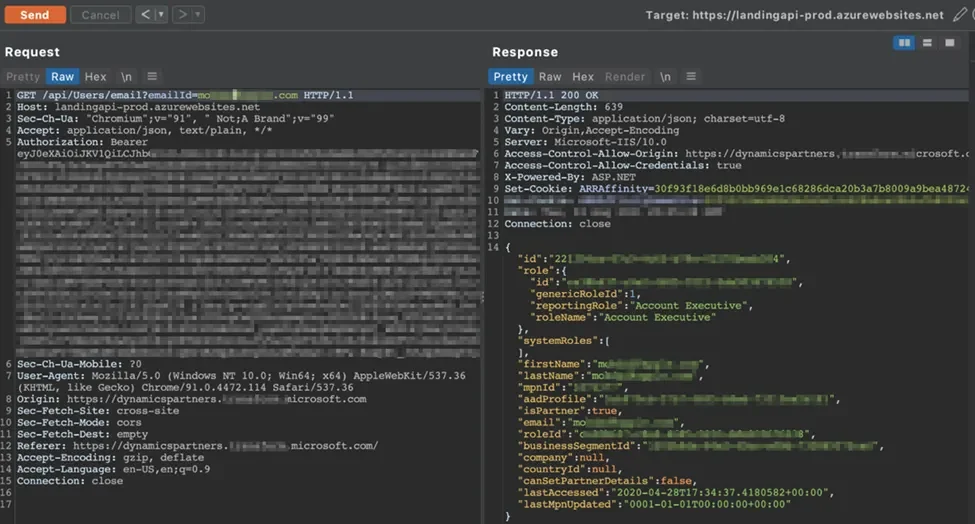
The screenshot shows this request and the data it returned for the second account.
The application returned the first and last name, email address, MPNID, AAD Profile ID, role name and other details of the other user, without any additional authorisation check on the API call. The bearer token was still the researcher's own; only the parameter changed. The limit is that the attacker must already know the victim's email address on the portal, which makes this an enumeration-by-known-identifier bug rather than a blind one.
Step 4: Request the whole user collection
Instead of the per-user lookup, the researcher invoked the collection endpoint directly:
Endpoint: /api/UsersHost: landingapi-prod.azurewebsites.netAuthorization: Bearer eyJ....
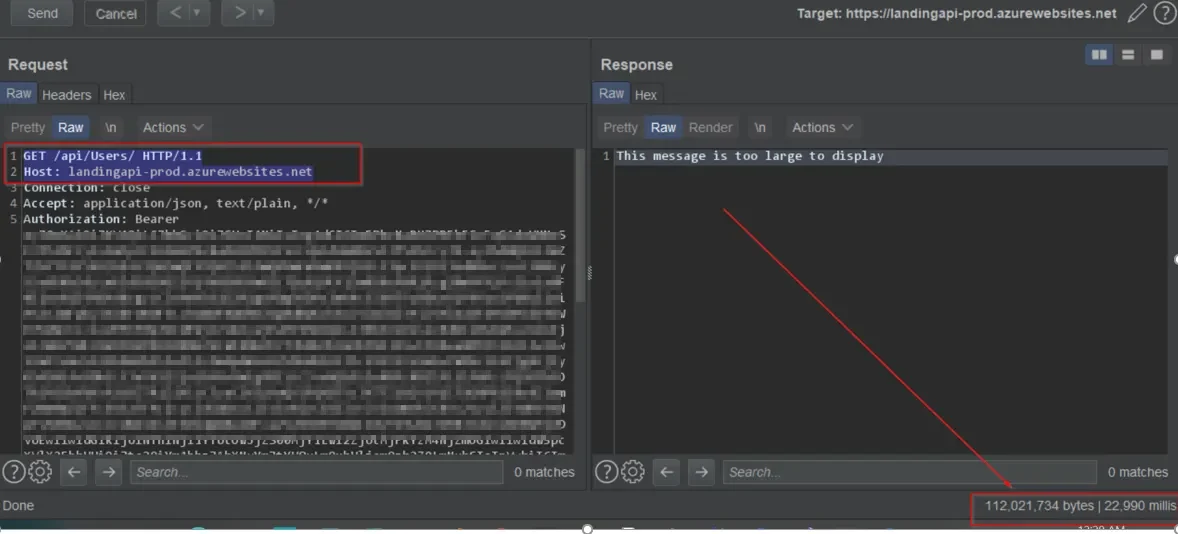
The screenshot shows the collection request and its response.
The response was roughly 112 megabytes of website user details, which the researcher estimates corresponds to more than 100,000 users. Again, no secondary authorisation was required beyond the ordinary partner bearer token.
Root cause
The API trusts a client-supplied identifier. /api/Users/email looks up a record by whatever emailId it is given and returns it, without confirming that the authenticated caller is that user or is entitled to see that user's record. The collection endpoint /api/Users returns the full user list without secondary authorisation beyond the ordinary partner token. Authentication is enforced (a bearer token is required), but authorisation on the object and on the collection is not, which is why this is classed as broken access control / IDOR. The report does not describe the server-side code, so the exact place where the check is missing is not stated.
Impact
An authenticated partner can read personally identifiable information of other portal users: first name, last name, email address, MPN ID, AAD Profile ID and role name. The single-record path requires knowing the victim's email address in advance. The collection path removes that constraint and discloses the details of what the researcher estimates to be over 100,000 users in one response of about 112 MB. The report describes the issue as critical; it does not describe any further use of the data, such as account takeover.
Fix
A fix was completed and communicated to the researcher on 12 August 2021, according to the timeline.
Variants to test
- Swap the identifier on any "who am I" endpoint. Find calls that take an email, user ID, object ID or tenant ID from the client and return profile data. Replace it with a second account's value. A positive result is a response containing the other account's fields while your own token is unchanged.
- Drop the per-object path and hit the collection. Where the UI calls
/api/Users/email?emailId=..., try/api/Usersdirectly. A positive result is a list or bulk export larger than anything the UI would show you. - Try the same parameter with an identifier you should not own. Use an address from a different tenant or domain in the same organisation. A positive result is a record returned rather than a 403 or an empty result.
- Check whether the token's role matters. Repeat the request with the lowest-privilege account you can create. A positive result is the same data coming back regardless of role.
Timeline
| Date | Event |
|---|---|
| Aug 04, 2021 | Reported to Microsoft |
| Aug 05, 2021 | Case manager assigns a case to the defect |
| Aug 12, 2021 | Fix completed and communicated to the finder |
| Sept 27, 2021 | Finder notification of intent to go public |
| Dec 16, 2021 | Approval for write-up |
What happened, in plain words
A security researcher found that a Microsoft website for Microsoft partners, called the Microsoft Dynamics 365 for Partners portal, was giving away personal details about its users to anyone who had a normal partner login. The details included first name, last name, email address, MPN ID and other account information. The researcher could ask the site for another person's details by supplying that person's email address in a request, and the site would hand them over. The researcher could also ask for the entire list of users in one go, which came back as about 112 megabytes of data, which they estimate is more than 100,000 users.
The researcher reported it to Microsoft on 4 August 2021, a fix was completed and communicated on 12 August 2021, and the write-up was approved on 16 December 2021.
This article walks through the same steps the researcher took, but explains every idea from scratch. You only need to be able to use a browser and a computer to follow along.
Background: what the product is and what an API is
The Microsoft Dynamics 365 for Partners portal is a website that Microsoft partners use to manage their partnership with Microsoft. A partner is a company that sells or supports Microsoft products. When a partner signs in, the portal shows them their profile and account information.
Behind the pages you see in a browser, modern websites often talk to a separate computer program called an API (Application Programming Interface). Think of the website as a restaurant dining room and the API as the kitchen: you (the browser) ask the waiter (the website's code) for something, and the waiter goes to the kitchen (the API) to fetch it. The API lives at a different address from the website itself. In this report, the portal is at dynamicspartners.xxxxx.microsoft.com and the API is at landingapi-prod.azurewebsites.net.
The API stores and returns user records. A user record is a bundle of information about one person: first name, last name, email address, MPN ID (Microsoft Partner Network identifier), AAD Profile ID (Azure Active Directory identifier) and role name (what level of access the person has).
The feature at the centre of this report is the profile lookup. When a signed-in partner loads the portal, the website's code asks the API: "give me the details of the person who is currently logged in." It does this by sending the person's email address as part of the request.
The vulnerability class: broken access control and IDOR
Two terms appear throughout this report, so let us define them now.
Broken access control means the system does not properly check whether the person making a request is allowed to see what they are asking for. Imagine a hotel where the receptionist gives you a key to your own room, but if you ask for room 214's key and say please, they hand it over without checking whether you are staying in that room. The lock works (you need a key to get in the building), but the rule about which key belongs to whom is missing.
IDOR stands for Insecure Direct Object Reference. It is a specific kind of broken access control where the system identifies something (a user, an order, a file) by a value that the client supplies, such as an email address or an ID number, and does not check that the client is allowed to access that particular thing. If you can change the value in the request and get somebody else's data back, that is an IDOR.
In this report, the value the client supplies is an email address in a parameter called emailId. The API looks up whatever email address it is given and returns that person's record, without checking that the person asking is that user or has permission to see other users.
Setup: what you need before you start
The only precondition is a valid partner account on the portal. The researcher used their own partner account to sign in, and a second testing account whose email address was used as the "other user" in the cross-user test. No special role, tooling or version information is given in the report.
Finding it: watching what the browser does
After logging in, the researcher watched the background API calls the portal makes. A browser normally hides these calls from you, but developer tools (built into every browser, usually opened with F12) let you see every request the page sends and every response it receives. One of those calls stood out: a call that fetches the details of the currently logged-in user, where the user is identified by an email address taken from a query parameter.
A query parameter is the part of a web address after a question mark. In example.com/page?name=alice, the parameter is name and its value is alice. Websites use query parameters to pass information to the server. A user identifier supplied by the client, with no visible check that it belongs to the caller, is the classic shape of an IDOR, so it was worth testing whether the parameter could be pointed at somebody else.
Exploitation
Step 1: Sign in to the portal
Log in to the Dynamics 365 for Partners portal with a valid partner account:
https://dynamicspartners.xxxxx.microsoft.com/
This line is the address of the portal's front page. You open it in a browser, enter your partner credentials, and you are signed in. The screenshot shows the portal after login, the starting point for observing the API traffic described below. Signing in matters because the API calls that follow only work for an authenticated user: the portal gives your browser a credential that it attaches to every request.
Step 2: Capture the profile lookup
The portal issues several API calls in the background. The interesting one fetches the details of the currently logged-in user:
Endpoint: /api/Users/email?emailId=maotg@???.onmicrosoft.comHost: landingapi-prod.azurewebsites.netAuthorization: Bearer eyJ....
Line by line:
Endpoint: /api/Users/email?emailId=maotg@???.onmicrosoft.comis the path being requested on the API server./api/Users/emailis the address of the profile lookup feature. After the question mark,emailId=maotg@???.onmicrosoft.comis the query parameter: the API is being asked for the user whose email address ismaotg@???.onmicrosoft.com. The???is a redaction in the report, hiding part of the real domain.Host: landingapi-prod.azurewebsites.nettells the network which server the request is for. This is the API server, not the portal website.Authorization: Bearer eyJ....is the credential. A bearer token is a long string of characters that the server issued to you when you signed in. "Bearer" means "whoever carries this token is treated as the user it was issued to", like a wristband at a festival: the staff check the wristband, not your face. TheeyJ....is a shortened, redacted example of such a token. Every request carries it so the API knows who is asking.
The emailId parameter carries the signed-in user's own email address by default, and the request is authenticated with a bearer token in the Authorization header. The response returns the first and last name, email address, MPNID, AAD Profile ID, role name and similar fields for that user.
The screenshot shows the request as the portal sends it, with the caller's own address in emailId. The researcher captured it to understand exactly how the portal asks for a user's details, so that the same request could be replayed with a different value.
Step 3: Point the lookup at another user
The test is to change emailId to the email address of a different user on the portal. The researcher used the address of a second testing account:
Endpoint: /api/Users/email?emailId=moxxx@???.onmicrosoft.comHost: landingapi-prod.azurewebsites.netAuthorization: Bearer eyJ....
Line by line:
Endpoint: /api/Users/email?emailId=moxxx@???.onmicrosoft.comis the same profile lookup path as before, but the value afteremailId=is now a different email address, belonging to the researcher's second testing account. Everything else in the request is unchanged.Host: landingapi-prod.azurewebsites.netis still the API server.Authorization: Bearer eyJ....is still the researcher's own token, issued to their first account. This is the crucial part: the caller has not changed, only the value in the parameter.
The screenshot shows this request and the data it returned for the second account.
The application returned the first and last name, email address, MPNID, AAD Profile ID, role name and other details of the other user, without any additional authorisation check on the API call. The bearer token was still the researcher's own; only the parameter changed. The limit is that the attacker must already know the victim's email address on the portal, which makes this an enumeration-by-known-identifier bug rather than a blind one. In plain terms: you cannot ask "show me user number 5" without knowing that user's email address first, but if you do know it, the site hands over their details.
Step 4: Request the whole user collection
Instead of the per-user lookup, the researcher invoked the collection endpoint directly:
Endpoint: /api/UsersHost: landingapi-prod.azurewebsites.netAuthorization: Bearer eyJ....
Line by line:
Endpoint: /api/Usersis the address of the whole user collection, without any?emailId=parameter. Where/api/Users/emailasks for one record,/api/Usersasks for the list of all records. Think of it as asking the library for one book by its title versus asking for the entire shelf.Authorization: Bearer eyJ....is still the researcher's ordinary partner token.
The screenshot shows the collection request and its response.
The response was roughly 112 megabytes of website user details, which the researcher estimates corresponds to more than 100,000 users. Again, no secondary authorisation was required beyond the ordinary partner bearer token. The researcher did not need to know any email addresses for this step: the API simply returned everything.
Root cause
The API trusts a client-supplied identifier. /api/Users/email looks up a record by whatever emailId it is given and returns it, without confirming that the authenticated caller is that user or is entitled to see that user's record. The collection endpoint /api/Users returns the full user list without secondary authorisation beyond the ordinary partner token. Authentication is enforced (a bearer token is required), but authorisation on the object and on the collection is not, which is why this is classed as broken access control / IDOR. The report does not describe the server-side code, so the exact place where the check is missing is not stated.
In everyday terms: the building has a doorman who checks that you have a wristband, but nobody checks which rooms the wristband opens. Once you are inside, every door opens.
Impact
An authenticated partner can read personally identifiable information of other portal users: first name, last name, email address, MPN ID, AAD Profile ID and role name. Personally identifiable information (PII) is any data that can be used to identify a specific person, such as a name or an email address. The single-record path requires knowing the victim's email address in advance. The collection path removes that constraint and discloses the details of what the researcher estimates to be over 100,000 users in one response of about 112 MB. The report describes the issue as critical; it does not describe any further use of the data, such as account takeover.
Fix
A fix was completed and communicated to the researcher on 12 August 2021, according to the timeline.
Variants to test
If you want to look for the same kind of bug in other applications, here are four things to try. Each one is a small variation on the same idea: change a value the client controls and see whether the server still hands over data it should not.
- Swap the identifier on any "who am I" endpoint. Find calls that take an email, user ID, object ID or tenant ID from the client and return profile data. Replace it with a second account's value. A positive result is a response containing the other account's fields while your own token is unchanged.
- Drop the per-object path and hit the collection. Where the UI calls
/api/Users/email?emailId=..., try/api/Usersdirectly. A positive result is a list or bulk export larger than anything the UI would show you. - Try the same parameter with an identifier you should not own. Use an address from a different tenant or domain in the same organisation. A positive result is a record returned rather than a 403 or an empty result. A 403 is the HTTP status code for "forbidden", the server's way of saying you are not allowed to see this.
- Check whether the token's role matters. Repeat the request with the lowest-privilege account you can create. A positive result is the same data coming back regardless of role.
Timeline
| Date | Event |
|---|---|
| Aug 04, 2021 | Reported to Microsoft |
| Aug 05, 2021 | Case manager assigns a case to the defect |
| Aug 12, 2021 | Fix completed and communicated to the finder |
| Sept 27, 2021 | Finder notification of intent to go public |
| Dec 16, 2021 | Approval for write-up |
Glossary
- API: Application Programming Interface; a program on a server that other programs (such as a website's code) talk to in order to fetch or send data.
- Access control: the rules that decide who is allowed to see or do what. When those rules are missing or wrong, it is called broken access control.
- AAD Profile ID: Azure Active Directory profile identifier; a unique code for a user's account in Microsoft's directory service.
- Authentication: proving who you are, for example by signing in with a username and password.
- Authorisation: deciding what a signed-in person is allowed to see or do. Authentication is the doorman checking your wristband; authorisation is the rule about which rooms that wristband opens.
- Bearer token: a long string of characters issued at sign-in that the server treats as proof of identity; whoever carries it is treated as the user it was issued to.
- Broken access control: a vulnerability where the system does not properly check whether the caller is allowed to access what they are asking for.
- Collection endpoint: an API address that returns a list of many records, as opposed to a single record.
- Developer tools: features built into browsers that let you inspect the requests and responses a page makes.
- Email address (in this report): the value used as the user identifier in the
emailIdparameter. - Endpoint: the specific address of one feature on an API, such as
/api/Users/email. - Enumeration: systematically discovering information, such as which email addresses exist on a system.
- Header: extra information attached to a request, such as
HostorAuthorization. - Host: the header that tells the network which server a request is for.
- IDOR: Insecure Direct Object Reference; a vulnerability where the system identifies something by a value the client supplies and does not check that the client is allowed to access it.
- MPN ID: Microsoft Partner Network identifier; a code that identifies a partner organisation.
- Parameter: a named value passed in a request, such as
emailId=...in a query string. - PII: Personally Identifiable Information; data that can identify a specific person, such as a name or email address.
- Portal: a website that gives signed-in users access to a set of services or data.
- Query parameter: the part of a web address after a question mark, made of a name and a value, such as
?emailId=[redacted]. - Response: what the server sends back after a request.
- Role name: a label describing what level of access a user has.
- Root cause: the underlying reason a vulnerability exists, as opposed to its symptoms.
- Token: see bearer token.
- User record: the bundle of information the system stores about one person, such as name, email address and identifiers.
- 403: the HTTP status code meaning "forbidden"; the server understood the request but refuses to allow it.


