Insecure Comments
The web API used to post comments on Word and PowerPoint documents accepted the author's display name, email address and object ID from the client without checking them against the logged-in user. An attacker could therefore post comments and appear as the author of a document while impersonating any Microsoft 365 user, inside or outside their tenant.

This is my blog regarding to impersonating and publishing a comment on behalf of any Microsoft Word and PowerPoint users. Interestingly, Excel and Visio are secure, they handle the comments in a different way (secure way).
The full write-up lives on its author's site
It belongs to its author, so we link to it rather than copy it. The other two tabs are our own rewrites, checked against it.
Context
Microsoft Word and PowerPoint documents opened in the browser can carry comments. A comment has three parts: an author (the person who starts the conversation, usually the logged-in user or someone the document is shared with), a message body, and the document the comment is attached to. The researcher found that the API call used when commenting carries the author's display name and an S:: identity string in the request body, and that changing them changes who the comment is attributed to. The result is that a user can publish a comment attributed to any other Microsoft 365 user, and can also add that user as an author of the document, without the victim's involvement.
Excel and Visio are described as secure: they handle comments in a different way. The issue was reported to Microsoft and classified as 'by design'. The researcher disagrees and considers it a vulnerability with significant risk.
Setup
The scenario uses a Microsoft 365 tenant with a user abel@msobb*.onmicrosoft.com (display name Abel John) who creates a document called September.docx and adds a comment. The report notes that the same behaviour works cross-tenant, not only within one tenant.
To impersonate a victim, the attacker needs three pieces of information: the victim's email address, first and last name, and object ID. The report states this information can be found easily through the Microsoft Teams external user search feature.
Finding it
The researcher looked at the API call made when a comment is posted from the Word editor. The endpoint observed was:
POST /we/OneNote.ashx?perfTag=PutChanges_1Host: euc-word-edit.officeapps.live.com

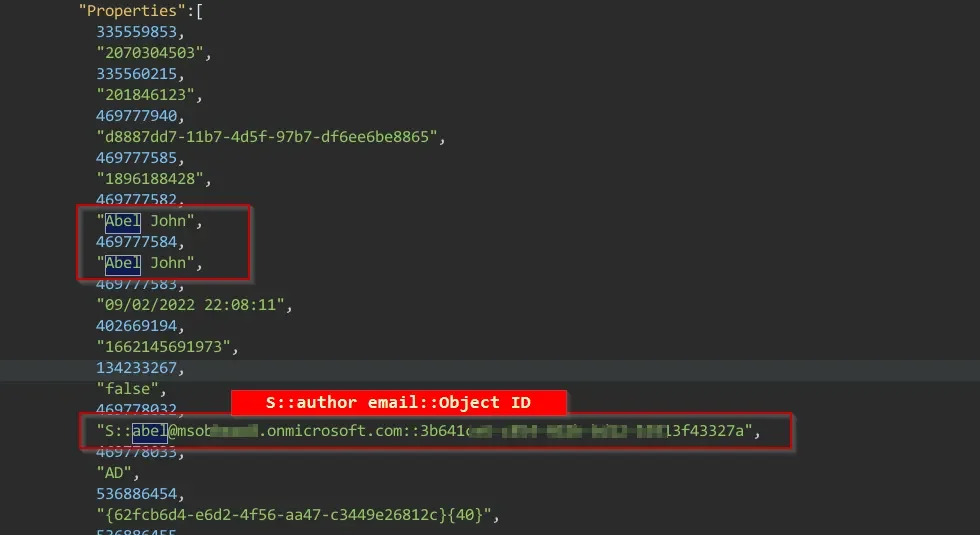
The request body contains the author's display name and a string of the form S::<author_email>::Object ID of the user. In the original, untampered request this was:
"Abel John",4668585..,"Abel John",."S::abel@msobb….onmicrosoft.com::3b64……27a" -> S::<author_email>::Object ID of the user
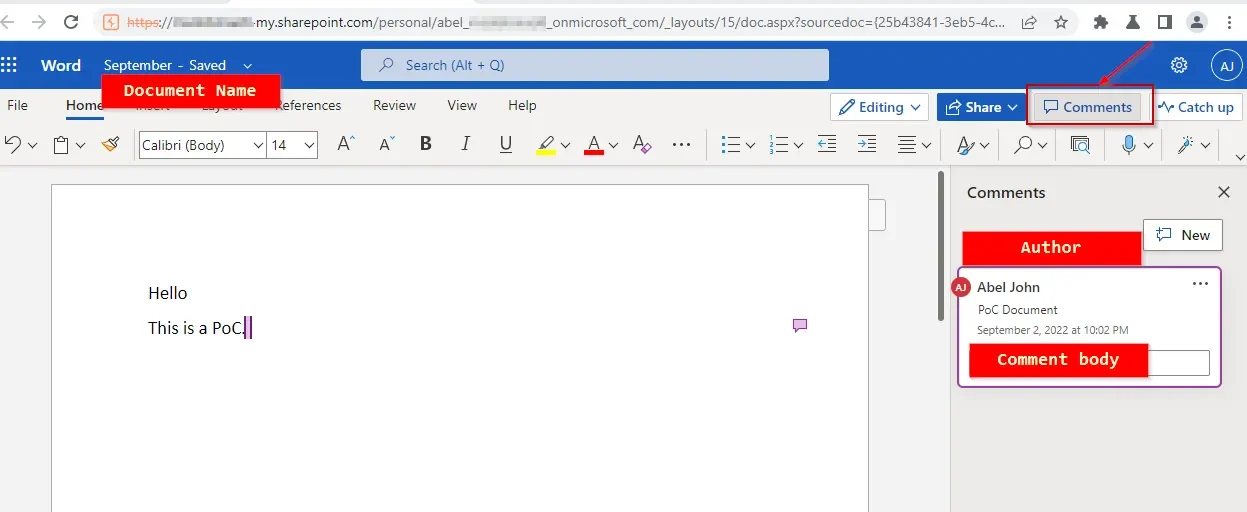
The document itself, with Abel's comment, is shown here:
Exploitation
Step 1: Capture the original comment request
Abel John creates a comment on September.docx with the body PoC Document. The captured request contains the author name and the S:: identity string shown above. This is the baseline that will be modified.
Step 2: Replace the author details with the victim's
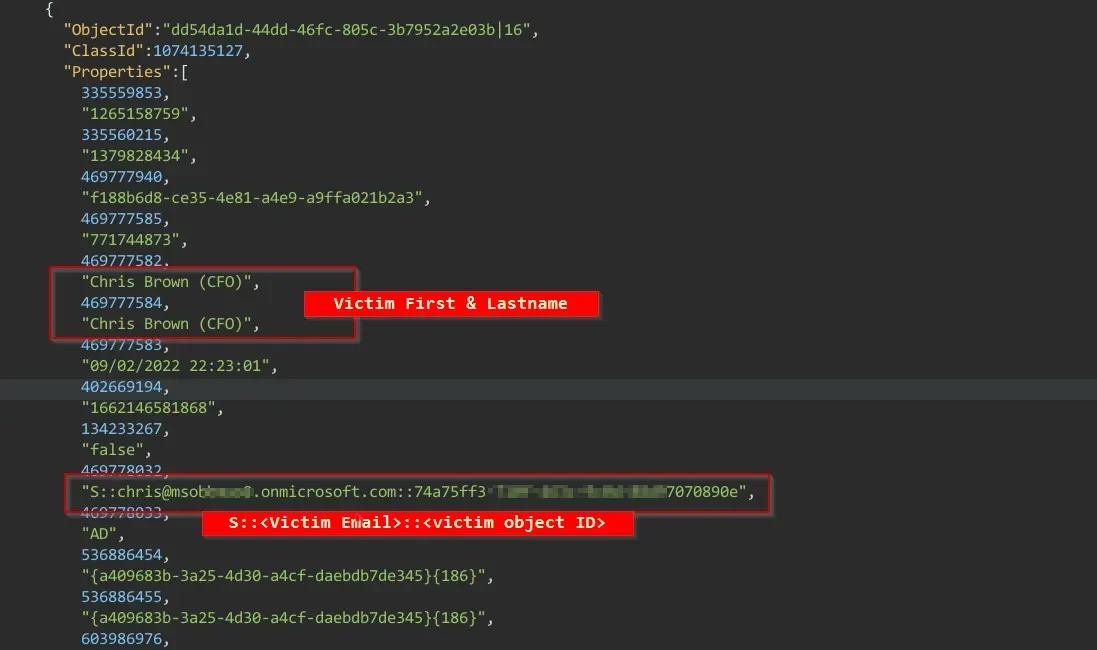
The attacker substitutes the display name, email address and object ID with those of the victim, Chris Brown (CFO):
"Chris Brown (CFO)", 4668585..,"Chris Brown (CFO)",."S::[redacted]::74a75f...........90e" -> S::<victim_email>::Object ID of the victim
Step 3: Send the tampered request and refresh
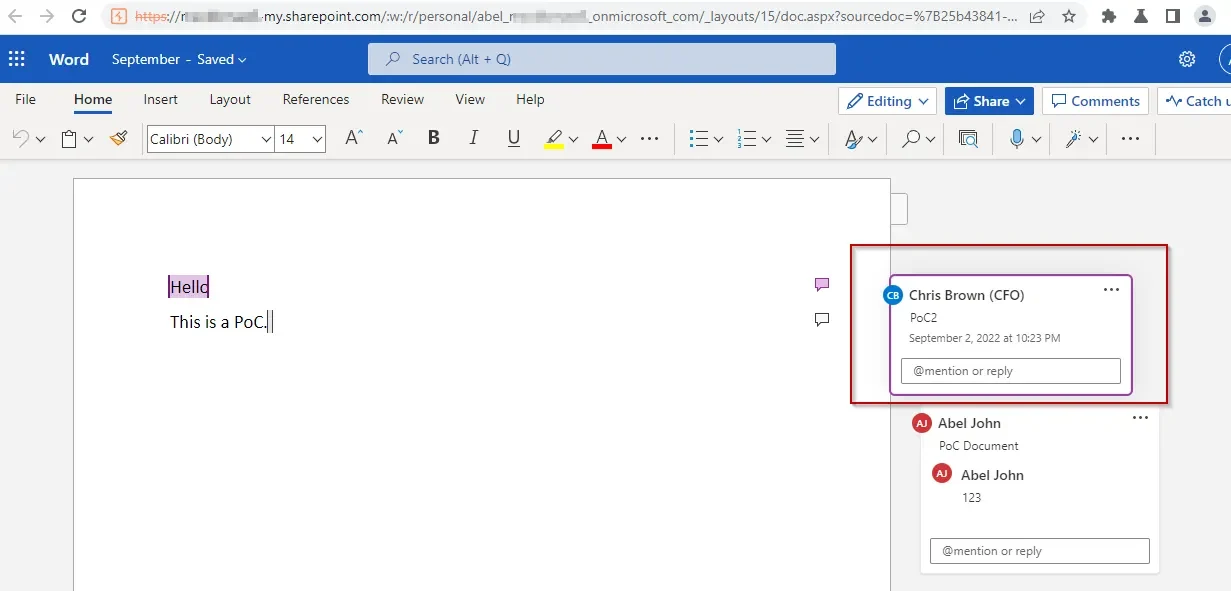
After replacing the values with the victim's details and refreshing the page, the comment is published on behalf of the victim user.
Step 4 (optional): Add another comment and change the membership parameter
The process is repeated, this time also replacing the victim email on the membership parameter.
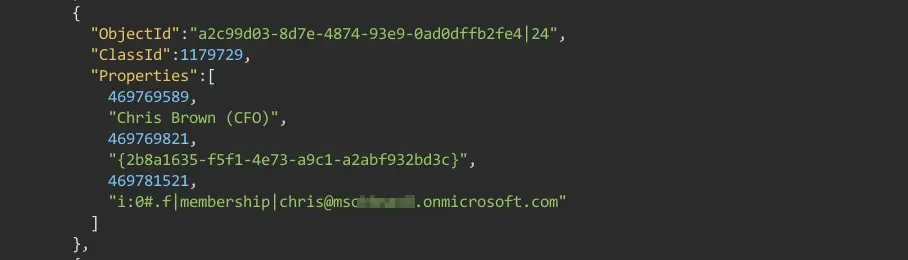
From the UI, the replayed comment appears as expected:
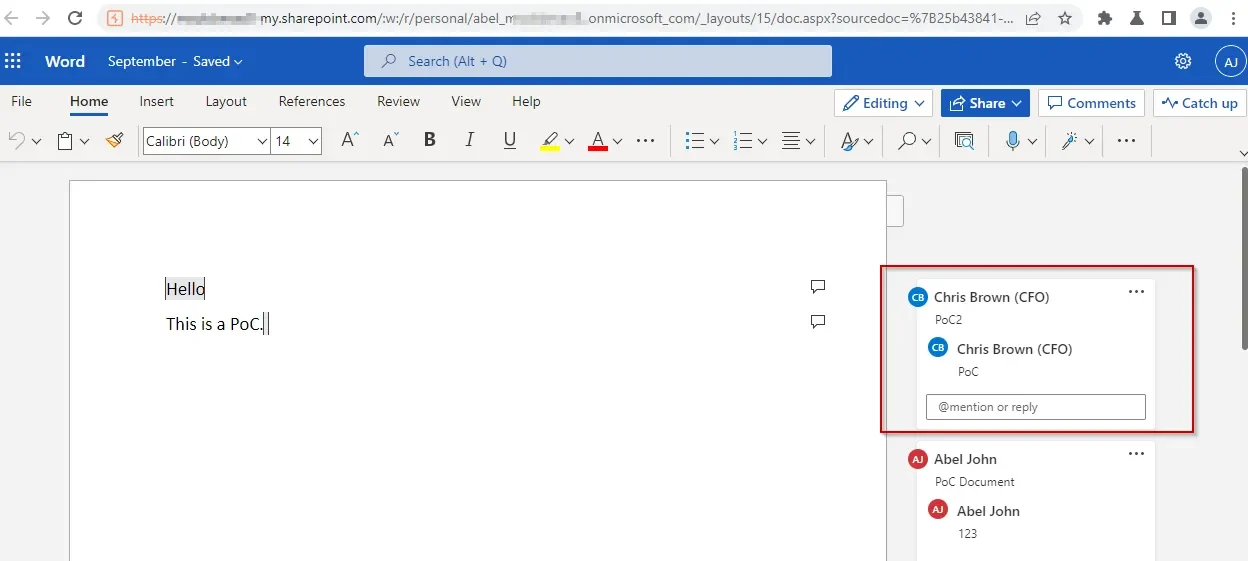
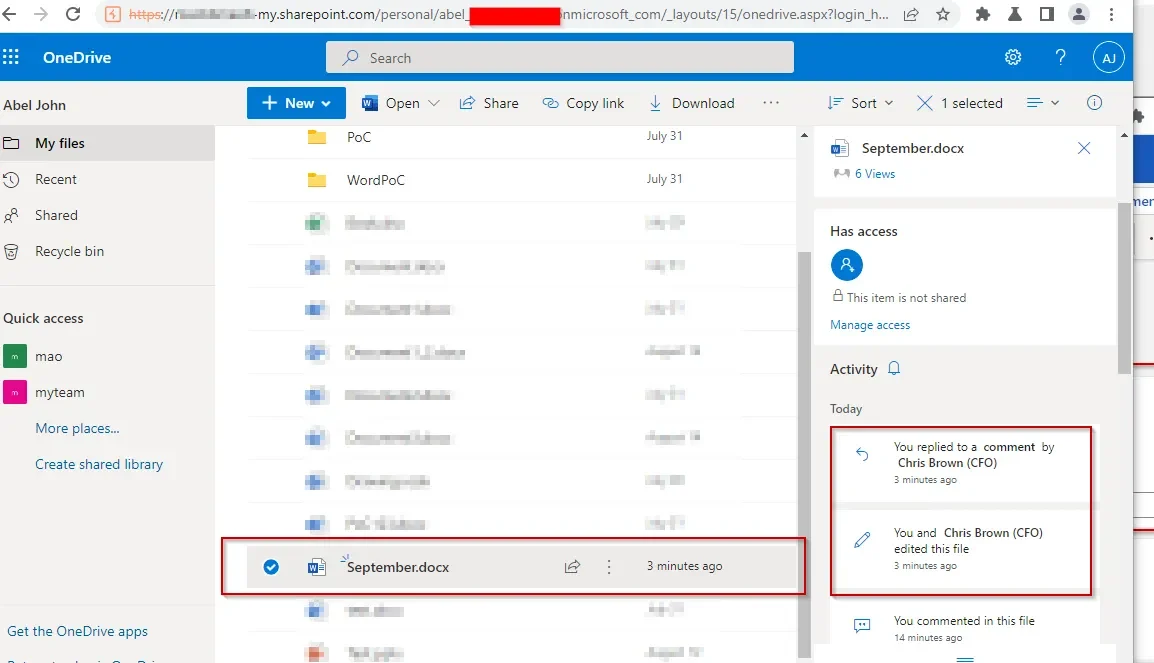
Step 5: Observe the effect in OneNote activities and version history
In OneNote, under the 'Activities' section, Chris Brown is shown commenting on the document, even though his details were used without his involvement.
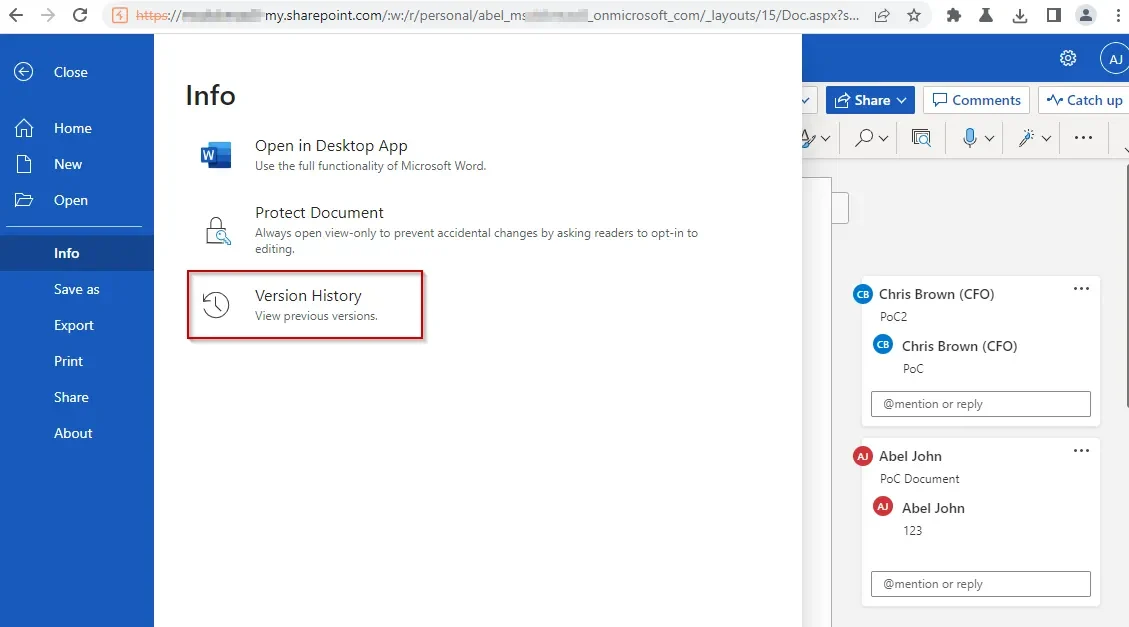
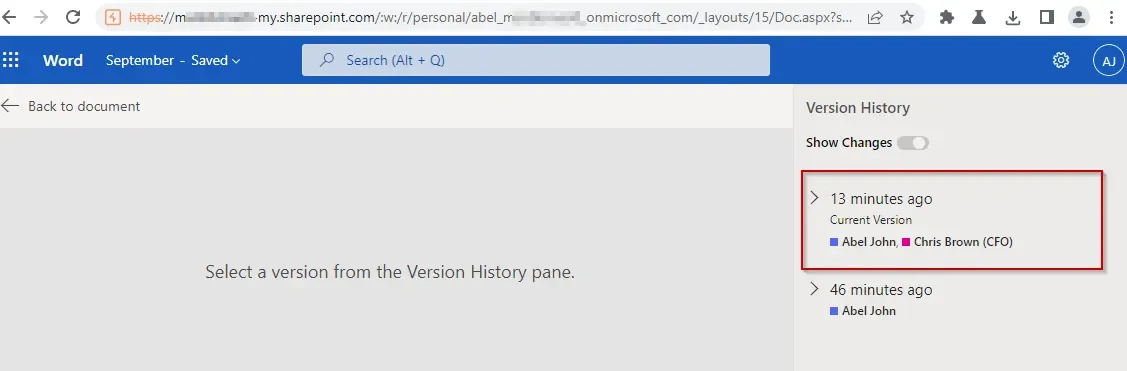
More importantly, Chris Brown becomes the author of the document without his awareness, as shown in the version history.
Another example: impersonating the Microsoft Security Response Center
A second demonstration uses a user abel@msobb???.onmicrosoft.com (Author #2, Abel John) who creates a document (Document Name #1) and adds a comment (Message Body #3).
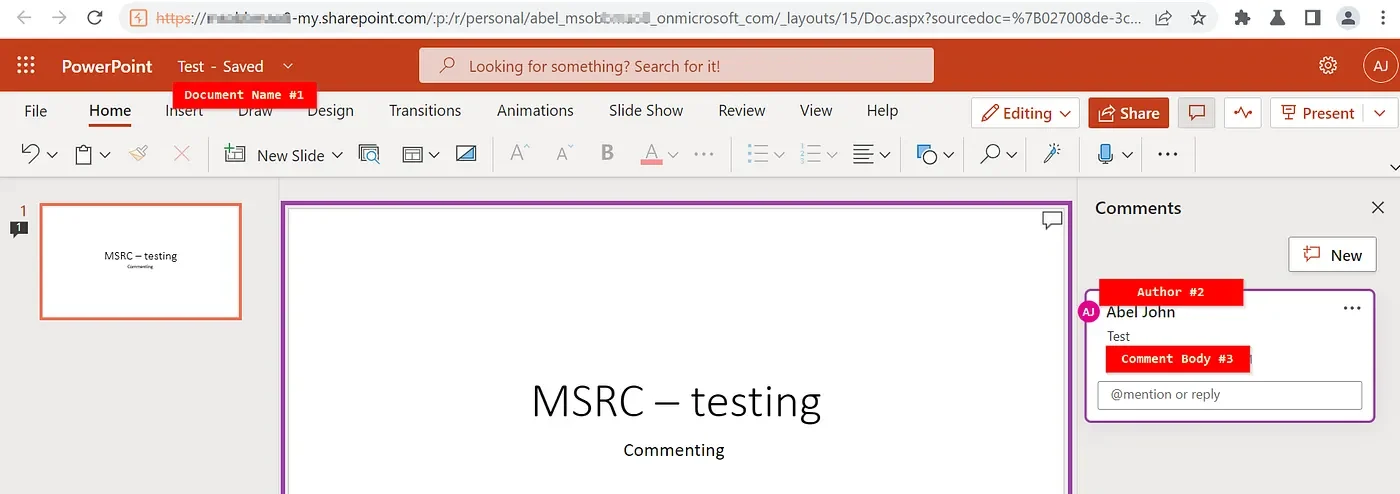
The report notes that anyone can edit a comment if the document is shared with edit rights, but in this case the document is not shared with anyone.
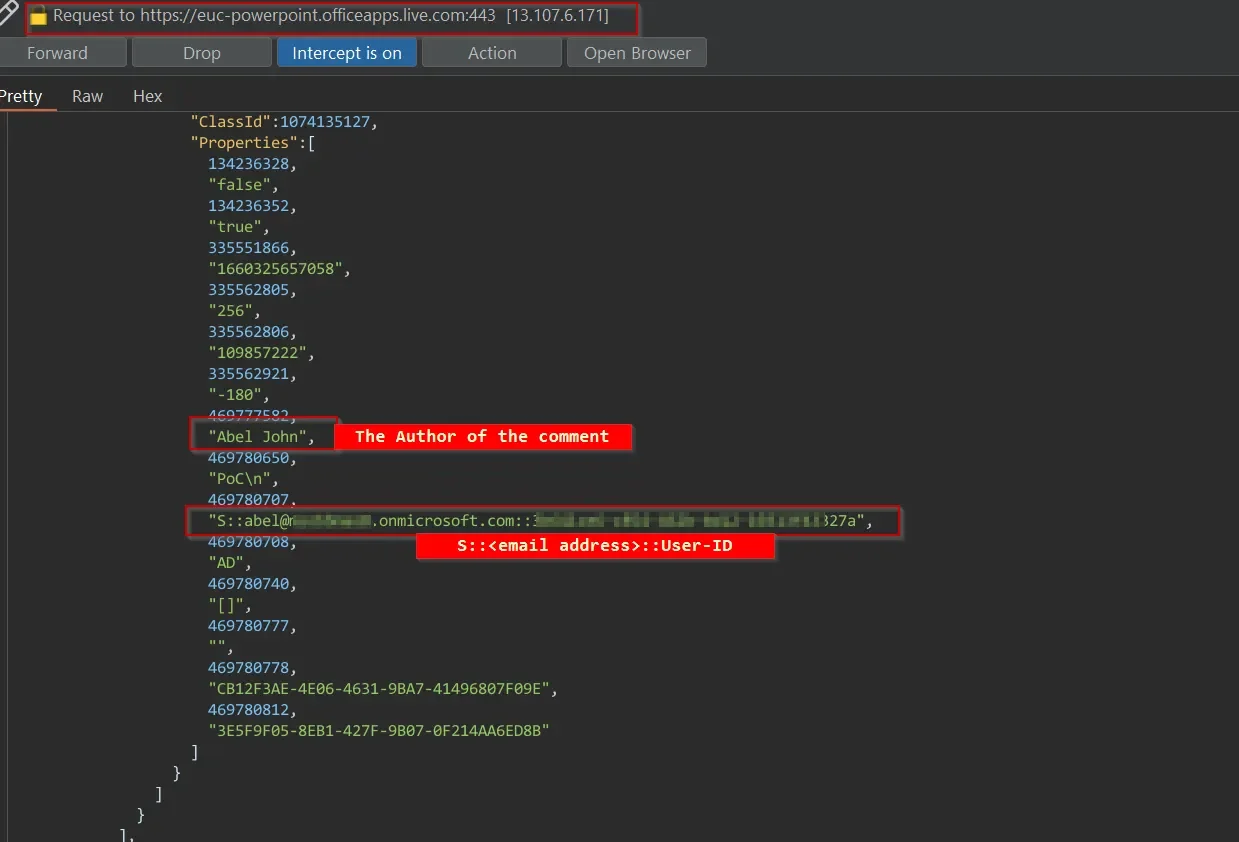
The underlying API call exposes the same parameters:
..."Properties":[ "-180", 469777582, "Abel John", 469780650, "PoC\n", 469780707, "S::[redacted]::3b6XXXXX-XXXX-XXXXX-bd12-10XXXXXXXXX", 469780708, "AD", 469780740, "[]", 469780777, "", ....
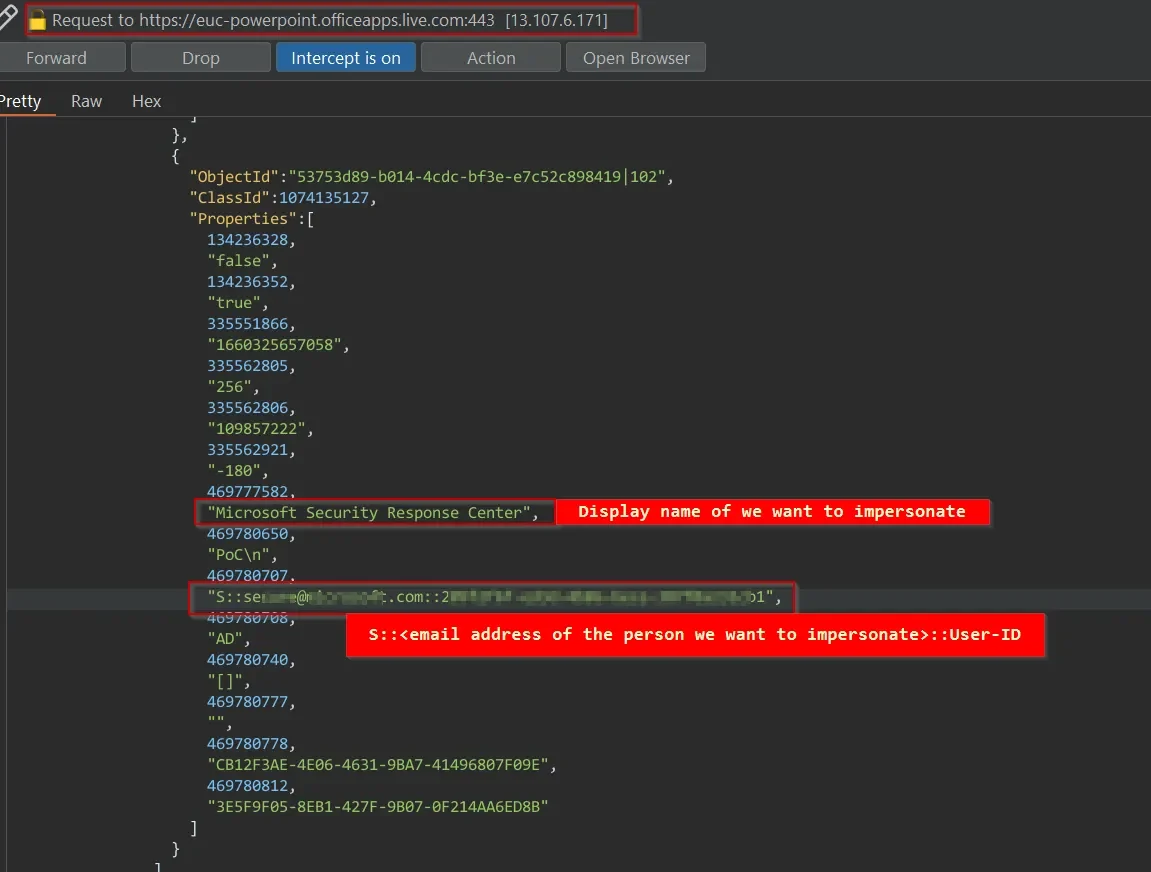
To exploit, the attacker needs the email address (UPN), display name and object ID of the target. For this example the Microsoft Security Response Center identity is used. The report notes that any user within or outside the tenant can be impersonated.
..."Properties":[ "-180", 469777582, "Microsoft Security Response Center",(Display name we want to impersonate) 469780650, "PoC\n", 469780707, "S::[redacted]::2XXXXX-XXXX-XXXXX-bd12-10XXXXXXXXX",(S::UPN::Object ID of the user we want to impersonate) 469780708, "AD", 469780740, "[]", 469780777, "", ....
The replacement is summarised as:
Display Name from Abel John -to- Microsoft Security Response CenterS::[redacted]::ObjectID -to- S::[redacted]::ObjectID
The request succeeds and the comment is published on behalf of the Microsoft Security Response Center user.
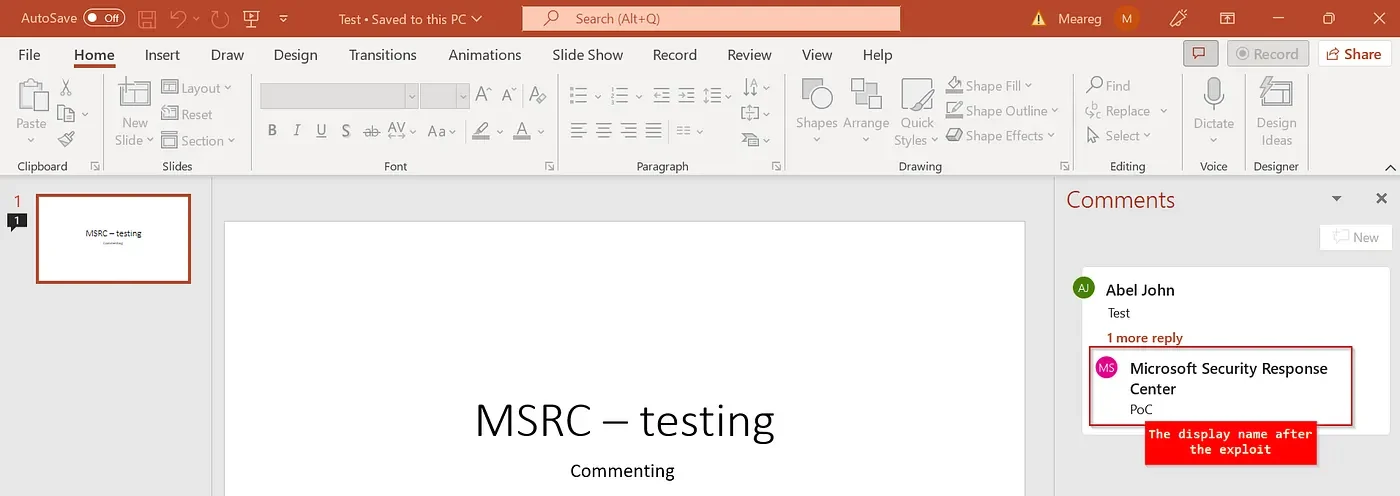
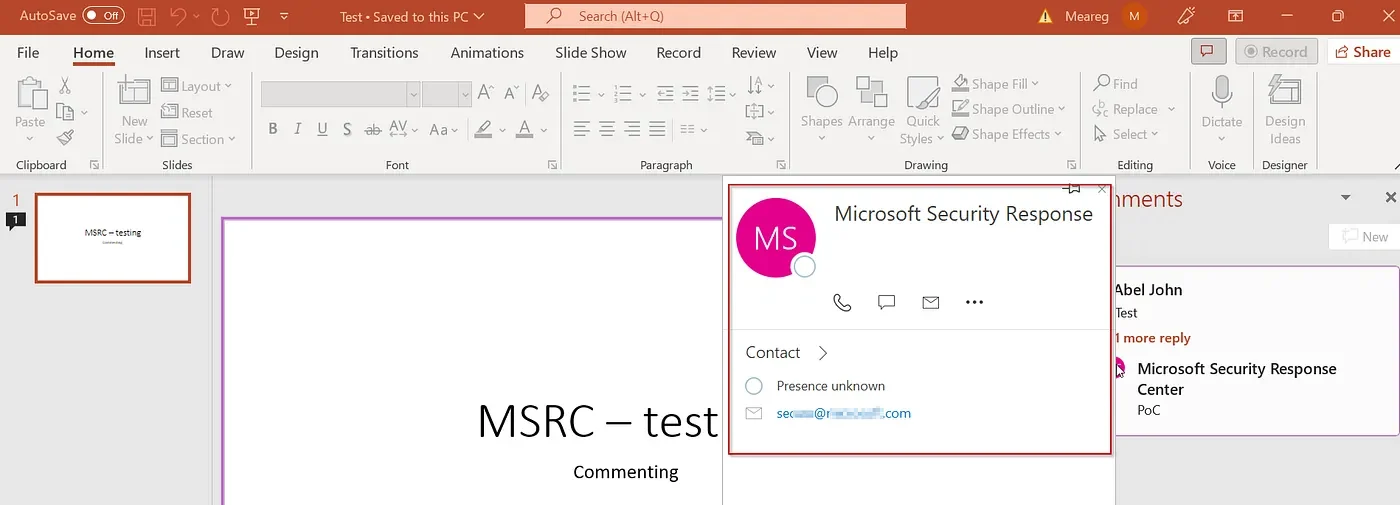
Downloading and examining the file shows that the author of the comment is still MSRC.
Root cause
The author identity of a comment is supplied by the client in the request body: the display name and the S::<email>::<object ID> string, plus a membership parameter. Changing these values to another user's details produced a comment attributed to that user. Because the identity is data in the request rather than something derived from the session, any authenticated user who knows a victim's display name, email and object ID can set them to the victim's values.
Microsoft's position is that this is by design, citing documentation that comments are stored in the file and anyone with edit access can edit a comment. The researcher points out that in the proof of concept the victim is not involved at all and the document is not shared with anyone, so the documented caveat does not cover the observed behaviour.
Impact
An attacker can:
- Create a comment on a document on behalf of any Microsoft 365 user, without that user's awareness.
- Add users as authors of a document without their involvement.
The report states this works within a tenant and cross-tenant. The researcher notes these capabilities could be used for phishing campaigns and for tampering with the integrity of a document. The attacker needs the victim's display name, email address and object ID, which the report says can be found easily through the Microsoft Teams external user search feature.
Fix
The report does not describe any fix. Microsoft classified the issue as 'by design'.
Variants to test
- Other Office comment surfaces. Test commenting in other Office web editors (for example Word and PowerPoint, which the report says are affected, versus Excel and Visio, which the report says are secure) and check whether the author fields are client-supplied. A positive result is a comment that appears under a different user's name after modifying the author parameters.
- Other identity-bearing parameters. Look for other request fields that carry a user identity, such as membership or author metadata, and try substituting a different user's values. A positive result is the substituted identity appearing in the UI, activities or version history.
- Cross-tenant substitution. Repeat the substitution with a victim from a different tenant. A positive result is a comment or authorship attributed to the external user.
- Version history and activities. After a successful substitution, check the document's version history and activities feed. A positive result is the victim listed as author or commenter without their involvement.
- Downloaded file inspection. Download the document and inspect the stored comment metadata. A positive result is the victim's identity persisted in the file.
What happened, in plain words
Microsoft Word and PowerPoint documents can be opened in a web browser, and inside them you can leave comments, the little notes that appear in the margin next to a piece of text. A comment normally has three parts:
- An author: the person who starts the conversation, usually the person logged in or someone the document has been shared with.
- A message body: the text of the comment itself.
- The document: the file the comment is attached to.
The researcher found that when the browser sends a comment to Microsoft's servers, the browser also tells the server who the author is. Changing that claim to another user's details made the comment appear to come from that user. The practical result is that a logged-in user can publish a comment that appears to come from any other Microsoft 365 user, and can even make that other person show up as an author of the document, all without that person doing anything.
Excel and Visio are described as secure: they handle comments in a different way. The issue was reported to Microsoft and classified as 'by design'. The researcher disagrees and considers it a vulnerability with significant risk.
Before going further, two everyday comparisons help. Think of an API as a waiter in a restaurant: your browser is the customer, the server is the kitchen, and the API is the agreed way of asking for things and getting answers back. You do not walk into the kitchen yourself; you give an order in a fixed format and the waiter carries it. Here the order is "post this comment", and part of the order includes a line saying who wrote it. The problem is that the kitchen trusts whatever name the customer writes on the order slip.
A session is like the wristband you get at an event: after you log in, the server gives your browser a marker so that on every later request it knows it is still you. Normally a server should use that wristband to decide who you are. In this case, the author name was written on the order slip instead, and the kitchen read the slip rather than checking the wristband.
Setup
The scenario uses a Microsoft 365 tenant with a user abel@msobb*.onmicrosoft.com (display name Abel John) who creates a document called September.docx and adds a comment. A tenant is Microsoft's word for one organisation's own separate area of Microsoft 365, with its own users and settings, a bit like one company's own building inside a large office park. The report notes that the same behaviour works cross-tenant, not only within one tenant, meaning a user in one organisation's area can impersonate a user in another organisation's area.
To impersonate a victim, the attacker needs three pieces of information: the victim's email address, first and last name, and object ID. An object ID is a long unique code that Microsoft uses internally to identify a particular user account, like a membership number that never changes even if the person's name or email does. The report states this information can be found easily through the Microsoft Teams external user search feature, which is the search box in Teams that lets you look up people outside your own organisation.
Finding it
The researcher looked at the API call made when a comment is posted from the Word editor. The endpoint observed was:
POST /we/OneNote.ashx?perfTag=PutChanges_1Host: euc-word-edit.officeapps.live.com
Line by line, in plain words:
POSTis the type of request. It means "I am sending data to the server to create or change something", as opposed toGET, which just asks to read something. Posting a comment creates something new, soPOSTfits./we/OneNote.ashx?perfTag=PutChanges_1is the path being called on the server. The part after the?is a small extra label the browser attaches, hereperfTag=PutChanges_1, which the report does not explain further. The nameOneNote.ashxis interesting because the document is a Word file, but the report simply shows the call as captured.Host: euc-word-edit.officeapps.live.comtells the network which server the request is aimed at. TheHostheader is how one web server can host many sites and still know which one you meant, like an apartment building address plus a flat number.
The request body contains the author's display name and a string of the form S::<author_email>::Object ID of the user. In the original, untampered request this was:
"Abel John",4668585..,"Abel John",."S::abel@msobb….onmicrosoft.com::3b64……27a" -> S::<author_email>::Object ID of the user
What this shows:
"Abel John"appears twice. This is the display name, the friendly name shown in the interface.4668585..is a number in the request. The report does not explain what it is, so treat it as an internal identifier that travels alongside the name."S::abel@msobb….onmicrosoft.com::3b64……27a"is the key part. It is a single string with three pieces separated by::. The first piece is the letterS, the second is the author's email address, and the third is the object ID. The arrow on the right,-> S::<author_email>::Object ID of the user, is the researcher's own annotation explaining the pattern, not part of the request.
Because the author identity is carried in the request body as plain parameters, it looked wrong: nothing in the visible request ties those values to the authenticated session. In other words, the order slip says who wrote the comment, but nothing on the slip is checked against the wristband. The document itself, with Abel's comment, is shown here:
Exploitation
Step 1: Capture the original comment request
Abel John creates a comment on September.docx with the body PoC Document. PoC stands for proof of concept, a small demonstration that shows a problem is real without doing any harm. The captured request contains the author name and the S:: identity string shown above. This is the baseline that will be modified.
Capturing the request is the first step because you cannot change something you have not seen.
Step 2: Replace the author details with the victim's
The attacker substitutes the display name, email address and object ID with those of the victim, Chris Brown (CFO):
"Chris Brown (CFO)", 4668585..,"Chris Brown (CFO)",."S::[redacted]::74a75f...........90e" -> S::<victim_email>::Object ID of the victim
What changed and why:
- The display name
"Abel John"became"Chris Brown (CFO)"in both places. The(CFO)part is just text inside the display name. - The email inside the
S::string became the victim's email,[redacted]. - The object ID at the end of the
S::string became the victim's object ID,74a75f...........90e.
The reason for doing this is simple: if the server reads the author from these fields, then putting the victim's values there should make the server record the victim as the author.
Step 3: Send the tampered request and refresh
After replacing the values with the victim's details and refreshing the page, the comment is published on behalf of the victim user.
Refreshing the page is how the researcher checked the result from the normal user interface rather than from the raw request. If the comment now shows Chris Brown as its author, the substitution worked.
Step 4 (optional): Add another comment and change the membership parameter
The process is repeated, this time also replacing the victim email on the membership parameter.
A parameter is one named piece of data inside a request, like one field on a form. The membership parameter is another field in the request that the researcher replaced with the victim's email. The report marks this step as optional.
From the UI, the replayed comment appears as expected:
A replay here means sending the same request again, with the edited values, to see the effect a second time. The screenshot shows the comment as it looks to a normal user.
Step 5: Observe the effect in OneNote activities and version history
In OneNote, under the 'Activities' section, Chris Brown is shown commenting on the document, even though his details were used without his involvement.
The Activities section is a feed inside the document that lists what has happened recently, a bit like a logbook. Seeing the victim's name there means the impersonation is not only visible in the comment bubble; it is recorded in the document's own history.
More importantly, Chris Brown becomes the author of the document without his awareness, as shown in the version history.
Version history is the list of saved versions of a document, with who changed what and when. It is the record people rely on to know who touched a file. If the victim appears there as an author, then the impersonation has affected the document's audit trail, not just a single comment.
Another example: impersonating the Microsoft Security Response Center
A second demonstration uses a user abel@msobb???.onmicrosoft.com (Author #2, Abel John) who creates a document (Document Name #1) and adds a comment (Message Body #3).
The report notes that anyone can edit a comment if the document is shared with edit rights, but in this case the document is not shared with anyone. That detail matters later, when Microsoft's explanation is discussed.
The underlying API call exposes the same parameters:
..."Properties":[ "-180", 469777582, "Abel John", 469780650, "PoC\n", 469780707, "S::[redacted]::3b6XXXXX-XXXX-XXXXX-bd12-10XXXXXXXXX", 469780708, "AD", 469780740, "[]", 469780777, "", ....
What this block shows:
"Properties"is the name of a list inside the request. A list in this format is written with square brackets[ ]and items separated by commas, like a shopping list written on one line."-180"and the long numbers such as469777582,469780650,469780707are numeric labels."Abel John"is the display name of the author."PoC\n"is the comment text. The\nis a newline character, the invisible instruction to start a new line, so the comment body is the word PoC followed by a line break."S::[redacted]::3b6XXXXX-XXXX-XXXXX-bd12-10XXXXXXXXX"is the sameS::identity string as before, with the email and object ID partly masked with X characters in the report."AD"and"[]"are further values in the list.
To exploit, the attacker needs the email address (UPN), display name and object ID of the target. UPN stands for user principal name, which is the technical name for the login-style email address of an account. For this example the Microsoft Security Response Center identity is used. The report notes that any user within or outside the tenant can be impersonated.
..."Properties":[ "-180", 469777582, "Microsoft Security Response Center",(Display name we want to impersonate) 469780650, "PoC\n", 469780707, "S::[redacted]::2XXXXX-XXXX-XXXXX-bd12-10XXXXXXXXX",(S::UPN::Object ID of the user we want to impersonate) 469780708, "AD", 469780740, "[]", 469780777, "", ....
Here the same list has been edited:
- The display name
"Abel John"is replaced by"Microsoft Security Response Center". The researcher's note in brackets,(Display name we want to impersonate), explains the field. - The
S::string now holds the target's email and object ID, with the note(S::UPN::Object ID of the user we want to impersonate)explaining the three parts.
The replacement is summarised as:
Display Name from Abel John -to- Microsoft Security Response CenterS::[redacted]::ObjectID -to- S::[redacted]::ObjectID
This line is a before-and-after note rather than a real request. It says: take the display name from Abel John and change it to Microsoft Security Response Center, and take the S:: string from Abel's email and object ID and change it to the target's email and object ID. The two halves are run together on one line in the report, which is why it reads awkwardly.
The request succeeds and the comment is published on behalf of the Microsoft Security Response Center user.
Downloading and examining the file shows that the author of the comment is still MSRC. MSRC is the short name for the Microsoft Security Response Center. Downloading and examining the file showed the author of the comment was still MSRC.
Root cause
The author identity of a comment is supplied by the client in the request body: the display name and the S::<email>::<object ID> string, plus a membership parameter. The server appears to accept these values without checking that they match the authenticated session. Because the identity is data in the request rather than something derived from the session, any authenticated user who knows a victim's display name, email and object ID can set them to the victim's values.
In everyday terms: the restaurant kitchen writes down whatever name the customer puts on the order slip, instead of checking the wristband. The fix would be to ignore the name on the slip and use the wristband. This kind of mistake is often called a broken authorisation problem, because the server fails to check that the person making the request is allowed to act as the person they claim to be. It is also related to what people call an IDOR, short for insecure direct object reference, where a request names an object or a person directly and the server does not verify that the requester is entitled to it.
Microsoft's position is that this is by design, citing documentation that comments are stored in the file and anyone with edit access can edit a comment. The researcher points out that in the proof of concept the victim is not involved at all and the document is not shared with anyone, so the documented caveat does not cover the observed behaviour. The documentation Microsoft refers to says:
Note: Keep in mind that it's possible for others to edit your comments. Comments in an Office document are stored in the file, so anyone with edit access to your file can edit your comment.
That note is about people who already have edit access to the file. The researcher's point is that in this case nobody shared the file with the victim and the victim never opened it, so the note does not describe what happened.
Impact
An attacker can:
- Create a comment on a document on behalf of any Microsoft 365 user, without that user's awareness.
- Add users as authors of a document without their involvement.
The report states this works within a tenant and cross-tenant. The researcher notes these capabilities could be used for phishing campaigns and for tampering with the integrity of a document. Phishing is the trick of making a message look like it comes from someone trustworthy so the reader clicks or replies; a comment that appears to come from a senior colleague is exactly that kind of bait. Integrity here means the trustworthiness of the document's record: if the history says a person wrote something they never wrote, the record is no longer reliable. The attacker needs the victim's display name, email address and object ID, which the report says can be found easily through the Microsoft Teams external user search feature.
Fix
Microsoft classified the issue as 'by design'. In the restaurant comparison, the kitchen should look at the wristband and ignore the name written on the slip.
Variants to test
- Other Office comment surfaces. Test commenting in other Office web editors (for example Word and PowerPoint, which the report says are affected, versus Excel and Visio, which the report says are secure) and check whether the author fields are client-supplied. A positive result is a comment that appears under a different user's name after modifying the author parameters.
- Other identity-bearing parameters. Look for other request fields that carry a user identity, such as membership or author metadata, and try substituting a different user's values. A positive result is the substituted identity appearing in the UI, activities or version history.
- Cross-tenant substitution. Repeat the substitution with a victim from a different tenant. A positive result is a comment or authorship attributed to the external user.
- Version history and activities. After a successful substitution, check the document's version history and activities feed. A positive result is the victim listed as author or commenter without their involvement.
- Downloaded file inspection. Download the document and inspect the stored comment metadata. A positive result is the victim's identity persisted in the file.
Timeline
The report gives these dates:
- Aug 05 2022: reported and received a case ID.
- Aug 10 2022: Microsoft classified the issue as 'by design'.
- Aug 10 2022: the researcher explained further and sent more proof of concept material.
- Aug 12 2022: Microsoft decided 'by design'.
- Aug 12 2022: draft sent for public disclosure.
- Sep 13 2022: Microsoft approved publication.
Glossary
- API: the agreed way for one program to ask another for something, like a waiter carrying orders between a customer and a kitchen.
- Author: the person a comment is attributed to.
- Broken authorisation: a flaw where the server does not properly check that the requester is allowed to do or claim what they are doing.
- Client: the program on your side, here the browser, as opposed to the server.
- Comment: a note attached to part of a document, with an author and a message body.
- Cross-tenant: involving two separate organisations' Microsoft 365 areas rather than one.
- Display name: the friendly name shown in the interface, such as Abel John.
- Endpoint: the specific address on a server that a request is sent to.
- Host header: the part of a request that says which server or site the request is for.
- IDOR (insecure direct object reference): a flaw where a request names an object or person directly and the server does not check the requester is entitled to it.
- Integrity: the trustworthiness of a record, meaning it has not been altered or misattributed.
- Membership parameter: a field in the request that records who belongs to the document.
- MSRC: the Microsoft Security Response Center, Microsoft's security team.
- Object ID: a long unique code Microsoft uses to identify a user account.
- Parameter: one named piece of data inside a request, like one field on a form.
- Phishing: making a message look like it comes from someone trustworthy so the reader acts on it.
- PoC (proof of concept): a small demonstration that shows a problem is real without causing harm.
- POST: a request type used to send data to the server to create or change something.
- Replay: sending the same request again, here with edited values, to observe the effect.
- Request body: the part of a request that carries the data being sent, as opposed to the address and headers.
- Session: the state that lets the server recognise you after you log in, like a wristband at an event.
- Tenant: one organisation's separate area inside Microsoft 365.
- UPN (user principal name): the login-style email address of an account.
- Version history: the list of saved versions of a document, with who changed what and when.


