Lethal Injection: How We Hacked Microsoft's Healthcare Chat Bot
The Azure Health Bot service had multiple vulnerabilities: a URL traversal flaw allowed reading other tenants' data connection details, and three sandbox escapes in the Node.js vm2 sandbox allowed remote code execution as root on a shared backend server. An attacker could access authentication secrets, cross-tenant data, and sensitive infrastructure.
 Published on breachproof.net
We have discovered multiple security vulnerabilities in the Azure Health Bot service, a patient-facing chatbot that handles medical information. The vulnerabilities, if exploited, could allow access to sensitive infrastructure and confidential medical data.
The full write-up lives on its author's site
It belongs to its author, so we link to it rather than copy it. The other two tabs are our own rewrites, checked against it.
Context
The target was the Azure Health Bot service, described in the report as a patient-facing chatbot that handles medical information. The research started at the Azure Health Bot management portal website. Among the features available, the portal lets a customer connect their bot to remote data sources and supply authentication details for those connections. The report notes that customers would likely connect their bot to third party data such as patient databases and appointment calendars, which makes the feature an interesting target.
The report covers several distinct issues found in the same service:
- Multiple sandbox escapes, unrestricted code execution as root on the bot backend
- Unrestricted access to authentication secrets and integration auth providers
- Unrestricted memory read in the bot backend, exposing sensitive secrets and cross tenant data
- Unrestricted deletion of other tenants' public resources
The first vulnerability allowed access to authentication credentials belonging to customers. Continued research found vulnerabilities allowing control of a backend server of the service. That server is shared across multiple customers and has access to several databases containing information belonging to multiple tenants.
According to the report, all vulnerabilities were fixed quickly following the disclosure to Microsoft, and Microsoft has not detected any sign of abuse. The report credits Dhawal, Kirupa, Gaurav, Madeline and the engineering team behind the service for their cooperation in remediating the issues.
Setup
The report does not describe any special accounts, roles, tools or versions. The work was done against the Azure Health Bot management portal, using a health bot instance created for testing. The report states that all research was done in the "debug" environment and was done carefully to not expose any sensitive information.
The instance identifier used throughout the examples is test-301x6x6, and the data connection identifier used is 1679070537717. The report does not say how the instance or the connection were created.
Finding it
After exploring the feature that connects a bot to remote data sources and stores authentication details, the researchers noticed something interesting in the request that retrieves the data connection details and auth secrets. A regular request looks like this:
https://portal-eastus.healthbot.microsoft.com/v4/test-301x6x6/integration/data-connections/1679070537717/
In this URL, test-301x6x6 is the unique health bot instance ID and 1679070537717 is the ID of the unique data connection created by the researchers.
The response to this request was the following JSON:
{
  "odata.metadata": "https://hbstenant2steausprod.table.core.windows.net/$metadata#test301x6x6/@Element",
  "etag": "W/\"datetime'2023-03-17T17%3A08%3A44.7784337Z'\"",
  "partitionKey": "DataConnection",
  "rowKey": "1679070537717",
  "timestamp": "2023-03-17T17:08:44.7784337Z",
  "type": "custom",
  "name": "test data connection",
  "description": "desc",
  "base_url": "https://website.com/a",
  "auth_provider": "",
  "static_parameters": "[{\"type\":\"header\",\"key\":\"Test\",\"value\":\"true\"}]"
}
The report notes that people familiar with Azure will recognise this as an Azure Table API response. The service stores the connection data in the Azure Table service and pulls that data directly from there.
The researchers' intuition was to start toying with the ID number of the data connection. They believed that the data connections of all customers are in the same table, and that if they could query whatever ID they wanted from the table, they could view the data connections of other customers.
Per the Azure Table API documentation, a request to retrieve data from a table has three variables to fill:
- table name
- partition key
- row key
The previous Table API response discloses all of that information. The researchers guessed that the backend server used a URL of that shape behind the scenes. From the response they could identify:
hbstenant2steausprod, the account name Microsoft used for storing the data.test301x6x6, the Azure health bot instance ID, which is not a secret.(PartitionKey='DataConnection',RowKey='1679070537717'), pullingDataConnectionwith the ID from the request.
The input in the researchers' control is the ID. The idea was to send an ID that would allow them to break out of their tenant and read other tenants' data. Since it is all appended to a URL, the idea was to leverage URL traversal to cancel out the prepended information added by the server and then add their own.
Exploitation
Step 1: Cross-tenant read through the data connection ID
The researchers encoded the slashes (%2F) in the injected ID. The report says this effectively turned the request into a request that successfully returned the connection data of the other tenant. The report shows the result in the following image:
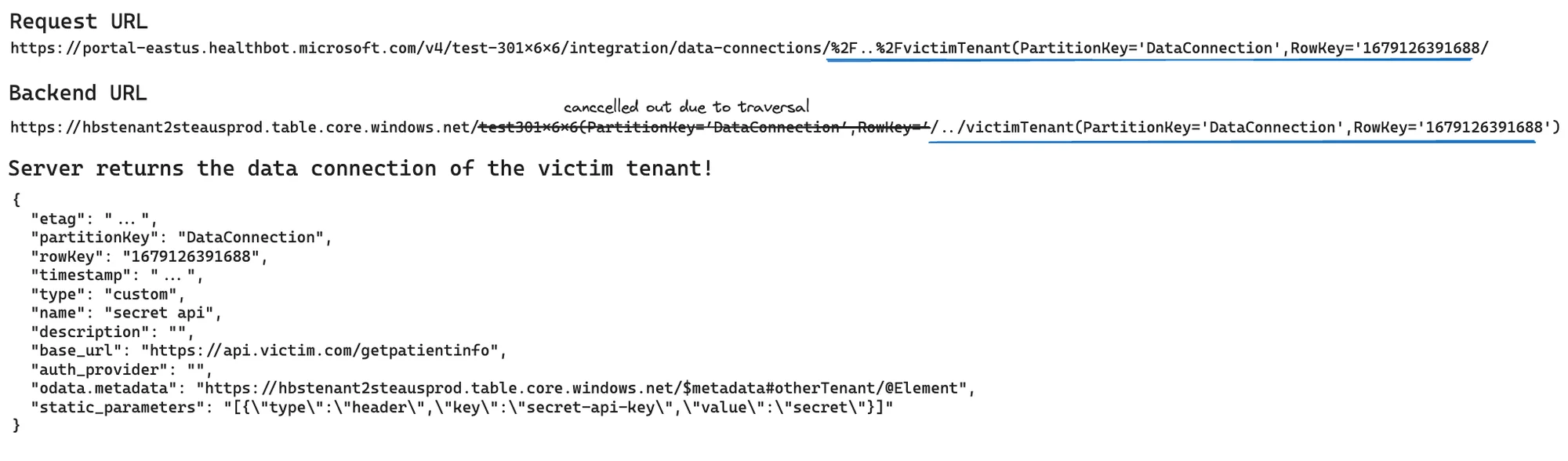
The report does not reproduce the exact injected string or the full resulting URL in text; it states that the slashes were encoded as %2F and injected into the URL, cancelling out the prepended information and adding the researchers' own. The outcome was that the request returned the connection data of another tenant.
Step 2: Reconnaissance inside the JavaScript sandbox
Exploring further into the service, the researchers saw that you can execute your JavaScript code in an isolated environment. This feature lets you process data coming from the chat as part of the conversation with the end customer.
They started with simple JavaScript reconnaissance inside the sandbox. Looking at global variables, they figured out they were running inside a vm2 sandbox, described in the report as a popular Node.js sandboxing library that has since been discontinued due to multiple, unrelated security flaws.
The goal was simple: to be able to execute shell commands and try to find a way to access cross-tenant data. The usual way to execute shell commands with Node.js is to import the child_process module and call exec or execSync.
In general, require inside the vm2 sandbox is a patched version that does not let you import anything harmful. However, Microsoft provided a few standard modules through a custom require function with a very specific whitelist of modules. The report does not list the whitelisted modules in full.
Step 3: Reading the custom require source
JavaScript lets you view the source code of any function by calling .toString() on it. The researchers used this to read the custom require implementation. The report describes the source as looking pretty harmless at first glance: a simple check whether the required module is in the whitelisted array, and if it is, the original Node.js require function is called.
The report does not reproduce the source code of the function in text. It does point out the detail that mattered: the code called _.indexOf() instead of the native array indexOf function. _.indexOf() is a function from the underscore module, which is whitelisted.
Step 4: Overriding indexOf to bypass the whitelist
Because the whitelist check used _.indexOf(), and underscore was available, the researchers could override the indexOf function. The report notes that it is conveniently already present as a global, so there is no need to import it. With the check subverted, the whitelist no longer restricts which module can be required, and remote code execution follows.
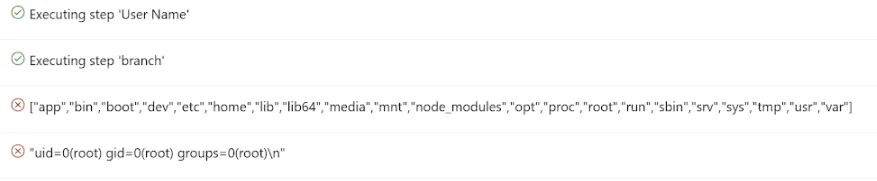
The report does not reproduce the exact payload used to override indexOf or the command executed. It states that bypassing the whitelist and achieving remote code execution was no problem once indexOf could be overridden.
Since the backend is shared, the researchers were running as root inside a server that processed the chats of other customers. Microsoft patched this bug within 24 hours.
Step 5: Underscore template compilation
After Microsoft patched the require() flaw, the researchers went deeper into the mechanics of the vm2 sandbox. They knew that the whitelisted modules are part of the unisolated Node.js root context, so the idea was to look into each module individually and try to find interesting functionality that could be abused.
They spent a few hours reading the documentation and code of all whitelisted modules. Most were boring data parsing libraries that did not help. Then something in Underscore.js caught their attention:
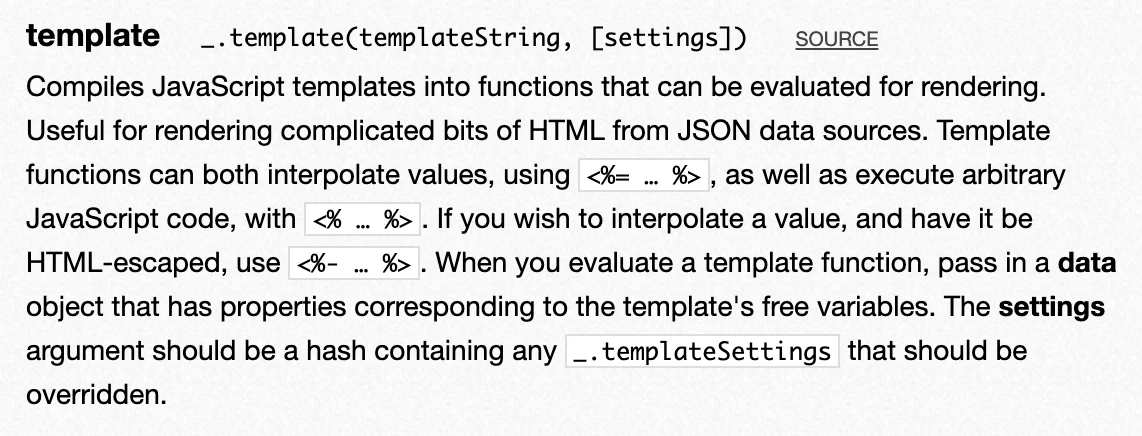
The report describes it as a function that compiles JavaScript templates, with an arbitrary code execution feature.
To explain why this is interesting, the report describes how vm2 sandboxing works in simple terms. vm2 creates a bridge between the sandbox and the host, and everything executed inside the sandbox goes through proxy functions that restrict what you can do to a very limited set of features. For example, if you try to access the Node.js global process variable from within the sandbox, the variable will not be found because it is not part of the sandboxed context.
However, when functions are passed down from the root context to the sandbox, the code is already compiled. The report calls this usually pretty dangerous, since code inside the sandbox can tamper with the modules and cause unexpected behaviour outside the sandbox.
Because the underscore module was passed down from outside the sandbox, the template code is compiled in the non-sandboxed context, so code execution can be achieved. The report does not reproduce the exact template payload in text. Microsoft quickly patched this as well.
Step 6: Reading uninitialised memory with SlowBuffer
The researchers then looked into the buffer module, a built-in Node.js module. What caught their attention was Buffer.allocUnsafe, which lets you allocate an uninitialised memory buffer. The report compares the two allocation functions:
Buffer.alloc: provides a memory buffer that is zeroed out. Reading from the allocated buffer returns a bunch of zeroes.Buffer.allocUnsafe: faster thanalloc, provides a memory buffer that has not been zeroed out. If the memory allocated was previously used for an HTTP request, for example, reading from the newly allocated buffer reveals the HTTP request.
The report calls this pretty dangerous, since using allocUnsafe inside the sandbox might allow access to sensitive information from the application's memory. The vm2 developers were aware of this and restricted the use of Buffer.allocUnsafe.
Since the entire buffer module was whitelisted, the researchers had access to SlowBuffer, which the report says is the same as allocUnsafe. SlowBuffer was not restricted by the sandbox, since it is not supposed to be there by default.
The report does not reproduce the exact code used to call SlowBuffer in text. Running the code a few times yielded interesting data from the application, for example a few JWT secrets for internal Azure identities, Kubernetes API calls, cross-tenant data and more.
Root cause
The report identifies several distinct root causes.
For the cross-tenant read, the data connection ID from the request was appended to a URL used to query the Azure Table service, without preventing URL traversal. The researchers' stated guess is that the backend built a Table API URL from the account name, the instance ID and a partition key and row key derived from the request, and that an ID containing encoded slashes could cancel out the prepended information and add the researchers' own query.
For the first sandbox escape, the custom require whitelist check used _.indexOf() from the whitelisted underscore module instead of the native array indexOf. Because underscore was reachable from inside the sandbox, the check could be overridden, and the whitelist stopped restricting imports.
For the second sandbox escape, whitelisted modules were passed down from the unisolated Node.js root context into the sandbox. Underscore's template compilation executes code in the context where the module was defined, so a template compiled through the passed-down module ran outside the sandbox. The report frames this as a general hazard of passing functions from the root context into a sandbox.
For the memory read, the entire buffer module was whitelisted, which exposed SlowBuffer. vm2 restricted Buffer.allocUnsafe but not SlowBuffer, which the report says is equivalent and is not supposed to be available by default.
Impact
The report states that the vulnerabilities, if exploited, could allow access to sensitive infrastructure and confidential medical data. Specifically:
- The sandbox escapes gave unrestricted code execution as root on the bot backend. Because that backend is shared, the researchers were running as root inside a server that processed the chats of other customers, and that server has access to several databases containing information belonging to multiple tenants.
- The memory read exposed sensitive secrets and cross tenant data, including JWT secrets for internal Azure identities, Kubernetes API calls and cross-tenant data.
The report notes that Microsoft has not detected any sign of abuse of these vulnerabilities. The research itself was done in the "debug" environment and carefully, to avoid exposing sensitive information.
Fix
The report describes the following changes made by Microsoft:
- The
require()flaw was patched within 24 hours of being reported. - The underscore template issue was quickly patched as well.
- After the memory read, Microsoft changed the service architecture to run a completely separate ACI instance per customer, making any future sandbox breach irrelevant.
- Microsoft changed the sandboxing from vm2 to the isolated-vm library, which uses V8 isolates, described in the report as a much better and more secure solution.
Variants to test
- Identifier fields appended to backend URLs. Take any user-controlled ID that the server places into a storage or API URL and inject encoded slashes (
%2F) or traversal sequences. A positive result is a response containing another tenant's record, or an error that reveals the constructed URL. - Custom module loaders in sandboxes. Read the loader's source with
.toString()and look for calls to library helpers such as_.indexOf,lodash.includesor similar instead of native methods. A positive result is being able to override the helper from inside the sandbox and then require a module that is not on the whitelist. - Whitelisted modules passed from the host context. For each whitelisted module, look for functions that compile or evaluate code, such as template engines. A positive result is code running outside the sandbox, for example access to the host
processobject. - Buffer allocation in sandboxes. Check whether
Buffer.allocUnsafeis blocked butSlowBufferor other aliases remain reachable. A positive result is reading non-zero bytes that contain request data, tokens or other tenants' content. - Cross-tenant deletion. Where the service exposes delete operations on resources identified by a user-supplied ID, try IDs belonging to another tenant. A positive result is a successful deletion response for a resource the account does not own.
What happened, in plain words
Microsoft runs a service called Azure Health Bot. In the report it is described as a patient-facing chatbot that handles medical information. A hospital or clinic could use it to build a chat assistant that talks to patients, answers questions and pulls information from other systems, such as a patient database or an appointment calendar.
A group of researchers, led by Yanir Tsarimi, looked at the website where customers manage their health bot (the management portal). They found several security problems in the service. The report says that, if exploited, these problems could allow access to sensitive infrastructure and confidential medical data.
The report lists four kinds of issue:
- Multiple sandbox escapes, unrestricted code execution as root on the bot backend
- Unrestricted access to authentication secrets and integration auth providers
- Unrestricted memory read in the bot backend, exposing sensitive secrets and cross tenant data
- Unrestricted deletion of other tenants' public resources
The first vulnerability allowed access to authentication credentials belonging to customers. As the researchers kept digging, they found vulnerabilities that let them take control of a backend server of the service. That server is shared across multiple customers and has access to several databases that contain information belonging to multiple tenants.
According to the report, all vulnerabilities were fixed quickly after the researchers told Microsoft, and Microsoft has not detected any sign of abuse. The report thanks Dhawal, Kirupa, Gaurav, Madeline and the engineering team behind the service for their cooperation in remediating the issues.
A few words before we start, because the rest of this article uses them constantly.
- A server is a computer somewhere in a data centre that answers requests from your browser. When you open a website, your browser sends a request to a server and the server sends back a page.
- An API (application programming interface) is a way for one piece of software to ask another piece of software for something, in a fixed format. Think of it as a waiter in a restaurant: you do not walk into the kitchen yourself, you tell the waiter what you want, the waiter goes to the kitchen and brings back a plate. The menu and the way of ordering are the API. In this article, the portal website talks to Microsoft's servers through APIs, and the servers talk to each other through APIs too.
- A tenant is one customer's own separate space inside a shared service. If two hospitals both use Azure Health Bot, each one is a tenant. The whole point of a multi-tenant service is that one tenant must never be able to see or touch another tenant's data.
- Credentials (or secrets) are the username and password style values that prove who you are. A password is a credential. So is an API key or a token.
- A token is a short string of characters that a server gives you after you log in, and that you show on later requests instead of your password. It is like a cloakroom ticket: you hand in your coat, you get a ticket, and later the ticket gets your coat back. Anyone holding the ticket can get the coat, which is why tokens must be kept secret.
- A sandbox is a restricted area inside a program where untrusted code is allowed to run, with the expectation that it cannot escape and harm the rest of the system. Think of a playpen for a child: the child can move around freely inside, but cannot leave.
- Remote code execution (RCE) means an attacker manages to make the victim's server run commands or code of the attacker's choosing. It is one of the most serious outcomes in security, because from there the attacker can usually do whatever the server itself can do.
- Root is the name of the all-powerful administrator account on Linux and similar systems. A program running as root can do anything on that machine.
- Cross-tenant means reaching data that belongs to a different customer than the one you are logged in as. It is the classic failure of a shared service.
Setup
The report does not describe any special accounts, roles, tools or versions used. The work was done against the Azure Health Bot management portal, using a health bot instance created for testing. The report states that all research was done in the "debug" environment and was done carefully to not expose any sensitive information.
The instance identifier used throughout the examples is test-301x6x6, and the data connection identifier used is 1679070537717. The report does not say how the instance or the connection were created beyond the fact that the connection was created through the portal feature.
In plain words: the work was done against the normal management portal, using a health bot instance created for testing. That is worth noticing, because it means the problems were reachable by any customer.
Finding it
The feature at the centre of the first bug lets a customer connect their bot to remote data sources and store authentication details for those connections. The report notes that customers would likely connect their bot to third party data such as patient databases and appointment calendars, which makes the feature an interesting target: wherever a service stores other people's passwords and keys, an attacker wants to look.
After exploring that feature, the researchers noticed something interesting in the request that retrieves the data connection details and auth secrets. A regular request looks like this:
https://portal-eastus.healthbot.microsoft.com/v4/test-301x6x6/integration/data-connections/1679070537717/
Line by line, in plain words:
https://is the normal secure web protocol. Your browser uses it every time you see the padlock.portal-eastus.healthbot.microsoft.comis the address of the management portal. Theeastuspart suggests a Microsoft data centre region, but the report does not discuss regions further./v4/is a version marker in the path. Many APIs put a version number in the URL so that old clients keep working when the API changes.test-301x6x6is, per the report, the unique health bot instance ID. It identifies which customer's bot this request is about./integration/data-connections/says which feature is being used: the data connections feature.1679070537717is the ID of the unique data connection the researchers created.- The trailing
/is just the end of the path.
The important thing to notice is that the URL contains an ID that the customer controls. The customer chooses which data connection to look at, and the ID of that connection appears in the URL. Whenever a value you control ends up inside a URL that a server builds, there is a chance to abuse it, and that is exactly what happened here.
The response to this request was the following JSON:
{
  "odata.metadata": "https://hbstenant2steausprod.table.core.windows.net/$metadata#test301x6x6/@Element",
  "etag": "W/\"datetime'2023-03-17T17%3A08%3A44.7784337Z'\"",
  "partitionKey": "DataConnection",
  "rowKey": "1679070537717",
  "timestamp": "2023-03-17T17:08:44.7784337Z",
  "type": "custom",
  "name": "test data connection",
  "description": "desc",
  "base_url": "https://website.com/a",
  "auth_provider": "",
  "static_parameters": "[{\"type\":\"header\",\"key\":\"Test\",\"value\":\"true\"}]"
}
Line by line, in plain words:
{and}mark the start and end of a JSON object. JSON is a simple text format for structured data, made of names and values. It is how most web APIs send data back."odata.metadata"is a field whose value is a URL. It points athbstenant2steausprod.table.core.windows.net, which the report later identifies as the account name Microsoft used for storing the data. The#test301x6x6part repeats the instance ID."etag"is a version marker for the record. Servers use it to tell whether a record has changed since you last read it. The value contains a date and time."partitionKey": "DataConnection"and"rowKey": "1679070537717"are the two labels that identify this record in the storage system. The report later explains these are the two keys you need to fetch a record from an Azure Table."timestamp"is when the record was written."type": "custom"says what kind of connection this is."name": "test data connection"and"description": "desc"are the label and description the researchers typed in."base_url": "https://website.com/a"is the remote address the bot would talk to."auth_provider": ""is empty here, meaning no authentication provider was configured for this connection."static_parameters"holds a small JSON string inside the JSON, describing a header namedTestwith the valuetrue. A header is an extra line of information that travels with a web request, alongside the address, like the label on a parcel.
The report notes that people familiar with Azure will recognise this as an Azure Table API response. The service stores the connection data in the Azure Table service and pulls that data directly from there. In plain words: the portal did not keep the connection details in its own private database. It kept them in a general-purpose Microsoft storage service, and it handed the record back to the browser almost exactly as that storage service returned it.
The researchers' intuition was to start toying with the ID number of the data connection. They believed that the data connections of all customers are in the same table, and that if they could query whatever ID they wanted from the table, they could view the data connections of other customers.
Why did they believe that? Because the response above shows the storage account name and the two keys. If every customer's connections live in one big table, then the only thing separating your record from mine is the key you ask for. If the server lets you ask for any key, you can read anyone's record.
Per the Azure Table API documentation, a request to retrieve data from a table has three variables to fill:
- table name
- partition key
- row key
The previous Table API response discloses all of that information. The researchers guessed that the backend server used a URL of that shape behind the scenes. From the response they could identify:
hbstenant2steausprod, the account name Microsoft used for storing the data.test301x6x6, the Azure health bot instance ID, which is not a secret.(PartitionKey='DataConnection',RowKey='1679070537717'), pullingDataConnectionwith the ID from the request.
The input in the researchers' control is the ID. The idea was to send an ID that would allow them to break out of their tenant and read other tenants' data. Since it is all appended to a URL, the idea was to leverage URL traversal to cancel out the prepended information added by the server and then add their own.
URL traversal needs a short explanation. In a URL, the sequence ../ means "go up one folder". If a server builds a path by gluing a fixed prefix and your input together, and your input contains ../, the result can climb out of the intended folder. It is like a form that says "your name: ______" and you write "Bob, and also please send this letter to a different address". The form was only supposed to hold a name, but the text you wrote changed where the letter goes. Here the researchers could not type a literal / easily, because the server would treat it as part of the URL structure, so they used the encoded form %2F. Percent-encoding is how special characters are written inside URLs: %2F means a slash, %20 means a space, and so on. The server decodes it back to a slash when it builds the real request.
Exploitation
Step 1: Cross-tenant read through the data connection ID
The researchers encoded the slashes (%2F) in the injected ID. The report says this effectively turned the request into a request that successfully returned the connection data of the other tenant. The report shows the result in the following image:
The report places an image here, just after describing the successful cross-tenant response.
The report does not reproduce the exact injected ID string or the full resulting URL in text; it only states that the slashes were encoded as %2F and injected into the URL, cancelling out the prepended information and adding the researchers' own. The outcome was that the request returned the connection data of another tenant.
Why does this matter so much? Because a data connection record can contain authentication details. If you can read another customer's connection record, you may learn how their bot authenticates to their patient database or calendar. That is the first vulnerability in the list: access to authentication credentials belonging to customers.
Step 2: Reconnaissance inside the JavaScript sandbox
Exploring further into the service, the researchers saw that you can execute your JavaScript code in an isolated environment. This feature lets you process data coming from the chat as part of the conversation with the end customer.
In plain words: the product lets a customer write small programs that run when a patient chats with the bot, for example to clean up or reshape the incoming text. Those programs run inside a sandbox, so that a badly written or malicious program cannot damage the rest of the service. JavaScript is the programming language that web pages and many web servers use.
The researchers started with simple JavaScript reconnaissance inside the sandbox. Reconnaissance just means looking around to learn about your environment before doing anything else, like walking into a room and checking where the doors are. Looking at global variables, they figured out they were running inside a vm2 sandbox. Global variables are named values that every program in that environment can see without asking for them, like the light switch in a room: it is just there.
vm2 is described in the report as a popular Node.js sandboxing library that has since been discontinued due to multiple, unrelated security flaws. Node.js is a program that lets JavaScript run outside a browser, on a server. A library is a bundle of ready-made code that other programs can use, so they do not have to write everything from scratch.
The goal was simple: to be able to execute shell commands and try to find a way to access cross-tenant data. A shell command is an instruction typed to the operating system itself, such as "list the files in this folder". If you can run shell commands on a server, you can usually do a great deal.
The usual way to execute shell commands with Node.js is to import the child_process module and call exec or execSync. A module is a named bundle of code that you load into your program. child_process is the Node.js module whose whole job is to start other programs. exec and execSync are the two functions in it that run a command.
In general, require inside the vm2 sandbox is a patched version that does not let you import anything harmful. require is the Node.js function you call to load a module. The sandbox replaces it with a safer version, so that code inside the playpen cannot fetch tools it should not have. However, Microsoft provided a few standard modules through a custom require function with a very specific whitelist of modules. A whitelist is a list of things that are allowed; anything not on the list is refused. The report does not list the whitelisted modules in full.
So the situation was: the researchers were inside a playpen, the door was locked, but a small hatch was open for a few approved toys. The question was whether the hatch could be widened.
Step 3: Reading the custom require source
JavaScript lets you view the source code of any function by calling .toString() on it. Source code is the human-readable text a program is written in. In many languages you cannot see the code of a function once the program is running, but JavaScript allows it, which is a gift to anyone doing security research: you can read exactly how a check is implemented.
The researchers used this to read the custom require implementation. The report describes the source as looking pretty harmless at first glance: a simple check whether the required module is in the whitelisted array, and if it is, the original Node.js require function is called. An array is an ordered list of values in JavaScript.
The report does not reproduce the source code of the function in text. It does point out the detail that mattered: the code called _.indexOf() instead of the native array indexOf function. _.indexOf() is a function from the underscore module, which is whitelisted.
Why is that a problem? indexOf is a function that answers the question "is this item in the list, and where?". The native version is built into JavaScript itself. The _. version comes from Underscore.js, a helper library. Both do roughly the same job, so at first glance the choice looks like a harmless style preference. But the two versions live in different places, and one of those places is reachable from inside the sandbox. If the check asks a function that the prisoner can rewrite, the prisoner controls the check.
Step 4: Overriding indexOf to bypass the whitelist
Because the whitelist check used _.indexOf(), and underscore was available, the researchers could override the indexOf function. Overriding means replacing an existing function with your own version. The report notes that it is conveniently already present as a global, so there is no need to import it. With the check subverted, the whitelist no longer restricts which module can be required, and remote code execution follows.
The everyday comparison: imagine a nightclub with a bouncer who checks names against a guest list. The bouncer does not keep the list himself; he asks a friend at the door. If you can replace the friend with someone who says "yes" to everyone, the guest list stops mattering. Here the "friend" was _.indexOf, and the researchers could replace it from inside the sandbox.
The report places an image here, just after describing the override of indexOf.
The report does not reproduce the exact payload used to override indexOf or the command executed. A payload is the specific piece of input an attacker sends to trigger a vulnerability. It states that bypassing the whitelist and achieving remote code execution was no problem once indexOf could be overridden.
Since the backend is shared, the researchers were running as root inside a server that processed the chats of other customers. That is the worst version of the problem: not only could they run commands, they ran them with the highest privileges, on a machine that other customers' bots were also using. Microsoft patched this bug within 24 hours.
Step 5: Underscore template compilation
After Microsoft patched the require() flaw, the researchers went deeper into the mechanics of the vm2 sandbox. They knew that the whitelisted modules are part of the unisolated Node.js root context, so the idea was to look into each module individually and try to find interesting functionality that could be abused.
Two terms here. The root context is the main, unrestricted part of the Node.js program, outside the playpen. Unisolated means it is not separated from the rest: code there can do everything the program can do. The whitelisted modules were loaded in that unrestricted area and then handed into the sandbox, which is a bit like giving a child a toy that is still connected by a string to the kitchen.
They spent a few hours reading the documentation and code of all whitelisted modules. Most were boring data parsing libraries that did not help. Parsing means turning raw text into structured data, for example turning the text of a date into a date object. Then something in Underscore.js caught their attention:
The report places an image here, just after saying something in Underscore.js caught their attention.
The report describes it as a function that compiles JavaScript templates, with an arbitrary code execution feature. A template is a piece of text with blanks in it that get filled in later, like a mail merge letter: "Dear ___, your appointment is on ___". Compiling a template means turning that text into a runnable function. If the template engine is willing to compile arbitrary JavaScript, then whoever controls the template controls the code that runs.
To explain why this is interesting, the report describes how vm2 sandboxing works in simple terms. vm2 creates a bridge between the sandbox and the host, and everything executed inside the sandbox goes through proxy functions that restrict what you can do to a very limited set of features. A proxy here means a stand-in function that checks and forwards your request, like a receptionist who takes your message and decides whether to pass it on.
For example, if you try to access the Node.js global process variable from within the sandbox, the variable will not be found because it is not part of the sandboxed context. The process object is the handle to the running Node.js program itself: its environment, its arguments, its identity. Being unable to see it is exactly what a sandbox is supposed to achieve.
However, when functions are passed down from the root context to the sandbox, the code is already compiled. The report calls this usually pretty dangerous, since code inside the sandbox can tamper with the modules and cause unexpected behaviour outside the sandbox. The comparison: the receptionist is supposed to filter your messages, but if you are allowed to hand the receptionist a pre-sealed envelope that she forwards without opening, your message reaches the boss unfiltered.
Because the underscore module was passed down from outside the sandbox, the template code is compiled in the non-sandboxed context, so code execution can be achieved. The report does not reproduce the exact template payload in text. Microsoft quickly patched this as well.
Notice the pattern across steps 4 and 5: both escapes came from the same helper library, Underscore.js, and both came from the same underlying mistake, trusting something that lives outside the sandbox while using it inside the sandbox.
Step 6: Reading uninitialised memory with SlowBuffer
The researchers then looked into the buffer module, a built-in Node.js module. A buffer is a block of memory used to hold raw bytes, for example the bytes of a file or of a network message. What caught their attention was Buffer.allocUnsafe, which lets you allocate an uninitialised memory buffer. Allocate means reserve. Uninitialised means the memory is handed to you as it is, without being wiped first.
The report compares the two allocation functions:
Buffer.alloc: provides a memory buffer that is zeroed out. Reading from the allocated buffer returns a bunch of zeroes.Buffer.allocUnsafe: faster thanalloc, provides a memory buffer that has not been zeroed out. If the memory allocated was previously used for an HTTP request, for example, reading from the newly allocated buffer reveals the HTTP request.
The everyday comparison: Buffer.alloc is a fresh sheet of paper. Buffer.allocUnsafe is a sheet from the recycling bin, still carrying whatever the previous user wrote. It is faster because nobody had to erase it, but if the previous user wrote down a password, you now have it.
The report calls this pretty dangerous, since using allocUnsafe inside the sandbox might allow access to sensitive information from the application's memory. The vm2 developers were aware of this and restricted the use of Buffer.allocUnsafe.
Since the entire buffer module was whitelisted, the researchers had access to SlowBuffer, which the report says is the same as allocUnsafe. SlowBuffer was not restricted by the sandbox, since it is not supposed to be there by default. In other words, the sandbox blocked one door and left an identical door next to it unlocked, because nobody expected that second door to exist.
The report does not reproduce the exact code used to call SlowBuffer in text. Running the code a few times yielded interesting data from the application, for example a few JWT secrets for internal Azure identities, Kubernetes API calls, cross-tenant data and more.
A few of those terms. A JWT (JSON Web Token) is a token format commonly used to prove identity between services; a JWT secret is the key used to sign such tokens, so anyone with it can forge valid ones. Azure identities are the accounts that Microsoft's own services use to talk to each other. Kubernetes is a system for running and managing many containers, and its API calls are the requests used to control it. Cross-tenant data is, again, data belonging to other customers. Reading all of that from recycled memory is the third major issue in the list.
Root cause
The report identifies several distinct root causes. A root cause is the underlying mistake that made the bug possible, as opposed to the symptom you see on the surface.
For the cross-tenant read, the data connection ID from the request was appended to a URL used to query the Azure Table service, without preventing URL traversal. The researchers' stated guess is that the backend built a Table API URL from the account name, the instance ID and a partition key and row key derived from the request, and that an ID containing encoded slashes could cancel out the prepended information and add the researchers' own query.
For the first sandbox escape, the custom require whitelist check used _.indexOf() from the whitelisted underscore module instead of the native array indexOf. Because underscore was reachable from inside the sandbox, the check could be overridden, and the whitelist stopped restricting imports.
For the second sandbox escape, whitelisted modules were passed down from the unisolated Node.js root context into the sandbox. Underscore's template compilation executes code in the context where the module was defined, so a template compiled through the passed-down module ran outside the sandbox. The report frames this as a general hazard of passing functions from the root context into a sandbox.
For the memory read, the entire buffer module was whitelisted, which exposed SlowBuffer. vm2 restricted Buffer.allocUnsafe but not SlowBuffer, which the report says is equivalent and is not supposed to be available by default.
If you want one sentence for all four: the service trusted things it should not have trusted, namely a customer-supplied ID inside a URL, a helper function inside a security check, a module from outside the sandbox used inside it, and a second name for a blocked function.
Impact
The report states that the vulnerabilities, if exploited, could allow access to sensitive infrastructure and confidential medical data. Specifically:
- The sandbox escapes gave unrestricted code execution as root on the bot backend. Because that backend is shared, the researchers were running as root inside a server that processed the chats of other customers, and that server has access to several databases containing information belonging to multiple tenants.
- The memory read exposed sensitive secrets and cross tenant data, including JWT secrets for internal Azure identities, Kubernetes API calls and cross-tenant data.
The report notes that Microsoft has not detected any sign of abuse of these vulnerabilities. The research itself was done in the "debug" environment and carefully, to avoid exposing sensitive information.
Why does the shared backend matter so much? Because a sandbox escape on a machine that only serves you is a problem for you. A sandbox escape on a machine that serves many customers is a problem for all of them. The report says the research was done carefully to not expose any sensitive information.
Fix
The report describes the following changes made by Microsoft:
- The
require()flaw was patched within 24 hours of being reported. - The underscore template issue was quickly patched as well.
- After the memory read, Microsoft changed the service architecture to run a completely separate ACI instance per customer, making any future sandbox breach irrelevant.
- Microsoft changed the sandboxing from vm2 to the isolated-vm library, which uses V8 isolates, described in the report as a much better and more secure solution.
A few terms. ACI stands for Azure Container Instances, a way of running a small isolated computer environment in the cloud. Giving each customer their own instance means that even if someone escapes their sandbox, there is nobody else on that machine to reach. V8 is the JavaScript engine, the part that actually runs JavaScript, and V8 isolates are separate JavaScript universes inside one process, with much stronger separation than vm2 provided.
Notice the shape of the fix: the first two patches closed the specific holes, and the last two removed the class of hole entirely. That is the better long-term answer.
Variants to test
If you are learning, these are general lessons to carry to other services.
- Identifier fields appended to backend URLs. Take any user-controlled ID that the server places into a storage or API URL and inject encoded slashes (
%2F) or traversal sequences. A positive result is a response containing another tenant's record, or an error that reveals the constructed URL. - Custom module loaders in sandboxes. Read the loader's source with
.toString()and look for calls to library helpers such as_.indexOf,lodash.includesor similar instead of native methods. A positive result is being able to override the helper from inside the sandbox and then require a module that is not on the whitelist. - Whitelisted modules passed from the host context. For each whitelisted module, look for functions that compile or evaluate code, such as template engines. A positive result is code running outside the sandbox, for example access to the host
processobject. - Buffer allocation in sandboxes. Check whether
Buffer.allocUnsafeis blocked butSlowBufferor other aliases remain reachable. A positive result is reading non-zero bytes that contain request data, tokens or other tenants' content. - Cross-tenant deletion. Where the service exposes delete operations on resources identified by a user-supplied ID, try IDs belonging to another tenant. A positive result is a successful deletion response for a resource the account does not own.
Glossary
- ACI (Azure Container Instances): a cloud service that runs a small, separate computer environment for you on demand.
- API (application programming interface): a fixed way for one piece of software to ask another for something, like ordering from a menu.
- Array: an ordered list of values in JavaScript.
- Azure Health Bot: Microsoft's service for building patient-facing chatbots that handle medical information.
- Azure Table: a Microsoft storage service that keeps records identified by a partition key and a row key.
- Backend: the server-side part of a service, which the user never sees directly.
- Buffer: a block of computer memory used to hold raw bytes.
- Buffer.alloc: a Node.js function that reserves memory and fills it with zeroes.
- Buffer.allocUnsafe: a Node.js function that reserves memory without wiping it, so old contents may remain.
- child_process: the Node.js module used to start other programs and run shell commands.
- Compile (a template): turn template text into a runnable function.
- Credentials: values such as passwords or keys that prove identity.
- Cross-tenant: reaching data that belongs to a different customer.
- Data connection: a saved configuration that lets a bot talk to an outside data source, including its authentication details.
- Debug environment: a testing setup used during research, as named in the report.
- exec / execSync: the functions in
child_processthat run a command. - Global variable: a named value that every program in an environment can see without asking.
- Header: an extra line of information sent alongside a web request or response.
- Instance: one running copy of a service, here one customer's bot.
- isolated-vm: a Node.js library that separates code using V8 isolates.
- JSON: a simple text format for structured data, made of names and values.
- JWT (JSON Web Token): a token format used to prove identity between services; its secret is the key used to sign tokens.
- Kubernetes: a system for running and managing many containers, controlled through an API.
- Library: a bundle of ready-made code that other programs can use.
- Module: a named bundle of code that a program can load.
- Multi-tenant: a service shared by many customers, each with their own separate space.
- Node.js: a program that runs JavaScript outside a browser, on a server.
- Override: replace an existing function with your own version.
- Parsing: turning raw text into structured data.
- Partition key / row key: the two labels that identify a record in Azure Table storage.
- Payload: the specific input an attacker sends to trigger a vulnerability.
- Percent-encoding: how special characters are written inside URLs, for example
%2Ffor a slash. - Proxy function: a stand-in function that checks and forwards a request.
- Reconnaissance: looking around an environment to learn about it before acting.
- Remote code execution (RCE): making a victim's server run code of the attacker's choosing.
- require: the Node.js function used to load a module.
- Root: the all-powerful administrator account on Linux and similar systems.
- Root cause: the underlying mistake that made a bug possible.
- Root context: the main, unrestricted part of a Node.js program, outside the sandbox.
- Sandbox: a restricted area where untrusted code can run without harming the rest of the system.
- Sandbox escape: getting code out of the sandbox and into the unrestricted environment.
- Secret: a value that must be kept private, such as a password or key.
- Shell command: an instruction given to the operating system itself.
- SlowBuffer: a Node.js function the report describes as equivalent to
Buffer.allocUnsafe. - Source code: the human-readable text a program is written in.
- Template: text with blanks that get filled in later.
- Tenant: one customer's separate space inside a shared service.
- Token: a short string a server gives you after login, shown on later requests instead of your password.
- Underscore.js: a JavaScript helper library, referred to in the report as underscore.
- Uninitialised memory: memory handed over without being wiped first.
- Unisolated: not separated from the main program, so code there can do everything the program can do.
- URL traversal: using
../or its encoded form to climb out of an intended folder in a URL. - V8: the JavaScript engine that actually runs JavaScript.
- V8 isolate: a separate JavaScript universe inside one process, used for strong separation.
- vm2: a Node.js sandboxing library, since discontinued, used by the service at the time.
- Whitelist: a list of things that are allowed; anything not on it is refused.



