AutoWarp: Critical Cross-Account Vulnerability in Microsoft Azure Automation Service
A critical vulnerability in Azure Automation allowed unauthorised access to other Azure customer accounts by obtaining authentication tokens from an internal server that managed sandboxes. An attacker could gain full control over resources and data of targeted accounts, depending on permissions.
 Published on orca.security
AutoWarp is a critical vulnerability in the Azure Automation service that allowed unauthorized access to other Azure customer accounts using the service. This attack could mean full control over resources and data belonging to the targeted account, depending on the permissions assigned by the customer.
The full write-up lives on its author's site
It belongs to its author, so we link to it rather than copy it. The other two tabs are our own rewrites, checked against it.
Context
AutoWarp is the name given by Orca Security researcher Yanir Tsarimi to a critical vulnerability in the Microsoft Azure Automation service. According to the report, the flaw allowed unauthorised access to other Azure customer accounts that used the service, and depending on the permissions a customer had assigned, this could mean full control over resources and data belonging to the targeted account. The research was reported to Microsoft, is now fixed, and impacted customers were notified. The report states that multiple large companies were using the service and could have been accessed, putting billions of dollars at risk.
Microsoft Azure Automation lets customers execute automation code in a managed fashion: you can schedule jobs, provide input and output, and more. Each customer's automation code runs inside a sandbox, isolated from other customers' code executing on the same virtual machine. That isolation is the security property the whole service rests on, and it is what AutoWarp broke.
The report lists two conditions for having been vulnerable before the fix:
- You have been using the Azure Automation service.
- The Managed Identity feature in your automation account is enabled, which the report says is enabled by default.
Discovery timeline
- December 6, 2021: research began, the vulnerability was discovered and reported to Microsoft.
- December 7, 2021: large companies were found to be at risk, including a global telecommunications company, two car manufacturers, a banking conglomerate, big four accounting firms, and more.
- December 10, 2021: Microsoft fixed the issue and started looking for additional variants of this attack.
- March 7, 2022: public disclosure following Microsoft's investigation conclusion.
Microsoft's statement, quoted in the report:
"We want to thank Yanir Tsarimi from Orca Security who reported this vulnerability and worked with the Microsoft Security Response Center (MSRC) under Coordinated Vulnerability Disclosure (CVD) to help keep Microsoft customers safe."
-Microsoft Security Response Center (MSRC)
Microsoft responded to the incident in an MSRC blog post and recommends that Automation customers follow the security best practices in its Automation security guidelines.
Setup
The researcher started by scrolling through the Azure services list looking for a service to research. "Automation Accounts" under the "Management & Governance" category caught his attention; he initially thought it was some kind of service allowing him to control Azure accounts with automation. After creating his first automation account, he found that Azure Automation is a fairly standard service for automation scripts: you upload a Python or PowerShell script and it executes on Azure.
No specific account tiers, role assignments, tool versions or subscription details beyond this are given in the report. The tools used were:
- A Python or PowerShell automation script uploaded to the automation account, used to start a reverse shell from inside the sandbox.
- cURL, to make HTTP requests to the local web service.
- ILSpy, a .NET decompiler, to review the orchestrator's files.
- The Azure CLI, to test whether a captured token was valid.
- A short Python script using the
requestslibrary to scan local ports. - The schedules feature of Azure Automation, to run token-grabbing jobs repeatedly.
The precondition for the whole attack is simply an automation account with the Managed Identity feature enabled, which the report says is the default.
Finding it
The researcher's first move was to explore the file system from inside the automation sandbox to see what he might find. He started a reverse shell from his automation script, which made working against the server much smoother.
Setting the reverse shell with Python was no problem. However, common commands such as tasklist returned an error saying they were not found. The PathExt environment variable, which defines which file extensions the OS should try to execute, was set to a strange value: instead of the usual .exe, only .CPL was present, the file extension for Windows Control Panel items. Even invoking tasklist.exe directly to list running processes gave a message the researcher had never seen before. It looked like something might be up.
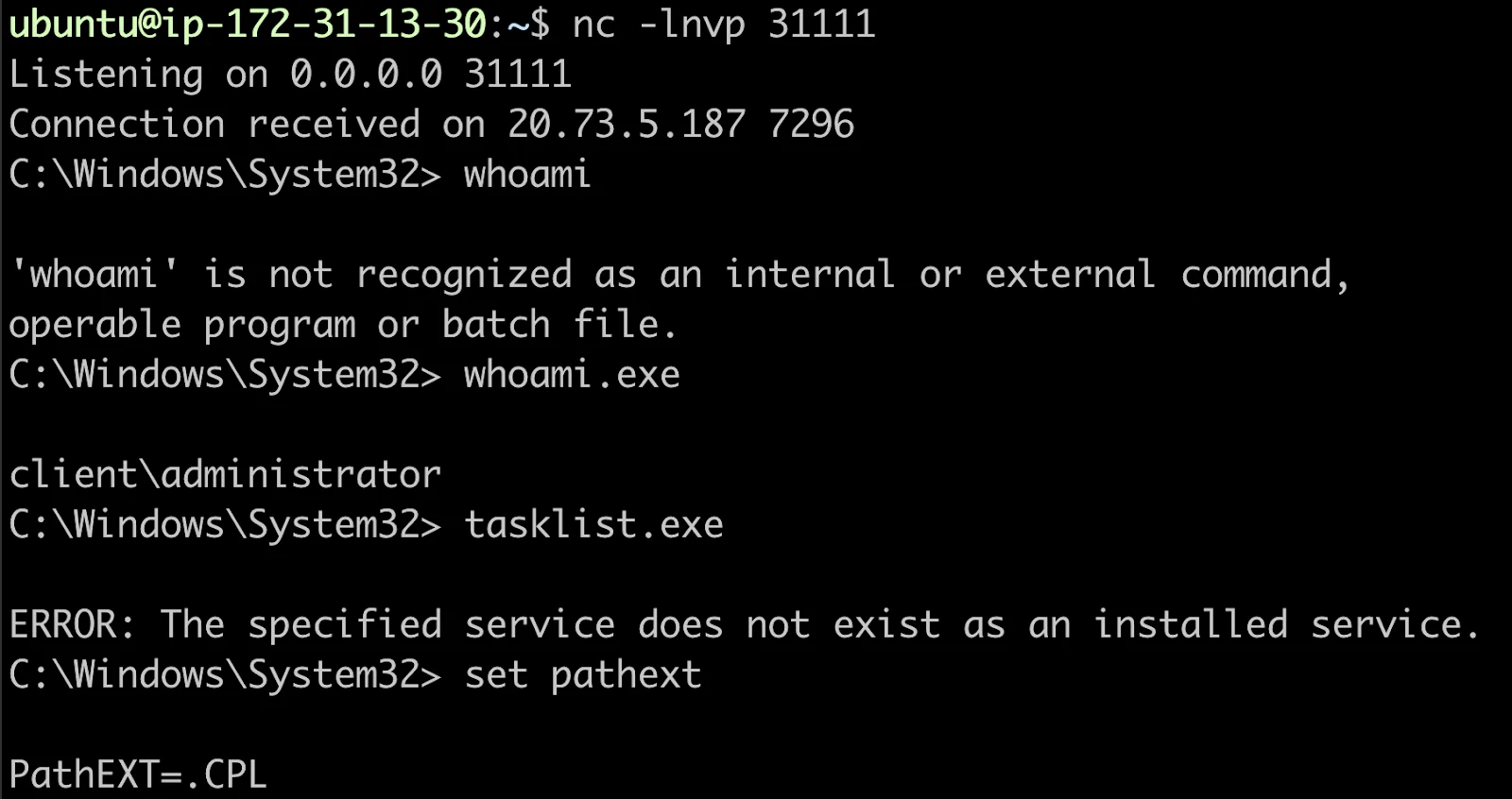
The image accompanies this point in the report, where the researcher describes the unexpected message returned when trying to run tasklist.exe inside the sandbox.
Looking at the C:\ drive, two directories caught his attention: "Orchestrator" and "temp". The orchestrator directory contained a lot of DLLs and EXEs, and filenames containing "sandbox" led him to understand that this directory contained the sandbox they were running in. The temp directory contained another directory named "diags" and a "trace.log" file.
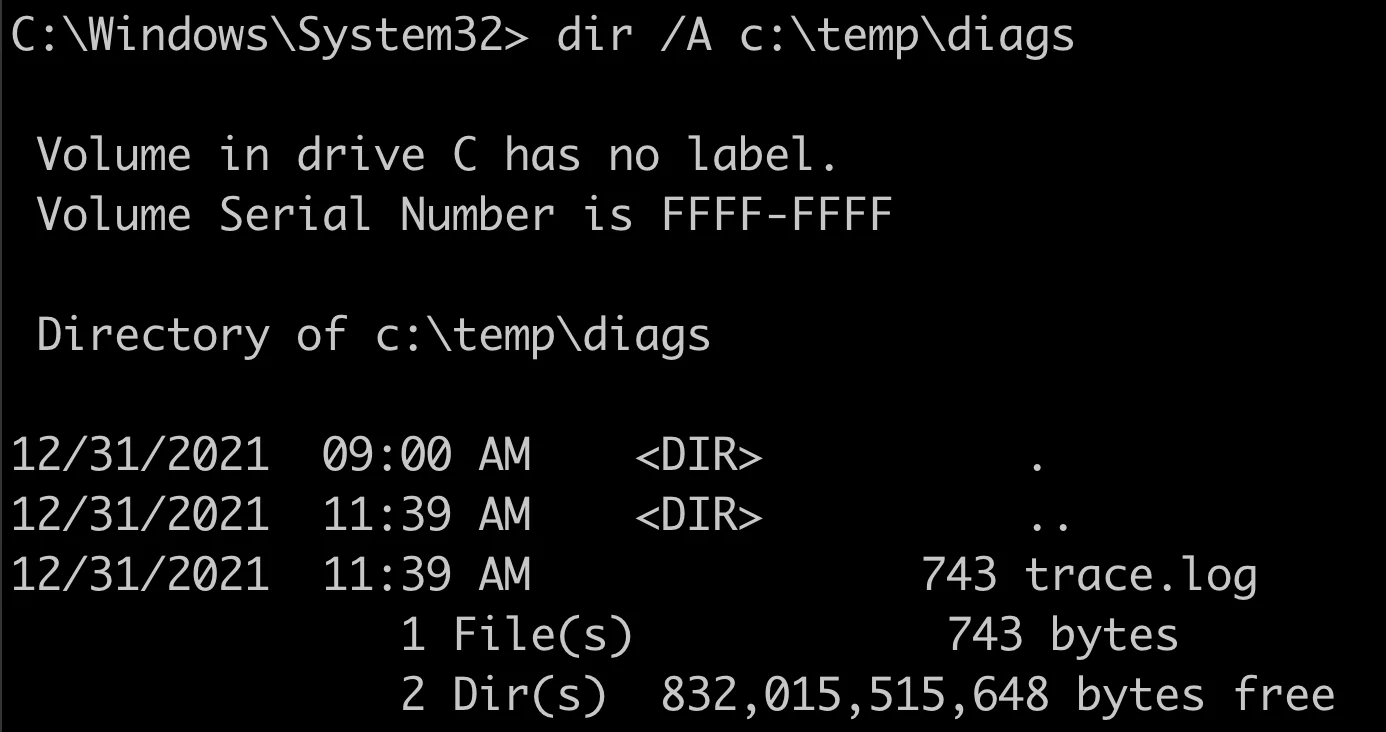
The image sits at this point in the report, illustrating the directory listing of the C:\ drive with the Orchestrator and temp directories.
Log files are great for research, the researcher notes: they often provide concise and important information, a chance to peek inside a diary describing what the developers deemed important. This one was a very good log file. Very early, at line 7, this appeared:
The log line announces an "asset retrieval web service" and gives its endpoint as a loopback address on port 40008. The researcher describes this as screaming red flags. He calls it a "cover": a software decision made to cover up for some technical limitation. Why choose such a high, seemingly random port? Because other ports are taken.
He made an HTTP request to the URL with cURL. It worked but did not provide much information about what was going on. He then tried the next ports (40009, 40010, and so on). Some of them responded, which immediately confirmed his suspicions. The logs made it obvious that the web service was managed by the orchestrator he had seen earlier, so he had to understand what it was.
Exploitation
Step 1: Decompile the orchestrator and find the routes
After downloading the orchestrator's files, the researcher opened them in ILSpy (.NET decompiler) and looked for the code of the "asset retrieval web service". He looked at the method that sets up the HTTP routes. What really popped out was that "/oauth2/token" and "/metadata/identity/oauth2/token" were mapped to a controller called "MSIController". At the time he did not know that MSI is an acronym for "Managed Service Identity".
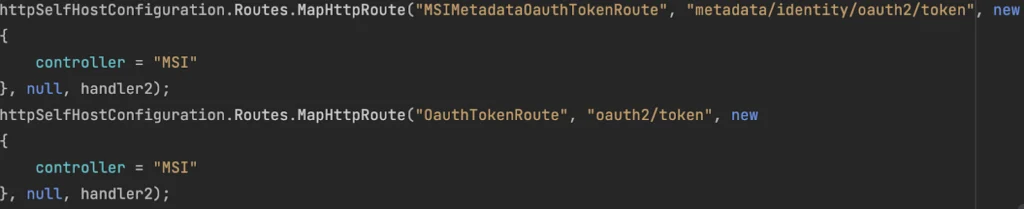
The image accompanies this part of the report, showing the decompiled code where the token routes are mapped to the MSIController.
He had not done much .NET web development or research before, so he inferred from the code that these routes were mapped to the "MSIController" class, which is straightforward if you are familiar with MVC (Model-View-Controller). He adds that some experience in software development helps significantly when reviewing source code, because it helps you "read between the lines" in even more complicated cases.
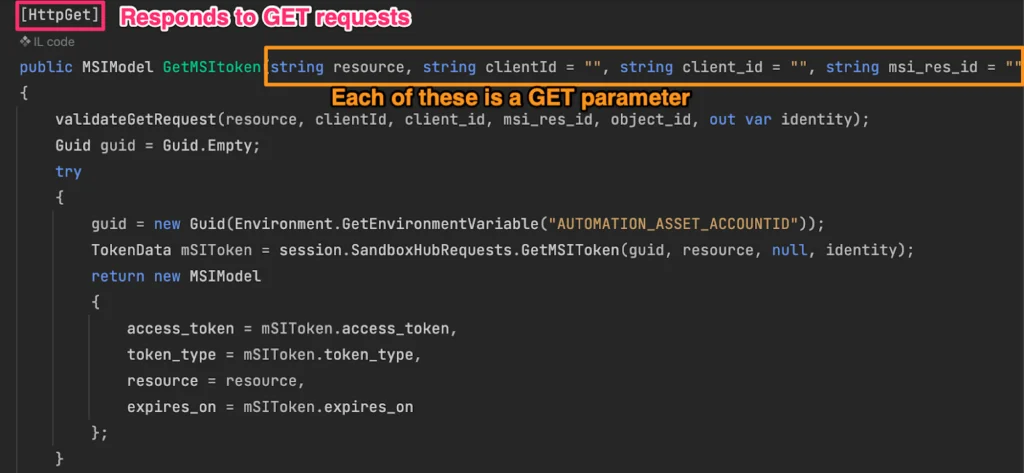
The image sits at this point in the report, alongside the discussion of reading decompiled source code.
Step 2: Request a token from the local endpoint
He started making HTTP requests to /oauth2/token, adjusting the request to look like a metadata request by adding the "Metadata: True" HTTP header and adding the resource parameter. He wanted the token to be usable by Azure management APIs, so he used "resource=https://managment.azure.com/". The request simply returned a JWT (JSON Web Token).
The report does not reproduce the exact request or the token. The important parts described are:
- The path:
/oauth2/token. - The header
Metadata: True, mimicking the Azure Instance Metadata Service request shape. - The
resourceparameter set tohttps://managment.azure.com/(spelled that way in the report).
The response was a JWT. The researcher's reaction in the report is "Uh-oh."
Step 3: Decode the token and identify the identity
He decoded the token and saw his subscription ID, tenant ID, and his automation account resource ID. He looked up "Azure Automation Identity" online and found that each automation account has a "system-assigned managed identity", which means you can assign roles to your automation scripts and the identity is managed by the service.
Step 4: Prove the token is real
To test whether the token was the real deal, he used the Azure CLI to make a simple request to get all his VMs (az vm list), intercepted the request, and swapped the token. He got an error that he did not have enough permissions, which was expected because he had not assigned any role to his managed identity. After assigning a compatible role, the token worked. The token was actually linked to his managed identity.
At this point the behaviour is legitimate: a token linked to a managed identity is not an issue in itself, and you are supposed to be able to get a token for your own managed identity.
Step 5: Notice that other ports answer
The problem was the additional ports accessible locally. Each time he ran an automation job, he saw the port changing, but it remained around the same range. He wrote a quick Python script to make HTTP requests to ports starting from 40,000:
import requests

PORT_RANGE_START = 40000
PORTS_TO_SCAN = 1000

print("Making requests to ports 40000 and up...")
for port in range(PORT_RANGE_START, PORT_RANGE_START + PORTS_TO_SCAN):
    try:
        resp = requests.post(f"http://[redacted]:{port}/oauth2/token",
timeout=0.5, headers={'Metadata': 'True'}, data={'resource':
'https://management.azure.com/'})
        print(f"Port {port}: {resp.json()}")
    except Exception as e:
        continue
The script sends a POST to /oauth2/token on each loopback port in the range, with the Metadata: True header and the resource parameter set to https://management.azure.com/, a short timeout of 0.5 seconds, and prints the JSON response for any port that answers. Random ports returned JWT tokens. He executed the script a few more times and different ports gave different tokens. It was obvious to him that he was actually accessing other people's identity endpoints. He had already proved that these tokens could be used to manage the Azure account if given enough permissions, so accessing data of other tenants was not necessary to demonstrate the issue.

The image accompanies this point in the report, where the researcher explains that he was accessing other people's identity endpoints and that using the tokens against tenant data was unnecessary.
Step 6: Measure the exposure with scheduled jobs
To understand how far the simple flaw could go, the team used the schedules feature of Azure Automation to try grabbing tokens from a few hundred ports and see which tenants came up. They did not store the tokens and only extracted metadata about the tenant: the tenant ID and the automation account resource ID.
In the short period before the issue was patched, they saw many unique tenants, including several very well-known companies, and this was just from a scheduled run every hour. The report notes that running continuously would likely have captured much more, and that the identity endpoint is expected to go down as soon as the automation job finishes, so in some cases you would have to grab it really fast.
Root cause
The report describes the flaw as fairly simple. The internal "asset retrieval web service" that serves managed identity tokens listened on loopback ports in a high range, and the researcher could reach other customers' identity endpoints from inside his sandbox. The researcher could reach the identity endpoints of other customers' sandboxes on the same host and obtain their managed identity tokens; the report says it is unclear what was missing.
The researcher's own framing of what was missing:
- The identity endpoint could have required some form of authentication; other endpoints on this server certainly did, according to the report.
- Or maybe someone overlooked the fact that the internal network inside the machine is not actually sandboxed as you might expect.
The report does not state which of these explanations is correct, and it does not describe the orchestrator code beyond the route mapping. The report does not explain why the sandbox failed to stop the attack; the researcher says it is unclear what was missing. The report says this is likely, not confirmed: "It's unclear what was missing here".
Impact
Under the conditions in the report (Azure Automation in use, Managed Identity enabled, which is the default), an attacker with the ability to run automation code could obtain managed identity tokens belonging to other tenants sharing the same host. The report states that these tokens could be used to manage the Azure account if given enough permissions, so the impact depends on the roles assigned to the targeted account's managed identity. The report's opening summary says this could mean full control over resources and data belonging to the targeted account, depending on the permissions assigned by the customer.
Someone with malicious intentions could have continuously grabbed tokens, and with each token widen the attack to more Azure customers. The researchers' own limited scheduled runs, one per hour, surfaced many unique tenants including several very well-known companies; the report hedges that continuous running would likely have captured much more, subject to the endpoint going down when the job finishes.
The researchers deliberately did not access other tenants' data: they had already proved the tokens worked against Azure management APIs with sufficient permissions, so accessing data of other tenants was not necessary. During the measurement phase they did not store tokens and only extracted tenant ID and automation account resource ID.
Fix
Microsoft fixed the issue on December 10, 2021, and started looking for additional variants of the attack. According to the report, Microsoft decided to patch the issue by requiring the "X-IDENTITY-HEADER" HTTP header when requesting identities. You must set the value to the secret value set in your environment variables. Microsoft also said it was performing an overall review of its architecture to make sure things like this do not happen again.

The image accompanies this closing part of the report, where the researcher describes Microsoft's fix and the architecture review.
It also points readers to Microsoft's Automation security guidelines as the recommended best practices for customers.
Variants to test
These are generalisation ideas for similar research, not claims from the report. Each is paired with what a positive result would look like.
- Scan loopback for undocumented HTTP services from inside a sandbox or job runner. Run a port sweep similar to the report's script against [redacted] over a wide range and log any port that returns JSON or an HTTP status rather than a connection error. A positive result is one or more ports answering with structured data, especially token-shaped responses.
- Look for metadata-style endpoints on non-standard ports. Request
/oauth2/tokenand/metadata/identity/oauth2/tokenwith aMetadata: Trueheader and aresourceparameter on every responding loopback port. A positive result is a JWT whose claims reference an identity, tenant or resource you do not own. - Check whether the port range is predictable across job runs. Record the port each job's service listens on over several runs. A positive result is a narrow, repeating range, which makes blind scanning practical.
- Test whether the endpoint requires authentication. Compare the token endpoint with other endpoints on the same local server; the report notes other endpoints on this server did require authentication. A positive result is a token issued with no credential, header secret or session.
- Read diagnostic logs and decompiled binaries shipped with the agent. Grep logs for endpoint URLs, ports and service names, and decompile .NET assemblies to find route tables. A positive result is a route mapping to an identity or credential controller that is reachable from the sandbox.
- Check cross-tenant reachability of any per-job local service. If each job gets its own local service on a shared host, try reaching the service belonging to a concurrent job. A positive result is a response containing identifiers (tenant ID, resource ID) that differ from your own.
- Verify the fix by replaying the request without the new header. After the patch, repeat the token request without
X-IDENTITY-HEADER. A positive result for the defender is a rejection; a token without the header would indicate the fix is incomplete.
What happened, in plain words
A security researcher named Yanir Tsarimi, working for a company called Orca Security, found a serious flaw in a Microsoft cloud service called Azure Automation. He gave the flaw the name AutoWarp. The flaw let someone who was using the service reach into other customers' accounts that were running on the same underlying machine. Depending on what permissions those other customers had given to their accounts, this could mean full control over their resources and data. The report says multiple large companies were using the service and could have been accessed, and that this put billions of dollars at risk. The researcher reported it to Microsoft, Microsoft fixed it, and the affected customers were told.
To follow the rest of this article you only need to know how to use a browser and a computer. Every technical idea is explained where it first appears, and there is a glossary at the end.
The service and the feature involved
Microsoft Azure is Microsoft's cloud platform: a collection of rented computers and services that run in Microsoft data centres and that customers reach over the internet. Azure Automation is one of those services. It lets a customer upload small programs, called scripts, and have Azure run them on a schedule or on demand. The report says you can schedule jobs, provide input and output, and more.
A script here is just a text file containing instructions, written in a programming language such as Python or PowerShell, that a computer executes step by step. Think of it as a recipe that a kitchen follows without asking questions.
Each customer's script does not run on its own private computer. It runs inside a sandbox, which is an isolated compartment on a shared machine. The report says each customer's automation code runs inside a sandbox, isolated from other customers' code executing on the same virtual machine. A useful everyday comparison is a set of separate hotel rooms in one building: guests share the building, but each room is supposed to be sealed off from the others. That sealing off is the security property the whole service rests on, and it is exactly what AutoWarp broke.
A virtual machine is a computer simulated in software. One physical server can host many virtual machines, and each one behaves like a separate computer with its own operating system, files and network. The sandboxes in this story sit on the same virtual machine, which is why they can, in principle, see each other's local network.
The report lists two conditions for having been vulnerable before the fix:
- You have been using the Azure Automation service.
- The Managed Identity feature in your automation account is enabled, which the report says is enabled by default.
Managed Identity is a feature where Azure creates an identity for a resource, such as an automation account, and manages it for you. You can then give that identity permissions, and your scripts can act as that identity without you handling any password. The report explains it later as: each automation account has a system-assigned managed identity, which basically means you can assign roles to your automation scripts and the identity is managed by the service. "Enabled by default" means new accounts get it switched on without the customer doing anything, so most customers were in the vulnerable configuration without choosing it.
The timeline
The report gives these dates:
- December 6, 2021: research began, the vulnerability was discovered and reported to Microsoft.
- December 7, 2021: large companies were found to be at risk, including a global telecommunications company, two car manufacturers, a banking conglomerate, big four accounting firms, and more.
- December 10, 2021: Microsoft fixed the issue and started looking for additional variants of this attack.
- March 7, 2022: public disclosure following Microsoft's investigation conclusion.
Public disclosure means the details are made public, usually after the vendor has had time to fix the problem. Coordinated Vulnerability Disclosure (CVD) is the agreed process for doing that: the finder tells the vendor privately, the vendor fixes it, and then everyone talks about it openly. Microsoft's statement, quoted in the report, thanks the researcher and says the work was done under CVD to help keep Microsoft customers safe. Microsoft also published a blog post about the incident and recommends that Automation customers follow the security best practices in its Automation security guidelines.
Setting up the research
The researcher started by scrolling through the Azure services list looking for a service to research. "Automation Accounts" under the "Management & Governance" category caught his attention. He first thought it was some kind of service allowing him to control Azure accounts with automation. After creating his first automation account, he found that Azure Automation is a fairly standard service for automation scripts: you upload a Python or PowerShell script and it executes on Azure.
The report does not give account tiers, role assignments, tool versions or subscription details beyond this. The tools used were:
- A Python or PowerShell automation script uploaded to the automation account, used to start a reverse shell from inside the sandbox.
- cURL, to make HTTP requests to the local web service.
- ILSpy, a .NET decompiler, to review the orchestrator's files.
- The Azure CLI, to test whether a captured token was valid.
- A short Python script using the
requestslibrary to scan local ports. - The schedules feature of Azure Automation, to run token-grabbing jobs repeatedly.
Several of those need explaining.
A reverse shell is a way for a program running on a remote machine to give the person controlling it an interactive command prompt on that machine. Normally you connect to a server and type commands; with a reverse shell, the remote machine connects back out to you and lets you type commands as if you were sitting at it. The comparison is a phone call: instead of you calling the office and asking questions, the office calls you and stays on the line while you give instructions. The researcher used one because it made working against the server much smoother than uploading a new script for every experiment.
cURL is a command line tool that sends requests over the network and prints the reply. A request is a message one program sends to another asking it to do something, and a response is the reply. When you load a web page, your browser sends a request and the web server sends back a response containing the page.
A decompiler is a tool that takes a compiled program, which is the machine-ready form a developer ships, and turns it back into something close to readable source code. ILSpy is a decompiler for .NET programs. .NET is a software platform from Microsoft; programs built on it are compiled into an intermediate form that ILSpy can turn back into readable code. The comparison is translating a finished cake back into a recipe: you cannot recover the exact original text, but you can see the ingredients and the steps.
Azure CLI is a command line tool for talking to Azure. CLI stands for command line interface, a way of using a program by typing commands rather than clicking buttons.
The precondition for the whole attack is simply an automation account with the Managed Identity feature enabled, which the report says is the default.
Finding it
The researcher's first move was to explore the file system from inside the automation sandbox to see what he might find. The file system is the way a computer organises files into folders and drives. He started a reverse shell from his automation script, which made working against the server much smoother.
Setting the reverse shell with Python was no problem. However, common commands such as tasklist returned an error saying they were not found. tasklist is a standard Windows command that lists the programs currently running. The PathExt environment variable, which defines which file extensions the operating system should try to execute, was set to a strange value: instead of the usual .exe, only .CPL was present, the file extension for Windows Control Panel items. Even invoking tasklist.exe directly to list running processes gave a message the researcher had never seen before. It looked like something might be up.
An environment variable is a named setting that the operating system or a program keeps in memory and that programs can read. Think of it as a sticky note on the fridge that every program in the kitchen can read. PathExt is one such setting: it tells Windows which file extensions count as runnable programs. A file extension is the part of a filename after the dot, such as .exe or .txt, that hints at what kind of file it is. .exe files are programs; .CPL files are Control Panel items, small programs that open settings windows. The fact that only .CPL was listed, and not .exe, was odd, and the odd error message was the first hint that this was not an ordinary Windows machine.
The image accompanies this point in the report, where the researcher describes the unexpected message returned when trying to run tasklist.exe inside the sandbox.
Looking at the C:\ drive, two directories caught his attention: "Orchestrator" and "temp". A directory is another word for a folder. The orchestrator directory contained a lot of DLLs and EXEs, and filenames containing "sandbox" led him to understand that this directory contained the sandbox they were running in. The temp directory contained another directory named "diags" and a "trace.log" file.
A DLL is a library file: a bundle of code that other programs load and use, rather than a program you run by itself. An EXE is an executable program. An orchestrator, in this context, is the software that manages the sandboxes: it starts them, stops them and keeps track of them. The comparison is a theatre stage manager who is not on stage but decides when each actor comes on and what props they get. A log file is a text file where a program writes notes about what it did, in order, with timestamps. The trace.log file was one of these.
The image sits at this point in the report, illustrating the directory listing of the C:\ drive with the Orchestrator and temp directories.
Log files are great for research, the researcher notes: they often provide concise and important information, a chance to peek inside a diary describing what the developers deemed important. This one was a very good log file. Very early, at line 7, this appeared:
Line by line, in plain words:
Orchestrator.Sandbox.Diagnostics Critical:is the name of the part of the program that wrote the line, followed by the severity levelCritical. It tells you the orchestrator's sandbox diagnostics component considered this important.0 : [2021-12-06T12:08:04.5527647Z]is a sequence number and a timestamp. TheZat the end means the time is in UTC, the world time standard.Creating asset retrieval web service.says the program is starting a small web service whose job is to retrieve assets. An asset here means a stored item the service hands out, and a web service is a program that answers requests over the network, the same way a website answers your browser.[assetRetrievalEndpoint=begins the address of that service.http://[redacted]:40008]is the address itself.httpis the protocol, the language of web requests.[redacted]is the loopback address, a special address that always means "this same computer". It is like a phone number that only rings inside your own house.40008is the port, a numbered door on that computer; a computer can run many services at once, each listening on a different port. So the line says: a web service was just started, and it can be reached only from this machine, on port 40008.
The researcher describes this as screaming red flags. He calls it a "cover": a software decision made to cover up for some technical limitation. Why choose such a high, seemingly random port? Because other ports are taken. Ports below 1024 are conventionally reserved for well-known services, and other software on the machine had probably claimed the lower numbers, so this service was pushed up into a high range.
He made an HTTP request to the URL with cURL. It worked but did not provide much information about what was going on. He then tried the next ports (40009, 40010, and so on). Some of them responded, which immediately confirmed his suspicions. The logs made it obvious that the web service was managed by the orchestrator he had seen earlier, so he had to understand what it was.
Exploitation
Step 1: Decompile the orchestrator and find the routes
After downloading the orchestrator's files, the researcher opened them in ILSpy and looked for the code of the "asset retrieval web service". He looked at the method that sets up the HTTP routes. A route is a rule that says which piece of code handles which web address. Think of a hotel switchboard: dial 1 for reception, dial 2 for room service. In a web service, a route maps a path such as /oauth2/token to the code that should answer it. A method, in programming, is a named block of code that does one job.
What really popped out was that "/oauth2/token" and "/metadata/identity/oauth2/token" were mapped to a controller called "MSIController". At the time he did not know that MSI is an acronym for "Managed Service Identity".
A controller is the part of a web program that handles a group of related requests. The name "MSIController" suggested that this code dealt with managed identities, which is exactly the feature described earlier. The path /oauth2/token is the address you ask for a token, and /metadata/identity/oauth2/token is the address used by a standard Azure mechanism for obtaining identity tokens. OAuth 2.0 is an industry standard for handing out access tokens, and oauth2 in the path is a reference to it.
The image accompanies this part of the report, showing the decompiled code where the token routes are mapped to the MSIController.
He had not done much .NET web development or research before, so he inferred from the code that these routes were mapped to the "MSIController" class, which is straightforward if you are familiar with MVC (Model-View-Controller). MVC is a common way of organising web software into three parts: the model holds the data, the view shows it, and the controller decides what to do with each incoming request. He adds that some experience in software development helps significantly when reviewing source code, because it helps you "read between the lines" in even more complicated cases.
The image sits at this point in the report, alongside the discussion of reading decompiled source code.
Step 2: Request a token from the local endpoint
He started making HTTP requests to /oauth2/token, adjusting the request to look like a metadata request by adding the Metadata: True HTTP header and adding the resource parameter. He wanted the token to be usable by Azure management APIs, so he used resource=https://managment.azure.com/. The request simply returned a JWT (JSON Web Token).
A few ideas need unpacking here.
An HTTP header is an extra line of information attached to a request or response, separate from the main content. Think of it as the label on a parcel: the parcel has contents, and the label says who sent it, who it is for and how it should be handled. Metadata: True is a header that says "this request is a metadata request". The Azure Instance Metadata Service is a standard local service that Azure virtual machines expose so that software inside the machine can ask about itself, including asking for identity tokens. Requests to it use that header. By adding it, the researcher made his request look like the standard, expected kind.
A parameter is a named value sent along with a request, like a field on a form. The resource parameter says which service the requested token should be valid for. The value https://managment.azure.com/ is the address of the Azure management interface, spelled that way in the report. A management API is the set of web addresses that let software create, change and delete Azure resources. API stands for Application Programming Interface: a defined set of requests that one program can make to another. The comparison is a restaurant menu: it lists exactly what you can order and how to ask for it, without you needing to know what happens in the kitchen.
A JWT, or JSON Web Token, is a compact string that carries claims about an identity, such as who you are and what you are allowed to do, together with a signature so it can be checked. JSON is a simple text format for structured data, using curly brackets and colons. A token is like a stamped wristband at an event: once you have it, staff let you into areas without checking your ID again. The response being a JWT was the surprise. The researcher's reaction in the report is "Uh-oh."
The report does not reproduce the exact request or the token. The important parts described are:
- The path:
/oauth2/token. - The header
Metadata: True, mimicking the Azure Instance Metadata Service request shape. - The
resourceparameter set tohttps://managment.azure.com/(spelled that way in the report).
Step 3: Decode the token and identify the identity
He decoded the token and saw his subscription ID, tenant ID, and his automation account resource ID. A subscription is a billing and organisation container in Azure; a subscription ID is its unique identifier. A tenant is an organisation's space in Azure, and a tenant ID identifies it. A resource ID is the unique name of a specific thing in Azure, such as one automation account. Decoding a JWT means reading the readable parts of it, which are not encrypted, only signed. The comparison is opening an envelope and reading the address on the letter: the contents may be sealed, but the address is visible.
He looked up "Azure Automation Identity" online and found that each automation account has a system-assigned managed identity, which means you can assign roles to your automation scripts and the identity is managed by the service. A role is a bundle of permissions, such as "can read virtual machines" or "can manage everything in this subscription".
Step 4: Prove the token is real
To test whether the token was the real deal, he used the Azure CLI to make a simple request to get all his VMs (az vm list), intercepted the request, and swapped the token. He got an error that he did not have enough permissions, which was expected because he had not assigned any role to his managed identity. After assigning a compatible role, the token worked. The token was actually linked to his managed identity.
az vm list is an Azure CLI command that asks Azure to list all virtual machines in the subscription. Intercepting a request means capturing it on its way out so you can look at it or change it before it is sent. Swapping the token means replacing the credential the tool would normally use with the captured one, to see whether the server accepts it. The first error was a good sign, not a bad one: it showed the token was being checked against permissions, and that his identity simply had none yet. Once he gave it a role, the token worked, which proved it was a genuine credential for his own managed identity.
At this point the behaviour is legitimate: a token linked to a managed identity is not an issue in itself, and you are supposed to be able to get a token for your own managed identity.
Step 5: Notice that other ports answer
The problem was the additional ports accessible locally. Each time he ran an automation job, he saw the port changing, but it remained around the same range. He wrote a quick Python script to make HTTP requests to ports starting from 40,000:
import requests

PORT_RANGE_START = 40000
PORTS_TO_SCAN = 1000

print("Making requests to ports 40000 and up...")
for port in range(PORT_RANGE_START, PORT_RANGE_START + PORTS_TO_SCAN):
    try:
        resp = requests.post(f"http://[redacted]:{port}/oauth2/token",
timeout=0.5, headers={'Metadata': 'True'}, data={'resource':
'https://management.azure.com/'})
        print(f"Port {port}: {resp.json()}")
    except Exception as e:
        continue
Line by line, in plain words:
import requestsloads a Python library calledrequests, which makes it easy to send web requests from a program. A library is a collection of ready-made code you can use instead of writing everything yourself.PORT_RANGE_START = 40000stores the number 40000 in a named box calledPORT_RANGE_START. This is where the scan begins.PORTS_TO_SCAN = 1000stores 1000 in a named box, meaning the script will try 1000 ports in total.print("Making requests to ports 40000 and up...")prints a message so the person running it knows it has started.for port in range(PORT_RANGE_START, PORT_RANGE_START + PORTS_TO_SCAN):starts a loop that repeats once for each number from 40000 up to 40999. A loop is a way of telling a program to do the same thing many times with a different value each time.try:begins a block where errors are tolerated. If something inside fails, the program jumps to theexceptpart instead of stopping.resp = requests.post(f"http://[redacted]:{port}/oauth2/token",sends a POST request to the token address on the current port. POST is one of the standard request types; it is used when you are sending data to the server rather than just asking for a page. Thef"..."syntax means the value ofportis inserted into the address.respstores the reply.timeout=0.5, headers={'Metadata': 'True'}, data={'resource':sets a half-second limit so a silent port does not stall the scan, adds theMetadata: Trueheader, and begins the data being sent.'https://management.azure.com/'})completes the data with theresourceparameter, asking for a token valid for Azure management. Note that this line spells the addressmanagement, while the earlier manual request in the report spelled itmanagment.print(f"Port {port}: {resp.json()}")prints the port number and the reply converted from JSON into readable text.except Exception as e:catches any error, such as a port that refuses the connection.continueskips to the next port in the loop.
So the script knocks on 1000 numbered doors on the same machine, one after another, asking each one for a token, and prints the answer from any door that opens. Random ports returned JWT tokens. He executed the script a few more times and different ports gave different tokens. It was obvious to him that he was actually accessing other people's identity endpoints. He had already proved that these tokens could be used to manage the Azure account if given enough permissions, so accessing data of other tenants was not necessary to demonstrate the issue.
An endpoint is a specific address that a service answers on, made of the machine, the port and the path. The comparison is a building with many numbered doors, each leading to a different office.
The image accompanies this point in the report, where the researcher explains that he was accessing other people's identity endpoints and that using the tokens against tenant data was unnecessary.
Step 6: Measure the exposure with scheduled jobs
To understand how far the simple flaw could go, the team used the schedules feature of Azure Automation to try grabbing tokens from a few hundred ports and see which tenants came up. They did not store the tokens and only extracted metadata about the tenant: the tenant ID and the automation account resource ID.
A scheduled job is a script that Azure runs automatically at set times, such as once an hour, without anyone pressing a button. Metadata here means information about the identity rather than the credential itself: who the tenant is, not the key that opens their door. Not storing the tokens was a deliberate choice to avoid holding other people's credentials.
In the short period before the issue was patched, they saw many unique tenants, including several very well-known companies, and this was just from a scheduled run every hour. The report notes that running continuously would likely have captured much more, and that the identity endpoint is expected to go down as soon as the automation job finishes, so in some cases you would have to grab it really fast. That last point explains why the scan had to be quick: the service only exists while a job is running, so the window to reach it is short.
Root cause
The report describes the flaw as fairly simple. The internal asset retrieval web service that serves managed identity tokens listened on loopback ports in a high range, and the researcher could reach other customers' identity endpoints from inside his sandbox. The researcher could reach the identity endpoints of other customers' sandboxes on the same host and obtain their managed identity tokens; the report says it is unclear what was missing.
A network namespace is a separate view of the network that a computer can give to a program, so that the program sees its own private set of addresses and ports. The comparison is giving each hotel guest a phone directory that lists only their own room: they cannot dial other rooms because those numbers are not in their book. The report does not say whether this separation was in place; the researcher says it is unclear what was missing.
Authentication means proving who you are before a service does something for you, such as showing a pass at a door. The researcher suggests the token endpoint could have required some form of authentication, as other endpoints on the server did.
The researcher's own framing of what was missing:
- The identity endpoint could have required some form of authentication; other endpoints on this server certainly did, according to the report.
- Or maybe someone overlooked the fact that the internal network inside the machine is not actually sandboxed as you might expect.
The report says this is likely, not confirmed: "It's unclear what was missing here".
Impact
Under the conditions in the report (Azure Automation in use, Managed Identity enabled, which is the default), an attacker with the ability to run automation code could obtain managed identity tokens belonging to other tenants sharing the same host. The report states that these tokens could be used to manage the Azure account if given enough permissions, so the impact depends on the roles assigned to the targeted account's managed identity. The report's opening summary says this could mean full control over resources and data belonging to the targeted account, depending on the permissions assigned by the customer.
Someone with malicious intentions could have continuously grabbed tokens, and with each token widen the attack to more Azure customers. The researchers' own limited scheduled runs, one per hour, surfaced many unique tenants including several very well-known companies; the report hedges that continuous running would likely have captured much more, subject to the endpoint going down when the job finishes.
The researchers deliberately did not access other tenants' data: they had already proved the tokens worked against Azure management APIs with sufficient permissions, so accessing data of other tenants was not necessary. During the measurement phase they did not store tokens and only extracted tenant ID and automation account resource ID.
Fix
Microsoft fixed the issue on December 10, 2021, and started looking for additional variants of the attack. According to the report, Microsoft decided to patch the issue by requiring the X-IDENTITY-HEADER HTTP header when requesting identities. You must set the value to the secret value set in your environment variables. Microsoft also said it was performing an overall review of its architecture to make sure things like this do not happen again.
In plain words, the fix adds a password-like check to the token endpoint. A secret is a value that only the legitimate owner should know, like a PIN. The header X-IDENTITY-HEADER must carry that secret, which the service places in the job's environment variables, the same sticky-note mechanism described earlier. Without the correct value, the request is refused. The comparison is a doorman who now asks for a password that only the real guest was given.
The image accompanies this closing part of the report, where the researcher describes Microsoft's fix and the architecture review.
It also points readers to Microsoft's Automation security guidelines as the recommended best practices for customers.
Variants to test
These are generalisation ideas for similar research, not claims from the report. Each is paired with what a positive result would look like.
- Scan loopback for undocumented HTTP services from inside a sandbox or job runner. Run a port sweep similar to the report's script against [redacted] over a wide range and log any port that returns JSON or an HTTP status rather than a connection error. A positive result is one or more ports answering with structured data, especially token-shaped responses.
- Look for metadata-style endpoints on non-standard ports. Request
/oauth2/tokenand/metadata/identity/oauth2/tokenwith aMetadata: Trueheader and aresourceparameter on every responding loopback port. A positive result is a JWT whose claims reference an identity, tenant or resource you do not own. - Check whether the port range is predictable across job runs. Record the port each job's service listens on over several runs. A positive result is a narrow, repeating range, which makes blind scanning practical.
- Test whether the endpoint requires authentication. Compare the token endpoint with other endpoints on the same local server; the report notes other endpoints on this server did require authentication. A positive result is a token issued with no credential, header secret or session.
- Read diagnostic logs and decompiled binaries shipped with the agent. Grep logs for endpoint URLs, ports and service names, and decompile .NET assemblies to find route tables. A positive result is a route mapping to an identity or credential controller that is reachable from the sandbox.
- Check cross-tenant reachability of any per-job local service. If each job gets its own local service on a shared host, try reaching the service belonging to a concurrent job. A positive result is a response containing identifiers (tenant ID, resource ID) that differ from your own.
- Verify the fix by replaying the request without the new header. After the patch, repeat the token request without
X-IDENTITY-HEADER. A positive result for the defender is a rejection; a token without the header would indicate the fix is incomplete.
Glossary
- API (Application Programming Interface): a defined set of requests one program can make to another, like a menu of what you can order.
- Asset: a stored item that a service hands out on request.
- Authentication: proving who you are before a service acts for you.
- Azure: Microsoft's cloud platform of rented computers and services.
- Azure Automation: an Azure service that runs customer scripts on a schedule or on demand.
- Azure CLI: a command line tool for talking to Azure.
- Azure Instance Metadata Service: a standard local service on Azure virtual machines that lets software ask about itself, including for identity tokens.
- Controller: the part of a web program that handles a group of related requests.
- Coordinated Vulnerability Disclosure (CVD): the agreed process where a finder tells the vendor privately, the vendor fixes the issue, and then details are made public.
- cURL: a command line tool that sends network requests and prints the replies.
- Decompiler: a tool that turns a compiled program back into something close to readable source code.
- Directory: a folder.
- DLL: a library file of code that other programs load and use.
- Endpoint: a specific address a service answers on, made of machine, port and path.
- Environment variable: a named setting kept by the operating system that programs can read.
- EXE: an executable program.
- File extension: the part of a filename after the dot, such as
.exe, hinting at the file type. - File system: the way a computer organises files into folders and drives.
- Header (HTTP header): an extra line of information attached to a request or response, like a parcel label.
- ILSpy: a decompiler for .NET programs.
- Intercept: to capture a request on its way out so it can be inspected or changed.
- JSON: a simple text format for structured data.
- JWT (JSON Web Token): a compact, signed string carrying claims about an identity, like a stamped wristband.
- Library: a collection of ready-made code you can use in your own program.
- Log file: a text file where a program writes timestamped notes about what it did.
- Loopback address ([redacted]): a special address that always means the same computer, reachable only from inside it.
- Loop: a way of telling a program to repeat the same steps many times with different values.
- Managed Identity: an Azure feature that creates and manages an identity for a resource so its code can act with permissions without handling passwords.
- Management API: the set of web addresses that let software create, change and delete Azure resources.
- Metadata: information about something, such as an identity, rather than the credential itself.
- Method: a named block of code that does one job.
- MVC (Model-View-Controller): a common way of organising web software into data, display and request handling.
- .NET: a software platform from Microsoft whose programs can be decompiled into readable code.
- Network namespace: a separate view of the network given to a program, so it sees only its own addresses and ports.
- OAuth 2.0: an industry standard for handing out access tokens.
- Orchestrator: software that starts, stops and manages sandboxes.
- Parameter: a named value sent with a request, like a field on a form.
- PathExt: a Windows environment variable listing which file extensions count as runnable programs.
- Port: a numbered door on a computer through which a service listens.
- POST: a standard request type used when sending data to a server.
- Public disclosure: making the details of a vulnerability public, usually after a fix.
- Request / response: a message asking a program to do something, and the reply it sends back.
- Reverse shell: a way for a remote program to connect back to you and give you an interactive command prompt on that machine.
- Role: a bundle of permissions in Azure, such as read or manage.
- Route: a rule mapping a web address to the code that handles it.
- Sandbox: an isolated compartment on a shared machine where one customer's code runs.
- Scheduled job: a script that runs automatically at set times.
- Script: a text file of instructions a computer executes step by step.
- Secret: a value only the legitimate owner should know, like a PIN.
- Subscription / subscription ID: a billing and organisation container in Azure, and its unique identifier.
- Tenant / tenant ID: an organisation's space in Azure, and its unique identifier.
- Token: a credential string that proves an identity and its permissions, like a wristband.
- Virtual machine: a computer simulated in software, behaving like a separate computer.
- Web service: a program that answers requests over the network.


