Microsoft Office Online Server Remote Code Execution
The document viewer endpoint in Office Online Server would fetch any HTTP, HTTPS or UNC location supplied to it, creating a server-side request forgery. Because those connections used the host's machine account, an attacker could coerce authentication and relay it to ADCS or LDAP to gain administrator rights on the server.
 Published on mdsec.co.uk
Our best in class red team can deliver a holistic cyber attack simulation to provide a true evaluation of your organisation’s cyber resilience.](https://www.mdsec.co.uk/our-services/adversary-simulation/) - [{{media:1}}
The full write-up lives on its author's site
It belongs to its author, so we link to it rather than copy it. The other two tabs are our own rewrites, checked against it.
Context
Microsoft's Office Online Server is the successor to Office Web Apps Server. It provides a browser based viewer and editor for Word, PowerPoint, Excel and OneNote documents, and it can be integrated with SharePoint so that those documents can be opened from within SharePoint.
The feature at the centre of this write-up is the /op/view.aspx endpoint. Its intended job is to retrieve Office documents from remote resources and display them in the browser. To do that, it accepts a location and makes a connection from the application to fetch the document.
During a routine penetration test, MDSec found that this endpoint is affected by a classic Server-Side Request Forgery: supplying it with an HTTP(s) or UNC location causes the application to initiate a connection to that location. Under the right conditions, that SSRF can be pushed all the way to remote code execution on the Office Online Server itself.
Setup
The vulnerability was witnessed in Office Online Server versions 16.0.10338.20039 and below. The endpoint can be reached without authentication, so no account or role on the target is needed to trigger the request itself. The tooling used in the exploitation chain is ntlmrelayx, together with an attacker controlled SMB server and an Active Directory Certificate Services deployment to relay to.
The chain assumes the Office Online Server can reach an attacker controlled SMB server; the report relays to ADCS, and notes LDAP as an alternative.
Finding it
The /op/view.aspx endpoint is designed to fetch documents from remote resources. Because it accepts a location from the caller and then makes the connection itself, it behaves as a classic SSRF: give it an HTTP(s) or UNC path and the application connects out on your behalf.
What made the finding more interesting was a second observation from the analysis: the connections from Office Online Server were performed using the machine account of the host. That turns a simple fetch primitive into coerced authentication, because the machine account's authentication can be captured and relayed to other resources.
Exploitation
Step 1: Fingerprint internal resources
The vulnerable endpoint can be exploited with a simple, unauthenticated GET request. The example below illustrates how internal resources can be fingerprinted using timing based attacks to identify valid IP addresses:
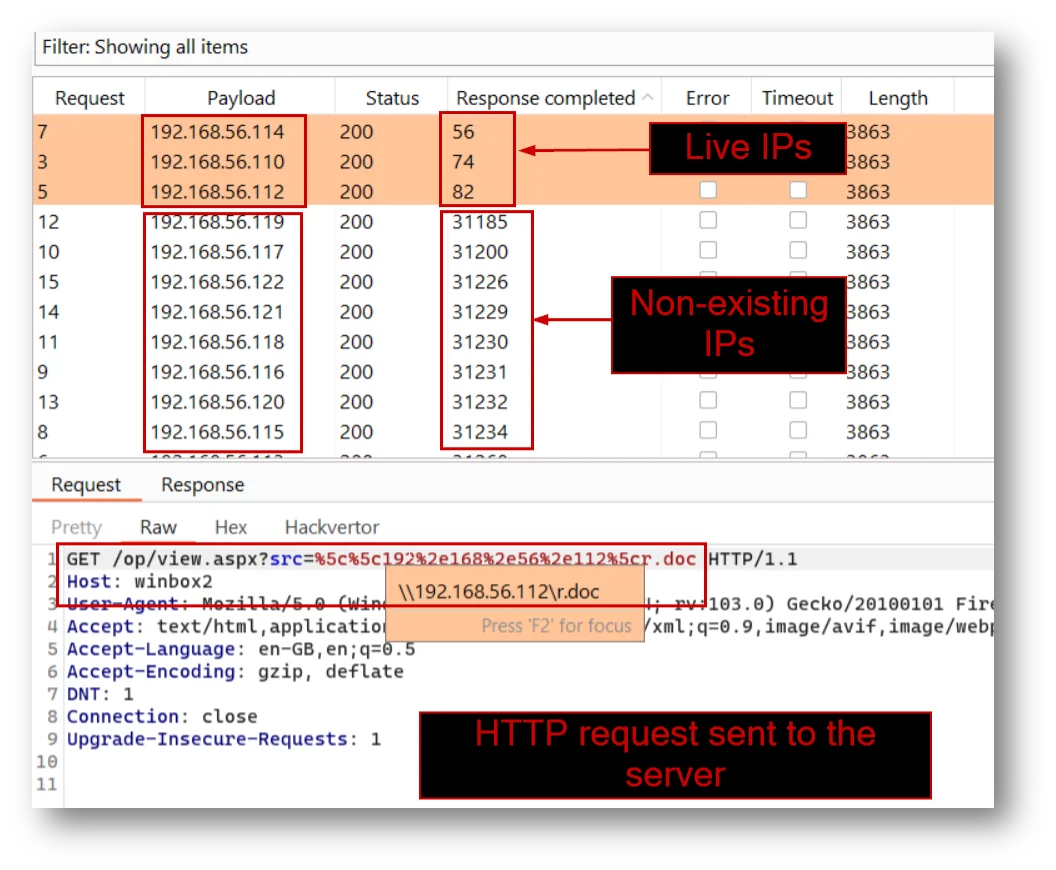
Because the request is unauthenticated, no credentials are needed to make the server connect out. Timing differences in the responses let you work out which internal addresses are valid.
Step 2: Coerce authentication from the machine account
Enumeration is interesting, but code execution is better. The connections from Office Online Server are made using the machine account of the host, which facilitates coerced authentication. That machine account can then be relayed to other resources, such as LDAP (to add shadow credentials) or Active Directory Certificate Services (to recover a client certificate for PKINIT authentication).
Step 3: Relay the SSRF to ADCS
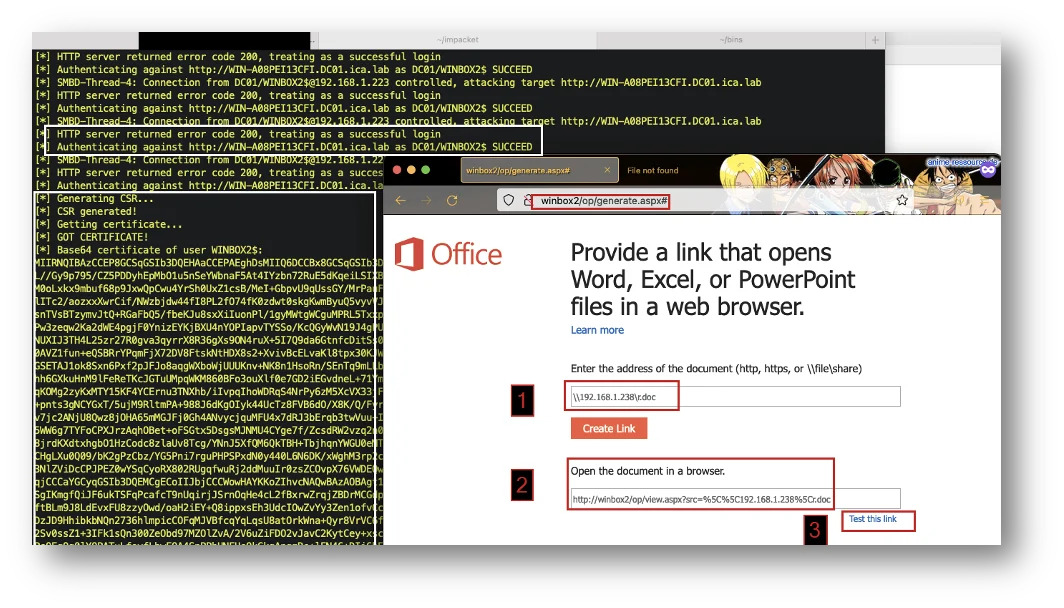
Assuming the Office Online Server is able to access an attacker controlled SMB server, the SSRF can be submitted to ntlmrelayx and subsequently relayed to ADCS, as shown below:
Step 4: Obtain a TGT with the certificate
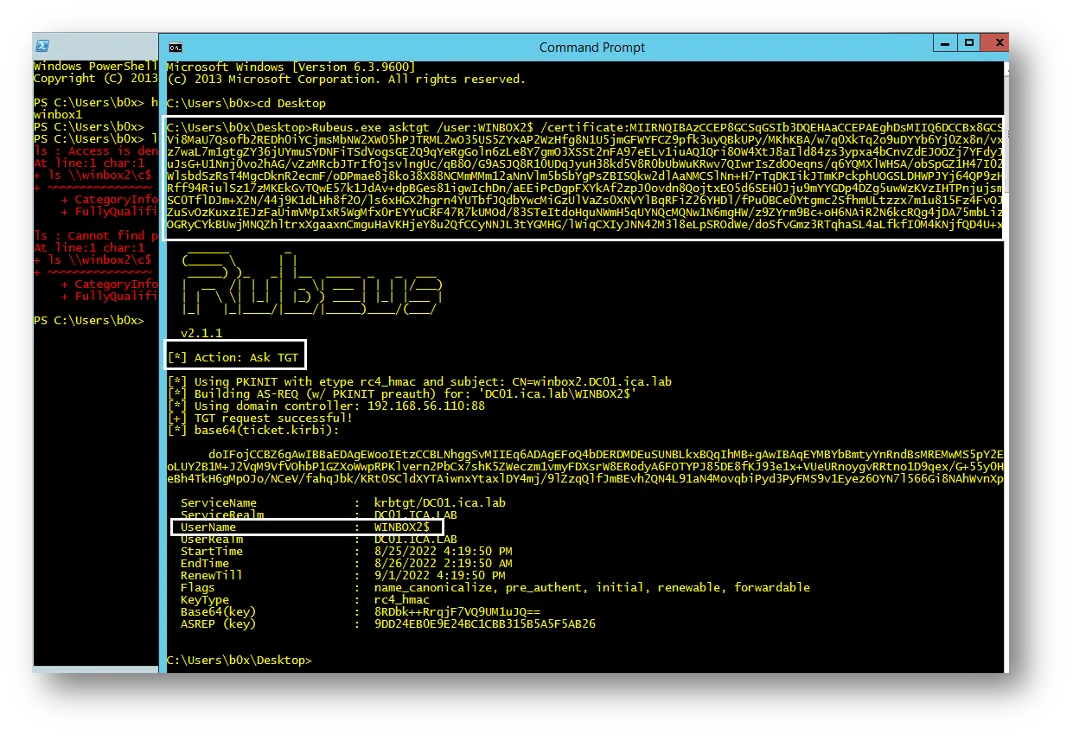
Using the certificate recovered from ADCS, it is possible to obtain a TGT for the server:
Step 5: Forge a service ticket with s4u2Self
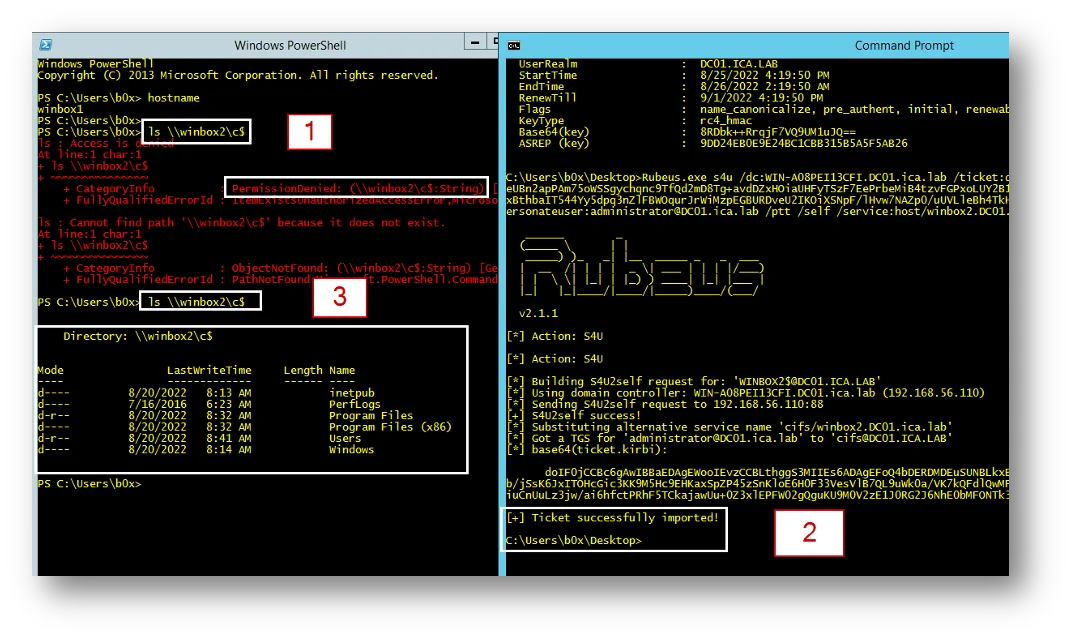
Using the TGT, a s4u2Self request can be made to receive a forged service ticket for the server, leading to local administrator privileges on the Office Online Server host:
An alternative path
A similar end result could almost certainly be achieved by using ntlmrelayx to relay to LDAP and performing a shadow credential attack. The author leaves that as an exercise for the reader.
Root cause
The /op/view.aspx endpoint takes a caller supplied HTTP(s) or UNC location and initiates a connection from the application to it. That is the SSRF itself. The escalation comes from the identity used for those outbound connections: they are made with the machine account of the host, so any destination the attacker controls receives authentication material that can be relayed.
Microsoft MSRC was informed of the vulnerability but considered it intended use for the endpoint and determined it to be a "won't fix". The design therefore treats the fetch behaviour as a feature, and the defence is left to the deployment.
Impact
Under the right conditions, an unauthenticated attacker can use the SSRF to coerce authentication from the Office Online Server's machine account and relay it to ADCS, recover a client certificate for PKINIT authentication, obtain a TGT for the server, and use a s4u2Self request to receive a forged service ticket. That leads to local administrator privileges on the Office Online Server host. Relaying to LDAP to add shadow credentials is described as an almost certainly viable alternative route to a similar result.
The chain depends on the Office Online Server being able to reach an attacker controlled SMB server.
Fix
MSRC indicated that the feature is by design and determined it to be a "won't fix". The mitigations it gave were deployment side. Internet connected servers should "lock down ports and any accounts on that farm to have least privilege". In addition, setting the OpenFromUNCEnabled flag to false disables this feature.

Variants to test
- Other document viewer endpoints that accept a remote location. Send an HTTP(s) or UNC path to any endpoint that fetches documents on the user's behalf. A positive result is an outbound connection from the server to a host you control.
- Timing based internal enumeration. Point the endpoint at internal addresses and compare response times. A positive result is a consistent timing difference that distinguishes valid addresses from invalid ones.
- Coerced authentication to an attacker controlled SMB server. Supply a UNC path pointing at your SMB server. A positive result is an inbound authentication attempt from the target's machine account.
- Relay to ADCS. Submit the coerced authentication to ntlmrelayx and relay it to ADCS. A positive result is a client certificate for the machine account, which can then be used for PKINIT to obtain a TGT.
- Relay to LDAP for shadow credentials. Relay the coerced authentication to LDAP and attempt to add shadow credentials. A positive result is a shadow credential written for the machine account, giving an alternative route to the same outcome.
What happened, in plain words
Microsoft makes a product called Office Online Server. Think of it as a web version of Word, PowerPoint, Excel and OneNote: instead of installing those programs on your computer, you open a document in your browser and the server does the work of showing it to you. Many organisations also use SharePoint, which is Microsoft's system for storing and sharing documents inside a company, and Office Online Server can be plugged into SharePoint so that documents stored there open in the browser.
One part of Office Online Server, called the /op/view.aspx endpoint, has a job that sounds harmless: when someone asks to view a document, this endpoint goes and fetches that document from wherever it lives, then displays it. To do that, it accepts a location (an address) from whoever is asking, and then the server itself makes a connection out to that address.
MDSec, a security company, was doing a penetration test (a hired, authorised attempt to break into a system, the way a locksmith might be paid to try your locks) and found a problem. If you give that endpoint an address, the server will happily connect to it, even if the address points at something internal that you should never be able to reach. This kind of flaw is called Server-Side Request Forgery, or SSRF: you trick a server into making a request on your behalf, so the request comes from the server, not from you.
That alone would be a way to fingerprint internal systems. But MDSec noticed something worse. When Office Online Server made those outbound connections, it did so using the machine account of the host, which is the identity the server computer itself uses to log in to other machines on the network. That means an attacker can capture that login attempt and pass it on (relay it) to other systems, and in the right conditions end up with local administrator privileges on the Office Online Server machine itself. That final step, running your own commands on someone else's computer, is remote code execution, or RCE.
MDSec told Microsoft. Microsoft's security response team (MSRC) replied that the endpoint is working as intended and marked it a "won't fix". The defence is therefore left to whoever deploys the product.
The product and the feature
Office Online Server is the successor to an older product called Office Web Apps Server. Its purpose is to let people view and edit Word, PowerPoint, Excel and OneNote documents in a browser, without the desktop programs installed. When it is integrated with SharePoint, documents stored in SharePoint can be opened directly from SharePoint pages.
The feature at the centre of this write-up is the /op/view.aspx endpoint. An endpoint is simply a specific address on a web server that does a specific job, like a particular counter in a large building: you go to that counter when you want that service. This endpoint's job is to retrieve Office documents from remote resources and display them in the browser. To do that, it accepts a location and makes a connection from the application to fetch the document.
That design is the seed of the problem. The endpoint trusts the location it is given and connects out to it. If an attacker supplies the location, the attacker decides where the server connects.
The vulnerability
During a routine penetration test, MDSec found that the /op/view.aspx endpoint is affected by a classic Server-Side Request Forgery. Supplying it with an HTTP(s) or UNC location causes the application to initiate a connection to that location.
Two terms need unpacking here:
- HTTP(s) is the normal language of the web, the one your browser speaks when it loads a page. An HTTP(s) location is an ordinary web address such as a URL.
- UNC stands for Universal Naming Convention. It is the Windows way of writing the address of a shared folder on another computer, and it looks like a path beginning with two backslashes, for example a share on a file server. When Windows sees a UNC path, it knows to reach out over the network to that file server, and that reach-out involves logging in.
So the endpoint will connect out to a web address or to a Windows file share, whichever it is handed. Under the right conditions, that SSRF can be pushed all the way to remote code execution on the Office Online Server itself.
MDSec witnessed this vulnerability within Office Online Server versions 16.0.10338.20039 and below.
Setup: what you need for the full chain
The endpoint can be reached without authentication, so no account or role on the target is needed to trigger the request itself. In plain terms, you do not need a username or password to make the server connect out; anyone who can reach the endpoint can ask it to fetch something.
The tooling used in the exploitation chain is ntlmrelayx, together with an attacker controlled SMB server and an Active Directory Certificate Services deployment to relay to. Each of those deserves a short explanation:
- ntlmrelayx is a tool from the Impacket collection. Its job is to catch an authentication attempt and forward it to another system, so the second system believes the original computer is logging in to it. Think of a relay race: one runner hands the baton to the next, and the second runner carries it to the finish line.
- SMB (Server Message Block) is the Windows protocol for sharing files and folders over a network. An SMB server is a machine that offers such shares. An attacker controlled SMB server is one the attacker runs, so the attacker can watch what arrives.
- Active Directory Certificate Services, or ADCS, is Microsoft's system for issuing digital certificates inside a company. A certificate here is like a stamped ID card issued by the company's own authority: other systems trust it because the authority issued it.
The chain assumes the Office Online Server can reach an attacker controlled SMB server; the report relays to ADCS, and notes LDAP as an alternative. In other words, the server must be able to talk out to the attacker's machine, and there must be a certificate authority inside the network that will accept the relayed login.
Finding it
The /op/view.aspx endpoint is designed to fetch documents from remote resources. Because it accepts a location from the caller and then makes the connection itself, it behaves as a classic SSRF: give it an HTTP(s) or UNC path and the application connects out on your behalf.
What made the finding more interesting was a second observation from the analysis: the connections from Office Online Server were performed using the machine account of the host. Every Windows computer joined to a company domain has its own account, separate from the accounts of the people who use it, and that account is used when the computer itself needs to prove its identity to another machine. That turns a simple fetch primitive into coerced authentication: the server is made to authenticate to a destination the attacker chose, and the attacker can capture that authentication.
Exploitation
Step 1: Fingerprint internal resources
The vulnerable endpoint can be exploited with a simple, unauthenticated GET request. A GET request is the most basic kind of web request: your browser sends one every time you type an address and press Enter, and it means "please give me this". The example below illustrates how internal resources can be fingerprinted using timing based attacks to identify valid IP addresses:
Fingerprinting means working out what is there without being allowed to look directly, the way you might tap on a wall to find the studs behind it. Timing based attacks use how long a response takes as the clue. If the server tries to connect to an address that exists, the attempt behaves one way; if the address does not exist, it behaves another way, and the difference shows up as a delay. By sending requests and measuring the time, you can tell which internal addresses are real.
Because the request is unauthenticated, no credentials are needed to make the server connect out. Timing differences in the responses let you work out which internal addresses are valid.
Step 2: Coerce authentication from the machine account
Enumeration is interesting, but code execution is better. Enumeration is the mapping-out phase, learning what exists on the network. It is useful, but it does not by itself give you control of a machine.
The connections from Office Online Server are made using the machine account of the host, which facilitates coerced authentication. That machine account can then be relayed to other resources, such as LDAP (to add shadow credentials) or Active Directory Certificate Services (to recover a client certificate for PKINIT authentication).
- LDAP is the protocol used to read and change the directory that holds users, computers and their settings in a Windows domain. If you can talk to LDAP as a computer account, you can change things about that account.
- Shadow credentials are a way of attaching an extra key to an account so that whoever holds the key can log in as that account, without changing its password.
- PKINIT is a way of logging in to a Windows domain using a certificate instead of a password. If you hold a valid certificate for an account, you can use it to obtain a TGT.
- A TGT (Ticket Granting Ticket) is the first ticket you get when you log in to a Windows domain. It is like a cloakroom ticket that proves who you are and lets you ask for further tickets to specific services.
Step 3: Relay the SSRF to ADCS
Assuming the Office Online Server is able to access an attacker controlled SMB server, the SSRF can be submitted to ntlmrelayx and subsequently relayed to ADCS, as shown below:
In plain words: you point the vulnerable endpoint at your own SMB server. The Office Online Server connects to it and, because it is a Windows machine talking to a file share, it authenticates using its machine account. ntlmrelayx catches that authentication and forwards it to the certificate authority. The authority, believing it is talking to the genuine server, issues a certificate for that machine account. That certificate is the prize, because it can be used to log in as the server.
Step 4: Obtain a TGT with the certificate
Using the certificate recovered from ADCS, it is possible to obtain a TGT for the server:
Here the certificate is presented to the domain in place of a password, using PKINIT, and the domain hands back a TGT for the server's machine account. The attacker now holds proof of identity for the server itself.
Step 5: Forge a service ticket with s4u2Self
Using the TGT, a s4u2Self request can be made to receive a forged service ticket for the server, leading to local administrator privileges on the Office Online Server host:
s4u2Self is a legitimate Windows feature that lets a service ask the domain for a ticket on behalf of a user. With the server's TGT in hand, the attacker can use it to obtain a ticket that grants administrator rights on the Office Online Server host. That is the end of the chain: local administrator privileges on the machine.
An alternative path
A similar end result could almost certainly be achieved by using ntlmrelayx to relay to LDAP and performing a shadow credential attack. The author leaves that as an exercise for the reader. In other words, instead of asking the certificate authority for a certificate, you could use the captured authentication to write a shadow credential onto the machine account through LDAP, which gives another way in.
Root cause
The /op/view.aspx endpoint takes a caller supplied HTTP(s) or UNC location and initiates a connection from the application to it. That is the SSRF itself. The escalation comes from the identity used for those outbound connections: they are made with the machine account of the host, so any destination the attacker controls receives authentication material that can be relayed.
Microsoft MSRC was informed of the vulnerability but considered it intended use for the endpoint and determined it to be a "won't fix". The design therefore treats the fetch behaviour as a feature, and the defence is left to the deployment.
Impact
Under the right conditions, an unauthenticated attacker can use the SSRF to coerce authentication from the Office Online Server's machine account and relay it to ADCS, recover a client certificate for PKINIT authentication, obtain a TGT for the server, and use a s4u2Self request to receive a forged service ticket. That leads to local administrator privileges on the Office Online Server host. Relaying to LDAP to add shadow credentials is described as an almost certainly viable alternative route to a similar result.
The chain depends on the Office Online Server being able to reach an attacker controlled SMB server.
Fix
MSRC indicated that the feature is by design and determined it to be a "won't fix". The mitigations it gave were deployment side. Internet connected servers should "lock down ports and any accounts on that farm to have least privilege". In addition, setting the OpenFromUNCEnabled flag to false disables this feature.
"Lock down ports" means closing network pathways that are not needed, so the server cannot reach out to places it should not. "Least privilege" means giving accounts only the permissions they genuinely need, so a compromised account cannot do much damage. The OpenFromUNCEnabled setting is a switch that controls whether the endpoint is allowed to open documents from UNC paths; setting it to false turns that capability off.
Timeline
23/08/2022, MDSec provide a description of the SSRF to MSRC.
12/09/2022, MSRC indicate that this feature is by design and that as a mitigation, Internet connected servers should "lock down ports and any accounts on that farm to have least privilege". Additionally, setting the OpenFromUNCEnabled flag to false can disable this feature.
This blog post was written by Manish Tanwar.
Variants to test
- Other document viewer endpoints that accept a remote location. Send an HTTP(s) or UNC path to any endpoint that fetches documents on the user's behalf. A positive result is an outbound connection from the server to a host you control.
- Timing based internal enumeration. Point the endpoint at internal addresses and compare response times. A positive result is a consistent timing difference that distinguishes valid addresses from invalid ones.
- Coerced authentication to an attacker controlled SMB server. Supply a UNC path pointing at your SMB server. A positive result is an inbound authentication attempt from the target's machine account.
- Relay to ADCS. Submit the coerced authentication to ntlmrelayx and relay it to ADCS. A positive result is a client certificate for the machine account, which can then be used for PKINIT to obtain a TGT.
- Relay to LDAP for shadow credentials. Relay the coerced authentication to LDAP and attempt to add shadow credentials. A positive result is a shadow credential written for the machine account, giving an alternative route to the same outcome.
Glossary
- ADCS (Active Directory Certificate Services): Microsoft's system for issuing digital certificates inside a company network.
- Certificate: a digital ID card issued by a trusted authority, used here to prove an account's identity.
- Coerced authentication: making a computer authenticate to a destination the attacker chose, so the attacker can capture that login.
- Endpoint: a specific address on a web server that performs a specific job.
- Enumeration: the mapping-out phase of an attack, learning what systems and addresses exist.
- Fingerprinting: working out what is present on a network indirectly, for example from response timing.
- GET request: the basic web request that asks a server to return a resource.
- HTTP(s): the protocol browsers use to load web pages; an HTTP(s) location is an ordinary web address.
- LDAP: the protocol for reading and changing the Windows directory of users, computers and settings.
- Least privilege: giving accounts only the permissions they genuinely need.
- Machine account: the identity a Windows computer itself uses to log in to other machines in a domain.
- MSRC: Microsoft Security Response Center, the team that handles reports of security problems in Microsoft products.
- ntlmrelayx: a tool that catches an authentication attempt and forwards it to another system.
- Office Online Server: Microsoft's browser based viewer and editor for Word, PowerPoint, Excel and OneNote documents.
- OpenFromUNCEnabled: a setting that controls whether the endpoint may open documents from UNC paths.
- Penetration test: an authorised, hired attempt to break into a system to find its weaknesses.
- PKINIT: a way of logging in to a Windows domain using a certificate instead of a password.
- RCE (remote code execution): running your own commands on someone else's computer.
- s4u2Self: a Windows feature that lets a service request a ticket on behalf of a user.
- Shadow credentials: an extra key attached to an account that lets its holder log in as that account.
- SharePoint: Microsoft's system for storing and sharing documents inside an organisation.
- SMB (Server Message Block): the Windows protocol for sharing files and folders over a network.
- SSRF (Server-Side Request Forgery): tricking a server into making a request on your behalf, so the request comes from the server.
- TGT (Ticket Granting Ticket): the first ticket obtained when logging in to a Windows domain, proving who you are.
- Timing based attack: using how long a response takes as the clue to what is happening behind the scenes.
- UNC (Universal Naming Convention): the Windows way of writing the address of a shared folder on another computer, beginning with two backslashes.



