Finding SQLI with white box analysis a recent bug example
An authenticated SQL injection existed in Zoho OpManager's OPMDeviceDetailsServlet because the category parameter was concatenated into a query. An attacker could run arbitrary SQL, and with stacked queries potentially write a web shell or achieve remote code execution.
 Published on medium.com
On September 13rd I submitted a bug for Zoho’s OpManager product. It was fixed quite fast by the development team and a new version 12.4 (Build no 124089) was released on October 3rd (CVE-2019–17602).
The full write-up lives on its author's site
It belongs to its author, so we link to it rather than copy it. The other two tabs are our own rewrites, checked against it.
Context
On 13 September I submitted a bug in Zoho's OpManager product. The development team fixed it quickly, and version 12.4 (build 124089) was released on 3 October as CVE-2019-17602.
The target is a Java web application: ManageEngine OpManager, downloaded from the vendor's website. The vulnerable code is reached through a Servlet called OPMDeviceDetailsServlet, mapped in web.xml to the URL /servlet/APMExtAlertsInteg. The Servlet can be reached both unauthenticated and authenticated; this article concentrates on the authenticated path, where a parameter called category ends up concatenated into an SQL query.
This is a short story about how I found the bug from a methodological perspective, with a focus on white-box analysis. Over the last months I have shifted my focus from black-box testing to a more white-boxed approach. Reading code is fun, but it also gives a more detailed understanding of bugs and a chance to find bugs that come with quite some preconditions.
Setup
No special accounts or tooling are described beyond the following:
- Download the latest ManageEngine OpManager from the vendor's website (more or less at random).
- Decompile all JAR files. Java compiles into byte-code, which can easily be decompiled back into source.
- Read the configuration files as well as the code. For Java web applications, several configurations live in web.xml, which for a deployed application is usually stored in the protected WEB-INF directory.
web.xml is useful because it shows how Java classes are used and mapped to URLs. Of special interest are Servlets: classes with methods like doGet or doPost that are executed for every request matching their URL mapping pattern defined in web.xml. The methodology is to go through all Servlets, look at least at their do* methods, and find vulnerabilities from there. The approach is top-down: from user-controlled input to bad things in the backend.
Finding it
After digging into some Servlets, I found one called OPMDeviceDetailsServlet. The web.xml file told me that its URL maps to /servlet/APMExtAlertsInteg.

This is where white-box analysis pays off. Following the control flow step by step makes it easy to submit the right parameters per request, satisfying the conditional branches visible in the source. The Servlet entry point calls the doPost method.
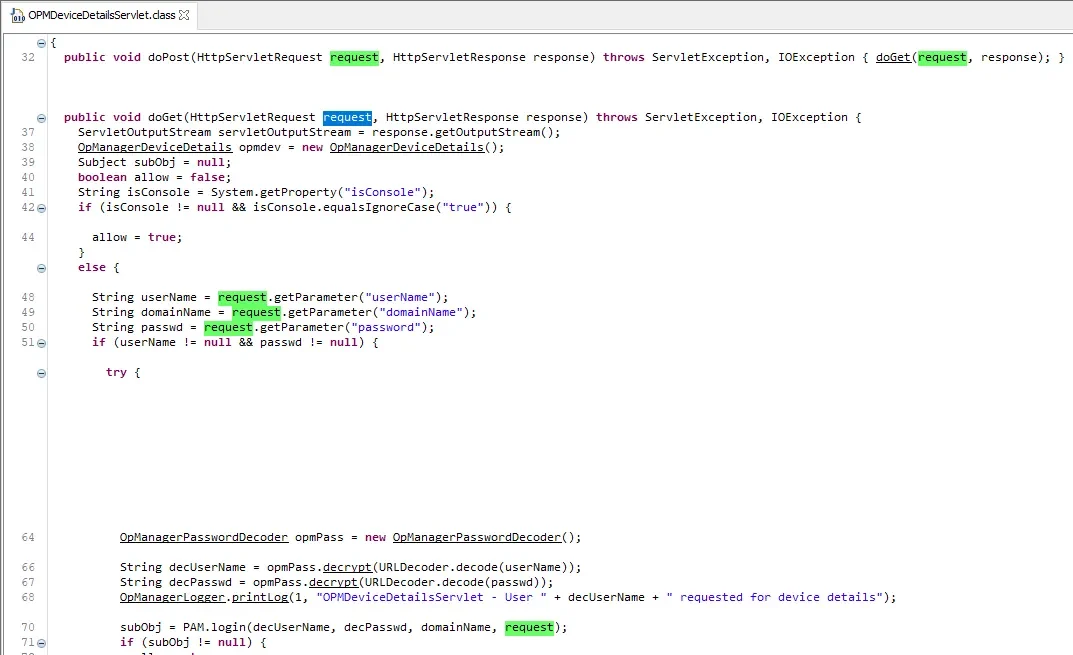
An allow variable has to be true for the interesting code to be reachable. With a proper combination of Servlet URL parameters, one can reach the code of the getXMLFileforAllDevices method: the fetchType parameter has to be set to the value deep, and userName, password and domainName have to be set accordingly.
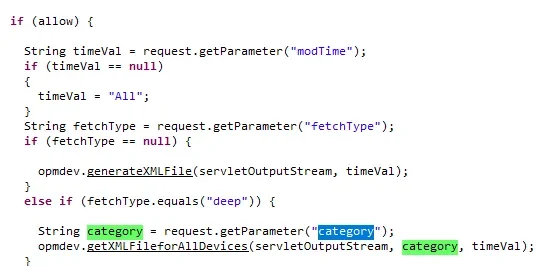
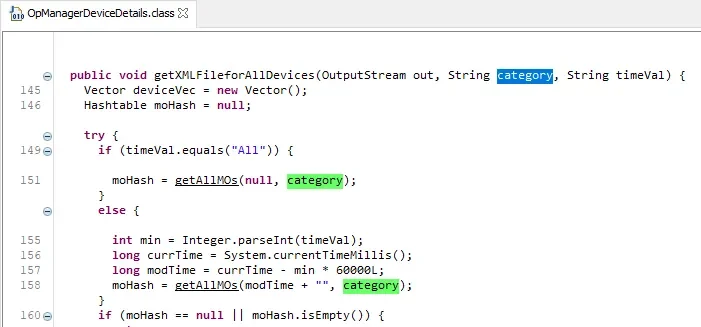
The timeVal parameter does not have to be set explicitly, because if it is null it is set to All programmatically. In the end, the getAllMOs method is called.
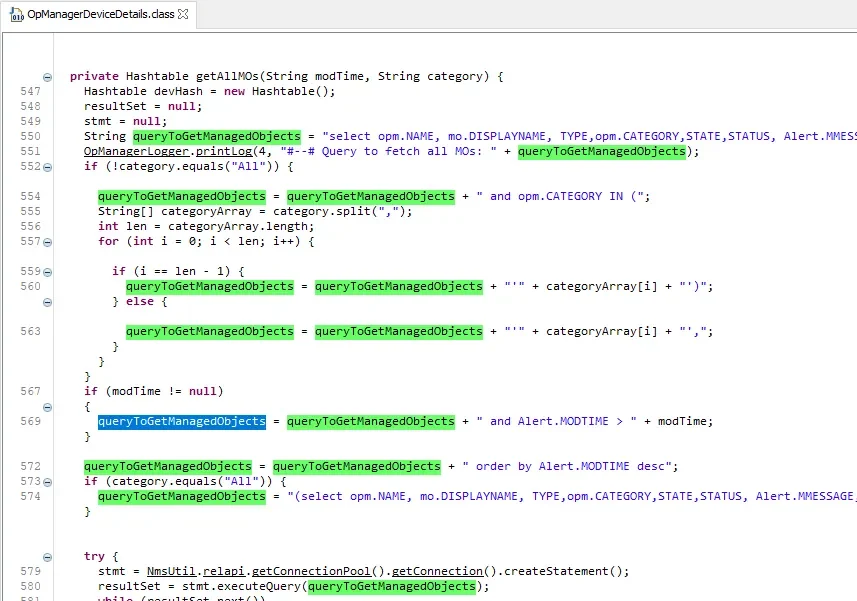
The getAllMO method builds and executes an SQL query parameterised with category. Because the query is built dynamically via String concatenation, malicious code can be injected easily.
Exploitation
Step 1: satisfy the Servlet's conditions
Reach the authenticated path of /servlet/APMExtAlertsInteg with fetchType=deep, plus valid userName, password and domainName values. timeVal can be omitted; it defaults to All. This drives execution into getXMLFileforAllDevices and then getAllMOs.
Step 2: inject into the category parameter
The exploitation step is as simple as injecting something like:
…&category=nocategory'); [NEW QUERY —
Step 3: confirm with a time-based payload
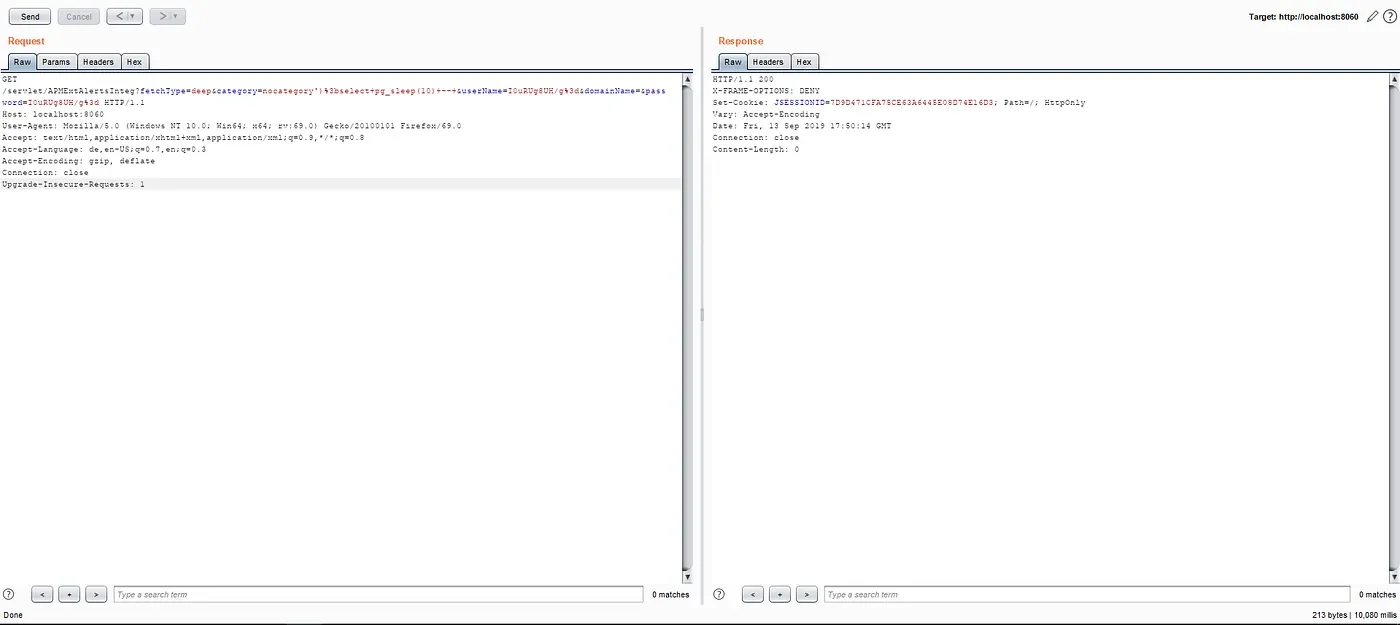
The screenshots below show a simple example of a pg_sleep(10) selection. Since the bundled database usually is PostgreSQL, stacked queries make injection easy.

Step 4: escalate beyond data access
With stacked queries and e.g. the help of COPY TO commands, a web shell could be written. UDF reverse shells would also be possible, so Remote Code Execution is just a matter of small additional effort, left to the interested reader.
Step 5: handle the credential encryption
For a proper decrypt call at the Servlet's entry point, the encryption routine for the username and password had to be re-implemented. Since the key is fixed (not good!), the routine was re-implemented quickly.
Root cause
The getAllMO method builds an SQL query parameterised with category by dynamic String concatenation, so attacker-controlled input becomes part of the SQL statement instead of being bound as a parameter. The Servlet's entry conditions (allow true, fetchType=deep, credentials and domain supplied) are reachable with request parameters, and the credential encryption uses a fixed key, so the routine had to be re-implemented for a proper decrypt call.
Impact
The Servlet can be called from an unauthenticated and an authenticated perspective, which makes it more or less critical; this article covers the authenticated part. In that path, an attacker who can satisfy the Servlet's conditions can inject SQL into the category parameter. With the bundled PostgreSQL database, stacked queries allow arbitrary additional statements, and COPY TO commands could be used to write a web shell; UDF reverse shells would also be possible, so Remote Code Execution is a matter of small additional effort.
Fix
The bug was fixed by the development team and released in OpManager version 12.4 (build 124089) on 3 October, tracked as CVE-2019-17602. The report does not describe the code change itself.
Variants to test
- Other Servlets in
web.xml. Enumerate every Servlet mapping, then read eachdoGet/doPostfor parameters that reach string-concatenated SQL. A positive result is a parameter whose value appears inside a query without binding. - Conditional gates before the sink. Look for variables like
allowthat must be true, and for parameters such asfetchTypewith magic values likedeep. A positive result is a request that passes the gate and reaches the query-building method. - Defaulted parameters. Check parameters that are set programmatically when null (here
timeValbecomingAll). A positive result is a request that omits them and still reaches the sink. - Fixed-key credential encryption. Where credentials are encrypted with a hard-coded key, re-implement the routine and send valid encrypted values. A positive result is the Servlet accepting them and continuing to the vulnerable code.
- Stacked queries on PostgreSQL. Try a time-based payload such as a
pg_sleepselection through the injectable parameter. A positive result is a measurable delay. - File write via
COPY TO. On a PostgreSQL backend with stacked queries, attempt to write a file into a web-accessible location. A positive result is a retrievable web shell.
Overall, this should make a white-box approach interesting if you get a chance to access code. Instead of fuzzing parameters, a short code analysis can sometimes reveal a straight-forward exploitation. From the beginning of code reading to a first successful exploitation took me approximately an hour, and I am far from being an expert.
What happened, in plain words
On 13 September I reported a security bug in a product called Zoho OpManager. The development team fixed it quickly, and a new version, 12.4 (build 124089), came out on 3 October. The bug was given the identifier CVE-2019-17602. A CVE is a public catalogue number for a known security flaw, so that everyone can refer to the same bug by the same name.
This article is the story of how I found that bug, told for someone who has never done security work before. The important idea is not a clever trick with a browser. It is that I read the program's own code, like reading the blueprint of a building instead of guessing where the doors are. That approach is called white-box analysis: you have the box open and you can see inside. The opposite, black-box testing, is when you only poke at the running program from outside and watch what it does.
Over the last months I had started to shift my focus from black-box testing to this more white-boxed approach. Reading code is fun, but it also gives a more detailed understanding of bugs, and a chance to find bugs that come with quite some preconditions. A precondition is simply something that has to be true before the interesting part of the program runs, like a door that only opens if you are carrying the right three keys.
The product and the feature
ManageEngine OpManager is a piece of software made by Zoho. It keeps an eye on devices and raises alerts when something goes wrong.
OpManager is a Java web application. Java is a programming language. A web application is a program that runs on a server and is used through a browser, the same way you use a website. When you click something in such an application, your browser sends a request over the network to the server, and the server sends back a page or some data.
Inside a Java web application there are pieces of code called Servlets. A Servlet is a small handler that runs when a request arrives at a particular address. Think of a hotel reception desk: each desk handles a particular kind of guest request, and the building's directory tells you which desk is which. The vulnerable feature here is a Servlet called OPMDeviceDetailsServlet, and the directory entry maps it to the URL /servlet/APMExtAlertsInteg. That URL is the address you would type or send a request to in order to reach this piece of code.
The Servlet can be reached both without logging in (unauthenticated) and after logging in (authenticated). This article concentrates on the authenticated path. In that path, a parameter called category ends up being pasted into a database query.
A parameter is a named value you attach to a request, like the fields in a form. If a URL is shop.example/item?colour=red, then colour is the parameter name and red is its value. Parameters are the main way you, the user, send input into a program, and therefore the main place where an attacker tries to put something the program did not expect.
Setting up: getting the code
No special accounts or tooling are described beyond the following steps.
- Download the latest ManageEngine OpManager from the vendor's website, more or less at random. The point is that the installer is publicly available, so anyone can obtain the program and look inside it.
- Decompile all JAR files. A JAR file is a bundle of compiled Java code, like a zip archive full of program parts. Java compiles into byte-code, an intermediate form that the computer runs. Byte-code can easily be decompiled back into source, meaning turned back into readable program text. A decompiler is the tool that does this.
- Read the configuration files as well as the code. For Java web applications, several configurations live in a file called web.xml. For a deployed application this file is usually stored in the protected WEB-INF directory. "Protected" here means the web server refuses to hand the file to a browser, but it is still on disk for anyone who has the program's files.
Why bother with web.xml? Because it is the building's directory. It shows how Java classes are used and mapped to URLs. Of special interest are the Servlets: classes with methods like doGet or doPost that are executed for every request matching their URL mapping pattern defined in web.xml. A method is just a named block of code inside a class; doGet and doPost are the conventional names for "handle an incoming request". doGet handles requests that ask for something, doPost handles requests that submit something, such as a form.
The methodology is to go through all Servlets, look at least at their do* methods, and find vulnerabilities from there. The approach is top-down: start from the user-controlled input, the parameters you can send, and follow them until they reach something bad in the backend. The backend is the part of the system behind the web page: the code, the database, the files.
Finding it
After digging into some Servlets, I found one called OPMDeviceDetailsServlet. The web.xml file told me that its URL maps to /servlet/APMExtAlertsInteg.
In plain terms: this is the line that tells me which address to send my request to if I want this code to run.
This is where white-box analysis pays off. Following the control flow step by step makes it easy to submit the right parameters per request, satisfying the conditional branches visible in the source. Control flow means the order in which the program executes its lines, including the forks in the road. A conditional branch is an if-statement: the program checks something, and only goes down one path when the check passes. When you can read the code, you can see exactly which checks stand between you and the interesting part, and you can prepare a request that passes all of them. The Servlet entry point calls the doPost method.
Think of it as the receptionist forwarding your request to the right desk.
An allow variable has to be true for the interesting code to be reachable. A variable is a named storage slot in a program holding a value; here it is a simple on/off flag. With a proper combination of Servlet URL parameters, one can reach the code of the getXMLFileforAllDevices method: the fetchType parameter has to be set to the value deep, and userName, password and domainName have to be set accordingly.
In plain terms: the program is asking a series of questions, and only if every answer is right does it continue to the method that does the real work. fetchType=deep is a magic value: the code compares the parameter against the literal word "deep", so you have to send exactly that word.
The timeVal parameter does not have to be set explicitly, because if it is null it is set to All programmatically. Null means "no value at all", as opposed to an empty text. "Programmatically" means the program itself fills in the default, so you can simply leave the parameter out of your request. In the end, the getAllMOs method is called.
In plain terms: this is the last turn of the corridor before the code that talks to the database.
The getAllMO method builds and executes an SQL query parameterised with category. Because the query is built dynamically via String concatenation, malicious code can be injected easily.
To understand why that is dangerous, two ideas are needed.
A database is an organised store of data, like a very large, very strict spreadsheet. You talk to it with SQL, a small language for asking questions such as "give me all rows where the category is X". A query is one such question.
String concatenation means gluing text pieces together end to end, like taping words into a sentence. If the program builds its SQL by taping the user's category value directly into the sentence, then whatever the user sends becomes part of the sentence. The database cannot tell which words were meant as data and which were meant as instructions. This is the classic SQL injection flaw: the attacker's text is read as SQL code instead of as a value. A safe program would use a parameterised query, where the value is handed to the database separately and is never treated as part of the instruction text.
Exploitation
Step 1: satisfy the Servlet's conditions
Reach the authenticated path of /servlet/APMExtAlertsInteg with fetchType=deep, plus valid userName, password and domainName values. timeVal can be omitted; it defaults to All. This drives execution into getXMLFileforAllDevices and then getAllMOs.
Why this step: every check seen in the code is a gate. Sending the right values is not an attack yet, it is simply walking through the gates so that the vulnerable code is reached at all. Without this, the request is turned away before the database is ever touched.
Step 2: inject into the category parameter
The exploitation step is as simple as injecting something like:
…&category=nocategory'); [NEW QUERY —
Line by line, in plain words:
…&stands for the rest of the request that comes before this parameter, ending with the separator&that joins parameters together.category=is the parameter name the vulnerable code reads.nocategory'is a harmless-looking value followed by a single quote. In SQL, text values are wrapped in single quotes, so this quote closes the text value early.)closes a bracket that the original query had opened around the value.;ends the current SQL statement.[NEW QUERYis where the attacker's own SQL statement would begin.
This is called a stacked query: several SQL statements sent and executed one after another.
Step 3: confirm with a time-based payload
The screenshots below show a simple example of a pg_sleep(10) selection. Since the bundled database usually is PostgreSQL, stacked queries make injection easy.
PostgreSQL is a popular free database program, and the database bundled with OpManager usually is PostgreSQL. pg_sleep(10) is a PostgreSQL function that makes the database wait for ten seconds before answering. Sending it is a way of confirming the injection without needing to see any data: if the response takes about ten seconds longer than usual, the injected instruction clearly ran. This is called a time-based test, because the evidence is the delay.
Step 4: escalate beyond data access
With stacked queries and e.g. the help of COPY TO commands, a web shell could be written. UDF reverse shells would also be possible, so Remote Code Execution is just a matter of small additional effort, left to the interested reader.
COPY TO is a PostgreSQL command that writes data out to a file on the server's disk. If the attacker can choose the file's location, they can drop a file into a folder the web server serves to browsers. A web shell is a small script placed on the server that lets the attacker run commands through their browser, like leaving a spare key hidden outside the building. A UDF is a user-defined function, a custom function added to the database; a reverse shell is a connection the compromised server opens back to the attacker, so the attacker can control it from outside. Remote Code Execution means running your own commands on someone else's machine. All of this is a step beyond reading data, which is why it is described as a matter of small additional effort rather than shown here.
Step 5: handle the credential encryption
For a proper decrypt call at the Servlet's entry point, the encryption routine for the username and password had to be re-implemented. Since the key is fixed (not good!), the routine was re-implemented quickly.
Encryption scrambles readable text into unreadable text using a key, and decryption turns it back. The Servlet decrypts the userName and password parameters, so the encryption routine had to be re-implemented to produce acceptable values. To produce acceptable values, I had to write the same scrambling routine myself, in reverse, so I could generate correctly encrypted values. This was quick because the key is fixed: it is hard-coded into the program and the same for every installation. A fixed key is bad practice, because anyone who reads the code, as I just had, can scramble and unscramble values too. A good design would use a key that is unique per installation and kept secret.
Root cause
The getAllMO method builds an SQL query parameterised with category by dynamic String concatenation, so attacker-controlled input becomes part of the SQL statement instead of being bound as a parameter. The Servlet's entry conditions (allow true, fetchType=deep, credentials and domain supplied) are reachable with ordinary request parameters, and the credential encryption uses a fixed key, which makes it possible to construct the required userName and password values.
In everyday terms: the program took a value from the visitor and taped it straight into an instruction to the database, and the locks in front of that code could all be opened with information anyone can read from the program itself.
Impact
The Servlet can be called from an unauthenticated and an authenticated perspective, which makes it more or less critical; this article covers the authenticated part. In that path, an attacker who can satisfy the Servlet's conditions can inject SQL into the category parameter. With the bundled PostgreSQL database, stacked queries allow arbitrary additional statements, and COPY TO commands could be used to write a web shell; UDF reverse shells would also be possible, so Remote Code Execution is a matter of small additional effort.
Fix
The bug was fixed by the development team and released in OpManager version 12.4 (build 124089) on 3 October, tracked as CVE-2019-17602. The report does not describe the code change itself.
Variants to test
If you want to try this way of working yourself, these are the things to look for. Each one is a pattern, not a single address.
- Other Servlets in
web.xml. Enumerate every Servlet mapping, then read eachdoGet/doPostfor parameters that reach string-concatenated SQL. A positive result is a parameter whose value appears inside a query without binding. - Conditional gates before the sink. Look for variables like
allowthat must be true, and for parameters such asfetchTypewith magic values likedeep. A positive result is a request that passes the gate and reaches the query-building method. The sink is the dangerous place where the input finally does harm, here the database query. - Defaulted parameters. Check parameters that are set programmatically when null, here
timeValbecomingAll. A positive result is a request that omits them and still reaches the sink. - Fixed-key credential encryption. Where credentials are encrypted with a hard-coded key, re-implement the routine and send valid encrypted values. A positive result is the Servlet accepting them and continuing to the vulnerable code.
- Stacked queries on PostgreSQL. Try a time-based payload such as a
pg_sleepselection through the injectable parameter. A positive result is a measurable delay. - File write via
COPY TO. On a PostgreSQL backend with stacked queries, attempt to write a file into a web-accessible location. A positive result is a retrievable web shell.
Overall, this should make a white-box approach interesting if you get a chance to access code. Instead of fuzzing parameters, a short code analysis can sometimes reveal a straight-forward exploitation. Fuzzing means throwing lots of random or malformed input at a program and watching for odd behaviour, without knowing what is inside. From the beginning of code reading to a first successful exploitation took me approximately an hour, and I am far from being an expert.
Glossary
- Authenticated: done after logging in, with a valid account.
- Backend: the part of a system behind the web page, such as the code, database and files.
- Black-box testing: testing a running program only from the outside, without seeing its code.
- Byte-code: the intermediate form Java code is compiled into, which a computer runs and a decompiler can turn back into source.
- Conditional branch: an if-statement in code; a path taken only when a check passes.
- Control flow: the order in which a program executes its lines, including the forks in the road.
COPY TO: a PostgreSQL command that writes data out to a file on the server's disk.- CVE: a public catalogue number for a known security vulnerability.
- Database: an organised store of data that programs query with SQL.
- Decompiler: a tool that turns compiled byte-code back into readable source code.
- Decryption: turning scrambled text back into readable text using a key.
- Encryption: scrambling readable text into unreadable text using a key.
- Fixed key: an encryption key hard-coded into the program and identical for every installation.
- Fuzzing: sending lots of random or malformed input to a program and watching for odd behaviour.
- JAR file: a bundle of compiled Java code, like a zip archive of program parts.
- Java: a programming language commonly used for web applications.
- Method: a named block of code inside a class;
doGetanddoPosthandle incoming requests. - Null: the absence of any value, as opposed to an empty text.
- Parameter: a named value attached to a request, like a form field.
- Parameterised query: a database query where user values are handed over separately and never treated as instruction text.
- PostgreSQL: a popular free database program, usually the one bundled with OpManager.
- Precondition: something that must be true before a piece of code runs.
- Query: one question or instruction sent to a database.
- Remote Code Execution: running your own commands on someone else's machine.
- Reverse shell: a connection the compromised server opens back to the attacker, giving control from outside.
- Servlet: a Java class that handles requests arriving at a particular URL.
- Sink: the dangerous place where user input finally does harm, such as a database query.
- SQL: the language used to ask questions of a database.
- SQL injection: a flaw where user input is read as SQL code instead of as a value.
- Stacked query: several SQL statements sent and executed one after another.
- String concatenation: gluing text pieces together end to end.
- Time-based test: confirming an injection by measuring a deliberate delay in the response.
- Top-down: starting from user-controlled input and following it until it reaches something bad.
- UDF: a user-defined function, a custom function added to a database.
- Unauthenticated: done without logging in.
- Variable: a named storage slot in a program holding a value.
- Web application: a program that runs on a server and is used through a browser.
- Web shell: a small script placed on a server that lets an attacker run commands through a browser.
web.xml: the Java web application configuration file that maps classes to URLs.- White-box analysis: finding bugs by reading the program's own code and configuration.