Pwning ManageEngine — From Endpoint to Exploit: A deep dive into CVE-2021–42847
The ADAudit Plus endpoint /api/agent/tabs/agentGPOWatcherData allowed unauthenticated users to write arbitrary files via directory traversal and to trigger XML external entity injection through the xmlReport parameter. An attacker could write files to any location and cause the server to make outbound requests, and with authentication could achieve remote code execution by writing a PowerShell script to the alert_scripts directory.
 Published on medium.com
In October of 2021, ManageEngine released ADAudit Plus build 7006. According to the release notes, this version included a patch for a critical unauthenticated arbitrary file write vulnerability tracked as CVE-2021–42847 (CSV3 base score: 9.8).
The full write-up lives on its author's site
It belongs to its author, so we link to it rather than copy it. The other two tabs are our own rewrites, checked against it.
Context
ManageEngine ADAudit Plus is an IT auditing product that monitors an Active Directory environment, file servers, Windows servers and Windows workstations, looking for suspicious activity such as unusual logons, account lockouts, and changes to users, files, groups and security policies.
In October 2021, ManageEngine released ADAudit Plus build 7006. The release notes state that this build patched a critical unauthenticated arbitrary file write tracked as CVE-2021-42847, with a CVSS base score of 9.8. The disclosure was credited to a researcher known as Moon. No root cause analysis or proof of concept had been published for the vulnerability, so after encountering a vulnerable instance during a pentest, I decided to dig into it myself.
This article covers the two vulnerabilities that share the same endpoint: an unauthenticated arbitrary file write with serious limitations, and an unauthenticated XML external entity injection (XXE). It also covers the paths I tried towards unauthenticated RCE, the authenticated RCE that the file write enables, and a conditional path to unauthenticated RCE.
Setup
The research was done by diffing ADAudit Plus builds 7005 and 7006, both available from the ManageEngine archive. The example requests in the report target [redacted]:8081, and a Python HTTP server was started on the researcher's test system to receive callbacks. The XXE testing used an XML payload adapted from Naveen Sunkavally's writeup of CVE-2022-28219, and the exploit chain experiments used the Horizon3.ai Python PoC and Ron Bowes's Metasploit module for that CVE as a starting point.
No credentials are needed for the file write or the XXE. The authenticated RCE section requires a valid ADAudit Plus user who can create or modify alert profiles.
Finding it
Patch diffing builds 7005 and 7006 shows that the /api/agent/tabs/agentGPOWatcherData endpoint was removed in 7006 by commenting out a line in \conf\adap\rest-api.xml:
<ADAPRestApiMapping UNIQUE_ID="ADAPRestApiMapping:UNIQUE_ID:717" TAB_NAME="agentData" URL_PATH="/tabs/agentGPOWatcherData" CLASS_NAME="com.adventnet.sym.adsm.auditing.webclient.ember.api.agent.AgentDataHandler" METHOD_NAME="receiveGPOWatcherData" DESCRIPTION="Receives GPO File watcher data from ADAuditPlus Server Agents"/>
The same endpoint appears in \webapps\adap\WEB-INF\security\security.xml:
<url path="/api/agent/tabs/agentGPOWatcherData" dynamic-params="true" csrf="false" method="post"> <inputstream max-len="-1" type="String"/></url>
The endpoint exists because ADAudit Plus can monitor Active Directory computers by installing agents on those machines. The agents talk to ADAudit Plus over HTTP, and agentGPOWatcherData let them send updates about changes to Group Policy Objects (GPOs) and about configuration changes for the agents themselves.
The entry point is the receiveGPOWatcherData function in the AgentDataHandler class inside \lib\AdventNetADAPClient.jar. CVE-2021-42847 comprises two vulnerabilities that both originate in this endpoint: the unauthenticated arbitrary file write, and the unauthenticated XXE.
Exploitation
Step 1: the file write path
The file write vector lives in the first part of receiveGPOWatcherData. The first few lines show that HTTP POST requests to /api/agent/tabs/agentGPOWatcherData are expected to carry a JSON body that includes a boolean parameter isGPOData.
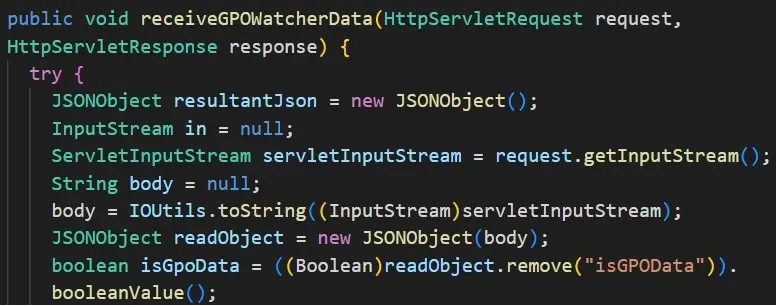
When isGPOData is true, the following code runs:
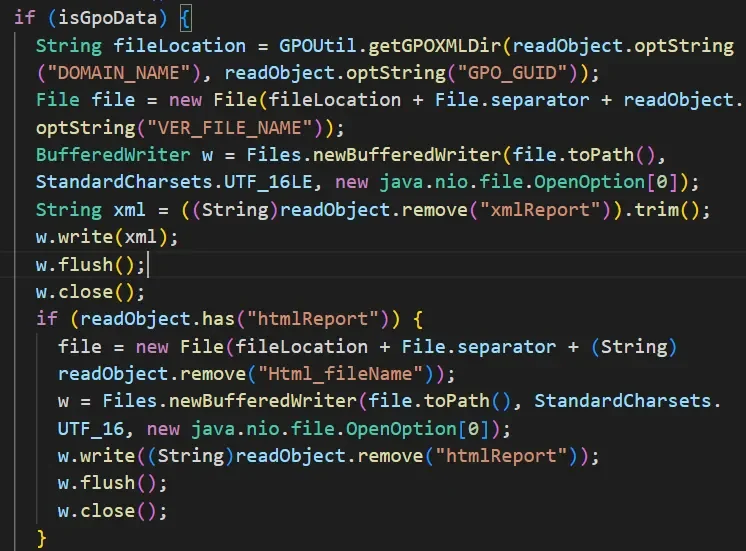
This part lets agents send GPO details to ADAudit Plus as an XML document, optionally supplemented with an HTML document. The logic is:
- The values of
DOMAIN_NAMEandGPO_GUID, if provided, are passed toGPOUtil.getGPOXMLDir, which creates a directory at\webapps\adap\GPODetails\<DOMAIN_NAME>\<GPO_GUID>\if it does not exist yet. The directory name is returned and assigned to thefileLocationstring. - The value of
VER_FILE_NAMEis appended tofileLocationand used as the path of a file about to be created, via.toPath(). - The value of
xmlReportis written to that file using UTF16LE encoding. No checks are performed on the contents ofxmlReport. - If
htmlReportis also passed, theHtml_fileNameparameter is expected as well, and its value is used to create a file the same way asVER_FILE_NAME. The value ofhtmlReportis written to that file using UTF16 encoding. Again, no validation is performed onhtmlReport.
Three issues in this logic combine into unauthenticated arbitrary file write:
- The
.toPath()call is vulnerable to directory traversal. IfVER_FILE_NAMEand/orHtml_fileNamecontains..\\, those are interpreted as valid Windows path navigators..\, so the output files can be written outside the intended directory. - No file extension checks are performed on
VER_FILE_NAMEandHtml_fileName, so any type of file can be created. - Since
xmlReportandhtmlReportare not validated, the created files can contain whatever content can be passed via JSON.
Step 2: writing a file
To create a file at C:\pwned.txt containing "wynter was here", send:
POST /api/agent/tabs/agentGPOWatcherData HTTP/1.1Host: [redacted]:8081User-Agent: Mozilla/5.0 (Windows NT 6.3; Win64; x64; rv:104.0) Gecko/20100101 Firefox/104.0Content-Length: 186{ "isGPOData":true, "DOMAIN_NAME" : "doesnotexist.domain" , "GPO_GUID":"somethingrandom", "VER_FILE_NAME":"..\\..\\..\\..\\..\\..\\..\\..\\pwned.txt", "xmlReport":"wynter was here"}
The VER_FILE_NAME value climbs out of the GPO details directory with repeated ..\\ sequences, and xmlReport supplies the file contents. The request creates the file at the desired location:
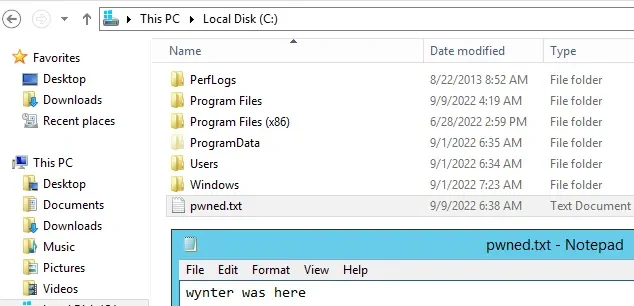
As a side effect, it also creates an empty directory at \webapps\adap\GPODetails\doesnotexist.domain\somethingrandom.
Step 3: the limits of the file write
The file write vector has serious limitations:
- The intended file contents must be JSON compatible, so only UTF-8 characters are supported. The vector is incompatible with binary payloads.
- The UTF16LE and UTF16 encoding used for
VER_FILE_NAME/xmlReportandHtml_fileName/htmlReportrespectively further reduces the types of file that can be written. For instance,VER_FILE_NAME/xmlReportcannot create executable PowerShell scripts:.ps1files can be created this way, but executing them makes PowerShell throw encoding-related errors.Html_fileName/htmlReportcan create PowerShell scripts without issues, and this turned out to be the most potent use of the vector. Creating.batfiles failed due to encoding issues for both parameter pairs.
Step 4: the XXE path
The second part of the isGPOData code path in receiveGPOWatcherData is shown below:
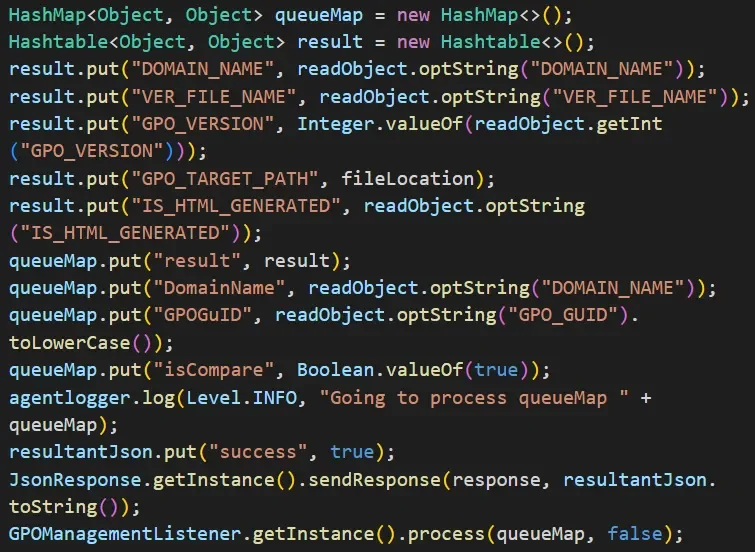
Here the names and values of several attributes required for a valid request are used to populate the Hashtable result, which together with a few more attributes populates the HashMap queueMap. If all required attributes are present, including the integer GPO_VERSION, the server responds with:
{"success":true}
Then queueMap is passed to GPOManagementListener.getInstance().process().
The process() function is defined in the GPOManagementListener class inside \lib\AdventNetADAPServer.jar. Much happens in it, but three function calls matter here. All three are triggered when an agent sends an HTTP POST similar to the earlier "wynter was here" example with isGPOData set to true, except that GPO_VERSION must now be added to the JSON hash. Its value does not seem to matter as long as it is an Integer.
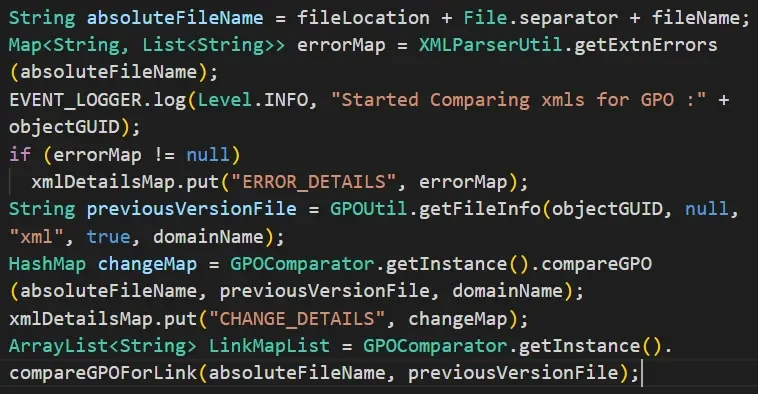
In that code, absoluteFileName is the absolute path to the file created via VER_FILE_NAME. The three calls are:
XMLParserUtil.getExtnErrors(absoluteFileName)GPOComparator.getInstance().compareGPO(absoluteFileName, previousVersionFile, domainName)GPOComparator.getInstance().compareGPOForLink(absoluteFileName, previousVersionFile)
All three lead to XXE if xmlReport contained a valid XXE payload.
Step 5: XXE via XMLParserUtil.getExtnErrors()
XMLParserUtil is also part of AdventNetADAPServer.jar. The top of its getExtnErrors() function deserves a closer look:
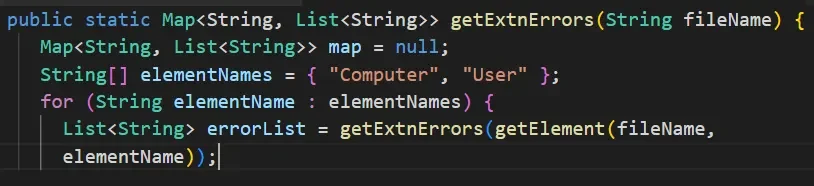
The important part is the call to the overloaded getExtnErrors() via getExtnErrors(getElement(fileName, elementName)). This happens twice:
- once with
elementNameset to "Computer" - once with
elementNameset to "User".
In both cases, fileName and elementName are first passed to getElement(), defined in the same class, which passes fileName to a function called parseXml:

Another case of method overloading eventually leads to this version of parseXml():
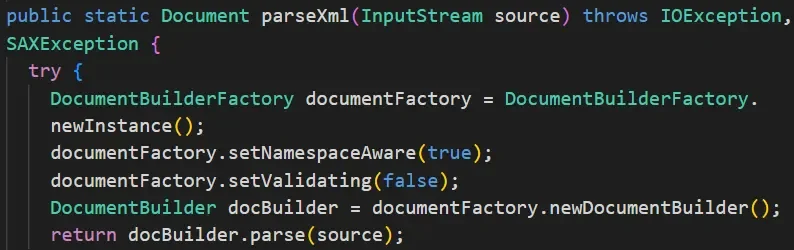
Seeing this method was a "holy shit" moment, because I had recently studied Naveen Sunkavally's writeup of CVE-2022-28219 for Horizon3.ai. That vulnerability, also in ManageEngine ADAudit Plus, combines an untrusted Java deserialisation code execution vector with an XXE vector originating in insecure use of Java's DocumentBuilderFactory, which is vulnerable to XXE by default.
The DocumentBuilderFactory implementation in parseXml() is almost identical to the vulnerable function in CVE-2022-28219. Most importantly, external entity resolution is not disabled before parse() runs on file contents that any unauthenticated user can control.
Step 6: XXE via GPOComparator.getInstance().compareGPO()
GPOComparator is in AdventNetADAPServer.jar as well. The path from compareGPO to XXE has two steps:
CompareGPOpassesnewFileName(the file we control) toXMLParserUtil.getElementList.XMLParserUtil.getElementListpassesnewFiletoparseXml:

Step 7: XXE via GPOComparator.getInstance().compareGPOForLink()
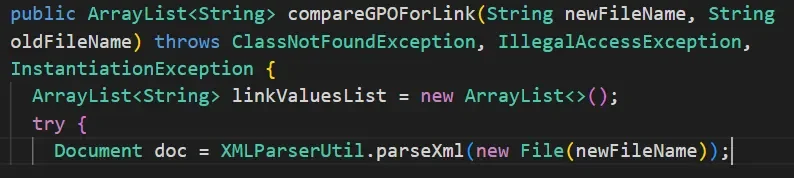
The compareGPOForLink function in GPOComparator completes the quartet of XXE triggers by calling parseXml directly:
Step 8: triggering the XXE
So the endpoint provides at least four XXE triggers:
- Two via
XMLParserUtil.getExtnErrors() - One via
GPOComparator.getInstance().compareGPO() - One via
GPOComparator.getInstance().compareGPOForLink()
To test whether XXE could actually be triggered through the xmlReport parameter, I started Python's default HTTP server on my test system and used Naveen Sunkavally's example XML payload for triggering NTLM authentication from the target to a provided HTTP server. The first test failed. Retracing my steps, I noticed again that UTF-16LE encoding is used when writing xmlReport to the file created via VER_FILE_NAME. I changed the encoding in the XML payload to UTF-16 and sent the following request (shown as an image because Medium does not like plaintext XXE payloads):
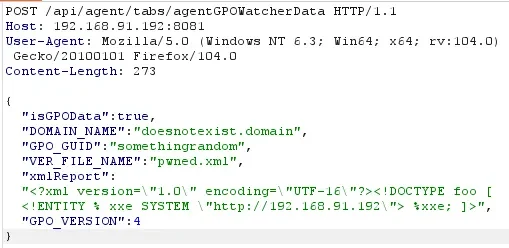
I sent the request, checked the Python server, and saw this:

All four XXE triggers were activated at once.
Step 9: attempts at unauthenticated RCE via the file write
I tried several paths to unauthenticated RCE through the file write vector:
- Writing a JSP payload to the web root. This seemed the most obvious route, but ADAudit refuses to process requests to JSP files, and I found no way to edit the web server configuration without restarting ADAudit Plus, which unauthenticated users cannot control.
- Overwriting one of the bundled PowerShell scripts. ADAudit Plus ships with a few PowerShell scripts, and CVE-2021-42847 can overwrite them, but I found no way to force ADAudit Plus to load any of them at runtime. From what I could tell they only run during startup, so a restart would again be required.
Step 10: attempts at unauthenticated RCE via the XXE
Next I tried to reuse the CVE-2022-28219 exploit chain, replacing its XXE vector with the one from CVE-2021-42847. It almost worked.
CVE-2022-28219 combines an untrusted Java deserialisation code execution vector with an XXE vector that can upload a serialised payload to the target via a Java-specific XXE technique disclosed by Timothy Morgan in 2013: uploading a file using the jar file protocol and a "blocking" server that does not close the connection after the upload.
A simplified version of the chain:
- The attacker generates a serialised Java payload with a tool such as ysoserial and launches two servers: a blocking web server and a special XXE FTP server.
- The attacker sends an XXE payload to the vulnerable endpoint. The payload uses the jar file protocol to make the web server attempt to load a jar file from the blocking server. The payload is temporarily stored as a temp file in the designated directory on the target, typically
c:\users\<username>\appdata\local\temp\. The blocking server holds the connection open, which prevents Java from unpacking the temp file and deleting it. - Because the temp file has a random name, the attacker sends further XXE payloads that make the target send directory listings to the XXE FTP server.
- Once the attacker knows the name and full path of the temp file, they force ADAudit Plus to execute it by sending an HTTP GET request to the
/cewolfendpoint, the untrusted Java deserialisation code execution vector.
The chain is automated in a Python PoC script by Horizon3.ai and in a Metasploit module by Ron Bowes of Rapid7.
To test whether the chain works with the CVE-2021-42847 XXE vector, I copied the Metasploit module and edited the targeted endpoint as well as the JSON and XML payloads. The new version managed to:
- identify the
appdata\local\temp\directory of the only configured local user on the target, where Java would store the temp file containing the payload - trick the target into downloading the payload from the blocking server and storing it in that temp directory
- hang and eventually time out.
The /api/agent/tabs/agentGPOWatcherData endpoint becomes unresponsive for as long as the blocking server stays open when the chain is used with CVE-2021-42847. The module therefore could not perform step 3 and obtain the exact name of the temp file. Without it, the payload could not be executed, even though it sat on the target for as long as the blocking server remained open. Watching the c:\users\<username>\appdata\local\temp\ folder during the run, I could see the payload uploaded there as a temp file. Killing the blocking server to make the endpoint responsive again would prompt instant deletion of the payload.
I also built a custom version of the Python PoC script for CVE-2022-28219 and tested it, with exactly the same result. I did confirm that the CVE-2021-42847 XXE vector can be used for step 2 of the chain and then switched to CVE-2022-28219 for step 3, but that adds no value over the original CVE-2022-28219 exploit.
I also briefly looked at using the file write vector to write a serialised payload to the target and execute it via /cewolf, but the UTF-8 limitation for payloads ruled that out.
Step 11: authenticated RCE through alert scripts
Having accepted that I would not get unauthenticated RCE out of this (while suspecting someone more skilled still might), I changed objectives to authenticated RCE. This proved very simple thanks to the "alert scripts" feature.
ADAudit Plus lets users configure alerts for suspicious behaviour affecting Active Directory or the monitored file servers and other systems. When creating an alert, users specify the behaviour that triggers it and how ADAudit Plus should respond. It can send custom emails and, more interestingly, execute a custom script.
The alert script functionality can be abused together with the CVE-2021-42847 file write. This matters most for builds 7004 and 7005, because in builds 7003 and prior alert scripts can be used by authenticated users to execute arbitrary payloads without any file write vector.
Step 12: authenticated RCE on builds 7003 and prior
The alert scripts feature is implemented differently in builds 7003 and prior. The release notes for build 7004 say:
Security hardening has been performed on custom alert script execution.
That wording is misleading, because builds 7003 and prior include no security checks at all on this functionality. When specifying the custom script for an alert, a user can simply enter a CMD payload instead of a script name, because the input is passed directly to a Runtime.exec() call. This happens in the runAlertScriptAction function of the AlertProfileManager class inside AdventNetADAPServer.jar. An authenticated user only has to:
- Go to the
Alertstab and create a new alert profile or modify an existing one. - Under the
categorysection of the alert profile, click the+next to theReport Profilesfield, tick the box next toAll Users Logonin the popup and confirm withOK. - Scroll down to
Alert Actions, tick theExecute Scriptbox, enter the CMD payload in theScript Locationfield and hitSaveat the bottom of the page. - Perform a failed Active Directory authentication attempt. This can be done through ADAudit Plus itself: log out (or open the app again in a private window) and try to log back in with incorrect AD credentials by selecting one of the configured AD domains under the
Logon Todropdown, entering a random username and password, and hittingLOGIN.
Step 13: authenticated RCE via CVE-2021-42847 on builds 7004 and 7005
The hardening in build 7004 introduced an /alert_scripts directory in the ADAudit Plus installation directory. Users must now store custom scripts there, and any value entered in the Script Location field must correspond to the name of a PowerShell or BAT script that actually exists in /alert_scripts.
Because CVE-2021-42847 can write PowerShell scripts to any location on the target, including /alert_scripts, the alert scripts feature still gives authenticated RCE on builds 7004 and 7005:
- Use
agentGPOWatcherDatato write a PowerShell script to/alert_scriptswith a request like:
POST /api/agent/tabs/agentGPOWatcherData HTTP/1.1Host: [redacted]:8081User-Agent: Mozilla/5.0 (Windows NT 6.3; Win64; x64; rv:104.0) Gecko/20100101 Firefox/104.0Content-Length: 186{ "isGPOData":true, "DOMAIN_NAME":"doesnotexist.domain" , "GPO_GUID":"somethingrandom", "VER_FILE_NAME":"nothing_to_see_here.xml", "xmlReport":"wynter was here", "htmlReport":"<POWERSHELL PAYLOAD>", "Html_fileName":"..\\..\\..\\..\\..\\alert_scripts\\evil.ps1"}
- Follow step 1 in the previous section.
- Follow step 2 in the previous section.
- Follow step 3 in the previous section, but enter the name of the PowerShell script you created (
evil.ps1in the example) in theScript Locationfield. - Follow step 4 in the previous section.
I wrote a Metasploit module to automate the attacks in this and the previous section.
Step 14: a conditional path to unauthenticated RCE
Researching the alert scripts feature revealed a way in which CVE-2021-42847 can still achieve unauthenticated RCE on builds 7005 and prior, but only if certain non-default conditions are present on the target. Many scenarios are imaginable and the required conditions change between them; one of the more plausible is:
- The target is ADAudit Plus build 7004 or 7005.
- ADAudit Plus is configured with at least one alert profile that uses the alert script functionality, and the script is a PowerShell script.
- The name of at least one PowerShell script in
<install_dir>/alert_scripts/reveals the type of activity that triggers the alert. - The activity required to trigger the alert includes behaviour an unauthenticated user can control, such as failed Active Directory login attempts, AD account lockouts (if a lockout is set), or even modification of files in a location accessible to an unauthenticated attacker, such as an SMB share that allows SMB NULL authentication.
In that scenario, unauthenticated RCE works like this:
- The attacker uses the CVE-2021-42847 XXE vector to obtain a directory listing of the
alert_scriptsfolder. This reveals one or more PowerShell scripts, at least one of which has a name revealing the triggering activity, and that activity can be controlled by the attacker. For instance, a script is calleduser_lockout.ps1. - The attacker uses the CVE-2021-42847 file write vector to overwrite the interesting PowerShell script with a custom PowerShell payload.
- The attacker starts a listener for the payload.
- The attacker performs the action likely to trigger the alert that executes the script. In this example, they make several incorrect login attempts for one Active Directory user until the lockout threshold is hit. Once ADAudit Plus registers the account lockout event, it loads all alert profiles configured for that activity, including the one that executes
user_lockout.ps1, and the attacker receives a connection to their listener.
Step 15: the auxiliary Metasploit module
Because CVE-2021-42847 lets unauthenticated users do useful things and offers a conditional path to unauthenticated RCE, I wrote a second Metasploit module, an auxiliary module with five actions:
READ_FILE_OR_DIR: obtain directory listings and read files via XXEWRITE_FILE: use the file write vector to create arbitrary filesLIST_ALERT_SCRIPTS: list the contents ofalert_scriptsvia XXEOVERWRITE_ALERT_SCRIPT: overwrite an existing PowerShell script inalert_scriptsTRIGGER_NTLM_AUTH: trigger NTLM authentication from the host via XXE
For actions 1, 3 and 5, the XXE vectors of both CVE-2021-42847 and CVE-2022-28219 are supported. The default is CVE-2022-28219 because it affects more versions and is significantly faster to exploit. The only benefit of CVE-2021-42847 for XXE is that it does not require a valid domain name to be entered, although that is normally easy to obtain.
Root cause
The file write comes from trusting agent-supplied JSON fields. VER_FILE_NAME and Html_fileName are appended to a directory path and passed to .toPath() without sanitising ..\\ sequences, without checking file extensions, and without validating the contents of xmlReport and htmlReport. The directory is created via GPOUtil.getGPOXMLDir, and the .toPath() call on the appended file name is vulnerable to directory traversal.
The XXE comes from parseXml() using Java's DocumentBuilderFactory without disabling external entity resolution before parse() runs on file contents that an unauthenticated user controls. The same pattern appears in four call paths: two through XMLParserUtil.getExtnErrors(), one through GPOComparator.getInstance().compareGPO(), and one through GPOComparator.getInstance().compareGPOForLink(). The endpoint's security mapping in security.xml marks it as csrf="false" with an unlimited input stream.
The authenticated RCE on builds 7003 and prior comes from passing user input from the Script Location field directly to Runtime.exec() in runAlertScriptAction. The build 7004 hardening restricts scripts to the /alert_scripts directory, but the file write vector can still place a PowerShell script there.
Impact
An unauthenticated attacker can write arbitrary UTF-8 content to arbitrary paths on the target, subject to the encoding limits described above, and can trigger XXE through xmlReport, including NTLM authentication to an attacker-controlled server. The file write cannot deliver binary payloads, and PowerShell scripts written through VER_FILE_NAME/xmlReport fail to execute due to encoding, while scripts written through Html_fileName/htmlReport work.
Unauthenticated RCE was not achieved unconditionally. It is possible in the conditional scenario described above, where an existing alert profile runs a PowerShell script whose name reveals a triggerable activity. Authenticated users get RCE on builds 7003 and prior directly through alert scripts, and on builds 7004 and 7005 by combining alert scripts with the file write.
Fix
In build 7006 the agentGPOWatcherData mapping in \conf\adap\rest-api.xml is commented out, removing the endpoint. The most effective mitigation is to update ADAudit Plus instances to the latest versions using the available service packs.
Variants to test
- Directory traversal in agent-supplied file names on other ManageEngine products. Send a POST with
VER_FILE_NAMEcontaining repeated..\\and a benignxmlReport. A positive result is a file appearing outside the GPO details directory, for example atC:\pwned.txt. - Extension bypass on the same endpoint. Set
Html_fileNameto a.ps1path underalert_scriptsandhtmlReportto a PowerShell payload. A positive result is an executable script in that directory. - XXE through
xmlReportwith UTF-16 encoding. Send the request withGPO_VERSIONas an integer and an XML payload encoded as UTF-16 pointing at a listener. A positive result is an inbound connection or DNS/HTTP callback from the target. - Alert script injection on older builds. On builds 7003 and prior, enter a CMD payload in the
Script Locationfield of an alert profile and trigger the alert with a failed AD login. A positive result is command execution on the target. - Conditional unauthenticated RCE. Use XXE to list
alert_scripts, overwrite a script whose name reveals a triggerable activity, start a listener, and trigger the activity. A positive result is a connection to the listener without any credentials. - CVE-2022-28219 chain substitution. Replace the XXE vector in the Horizon3.ai PoC or the Rapid7 Metasploit module with the CVE-2021-42847 vector. A positive result would be the module completing step 3 and executing the uploaded payload, which did not happen in this research because the endpoint becomes unresponsive while the blocking server is open.
What happened, in plain words
ManageEngine makes software that companies use to keep an eye on their computer networks. One of their products, ADAudit Plus, watches a company's Windows network (called Active Directory) and reports suspicious things, like someone logging in at a strange hour or a user account being locked after too many wrong passwords.
In October 2021, ManageEngine released a new version of ADAudit Plus, build 7006. The release notes said it fixed a serious security hole, tracked as CVE-2021-42847. A CVE is a public catalogue number for a known security flaw, so anyone can look it up. The flaw had a CVSS base score of 9.8, and CVSS is a way of scoring how bad a security bug is. The person credited with finding it was a researcher known as Moon.
No detailed explanation of the bug, and no working example attack, had been published. So I decided to work it out myself. This article walks through what I found: two separate bugs that live in the same place in the software, how far each one can be pushed, and the ways I tried (and mostly failed) to turn them into full remote control of the machine.
A quick note on words I will use a lot:
- Server: a computer that runs software other computers connect to. ADAudit Plus is a server product.
- Endpoint: a specific address on a server that accepts a particular kind of request, like a service window in a building. The endpoint at the centre of this story is
/api/agent/tabs/agentGPOWatcherData. - API: the set of endpoints a program offers so other programs can talk to it, instead of a human clicking buttons.
- Request: a message one computer sends to another. A browser sends requests every time you load a page.
- JSON: a simple text format for structured data, made of names and values in curly braces, like
{"name":"value"}. It is how many APIs exchange information. - XML: another text format for structured data, using tags in angle brackets, like
<name>value</name>. - RCE (remote code execution): the worst kind of bug, where an attacker can make the server run their own commands. "Unauthenticated RCE" means doing it without any username or password.
- XXE (XML external entity injection): a bug where a server is tricked into reading files or contacting other machines because it trusts special instructions inside an XML document.
- Arbitrary file write: a bug that lets an attacker create a file with content of their choosing, anywhere on the server's disk.
First things first: what is ADAudit Plus
ManageEngine ADAudit Plus is an IT auditing solution. In plain terms, it is a watchdog for a company's Windows network. It monitors the Active Directory environment, file servers, Windows servers and Windows workstations, looking for suspicious activity such as unusual logons, account lockouts, and changes to users, files, groups, security policies and more.
To do that, it can be set up so that small helper programs, called agents, are installed on the computers it watches. Those agents send information back to the ADAudit Plus server over HTTP, the same protocol your browser uses. One of the things agents report on is changes to Group Policy Objects (GPOs), which are bundles of settings that a Windows network pushes to many computers at once, for example password rules or desktop restrictions.
1. Vulnerable endpoint: agentGPOWatcherData
How I found it
I compared two versions of the software side by side, builds 7005 and 7006. This technique is called patch diffing: you take the version before a fix and the version after, and look at what changed. The fix often points straight at the bug.
Both builds are available for download from the ManageEngine archive. Comparing them showed that the /api/agent/tabs/agentGPOWatcherData endpoint was removed in 7006 using a very advanced patching technique known as "commenting out". Specifically, the following line in \conf\adap\rest-api.xml is commented out in build 7006:
<ADAPRestApiMapping UNIQUE_ID="ADAPRestApiMapping:UNIQUE_ID:717" TAB_NAME="agentData" URL_PATH="/tabs/agentGPOWatcherData" CLASS_NAME="com.adventnet.sym.adsm.auditing.webclient.ember.api.agent.AgentDataHandler" METHOD_NAME="receiveGPOWatcherData" DESCRIPTION="Receives GPO File watcher data from ADAuditPlus Server Agents"/>
Line by line, in plain words:
ADAPRestApiMappingis the name of a configuration entry. It tells the server "this web address belongs to this piece of code".UNIQUE_IDis just an internal identifier for the entry.TAB_NAME="agentData"groups it with other agent-related endpoints.URL_PATH="/tabs/agentGPOWatcherData"is the web address, the endpoint itself.CLASS_NAME=...AgentDataHandlernames the Java class (a block of code) that handles requests to this address.METHOD_NAME="receiveGPOWatcherData"names the specific function inside that class that runs.DESCRIPTION=...is a human-readable note saying this endpoint receives GPO file watcher data from ADAudit Plus server agents.
So the whole line is a map entry: "when a request arrives at this address, run this function". Commenting it out removes the endpoint from the server entirely.
The same endpoint also appears in \webapps\adap\WEB-INF\security\security.xml:
<url path="/api/agent/tabs/agentGPOWatcherData" dynamic-params="true" csrf="false" method="post"> <inputstream max-len="-1" type="String"/></url>
This one is a security rule. In plain words:
path="/api/agent/tabs/agentGPOWatcherData"says which address the rule covers.dynamic-params="true"means the parameters of the request can vary.csrf="false"means the server does not require a CSRF token. A CSRF token is a secret value a website puts in forms so it can tell a genuine request from one forged by another site. Turning it off means requests to this endpoint are not checked that way.method="post"means it accepts POST requests, the kind a browser sends when you submit a form.<inputstream max-len="-1" type="String"/>says the request body is read as a stream of text with no length limit (-1means unlimited).
Put together, this rule says: this endpoint accepts POST requests with unlimited body content and no CSRF protection.
Why the endpoint existed
The original purpose of this endpoint has to do with the fact that ADAudit Plus can be configured to monitor Active Directory computers by installing agents on those machines. Those agents interact with ADAudit Plus via HTTP requests to the API, and the /api/agent/tabs/agentGPOWatcherData endpoint allowed agents to send updates to ADAudit Plus regarding changes to Group Policy Objects (GPOs) and/or configuration changes for the agents themselves.
Where the code lives
The entry point for the agentGPOWatcherData endpoint is the receiveGPOWatcherData function in the AgentDataHandler class inside \lib\AdventNetADAPClient.jar. A JAR file is a bundle of Java code, like a zip file full of programs. As we will see, CVE-2021-42847 actually comprises two vulnerabilities originating in the same endpoint:
- Unauthenticated arbitrary file write (with serious limitations)
- Unauthenticated XML external entity injection (XXE)
2. Unauthenticated arbitrary file write
The code path
The unauthenticated arbitrary file write vector originates in the first part of receiveGPOWatcherData. The first few lines show that HTTP POST requests to /api/agent/tabs/agentGPOWatcherData are expected to contain an HTTP body in JSON format, which should include a boolean parameter isGPOData. A boolean is simply a true/false value.
If the value for isGPOData is true, we hit the following code:
This part of the function allows ADAudit Plus agents to use agentGPOWatcherData in order to send GPO details to ADAudit Plus in the form of an XML document, possibly supplemented with an HTML document. The logic here is as follows:
- The values of the
DOMAIN_NAMEandGPO_GUIDparameters, if provided, are passed in a call to theGPOUtil.getGPOXMLDirmethod, which will create a directory at\webapps\adap\GPODetails\<DOMAIN_NAME>\<GPO_GUID>\if that directory does not exist yet. The name of the directory is returned and assigned to thefileLocationstring. A method is just a named block of code that does something; think of it as a function. - The value of the
VER_FILE_NAMEparameter is appended tofileLocationand then used as the path to a file that is about to be created. This is achieved via.toPath(), a Java call that turns a piece of text into a file path. - The value of the
xmlReportparameter is written to the aforementioned file using UTF16LE encoding. Encoding is how text is turned into bytes on disk; UTF16LE is one such scheme. It should be noted here that zero checks are performed to validate the contents ofxmlReport. - If the
htmlReportparameter is also passed along, theHtml_fileNameparameter is also expected, the value for which is used to create a file just likeVER_FILE_NAME. In this case, the value ofhtmlReportis written to said file using UTF16 encoding. Again, no validation is performed for the value ofhtmlReport.
The three mistakes
The above logic contains at least three notable security issues that can be exploited in order to achieve unauthenticated arbitrary file write via /api/agent/tabs/agentGPOWatcherData:
- The
.toPath()call is vulnerable to directory traversal. This is the trick of putting..in a file path, which means "go up one folder". IfVER_FILE_NAMEand/orHtml_fileNameincludes instances of..\\, those will be interpreted as valid Windows path navigators..\, making it possible to let ADAudit Plus write the output files outside of the intended directory. It is like being told to put a parcel in "room 3" and writing "room 3, then up the stairs, then out the back door" on the label. - No file extension checks are performed for
VER_FILE_NAMEandHtml_fileName, so these parameters can be used to create any type of file. A file extension is the bit after the dot, like.txtor.ps1, which tells Windows what kind of file it is. - Since no validation is performed for
xmlReportandhtmlReport, the created files can have whatever content can be passed via JSON.
Writing a file
For instance, to create a file at C:\pwned.txt with the contents "wynter was here", we can send the following request:
POST /api/agent/tabs/agentGPOWatcherData HTTP/1.1Host: [redacted]:8081User-Agent: Mozilla/5.0 (Windows NT 6.3; Win64; x64; rv:104.0) Gecko/20100101 Firefox/104.0Content-Length: 186{ "isGPOData":true, "DOMAIN_NAME" : "doesnotexist.domain" , "GPO_GUID":"somethingrandom", "VER_FILE_NAME":"..\\..\\..\\..\\..\\..\\..\\..\\pwned.txt", "xmlReport":"wynter was here"}
Line by line:
POST /api/agent/tabs/agentGPOWatcherData HTTP/1.1is the request line: the method (POST, meaning "here is some data for you"), the endpoint address, and the version of the HTTP protocol.Host: [redacted]:8081says which server and port the request is aimed at. A port is like a numbered door on a computer; 8081 is the one ADAudit Plus was listening on in my test setup.User-Agent: ...is a label the client sends to say what browser or tool it is. Here it pretends to be Firefox. It is not important to the attack; it just makes the request look ordinary.Content-Length: 186says how many bytes long the body is, so the server knows when the body ends.- The body is JSON.
"isGPOData":truetakes the branch of code we want. "DOMAIN_NAME" : "doesnotexist.domain"and"GPO_GUID":"somethingrandom"are made-up values. They only serve to make the server create a folder to start from."VER_FILE_NAME":"..\\..\\..\\..\\..\\..\\..\\..\\pwned.txt"is the directory traversal. Each..\\climbs up one folder level, and the file namepwned.txtis added at the end."xmlReport":"wynter was here"is the content that gets written into that file.
This will create the desired file at the desired location:
In addition, it will create an empty directory at \webapps\adap\GPODetails\doesnotexist.domain\somethingrandom. That is the folder the code intended to use, before the traversal took the file elsewhere.
2.1 File write limitations
Unfortunately, the file write vector has serious limitations:
- Most importantly, the intended file contents need to be JSON compatible, which means only UTF-8 characters are supported. In other words, the vector is incompatible with binary payloads. A binary payload is a program file made of raw bytes, like an
.exe; JSON is text, so it cannot carry those bytes faithfully. - In addition, the UTF16LE and UTF16LE encoding for, respectively,
VER_FILE_NAME/xmlReportandHtml_fileName/htmlReport, further reduces the types of files we can write to the target. For instance,VER_FILE_NAME/xmlReportcannot be used for creating executable PowerShell scripts. PowerShell is Windows' built-in scripting language, and a.ps1file is a PowerShell script. While it is possible to create.ps1files this way, executing those files will result in PowerShell throwing encoding-related errors. Fortunately,Html_fileName/htmlReportcan be used to create PowerShell scripts without issues. This, as is shown later on, is the most potent use I could find for this vector. I also tried creating.batfiles, but this failed due to encoding-related issues for bothVER_FILE_NAME/xmlReportandHtml_fileName/htmlReport. A.batfile is an older kind of Windows script.
3. XXE
The second code path
The second part of the isGpoData code path in receiveGPOWatcherData is shown below:
The following happens here:
- The names and values of several attributes required for a valid request to the
agentGPOWatcherDataendpoint are used to populate the Hashtable objectresult, which itself is then used to populate the HashMapqueueMaptogether with a few more attributes. A Hashtable and a HashMap are just containers that store labelled values, like a filing cabinet with named drawers. - If all required attributes have been provided, which includes the not yet mentioned integer
GPO_VERSION, the server sends the following JSON body to the response:
{"success":true}
That is simply the server saying "done".
- Next, the
queueMapobject is passed in a call toGPOManagementListener.getInstance().process().
The process() function
The process() function is defined in the GPOManagementListener class inside \lib\AdventNetADAPServer.jar. Quite a lot happens in this function, but the only things we care about here are three function calls in the below code snippet. All three function calls will be triggered when an agent sends an HTTP POST request similar to the previous "wynter was here" example, where isGPOData is set to true. However, the GPO_VERSION parameter should now be added to the JSON hash. The value for this doesn't seem to matter as long as it's an Integer. An integer is a whole number.
In the above code, absoluteFileName is the absolute path to the file we created via VER_FILE_NAME. The three relevant function calls are:
XMLParserUtil.getExtnErrors(absoluteFileName)GPOComparator.getInstance().compareGPO(absoluteFileName, previousVersionFile, domainName)GPOComparator.getInstance().compareGPOForLink(absoluteFileName, previousVersionFile)
As it turns out, all three function calls will lead to XXE if xmlReport contained a valid XXE payload. In other words, the file we just wrote is later read back and parsed as XML, and all three calls lead to XXE if xmlReport contained a valid XXE payload.
3.1 XXE via XMLParserUtil.getExtnErrors()
The XMLParserUtil class is also part of AdventNetADAPServer.jar. The top of its getExtnErrors() function deserves a closer look:
The important part here is the call to the overloaded method getExtnErrors() via getExtnErrors(getElement(fileName, elementName)). Method overloading means several functions share a name but take different inputs; Java picks the right one based on what you pass. This call is performed twice:
- once with
elementNameset to "Computer" - once with
elementNameset to "User".
In both cases, fileName and elementName are first passed to getElement(), which is defined in the same class, and which passes fileName in a call to a function called parseXml:
What follows is another case of method overloading, which eventually brings us to the below version of parseXml():
Seeing this method for the first time was a "holy shit" moment for me because I had recently studied the excellent writeup for CVE-2022-28219 by Naveen Sunkavally of Horizon3.ai. That writeup detailed a more recent vulnerability affecting ManageEngine ADAudit Plus that could be leveraged to achieve unauthenticated remote code execution (RCE). CVE-2022-28219 combines an untrusted Java deserialisation code execution vector with an XXE vector originating in the insecure use of Java's DocumentBuilderFactory class, which is vulnerable to XXE by default. Deserialisation is the process of turning stored bytes back into a live object in memory; if an attacker controls those bytes, they can sometimes control what the program builds.
The implementation of DocumentBuilderFactory in parseXml() is almost identical to how it is implemented in the vulnerable function covered by CVE-2022-28219. Most importantly, external entity resolution is not disabled before the parse() method in the DocumentBuilderFactory class is run on the file contents that, as shown above, any unauthenticated user can control. External entity resolution is the feature that lets an XML document say "insert the contents of this file here" or "fetch this URL". It is useful in some settings and dangerous when the document comes from an attacker.
3.2 XXE via GPOComparator.getInstance().compareGPO()
The GPOComparator class can be found in AdventNetADAPServer.jar as well. The path from its compareGPO function to XXE includes two steps:
CompareGPOpassesnewFileName(the file we control) in a call to theXMLParserUtil.getElementListfunctionXMLParserUtil.getElementListpassesnewFileto our good friendparseXml:
3.3 XXE via GPOComparator.getInstance().compareGPOForLink()
The compareGPOForLink function in the GPOComparator class completes our quartet of potential XXE triggers by making a direct call to parseXml:
3.4 Triggering XXE
As we saw above, the /api/agent/tabs/agentGPOWatcherData endpoint provides us with (at least) four XXE triggers:
- Two via
XMLParserUtil.getExtnErrors() - One via
GPOComparator.getInstance().compareGPO() - One via
GPOComparator.getInstance().compareGPOForLink()
In order to test if I could actually trigger XXE via the xmlReport parameter in a request to the agentGPOWatcherData endpoint, I started Python's default HTTP server on my test system and then used Naveen Sunkavally's example XML payload for triggering NTLM authentication from the target to a provided HTTP server. NTLM authentication is a Windows login handshake; the payload makes the target attempt it against a server you provide. A Python HTTP server is a one-line way to run a small web server on your own machine that logs every request it receives, which is perfect for seeing whether the target called back.
My initial test failed, but after retracing my steps I noticed once again that UTF-16LE encoding is used when writing the contents of xmlReport to the file that is being created via VER_FILE_NAME. I then changed the encoding in the XML payload to UTF-16, resulting in the following request (I'm using an image here because Medium doesn't like plaintext XXE payloads, who would've thought?):
I sent the request, checked my ever-patient Python server, and saw this:
Yay, all four XXE triggers were activated at once!
4. The road to pwnage (is full of disappointments)
I tried a variety of techniques to build an unauthenticated RCE exploit chain using the two vectors I identified for CVE-2021-42847. An exploit chain is a sequence of small steps, each one setting up the next, that together achieve something bigger than any single step. The short version of this story is that I failed because I am n00b. The long version is outlined in this section.
4.1 Failing to get unauthenticated RCE via the file write vector
For the file write vector, I pursued several potential paths to unauthenticated RCE, including the following:
- Writing a JSP payload to the web root: This seemed like the most obvious route to take, but I quickly discovered it wasn't going to work because ADAudit refuses to process requests to JSP files and I was unable to find a way to edit the web server configuration without having to restart ADAudit Plus, which is something unauthenticated users cannot control as far as I know. A JSP file is a page of Java code that a web server can run when someone visits it; if you could drop one into the web folder, visiting it would run your code. The web root is the folder the web server serves pages from.
- Overwriting one of the bundled PowerShell scripts: ADAudit Plus comes bundled with a few PowerShell scripts. While it is possible to overwrite those using CVE-2021-42847, I did not find a way to force ADAudit Plus to load any of these files at runtime and thereby execute my payload. From what I could tell, these scripts are only run during startup, so once again a restart of ADAudit Plus would be required.
4.2 Failing to get unauthenticated RCE via the XXE vector
After failing to get what I wanted out of the file write vector, I turned to the delicate art of ripping off other people's work. More specifically, I tried to use the exploit chain for CVE-2022-28219 while replacing the XXE vector used there with the one I identified for CVE-2021-42847. This almost worked. In fact, it was so close that it still hurts. Allow me to elaborate.
CVE-2022-28219 combines an untrusted Java deserialisation code execution vector with an XXE vector that can be leveraged to upload a serialised payload to the target via
a really nice Java-specific XXE technique disclosed by Timothy Morgan in 2013 to upload a file using the jar file protocol and a "blocking" server that doesn't close the connection after the upload
A serialised payload is a program or command turned into a stream of bytes so it can be stored or sent. A blocking server is one that deliberately keeps a connection open and never finishes the reply, which is useful for keeping a temporary file alive on the target.
A simplified version of the exploit chain looks like this:
- Attacker W generates a serialised Java payload using a tool like ysoserial and launches two servers: a "blocking" web server and a special XXE FTP server. ysoserial is a well-known tool that builds these serialised Java payloads.
- W sends an XXE payload to vulnerable endpoint. The payload leverages the jar file protocol to trick the web server into attempting to load a jar file from the blocking server. The payload is temporarily stored as temp file in the designated directory on the target system (typically
c:\users\<username>\appdata\local\temp\). The blocking server holds the connection open, which prevents Java from unpacking the temp file and deleting it. - Because the temp file containing the payload has a random name, W sends additional XXE payloads that trick the target into sending directory listings to the target via their XXE FTP server.
- Once W obtains the name of and full path to the temp file containing their payload, they force ADAudit Plus to execute it by sending an HTTP GET request to the
/cewolfendpoint, which represents the untrusted Java deserialisation code execution vector.
This exploit chain has been automated in a python PoC script by the good folks at horizon3.ai and in a Metasploit module by Ron Bowes of Rapid7. Metasploit is a popular framework that packages exploits into ready-to-run modules, so you can point one at a target and press go. A PoC (proof of concept) is a small script that demonstrates a bug works.
In order to test if this exploit chain could also work with the XXE vector from CVE-2021-42847, I created a copy of the Metasploit module and edited the targeted endpoint as well as the JSON and XML payloads. When I ran this new version of the module, it managed to do the following:
- Identify the
appdata\local\temp\directory of the only configured local user on the target, which was the location where Java would store the temp file containing the payload - Trick the target into downloading the payload from the blocking server and storing it in the identified temp directory
- Hang and eventually timeout like a coward
As it turns out, the ADAudit Plus /api/agent/tabs/agentGPOWatcherData endpoint becomes unresponsive for as long as the blocking server remains open when using this exploit chain with CVE-2021-42847. As a result, my module was unable to perform step 3 to obtain the exact name of the temp file containing the payload. And without that, it was impossible to execute the payload, even though it did reside on the target for as long as the blocking server remained open.
In fact, when I ran the module while keeping an eye on the c:\users\<username>\appdata\local\temp\ folder, I could see the payload being uploaded there as a temp file. It was right there, staring me in the face. So close, and yet forever out of reach of my module, since nuking the blocking server in order to render the endpoint responsive again, would prompt the instant deletion of the payload. Tears were shed, chairs were thrown, career shifts were considered, but somehow I made it through.
I then actually took the extra step of also creating a custom version of the python PoC script for CVE-2022-28219 and testing that. However, the result was exactly the same, and was followed by more tears, more broken chairs, and another resignation email saved in drafts.
I did confirm that it is possible to use the CVE-2021-42847 XXE vector for step 2 of the exploit chain, and subsequently switch to CVE-2022-28219 for step 3, but this approach doesn't really provide any added value to the original exploit for CVE-2022-28219.
FYI, I also briefly looked into the possibility of using the file write vector to simply write a serialised payload to the target and executing that via /cewolf, but this wasn't possible due to the UTF-8 limitation for payloads.
5. Authenticated RCE
Once I had accepted that I wasn't going to get unauthenticated RCE out of this (while realizing that someone 1337 might still be able to), I adjusted my objectives from unauthenticated to authenticated RCE. Authenticated here means the attacker already has a valid login to the ADAudit Plus web interface. This proved to be very simple to achieve thanks to a feature called "alert scripts".
ADAudit Plus lets users configure "alerts" for suspicious behaviour affecting Active Directory or the file servers and other systems being monitored. When creating an alert, users can specify the type of behaviour that will trigger it, and how ADAudit Plus should respond to the alert. It is possible to have ADAudit Plus send custom emails and, more interestingly, execute a custom script.
Rather unsurprisingly, the "alert script" functionality can be easily abused in combination with the file write vector for CVE-2021-42847. This is most relevant for builds 7004 and 7005 because in builds 7003 and prior, "alert scripts" can be used by authenticated users to execute arbitrary payloads without even needing a file write vector.
5.1 Authenticated RCE on builds 7003 and prior
When looking into the alert scripts functionality, I noticed that this is implemented differently in builds 7003 and prior than it is in later builds. As specified in the release notes for build 7004:
Security hardening has been performed on custom alert script execution.
The phrase security "hardening" is misleading here, because builds 7003 and prior include zero security checks to prevent abuse of this functionality. In fact, when specifying the custom script to be executed for an alert, users can simply enter a CMD payload instead of the name of a script, because their input will be passed directly to a Runtime.exec() call. CMD is the Windows command prompt, and Runtime.exec() is the Java call that runs an operating system command. This happens in the runAlertScriptAction function that is part of the AlertProfileManager class inside AdventNetADAPServer.jar. All an authenticated user has to do in order to get RCE out of this is:
- Go to the
Alertstab to either create a new alert profile, or modify an existing one. - Under the
categorysection of the alert profile, click the+on the side of theReport Profilesfield, then tick the box next toAll Users Logonin the popup and confirm by clickingOK. - Scroll down to
Alert Actionsand tick theExecute Scriptbox. Enter your CMD payload in theScript Locationfield and hitSaveat the bottom of the page to save the alert profile. - Perform a failed active directory authentication attempt. You can actually do this via ADAudit Plus itself by logging out (or opening the app again in a private window), and then trying to log back in using incorrect AD credentials. To do this, select one of the configured AD domains under the
Logon Todropdown, enter a random username and password, and hitLOGIN.
The demo video below covers the full attack:
5.2 Authenticated RCE via CVE-2021-42847 on builds 7004 and 7005
The "security hardening" performed for build 7004, introduced an /alert_scripts directory in the ADAudit Plus installation directory. From now on, users are required to use this directory to store any custom scripts they want ADAudit Plus to execute as part of the alert scripts functionality. To enforce this, any value entered in the Script Location field during the configuration of an alert script (see step 3 above), should correspond with the name of a PowerShell or BAT script that actually exists in the /alert_scripts directory.
Because CVE-2021-42847 allows us to write PowerShell scripts to any location on the target, including /alert_scripts, the alert scripts functionality can still be used to achieve authenticated RCE on builds 7004 and 7005. In order to achieve this, you can follow the below steps:
- Leverage the
agentGPOWatcherDatato write a PowerShell script to/alert_scriptsvia a request like the one below:
POST /api/agent/tabs/agentGPOWatcherData HTTP/1.1Host: [redacted]:8081User-Agent: Mozilla/5.0 (Windows NT 6.3; Win64; x64; rv:104.0) Gecko/20100101 Firefox/104.0Content-Length: 186{ "isGPOData":true, "DOMAIN_NAME":"doesnotexist.domain" , "GPO_GUID":"somethingrandom", "VER_FILE_NAME":"nothing_to_see_here.xml", "xmlReport":"wynter was here", "htmlReport":"<POWERSHELL PAYLOAD>", "Html_fileName":"..\\..\\..\\..\\..\\alert_scripts\\evil.ps1"}
Line by line:
- The request line,
Host,User-AgentandContent-Lengthheaders work exactly as in the earlier example. "isGPOData":trueagain takes the file-writing branch."DOMAIN_NAME"and"GPO_GUID"are again made-up values used to create the starting folder."VER_FILE_NAME":"nothing_to_see_here.xml"is a harmless file name with no traversal. It is there because the code expects it, and it gives the XML parser something to chew on."xmlReport":"wynter was here"is the content of that harmless file. It is not the payload this time."htmlReport":"<POWERSHELL PAYLOAD>"is the actual payload, written through the HTML branch, which we saw earlier produces working PowerShell scripts."Html_fileName":"..\\..\\..\\..\\..\\alert_scripts\\evil.ps1"climbs up out of the GPO details directory and into thealert_scriptsdirectory, creatingevil.ps1there.
-
Follow step 1 in section 5.1.
-
Follow step 2 in section 5.1.
-
Follow step 3 in section 5.1, but enter the name of the PowerShell script you created (in the above example this is
evil.ps1) in theScript Locationfield instead. -
Follow step 4 in section 5.1.
5.3 Metasploit module: Authenticated RCE in ADAudit Plus builds 7005 and prior
I have written a Metasploit module to automate the attacks described in sections 5.1 and 5.2.
5.4 MSF module demo for ADAudit Plus build 7005
6 A conditional path to unauthenticated RCE
To my amazement, my research into the alert scripts feature of AD Audit Plus actually revealed a way in which CVE-2021-42847 could still be used to achieve unauthenticated RCE on builds 7005 and prior. However, this is only true if certain non-default conditions are present on the target. It's possible to imagine quite a few different scenarios that would allow this attack and the required conditions will change a bit between scenarios, but one of the more plausible scenarios I could come up with goes like this:
- The target is ADAudit Plus build 7004 or 7005.
- ADAudit Plus is configured with at least one alert profile that leverages the alert script functionality. The script used for this alert is a PowerShell script.
- The name of at least one PowerShell script in
<install_dir>/alert_scripts/reveals the type of activity that will trigger the alert. - The activity or activities required to trigger the alert include behaviour that an unauthenticated user can control, such as failed active directory login attempts, AD account lockouts (if an account lockout is set), or even the modification of files in a location accessible to an unauthenticated attacker, such as an SMB share that allows SMB NULL authentication. SMB is the Windows file-sharing protocol; NULL authentication means the share lets you connect without a username or password.
In the above scenario, unauthenticated RCE would be possible like this:
- Attacker W uses the XXE vector in CVE-2021-42847 to obtain the directory listing of the
alert_scriptsfolder. This reveals one or multiple PowerShell scripts. At least one of the PowerShell scripts has a name that reveals the type of activity that will trigger the alert, and this activity can be controlled by W. For instance, one script is calleduser_lockout.ps1 - W uses the file write vector in CVE-2021-42847 in order to overwrite the interesting PowerShell script with a custom PowerShell payload.
- W starts a listener for their PowerShell payload. A listener is a small program that waits for an incoming connection, so you know when your payload has run.
- W performs the action that is likely to trigger the alert that will execute the PowerShell script. In this example, W performs several incorrect login attempts for one Active Directory user until the lockout threshold is hit. Once ADAudit Plus registers the account lockout event, it loads all alert profiles that are configured for this type of activity, including the one that executes
user_lockout.ps1. As a result, W receives a connection to their listener.
6.1 Metasploit module: Leveraging CVE-2021-42847 to read and write files, mess with alert scripts, and more.
Because CVE-2021-42847 does allow unauthenticated users to do some cool stuff, and even offers a conditional path to unauthenticated RCE, I wrote a second Metasploit module that can be used to take advantage of this. The module I wrote is an auxiliary module that supports the following five actions. An auxiliary module in Metasploit is one that does reconnaissance or file operations rather than opening a full shell.
READ_FILE_OR_DIR: Obtain directory listings and reading files via XXEWRITE_FILE: Leverage the file write vector to create arbitrary filesLIST_ALERT_SCRIPTS: List the contents ofalert_scriptsvia XXEOVERWRITE_ALERT_SCRIPT: Overwrite an existing PowerShell scripts inalert_scriptsTRIGGER_NTLM_AUTH: Trigger NTLM authentication from the host via XXE
For actions 1, 3 and 5, the XXE vectors for both CVE-2021-42847 and CVE-2022-28219 are supported. The default XXE vector is CVE-2022-28219 because this affects more versions and is significantly faster to exploit than CVE-2021-42847. The only benefit of CVE-2021-42847 over CVE-2022-28219 when it comes to XXE is that the former does not require a valid domain name to be entered, although this will normally be very easy to obtain. In the example videos below the XXE vector for CVE-2021-42847 is being used for demonstration purposes.
6.1.1 MSF module demo for READ_FILE_OR_DIR
6.1.2 MSF module demo for WRITE_FILE
6.1.3 MSF module demo for TRIGGER_NTLM_AUTH
6.1.4 MSF module demo for unauthenticated RCE via LIST_ALERT_SCRIPTS and OVERWRITE_ALERT_SCRIPT
Mitigation
The most effective way to mitigate against CVE-2021-42847 is to update your ManageEngine ADAudit Plus instances to the latest versions using the available service packs. A service pack is an official update package from the vendor.
A few final words regarding additional research
While I wasn't able to come up with an unconditional exploit chain for unauthenticated RCE, this may nevertheless be possible for CVE-2021-42847. If you have an idea for how to achieve this, please don't hesitate to try. If you do find a way, I'd be happy to mention you here and write a new Metasploit module :)
Glossary
- Active Directory: Microsoft's system for managing users, computers and permissions on a Windows network.
- Agent: a small helper program installed on a monitored computer that reports back to a central server.
- API: the set of addresses and rules a program offers so other programs can talk to it.
- Arbitrary file write: a bug that lets an attacker create a file with chosen content at a chosen location on the server.
- Authenticated: performed with a valid username and password already in hand.
- Auxiliary module: a Metasploit module that does reconnaissance or file operations rather than opening a shell.
- Binary payload: a program file made of raw bytes, which a text format like JSON cannot carry faithfully.
- Blocking server: a server that deliberately keeps a connection open and never finishes the reply.
- Boolean: a value that is either true or false.
- Build: a numbered release of a software product; 7005 and 7006 are two such releases.
- CMD: the Windows command prompt, where you type commands for the operating system to run.
- CSRF token: a secret value a website puts in forms so it can tell a genuine request from a forged one.
- CVE: a public catalogue number for a known security flaw, so anyone can look it up.
- CVSS: a scoring system that rates how severe a security bug is, usually out of 10.
- Directory traversal: putting
..in a file path to climb out of the intended folder. - Encoding: how text is turned into bytes on disk, for example UTF-8 or UTF-16.
- Endpoint: a specific web address on a server that accepts a particular kind of request.
- Exploit chain: a sequence of small steps, each setting up the next, that together achieve a bigger result.
- External entity resolution: the XML feature that lets a document say "insert this file" or "fetch this URL".
- File extension: the part after the dot in a file name, like
.txtor.ps1, which tells Windows what kind of file it is. - GPO (Group Policy Object): a bundle of settings a Windows network pushes to many computers at once.
- Hashtable / HashMap: containers that store labelled values, like a filing cabinet with named drawers.
- HTTP: the protocol browsers and APIs use to exchange requests and responses.
- Integer: a whole number.
- JAR file: a bundle of Java code, like a zip file full of programs.
- JSON: a simple text format for structured data, made of names and values in curly braces.
- JSP file: a page of Java code a web server can run when someone visits it.
- Listener: a small program that waits for an incoming connection, so you know when your payload has run.
- Metasploit: a popular framework that packages exploits into ready-to-run modules.
- Method: a named block of code that does something; a function.
- Method overloading: several functions sharing a name but taking different inputs, with the language picking the right one.
- NTLM authentication: a Windows login handshake that can be tricked into talking to an attacker's machine.
- Patch diffing: comparing the version before a fix with the version after, to see what changed and infer the bug.
- PoC (proof of concept): a small script that demonstrates a bug works.
- Port: a numbered door on a computer that a service listens on.
- PowerShell: Windows' built-in scripting language; a
.ps1file is a PowerShell script. - RCE (remote code execution): a bug that lets an attacker make the server run their own commands.
- Serialised payload: a program or command turned into a stream of bytes so it can be stored or sent.
- Service pack: an official update package from a software vendor.
- SMB: the Windows file-sharing protocol.
- SMB NULL authentication: an SMB share that lets you connect without a username or password.
- Unauthenticated: performed without any username or password.
- Web root: the folder a web server serves pages from.
- XML: a text format for structured data using tags in angle brackets.
- ysoserial: a well-known tool that builds serialised Java payloads.