SSRF Tips: SSRF/XSPA in Microsoft’s Bing Webmaster Central
The Bing Webmaster Central tool had an SSRF vulnerability that allowed an attacker to make the server request internal addresses. The author bypassed a previous fix by using a nip.io domain that resolved to [redacted], enabling access to localhost and potentially listing internal ports and directories.
 Published on medium.com
DNS
The full write-up lives on its author's site
It belongs to its author, so we link to it rather than copy it. The other two tabs are our own rewrites, checked against it.
Context
Bing Webmaster Central is Microsoft's portal for site owners to manage how Bing indexes their sites. The write-up concerns a server-side request forgery (SSRF) issue in that application, and the researcher also frames it as XSPA (cross-site port attack), because the same primitive can be used to probe internal ports.
The starting point is an earlier public report against the same application, which described an SSRF that could list internal ports and the services running on that application. The researcher read that report and asked a simple question: what if the old fix can be bypassed with a new payload? The write-up is a short account of testing that question, not a full vulnerability report, so several details (the exact endpoint, the parameter name, the request method, the response bodies) are not given.
Setup
The write-up does not describe any account, role, tooling or version. The only stated precondition is a browser: the researcher opened it and started testing against the live application. No proxy, scanner or script is mentioned.
Finding it
The earlier report established that the application accepted a user-controlled address and made a server-side request to it, and that this could be used to enumerate internal ports and services. That means the application had a feature that fetches a URL or host on the user's behalf, and that a fix had since been applied to it.
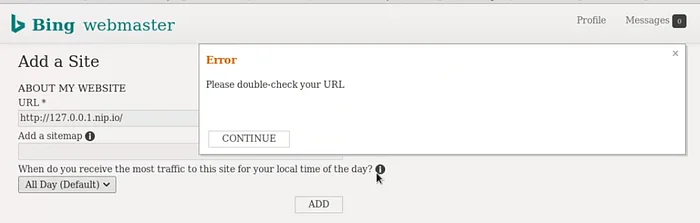
The researcher's hypothesis was that the fix filtered the input in a way that could be worked around. The first test was a list of payloads that all resolved to [redacted]. The filter rejected those addresses, so the straightforward loopback representations were blocked.

Exploitation
Step 1: confirm that loopback addresses are blocked
The researcher submitted a series of payloads that resolve to [redacted]. The application's filter did not allow those addresses, so none of them got through. The write-up does not list the individual payloads or the exact error returned.
Step 2: bypass the filter with a DNS name that resolves to loopback
Since the filter blocked the literal loopback address and also blocked registering IP addresses, the researcher used the nip.io wildcard DNS service. nip.io resolves any hostname of the form <ip>.nip.io to the embedded IP address, so a hostname can carry a loopback address without the input containing [redacted] as a literal string.
The hostname used was:
127.127.127.127.nip.io
This resolves to [redacted], which is inside the loopback range [redacted]/8. The filter saw a domain name rather than an IP literal, so the check passed, while the server's DNS resolution still landed on the local address.
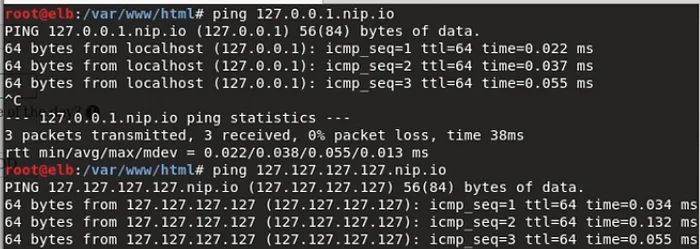
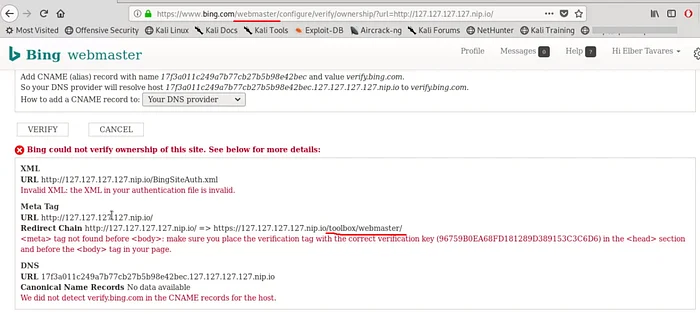
The researcher concluded from the result that the application had been made to access its own local address. The write-up does not show the response body, only the screenshots.
Step 3: observe the redirect
With [redacted] the application responded with a redirect to:
/toolbox/webmaster/
The write-up notes that with [redacted] the application redirects to /toolbox/webmaster/.
Step 4: probe a nonexistent directory
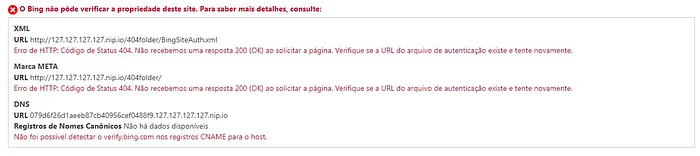
The researcher then requested a directory that does not exist, to check the server responses.
Root cause
The filter rejected loopback addresses, and a hostname resolving to loopback got past it. A hostname controlled by the user, here through nip.io, therefore passed the string check and then resolved to a loopback address at request time. This is the classic DNS-based bypass of an SSRF denylist: the validation and the connection use different representations of the same destination.
Why the earlier fix did not stop it: The write-up's result shows that the earlier fix did not stop a hostname that resolves into [redacted]/8.
Impact
The researcher concluded that he had been able to access the local address of Bing Webmaster, and states that this allowed listing internal ports and directories. The write-up notes that administrative panels are often configured to be reachable only from localhost, and that such panels could be found by scanning directories through this SSRF. The report does not demonstrate access to a specific administrative panel, and no bounty amount or severity rating is given.
Fix
Based on the bypass, the fix would need to resolve the supplied hostname and validate the resulting address, rejecting loopback, link-local, private and other non-routable ranges, and re-checking after any redirect rather than trusting the input string.
Variants to test
The same idea applies wherever a URL or host parameter is filtered by string matching. On another target, try:
- A wildcard DNS service that embeds an address in the hostname, such as
127.0.0.1.nip.io. A positive result is a response that looks like it came from the target's own service, for example a redirect to an internal path or an internal error page. - Alternative loopback representations that a string filter may miss, such as decimal, octal or shortened forms of
[redacted]. A positive result is the same internal response as with the plain address. - A hostname that resolves to a private range such as
10.0.0.1.nip.ioor192.168.0.1.nip.io. A positive result is a response from an internal host that is not reachable from the internet. - A redirect from an allowed external host to a loopback address, to test whether the filter is applied only to the initial URL. A positive result is the internal response arriving after the redirect.
- A nonexistent path on the internal host, to see whether internal error pages or status codes leak through. A positive result is a distinguishable internal response rather than a generic error.
What happened, in plain words
A security researcher read an old public report about a bug in Bing Webmaster Central, a Microsoft website where people who own websites can manage how Bing lists and indexes their pages. The old report described a problem called SSRF, which stands for server-side request forgery. In plain terms, the website had a feature that fetched a web address on the user's behalf, and someone had found a way to make it fetch addresses on the company's own internal network instead of the public internet. The old report said this let the author list internal ports and the services running on that application.
A port is a numbered doorway on a computer that a particular service listens on. A web server usually listens on port 80 or 443, a database on another number, and so on. If you can make a server connect to its own internal doorways, you can discover which services are running inside, even though those services were never meant to be reachable from outside.
The researcher's question was simple: the old bug was fixed, but what if the fix can be worked around with a new trick? This article is the short story of testing that question in a browser. It is not a full formal bug report, so it does not name the exact page, the parameter, the request method or the response bodies. What it does show is the idea behind the bypass, and that idea is worth understanding because it comes up again and again.
The starting point
The earlier report, linked in the article, established two things. First, the application accepted an address supplied by the user and made a request to it from the server side. Second, this could be used to enumerate internal ports and services. That means the application had a feature that fetches a URL or host for the user, and that a fix had since been applied to it.
A useful comparison: imagine a hotel concierge who will, on your request, phone any number you give them. Normally you ask them to call a restaurant in town. SSRF is when you ask them to call the hotel's own private internal extension, the one only staff are supposed to reach. The concierge is the server, the phone number is the address you supply, and the private extension is the internal service.
The researcher's hypothesis was that the fix filtered the input in a way that could be worked around. So the first test was a list of payloads that all resolved to [redacted]. That address is the standard loopback address: the name a computer uses for itself. When a program connects to [redacted], it is talking to the same machine it is running on, not to anything on the internet.
The filter rejected those addresses, so the straightforward loopback representations were blocked. This is the expected first result: the fix was doing something, and the obvious attempts did not get through.
Step 1: confirm that loopback addresses are blocked
The researcher submitted a series of payloads that resolve to [redacted]. The application's filter did not allow those addresses, so none of them got through. The article does not list the individual payloads or the exact error returned. What matters for the next step is the conclusion: the filter did not allow addresses that resolved to [redacted].
Step 2: bypass the filter with a DNS name that resolves to loopback
Since the filter blocked the literal loopback address and also blocked registering IP addresses, the researcher used the nip.io wildcard DNS service. DNS is the internet's address book: it turns a name like example.com into the numeric address of a machine. nip.io is a free service that resolves any hostname of the form <ip>.nip.io to the IP address embedded in the name. So a hostname can carry a loopback address without the input containing [redacted] as a literal string.
The hostname used was:
127.127.127.127.nip.io
Line by line: [redacted] is the address embedded in the name, and it sits inside the loopback range [redacted]/8, the whole block of addresses that mean "this machine". .nip.io is the part that tells the DNS service to hand back the embedded address. Put together, the name looks like an ordinary domain to a string filter, but when the server looks it up, it lands on its own local address.
The filter saw a domain name rather than an IP literal, so the check passed, while the server's DNS resolution still landed on the local address. This is the heart of the trick: the check and the actual connection look at two different things. The check reads the text; the connection asks DNS what the text means.
The researcher concluded from the result that the application had been made to access its own local address. The article does not show the response body, only the screenshots.
Step 3: observe the redirect
With [redacted] the application responded with a redirect to:
/toolbox/webmaster/
A redirect is the server saying "not here, look over there" and pointing the browser at another path. Line by line, this is a single path on the same site: the folder toolbox, then the folder webmaster, ending in a slash. The write-up notes that with [redacted] the application redirects to /toolbox/webmaster/. If the request had gone to some unrelated machine on the internet, it would not have answered with the internal webmaster path.
Step 4: probe a nonexistent directory
The researcher then requested a directory that does not exist, to check the server responses. The idea is like knocking on a door in a building and seeing whether you get a reply, a "no such room" sign, or silence: each outcome tells you something about what is behind the door. The article does not give the path used or the status code returned.
Why the fix did not hold
The filter rejected loopback addresses, and a hostname resolving to loopback got past it. The write-up does not describe the filter's implementation. A hostname controlled by the user, here through nip.io, therefore passed the string check and then resolved to a loopback address at request time. This is the classic DNS-based bypass of an SSRF denylist: the validation and the connection use different representations of the same destination.
A denylist is a list of things you are not allowed to do. It only works if the list is complete, and here it was not: it covered the plain spelling of the loopback address but not a name that resolves to it. The article does not describe the filter's implementation, so the exact matching logic is not known.
What it meant
The researcher concluded that he had been able to access the local address of Bing Webmaster, and states that this allowed listing internal ports and directories. The article notes that administrative panels are often configured to be reachable only from localhost, meaning only from the machine itself, and that such panels could be found by scanning directories through this SSRF. The article does not demonstrate access to a specific administrative panel, and no bounty amount or severity rating is given.
How it should be fixed
The article does not state what Microsoft changed. Based on the bypass, the fix would need to resolve the supplied hostname and validate the resulting address, rejecting loopback, link-local, private and other non-routable ranges, and re-checking after any redirect rather than trusting the input string. In the concierge comparison: instead of checking the number as written, look up who the number actually reaches before placing the call, and check again if the call gets forwarded.
Variants to test
The same idea applies wherever a URL or host parameter is filtered by string matching. On another target, try:
- A wildcard DNS service that embeds an address in the hostname, such as
127.0.0.1.nip.io. A positive result is a response that looks like it came from the target's own service, for example a redirect to an internal path or an internal error page. - Alternative loopback representations that a string filter may miss, such as decimal, octal or shortened forms of
[redacted]. A positive result is the same internal response as with the plain address. - A hostname that resolves to a private range such as
10.0.0.1.nip.ioor192.168.0.1.nip.io. A positive result is a response from an internal host that is not reachable from the internet. - A redirect from an allowed external host to a loopback address, to test whether the filter is applied only to the initial URL. A positive result is the internal response arriving after the redirect.
- A nonexistent path on the internal host, to see whether internal error pages or status codes leak through. A positive result is a distinguishable internal response rather than a generic error.
Glossary
- SSRF (server-side request forgery): a bug where an application can be tricked into making a request to an address the attacker chooses, often an internal one.
- XSPA (cross-site port attack): using an SSRF-style primitive to probe which ports are open on an internal host.
- Bing Webmaster Central: Microsoft's portal where site owners manage how Bing indexes their sites.
- Loopback address: an address such as
[redacted]that always means the same machine; connecting to it talks to the computer itself. - Port: a numbered doorway on a computer that a particular service listens on.
- DNS: the internet's address book, turning names into numeric IP addresses.
- Hostname: a name for a machine, such as
example.com, that DNS can resolve. - IP address: the numeric address of a machine on a network.
- Payload: the input an attacker sends to try to trigger a bug.
- Filter: code that inspects input and blocks values it considers dangerous.
- Denylist: a list of forbidden values; it only works if the list is complete.
- Wildcard DNS service: a service that resolves any name matching a pattern, such as
nip.io, which returns the IP embedded in the name. - Redirect: a server response telling the client to go to a different path or address.
- Localhost: the name for the local machine, equivalent to the loopback address.
- Private range: IP address blocks used only inside internal networks and not routable on the public internet.
- Link-local: an address range used for communication on a local network segment only.
- Status code: the number a web server returns to say how a request went, such as 200 for success or 404 for not found.




