LPE via StorSvc
The StorSvc service runs as SYSTEM and attempts to load a missing DLL (SprintCSP.dll) from a writable directory in the system PATH. An attacker can place a malicious DLL there and trigger the service via an RPC call to execute code with SYSTEM privileges.
 Published on github.com
blackarrowsec / redteam-research Public
The full write-up lives on its author's site
It belongs to its author, so we link to it rather than copy it. The other two tabs are our own rewrites, checked against it.
Context
StorSvc is a Windows service that runs as NT AUTHORITY\SYSTEM. The service is hosted in a shared service host process, and its command line is:
C:\Windows\System32\svchost.exe -k LocalSystemNetworkRestricted -p -s StorSvc
The service exposes an RPC interface. One of its methods, StorSvc.dll!SvcRebootToFlashingMode, reaches a factory reset path for phones. The write-up shows that this code path ends in a DLL load of a library that is not present on a normal Windows installation, and that the load happens with SYSTEM privileges.
Setup
The proof of concept is published as two source projects in the blackarrowsec/redteam-research repository, under the LPE via StorSvc directory:
- RpcClient.exe, which triggers the RPC call.
- SprintCSP.dll, the DLL that is placed to exploit the hijacking.
The exploit has been tested on Windows 10, Windows 11, Windows Server 2019 and Windows Server 2022. Before running it, the #define macro at storsvc_c.c in the RpcClient project must be changed so that the exploit is adapted to the target machine's operating system. The PoC DLL runs a whoami command and writes the output to C:\ProgramData\whoamiall.txt; the DoStuff() function in main.c of the SprintCSP project is the place to extend it.
No account, role or credential is described beyond the requirement that the attacker can write to a directory that appears in the SYSTEM %PATH%.
Finding it
The service runs as NT AUTHORITY\SYSTEM in the service group LocalSystemNetworkRestricted, which holds the following privileges:
Privilege Name               Description                                         State
============================ =================================================== =============
SeTcbPrivilege               Act as part of the operating system                 Enabled
SeLoadDriverPrivilege        Load and unload device drivers                      Disabled
SeBackupPrivilege            Back up files and directories                       Disabled
SeRestorePrivilege           Restore files and directories                       Disabled
SeSystemEnvironmentPrivilege Modify firmware environment values                  Disabled
SeChangeNotifyPrivilege      Bypass traverse checking                            Enabled
SeManageVolumePrivilege      Perform volume maintenance tasks                    Enabled
The interesting part is the call chain behind the RPC method. StorSvc.dll!SvcRebootToFlashingMode calls StorSvc.dll!InitResetPhone, which calls StorSvc.dll!ResetPhoneWorkerCallback, and that callback tries to load SprintCSP.dll.
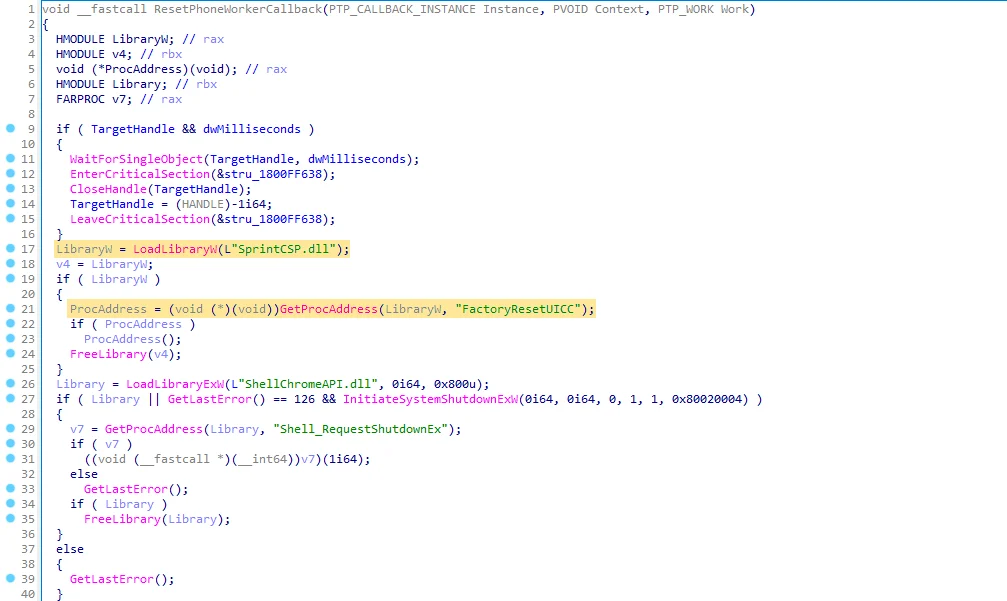
The image shows the code path that tries to load SprintCSP.dll. Because SprintCSP.dll is missing from the system, the load follows the normal DLL Search Order flow. If any directory in the SYSTEM %PATH% is writable by the attacker, a DLL placed there with that name is picked up and executed with SYSTEM privileges.
Exploitation
Step 1: Find a writable directory in the SYSTEM path
The first step is to read the machine-wide Path environment variable:
reg query "HKLM\SYSTEM\CurrentControlSet\Control\Session Manager\Environment" -v Path
The output lists the directories in the SYSTEM path. The attacker looks for one of them that can be written to.
Step 2: Drop the DLL
Copy SprintCSP.dll into the writable path found in the previous step. The DLL is the payload that the service will load.
Step 3: Trigger the RPC method
Execute RpcClient.exe. This makes the local RPC call to SvcRebootToFlashingMode, which walks the chain described above and reaches the load of SprintCSP.dll, now resolved to the attacker's copy.
Step 4: Check the result
Read C:\ProgramData\whoamiall.txt. The PoC DLL runs whoami and writes the output there, so the file shows the identity under which the DLL executed.
The recording shows the four steps end to end: finding the writable SYSTEM path, copying SprintCSP.dll into it, running RpcClient.exe and checking the output file.
After the exploit is triggered, the service has to be stopped or rebooted, which SprintCSP.dll already does.
Root cause
The service calls into a code path that loads a DLL by name, SprintCSP.dll, which does not exist on the system. Windows resolves such a name through the standard DLL search order, which includes directories from the SYSTEM %PATH%. Any directory in that path that a low-privileged user can write to therefore becomes a place where the attacker can plant a DLL that the SYSTEM service will load and execute. The service runs with a privileged token, so the code in the planted DLL runs with those privileges.
The weakness is the combination of a missing DLL loaded by name and a writable directory in the search path.
Impact
An attacker who can write to a directory in the SYSTEM %PATH% can obtain code execution as NT AUTHORITY\SYSTEM by triggering the RPC method locally. That is a full local privilege escalation from whatever unprivileged context the attacker already has on the machine. The exploit depends on the target having a writable directory in the SYSTEM path and on the RPC method being reachable locally.
Fix
The write-up does not describe a fix or a vendor response. A change that would remove the weakness is to stop loading SprintCSP.dll by name from the search path, for example by loading it from a fixed, protected location, and to keep writable directories out of the SYSTEM %PATH%.
Variants to test
- Other services that load a missing DLL by name. Look for services running as SYSTEM whose code path reaches a
LoadLibrary-style call for a library that is not installed. A positive result is the library being resolved from a directory you control when the service is triggered. - Other writable directories in the SYSTEM path. Enumerate the machine
Pathvalue and check each entry for write access by a low-privileged user. A positive result is a directory you can create files in that the service searches. - Other RPC methods on StorSvc. The write-up only covers
SvcRebootToFlashingMode; other methods on the same interface may reach similar loads. A positive result is a method that triggers a DLL load from a writable path. - Other Windows versions. The PoC was tested on Windows 10, Windows 11, Windows Server 2019 and Windows Server 2022, with the
#definemacro adjusted per target. A positive result is the same call chain and DLL load on a version you have adapted the client for.
What happened, in plain words
A Windows computer has many background programs called services. They start automatically, often before anyone logs in, and they usually run with very high permissions so they can do system-level jobs. One of these services is called StorSvc. On a normal Windows machine it runs as the most powerful built-in account, NT AUTHORITY\SYSTEM, which is the account Windows itself uses for core tasks. Anything that runs as SYSTEM can do almost anything on the computer.
StorSvc offers a way for other programs to ask it to do things. That way of asking is called an RPC interface. RPC stands for Remote Procedure Call: it lets one program call a function inside another program as if the function were its own, even when the other program is a separate process. Think of it like a restaurant: you do not walk into the kitchen, you give your order to a waiter, and the kitchen prepares it. RPC is the waiter between programs.
One of the orders StorSvc accepts is called SvcRebootToFlashingMode. It reaches a factory reset path for phones. The researchers found that this order, deep inside StorSvc's code, ends up trying to load a file called SprintCSP.dll. A DLL is a Dynamic Link Library: a file full of reusable code that a program loads when it needs it, a bit like a plug-in or an extra toolbox. The problem is that SprintCSP.dll is not present on a normal Windows installation.
When Windows is asked to load a DLL by name and cannot find it in the obvious place, it searches a list of folders in a fixed order. That list is called the DLL Search Order, and it includes folders listed in the system-wide %PATH% environment variable. An environment variable is a named setting that programs read, and %PATH% is the list of folders Windows looks in when it needs to find a program or library. If any folder in that list can be written to by an ordinary, low-privileged user, that user can drop a file named SprintCSP.dll into it. The next time StorSvc follows that code path, it finds the planted file, loads it, and runs its code with SYSTEM privileges. That is a local privilege escalation: a user who starts with limited rights ends up running code as the most powerful account on the machine.
This class of weakness is called DLL Hijacking, sometimes DLL side-loading or DLL search order hijacking. The everyday comparison: imagine a courier who is told to pick up a parcel from "the usual shelf" without checking which building the shelf is in. If you can put your own parcel on a shelf the courier will visit, the courier delivers your parcel for you, with all the trust the courier carries.
Context
StorSvc is a Windows service that runs as NT AUTHORITY\SYSTEM. It does not have its own dedicated program file. Instead it is hosted inside a shared service host process, svchost.exe, which is a single program that runs many services at once to save memory. The command line that starts it is:
C:\Windows\System32\svchost.exe -k LocalSystemNetworkRestricted -p -s StorSvc
Line by line:
C:\Windows\System32\svchost.exeis the shared host program. TheSystem32folder is where core Windows programs live.-k LocalSystemNetworkRestrictedtells the host which group of services to load. A service group is a bundle of services that share settings, including which permissions they get.-p -s StorSvcsays to run the specific service named StorSvc inside that host.
The service exposes an RPC interface. One of its methods, StorSvc.dll!SvcRebootToFlashingMode, is meant to put a device into flashing mode, which in practice involves a factory reset path for phones. The ! notation is a common way of writing "the function named X inside the file named Y": here, the function SvcRebootToFlashingMode inside StorSvc.dll. The write-up shows that this code path ends in a DLL load of a library that is not present on a normal Windows installation, and that the load happens with SYSTEM privileges.
Setup
The proof of concept is published as two source projects in the blackarrowsec/redteam-research repository, under the LPE via StorSvc directory. A proof of concept, or PoC, is a small working demonstration that proves a weakness is real without being a full attack tool.
- RpcClient.exe, which triggers the RPC call. This is the "waiter" that sends the order to StorSvc.
- SprintCSP.dll, the DLL that is placed to exploit the hijacking. This is the fake parcel that the courier will pick up.
The exploit has been tested on Windows 10, Windows 11, Windows Server 2019 and Windows Server 2022. Before running it, the #define macro at storsvc_c.c in the RpcClient project must be changed so that the exploit is adapted to the target machine's operating system. A #define macro is a line in source code that sets a named value before the program is compiled; here it selects which version of Windows the client should talk to, because the internal details of the RPC call differ between versions. Compiling means turning source code into a runnable program.
The PoC DLL runs a whoami command and writes the output to C:\ProgramData\whoamiall.txt. whoami is a standard command that prints the name of the account the current program is running as, so the output file is the evidence of which identity the DLL got. The DoStuff() function in main.c of the SprintCSP project is the place to extend it if you want the DLL to do something else.
No account, role or credential is described beyond the requirement that the attacker can write to a directory that appears in the SYSTEM %PATH%. In other words, the attacker does not need a password or an administrator login; they only need the ability to create files in one of those folders.
Finding it
The service runs as NT AUTHORITY\SYSTEM in the service group LocalSystemNetworkRestricted, which holds the following privileges. A privilege is a specific extra permission, finer-grained than a normal user right, such as the right to load a driver or to back up files you could not otherwise read:
Privilege Name               Description                                         State
============================ =================================================== =============
SeTcbPrivilege               Act as part of the operating system                 Enabled
SeLoadDriverPrivilege        Load and unload device drivers                      Disabled
SeBackupPrivilege            Back up files and directories                       Disabled
SeRestorePrivilege           Restore files and directories                       Disabled
SeSystemEnvironmentPrivilege Modify firmware environment values                  Disabled
SeChangeNotifyPrivilege      Bypass traverse checking                            Enabled
SeManageVolumePrivilege      Perform volume maintenance tasks                    Enabled
Reading the table: each row is one privilege, a short description of what it allows, and whether it is currently switched on (Enabled) or available but switched off (Disabled). SeTcbPrivilege, "Act as part of the operating system", is enabled, which is one of the strongest rights Windows has. SeChangeNotifyPrivilege, "Bypass traverse checking", is also enabled; it lets a process walk through folders even when it lacks the usual permission on each one. The others are present but disabled. The point for a beginner is simply that this service is not a small, harmless background job: it carries serious power.
The interesting part is the call chain behind the RPC method. A call chain is the sequence of function calls that happens inside a program: function A calls B, B calls C, and so on. StorSvc.dll!SvcRebootToFlashingMode calls StorSvc.dll!InitResetPhone, which calls StorSvc.dll!ResetPhoneWorkerCallback, and that callback tries to load SprintCSP.dll.
The image shows the code path that tries to load SprintCSP.dll.
Because SprintCSP.dll is missing from the system, the load follows the normal DLL Search Order flow. If any directory in the SYSTEM %PATH% is writable by the attacker, a DLL placed there with that name is picked up and executed with SYSTEM privileges. The reason this works is that Windows does not treat a missing DLL as an error to stop at; it keeps looking, folder by folder, until it finds a file with the right name.
Exploitation
Step 1: Find a writable directory in the SYSTEM path
The first step is to read the machine-wide Path environment variable:
reg query "HKLM\SYSTEM\CurrentControlSet\Control\Session Manager\Environment" -v Path
Line by line:
reg queryis the Windows command that reads a value from the registry. The registry is a central database of settings that Windows and its programs use."HKLM\SYSTEM\CurrentControlSet\Control\Session Manager\Environment"is the exact location in that database.HKLMmeans HKEY_LOCAL_MACHINE, the part of the registry that applies to the whole computer rather than to one user. The path leads to theEnvironmentkey, which stores machine-wide environment variables.-v Pathasks for the single value namedPath.
The output lists the directories in the SYSTEM path. The attacker looks for one of them that can be written to. Why this step first: the whole trick depends on a folder that the powerful service will search and that the attacker is allowed to put files into, so finding such a folder is the precondition for everything else.
Step 2: Drop the DLL
Copy SprintCSP.dll into the writable path found in the previous step. The DLL is the payload that the service will load. "Payload" means the code that actually does something once it runs; here it is the file that will execute as SYSTEM.
Step 3: Trigger the RPC method
Execute RpcClient.exe. This makes the local RPC call to SvcRebootToFlashingMode, which walks the chain described above and reaches the load of SprintCSP.dll, now resolved to the attacker's copy. "Resolved" means Windows has found a file for that name; because the real one is absent, the search lands on the planted copy.
Step 4: Check the result
Read C:\ProgramData\whoamiall.txt. The PoC DLL runs whoami and writes the output there, so the file shows the identity under which the DLL executed. If the file says the SYSTEM account, the escalation worked.
The recording shows the four steps end to end: finding the writable SYSTEM path, copying SprintCSP.dll into it, running RpcClient.exe and checking the output file.
After the exploit is triggered, the service has to be stopped or rebooted, which SprintCSP.dll already does.
Root cause
The service calls into a code path that loads a DLL by name, SprintCSP.dll, which does not exist on the system. Windows resolves such a name through the standard DLL search order, which includes directories from the SYSTEM %PATH%. Any directory in that path that a low-privileged user can write to therefore becomes a place where the attacker can plant a DLL that the SYSTEM service will load and execute. The service runs with a privileged token, so the code in the planted DLL runs with those privileges. A token, in Windows terms, is the internal badge a process carries that says which user it is and what it is allowed to do; the service's badge says SYSTEM, and the planted code inherits it.
The weakness is the combination of a missing DLL loaded by name and a writable directory in the search path.
Impact
An attacker who can write to a directory in the SYSTEM %PATH% can obtain code execution as NT AUTHORITY\SYSTEM by triggering the RPC method locally. That is a full local privilege escalation from whatever unprivileged context the attacker already has on the machine. "Local" means the attacker must already be able to run programs on the computer; this is not something done from the internet. The exploit depends on the target having a writable directory in the SYSTEM path and on the RPC method being reachable locally.
Fix
The write-up does not describe a fix or a vendor response. A change that would remove the weakness is to stop loading SprintCSP.dll by name from the search path, for example by loading it from a fixed, protected location, and to keep writable directories out of the SYSTEM %PATH%. In everyday terms: either tell the courier exactly which locked shelf to use, or do not send the courier at all when there is nothing to collect, and never leave an open shelf on the route.
Variants to test
- Other services that load a missing DLL by name. Look for services running as SYSTEM whose code path reaches a
LoadLibrary-style call for a library that is not installed.LoadLibraryis the Windows function that loads a DLL. A positive result is the library being resolved from a directory you control when the service is triggered. - Other writable directories in the SYSTEM path. Enumerate the machine
Pathvalue and check each entry for write access by a low-privileged user. A positive result is a directory you can create files in that the service searches. - Other RPC methods on StorSvc. The write-up only covers
SvcRebootToFlashingMode; other methods on the same interface may reach similar loads. A positive result is a method that triggers a DLL load from a writable path. - Other Windows versions. The PoC was tested on Windows 10, Windows 11, Windows Server 2019 and Windows Server 2022, with the
#definemacro adjusted per target. A positive result is the same call chain and DLL load on a version you have adapted the client for.
Glossary
- API: a defined set of functions one program offers so another program can ask it to do things, without knowing how it works inside.
- Call chain: the sequence of function calls inside a program, where one function calls the next.
- Compile: turn source code written by a person into a runnable program the computer can execute.
- DLL (Dynamic Link Library): a file containing reusable code that programs load when needed, like a plug-in or extra toolbox.
- DLL Hijacking: a weakness where a program loads a library by name and an attacker can place a file with that name where the program will find it first.
- DLL Search Order: the fixed list of folders Windows checks, in order, when looking for a DLL by name.
- Environment variable: a named setting that programs read, such as
%PATH%. %PATH%: the environment variable listing the folders Windows searches for programs and libraries.#definemacro: a line in source code that sets a named value before compilation.- Local privilege escalation (LPE): gaining higher permissions on a machine you can already run programs on, for example from a normal user to SYSTEM.
NT AUTHORITY\SYSTEM: the most powerful built-in Windows account, used by the operating system itself.- Payload: the code that actually runs and does something once an exploit succeeds.
- PoC (proof of concept): a small working demonstration that proves a weakness is real.
- Privilege: a specific extra permission, finer-grained than a normal user right, such as loading a driver.
- Registry: a central database of settings used by Windows and its programs.
- RPC (Remote Procedure Call): a way for one program to call a function inside another program as if it were its own.
- Service: a background program that Windows starts automatically, often before login, usually with high permissions.
- Service group: a bundle of services that share settings, including which permissions they get.
svchost.exe: the shared Windows host program that runs many services at once.- Token: the internal badge a Windows process carries that says which user it is and what it is allowed to do.
whoami: a standard command that prints the name of the account the current program runs as.


