Monero Wallet Gui for Windows (Arbitrary Code Execution)
The Windows Monero wallet GUI loads an OpenSSL configuration file from a directory writable by low-privileged users, allowing them to plant a malicious DLL and config. When an administrator launches the application, the attacker's code executes with elevated privileges.

- Triaged in 5 days
- Fixed in 5 months
- Disclosed after 5 months
Summary: The windows version of the monero-wallet-gui.exe application allows for code injection. The monero-wallet-gui.exe utilizes a precompiled OpenSSL library called libeay32.dll. This OpenSSL library is trying to read a configuration file that doesn’t exist. By default, on windows systems, authenticated users can create under the c:\ drive. A user with low privileges can create the folder structure and copy a malicious openssl config and .dll files into their path. When the monero-wallet-gui.exe application is executed, the malicious .dll file is also executed.
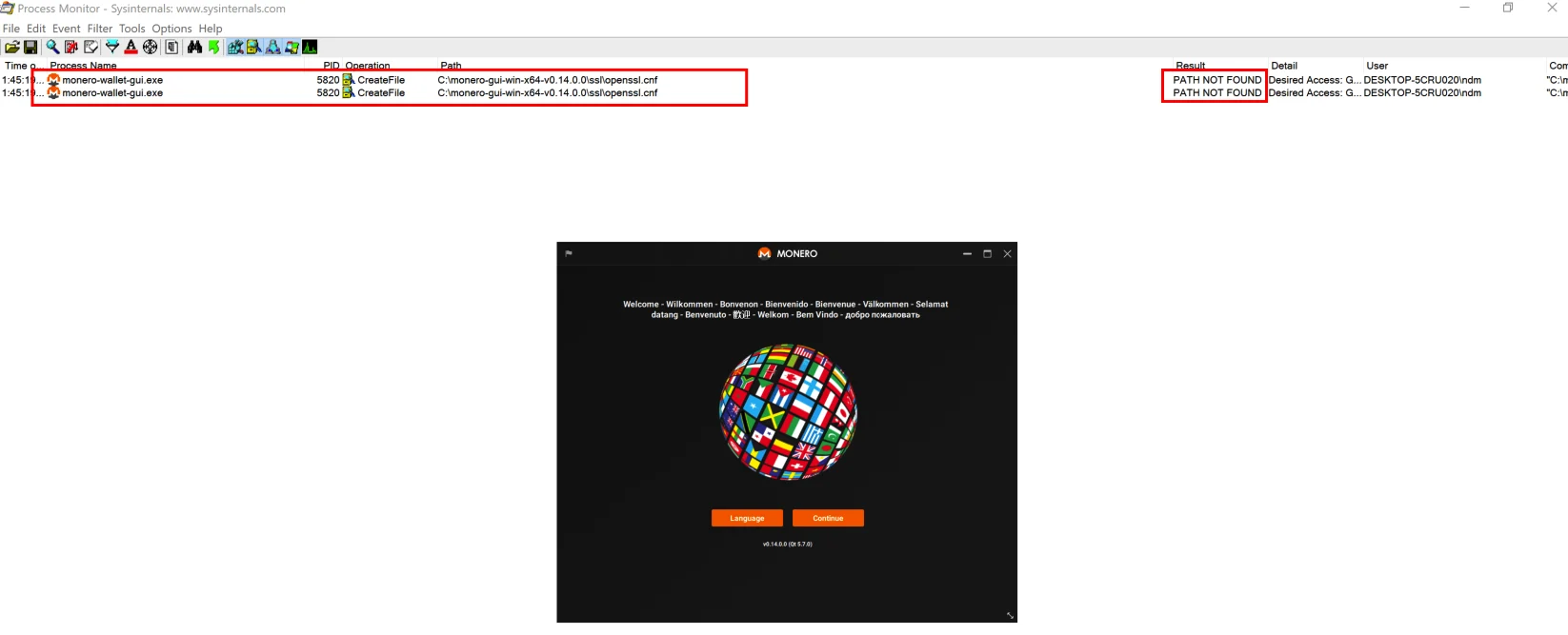
Description: If you download Microsoft sys internals process monitor and execute it. Then open the monero-wallet-gui.exe application, you can see the “monero-wallet-gui.exe” binary trying to read a file called openssl.cnf and getting the result “PATH NOT FOUND”. See attached screenshot (FileNotFound.png).
I believe the issue can be resolved by compiling the OpenSSL library using –openssldir parameter and specifying a directory that can only be written too by administrators (i.e. C:\Program Files, C:\ProgramData). Currently it looks for the “ssl” directory in the parent directory of the Monero install path. For example, if I download the monero-gui-win-x64-v0.14.0.0.zip file and save it to the c: drive, then extract the file, the install path becomes “C:\monero-gui-win-x64-v0.14.0.0\monero-gui-v0.14.0.0”. When monero-wallet-gui.exe is executed, it looks for the openssl.cnf file in “C:\monero-gui-win-x64-v0.14.0.0\ssl”, which doesn’t exist.
I’ve included two example exploits for this;
Exploit example 1 calc.c – source code of my .dll file to execute calc.exe calc.dll – compiled version of the calc.exe library openssl-calc.cnf – example malicious openssl config
Exploit example 2 backdoor.c – source code my .dll file to create a local administrator, this uses a known uac bypass backdoor.dll – compiled version of the local admin backdoor library openssl-backdoor.cnf - example malicious openssl config
Steps To Reproduce: Download and extract monero-gui-win-x64-v0.14.0.0.zip to c: drive.
Exploit 1 – calc.exe – See attached video calc.mp4
- Login with a low privileged user (part of Users group)
- Open a cmd.exe and issue command: mkdir C:\monero-gui-win-x64-v0.14.0.0\ssl
- Copy calc.dll C:\monero-gui-win-x64-v0.14.0.0\ssl
- Copy openssl-calc.cnf to C:\monero-gui-win-x64-v0.14.0.0\ssl
- Rename openssl-calc.cnf to openssl.cnf
- Logout of low privileged user.
- Login with local administrator.
- Launch monero-wallet-gui.exe application.
- Calc.exe with execute.
Exploit 2 – create a local admin user (uac bypass) – See attached video backdoor.mp4
- Login with a low privileged user (part of Users group)
- Open a cmd.exe and issue command: mkdir C:\monero-gui-win-x64-v0.14.0.0\ssl
- Copy backdoor.dll to C:\monero-gui-win-x64-v0.14.0.0\ssl
- Copy openssl-backdoor.cnf .dll to C:\monero-gui-win-x64-v0.14.0.0\ssl
- Rename openssl-backdoor.cnf to openssl.cnf
- Logout of low privileged user.
- Login with local administrator.
- Launch monero-wallet-gui.exe application.
- Open “Computer Management”
- Navigate to “System Tools” -> “Local Users and Groups” -> “Users”
- A new user of “backdoor” with a password of “backdoor” was added.
- Right click on “backdoor” and click “Properties”, then click “Member Of”.
- The “backdoor” user is part of the local administrator group.
How can the system be exploited with this bug? DLL Hi-jacking can be used for many nefarious purposes. It can be used by malware to propagate and establish persistence on a workstation. It can be used to privilege escalation in the post exploitation phases of an attack.
Impact
The impact is high. Successful exploitation leads to arbitrary code execution on the windows system. There are many actions a nefarious individual could accomplish with this vulnerability. In addition to post-exploitation privilege escalation, another example could be ransomware, or other malware.
Attachments
Not written yet. The AI write-up for this report has not been written yet. The Original tab links to the source.
How it worked
Root cause
The OpenSSL library was compiled without a fixed, administrator-only configuration directory, so it searches for openssl.cnf in a location writable by standard users.
Impact
Successful exploitation leads to arbitrary code execution on the Windows system, which could be used for privilege escalation, persistence, ransomware, or other malware.
What the attacker needed
Low-privileged Windows account; admin launches the GUI after files are planted
The fix
The OpenSSL library should be compiled with the --openssldir parameter pointing to a directory writable only by administrators.
How it was found
- Log in as a low-privileged user.
- Create the ssl folder under the Monero installation path.
- Copy the malicious DLL and config file into that folder.
- Rename the config file to openssl.cnf.
- Log out and log in as a local administrator.
- Launch monero-wallet-gui.exe, which executes the malicious DLL.
Explained by bugbounty.wiki with AI from the original and checked against quotes from it; it can still be wrong. Read the original before relying on a detail.
Not written yet. The AI write-up for this report has not been written yet. The Original tab links to the source.
When a program starts, it often loads extra files from folders on the computer. If a normal user can write to one of those folders, they can put a harmful file there. Later, when an administrator runs the program, that harmful file runs with the administrator's power.
What is RCE?
Running the attacker's code on the target's servers: through command or code injection, unsafe deserialisation or template injection.





